air condition MERCEDES-BENZ METRIS 2017 MY17 Operator’s Manual
[x] Cancel search | Manufacturer: MERCEDES-BENZ, Model Year: 2017, Model line: METRIS, Model: MERCEDES-BENZ METRIS 2017Pages: 318, PDF Size: 5.01 MB
Page 120 of 318
Adjusting the air vents
Important safety notes
GWARNIN G
Ver yhot or ver ycold air can flo wfrom th eair
vents .This could result in burn sor frostbit ein
th eimmediat evicinity of th eair vents .There
is aris kof injury.
Mak esur ethat all vehicl eoccupant salways
maintai n asufficien tdistanc eto th eair out -
lets. If necessary, redirect th eairflow to
another area of th evehicl einterior.
The center and side air vents are adjustable.
The air vents can also be adjusted on vehicles
wit hrear-compartmen tair conditioning .
In order to ensur eth edirec tflo wof fresh air
throug hth eair vents int oth evehicl einterior,
pleas eobserv eth efollowin gnotes:
Rkeep th eair inlet between th ewindshield and
th ehoo dfree of blockages, suc has ice ,snow
or leaves.
Rnever cover th events or th eventilation grilles
in th evehicl einterior.
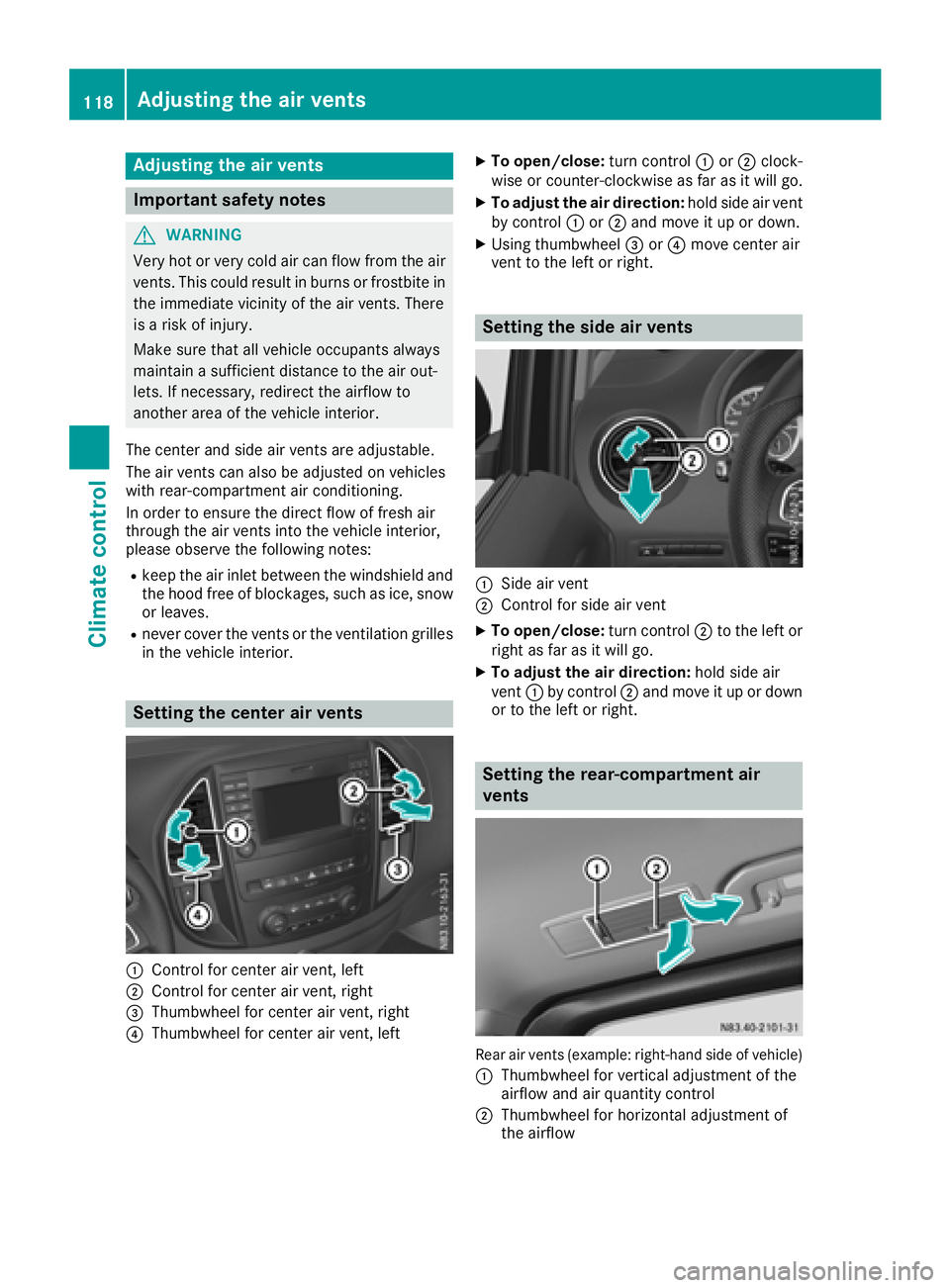
Setting the center air vents
:Control for center air vent, lef t
;Control for center air vent, right
=Thumbwheel for center air vent, right
?Thumbwheel for center air vent, lef t
XTo open/close:turncontrol :or; clock -
wise or counter-clockwise as far as it will go.
XTo adjust th eair direction: hold side air ven t
by control :or; and mov eit up or down .
XUsing thumbwheel =or? mov ecenter air
ven tto th elef tor right .
Setting the side air vents
:Sideair ven t
;Control for side air ven t
XTo open/close:turncontrol ;to th elef tor
right as far as it will go.
XTo adjust th eair direction: hold side air
ven t: by control ;and mov eit up or down
or to th elef tor right .
Setting the rea r-compa rtment air
vents
Rear air vents (example: right-hand side of vehicle)
:
Thumbwheel for vertical adjustmen tof th e
airflow and air quantity control
;Thumbwheel for horizontal adjustmen tof
th eairflow
118Adjusting the air vents
Climate control
Page 121 of 318
The air vents can only be adjusted on vehicles
with rear-compartment air conditioning.
Vehicles with rear-compartment air condition-
ing: in heating mode, the air in the rear com-
partment is automatically distributed in the foot-
wells and roof area after the coolant has
reached the required temperature. In cooling
mode, in the initial phase the air is distributed in
the footwells and roof area of the hot vehicle,
and subsequently only in the roof area.
XTo open: turn thumbwheel :of the rear air
vent to the center position.
XTo close: turn thumbwheel :to the upper or
lower end position.
Adjusting the air vents119
Climate control
Z
Page 126 of 318
Important safety notes
GWARNING
If th eengin eis switched off automatically and
you exit th evehicle, th eengin eis restarte d
automatically. The vehicl emay begi nmoving .
Ther eis aris kof acciden tand injury.
If you wish to exit th evehicle, always tur noff
th eignition and secure th evehicl eagainst
rollin gaway.
Automatic engine switch-off
Gene ral notes
The ECO start/sto pfunction is operational
when th eè ECO symbol is shown in th esta-
tus bar of th edisplay.
Fo rthis to happen, various conditions, includin g
th efollowing, must be met :
RtheECO start/sto pfunction is switched on .
The indicator lamp in th eè ECO butto nis
lit (
Ypage 125).
Rtheoutside temperature is abov e32 ‡(0 †).
Rthe engine has reached its operating temper-
ature.
Rthe set temperature for the vehicle interior
has been reached.
Rthe condition of charge of the starter battery
is sufficient.
Rthe system detects that the windshield is not
fogged up when the air-conditioning system
or automatic climate control is switched on.
Rthe hood is closed.
Rthe driver's seat belt is fastened.
Rthe driver's door is closed.
Rthere is no danger of immediately rolling
backwards, e.g. when stopped on a steep gra-dient.
If a trailer is attached and/or a rear carrier
system is installed and connected electri-
cally, this danger is detected on less steep
gradients.
Only if all the conditions for automatic engine
switch-off are fulfilled, does the display show
the è ECO symbol.
All of the vehicle's systems remain active when
the engine is switched off automatically.
The engine can be switched off automatically a
maximum of four times (initial stop, then three subsequent stops) in succession. After that, the
display hides the èECO symbol. Automatic
engine switch-off is not possible again until the
è ECO symbol is shown again.
If you open the hood after an a
utomatic engine
switch-off, the automatic engine start is deacti-
vated. Once the hood is closed, you have to start
the engine manually.
If the vehicle is stopped in Dor N, the ECO start/
stop function switches off the engine automat-
ically once the vehicle is stationary.
Automatic engine start
General notes
The engine is started automatically if:
Ryou switch off the ECO start/stop function by
pressing the èECO button The indicator
lamp in the èECO button then goes out.
(
Ypage 125)
Ryou depress the accelerator pedal.
Ryou engage reverse gear R.
Ryou unfasten your seat belt.
Ryou open the driver's door.
Rthe vehicle begins to roll away.
Rthe brake system requires this.
Rthe temperature in the vehicle interior
increasingly deviates from the set value.
Rthe system detects moisture on the wind-
shield when the air-conditioning system is
switched on.
Rthe battery's condition of charge is too low.
The engine is started automatically if you:
Rswitch to drive program M(Ypage 129)
Rrelease the brake pedal when in transmission
position Dor N
Rswitch to transmission position P
After shifting from transmission position Rto D,
the ECO start/stop function is not available until
the è ECO symbol is shown in the display.
124Driving
Driving and parking
Page 140 of 318
!Depressing the brake pedal constantly
results in excessive and premature wear to
the brake pads.
If the brakes have been subjected to a heavy
load, do not stop the vehicle immediately. Drive
on for a short while. The brakes are cooled down
more quickly in the airflow.
Wet road surfaces
If you have been driving for a long time in heavy
rain without braking, there may be a delayed
response when you first apply the brakes. This
may also occur after driving through a car wash
or deep water.
You must depress the brake pedal more firmly.
Maintain a longer distance to the vehicle in
front.
While paying attention to the traffic conditions,
you should brake the vehicle firmly after driving
on a wet road surface or through a car wash. This
heats the brake discs, so that they dry more
quickly, which protects them against corrosion.
Limited braking performance on salt-
treated roads
When driving on salted roads, salt may start to
build up on the brake disks and brake pads. This can increase braking distances considerably.
Maintain a greater distance to the vehicle in
front.
To remove any build-up of salt that may have
formed:
XApply the brakes at the start of the journey,
occasionally during journey and at the end of
the journey. Make sure that you do not endan-
ger other road users when doing so.
Checking the brake pad thickness
In addition to monitoring using the brake pad
wear sensor, regularly monitor and check all of
the brake pads by performing a visual inspection
to look for pad material wear.
If you are unable to check the brake wear on the
inside of the wheels, remove the wheels with the tools provided.
Make sure that the brake pad material thickness
never falls below 0.12 in (3 mm). Have the brake pads checked and replaced at a qualified spe-
cialist workshop, if necessary. Do not solely rely on the brake pad wear sensor.
It is strongly recommended that you have the
brake pads checked at a qualified specialist
workshop at every service displayed in the main-
tenance interval indicator, prior to long journeys
and whenever the wheels are removed.
New brake discs and brake pads/
linings
New brake pads and brake discs only reach their
optimal braking effect after about 60 miles
(100 kilometers). Until then, compensate for
this by applying greater force to the brake pedal.
For safety reasons, Mercedes-Benz recom-
mends only installing the following brake discs
and brake pads/linings:
Rbrake discs that have been approved by
Mercedes-Benz
Rbrake pads/linings that have been approved
by Mercedes-Benz or are of an equivalent
standard of quality
Other brake discs or brake pads/linings can
compromise the safety of your vehicle.
Always replace all brake discs or brake pads/
linings on an axle at the same time and only have
them replaced at a qualified specialist work-
shop. When replacing the brake discs, always
have the brake pads/linings replaced at the
same time.
Parking brake
GWARNING
If you must brake the vehicle with the parking brake, the braking distance is considerably
longer and the wheels could lock. There is an
increased danger of skidding and accidents.
Only use the parking brake to brake the vehi-
cle when the service brake is faulty. Do not
apply the parking brake too firmly. If the
wheels lock, release the parking brake until
the wheels begin turning again.
When driving on wet roads or dirt-covered sur-
faces, road salt and/or dirt may get into the
parking brake. This causes corrosion and a
reduction of braking force.
In order to prevent this, drive with the parking
brake lightly applied from time to time. When
doing so, drive for a distance of approximately
138Driving tips
Driving and parking
Page 141 of 318
110 yds (100 m) at a maximum speed of 12 mph(20 km/h).
The brake lamps are not illuminated when you
brake the vehicle using the parking brake.
Driving in wet conditions
Hydroplaning
GWARNING
There is a danger of hydroplaning occurring,
even if you are driving slowly and your tires
have sufficient tread depth, depending on the
depth of water on the road. There is a risk of
an accident.
For this reason, avoid tire ruts and brake care-
fully.
Therefore, in heavy rain or other conditions in
which hydroplaning can occur, drive as follows:
Rreduce your speed
Ravoid tire ruts
Rapply the brakes with care
Driving on flooded roads
!Do not drive through flooded areas. Check
the depth of any water before driving through
it. Drive slowly through standing water. Oth-
erwise, water may enter the vehicle interior or
the engine compartment. This can damage
the electronic components in the engine or
the automatic transmission. Water can also
be drawn in by the engine's air suction nozzles
and this can cause engine damage.
If you have to drive on stretches of road on which
water has collected, please bear in mind that:
Rthe water level of standing water should not
be above the lower edge of the front bumper
Rdo not drive faster than walking speed
Driving in winter
GWARNING
If you shift down on a slippery road surface in an attempt to increase the engine's braking
effect, the drive wheels could lose their grip.
There is an increased danger of skidding and
accidents.
Do not shift down for additional engine brak-
ing on a slippery road surface.
!An accumulation of snow and ice, particu-
larly when frozen, caught in the area around
the air intake slots, moving parts, the axles
and the wheel arches may:
Rrestrict air intake
Rdamage vehicle parts
Rcause malfunctions by restricting the mobi-
lity intended by the design (e.g. reduced
possible steering input).
Regularly check the vehicle and remove snow
or ice when traveling in wintry conditions.
If there is any damage, inform a qualified spe-
cialist workshop.
!Vehicles with automatic transmission may
roll only briefly in the neutral position N. Pro-
longed rolling of the wheels, e.g. when being
towed, will result in transmission damage.
Have your vehicle winterproofed at a qualified
specialist workshop at the onset of winter.
Drive particularly carefully on slippery roads.
Avoid sudden acceleration, steering and braking
maneuvers. Do not use cruise control.
If the vehicle threatens to skid or cannot be
stopped when moving at low speed:
XShift the transmission to position N.
XTry to maintain control of the vehicle using
corrective steering.
The outside temperature indicator is not
designed to serve as an ice-warning device and is therefore unsuitable for that purpose.
Changes in the outside temperature are dis-
played after a short delay.
Indicated temperatures just above the freezing
point do not guarantee that the road surface is
free of ice. The road may still be icy, especially in
wooded areas or on bridges. If you do not adjust
your driving style, the vehicle may start to skid.
Al
ways adapt your driving style and drive at a
speed to suit the prevailing weather conditions.
You should pay special attention to road condi-
tions when temperatures are around freezing
point.
Driving tips139
Driving and parking
Z
Page 144 of 318
When driving at altitudes of 2700 yds (2500m)
above sea level, the ECO start/stop function is
no longer available.
Notes on braking on downhill gradients can be
found in the "Braking" section (
Ypage 137).
Driving systems
Cruise control
General notes
Cruise control maintains the speed of the vehi-
cle for you. It brakes automatically in order to
avoid exceeding the set speed.
Use cruise control if road and traffic conditions
make it appropriate to maintain a steady speed
for a prolonged period. You can set any speed
from 30 km/h upwards in increments of 1 km/h
and 10 km/h.
If you have set Miles
as the unit for the digital
speedometer, you can set any speed above
20 mph in increments of 1 mph and 5 mph.
Changing the display unit for the digital speed-
ometer and the distance:
Ron vehicles without steering wheel buttons
(Ypage 175)
Ron vehicles with steering wheel buttons
(Ypage 186)
Cruise control should not be activated when
driving off-road or on construction sites.
Cruise control may be unable to maintain the
stored speed on uphill gradients. The stored
speed is resumed if the uphill gradient evens out
and the vehicle's speed does not fall below
20 mph (30 km/ h). Cruise control maintains the
stored speed on downhill gradients by automat-
ically applying the brakes. Observe the addi-
tional driving tips (
Ypage 137).
Important safety notes
Observe the notes on braking (Ypage 137).
If you fail to adapt your driving style or if you are inattentive, cruise control can neither reduce
the risk of an accident nor override the laws of
physics. Cruise control cannot take road,
weather and traffic conditions into account.
Cruise control is only an aid. You are responsible
for the distance to the vehicle in front, for vehi-
cle speed, for braking in good time and for stay-
ing in lane. If you change wheel size, make sure they corre-
spond to the correct wheel size category
(
Ypage 277). If the category is changed without
recoding the control units in the vehicle, the
functioning of cruise control may be impaired.
Do not use cruise control:
Rin traffic conditions that are unsuitable for
driving at a constant speed, e.g. in heavy traf-
fic, on winding roads or off-road.
Ron slippery roads. Braking or accelerating
may cause the drive wheels to lose traction
and the vehicle could then skid.
Rwhen there is poor visibility, e.g. due to fog,
heavy rain or snow.
If there is a change of drivers, make sure that
you inform the new driver about the set cruise
speed.
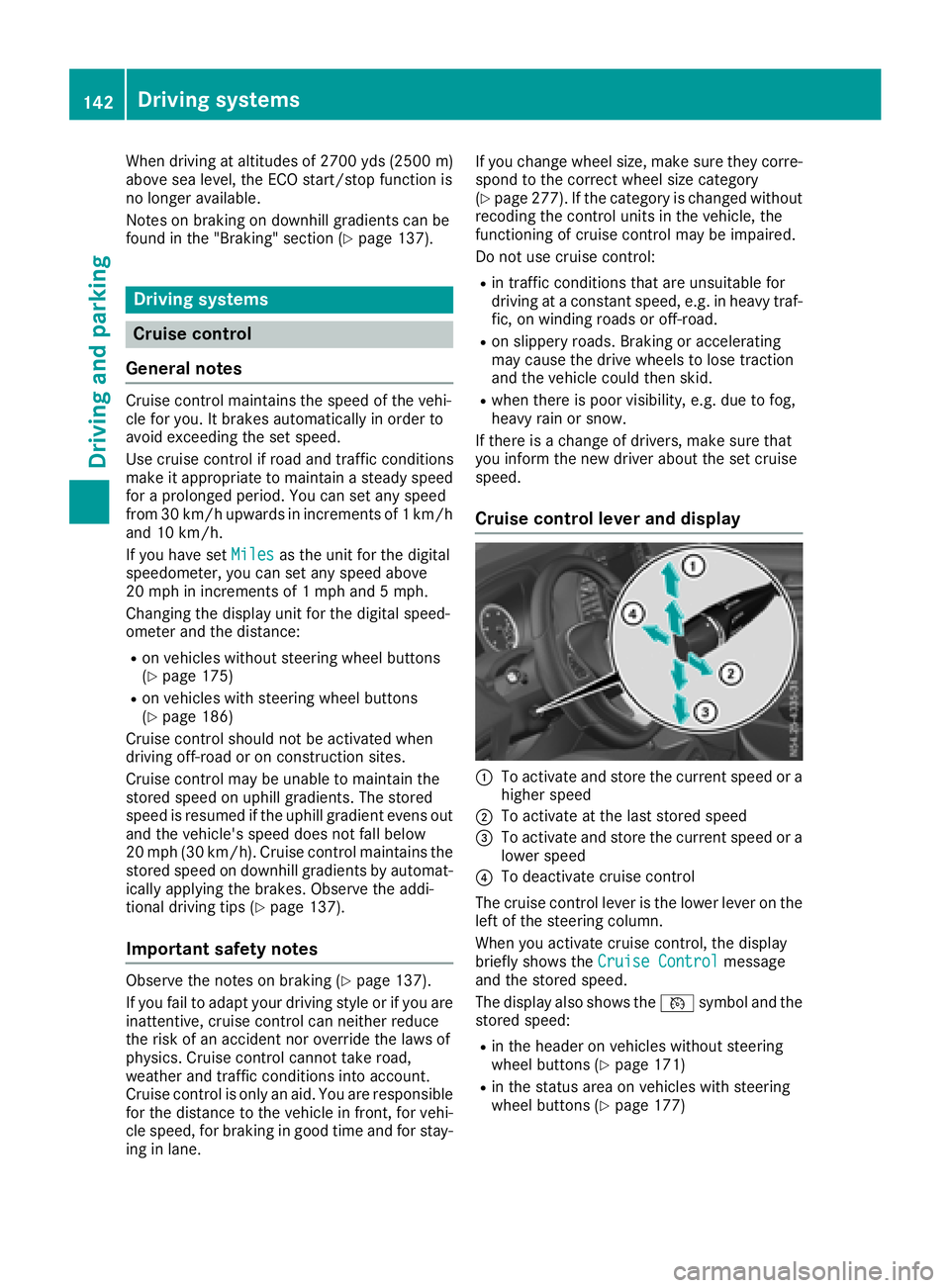
Cruise control lever and display
:To activate and store the current speed or a
higher speed
;To activate at the last stored speed
=To activate and store the current speed or a
lower speed
?To deactivate cruise control
The cruise control lever is the lower lever on the
left of the steering column.
When you activate cruise control, the display
briefly shows the Cruise Control
message
and the stored speed.
The display also shows the Vsymbol and the
stored speed:
Rin the header on vehicles without steering
wheel buttons (Ypage 171)
Rin the status area on vehicles with steering
wheel buttons (Ypage 177)
142Driving systems
Driving and parking
Page 146 of 318
The last speed set remains stored. The last
speed stored is deleted when you switch off the
engine.
Cruise control is deactivated automatically
when:
Ryou apply the brakes
Ryou apply the parking brake and theF
(only USA) or J(only Canada) indicator
lamp in the instrument cluster lights up
Ryou are driving slower than 20 mph (30 km/h)
Ryou shift th eautomati ctransmission to neu-
tral position Nwhile th evehicl eis in motion
RES P®intervenes or you deactivat eES P®
Rthere is amalfunction in th eES P®or AB Ssys-
te m
If cruise control automatically deactivates, a
warnin gtone sounds and th eCruise
Contro lOffmessage appears briefl yin th edisplay.
The V symbol and th edisplay of th estore d
speed in th eheader or in th estatu sarea of th e
display are then no tshown.
Problems with cruise contro l
The speed cannotbe set when cruise control is
activated.
The display is showin g amessage of high priority
and canno ttherefor esho w a chang ein speed.
XProceed as instructe dby th emessage in th e
display.
COLLISION PREVENTION ASSIST
Gene ral notes
COLLISION PREVENTION ASSIST help syou:
Rto minimiz eth eris kof afront-en dcollision
wit h a detecte dobstacle in th epat hof your
vehicl e
Rto reduce th econsequence sof afront-en d
collision
The system uses rada rsensor sto detec tvehi-
cle sin front.
COLLISION PREVENTION ASSIST consist sof th e
distanc ewarnin gfunction and Adaptive Brake
Assist.
If COLLISION PREVENTION ASSIST is malfunc -
tioning, th edisplay shows acorrespondin gmes -
sage (
Ypage 214).
Distance warning function
Important safety notes
GWARNIN G
The distanc ewarnin gfunction does no treact:
Rto people or animals
Rto oncomin gvehicles
Rto crossin gtraffic
Rwhen cornering
Thus ,th edistanc ewarnin gfunction canno t
provid e awarnin gin all critica lsituations.
There is aris kof an accident.
Always pay careful attention to th etraffic sit -
uation and be read yto brake.
GWARNIN G
The distanc ewarnin gfunction canno talways
clearly identify objects and complex traffic
situations.
In suc hcases, th edistanc ewarnin gfunction
may:
Rgiv ean unnecessary warnin g
Rnotgiv e a warnin g
There is aris kof an accident.
Always pay careful attention to th etraffic sit -
uation and do no trel ysolely on th edistanc e
warnin gfunction .
In particular, th edetection of obstacles can be
impaire din th ecas eof:
Rdir ton th esensor sor anythin gelse coverin g
th esensor s
Rsnow or heav yrain
Rinterferenc efrom other rada rsource s
Rstrongrada rreflections, for example, in park -
in g garages
Ranarrow vehicl etravelin gin front, e.g. a
motorbik e
Ravehicl etravelin gin fron ton adifferen tlin e
Due to th enature of th esystem, particularly
complicate dbut non-critica ldrivin gcondition s
may also caus eth esystem to display awarning.
If you fail to adapt your drivin gstyle, th edis-
tance warnin gfunction can neither reduce th e
ris kof an acciden tno roverride th elaws of phys -
ics .The distanc ewarnin gfunction canno ttak e
144Driving systems
Driving and parking
Page 147 of 318
into account road, weather or traffic conditions.
The distance warning function is only an aid. You
are responsible for the distance to the vehicle in
front, for vehicle speed, braking in good time
and for staying in your lane.
Following damage to the front end of the vehicle,
have the configuration and operation of the
radar sensor checked at a qualified specialist
workshop. This also applies to collisions at slow
speeds where there is no visible damage to the
front of the vehicle.
If you change wheel size, make sure they corre- spond to the correct wheel size category
(
Ypage 277). If the category is changed without
recoding the control units in the vehicle, the
functioning of the distance warning feature may
be impaired. COLLISION PREVENTION ASSIST
may then detect a malfunction and switch itself
off.
Operation
XTo activate/deactivate: activate or deacti-
vate the distance warning function in the on-
board computer (
Ypage 185).
If the distance warning function of COLLISION
PREVENTION ASSIST is activated, the display
shows the Äsymbol:
Rin the header
Rin the Status Overviewof the Assist.menu (Ypage 184)
At speeds up to approx 20 mph (30 km/h) the
display in vehicles with Active Parking Assist
first shows the ístatus indicator. Only up to
a speed of about 20 mph (30 km/h) does the display show the Äsymbol instead of the
í status indicator.
The distance warning function can help you to
minimize the risk of a front-end collision with a
vehicle ahead or reduce the effects of such a
collision. With the help of the radar sensor sys-
tem, the distance warning function can detect
obstacles that are in the path of your vehicle for
an extended period of time. If the distance warn-
ing function detects that there is a risk of a col-
lision, you will be warned visually and, where
necessary, acoustically. Without your interven-
tion, the distance warning function cannot pre-
vent a collision.
The distance warning function issues a warning
at speeds:
Rfrom about 4 mph (7 km/h) if you approach a
vehicle traveling in front or a stationary vehi-
cle too quickly. The ·warning lamp in the instrument cluster then lights up and an inter-
mittent warning tone also sounds.
At speeds up to about 45 mph (70 km/h), the
system also detects stationary obstacles, for
example stopped or parked vehicles.
XBrake immediately until the distance from the
obstacle increases and the risk of a front-end
collision passes.
or
XTake evasive action, provided it is safe to do
so.
Adaptive Brake Assist
General notes
Adaptive Brake Assist evaluates the traffic sit-
uation with the help of the radar sensor system and can detect obstacles which have been in
your vehicle's path for an extended period of
time. From speeds above 4 mph (7 km/h), Adap-
tive Brake Assist aids you in braking during haz-
ardous situations.
Up to a speed of approximately 125 mph
(200 km/h), Adaptive Brake Assist is capable of
reacting to moving obstacles that have already
been detected as such at least once over the
period of observation.
Important safety notes
GWARNING
Adaptive Brake Assist does not react:
Rto people or animals
Rto oncoming vehicles
Rto crossing traffic
Rto stationary obstacles
Rwhen cornering
As a result, the Adaptive Brake Assist may not
intervene in all critical conditions. There is a
risk of an accident.
Always pay careful attention to the traffic sit- uation and be ready to brake.
GWARNING
Adaptive Brake Assist cannot always clearly
identify objects and complex traffic situa-
tions.
Driving systems145
Driving and parking
Z
Page 148 of 318
In such cases, Adaptive Brake Assist can:
Rintervene unnecessarily
Rnot intervene
There is a risk of an accident.
Always pay careful attention to the traffic sit- uation and be ready to brake. Terminate the
intervention in a non-critical driving situation.
In particular, the detection of obstacles can be
impaired in the case of:
Rdirt on the sensors or anything else covering
the sensors
Rsnow or heavy rain
Rinterference from other radar sources
Rstrong radar reflections, for example, in park-
ing garages
Ra narrow vehicle traveling in front, e.g. a
motorbike
Ra vehicle traveling in front on a different line
Due to the nature of the system, particularly
complicated but non-critical driving conditions
may also cause Adaptive Brake Assist to inter-
vene.
If you fail to adapt your driving style, Adaptive
Brake Assist can neither reduce the risk of acci-
dent nor override the laws of physics. Adaptive
Brake Assist cannot take into account road,
weather or traffic conditions. Adaptive Brake
Assist is only an aid. You are responsible for the
distance to the vehicle in front, for vehicle
speed, braking in good time and for staying in
your lane.
Following damage to the front end of the vehicle,
have the configuration and operation of the
radar sensor checked at a qualified specialist
workshop. This also applies to collisions at slow
speeds where there is no visible damage to the
front of the vehicle.
If you change wheel size, make sure they corre- spond to the correct wheel size category
(
Ypage 277). If the category is changed without
recoding the control units in the vehicle, the
functioning of Adaptive Brake Assist may be
impaired. COLLISION PREVENTION ASSIST may
then detect a malfunction and switch itself off.
If Adaptive Brake Assist is not available due to a
malfunction in the radar sensor system, the
brake system remains available with full brake
boosting effect and BAS.
Operation
With the help of the radar sensor system, Adap-
tive Brake Assist can detect obstacles that have been in the path of your vehicle for an extended
period of time. Ada
ptive Brake Assist does not
react to stationary obstacles. If Adaptive Brake
Assist detects a risk of collision with a vehicle
traveling in front or with a stationary obstacle,
the system calculates the braking force neces-
sary to avoid this collision. If you apply the
brakes forcefully, Adaptive Brake Assist will
automatically increase the braking force to a
level suitable for the traffic conditions.
XBrake until the distance to the obstacle
increases and the risk of a collision passes.
ABS prevents the wheels from locking.
The brakes function as usual again if:
Ryou release the brake pedal
Rthere is no longer any danger of a collision
Rno obstacle is detected in front of your vehicle
Braking assistance is then ended.
Blind Spot Assist
General notes
Blind Spot Assist monitors the areas on either
side of the vehicle that are not visible to the
driver with two lateral, rear-facing radar sensors
in the bumper. It supports you from speeds of
approximately 20 mph (30 km/h). A warning
display in the exterior mirrors draws your atten-
tion to vehicles detected in the monitored area.
If you then switch on the corresponding turn
signal to change lane, you will also receive an
optical and audible collision warning.
Important safety notes
GWARNING
Blind Spot Assist does not react to:
Rvehicles overtaken too closely on the side,
placing them in the blind spot area
Rvehicles which approach with a large speed
differential and overtake your vehicle
As a result, Blind Spot Assist may not give
warnings in such situations. There is a risk of
an accident.
146Driving systems
Driving and parking
Page 149 of 318
Always observe the traffic conditions care-
fully, and maintain a safe lateral distance.
Blind Spot Assist is only an aid. It may fail to
detect some vehicles and is no substitute for
attentive driving. Always ensure that there is
sufficient distance to the side for other road
users and obstacles.
In particular, the detection of obstacles can be
impaired in the case of:
Rdirt on the sensors or anything else covering
the sensors
Rfog, heavy rain or snow
Rnarrow vehicles, e.g. motorcycles or bicycles
Rvery wide lanes
Rnarrow lanes
Rvehicles not driving in the middle of their lane
Rbarriers or other road boundaries
Vehicles in the monitoring range are then not
indicated.
iUSA only:
This device has been approved by the FCC as
a "Vehicular Radar System". The radar sensor
is intended for use in an automotive radar
system only. Removal, tampering, or altering
of the device will void any warranties, and is
not permitted by the FCC. Do not tamper with,
alter, or use in any non-approved way.
Any unauthorized modification to this device
could void the user’s authority to operate the
equipment.
Monitoring range of the sensors
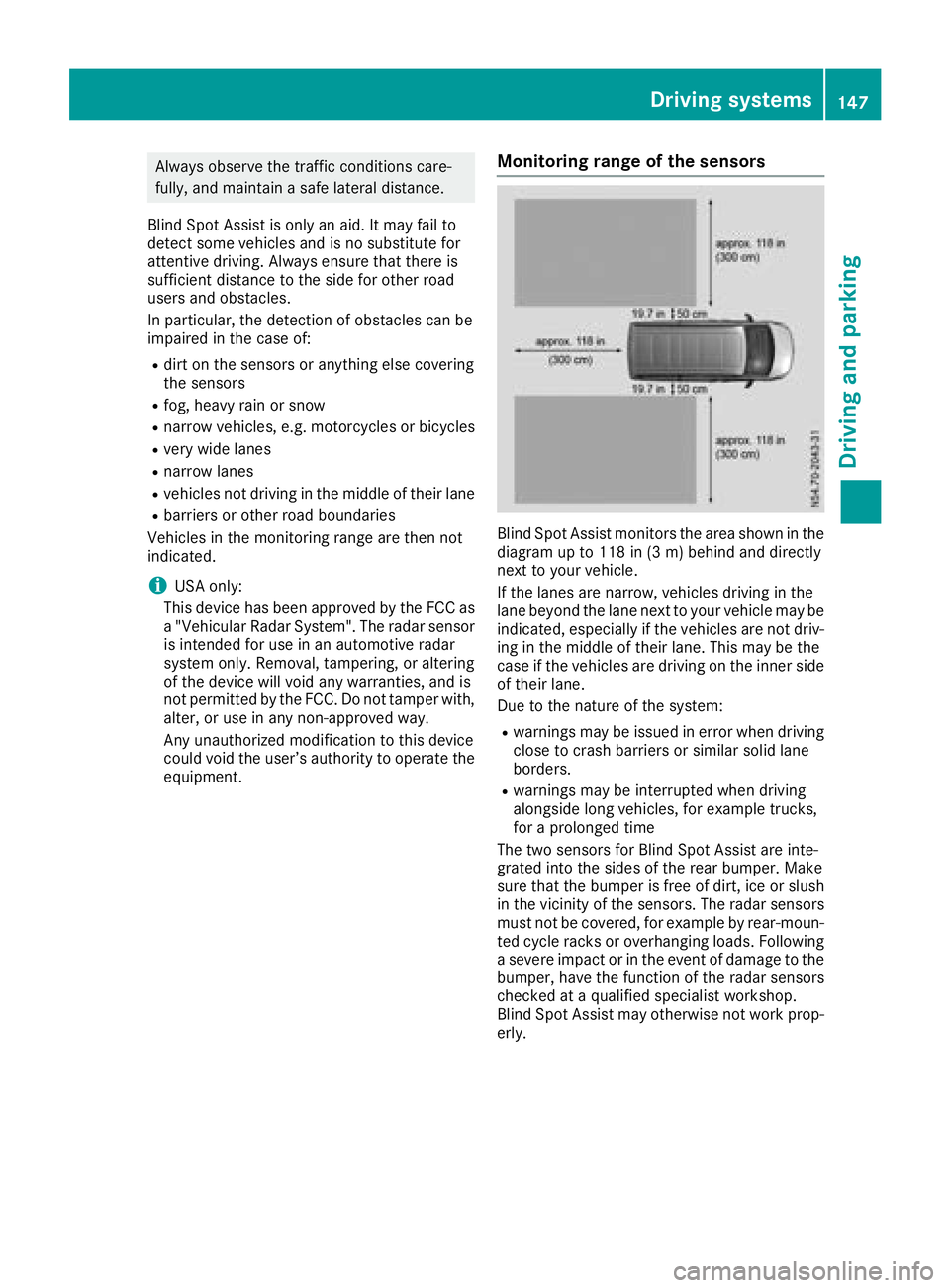
Blind Spot Assist monitors the area shown in the
diagram up to 118 in (3 m) behind and directly
next to your vehicle.
If the lanes are narrow, vehicles driving in the
lane beyond the lane next to your vehicle may be
indicated, especially if the vehicles are not driv-
ing in the middle of their lane. This may be the
case if the vehicles are driving on the inner side
of their lane.
Due to the nature of the system:
Rwarnings may be issued in error when driving
close to crash barriers or similar solid lane
borders.
Rwarnings may be interrupted when driving
alongside long vehicles, for example trucks,
for a prolonged time
The two sensors for Blind Spot Assist are inte-
grated into the sides of the rear bumper. Make
sure that the bumper is free of dirt, ice or slush
in the vicinity of the sensors. The radar sensors
must not be covered, for example by rear-moun-
ted cycle racks or overhanging loads. Following
a severe impact or in the event of damage to the
bumper, have the function of the radar sensors
checked at a qualified specialist workshop.
Blind Spot Assist may otherwise not work prop-
erly.
Driving systems147
Driving an d parking
Z