air condition MERCEDES-BENZ METRIS 2017 MY17 Operator’s Manual
[x] Cancel search | Manufacturer: MERCEDES-BENZ, Model Year: 2017, Model line: METRIS, Model: MERCEDES-BENZ METRIS 2017Pages: 318, PDF Size: 5.01 MB
Page 224 of 318
Warning/
indicator
lampNSignal type
Possible causes/consequences and M
Solutions
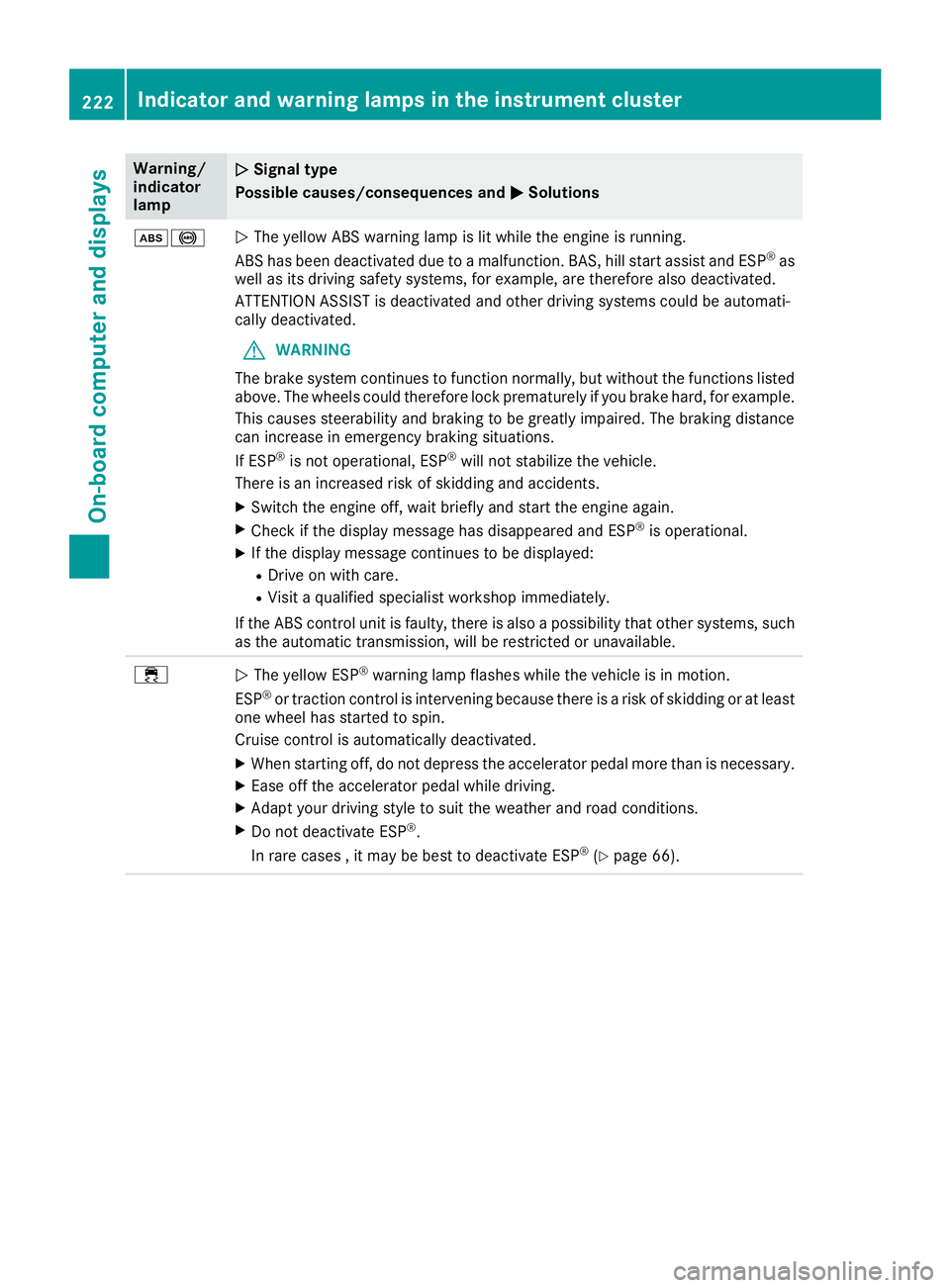
ò!NThe yellow ABS warning lamp is lit while the engine is running.
ABS has been deactivated due to a malfunction. BAS, hill start assist and ESP®as
well as its driving safety systems, for example, are therefore also deactivated.
ATTENTION ASSIST is deactivated and other driving systems could be automati-
cally deactivated.
GWARNING
The brake system continues to function normally, but without the functions listed
above. The wheels could therefore lock prematurely if you brake hard, for example.
This causes steerability and braking to be greatly impaired. The braking distance
can increase in emergency braking situations.
If ESP
®is not operational, ESP®will not stabilize the vehicle.
There is an increased risk of skidding and accidents.
XSwitch the engine off, wait briefly and start the engine again.
XCheck if the display message has disappeared and ESP®is operational.
XIf the display message continues to be displayed:
RDrive on with care.
RVisit a qualified specialist workshop immediately.
If the ABS control unit is faulty, there is also a possibility that other systems, such
as the automatic transmission, will be restricted or unavailable.
÷N The yellow ESP®warning lamp flashes while the vehicle is in motion.
ESP®or traction control is intervening because there is a risk of skidding or at least
one wheel has started to spin.
Cruise control is automatically deactivated.
XWhen starting off, do not depress the accelerator pedal more than is necessary.
XEase off the accelerator pedal while driving.
XAdapt your driving style to suit the weather and road conditions.
XDo not deactivate ESP®.
In rare cases , it may be best to deactivate ESP®(Ypage 66).
222Indicator and warning lamps in the instrument cluster
On-board computer and displays
Page 226 of 318
Warning/
indicator
lampNSignal type
Possible causes/consequences and M
Solutions
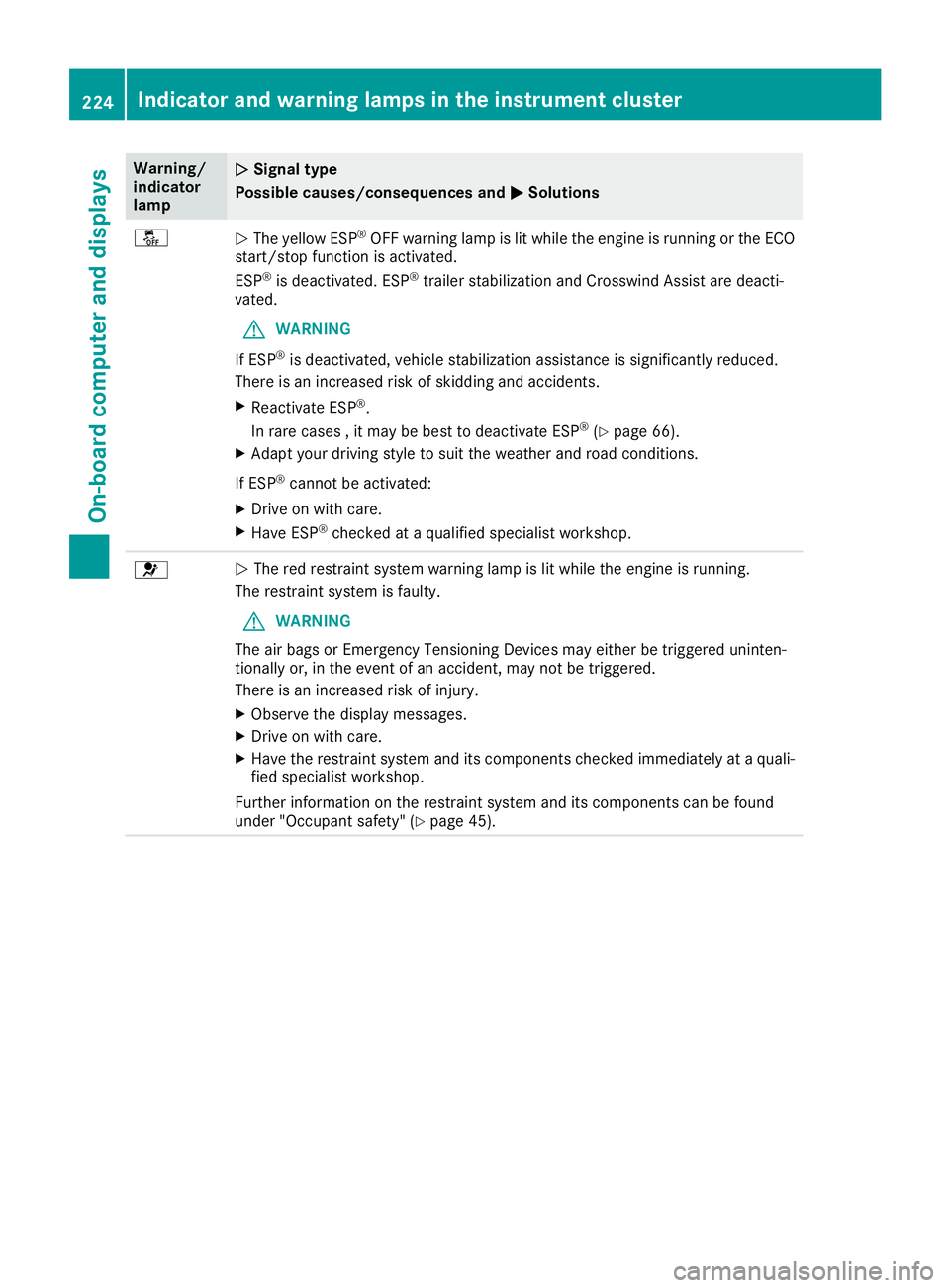
åNThe yellow ESP®OFF warning lamp is lit while the engine is running or the ECO
start/stop function is activated.
ESP
®is deactivated. ESP®trailer stabilization and Crosswind Assist are deacti-
vated.
GWARNING
If ESP
®is deactivated, vehicle stabilization assistance is significantly reduced.
There is an increased risk of skidding and accidents.
XReactivate ESP®.
In rare cases , it may be best to deactivate ESP®(Ypage 66).
XAdapt your driving style to suit the weather and road conditions.
If ESP
®cannot be activated:
XDrive on with care.
XHave ESP®checked at a qualified specialist workshop.
6N The red restraint system warning lamp is lit while the engine is running.
The restraint system is faulty.
GWARNING
The air bags or Emergency Tensioning Devices may either be triggered uninten-
tionally or, in the event of an accident, may not be triggered.
There is an increased risk of injury.
XObserve the display messages.
XDrive on with care.
XHave the restraint system and its components checked immediately at a quali- fied specialist workshop.
Further information on the restraint system and its components can be found
under "Occupant safety" (
Ypage 45).
224Indicator and warning lamps in the instrument cluster
On-board computer and displays
Page 228 of 318
Warning/
indicator
lampNSignal type
Possible causes/consequences and M
Solutions
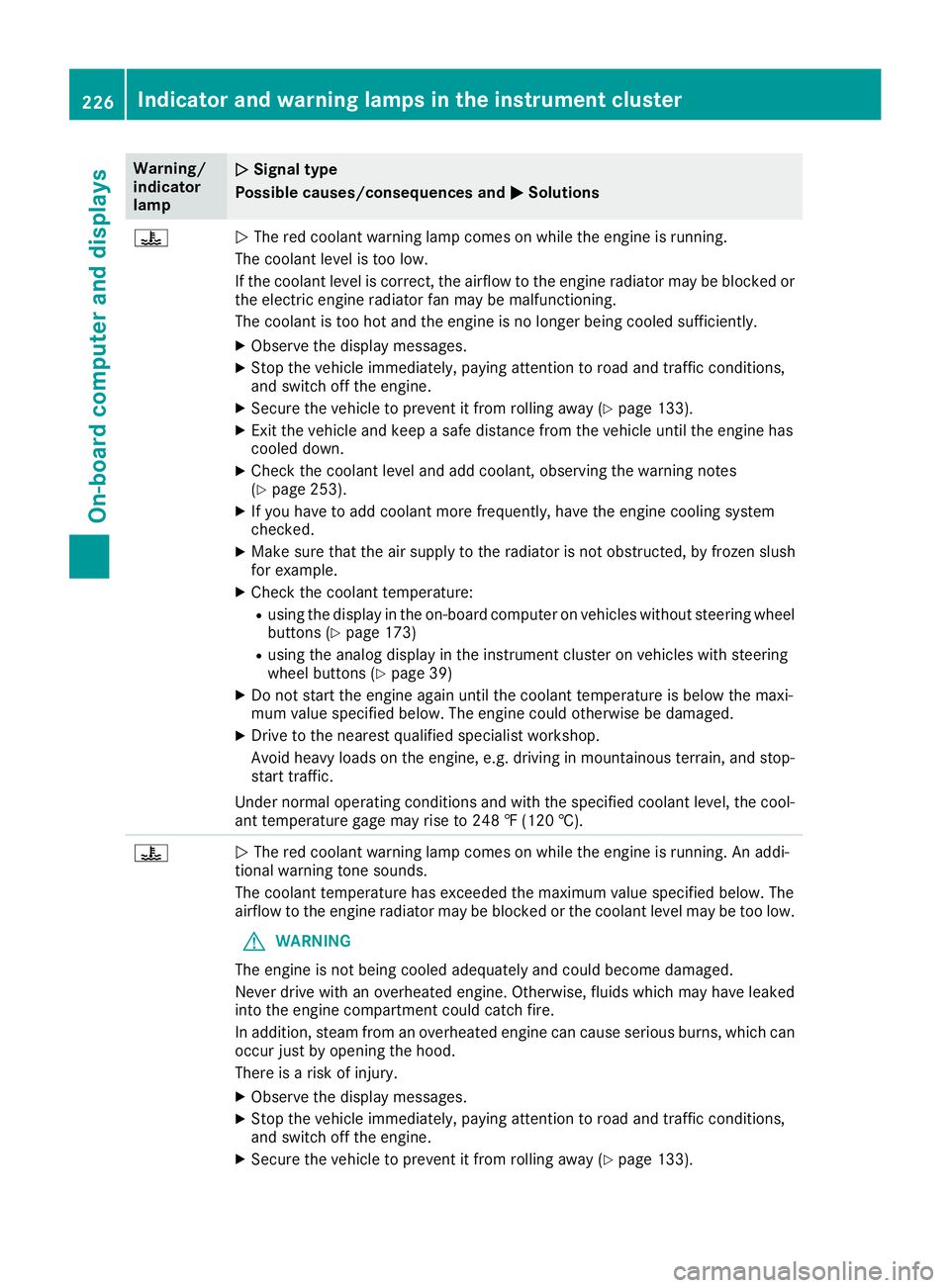
?NThe red coolant warning lamp comes on while the engine is running.
The coolant level is too low.
If the coolant level is correct, the airflow to the engine radiator may be blocked or
the electric engine radiator fan may be malfunctioning.
The coolant is too hot and the engine is no longer being cooled sufficiently.
XObserve the display messages.
XStop the vehicle immediately, paying attention to road and traffic conditions,
and switch off the engine.
XSecure the vehicle to prevent it from rolling away (Ypage 133).
XExit the vehicle and keep a safe distance from the vehicle until the engine has
cooled down.
XCheck the coolant level and add coolant, observing the warning notes
(Ypage 253).
XIf you have to add coolant more frequently, have the engine cooling system
checked.
XMake sure that the air supply to the radiator is not obstructed, by frozen slush
for example.
XCheck the coolant temperature:
Rusing the display in the on-board computer on vehicles without steering wheel
buttons (Ypage 173)
Rusing the analog display in the instrument cluster on vehicles with steering
wheel buttons (Ypage 39)
XDo not start the engine again until the coolant temperature is below the maxi-
mum value specified below. The engine could otherwise be damaged.
XDrive to the nearest qualified specialist workshop.
Avoid heavy loads on the engine, e.g. driving in mountainous terrain, and stop-
start traffic.
Under normal operating conditions and with the specified coolant level, the cool-
ant temperature gage may rise to 248 ‡ (120 †).
?N The red coolant warning lamp comes on while the engine is running. An addi-
tional warning tone sounds.
The coolant temperature has exceeded the maximum value specified below. The
airflow to the engine radiator may be blocked or the coolant level may be too low.
GWARNING
The engine is not being cooled adequately and could become damaged.
Never drive with an overheated engine. Otherwise, fluids which may have leaked
into the engine compartment could catch fire.
In addition, steam from an overheated engine can cause serious burns, which can
occur just by opening the hood.
There is a risk of injury.
XObserve the display messages.
XStop the vehicle immediately, paying attention to road and traffic conditions,
and switch off the engine.
XSecure the vehicle to prevent it from rolling away (Ypage 133).
226Indicator and warning lamps in the instrument cluster
On-board computer and displays
Page 229 of 318
Warning/
indicator
lampNSignal type
Possible causes/consequences and M
Solutions
XExit the vehicle and keep a safe distance from the vehicle until the engine has
cooled down.
XCheck the coolant level and add coolant, observing the warning notes
(Ypage 253).
XIf you have to add coolant more frequently, have the engine cooling system
checked.
XMake sure that the air supply to the radiator is not obstructed, by frozen slush
for example.
XCheck the coolant temperature:
Rusing the display in the on-board computer on vehicles without steering wheel
buttons (Ypage 173)
Rusing the analog display in the instrument cluster on vehicles with steering
wheel buttons (Ypage 39)
XIf the coolant temperature is below the maximum value specified below, you can
continue driving to the nearest qualified specialist workshop.
Avoid heavy loads on the engine, e.g. driving in mountainous terrain, and stop-
start traffic.
Under normal operating conditions and with the specified coolant level, the cool-
ant temperature gage may rise to 248 ‡ (120 †).
Driving systems
Warning/
indicator
lampNSignal type
Possible causes/consequences and M
Solutions
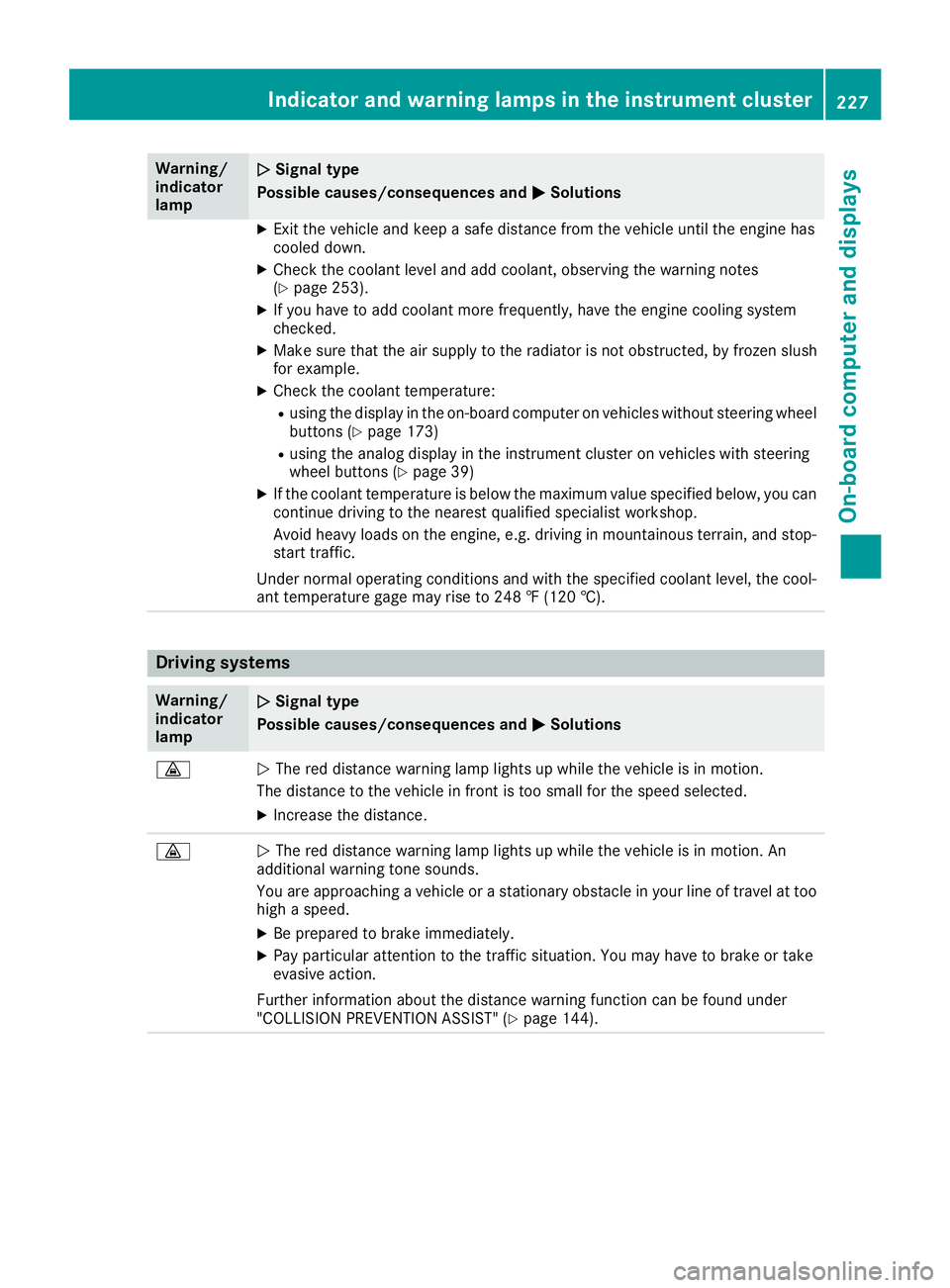
·NThe red distance warning lamp lights up while the vehicle is in motion.
The distance to the vehicle in front is too small for the speed selected.
XIncrease the distance.
·N The red distance warning lamp lights up while the vehicle is in motion. An
additional warning tone sounds.
You are approaching a vehicle or a stationary obstacle in your line of travel at too
high a speed.
XBe prepared to brake immediately.
XPay particular attention to the traffic situation. You may have to brake or take
evasive action.
Further information about the distance warning function can be found under
"COLLISION PREVENTION ASSIST" (
Ypage 144).
Indicator and warning lamps in the instrument cluster227
On-board computer and displays
Z
Page 230 of 318
Tires
Warning/
indicator
lampNSignal type
Possible causes/consequences and M
Solutions
hNThe yellow tire pressure monitor warning lamp (pressure loss/malfunction) is lit.
The tire pressure monitor has detected a loss of pressure in at least one of the tires.
GWARNING
Underinflated tires pose the following risks:
RThe tires may burst, especially as the load and vehicle speed increase.
RThe tires may wear excessively and/or unevenly, which may greatly impair tire traction.
RThe handling as well as steering and braking characteristics may be severely
affected.
There is a risk of an accident.
XStop the vehicle without making any sudden steering or braking maneuvers. Pay
attention to the traffic conditions while doing so.
XSecure the vehicle to prevent it from rolling away (Ypage 133).
XObserve the display messages.
XCheck the tires and, if necessary, change the wheel (Ypage 296).
XCheck the tire pressure.
You can check the tire pressure electronically on vehicles with steering wheel
buttons (
Ypage 284).
XIf necessary, correct the tire pressure.
hN The yellow tire pressure monitor (pressure loss/malfunction) warning lamp
flashes for approximately one minute and then remains lit.
The tire pressure monitor is malfunctioning.
GWARNING
The system may not be able to detect or signal low tire pressure as intended.
There is a risk of an accident.
XObserve the display messages.
XVisit a qualified specialist workshop.
228Indicator and warninglamps in the instrument cluster
On-board computer and displays
Page 232 of 318
Introduction
Important safety notes
GWARNING
If you operate information systems and com-
munication equipmen tintegrate din th evehi-
cle while driving ,you will be distracte dfrom
traffic conditions. You could also lose control
of th evehicle. Ther eis aris kof an accident.
Only operate th eequipmen twhen th etraffic
situation permits. If you are no tsur ethat this
is possible ,park th evehicl epayin gattention
to traffic condition sand operate th eequip-
men twhen th evehicl eis stationary.
Observ eth elegal requirements for th ecountry
you are in.
GWARNIN G
Operating mobile information systems and
communication device swhile driving will dis-
tract you from traffic conditions. In addition ,
you could then lose control of th evehicle.
Ther eis aris kof an accident.
Only operate these device swhen th evehicl e
is stationary.
GWARNIN G
Handlin gdisc swhile driving may distrac tyou
from traffic conditions. You could also lose
control of th evehicle. Ther eis aris kof an
accident.
Handle disc sonly when th evehicl eis station -
ary.
Bea rin min dthat at aspee dof jus t30 mph
(approximately 50 km/h), your vehicl eis cover -
ing adistanc eof 44 fee t(approximately 14 m)
per second.
GWARNIN G
SD cards are small parts. They can be swal-
lowed and caus echoking .This poses an
increased ris kof injury or eve nfatal injury.
Kee pth eSD car dout of th ereac hof children .
If aSD car dis swallowed, seek medical atten -
tion immediately.
GWARNIN G
The CD/DV Ddriv eis aclas s 1laser product.
If you open th ehousing of th eCD/DV Ddrive,
there is aris kof exposure to invisibl elaser
radiation .This laser radiation could damag e
your retina .Ther eis aris kof injury.
Never open th ehousing .Always hav emain -
tenance and repair wor kcarrie dout at aquali-
fie dspecialist workshop.
GWARNIN G
Modification sto electronic components, their
software as well as wirin gcan impair their
function and/o rth efunction of other net-
worke dcomponents. In particular, systems
relevan tto safet ycould also be affected. As a
result ,these may no longer function as inten -
ded and/o rjeopardiz eth eoperating safet yof
th evehicle. Ther eis an increased ris kof an
acciden tand injury.
Never tamper wit hth ewirin gas well as elec -
tronic component sor their software. You
should hav eall wor kto electrical and elec -
tronic equipmen tcarrie dout at aqualified
specialist workshop.
When usin gth edevice pleas efollow:
Rth esafet ynote sin these operating instruc-
tion s
Rtraffic rule sand regulation s
Rmotor vehiclelaws and safet ystandards
General notes
Thes ebrie finstruction sonly describe th ebasic
operation of your multimedia system.
All further information on th eindividual func-
tion scan be foun don th eInternet at
www.mercedes-benz.de/betriebsanleitung -
transporter.
Protection against theft
The multimedia system is equipped wit htech -
nical provision sto protect it against theft .
230Introduction
Multimedia systems in brief
Page 236 of 318
OperationMenu
SD memory cardSD
Music
Media
Sound
USB deviceUSB
Music
Media
Sound
AUXAUX
Volume
Sound
BT AudioBT Audio
Media
Sound
TelephoneTelephone
Call lists
SystemSettings
Display off
Bluetooth®settings
Requirements for a Bluetooth
®connec-
tion
You can connect Bluetooth®-compatible mobile
phones and other audio equipment to the mul-
timedia system.
To do so, the following conditions must be met:
RThe Bluetooth®device must be located inside
the vehicle in the vicinity of the multimedia
system.
RBluetooth®must be activated on both the
multimedia system and on the respective
Bluetooth
®device.
Rthe Bluetooth®device must be visible for the
multimedia system.
iYou can obtain further information about
suitable mobile phones and connecting
mobile phones via Bluetooth
®at any qualified
specialist workshop.
iYou can obtain further information about
suitable mobile phones and connecting mobile phones via Bluetooth
®at any author-
ized Sprinter Dealer.
Activating/deactivating the Bluetooth®
function
XPress the ibutton.
XPress the :button repeatedly until the
menu bar is selected.
XSelect Settings.
XSelectActivate Bluetooth.
XActivate or deactivate the Bluetooth®func-
tion using the control knob.
A tick in front of the Activate Bluetooth
message indicates that the Bluetooth®func-
tion is activated.
iThe Bluetooth®function will remain
switched on until you switch it off again.
Searching for and pairing with a Blue-
tooth®device
XPress the %button.
or
XSelect the Bluetooth®audio function.
XPress the :button repeatedly until the
menu bar is selected.
XSelect Telephone/BT Audio.
XBluetooth telephones/Bluetoothdevice list.
XSelectUpdate.
The multimedia system searches for Blue-
tooth
®devices within range for a certain
period of time.
If at least one Bluetooth
®device is found, the
display shows the Bluetooth®name of the
device.
If the multimedia system does not find a Blue-
tooth
®device, the SearchforBluetoothdevices failed.message is shown in the
display.
XTo search again: select Update.
XTo select a Bluetooth®device:select the
desired Bluetooth®device using the control
knob.
The display shows the input menu for the
passkey.
234Audio 15
Multimedia systems in brief
Page 238 of 318
XConnect the USB device to the USB portinthe
correct position.
XPress the Õbutton repeatedly, unt ilthe
displ ayinthe menu bar shows USB.
Playback starts.
iDue to the widerange of USB devices avail-
able on the market, playback cannot beguar-
anteed for all USB device brands.
Audio playback from a Bluetooth®
device
Requir ement: the Bluetooth®audio device is
paired and connected to the multimedia system.
XPress theÕbutton repeatedly untilBTAudiois shown in thedispl ay.
XPress the :button repeatedly untilthe
menu bar isselected.
XTo start playback: selectMinthe menu bar.
Playback starts.
XTo stop playback: select¯inthe menu bar.
Playback stops.
Audio playback via the AUX jack
XConnect an external device to the AUX jack.
XPress the Õbutton repeatedly untilthe
displ ay shows Aux.
The multimedia system plays the external
device and produces sound through the loud-
speakers again.
Telephone mode
"999" or "112" emergency call
Making emergency calls without entering a PIN
is only possible using the mob ilephone.
The 999 or112 emergency call number isa
public service. Any misuse ispunishable by law.
Making a call
XPress the%button.
XEnter the desired phone number using the
xtos number keys and the lbut-
ton.
XTo delete individual digits: press theí
button.
XTo delete the entire numerical sequence:
press and hold the íbutton until the
entire numerical sequence isdeleted.
XTo make a call: press the6button.
This initiates dialing.
XTo cancel dialing: press the~button
when dialing.
Navigation system
Important safety notes
GWARNING
If you operate information systems and com-
munication equipment integrated in the veh i-
cle while driving, you will be distracted from
traffic conditions. You could also lose control
of the vehicle. There is a risk of an accident.
Only operate the equipment when the traffic
situation permits. If you are not sure that this
is possible, park the vehicle paying attention
to traff icconditions and operate the equip-
ment when the vehicle isstationary.
Observe the legal requirements for the country
you are in.
The multimedia system calculates the route to
the destination without taking account of the
following, for example:
Rtraff iclights
Rstop and giveway signs
Rparking or stopping restrictions
Rroad narrowing
Rother road and traffic rules and regulations
The multimedia system may provide incorrect
navigation announcements if the surroundings
do not correspond to the data on the digital
map. For example, a route may have been diver-
ted or the direction of a one-way street may have
changed.
For this reason, you must always observe road
and traffic rules and regulations during your
jo urney. Road and traffic rules and regulations
always have priority over the system's driving
recommendations.
236Audio 15
Multimedia systems in brief
Page 257 of 318
Adding coolant
XIfthe coolant drops under marker bar=in
the filler neck, add coolant.
Observe the information on the correct cool-
ant mixture rat ioand the required water qual-
ity under "Service products and capacities"
(
Ypage 309). To prevent damage to the
engine co oling system, use only appr oved
corrosion inh ibitor/antifreeze that co mplies
wit h the Mercedes-Benz Specifications for
Service Products.
XReplac e cap:and tighten ina clock wise
dire ction.
XStart the engine.
XSet the temperature inthe veh icleinterior to
the maximum output on the air-conditioning
system control panel.
XAfter approximate lyfive minutes, switch off
the engine again and allow itto cool down.
XCheck the coolant level again and add coolant
ifnecessary.
XClose the hood.
Brake fluid
GWAR NING
Service products may be poisonous and haz-
ardous to health. There isa risk of injury.
Comp ly with instructions on the use, storage
and dispo sal of service products on the labels
of the respective original containers. Always
store service products sealed intheir original
containers. Always keep service products out
of the reach of ch ildren.
GWAR NING
Opening the hood when the engine isover-
heated or when there isa fire inthe engine
compartment could expose you to hot gases
or other service products. There isa risk of
injury.
Let an overheated engine cool downbefore
opening the hood. Ifthere isa fire inthe
engine compartment, keep the hood closed
and contact the fire department.
GWARNING
Certain components in the engine compart-
ment, such as the engine, radiator and parts
of the exhaust system, can become very hot.
Working in the engine compartment poses a
risk of injury.
Where possible, let the engine cool downand
touch only the components describe d in the
foll owin g.
Brake fluid is hazardous to health. Also observe the safety notes under "Service products and
capacities" (
Ypage 304).
GWARNING
The brake fluid constantly absorbs moisture
from the air. This lowers the boiling point of
the brake fluid. Ifthe boilin g point of the brake
fluid is too low,vapor pockets may form in the
brake system when the brakes are applied
hard. This would impair braking efficiency.
There is a risk of an accident.
You should have the brake fluid renewed at
the specified intervals.
!If the brake fluid level in the brake fluid res-
ervoir has fallen to the MIN mark or below,
check the brake system immediately for
leaks. Also check the thickness of the brake
linings. Visit a qualified specialist workshop
immediately.
Do not add brake fluid. This does not correct
the malfunction.
!Brake fluid corrodes paint, plastic and rub-
ber. Ifpaint, plastic or rubber has come into
contact with brake fluid, rinse with water
immediately.
Have the brake fluid renewed every two years at a qualified specialist workshop. Observe the
information regarding brake fluid in the "Service
products and capacities" section (
Ypage 309).
Engine compartment255
Maintenance and care
Z
Page 259 of 318
Maintenance
General notes
HEnvironmental note
Observe measures to protect the environ-
ment when working on the vehicle. You must
observe the legal requirements when dispos-
ing of service products, e.g. engine oil. This
also includes all components, e.g. filters,
which have come into contact with service
products. Any qualified specialist workshop
can provide information about this.
Dispose of empty containers, cleaning cloths
and care products in an environmentally
responsible manner. Comply with the instruc-
tions for use of the care products.
Do not run the engine for longer than neces-
sary when the vehicle is stationary.
Before carrying out maintenance measures and
repairs, you must read the following documents
relating to maintenance measures and repairs:
Rrelevant sections of the technical documen-
tation such as the Operator's Manual and
workshop information
Rlegal stipulations such as work safety regula-
tions and accident prevention regulations
While working under the vehicle, you must
secure the vehicle on jack stands with sufficient load capacity.
Never use a vehicle jack instead of stands. The
jack is designed only to raise the vehicle for a
short time when changing a wheel. It is not
suited for performing maintenance work under
the vehicle.
Please also refer to the notes about qualified
specialist workshops (
Ypage 31).
The scope and regularity of the inspection and
maintenance work primarily depend on the
often diverse operating conditions. Specialist
knowledge beyond the scope of this Operator's
Manual is required when carrying out testing
and maintenance work. This work should only be
carried out by trained staff.
The vehicle Maintenance Booklet describes the scope and frequency of maintenance work and
contains additional notes on the Limited War-
ranty. You will find information about service
products approved by Mercede s-Benz a
ndcapacities under "Service products and capaci-
ties" (
Ypage 304)
Maintenance services must be carried out in
accordance with the provisions and recommen- dations in the Maintenance Booklet. Not doing
so could void the warranty claim and lead to
refusal of goodwill gestures after the manufac-
turer has submitted a damage report.
Observe the information under "Mercedes-Benz
genuine parts" (
Ypage 33).
Service interval display
General notes
The service interval display informs you of the
next service due date. Information on the type of
service and service intervals can be found in the
Maintenance Booklet.
iThe service interval display does not provide
information about the engine oil level. The
service interval display should therefore not
be confused with the engine oil level display.
For example, the display shows one of the fol-
lowing service messages for a few seconds:
RService A in .. days
RService A Dueor Service A Due
RServ. A Exceed. by .. Days
Then either the remaining time or distance until
the next service due date is displayed. If the
service due date has been exceeded, the
elapsed time or distance traveled after the over-
due service date is shown. The letter in the dis-
play message indicates which service is due. A
stands for a minor service andBfor a major ser-
vice.
A qualified specialist workshop, e.g. an author-
ized Mercedes-Benz Commercial Van Center,
will reset the service interval display after the
service work has been carried out. You can also
obtain further information on maintenance
work, for example.
The prescribed service interval is based on nor- mal vehicle use. Service work will need to be
performed more frequently than prescribed if
the vehicle is operated under more arduous con-
ditions or with higher loads. Such arduous con-
ditions include:
Rregular city driving with frequent intermediate
stops
Rdriving predominantly short distances
Maintenance257
Maintenance and care
Z