lock MERCEDES-BENZ METRIS 2017 MY17 Operator’s Manual
[x] Cancel search | Manufacturer: MERCEDES-BENZ, Model Year: 2017, Model line: METRIS, Model: MERCEDES-BENZ METRIS 2017Pages: 318, PDF Size: 5.01 MB
Page 136 of 318
GWARNING
If you leave children unsupervised in the vehi-
cle, they could set it in motion by, for example:
Rrelease the parking brake.
Rshift the automatic transmission out of the
parking position P.
Rstart the engine.
In addition, they may operate vehicle equip-
ment and become trapped. There is a risk of
an accident and injury.
When leaving the vehicle, always take the
SmartKey with you and lock the vehicle. Never
leave children unsupervised in the vehicle.
!Always secure the vehicle correctly against
rolling away. Otherwise, the vehicle or its driv-
etrain could be damaged.
!When the vehicle is parked, always remove
the key to prevent the battery from becoming
discharged.
Always park your vehicle safely and secure it
against rolling away. When parking, observe the
legal requirements of the country in which you
are currently driving.
To ensure that the vehicle is properly secured
against rolling away unintentionally:
Rthe parking brake must be firmly applied
Rthe transmission must be in position Pand the
key must be removed from the ignition lock
Ron steep uphill or downhill gradients, the front
wheels must be turned towards the curb
Parking brake
GWARNING
If you leave children unsupervised in the vehi-
cle, they could set it in motion by, for example:
Rrelease the parking brake.
Rshift the automatic transmission out of the
parking position P.
Rstart the engine.
In addition, they may operate vehicle equip-
ment and become trapped. There is a risk of
an accident and injury.
When leaving the vehicle, always take the
SmartKey with you and lock the vehicle. Never
leave children unsupervised in the vehicle.
GWARNING
If you must brake the vehicle with the parking brake, the braking distance is considerably
longer and the wheels could lock. There is an
increased danger of skidding and accidents.
Only use the parking brake to brake the vehi-
cle when the service brake is faulty. Do not
apply the parking brake too firmly. If the
wheels lock, release the parking brake until
the wheels begin turning again.
The brake lamps are not illuminated when you
brake the vehicle using the parking brake.
As a rule, you may only apply the parking brake
when the vehicle is stationary.
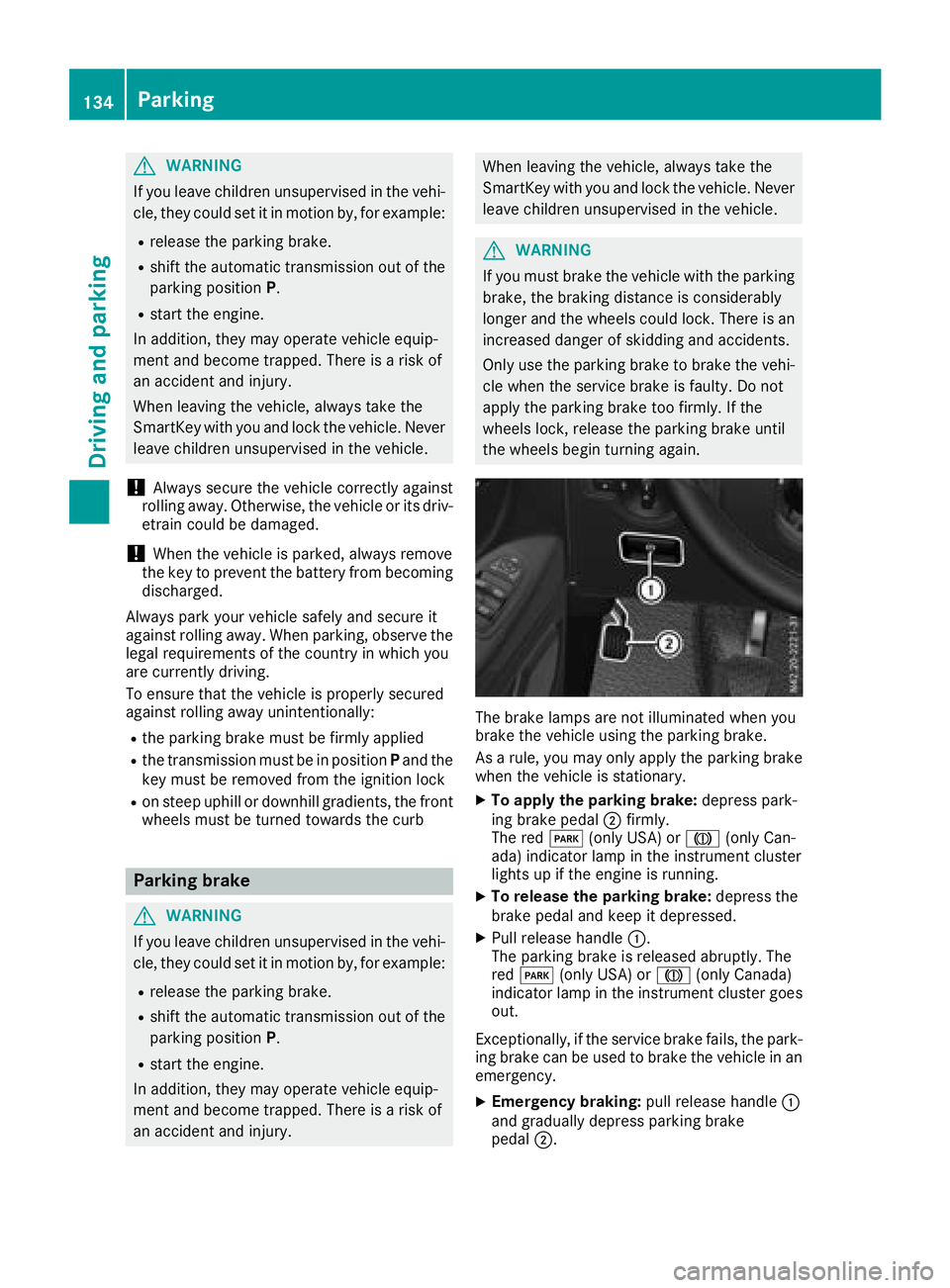
XTo apply the parking brake: depress park-
ing brake pedal ;firmly.
The red F(only USA) or J(only Can-
ada) indicator lamp in the instrument cluster
lights up if the engine is running.
XTo release the parking brake: depress the
brake pedal and keep it depressed.
XPull release handle :.
The parking brake is released abruptly. The
red F (only USA) or J(only Canada)
indicator lamp in the instrument cluster goes
out.
Exceptionally, if the service brake fails, the park-
ing brake can be used to brake the vehicle in an
emergency.
XEmergency braking: pull release handle:
and gradually depress parking brake
pedal ;.
134Parking
Driving and parking
Page 137 of 318
Switching off the engine
Important safety notes
GWARNING
The automatic transmission switches to neu-
tral position Nwhen you switch off the engine.
The vehicle may roll away. There is a risk of an
accident.
After switching off the engine, always switch
to parking position P. Prevent the parked vehi-
cle from rolling away by applying the parking
brake.
!If the coolant temperature is very high, e.g.
after driving on hilly roads, leave the engine
running at idle speed for about two minutes
before turning it off.
This allows the coolant temperature to return
to normal.
Vehicles with automatic transmission
XStop the vehicle.
XShift the transmission to position P.
XApply the parking brake.
XTurn the key to position0in the ignition lock
and remove it.
The immobilizer is activated.
If you switch the engine off with the trans-
mission in position Ror D, the automatic
transmission shifts to Nautomatically.
If you then open one of the front doors or
remove the key from the ignition, the auto-
matic transmission automatically shifts to P.
If you shift the automatic transmission to N
before switching off the engine, the automatic
transmission remains in Neven if a front door
is opened.
XSecure the vehicle to prevent it from rolling
away (Ypage 133).
Parking the vehicle for a long period
If you leave the vehicle parked for longer than
four weeks, the battery may be damaged by
exhaustive discharging.
XDisconnect the battery (Ypage 259).
or
XConnect the battery to a trickle charger.
Be sure to observe the notes on charging the batteries (
Ypage 262).
You can obtain information about trickle
chargers from a qualified specialist work-
shop.
If you leave the vehicle parked for longer than 6
weeks, the vehicle may suffer damage as a
result of lack of use.
XVisit a qualified specialist workshop and seek
advice.
Driving tips
General notes
Important safety notes
GWARNING
If you switch off the ignition while driving,
safety-relevant functions are only available
with limitations, or not at all. This could affect, for example, the power steering and the brake
boosting effect. You will require considerably
more effort to steer and brake. There is a risk
of an accident.
Do not switch off the ignition while driving.
GWARNING
If you operate mobile communication equip-
ment while driving, you will be distracted from traffic conditions. You could also lose control
of the vehicle. There is a risk of an accident.
Only operate this equipment when the vehicle
is stationary.
Observe the legal requirements of the country in
which you are driving. Some jurisdictions pro-
hibit the driver from using a mobile phone while driving a vehicle.
Driving tips135
Driving and parking
Z
Page 140 of 318
!Depressing the brake pedal constantly
results in excessive and premature wear to
the brake pads.
If the brakes have been subjected to a heavy
load, do not stop the vehicle immediately. Drive
on for a short while. The brakes are cooled down
more quickly in the airflow.
Wet road surfaces
If you have been driving for a long time in heavy
rain without braking, there may be a delayed
response when you first apply the brakes. This
may also occur after driving through a car wash
or deep water.
You must depress the brake pedal more firmly.
Maintain a longer distance to the vehicle in
front.
While paying attention to the traffic conditions,
you should brake the vehicle firmly after driving
on a wet road surface or through a car wash. This
heats the brake discs, so that they dry more
quickly, which protects them against corrosion.
Limited braking performance on salt-
treated roads
When driving on salted roads, salt may start to
build up on the brake disks and brake pads. This can increase braking distances considerably.
Maintain a greater distance to the vehicle in
front.
To remove any build-up of salt that may have
formed:
XApply the brakes at the start of the journey,
occasionally during journey and at the end of
the journey. Make sure that you do not endan-
ger other road users when doing so.
Checking the brake pad thickness
In addition to monitoring using the brake pad
wear sensor, regularly monitor and check all of
the brake pads by performing a visual inspection
to look for pad material wear.
If you are unable to check the brake wear on the
inside of the wheels, remove the wheels with the tools provided.
Make sure that the brake pad material thickness
never falls below 0.12 in (3 mm). Have the brake pads checked and replaced at a qualified spe-
cialist workshop, if necessary. Do not solely rely on the brake pad wear sensor.
It is strongly recommended that you have the
brake pads checked at a qualified specialist
workshop at every service displayed in the main-
tenance interval indicator, prior to long journeys
and whenever the wheels are removed.
New brake discs and brake pads/
linings
New brake pads and brake discs only reach their
optimal braking effect after about 60 miles
(100 kilometers). Until then, compensate for
this by applying greater force to the brake pedal.
For safety reasons, Mercedes-Benz recom-
mends only installing the following brake discs
and brake pads/linings:
Rbrake discs that have been approved by
Mercedes-Benz
Rbrake pads/linings that have been approved
by Mercedes-Benz or are of an equivalent
standard of quality
Other brake discs or brake pads/linings can
compromise the safety of your vehicle.
Always replace all brake discs or brake pads/
linings on an axle at the same time and only have
them replaced at a qualified specialist work-
shop. When replacing the brake discs, always
have the brake pads/linings replaced at the
same time.
Parking brake
GWARNING
If you must brake the vehicle with the parking brake, the braking distance is considerably
longer and the wheels could lock. There is an
increased danger of skidding and accidents.
Only use the parking brake to brake the vehi-
cle when the service brake is faulty. Do not
apply the parking brake too firmly. If the
wheels lock, release the parking brake until
the wheels begin turning again.
When driving on wet roads or dirt-covered sur-
faces, road salt and/or dirt may get into the
parking brake. This causes corrosion and a
reduction of braking force.
In order to prevent this, drive with the parking
brake lightly applied from time to time. When
doing so, drive for a distance of approximately
138Driving tips
Driving and parking
Page 148 of 318
In such cases, Adaptive Brake Assist can:
Rintervene unnecessarily
Rnot intervene
There is a risk of an accident.
Always pay careful attention to the traffic sit- uation and be ready to brake. Terminate the
intervention in a non-critical driving situation.
In particular, the detection of obstacles can be
impaired in the case of:
Rdirt on the sensors or anything else covering
the sensors
Rsnow or heavy rain
Rinterference from other radar sources
Rstrong radar reflections, for example, in park-
ing garages
Ra narrow vehicle traveling in front, e.g. a
motorbike
Ra vehicle traveling in front on a different line
Due to the nature of the system, particularly
complicated but non-critical driving conditions
may also cause Adaptive Brake Assist to inter-
vene.
If you fail to adapt your driving style, Adaptive
Brake Assist can neither reduce the risk of acci-
dent nor override the laws of physics. Adaptive
Brake Assist cannot take into account road,
weather or traffic conditions. Adaptive Brake
Assist is only an aid. You are responsible for the
distance to the vehicle in front, for vehicle
speed, braking in good time and for staying in
your lane.
Following damage to the front end of the vehicle,
have the configuration and operation of the
radar sensor checked at a qualified specialist
workshop. This also applies to collisions at slow
speeds where there is no visible damage to the
front of the vehicle.
If you change wheel size, make sure they corre- spond to the correct wheel size category
(
Ypage 277). If the category is changed without
recoding the control units in the vehicle, the
functioning of Adaptive Brake Assist may be
impaired. COLLISION PREVENTION ASSIST may
then detect a malfunction and switch itself off.
If Adaptive Brake Assist is not available due to a
malfunction in the radar sensor system, the
brake system remains available with full brake
boosting effect and BAS.
Operation
With the help of the radar sensor system, Adap-
tive Brake Assist can detect obstacles that have been in the path of your vehicle for an extended
period of time. Ada
ptive Brake Assist does not
react to stationary obstacles. If Adaptive Brake
Assist detects a risk of collision with a vehicle
traveling in front or with a stationary obstacle,
the system calculates the braking force neces-
sary to avoid this collision. If you apply the
brakes forcefully, Adaptive Brake Assist will
automatically increase the braking force to a
level suitable for the traffic conditions.
XBrake until the distance to the obstacle
increases and the risk of a collision passes.
ABS prevents the wheels from locking.
The brakes function as usual again if:
Ryou release the brake pedal
Rthere is no longer any danger of a collision
Rno obstacle is detected in front of your vehicle
Braking assistance is then ended.
Blind Spot Assist
General notes
Blind Spot Assist monitors the areas on either
side of the vehicle that are not visible to the
driver with two lateral, rear-facing radar sensors
in the bumper. It supports you from speeds of
approximately 20 mph (30 km/h). A warning
display in the exterior mirrors draws your atten-
tion to vehicles detected in the monitored area.
If you then switch on the corresponding turn
signal to change lane, you will also receive an
optical and audible collision warning.
Important safety notes
GWARNING
Blind Spot Assist does not react to:
Rvehicles overtaken too closely on the side,
placing them in the blind spot area
Rvehicles which approach with a large speed
differential and overtake your vehicle
As a result, Blind Spot Assist may not give
warnings in such situations. There is a risk of
an accident.
146Driving systems
Driving and parking
Page 150 of 318
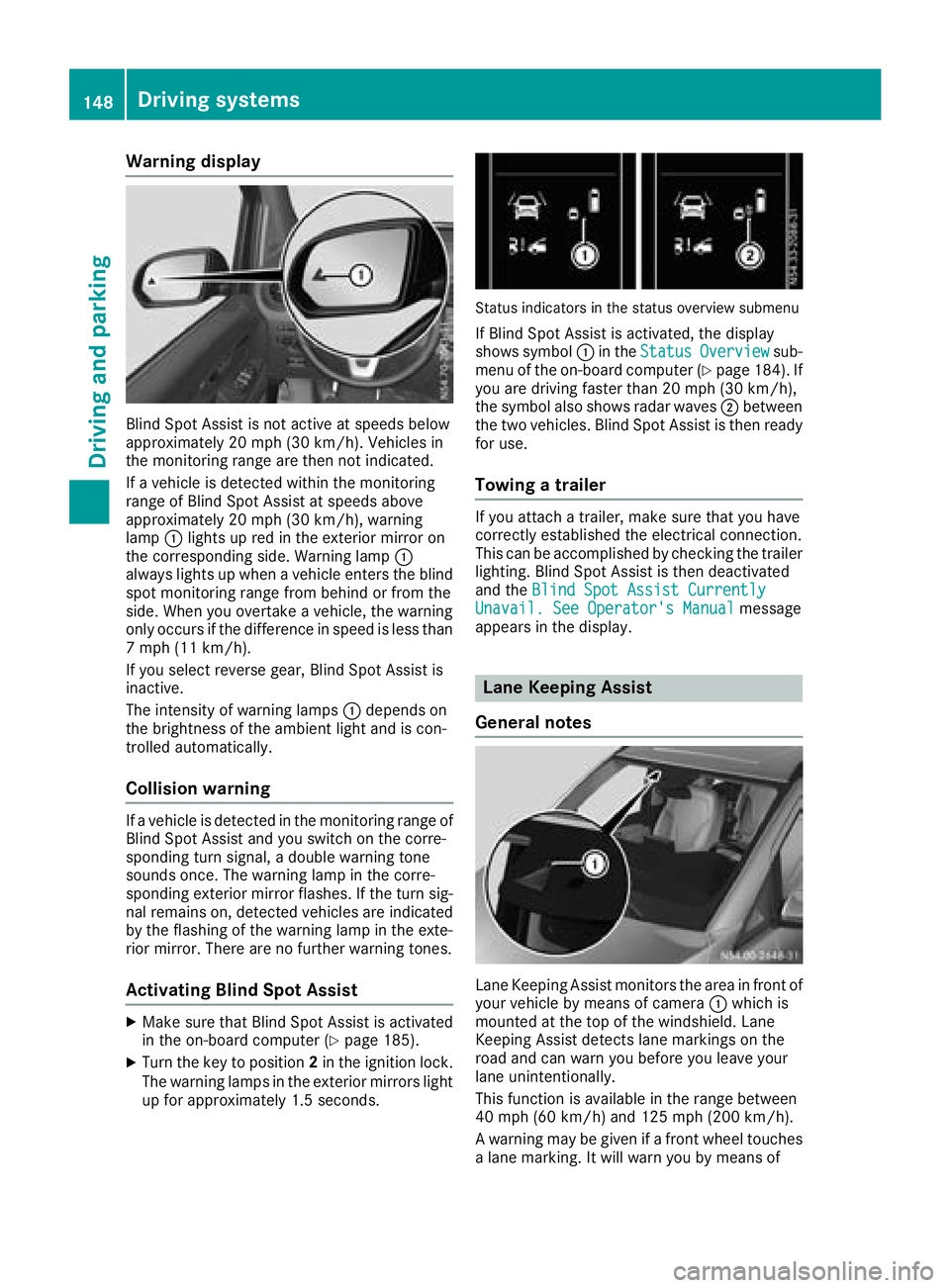
Warning display
Blind Spot Assist is not active at speeds below
approximately 20 mph (30 km/h). Vehicles in
the monitoring range are then not indicated.
If a vehicle is detected within the monitoring
range of Blind Spot Assist at speeds above
approximately 20 mph (30 km/h), warning
lamp:lights up red in the exterior mirror on
the corresponding side. Warning lamp :
always lights up when a vehicle enters the blind
spot monitoring range from behind or from the
side. When you overtake a vehicle, the warning
only occurs if the difference in speed is less than
7 mph (11 km/h).
If you select reverse gear, Blind Spot Assist is
inactive.
The intensity of warning lamps :depends on
the brightness of the ambient light and is con-
trolled automatically.
Collision warning
If a vehicle is detected in the monitoring range of
Blind Spot Assist and you switch on the corre-
sponding turn signal, a double warning tone
sounds once. The warning lamp in the corre-
sponding exterior mirror flashes. If the turn sig-
nal remains on, detected vehicles are indicated
by the flashing of the warning lamp in the exte-
rior mirror. There are no further warning tones.
Activating Blind Spot Assist
XMake sure that Blind Spot Assist is activated
in the on-board computer (Ypage 185).
XTurn the key to position 2in the ignition lock.
The warning lamps in the exterior mirrors light
up for approximately 1.5 seconds.
Status indicators in the status overview submenu
If Blind Spot Assist is activated, the display
shows symbol :in the StatusOverviewsub-
menu of the on-board computer (Ypage 184). If
you are driving faster than 20 mph (30 km/h),
the symbol also shows radar waves ;between
the two vehicles. Blind Spot Assist is then ready
for use.
Towing a trailer
If you attach a trailer, make sure that you have
correctly established the electrical connection.
This can be accomplished by checking the trailer
lighting. Blind Spot Assist is then deactivated
and the Blind Spot Assist Currently
Unavail. See Operator's Manualmessage
appears in the display.
Lane Keeping Assist
General notes
Lane Keeping Assist monitors the area in front of
your vehicle by means of camera :which is
mounted at the top of the windshield. Lane
Keeping Assist detects lane markings on the
road and can warn you before you leave your
lane unintentionally.
This function is available in the range between
40 mph (60 km/h) and 125 mph (200 km/h).
A warning may be given if a front wheel touches a lane marking. It will warn you by means of
148Driving systems
Driving and parking
Page 153 of 318
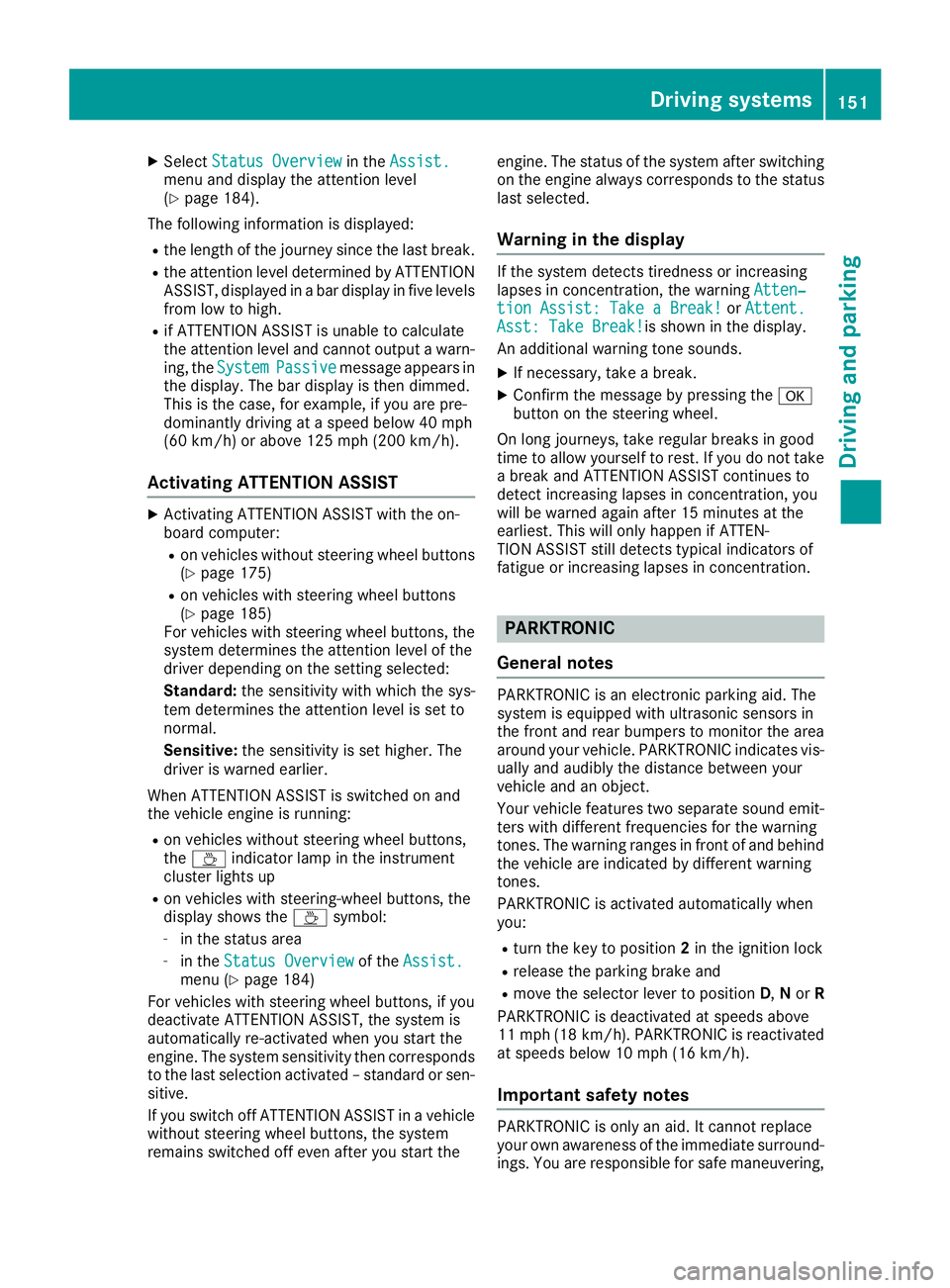
XSelectStatus Overviewin theAssist.menu and display the attention level
(Ypage 184).
The following information is displayed:
Rthe length of the journey since the last break.
Rthe attention level determined by ATTENTION
ASSIST, displayed in a bar display in five levels
from low to high.
Rif ATTENTION ASSIST is unable to calculate
the attention level and cannot output a warn-
ing, the System
Passivemessage appears in
the display. The bar display is then dimmed.
This is the case, for example, if you are pre-
dominantly driving at a speed below 40 mph
(60 km/h) or above 125 mph (200 km/h).
Activating ATTENTION ASSIST
XActivating ATTENTION ASSIST with the on-
board computer:
Ron vehicles without steering wheel buttons
(Ypage 175)
Ron vehicles with steering wheel buttons
(Ypage 185)
For vehicles with steering wheel buttons, the
system determines the attention level of the
driver depending on the setting selected:
Standard: the sensitivity with which the sys-
tem determines the attention level is set to
normal.
Sensitive: the sensitivity is set higher. The
driver is warned earlier.
When ATTENTION ASSIST is switched on and
the vehicle engine is running:
Ron vehicles without steering wheel buttons,
the À indicator lamp in the instrument
cluster lights up
Ron vehicles with steering-wheel buttons, the
display shows the Àsymbol:
-in the status area
-in the Status Overviewof the Assist.menu (Ypage 184)
For vehicles with steering wheel buttons, if you
deactivate ATTENTION ASSIST, the system is
automatically re-activated when you start the
engine. The system sensitivity then corresponds
to the last selection activated – standard or sen-
sitive.
If you switch off ATTENTION ASSIST in a vehicle without steering wheel buttons, the system
remains switched off even after you start the engine. The status of the system after switching
on the engine always corresponds to the status
last selected.
Warning in the display
If the system detects tiredness or increasing
lapses in concentration, the warning
Atten‐
tion Assist: Take a Break!orAttent.Asst: Take Break!is shown in the display.
An additional warning tone sounds.
XIf necessary, take a break.
XConfirm the message by pressing the a
button on the steering wheel.
On long journeys, take regular breaks in good
time to allow yourself to rest. If you do not take
a break and ATTENTION ASSIST continues to
detect increasing lapses in concentration, you
will be warned again after 15 minutes at the
earliest. This will only happen if ATTEN-
TION ASSIST still detects typical indicators of
fatigue or increasing lapses in concentration.
PARKTRONIC
General notes
PARKTRONIC is an electronic parking aid. The
system is equipped with ultrasonic sensors in
the front and rear bumpers to monitor the area
around your vehicle. PARKTRONIC indicates vis-
ually and audibly the distance between your
vehicle and an object.
Your vehicle features two separate sound emit- ters with different frequencies for the warning
tones. The warning ranges in front of and behind
the vehicle are indicated by different warning
tones.
PARKTRONIC is activated automatically when
you:
Rturn the key to position 2in the ignition lock
Rrelease the parking brake and
Rmove the selector lever to position D,N or R
PARKTRONIC is deactivated at speeds above
11 mph (18 km/h). PARKTRONIC is reactivated
at speeds below 10 mph (16 km/h).
Important safety notes
PARKTRONIC is only an aid. It cannot replace
your own awareness of the immediate surround-
ings. You are responsible for safe maneuvering,
Driving systems151
Driving and parking
Z
Page 156 of 318
Towing a trailer
PARKTRONIC detects a coupled trailer if your
vehicle is equipped with the corresponding elec-
trical installations for trailer towing.
PARKTRONIC is deactivated for the rear area
when you establish an electrical connectionbetween your vehicle and a trailer. If you use an
adapter for the socket, remove it from the
socket after detaching the trailer. Otherwise,
PARKTRONIC remains deactivated for the rear
area.
Problems with PARKTRONIC
ProblemPossible causes/consequences and
MSolutions
Only the red segments in
the PARKTRONIC warn-
ing displays are lit.
In addition, a warning
tone sounds for approx.
two seconds
PARKTRONIC is then
deactivated.
The indicator lamp of the
f button lights up
and the red segments in
the PARKTRONIC warn-
ing display go out.PARKTRONIC has malfunctioned and has switched itself off.
XIf problems persist, have PARKTRONIC checked at a qualified spe- cialist workshop.
The PARKTRONIC warn-
ing displays implausible
distances.
For example, all the seg-
ments may be lit even
though there is no obsta-
cle present.The PARKTRONIC sensors are dirty or iced up.
XClean the PARKTRONIC sensors (Ypage 266).
XTurn the key to position 2in the ignition lock.
The license plate or other parts attached near the sensors may not be
secured correctly.
XCheck the license plate and attachment parts near the sensors for
correct seating.
An external radio or ultrasonic source may be causing interference.
XCheck PARKTRONIC functions in a different location.
Active Parking Assist
General notes
Active Parking Assist is an electronic parking
aid. The system uses ultrasound sensors to
measure the road on both sides of the vehicle
and indicates suitable parking spaces. It can
then actively steer and brake the vehicle to help
you to park and exit the parking space.
Active Parking Assist includes the PARKTRONIC
parking aid which indicates visually and audibly the distance between your vehicle and an
object. To do this, PARKTRONIC uses the ultra- sonic sensors of the Active Parking Assist
(
Ypage 151).
Important safety notes
Active Parking Assist is only an aid. It is not a
substitute for your attention to the immediate
surroundings. You are responsible for safe
maneuvering, parking and pulling away. Make
sure that no persons, animals or objects are in
the maneuvering range.
When you deactivate PARKTRONIC, Active Park-
ing Assist will also be deactivated.
154Driving system
s
Driving an d parking
Page 158 of 318
Active Parking Assist does not assist you park-
ing in spaces at right angles to the direction of
travel if:
Rtwo parking spaces are located directly next
to one another
Rthe parking space is directly next to a low
obstacle such as a low curb
Ryou forward park
Active Parking Assist does not assist you park-
ing in spaces that are parallel or at right angles
to the direction of travel if:
Rthe parking space is on a curb
Rthe system reads the parking space as being
blocked, for example by foliage or grass pav-
ing blocks
Rthe area is too small for the vehicle to maneu-
ver into
Rthe parking space is bordered by an obstacle,
e.g. a tree, a post or a trailer
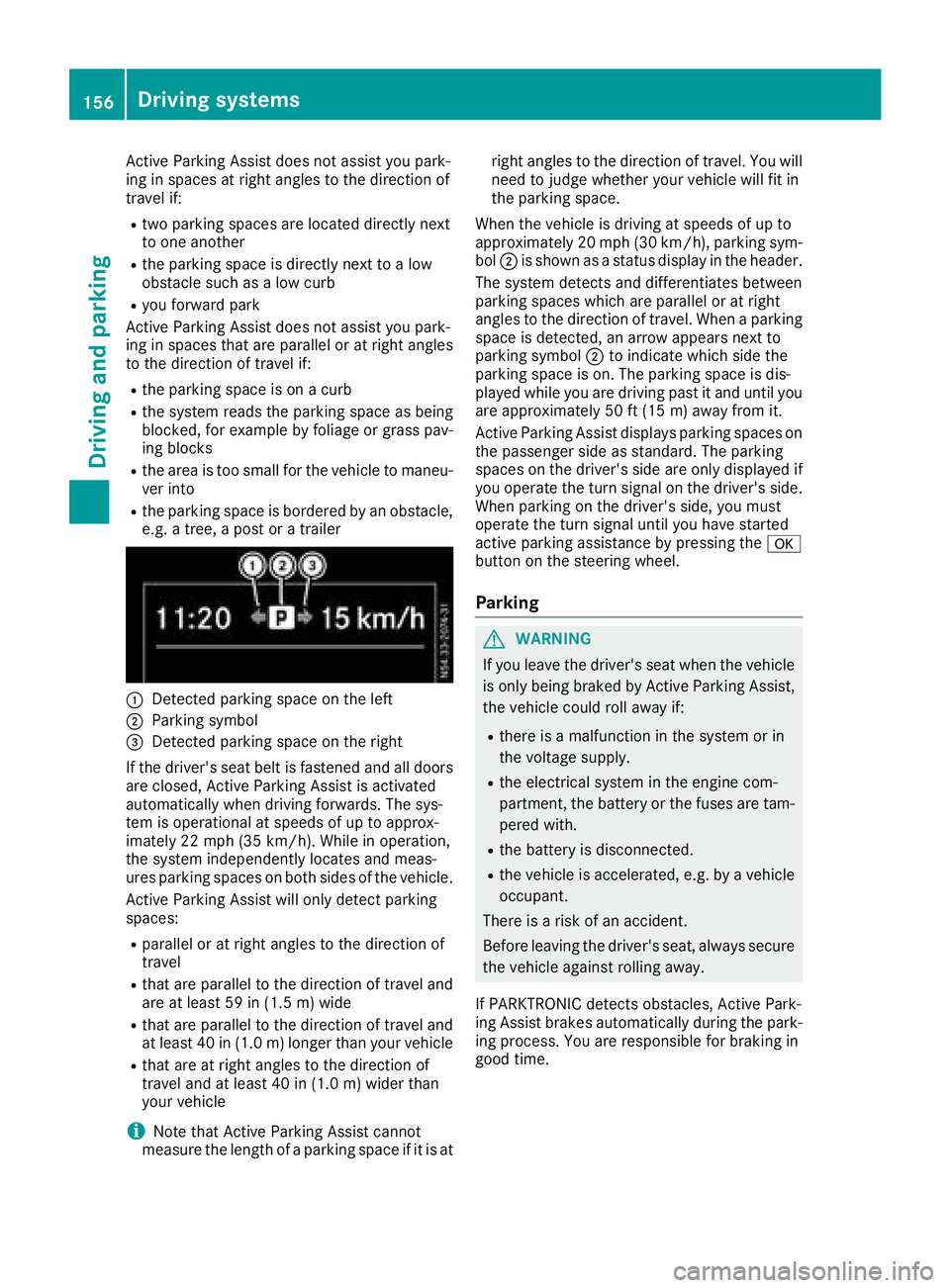
:Detected parking space on the left
;Parking symbol
=Detected parking space on the right
If the driver's seat belt is fastened and all doors
are closed, Active Parking Assist is activated
automatically when driving forwards. The sys-
tem is operational at speeds of up to approx-
imately 22 mph (35 km/h). While in operation,
the system independently locates and meas-
ures parking spaces on both sides of the vehicle.
Active Parking Assist will only detect parking
spaces:
Rparallel or at right angles to the direction of
travel
Rthat are parallel to the direction of travel and are at least 59 in (1.5 m) wide
Rthat are parallel to the direction of travel and
at least 40 in (1.0 m) longer than your vehicle
Rthat are at right angles to the direction of
travel and at least 40 in (1.0 m) widerthan
your vehicle
iNote that Active Parking Assist cannot
measure the length of a parking space if it is at right angles to the direction of travel. You will
need to judge whether your vehicle will fit in
the parking space.
When the vehicle is driving at speeds of up to
approximately 20 mph (30 km/h), parking sym-
bol ;is shown as a status display in the header.
The syste m d
etects and differentiates between
parking spaces which are parallel or at right
angles to the direction of travel. When a parking
space is detected, an arrow appears next to
parking symbol ;to indicate which side the
parking space is on. The parking space is dis-
played while you are driving past it and until you
are approximately 50 ft (15 m) away from it.
Active Parking Assist displays parking spaces on
the passenger side as standard. The parking
spaces on the driver's side are only displayed if
you operate the turn signal on the driver's side.
When parking on the driver's side, you must
operate the turn signal until you have started
active parking assistance by pressing the a
button on the steering wheel.
Parking
GWARNING
If you leave the driver's seat when the vehicle is only being braked by Active Parking Assist,
the vehicle could roll away if:
Rthere is a malfunction in the system or in
the voltage supply.
Rthe electrical system in the engine com-
partment, the battery or the fuses are tam-
pered with.
Rthe battery is disconnected.
Rthe vehicle is accelerated, e.g. by a vehicle
occupant.
There is a risk of an accident.
Before leaving the driver's seat, always secure the vehicle against rolling away.
If PARKTRONIC detects obstacles, Active Park-
ing Assist brakes automatically during the park- ing process. You are responsible for braking in
good time.
156Driving system s
Driving an d parking
Page 161 of 318
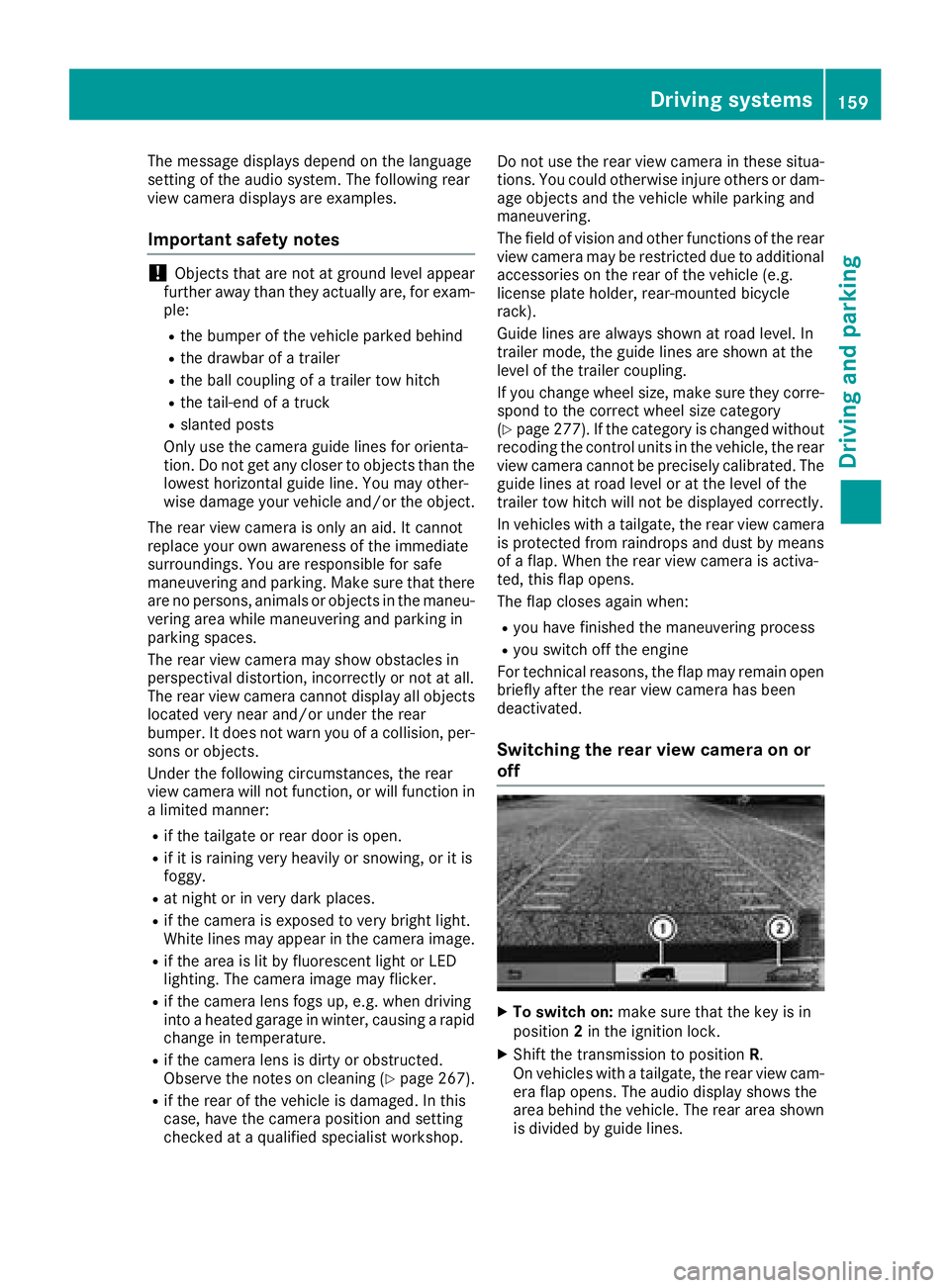
The message displays depend on the language
setting of the audio system. The following rear
view camera displays are examples.
Important safety notes
!Objects that are not at ground level appear
further away than they actually are, for exam-
ple:
Rthe bumper of the vehicle parked behind
Rthe drawbar of a trailer
Rthe ball coupling of a trailer tow hitch
Rthe tail-end of a truck
Rslanted posts
Only use the camera guide lines for orienta-
tion. Do not get any closer to objects than the
lowest horizontal guide line. You may other-
wise damage your vehicle and/or the object.
The rear view camera is only an aid. It cannot
replace your own awareness of the immediate
surroundings. You are responsible for safe
maneuvering and parking. Make sure that there
are no persons, animals or objects in the maneu- vering area while maneuvering and parking in
parking spaces.
The rear view camera may show obstacles in
perspectival distortion, incorrectly or not at all.
The rear view camera cannot display all objects
located very near and/or under the rear
bumper. It does not warn you of a collision, per-
sons or objects.
Under the following circumstances, the rear
view camera will not function, or will function in
a limited manner:
Rif the tailgate or rear door is open.
Rif it is raining very heavily or snowing, or it is
foggy.
Rat night or in very dark places.
Rif the camera is exposed to very bright light.
White lines may appear in the camera image.
Rif the area is lit by fluorescent light or LED
lighting. The camera image may flicker.
Rif the camera lens fogs up, e.g. when driving
into a heated garage in winter, causing a rapid
change in temperature.
Rif the camera lens is dirty or obstructed.
Observe the notes on cleaning (Ypage 267).
Rif the rear of the vehicle is damaged. In this
case, have the camera position and setting
checked at a qualified specialist workshop. Do not use the rear view camera in these situa-
tions. You could otherwise injure others or dam-
age objects and the vehicle while parking and
maneuvering.
The field of vision and other functions of the rear view camera may be restricted due to additional
accessories on the rear of the vehicle (e.g.
license plate holder, rear-mount
ed bicycle
rack).
Guide lines are always shown at road level. In
trailer mode, the guide lines are shown at the
level of the trailer coupling.
If you change wheel size, make sure they corre- spond to the correct wheel size category
(
Ypage 277). If the category is changed without
recoding the control units in the vehicle, the rear
view camera cannot be precisely calibrated. The
guide lines at road level or at the level of the
trailer tow hitch will not be displayed correctly.
In vehicles with a tailgate, the rear view camera
is protected from raindrops and dust by means
of a flap. When the rear view camera is activa-
ted, this flap opens.
The flap closes again when:
Ryou have finished the maneuvering process
Ryou switch off the engine
For technical reasons, the flap may remain open
briefly after the rear view camera has been
deactivated.
Switching the rear view camera on or
off
XTo switch on: make sure that the key is in
position 2in the ignition lock.
XShift the transmission to position R.
On vehicles with a tailgate, the rear view cam-
era flap opens. The audio display shows the
area behind the vehicle. The rear area shown
is divided by guide lines.
Driving systems159
Driving and parking
Z
Page 173 of 318
On-board computer (vehicles without
steering wheel buttons)
Operating the on-board computer
Overview
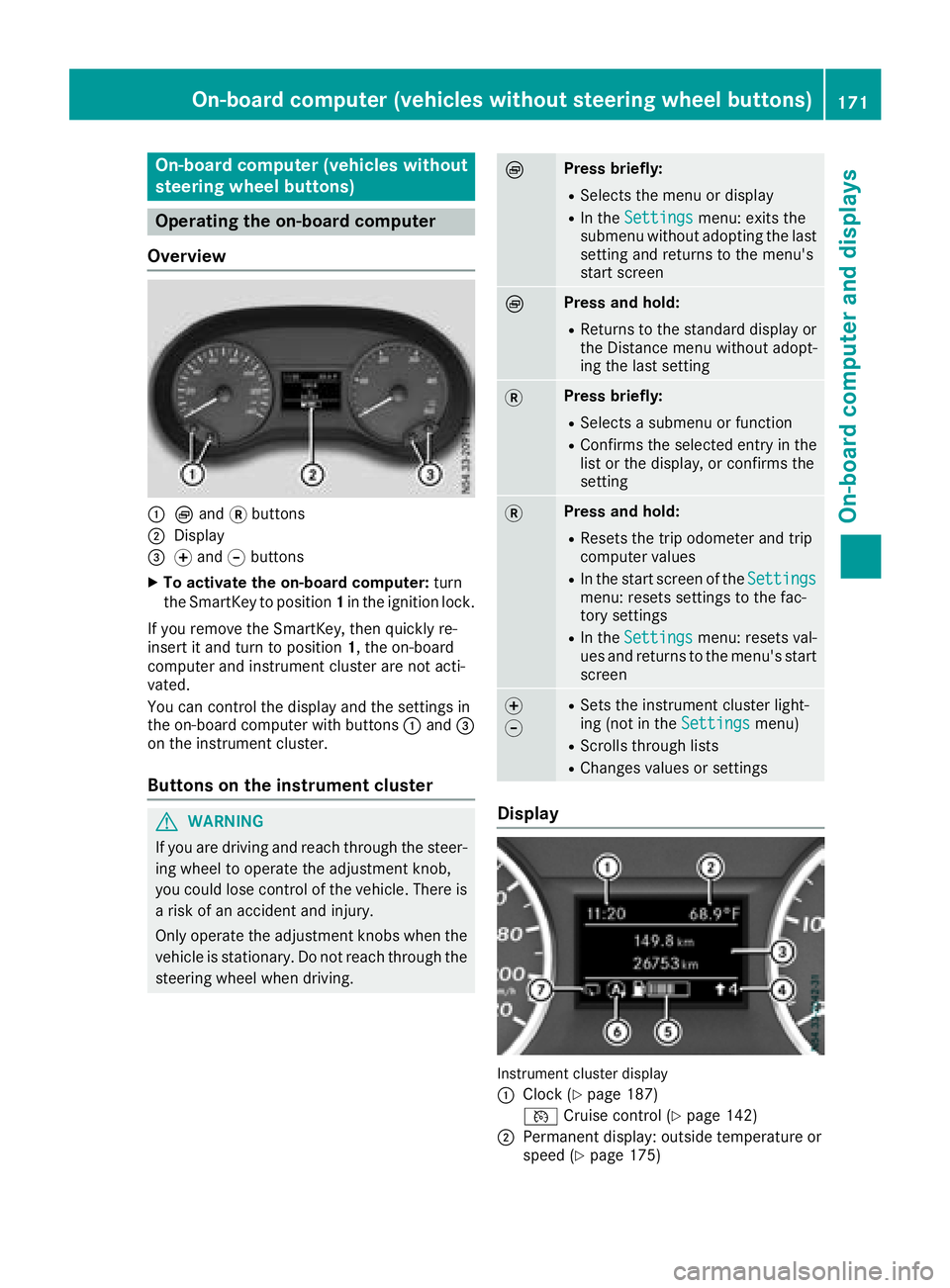
:È and 3buttons
;Display
=f and gbuttons
XTo activate the on-board computer: turn
the SmartKey to position 1in the ignition lock.
If you remove the SmartKey, then quickly re-
insert it and turn to position 1, the on-board
computer and instrument cluster are not acti-
vated.
You can control the display and the settings in
the on-board computer with buttons :and =
on the instrument cluster.
Buttons on the instrument cluster
GWARNING
If you are driving and reach through the steer- ing wheel to operate the adjustment knob,
you could lose control of the vehicle. There is
a risk of an accident and injury.
Only operate the adjustment knobs when thevehicle is stationary. Do not reach through the
steering wheel when driving.
ÈPress briefly:
RSelects the menu or display
RIn the Settingsmenu: exits the
submenu without adopting the last
setting and returns to the menu's
start screen
ÈPress and hold:
RReturns to the standard display or the Distance menu without adopt-
ing the last setting
3Press briefly:
RSelects a submenu or function
RConfirms the selected entry in the
list or the display, or confirms the
setting
3Press and hold:
RResets the trip odometer and trip
computer values
RIn the start screen of the Settingsmenu: resets settings to the fac-
tory settings
RIn theSettingsmenu: resets val-
ues and returns to the menu's start
screen
f
gRSets the instrument cluster light-
ing (not in the Settingsmenu)
RScrolls through lists
RChanges values or settings
Display
Instrument cluster display
:
Clock (Ypage 187)
V Cruise control (
Ypage 142)
;Permanent display: outside temperature or
speed (Ypage 175)
On-board computer (vehicles without steering wheel buttons)171
On-board computer and displays
Z