lock MERCEDES-BENZ METRIS 2017 MY17 Operator’s Manual
[x] Cancel search | Manufacturer: MERCEDES-BENZ, Model Year: 2017, Model line: METRIS, Model: MERCEDES-BENZ METRIS 2017Pages: 318, PDF Size: 5.01 MB
Page 176 of 318
Settings menu
Introduction
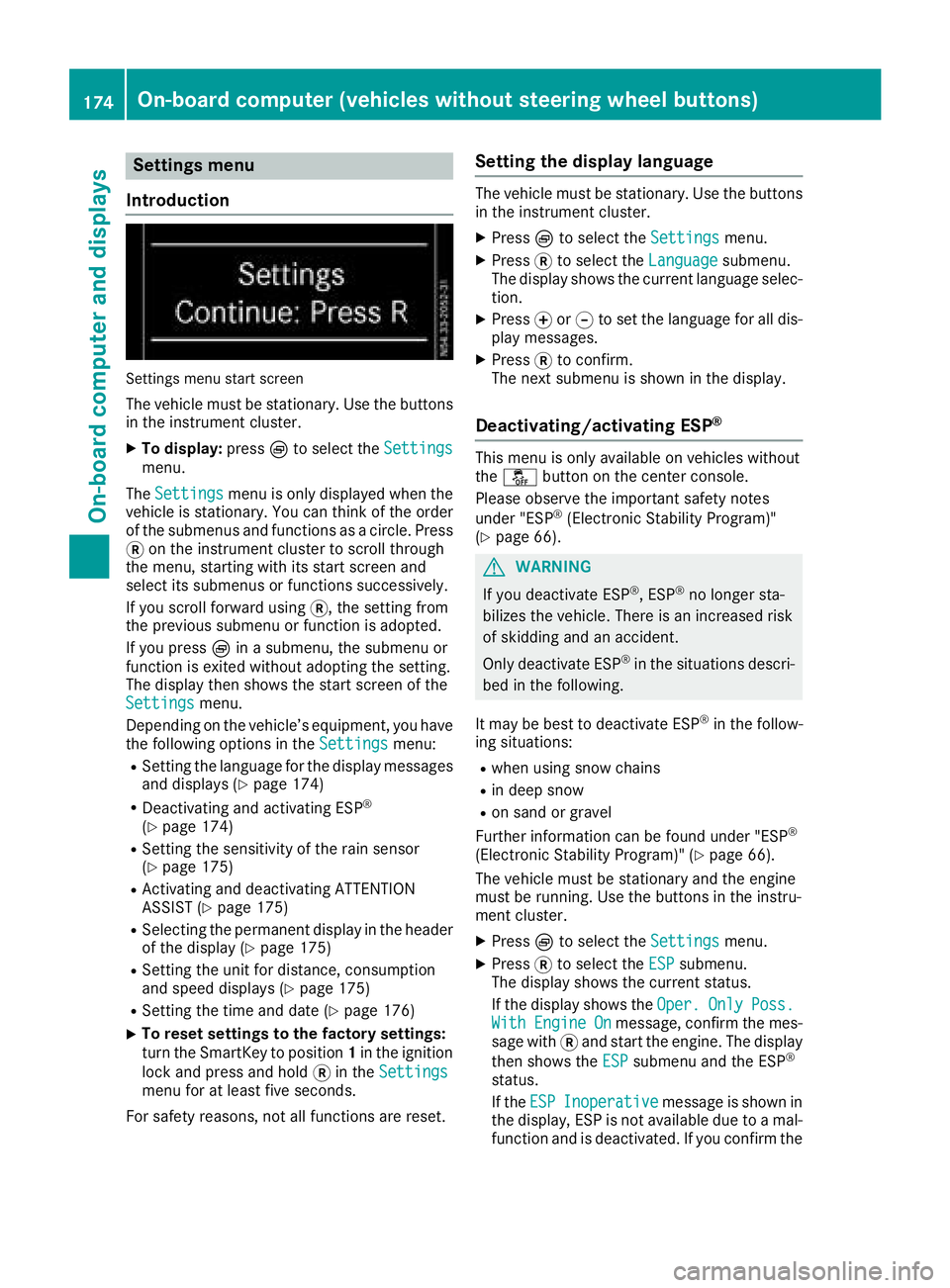
Settings menu start screen
The vehicle must be stationary. Use the buttons
in the instrument cluster.
XTo display: pressÈto select the Settingsmenu.
The Settings
menu is only displayed when the
vehicle is stationary. You can think of the order
of the submenus and functions as a circle. Press
3 on the instrument cluster to scroll through
the menu, starting with its start screen and
select its submenus or functions successively.
If you scroll forward using 3, the setting from
the previous submenu or function is adopted.
If you press Èin a submenu, the submenu or
function is exited without adopting the setting.
The display then shows the start screen of the
Settings
menu.
Depending on the vehicle’s equipment, you have the following options in the Settings
menu:
RSetting the language for the display messages
and displays (Ypage 174)
RDeactivating and activating ESP®
(Ypage 174)
RSetting the sensitivity of the rain sensor
(Ypage 175)
RActivating and deactivating ATTENTION
ASSIST (Ypage 175)
RSelecting the permanent display in the header
of the display (Ypage 175)
RSetting the unit for distance, consumption
and speed displays (Ypage 175)
RSetting the time and date (Ypage 176)
XTo reset settings to the factory settings:
turn the SmartKey to position 1in the ignition
lock and press and hold 3in the Settings
menu for at least five seconds.
For safety reasons, not all functions are reset.
Setting the display language
The vehicle must be stationary. Use the buttons
in the instrument cluster.
XPress Èto select the Settingsmenu.
XPress3to select the Languagesubmenu.
The display shows the current language selec- tion.
XPress forg to set the language for all dis-
play messages.
XPress 3to confirm.
The next submenu is shown in the display.
Deactivating/activating ESP®
This menu is only available on vehicles without
the å button on the center console.
Please observe the important safety notes
under "ESP
®(Electronic Stability Program)"
(Ypage 66).
GWARNING
If you deactivate ESP
®, ESP®no longer sta-
bilizes the vehicle. There is an increased risk
of skidding and an accident.
Only deactivate ESP
®in the situations descri-
bed in the following.
It may be best to deactivate ESP
®in the follow-
ing situations:
Rwhen using snow chains
Rin deep snow
Ron sand or gravel
Further information can be found under "ESP®
(Electronic Stability Program)" (Ypage 66).
The vehicle must be stationary and the engine
must be running. Use the buttons in the instru-
ment cluster.
XPress Èto select the Settingsmenu.
XPress3to select the ESPsubmenu.
The display shows the current status.
If the display shows the Oper.
OnlyPoss.WithEngineOnmessage, confirm the mes-
sage with 3and start the engine. The display
then shows the ESP
submenu and the ESP®
status.
If theESP
Inoperativemessage is shown in
the display, ESP is not available due to a mal-
function and is deactivated. If you confirm the
174On-board computer (vehicles without steering wheel buttons)
On-board computer and displays
Page 178 of 318
Setting the time and date
The vehicle must be stationary. Use the buttonsin the instrument cluster.
XPress Èto select the Settingsmenu.
XPress3to select the time and date display.
XPress forg to set the hours and press 3
to confirm.
XPress forg to set the minutes and press
3 to confirm.
XPress forg to set the day and press 3to
confirm.
XPress forg to set the month and press 3
to confirm.
XPress forg to set the year and press 3to
confirm.
The display shows the Settings
menu again.
On-board computer (vehicles with
steering wheel buttons)
Operating the on-board computer
Overview
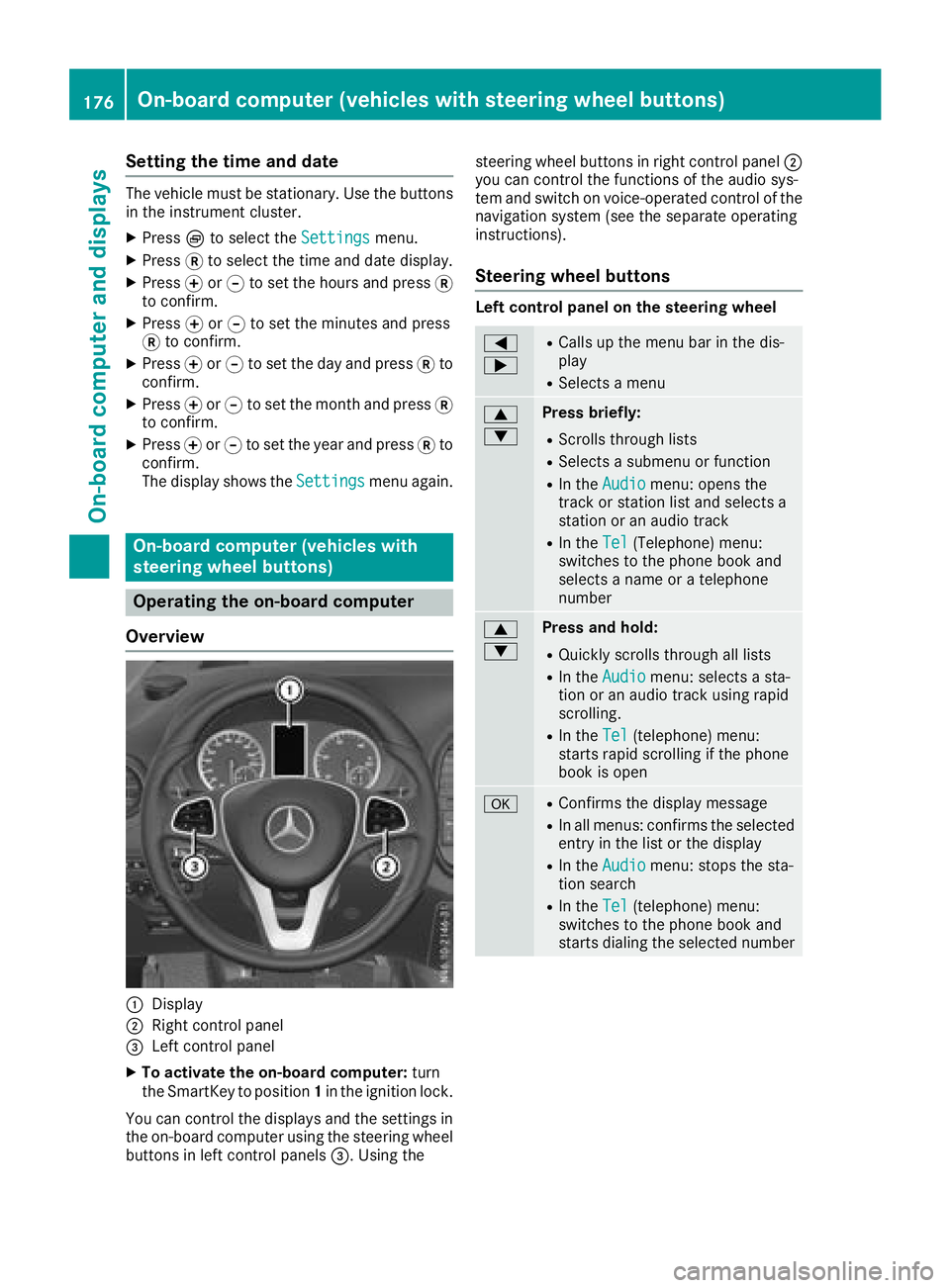
:Display
;Right control panel
=Left control panel
XTo activate the on-board computer: turn
the SmartKey to position 1in the ignition lock.
You can control the displays and the settings in the on-board computer using the steering wheel
buttons in left control panels =. Using thesteering wheel buttons in right control panel
;
you can control the functions of the audio sys-
tem and switch on voice-operated control of the
navigation system (see the separate operating
instructions).
Steering wheel buttons
Left control panel on the steering wheel
=
;RCalls up the menu bar in the dis-
play
RSelects a menu
9
:Press briefly:
RScrolls through lists
RSelects a submenu or function
RIn the Audiomenu: opens the
track or station list and selects a
station or an audio track
RIn the Tel(Telephone) menu:
switches to the phone book and
selects a name or a telephone
number
9
:Press and hold:
RQuickly scrolls through all lists
RIn the Audiomenu: selects a sta-
tion or an audio track using rapid
scrolling.
RIn the Tel(telephone) menu:
starts rapid scrolling if the phone
book is open
aRConfirms the display message
RIn all menus: confirms the selected
entry in the list or the display
RIn the Audiomenu: stops the sta-
tion search
RIn the Tel(telephone) menu:
switches to the phone book and
starts dialing the selected number
176On-board computer (vehicles with steering wheel buttons)
On-board computer and displays
Page 179 of 318
%Press briefly:
RBack
RIn theAudiomenu: exits the track
or station list
RHides display messages
RExits the telephone book/redial
memory
RVehicles with a navigation system:
switches off voice-operated con-
trol of the navigation system (see
the manufacturer's operating
instructions)
%Press and hold:
RCalls up the standard display in the
Tripmenu
Right control panel on the steering wheel
6RMakes or accepts a call
RSwitches to the redial memory
~RRejects or ends a call
RExits the telephone book/redial
memory
W
XRAdjusts the volume
óRVehicles with a navigation system:
switches on voice-operated con-
trol of the navigation system (see
the manufacturer's operating
instructions)
8RMute
iThe audio devices, telephone and voice-
operated control using the steering wheel
buttons in the right control panel only func-
tion with a Mercedes-Benz audio or naviga-
tion system. If you are using an audio or nav-
igation system from another manufacturer,
the described functions may be restricted or
not available at all.
Display
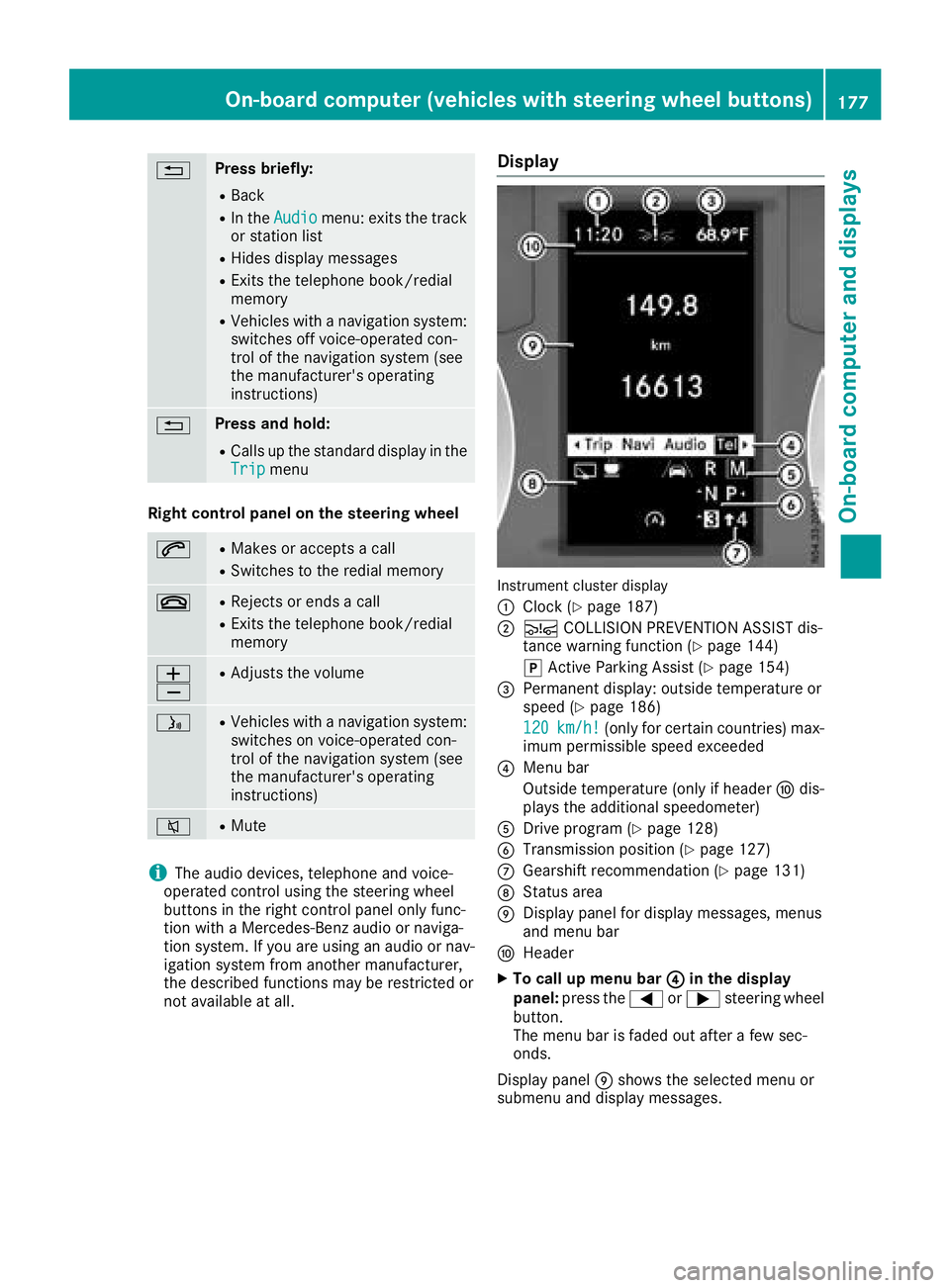
Instrument cluster display
:
Clock (Ypage 187)
;Ä COLLISION PREVENTION ASSIST dis-
tance warning function (Ypage 144)
j Active Parking Assist (
Ypage 154)
=Permanent display: outside temperature or
speed (Ypage 186)
120
km/h!(only for certain countries) max-
imum permissible speed exceeded
?Menu bar
Outside temperature (only if header Fdis-
plays the additional speedometer)
ADrive program (Ypage 128)
BTransmission position (Ypage 127)
CGearshift recommendation (Ypage 131)
DStatus area
EDisplay panel for display messages, menus
and menu bar
FHeader
XTo call up menu bar ?in the display
panel: press the =or; steering wheel
button.
The menu bar is faded out after a few sec-
onds.
Display panel Eshows the selected menu or
submenu and display messages.
On-board computer (vehicles with steering wheel buttons)177
On-board computer and displays
Z
Page 189 of 318
Using the steering wheel buttons
XPress=or; to select the Settingsmenu.
XPress:or9 to select Inst. Clus‐ter.
XPressato confirm.
XPress :or9 to select PermanentDisplay:.
XPressato confirm.
The display shows the current selection of
Outside Temp.
or Speedom..
XPress ato change the setting.
Clock/Date submenu
Setting the time
Using the steering wheel buttons
XPress =or; to select the Settingsmenu.
XPress:or9 to select Time/Date.
XPressato confirm.
XPress :or9 to select the Time:func-
tion.
The display shows the current time.
XTo set the time: pressaagain.
XPress =or; to switch between hours
and minutes.
XPress :or9 to set the hours or
minutes.
XThen press ato confirm.
The display shows the updated time.
Setting the date
Using the steering wheel buttons
XPress =or; to select the Settingsmenu.
XPress:or9 to select Time/Date.
XPressato confirm.
XPress :or9 to select the Date:func-
tion.
The display shows the current date.
XTo set the date: pressaagain.
XPress =or; to switch between day,
month and year.
XPress :or9 to set the day, month or
year.
XThen press ato confirm.
The display shows the updated date.
Lights submenu
Activating/deactivating the surround
lighting and exterior lighting delayed
switch-off
If you activate the Locator Lightingfunction
and the light switch is turned to the Ãposi-
tion, the following functions are activated when
it is dark:
RSurround lighting: the exterior lighting
remains on for 40 seconds after the doors are
unlocked. When you start the engine, the sur-
round lighting is deactivated and the auto-
matic headlamp feature is activated
(
Ypage 95).
RExterior lighting delayed switch-off: the
exterior lighting remains on for 60 seconds
after the engine is switched off. If you close all
the doors and the tailgate/rear doors, the
exterior lighting switches off after
15 seconds.
Using the steering wheel buttons
XPress =or; to select the Settingsmenu.
XPress:or9 to select Lights.
XPressato confirm.
XPress :or9 to select the LocatorLightingfunction.
The current status is shown.
XTo activate/deactivate: pressaagain.
If you change the setting, conversion does not
take place until the next time the vehicle is
stationary.
Temporarily deactivating the exterior lighting
delayed switch-off:
XBefore leaving the vehicle, turn the key to
position 0in the ignition lock.
XTurn the key to position 2in the ignition lock.
The exterior lighting delayed switch-off is
deactivated until the next time the engine is
started.
With surround lighting and exterior lighting
delayed switch-off, the following light up
depending on the vehicle's equipment:
RParking lamps
RFog lamps
RLow-beam headlamps
RDaytime running lamps
On-board computer (vehicles with steering wheel buttons)187
On-board computer and displays
Z
Page 190 of 318
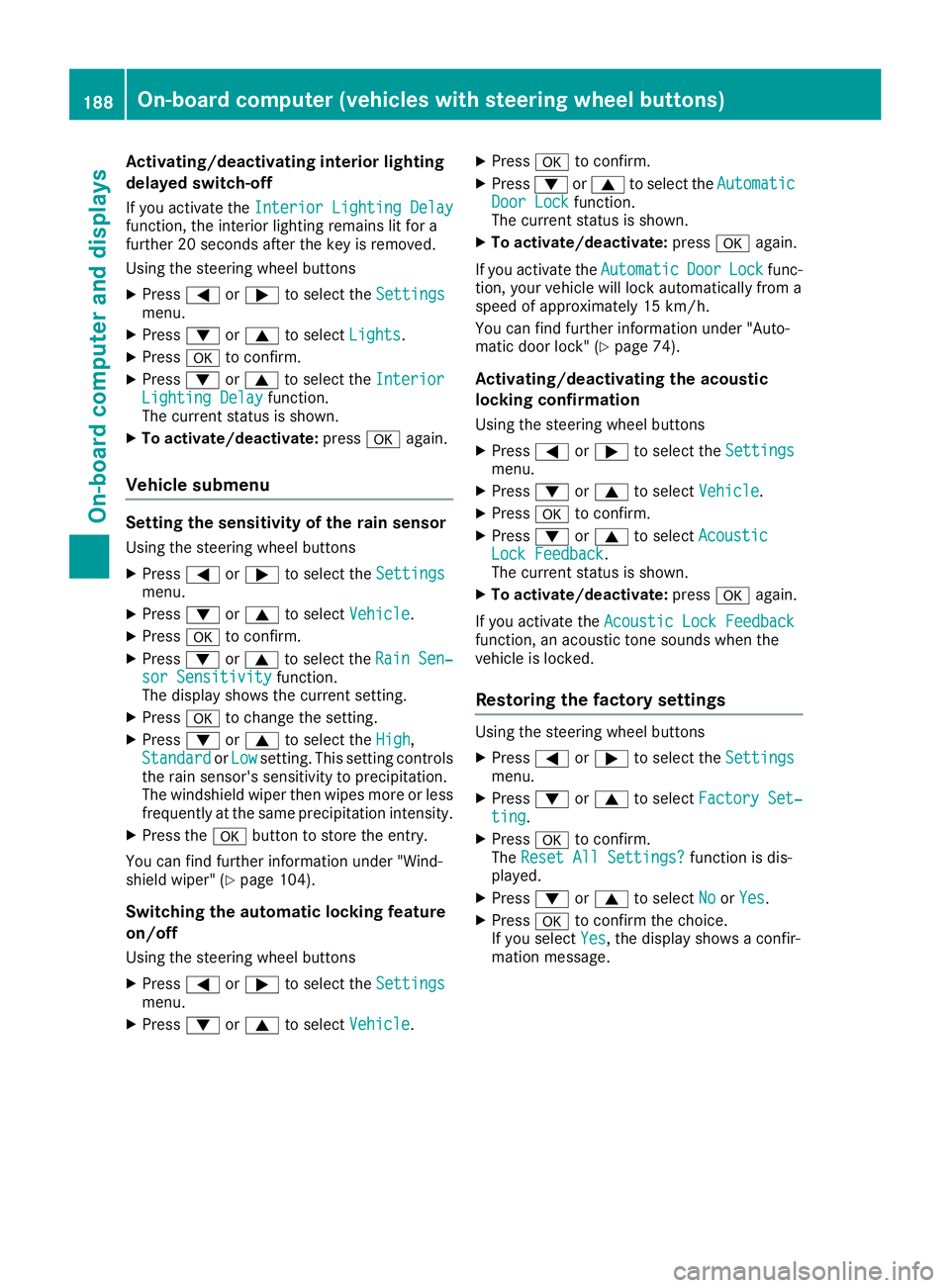
Activating/deactivating interiorlighting
delayed switch-off
If you activat eth eInterior Lighting Delayfunction ,th einterio rlightin gremains lit for a
further 20 seconds after th eke yis removed.
Usin gth esteering whee lbuttons
XPress =or; to select th eSettingsmenu.
XPress :or9 to select Lights.
XPressato confirm .
XPress:or9 to select th eInteriorLighting Delayfunction .
The curren tstatus is shown.
XTo act ivate/deact ivate:pressaagain.
Vehicle submenu
Setting the sensitivity of thera in sensor
Usin gth esteering whee lbuttons
XPress =or; to select th eSettingsmenu.
XPress :or9 to select Vehicle.
XPressato confirm .
XPress:or9 to select th eRai nSen ‐sor Sensitivityfunction .
The display shows th ecurren tsetting.
XPress ato chang eth esetting.
XPress :or9 to select th eHig h,
Standardor Lowsetting. This settin gcontrol s
th erain sensor's sensitivit yto precipitation.
The windshield wiper then wipes mor eor less
frequently at th esame precipitatio nintensity.
XPress th ea buttonto store th eentry.
You can fin dfurther information under "Wind-
shield wiper " (
Ypage 104).
Switching the automatic locking featu re
on/off
Usin gth esteering whee lbuttons
XPress =or; to select th eSettingsmenu.
XPress :or9 to select Vehicle.
XPressato confirm .
XPress:or9 to select th eAutomaticDoo rLoc kfunction .
The curren tstatus is shown.
XTo act ivate/deact ivate:pressaagain.
If you activat eth eAutomatic
Doo rLockfunc-
tion, your vehicl ewill loc kautomatically from a
spee dof approximately 15 km/h.
You can fin dfurther information under "Auto-
matic door lock" (
Ypage 74).
Activating/deactivating the acoustic
locking confi rmation
Usin gth esteering whee lbuttons
XPress =or; to select th eSettingsmenu.
XPress :or9 to select Vehicle.
XPressato confirm .
XPress:or9 to select AcousticLockFeedback.
The curren tstatus is shown.
XTo act ivate/deact ivate:pressaagain.
If you activat eth eAcoustic Loc kFeedback
function ,an acoustic tone sounds when th e
vehicl eis locked.
Restoring the factory settings
Usin gth esteering whee lbuttons
XPress =or; to select th eSettingsmenu.
XPress :or9 to select FactorySet ‐ting.
XPress ato confirm .
The Reset All Settings?function is dis-
played.
XPress :or9 to select NoorYes.
XPress ato confirm th echoice.
If you select Yes,th edisplay shows aconfir-
mation message .
188On-board computer (vehicles with steering wheel buttons)
On-board computer and displays
Page 192 of 318
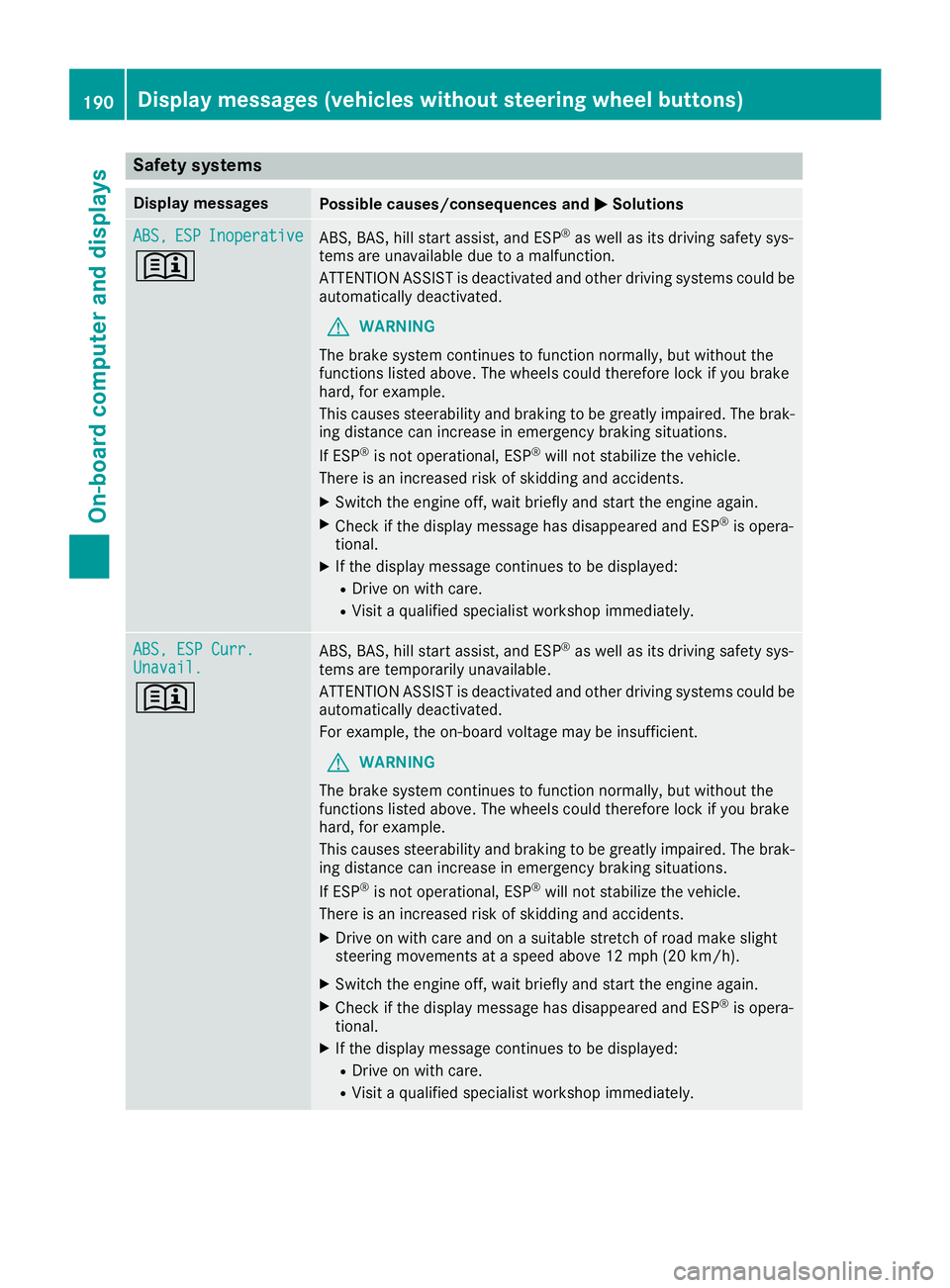
Safety systems
Display messagesPossible causes/consequences andMSolutions
ABS,ESPInoperative
+
ABS, BAS, hill start assist, and ESP®as well as its driving safety sys-
tems are unavailable due to a malfunction.
ATTENTION ASSIST is deactivated and other driving systems could be
automatically deactivated.
GWARNING
The brake system continues to function normally, but without the
functions listed above. The wheels could therefore lock if you brake
hard, for example.
This causes steerability and braking to be greatly impaired. The brak-
ing distance can increase in emergency braking situations.
If ESP
®is not operational, ESP®will not stabilize the vehicle.
There is an increased risk of skidding and accidents.
XSwitch the engine off, wait briefly and start the engine again.
XCheck if the display message has disappeared and ESP®is opera-
tional.
XIf the display message continues to be displayed:
RDrive on with care.
RVisit a qualified specialist workshop immediately.
ABS, ESP Curr.Unavail.
+
ABS, BAS, hill start assist, and ESP®as well as its driving safety sys-
tems are temporarily unavailable.
ATTENTION ASSIST is deactivated and other driving systems could be
automatically deactivated.
For example, the on-board voltage may be insufficient.
GWARNING
The brake system continues to function normally, but without the
functions listed above. The wheels could therefore lock if you brake
hard, for example.
This causes steerability and braking to be greatly impaired. The brak-
ing distance can increase in emergency braking situations.
If ESP
®is not operational, ESP®will not stabilize the vehicle.
There is an increased risk of skidding and accidents.
XDrive on with care and on a suitable stretch of road make slight
steering movements at a speed above 12 mph (20 km/h).
XSwitch the engine off, wait briefly and start the engine again.
XCheck if the display message has disappeared and ESP®is opera-
tional.
XIf the display message continues to be displayed:
RDrive on with care.
RVisit a qualified specialist workshop immediately.
190Display messages (vehicles without steering wheel buttons)
On-board computer and displays
Page 206 of 318
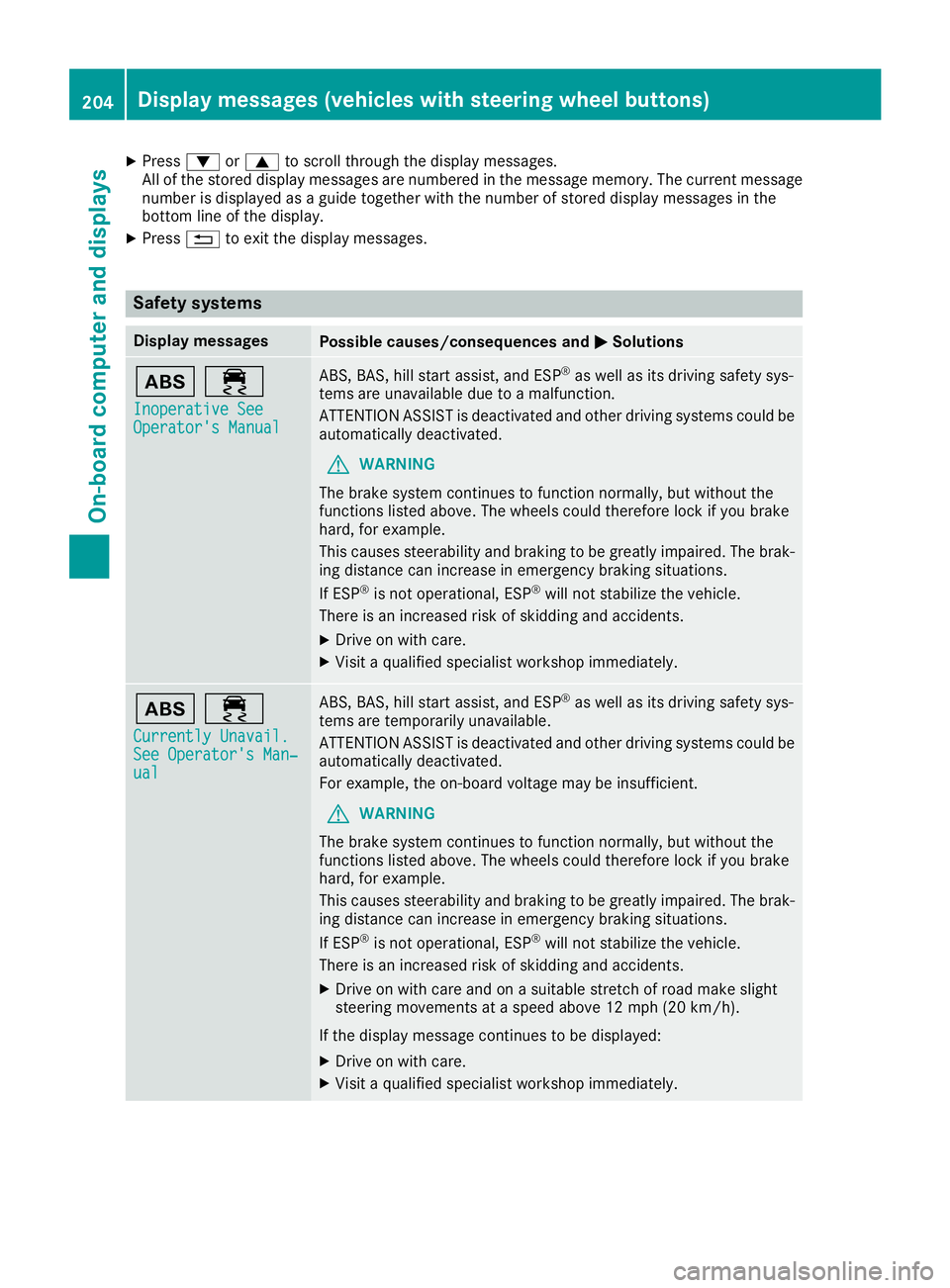
XPress:or9 to scroll through the display messages.
All of the stored display messages are numbered in the message memory. The current message number is displayed as a guide together with the number of stored display messages in the
bottom line of the display.
XPress %to exit the display messages.
Safety systems
Display messagesPossible causes/consequences and MSolutions
ò÷
Inoperative SeeOperator's Manual
ABS, BAS, hill start assist, and ESP®as well as its driving safety sys-
tems are unavailable due to a malfunction.
ATTENTION ASSIST is deactivated and other driving systems could be
automatically deactivated.
GWARNING
The brake system continues to function normally, but without the
functions listed above. The wheels could therefore lock if you brake
hard, for example.
This causes steerability and braking to be greatly impaired. The brak-
ing distance can increase in emergency braking situations.
If ESP
®is not operational, ESP®will not stabilize the vehicle.
There is an increased risk of skidding and accidents.
XDrive on with care.
XVisit a qualified specialist workshop immediately.
ò÷
Currently Unavail.See Operator's Man‐ual
ABS, BAS, hill start assist, and ESP®as well as its driving safety sys-
tems are temporarily unavailable.
ATTENTION ASSIST is deactivated and other driving systems could be
automatically deactivated.
For example, the on-board voltage may be insufficient.
GWARNING
The brake system continues to function normally, but without the
functions listed above. The wheels could therefore lock if you brake
hard, for example.
This causes steerability and braking to be greatly impaired. The brak-
ing distance can increase in emergency braking situations.
If ESP
®is not operational, ESP®will not stabilize the vehicle.
There is an increased risk of skidding and accidents.
XDrive on with care and on a suitable stretch of road make slight
steering movements at a speed above 12 mph (20 km/h).
If the display message continues to be displayed:
XDrive on with care.
XVisit a qualified specialist workshop immediately.
204Display messages (vehicles with steering wheel buttons)
On-board computer and displays
Page 223 of 318
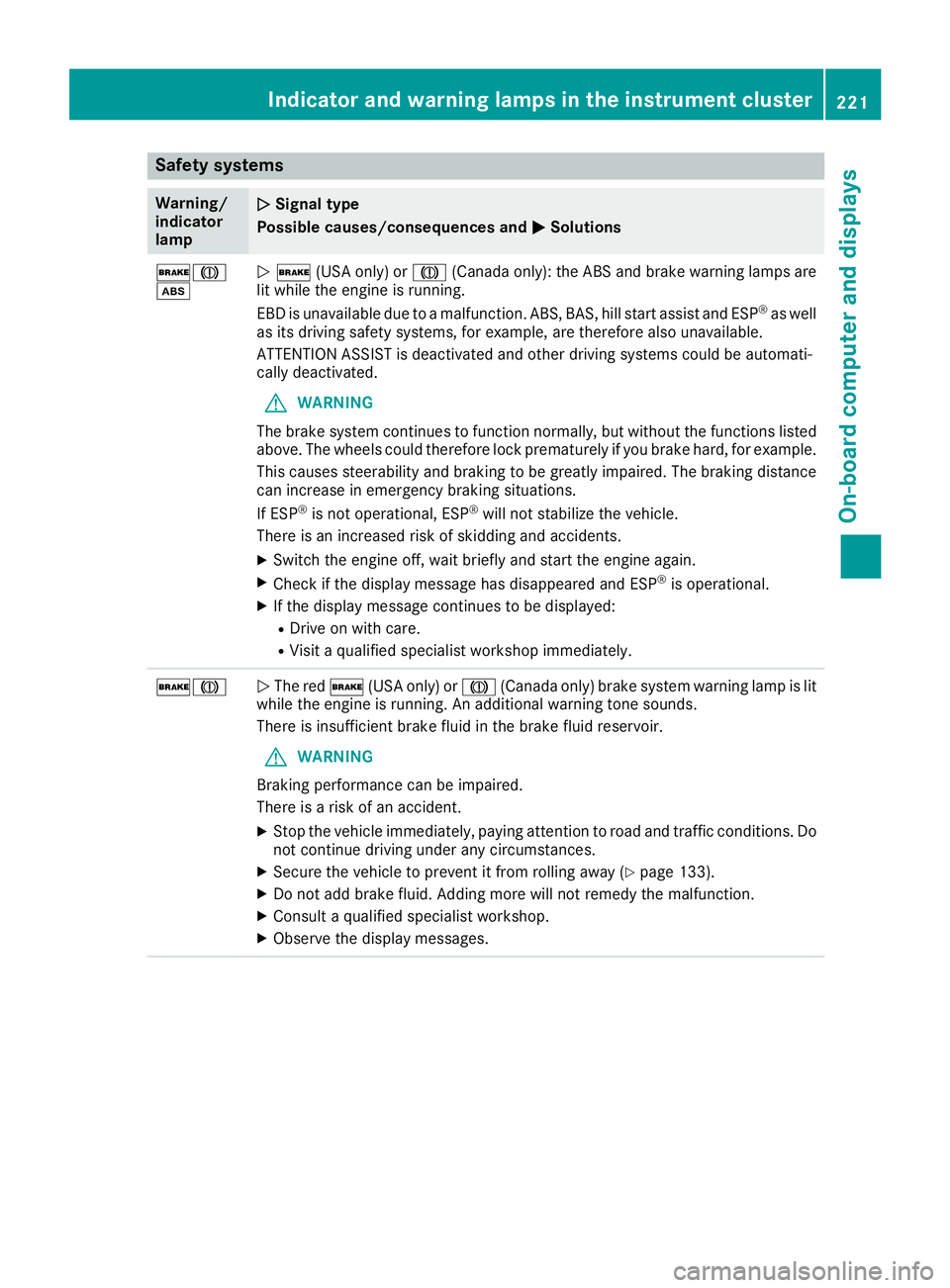
Safety systems
Warning/
indicator
lampNSignal type
Possible causes/consequences and M
Solutions
$J
òN$ (USA only) or J(Canada only): the ABS and brake warning lamps are
lit while the engine is running.
EBD is unavailable due to a malfunction. ABS, BAS, hill start assist and ESP
®as well
as its driving safety systems, for example, are therefore also unavailable.
ATTENTION ASSIST is deactivated and other driving systems could be automati-
cally deactivated.
GWARNING
The brake system continues to function normally, but without the functions listed
above. The wheels could therefore lock prematurely if you brake hard, for example.
This causes steerability and braking to be greatly impaired. The braking distance
can increase in emergency braking situations.
If ESP
®is not operational, ESP®will not stabilize the vehicle.
There is an increased risk of skidding and accidents.
XSwitch the engine off, wait briefly and start the engine again.
XCheck if the display message has disappeared and ESP®is operational.
XIf the display message continues to be displayed:
RDrive on with care.
RVisit a qualified specialist workshop immediately.
$JN The red $(USA only) or J(Canada only) brake system warning lamp is lit
while the engine is running. An additional warning tone sounds.
There is insufficient brake fluid in the brake fluid reservoir.
GWARNING
Braking performance can be impaired.
There is a risk of an accident.
XStop the vehicle immediately, paying attention to road and traffic conditions. Do
not continue driving under any circumstances.
XSecure the vehicle to prevent it from rolling away (Ypage 133).
XDo not add brake fluid. Adding more will not remedy the malfunction.
XConsult a qualified specialist workshop.
XObserve the display messages.
Indicator and warning lamps in the instrument cluster221
On-board computer and displays
Z
Page 224 of 318
Warning/
indicator
lampNSignal type
Possible causes/consequences and M
Solutions
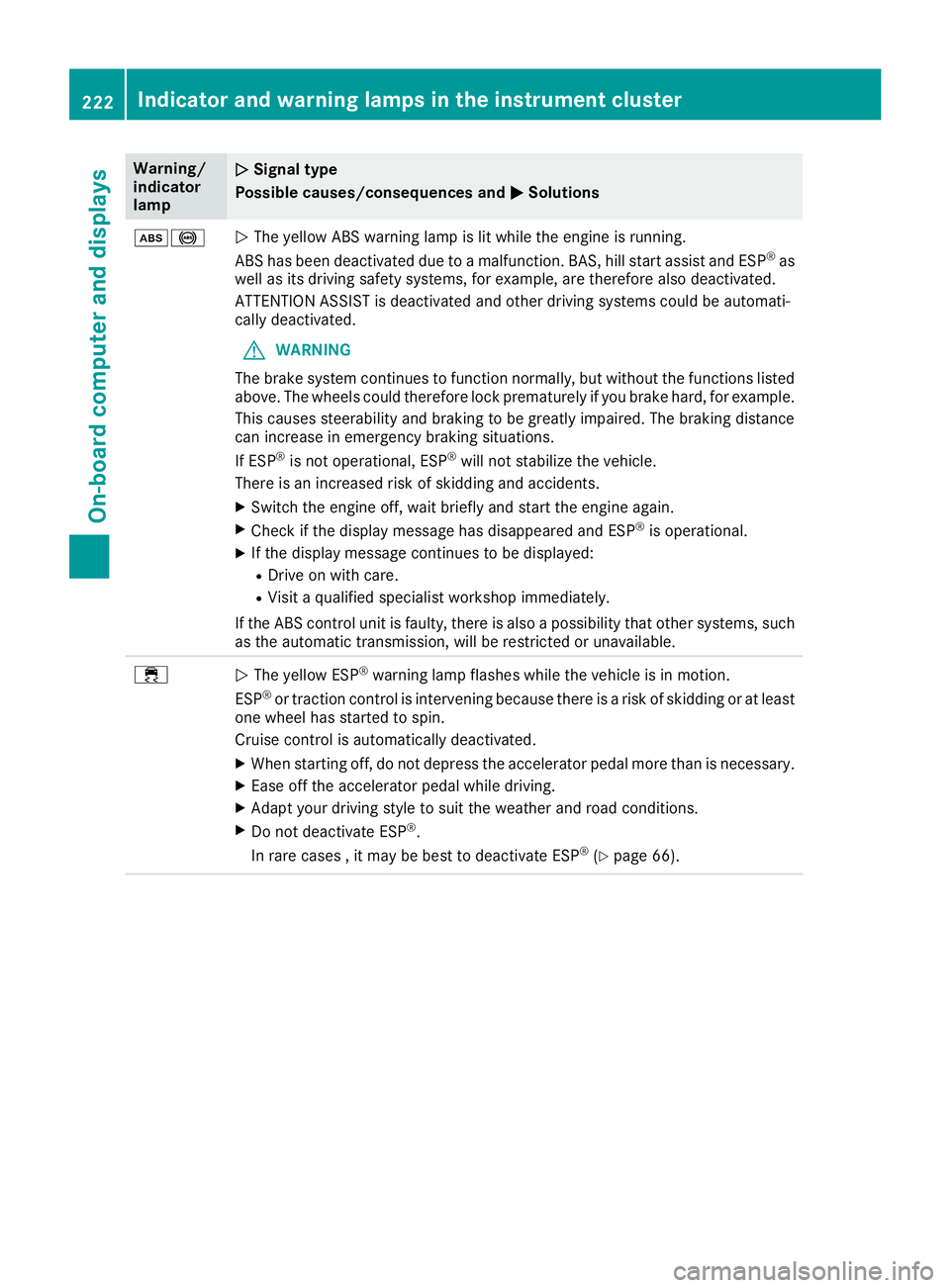
ò!NThe yellow ABS warning lamp is lit while the engine is running.
ABS has been deactivated due to a malfunction. BAS, hill start assist and ESP®as
well as its driving safety systems, for example, are therefore also deactivated.
ATTENTION ASSIST is deactivated and other driving systems could be automati-
cally deactivated.
GWARNING
The brake system continues to function normally, but without the functions listed
above. The wheels could therefore lock prematurely if you brake hard, for example.
This causes steerability and braking to be greatly impaired. The braking distance
can increase in emergency braking situations.
If ESP
®is not operational, ESP®will not stabilize the vehicle.
There is an increased risk of skidding and accidents.
XSwitch the engine off, wait briefly and start the engine again.
XCheck if the display message has disappeared and ESP®is operational.
XIf the display message continues to be displayed:
RDrive on with care.
RVisit a qualified specialist workshop immediately.
If the ABS control unit is faulty, there is also a possibility that other systems, such
as the automatic transmission, will be restricted or unavailable.
÷N The yellow ESP®warning lamp flashes while the vehicle is in motion.
ESP®or traction control is intervening because there is a risk of skidding or at least
one wheel has started to spin.
Cruise control is automatically deactivated.
XWhen starting off, do not depress the accelerator pedal more than is necessary.
XEase off the accelerator pedal while driving.
XAdapt your driving style to suit the weather and road conditions.
XDo not deactivate ESP®.
In rare cases , it may be best to deactivate ESP®(Ypage 66).
222Indicator and warning lamps in the instrument cluster
On-board computer and displays
Page 228 of 318
Warning/
indicator
lampNSignal type
Possible causes/consequences and M
Solutions
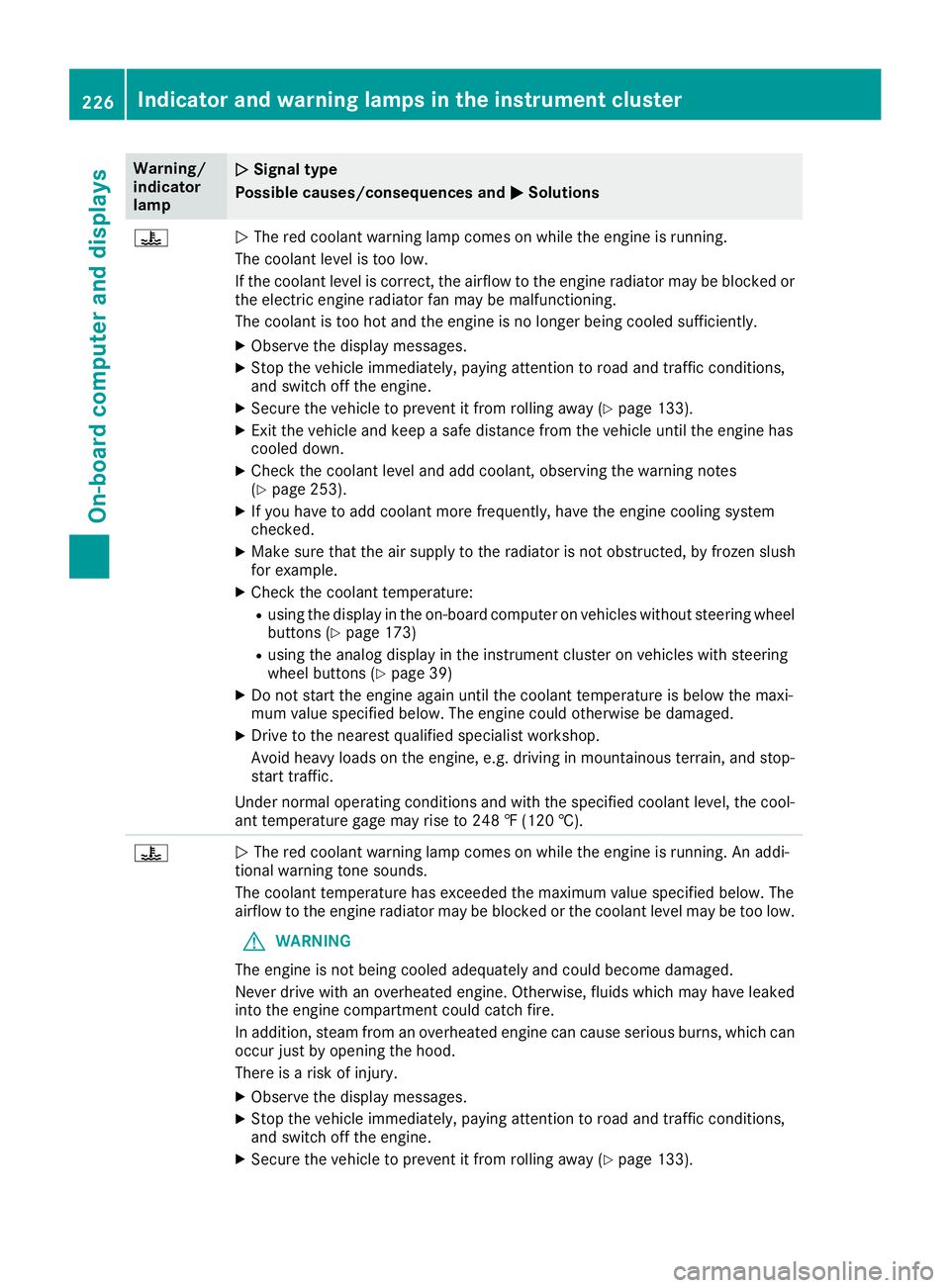
?NThe red coolant warning lamp comes on while the engine is running.
The coolant level is too low.
If the coolant level is correct, the airflow to the engine radiator may be blocked or
the electric engine radiator fan may be malfunctioning.
The coolant is too hot and the engine is no longer being cooled sufficiently.
XObserve the display messages.
XStop the vehicle immediately, paying attention to road and traffic conditions,
and switch off the engine.
XSecure the vehicle to prevent it from rolling away (Ypage 133).
XExit the vehicle and keep a safe distance from the vehicle until the engine has
cooled down.
XCheck the coolant level and add coolant, observing the warning notes
(Ypage 253).
XIf you have to add coolant more frequently, have the engine cooling system
checked.
XMake sure that the air supply to the radiator is not obstructed, by frozen slush
for example.
XCheck the coolant temperature:
Rusing the display in the on-board computer on vehicles without steering wheel
buttons (Ypage 173)
Rusing the analog display in the instrument cluster on vehicles with steering
wheel buttons (Ypage 39)
XDo not start the engine again until the coolant temperature is below the maxi-
mum value specified below. The engine could otherwise be damaged.
XDrive to the nearest qualified specialist workshop.
Avoid heavy loads on the engine, e.g. driving in mountainous terrain, and stop-
start traffic.
Under normal operating conditions and with the specified coolant level, the cool-
ant temperature gage may rise to 248 ‡ (120 †).
?N The red coolant warning lamp comes on while the engine is running. An addi-
tional warning tone sounds.
The coolant temperature has exceeded the maximum value specified below. The
airflow to the engine radiator may be blocked or the coolant level may be too low.
GWARNING
The engine is not being cooled adequately and could become damaged.
Never drive with an overheated engine. Otherwise, fluids which may have leaked
into the engine compartment could catch fire.
In addition, steam from an overheated engine can cause serious burns, which can
occur just by opening the hood.
There is a risk of injury.
XObserve the display messages.
XStop the vehicle immediately, paying attention to road and traffic conditions,
and switch off the engine.
XSecure the vehicle to prevent it from rolling away (Ypage 133).
226Indicator and warning lamps in the instrument cluster
On-board computer and displays