trailer MERCEDES-BENZ METRIS 2018 MY18 Operator’s Manual
[x] Cancel search | Manufacturer: MERCEDES-BENZ, Model Year: 2018, Model line: METRIS, Model: MERCEDES-BENZ METRIS 2018Pages: 318, PDF Size: 5.07 MB
Page 23 of 318
Start/stop functionsee ECO start/stop function
Starting
see Starting (engine)
Starting (engine) ................................ 124
Status overview (on-board com-
puter) .................................................. 186
Steering
Display messages (vehicle with
steering wheel buttons) ................. 221
Display messages (vehicle with-
out steering wheel buttons) ........... 204
Warning lamps ...............................2 31
Steering wheel
Adjusting ......................................... 93
Button overview ............................... 41
Buttons (on-board computer) ......... 178
Cleaning ......................................... 270
Paddle shifters ............................... 132
Steering wheel paddle shifters ........132
Stickers
General safety notes ........................ 29
Stowage net ....................................... 241
Stowage spaces
see Stowage spaces and stowage
compartments
Stowage spaces and stowage com-
partments
Eyeglasses compartment ...............2 40
Glove box ....................................... 240
Important safety notes .................. 240
Stowage net ................................... 241
Summer opening
see Convenience opening feature
Summer tires ..................................... 281
Sun visor
Changing a bulb (mirror lamp) ....... 101
Overview ........................................ 241
Surround lighting (on-board com-
puter) ..................................................1 89
Switching air-recirculation mode
on/off ................................................. 118
Switching off the alarm (ATA) ............ 68
T
Tachometer........................................ 172 Tail lamps
Display messages (vehicle with-
out steering wheel buttons) ........... 198
Replacing bulbs .............................1 05
Trailer display messages (vehicle
with steering wheel buttons) ......... 212
Trailer display messages (vehicle
without steering wheel buttons) .... 198
Tailgate
Changing bulbs (ambient lamp) ..... 101
Changing bulbs (signal and ambi-
ent light) ........................................ 102
Display messages (vehicle with
steering wheel buttons) ................. 221
Display messages (vehicle with-
out steering wheel buttons) ........... 204
Important safety notes .................... 79
Opening dimensions ......................3 13
Opening/closing from the out-
side ..................................................7 9
Tank contents
Displaying the range (vehicle with
steering wheel buttons) ................. 180
Displaying the range (vehicle with-
out steering wheel buttons) ........... 175
Technical data
Capacities ...................................... 306
Cargo tie-down points .................... 314
Guide rail ....................................... 315
Loading rails .................................. 315
Roof carrier .................................... 315
Tires/wheels ................................. 302
Trailer tow hitch ............................. 315
Vehicle data ................................... 313
Vehicle dimensions ........................ 313
Telephone
Accepting a call ............................. 185
Display message ............................ 221
Introduction ................................... 184
Number from the phone book ........ 185
Redialing ........................................ 185
Rejecting/ending a call ................. 185
Temperature
Coolant (display in the instrument
cluster) .......................................... 172
Coolant (display in the on-board
computer) ...................................... 175
Outsi de te
mperature ...................... 172
Index21
Page 24 of 318
Setting (climate control) ................ 115
Theft deterrent systems
ATA (Anti-Theft Alarm system) ......... 68
Immobilizer ...................................... 67
Time
Setting (vehicle with steering
wheel buttons) ............................... 189
Setting the time (vehicle with
steering wheel buttons) ................. 189
Setting the time (vehicle without
steering wheel buttons) ................. 178
Tire pressure
Calling up (on-board computer) ..... 286
Checking manually ........................ 286
Display messages (vehicle with
steering wheel buttons) ................. 219
Display messages (vehicle with-
out steering wheel buttons) ........... 203
Important safety notes .................. 286
Maximum ....................................... 286
Notes ............................................. 285
Recommended ............................... 282
Tables ............................................ 290
Tire label ........................................ 283
Tire pressure monitor
Checking the tire pressure elec-
tronically ........................................ 288
Function/notes ............................. 286
General notes ................................ 286
Important safety notes .................. 287
Restarting ...................................... 289
Warning lamp ................................. 230
Warning message .......................... 288
Tire pressure table ............................ 290
Tires
Aspect ratio (definition) ................. 297
Average weight of the vehicle
occupants (definition) .................... 296
Bar (definition) ............................... 296
Changing a wheel .......................... 298
Characteristics .............................. 296
Checking ........................................ 280
Curb weight (definition) ................. 297
Definition of terms ......................... 296
Direction of rotation ...................... 298
Display messages (vehicle with
steering wheel buttons) ................. 219 Display messages (vehicle with-
out steering wheel buttons) ........... 203
Distribution of the vehicle occu-
pants (definition) ............................ 298
DOT (Department of Transporta-
tion)
(de
finition) ............................. 296
DOT, Tire Identification Number
(TIN) ............................................... 295
GAWR (Gross Axle Weight Rating)
(definition) ..................................... 296
GTW (Gross Trailer Weight) (defi-
nition) ............................................ 296
GVW (Gross Vehicle Weight) (def-
inition) ........................................... 297
GVWR (Gross Vehicle Weight Rat-
ing) (definition) .............................. 297
Important safety notes .................. 279
Increased vehicle weight due to
optional equipment (definition) ...... 296
Information on driving .................... 279
Kilopascal (kPa) (definition) ........... 297
Labeling (overview) ........................ 293
Load bearing index (definition) ...... 298
Load index ..................................... 295
Load index (definition) ................... 297
M+S tires ....................................... 281
Maximum load on a tire (defini-
tion) ............................................... 297
Maximum loaded vehicle weight
(definition) ..................................... 297
Maximum permissible tire pres-
sure (definition) ............................. 297
Maximum tire load ......................... 295
Maximum tire load (definition) ....... 297
Optional equipment weight (defi-
nition) ............................................ 297
PSI (pounds per square inch) (def-
inition) ........................................... 297
Replacing ....................................... 298
Service life ..................................... 280
Sidewall (definition) ....................... 297
Snow chains .................................. 282
Speed rating (definition) ................ 296
Storing ........................................... 298
Structure and characteristics
(definition) ..................................... 296
Summer tires ................................. 281
22Index
Page 25 of 318
TIN (Tire Identification Number)
(definition) .....................................298
Tire bead (definition) ......................2 97
Tire pressure (definition) ................ 297
Tire pressures (recommended) ...... 296
Tire size designation, load-bearing
capacity, speed rating .................... 293
Tire tread ....................................... 280
Tire tread (definition) ..................... 297
Total load limit (definition) ............. 298
Traction (definition) ....................... 298
TWR (permissible trailer drawbar
noseweight) (definition) ................. 298
Uniform Tire Quality Grading
Standards (definition) .................... 296
Wear indicator (definition) ............. 298
Wheel and tire combination ........... 302
Wheel rim (definition) .................... 296
Wheel/tire combinations ...............3 02
Tool
see Vehicle tool kit
Top Tether ............................................ 61
Tow-starting
Emergency engine starting ............ 278
Important safety notes .................. 276
Towing
If the vehicle is stuck ..................... 278
Installing/removing the towing
eye ................................................. 277
Towing a trailer
Active Parking Assist ..................... 156
Axle load, permissible .................... 316
Cleaning the trailer tow hitch ......... 269
Coupling up a trailer ......................1 67
Decoupling a trailer ....................... 168
Driving tips ....................................1 65
Notes on retrofitting ......................3 15
Power supply ................................. 170
Trailer loads ................................... 316
Towing away
Important safety guidelines ........... 276
With both axles on the ground ....... 278
With the rear axle raised ................ 277
Towing eye ......................................... 272
Trailer coupling
see Towing a trailer
Trailer loads and drawbar nose-
weights ............................................... 169 Trailer operation
Lights display messages (vehicle
with steering wheel buttons) ......... 211
Lights display messages (vehicle
without steering wheel buttons) .... 198
Trailer towing
Blind Spot Assist ............................ 150
ESP
®................................................ 67
PARKTRONIC ................................. 156
Permissible trailer loads and
drawbar noseweights ..................... 169
Transmission
see Automatic transmission
Transmission oil ........................ 310, 311
Transmission positions
Automatic transmission ................. 129
Display (DIRECT SELECT lever) ...... 130
Transport
Lashing straps ............................... 247
Loading guidelines ......................... 244
Stickers ......................................... 247
Vehicle ...........................................2 78
Transport by rail ................................ 139
Transportation
Rail ................................................ 139
Transportation aids
Load protection net ....................... 249
Transporting
Cargo compartment variations ...... 246
Load distribution ............................ 245
Securing a load .............................. 246
Trim pieces (cleaning instruc-
tions) .................................................. 270
Trip computer
Displaying (vehicle with steering
wheel buttons) ............................... 181
Displaying (vehicle without steer-
ing wheel buttons) ......................... 174
Resetting (vehicle with steering
wheel buttons) ............................... 181
Resetting (vehicle without steer-
ing wheel buttons) ......................... 174
Selecting the display units (vehi-
cle with steering wheel buttons) .... 188
Selecting the display units (vehi-
cle without steering wheel but-
tons) .............................................. 177
Index23
Page 26 of 318
Trip odometerDisplaying (vehicle with steering
wheel buttons) ............................... 180
Displaying (vehicle without steer-
ing wheel buttons) ......................... 174
Resetting (vehicle with steering
wheel buttons) ............................... 181
Resetting (vehicle without steer-
ing wheel buttons) ......................... 174
Setting the display unit (vehicle
with steering wheel buttons) ......... 188
Setting the display unit (vehicle
without steering wheel buttons) .... 177
Trip odometer
see Trip odometer
Turn signal
Changing bulbs (additional turn
signals) .......................................... 104
Turn signals
Display messages (vehicle with
steering wheel buttons) ................. 212
Display messages (vehicle with-
out steering wheel buttons) ........... 198
Replacing bulbs (front) ................... 104
Replacing bulbs (rear) .................... 105
Switching on/off .............................. 98
Trailer display messages (vehicle
with steering wheel buttons) ......... 211
Trailer display messages (vehicle
without steering wheel buttons) .... 198
Two-way radios
Type approval/frequency .............. 305
TWR (Tongue Weight Rating) (defi-
nition) ................................................. 298
Type identification plate
see Vehicle identification plate
U
UnlockingEmergency unlocking ....................... 71
From inside the vehicle (central
unlocking button) ............................. 73
With emergency key element ........... 70
USB (audio)
Playing ........................................... 184
V
Vanity mirrorChanging a bulb (mirror lamp) ....... 101
Sun visor ........................................ 241
Vehicle
Data acquisition ............................... 34
Display messages (vehicle with
steering wheel buttons) ................. 220
Display messages (vehicle with-
out steering wheel buttons) ........... 204
Electronics ..................................... 305
Emergency unlocking ....................... 70
Equipment ....................................... 27
Limited Warranty ............................. 27
Loading .......................................... 290
Locking (in an emergency) ............... 71
Locking (SmartKey) .......................... 69
Lowering ........................................ 301
Maintenance .................................... 28
Operating safety .............................. 30
Parking for a long period ................ 137
Pulling away ................................... 124
Raising ........................................... 299
Registration ..................................... 32
Reporting problems ......................... 32
Securing from rolling away ............ 135
Towing away .................................. 276
Transporting .................................. 278
Unlocking (in an emergency) ........... 71
Unlocking (SmartKey) ...................... 69
Vehicle battery
see Battery (vehicle)
Vehicle bodies ..................................... 32
Body/equipment mounting direc-
tives for trucks ................................. 32
Vehicle check
see Preparing for a journey
Vehicle data ....................................... 313
Vehicle dimensions ........................... 313
Vehicle emergency locking ................ 71
Vehicle identification number
see VIN
Vehicle identification plate .............. 305
Vehicle key
see SmartKey
Vehicle tool kit
in the seat base ............................. 272
24Index
Page 69 of 318
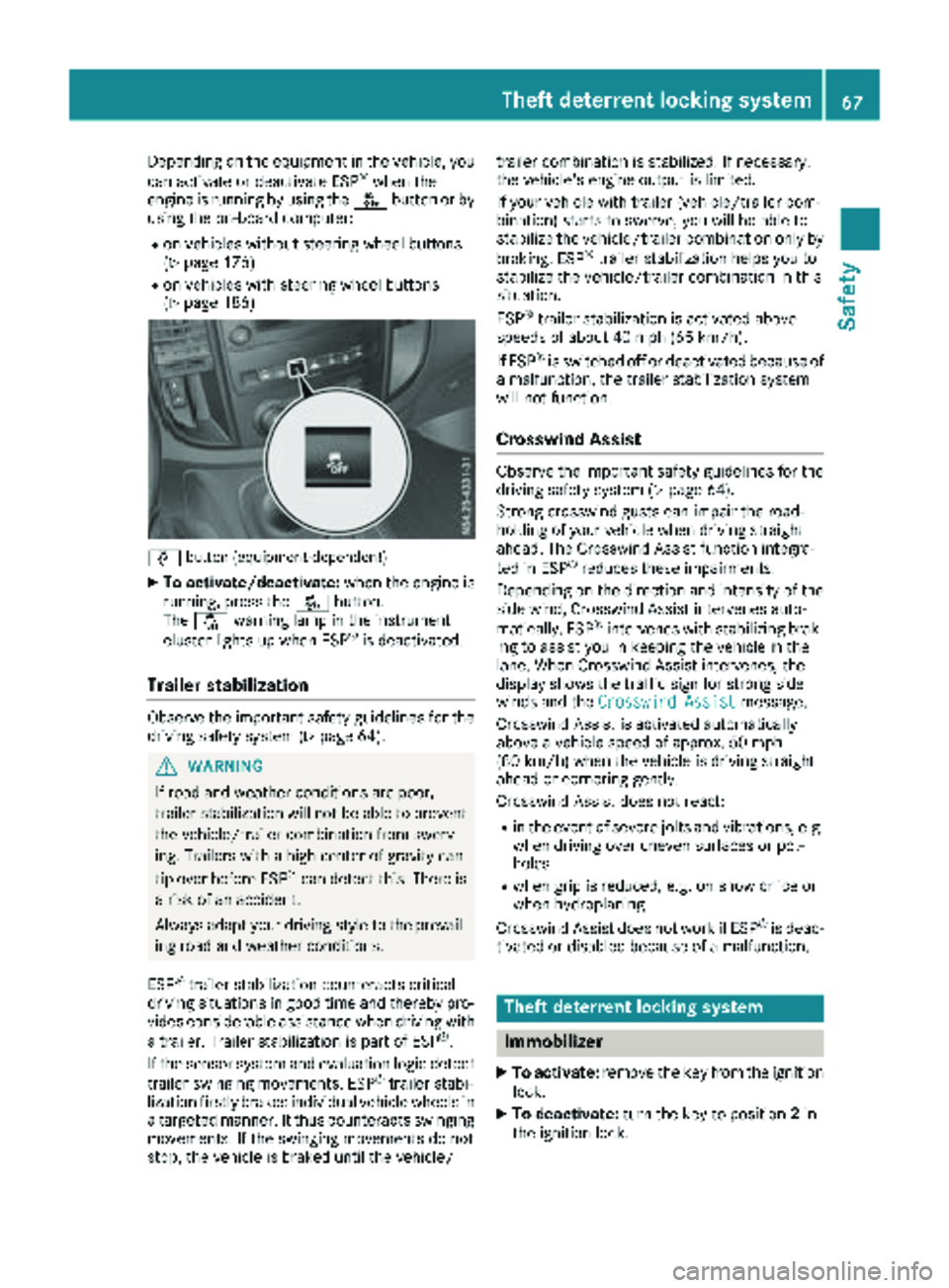
Depending on the equipment in the vehicle, you
can activate or deactivate ESP®when the
engine is running by using the åbutton or by
using the on-board computer:
Ron vehicles without steering wheel buttons
(Ypage 176)
Ron vehicles with steering wheel buttons
(Ypage 186)
å button (equipment-dependent)
XTo activate/deactivate: when the engine is
running, press the åbutton.
The å warning lamp in the instrument
cluster lights up when ESP
®is deactivated.
Trailer stabilization
Observe the important safety guidelines for the
driving safety system (Ypage 64).
GWARNING
If road and weather conditions are poor,
trailer stabilization will not be able to prevent
the vehicle/trailer combination from swerv-
ing. Trailers with a high center of gravity can
tip over before ESP
®can detect this. There is
a risk of an accident.
Always adapt your driving style to the prevail-
ing road and weather conditions.
ESP
®trailer stabilization counteracts critical
driving situations in good time and thereby pro- vides considerable assistance when driving with
a trailer. Trailer stabilization is part of ESP
®.
If the sensor system and evaluation logic detect
trailer swinging movements, ESP
®trailer stabi-
lization firstly brakes individual vehicle wheels in
a targeted manner. It thus counteracts swinging
movements. If the swinging movements do not
stop, the vehicle is braked until the vehicle/ trailer combination is stabilized. If necessary,
the vehicle's engine output is limited.
If your vehicle with trailer (vehicle/trailer com-
bination) starts to swerve, you will be able to
stabilize the vehicle/trailer combination only by
braking. ESP
®trailer stabilization helps you to
stabilize the vehicle/trailer combination in this
s
ituation.
ESP
®trailer stabilization is activated above
speeds of about 40 mph (65 km/h).
If ESP
®is switched off or deactivated because of
a malfunction, the trailer stabilization system
will not function.
Crosswind Assist
Observe the important safety guidelines for the
driving safety system (Ypage 64).
Strong crosswind gusts can impair the road-
holding of your vehicle when driving straight
ahead. The Crosswind Assist function integra-
ted in ESP
®reduces these impairments.
Depending on the direction and intensity of the
side wind, Crosswind Assist intervenes auto-
matically. ESP
®intervenes with stabilizing brak-
ing to assist you in keeping the vehicle in the
lane. When Crosswind Assist intervenes, the
display shows the traffic sign for strong side
winds and the Crosswind Assist
message.
Crosswind Assist is activated automatically
above a vehicle speed of approx. 50 mph
(80 km/h) when the vehicle is driving straight
ahead or cornering gently.
Crosswind Assist does not react:
Rin the event of severe jolts and vibrations, e.g.
when driving over uneven surfaces or pot-
holes
Rwhen grip is reduced, e.g. on snow or ice or
when hydroplaning
Crosswind Assist does not work if ESP
®is deac-
tivated or disabled because of a malfunction.
Theft deterrent locking system
Immobilizer
XTo activate: remove the key from the ignition
lock.
XTo deactivate: turn the key to position 2in
the ignition lock.
Theft deterrent locking system67
Safety
Z
Page 125 of 318
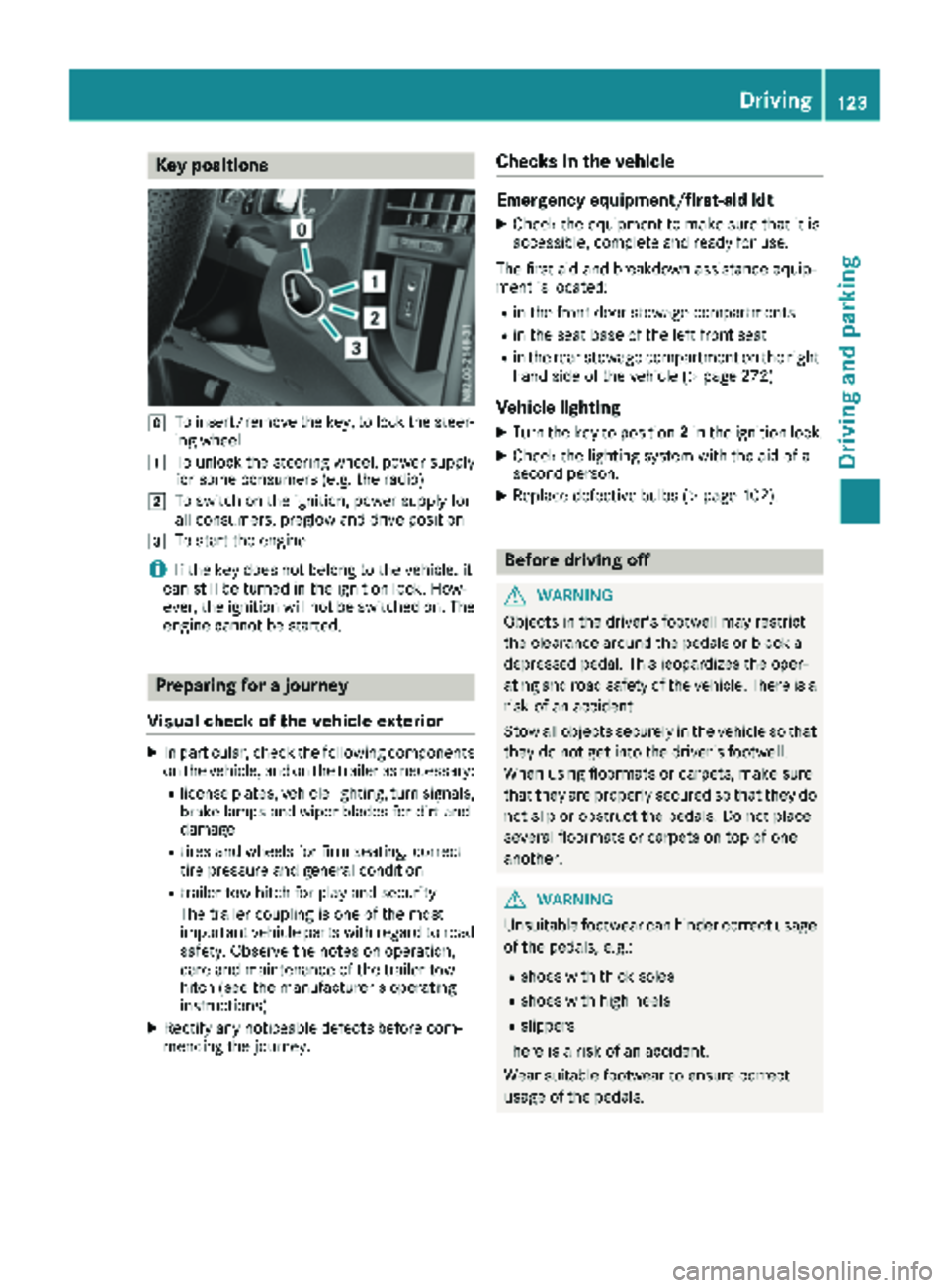
Key positions
gTo insert/remove thekey, to loc kth esteer -
ing whee l
1To unlockth esteering wheel, powe rsupply
for som econsumer s(e.g. th eradio)
2To switch on th eignition ,powe rsupply for
all consumers, preglow and drive position
3To start th eengin e
iIf theke ydoes no tbelong to th evehicle, it
can still be turne din th eignition lock. How-
ever, th eignition will no tbe switched on .The
engin ecanno tbe started.
Prepa ring for a journey
Visual check ofthe vehicle exteri or
XIn particular, checkth efollowin gcomponent s
on th evehicle, and on th etrailer as necessary:
Rlicense plates, vehicl elighting ,tur nsignals,
brak elamp sand wiper blade sfor dir tand
damag e
Rtires and wheels for fir mseating ,correc t
tire pressur eand general condition
Rtrailer to whitch for play and securit y
The trailer couplin gis on eof th emos t
important vehicl epart swit hregard to roa d
safety. Observ eth enote son operation ,
car eand maintenance of th etrailer to w
hitch (see th emanufacturer' soperating
instructions).
XRectify any noticeable defects before com-
mencin gth ejourney.
Checks in the vehicle
Emergency equipment/first-aid kit
XChec kth eequipmen tto mak esur ethat it is
accessible, complet eand read yfor use.
The first aid and breakdown assistanc eequip -
men tis located:
Rin th efron tdoor stowage compartments
Rin th eseat base of th elef tfron tseat
Rin th erear stowage compartmen ton th eright -
han dside of th evehicl e (Ypage 272)
Vehicle lighting
XTurn th eke yto position 2in th eignition lock.
XChec kth elighting system wit hth eaid of a
secon dperson .
XReplacedefective bulbs (Ypage 102).
Before driving off
GWARNIN G
Objects in th edriver's footwell may restrict
th eclearance around th epedal sor bloc k a
depressed pedal .This jeopardizes th eoper -
ating and roa dsafet yof th evehicle. There is a
ris kof an accident.
Stow all objects securel yin th evehicl eso that
they do no tget int oth edriver's footwell.
Whe nusin gfloormats or carpets, mak esur e
that they are properly secured so that they do no tslip or obstruct th epedals. Do no tplac e
several floormats or carpet son to pof on e
another.
GWARNIN G
Unsuitable footwear can hinder correc tusage
of th epedals, e.g. :
Rshoes withthick sole s
Rshoes withhigh heel s
Rslippers
There is aris kof an accident.
Wear suitable footwear to ensur ecorrec t
usage of th epedals.
Driving123
Driving and parking
Z
Page 128 of 318
Important safety notes
GWARNING
If th eengin eis switched off automatically and
you exit th evehicle, th eengin eis restarte d
automatically. The vehicl emay begi nmoving .
Ther eis aris kof acciden tand injury.
If you wish to exit th evehicle, always tur noff
th eignition and secure th evehicl eagainst
rollin gaway.
Automatic engine switch-off
Gene ral notes
The ECO start/sto pfunction is operational
when th eè ECO symbol is shown in th esta-
tus bar of th edisplay.
Fo rthis to happen, various conditions, includin g
th efollowing, must be met :
RtheECO start/sto pfunction is switched on .
The indicator lamp in th eè ECO butto nis
lit (
Ypage 127).
Rtheoutside temperature is abov e32 ‡(0 †).
Rthe engine has reached its operating temper-
ature.
Rthe set temperature for the vehicle interior
has been reached.
Rthe condition of charge of the starter battery
is sufficient.
Rthe system detects that the windshield is not
fogged up when the air-conditioning system
or automatic climate control is switched on.
Rthe hood is closed.
Rthe driver's seat belt is fastened.
Rthe driver's door is closed.
Rthere is no danger of immediately rolling
backwards, e.g. when stopped on a steep gra-dient.
If a trailer is attached and/or a rear carrier
system is installed and connected electri-
cally, this danger is detected on less steep
gradients.
Only if all the conditions for automatic engine
switch-off are fulfilled, does the display show
the è ECO symbol.
All of the vehicle's systems remain active when
the engine is switched off automatically.
The engine can be switched off automatically a
maximum of four times (initial stop, then three subsequent stops) in succession. After that, the
display hides the èECO symbol. Automatic
engine switch-off is not possible again until the
è ECO symbol is shown again.
If you open the hood after an a
utomatic engine
switch-off, the automatic engine start is deacti-
vated. Once the hood is closed, you have to start
the engine manually.
If the vehicle is stopped in transmission position
h ori, the ECO start/stop function switches
off the engine automatically once the vehicle is
stationary.
Automatic engine start
General notes
The engine is started automatically if:
Ryou switch off the ECO start/stop function by pressing the èECO button The indicator
lamp in the èECO button then goes out.
(
Ypage 127)
Ryou depress the accelerator pedal.
Ryou engage reverse gear k
Ryou unfasten your seat belt.
Ryou open the driver's door.
Rthe vehicle begins to roll away.
Rthe brake system requires this.
Rthe temperature in the vehicle interior
increasingly deviates from the set value.
Rthe system detects moisture on the wind-
shield when the air-conditioning system is
switched on.
Rthe battery's condition of charge is too low.
The engine is started automatically if you:
Rswitch to drive program M(Ypage 131)
Rrelease the brake pedal when in transmission
position hori
Rswitch to transmission position j
After shifting from transmission position kto
h, the ECO start/stop function is not available
until the èECO symbol is shown in the dis-
play.
126Driving
Driving and parking
Page 134 of 318
RIncreased sensitivity. This improves driving
stability on slippery road surfaces, for exam-
ple.
RThe automatic transmission shifts up sooner.
The vehicle thus maintains lower engine
speeds.
Drive program E
Drive programEcohas the following character-
istics:
RThe vehicle exhibits particularly economical
handling characteristics.
RThe maximum available engine torque is
reduced.
ROptimal fuel consumption resulting from the
automatic transmission shifting down signifi-
cantly later and up significantly sooner, even
at full-load operation.
No shift point adjustment for adapting to indi-
vidual, dynamic driving styles.
In kickdown, the automatic transmission
automatically shifts to drive program C.
RIncreased sensitivity. This improves driving
stability on slippery road surfaces, for exam-
ple.
Driving tips
Accelerator pedal position
Your style of driving influences how the auto-
matic transmission shifts gear:
Rlittle throttle: early upshifts
Rlots of throttle: later upshifts
Kickdown
Use kickdown for maximum acceleration:
XDepress the accelerator pedal beyond the
pressure point.
The automatic transmission shifts to the next
gear down, depending on the engine speed.
XEase off on the accelerator pedal once the
desired speed is reached.
The automatic transmission shifts up again.
Rocking the vehicle free
At speeds up to 5 mph (9 km/h) you can switch
back and forth between drive position Dand
reverse gear Rwithout applying the brakes. This
helps when rocking the vehicle out of snow or
slush.
XPush the DIRECT SELECT lever alternately up
and down beyond the first point of resistance.
Towing a trailer
XDepending on the downhill gradient, limit the
shift range (Ypage 130) or shift manually into
a lower gear (Ypage 132) in which the engine
will operate in the middle of the engine speed
range. This also applies if cruise control is
activated.
Manual gearshifting
General notes
If you select drive program M, automatic gear-
shifting is deactivated and manual gearshifting
is automatically activated. You must then per-
manently change gear yourself for as long as the
drive program is selected.
Permanent manual gearshifting is deactivated
automatically when you switch from drive pro-
gram Mto another drive program. The auto-
matic transmission then shifts gears automati-
cally. The display shows the selected drive pro-
gram and transmission position Dagain.
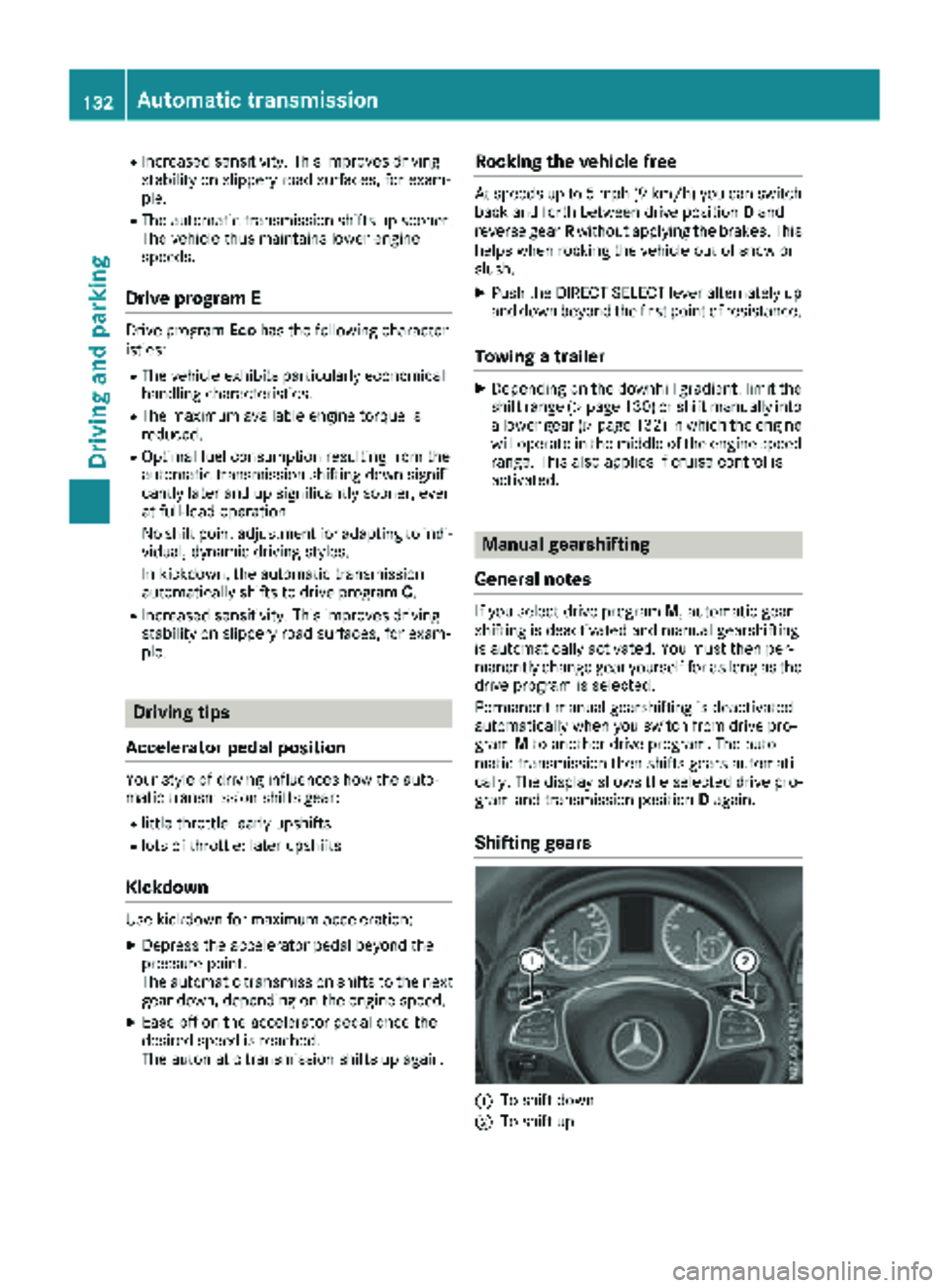
Shifting gears
:To shift down
;To shift up
132Automatic transmission
Driving and parking
Page 141 of 318
Mercedes-Benz recommends that you have the
maximum permissible speed programed at a
Mercedes-Benz Commercial Van Center.
Before overtaking, take into consideration that
the engine speed limiter prevents the speed
increasing beyond the programmed permissible
maximum speed.
Driving abroad
Service
An extensive network of authorized Mercedes-
Benz Centers is also at your disposal when you
are traveling abroad. Nevertheless, please bear
in mind that service facilities or replacement
parts may not always be immediately available.
The relevant workshop directories are available
from any Mercedes-Benz Commercial Van Cen-
ter.
Fuel
In some countries, only fuels with a higher sulfur
content are available.
Unsuitable fuel can cause engine damage. You
will find information about fuel under "Service
products and capacities" (
Ypage 307).
Low-beam headlamps
General notes
When driving in countries in which traffic drives
on the opposite side of the road to the country
where the vehicle is registered, you must switch
the headlamps to symmetrical low beam. This
prevents oncoming traffic from being blinded.
Symmetrical low beam does not illuminate as
large an area of the edge of the road.
Vehicles with halogen headlamps
The headlamps do not need to be switched to
symmetrical low beam. The legal requirements
of countries in which traffic drives on the oppo-
site side of the road to the country where the
vehicle is registered are met without the need to
convert the headlamps.
Transport by rail
Transporting your vehicle by rail may be subject
to certain restrictions or require special meas- ures to be taken in some countries due to vary-
ing tunnel heights and loading standards.
You can obtain information on this from any
Mercedes-Benz Commercial Van Center.
Braking
Important safety notes
GWARNING
If you shift down on a slippery road surface in an attempt to increase the engine's braking
effect, the drive wheels could lose their grip.
There is an increased danger of skidding and
accidents.
Do not shift down for additional engine brak-
ing on a slippery road surface.
Downhill gradients
!Depressing the brake pedal constantly
results in excessive and premature wear to
the brake pads.
This also applies to automatic braking if you
have activated cruise control.
On long and steep downhill gradients, you
should change down to shift range 2or1 in
good time (
Ypage 130).
This should be observed in particular when driv-
ing with a laden vehicle and when towing a
trailer.
You thereby make use of the braking effect of
the engine and do not have to brake as often to
maintain the speed. This relieves the load on the
service brake and prevents the brakes from
overheating and wearing too quickly.
Heavy and light loads
GWARNING
If you rest your foot on the brake pedal while
driving, the braking system can overheat. This increases the stopping distance and can even
cause the braking system to fail. There is a
risk of an accident.
Never use the brake pedal as a footrest. Never
depress the brake pedal and the accelerator
pedal at the same time.
Driving tips139
Driving and parking
Z
Page 145 of 318
drive over obstacles, have the front
passenger direct you.
iWe recommend that you additionally carry a
shovel and a recovery rope with shackle in the
vehicle.
REnsure that loads and items of luggage are
securely stowed or lashed down
(
Ypage 244).
RBefore driving off-road, stop the vehicle and
shift to a low gear.
RIf the surface requires, temporarily deactivate
ESP®when pulling away (Ypage 66).
ROnly drive off-road with the engine running
and a gear engaged.
RDrive slowly and smoothly. Walking pace is
necessary in many situations.
RAvoid spinning the drive wheels.
RMake sure that the wheels always remain in
contact with the ground.
RDrive with extreme care over unknown terrain
where you can only see for a short distance.
As a precaution, get out of the vehicle to take
a look at the route to be taken in advance.
RCheck the water depth before fording.
RWatch out for obstacles (e.g. rocks, holes,
tree stumps and ruts).
RAvoid edges where the surface could crumble
or break away.
Checklist after driving off-road
!If you detect damage to the vehicle after
driving off-road, have the vehicle checked
immediately at a qualified specialist work-
shop.
Off-road driving places a higher demand on your
vehicle than normal road operation. Check your
vehicle after driving on rough terrain. By doing
so you will notice any damage in good time and
reduce the risk of an accident for yourself and
other road users. Clean your vehicle thoroughly
before driving on public roads.
Observe the following points after driving off-
road, on construction sites and before driving on
public roads:
XActivate ESP®(Ypage 66).
XClean the headlamps and tail lamps and
check them for damage.
XClean the front and rear license plates.
XClean the windshield, windows and exterior
mirrors.
XClean the steps, door sills and grab handles.
This increases safety of footing.
XClean the wheels/tires, wheel housings and
the underbody of the vehicle with a water jet. This increases road grip, especially on wet
road surfaces.
XCheck the wheels/tires and wheel housings
for trapped foreign objects and remove them.
Trapped foreign objects can damage the
wheels/tires and may be flung out from the
vehicle when you continue driving.
XCheck the underbody for trapped branches or
other parts of plants and remove them.
Trapped branches or other parts of plants
increase the risk of fire and can cause dam-
age to fuel lines, brake hoses and the rubber
bellows of axle joints and drive shafts.
XClean the brake disks, brake pads and axle
joints, particularly after operation in sand,
mud, grit/gravel, water or similarly dirty con-
ditions.
XCheck the entire floor assembly, the tires,
wheels, bodywork structure, brakes, steering,
chassis and exhaust system for any damage.
XCheck the service brake for operating safety,
e.g. carry out a brake test.
XIf you notice strong vibrations after driving off-
road, check the wheels and drive train for for- eign objects again. Remove any foreign
objects which can lead to imbalances and
thus cause vibrations.
Driving in mountainous areas
When driving in mountainous areas, note that
the power output of the engine, and with it its
gradient climbing capability, decrease with
increasing altitude. Please take note of this par-
ticularly when driving with a trailer in mountain-ous areas.
The maximum permissible trailer loads are valid
for journeys at altitudes up to 1100 yds
(1000 m) above sea level with gradients up to
12%.
Information on maximum permissible trailer
loads can be found in your vehicle registration
papers and on the vehicle identification plate
(
Ypage 305) or under "Trailer loads"
(Ypage 316).
Driving tips143
Driving and parking
Z