warning light MERCEDES-BENZ METRIS 2018 MY18 Operator’s Manual
[x] Cancel search | Manufacturer: MERCEDES-BENZ, Model Year: 2018, Model line: METRIS, Model: MERCEDES-BENZ METRIS 2018Pages: 318, PDF Size: 5.07 MB
Page 158 of 318
Towing a trailer
PARKTRONIC detects a coupled trailer if your
vehicle is equipped with the corresponding elec-
trical installations for trailer towing.
PARKTRONIC is deactivated for the rear area
when you establish an electrical connectionbetween your vehicle and a trailer. If you use an
adapter for the socket, remove it from the
socket after detaching the trailer. Otherwise,
PARKTRONIC remains deactivated for the rear
area.
Problems with PARKTRONIC
ProblemPossible causes/consequences and
MSolutions
Only the red segments in
the PARKTRONIC warn-
ing displays are lit.
In addition, a warning
tone sounds for approx.
two seconds
PARKTRONIC is then
deactivated.
The indicator lamp of the
f button lights up
and the red segments in
the PARKTRONIC warn-
ing display go out.PARKTRONIC has malfunctioned and has switched itself off.
XIf problems persist, have PARKTRONIC checked at a qualified spe- cialist workshop.
The PARKTRONIC warn-
ing displays implausible
distances.
For example, all the seg-
ments may be lit even
though there is no obsta-
cle present.The PARKTRONIC sensors are dirty or iced up.
XClean the PARKTRONIC sensors (Ypage 268).
XTurn the key to position 2in the ignition lock.
The license plate or other parts attached near the sensors may not be
secured correctly.
XCheck the license plate and attachment parts near the sensors for
correct seating.
An external radio or ultrasonic source may be causing interference.
XCheck PARKTRONIC functions in a different location.
Active Parking Assist
General notes
Active Parking Assist is an electronic parking
aid. The system uses ultrasound sensors to
measure the road on both sides of the vehicle
and indicates suitable parking spaces. It can
then actively steer and brake the vehicle to help
you to park and exit the parking space.
Active Parking Assist includes the PARKTRONIC
parking aid which indicates visually and audibly the distance between your vehicle and an
obstruction. To do this, PARKTRONIC uses the ultrasonic sensors of the Active Parking Assist
(
Ypage 153).
Important safety notes
Active Parking Assist is only an aid. It is not a
substitute for your attention to the immediate
surroundings. You are responsible for safe
maneuvering, parking and pulling away. Make
sure that no persons, animals or objects are in
the maneuvering range.
When you deactivate PARKTRONIC, Active Park-
ing Assist will also be deactivated.
156Driving system
s
Driving an d parking
Page 159 of 318
For vehicles with a trailer coupling installed, the
minimum length for parking spaces will be
slightly increased.
If you have attached a trailer to your vehicle, you
should not use Active Parking Assist. Once the
electrical connection is established between
your vehicle and the trailer, Active Parking
Assist is no longer available. PARKTRONIC is
then deactivated for the rear area.
GWARNING
While parking or pulling out of a parking
space, the vehicle swings out and can drive
onto areas of the oncoming lane. This could
result in a collision with another road user.
There is a risk of an accident.
Pay attention to other road users. Stop the
vehicle if necessary or cancel the Active Park- ing Assist parking procedure.
!If unavoidable, you should drive over obsta-
cles such as curbs slowly and not at a sharp
angle. Otherwise, you may damage the
wheels or tires.
Active Parking Assist may also display spaces
not suitable for parking, e.g.:
Rin a zone where parking or stopping is pro-
hibited
Rin front of driveways or entrances and exits
Ron unsuitable surfaces
Parking tips:
Ron narrow roads, drive as closely as possible
past the parking space.
Rparking spaces that are littered or overgrown
might be identified or measured incorrectly.
Rparking spaces that are partially occupied by
trailer drawbars might not be identified as
such or be measured incorrectly.
Rsnowfall or heavy rain may lead to a parking
space being measured inaccurately.
Rwhen transporting a load which protrudes
from your vehicle, you should not use Active
Parking Assist.
Rnever use Active Parking Assist when snow
chains are installed.
Ralways ensure that the tire pressure is correct
This has a direct influence on the parking
characteristics of the vehicle.
Rif you mount w heels with a different wheel
size, this will have a direct influence on the
parking result.
Rif you mount tires from another manufacturer,
this may have an influence on the parking
result.
Rif you drive slowly past the parking space, a
better parking result is achieved.
Rpay attention to the PARKTRONIC warning
messages (Ypage 155) during the parking
procedure.
Ryou can intervene in the steering procedure to
correct it at any time. Parking assistance will
then be canceled and Active Parking Assist
stopped.
Use Active Parking Assist for parking spaces
that are:
Rparallel or at right angles to the direction of
travel.
Ron straight roads, not bends.
Ron the same level as the road, e.g. not on the
pavement.
Detecting parking spaces
GWARNING
If there are objects above the detection range:
RActive Park Assist may steer too early
Rthe vehicle may not stop in front of these
objects
You may cause a collision as a result. There is
a risk of an accident.
If objects are located above the detection
range, stop and deactivate Active Parking
Assist.
Objects located above the height range of Active
Parking Assist will not be detected when the
parking space is measured. These are not taken
into account when the parking procedure is cal-
culated, e.g. overhanging loads, overhangs or
truck loading ramps.
For further information on the detection range
(
Ypage 154).
Driving systems157
Driving and parking
Z
Page 162 of 318
XTo cancel the process:press the%but-
ton on the steering wheel or drive off.
or
XTo exit the parking space using active
parking assistance: press theabutton
on the steering wheel.
The display shows the Park Assist
Active: Accelerate and BrakeObs.Surroundingsmessage.
XLet go of the steering wheel.
XPull away, being ready to brake at all times.
Exit the parking space slowly and do not drive
faster than 6 mph (10 km/h). Otherwise park-
ing assistance is canceled and Active Parking
Assist is stopped.
Active Parking Assist brakes the vehicle to a
standstill when the vehicle approaches a bor-
der of the parking space.
XWhile the vehicle is stationary, shift the trans-
mission to position hork as required or
according to the message.
Active Parking Assist immediately steers in
the other direction. The display shows the
Park Assist Active: Accelerate and
BrakeObs. Surroundingsmessage.
iYou will achieve the best results by waiting
for the steering procedure to complete before
pulling away.
If you back up after activation, the steering
wheel is moved to the straight-ahead posi-
tion.
XDrive forwards and reverse as prompted by
the PARKTRONIC warning displays, several
times if necessary.
Once you have exited the parking space com-
pletely:
RThe display shows the Park Assist Fin‐ishedmessage.
RA tone sounds.
RThe steering wheel is moved to the straight-
ahead position
The parking assistance function of Active Park-
ing Assist is stopped. You will then have to steer
and merge into traffic on your own.
PARKTRONIC is still available.
You can take over the steering before the vehi-
cle has exited the parking space completely.
This is useful, for example when you recognize
that it is already possible to pull out of the park-
ing space.
Canceling active parking assistance
XStop the movement of the steering wheel or
steer yourself.
or
XPress the fbutton and deactivate
PARKTRONIC (Ypage 155).
Parking assistance is canceled immediately
and Active Parking Assist is stopped. The dis-
play shows the Park
AssistCanceledmes-
sage.
Active parking assistance is canceled automat-
ically if:
Ryou apply the parking brake.
Rparking using Active Parking Assist is no lon-
ger possible.
Ryou are driving faster than 6 mph (10 km/h).
Ra wheel spins and ESP®intervenes or fails.
The ÷ warning lamp in the instrument
cluster then lights up.
Ryou unfasten your seat belt.
Ryou open a door or the tailgate/rear door.
Ryou shift the automatic transmission to posi-
tion P.
A warning tone sounds, the parking symbol in
the display goes out and the Park Assist
Canceledmessage appears.
Once active Parking Assist has been canceled,
you must steer and brake again yourself.
If a system malfunction occurs, vehicles are
automatically braked down to a standstill. To
continue driving, you must depress the acceler-
ator pedal again.
Rear view camera
General notes
On vehicles with a tailgate, the rear view camera
is next to the tailgate handle (Ypage 269).
On vehicles with rear doors, the rear view cam-
era is in the top of the license plate molding
(
Ypage 269).
The rear view camera is a visual parking aid. It
shows you the area behind the vehicle in the
audio display.
The area behind the vehicle is displayed in a
mirrored fashion, as in the rear-view mirror or
the exterior mirrors. The guide lines displayed
assist you in backing up.
160Driving systems
Driving an d parking
Page 165 of 318
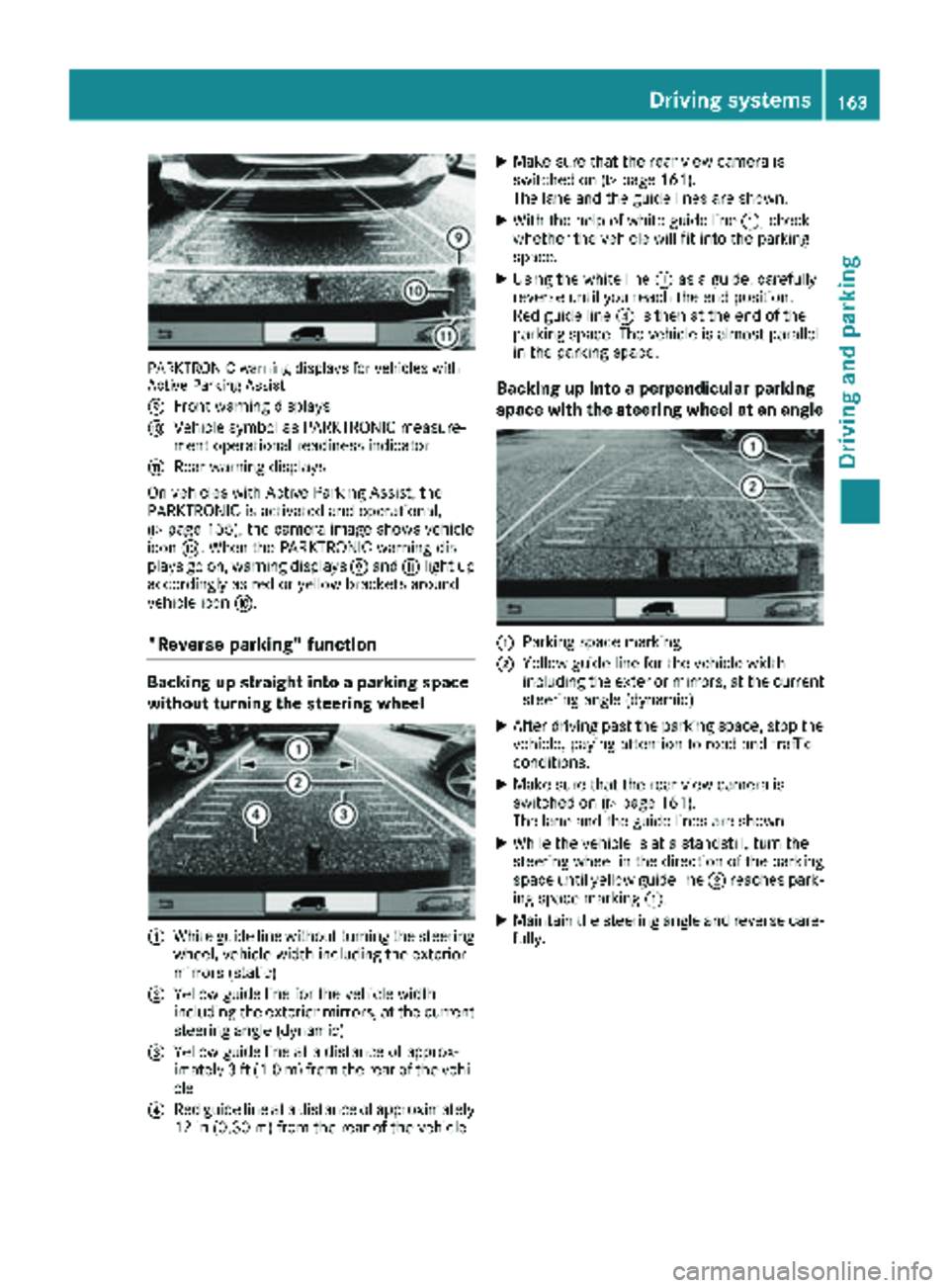
PARKTRONIC warning displays for vehicles with
Active Parking Assist
E
Front warning displays
FVehicle symbol as PARKTRONIC measure-
ment operational readiness indicator
GRear warning displays
On vehicles with Active Parking Assist, the
PARKTRONIC is activated and operational,
(
Ypage 155), the camera image shows vehicle
icon F. When the PARKTRONIC warning dis-
plays go on, warning displays Eand Glight up
accordingly as red or yellow brackets around
vehicle icon F.
"Reverse parking" function
Backing up straight into a parking space
without turning the steering wheel
:White guide line without turning the steering
wheel, vehicle width including the exterior
mirrors (static)
;Yellow guide line for the vehicle width
including the exterior mirrors, at the current
steering angle (dynamic)
=Yellow guide line at a distance of approx-
imately 3 ft (1.0 m) from the rear of the vehi-
cle
?Red guide line at a distance of approximately
12 in (0.30 m)from the rear of the vehicle
XMake sure that the rear view camera is
switched on (Ypage 161).
The lane and the guide lines are shown.
XWith the help of white guide line :, check
whether the vehicle will fit into the parking
space.
XUsing the white line :as a guide, carefully
reverse until you reach the end position.
Red guide line ?is then at the end of the
parking space. The vehicle is almost parallel
in the parking space.
Backing up into a perpendicular parking
space with the steering wheel at an angle
:Parking space marking
;Yellow guide line for the vehicle width
including the exterior mirrors, at the current
steering angle (dynamic)
XAfter driving past the parking space, stop the
vehicle, paying attention to road and traffic
conditions.
XMake sure that the rear view camera is
switched on (Ypage 161).
The lane and the guide lines are shown.
XWhile the vehicle is at a standstill, turn the
steering wheel in the direction of the parking
space until yellow guide line ;reaches park-
ing space marking :.
XMaintain the steering angle and reverse care-
fully.
Driving systems163
Driving and parking
Z
Page 167 of 318
Information on the audio system control knob
can be found in the separate operating
instructions.
Symbol=is highlighted. The distance spec-
ifications now only apply to objects that are at
the same level as the ball coupling.
XBack up carefully, making sure that trailer
drawbar locating aid ;points approximately
in the direction of trailer drawbar :.
XBack up carefully until trailer drawbar :rea-
ches red guide line A.
The distance between trailer drawbar :and
ball coupling ?is now approximately 12 in
(0.30 m).
XCouple the trailer (Ypage 165).
Towing a trailer
Notes on trailer towing
Important safety notes
GWARNING
Installing an unsuitable ball coupling may
result in overloading of the trailer tow hitch
and the rear axle. This applies especially if the ball coupling in question is longer or angled
differently. This could seriously impair the
driving characteristics and the trailer can
come loose. There is a risk of an accident.
You should only ever install a ball coupling
that has the permissible dimensions and that
is designed to meet your trailer-towing
requirements. Do not modify the ball coupling
or the trailer tow hitch.
GWARNING
If you install a ball coupling other than the one
delivered with the vehicle, the trailer tow hitch
and the rear axle may be overloaded. This
applies especially if the ball coupling in ques-
tion is longer or angled differently. This could
seriously impair the driving characteristics
and the trailer can come loose. There is a risk
of an accident.
Only install the ball coupling delivered with
the vehicle or a ball coupling that is designed
to meet your trailer towing requirements. Do
not modify the ball coupling or the trailer tow
hitch.
GWARNING
If the ball coupling is not correctly installed
and secured, it could come loose while driving and endanger other road users. There is a risk
of an accident and injury.
Install and secure the ball coupling as descri-
bed in the ball coupling manufacturer's instal-
lation instructions. Make sure that the ball
coupling is correctly installed and secured
before every journey.
GWARNING
When the vehicle/trailer combination begins
to lurch, you could lose control of it. The vehi- cle/trailer combination could even rollover.
There is a risk of an accident.
On no account should you attempt to
straighten up the vehicle/trailer combination
by increasing the speed. Reduce vehicle
speed and do not countersteer. Apply the
brake as necessary.
You can attach carrier systems such as bicycle
racks or load-bearing implements on the ball
coupling. The maximum load-bearing capacity
of 165 lb (75 kg) applies when using carrier sys-
tems on the ball coupling.
Always observe the operating instructions pro-
vided by the manufacturers of the trailer cou-
pling and the ball coupling.
Couple and decouple the trailer carefully. When
backing up the towing vehicle, make sure
nobody is standing between the vehicle and the trailer.
A trailer which is incorrectly coupled to the tow-
ing vehicle could break away. A correctly cou-
pled trailer must be positioned horizontally
behind the towing vehicle.
Ensure that the following weights are not excee-
ded:
Rthe permissible noseweight
Rthe permissible trailer load
Rthe permissible rear axle load of the towing
vehicle
Towing a trailer165
Driving and parking
Z
Page 170 of 318
This enables you to gain experience and get
used to the new handling characteristics.
RBefore driving, check:
-that the trailer tow hitch and ball coupling
are secure
-that the safety switch for a braked trailer is
functioning properly
-that the safety chains are secure and not
damaged
-that the electrical connections are secure
-that the lights are working
-that the wheels are in good order and the
tire pressure is correct
RAdjust the exterior mirrors to provide an
unobstructed view of the rear section of the
trailer.
RIf the trailer is equipped with a separate func-
tional braking system, check before each
journey whether the brakes are functioning
correctly.
RSecure the load on the trailer according to the
applicable specifications and current stand-
ards on securing loads (
Ypage 246).
RWhen driving with a trailer, check at regular
intervals that the load is secured and that the
brakes and lights are working.
RBear in mind that the handling will be less
stable when towing a trailer than when driving
without one. Avoid sudden steering move-
ments.
RThe vehicle/trailer combination is heavier,
accelerates more slowly and has a decreased
gradient climbing capability and a longer
braking distance.
It is more susceptible to crosswinds and
requires cautious steering.
RIf possible, do not brake suddenly, but rather
moderately at first so that the trailer can acti-
vate its brakes. Then increase the force on the
brake pedal.
RIf the automatic transmission repeatedly
shifts between gears when driving on inclines,
restrict the shift range. Select shift range 4,3,
2 or 1.
Driving in a low gear and at a low speed
reduces the risk of damaging the engine.
RWhen driving on a downhill gradient, shift to a
low gear and take advantage of the engine's
braking effect. Avoid continuous brake application as this
may overheat the vehicle brakes and, if instal-
led, the trailer brakes.
RIf the coolant temperature increases dramat-
ically while the air-conditioning system is
switched on, switch off the air-conditioning
system.
Coolant heat can also be dissipated by
switching the airflow and the temperature of
the air conditioning to the
maximum level.
Open t
he windows if necessary.
RWhen overtaking, pay particular attention to
the extended length of your vehicle/trailer
combination.
Due to the length of your vehicle/trailer com-
bination you need an additional distance
before you can return to your original lane.
Uncoupling a trailer
GWARNING
If you uncouple a trailer with the overrun
brake engaged, you could trap your hand
between the vehicle and the trailer drawbar.
There is a risk of injury.
Do not uncouple a trailer if the overrun brake
is engaged.
!Do not disconnect a trailer with an engaged
overrun brake. Otherwise, your vehicle could
be damaged by the rebounding of the overrun
brake.
XMake sure that the selector lever of the auto-
matic transmission is in position P.
XEngage the vehicle's parking brake.
XClose all doors.
XApply the parking brake of the trailer.
XIn addition, secure the trailer against rolling
away with a wheel chock or similar object.
XRemove the trailer cable and safety chains
and decouple the trailer.
168Towing a trailer
Driving and parking
Page 173 of 318
Useful information
This Operator's Manual describes all models as
well as standard and optional equipment of your
vehicle that were available at the time of going
to print. Country-specific variations are possi-
ble. Note that your vehicle may not be equipped
with all of the described functions. This also
applies to systems and functions relevant to
safety.
Read the information on qualified specialist
workshops (
Ypage 31).
Important safety notes
GWARNING
If you operate information systems and com-
munication equipment integrated in the vehi-
cle while driving, you will be distracted from
traffic conditions. You could also lose control
of the vehicle. There is a risk of an accident.
Only operate the equipment when the traffic
situation permits. If you are not sure that this
is possible, park the vehicle paying attention
to traffic conditions and operate the equip-
ment when the vehicle is stationary.
GWARNING
If you are driving and reach through the steer- ing wheel to operate the adjustment knob,
you could lose control of the vehicle. There is
a risk of an accident and injury.
Only operate the adjustment knobs when thevehicle is stationary. Do not reach through the
steering wheel when driving.
You must observe the legal requirements for the
country in which you are currently driving when
operating the on-board computer.
GWARNING
If the instrument cluster has failed or mal-
functioned, you may not recognize function
restrictions in systems relevant to safety. The
operating safety of your vehicle may be
impaired. There is a risk of an accident.
Drive on carefully. Have the vehicle checked
at a qualified specialist workshop immedi-
ately.
The on-board computer display only shows mes-
sages and warnings from certain systems. You
should therefore make sure your vehicle is oper-
ating safely at all times. If the operating safety of
your vehicle is impaired, stop the vehicle as
soon as possible, paying attention to road and
traffic conditions. Then consult a qualified spe-
cialist workshop.
The accuracy of the speedometer and odometer
displays is legally prescribed. Determining the
speed is dependent on the wheel size or the
rolling circumference of the wheels. If you
change the wheel size on your vehicle, make
sure it is assigned to the correct wheel size cat-
egory (
Ypage 279). If you change wheel size
category without recoding the control unit, the
speedometer indication will be inaccurate. Driv-
ing safety and driving systems may be impaired
or detect a malfunction and shut down.
An overview of the instrument cluster can be
found under "Instrument cluster":
Rfor vehicles without steering wheel buttons
(Ypage 37)
Rfor vehicles with steering wheel buttons
(Ypage 39)
Display and operation
Instrument lighting
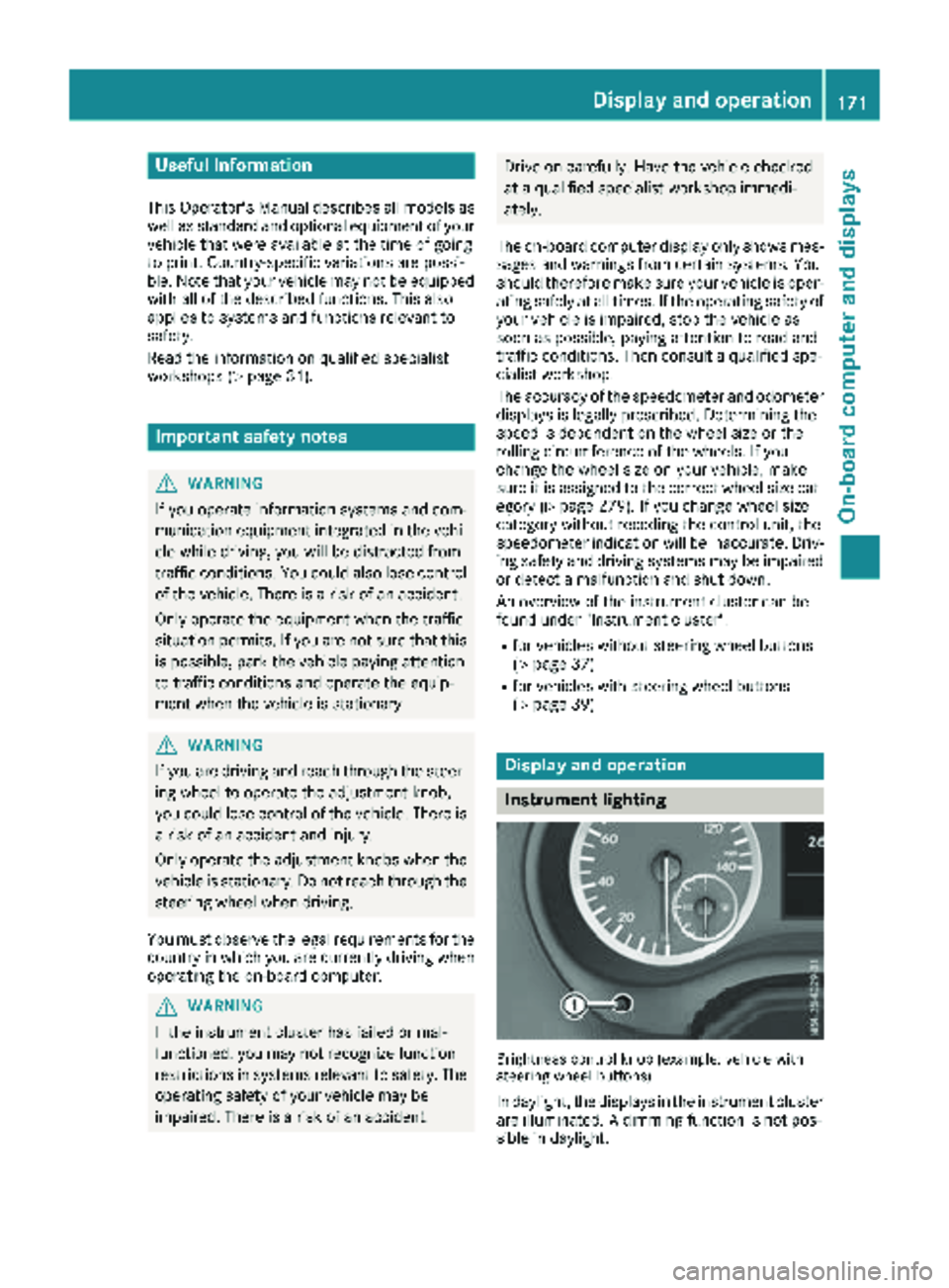
Brightness control knob (example: vehicle with
steering wheel buttons)
In daylight, the displays in the instrument cluster
are illuminated. A dimming function is not pos-
sible in daylight.
Display and operation171
On-board computer and displays
Z
Page 174 of 318
On vehicles with steering wheel buttons, the
light sensor in the instrument cluster automati-
cally controls the brightness of the display light-
ing.
While the lights are on, the brightness is depend-
ent upon the brightness of the ambient light.
You can also adjust the brightness of the instru-
ment lighting and the display lighting
Rby pressing thefand gbuttons on the
instrument cluster on vehicles without steer-
ing wheel buttons (not in the Settings
menu)
Rby turning brightness control knob :on vehi-
cles with steering wheel buttons
Speedometer
If you change the wheel size on your vehicle,
make sure it is assigned to the correct wheel
size category (
Ypage 279). If you change wheel
size category without recoding the control unit,
the speedometer indication will be inaccurate.
The current vehicle speed may then be higher
than the speed displayed in the speedometer.
The speed can also be shown in the display in
the form of a digital speedometer:
ROn vehicles without steering wheel buttons
(Ypage 175)
ROn vehicles with steering wheel buttons
(Ypage 181)
iIn some countries, a warning sounds and/or
the display shows a message when the vehi-
cle reaches the maximum legally permissible speed limit, e.g. at 75 mph (120 km/h).
Tachometer
!
Do not drive in the overrevving range, as this
could damage the engine.
HEnvironmental note
Avoid driving at high engine speeds. This
unnecessarily increases the fuel consumption
of your vehicle and harms the environment as
a result of increased emissions.
The red band in the tachometer indicates the
engine's overrevving range.
To protect the engine, the fuel supply is inter-
rupted when the red band is reached.
Outside temperature display
You should pay special attention to road condi-
tions when temperatures are around freezing
point.
Please bear in mind that the outside tempera-
ture display shows the air temperature meas-
ured and not the road temperature.
The display shows the outside temperature in
the header:
Ron vehicles without steering wheel buttons
(Ypage 173)
Ron vehicles with steering wheel buttons
(Ypage 179)
Changes in the outside temperature are dis-
played after a short delay.
Coolant temperature gauge
GWARNING
Opening the hood when the engine is over-
heated or when there is a fire in the engine
compartment could expose you to hot gases
or other service products. There is a risk of
injury.
Let an overheated engine cool down before
opening the hood. If there is a fire in the
engine compartment, keep the hood closed
and contact the fire department.
On vehicles without steering wheel buttons, you
can have the coolant temperature shown in the
display (
Ypage 175).
On vehicles with steering wheel buttons, an ana-
log coolant temperature gage is located in the
tachometer in the instrument cluster
(
Ypage 39).
Under normal operating conditions and with the
specified coolant level, the gauge may rise to
248 ‡ (120 †).
172Display and operation
On-board computer and displays
Page 175 of 318
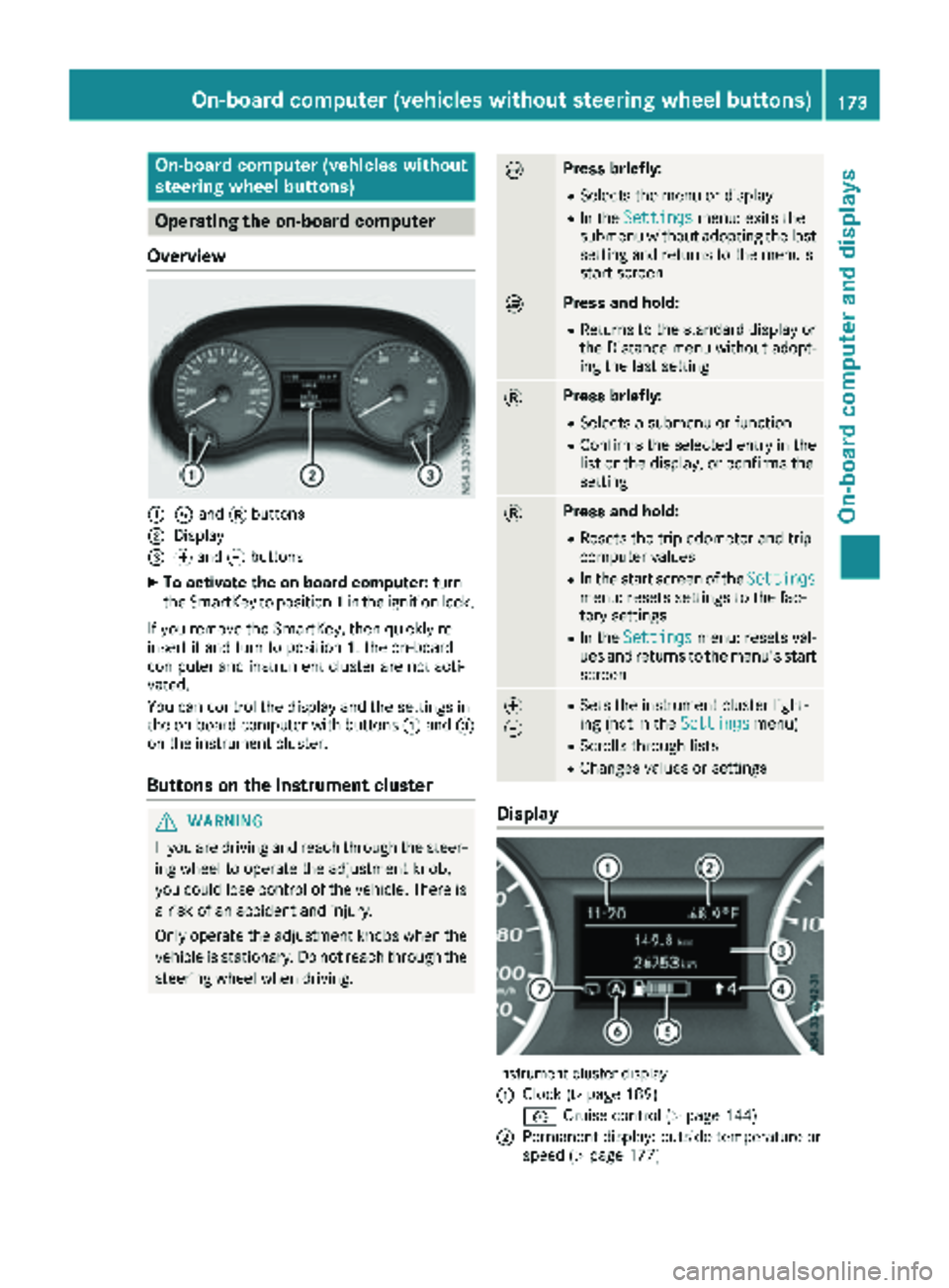
On-board computer (vehicles without
steering wheel buttons)
Operating the on-board computer
Overview
:È and 3buttons
;Display
=f and gbuttons
XTo activate the on-board computer: turn
the SmartKey to position 1in the ignition lock.
If you remove the SmartKey, then quickly re-
insert it and turn to position 1, the on-board
computer and instrument cluster are not acti-
vated.
You can control the display and the settings in
the on-board computer with buttons :and =
on the instrument cluster.
Buttons on the instrument cluster
GWARNING
If you are driving and reach through the steer- ing wheel to operate the adjustment knob,
you could lose control of the vehicle. There is
a risk of an accident and injury.
Only operate the adjustment knobs when thevehicle is stationary. Do not reach through the
steering wheel when driving.
ÈPress briefly:
RSelects the menu or display
RIn the Settingsmenu: exits the
submenu without adopting the last
setting and returns to the menu's
start screen
ÈPress and hold:
RReturns to the standard display or the Distance menu without adopt-
ing the last setting
3Press briefly:
RSelects a submenu or function
RConfirms the selected entry in the
list or the display, or confirms the
setting
3Press and hold:
RResets the trip odometer and trip
computer values
RIn the start screen of the Settingsmenu: resets settings to the fac-
tory settings
RIn theSettingsmenu: resets val-
ues and returns to the menu's start
screen
f
gRSets the instrument cluster light-
ing (not in the Settingsmenu)
RScrolls through lists
RChanges values or settings
Display
Instrument cluster display
:
Clock (Ypage 189)
V Cruise control (
Ypage 144)
;Permanent display: outside temperature or
speed (Ypage 177)
On-board computer (vehicles without steering wheel buttons)173
On-board computer and displays
Z
Page 179 of 318
message with3, the display shows the next
submenu.
XPress forg to activate or deactivate ESP.
XPress 3to confirm.
The next submenu is shown in the display.
If the å warning lamp in the instrument
cluster lights up when the vehicle is ready to
drive, ESP
®is deactivated.
Observe the information on warning lamps
(
Ypage 224) and display messages
(Ypage 196).
Setting the sensitivity of the rain sensor
The vehicle must be stationary. Use the buttons
in the instrument cluster.
XPress Èto select the Settingsmenu.
XPress3to select the Rain Sensorsub-
menu.
The display shows the current sensitivity set-
ting.
XPress forg to select the Low,Standardor
Sensitivesetting. This setting controls the
rain sensor's sensitivity to precipitation. The
windshield wiper will then wipe more or less
frequently at the same precipitation intensity.
XPress 3to confirm.
The next submenu is shown in the display.
You can find further information under "Wind-
shield wiper" (
Ypage 106).
Activating/deactivating ATTENTION
ASSIST
The vehicle must be stationary. Use the buttons in the instrument cluster.
XPress Èto select the Settingsmenu.
XPress3to select the Attention Assistsubmenu.
The display shows the current status.
If theAttention Assist Inoperative
message is shown in the display, ATTENTION
ASSIST is not available due to a malfunction
and is deactivated. If you confirm the mes-
sage with 3, the display shows the next sub-
menu.
XPress forg to activate or deactivate
ATTENTION ASSIST.
XPress 3to confirm.
The next submenu is shown in the display. Further information can be found under "ATTEN-
TION ASSIST" (
Ypage 152).
Selecting the permanent display func-
tion
With the
Permanent Display:function, you
can switch the display in the header between
outside temperature and speed.
If the display shows the speed in the header, the
outside temperature is shown with the odome-
ters (
Ypage 174).
The additional speedometer unit in the header is
always inverse to the speedometer unit.
The vehicle must be stationary. Use the buttons
in the instrument cluster.
XUsing Èselect the Settingsmenu.
XUsing3select the Permanent Display:submenu.
The display indicates the selected setting of
Outside Temp.
orSpeedometer.
XChange the setting by pressing forg.
XPress 3to confirm.
The next submenu is shown in the display.
Selecting the unit for the distance
In the Distance Unit:submenu, you can
select whether the display shows certain infor-
mation in kilometers or miles.
The vehicle must be stationary. Use the buttons
in the instrument cluster.
XPress Èto select the Settingsmenu.
XPress3to select the Distance Unit:sub-
menu.
The display indicates the selected setting of
km
or Miles.
XChange the setting by pressing forg.
XPress 3to confirm.
The display shows the next submenu or the
Settings
menu again.
The selected distance units are used for the dis- plays:
RDigital speedometer
ROdometer and trip odometer
RTrip computer
RRange
RCurrent consumption
RCruise control
RService intervals
On-board computer (vehicles without steering wheel buttons)177
On-board computer and displays
Z