lane assist MERCEDES-BENZ METRIS 2018 MY18 Operator’s Manual
[x] Cancel search | Manufacturer: MERCEDES-BENZ, Model Year: 2018, Model line: METRIS, Model: MERCEDES-BENZ METRIS 2018Pages: 318, PDF Size: 5.07 MB
Page 12 of 318
Vehicle ........................................... 220
Display messages (vehicle without
steering wheel buttons)
Calling up ....................................... 191
Driving systems .............................2 02
Engine ............................................ 200
Hiding ............................................ 191
Important safety notes .................. 191
Introduction ................................... 191
Key ................................................ 205
Lamps ............................................ 198
Setting the language ......................1 76
Tires ............................................... 203
Vehicle ...........................................2 04
Distance recorder
Displaying (vehicle with steering
wheel buttons) ............................... 180
Displaying (vehicle without steer-
ing wheel buttons) ......................... 174
Setting the display unit (vehicle
without steering wheel buttons) .... 177
Distance recorder
see Trip odometer
Distance warning (warning lamp) .... 229
Distance warning function ...............146
Door
Changing bulbs (ambient lamp) ..... 101
Display messages (vehicle with
steering wheel buttons) ................. 221
Display messages (vehicle with-
out steering wheel buttons) ........... 204
Indicator lamp ................................ 231
Doors
Central locking/unlocking
(SmartKey) ....................................... 69
Control panel ................................... 43
Emergency locking ........................... 71
Emergency unlocking ....................... 71
Drinking and driving ......................... 138
Drinks holder
see Bottle holder
Drive program
Automatic transmission ................. 131
Display (DIRECT SELECT lever) ...... 130
Driver's door and front-passenger
door ...................................................... 74
Driver's seat
see Seats Driving abroad
Fuel ................................................ 139
Low-beam headlamps .................... 139
Mercedes-Benz Service ....... .......... 139
D
riving off-road
see Off-road driving
Driving on flooded roads .................. 141
Driving safety systems
ABS (Anti-lock Braking System) ....... 64
BAS (Brake Assist System) .............. 65
EBD (electronic brake force distri-
bution) ............................................. 65
ESP
®(Electronic Stability Pro-
gram) ............................................... 65
Important safety information ........... 64
Overview .......................................... 64
Driving system
COLLISION PREVENTION ASSIST .. 146
Display messages (vehicle with-
out steering wheel buttons) ........... 202
Driving systems
Active Parking Assist ..................... 156
ATTENTION ASSIST ........................ 152
Blind Spot Assist ............................ 148
Cruise control ................................ 144
Display messages (vehicle with
steering wheel buttons) ................. 216
Lane Keeping Assist ......................1 50
PARKTRONIC ................................. 153
Rear view camera .......................... 160
Driving tips
Automatic transmission ................. 132
Brakes ...........................................1 39
Break-in period .............................. 122
Checking brake lining thickness .... 140
Downhill gradient ........................... 139
Drinking and driving ....................... 138
Driving abroad ............................... 139
Driving in mountainous areas ........1 43
Driving in winter .............................1 41
Driving on flooded roads ................ 141
Driving on wet roads ......................1 41
Exhaust check ............................... 138
Fuel ................................................ 138
General .......................................... 137
Hydroplaning ................................. 141
Icy road surfaces ........................... 141
Important safety notes .................. 122
10Index
Page 16 of 318
Switching the rear compartment
lighting on centrally ....................... 100
J
JackHolder in the cargo compartment .. 274
Jacking points ................................ 299
Scope of tire-changing tools .......... 272
Storage location ............................ 272
Stowage compartment in the rear. .272
Stowage space in the cargo com-
partment ........................................ 273
Using ............................................. 299
Jump starting (engine) ......................274
K
Key
Display messages (vehicle with
steering wheel buttons) ................. 221
Display messages (vehicle with-
out steering wheel buttons) ........... 205
Position in the ignition lock ............ 123
Kickdown ...........................................1 32
L
Lamps
Display messages (vehicle with-
out steering wheel buttons) ........... 198
see Warning and indicator lamps
Lane detection (automatic)
see Lane Keeping Assist
Lane Keeping Assist
Activating/deactivating ................. 151
Display message ............................ 217
Function/information .................... 150
Setting sensitivity (on-board com-
puter) ............................................. 187
Setting the sensitivity .................... 152
Language
Display (vehicle with steering
wheel buttons) ............................... 188
Display (vehicle without steering
wheel buttons) ............................... 176
Lashing points and tie downs
Permissible tensile load ................. 314 Lashing strap
Important safety notes .................. 247
Tensioning strap .................... 248, 249
LATCH-type (ISOFIX) child seat
anchors ................................................ 61
License plate lamp
Changing bulbs .............................. 102
License plate lamps
Display messages (vehicle with
steering wheel buttons) ................. 212
Display messages (vehicle with-
out steering wheel buttons) ........... 199
Light sensor
Display messages (vehicle with
steering wheel buttons) ................. 212
Display messages (vehicle with-
out steering wheel buttons) ........... 198
Lighting
see Lights
Lights
Activating/deactivating the inte-
rior lighting delayed switch-off ....... 190
Automatic headlamp mode .............. 97
Changing bulbs (halogen head-
lamps) ............................................ 102
Changing bulbs (interior lights) ...... 100
Display messages (vehicle with
steering wheel buttons) ................. 211
Driving abroad ............................... 139
Fog lamps ........................................ 97
Hazard warning lamps ..................... 98
High beam flasher ............................ 98
Hi
gh-beam headlamps ..................... 98
Important safety notes .................... 96
Light switch ..................................... 96
Low-beam headlamps ...................... 97
Parking lamps .................................. 96
Rear fog lamp .................................. 97
Replacing bulbs (halogen head-
lamps) ............................................ 102
Standing lamps ................................ 96
Switching the daytime running
lamps on/off (switch) ...................... 97
Switching the exterior lighting
delayed switch-off on/off (on-
board computer) ............................ 189
Switching the surround lighting
on/off (on-board computer) .......... 189
14Index
Page 38 of 318
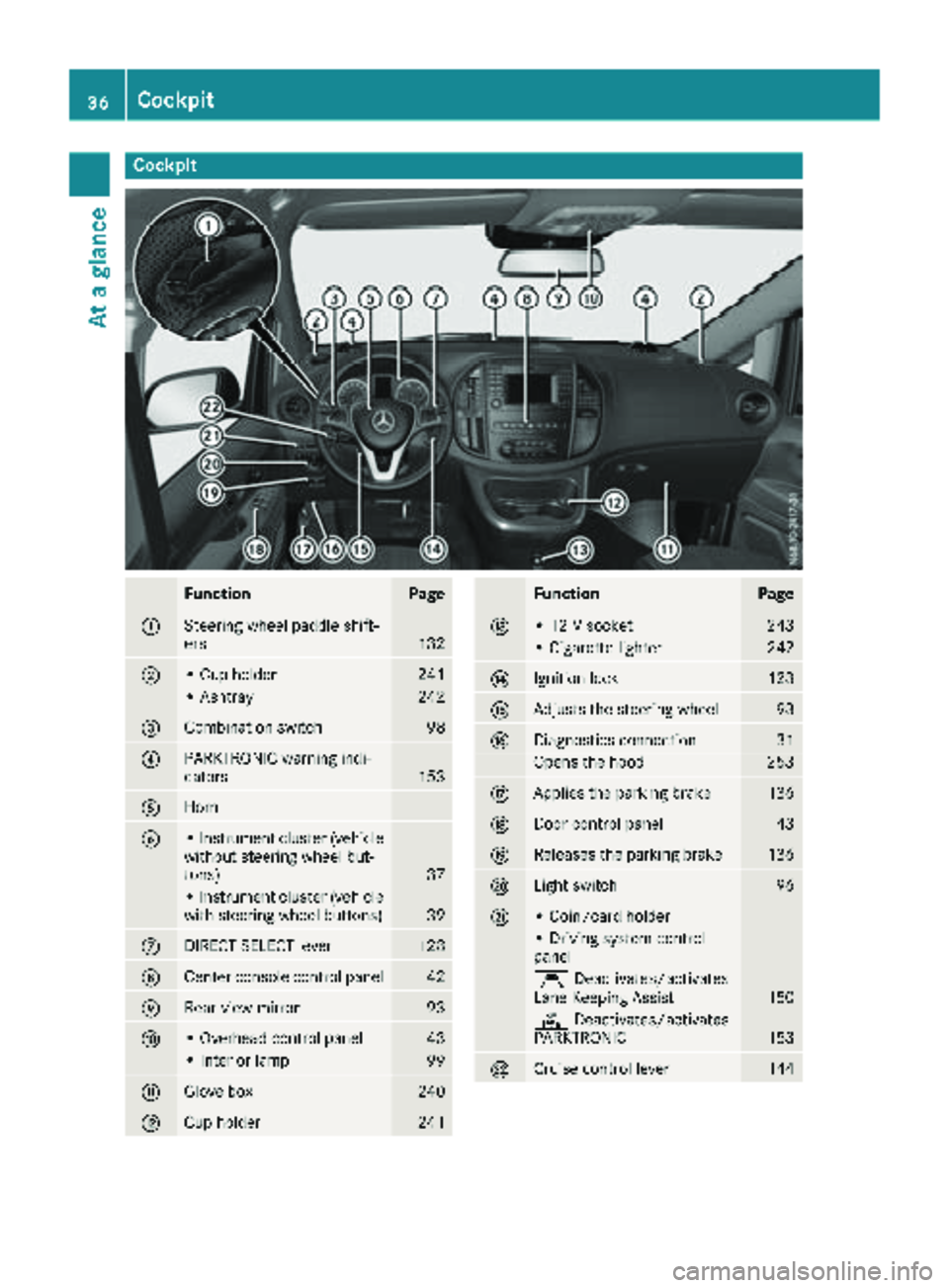
Cockpit
FunctionPage
:Steering wheel paddle shift-
ers132
;• Cup holder241
• Ashtray242
=Combination switch98
?PARKTRONIC warning indi-
cators153
AHorn
B• Instrument cluster (vehicle
without steering wheel but-
tons)
37
• Instrument cluster (vehicle
with steering wheel buttons)39
CDIRECT SELECT lever128
DCenter console control panel42
ERear-view mirror93
F• Overhead control panel43
• Interior lamp99
GGlove box240
HCup holder241
FunctionPage
I• 12 V socket243
• Cigarette lighter242
JIgnition lock123
KAdjusts the steering wheel93
LDiagnostics connection31
Opens the hood253
MApplies the parking brake136
NDoor control panel43
OReleases the parking brake136
PLight switch96
Q• Coin/card holder
• Driving system control
panel
ÇDeactivates/activates
Lane Keeping Assist150
c Deactivates/activates
PARKTRONIC153
RCruise control lever144
36Cockpit
At a glance
Page 66 of 318
the electric sliding door using the corresponding
ÅorÆ sliding door button in the center
console (
Ypage 77).
Pets in the vehicle
GWARNING
If you leave animals unattended or unsecured
in the vehicle, they could press buttons or
switches, for example.
As a result, they could:
Ractivate vehicle equipment and become
trapped, for example
Ractivate or deactivate systems, thereby
endangering other road users
Unsecured animals could also be flung around
the vehicle in the event of an accident or sud-
den steering or braking, thereby injuring vehi-
cle occupants. There is a risk of an accident
and injury.
Never leave animals unattended in the vehi-
cle. Always secure animals properly during
the journey, e.g. use a suitable animal trans-
port box.
Driving safety systems
Overview
In this section, you will find information about
the following driving safety systems:
REBD ( Electronic Brake Force Distribution)
RABS ( Anti-lock Braking System)
RBAS ( Brake Assist System)
RESP®(E lectronic Stability Program)
Important safety notes
If you fail to adapt your driving style or if you are
inattentive, the driving safety systems can nei-
ther reduce the risk of accident nor override the
laws of physics. Driving safety systems are
merely aids designed to assist driving. You are
responsible for the distance to the vehicle in
front, for vehicle speed, braking in good time
and for staying in your lane. Always adapt your driving style to the prevailing road and weather
conditions and maintain a sufficient, safe dis-
tance from other road users. Drive carefully.
Please note that the driving safety systems
described only work optimally when:
Rthere is adequate contact between the tires
and the road surface
Ryou use winter tires (M+S tires), with snow
chains if necessary, when the road conditions
are wintry
Rthe speed information determined by the
vehicle is within the legally prescribed display
accuracy
Pay particular attention to the information
regarding tires, tire tread and winter operation
under "Wheels and tires" (
Ypage 279).
ABS (Anti-lock Braking System)
General notes
ABS regulates brake pressure in such a way that the wheels do not lock when you brake. This
allows you to continue steering the vehicle when
braking.
The ò warning lamp in the instrument cluster
lights up when the ignition is switched on. The
lamp goes out when the engine starts running.
Important safety notes
Observe the important safety guidelines for the
driving safety system (Ypage 64).
ABS works from a speed of about 5 mph
(8 km/h), regardless of road-surface conditions. ABS works on slippery surfaces, even when you
only brake gently.
GWARNING
If ABS is faulty, the wheels could lock when
braking. The steerability and braking charac-
teristics may be severely impaired. Addition-
ally, further driving safety systems are deac-
tivated. There is an increased danger of skid-
ding and accidents.
Drive on carefully. Have ABS checked imme-
diately at a qualified specialist workshop.
If ABS is malfunctioning, the òwarning lamp
(
Ypage 224) lights up while the engine is run-
ning and the display shows a message:
64Driving safet ysystem s
Safety
Page 69 of 318
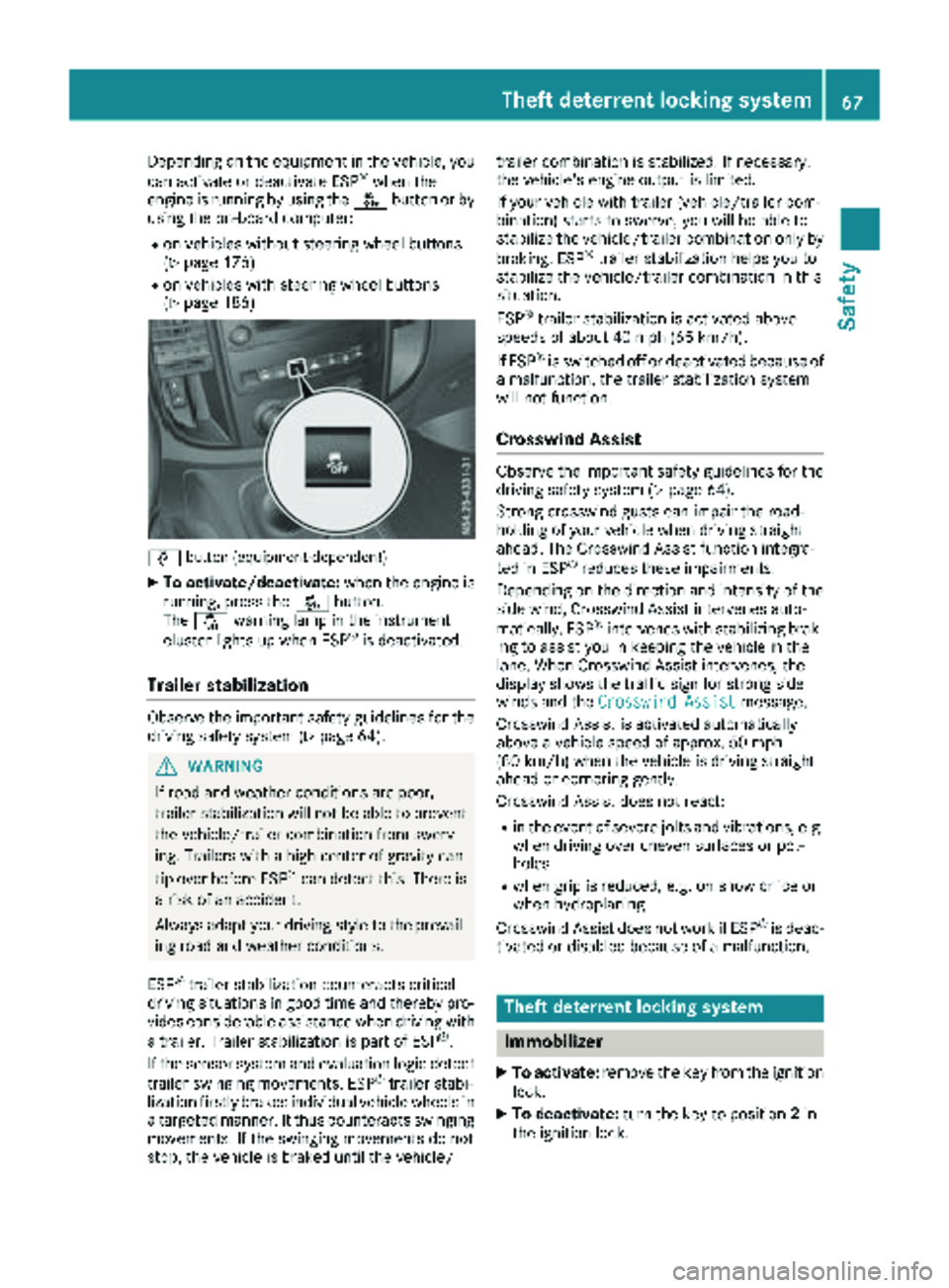
Depending on the equipment in the vehicle, you
can activate or deactivate ESP®when the
engine is running by using the åbutton or by
using the on-board computer:
Ron vehicles without steering wheel buttons
(Ypage 176)
Ron vehicles with steering wheel buttons
(Ypage 186)
å button (equipment-dependent)
XTo activate/deactivate: when the engine is
running, press the åbutton.
The å warning lamp in the instrument
cluster lights up when ESP
®is deactivated.
Trailer stabilization
Observe the important safety guidelines for the
driving safety system (Ypage 64).
GWARNING
If road and weather conditions are poor,
trailer stabilization will not be able to prevent
the vehicle/trailer combination from swerv-
ing. Trailers with a high center of gravity can
tip over before ESP
®can detect this. There is
a risk of an accident.
Always adapt your driving style to the prevail-
ing road and weather conditions.
ESP
®trailer stabilization counteracts critical
driving situations in good time and thereby pro- vides considerable assistance when driving with
a trailer. Trailer stabilization is part of ESP
®.
If the sensor system and evaluation logic detect
trailer swinging movements, ESP
®trailer stabi-
lization firstly brakes individual vehicle wheels in
a targeted manner. It thus counteracts swinging
movements. If the swinging movements do not
stop, the vehicle is braked until the vehicle/ trailer combination is stabilized. If necessary,
the vehicle's engine output is limited.
If your vehicle with trailer (vehicle/trailer com-
bination) starts to swerve, you will be able to
stabilize the vehicle/trailer combination only by
braking. ESP
®trailer stabilization helps you to
stabilize the vehicle/trailer combination in this
s
ituation.
ESP
®trailer stabilization is activated above
speeds of about 40 mph (65 km/h).
If ESP
®is switched off or deactivated because of
a malfunction, the trailer stabilization system
will not function.
Crosswind Assist
Observe the important safety guidelines for the
driving safety system (Ypage 64).
Strong crosswind gusts can impair the road-
holding of your vehicle when driving straight
ahead. The Crosswind Assist function integra-
ted in ESP
®reduces these impairments.
Depending on the direction and intensity of the
side wind, Crosswind Assist intervenes auto-
matically. ESP
®intervenes with stabilizing brak-
ing to assist you in keeping the vehicle in the
lane. When Crosswind Assist intervenes, the
display shows the traffic sign for strong side
winds and the Crosswind Assist
message.
Crosswind Assist is activated automatically
above a vehicle speed of approx. 50 mph
(80 km/h) when the vehicle is driving straight
ahead or cornering gently.
Crosswind Assist does not react:
Rin the event of severe jolts and vibrations, e.g.
when driving over uneven surfaces or pot-
holes
Rwhen grip is reduced, e.g. on snow or ice or
when hydroplaning
Crosswind Assist does not work if ESP
®is deac-
tivated or disabled because of a malfunction.
Theft deterrent locking system
Immobilizer
XTo activate: remove the key from the ignition
lock.
XTo deactivate: turn the key to position 2in
the ignition lock.
Theft deterrent locking system67
Safety
Z
Page 149 of 318
into account road, weather or traffic conditions.
The distance warning function is only an aid. You
are responsible for the distance to the vehicle in
front, for vehicle speed, braking in good time
and for staying in your lane.
Following damage to the front end of the vehicle,
have the configuration and operation of the
radar sensor checked at a qualified specialist
workshop. This also applies to collisions at slow
speeds where there is no visible damage to the
front of the vehicle.
If you change wheel size, make sure they corre- spond to the correct wheel size category
(
Ypage 279). If the category is changed without
recoding the control units in the vehicle, the
functioning of the distance warning feature may
be impaired. COLLISION PREVENTION ASSIST
may then detect a malfunction and switch itself
off.
Operation
XTo activate/deactivate: activate or deacti-
vate the distance warning function in the on-
board computer (
Ypage 187).
If the distance warning function of COLLISION
PREVENTION ASSIST is activated, the display
shows the Äsymbol:
Rin the header
Rin the Status Overviewof the Assist.menu (Ypage 186)
At speeds up to approx 20 mph (30 km/h) the
display in vehicles with Active Parking Assist
first shows the ístatus indicator. Only up to
a speed of about 20 mph (30 km/h) does the display show the Äsymbol instead of the
í status indicator.
The distance warning function can help you to
minimize the risk of a front-end collision with a
vehicle ahead or reduce the effects of such a
collision. With the help of the radar sensor sys-
tem, the distance warning function can detect
obstacles that are in the path of your vehicle for
an extended period of time. If the distance warn-
ing function detects that there is a risk of a col-
lision, you will be warned visually and, where
necessary, acoustically. Without your interven-
tion, the distance warning function cannot pre-
vent a collision.
The distance warning function issues a warning
at speeds:
Rfrom about 4 mph (7 km/h) if you approach a
vehicle traveling in front or a stationary vehi-
cle too quickly. The ·warning lamp in the instrument cluster then lights up and an inter-
mittent warning tone also sounds.
At speeds up to about 45 mph (70 km/h), the
system also detects stationary obstacles, for
example stopped or parked vehicles.
XBrake immediately until the distance from the
obstacle increases and the risk of a front-end
collision passes.
or
XTake evasive action, provided it is safe to do
so.
Adaptive Brake Assist
General notes
Adaptive Brake Assist evaluates the traffic sit-
uation with the help of the radar sensor system and can detect obstacles which have been in
your vehicle's path for an extended period of
time. From speeds above 4 mph (7 km/h), Adap-
tive Brake Assist aids you in braking during haz-
ardous situations.
Up to a speed of approximately 125 mph
(200 km/h), Adaptive Brake Assist is capable of
reacting to moving obstacles that have already
been detected as such at least once over the
period of observation.
Important safety notes
GWARNING
Adaptive Brake Assist does not react:
Rto people or animals
Rto oncoming vehicles
Rto crossing traffic
Rto stationary obstacles
Rwhen cornering
As a result, the Adaptive Brake Assist may not
intervene in all critical conditions. There is a
risk of an accident.
Always pay careful attention to the traffic sit- uation and be ready to brake.
GWARNING
Adaptive Brake Assist cannot always clearly
identify objects and complex traffic situa-
tions.
Driving systems147
Driving and parking
Z
Page 150 of 318
In such cases, Adaptive Brake Assist can:
Rintervene unnecessarily
Rnot intervene
There is a risk of an accident.
Always pay careful attention to the traffic sit- uation and be ready to brake. Terminate the
intervention in a non-critical driving situation.
In particular, the detection of obstacles can be
impaired in the case of:
Rdirt on the sensors or anything else covering
the sensors
Rsnow or heavy rain
Rinterference from other radar sources
Rstrong radar reflections, for example, in park-
ing garages
Ra narrow vehicle traveling in front, e.g. a
motorbike
Ra vehicle traveling in front on a different line
Due to the nature of the system, particularly
complicated but non-critical driving conditions
may also cause Adaptive Brake Assist to inter-
vene.
If you fail to adapt your driving style, Adaptive
Brake Assist can neither reduce the risk of acci-
dent nor override the laws of physics. Adaptive
Brake Assist cannot take into account road,
weather or traffic conditions. Adaptive Brake
Assist is only an aid. You are responsible for the
distance to the vehicle in front, for vehicle
speed, braking in good time and for staying in
your lane.
Following damage to the front end of the vehicle,
have the configuration and operation of the
radar sensor checked at a qualified specialist
workshop. This also applies to collisions at slow
speeds where there is no visible damage to the
front of the vehicle.
If you change wheel size, make sure they corre- spond to the correct wheel size category
(
Ypage 279). If the category is changed without
recoding the control units in the vehicle, the
functioning of Adaptive Brake Assist may be
impaired. COLLISION PREVENTION ASSIST may
then detect a malfunction and switch itself off.
If Adaptive Brake Assist is not available due to a
malfunction in the radar sensor system, the
brake system remains available with full brake
boosting effect and BAS.
Operation
With the help of the radar sensor system, Adap-
tive Brake Assist can detect obstacles that have been in the path of your vehicle for an extended
period of time. Ada
ptive Brake Assist does not
react to stationary obstacles. If Adaptive Brake
Assist detects a risk of collision with a vehicle
traveling in front or with a stationary obstacle,
the system calculates the braking force neces-
sary to avoid this collision. If you apply the
brakes forcefully, Adaptive Brake Assist will
automatically increase the braking force to a
level suitable for the traffic conditions.
XBrake until the distance to the obstacle
increases and the risk of a collision passes.
ABS prevents the wheels from locking.
The brakes function as usual again if:
Ryou release the brake pedal
Rthere is no longer any danger of a collision
Rno obstacle is detected in front of your vehicle
Braking assistance is then ended.
Blind Spot Assist
General notes
Blind Spot Assist monitors the areas on either
side of the vehicle that are not visible to the
driver with two lateral, rear-facing radar sensors
in the bumper. It supports you from speeds of
approximately 20 mph (30 km/h). A warning
display in the exterior mirrors draws your atten-
tion to vehicles detected in the monitored area.
If you then switch on the corresponding turn
signal to change lane, you will also receive an
optical and audible collision warning.
Important safety notes
GWARNING
Blind Spot Assist does not react to:
Rvehicles overtaken too closely on the side,
placing them in the blind spot area
Rvehicles which approach with a large speed
differential and overtake your vehicle
As a result, Blind Spot Assist may not give
warnings in such situations. There is a risk of
an accident.
148Driving systems
Driving and parking
Page 151 of 318
Always observe the traffic conditions care-
fully, and maintain a safe lateral distance.
Blind Spot Assist is only an aid. It may fail to
detect some vehicles and is no substitute for
attentive driving. Always ensure that there is
sufficient distance to the side for other road
users and obstacles.
In particular, the detection of obstacles can be
impaired in the case of:
Rdirt on the sensors or anything else covering
the sensors
Rfog, heavy rain or snow
Rnarrow vehicles, e.g. motorcycles or bicycles
Rvery wide lanes
Rnarrow lanes
Rvehicles not driving in the middle of their lane
Rbarriers or other road boundaries
Vehicles in the monitoring range are then not
indicated.
iUSA only:
This device has been approved by the FCC as
a "Vehicular Radar System". The radar sensor
is intended for use in an automotive radar
system only. Removal, tampering, or altering
of the device will void any warranties, and is
not permitted by the FCC. Do not tamper with,
alter, or use in any non-approved way.
Any unauthorized modification to this device
could void the user’s authority to operate the
equipment.
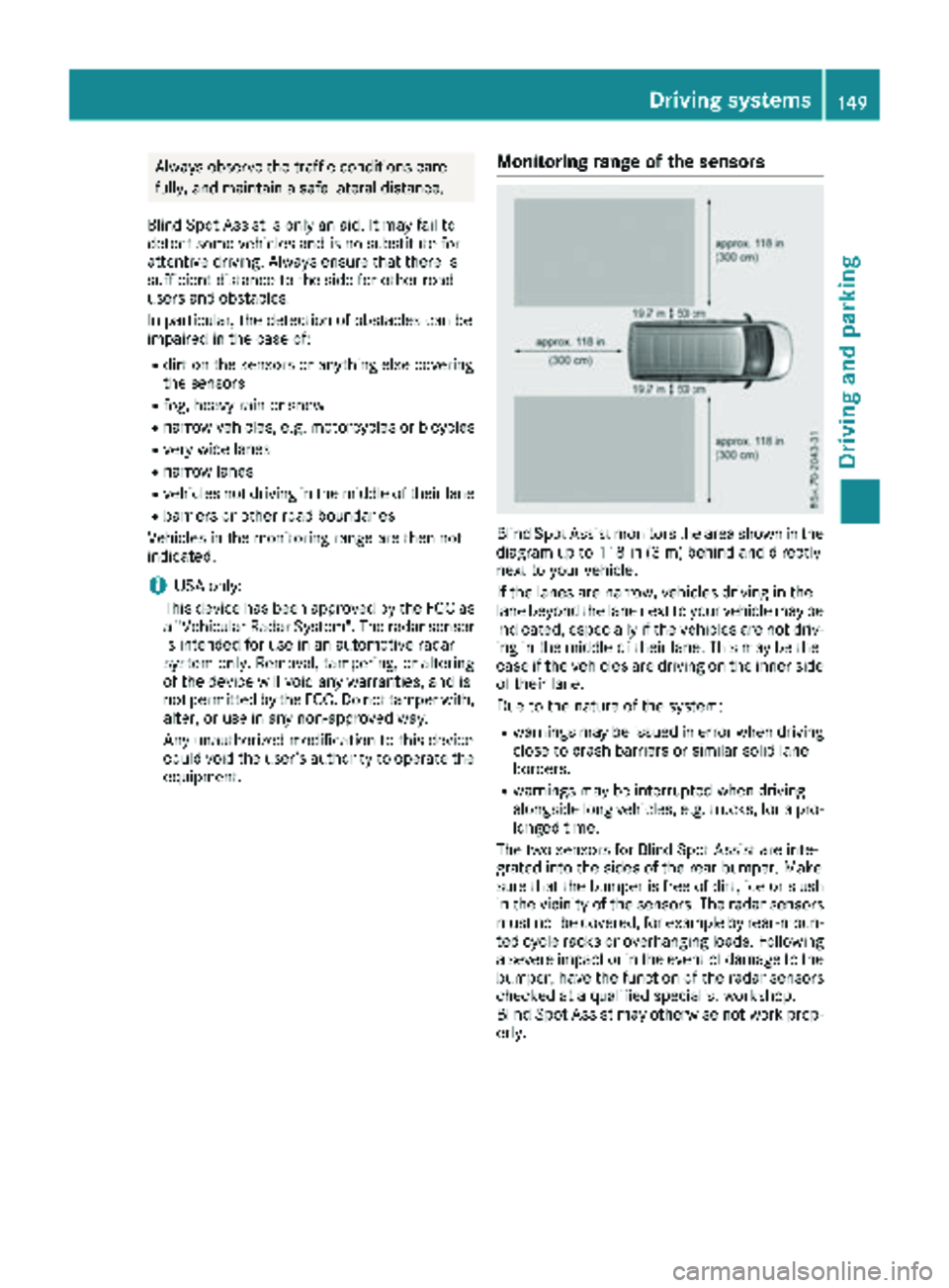
Monitoring range of the sensors
Blind Spot Assist monitors the area shown in the
diagram up to 118 in (3 m) behind and directly
next to your vehicle.
If the lanes are narrow, vehicles driving in the
lane beyond the lane next to your vehicle may be
indicated, especially if the vehicles are not driv-
ing in the middle of their lane. This may be the
case if the vehicles are driving on the inner side
of their lane.
Due to the nature of the system:
Rwarnings may be issued in error when driving
close to crash barriers or similar solid lane
borders.
Rwarnings may be interrupted when driving
alongside long vehicles, e.g. trucks, for a pro-
longed time.
The two sensors for Blind Spot Assist are inte-
grated into the sides of the rear bumper. Make
sure that the bumper is free of dirt, ice or slush
in the vicinity of the sensors. The radar sensors
must not be covered, for example by rear-moun- ted cycle racks or overhanging loads. Following
a severe impact or in the event of damage to the
bumper, have the function of the radar sensors
checked at a qualified specialist workshop.
Blind Spot Assist may otherwise not work prop-
erly.
Driving systems149
Driving an d parking
Z
Page 152 of 318
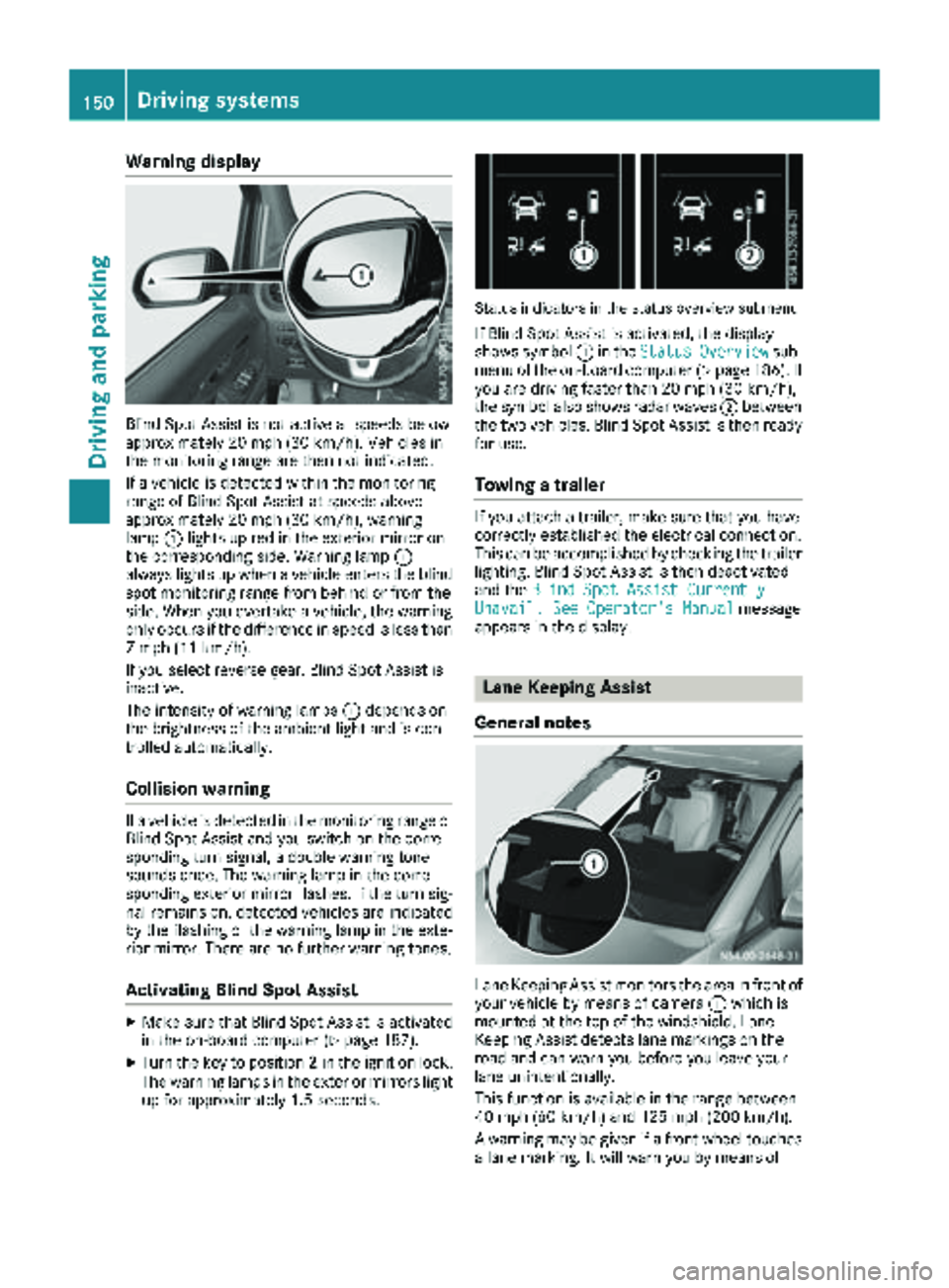
Warning display
Blind Spot Assist is not active at speeds below
approximately 20 mph (30 km/h). Vehicles in
the monitoring range are then not indicated.
If a vehicle is detected within the monitoring
range of Blind Spot Assist at speeds above
approximately 20 mph (30 km/h), warning
lamp:lights up red in the exterior mirror on
the corresponding side. Warning lamp :
always lights up when a vehicle enters the blind
spot monitoring range from behind or from the
side. When you overtake a vehicle, the warning
only occurs if the difference in speed is less than
7 mph (11 km/h).
If you select reverse gear, Blind Spot Assist is
inactive.
The intensity of warning lamps :depends on
the brightness of the ambient light and is con-
trolled automatically.
Collision warning
If a vehicle is detected in the monitoring range of
Blind Spot Assist and you switch on the corre-
sponding turn signal, a double warning tone
sounds once. The warning lamp in the corre-
sponding exterior mirror flashes. If the turn sig-
nal remains on, detected vehicles are indicated
by the flashing of the warning lamp in the exte-
rior mirror. There are no further warning tones.
Activating Blind Spot Assist
XMake sure that Blind Spot Assist is activated
in the on-board computer (Ypage 187).
XTurn the key to position 2in the ignition lock.
The warning lamps in the exterior mirrors light
up for approximately 1.5 seconds.
Status indicators in the status overview submenu
If Blind Spot Assist is activated, the display
shows symbol :in the StatusOverviewsub-
menu of the on-board computer (Ypage 186). If
you are driving faster than 20 mph (30 km/h),
the symbol also shows radar waves ;between
the two vehicles. Blind Spot Assist is then ready
for use.
Towing a trailer
If you attach a trailer, make sure that you have
correctly established the electrical connection.
This can be accomplished by checking the trailer
lighting. Blind Spot Assist is then deactivated
and the Blind Spot Assist Currently
Unavail. See Operator's Manualmessage
appears in the display.
Lane Keeping Assist
General notes
Lane Keeping Assist monitors the area in front of
your vehicle by means of camera :which is
mounted at the top of the windshield. Lane
Keeping Assist detects lane markings on the
road and can warn you before you leave your
lane unintentionally.
This function is available in the range between
40 mph (60 km/h) and 125 mph (200 km/h).
A warning may be given if a front wheel touches a lane marking. It will warn you by means of
150Driving systems
Driving and parking
Page 153 of 318
intermittent vibration through the steering
wheel for up to 1.5 seconds.
Important safety notes
GWARNING
Lane Keeping Assist may not always clearly
recognize lane markings.
In this case, Lane Keeping Assist may:
Rgive an unnecessary warning
Rnot give a warning
There is a risk of an accident.
Always pay particular attention to the traffic
situation and stay in lane, in particular if
warned by Lane Keeping Assist.
GWARNING
The Lane Keeping Assist warning does not
return the vehicle to the original lane. There is
a risk of an accident.
You should always steer, brake or accelerate
yourself, in particular if warned by Lane Keep-
ing Assist.
If you fail to adapt your driving style, Lane Keep-
ing Assist can neither reduce the risk of accident
nor override the laws of physics. Lane Keeping
Assist cannot take into account road, weather or traffic conditions. Lane Keeping Assist is only an
aid. You are responsible for the distance to the
vehicle in front, for vehicle speed, braking in
good time and for staying in your lane.
Lane Keeping Assist does not keep your vehicle
in its lane.
The system may be impaired or may not function
if:
Rthere is poor visibility, e.g. due to insufficient
illumination of the road, or due to snow, rain,
fog or spray
Rthere is glare, e.g. from oncoming traffic, the
sun or reflection from other vehicles (e.g. if
the road surface is wet)
Rthe windshield is dirty, fogged up, damaged or
covered, for instance by a sticker, in the vicin-
ity of the camera
Rthere are no lane markings, or several unclear
lane markings for one lane, e.g. around con-
struction sites
Rthe lane markings are worn away, dark or cov-
ered up, e.g. by dirt or snow
Rthe distance to the vehicle in front is too short
and thus the lane markings cannot be detec-
ted
Rthe lane markings change quickly, e.g. lanes
branch off, cross one another or merge
Rthe road is narrow and winding
Rthere are highly variable shade conditions onthe road
Deactivating and activating Lane Keep -
ing Assist
XPress the Çbutton.
If the indicator lamp in the button lights up
and the display shows the Çsymbol in the
status area, Lane Keeping Assist is switched
on but not ready for use.
If you are driving with Lane Keeping Assist
activated at speeds above 40 mph (60 km/h)
and lane markings are detected, the display
shows the Çsymbol highlighted in the
status area. Lane Keeping Assist is then ready
for use.
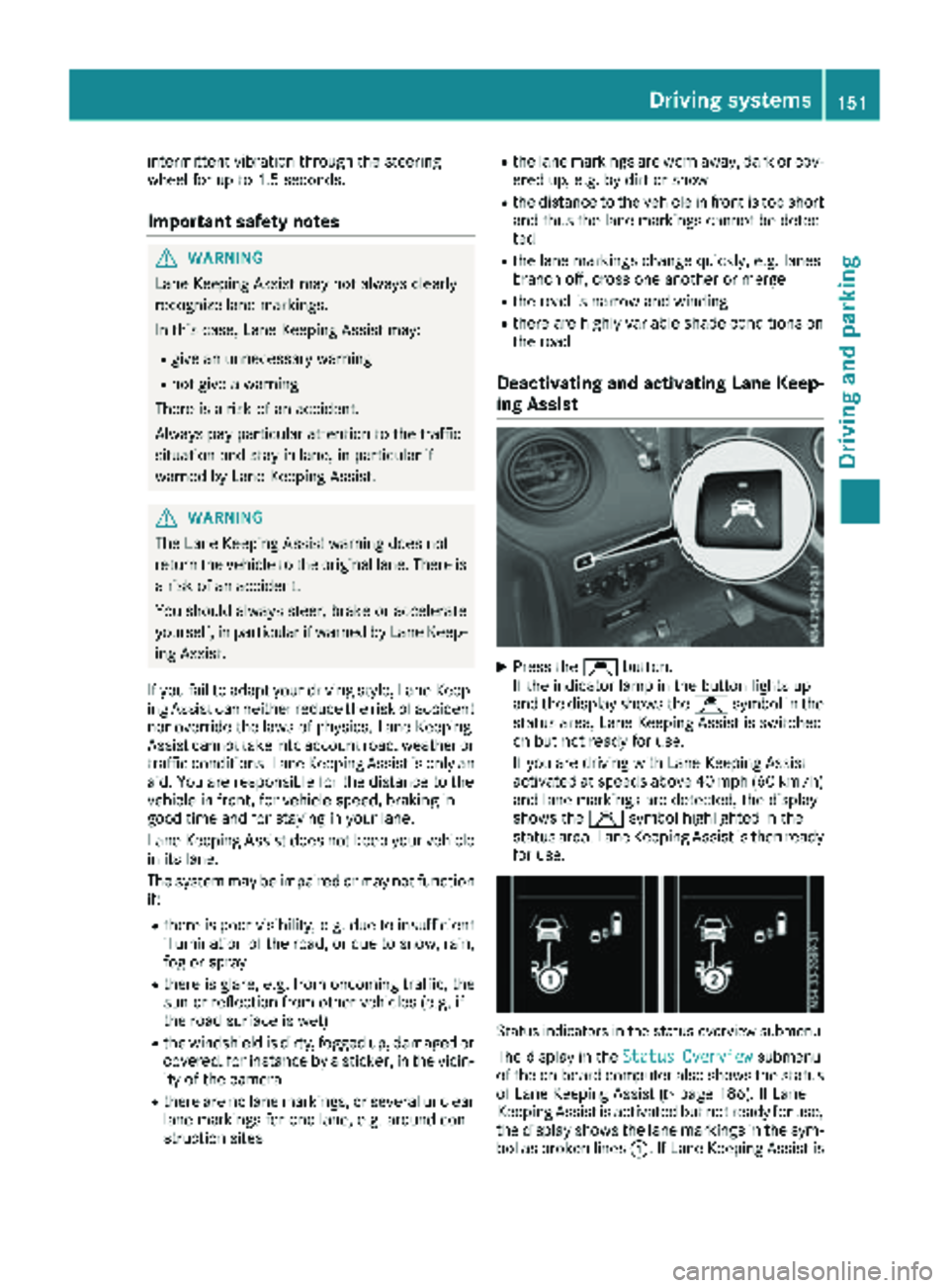
Status indicators in the status overview submenu
The display in the Status Overviewsubmenu
of the on-board computer also shows the status
of Lane Keeping Assist (
Ypage 186). If Lane
Keeping Assist is activated but not ready for use,
the display shows the lane markings in the sym-
bol as broken lines :. If Lane Keeping Assist is
Driving systems151
Driving and parking
Z