ECO mode MERCEDES-BENZ METRIS 2020 MY20 Operator’s Manual
[x] Cancel search | Manufacturer: MERCEDES-BENZ, Model Year: 2020, Model line: METRIS, Model: MERCEDES-BENZ METRIS 2020Pages: 320, PDF Size: 26.38 MB
Page 121 of 320
Regulating climate control automati-
cally
General notes When dual-zone automatic climate control is in
automatic mode, the set temperature is auto-
matically kept constant. The system automati-
cally regulates the temperature of the dis-
pensed air, the airflow and the air distribution.
Automatic mode will achieve optimal operation
if the cooling with air dehumidification func-
tion is also activated. If desired, the cooling
with air dehumidification function can be deac-
tivated (
Y page 118).
Dual-zone automatic climate control Automatic mode for automatic climate control
settings can only be activated or deactivated
on the first menu level. If you do not set a new
value for the rear-compartment climate control
in the second menu level within approx. ten
seconds, the control panel display goes back
to the first menu level.
X Switch on climate control ( Y page 117).
X Set temperature for the driver's and front-
passenger side and, for vehicles with rear-
compartment air conditioning, for the rear
compartment, too
(Y page 119).
X To switch automatic mode on or off:
press the à button.
If the indicator lamp in the
à button
lights up, automatic mode is activated. The
airflow and air distribution are controlled
automatically and the windshield defrosting
function is deactivated.
If you deactivate automatic mode, the auto-
matic climate control system saves the current
settings.
In automatic mode, if you adjust the airflow or
air distribution manually, the indicator lamp
above the à button goes out. The function
which has not been changed manually, how-
ever, continues to be controlled automatically. Setting the temperature
Air-conditioning system X
Switch on climate control ( Y page
117).
X To increase or reduce: turn temperature
control : clockwise or counter-clockwise.
When doing so, only change the tempera-
ture in small increments, and start in the
center position or at
72 ‡ (22 †)
( Y page 115).
Dual-zone automatic climate control You can set the temperature separately for the
driver's and co-driver's side. In vehicles with
rear-compartment air conditioning, the tem-
perature for the rear compartment can be set
additionally. Each set temperature is automati-
cally maintained at a constant level.
X Switch on climate control (Y page
117).
X To increase or reduce: turn temperature
control : or E clockwise or counter-clock-
wise ( Y page
116). When doing so, only
change the temperature in small increments
starting at 72 ‡ (22 †).
The control panel display shows the set
temperature for the left and right side at the
respective edge of the display.
Rear-compartment air-conditioning
system Vehicles with air-conditioning system
X Switch on climate control ( Y page
117).
The air conditioning settings for tempera-
ture, airflow and, for rear-compartment air
conditioning, also the setting for air distribu-
tion are also applied to the rear-compart-
ment climate control.
Vehicles with dual-zone automatic cli-
mate control X Switch on climate control ( Y page
117).
X To increase or decrease: press the /
button on the control panel of the automatic
climate control.
The indicator lamp in the / button
flashes. The control panel display shows the
second menu level for the temperature and Operating the climate control system
119
Climate control
Page 122 of 320
airflow setting of the rear-compartment air
conditioning.
X Turn temperature control : or E counter-
clockwise or clockwise (Y page 116). When
doing so, only change the temperature in
small increments starting at 72 ‡ (22 †).
The control panel display shows the temper-
ature set for the rear compartment.
If you do not make any more settings for
approximately ten seconds, the control
panel display shows menu level 1 again for
the automatic climate control settings. The
indicator lamp in the / button remains
lit. Setting the air distribution
Air-conditioning system Air distribution settings
¯ Directs air through the defroster vents
P Directs air through the center and side
air vents
O Directs air through the footwell vents
Regardless of the air distribution selected, air
is always directed to the side air vents. You
can adjust this airflow by opening or closing
the side air vents ( Y page
124).
Setting the air distribution
X Switch on climate control (Y page
117).
X Press the P, O and/or ¯ button.
If the indicator lamp in a button lights up,
the air is directed to the corresponding air
vents.
X Adjust the air vents if necessary
(Y page
124).
Dual-zone automatic climate control Air distribution settings
¯ Directs air through the defroster vents
b Directs air through the defroster, center
and side air vents
_ Directs air through the defroster, cen-
ter, side and footwell vents
a Directs air through the defroster and
footwell vents
P Directs air through the center and side
air vents N
Directs air through the center, side and
footwell vents
O Directs air through the footwell vents
Regardless of the air distribution selected, air
is always directed to the side air vents. You
can adjust this airflow by opening or closing
the side air vents ( Y page
124).
Setting the air distribution
X Switch on climate control (Y page
117).
X Press the É or Ë button to set the air
distribution.
The control panel display shows the corre-
sponding air distribution symbol.
X Adjust the air vents if necessary
(Y page
124).
i If the air distribution is set when dual-zone
automatic climate control is in automatic
mode, automatic control is deactivated. The
indicator lamp on the à button then
goes out. The airflow continues to be adjus-
ted automatically, however.
Rear-compartment air-conditioning
system When the rear-compartment air conditioning is
switched on, the air distribution setting on the
control panel also applies to the rear-compart-
ment air conditioning.
This also applies to the automatic mode of
dual-zone automatic climate control. The air is
then automatically directed to the footwell or
the headroom of the rear compartment. Setting the airflow
Air-conditioning system X
Switch on climate control (Y page
117).
X To increase or reduce: turn airflow control
A counter-clockwise or clockwise to the
desired level
(Y page 115).
Dual-zone automatic climate control X
Switch on climate control ( Y page
117).
X To increase or reduce: press the K or
I button.
The control panel display shows the airflow
control setting as a bar display. 120
Operating the climate control system
Climate control
Page 123 of 320
i
If the airflow is set when in automatic
mode, automatic control is deactivated. The
indicator lamp in the à button then goes
out. The air distribution continues to be
adjusted automatically, however.
Rear-compartment air-conditioning
system Vehicles with air-conditioning system
X Switch on climate control (Y page 117).
The air conditioning settings for tempera-
ture, airflow and, for rear-compartment air
conditioning, also the setting for air distribu-
tion are also applied to the rear-compart-
ment climate control.
Vehicles with dual-zone automatic cli-
mate control
X Switch on climate control (Y page
117).
X To increase or decrease: press the /
button on the control panel of the automatic
climate control.
The indicator lamp in the / button
flashes. The control panel display shows the
second menu level for the temperature and
airflow setting of the rear compartment air
conditioning.
X Press the K or I button.
The control panel display shows the rear-
compartment airflow control setting as a bar
display.
If you do not make any more settings for
approximately ten seconds, the control
panel display shows menu level 1 again for
the automatic climate control settings. The
indicator lamp in the / button remains
lit. Activating/deactivating the synchro-
nization function
General notes Dual-zone automatic climate control can be
set centrally using the synchronization func-
tion. The temperature setting for the driver's
side is then adopted for the front-passenger
side and, on vehicles with rear-compartment
air conditioning, the rear compartment too. Dual-zone automatic climate control X
Switch on climate control ( Y page
117).
X Press the 0 button.
If the indicator lamp in the 0 button
lights up, the function is switched on. The
display then shows the temperature set on
the driver's side for the front-passenger
side.
The synchronization function switches off if
the temperature setting for the front-
passenger side or for the rear compartment
is altered. The indicator lamp on the 0
button then goes out. Defrosting the windshield
General notes You can use the following settings to defrost
the windshield or to defrost the inside of the
windshield and the front side windows.
Only use the following settings until the wind-
shield is clear.
Air-conditioning system X
Switch on climate control (Y page
117).
X Turn temperature control : and airflow
control A clockwise to the z setting
(Y page
115).
X Select the ¯ air distribution setting
(Y page
120).
Only the indicator lamp in the ¯ button
lights up. The indicator lamps on the P
and O buttons are off.
Dual-zone automatic climate control X
Switch on climate control ( Y page
117).
X To activate/deactivate the windshield
defrosting function: press the ¬ but-
ton.
The indicator lamp in the ¬ button
comes on when the windshield defrosting
function is switched on. Temperature, air-
flow and air distribution are automatically
set to the optimum defrosting effect. Air-
recirculation mode is deactivated.
When you activate automatic mode, the
windshield defrosting function is automati-
cally deactivated. Operating the climate control system
121
Climate control
Page 125 of 320
Switching air-recirculation mode
on/off
Important safety notes You can deactivate the intake of fresh air if
unpleasant odors enter the vehicle from out-
side. The air inside the vehicle is then circula-
ted.
When you switch on air-recirculation mode,
the side windows and windows could fog up
more quickly, in particular at low outside tem-
peratures. Only switch on air-recirculation
mode for a short time.
Air-conditioning system or dual-zone
automatic climate control X
Switch on climate control ( Y page 117).
X Press the h button.
If the indicator lamp in the h button
lights up, air-recirculation mode is activated.
Air-recirculation mode switches on automati-
cally: R at high outside temperatures
R while driving in a tunnel (only vehicles with a
navigation system)
The indicator lamp in the h button is then
not lit up. Outside air is added automatically
after about
30 minutes.
Air-recirculation mode is deactivated automati-
cally:
R after approximately five minutes at outside
temperatures below about 45 ‡ (7 †)
R after approximately five minutes when the
cooling with air-dehumidification function is
deactivated
R after approximately 30 minutes at outside
temperatures above about 45 ‡ (7 †) and
when the cooling with air-dehumidification
function is active Convenience opening/pre-entry cli-
mate control
G
WARNING
During convenience opening, body parts
could be drawn in or become trapped
between the side window and the door
frame. There is a risk of injury. Monitor the entire opening procedure when
using convenience opening. When opening,
make sure that nobody touches the side
window. Release the % switch immedi-
ately if somebody becomes trapped, to
interrupt the opening procedure.
X Pre-entry climate control and conveni-
ence opening with the key:
press and hold
the % button on the key.
The side windows open automatically and
the blower of the climate control system is
activated.
X Release the % button.
i At high interior temperatures, the blower is
also switched on when a door is opened.
This means that slightly cooled air enters
the vehicle interior after the engine is star-
ted, to cool the vehicle more rapidly. Switching the residual heat function
on/off
General notes Only vehicles with dual-zone automatic climate
control have the residual heat function.
Once the engine is switched off, it is possible
to make use of the residual heat of the engine
to continue heating or ventilating the front
compartment of the vehicle for approximately
30 minutes. The heating or ventilation time
depends on the set interior temperature.
Switching the function on/off X
Turn the key to position 0 in the ignition
lock or remove it.
X Press the Ì button.
If the residual heat function is activated, the
indicator lamp in the Ì button comes on.
The blower will run at a low speed regard-
less of the airflow setting.
If you activate the residual heat function at
high temperatures, only the auxiliary ventila-
tion will be activated. The blower then runs
at medium speed. Operating the climate control system
123
Climate control Z
Page 128 of 320
Useful information
This Operator's Manual describes all models
as well as standard and optional equipment of
your vehicle that were available at the time of
going to print. Country-specific variations are
possible. Note that your vehicle may not be
equipped with all of the described functions.
This also applies to systems and functions rel-
evant to safety.
Read the information on qualified specialist
workshops (Y page
32).Breaking-in notes
Important safety notes
In certain driving and driving safety systems,
the sensors adjust automatically while a cer-
tain distance is being driven after the vehicle
has been delivered or after repairs. Full system
effectiveness is not reached until the end of
this teach-in procedure.
New or replaced brake pads and brake discs
only reach their optimal braking effect after a
few hundred kilometers of driving. Until then,
compensate for this by applying greater force
to the brake pedal. The first 1000 miles (1500 km)
For the service life and economy of your vehi-
cle it is crucial that you break in the engine
with due care.
R Therefore, protect the engine for the first
1000 miles (1500 km
) by driving at varying
vehicle and engine speeds.
R Avoid overstraining the vehicle and high
engine speeds during this period, e.g. driv-
ing at full throttle. Do not exceed Ø of the
permissible maximum speed for each gear.
R Do not change down a gear manually in
order to brake.
R Try to avoid depressing the accelerator
pedal beyond the pressure point (kickdown).
After 1000 miles (1500 km), you can increase
the engine speed gradually and accelerate the
vehicle to full speed.
i You should also observe these notes on
breaking-in if the engine or parts of the drive
train on your vehicle have been replaced. Driving
Important safety notes
G
WARNING
Flammable materials introduced through
environmental influence or by animals can
ignite if in contact with the exhaust system
or parts of the engine that heat up. There is
a risk of fire.
Carry out regular checks to make sure that
there are no flammable foreign materials in
the engine compartment or in the exhaust
system. G
WARNING
If you switch off the ignition while driving,
safety-relevant functions are only available
with limitations, or not at all. This could
affect, for example, the power steering and
the brake boosting effect. You will require
considerably more effort to steer and brake.
There is a risk of an accident.
Do not switch off the ignition while driving. G
WARNING
If the parking brake has not been fully
released when driving, the parking brake
can:
R overheat and cause a fire
R lose its hold function.
There is a risk of fire and an accident.
Release the parking brake fully before driv-
ing off.
! Warm up the engine quickly. Do not use
the engine's full performance until it has
reached operating temperature.
Only shift the automatic transmission to the
desired drive position when the vehicle is
stationary.
Where possible, avoid spinning the drive
wheels when pulling away on slippery roads.
You could otherwise damage the drive train. 126
Driving
Driving and parking
Page 138 of 320
Gearshift recommendation
:
Gearshift direction
; Recommended gear The gearshift recommendations assist you in
adopting an economical driving style.
X When the display shows the gearshift rec-
ommendation, shift to recommended
gear ;. Problems with the transmission
Problem
Possible causes/consequences and
M SolutionsThe transmission is
locked in position j. The vehicle electronics are malfunctioning.
X Have the vehicle electronics checked immediately at a qualified
specialist workshop. The acceleration char-
acteristics have deterio-
rated noticeably.
The transmission does
not shift. The transmission is in emergency mode.
It is only possible to shift into second gear or reverse gear
R.
X Have the transmission checked immediately at a qualified spe-
cialist workshop.
X Stop the vehicle.
X Move the selector lever to j.
X Switch off the engine.
X Wait at least ten seconds before restarting the engine.
X Depress the brake pedal.
X Move selector lever to h or k.
X Have the transmission checked immediately at a qualified spe-
cialist workshop. Refueling
Important safety notes
G
WARNING
Fuel is highly flammable. Improper handling
of fuel creates a risk of fire and explosion.
Avoid fire, open flames, smoking and creat-
ing sparks under all circumstances. Switch
off the engine and, if applicable, the auxiliary
heating before refueling. G
WARNING
Fuels are toxic and harmful to health. There
is a risk of injury.
You must avoid fuels coming into contact
with skin, eyes and clothes or being swal-
lowed.
Do not inhale the fuel vapors. Keep children
away from fuels.
Keep doors and windows closed during the
refueling process. 136
RefuelingDriving and parking
Page 142 of 320
Parking the vehicle for a long period
If you leave the vehicle parked for longer than
four weeks, the battery may be damaged by
exhaustive discharging.
X Disconnect the battery (Y page 260).
or X Connect the battery to a trickle charger.
Be sure to observe the notes on charging
the batteries
(Y page 262).
You can obtain information about trickle
chargers from a qualified specialist work-
shop.
If you leave the vehicle parked for longer than
6 weeks, the vehicle may suffer damage as a
result of lack of use.
X Visit a qualified specialist workshop and
seek advice. Driving tips
General notes
Important safety notes G
WARNING
If you switch off the ignition while driving,
safety-relevant functions are only available
with limitations, or not at all. This could
affect, for example, the power steering and
the brake boosting effect. You will require
considerably more effort to steer and brake.
There is a risk of an accident.
Do not switch off the ignition while driving. G
WARNING
Mobile communications equipment distracts
the driver from traffic conditions. In addi-
tion, the driver could lose control of the
vehicle. There is a risk of an accident.
As a driver, use mobile communications
equipment only when the vehicle is at a
standstill.
As a vehicle occupant, use mobile communi-
cations equipment only in the designated
area, e.g. the rear passenger compartment. Observe the legal requirements of the country
in which you are driving. Some jurisdictions
prohibit the driver from using a mobile phone
while driving a vehicle.
Always use the hands-free system for tele-
phoning while driving. Only use the telephone
if road traffic conditions permit. If this is not
the case, pull over to a safe location before
using the telephone.
Bear in mind that at a speed of just 30 mph
(approximately
50 km/h), your vehicle is cov-
ering a distance of 44 feet (approximately
14 m) every second.
Drive sensibly – save fuel In order to save fuel, observe the following
tips:
X The tires should always be inflated to the
recommended tire pressure.
X Remove unnecessary loads.
X Remove roof carriers when they are not nee-
ded.
X Warm up the engine at low engine speeds.
X Avoid frequent acceleration or braking.
X Have all maintenance work carried out as
indicated by the service intervals in the
Maintenance Booklet or by the service inter-
val display.
Fuel consumption also increases when driving
in cold weather, in stop-start traffic and in
mountainous terrain.
Overrun cutoff If you are in overrun mode and take your foot
off the accelerator pedal, the fuel supply is cut
off when the engine speed is out of the idle
speed control range.
Drinking and driving G
WARNING
Drinking and driving and/or taking drugs
and driving are very dangerous combina-
tions. Even a small amount of alcohol or
drugs can affect your reflexes, perceptions
and judgment.
The possibility of a serious or even fatal
accident is greatly increased when you drink
or take drugs and drive. 140
Driving tips
Driving and parking
Page 143 of 320
Do not drink or take drugs and drive or allow
anyone to drive who has been drinking or
taking drugs.
Emission control G
DANGER
Combustion engines emit poisonous
exhaust gases such as carbon monoxide.
Inhaling these exhaust gases is hazardous to
health and can result in poisoning. There is a
risk of fatal injury. Therefore, never leave the
engine running an enclosed space without
adequate ventilation.
Certain engine systems are designed to keep
the level of poisonous substances in exhaust
fumes within legal limits.
These systems only work optimally if they are
maintained exactly in accordance with the
manufacturer's specifications. Any work on
the engine should therefore be carried out by
qualified and authorized Mercedes-Benz tech-
nicians.
The engine settings must not be changed
under any circumstances. In addition, all spe-
cific maintenance work must be carried out at
regular intervals and in accordance with the
service requirements of the dealer listed here
on the inside title page. Details can be found
in the Maintenance Booklet. Speed limiter
G
WARNING
Exceeding the stated tire load-bearing capa-
city and the approved maximum speed
could lead to tire damage or the tire burst-
ing. There is a risk of accident.
Therefore, only use tire types and sizes
approved for your vehicle model. Observe
the tire load rating and speed rating
required for your vehicle.
As the driver, you must be aware of the maxi-
mum design speed of the vehicle and the max-
imum permissible speed based on the tires
(tire and tire pressure). In particular, also observe the tire approval regulations for each
country.
You must not exceed the speed limit for the
tires indicated by the speed rating. The speed
rating is stated in the tire tables (Y page
302).
You can permanently limit the permissible
maximum speed of your vehicle, e.g. for driv-
ing on winter tires.
Mercedes-Benz recommends that you have
the maximum permissible speed programed at
a Mercedes-Benz Commercial Van Center.
Before overtaking, take into consideration that
the engine speed limiter prevents the speed
increasing beyond the programmed permissi-
ble maximum speed. Driving abroad
Service An extensive network of authorized Mercedes-
Benz Centers is also at your disposal when you
are traveling abroad. Nevertheless, please
bear in mind that service facilities or replace-
ment parts may not always be immediately
available. The relevant workshop directories
are available from any Mercedes-Benz Com-
mercial Van Center.
Fuel In some countries, only fuels with a higher sul-
fur content are available.
Unsuitable fuel can cause engine damage. You
will find information about fuel under "Service
products and capacities"
(Y page 306).
Low-beam headlamps General notes
When driving in countries in which traffic
drives on the opposite side of the road to the
country where the vehicle is registered, you
must switch the headlamps to symmetrical
low beam. This prevents oncoming traffic from
being blinded. Symmetrical low beam does not
illuminate as large an area of the edge of the
road. Driving tips
141
Driving and parking Z
Page 166 of 320
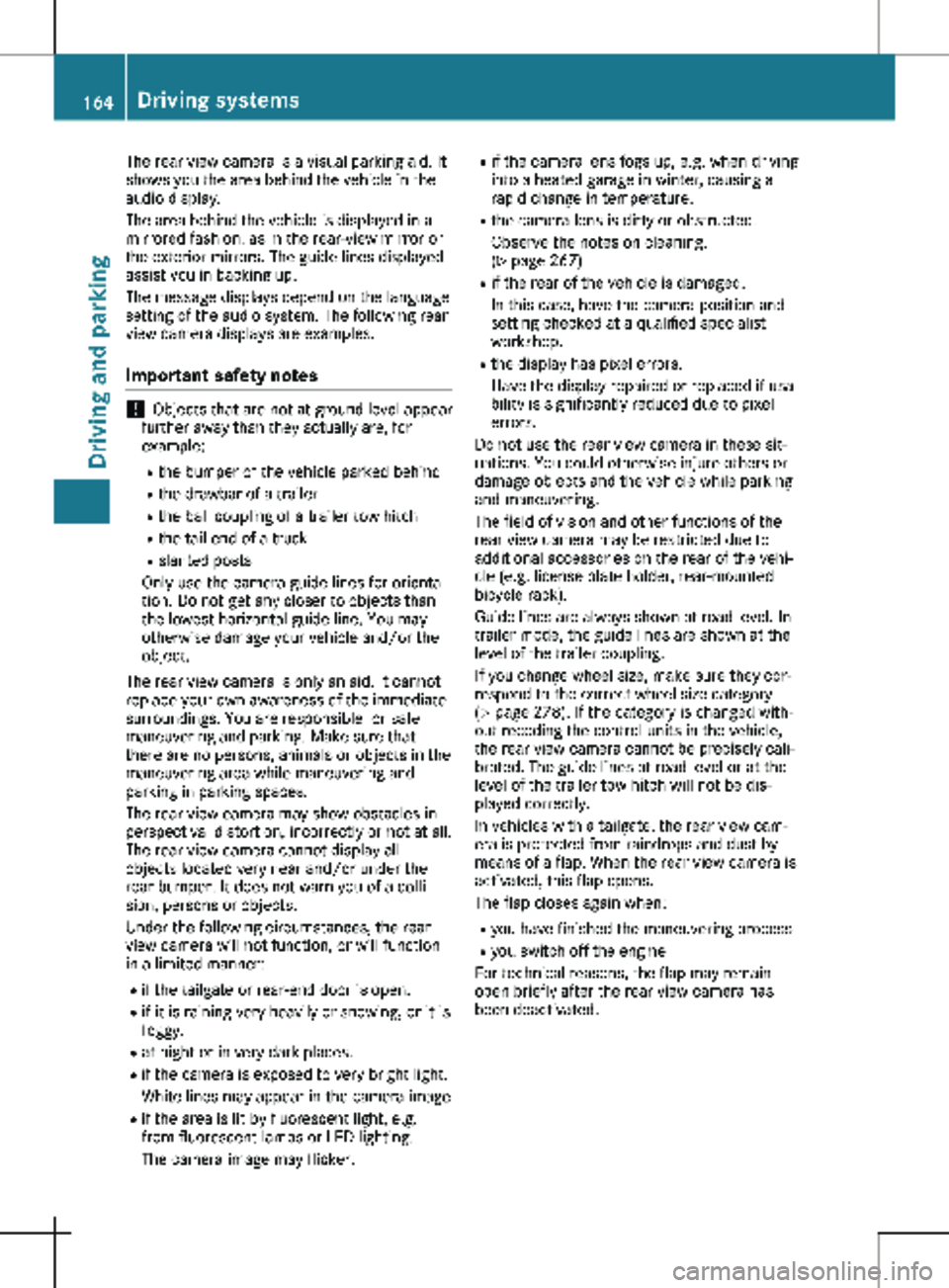
The rear view camera is a visual parking aid. It
shows you the area behind the vehicle in the
audio display.
The area behind the vehicle is displayed in a
mirrored fashion, as in the rear-view mirror or
the exterior mirrors. The guide lines displayed
assist you in backing up.
The message displays depend on the language
setting of the audio system. The following rear
view camera displays are examples.
Important safety notes !
Objects that are not at ground level appear
further away than they actually are, for
example:
R the bumper of the vehicle parked behind
R the drawbar of a trailer
R the ball coupling of a trailer tow hitch
R the tail-end of a truck
R slanted posts
Only use the camera guide lines for orienta-
tion. Do not get any closer to objects than
the lowest horizontal guide line. You may
otherwise damage your vehicle and/or the
object.
The rear view camera is only an aid. It cannot
replace your own awareness of the immediate
surroundings. You are responsible for safe
maneuvering and parking. Make sure that
there are no persons, animals or objects in the
maneuvering area while maneuvering and
parking in parking spaces.
The rear view camera may show obstacles in
perspectival distortion, incorrectly or not at all.
The rear view camera cannot display all
objects located very near and/or under the
rear bumper. It does not warn you of a colli-
sion, persons or objects.
Under the following circumstances, the rear
view camera will not function, or will function
in a limited manner:
R if the tailgate or rear-end door is open.
R if it is raining very heavily or snowing, or it is
foggy.
R at night or in very dark places.
R if the camera is exposed to very bright light.
White lines may appear in the camera image
R if the area is lit by fluorescent light, e.g.
from fluorescent lamps or LED lighting.
The camera image may flicker. R
if the camera lens fogs up, e.g. when driving
into a heated garage in winter, causing a
rapid change in temperature.
R the camera lens is dirty or obstructed.
Observe the notes on cleaning.
(Y page
267)
R if the rear of the vehicle is damaged.
In this case, have the camera position and
setting checked at a qualified specialist
workshop.
R the display has pixel errors.
Have the display repaired or replaced if usa-
bility is significantly reduced due to pixel
errors.
Do not use the rear view camera in these sit-
uations. You could otherwise injure others or
damage objects and the vehicle while parking
and maneuvering.
The field of vision and other functions of the
rear view camera may be restricted due to
additional accessories on the rear of the vehi-
cle (e.g. license plate holder, rear-mounted
bicycle rack).
Guide lines are always shown at road level. In
trailer mode, the guide lines are shown at the
level of the trailer coupling.
If you change wheel size, make sure they cor-
respond to the correct wheel size category
( Y page 278). If the category is changed with-
out recoding the control units in the vehicle,
the rear view camera cannot be precisely cali-
brated. The guide lines at road level or at the
level of the trailer tow hitch will not be dis-
played correctly.
In vehicles with a tailgate, the rear view cam-
era is protected from raindrops and dust by
means of a flap. When the rear view camera is
activated, this flap opens.
The flap closes again when:
R you have finished the maneuvering process
R you switch off the engine
For technical reasons, the flap may remain
open briefly after the rear view camera has
been deactivated. 164
Driving systems
Driving and parking
Page 167 of 320
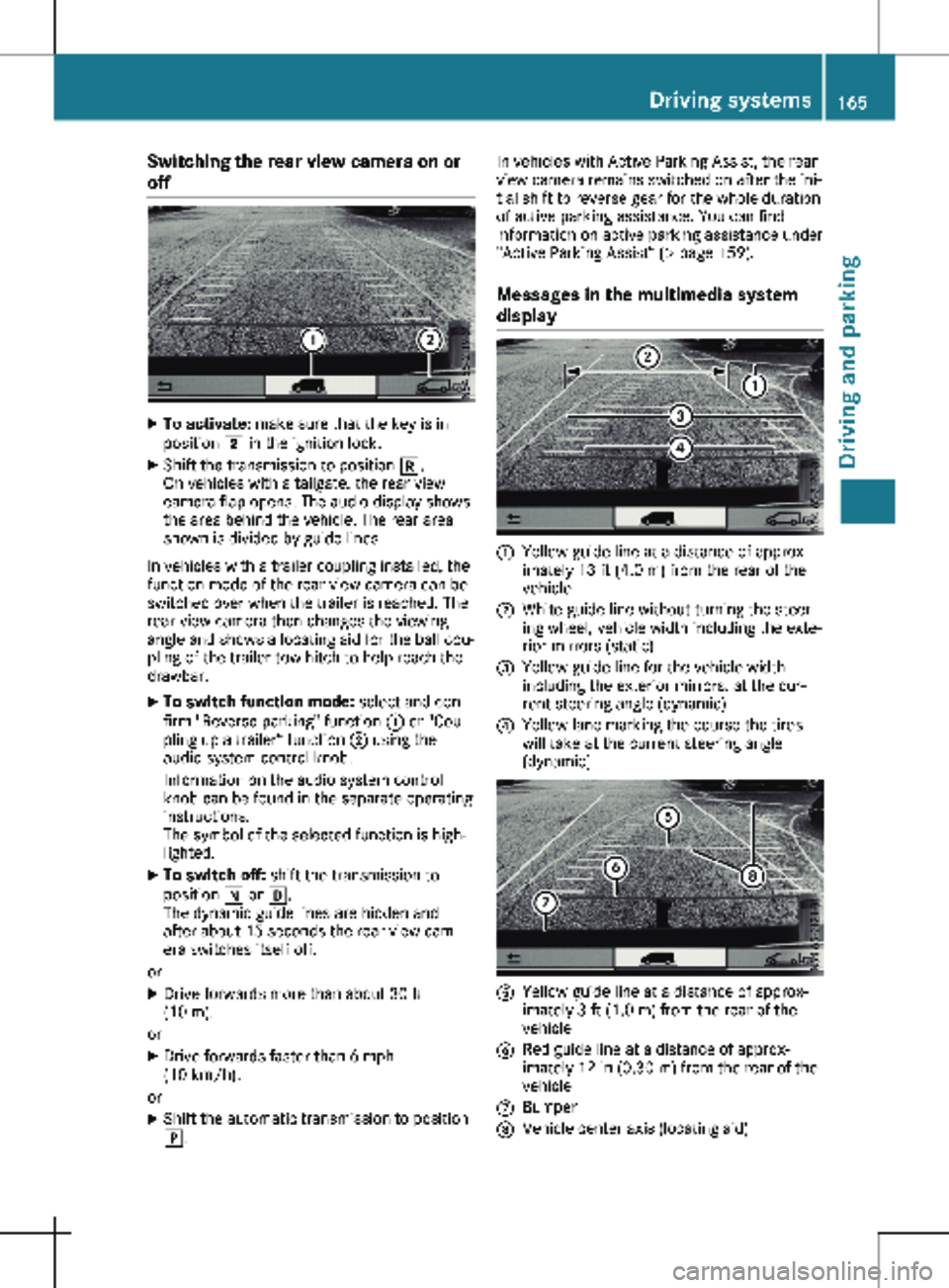
Switching the rear view camera on or
off
X
To activate: make sure that the key is in
position 2 in the ignition lock.
X Shift the transmission to position k.
On vehicles with a tailgate, the rear view
camera flap opens. The audio display shows
the area behind the vehicle. The rear area
shown is divided by guide lines.
In vehicles with a trailer coupling installed, the
function mode of the rear view camera can be
switched over when the trailer is reached. The
rear view camera then changes the viewing
angle and shows a locating aid for the ball cou-
pling of the trailer tow hitch to help reach the
drawbar.
X To switch function mode: select and con-
firm "Reverse parking" function : or "Cou-
pling up a trailer“ function ; using the
audio system control knob.
Information on the audio system control
knob can be found in the separate operating
instructions.
The symbol of the selected function is high-
lighted.
X To switch off: shift the transmission to
position i or h.
The dynamic guide lines are hidden and
after about 15 seconds the rear view cam-
era switches itself off.
or X Drive forwards more than about 30 ft
(10 m).
or X Drive forwards faster than 6 mph
(10 km/h
).
or X Shift the automatic transmission to position
j. In vehicles with Active Parking Assist, the rear
view camera remains switched on after the ini-
tial shift to reverse gear for the whole duration
of active parking assistance. You can find
information on active parking assistance under
"Active Parking Assist“
(Y page 159).
Messages in the multimedia system
display :
Yellow guide line at a distance of approx-
imately
13 ft (4.0 m) from the rear of the
vehicle
; White guide line without turning the steer-
ing wheel, vehicle width including the exte-
rior mirrors (static)
= Yellow guide line for the vehicle width
including the exterior mirrors, at the cur-
rent steering angle (dynamic)
? Yellow lane marking the course the tires
will take at the current steering angle
(dynamic) A
Yellow guide line at a distance of approx-
imately
3 ft (1.0 m) from the rear of the
vehicle
B Red guide line at a distance of approx-
imately
12 in (0.30 m) from the rear of the
vehicle
C Bumper
D Vehicle center axis (locating aid) Driving systems
165
Driving and parking Z