change time MERCEDES-BENZ METRIS 2020 MY20 Operator’s Manual
[x] Cancel search | Manufacturer: MERCEDES-BENZ, Model Year: 2020, Model line: METRIS, Model: MERCEDES-BENZ METRIS 2020Pages: 320, PDF Size: 26.38 MB
Page 107 of 320
X
Remove bulb = from socket ;.
X Press new bulb = into socket ;.
X Screw socket ; clockwise into the lamp
housing :.
X Position lamp housing : on the left-hand
side and engage. Signal and ambient light in the tail-
gate
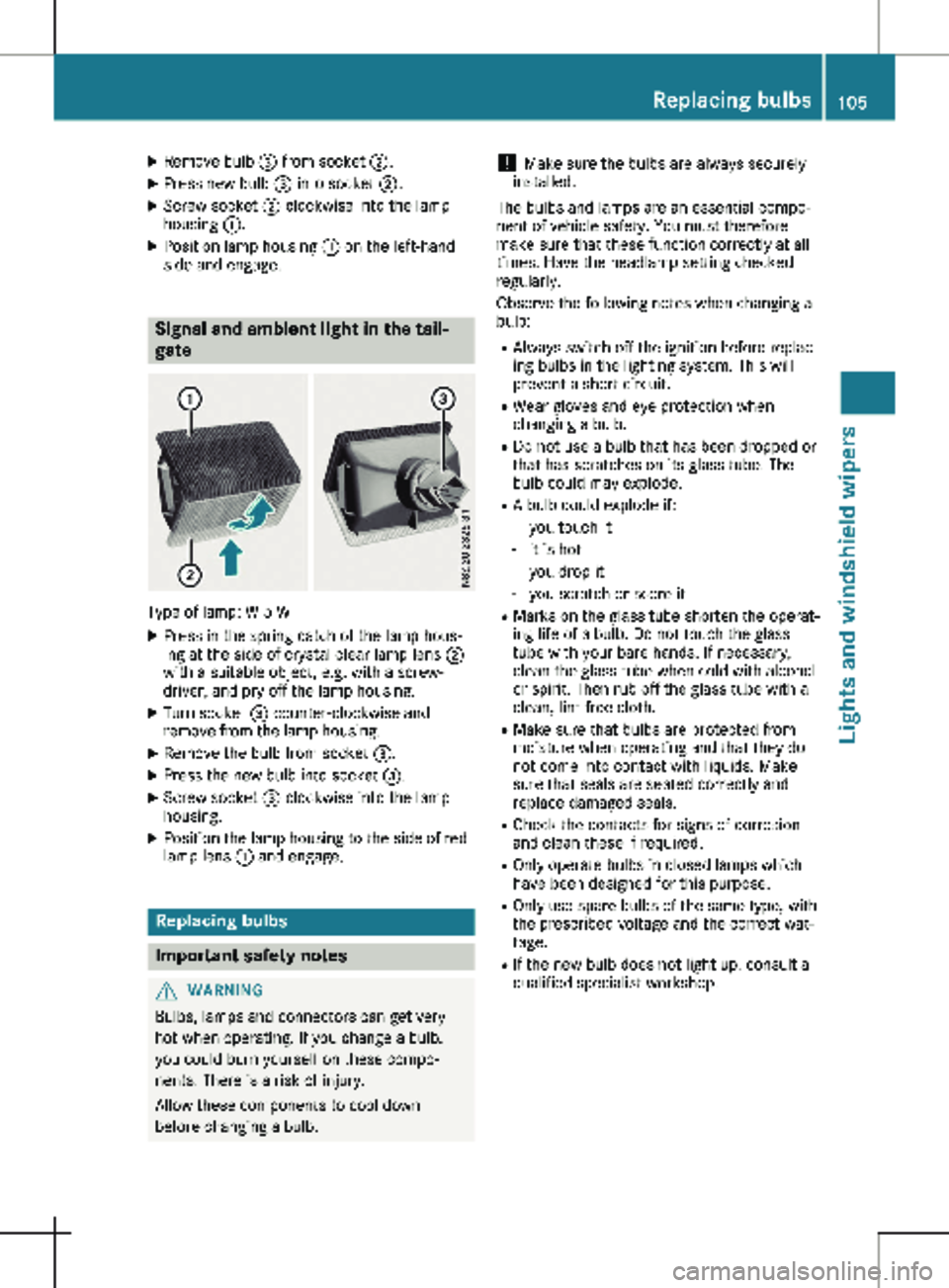
Type of lamp: W 5 W
X Press in the spring catch of the lamp hous-
ing at the side of crystal clear lamp lens ;
with a suitable object, e.g. with a screw-
driver, and pry off the lamp housing.
X Turn socket = counter-clockwise and
remove from the lamp housing.
X Remove the bulb from socket =.
X Press the new bulb into socket =.
X Screw socket = clockwise into the lamp
housing.
X Position the lamp housing to the side of red
lamp lens : and engage. Replacing bulbs
Important safety notes
G
WARNING
Bulbs, lamps and connectors can get very
hot when operating. If you change a bulb,
you could burn yourself on these compo-
nents. There is a risk of injury.
Allow these components to cool down
before changing a bulb. !
Make sure the bulbs are always securely
installed.
The bulbs and lamps are an essential compo-
nent of vehicle safety. You must therefore
make sure that these function correctly at all
times. Have the headlamp setting checked
regularly.
Observe the following notes when changing a
bulb:
R Always switch off the ignition before replac-
ing bulbs in the lighting system. This will
prevent a short circuit.
R Wear gloves and eye protection when
changing a bulb.
R Do not use a bulb that has been dropped or
that has scratches on its glass tube. The
bulb could may explode.
R A bulb could explode if:
- you touch it
- it is hot
- you drop it
- you scratch or score it
R Marks on the glass tube shorten the operat-
ing life of a bulb. Do not touch the glass
tube with your bare hands. If necessary,
clean the glass tube when cold with alcohol
or spirit. Then rub off the glass tube with a
clean, lint-free cloth.
R Make sure that bulbs are protected from
moisture when operating and that they do
not come into contact with liquids. Make
sure that seals are seated correctly and
replace damaged seals.
R Check the contacts for signs of corrosion
and clean these if required.
R Only operate bulbs in closed lamps which
have been designed for this purpose.
R Only use spare bulbs of the same type, with
the prescribed voltage and the correct wat-
tage.
R If the new bulb does not light up, consult a
qualified specialist workshop. Replacing bulbs
105Lights and windshield wipers Z
Page 108 of 320
R
Have lamps with LED bulbs repaired at a
qualified specialist workshop only.
R Have the bulbs of the following lamps
replaced at a qualified specialist workshop
only:
- Additional brake lamps
- The license plate lighting
- Front fog lamp
- Side marker lamp
Please also observe the notes on the inte-
rior lights
(Y page 103).
If you require assistance changing bulbs, con-
sult a qualified specialist workshop. Front lamp clusters
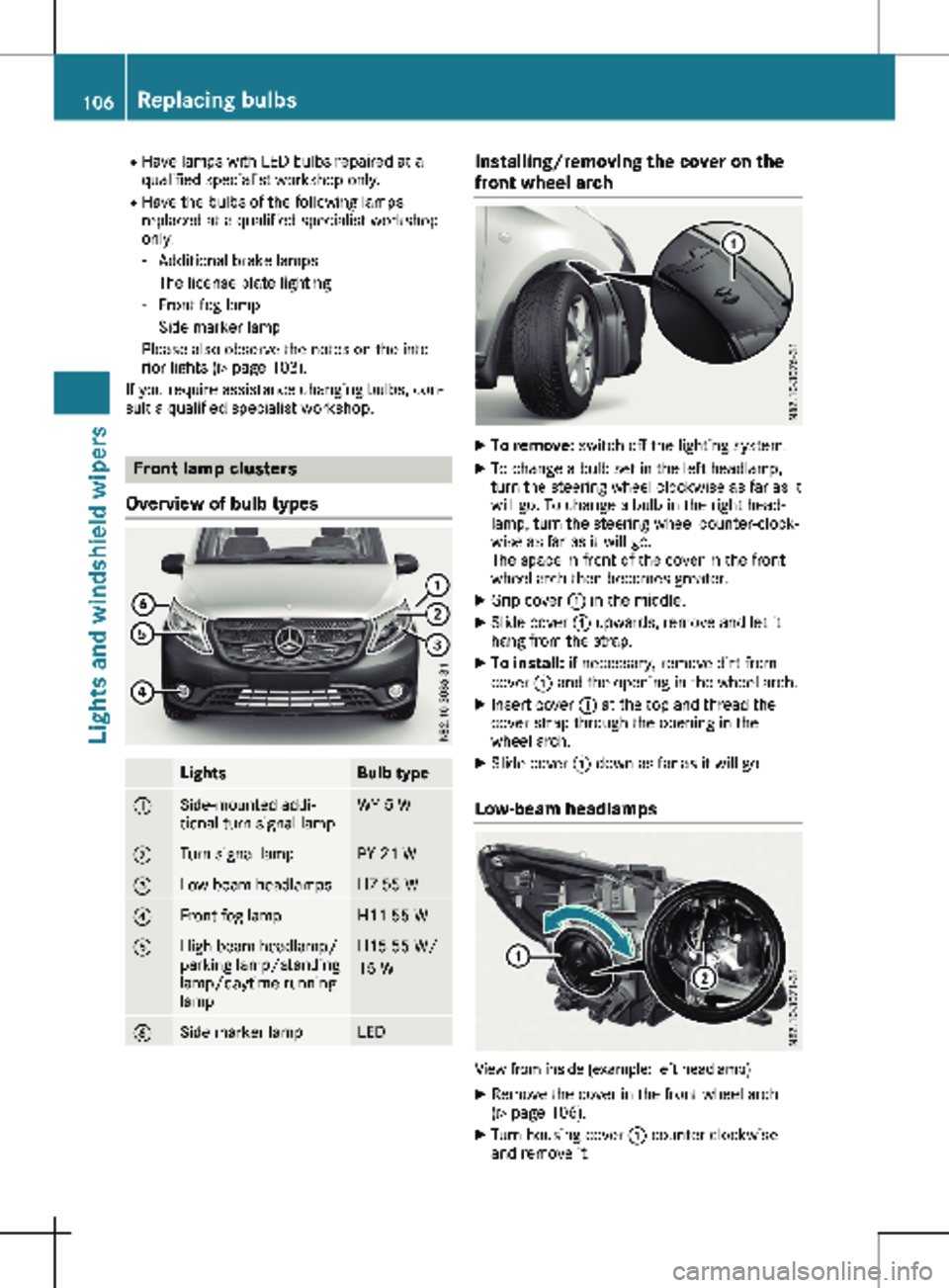
Overview of bulb types Lights Bulb type
:
Side-mounted addi-
tional turn signal lamp WY 5 W
;
Turn signal lamp PY 21 W
=
Low-beam headlamps H7 55 W
?
Front fog lamp H11 55 W
A
High-beam headlamp/
parking lamp/standing
lamp/daytime running
lamp H15 55 W/
15 W
B
Side marker lamp LED Installing/removing the cover on the
front wheel arch
X
To remove: switch off the lighting system.
X To change a bulb set in the left headlamp,
turn the steering wheel clockwise as far as it
will go. To change a bulb in the right head-
lamp, turn the steering wheel counter-clock-
wise as far as it will go.
The space in front of the cover in the front
wheel arch then becomes greater.
X Grip cover : in the middle.
X Slide cover : upwards, remove and let it
hang from the strap.
X To install: if necessary, remove dirt from
cover : and the opening in the wheel arch.
X Insert cover : at the top and thread the
cover strap through the opening in the
wheel arch.
X Slide cover : down as far as it will go.
Low-beam headlamps View from inside (example: left headlamp)
X Remove the cover in the front wheel arch
(Y page
106).
X Turn housing cover : counter-clockwise
and remove it. 106
Replacing bulbs
Lights and windshield wipers
Page 116 of 320
Useful information
This Operator's Manual describes all models
as well as standard and optional equipment of
your vehicle that were available at the time of
going to print. Country-specific variations are
possible. Note that your vehicle may not be
equipped with all of the described functions.
This also applies to systems and functions rel-
evant to safety.
Read the information on qualified specialist
workshops (Y page
32).Overview of climate control systems
Important safety notes
Observe the recommended settings on the fol-
lowing pages. Otherwise, the windows could
fog up.
To prevent the windows from fogging up:
R only switch off climate control briefly
R only switch on air-recirculation mode briefly
R for vehicles with air-conditioning system or
dual-zone automatic climate control, switch
on the "Cooling with air dehumidification"
function
R for vehicles with dual-zone automatic cli-
mate control, switch on the windshield
defrosting function briefly, if required Climate control regulates the temperature and
the humidity in the vehicle interior and filters
undesirable substances from the air.
Climate control is only operational when the
engine is running. The system only functions
optimally when the side windows are closed.
Ventilate the vehicle for a brief period during
warm weather. In order to cool the vehicle
more rapidly, switch climate control to air-
recirculation mode briefly. This will speed up
the cooling process and the desired interior
temperature will be reached more quickly.
The integrated filter can filter out most parti-
cles of dust and completely filters out pollen.
In vehicles with dual-zone automatic climate
control, gaseous pollutants and odors will also
be reduced. A clogged filter reduces the air-
flow into the vehicle interior. For this reason,
you should always observe the interval for
replacing the filter, which is specified in the
Maintenance Booklet. As the interval between
changes depends on environmental condi-
tions, e.g. heavy air pollution, the interval may
be shorter than stated in the Maintenance
Booklet. 114
Overview of climate control systems
Climate control
Page 128 of 320
Useful information
This Operator's Manual describes all models
as well as standard and optional equipment of
your vehicle that were available at the time of
going to print. Country-specific variations are
possible. Note that your vehicle may not be
equipped with all of the described functions.
This also applies to systems and functions rel-
evant to safety.
Read the information on qualified specialist
workshops (Y page
32).Breaking-in notes
Important safety notes
In certain driving and driving safety systems,
the sensors adjust automatically while a cer-
tain distance is being driven after the vehicle
has been delivered or after repairs. Full system
effectiveness is not reached until the end of
this teach-in procedure.
New or replaced brake pads and brake discs
only reach their optimal braking effect after a
few hundred kilometers of driving. Until then,
compensate for this by applying greater force
to the brake pedal. The first 1000 miles (1500 km)
For the service life and economy of your vehi-
cle it is crucial that you break in the engine
with due care.
R Therefore, protect the engine for the first
1000 miles (1500 km
) by driving at varying
vehicle and engine speeds.
R Avoid overstraining the vehicle and high
engine speeds during this period, e.g. driv-
ing at full throttle. Do not exceed Ø of the
permissible maximum speed for each gear.
R Do not change down a gear manually in
order to brake.
R Try to avoid depressing the accelerator
pedal beyond the pressure point (kickdown).
After 1000 miles (1500 km), you can increase
the engine speed gradually and accelerate the
vehicle to full speed.
i You should also observe these notes on
breaking-in if the engine or parts of the drive
train on your vehicle have been replaced. Driving
Important safety notes
G
WARNING
Flammable materials introduced through
environmental influence or by animals can
ignite if in contact with the exhaust system
or parts of the engine that heat up. There is
a risk of fire.
Carry out regular checks to make sure that
there are no flammable foreign materials in
the engine compartment or in the exhaust
system. G
WARNING
If you switch off the ignition while driving,
safety-relevant functions are only available
with limitations, or not at all. This could
affect, for example, the power steering and
the brake boosting effect. You will require
considerably more effort to steer and brake.
There is a risk of an accident.
Do not switch off the ignition while driving. G
WARNING
If the parking brake has not been fully
released when driving, the parking brake
can:
R overheat and cause a fire
R lose its hold function.
There is a risk of fire and an accident.
Release the parking brake fully before driv-
ing off.
! Warm up the engine quickly. Do not use
the engine's full performance until it has
reached operating temperature.
Only shift the automatic transmission to the
desired drive position when the vehicle is
stationary.
Where possible, avoid spinning the drive
wheels when pulling away on slippery roads.
You could otherwise damage the drive train. 126
Driving
Driving and parking
Page 135 of 320
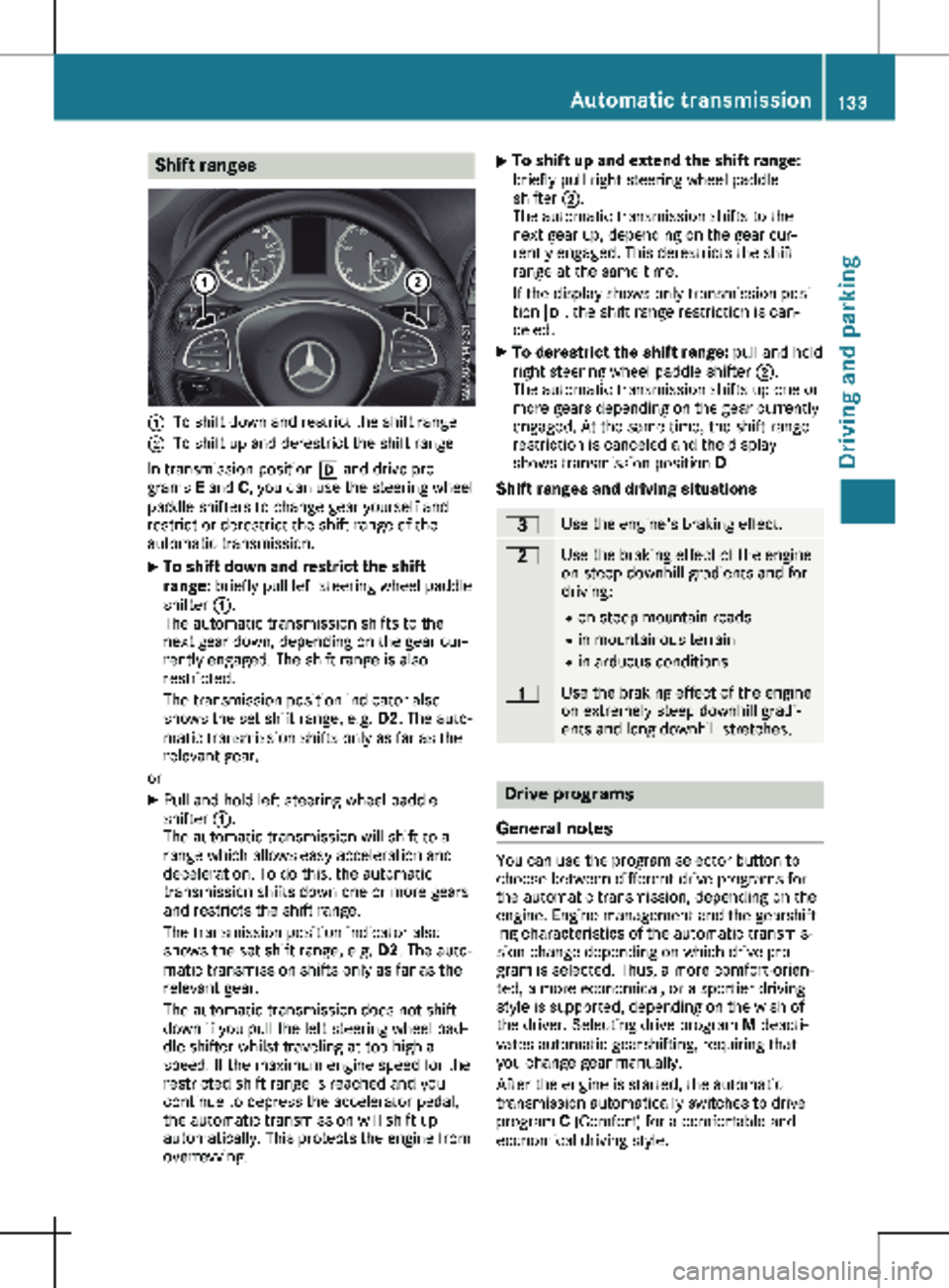
Shift ranges
:
To shift down and restrict the shift range
; To shift up and derestrict the shift range
In transmission position h and drive pro-
grams E and C, you can use the steering wheel
paddle shifters to change gear yourself and
restrict or derestrict the shift range of the
automatic transmission.
X To shift down and restrict the shift
range:
briefly pull left steering wheel paddle
shifter :.
The automatic transmission shifts to the
next gear down, depending on the gear cur-
rently engaged. The shift range is also
restricted.
The transmission position indicator also
shows the set shift range, e.g. D2. The auto-
matic transmission shifts only as far as the
relevant gear.
or X Pull and hold left steering wheel paddle
shifter :.
The automatic transmission will shift to a
range which allows easy acceleration and
deceleration. To do this, the automatic
transmission shifts down one or more gears
and restricts the shift range.
The transmission position indicator also
shows the set shift range, e.g. D2. The auto-
matic transmission shifts only as far as the
relevant gear.
The automatic transmission does not shift
down if you pull the left steering wheel pad-
dle shifter whilst traveling at too high a
speed. If the maximum engine speed for the
restricted shift range is reached and you
continue to depress the accelerator pedal,
the automatic transmission will shift up
automatically. This protects the engine from
overrevving. X
To shift up and extend the shift range:
briefly pull right steering wheel paddle
shifter
;.
The automatic transmission shifts to the
next gear up, depending on the gear cur-
rently engaged. This derestricts the shift
range at the same time.
If the display shows only transmission posi-
tion h, the shift range restriction is can-
celed.
X To derestrict the shift range: pull and hold
right steering wheel paddle shifter ;.
The automatic transmission shifts up one or
more gears depending on the gear currently
engaged. At the same time, the shift range
restriction is canceled and the display
shows transmission position D .
Shift ranges and driving situations =
Use the engine's braking effect.
5
Use the braking effect of the engine
on steep downhill gradients and for
driving:
R on steep mountain roads
R in mountainous terrain
R in arduous conditions 4
Use the braking effect of the engine
on extremely steep downhill gradi-
ents and long downhill stretches.
Drive programs
General notes You can use the program selector button to
choose between different drive programs for
the automatic transmission, depending on the
engine. Engine management and the gearshift-
ing characteristics of the automatic transmis-
sion change depending on which drive pro-
gram is selected. Thus, a more comfort-orien-
ted, a more economical, or a sportier driving
style is supported, depending on the wish of
the driver. Selecting drive program M deacti-
vates automatic gearshifting, requiring that
you change gear manually.
After the engine is started, the automatic
transmission automatically switches to drive
program C (Comfort) for a comfortable and
economical driving style. Automatic transmission
133Driving and parking Z
Page 144 of 320
Vehicles with halogen headlamps
The headlamps do not need to be switched to
symmetrical low beam. The legal requirements
of countries in which traffic drives on the
opposite side of the road to the country where
the vehicle is registered are met without the
need to convert the headlamps. Transport by rail
Transporting your vehicle by rail may be sub-
ject to certain restrictions or require special
measures to be taken in some countries due
to varying tunnel heights and loading stand-
ards.
You can obtain information on this from any
Mercedes-Benz Commercial Van Center. Braking
Important safety notes G
WARNING
If you shift down on a slippery road surface
in an attempt to increase the engine's brak-
ing effect, the drive wheels could lose their
grip. There is an increased danger of skid-
ding and accidents.
Do not shift down for additional engine brak-
ing on a slippery road surface.
Downhill gradients !
Depressing the brake pedal constantly
results in excessive and premature wear to
the brake pads.
This also applies to automatic braking if you
have activated cruise control.
On long and steep downhill gradients, you
should change down to shift range 2 or 1 in
good time
(Y page 133).
This should be observed in particular when
driving with a laden vehicle and when towing a
trailer.
You thereby make use of the braking effect of
the engine and do not have to brake as often
to maintain the speed. This relieves the load
on the service brake and prevents the brakes
from overheating and wearing too quickly. Heavy and light loads G
WARNING
If you rest your foot on the brake pedal
while driving, the braking system can over-
heat. This increases the stopping distance
and can even cause the braking system to
fail. There is a risk of an accident.
Never use the brake pedal as a footrest.
Never depress the brake pedal and the
accelerator pedal at the same time.
! Depressing the brake pedal constantly
results in excessive and premature wear to
the brake pads.
If the brakes have been subjected to a heavy
load, do not stop the vehicle immediately.
Drive on for a short while. The brakes are
cooled down more quickly in the airflow.
Wet road surfaces If you have been driving for a long time in
heavy rain without braking, there may be a
delayed response when you first apply the
brakes. This may also occur after driving
through a car wash or deep water.
You must depress the brake pedal more firmly.
Maintain a longer distance to the vehicle in
front.
While paying attention to the traffic conditions,
you should brake the vehicle firmly after driv-
ing on a wet road surface or through a car
wash. This heats the brake discs, so that they
dry more quickly, which protects them against
corrosion.
Limited braking performance on salt-
treated roads When driving on salted roads, salt may start to
build up on the brake disks and brake pads.
This can increase braking distances considera-
bly.
Maintain a greater distance to the vehicle in
front.
To remove any build-up of salt that may have
formed:
X Apply the brakes at the start of the journey,
occasionally during journey and at the end 142
Driving tips
Driving and parking
Page 149 of 320
Use cruise control if road and traffic condi-
tions make it appropriate to maintain a steady
speed for a prolonged period. You can set any
speed from 30 km/h
upwards in increments of
1 km/h and 10 km/h.
If you have set Miles as the unit for the digital
speedometer , you can set any speed above
20 mph in increments of 1 mph and 5 mph.
Changing the display unit for the digital speed-
ometer and the distance:
R on vehicles without steering wheel buttons
(Y page 180)
R on vehicles with steering wheel buttons
(Y page 192)
Cruise control should not be activated when
driving off-road or on construction sites.
Cruise control may be unable to maintain the
stored speed on uphill gradients. The stored
speed is resumed if the uphill gradient evens
out and the vehicle's speed does not fall below
20 mph (30 km/h). Cruise control maintains
the stored speed on downhill gradients by
automatically applying the brakes. Observe the
additional driving tips (Y page 142).
Important safety notes Observe the notes on braking (Y page
142).
If you fail to adapt your driving style or if you
are inattentive, cruise control can neither
reduce the risk of an accident nor override the
laws of physics. Cruise control cannot take
road, weather and traffic conditions into
account. Cruise control is only an aid. You are
responsible for the distance to the vehicle in
front, for vehicle speed, for braking in good
time and for staying in lane.
If you change wheel size, make sure they cor-
respond to the correct wheel size category
(Y page 278). If the category is changed with- out recoding the control units in the vehicle,
the functioning of cruise control may be
impaired.
Do not use cruise control:
R in traffic conditions that are unsuitable for
driving at a constant speed, e.g. in heavy
traffic, on winding roads or off-road.
R on slippery roads. Braking or accelerating
may cause the drive wheels to lose traction
and the vehicle could then skid.
R when there is poor visibility, e.g. due to fog,
heavy rain or snow. If there is a change of drivers, make sure that
you inform the new driver about the set cruise
speed.
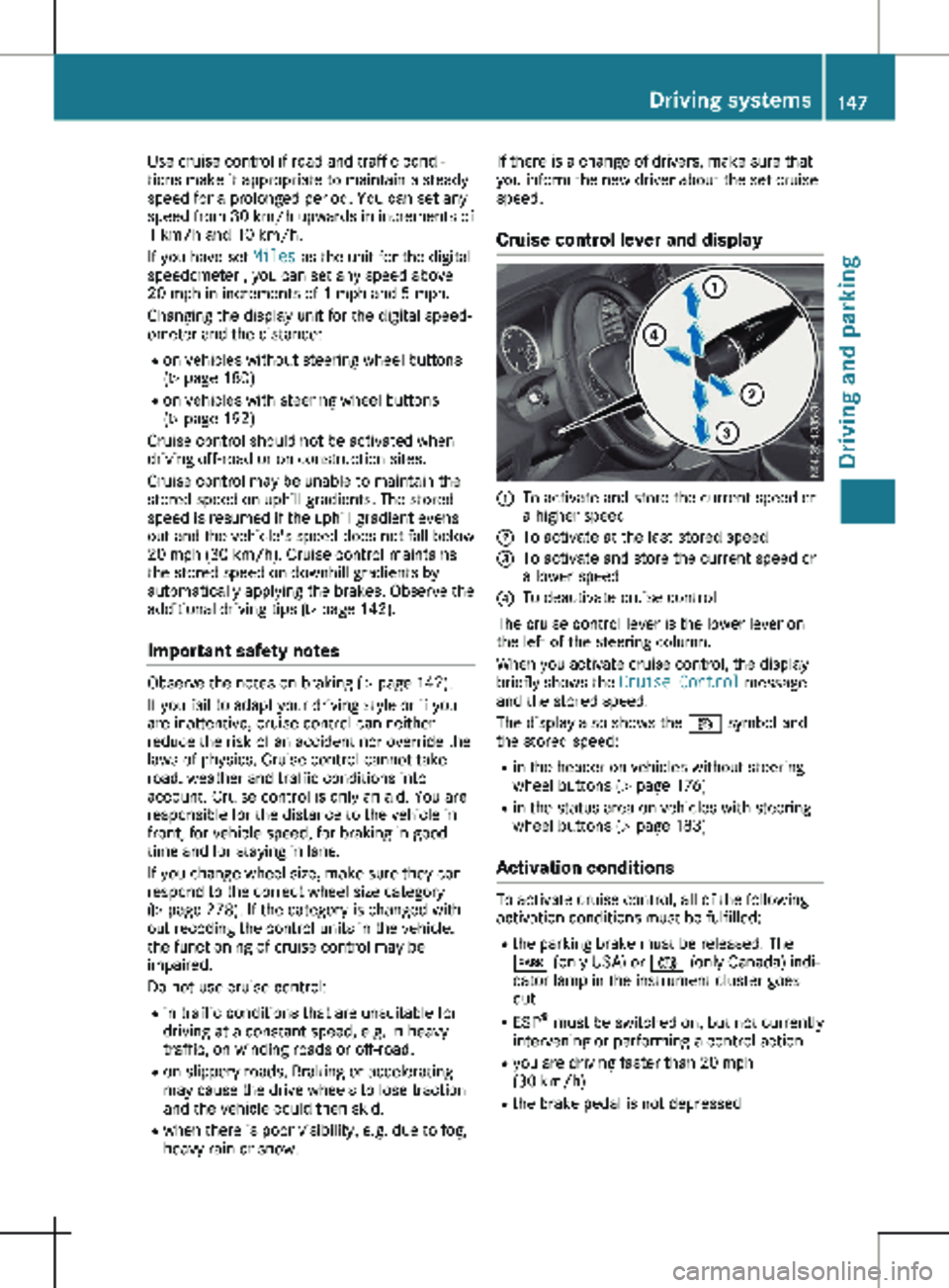
Cruise control lever and display :
To activate and store the current speed or
a higher speed
; To activate at the last stored speed
= To activate and store the current speed or
a lower speed
? To deactivate cruise control
The cruise control lever is the lower lever on
the left of the steering column.
When you activate cruise control, the display
briefly shows the Cruise Control message
and the stored speed.
The display also shows the V symbol and
the stored speed:
R in the header on vehicles without steering
wheel buttons (Y page
176)
R in the status area on vehicles with steering
wheel buttons (Y page 183)
Activation conditions To activate cruise control, all of the following
activation conditions must be fulfilled:
R the parking brake must be released. The
F (only USA) or J (only Canada) indi-
cator lamp in the instrument cluster goes
out
R ESP ®
must be switched on, but not currently
intervening or performing a control action
R you are driving faster than
20 mph
(30 km/h)
R the brake pedal is not depressed Driving systems
147
Driving and parking Z
Page 152 of 320

may also cause the system to display a warn-
ing.
If you fail to adapt your driving style, the dis-
tance warning function can neither reduce the
risk of an accident nor override the laws of
physics. The distance warning function cannot
take into account road, weather or traffic con-
ditions. The distance warning function is only
an aid. You are responsible for the distance to
the vehicle in front, for vehicle speed, braking
in good time and for staying in your lane.
Following damage to the front end of the vehi-
cle, have the configuration and operation of
the radar sensor checked at a qualified spe-
cialist workshop. This also applies to collisions
at slow speeds where there is no visible dam-
age to the front of the vehicle.
If you change wheel size, make sure they cor-
respond to the correct wheel size category
(Y page
278). If the category is changed with-
out recoding the control units in the vehicle,
the functioning of the distance warning feature
may be impaired. COLLISION PREVENTION
ASSIST may then detect a malfunction and
switch itself off.
Operation
X To activate/deactivate: activate or deacti-
vate the distance warning function in the on-
board computer
(Y page 190).
If the distance warning function of COLLI-
SION PREVENTION ASSIST is activated, the
display shows the Ä symbol:
R in the header
R in the Status Overview of the Assist.
menu (Y page 189)
At speeds up to approx 20 mph (30 km/h)
the display in vehicles with Active Parking
Assist first shows the í status indicator.
Only from a speed of about 20 mph
(30 km/h) does the display show the
Äsymbol instead of the í status indica-
tor.
The distance warning function can help you to
minimize the risk of a front-end collision with a
vehicle ahead or reduce the effects of such a
collision. With the help of the radar sensor sys-
tem, the distance warning function can detect
obstacles that are in the path of your vehicle
for an extended period of time. If the distance
warning function detects that there is a risk of
a collision, you will be warned visually and,
where necessary, acoustically. Without your intervention, the distance warning function
cannot prevent a collision.
The distance warning function issues a warn-
ing at speeds:
R from about
4 mph (7 km/h) if you approach
a vehicle traveling in front or a stationary
vehicle too quickly. The · warning lamp
in the instrument cluster then lights up and
an intermittent warning tone also sounds.
At speeds up to about 45 mph (70 km/h),
the system also detects stationary obsta-
cles, for example stopped or parked vehi-
cles.
X Brake immediately until the distance from
the obstacle increases and the risk of a
front-end collision passes.
or X Take evasive action, provided it is safe to do
so.
Adaptive Brake Assist General notes
Adaptive Brake Assist evaluates the traffic sit-
uation with the help of the radar sensor sys-
tem and can detect obstacles which have been
in your vehicle's path for an extended period
of time. From speeds above 4 mph (7 km/h
),
Adaptive Brake Assist aids you in braking dur-
ing hazardous situations.
Up to a speed of approximately 125 mph
(200 km/h), Adaptive Brake Assist is capable
of reacting to moving obstacles that have
already been detected as such at least once
over the period of observation.
Important safety notes G
WARNING
Adaptive Brake Assist does not react:
R to people or animals
R to oncoming vehicles
R to crossing traffic
R to stationary obstacles
R when cornering
As a result, the Adaptive Brake Assist may
not intervene in all critical conditions. There
is a risk of an accident. 150
Driving systems
Driving and parking
Page 153 of 320

Always pay careful attention to the traffic
situation and be ready to brake. G
WARNING
Adaptive Brake Assist cannot always clearly
identify objects and complex traffic situa-
tions.
In such cases, Adaptive Brake Assist can:
R intervene unnecessarily
R not intervene
There is a risk of an accident.
Always pay careful attention to the traffic
situation and be ready to brake. Terminate
the intervention in a non-critical driving sit-
uation.
In particular, the detection of obstacles can be
impaired in the case of:
R dirt on the sensors or anything else covering
the sensors
R snow or heavy rain
R interference from other radar sources
R strong radar reflections, for example, in
parking garages
R a narrow vehicle traveling in front, e.g. a
motorbike
R a vehicle traveling in front on a different line
Due to the nature of the system, particularly
complicated but non-critical driving conditions
may also cause Adaptive Brake Assist to inter-
vene.
If you fail to adapt your driving style, Adaptive
Brake Assist can neither reduce the risk of
accident nor override the laws of physics.
Adaptive Brake Assist cannot take into
account road, weather or traffic conditions.
Adaptive Brake Assist is only an aid. You are
responsible for the distance to the vehicle in
front, for vehicle speed, braking in good time
and for staying in your lane.
Following damage to the front end of the vehi-
cle, have the configuration and operation of
the radar sensor checked at a qualified spe-
cialist workshop. This also applies to collisions
at slow speeds where there is no visible dam-
age to the front of the vehicle.
If you change wheel size, make sure they cor-
respond to the correct wheel size category
(Y page
278). If the category is changed with- out recoding the control units in the vehicle,
the functioning of Adaptive Brake Assist may
be impaired. COLLISION PREVENTION ASSIST
may then detect a malfunction and switch
itself off.
If Adaptive Brake Assist is not available due to
a malfunction in the radar sensor system, the
brake system remains available with full brake
boosting effect and BAS.
Operation With the help of the radar sensor system,
Adaptive Brake Assist can detect obstacles
that have been in the path of your vehicle for
an extended period of time. Adaptive Brake
Assist does not react to stationary obstacles.
If Adaptive Brake Assist detects a risk of colli-
sion with a vehicle traveling in front or with a
stationary obstacle, the system calculates the
braking force necessary to avoid this collision.
If you apply the brakes forcefully, Adaptive
Brake Assist will automatically increase the
braking force to a level suitable for the traffic
conditions.
X Brake until the distance to the obstacle
increases and the risk of a collision passes.
ABS prevents the wheels from locking.
The brakes function as usual again if:
R you release the brake pedal
R there is no longer any danger of a collision
R no obstacle is detected in front of your vehi-
cle
Braking assistance is then ended. Blind Spot Assist
General notes Blind Spot Assist monitors the areas on either
side of the vehicle that are not visible to the
driver with two lateral, rear-facing radar sen-
sors in the bumper. It supports you from
speeds of approximately
20 mph (30 km/h). A
warning display in the exterior mirrors draws
your attention to vehicles detected in the
monitored area. If you then switch on the cor-
responding turn signal to change lane, you will
also receive an optical and audible collision
warning. Driving systems
151
Driving and parking Z
Page 156 of 320
means of intermittent vibration through the
steering wheel for up to
1.5 seconds.
Important safety notes G
WARNING
Lane Keeping Assist cannot always clearly
detect lane markings.
In such cases, Lane Keeping Assist can:
R give an unnecessary warning
R not give a warning
There is a risk of an accident.
Always pay particular attention to the traffic
situation and keep within the lane, espe-
cially if Lane Keeping Assist alerts you. G
WARNING
The Lane Keeping Assist warning does not
return the vehicle to the original lane. There
is a risk of an accident.
You should always steer, brake or accelerate
yourself, in particular if warned by Lane
Keeping Assist.
If you fail to adapt your driving style, Lane
Keeping Assist can neither reduce the risk of
accident nor override the laws of physics.
Lane Keeping Assist cannot take into account
road, weather or traffic conditions. Lane Keep-
ing Assist is only an aid. You are responsible
for the distance to the vehicle in front, for
vehicle speed, braking in good time and for
staying in your lane.
Lane Keeping Assist does not keep your vehi-
cle in its lane.
The system may be impaired or may not func-
tion if:
R there is poor visibility, e.g. due to insuffi-
cient illumination of the road, or due to
snow, rain, fog or spray
R there is glare, e.g. from oncoming traffic,
the sun or reflection from other vehicles
(e.g. if the road surface is wet)
R the windshield is dirty, fogged up, damaged
or covered, for instance by a sticker, in the
vicinity of the camera
R there are no lane markings, or several
unclear lane markings for one lane, e.g.
around construction sites R
the lane markings are worn away, dark or
covered up, e.g. by dirt or snow
R the distance to the vehicle in front is too
short and thus the lane markings cannot be
detected
R the lane markings change quickly, e.g. lanes
branch off, cross one another or merge
R the road is narrow and winding
R there are highly variable shade conditions
on the road
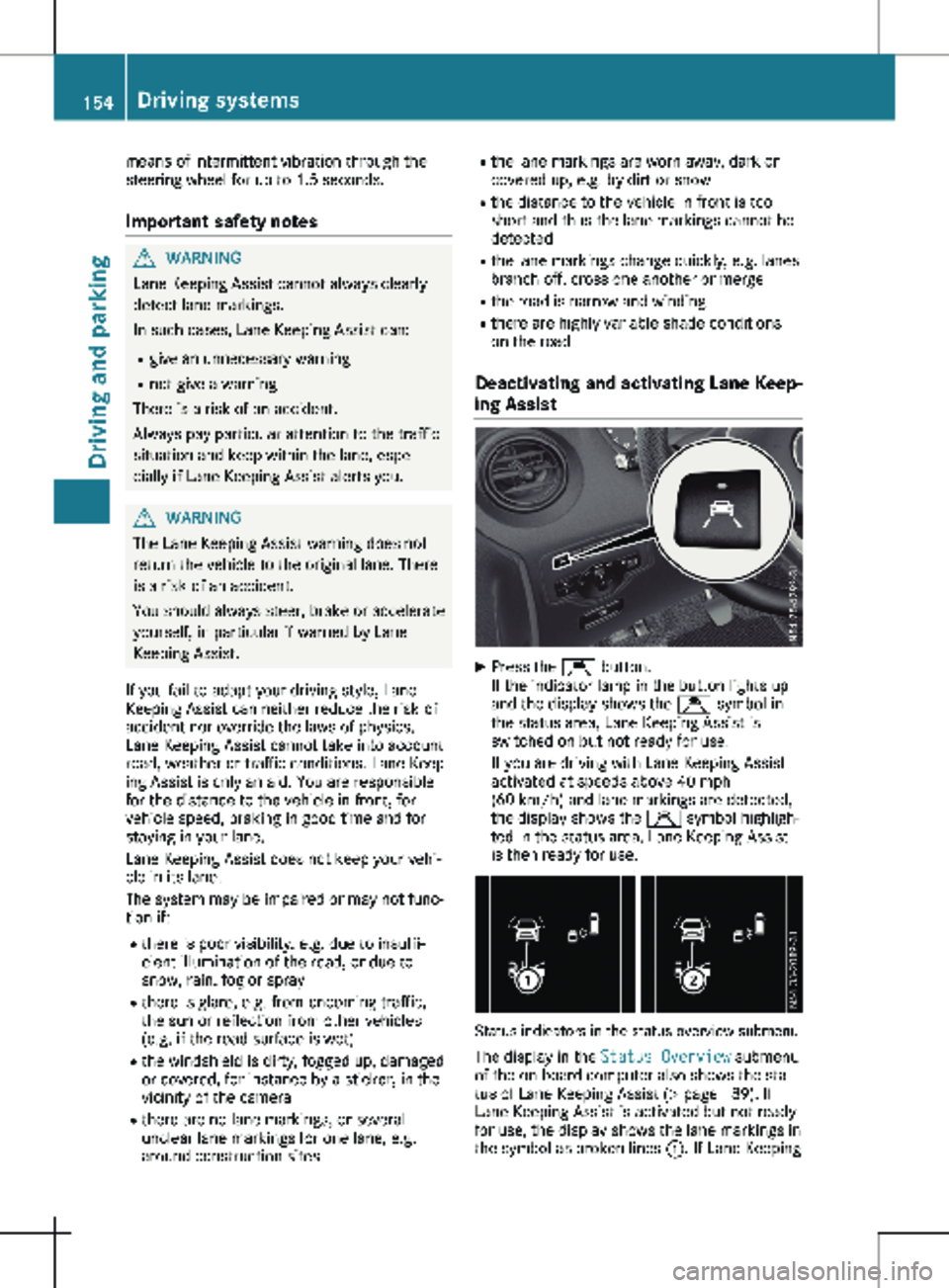
Deactivating and activating Lane Keep-
ing Assist X
Press the Ç button.
If the indicator lamp in the button lights up
and the display shows the Ç symbol in
the status area, Lane Keeping Assist is
switched on but not ready for use.
If you are driving with Lane Keeping Assist
activated at speeds above
40 mph
(60 km/h) and lane markings are detected,
the display shows the Ç symbol highligh-
ted in the status area. Lane Keeping Assist
is then ready for use. Status indicators in the status overview submenu
The display in the Status Overview submenu
of the on-board computer also shows the sta-
tus of Lane Keeping Assist
(Y page 189). If
Lane Keeping Assist is activated but not ready
for use, the display shows the lane markings in
the symbol as broken lines :. If Lane Keeping154
Driving systems
Driving and parking