light MERCEDES-BENZ METRIS 2020 MY20 Operator’s Manual
[x] Cancel search | Manufacturer: MERCEDES-BENZ, Model Year: 2020, Model line: METRIS, Model: MERCEDES-BENZ METRIS 2020Pages: 320, PDF Size: 26.38 MB
Page 20 of 320
Hill start assist ............................... 129
Q
QR code Rescue card
..................................... 35
Qualified specialist workshop ........... 32R
Radiator cover .....................................
34
Radio
Selecting a station ......................... 187
see separate operating instructions
Radio-wave reception/transmis-
sion in the vehicle
Declaration of conformity ................ 31
Rail transport
see Transport by rail
Rain sensor
Setting the sensitivity .................... 109
Setting the sensitivity (vehicle
with steering wheel buttons) ......... 193
Setting the sensitivity (vehicle
without steering wheel buttons) .... 180
Reading lamp ..................................... 102
Rear bench seat
EASY-ENTRY/EXIT feature ............... 90
General notes .................................. 89
Installation options .......................... 90
Removing/installing (standard
rear bench seat) ............................... 91
Seat anchorage ................................ 89
Seat rails .......................................... 89
Seating variants ............................... 90
Rear compartment
Activating/deactivating climate
control ........................................... 117
Seating variants ............................... 90
Setting the air vents ...................... 125
Setting the temperature ................ 119
Switching the interior lighting
on/off ............................................ 103
Rear door
Display messages (vehicle with
steering wheel buttons) ................. 226
Display messages (vehicle with-
out steering wheel buttons) ........... 208 Important safety notes .................... 82
Indicator lamp ................................
237
Opening at an angle of 180° or
270° ................................................ 83
Opening dimensions ...................... 313
Opening/closing from inside ........... 83
Opening/closing from the out-
side .................................................. 82
Rear fog lamp
Display messages (vehicle with
steering wheel buttons) ................. 217
Display messages (vehicle with-
out steering wheel buttons) ........... 203
Replacing bulbs ............................. 108
Switching on/off ........................... 100
Rear view camera
Cleaning instructions ..................... 267
Coupling up a trailer function ........ 167
Function/notes ............................. 163
General notes ................................ 163
Important safety notes .................. 164
Messages in the display ................. 165
Reverse parking ............................. 166
Switching on/off ........................... 165
Rear window defroster
Problem (malfunction) ................... 122
Switching on/off ........................... 122
Rear window wiper
Replacing the wiper blade .............. 112
Switching on/off ........................... 110
Rear-compartment air-condition-
ing system
see Climate control
Rear-compartment heating
see Climate control
Rear-view mirror
Anti-glare (manual) .......................... 96
Recuperation display ........................ 178
Recycling
see Protection of the environment
Refrigerant (air-conditioning sys-
tem)
Important safety notes .................. 311
Refueling
Fuel filler flap ................................. 137
Fuel gauge (vehicle with steering
wheel buttons) ................................. 4018
Index
Page 22 of 320
Refrigerant (air-conditioning sys-
tem) ............................................... 311
Transmission oil ............................. 310
Washer fluid ................................... 312
Setting a speed
see Cruise control
Setting the air distribution ............... 120
Setting the airflow ............................ 120
Settings
Factory (vehicle with steering
wheel buttons) ............................... 194
Factory (vehicle without steering
wheel buttons) ............................... 179
On-board computer (vehicle with
steering wheel buttons) ................. 191
On-board computer (vehicle with-
out steering wheel buttons) ........... 179
Side impact air bag ............................. 52
Side windows
Cleaning ......................................... 265
Convenience closing feature ............ 85
Convenience opening feature .......... 85
Hinged side windows ....................... 84
Important safety information ........... 84
Opening/closing .............................. 85
Overview .......................................... 84
Problem (malfunction) ..................... 86
Resetting ......................................... 86
Signal and ambient light
Changing a bulb ............................. 105
Sliding door
Child-proof locks .............................. 66
Cleaning ......................................... 267
Important safety notes .................... 77
Indicator lamp ................................ 237
Opening/closing from the inside ..... 77
Opening/closing from the out-
side .................................................. 77
see Electric sliding door
SmartKey
Changing the battery ....................... 73
Changing the programming ............. 72
Checking the battery ....................... 73
Convenience closing feature ... 85, 123
Convenience opening feature .......... 85
Door central locking/unlocking ....... 71
Important safety notes .................... 71
Loss ................................................. 74 Mechanical key ................................ 72
Problem (malfunction)
..................... 74
SmartKey positions (ignition
lock) .................................................... 127
Snow chains ...................................... 281
Sockets .............................................. 241
Spare wheel
General notes ................................ 302
Important safety notes .................. 302
Removing/mounting ...................... 303
Special seat belt retractor .................. 61
Specialist workshop ............................ 32
Speed, controlling
see Cruise control
Speedometer
Activating/deactivating the addi-
tional speedometer (vehicle with
steering wheel buttons) ................. 192
Activating/deactivating the addi-
tional speedometer (vehicle with-
out steering wheel buttons) ........... 180
Digital (vehicle with steering
wheel buttons) ............................... 185
Digital (vehicle without steering
wheel buttons) ............................... 178
General notes ................................ 175
In the instrument cluster (vehicle
with steering wheel buttons) ............ 40
In the instrument cluster (vehicle
without steering wheel buttons) ...... 38
Setting the display unit (vehicle
with steering wheel buttons) ......... 192
Setting the display unit (vehicle
without steering wheel buttons) .... 180
SRS (Supplemental Restraint Sys-
tem)
see Restraint system
Standing lamp
Display messages (vehicle with
steering wheel buttons) ................. 217
Standing lamps
Display messages (vehicle with-
out steering wheel buttons) ........... 203
Replacing bulbs (front) ................... 107
Replacing bulbs (rear) .................... 108
Switching on/off .............................. 99 20
Index
Page 23 of 320
Starting
see Starting (engine)
Starting (engine) ................................
128
Status overview (on-board com-
puter) .................................................. 189
Steering
Display messages (vehicle with
steering wheel buttons) ................. 227
Display messages (vehicle with-
out steering wheel buttons) ........... 208
Warning lamps ............................... 237
Steering wheel
Adjusting ......................................... 95
Button overview ............................... 42
Buttons (on-board computer) ......... 181
Cleaning ......................................... 269
Paddle shifters ............................... 135
Steering wheel paddle shifters ........ 135
Stickers
General safety notes ........................ 29
Stowage net ....................................... 239
Stowage spaces
see Stowage spaces and stow-
age compartments
Stowage spaces and stowage
compartments
Eyeglasses compartment ............... 238
Glove box ....................................... 238
Important safety notes .................. 238
Stowage net ................................... 239
Summer opening
see Convenience opening feature
Summer tires
In winter ........................................ 280
Sun visor
Changing a bulb (mirror lamp) ....... 104
Overview ........................................ 239
Surround lighting (on-board com-
puter) .................................................. 193
Switching air-recirculation mode
on/off ................................................. 123
Switching off the alarm (ATA) ............ 70T
Tachometer ........................................
175Tail lamps
Display messages (vehicle with-
out steering wheel buttons)
........... 202
Replacing bulbs ............................. 108
Trailer display messages (vehicle
with steering wheel buttons) .. 216, 217
Trailer display messages (vehicle
without steering wheel buttons) .... 202
Tailgate
Changing bulbs (ambient lamp) ..... 104
Display messages (vehicle with
steering wheel buttons) ................. 226
Display messages (vehicle with-
out steering wheel buttons) ........... 208
Important safety notes .................... 81
Opening dimensions ...................... 313
Opening/closing from the out-
side .................................................. 81
Replacing light bulbs (signal/
ambient lamp) ................................ 105
Tank
see Fuel tank
Tank contents
Displaying the range (vehicle
with steering wheel buttons) ......... 184
Displaying the range (vehicle
without steering wheel buttons) .... 178
Technical data
Capacities ...................................... 305
Cargo tie-down points .................... 313
Guide rail ....................................... 314
Loading rails .................................. 314
Roof carrier .................................... 314
Tires/wheels ................................. 301
Trailer tow hitch ............................. 315
Vehicle data ................................... 312
Vehicle dimensions ........................ 313
Telephone
Accepting a call ............................. 188
Display message ............................ 227
Introduction ................................... 188
Number from the phone book ........ 188
Redialing ........................................ 189
Rejecting/ending a call ................. 188
Temperature
Coolant (display in the instru-
ment cluster) ................................. 175 Index
21
Page 25 of 320
Summer tires in winter .................. 280
TIN (Tire Identification Number)
(definition) .....................................
297
Tire bead (definition) ...................... 297
Tire pressure (definition) ................ 296
Tire pressures (recommended) ...... 295
Tire size designation, load-bear-
ing capacity, speed rating .............. 293
Tire tread ....................................... 279
Tire tread (definition) ..................... 297
Total load limit (definition) ............. 297
Traction (definition) ....................... 297
TWR (permissible trailer drawbar
noseweight) (definition) ................. 297
Uniform Tire Quality Grading
Standards (definition) .................... 295
Wear indicator (definition) ............. 297
Wheel and tire combination ........... 302
Wheel rim (definition) .................... 296
Wheel/tire combinations ............... 301
Tool
see Vehicle tool kit
Top Tether ............................................ 63
Tow-starting
Emergency engine starting ............ 277
Important safety notes .................. 274
Towing
If the vehicle is stuck ..................... 276
Installing/removing the towing
eye ................................................. 275
Towing a trailer
Active Parking Assist ..................... 159
Axle load, permissible .................... 315
Cleaning the trailer tow hitch ......... 268
Coupling up a trailer ...................... 170
Decoupling a trailer ....................... 171
Driving tips .................................... 168
Notes on retrofitting ...................... 315
Power supply ................................. 173
Trailer loads ................................... 315
Towing away
Important safety guidelines ........... 274
With both axles on the ground ....... 276
With the rear axle raised ................ 276
Towing eye
Storage location ............................ 270
Trailer coupling
see Towing a trailer Trailer loads and drawbar nose-
weights
...............................................
172
Trailer operation
Lights display messages (vehicle
with steering wheel buttons) ......... 216
Lights display messages (vehicle
without steering wheel buttons) .... 202
Trailer towing
Blind Spot Assist ............................ 153
ESP ®
................................................ 69
PARKTRONIC ................................. 159
Permissible trailer loads and
drawbar noseweights ..................... 172
Transmission
see Automatic transmission
Transmission oil ................................ 310
Transmission positions
Automatic transmission ................. 132
Display (DIRECT SELECT lever) ...... 132
Transport
Lashing straps ............................... 246
Loading guidelines ......................... 242
Stickers ......................................... 246
Vehicle ........................................... 276
Transport by rail ................................ 142
Transportation
Rail ................................................ 142
Transportation aids
Load protection net ....................... 248
Transporting
Cargo compartment variations ...... 244
Load distribution ............................ 243
Securing a load .............................. 244
Trim pieces (cleaning instruc-
tions) .................................................. 269
Trip computer
Displaying (vehicle with steering
wheel buttons) ............................... 184
Displaying (vehicle without steer-
ing wheel buttons) ......................... 177
Resetting (vehicle with steering
wheel buttons) ............................... 185
Resetting (vehicle without steer-
ing wheel buttons) ......................... 177
Selecting the display units (vehi-
cle with steering wheel buttons) .... 192 Index
23
Page 37 of 320
In some countries, certain parts are only offi-
cially approved for installation or modification
if they comply with legal requirements. All gen-
uine Mercedes-Benz parts satisfy these
requirements. Make sure that all parts are
suitable for your vehicle.
Always specify the vehicle identification num-
ber (VIN) ( Y page
304) and engine number
when ordering genuine Mercedes-Benz parts
(Y page 305). QR code for rescue card
The QR Code stickers are affixed to the B-pillar
on the driver's and front-passenger side.
In the event of an accident the rescue services
use the QR Code to quickly find the rescue
card for your vehicle. The current rescue card
contains the most important information on
your vehicle, e.g. the electric cable routes, in a
compact form.
Further information can be found at http://
www.mercedes-benz.de/qr-code. Data stored in the vehicle
Electronic control units
Electronic control units are installed in your
vehicle. Some of them are necessary to ensure
that your vehicle functions safely, some are
there to support the driver (driver assistance
systems). In addition to that, your vehicle
offers convenience and entertainment func-
tions which are also made possible by the use
of electronic control units.
Electronic control units contain data memories
which can store technical information on the
vehicle's operating state, component stress,
maintenance requirements as well as technical
events and malfunctions either temporarily or
permanently.
In general, this information documents the sta-
tus of a component, a module, a system or the
surroundings, for example:
R operating states of system components (e.g.
fill levels, battery status, tire pressure)
R status messages concerning the vehicle or
its individual components (e.g. number of
wheel revolutions/speed, deceleration in movement, lateral acceleration, display of
fastened seat belts)
R malfunctions and defects in important sys-
tem components (e.g. lights, brakes)
R information on events damaging the vehicle
R system responses in special driving situa-
tions (e.g. air bag deployment, intervention
of stability control systems)
R ambient conditions (e.g. temperature, rain
sensor)
In addition to the underlying control unit func-
tion, this data can be used for the detection
and the rectification of malfunctions as well as
the optimization of vehicle functions by the
manufacturer. Most of this data is volatile and
is only processed in the vehicle itself. Only a
small proportion of the data is stored in event
or malfunction memories.
When you use services, the technical data
from the vehicle can be read out by service
network employees (e.g. workshops, manufac-
turers) or third parties (e.g. breakdown serv-
ices). Services can include repair services,
maintenance processes, warranty cases and
quality assurance measures. Data is read out
using the legally prescribed diagnostics con-
nection in the vehicle. The respective repre-
sentatives of the service network or third par-
ties collect, process and use the data. It docu-
ments technical states of the vehicle, helps
staff to find malfunctions and improve quality
and, in certain cases, is passed on to the man-
ufacturer. Furthermore, the manufacturer is
subject to product liability provisions. For this
reason, the manufacturer requires technical
data from vehicles.
Malfunction memories in the vehicle can be
reset within the scope of the repair or service
work carried out by a service outlet.
Depending on the equipment selected, you
can add data to the convenience and infotain-
ment functions of the vehicle yourself.
These include:
R multimedia data, such as music, films or
photos for playback in an integrated multi-
media system
R address book data for use in connection
with an integrated hands-free system or an
integrated navigation system
R navigation destinations entered
R data on the utilization of Internet services Introduction
35 Z
Page 38 of 320
This data can be saved locally in the vehicle or
is located on a device that you have connected
to the vehicle (e.g. smartphone, USB flash
drive or MP3 player). If this data is saved in
the vehicle, you can delete it at any time.
Transfer of this data to third parties is only
possible at your request, predominantly while
using online services and in accordance with
the settings you have selected.
You can save convenience settings/customi-
zations in the vehicle and change them at any
time.
Depending on the piece of equipment in ques-
tion, these can include:
R settings for the seat and steering wheel
positions
R suspension and air-conditioning settings
R customizations such as interior lighting
If your vehicle is equipped appropriately, you
can connect your smartphone or another
mobile end device to the vehicle. You can
operate this device using the integrated con-
trols in the vehicle. This allows images and
sound from the smartphone to be output
through the multimedia system. Simultane-
ously, certain information is transferred to
your smartphone.
Depending on the type of integration, this can
include:
R general vehicle status
R position data
This allows the use of selected smartphone
apps, such as navigation or music player apps.
No further interaction between smartphone
and vehicle takes place and, in particular, it is
not possible to actively access vehicle data.
The type of additional data processing is deter-
mined by the provider of the app being used.
Which settings can be made, if at all, depend
on the respective app and the operating sys-
tem of your smartphone. Online services
Wireless network connection If your vehicle has a wireless network connec-
tion, data can be exchanged between your
vehicle and other systems. The wireless net-
work connection is made possible by the vehi-
cle's own transceiver or by mobile end devices
that you have brought into the vehicle (e.g. smartphones). This wireless network connec-
tion can be used to access online functions.
This includes online services and apps provi-
ded by the manufacturer or other providers.
Services provided by the manufacturer In the case of the manufacturer's online serv-
ices, the manufacturer describes the functions
in a suitable place (e.g. manufacturer's operat-
ing instructions, website) and provides the
associated information subject to data protec-
tion legislation. Personal data may be used
when providing online services. The data
exchange for this takes place via a secure con-
nection, e.g. with the manufacturer's IT sys-
tems intended for the purpose. The collection,
the processing and the use of personal data
above and beyond the provision of services is
only permitted on the basis of a legal permit or
the consent of the person involved.
In most cases, you can enable or disable the
services and functions, some of which are sub-
ject to a charge. In some cases it will also
apply to the entire data connection of the vehi-
cle. There are exceptions to this; in particular,
legally prescribed functions and services such
as the "E-Call" traffic emergency call system.
Services provided by third parties If it is possible to use online services from
other providers, these services are the respon-
sibility of the provider in question and subject
to that provider's data protection conditions
and terms of use. The manufacturer has no
influence over the content exchanged in this
connection.
Please ask the respective service provider for
information on the type, extent and purpose of
the collection and use of personal data in the
context of services provided by third parties.36
Introduction
Page 39 of 320
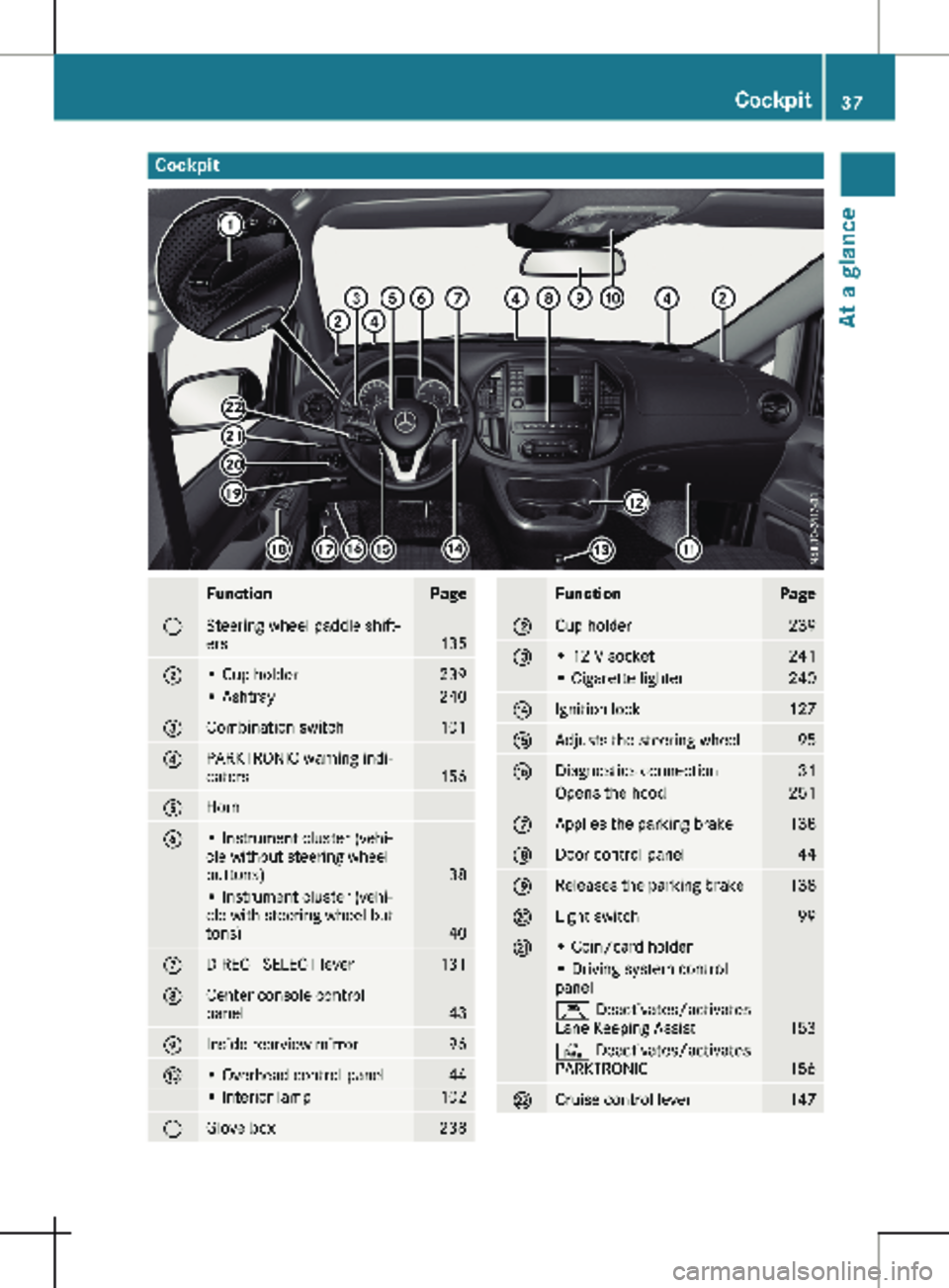
Cockpit
Function Page
:
Steering wheel paddle shift-
ers
135
;
• Cup holder 239
• Ashtray 240
=
Combination switch 101
?
PARKTRONIC warning indi-
cators
156
A
Horn
B
• Instrument cluster (vehi-
cle without steering wheel
buttons)
38
• Instrument cluster (vehi-
cle with steering wheel but-
tons)
40
C
DIRECT SELECT lever 131
D
Center console control
panel
43
E
Inside rearview mirror 96
F
• Overhead control panel 44
• Interior lamp 102
G
Glove box 238 Function Page
H
Cup holder 239
I
• 12 V socket 241
• Cigarette lighter 240
J
Ignition lock 127
K
Adjusts the steering wheel 95
L
Diagnostics connection 31
Opens the hood 251
M
Applies the parking brake 138
N
Door control panel 44
O
Releases the parking brake 138
P
Light switch 99
Q
• Coin/card holder
• Driving system control
panel
Ç Deactivates/activates
Lane Keeping Assist
153
c Deactivates/activates
PARKTRONIC
156
R
Cruise control lever 147Cockpit
37At a glance
Page 40 of 320
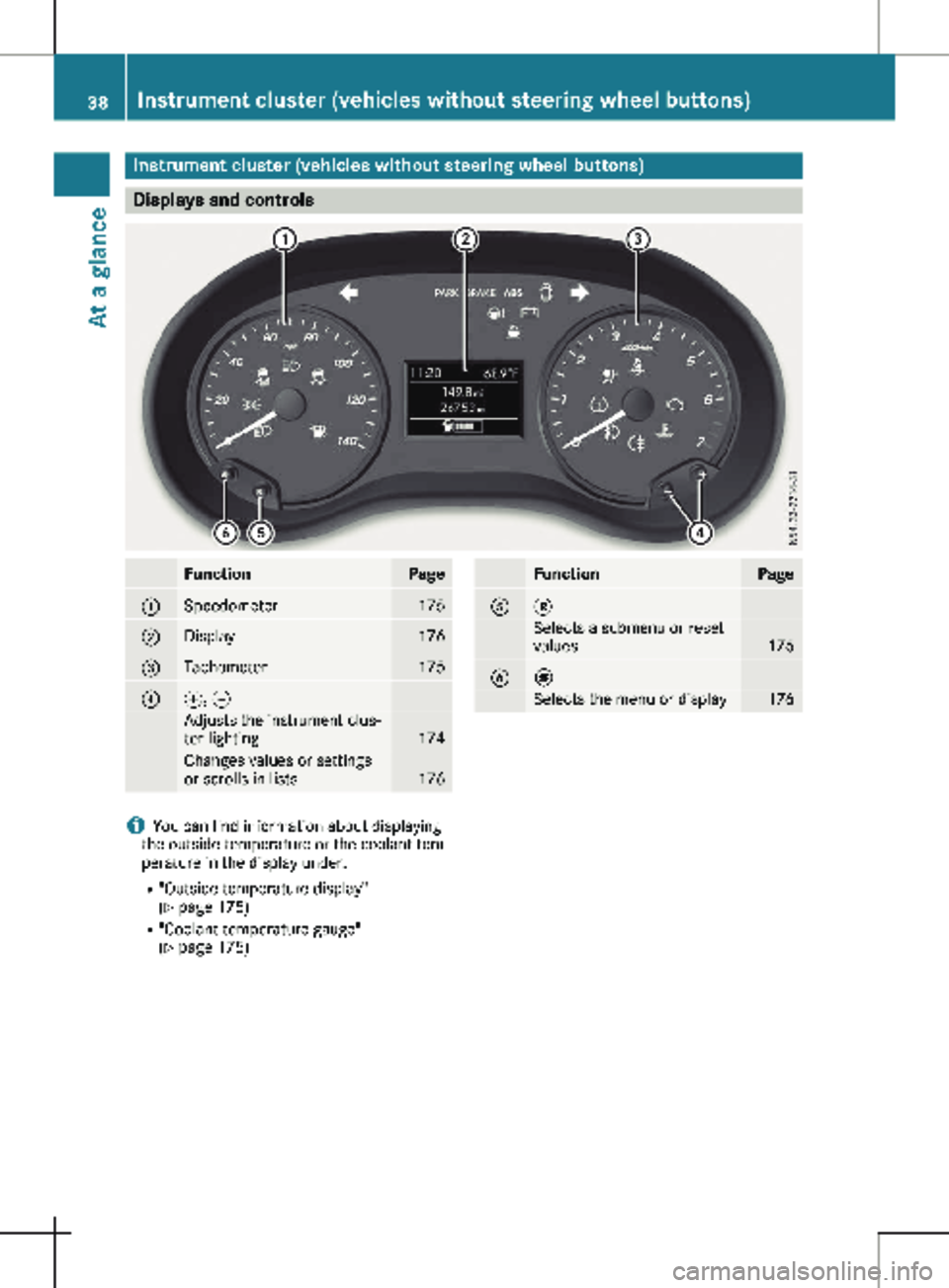
Instrument cluster (vehicles without steering wheel buttons)
Displays and controls
Function Page
:
Speedometer 175
;
Display 176
=
Tachometer 175
?
f, g
Adjusts the instrument clus-
ter lighting
174
Changes values or settings
or scrolls in lists
176 Function Page
A 3
Selects a submenu or reset
values
176
B È
Selects the menu or display 176
i
You can find information about displaying
the outside temperature or the coolant tem-
perature in the display under:
R "Outside temperature display"
(Y page
175)
R "Coolant temperature gauge"
(Y page 175)38
Instrument cluster (vehicles without steering wheel buttons)
At a glance
Page 42 of 320
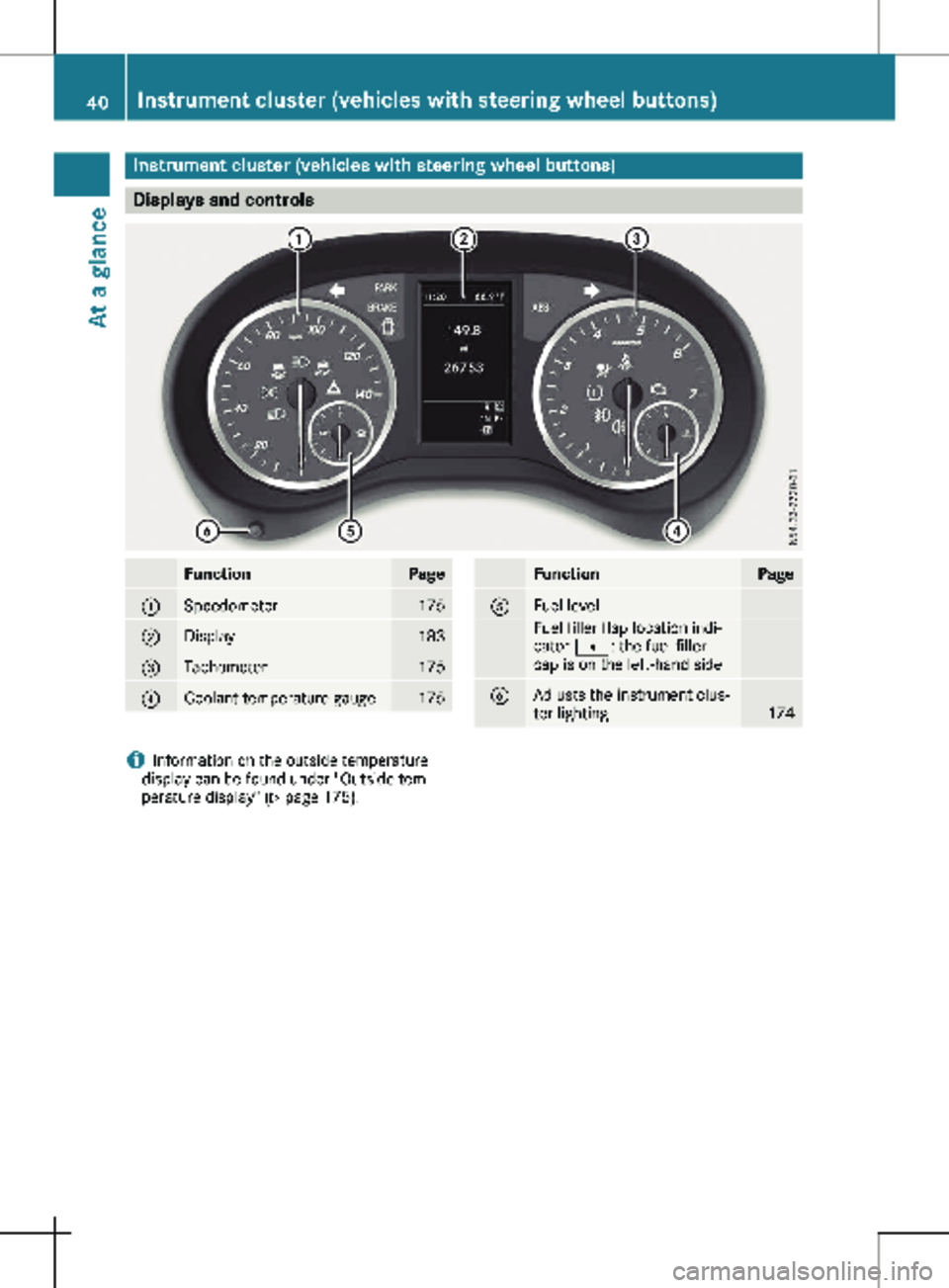
Instrument cluster (vehicles with steering wheel buttons)
Displays and controls
Function Page
:
Speedometer 175
;
Display 183
=
Tachometer 175
?
Coolant temperature gauge 175 Function Page
A
Fuel level
Fuel filler flap location indi-
cator t: the fuel filler
cap is on the left-hand side
B
Adjusts the instrument clus-
ter lighting
174
i
Information on the outside temperature
display can be found under "Outside tem-
perature display"
(Y page 175). 40
Instrument cluster (vehicles with steering wheel buttons)
At a glance
Page 46 of 320
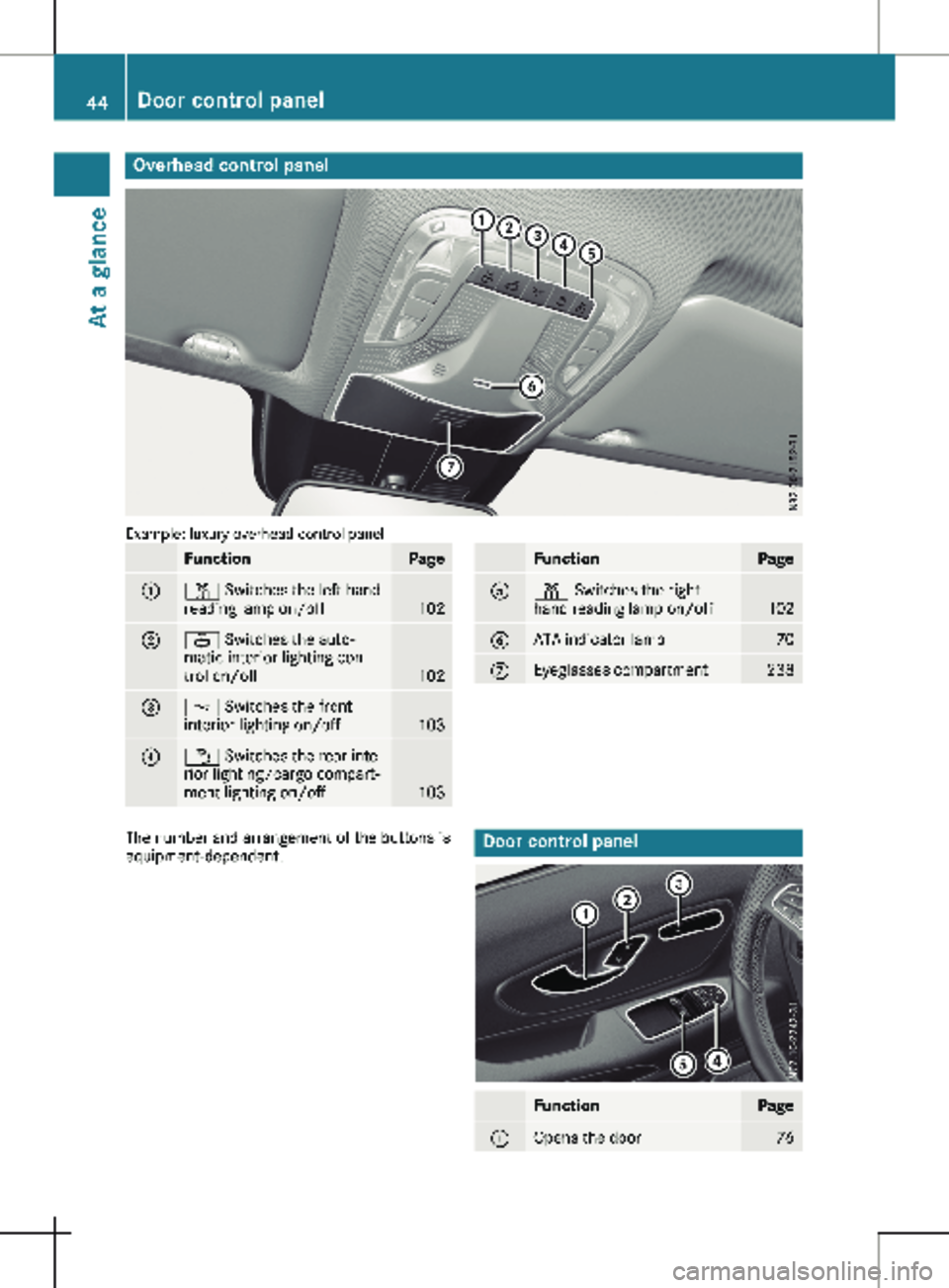
Overhead control panel
Example: luxury overhead control panel
Function Page
:
p Switches the left-hand
reading lamp on/off
102
;
| Switches the auto-
matic interior lighting con-
trol on/off
102
=
c Switches the front
interior lighting on/off 103
?
w Switches the rear inte-
rior lighting/cargo compart-
ment lighting on/off
103 Function Page
A
p Switches the right-
hand reading lamp on/off
102
B
ATA indicator lamp 70
C
Eyeglasses compartment 238
The number and arrangement of the buttons is
equipment-dependent.
Door control panel
Function Page
:
Opens the door 7644
Door control panelAt a glance