light MERCEDES-BENZ METRIS 2020 MY20 Operator’s Manual
[x] Cancel search | Manufacturer: MERCEDES-BENZ, Model Year: 2020, Model line: METRIS, Model: MERCEDES-BENZ METRIS 2020Pages: 320, PDF Size: 26.38 MB
Page 107 of 320
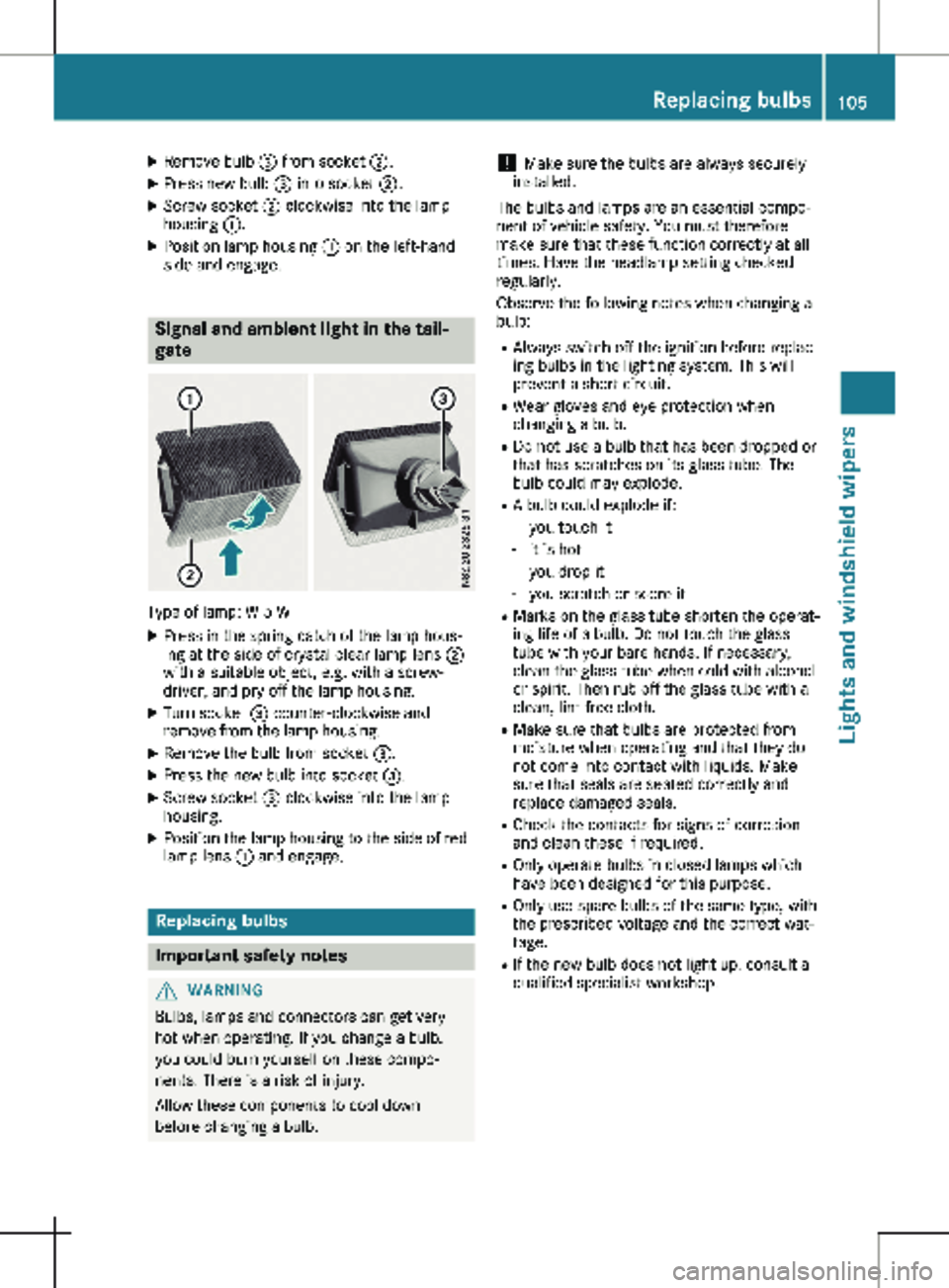
X
Remove bulb = from socket ;.
X Press new bulb = into socket ;.
X Screw socket ; clockwise into the lamp
housing :.
X Position lamp housing : on the left-hand
side and engage. Signal and ambient light in the tail-
gate
Type of lamp: W 5 W
X Press in the spring catch of the lamp hous-
ing at the side of crystal clear lamp lens ;
with a suitable object, e.g. with a screw-
driver, and pry off the lamp housing.
X Turn socket = counter-clockwise and
remove from the lamp housing.
X Remove the bulb from socket =.
X Press the new bulb into socket =.
X Screw socket = clockwise into the lamp
housing.
X Position the lamp housing to the side of red
lamp lens : and engage. Replacing bulbs
Important safety notes
G
WARNING
Bulbs, lamps and connectors can get very
hot when operating. If you change a bulb,
you could burn yourself on these compo-
nents. There is a risk of injury.
Allow these components to cool down
before changing a bulb. !
Make sure the bulbs are always securely
installed.
The bulbs and lamps are an essential compo-
nent of vehicle safety. You must therefore
make sure that these function correctly at all
times. Have the headlamp setting checked
regularly.
Observe the following notes when changing a
bulb:
R Always switch off the ignition before replac-
ing bulbs in the lighting system. This will
prevent a short circuit.
R Wear gloves and eye protection when
changing a bulb.
R Do not use a bulb that has been dropped or
that has scratches on its glass tube. The
bulb could may explode.
R A bulb could explode if:
- you touch it
- it is hot
- you drop it
- you scratch or score it
R Marks on the glass tube shorten the operat-
ing life of a bulb. Do not touch the glass
tube with your bare hands. If necessary,
clean the glass tube when cold with alcohol
or spirit. Then rub off the glass tube with a
clean, lint-free cloth.
R Make sure that bulbs are protected from
moisture when operating and that they do
not come into contact with liquids. Make
sure that seals are seated correctly and
replace damaged seals.
R Check the contacts for signs of corrosion
and clean these if required.
R Only operate bulbs in closed lamps which
have been designed for this purpose.
R Only use spare bulbs of the same type, with
the prescribed voltage and the correct wat-
tage.
R If the new bulb does not light up, consult a
qualified specialist workshop. Replacing bulbs
105Lights and windshield wipers Z
Page 108 of 320
R
Have lamps with LED bulbs repaired at a
qualified specialist workshop only.
R Have the bulbs of the following lamps
replaced at a qualified specialist workshop
only:
- Additional brake lamps
- The license plate lighting
- Front fog lamp
- Side marker lamp
Please also observe the notes on the inte-
rior lights
(Y page 103).
If you require assistance changing bulbs, con-
sult a qualified specialist workshop. Front lamp clusters
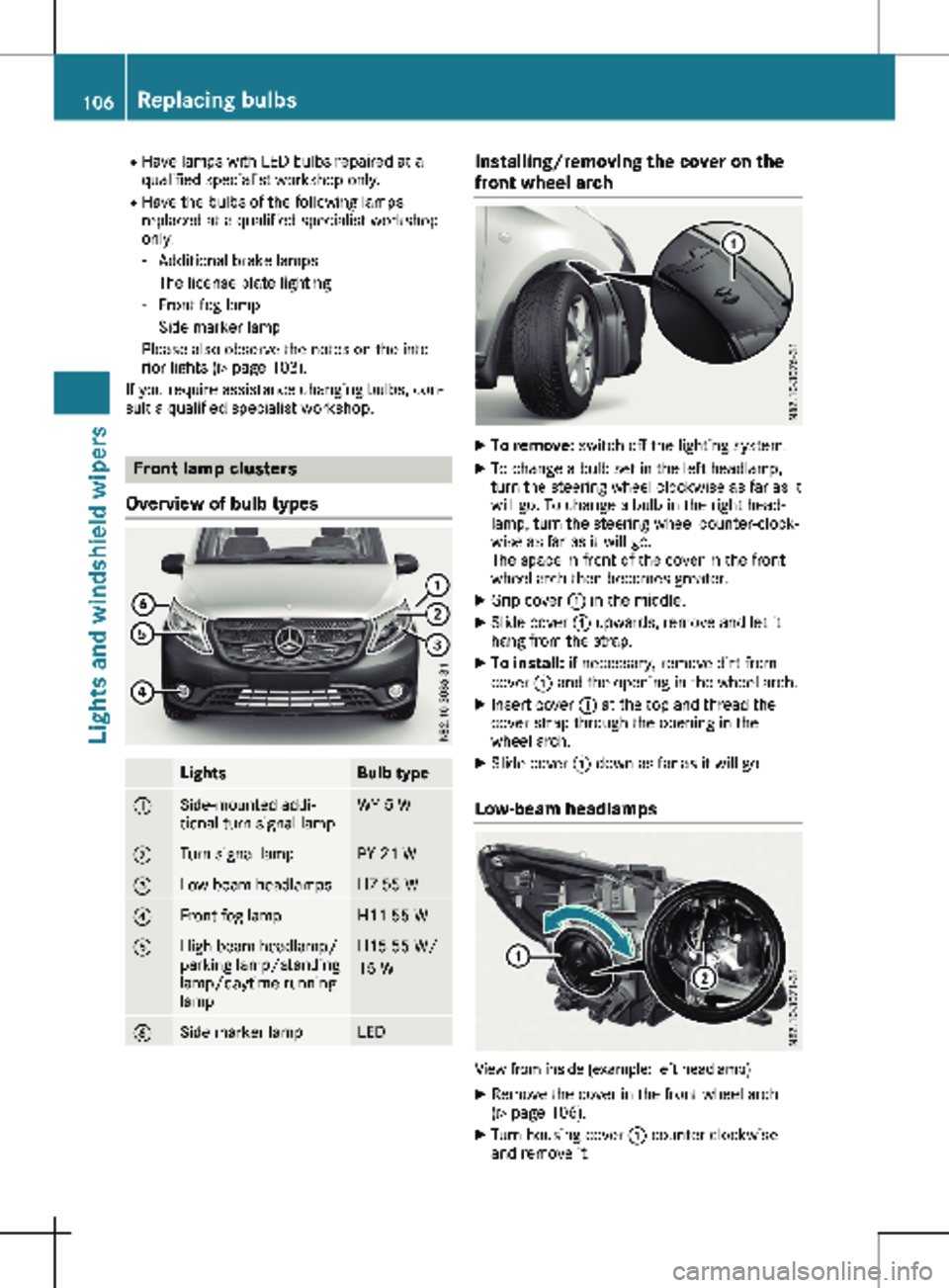
Overview of bulb types Lights Bulb type
:
Side-mounted addi-
tional turn signal lamp WY 5 W
;
Turn signal lamp PY 21 W
=
Low-beam headlamps H7 55 W
?
Front fog lamp H11 55 W
A
High-beam headlamp/
parking lamp/standing
lamp/daytime running
lamp H15 55 W/
15 W
B
Side marker lamp LED Installing/removing the cover on the
front wheel arch
X
To remove: switch off the lighting system.
X To change a bulb set in the left headlamp,
turn the steering wheel clockwise as far as it
will go. To change a bulb in the right head-
lamp, turn the steering wheel counter-clock-
wise as far as it will go.
The space in front of the cover in the front
wheel arch then becomes greater.
X Grip cover : in the middle.
X Slide cover : upwards, remove and let it
hang from the strap.
X To install: if necessary, remove dirt from
cover : and the opening in the wheel arch.
X Insert cover : at the top and thread the
cover strap through the opening in the
wheel arch.
X Slide cover : down as far as it will go.
Low-beam headlamps View from inside (example: left headlamp)
X Remove the cover in the front wheel arch
(Y page
106).
X Turn housing cover : counter-clockwise
and remove it. 106
Replacing bulbs
Lights and windshield wipers
Page 109 of 320
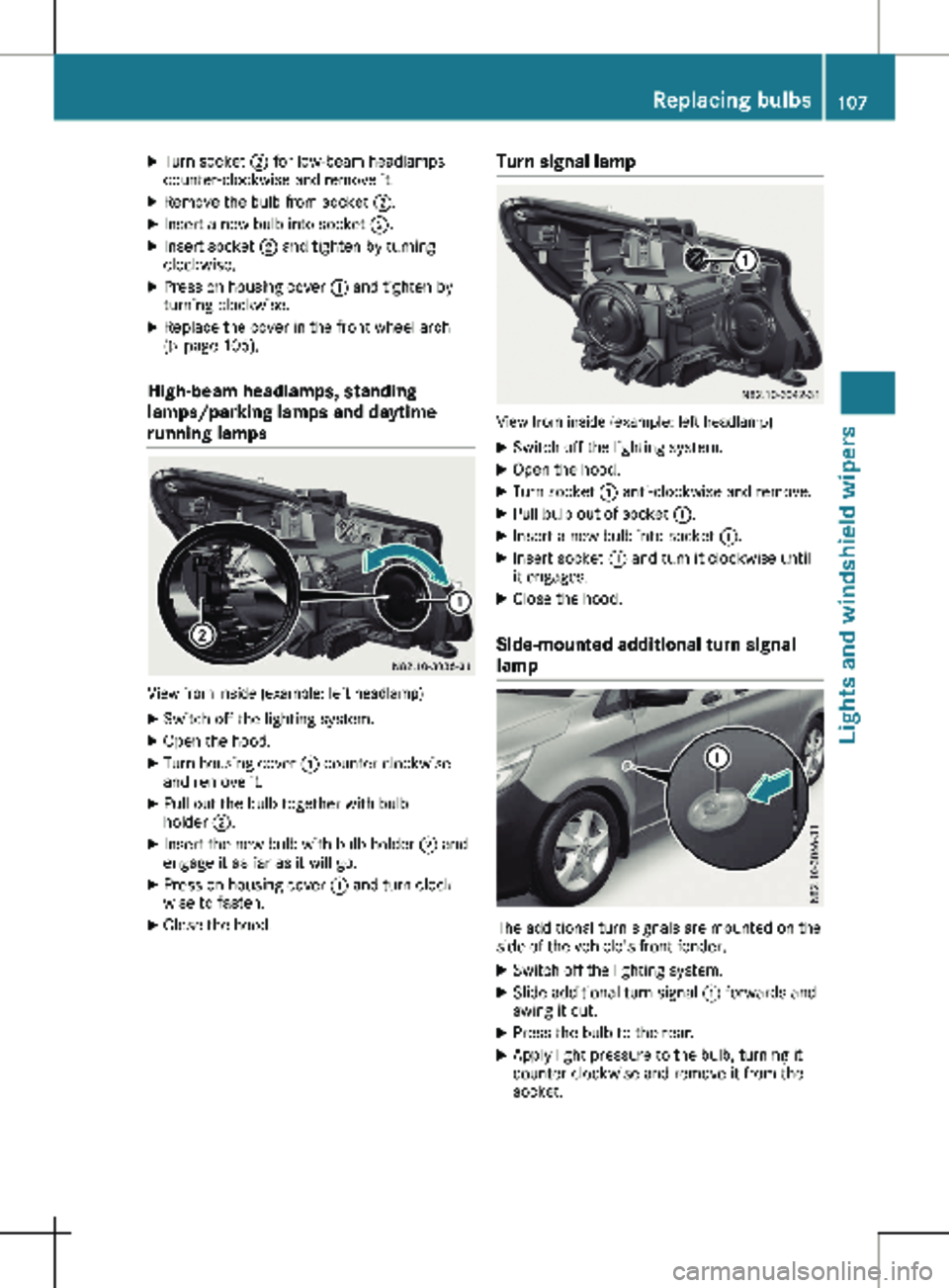
X
Turn socket ; for low-beam headlamps
counter-clockwise and remove it.
X Remove the bulb from socket ;.
X Insert a new bulb into socket ;.
X Insert socket ; and tighten by turning
clockwise.
X Press on housing cover : and tighten by
turning clockwise.
X Replace the cover in the front wheel arch
(Y page
106).
High-beam headlamps, standing
lamps/parking lamps and daytime
running lamps View from inside (example: left headlamp)
X Switch off the lighting system.
X Open the hood.
X Turn housing cover : counter-clockwise
and remove it.
X Pull out the bulb together with bulb
holder ;.
X Insert the new bulb with bulb holder ; and
engage it as far as it will go.
X Press on housing cover : and turn clock-
wise to fasten.
X Close the hood. Turn signal lamp View from inside (example: left headlamp)
X Switch off the lighting system.
X Open the hood.
X Turn socket : anti-clockwise and remove.
X Pull bulb out of socket :.
X Insert a new bulb into socket :.
X Insert socket : and turn it clockwise until
it engages.
X Close the hood.
Side-mounted additional turn signal
lamp The additional turn signals are mounted on the
side of the vehicle's front fender.
X Switch off the lighting system.
X Slide additional turn signal : forwards and
swing it out.
X Press the bulb to the rear.
X Apply light pressure to the bulb, turning it
counter-clockwise and remove it from the
socket. Replacing bulbs
107
Lights and windshield wipers Z
Page 110 of 320

X
Press the new bulb into the socket and
screw it in clockwise.
X Attach additional turn signal : at the front
and engage. Replacing the rear lamp clusters
Overview of bulb types Tail lamps
Lights Bulb type
:
High-mounted brake
lamp LED
;
License plate lamp LED
=
Rear fog lamp (driver's
side) P 21 W
?
Backup lamp P 21 W
A
Brake lamp/tail lamp/
standing lamp/turn sig-
nal P 21 W
Side marker lamp LED
Tail lamps
Installing/removing the tail lamp
! Remove the tail lamps with care so as not
to damage the paintwork.
Because of the installation position,
Mercedes-Benz recommends that you have
the tail lamp bulbs changed at a qualified
specialist workshop. Tail lamps
X To remove: switch off the lighting system.
X Open the tailgate/rear-end door.
i The vehicle tool kit contains a screwdriver
( Y page
270).
X Unscrew two side screws :.
X Press tail lamp ; out as far as bolts =.
X Remove tail lamp ; out from bolts =.
X Pull the connector off the bulb holder of the
tail lamp.
X To install: press the connector into the bulb
holder of the tail lamp.
X Press the tail lamp sideways onto bolts =
and slide onto the vehicle.
X Tighten two side screws :.
Standard tail lamp X
Remove the tail lamp ( Y page
108).
X Unscrew three screws : and remove bulb
holder ; from the tail lamp.108
Replacing bulbs
Lights and windshield wipers
Page 111 of 320

Bulb holder
=
Turn signals/brake lamps/tail lamps/
standing lamps
? Backup lamp
A Rear fog lamp (driver's side only)
X Apply light pressure to the corresponding
bulb, turn it counter-clockwise and remove
it from the bulb holder.
X Press the new bulb into the socket and
screw it in clockwise.
X Insert bulb holder ; into the tail lamp and
tighten all three screws :.
X Install the tail lamp (Y page 108).Windshield wipers
Switching the windshield wiper
on/off
! Do not operate the windshield wipers
when the windshield is dry, as this could
damage the wiper blades. Moreover, dust
that has collected on the windshield can
scratch the glass if wiping takes place when
the windshield is dry.
If it is necessary to switch on the windshield
wipers in dry weather conditions, always use
washer fluid when operating the windshield
wipers.
! If the windshield wipers leave smears on
the windshield after the vehicle has been
washed in an automatic car wash, wax or
other residues may be the reason for this.
Clean the windshield using washer fluid
after washing the vehicle in an automatic
car wash.
! Intermittent wiping with rain sensor: due
to optical influences and the windshield becoming dirty in dry weather conditions,
the windshield wipers may be activated
inadvertently. This could then damage the
windshield wiper blades or scratch the wind-
shield.
For this reason, you should always switch
off the windshield wipers in dry weather. 1
$ Windshield wipers off
2 Ä Intermittent wipe, low (rain sensor
set to low sensitivity)
3 Å Intermittent wipe, high (rain sensor
set to high sensitivity)
4 ° Continuous wipe, slow
5 ¯ Continuous wipe, fast
B î 1st pressure point – single wipe; 2nd
pressure point – wipe with washer fluid
X Turn the key to position 1 or 2 in the igni-
tion lock.
X Turn the í wiper switch to the corre-
sponding position.
In the Ä or Å
positions, the appropriate
wiping frequency is set automatically accord-
ing to the intensity of the rain. In the Å
position, the rain sensor is more sensitive to
precipitation than in the Ä position, caus-
ing the windshield wipers to wipe more fre-
quently.
The windshield will no longer be wiped prop-
erly if the wiper blades are worn. This may pre-
vent you from observing the traffic conditions.
Information on replacing the wiper blades can
be found under "Replacing wiper blades"
( Y page 110). Windshield wipers
109
Lights and windshield wipers Z
Page 112 of 320

Switching the rear window wiper
on/off
1
b To wipe with washer fluid
2 ° Intermittent wipe
3 $ Rear window wiper off
4 b To wipe with washer fluid
X Turn the key to position 1 or 2 in the igni-
tion lock.
X Move the è switch to the corresponding
position.
If the rear window wiper is activated, the
è symbol is shown in the status area of
the display.
The Status Overview in the Assist.
menu then also shows the è symbol for
vehicles with steering wheel buttons
(Y page
189).
X To wipe with washer fluid: press the è
switch beyond the current position as far as
it will go to 1 or press and hold 4.
When you release the è switch, the rear
window wiper continues to wipe for about
another five seconds. The rear window
wiper then wipes according to the original
position 2 or 3.
The rear window wiper switches on automati-
cally if you engage reverse gear and the wind-
shield wipers are on.
If the vehicle is stationary and you open the
tailgate or rear-end door, the rear window
wiper will stop automatically. The rear window
wiper will only resume wiping again when the
tailgate and rear-end door are closed and you
pull away again.
The rear window will no longer be wiped prop-
erly if the wiper blade is worn. This may pre-
vent you from observing the traffic conditions.
Information on replacing the wiper blade can be found under "Replacing wiper blades"
(
Y page
110). Replacing the wiper blades
Important safety notes G
WARNING
If the windshield wipers begin to move while
you are changing the wiper blades, you
could be trapped by the wiper arm. There is
a risk of injury.
Always switch off the windshield wipers and
ignition before changing the wiper blades.
! Never open the hood/tailgate or rear
doors if a windshield wiper arm has been
folded away from the windshield/rear win-
dow.
Never fold a windshield wiper arm without a
wiper blade back onto the windshield/rear
window.
Hold the windshield wiper arm firmly when
you change the wiper blade. If you release
the windshield wiper arm without a wiper
blade and it falls onto the windshield/rear
window, the windshield/rear window may
be damaged by the force of the impact.
Mercedes-Benz recommends that you have
the wiper blades changed at a qualified spe-
cialist workshop.
! Only hold the wiper blade by the wiper
arm. You could otherwise damage the wiper
rubber.
Wiper blades are wear parts. The windshield
will no longer be wiped properly if the wiper
blades are worn. This may prevent you from
observing the traffic conditions.
Please observe the service indicator after
changing the wiper blades of the windshield
wiper.
Service indicator Replacement wiper blades for the windshield
wiper have a service indicator on the tip of the
wiper blade.
Depending on the amount of use, the service
indicator will change color from black to yel-
low.110
Windshield wipers
Lights and windshield wipers
Page 113 of 320
Change the wiper blade if:
R the wiper blade is damaged
R the service indicator has turned yellow
In order to activate the service indicator, you
have to remove the protective film
( Y page
111).
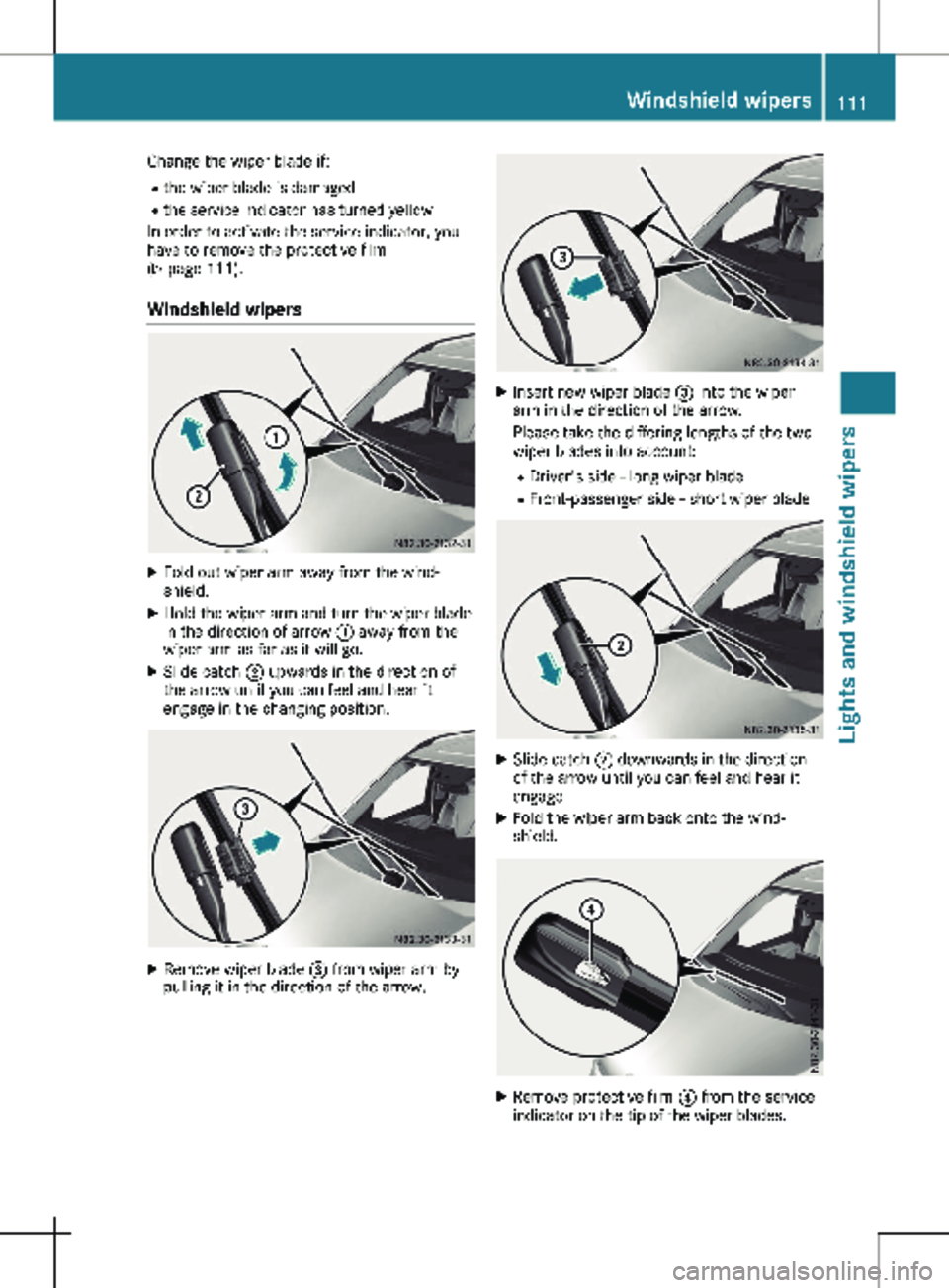
Windshield wipers X
Fold out wiper arm away from the wind-
shield.
X Hold the wiper arm and turn the wiper blade
in the direction of arrow : away from the
wiper arm as far as it will go.
X Slide catch ; upwards in the direction of
the arrow until you can feel and hear it
engage in the changing position. X
Remove wiper blade = from wiper arm by
pulling it in the direction of the arrow. X
Insert new wiper blade = into the wiper
arm in the direction of the arrow.
Please take the differing lengths of the two
wiper blades into account:
R Driver's side - long wiper blade
R Front-passenger side - short wiper blade X
Slide catch ; downwards in the direction
of the arrow until you can feel and hear it
engage.
X Fold the wiper arm back onto the wind-
shield. X
Remove protective film ? from the service
indicator on the tip of the wiper blades. Windshield wipers
111
Lights and windshield wipers Z
Page 114 of 320
Rear window wiper
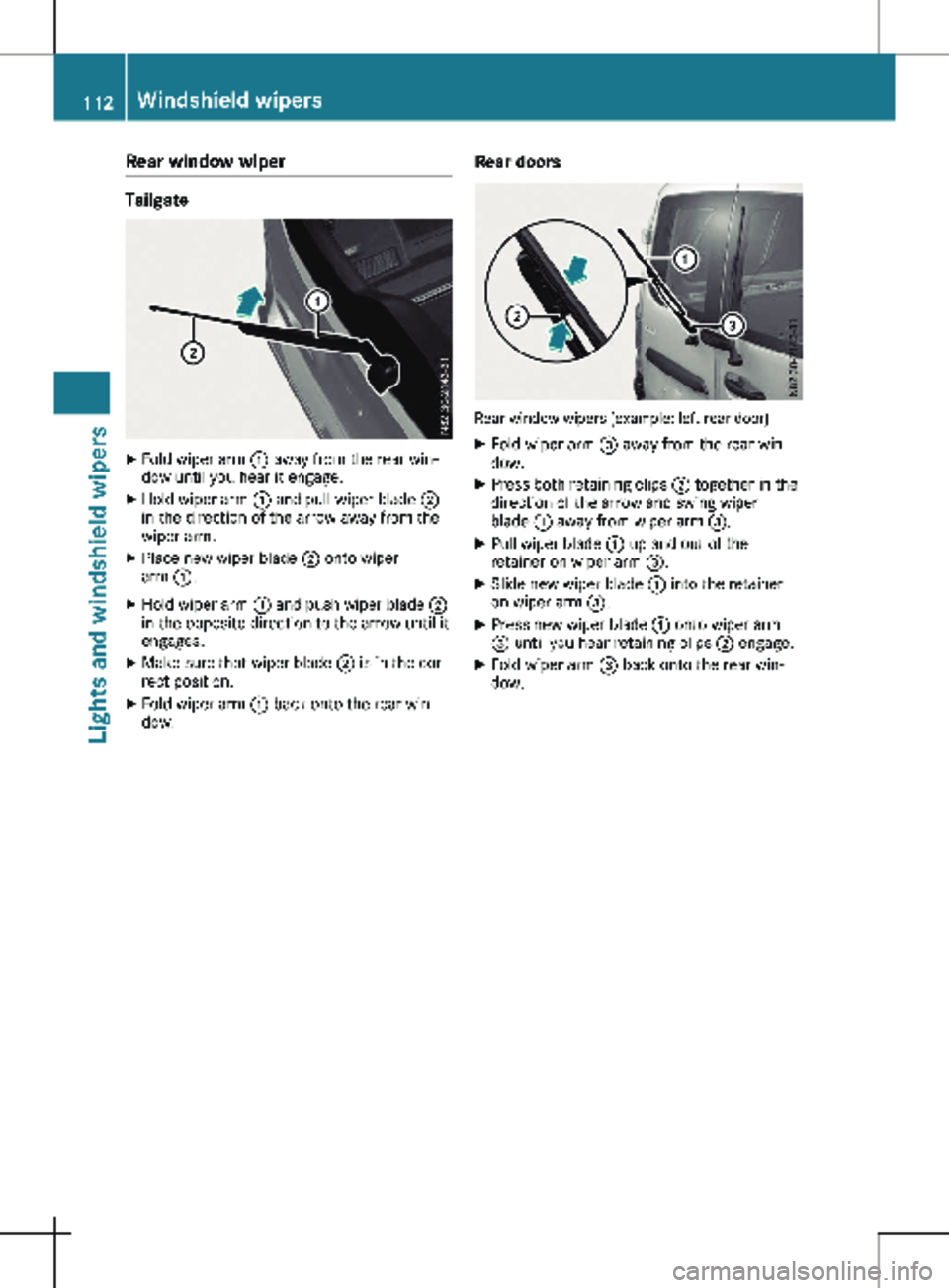
Tailgate
X
Fold wiper arm : away from the rear win-
dow until you hear it engage.
X Hold wiper arm : and pull wiper blade ;
in the direction of the arrow away from the
wiper arm.
X Place new wiper blade ; onto wiper
arm :.
X Hold wiper arm : and push wiper blade ;
in the opposite direction to the arrow until it
engages.
X Make sure that wiper blade ; is in the cor-
rect position.
X Fold wiper arm : back onto the rear win-
dow. Rear doors Rear window wipers (example: left rear door)
X Fold wiper arm = away from the rear win-
dow.
X Press both retaining clips ; together in the
direction of the arrow and swing wiper
blade : away from wiper arm =.
X Pull wiper blade : up and out of the
retainer on wiper arm =.
X Slide new wiper blade : into the retainer
on wiper arm =.
X Press new wiper blade : onto wiper arm
= until you hear retaining clips ; engage.
X Fold wiper arm = back onto the rear win-
dow. 112
Windshield wipersLights and windshield wipers
Page 115 of 320
Problems with the windshield wipers
Problem
Possible causes/consequences and
M SolutionsThe windshield wiper
jams. Leaves or snow, for example, may be obstructing the windshield
wiper movement. The wiper motor has switched off.
X Stop the vehicle as soon as possible, paying attention to road and
traffic conditions.
X For safety reasons, you should remove the key from the ignition
lock.
X Remove the cause of the obstruction.
X Switch on the windshield wipers again. The windshield wiper
does not move at all. There is a malfunction in the windshield wiper drive.
X Select another wiper speed on the combination switch.
X Have the windshield wipers checked at a qualified specialist
workshop. The windshield washer
fluid from the spray noz-
zles no longer hits the
center of the wind-
shield/rear window. The spray nozzles are misaligned.
X Have the spray nozzles checked at a qualified specialist work-
shop. Windshield wipers
113Lights and windshield wipers Z
Page 119 of 320
R
If you wish to use the driver's side settings
on the co-driver's side and, for vehicles with
rear-compartment air conditioning, for the
rear compartment as well, use the "Synchro-
nization" function. The indicator lamp in the
0 button comes on when the function is
switched on.
R After long journeys, you can use the residual
heat of the engine to heat the stationary
vehicle. The residual heat utilization can
only be switched on or off while the ignition
is switched off. The indicator lamp in the
Ì button comes on when the function is
switched on.
Approximately 60 minutes after parking the
vehicle, 3-zone automatic climate control can
switch on automatically, depending on the out-
side temperature. The vehicle is then ventila-
ted for about 30 minutes at low fan setting
and 3-zone automatic climate control is dried
out. Optimum use of the rear compart-
ment air conditioning
Vehicles with air-conditioning system
Switch the rear-compartment air-conditioning
system on and off using the air-conditioning
system control panel. When you switch on the
rear-compartment air conditioning, your set-
tings for temperature, airflow and air distribu-
tion are automatically adopted on the control
panel for the rear-compartment air condition-
ing.
The indicator lamp in the / button comes
on when the rear-compartment air-condition-
ing is switched on
(Y page 115).
Vehicles with dual-zone automatic climate
control
To operate the rear-compartment air condi-
tioning, use the control panel of the dual-zone
automatic climate control system. When you
switch on the rear-compartment air condition-
ing, you can set the temperature and airflow
separately on the control panel. The airflow
setting is automatically adopted for the rear-
compartment air conditioning. When dual-zone
automatic climate control is in à automatic
mode, the air distribution of the rear-compart-
ment air conditioning is also automatically
adjusted.
When you set the temperature and airflow of
the rear-compartment air conditioning, the indicator lamp of the / button
(Y page
116) flashes. When the rear-compart-
ment air conditioning is switched on, the indi-
cator lamp on the / button lights up.
For optimum climate control, set the tempera-
ture to 72 ‡ (22 †) and switch on à auto-
matic mode. Only change the temperature in
small increments. Operating the climate control sys-
tem
Switching the climate control on/off
Important safety notes When the climate control is switched off, air
intake and air circulation also stop. Only use
this setting for a brief period. Otherwise, the
windows could fog up.
Air-conditioning system X
Turn the key to position 2 in the ignition
lock.
X To switch on: turn airflow control A clock-
wise to at least level 1 – (Y page
115).
X To switch off: turn airflow control A coun-
ter-clockwise to position 0.
Dual-zone automatic climate control X
Turn the key to position 2 in the ignition
lock.
X To switch on: press the à button.
The indicator lamp in the à button and
the display are switched on. The climate
control is automatically adjusted depending
on the set temperature
(Y page 119).
or
X Press the K button and set blower set-
ting 1 or above.
The blower settings are shown in the display
as a bar graph.
X To switch off: press the I button and,
after reaching the lowest blower speed,
press it again.
The control panel display goes off.
Preferably switch on climate control using the
à button. Operating the climate control system
117
Climate control