phone MERCEDES-BENZ METRIS 2020 MY20 Operator’s Manual
[x] Cancel search | Manufacturer: MERCEDES-BENZ, Model Year: 2020, Model line: METRIS, Model: MERCEDES-BENZ METRIS 2020Pages: 320, PDF Size: 26.38 MB
Page 142 of 320
Parking the vehicle for a long period
If you leave the vehicle parked for longer than
four weeks, the battery may be damaged by
exhaustive discharging.
X Disconnect the battery (Y page 260).
or X Connect the battery to a trickle charger.
Be sure to observe the notes on charging
the batteries
(Y page 262).
You can obtain information about trickle
chargers from a qualified specialist work-
shop.
If you leave the vehicle parked for longer than
6 weeks, the vehicle may suffer damage as a
result of lack of use.
X Visit a qualified specialist workshop and
seek advice. Driving tips
General notes
Important safety notes G
WARNING
If you switch off the ignition while driving,
safety-relevant functions are only available
with limitations, or not at all. This could
affect, for example, the power steering and
the brake boosting effect. You will require
considerably more effort to steer and brake.
There is a risk of an accident.
Do not switch off the ignition while driving. G
WARNING
Mobile communications equipment distracts
the driver from traffic conditions. In addi-
tion, the driver could lose control of the
vehicle. There is a risk of an accident.
As a driver, use mobile communications
equipment only when the vehicle is at a
standstill.
As a vehicle occupant, use mobile communi-
cations equipment only in the designated
area, e.g. the rear passenger compartment. Observe the legal requirements of the country
in which you are driving. Some jurisdictions
prohibit the driver from using a mobile phone
while driving a vehicle.
Always use the hands-free system for tele-
phoning while driving. Only use the telephone
if road traffic conditions permit. If this is not
the case, pull over to a safe location before
using the telephone.
Bear in mind that at a speed of just 30 mph
(approximately
50 km/h), your vehicle is cov-
ering a distance of 44 feet (approximately
14 m) every second.
Drive sensibly – save fuel In order to save fuel, observe the following
tips:
X The tires should always be inflated to the
recommended tire pressure.
X Remove unnecessary loads.
X Remove roof carriers when they are not nee-
ded.
X Warm up the engine at low engine speeds.
X Avoid frequent acceleration or braking.
X Have all maintenance work carried out as
indicated by the service intervals in the
Maintenance Booklet or by the service inter-
val display.
Fuel consumption also increases when driving
in cold weather, in stop-start traffic and in
mountainous terrain.
Overrun cutoff If you are in overrun mode and take your foot
off the accelerator pedal, the fuel supply is cut
off when the engine speed is out of the idle
speed control range.
Drinking and driving G
WARNING
Drinking and driving and/or taking drugs
and driving are very dangerous combina-
tions. Even a small amount of alcohol or
drugs can affect your reflexes, perceptions
and judgment.
The possibility of a serious or even fatal
accident is greatly increased when you drink
or take drugs and drive. 140
Driving tips
Driving and parking
Page 184 of 320
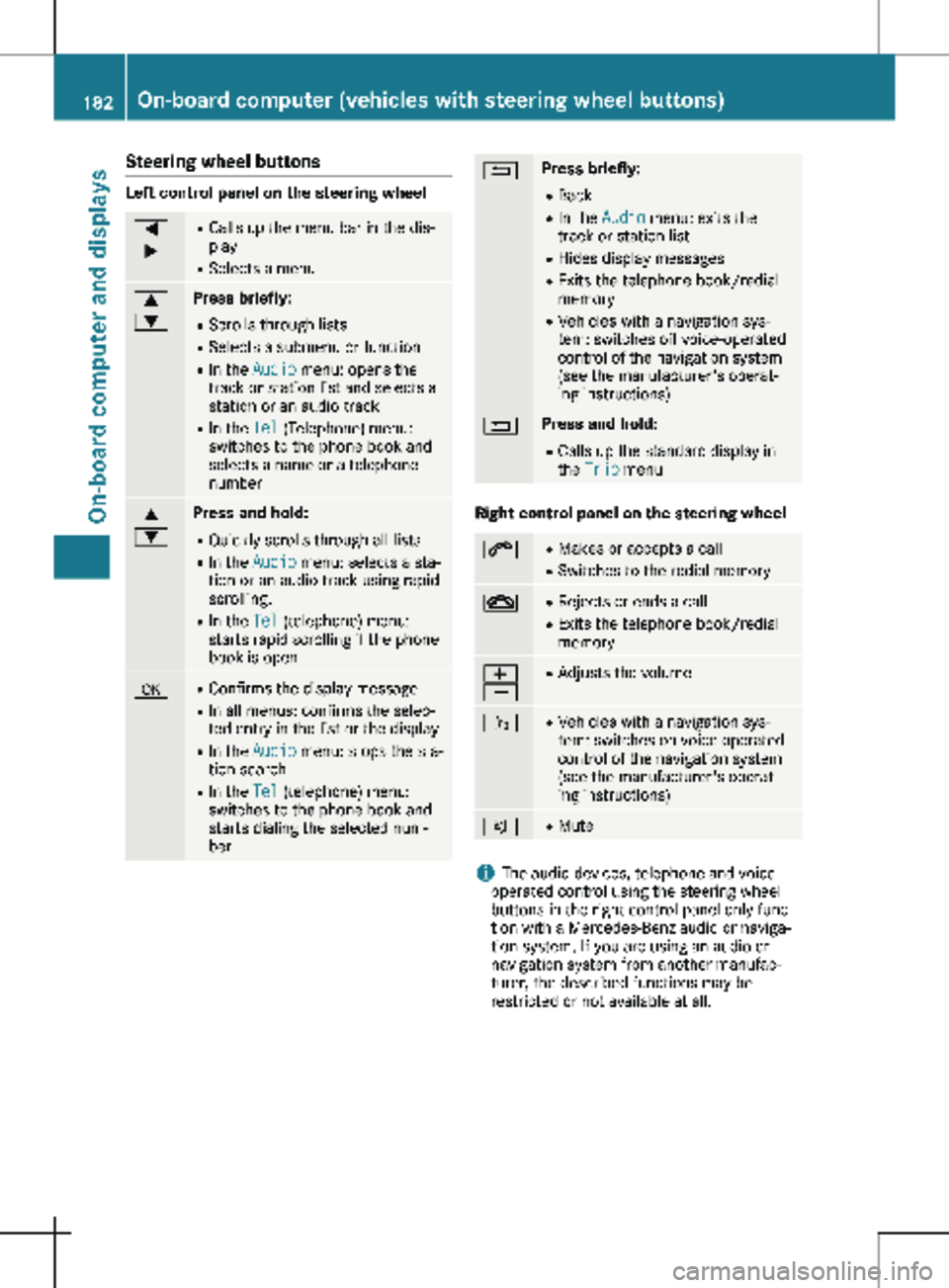
Steering wheel buttons
Left control panel on the steering wheel
=
; R
Calls up the menu bar in the dis-
play
R Selects a menu 9
: Press briefly:
R Scrolls through lists
R Selects a submenu or function
R In the Audio menu: opens the
track or station list and selects a
station or an audio track
R In the Tel (Telephone) menu:
switches to the phone book and
selects a name or a telephone
number 9
: Press and hold:
R
Quickly scrolls through all lists
R In the Audio menu: selects a sta-
tion or an audio track using rapid
scrolling.
R In the Tel (telephone) menu:
starts rapid scrolling if the phone
book is open a R
Confirms the display message
R In all menus: confirms the selec-
ted entry in the list or the display
R In the Audio menu: stops the sta-
tion search
R In the Tel (telephone) menu:
switches to the phone book and
starts dialing the selected num-
ber % Press briefly:
R Back
R In the Audio menu: exits the
track or station list
R Hides display messages
R Exits the telephone book/redial
memory
R Vehicles with a navigation sys-
tem: switches off voice-operated
control of the navigation system
(see the manufacturer's operat-
ing instructions) % Press and hold:
R
Calls up the standard display in
the Trip menu Right control panel on the steering wheel
6 R
Makes or accepts a call
R Switches to the redial memory ~ R
Rejects or ends a call
R Exits the telephone book/redial
memory W
X R
Adjusts the volume ó R
Vehicles with a navigation sys-
tem: switches on voice-operated
control of the navigation system
(see the manufacturer's operat-
ing instructions) 8 R
Mute i
The audio devices, telephone and voice-
operated control using the steering wheel
buttons in the right control panel only func-
tion with a Mercedes-Benz audio or naviga-
tion system. If you are using an audio or
navigation system from another manufac-
turer, the described functions may be
restricted or not available at all. 182
On-board computer (vehicles with steering wheel buttons)On-board computer and displays
Page 185 of 320
Display
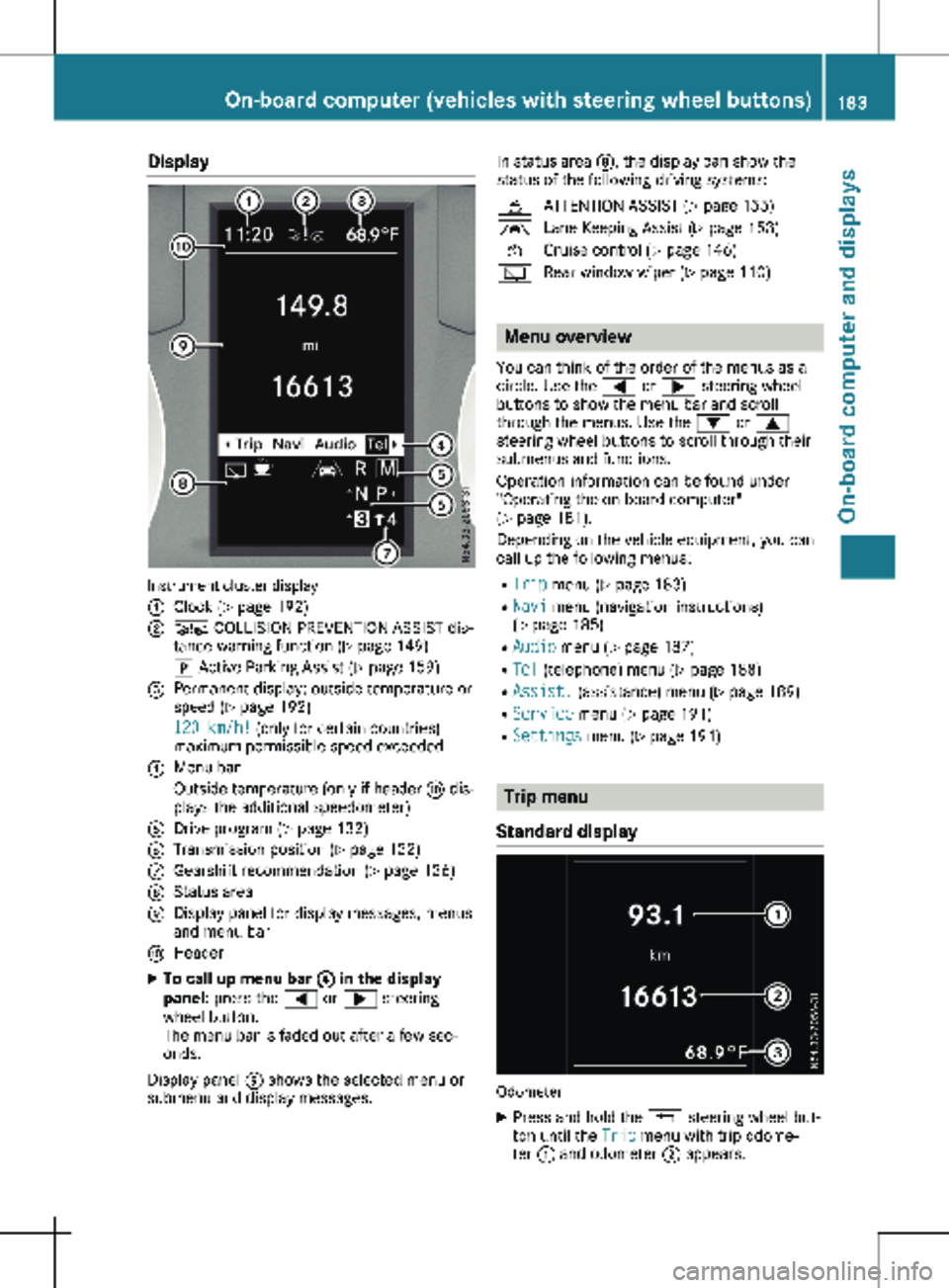
Instrument cluster display
:
Clock (Y page 192)
; Ä COLLISION PREVENTION ASSIST dis-
tance warning function
(Y page 149)
j Active Parking Assist
(Y page 159)
= Permanent display: outside temperature or
speed ( Y page
192)
120 km/h! (only for certain countries)
maximum permissible speed exceeded
? Menu bar
Outside temperature (only if header F dis-
plays the additional speedometer)
A Drive program ( Y page 132)
B Transmission position ( Y page
132)
C Gearshift recommendation ( Y page
136)
D Status area
E Display panel for display messages, menus
and menu bar
F Header
X To call up menu bar ? in the display
panel: press the = or ; steering
wheel button.
The menu bar is faded out after a few sec-
onds.
Display panel E shows the selected menu or
submenu and display messages. In status area D, the display can show the
status of the following driving systems:
À ATTENTION ASSIST ( Y page
155)
à Lane Keeping Assist ( Y page
153)
V Cruise control (Y page
146)
è Rear window wiper (Y page
110) Menu overview
You can think of the order of the menus as a
circle. Use the = or ; steering wheel
buttons to show the menu bar and scroll
through the menus. Use the : or 9
steering wheel buttons to scroll through their
submenus and functions.
Operation information can be found under
"Operating the on-board computer"
(Y page
181).
Depending on the vehicle equipment, you can
call up the following menus:
R Trip menu (Y page 183)
R Navi menu (navigation instructions)
(Y page 185)
R Audio menu ( Y page 187)
R Tel (telephone) menu (Y page 188)
R Assist. (assistance) menu ( Y page 189)
R Service menu (Y page 191)
R Settings menu (Y page 191) Trip menu
Standard display Odometer
X Press and hold the % steering wheel but-
ton until the Trip menu with trip odome-
ter : and odometer ; appears. On-board computer (vehicles with steering wheel buttons)
183
On-board computer and displays Z
Page 190 of 320

Telephone menu
Introduction G
WARNING
If you operate information systems and com-
munication equipment integrated in the
vehicle when driving, you may be distracted
from the traffic situation. You could also
lose control of the vehicle. There is a risk of
an accident.
Only operate this equipment when the traffic
situation permits. If you are not sure that
this is possible, park the vehicle paying
attention to traffic conditions and operate
the equipment when the vehicle is station-
ary.
When using the phone, you must observe the
legal requirements for the country in which
you are currently driving.
X Switch on the audio system (see the sepa-
rate operating instructions).
X Switch on the mobile phone (see the manu-
facturer's separate operating instructions).
X Establish a Bluetooth ®
connection between
the mobile phone and the audio system (see
the separate operating instructions).
Using the steering wheel buttons
X Press = or ; to select the Tel menu.
The display shows one of the following mes-
sages:
R The name of the network provider or Phone
READY: the mobile phone has found a net-
work and is ready to receive.
R No Service: there is no network available
or the mobile phone is searching for a net-
work.
R Bluetooth Ready: you have not yet estab-
lished a Bluetooth ®
connection between the
mobile phone and the audio system.
You can obtain further information about suita-
ble mobile phones and connecting mobile
phones via Bluetooth ®
:
R at a Mercedes-Benz Commercial Van Center
R on the Internet at
http://www.mercedes-
benz.com/connect Accepting a call
X
Press the 6 button to answer a call.
If someone calls you when you are in the Tel
menu, a corresponding display message
appears in the multifunction display.
Rejecting or ending a call X
Press the ~ steering wheel button.
Dialing a number from the phone book Using the steering wheel buttons
X Press = or ; to select the Tel menu.
X Press :, 9 or a to switch to the
phone book.
X Press : or 9 to select names succes-
sively.
If you press and hold the button for longer
than one second, the names in the phone
book are shown rapidly one after another.
or
X Press and hold : or 9 for longer than
five seconds.
Rapid scrolling — the name that starts with
the next letter or the previous letter in the
alphabet is displayed. Rapid scrolling stops
when you release the button or reach the
end of the list.
X If only one telephone number is stored
for a name:
press 6 or a to start
dialing.
or X If there is more than one number for a
particular name:
press the 6 or a
button to display the numbers.
X Press : or 9 to select a telephone
number. 188
On-board computer (vehicles with steering wheel buttons)
On-board computer and displays
Page 191 of 320
X
Press 6 or a to start dialing.
or X To exit the phone book: press ~ or
%.
Redialing The on-board computer saves the last names
or numbers dialed in the redial memory. Using
the steering wheel buttons
X Press = or ; to select the Tel menu.
X Press the 6 button to switch to the
redial memory.
X Press : or 9 to select names or tele-
phone numbers.
X Press the 6 or a button to start dial-
ing.
or X To exit the redial memory: press the ~
or % button. Assistance menu
Introduction Depending on the vehicle’s equipment, you
have the following options in the Assist.
menu:
R Displaying the status overview
(Y page
189)
R Deactivating or activating ESP ®
(Y page 190)
R Activating or deactivating the COLLISION
PREVENTION ASSIST distance warning func-
tion (Y page 190)
R Setting the ATTENTION ASSIST sensitivity
(Y page 190) R
Activating or deactivating Blind Spot Assist
(Y page
191)
R Setting the sensitivity of Lane Keeping
Assist (Y page 191)
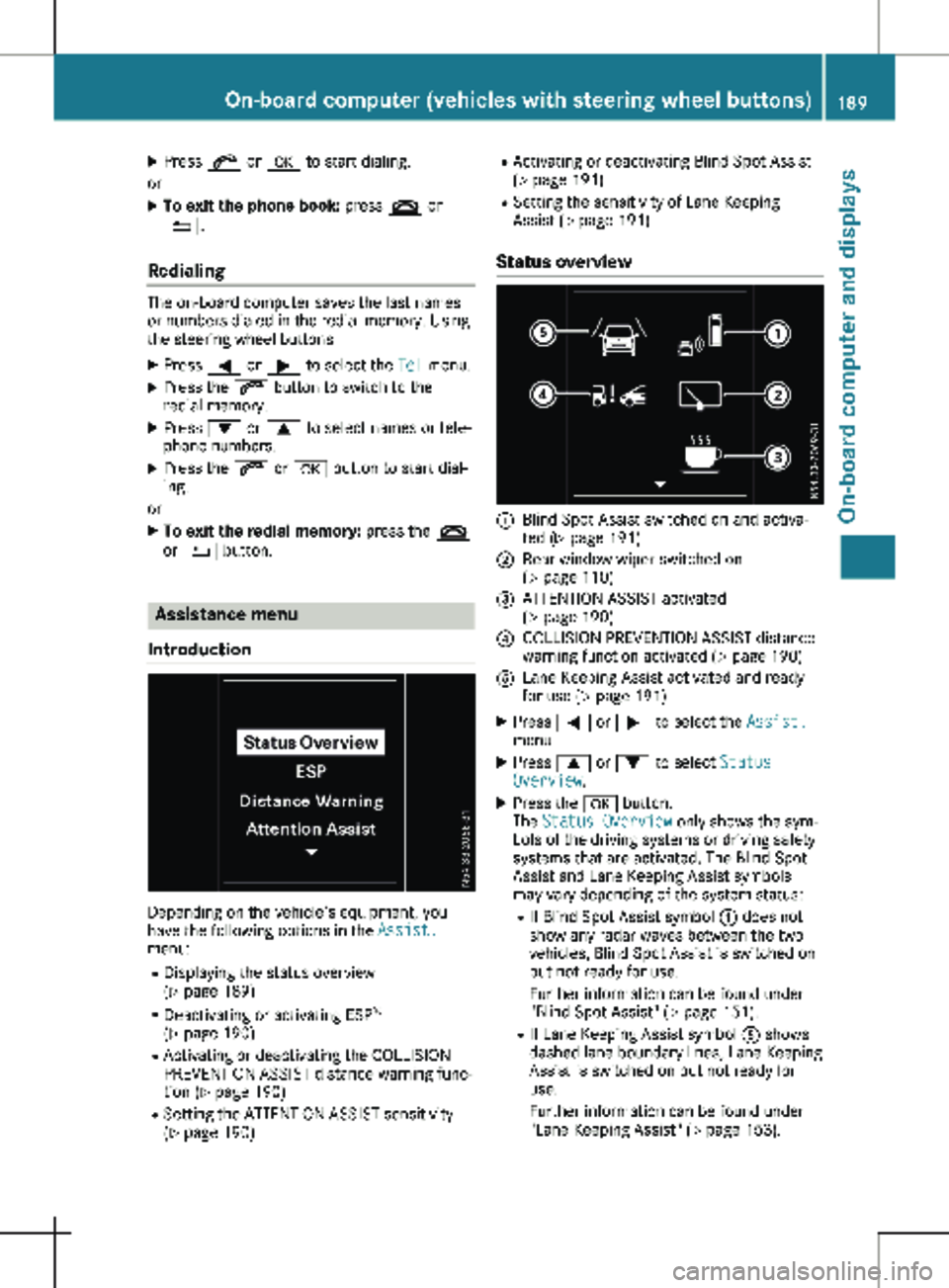
Status overview :
Blind Spot Assist switched on and activa-
ted
(Y page 191)
; Rear window wiper switched on
(Y page
110)
= ATTENTION ASSIST activated
(Y page
190)
? COLLISION PREVENTION ASSIST distance
warning function activated
(Y page 190)
A Lane Keeping Assist activated and ready
for use (Y page
191)
X Press = or ; to select the Assist.
menu.
X Press 9 or : to select Status
Overview.
X Press the a button.
The Status Overview only shows the sym-
bols of the driving systems or driving safety
systems that are activated. The Blind Spot
Assist and Lane Keeping Assist symbols
may vary depending of the system status:
R If Blind Spot Assist symbol : does not
show any radar waves between the two
vehicles, Blind Spot Assist is switched on
but not ready for use.
Further information can be found under
"Blind Spot Assist" (Y page
151).
R If Lane Keeping Assist symbol A shows
dashed lane boundary lines, Lane Keeping
Assist is switched on but not ready for
use.
Further information can be found under
"Lane Keeping Assist" (Y page 153). On-board computer (vehicles with steering wheel buttons)
189
On-board computer and displays Z
Page 229 of 320
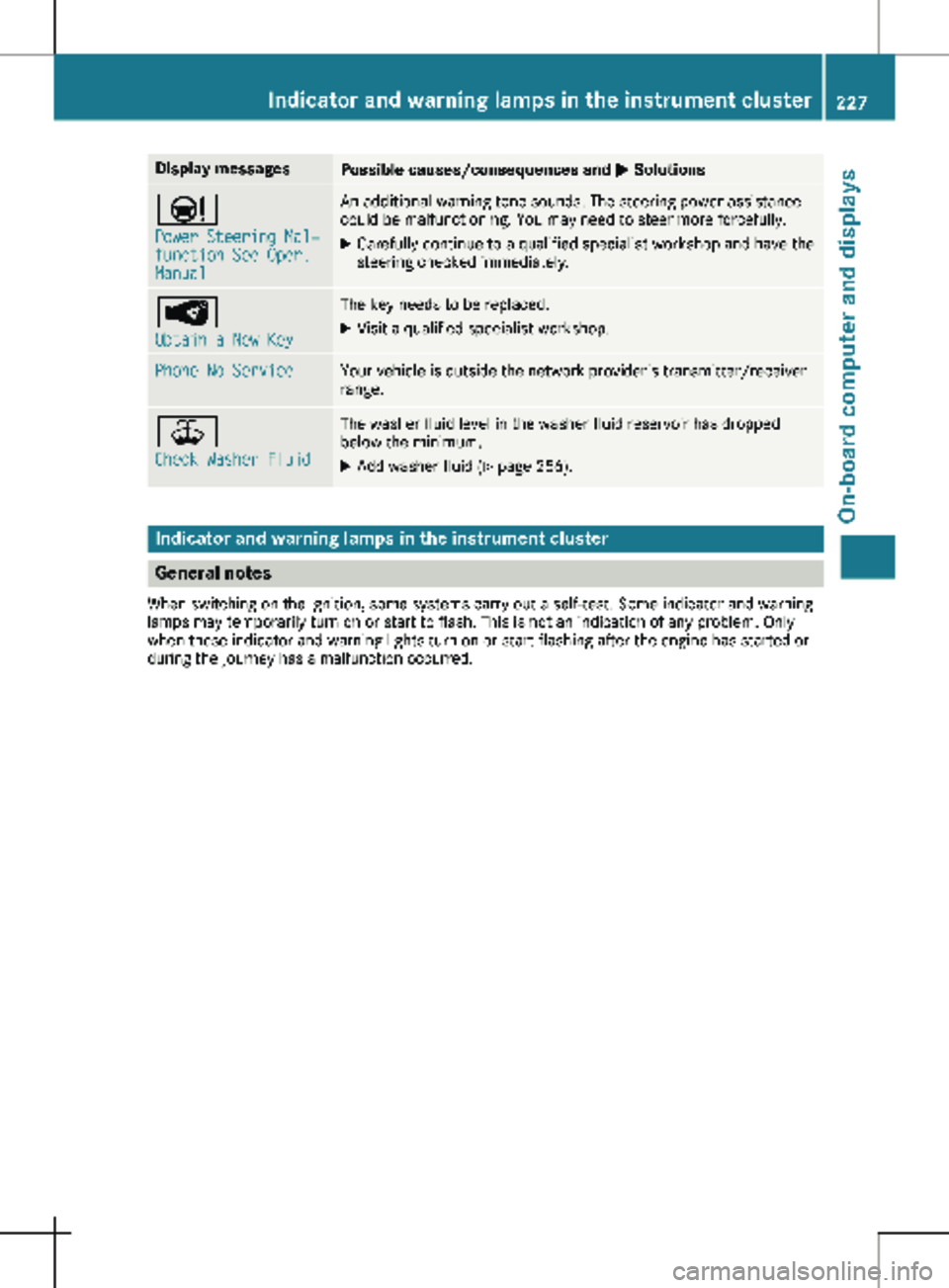
Display messages
Possible causes/consequences and
M SolutionsÐ
Power Steering Mal‐
function See Oper.
Manual An additional warning tone sounds. The steering power assistance
could be malfunctioning. You may need to steer more forcefully.
X Carefully continue to a qualified specialist workshop and have the
steering checked immediately. Â
Obtain a New Key The key needs to be replaced.
X Visit a qualified specialist workshop. Phone No Service Your vehicle is outside the network provider's transmitter/receiver
range. ¥
Check Washer Fluid The washer fluid level in the washer fluid reservoir has dropped
below the minimum.
X Add washer fluid (Y page 256).Indicator and warning lamps in the instrument cluster
General notes
When switching on the ignition, some systems carry out a self-test. Some indicator and warning
lamps may temporarily turn on or start to flash. This is not an indication of any problem. Only
when these indicator and warning lights turn on or start flashing after the engine has started or
during the journey has a malfunction occurred. Indicator and warning lamps in the instrument cluster
227
On-board computer and displays Z
Page 240 of 320
Useful information
This Operator's Manual describes all models
as well as standard and optional equipment of
your vehicle that were available at the time of
going to print. Country-specific variations are
possible. Note that your vehicle may not be
equipped with all of the described functions.
This also applies to systems and functions rel-
evant to safety.
Read the information on qualified specialist
workshops (Y page
32).Stowage spaces and stowage com-
partments
Important safety notes
G
WARNING
If you transport objects in the vehicle inte-
rior and these are not adequately secured,
they could slip or be flung around and
thereby strike vehicle occupants. In addi-
tion, cup holders, open stowage spaces and
mobile phone brackets may not always be
able to hold the objects placed in them in
the event of an accident. There is a risk of
injury, particularly in the event of sharp
braking or sudden changes of direction.
R Always stow objects in such a way that
they cannot be tossed about in these or
similar situations.
R Always make sure that objects do not pro-
trude out of the stowage spaces, luggage
nets or stowage nets.
R Ensure that closable stowage spaces are
shut before beginning your journey.
R Always stow and secure heavy, hard, poin-
ted, sharp-edged, fragile or large objects
in the cargo compartment.
Observe the "Loading guidelines"
(Y page
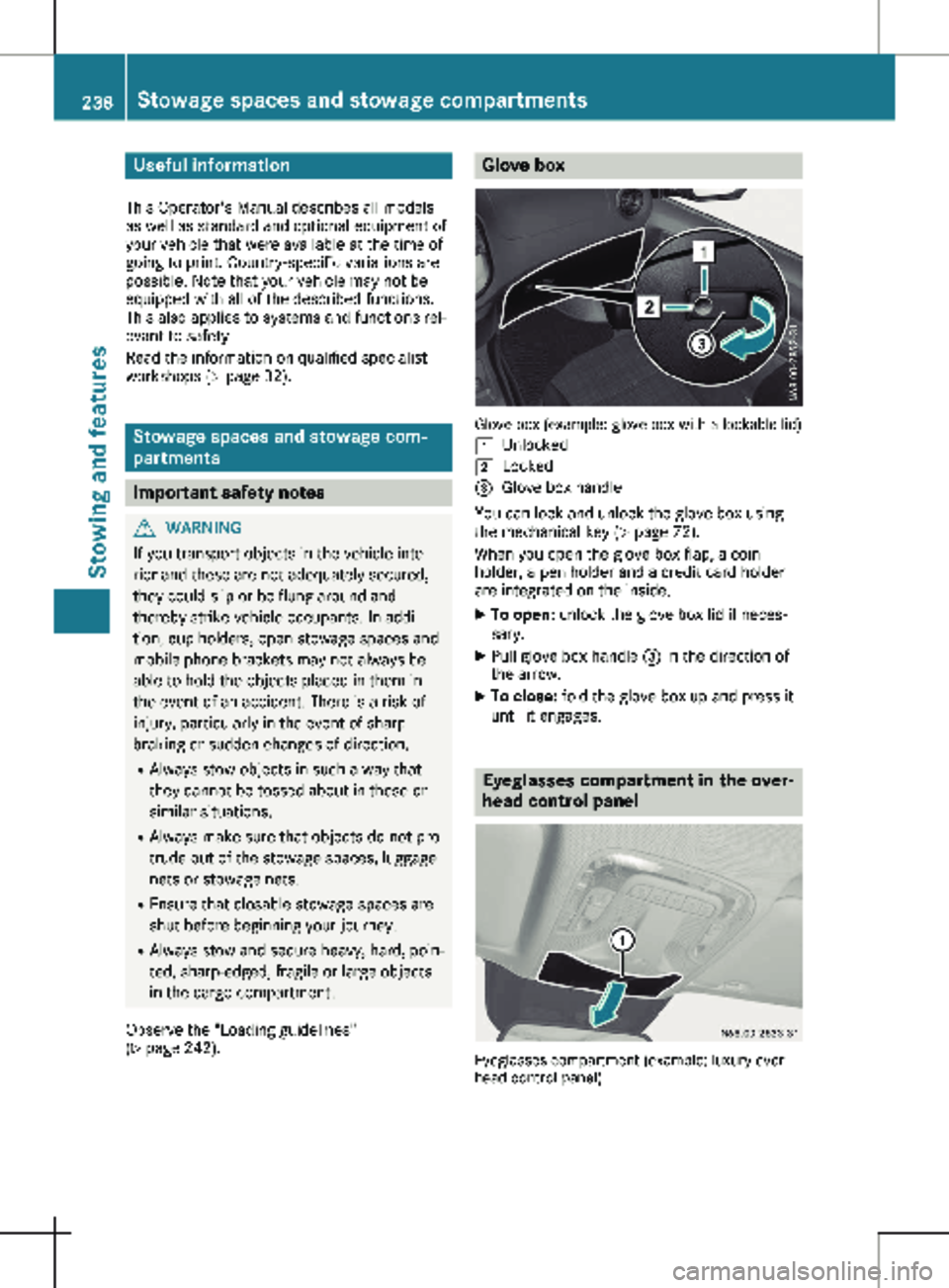
242). Glove box
Glove box (example: glove box with a lockable lid)
1 Unlocked
2 Locked
= Glove box handle
You can lock and unlock the glove box using
the mechanical key (Y page
72).
When you open the glove box flap, a coin
holder, a pen holder and a credit card holder
are integrated on the inside.
X To open: unlock the glove box lid if neces-
sary.
X Pull glove box handle = in the direction of
the arrow.
X To close: fold the glove box up and press it
until it engages. Eyeglasses compartment in the over-
head control panel
Eyeglasses compartment (example: luxury over-
head control panel) 238
Stowage spaces and stowage compartments
Stowing and features
Page 255 of 320
X
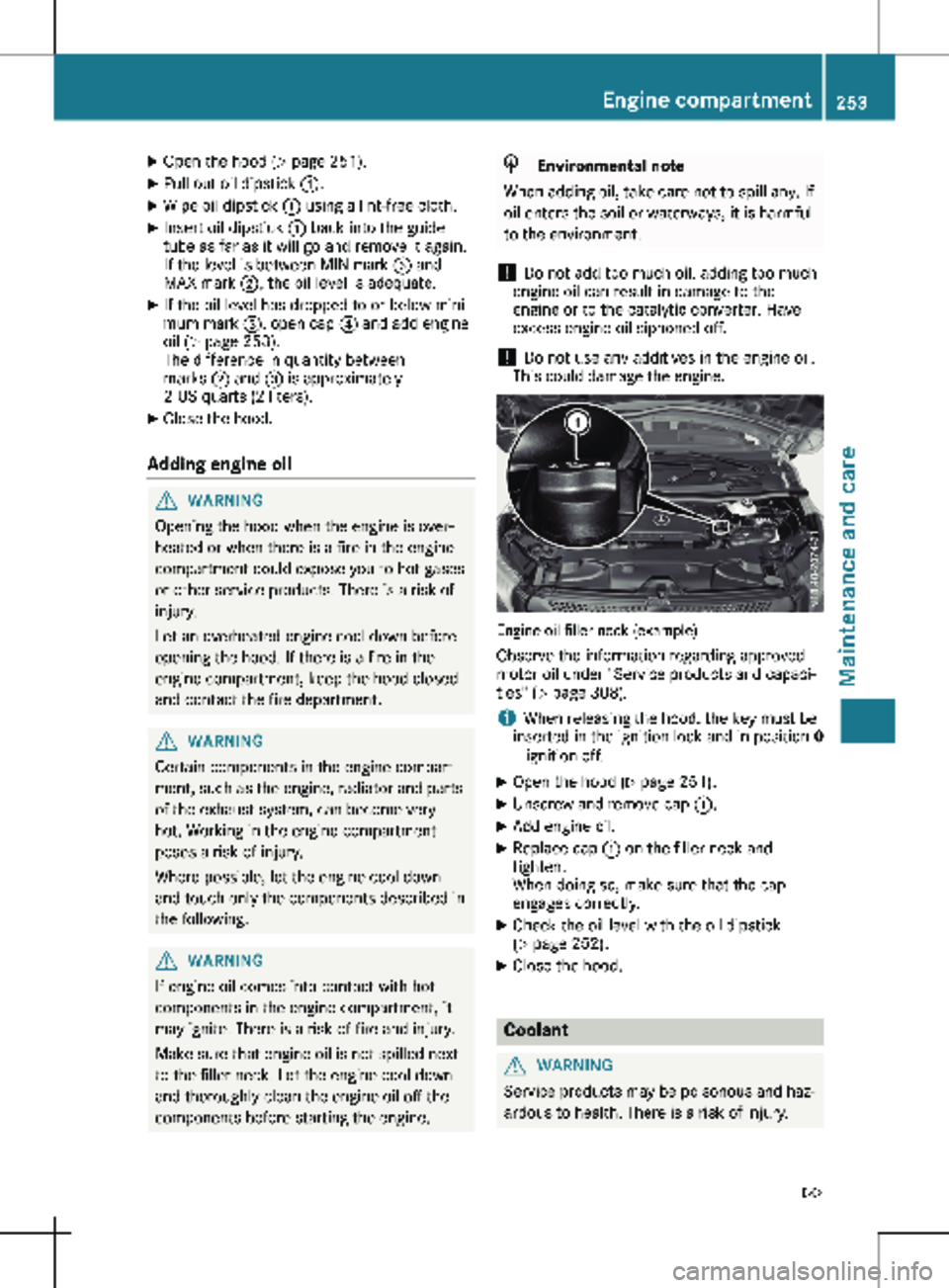
Open the hood (Y page 251).
X Pull out oil dipstick :.
X Wipe oil dipstick : using a lint-free cloth.
X Insert oil dipstick : back into the guide
tube as far as it will go and remove it again.
If the level is between MIN mark = and
MAX mark ;, the oil level is adequate.
X If the oil level has dropped to or below mini-
mum mark =, open cap ? and add engine
oil
(Y page 253).
The difference in quantity between
marks ; and = is approximately
2 US quarts (2 liters).
X Close the hood.
Adding engine oil G
WARNING
Opening the hood when the engine is over-
heated or when there is a fire in the engine
compartment could expose you to hot gases
or other service products. There is a risk of
injury.
Let an overheated engine cool down before
opening the hood. If there is a fire in the
engine compartment, keep the hood closed
and contact the fire department. G
WARNING
Certain components in the engine compart-
ment, such as the engine, radiator and parts
of the exhaust system, can become very
hot. Working in the engine compartment
poses a risk of injury.
Where possible, let the engine cool down
and touch only the components described in
the following. G
WARNING
If engine oil comes into contact with hot
components in the engine compartment, it
may ignite. There is a risk of fire and injury.
Make sure that engine oil is not spilled next
to the filler neck. Let the engine cool down
and thoroughly clean the engine oil off the
components before starting the engine. H
Environmental note
When adding oil, take care not to spill any. If
oil enters the soil or waterways, it is harmful
to the environment.
! Do not add too much oil. adding too much
engine oil can result in damage to the
engine or to the catalytic converter. Have
excess engine oil siphoned off.
! Do not use any additives in the engine oil.
This could damage the engine. Engine oil filler neck (example)
Observe the information regarding approved
motor oil under "Service products and capaci-
ties" (Y page
308).
i When releasing the hood, the key must be
inserted in the ignition lock and in position 0
– ignition off.
X Open the hood (Y page
251).
X Unscrew and remove cap :.
X Add engine oil.
X Replace cap : on the filler neck and
tighten.
When doing so, make sure that the cap
engages correctly.
X Check the oil level with the oil dipstick
(Y page
252).
X Close the hood. Coolant
G
WARNING
Service products may be poisonous and haz-
ardous to health. There is a risk of injury. Engine compartment
253
Maintenance and care
Z
Page 274 of 320
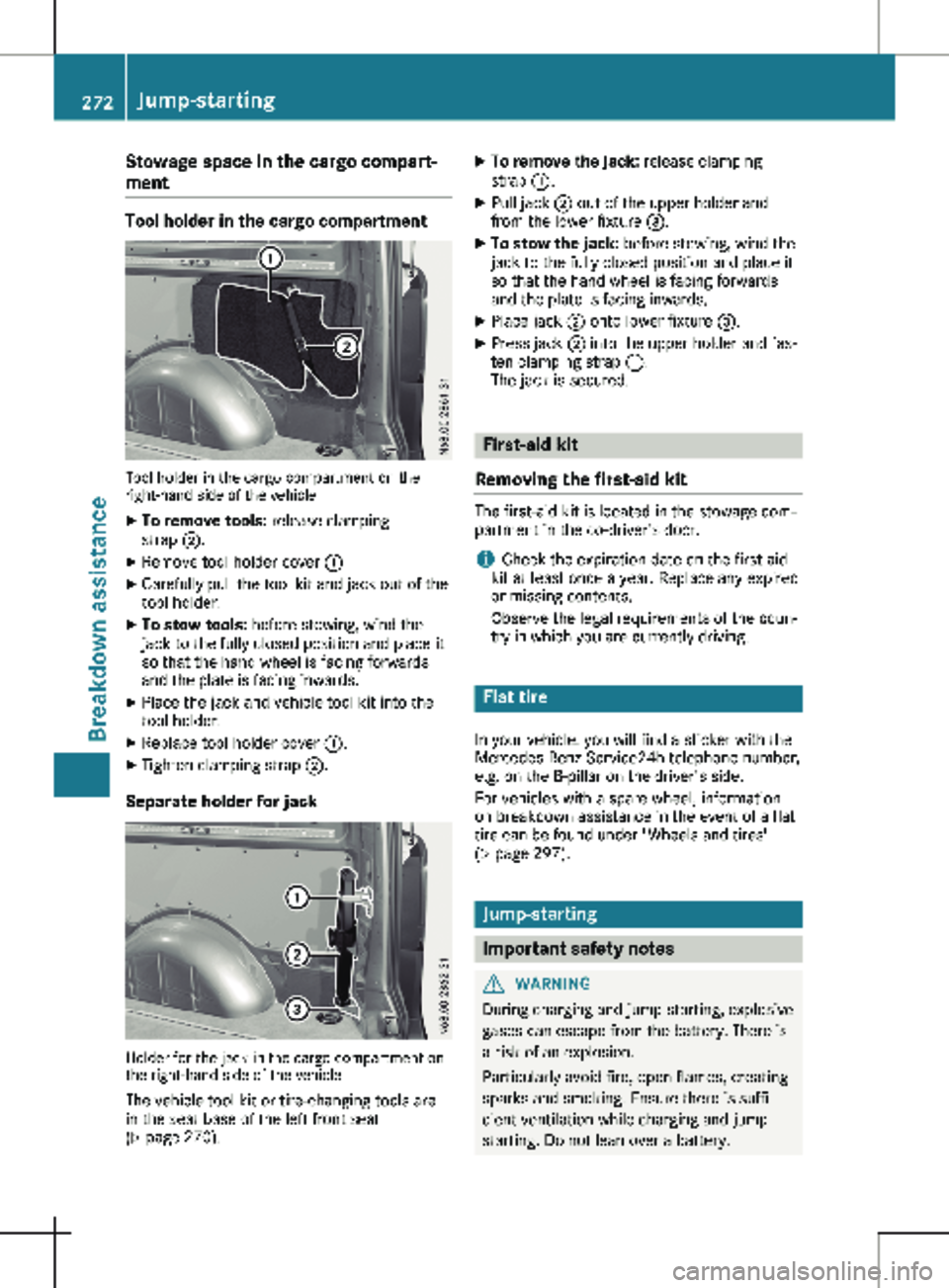
Stowage space in the cargo compart-
ment
Tool holder in the cargo compartment
Tool holder in the cargo compartment on the
right-hand side of the vehicle
X To remove tools: release clamping
strap ;.
X Remove tool holder cover :
X Carefully pull the tool kit and jack out of the
tool holder.
X To stow tools: before stowing, wind the
jack to the fully closed position and place it
so that the hand wheel is facing forwards
and the plate is facing inwards.
X Place the jack and vehicle tool kit into the
tool holder.
X Replace tool holder cover :.
X Tighten clamping strap ;.
Separate holder for jack Holder for the jack in the cargo compartment on
the right-hand side of the vehicle
The vehicle tool kit or tire-changing tools are
in the seat base of the left front seat
(Y page
270). X
To remove the jack: release clamping
strap :.
X Pull jack ; out of the upper holder and
from the lower fixture =.
X To stow the jack: before stowing, wind the
jack to the fully closed position and place it
so that the hand wheel is facing forwards
and the plate is facing inwards.
X Place jack ; onto lower fixture =.
X Press jack ; into the upper holder and fas-
ten clamping strap :.
The jack is secured. First-aid kit
Removing the first-aid kit The first-aid kit is located in the stowage com-
partment in the co-driver's door.
i Check the expiration date on the first-aid
kit at least once a year. Replace any expired
or missing contents.
Observe the legal requirements of the coun-
try in which you are currently driving. Flat tire
In your vehicle, you will find a sticker with the
Mercedes-Benz Service24h telephone number,
e.g. on the B-pillar on the driver's side.
For vehicles with a spare wheel, information
on breakdown assistance in the event of a flat
tire can be found under "Wheels and tires"
( Y page
297). Jump-starting
Important safety notes
G
WARNING
During charging and jump-starting, explosive
gases can escape from the battery. There is
a risk of an explosion.
Particularly avoid fire, open flames, creating
sparks and smoking. Ensure there is suffi-
cient ventilation while charging and jump-
starting. Do not lean over a battery. 272
Jump-starting
Breakdown assistance
Page 289 of 320

nificantly too low. The tire pressure monitor
is not malfunctioning.
R USA only: if the h warning lamp flashes
for
60 seconds and then remains lit con-
stantly, the tire pressure monitor is malfunc-
tioning.
The display also shows a message:
R on vehicles without steering wheel buttons
(Y page 207)
R on vehicles with steering wheel buttons
(Y page 224)
USA only: if the tire pressure monitor is mal-
functioning, it may be more than ten minutes
before the malfunction is shown. The h tire
pressure warning lamp flashes for 60 seconds
and then remains lit. When the malfunction
has been rectified, the h tire pressure
warning lamp goes out after a few minutes of
driving.
The tire pressure values indicated by the on-
board computer may differ from those meas-
ured at a gas station with a pressure gauge.
The tire pressures shown by the on-board
computer refer to those measured at sea level.
At high altitudes, the tire pressure values indi-
cated by a pressure gauge are higher than
those shown by the on-board computer. In this
case, do not reduce the tire pressures.
If radio transmitting equipment (e.g. wireless
headphones, two-way radios) is operated
inside the vehicle or in the vicinity of the vehi-
cle, this can interfere with the operation of the
tire pressure monitor.
Checking the tire pressure electroni-
cally on vehicles with steering wheel
buttons You can only check the tire pressure electroni-
cally on vehicles with steering wheel buttons.
Using the steering wheel buttons
X Turn the key to position 2 in the ignition
lock.
X Press the = or ; button to select the
Service menu.
X Use the 9 or : button to select
Tire Pressure.
X Press a to confirm.
The current tire pressure of each wheel is
shown in the display. If the vehicle has been parked for over
20 minutes
, the Tire pressure will be
displayed after driving a few minutes
message appears.
After a teach-in period, the tire pressure moni-
tor automatically detects new wheels or new
sensors. As long as a clear allocation of the
tire pressure value to the individual wheels is
not possible, the Tire Pressure Monitor
Active message is shown instead of the tire
pressure display. The tire pressures are
already being monitored.
Tire pressure monitor warning mes-
sages If the tire pressure monitor detects a loss in
pressure in one or more tires, a warning mes-
sage is shown in the display. The h warn-
ing lamp lights up.
Vehicles without steering wheel buttons
R If the Correct Tire Pressure message is
shown in the display, the tire pressure in at
least one tire is too low. The tire pressure
must be corrected at the next opportunity.
R If the Check Tire Pressure Soon mes-
sage is shown in the display, the tire pres-
sure in one or more tires has dropped signif-
icantly. The tires must be checked.
R If the Warning Tire Malfunc. message is
shown in the display, the tire pressure in
one or more tires has dropped suddenly.
The tires must be checked.
Vehicles with steering wheel buttons
R If the Adjust Tire Pressure message is
shown in the display, the tire pressure in at
least one tire is too low. The tire pressure
must be corrected at the next opportunity.
R If the Check Tires message is shown in the
display, the tire pressure in one or more
tires has dropped significantly. The tires
must be checked.
R If the Warning Tire Malfunction mes-
sage is shown in the display, the tire pres-
sure in one or more tires has dropped sud-
denly. The tires must be checked. Tire pressure
287
Wheels and tires Z