trailer MERCEDES-BENZ METRIS 2020 MY20 Operator’s Manual
[x] Cancel search | Manufacturer: MERCEDES-BENZ, Model Year: 2020, Model line: METRIS, Model: MERCEDES-BENZ METRIS 2020Pages: 320, PDF Size: 26.38 MB
Page 24 of 320
Coolant (display in the on-board
computer) ......................................
178
Outside temperature ...................... 175
Setting (climate control) ................ 119
Theft deterrent systems
ATA (Anti-Theft Alarm system) ......... 70
Immobilizer ...................................... 70
Time
Setting (vehicle with steering
wheel buttons) ............................... 192
Setting the time (vehicle with
steering wheel buttons) ................. 192
Setting the time (vehicle without
steering wheel buttons) ................. 181
Tire pressure
Calling up (on-board computer) ..... 285
Checking manually ........................ 285
Display messages (vehicle with
steering wheel buttons) ................. 224
Display messages (vehicle with-
out steering wheel buttons) ........... 207
Maximum ....................................... 285
Notes ............................................. 284
Recommended ............................... 282
Tables ............................................ 289
Tire label ........................................ 282
Tire pressure monitor
Checking the tire pressure elec-
tronically ........................................ 287
Function/notes ............................. 285
General notes ................................ 285
Important safety notes .................. 286
Restarting ...................................... 288
Warning lamp ................................. 236
Warning message .......................... 287
Tire pressure table ............................ 289
Tires
Aspect ratio (definition) ................. 296
Average weight of the vehicle
occupants (definition) .................... 295
Bar (definition) ............................... 295
Changing a wheel .......................... 297
Characteristics .............................. 295
Checking ........................................ 279
Curb weight (definition) ................. 296
Definition of terms ......................... 295
Direction of rotation ...................... 297 Display messages (vehicle with
steering wheel buttons) .................
224
Display messages (vehicle with-
out steering wheel buttons) ........... 207
Distribution of the vehicle occu-
pants (definition) ............................ 297
DOT (Department of Transporta-
tion) (definition) ............................. 295
DOT, Tire Identification Number
(TIN) ............................................... 294
GAWR (Gross Axle Weight Rat-
ing) (definition) .............................. 296
GTW (Gross Trailer Weight) (defi-
nition) ............................................ 296
GVW (Gross Vehicle Weight) (def-
inition) ........................................... 296
GVWR (Gross Vehicle Weight
Rating) (definition) ......................... 296
Important safety notes .................. 278
Increased vehicle weight due to
optional equipment (definition) ...... 295
Information on driving .................... 278
Kilopascal (kPa) (definition) ........... 296
Labeling (overview) ........................ 292
Load bearing index (definition) ...... 297
Load index ..................................... 294
Load index (definition) ................... 296
M+S tires ....................................... 280
Maximum load on a tire (defini-
tion) ............................................... 296
Maximum loaded vehicle weight
(definition) ..................................... 296
Maximum permissible tire pres-
sure (definition) ............................. 296
Maximum tire load ......................... 294
Maximum tire load (definition) ....... 296
Optional equipment weight (defi-
nition) ............................................ 297
PSI (pounds per square inch)
(definition) ..................................... 296
Replacing ....................................... 297
Service life ..................................... 279
Sidewall (definition) ....................... 297
Snow chains .................................. 281
Speed rating (definition) ................ 296
Storing ........................................... 298
Structure and characteristics
(definition) ..................................... 295 22
Index
Page 25 of 320
Summer tires in winter .................. 280
TIN (Tire Identification Number)
(definition) .....................................
297
Tire bead (definition) ...................... 297
Tire pressure (definition) ................ 296
Tire pressures (recommended) ...... 295
Tire size designation, load-bear-
ing capacity, speed rating .............. 293
Tire tread ....................................... 279
Tire tread (definition) ..................... 297
Total load limit (definition) ............. 297
Traction (definition) ....................... 297
TWR (permissible trailer drawbar
noseweight) (definition) ................. 297
Uniform Tire Quality Grading
Standards (definition) .................... 295
Wear indicator (definition) ............. 297
Wheel and tire combination ........... 302
Wheel rim (definition) .................... 296
Wheel/tire combinations ............... 301
Tool
see Vehicle tool kit
Top Tether ............................................ 63
Tow-starting
Emergency engine starting ............ 277
Important safety notes .................. 274
Towing
If the vehicle is stuck ..................... 276
Installing/removing the towing
eye ................................................. 275
Towing a trailer
Active Parking Assist ..................... 159
Axle load, permissible .................... 315
Cleaning the trailer tow hitch ......... 268
Coupling up a trailer ...................... 170
Decoupling a trailer ....................... 171
Driving tips .................................... 168
Notes on retrofitting ...................... 315
Power supply ................................. 173
Trailer loads ................................... 315
Towing away
Important safety guidelines ........... 274
With both axles on the ground ....... 276
With the rear axle raised ................ 276
Towing eye
Storage location ............................ 270
Trailer coupling
see Towing a trailer Trailer loads and drawbar nose-
weights
...............................................
172
Trailer operation
Lights display messages (vehicle
with steering wheel buttons) ......... 216
Lights display messages (vehicle
without steering wheel buttons) .... 202
Trailer towing
Blind Spot Assist ............................ 153
ESP ®
................................................ 69
PARKTRONIC ................................. 159
Permissible trailer loads and
drawbar noseweights ..................... 172
Transmission
see Automatic transmission
Transmission oil ................................ 310
Transmission positions
Automatic transmission ................. 132
Display (DIRECT SELECT lever) ...... 132
Transport
Lashing straps ............................... 246
Loading guidelines ......................... 242
Stickers ......................................... 246
Vehicle ........................................... 276
Transport by rail ................................ 142
Transportation
Rail ................................................ 142
Transportation aids
Load protection net ....................... 248
Transporting
Cargo compartment variations ...... 244
Load distribution ............................ 243
Securing a load .............................. 244
Trim pieces (cleaning instruc-
tions) .................................................. 269
Trip computer
Displaying (vehicle with steering
wheel buttons) ............................... 184
Displaying (vehicle without steer-
ing wheel buttons) ......................... 177
Resetting (vehicle with steering
wheel buttons) ............................... 185
Resetting (vehicle without steer-
ing wheel buttons) ......................... 177
Selecting the display units (vehi-
cle with steering wheel buttons) .... 192 Index
23
Page 26 of 320
Selecting the display units (vehi-
cle without steering wheel but-
tons) ..............................................
180
Trip meter
see Trip odometer
Trip odometer
Displaying (vehicle with steering
wheel buttons) ............................... 183
Displaying (vehicle without steer-
ing wheel buttons) ......................... 177
Resetting (vehicle with steering
wheel buttons) ............................... 185
Resetting (vehicle without steer-
ing wheel buttons) ......................... 177
Setting the display unit (vehicle
with steering wheel buttons) ......... 192
Setting the display unit (vehicle
without steering wheel buttons) .... 180
Truck
see Vehicle
Truck key
see SmartKey
Turn signal
Changing bulbs (additional turn
signals) .......................................... 107
Turn signals
Display messages (vehicle with
steering wheel buttons) ................. 216
Display messages (vehicle with-
out steering wheel buttons) ........... 202
Replacing bulbs (front) ................... 107
Replacing bulbs (rear) .................... 108
Switching on/off ........................... 101
Trailer display messages (vehicle
with steering wheel buttons) ......... 216
Trailer display messages (vehicle
without steering wheel buttons) .... 202
Turn signals
see Turn signals
Two-way radios
Type approval/frequency .............. 304
TWR (Tongue Weight Rating) (def-
inition) ................................................ 297
Type identification plate
see Vehicle identification plate U
Unlocking Emergency unlocking
....................... 73
From inside the vehicle (central
unlocking button) ............................. 75
With emergency key element ........... 72
USB (audio)
Playing ........................................... 187 V
Vanity mirror Changing a bulb (mirror lamp)
....... 104
Sun visor ........................................ 239
Vehicle
Data acquisition ............................... 35
Display messages (vehicle with
steering wheel buttons) ................. 225
Display messages (vehicle with-
out steering wheel buttons) ........... 208
Electronics ..................................... 304
Emergency unlocking ....................... 72
Equipment ....................................... 27
Limited Warranty ............................. 27
Loading .......................................... 289
Locking (in an emergency) ............... 73
Locking (SmartKey) .......................... 71
Lowering ........................................ 300
Maintenance .................................... 28
Operating safety .............................. 30
Parking for a long period ................ 140
Pulling away ................................... 128
Raising ........................................... 298
Registration ..................................... 33
Reporting problems ......................... 32
Securing from rolling away ............ 138
Towing away .................................. 274
Transporting .................................. 276
Unlocking (in an emergency) ........... 73
Unlocking (SmartKey) ...................... 71
Vehicle battery
see Battery (vehicle)
Vehicle bodies ..................................... 33
Body/equipment mounting
directives for trucks ......................... 33
Vehicle check
see Preparing for a journey24
Index
Page 71 of 320
ESP
®
is deactivated if the å warning lamp
in the instrument cluster is lit when the engine
is running.
Only use wheels with the recommended tire
sizes. Only then will ESP ®
function properly.
Deactivating or activating ESP ®G
WARNING
If you deactivate ESP ®
, ESP ®
no longer sta-
bilizes the vehicle. There is an increased risk
of skidding and an accident.
Only deactivate ESP ®
in the situations
described in the following.
It may be best to deactivate ESP ®
in the fol-
lowing situations:
R when using snow chains
R in deep snow
R on sand or gravel
Activate ESP ®
as soon as the situations descri-
bed above no longer apply. Otherwise, ESP ®
assistance for stabilizing the vehicle will
remain significantly reduced, even if the vehi-
cle starts to skid.
If you deactivate ESP ®
:
R the å warning lamp in the instrument
cluster lights up
R the ÷ warning lamp in the instrument
cluster flashes if the wheels are spinning
R ESP ®
assistance for stabilizing the vehicle in
the lower speed range up to approximately
37 mph (60 km/h
) is significantly reduced
R engine torque is no longer limited and the
drive wheels are able to spin. The spinning
of the wheels results in a cutting action for
better traction on loose surfaces
R traction control is still activated
R ESP ®
still provides support when you brake
Depending on the equipment in the vehicle,
you can activate or deactivate ESP ®
when the
engine is running by using the å button or
by using the on-board computer:
R on vehicles without steering wheel buttons
(Y page 179)
R on vehicles with steering wheel buttons
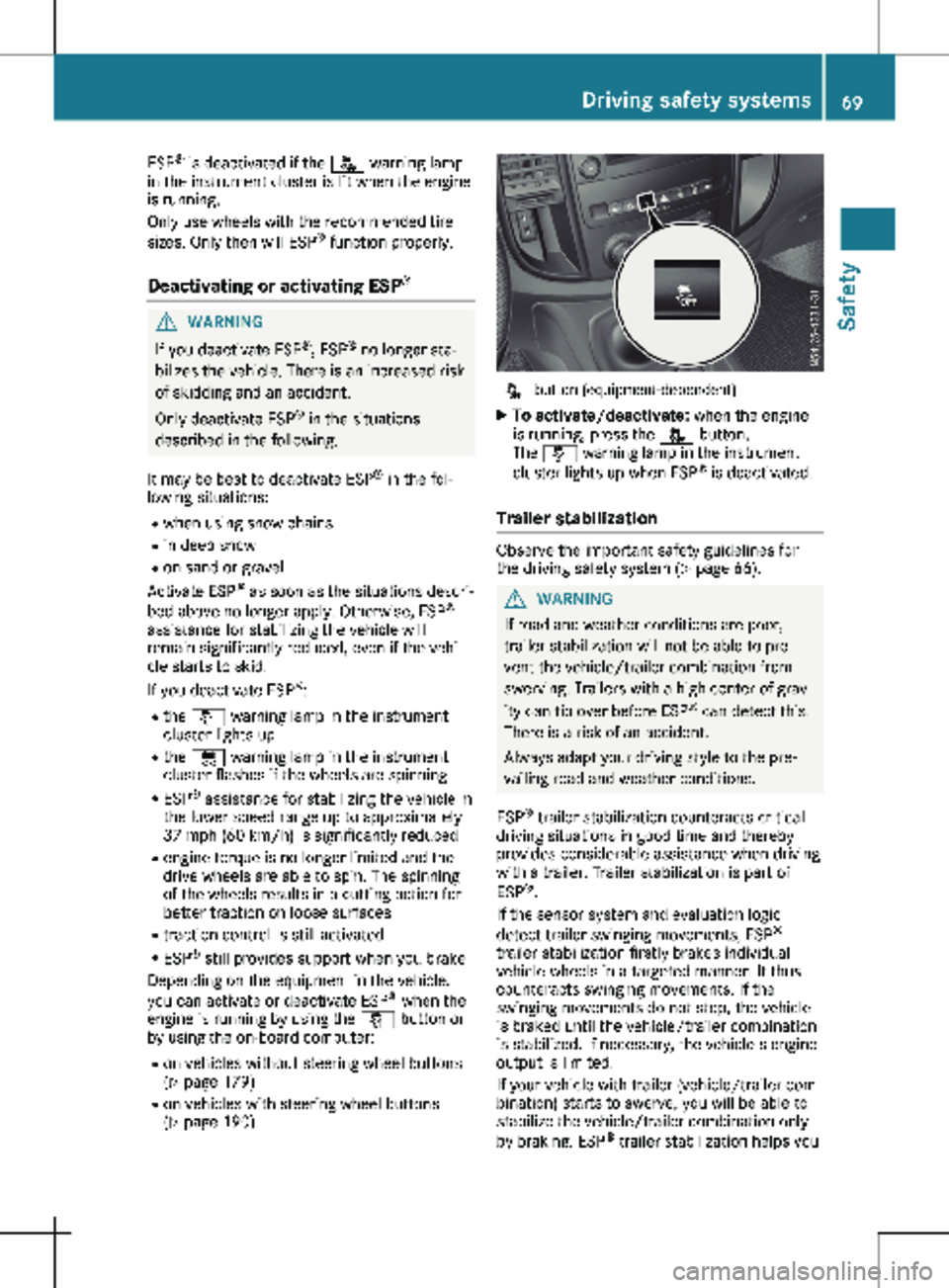
(Y page 190) å button (equipment-dependent)
X To activate/deactivate: when the engine
is running, press the å button.
The å warning lamp in the instrument
cluster lights up when ESP ®
is deactivated.
Trailer stabilization Observe the important safety guidelines for
the driving safety system (
Y page
66). G
WARNING
If road and weather conditions are poor,
trailer stabilization will not be able to pre-
vent the vehicle/trailer combination from
swerving. Trailers with a high center of grav-
ity can tip over before ESP ®
can detect this.
There is a risk of an accident.
Always adapt your driving style to the pre-
vailing road and weather conditions.
ESP ®
trailer stabilization counteracts critical
driving situations in good time and thereby
provides considerable assistance when driving
with a trailer. Trailer stabilization is part of
ESP ®
.
If the sensor system and evaluation logic
detect trailer swinging movements, ESP ®
trailer stabilization firstly brakes individual
vehicle wheels in a targeted manner. It thus
counteracts swinging movements. If the
swinging movements do not stop, the vehicle
is braked until the vehicle/trailer combination
is stabilized. If necessary, the vehicle's engine
output is limited.
If your vehicle with trailer (vehicle/trailer com-
bination) starts to swerve, you will be able to
stabilize the vehicle/trailer combination only
by braking. ESP ®
trailer stabilization helps you Driving safety systems
69
Safety Z
Page 72 of 320
to stabilize the vehicle/trailer combination in
this situation.
ESP
®
trailer stabilization is activated above
speeds of about
40 mph (65 km/h).
If ESP ®
is switched off or deactivated because
of a malfunction, the trailer stabilization sys-
tem will not function.
Crosswind Assist Observe the important safety guidelines for
the driving safety system (Y page
66).
Strong crosswind gusts can impair the road-
holding of your vehicle when driving straight
ahead. The Crosswind Assist function integra-
ted in ESP ®
reduces these impairments.
Depending on the direction and intensity of
the side wind, Crosswind Assist intervenes
automatically. ESP ®
intervenes with stabilizing
braking to assist you in keeping the vehicle in
the lane. When Crosswind Assist intervenes,
the display shows the traffic sign for strong
side winds and the Crosswind Assist mes-
sage.
Crosswind Assist is activated automatically
above a vehicle speed of approx. 50 mph
(80 km/h) when the vehicle is driving straight
ahead or cornering gently.
Crosswind Assist does not react in the follow-
ing situations:
R in the event of severe jolts and vibrations,
e.g. when driving over uneven surfaces or
potholes
R when road adhesion is reduced, e.g. on
snow or ice or when hydroplaning
Crosswind Assist does not work if ESP ®
is
deactivated or disabled because of a malfunc-
tion. Theft deterrent locking system
Immobilizer
X To activate: remove the key from the igni-
tion lock.
X To deactivate: turn the key to position 2 in
the ignition lock.
The immobilizer prevents your vehicle from
being started without the correct key.
Always take the key with you and lock the
vehicle when leaving the vehicle. If you leave the key in the vehicle, anyone can start the
engine.
i The immobilizer is always deactivated
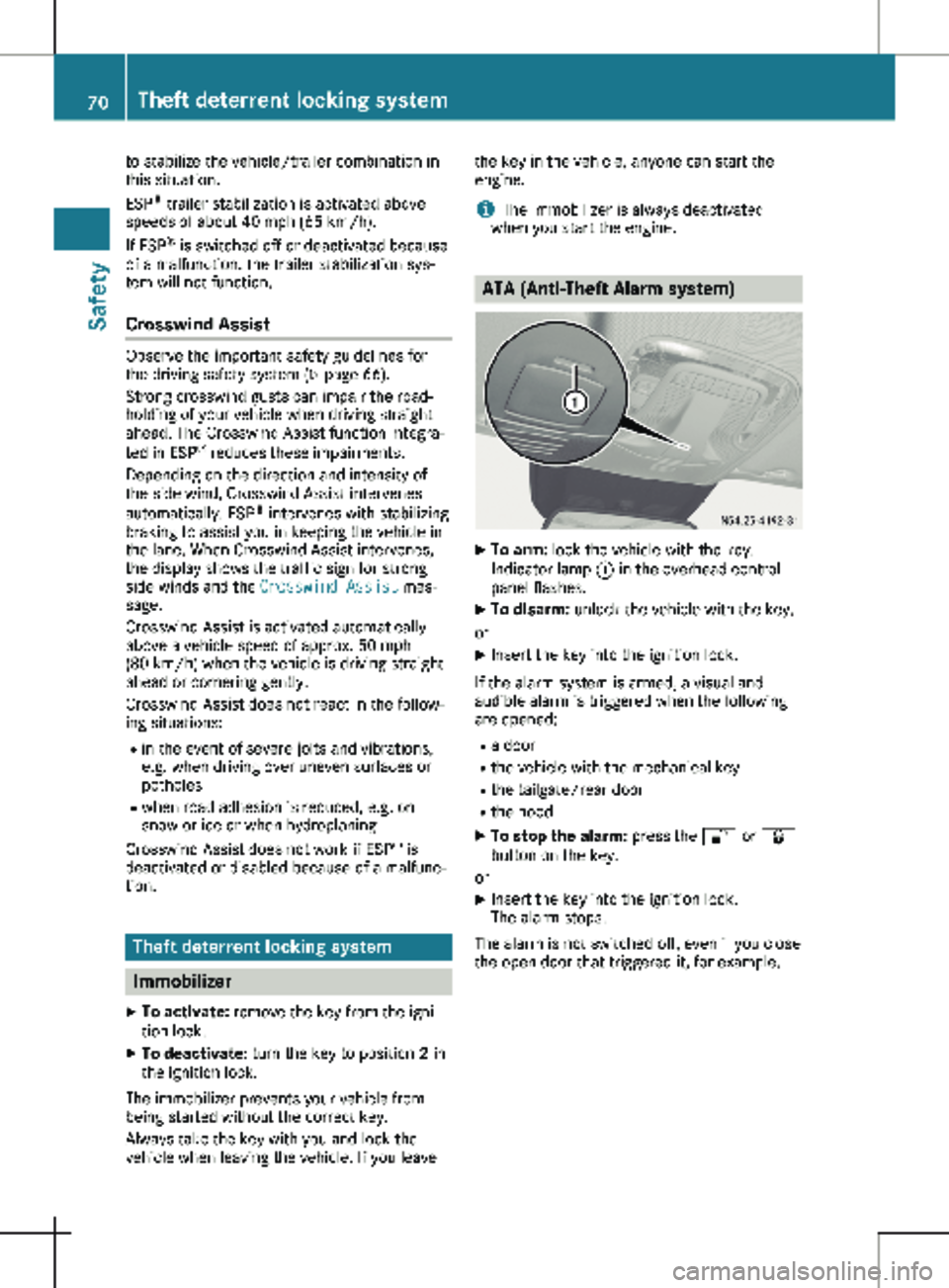
when you start the engine. ATA (Anti-Theft Alarm system)
X
To arm: lock the vehicle with the key.
Indicator lamp : in the overhead control
panel flashes.
X To disarm: unlock the vehicle with the key.
or
X Insert the key into the ignition lock.
If the alarm system is armed, a visual and
audible alarm is triggered when the following
are opened:
R a door
R the vehicle with the mechanical key
R the tailgate/rear door
R the hood
X To stop the alarm: press the % or &
button on the key.
or X Insert the key into the ignition lock.
The alarm stops.
The alarm is not switched off, even if you close
the open door that triggered it, for example. 70
Theft deterrent locking system
Safety
Page 129 of 320
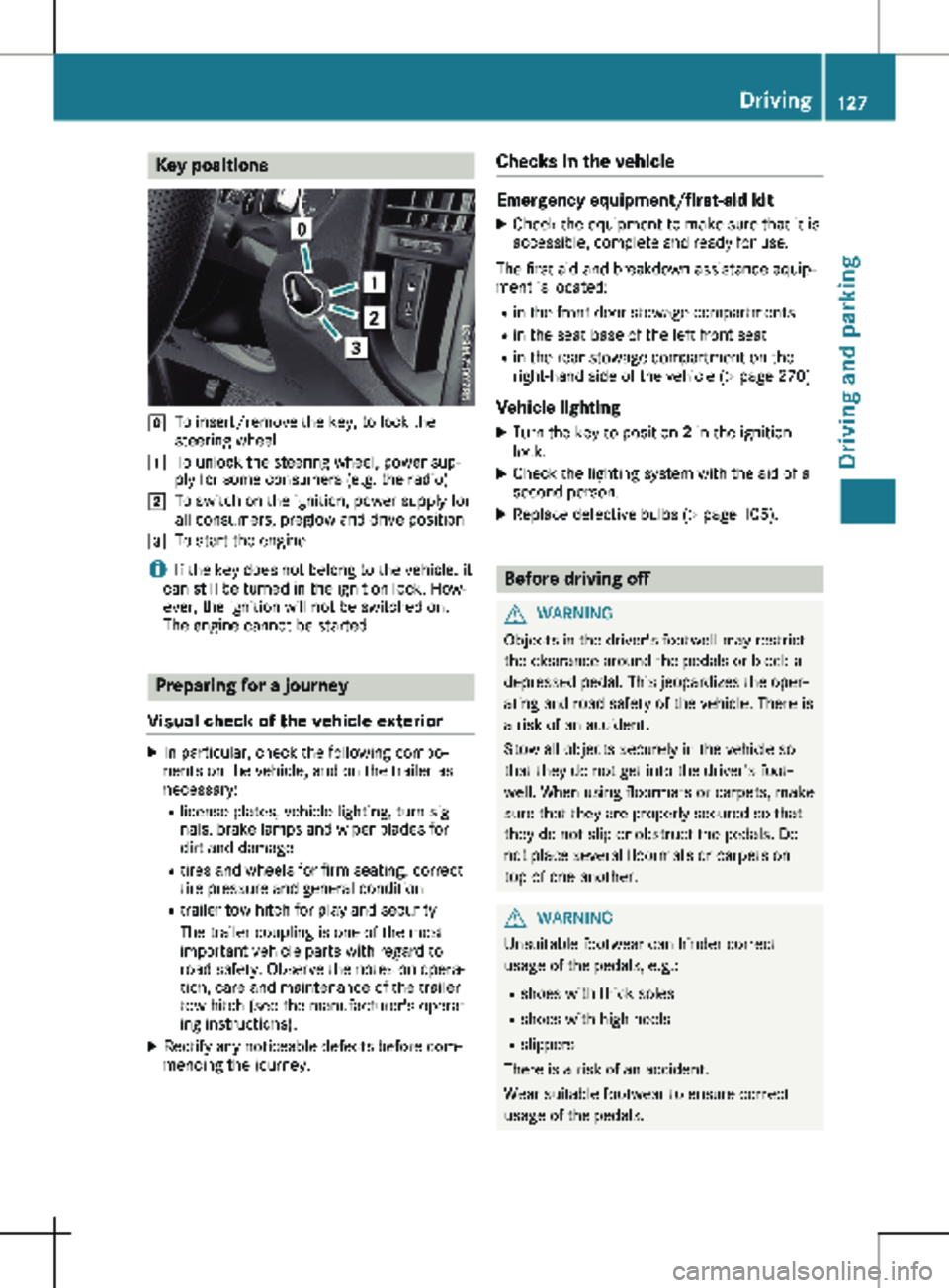
Key positions
g
To insert/remove the key, to lock the
steering wheel
1 To unlock the steering wheel, power sup-
ply for some consumers (e.g. the radio)
2 To switch on the ignition, power supply for
all consumers, preglow and drive position
3 To start the engine
i If the key does not belong to the vehicle, it
can still be turned in the ignition lock. How-
ever, the ignition will not be switched on.
The engine cannot be started. Preparing for a journey
Visual check of the vehicle exterior X
In particular, check the following compo-
nents on the vehicle, and on the trailer as
necessary:
R
license plates, vehicle lighting, turn sig-
nals, brake lamps and wiper blades for
dirt and damage
R tires and wheels for firm seating, correct
tire pressure and general condition
R trailer tow hitch for play and security
The trailer coupling is one of the most
important vehicle parts with regard to
road safety. Observe the notes on opera-
tion, care and maintenance of the trailer
tow hitch (see the manufacturer's operat-
ing instructions).
X Rectify any noticeable defects before com-
mencing the journey. Checks in the vehicle Emergency equipment/first-aid kit
X Check the equipment to make sure that it is
accessible, complete and ready for use.
The first aid and breakdown assistance equip-
ment is located:
R in the front door stowage compartments
R in the seat base of the left front seat
R in the rear stowage compartment on the
right-hand side of the vehicle
(Y page 270)
Vehicle lighting
X Turn the key to position 2 in the ignition
lock.
X Check the lighting system with the aid of a
second person.
X Replace defective bulbs (Y page
105). Before driving off
G
WARNING
Objects in the driver's footwell may restrict
the clearance around the pedals or block a
depressed pedal. This jeopardizes the oper-
ating and road safety of the vehicle. There is
a risk of an accident.
Stow all objects securely in the vehicle so
that they do not get into the driver's foot-
well. When using floormats or carpets, make
sure that they are properly secured so that
they do not slip or obstruct the pedals. Do
not place several floormats or carpets on
top of one another. G
WARNING
Unsuitable footwear can hinder correct
usage of the pedals, e.g.:
R shoes with thick soles
R shoes with high heels
R slippers
There is a risk of an accident.
Wear suitable footwear to ensure correct
usage of the pedals. Driving
127
Driving and parking Z
Page 137 of 320
Kickdown
Use kickdown for maximum acceleration:
X Depress the accelerator pedal beyond the
pressure point.
The automatic transmission shifts to the
next gear down, depending on the engine
speed.
X Ease off on the accelerator pedal once the
desired speed is reached.
The automatic transmission shifts up again.
Rocking the vehicle free At speeds up to 5 mph (9 km/h) you can
switch back and forth between drive position
h and reverse gear
k without applying the
brakes. This helps when rocking the vehicle
out of snow or slush.
X Push the DIRECT SELECT lever alternately
up and down beyond the first point of resist-
ance.
Towing a trailer X
Depending on the downhill gradient, limit
the shift range
(Y page 133) or shift man-
ually into a lower gear (Y page 135) in which the engine will operate in the middle
of the engine speed range. This also applies
if cruise control is activated. Manual gearshifting
General notes If you select drive program
M, automatic gear-
shifting is deactivated and manual gearshifting
is automatically activated. You must then per-
manently change gear yourself for as long as
the drive program is selected.
Permanent manual gearshifting is deactivated
automatically when you switch from drive pro-
gram M to another drive program. The auto-
matic transmission then shifts gears automati-
cally. The display shows the selected drive
program and transmission position h again. Shifting gears
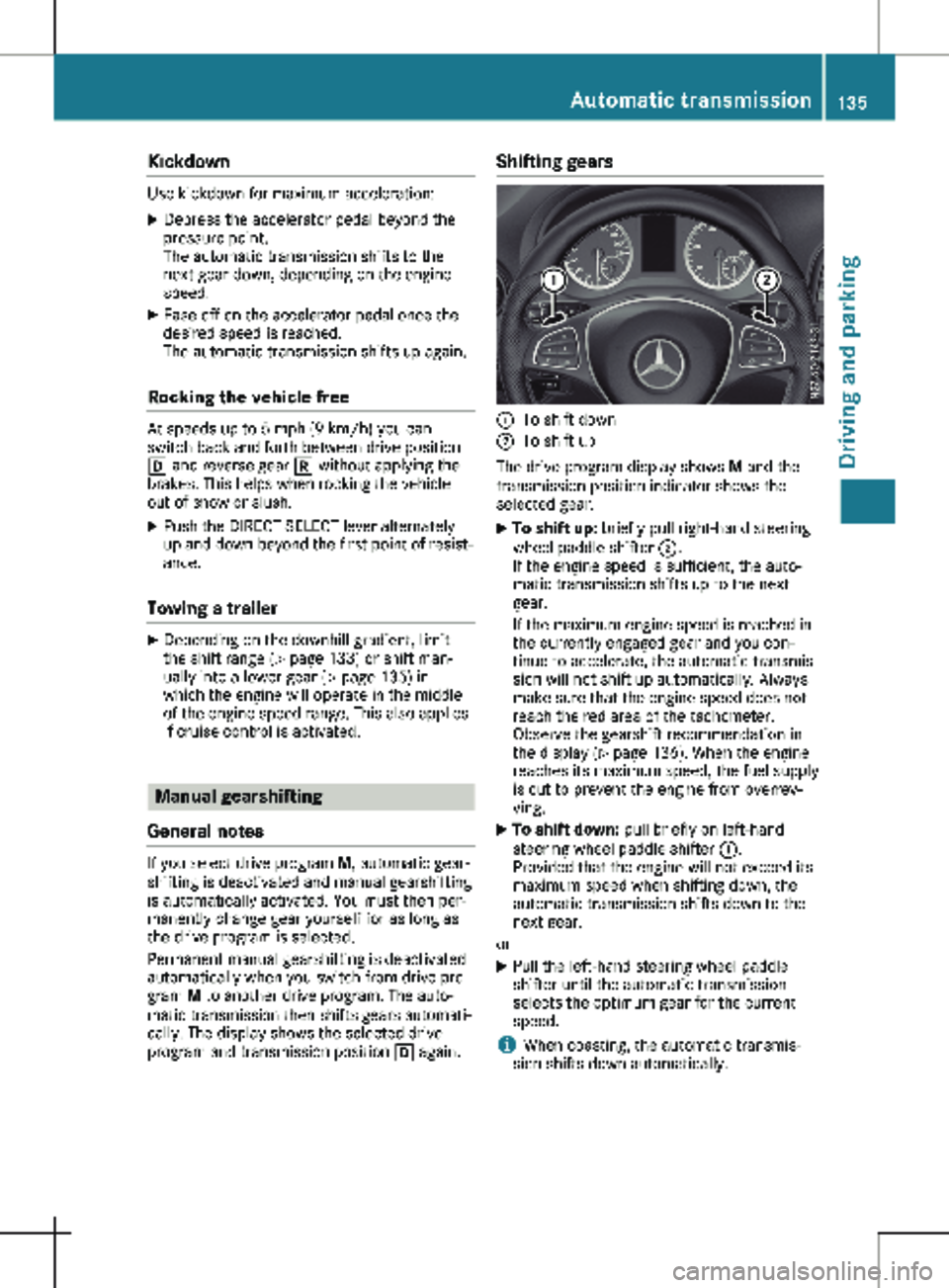
:
To shift down
; To shift up
The drive program display shows M and the
transmission position indicator shows the
selected gear.
X To shift up: briefly pull right-hand steering
wheel paddle shifter ;.
If the engine speed is sufficient, the auto-
matic transmission shifts up to the next
gear.
If the maximum engine speed is reached in
the currently engaged gear and you con-
tinue to accelerate, the automatic transmis-
sion will not shift up automatically. Always
make sure that the engine speed does not
reach the red area of the tachometer.
Observe the gearshift recommendation in
the display
(Y page 136). When the engine
reaches its maximum speed, the fuel supply
is cut to prevent the engine from overrev-
ving.
X To shift down: pull briefly on left-hand
steering wheel paddle shifter :.
Provided that the engine will not exceed its
maximum speed when shifting down, the
automatic transmission shifts down to the
next gear.
or
X Pull the left-hand steering wheel paddle
shifter until the automatic transmission
selects the optimum gear for the current
speed.
i When coasting, the automatic transmis-
sion shifts down automatically. Automatic transmission
135
Driving and parking Z
Page 144 of 320
Vehicles with halogen headlamps
The headlamps do not need to be switched to
symmetrical low beam. The legal requirements
of countries in which traffic drives on the
opposite side of the road to the country where
the vehicle is registered are met without the
need to convert the headlamps. Transport by rail
Transporting your vehicle by rail may be sub-
ject to certain restrictions or require special
measures to be taken in some countries due
to varying tunnel heights and loading stand-
ards.
You can obtain information on this from any
Mercedes-Benz Commercial Van Center. Braking
Important safety notes G
WARNING
If you shift down on a slippery road surface
in an attempt to increase the engine's brak-
ing effect, the drive wheels could lose their
grip. There is an increased danger of skid-
ding and accidents.
Do not shift down for additional engine brak-
ing on a slippery road surface.
Downhill gradients !
Depressing the brake pedal constantly
results in excessive and premature wear to
the brake pads.
This also applies to automatic braking if you
have activated cruise control.
On long and steep downhill gradients, you
should change down to shift range 2 or 1 in
good time
(Y page 133).
This should be observed in particular when
driving with a laden vehicle and when towing a
trailer.
You thereby make use of the braking effect of
the engine and do not have to brake as often
to maintain the speed. This relieves the load
on the service brake and prevents the brakes
from overheating and wearing too quickly. Heavy and light loads G
WARNING
If you rest your foot on the brake pedal
while driving, the braking system can over-
heat. This increases the stopping distance
and can even cause the braking system to
fail. There is a risk of an accident.
Never use the brake pedal as a footrest.
Never depress the brake pedal and the
accelerator pedal at the same time.
! Depressing the brake pedal constantly
results in excessive and premature wear to
the brake pads.
If the brakes have been subjected to a heavy
load, do not stop the vehicle immediately.
Drive on for a short while. The brakes are
cooled down more quickly in the airflow.
Wet road surfaces If you have been driving for a long time in
heavy rain without braking, there may be a
delayed response when you first apply the
brakes. This may also occur after driving
through a car wash or deep water.
You must depress the brake pedal more firmly.
Maintain a longer distance to the vehicle in
front.
While paying attention to the traffic conditions,
you should brake the vehicle firmly after driv-
ing on a wet road surface or through a car
wash. This heats the brake discs, so that they
dry more quickly, which protects them against
corrosion.
Limited braking performance on salt-
treated roads When driving on salted roads, salt may start to
build up on the brake disks and brake pads.
This can increase braking distances considera-
bly.
Maintain a greater distance to the vehicle in
front.
To remove any build-up of salt that may have
formed:
X Apply the brakes at the start of the journey,
occasionally during journey and at the end 142
Driving tips
Driving and parking
Page 148 of 320
R
Drive with extreme care over unknown ter-
rain where you can only see for a short dis-
tance. As a precaution, get out of the vehi-
cle to take a look at the route to be taken in
advance.
R Check the water depth before fording.
R Watch out for obstacles (e.g. rocks, holes,
tree stumps and ruts).
R Avoid edges where the surface could crum-
ble or break away.
Checklist after driving off-road !
If you detect damage to the vehicle after
driving off-road, have the vehicle checked
immediately at a qualified specialist work-
shop.
Off-road driving places a higher demand on
your vehicle than normal road operation.
Check your vehicle after driving on rough ter-
rain. By doing so you will notice any damage in
good time and reduce the risk of an accident
for yourself and other road users. Clean your
vehicle thoroughly before driving on public
roads.
Observe the following points after driving off-
road, on construction sites and before driving
on public roads:
X Activate ESP ®
(Y page 69).
X Clean the headlamps and tail lamps and
check them for damage.
X Clean the front and rear license plates.
X Clean the windshield, windows and exterior
mirrors.
X Clean the steps, door sills and grab handles.
This increases safety of footing.
X Clean the wheels/tires, wheel housings and
the underbody of the vehicle with a water
jet.
This increases road grip, especially on wet
road surfaces.
X Check the wheels/tires and wheel housings
for trapped foreign objects and remove
them.
Trapped foreign objects can damage the
wheels/tires and may be flung out from the
vehicle when you continue driving.
X Check the underbody for trapped branches
or other parts of plants and remove them.
Trapped branches or other parts of plants
increase the risk of fire and can cause dam- age to fuel lines, brake hoses and the rubber
bellows of axle joints and drive shafts.
X Clean the brake disks, brake pads and axle
joints, particularly after operation in sand,
mud, grit/gravel, water or similarly dirty
conditions.
X Check the entire floor assembly, the tires,
wheels, bodywork structure, brakes, steer-
ing, chassis and exhaust system for any
damage.
X Check the service brake for operating
safety, e.g. carry out a brake test.
X If you notice strong vibrations after driving
off-road, check the wheels and drive train
for foreign objects again. Remove any for-
eign objects which can lead to imbalances
and thus cause vibrations. Driving in mountainous areas
When driving in mountainous areas, note that
the power output of the engine, and with it its
gradient climbing capability, decrease with
increasing altitude. Please take note of this
particularly when driving with a trailer in moun-
tainous areas.
The maximum permissible trailer loads are
valid for journeys at altitudes up to
1100 yds
(1000 m) above sea level with gradients up to
12%.
Information on maximum permissible trailer
loads can be found in your vehicle registration
papers and on the vehicle identification plate
(Y page 304) or under "Trailer loads" ( Y page 315).
When driving at altitudes of 2700 yds
(2500 m) above sea level, the ECO start/stop
function is no longer available.
Notes on braking on downhill gradients can be
found in the "Braking" section (Y page 142). Driving systems
Cruise control
General notes Cruise control maintains the speed of the vehi-
cle for you. It brakes automatically in order to
avoid exceeding the set speed.146
Driving systems
Driving and parking
Page 155 of 320
Warning display
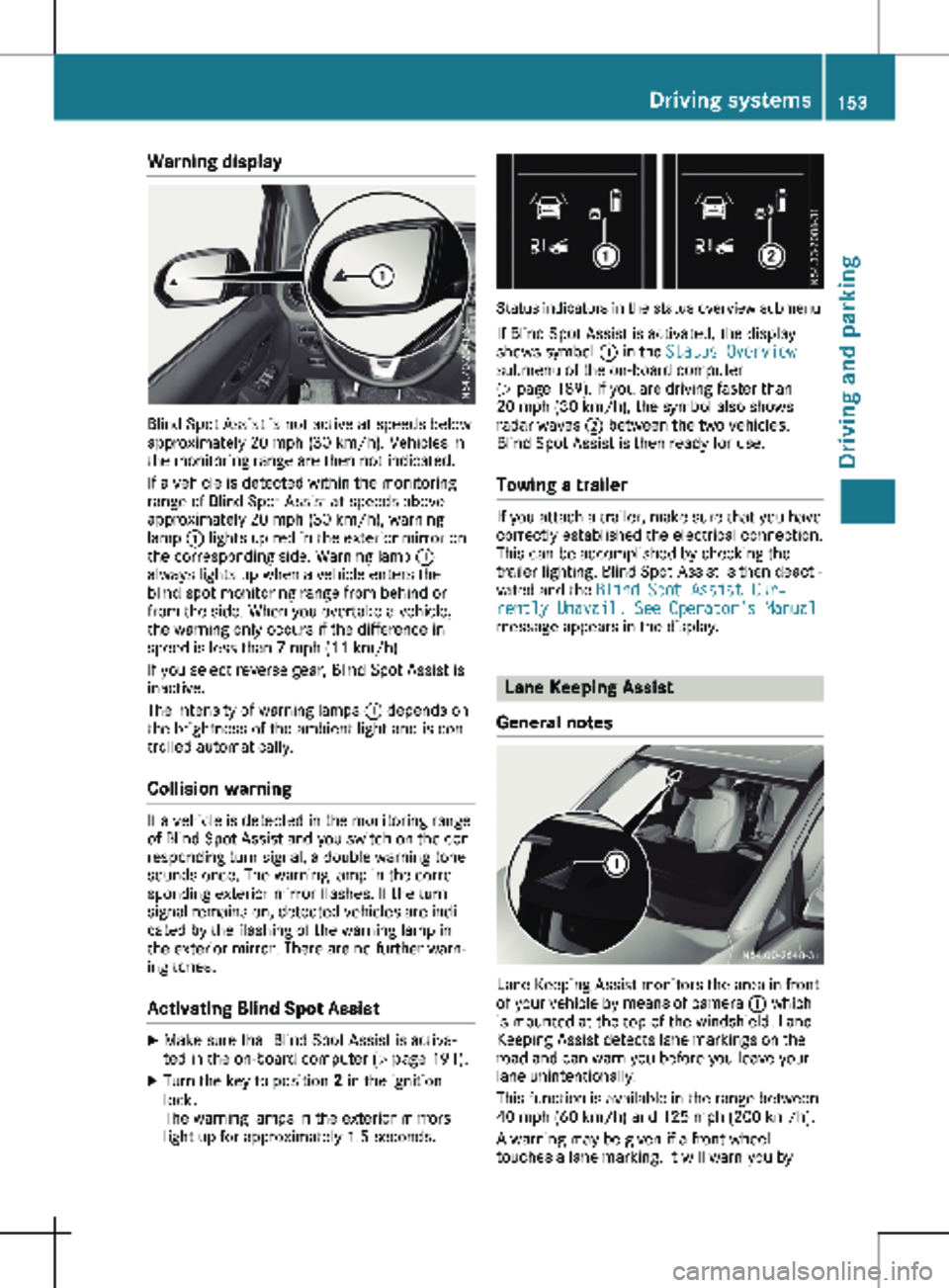
Blind Spot Assist is not active at speeds below
approximately
20 mph (30 km/h). Vehicles in
the monitoring range are then not indicated.
If a vehicle is detected within the monitoring
range of Blind Spot Assist at speeds above
approximately 20 mph (30 km/h), warning
lamp : lights up red in the exterior mirror on
the corresponding side. Warning lamp :
always lights up when a vehicle enters the
blind spot monitoring range from behind or
from the side. When you overtake a vehicle,
the warning only occurs if the difference in
speed is less than 7 mph (11 km/h).
If you select reverse gear, Blind Spot Assist is
inactive.
The intensity of warning lamps : depends on
the brightness of the ambient light and is con-
trolled automatically.
Collision warning If a vehicle is detected in the monitoring range
of Blind Spot Assist and you switch on the cor-
responding turn signal, a double warning tone
sounds once. The warning lamp in the corre-
sponding exterior mirror flashes. If the turn
signal remains on, detected vehicles are indi-
cated by the flashing of the warning lamp in
the exterior mirror. There are no further warn-
ing tones.
Activating Blind Spot Assist X
Make sure that Blind Spot Assist is activa-
ted in the on-board computer (Y page
191).
X Turn the key to position 2 in the ignition
lock.
The warning lamps in the exterior mirrors
light up for approximately
1.5 seconds. Status indicators in the status overview submenu
If Blind Spot Assist is activated, the display
shows symbol : in the Status Overview
submenu of the on-board computer
(Y page
189). If you are driving faster than
20 mph (30 km/h), the symbol also shows
radar waves ; between the two vehicles.
Blind Spot Assist is then ready for use.
Towing a trailer If you attach a trailer, make sure that you have
correctly established the electrical connection.
This can be accomplished by checking the
trailer lighting. Blind Spot Assist is then deacti-
vated and the Blind Spot Assist Cur‐
rently Unavail. See Operator's Manual
message appears in the display. Lane Keeping Assist
General notes Lane Keeping Assist monitors the area in front
of your vehicle by means of camera : which
is mounted at the top of the windshield. Lane
Keeping Assist detects lane markings on the
road and can warn you before you leave your
lane unintentionally.
This function is available in the range between
40 mph (60 km/h
) and 125 mph (200 km/h).
A warning may be given if a front wheel
touches a lane marking. It will warn you by Driving systems
153
Driving and parking Z