automatic transmission MERCEDES-BENZ METRIS 2020 MY20 Operator’s Manual
[x] Cancel search | Manufacturer: MERCEDES-BENZ, Model Year: 2020, Model line: METRIS, Model: MERCEDES-BENZ METRIS 2020Pages: 320, PDF Size: 26.38 MB
Page 160 of 320
tance from an obstacle may no longer be
shown.
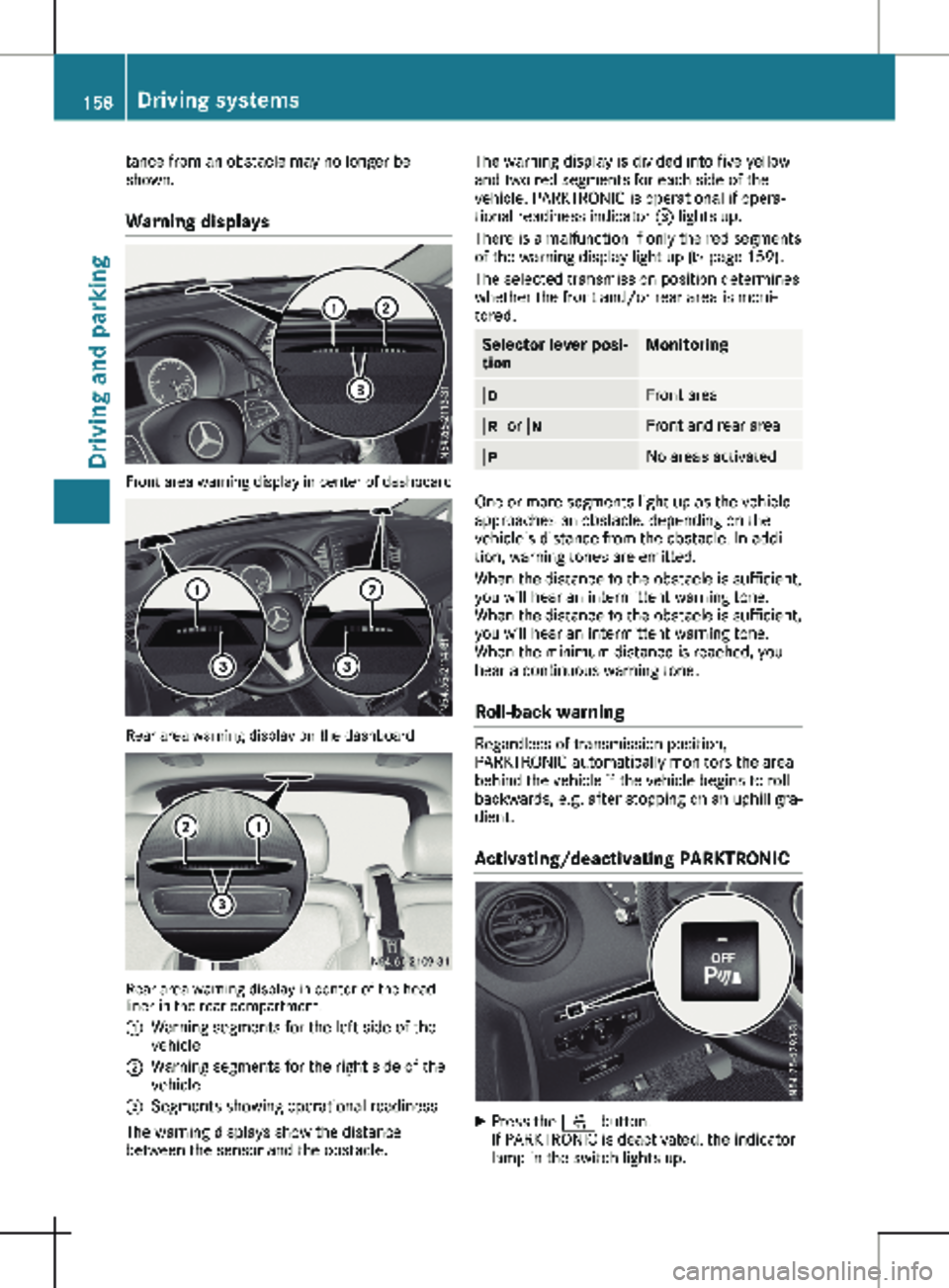
Warning displays Front area warning display in center of dashboard
Rear area warning display on the dashboard
Rear area warning display in center of the head-
liner in the rear compartment.
:
Warning segments for the left side of the
vehicle
; Warning segments for the right side of the
vehicle
= Segments showing operational readiness
The warning displays show the distance
between the sensor and the obstacle. The warning display is divided into five yellow
and two red segments for each side of the
vehicle. PARKTRONIC is operational if opera-
tional readiness indicator = lights up.
There is a malfunction if only the red segments
of the warning display light up
(Y page 159).
The selected transmission position determines
whether the front and/or rear area is moni-
tored. Selector lever posi-
tion Monitoring
h
Front area
k or i Front and rear area
j
No areas activated
One or more segments light up as the vehicle
approaches an obstacle, depending on the
vehicle's distance from the obstacle. In addi-
tion, warning tones are emitted.
When the distance to the obstacle is sufficient,
you will hear an intermittent warning tone.
When the distance to the obstacle is sufficient,
you will hear an intermittent warning tone.
When the minimum distance is reached, you
hear a continuous warning tone.
Roll-back warning Regardless of transmission position,
PARKTRONIC automatically monitors the area
behind the vehicle if the vehicle begins to roll
backwards, e.g. after stopping on an uphill gra-
dient.
Activating/deactivating PARKTRONIC X
Press the f button.
If PARKTRONIC is deactivated, the indicator
lamp in the switch lights up.158
Driving systems
Driving and parking
Page 164 of 320
X
Bring the vehicle safely to a stop when the
parking symbol shows the desired parking
space in the instrument cluster.
X Shift the transmission to position k.
The display shows the Start Park
Assist? Yes: OK No: % message and
the location of the parking space.
X To cancel the process: press the % but-
ton on the steering wheel or drive off.
or X To park using active parking assistance:
press the a button on the steering
wheel.
The display shows the
Park Assist
Active: Accelerate and Brake Obs.
Surroundings message.
X Let go of the steering wheel.
X Reverse the vehicle, being ready to brake at
all times. Exit the parking space slowly and
do not drive faster than
6 mph (10 km/h).
Otherwise parking assistance is canceled
and Active Parking Assist is stopped.
Active Parking Assist brakes the vehicle to a
standstill when the vehicle approaches the
rear border of the parking space.
Maneuvering may be required in tight parking
spaces. The display shows the Park Assist
Active: Select D Obs. Surroundings
message.
X While the vehicle is stationary, shift the
transmission to position h.
Active Parking Assist immediately steers in
the other direction. The display shows the
Park Assist Active: Accelerate and
Brake Obs. Surroundings message.
i You will achieve the best results by waiting
for the steering procedure to complete
before pulling away.
X Drive forwards and be ready to brake at all
times.
Active Parking Assist brakes the vehicle to a
standstill.
The display shows the Park Assist
Active: Select R Obs. Surroundings
message.
As soon as the parking procedure is complete,
the Park Assist Finished message appears
in the display and a tone sounds. The parking
assistance function of Active Parking Assist is
stopped. The vehicle is parked and kept sta-
tionary without the driver having to depress the brake pedal. The braking effect is canceled
when you depress the accelerator pedal.
Active Parking Assist no longer supports you
with steering interventions and brake applica-
tions. Once active parking assistance has been
stopped, you must steer and brake again your-
self. PARKTRONIC is still available.
Parking tips:
R The way your vehicle is positioned in the
parking space after parking is dependent on
various factors. These include the position
and shape of the vehicles parked in front
and behind it and the conditions of the loca-
tion. It may be the case that Active Parking
Assist guides you too far into a parking
space, or not far enough into it. In some
cases, it may also lead you across or onto
the curb. In this case, cancel the active
parking assistance.
R You can also engage transmission position
h prematurely. The vehicle redirects and
does not drive as far into the parking space.
If you change direction too early, parking
assistance is canceled and Active Parking
Assist is stopped. It is then not possible to
achieve a sensible parking position from the
current position.
Exiting a parking space In order that Active Parking Assist can assist
you when exiting the parking space, the follow-
ing conditions must be fulfilled:
R the border of the parking space must be
high enough at the front and the rear, a
curb, for instance, is not sufficient.
R the border of the parking space must not be
too wide. Your vehicle can be maneuvered
into a position at a maximum of 45° to the
starting position in the parking space.
R a maneuvering distance of at least
3.3 ft
(1.0 m) must be available.
Active Parking Assist can only assist you with
exiting a parking space if you have parked the
vehicle parallel to the direction of travel using
Active Parking Assist.
If PARKTRONIC detects obstacles, Active Park-
ing Assist brakes automatically when exiting
from the parking space. You are responsible
for braking in good time. 162
Driving systems
Driving and parking
Page 165 of 320

X
Start the engine.
X Switch on the turn signal in the direction in
which you are pulling away.
X Shift the transmission to position h or k.
The display shows the message Start
Park Assist? Yes: OK No: %.
X To cancel the process: press the % but-
ton on the steering wheel or drive off.
or
X To exit the parking space using active
parking assistance: press the a button
on the steering wheel.
The display shows the message Park
Assist Active: Accelerate and Brake
Obs. Surroundings.
X Let go of the steering wheel.
X Pull away, being ready to brake at all times.
Exit the parking space slowly and do not
drive faster than
6 mph (10 km/h). Other-
wise parking assistance is canceled and
Active Parking Assist is stopped.
Active Parking Assist brakes the vehicle to a
standstill when the vehicle approaches a
border of the parking space.
X While the vehicle is stationary, shift the
transmission to position h or k as
required or according to the message.
Active Parking Assist immediately steers in
the other direction. The display shows the
message Park Assist Active: Acceler‐
ate and Brake Obs. Surroundings.
i You will achieve the best results by waiting
for the steering procedure to complete
before pulling away.
If you back up after activation, the steering
wheel is moved to the straight-ahead posi-
tion.
X Drive forwards and reverse as prompted by
the PARKTRONIC warning displays, several
times if necessary.
Once you have exited the parking space com-
pletely:
R The display shows the Park Assist Fin‐
ished message.
R A tone sounds.
R The steering wheel is moved to the straight-
ahead position
The parking assistance function of Active Park-
ing Assist is stopped. You will then have to
steer and merge into traffic on your own.
PARKTRONIC is still available. You can take over the steering before the vehi-
cle has exited the parking space completely.
This is useful, for example when you recognize
that it is already possible to pull out of the
parking space.
Canceling active parking assistance X
Stop the movement of the steering wheel or
steer yourself.
or X Press the f button and deactivate
PARKTRONIC
(Y page 158).
Parking assistance is canceled immediately
and Active Parking Assist is stopped. The
display shows the Park Assist Canceled
message.
Active parking assistance is canceled automat-
ically in the following cases:
R you apply the parking brake.
R parking using Active Parking Assist is no
longer possible.
R you are driving faster than
6 mph
(10 km/h).
R a wheel spins and ESP ®
intervenes or fails.
The ÷ warning lamp in the instrument
cluster then lights up.
R you unfasten your seat belt.
R you open a door or the tailgate/rear-end
door.
R you shift the transmission to position j.
A warning tone sounds, the parking symbol in
the display goes out and the Park Assist
Canceled message appears.
Once active Parking Assist has been canceled,
you must steer and brake again yourself.
If a system malfunction occurs, vehicles are
automatically braked down to a standstill. To
continue driving, you must depress the accel-
erator pedal again. Rear view camera
General notes On vehicles with a tailgate, the rear view cam-
era is next to the tailgate handle
(
Y page
267).
On vehicles with rear-end doors, the rear view
camera is in the top of the license plate mold-
ing ( Y page 267). Driving systems
163
Driving and parking Z
Page 167 of 320
Switching the rear view camera on or
off
X
To activate: make sure that the key is in
position 2 in the ignition lock.
X Shift the transmission to position k.
On vehicles with a tailgate, the rear view
camera flap opens. The audio display shows
the area behind the vehicle. The rear area
shown is divided by guide lines.
In vehicles with a trailer coupling installed, the
function mode of the rear view camera can be
switched over when the trailer is reached. The
rear view camera then changes the viewing
angle and shows a locating aid for the ball cou-
pling of the trailer tow hitch to help reach the
drawbar.
X To switch function mode: select and con-
firm "Reverse parking" function : or "Cou-
pling up a trailer“ function ; using the
audio system control knob.
Information on the audio system control
knob can be found in the separate operating
instructions.
The symbol of the selected function is high-
lighted.
X To switch off: shift the transmission to
position i or h.
The dynamic guide lines are hidden and
after about 15 seconds the rear view cam-
era switches itself off.
or X Drive forwards more than about 30 ft
(10 m).
or X Drive forwards faster than 6 mph
(10 km/h
).
or X Shift the automatic transmission to position
j. In vehicles with Active Parking Assist, the rear
view camera remains switched on after the ini-
tial shift to reverse gear for the whole duration
of active parking assistance. You can find
information on active parking assistance under
"Active Parking Assist“
(Y page 159).
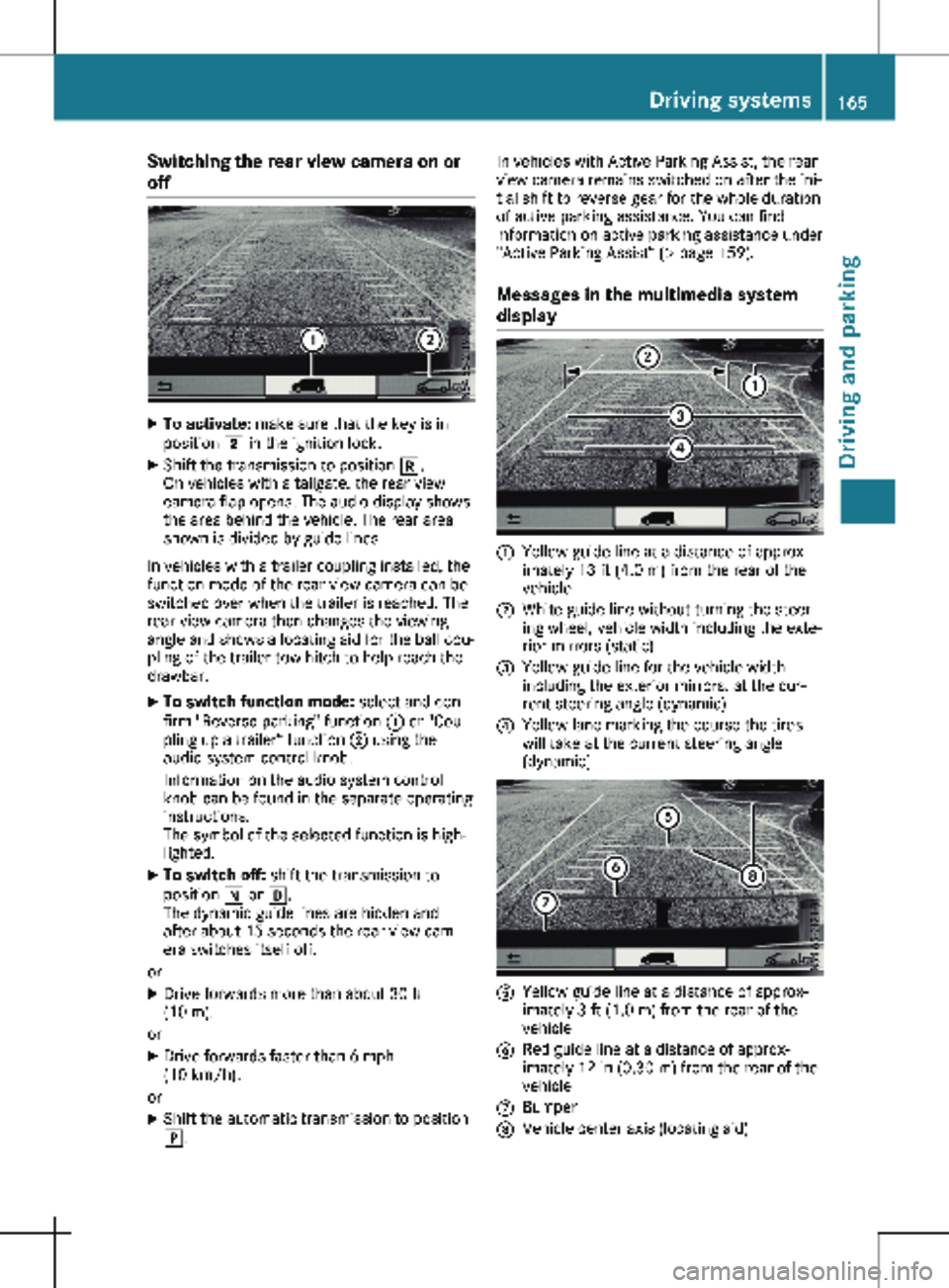
Messages in the multimedia system
display :
Yellow guide line at a distance of approx-
imately
13 ft (4.0 m) from the rear of the
vehicle
; White guide line without turning the steer-
ing wheel, vehicle width including the exte-
rior mirrors (static)
= Yellow guide line for the vehicle width
including the exterior mirrors, at the cur-
rent steering angle (dynamic)
? Yellow lane marking the course the tires
will take at the current steering angle
(dynamic) A
Yellow guide line at a distance of approx-
imately
3 ft (1.0 m) from the rear of the
vehicle
B Red guide line at a distance of approx-
imately
12 in (0.30 m) from the rear of the
vehicle
C Bumper
D Vehicle center axis (locating aid) Driving systems
165
Driving and parking Z
Page 172 of 320
not depress the brake pedal constantly, but
periodically.
Observe the notes on ESP
®
trailer stabilization
( Y page
69).
Driving tips If the trailer begins to swing from side to side:
X Do not accelerate.
X Do not counter-steer.
X Brake if necessary.
i You can reduce the risk of the trailer
swinging and rocking by retrofitting anti-roll
bars or trailer stability programs. Further
information is available at your authorized
Mercedes-Benz Van Dealer.
R Maintain a greater distance than you would
when driving without towing a trailer.
R Avoid sudden braking. Apply the brakes gen-
tly at first to allow the trailer brake to over-
run. Then, increase the brake force quickly.
R The figures for the gradient climbing capa-
bilities from a standstill refer to sea level.
When driving in mountainous areas, note
that the power output of the engine, and
with it its gradient climbing capability,
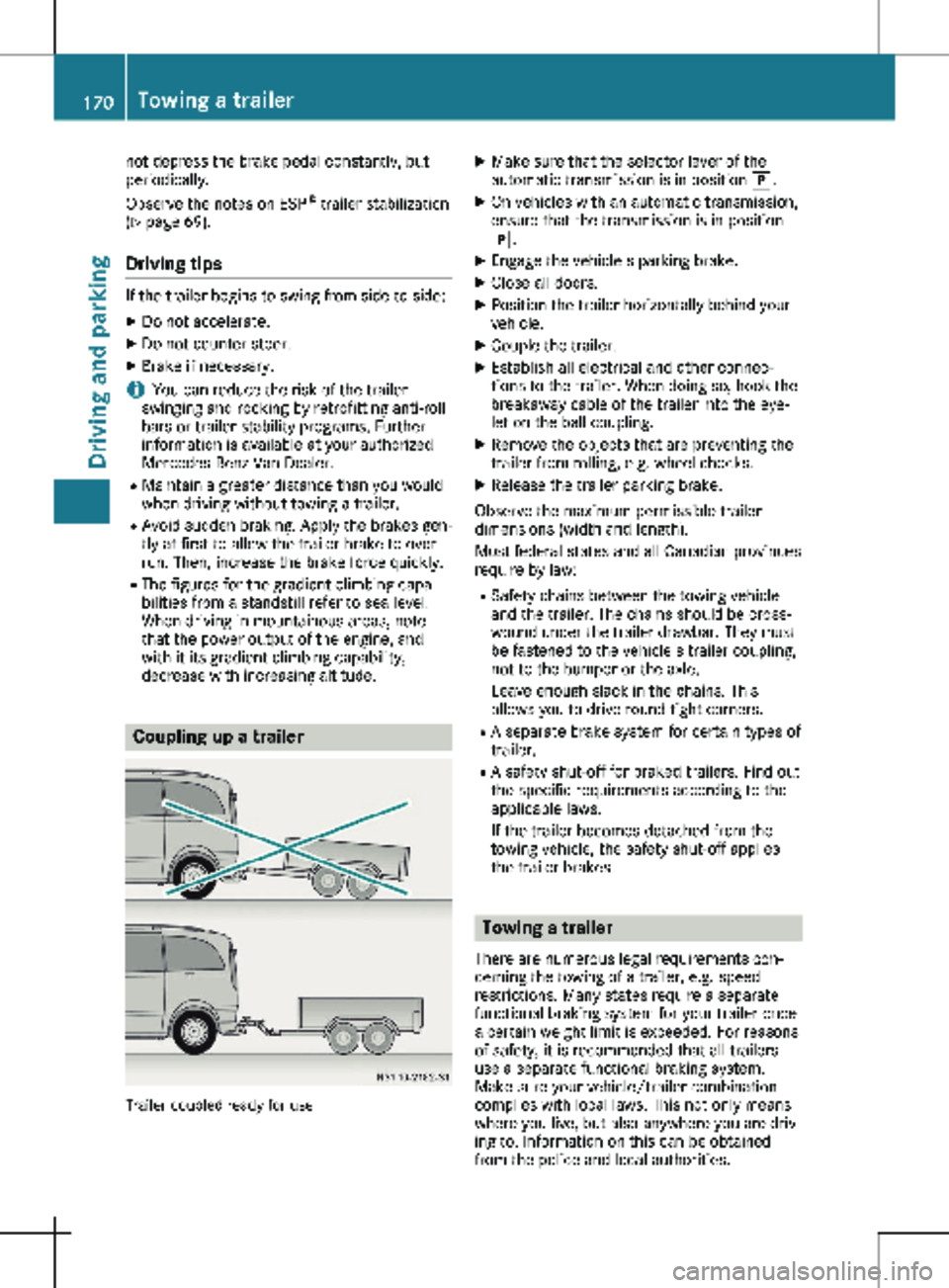
decrease with increasing altitude. Coupling up a trailer
Trailer coupled ready for use X
Make sure that the selector lever of the
automatic transmission is in position j.
X On vehicles with an automatic transmission,
ensure that the transmission is in position
j.
X Engage the vehicle's parking brake.
X Close all doors.
X Position the trailer horizontally behind your
vehicle.
X Couple the trailer.
X Establish all electrical and other connec-
tions to the trailer. When doing so, hook the
breakaway cable of the trailer into the eye-
let on the ball coupling.
X Remove the objects that are preventing the
trailer from rolling, e.g. wheel chocks.
X Release the trailer parking brake.
Observe the maximum permissible trailer
dimensions (width and length).
Most federal states and all Canadian provinces
require by law: R Safety chains between the towing vehicle
and the trailer. The chains should be cross-
wound under the trailer drawbar. They must
be fastened to the vehicle's trailer coupling,
not to the bumper or the axle.
Leave enough slack in the chains. This
allows you to drive round tight corners.
R A separate brake system for certain types of
trailer.
R A safety shut-off for braked trailers. Find out
the specific requirements according to the
applicable laws.
If the trailer becomes detached from the
towing vehicle, the safety shut-off applies
the trailer brakes. Towing a trailer
There are numerous legal requirements con-
cerning the towing of a trailer, e.g. speed
restrictions. Many states require a separate
functional braking system for your trailer once
a certain weight limit is exceeded. For reasons
of safety, it is recommended that all trailers
use a separate functional braking system.
Make sure your vehicle/trailer combination
complies with local laws. This not only means
where you live, but also anywhere you are driv-
ing to. Information on this can be obtained
from the police and local authorities. 170
Towing a trailer
Driving and parking
Page 173 of 320
Observe the following when towing a trailer:
R Practice driving around bends, stopping and
backing up at a place where there is no traf-
fic. This enables you to gain experience and
get used to the new handling characteris-
tics.
R Before driving, check:
- that the trailer tow hitch and ball coupling
are secure
- that the safety switch for a braked trailer
is functioning properly
- that the safety chains are secure and not
damaged
- that the electrical connections are secure
- that the lights are working
- that the wheels are in good order and the
tire pressure is correct
R Adjust the exterior mirrors to provide an
unobstructed view of the rear section of the
trailer.
R If the trailer is equipped with a separate
functional braking system, check before
each journey whether the brakes are func-
tioning correctly.
R Secure the load on the trailer according to
the applicable specifications and current
standards on securing loads
(Y page 244).
R When driving with a trailer, check at regular
intervals that the load is secured and that
the brakes and lights are working.
R Bear in mind that the handling will be less
stable when towing a trailer than when driv-
ing without one. Avoid sudden steering
movements.
R The vehicle/trailer combination is heavier,
accelerates more slowly and has a
decreased gradient climbing capability and a
longer braking distance.
It is more susceptible to crosswinds and
requires cautious steering.
R If possible, do not brake suddenly, but
rather moderately at first so that the trailer
can activate its brakes. Then increase the
force on the brake pedal.
R If the automatic transmission repeatedly
shifts between gears when driving on
inclines, restrict the shift range. Select shift
range 4, 3, 2 or 1.
Driving in a low gear and at a low speed
reduces the risk of damaging the engine. R
When driving on a downhill gradient, shift to
a low gear and take advantage of the
engine's braking effect.
Avoid continuous brake application as this
may overheat the vehicle brakes and, if
installed, the trailer brakes.
R If the coolant temperature increases dra-
matically while the air-conditioning system
is switched on, switch off the air-condition-
ing system.
Coolant heat can also be dissipated by
switching the airflow and the temperature of
the air conditioning to the maximum level.
Open the windows if necessary.
R When overtaking, pay particular attention to
the extended length of your vehicle/trailer
combination.
Due to the length of your vehicle/trailer
combination you need an additional dis-
tance before you can return to your original
lane. Uncoupling a trailer
G
WARNING
If you uncouple a trailer with the overrun
brake engaged, you could trap your hand
between the vehicle and the trailer drawbar.
There is a risk of injury.
Do not uncouple a trailer if the overrun
brake is engaged.
! Do not disconnect a trailer with an
engaged overrun brake. Otherwise, your
vehicle could be damaged by the rebound-
ing of the overrun brake.
X Make sure that the selector lever of the
automatic transmission is in position P.
X Engage the vehicle's parking brake.
X Close all doors.
X Apply the parking brake of the trailer.
X In addition, secure the trailer against rolling
away with a wheel chock or similar object.
X Remove the trailer cable and safety chains
and decouple the trailer. Towing a trailer
171
Driving and parking Z
Page 187 of 320
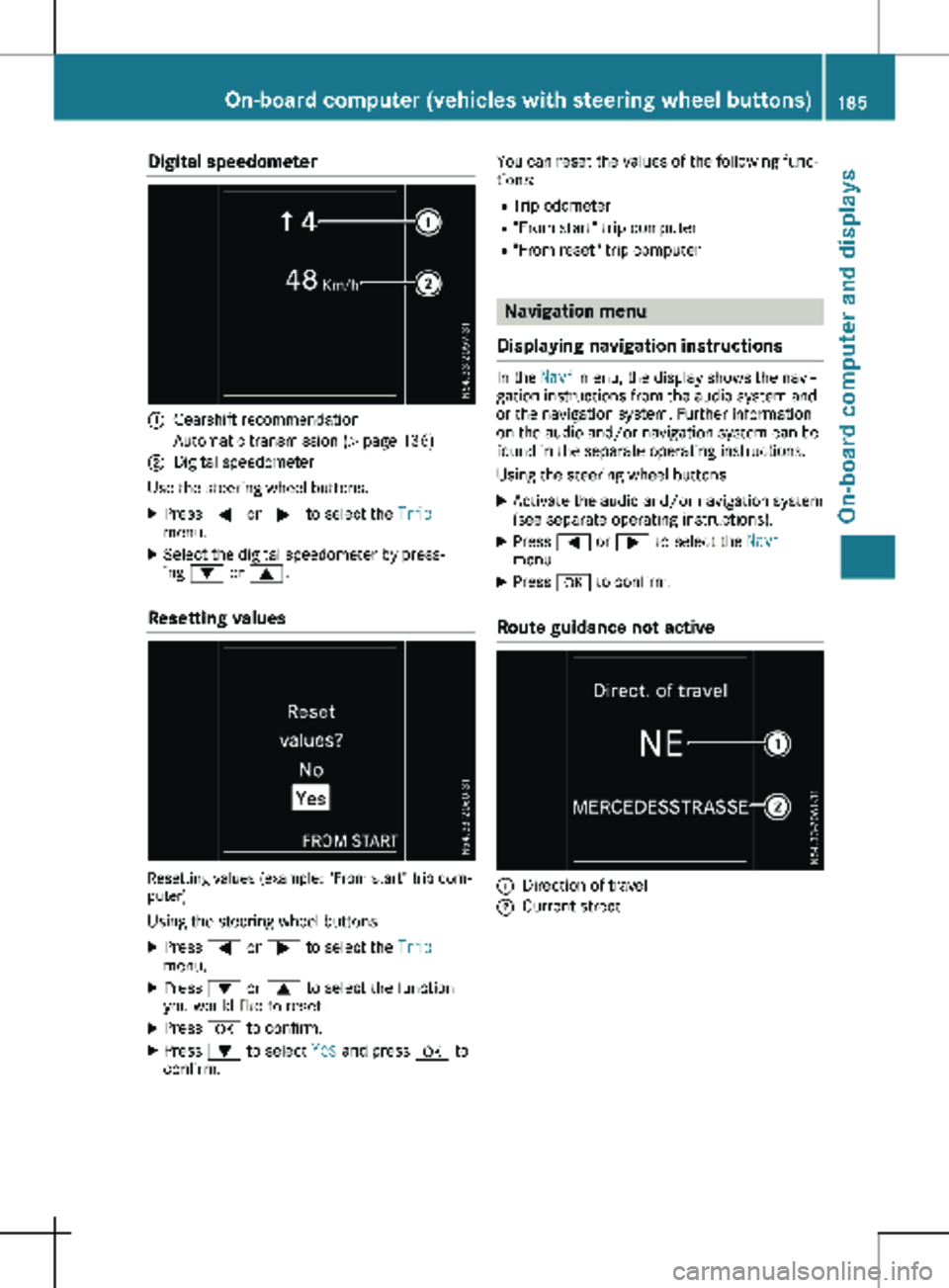
Digital speedometer
:
Gearshift recommendation
Automatic transmission (Y page 136)
; Digital speedometer
Use the steering wheel buttons.
X Press = or ; to select the Trip
menu.
X Select the digital speedometer by press-
ing : or 9.
Resetting values Resetting values (example: "From start" trip com-
puter)
Using the steering wheel buttons
X Press = or ; to select the Trip
menu.
X Press : or 9 to select the function
you would like to reset.
X Press a to confirm.
X Press : to select Yes and press a to
confirm. You can reset the values of the following func-
tions:
R Trip odometer
R "From start" trip computer
R "From reset" trip computer Navigation menu
Displaying navigation instructions In the
Navi menu, the display shows the navi-
gation instructions from the audio system and
or the navigation system. Further information
on the audio and/or navigation system can be
found in the separate operating instructions.
Using the steering wheel buttons
X Activate the audio and/or navigation system
(see separate operating instructions).
X Press = or ; to select the Navi
menu.
X Press a to confirm.
Route guidance not active :
Direction of travel
; Current street On-board computer (vehicles with steering wheel buttons)
185
On-board computer and displays Z
Page 227 of 320

Display messages
Possible causes/consequences and
M SolutionsTire Pressure Moni‐
tor Currently
Unavailable Due to a source of radio interference, no signals can be received
from the wheel sensors. The tire pressure monitor is temporarily
malfunctioning.
The tire pressure monitor restarts automatically as soon as the
problem has been solved. Wheel Sensor(s)
Missing There is no signal from the tire pressure sensor of one or several
wheels. The pressure of the affected tire is not shown in the display.
X Have the faulty tire pressure sensor replaced at a qualified spe-
cialist workshop. Tire Pressure Moni‐
tor Inoperative No
Wheel Sensors The wheels installed do not have suitable tire pressure sensors. The
tire pressure monitor is deactivated.
X Install wheels with suitable tire pressure sensors.
The tire pressure monitor is activated automatically after driving
for a few minutes. Tire Press. Moni‐
tor Inoperative The tire pressure monitor is malfunctioning.
X Visit a qualified specialist workshop. Vehicle
Display messages
Possible causes/consequences and
M SolutionsShift to 'P' or
'N' to Start Engine You have attempted to start the engine in transmission position
k
or h.
X Shift the transmission to position j or i.Auxiliary Battery
Malfunction The auxiliary battery for the transmission is no longer being
charged.
X Visit a qualified specialist workshop. Apply Brake to
Shift from 'P' You attempted to shift the transmission to position
h, k or i
without depressing the brake pedal.
X Depress the brake pedal. Perm. N Activated
Risk of Rolling An additional warning tone sounds. The transmission has been shif-
ted to position i when the vehicle is coasting or being driven.
X Stop the vehicle by depressing the brake pedal and when the
vehicle is stationary shift the transmission to position j.
X Continue driving by shifting the transmission to position h or
k. Risk of Rolling:
Transmission Not
in P An additional warning tone sounds. The driver's door is open and
the transmission is in position k, i or h.
X Shift the transmission to position j.
X Secure the vehicle to prevent it from rolling away ( Y page 138).Display messages (vehicles with steering wheel buttons)
225
On-board computer and displays Z
Page 228 of 320
Display messages
Possible causes/consequences and
M SolutionsService Required
Do Not Shift Gears
Visit Dealer An additional warning tone sounds. You cannot change the trans-
mission position due to a malfunction.
If transmission position h is selected:
X Consult a qualified specialist workshop without shifting transmis-
sion position h.
If transmission position k, i or j is selected:
X Notify a qualified specialist workshop. Reverse Not Poss.
Service Required The transmission is malfunctioning. Transmission position k can-
not be selected.
X Notify a qualified specialist workshop. Transmission Mal‐
function Stop The transmission is malfunctioning. The transmission shifts to neu-
tral i automatically.
X Stop the vehicle immediately, paying attention to road and traffic
conditions.
X Shift the transmission to position j.
X Notify a qualified specialist workshop. Only Shift to 'P'
when Vehicle is
Stationary The vehicle is still moving.
X Pull over and stop the vehicle, paying attention to road and traffic
conditions.
X Shift the transmission to position j.Ò The tailgate is open.
X Close the tailgate. Ñ The rear-end door is open.
X Close the rear-end door/doors. Ó An additional warning tone sounds. The hood is open.
G WARNING
The open hood may then block your view when the vehicle is in
motion.
There is a risk of an accident.
X Stop the vehicle immediately, paying attention to road and traffic
conditions.
X Secure the vehicle to prevent it from rolling away (Y page 138).
X Close the hood. C An additional warning tone sounds while the vehicle is in motion.
The display shows the open door(s).
X Close all doors.226
Display messages (vehicles with steering wheel buttons)
On-board computer and displays
Page 262 of 320
Disconnecting and removing
G
WARNING
During the charging process, a battery pro-
duces hydrogen gas. If a short circuit occurs
or sparks are created, the hydrogen gas can
ignite. There is a risk of an explosion.
R Make sure that the positive terminal of a
connected battery does not come into
contact with vehicle parts.
R Never place metal objects or tools on a
battery.
R It is important that you observe the
described order of the battery terminals
when connecting and disconnecting a bat-
tery.
R When jump-starting, make sure that the
battery poles with identical polarity are
connected.
R It is particularly important to observe the
described order when connecting and dis-
connecting the jumper cables.
R Never connect or disconnect the battery
terminals while the engine is running. G
WARNING
Battery acid is caustic. There is a risk of
injury.
Avoid contact with skin, eyes or clothing. Do
not inhale any battery gases. Do not lean
over the battery. Keep children away from
batteries. Wash away battery acid immedi-
ately with plenty of clean water and seek
medical attention.
! You should have all work involving the bat-
tery carried out at a qualified specialist
workshop.
If, in exceptional circumstances, you need
to disconnect the battery yourself, please
make sure that:
R Secure the vehicle to prevent it from roll-
ing away.
R You have switched off the engine and
removed the key. Make sure the ignition
is switched off. Check to see that there
are no indicator lamps lighting in the instrument cluster. Electronic compo-
nents such as the alternator may other-
wise be damaged.
R After the battery has been disconnected,
the parking brake is automatically
engaged. You can then no longer move
the vehicle.
R For vehicles with automatic transmission,
the transmission is locked in position P
after disconnecting the battery. You can
then no longer move the vehicle.
R You have first removed the negative ter-
minal and then the positive terminal.
Never mix up the terminal clamp discon-
nection/connection order and never mix
up the terminal clamps. The vehicle's
electronics may otherwise be damaged.
The battery and the cover of the positive ter-
minal clamp must be installed securely dur-
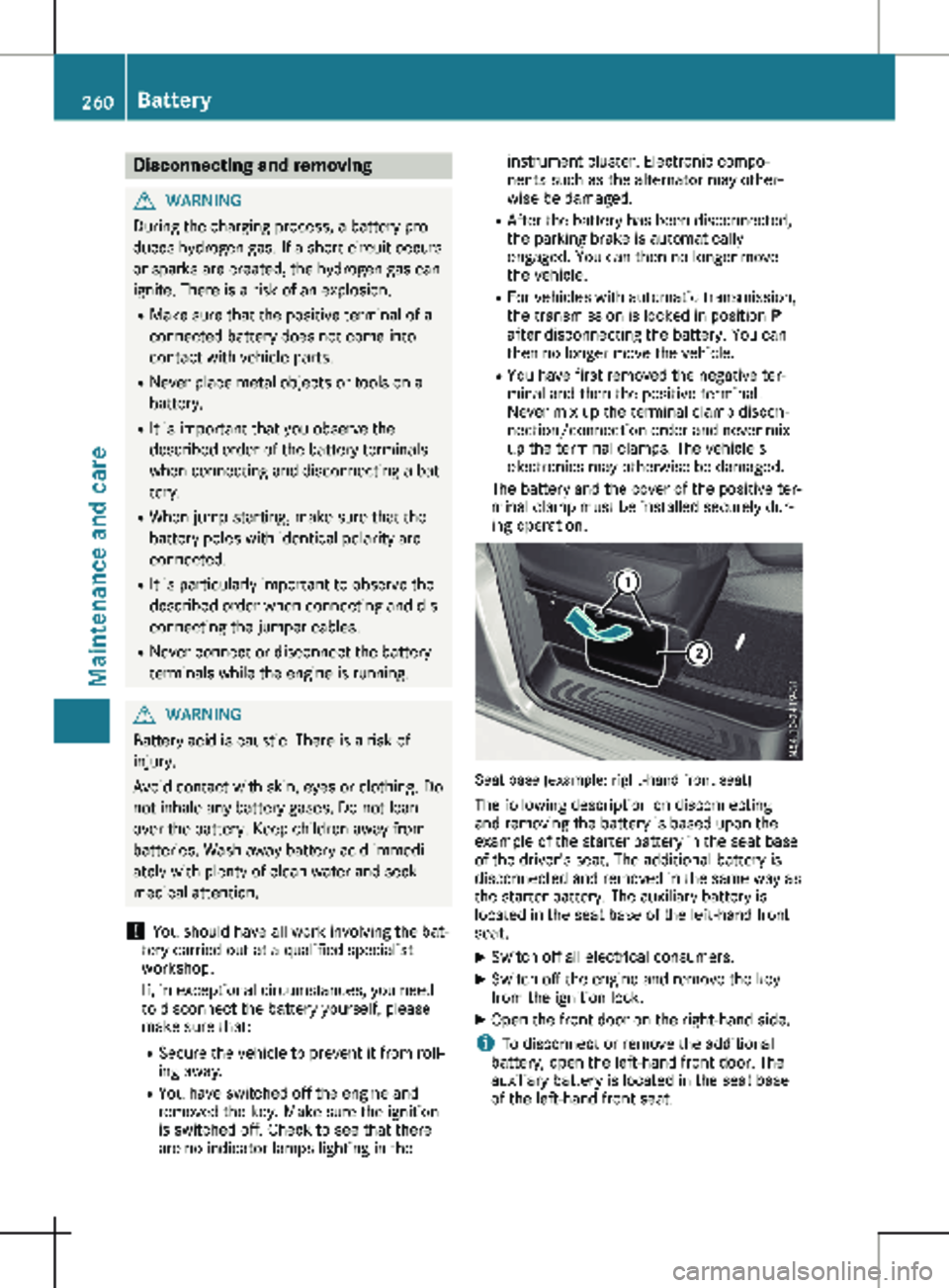
ing operation. Seat base (example: right-hand front seat)
The following description on disconnecting
and removing the battery is based upon the
example of the starter battery in the seat base
of the driver's seat. The additional battery is
disconnected and removed in the same way as
the starter battery. The auxiliary battery is
located in the seat base of the left-hand front
seat.
X Switch off all electrical consumers.
X Switch off the engine and remove the key
from the ignition lock.
X Open the front door on the right-hand side.
i To disconnect or remove the additional
battery, open the left-hand front door. The
auxiliary battery is located in the seat base
of the left-hand front seat. 260
BatteryMaintenance and care