warning lights MERCEDES-BENZ METRIS 2020 MY20 Operator’s Manual
[x] Cancel search | Manufacturer: MERCEDES-BENZ, Model Year: 2020, Model line: METRIS, Model: MERCEDES-BENZ METRIS 2020Pages: 320, PDF Size: 26.38 MB
Page 102 of 320

Low-beam headlamps
When the ignition is switched on and the light
switch is in the
L position, the parking
lamps and low-beam headlamps are switched
on even if the light sensor does not sense dark
ambient light. This is particularly useful when
there is fog or rain.
X To switch on: turn the key to position 2 in
the ignition lock or start the engine.
X Turn the light switch to the L position.
The L indicator lamp in the instrument
cluster lights up.
Daytime running lamps X
To switch on: turn the light switch to the
$ or à position.
Automatic headlamp mode G
WARNING
When the light switch is set to Ã, the
low-beam headlamps may not be switched
on automatically if there is fog, snow or
other causes of poor visibility due to the
weather conditions such as spray. There is a
risk of an accident.
In such situations, turn the light switch to
L.
Automatic headlamp mode is only a driving
aid. You are responsible for the vehicle lighting
at all times.
When the parking lamps and low-beam head-
lamps are switched on, the green T (park-
ing lamps) and L (low-beam headlamps)
indicator lamps in the instrument cluster light
up.
à is the preferred light switch setting. The
light setting is automatically selected accord-
ing to the brightness of the ambient light
(exception: poor visibility due to weather con-
ditions, such as fog, snow or spray):
R Key in position 1 in the ignition lock: the
parking lamps are switched on or off auto-
matically depending on the brightness of the
ambient light.
R When the engine is on: depending on the
ambient light, the daytime running lamps or the parking lamps and low-beam headlamps
are switched on/off automatically.
X To switch on automatic headlamp mode:
turn the light switch to
Ã.
Fog lamps/rear fog lamp You can only switch the fog lamps on or off
manually in vehicles which have fog lamps
installed.
Front fog lamps help you to see and be seen in
conditions of poor visibility due to fog or pre-
cipitation. They can only be operated together
with the parking lamps or with the low-beam
headlamps.
The rear fog lamp improves visibility of your
vehicle for the traffic behind in the event of
heavy fog. Observe the legal requirements of
the country you are currently in when using
the rear fog lamp.
X Turn the light switch to L or Ã.
X Turn the key to position 2 in the ignition
lock or start the engine.
X To switch the front fog lamps on/off:
press the N button.
When the green
N indicator lamp in the
instrument cluster goes on, the fog lamps
are switched on.
X To switch the rear fog lamp on/off: press
the R button.
When the yellow R indicator lamp in the
instrument cluster goes on, the rear fog
lamp is switched on.
Standing lamps !
If the battery charge is very low, the stand-
ing lamps will switch off automatically to
enable the next engine start. Always park
your vehicle in accordance with legal regula-
tions, in a secure and adequately lit loca-
tion. Avoid leaving the T parking lamps
on for several hours. If possible, switch on
the right X or left W standing lamp.
Switching on the standing lamps ensures that
the corresponding side of the vehicle is illumi-
nated. 100
Exterior lightingLights and windshield wipers
Page 103 of 320
Switching on the standing lamps:
X Turn the key to position 0 (Y page 127) in
the ignition lock or remove the key.
X Right-hand standing lamp: turn the light
switch to position X.
X Left-hand standing lamp: turn the light
switch to position W.Combination switch
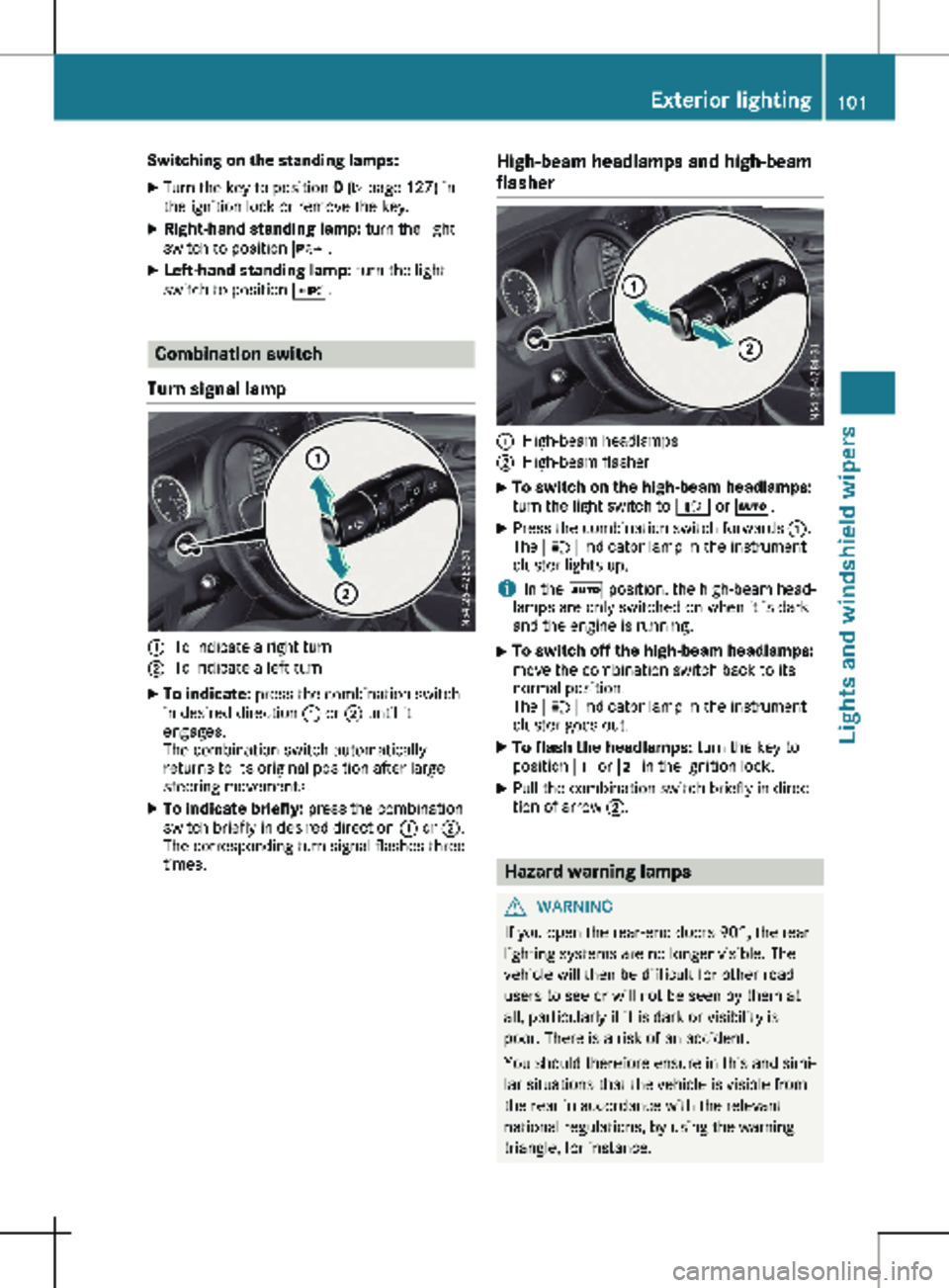
Turn signal lamp :
To indicate a right turn
; To indicate a left turn
X To indicate: press the combination switch
in desired direction : or ; until it
engages.
The combination switch automatically
returns to its original position after large
steering movements.
X To indicate briefly: press the combination
switch briefly in desired direction : or ;.
The corresponding turn signal flashes three
times. High-beam headlamps and high-beam
flasher :
High-beam headlamps
; High-beam flasher
X To switch on the high-beam headlamps:
turn the light switch to
L or Ã.
X Press the combination switch forwards :.
The K indicator lamp in the instrument
cluster lights up.
i In the à position, the high-beam head-
lamps are only switched on when it is dark
and the engine is running.
X To switch off the high-beam headlamps:
move the combination switch back to its
normal position.
The K indicator lamp in the instrument
cluster goes out.
X To flash the headlamps: turn the key to
position 1 or 2 in the ignition lock.
X Pull the combination switch briefly in direc-
tion of arrow ;. Hazard warning lamps
G
WARNING
If you open the rear-end doors 90°, the rear
lighting systems are no longer visible. The
vehicle will then be difficult for other road
users to see or will not be seen by them at
all, particularly if it is dark or visibility is
poor. There is a risk of an accident.
You should therefore ensure in this and simi-
lar situations that the vehicle is visible from
the rear in accordance with the relevant
national regulations, by using the warning
triangle, for instance. Exterior lighting
101
Lights and windshield wipers Z
Page 104 of 320
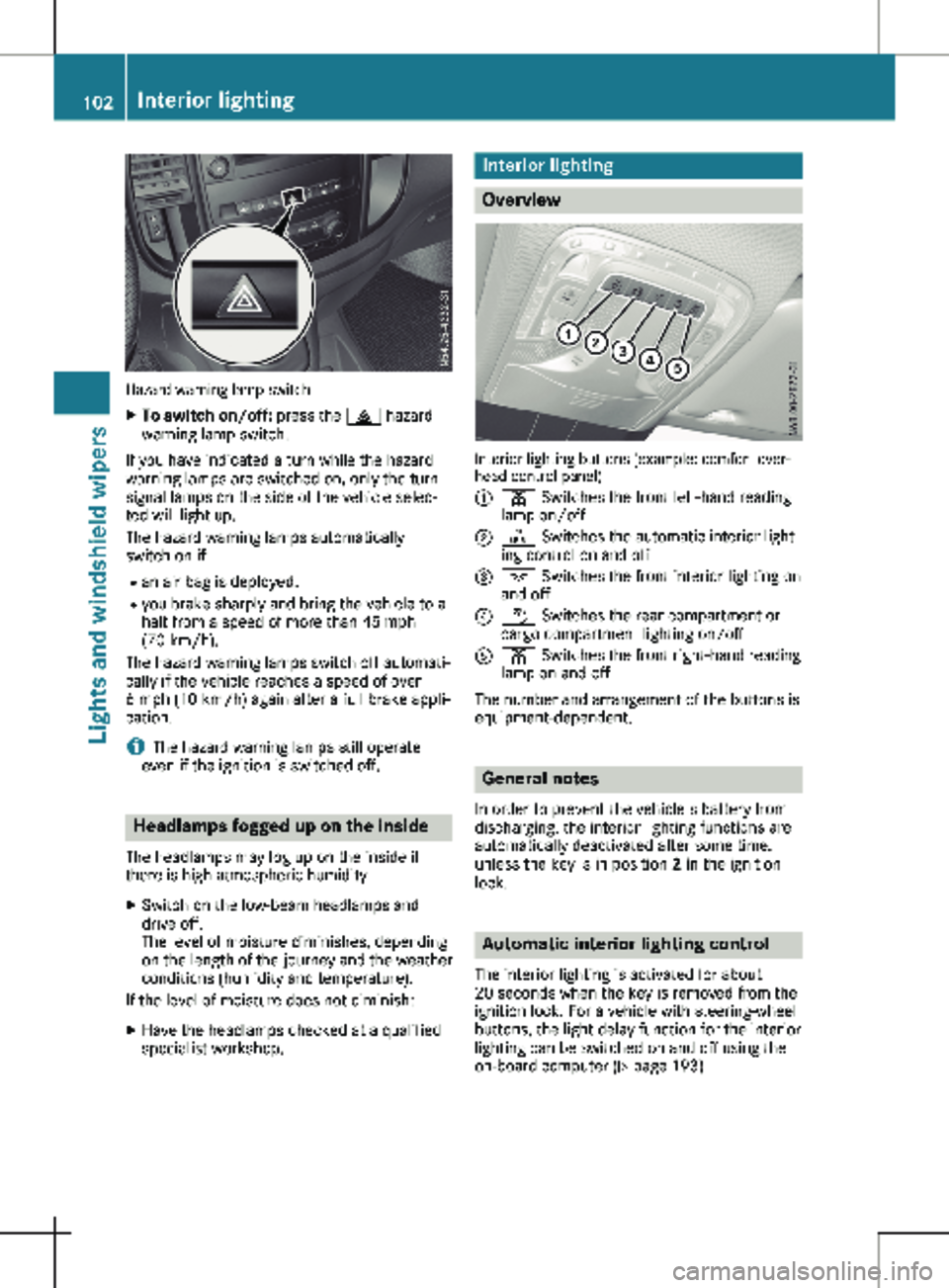
Hazard warning lamp switch
X
To switch on/off: press the £ hazard
warning lamp switch.
If you have indicated a turn while the hazard
warning lamps are switched on, only the turn
signal lamps on the side of the vehicle selec-
ted will light up.
The hazard warning lamps automatically
switch on if: R an air bag is deployed.
R you brake sharply and bring the vehicle to a
halt from a speed of more than 45 mph
(70 km/h
).
The hazard warning lamps switch off automati-
cally if the vehicle reaches a speed of over
6 mph (10 km/h) again after a full brake appli-
cation.
i The hazard warning lamps still operate
even if the ignition is switched off. Headlamps fogged up on the inside
The headlamps may fog up on the inside if
there is high atmospheric humidity.
X Switch on the low-beam headlamps and
drive off.
The level of moisture diminishes, depending
on the length of the journey and the weather
conditions (humidity and temperature).
If the level of moisture does not diminish:
X Have the headlamps checked at a qualified
specialist workshop. Interior lighting
Overview
Interior lighting buttons (example: comfort over-
head control panel)
:
p Switches the front left-hand reading
lamp on/off
; | Switches the automatic interior light-
ing control on and off
= c Switches the front interior lighting on
and off
? w Switches the rear compartment or
cargo compartment lighting on/off
A p Switches the front right-hand reading
lamp on and off
The number and arrangement of the buttons is
equipment-dependent. General notes
In order to prevent the vehicle's battery from
discharging, the interior lighting functions are
automatically deactivated after some time,
unless the key is in position 2 in the ignition
lock. Automatic interior lighting control
The interior lighting is activated for about
20 seconds
when the key is removed from the
ignition lock. For a vehicle with steering-wheel
buttons, the light delay function for the interior
lighting can be switched on and off using the
on-board computer ( Y page 193)102
Interior lighting
Lights and windshield wipers
Page 107 of 320
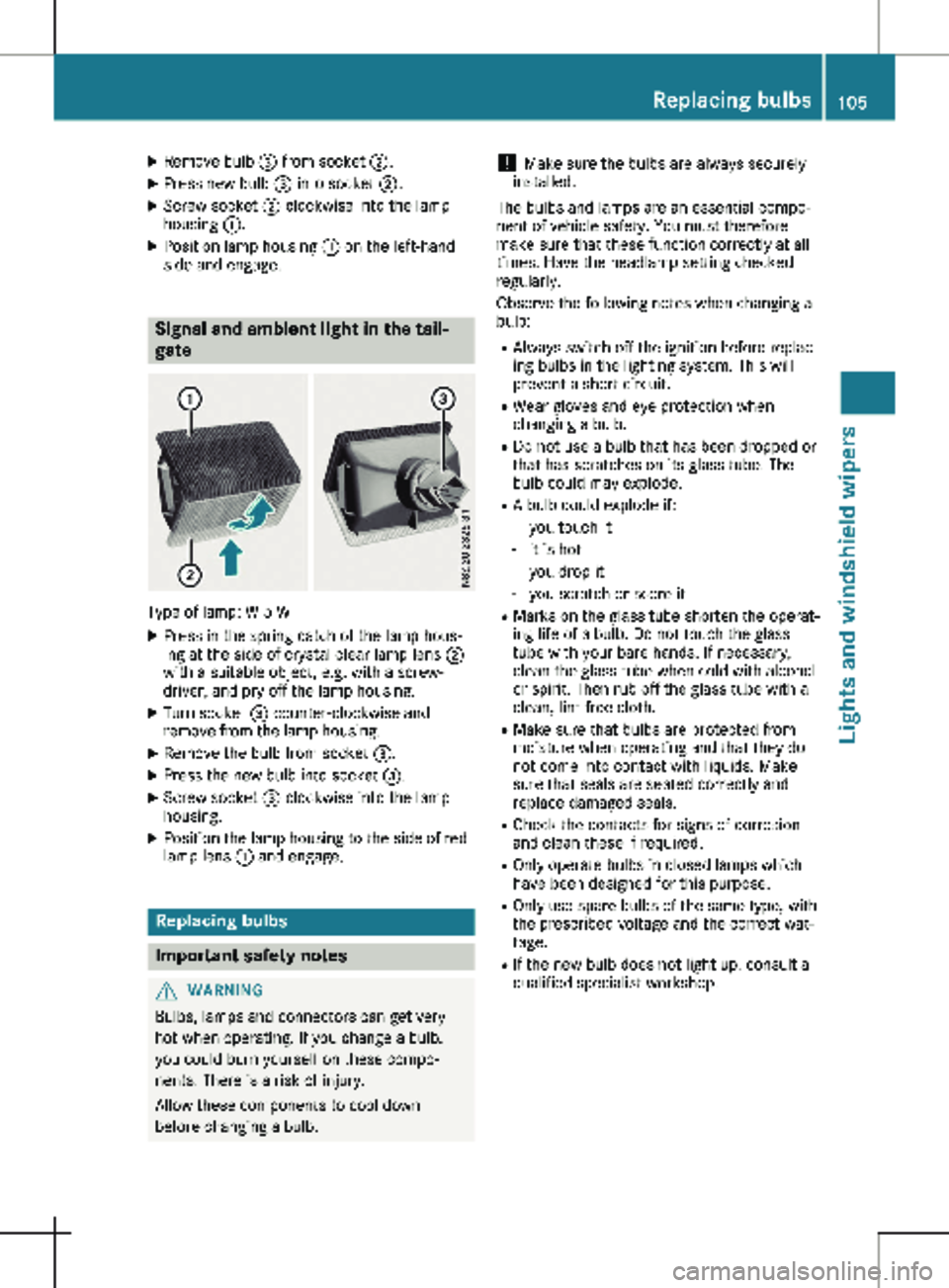
X
Remove bulb = from socket ;.
X Press new bulb = into socket ;.
X Screw socket ; clockwise into the lamp
housing :.
X Position lamp housing : on the left-hand
side and engage. Signal and ambient light in the tail-
gate
Type of lamp: W 5 W
X Press in the spring catch of the lamp hous-
ing at the side of crystal clear lamp lens ;
with a suitable object, e.g. with a screw-
driver, and pry off the lamp housing.
X Turn socket = counter-clockwise and
remove from the lamp housing.
X Remove the bulb from socket =.
X Press the new bulb into socket =.
X Screw socket = clockwise into the lamp
housing.
X Position the lamp housing to the side of red
lamp lens : and engage. Replacing bulbs
Important safety notes
G
WARNING
Bulbs, lamps and connectors can get very
hot when operating. If you change a bulb,
you could burn yourself on these compo-
nents. There is a risk of injury.
Allow these components to cool down
before changing a bulb. !
Make sure the bulbs are always securely
installed.
The bulbs and lamps are an essential compo-
nent of vehicle safety. You must therefore
make sure that these function correctly at all
times. Have the headlamp setting checked
regularly.
Observe the following notes when changing a
bulb:
R Always switch off the ignition before replac-
ing bulbs in the lighting system. This will
prevent a short circuit.
R Wear gloves and eye protection when
changing a bulb.
R Do not use a bulb that has been dropped or
that has scratches on its glass tube. The
bulb could may explode.
R A bulb could explode if:
- you touch it
- it is hot
- you drop it
- you scratch or score it
R Marks on the glass tube shorten the operat-
ing life of a bulb. Do not touch the glass
tube with your bare hands. If necessary,
clean the glass tube when cold with alcohol
or spirit. Then rub off the glass tube with a
clean, lint-free cloth.
R Make sure that bulbs are protected from
moisture when operating and that they do
not come into contact with liquids. Make
sure that seals are seated correctly and
replace damaged seals.
R Check the contacts for signs of corrosion
and clean these if required.
R Only operate bulbs in closed lamps which
have been designed for this purpose.
R Only use spare bulbs of the same type, with
the prescribed voltage and the correct wat-
tage.
R If the new bulb does not light up, consult a
qualified specialist workshop. Replacing bulbs
105Lights and windshield wipers Z
Page 112 of 320

Switching the rear window wiper
on/off
1
b To wipe with washer fluid
2 ° Intermittent wipe
3 $ Rear window wiper off
4 b To wipe with washer fluid
X Turn the key to position 1 or 2 in the igni-
tion lock.
X Move the è switch to the corresponding
position.
If the rear window wiper is activated, the
è symbol is shown in the status area of
the display.
The Status Overview in the Assist.
menu then also shows the è symbol for
vehicles with steering wheel buttons
(Y page
189).
X To wipe with washer fluid: press the è
switch beyond the current position as far as
it will go to 1 or press and hold 4.
When you release the è switch, the rear
window wiper continues to wipe for about
another five seconds. The rear window
wiper then wipes according to the original
position 2 or 3.
The rear window wiper switches on automati-
cally if you engage reverse gear and the wind-
shield wipers are on.
If the vehicle is stationary and you open the
tailgate or rear-end door, the rear window
wiper will stop automatically. The rear window
wiper will only resume wiping again when the
tailgate and rear-end door are closed and you
pull away again.
The rear window will no longer be wiped prop-
erly if the wiper blade is worn. This may pre-
vent you from observing the traffic conditions.
Information on replacing the wiper blade can be found under "Replacing wiper blades"
(
Y page
110). Replacing the wiper blades
Important safety notes G
WARNING
If the windshield wipers begin to move while
you are changing the wiper blades, you
could be trapped by the wiper arm. There is
a risk of injury.
Always switch off the windshield wipers and
ignition before changing the wiper blades.
! Never open the hood/tailgate or rear
doors if a windshield wiper arm has been
folded away from the windshield/rear win-
dow.
Never fold a windshield wiper arm without a
wiper blade back onto the windshield/rear
window.
Hold the windshield wiper arm firmly when
you change the wiper blade. If you release
the windshield wiper arm without a wiper
blade and it falls onto the windshield/rear
window, the windshield/rear window may
be damaged by the force of the impact.
Mercedes-Benz recommends that you have
the wiper blades changed at a qualified spe-
cialist workshop.
! Only hold the wiper blade by the wiper
arm. You could otherwise damage the wiper
rubber.
Wiper blades are wear parts. The windshield
will no longer be wiped properly if the wiper
blades are worn. This may prevent you from
observing the traffic conditions.
Please observe the service indicator after
changing the wiper blades of the windshield
wiper.
Service indicator Replacement wiper blades for the windshield
wiper have a service indicator on the tip of the
wiper blade.
Depending on the amount of use, the service
indicator will change color from black to yel-
low.110
Windshield wipers
Lights and windshield wipers
Page 125 of 320
Switching air-recirculation mode
on/off
Important safety notes You can deactivate the intake of fresh air if
unpleasant odors enter the vehicle from out-
side. The air inside the vehicle is then circula-
ted.
When you switch on air-recirculation mode,
the side windows and windows could fog up
more quickly, in particular at low outside tem-
peratures. Only switch on air-recirculation
mode for a short time.
Air-conditioning system or dual-zone
automatic climate control X
Switch on climate control ( Y page 117).
X Press the h button.
If the indicator lamp in the h button
lights up, air-recirculation mode is activated.
Air-recirculation mode switches on automati-
cally: R at high outside temperatures
R while driving in a tunnel (only vehicles with a
navigation system)
The indicator lamp in the h button is then
not lit up. Outside air is added automatically
after about
30 minutes.
Air-recirculation mode is deactivated automati-
cally:
R after approximately five minutes at outside
temperatures below about 45 ‡ (7 †)
R after approximately five minutes when the
cooling with air-dehumidification function is
deactivated
R after approximately 30 minutes at outside
temperatures above about 45 ‡ (7 †) and
when the cooling with air-dehumidification
function is active Convenience opening/pre-entry cli-
mate control
G
WARNING
During convenience opening, body parts
could be drawn in or become trapped
between the side window and the door
frame. There is a risk of injury. Monitor the entire opening procedure when
using convenience opening. When opening,
make sure that nobody touches the side
window. Release the % switch immedi-
ately if somebody becomes trapped, to
interrupt the opening procedure.
X Pre-entry climate control and conveni-
ence opening with the key:
press and hold
the % button on the key.
The side windows open automatically and
the blower of the climate control system is
activated.
X Release the % button.
i At high interior temperatures, the blower is
also switched on when a door is opened.
This means that slightly cooled air enters
the vehicle interior after the engine is star-
ted, to cool the vehicle more rapidly. Switching the residual heat function
on/off
General notes Only vehicles with dual-zone automatic climate
control have the residual heat function.
Once the engine is switched off, it is possible
to make use of the residual heat of the engine
to continue heating or ventilating the front
compartment of the vehicle for approximately
30 minutes. The heating or ventilation time
depends on the set interior temperature.
Switching the function on/off X
Turn the key to position 0 in the ignition
lock or remove it.
X Press the Ì button.
If the residual heat function is activated, the
indicator lamp in the Ì button comes on.
The blower will run at a low speed regard-
less of the airflow setting.
If you activate the residual heat function at
high temperatures, only the auxiliary ventila-
tion will be activated. The blower then runs
at medium speed. Operating the climate control system
123
Climate control Z
Page 141 of 320
is an increased danger of skidding and acci-
dents.
Only use the parking brake to brake the
vehicle when the service brake is faulty. Do
not apply the parking brake too firmly. If the
wheels lock, release the parking brake until
the wheels begin turning again. The brake lamps are not illuminated when you
brake the vehicle using the parking brake.
As a rule, you may only apply the parking
brake when the vehicle is stationary.
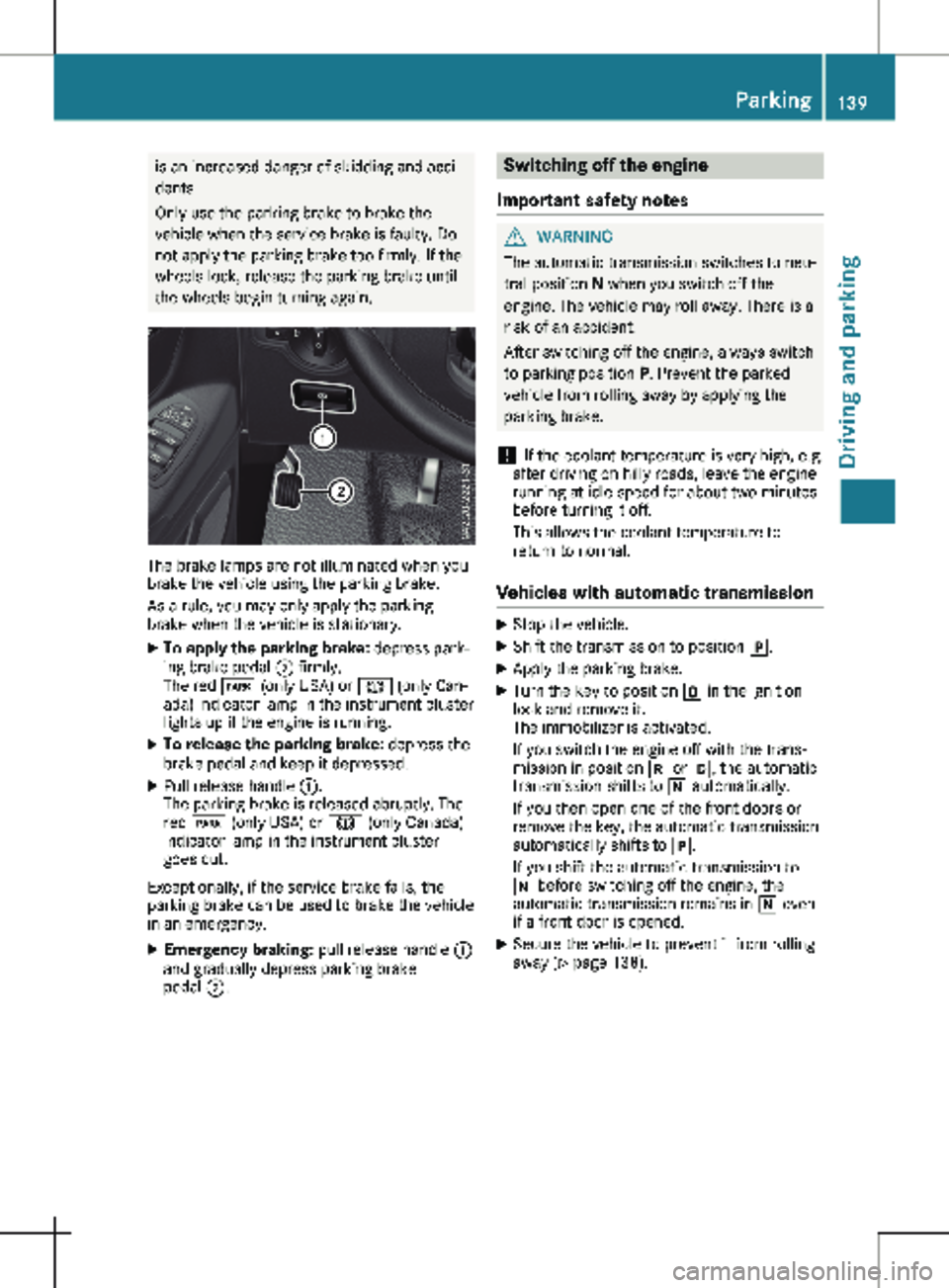
X To apply the parking brake: depress park-
ing brake pedal ; firmly.
The red F (only USA) or J (only Can-
ada) indicator lamp in the instrument cluster
lights up if the engine is running.
X To release the parking brake: depress the
brake pedal and keep it depressed.
X Pull release handle :.
The parking brake is released abruptly. The
red F (only USA) or J (only Canada)
indicator lamp in the instrument cluster
goes out.
Exceptionally, if the service brake fails, the
parking brake can be used to brake the vehicle
in an emergency.
X Emergency braking: pull release handle :
and gradually depress parking brake
pedal ;. Switching off the engine
Important safety notes G
WARNING
The automatic transmission switches to neu-
tral position N when you switch off the
engine. The vehicle may roll away. There is a
risk of an accident.
After switching off the engine, always switch
to parking position P. Prevent the parked
vehicle from rolling away by applying the
parking brake.
! If the coolant temperature is very high, e.g.
after driving on hilly roads, leave the engine
running at idle speed for about
two minutes
before turning it off.
This allows the coolant temperature to
return to normal.
Vehicles with automatic transmission X
Stop the vehicle.
X Shift the transmission to position j.
X Apply the parking brake.
X Turn the key to position u in the ignition
lock and remove it.
The immobilizer is activated.
If you switch the engine off with the trans-
mission in position k or h, the automatic
transmission shifts to i automatically.
If you then open one of the front doors or
remove the key, the automatic transmission
automatically shifts to j.
If you shift the automatic transmission to
i before switching off the engine, the
automatic transmission remains in i even
if a front door is opened.
X Secure the vehicle to prevent it from rolling
away
(Y page 138). Parking
139
Driving and parking Z
Page 150 of 320
Storing and maintaining the current
speed
X
Accelerate the vehicle to the desired speed
above 20 mph (30 km/h
).
X Briefly push the cruise control lever up : or
down =.
X Release the accelerator pedal.
Cruise control is activated. The current
speed is stored and shown briefly in the dis-
play's text field.
The display also shows the V symbol and
the stored speed:
R in the header on vehicles without steering
wheel buttons (Y page
176)
R in the status area on vehicles with steer-
ing wheel buttons (Y page 183)
Resuming the stored speed G
WARNING
If you call up the stored speed and it differs
from the current speed, the vehicle acceler-
ates or decelerates. If you do not know the
stored speed, the vehicle could accelerate
or brake unexpectedly. There is a risk of an
accident.
Pay attention to the road and traffic condi-
tions before calling up the stored speed. If
you do not know the stored speed, store the
desired speed again.
X Briefly pull the cruise control lever towards
you ;.
X Release the accelerator pedal.
Cruise control is activated and resumes the
vehicle's speed to the last speed stored.
The stored speed is shown briefly in the dis-
play.
The display also shows the V symbol and
the stored speed:
R in the header on vehicles without steering
wheel buttons (Y page
176)
R in the status area on vehicles with steer-
ing wheel buttons (Y page 183)
i When you pull the cruise control lever
towards you for the first time after starting
the engine, cruise control adopts the cur-
rent speed. Setting the speed It may be a moment before the vehicle starts
to accelerate or brake to the set speed. Take
this delay into account when setting the
speed.
X
Press the cruise control lever up : to
increase the speed or down = to reduce
the speed.
The vehicle will accelerate or decelerate.
The speed is shown in the display.
X Release the cruise control lever once the
desired speed is reached.
The displayed speed is stored.
or
X Briefly press the cruise control lever as far
as the 1st pressure point up : or down =.
The last speed stored is increased/reduced
in increments of
1 mph (1 km/h).
or X Briefly press the cruise control lever beyond
the pressure point up : or down =.
The last speed stored is increased/reduced
in increments of
5 mph (10 km/h).
i Cruise control is not deactivated if you
depress the accelerator pedal. If you accel-
erate briefly to overtake, for example, cruise
control resumes the vehicle’s speed to the
last speed stored after you have finished
overtaking.
Deactivating cruise control There are various ways to deactivate cruise
control:
X Briefly press the cruise control lever for-
wards ?.
or X Apply the brakes.
The last speed set remains stored. The last
speed stored is deleted when you switch off
the engine.
Cruise control is deactivated automatically
when:
R you apply the brakes
R you apply the parking brake and the F
(only USA) or J (only Canada) indicator
lamp in the instrument cluster lights up
R you are driving slower than
20 mph
(30 km/h) 148
Driving systems
Driving and parking
Page 152 of 320

may also cause the system to display a warn-
ing.
If you fail to adapt your driving style, the dis-
tance warning function can neither reduce the
risk of an accident nor override the laws of
physics. The distance warning function cannot
take into account road, weather or traffic con-
ditions. The distance warning function is only
an aid. You are responsible for the distance to
the vehicle in front, for vehicle speed, braking
in good time and for staying in your lane.
Following damage to the front end of the vehi-
cle, have the configuration and operation of
the radar sensor checked at a qualified spe-
cialist workshop. This also applies to collisions
at slow speeds where there is no visible dam-
age to the front of the vehicle.
If you change wheel size, make sure they cor-
respond to the correct wheel size category
(Y page
278). If the category is changed with-
out recoding the control units in the vehicle,
the functioning of the distance warning feature
may be impaired. COLLISION PREVENTION
ASSIST may then detect a malfunction and
switch itself off.
Operation
X To activate/deactivate: activate or deacti-
vate the distance warning function in the on-
board computer
(Y page 190).
If the distance warning function of COLLI-
SION PREVENTION ASSIST is activated, the
display shows the Ä symbol:
R in the header
R in the Status Overview of the Assist.
menu (Y page 189)
At speeds up to approx 20 mph (30 km/h)
the display in vehicles with Active Parking
Assist first shows the í status indicator.
Only from a speed of about 20 mph
(30 km/h) does the display show the
Äsymbol instead of the í status indica-
tor.
The distance warning function can help you to
minimize the risk of a front-end collision with a
vehicle ahead or reduce the effects of such a
collision. With the help of the radar sensor sys-
tem, the distance warning function can detect
obstacles that are in the path of your vehicle
for an extended period of time. If the distance
warning function detects that there is a risk of
a collision, you will be warned visually and,
where necessary, acoustically. Without your intervention, the distance warning function
cannot prevent a collision.
The distance warning function issues a warn-
ing at speeds:
R from about
4 mph (7 km/h) if you approach
a vehicle traveling in front or a stationary
vehicle too quickly. The · warning lamp
in the instrument cluster then lights up and
an intermittent warning tone also sounds.
At speeds up to about 45 mph (70 km/h),
the system also detects stationary obsta-
cles, for example stopped or parked vehi-
cles.
X Brake immediately until the distance from
the obstacle increases and the risk of a
front-end collision passes.
or X Take evasive action, provided it is safe to do
so.
Adaptive Brake Assist General notes
Adaptive Brake Assist evaluates the traffic sit-
uation with the help of the radar sensor sys-
tem and can detect obstacles which have been
in your vehicle's path for an extended period
of time. From speeds above 4 mph (7 km/h
),
Adaptive Brake Assist aids you in braking dur-
ing hazardous situations.
Up to a speed of approximately 125 mph
(200 km/h), Adaptive Brake Assist is capable
of reacting to moving obstacles that have
already been detected as such at least once
over the period of observation.
Important safety notes G
WARNING
Adaptive Brake Assist does not react:
R to people or animals
R to oncoming vehicles
R to crossing traffic
R to stationary obstacles
R when cornering
As a result, the Adaptive Brake Assist may
not intervene in all critical conditions. There
is a risk of an accident. 150
Driving systems
Driving and parking
Page 155 of 320
Warning display
Blind Spot Assist is not active at speeds below
approximately
20 mph (30 km/h). Vehicles in
the monitoring range are then not indicated.
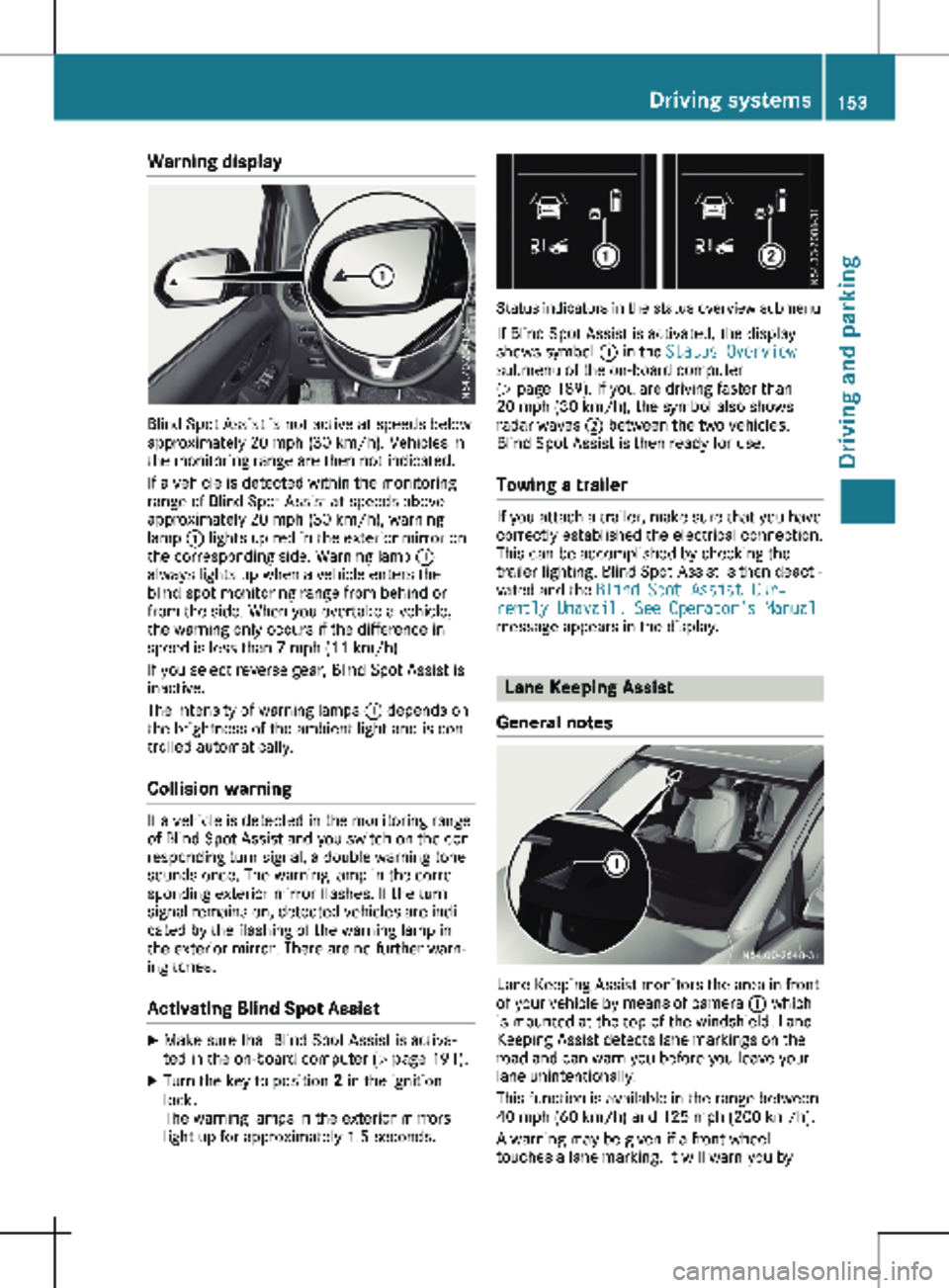
If a vehicle is detected within the monitoring
range of Blind Spot Assist at speeds above
approximately 20 mph (30 km/h), warning
lamp : lights up red in the exterior mirror on
the corresponding side. Warning lamp :
always lights up when a vehicle enters the
blind spot monitoring range from behind or
from the side. When you overtake a vehicle,
the warning only occurs if the difference in
speed is less than 7 mph (11 km/h).
If you select reverse gear, Blind Spot Assist is
inactive.
The intensity of warning lamps : depends on
the brightness of the ambient light and is con-
trolled automatically.
Collision warning If a vehicle is detected in the monitoring range
of Blind Spot Assist and you switch on the cor-
responding turn signal, a double warning tone
sounds once. The warning lamp in the corre-
sponding exterior mirror flashes. If the turn
signal remains on, detected vehicles are indi-
cated by the flashing of the warning lamp in
the exterior mirror. There are no further warn-
ing tones.
Activating Blind Spot Assist X
Make sure that Blind Spot Assist is activa-
ted in the on-board computer (Y page
191).
X Turn the key to position 2 in the ignition
lock.
The warning lamps in the exterior mirrors
light up for approximately
1.5 seconds. Status indicators in the status overview submenu
If Blind Spot Assist is activated, the display
shows symbol : in the Status Overview
submenu of the on-board computer
(Y page
189). If you are driving faster than
20 mph (30 km/h), the symbol also shows
radar waves ; between the two vehicles.
Blind Spot Assist is then ready for use.
Towing a trailer If you attach a trailer, make sure that you have
correctly established the electrical connection.
This can be accomplished by checking the
trailer lighting. Blind Spot Assist is then deacti-
vated and the Blind Spot Assist Cur‐
rently Unavail. See Operator's Manual
message appears in the display. Lane Keeping Assist
General notes Lane Keeping Assist monitors the area in front
of your vehicle by means of camera : which
is mounted at the top of the windshield. Lane
Keeping Assist detects lane markings on the
road and can warn you before you leave your
lane unintentionally.
This function is available in the range between
40 mph (60 km/h
) and 125 mph (200 km/h).
A warning may be given if a front wheel
touches a lane marking. It will warn you by Driving systems
153
Driving and parking Z