wheel MERCEDES-BENZ METRIS 2020 MY20 Operator’s Manual
[x] Cancel search | Manufacturer: MERCEDES-BENZ, Model Year: 2020, Model line: METRIS, Model: MERCEDES-BENZ METRIS 2020Pages: 320, PDF Size: 26.38 MB
Page 95 of 320
X
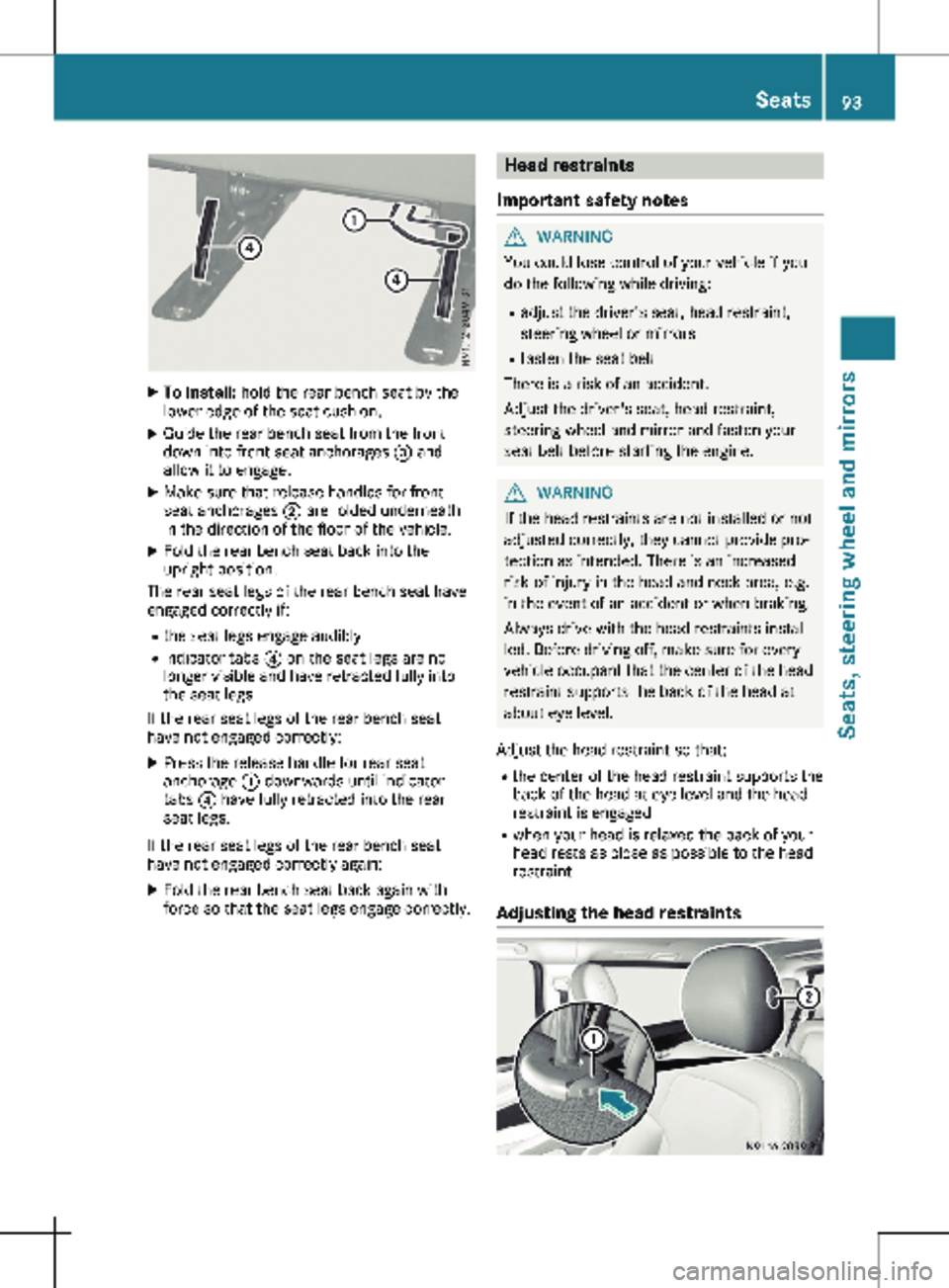
To install: hold the rear bench seat by the
lower edge of the seat cushion.
X Guide the rear bench seat from the front
down into front seat anchorages = and
allow it to engage.
X Make sure that release handles for front
seat anchorages ; are folded underneath
in the direction of the floor of the vehicle.
X Fold the rear bench seat back into the
upright position.
The rear seat legs of the rear bench seat have
engaged correctly if:
R the seat legs engage audibly
R indicator tabs ? on the seat legs are no
longer visible and have retracted fully into
the seat legs
If the rear seat legs of the rear bench seat
have not engaged correctly:
X Press the release handle for rear seat
anchorage : downwards until indicator
tabs ? have fully retracted into the rear
seat legs.
If the rear seat legs of the rear bench seat
have not engaged correctly again: X Fold the rear bench seat back again with
force so that the seat legs engage correctly. Head restraints
Important safety notes G
WARNING
You could lose control of your vehicle if you
do the following while driving:
R adjust the driver's seat, head restraint,
steering wheel or mirrors
R fasten the seat belt
There is a risk of an accident.
Adjust the driver's seat, head restraint,
steering wheel and mirror and fasten your
seat belt before starting the engine. G
WARNING
If the head restraints are not installed or not
adjusted correctly, they cannot provide pro-
tection as intended. There is an increased
risk of injury in the head and neck area, e.g.
in the event of an accident or when braking.
Always drive with the head restraints instal-
led. Before driving off, make sure for every
vehicle occupant that the center of the head
restraint supports the back of the head at
about eye level.
Adjust the head restraint so that: R the center of the head restraint supports the
back of the head at eye level and the head
restraint is engaged
R when your head is relaxed the back of your
head rests as close as possible to the head
restraint
Adjusting the head restraints Seats
93Seats, steering wheel and mirrors Z
Page 96 of 320
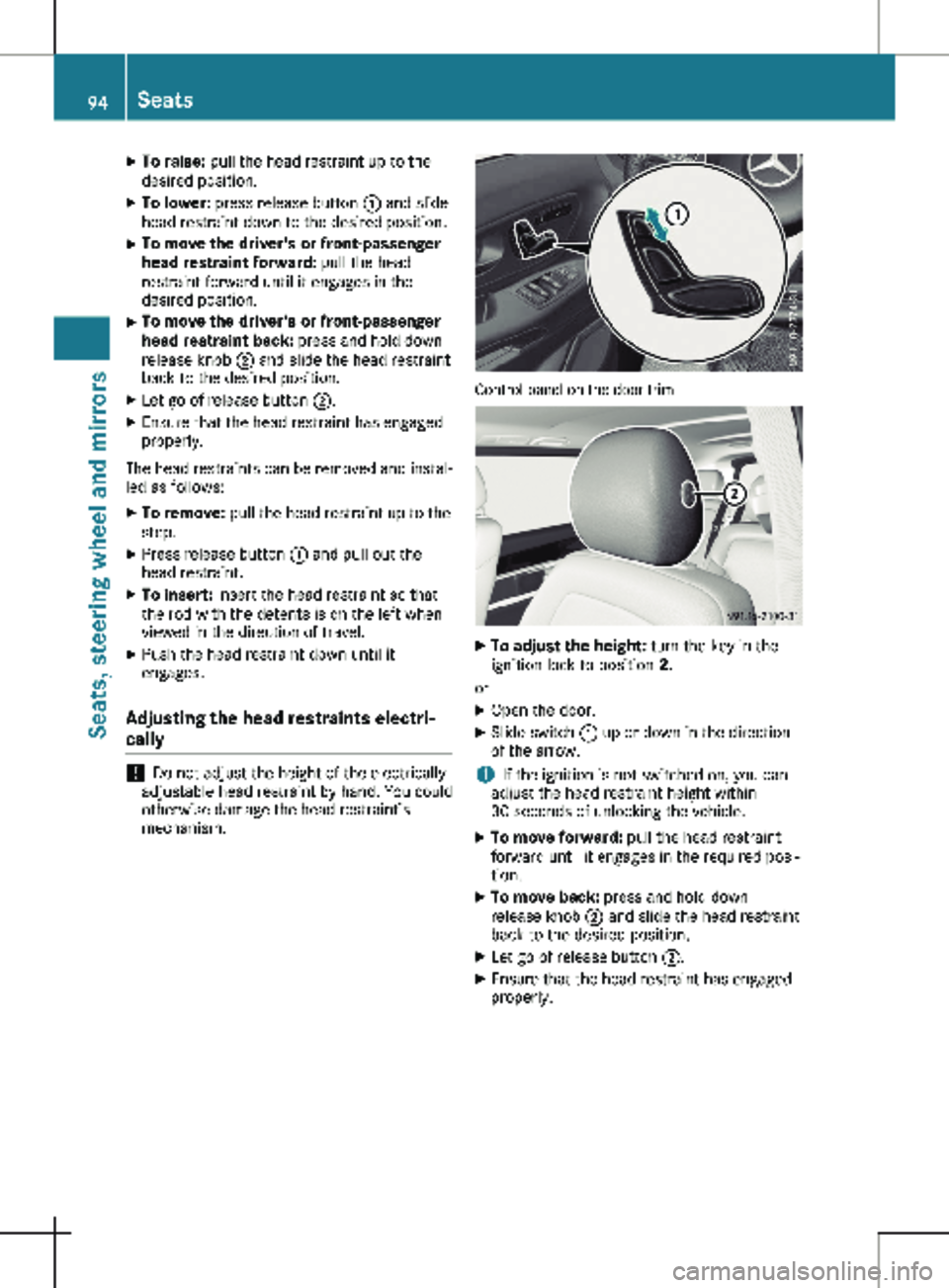
X
To raise: pull the head restraint up to the
desired position.
X To lower: press release button : and slide
head restraint down to the desired position.
X To move the driver's or front-passenger
head restraint forward: pull the head
restraint forward until it engages in the
desired position.
X To move the driver's or front-passenger
head restraint back: press and hold down
release knob ; and slide the head restraint
back to the desired position.
X Let go of release button ;.
X Ensure that the head restraint has engaged
properly.
The head restraints can be removed and instal-
led as follows:
X To remove: pull the head restraint up to the
stop.
X Press release button : and pull out the
head restraint.
X To insert: insert the head restraint so that
the rod with the detents is on the left when
viewed in the direction of travel.
X Push the head restraint down until it
engages.
Adjusting the head restraints electri-
cally !
Do not adjust the height of the electrically
adjustable head restraint by hand. You could
otherwise damage the head restraint’s
mechanism. Control panel on the door trim
X
To adjust the height: turn the key in the
ignition lock to position 2.
or X Open the door.
X Slide switch : up or down in the direction
of the arrow.
i If the ignition is not switched on, you can
adjust the head restraint height within
30 seconds of unlocking the vehicle.
X To move forward: pull the head restraint
forward until it engages in the required posi-
tion.
X To move back: press and hold down
release knob ; and slide the head restraint
back to the desired position.
X Let go of release button ;.
X Ensure that the head restraint has engaged
properly.94
SeatsSeats, steering wheel and mirrors
Page 97 of 320
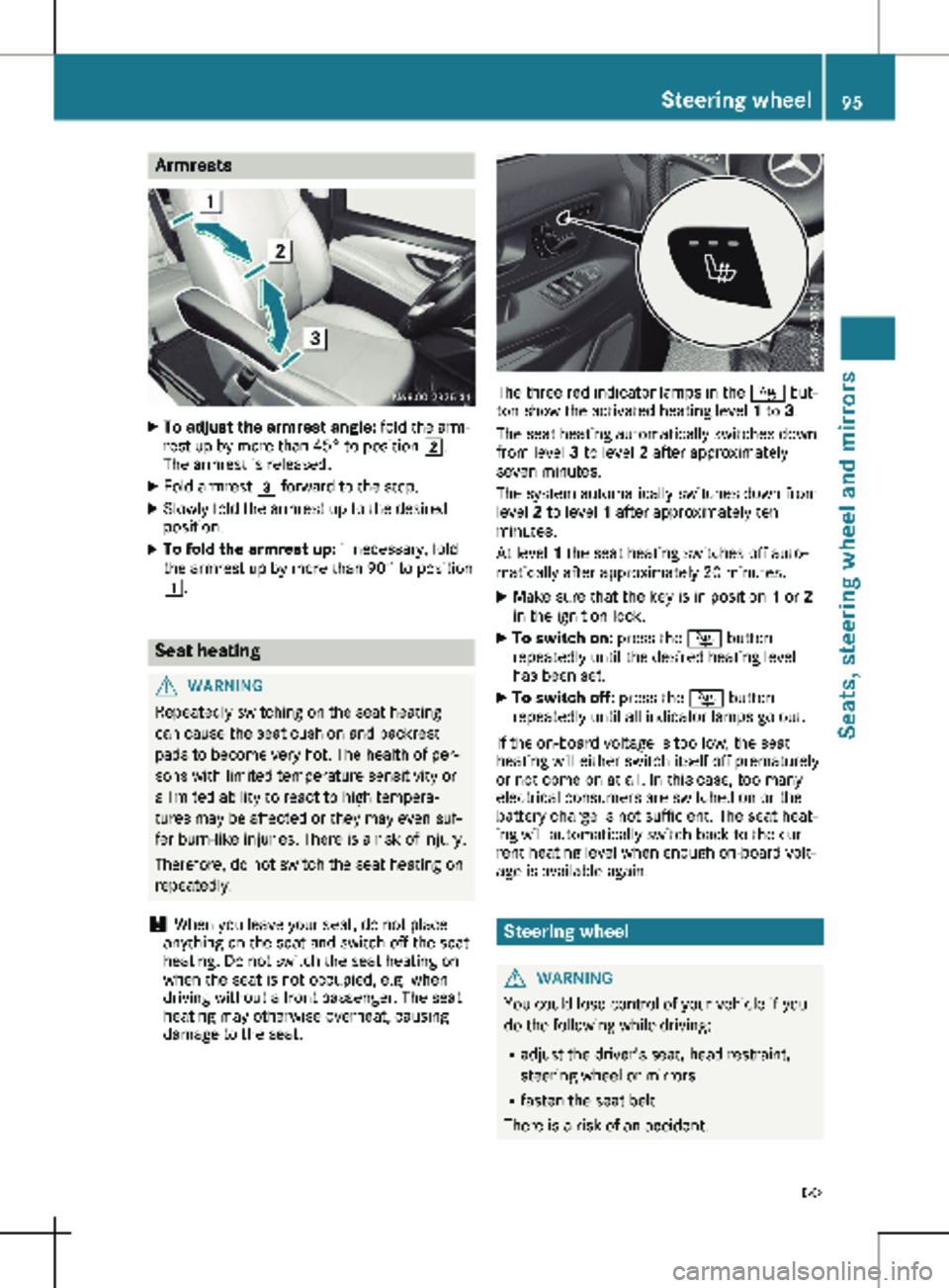
Armrests
X
To adjust the armrest angle: fold the arm-
rest up by more than 45° to position 2.
The armrest is released.
X Fold armrest 3 forward to the stop.
X Slowly fold the armrest up to the desired
position.
X To fold the armrest up: if necessary, fold
the armrest up by more than 90° to position
1. Seat heating
G
WARNING
Repeatedly switching on the seat heating
can cause the seat cushion and backrest
pads to become very hot. The health of per-
sons with limited temperature sensitivity or
a limited ability to react to high tempera-
tures may be affected or they may even suf-
fer burn-like injuries. There is a risk of injury.
Therefore, do not switch the seat heating on
repeatedly.
! When you leave your seat, do not place
anything on the seat and switch off the seat
heating. Do not switch the seat heating on
when the seat is not occupied, e.g. when
driving without a front passenger. The seat
heating may otherwise overheat, causing
damage to the seat. The three red indicator lamps in the
Í but-
ton show the activated heating level 1 to 3.
The seat heating automatically switches down
from level 3 to level 2 after approximately
seven minutes.
The system automatically switches down from
level 2 to level 1 after approximately ten
minutes.
At level 1 the seat heating switches off auto-
matically after approximately
20 minutes.
X Make sure that the key is in position 1 or 2
in the ignition lock.
X To switch on: press the Í button
repeatedly until the desired heating level
has been set.
X To switch off: press the Í button
repeatedly until all indicator lamps go out.
If the on-board voltage is too low, the seat
heating will either switch itself off prematurely
or not come on at all. In this case, too many
electrical consumers are switched on or the
battery charge is not sufficient. The seat heat-
ing will automatically switch back to the cur-
rent heating level when enough on-board volt-
age is available again. Steering wheel
G
WARNING
You could lose control of your vehicle if you
do the following while driving:
R adjust the driver's seat, head restraint,
steering wheel or mirrors
R fasten the seat belt
There is a risk of an accident. Steering wheel
95
Seats, steering wheel and mirrors
Z
Page 98 of 320
Adjust the driver's seat, head restraint,
steering wheel and mirror and fasten your
seat belt before starting the engine.
G
WARNING
If the steering wheel is unlocked while the
vehicle is in motion, it could change position
unexpectedly. This could cause you to lose
control of the vehicle. There is a risk of an
accident.
Before starting off, make sure the steering
wheel is locked. Never unlock the steering
wheel while the vehicle is in motion. G
WARNING
Children could injure themselves if they
adjust the steering wheel. There is a risk of
injury.
When leaving the vehicle, always take the
SmartKey with you and lock the vehicle.
Never leave children unsupervised in the
vehicle.
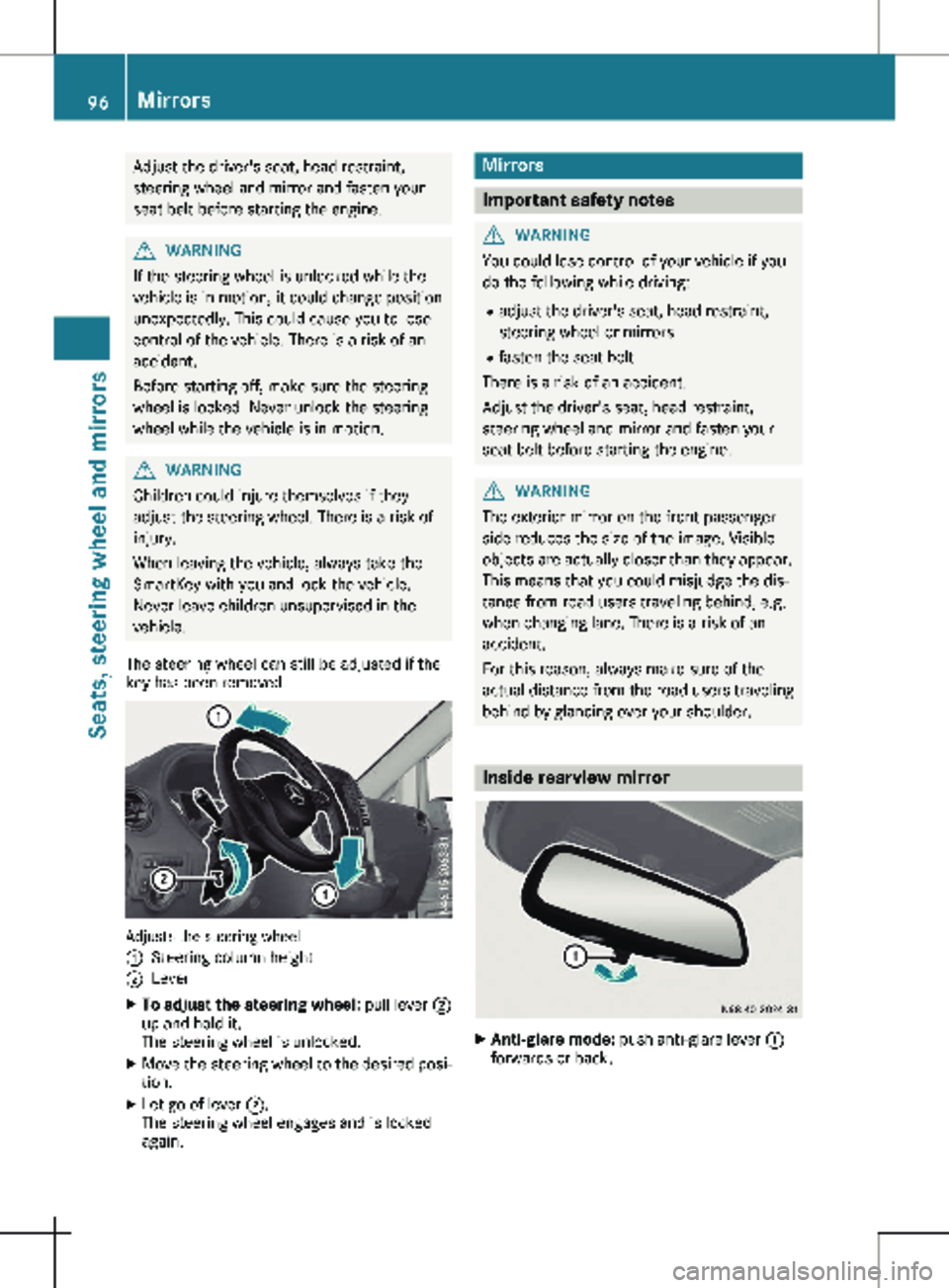
The steering wheel can still be adjusted if the
key has been removed. Adjusts the steering wheel
:
Steering column height
; Lever
X To adjust the steering wheel: pull lever ;
up and hold it.
The steering wheel is unlocked.
X Move the steering wheel to the desired posi-
tion.
X Let go of lever ;.
The steering wheel engages and is locked
again. Mirrors
Important safety notes
G
WARNING
You could lose control of your vehicle if you
do the following while driving:
R adjust the driver's seat, head restraint,
steering wheel or mirrors
R fasten the seat belt
There is a risk of an accident.
Adjust the driver's seat, head restraint,
steering wheel and mirror and fasten your
seat belt before starting the engine. G
WARNING
The exterior mirror on the front-passenger
side reduces the size of the image. Visible
objects are actually closer than they appear.
This means that you could misjudge the dis-
tance from road users traveling behind, e.g.
when changing lane. There is a risk of an
accident.
For this reason, always make sure of the
actual distance from the road users traveling
behind by glancing over your shoulder. Inside rearview mirror
X
Anti-glare mode: push anti-glare lever :
forwards or back. 96
MirrorsSeats, steering wheel and mirrors
Page 99 of 320
Exterior mirrors
Adjusting manually X
Before starting off, manually adjust the exte-
rior mirrors in such a way that you can get a
good overview of road and traffic conditions.
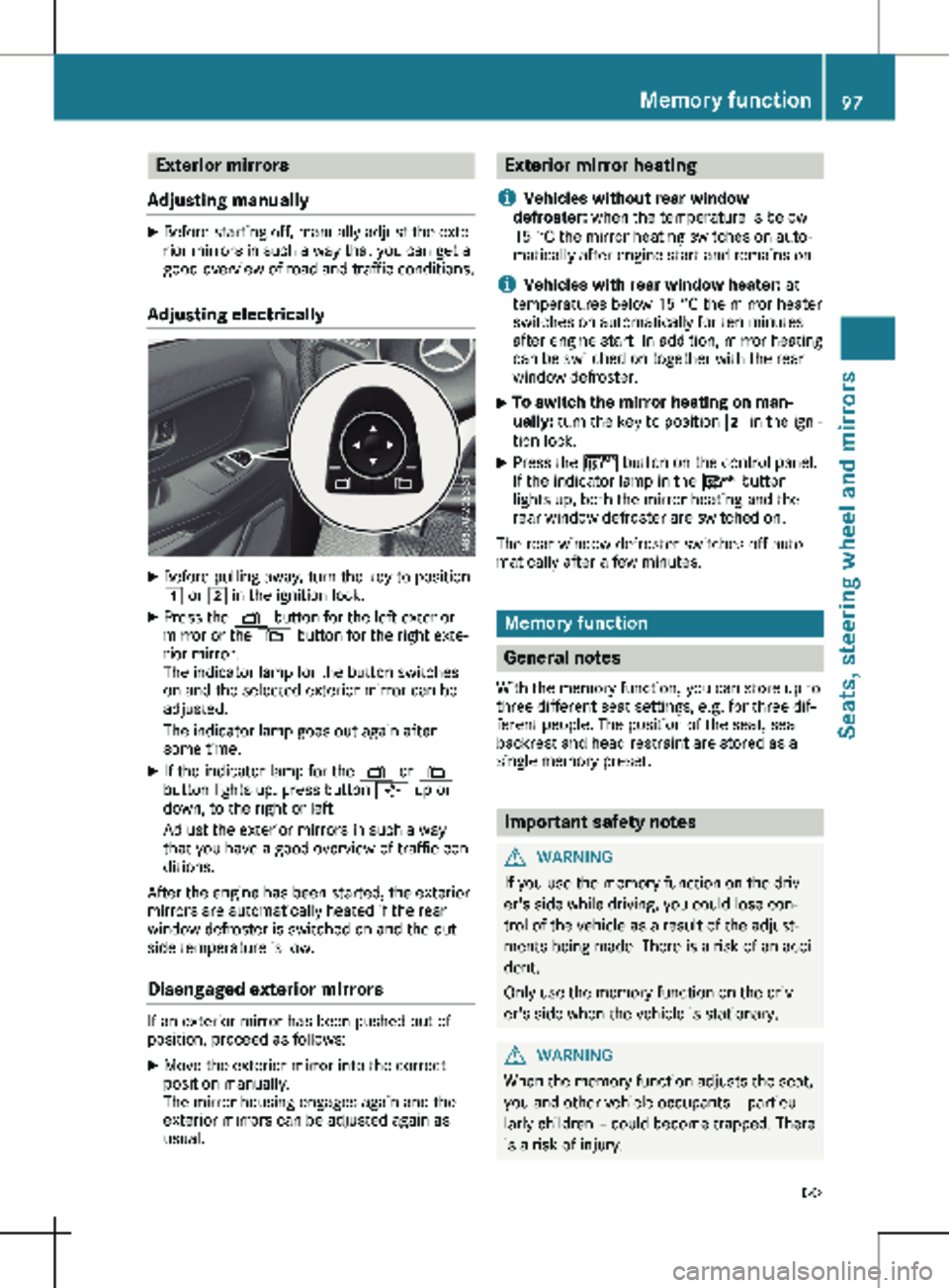
Adjusting electrically X
Before pulling away, turn the key to position
1 or 2 in the ignition lock.
X Press the Z button for the left exterior
mirror or the \ button for the right exte-
rior mirror.
The indicator lamp for the button switches
on and the selected exterior mirror can be
adjusted.
The indicator lamp goes out again after
some time.
X If the indicator lamp for the Z or \
button lights up, press button 7 up or
down, to the right or left.
Adjust the exterior mirrors in such a way
that you have a good overview of traffic con-
ditions.
After the engine has been started, the exterior
mirrors are automatically heated if the rear
window defroster is switched on and the out-
side temperature is low.
Disengaged exterior mirrors If an exterior mirror has been pushed out of
position, proceed as follows:
X
Move the exterior mirror into the correct
position manually.
The mirror housing engages again and the
exterior mirrors can be adjusted again as
usual. Exterior mirror heating
i Vehicles without rear window
defroster: when the temperature is below
15 °C the mirror heating switches on auto-
matically after engine start and remains on.
i Vehicles with rear window heater: at
temperatures below
15 °C the mirror heater
switches on automatically for ten minutes
after engine start. In addition, mirror heating
can be switched on together with the rear
window defroster.
X To switch the mirror heating on man-
ually:
turn the key to position 2 in the igni-
tion lock.
X Press the ¤ button on the control panel.
If the indicator lamp in the ¤ button
lights up, both the mirror heating and the
rear window defroster are switched on.
The rear window defroster switches off auto-
matically after a few minutes. Memory function
General notes
With the memory function, you can store up to
three different seat settings, e.g. for three dif-
ferent people. The position of the seat, seat
backrest and head restraint are stored as a
single memory preset. Important safety notes
G
WARNING
If you use the memory function on the driv-
er's side while driving, you could lose con-
trol of the vehicle as a result of the adjust-
ments being made. There is a risk of an acci-
dent.
Only use the memory function on the driv-
er's side when the vehicle is stationary. G
WARNING
When the memory function adjusts the seat,
you and other vehicle occupants – particu-
larly children – could become trapped. There
is a risk of injury. Memory function
97
Seats, steering wheel and mirrors
Z
Page 100 of 320
While the memory function is making adjust-
ments, make sure that no one has any body
parts in the sweep of the seat. If somebody
becomes trapped, immediately release the
memory function position button. The
adjustment process is stopped. G
WARNING
Children could become trapped if they acti-
vate the memory function, particularly when
unattended. There is a risk of injury.
When leaving the vehicle, always take the
SmartKey with you and lock the vehicle.
Never leave children unsupervised in the
vehicle.
The memory function can be used at any time,
for example even when the key has been
removed from the ignition lock. Storing settings
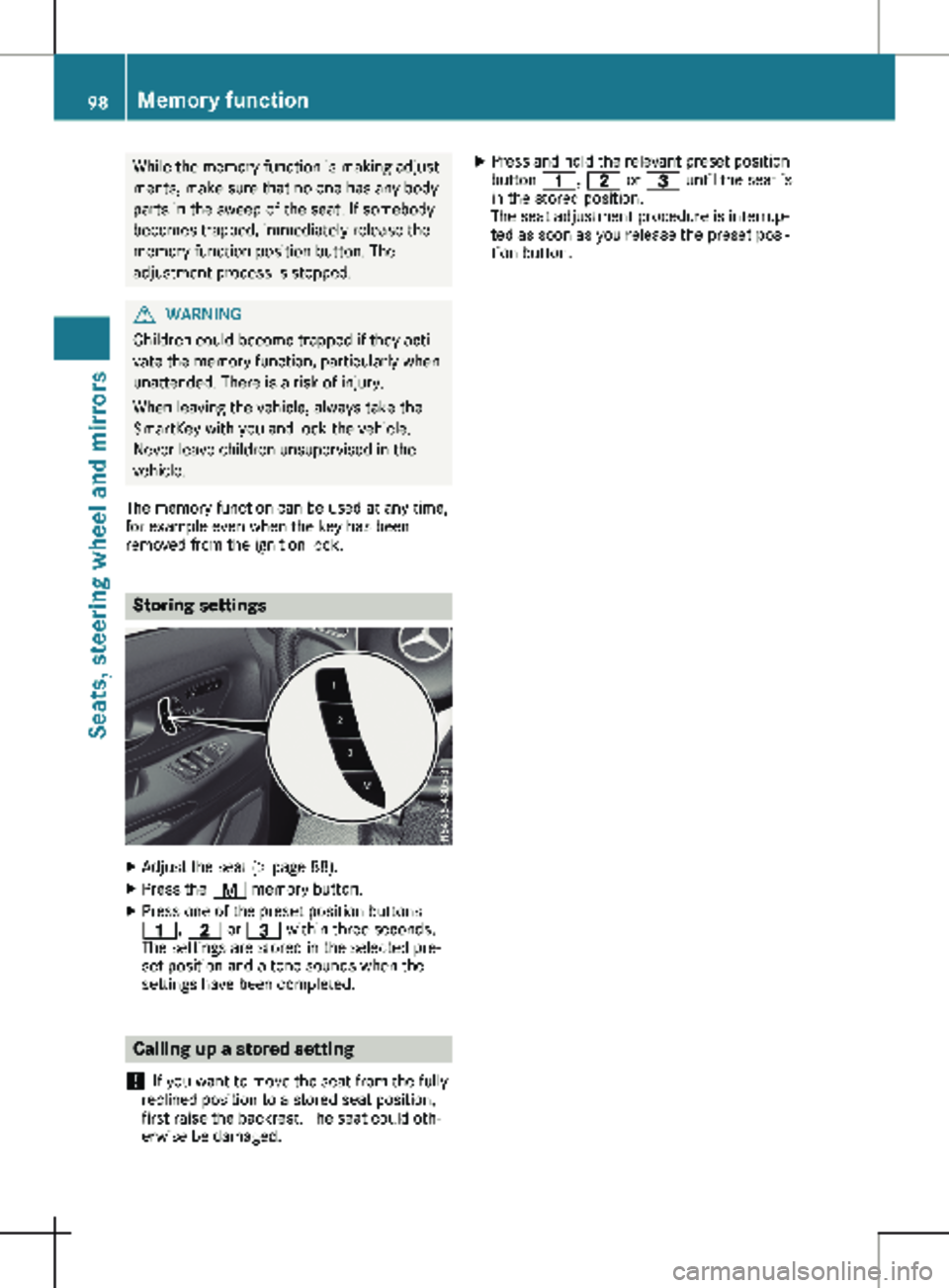
X
Adjust the seat (Y page 88).
X Press the r memory button.
X Press one of the preset position buttons
4, 5 or = within three seconds.
The settings are stored in the selected pre-
set position and a tone sounds when the
settings have been completed. Calling up a stored setting
! If you want to move the seat from the fully
reclined position to a stored seat position,
first raise the backrest. The seat could oth-
erwise be damaged. X
Press and hold the relevant preset position
button 4, 5 or = until the seat is
in the stored position.
The seat adjustment procedure is interrup-
ted as soon as you release the preset posi-
tion button. 98
Memory function
Seats, steering wheel and mirrors
Page 104 of 320
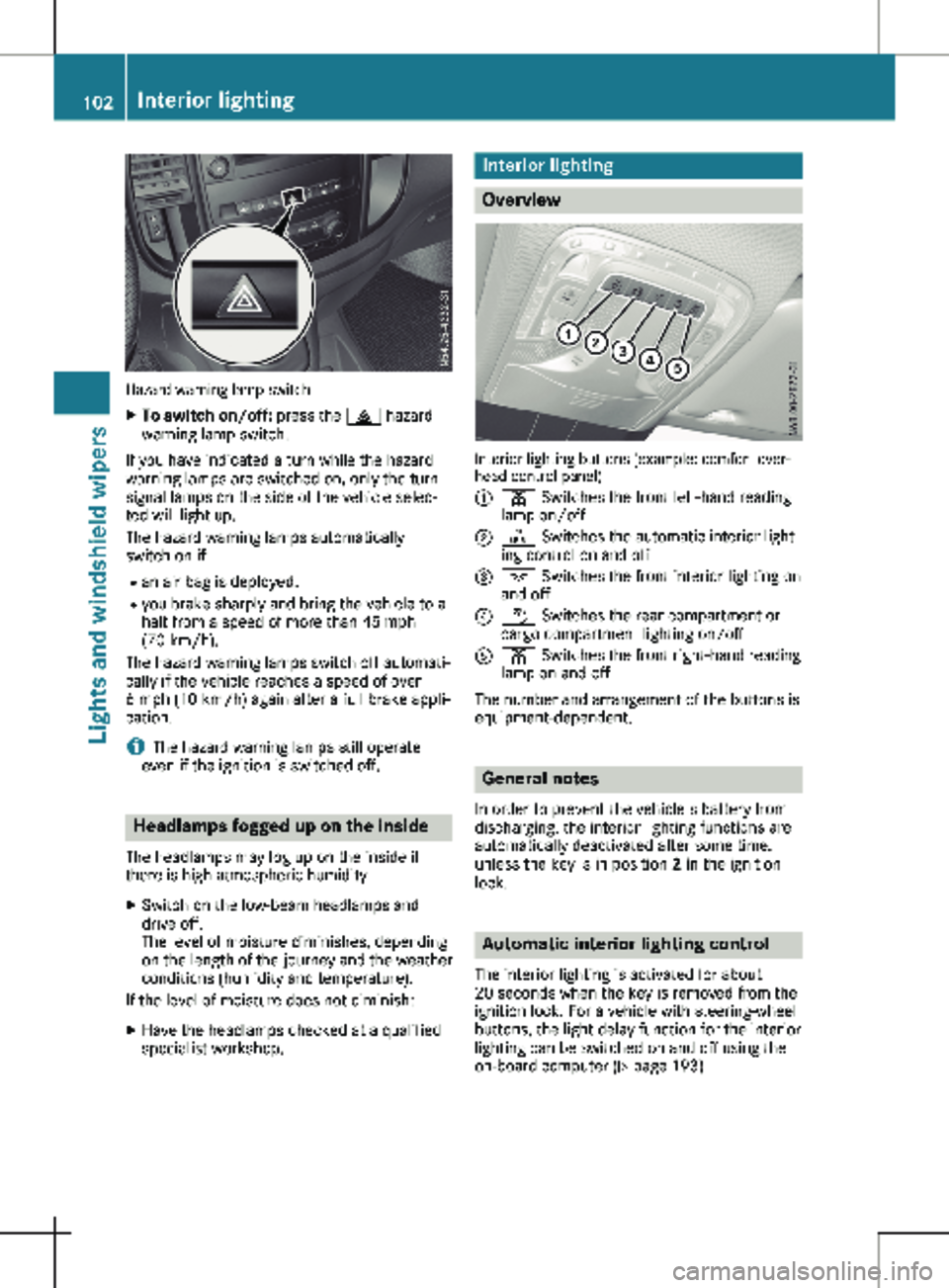
Hazard warning lamp switch
X
To switch on/off: press the £ hazard
warning lamp switch.
If you have indicated a turn while the hazard
warning lamps are switched on, only the turn
signal lamps on the side of the vehicle selec-
ted will light up.
The hazard warning lamps automatically
switch on if: R an air bag is deployed.
R you brake sharply and bring the vehicle to a
halt from a speed of more than 45 mph
(70 km/h
).
The hazard warning lamps switch off automati-
cally if the vehicle reaches a speed of over
6 mph (10 km/h) again after a full brake appli-
cation.
i The hazard warning lamps still operate
even if the ignition is switched off. Headlamps fogged up on the inside
The headlamps may fog up on the inside if
there is high atmospheric humidity.
X Switch on the low-beam headlamps and
drive off.
The level of moisture diminishes, depending
on the length of the journey and the weather
conditions (humidity and temperature).
If the level of moisture does not diminish:
X Have the headlamps checked at a qualified
specialist workshop. Interior lighting
Overview
Interior lighting buttons (example: comfort over-
head control panel)
:
p Switches the front left-hand reading
lamp on/off
; | Switches the automatic interior light-
ing control on and off
= c Switches the front interior lighting on
and off
? w Switches the rear compartment or
cargo compartment lighting on/off
A p Switches the front right-hand reading
lamp on and off
The number and arrangement of the buttons is
equipment-dependent. General notes
In order to prevent the vehicle's battery from
discharging, the interior lighting functions are
automatically deactivated after some time,
unless the key is in position 2 in the ignition
lock. Automatic interior lighting control
The interior lighting is activated for about
20 seconds
when the key is removed from the
ignition lock. For a vehicle with steering-wheel
buttons, the light delay function for the interior
lighting can be switched on and off using the
on-board computer ( Y page 193)102
Interior lighting
Lights and windshield wipers
Page 108 of 320
R
Have lamps with LED bulbs repaired at a
qualified specialist workshop only.
R Have the bulbs of the following lamps
replaced at a qualified specialist workshop
only:
- Additional brake lamps
- The license plate lighting
- Front fog lamp
- Side marker lamp
Please also observe the notes on the inte-
rior lights
(Y page 103).
If you require assistance changing bulbs, con-
sult a qualified specialist workshop. Front lamp clusters
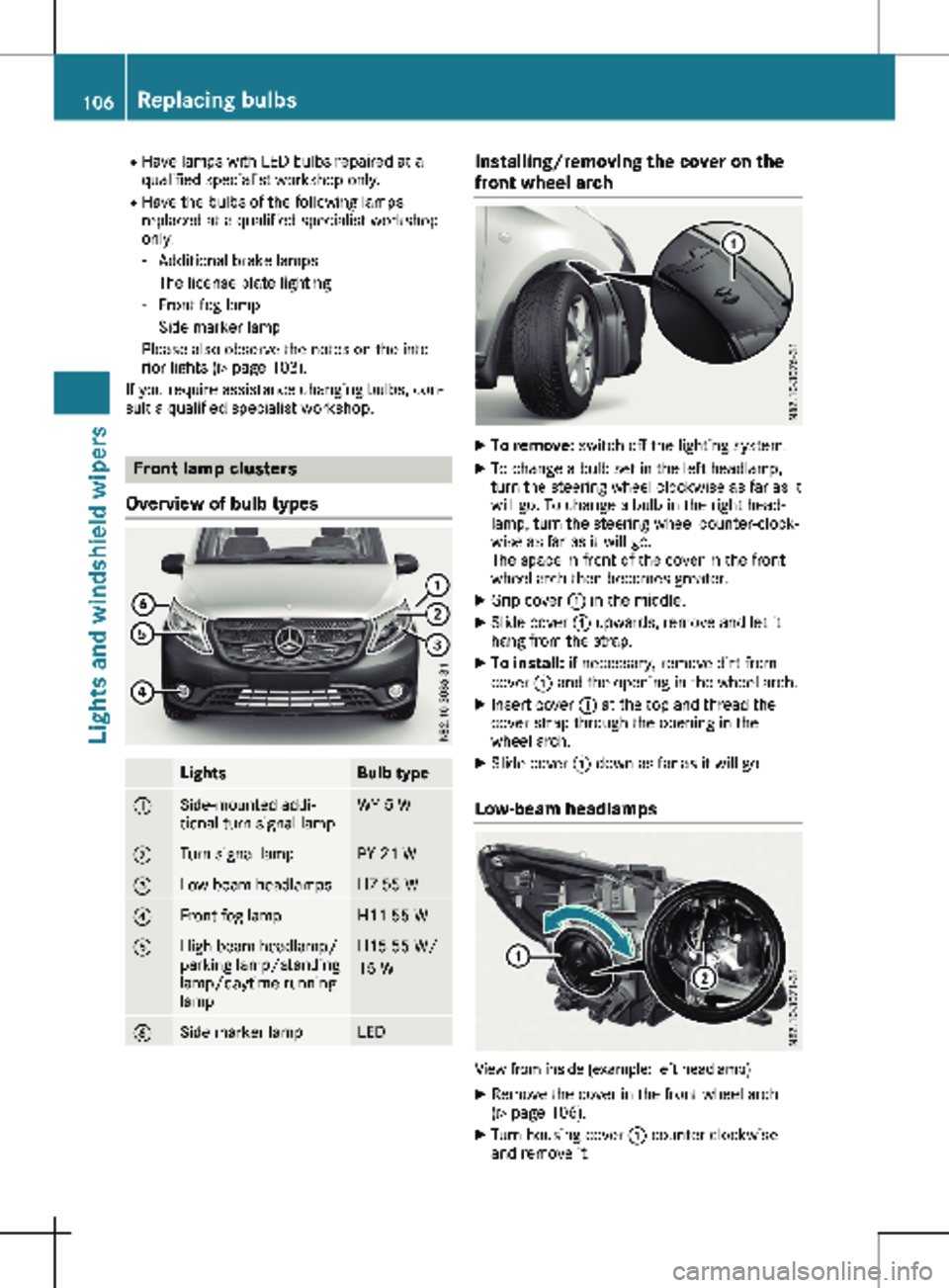
Overview of bulb types Lights Bulb type
:
Side-mounted addi-
tional turn signal lamp WY 5 W
;
Turn signal lamp PY 21 W
=
Low-beam headlamps H7 55 W
?
Front fog lamp H11 55 W
A
High-beam headlamp/
parking lamp/standing
lamp/daytime running
lamp H15 55 W/
15 W
B
Side marker lamp LED Installing/removing the cover on the
front wheel arch
X
To remove: switch off the lighting system.
X To change a bulb set in the left headlamp,
turn the steering wheel clockwise as far as it
will go. To change a bulb in the right head-
lamp, turn the steering wheel counter-clock-
wise as far as it will go.
The space in front of the cover in the front
wheel arch then becomes greater.
X Grip cover : in the middle.
X Slide cover : upwards, remove and let it
hang from the strap.
X To install: if necessary, remove dirt from
cover : and the opening in the wheel arch.
X Insert cover : at the top and thread the
cover strap through the opening in the
wheel arch.
X Slide cover : down as far as it will go.
Low-beam headlamps View from inside (example: left headlamp)
X Remove the cover in the front wheel arch
(Y page
106).
X Turn housing cover : counter-clockwise
and remove it. 106
Replacing bulbs
Lights and windshield wipers
Page 109 of 320
X
Turn socket ; for low-beam headlamps
counter-clockwise and remove it.
X Remove the bulb from socket ;.
X Insert a new bulb into socket ;.
X Insert socket ; and tighten by turning
clockwise.
X Press on housing cover : and tighten by
turning clockwise.
X Replace the cover in the front wheel arch
(Y page
106).
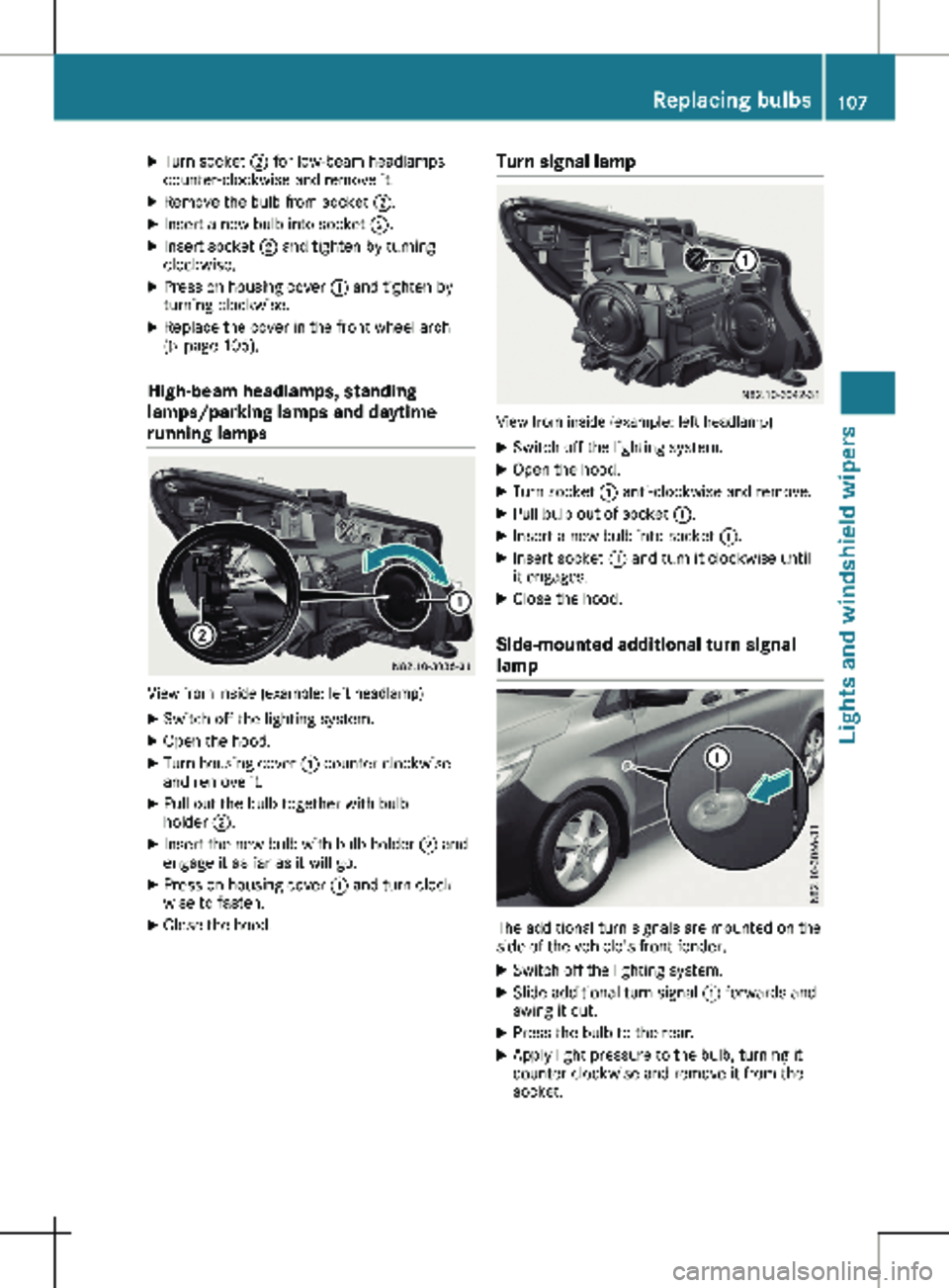
High-beam headlamps, standing
lamps/parking lamps and daytime
running lamps View from inside (example: left headlamp)
X Switch off the lighting system.
X Open the hood.
X Turn housing cover : counter-clockwise
and remove it.
X Pull out the bulb together with bulb
holder ;.
X Insert the new bulb with bulb holder ; and
engage it as far as it will go.
X Press on housing cover : and turn clock-
wise to fasten.
X Close the hood. Turn signal lamp View from inside (example: left headlamp)
X Switch off the lighting system.
X Open the hood.
X Turn socket : anti-clockwise and remove.
X Pull bulb out of socket :.
X Insert a new bulb into socket :.
X Insert socket : and turn it clockwise until
it engages.
X Close the hood.
Side-mounted additional turn signal
lamp The additional turn signals are mounted on the
side of the vehicle's front fender.
X Switch off the lighting system.
X Slide additional turn signal : forwards and
swing it out.
X Press the bulb to the rear.
X Apply light pressure to the bulb, turning it
counter-clockwise and remove it from the
socket. Replacing bulbs
107
Lights and windshield wipers Z
Page 112 of 320

Switching the rear window wiper
on/off
1
b To wipe with washer fluid
2 ° Intermittent wipe
3 $ Rear window wiper off
4 b To wipe with washer fluid
X Turn the key to position 1 or 2 in the igni-
tion lock.
X Move the è switch to the corresponding
position.
If the rear window wiper is activated, the
è symbol is shown in the status area of
the display.
The Status Overview in the Assist.
menu then also shows the è symbol for
vehicles with steering wheel buttons
(Y page
189).
X To wipe with washer fluid: press the è
switch beyond the current position as far as
it will go to 1 or press and hold 4.
When you release the è switch, the rear
window wiper continues to wipe for about
another five seconds. The rear window
wiper then wipes according to the original
position 2 or 3.
The rear window wiper switches on automati-
cally if you engage reverse gear and the wind-
shield wipers are on.
If the vehicle is stationary and you open the
tailgate or rear-end door, the rear window
wiper will stop automatically. The rear window
wiper will only resume wiping again when the
tailgate and rear-end door are closed and you
pull away again.
The rear window will no longer be wiped prop-
erly if the wiper blade is worn. This may pre-
vent you from observing the traffic conditions.
Information on replacing the wiper blade can be found under "Replacing wiper blades"
(
Y page
110). Replacing the wiper blades
Important safety notes G
WARNING
If the windshield wipers begin to move while
you are changing the wiper blades, you
could be trapped by the wiper arm. There is
a risk of injury.
Always switch off the windshield wipers and
ignition before changing the wiper blades.
! Never open the hood/tailgate or rear
doors if a windshield wiper arm has been
folded away from the windshield/rear win-
dow.
Never fold a windshield wiper arm without a
wiper blade back onto the windshield/rear
window.
Hold the windshield wiper arm firmly when
you change the wiper blade. If you release
the windshield wiper arm without a wiper
blade and it falls onto the windshield/rear
window, the windshield/rear window may
be damaged by the force of the impact.
Mercedes-Benz recommends that you have
the wiper blades changed at a qualified spe-
cialist workshop.
! Only hold the wiper blade by the wiper
arm. You could otherwise damage the wiper
rubber.
Wiper blades are wear parts. The windshield
will no longer be wiped properly if the wiper
blades are worn. This may prevent you from
observing the traffic conditions.
Please observe the service indicator after
changing the wiper blades of the windshield
wiper.
Service indicator Replacement wiper blades for the windshield
wiper have a service indicator on the tip of the
wiper blade.
Depending on the amount of use, the service
indicator will change color from black to yel-
low.110
Windshield wipers
Lights and windshield wipers