cruise control MERCEDES-BENZ R-Class 2012 W251 User Guide
[x] Cancel search | Manufacturer: MERCEDES-BENZ, Model Year: 2012, Model line: R-Class, Model: MERCEDES-BENZ R-Class 2012 W251Pages: 368, PDF Size: 15.19 MB
Page 177 of 368
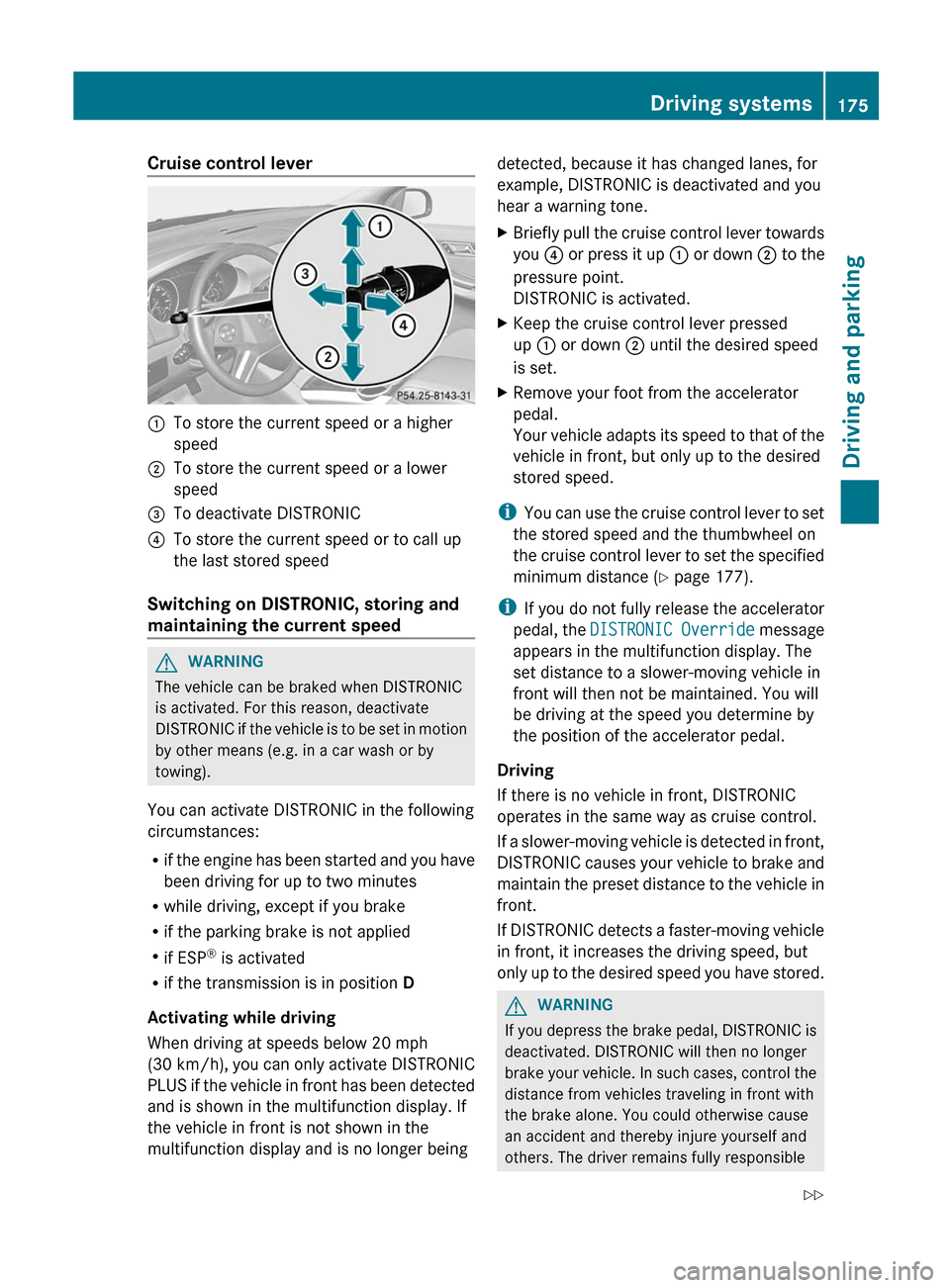
Cruise control lever:To store the current speed or a higher
speed;To store the current speed or a lower
speed=To deactivate DISTRONIC?To store the current speed or to call up
the last stored speed
Switching on DISTRONIC, storing and
maintaining the current speed
GWARNING
The vehicle can be braked when DISTRONIC
is activated. For this reason, deactivate
DISTRONIC if the vehicle is to be set in motion
by other means (e.g. in a car wash or by
towing).
You can activate DISTRONIC in the following
circumstances:
R if the engine has been started and you have
been driving for up to two minutes
R while driving, except if you brake
R if the parking brake is not applied
R if ESP ®
is activated
R if the transmission is in position D
Activating while driving
When driving at speeds below 20 mph
(30 km/h) , you can only activate DISTRONIC
PLUS if the vehicle in front has been detected
and is shown in the multifunction display. If
the vehicle in front is not shown in the
multifunction display and is no longer being
detected, because it has changed lanes, for
example, DISTRONIC is deactivated and you
hear a warning tone.XBriefly pull the cruise control lever towards
you ? or press it up : or down ; to the
pressure point.
DISTRONIC is activated.XKeep the cruise control lever pressed
up : or down ; until the desired speed
is set.XRemove your foot from the accelerator
pedal.
Your vehicle adapts its speed to that of the
vehicle in front, but only up to the desired
stored speed.
i You can use the cruise control lever to set
the stored speed and the thumbwheel on
the cruise control lever to set the specified
minimum distance ( Y page 177).
i If you do not fully release the accelerator
pedal, the DISTRONIC Override message
appears in the multifunction display. The
set distance to a slower-moving vehicle in
front will then not be maintained. You will
be driving at the speed you determine by
the position of the accelerator pedal.
Driving
If there is no vehicle in front, DISTRONIC
operates in the same way as cruise control.
If a slower-moving vehicle is detected in front,
DISTRONIC causes your vehicle to brake and
maintain the preset distance to the vehicle in
front.
If DISTRONIC detects a faster-moving vehicle
in front, it increases the driving speed, but
only up to the desired speed you have stored.
GWARNING
If you depress the brake pedal, DISTRONIC is
deactivated. DISTRONIC will then no longer
brake your vehicle. In such cases, control the
distance from vehicles traveling in front with
the brake alone. You could otherwise cause
an accident and thereby injure yourself and
others. The driver remains fully responsible
Driving systems175Driving and parkingZ
Page 178 of 368
for the vehicle's distance from other vehicles,
the speed being driven and for braking in good
time.
StoppingGWARNING
DISTRONIC must never be operated,
activated or deactivated by a passenger or
from outside the vehicle.
If DISTRONIC detects that the vehicle in front
is stopping, it brakes your vehicle until it is
stationary.
i Depending on the specified minimum
distance, your vehicle will come to a
standstill at a sufficient distance behind the
vehicle in front. The specified minimum
distance is set using the thumbwheel on
the cruise-control lever.
DISTRONIC is deactivated automatically
when stopping:
R on flat stretches of road or on downhill
gradients when the vehicle is stationary
R while the vehicle is still moving on uphill
gradients, to prevent the vehicle from
unexpectedly rolling back when
DISTRONIC is deactivated
If DISTRONIC is deactivated, you will hear a
warning tone.
XTo prevent the vehicle from rolling away,
apply the foot brake or parking brake.
Setting a speed
GWARNING
Keep in mind that it may take a brief moment
until the vehicle has made the necessary
adjustments.
Increase or decrease the set vehicle speed to
a value that the prevailing road conditions and
legal speed limits permit. Otherwise, sudden
and unexpected acceleration or deceleration
of the vehicle could cause an accident and/
or serious injury to you and others.
XPress the cruise control lever to the
pressure point, up : for a higher speed or
down ; for a lower speed.XKeep the cruise control lever pressed until
the desired speed is reached.XRelease the cruise control lever.
The new speed is stored. DISTRONIC is
activated and adjusts the vehicle's speed
to the new speed stored.
Making adjustments in 1 mph (Canada:
1 km/h) increments
XBriefly press the cruise control lever to the
pressure point, up : for a higher speed or
down ; for a lower speed.
The last speed stored is increased or
reduced.
Making adjustments in 5 mph (Canada:
10 km/h) increments
XBriefly press the cruise control lever
beyond the pressure point, up : for a
higher speed or down ; for a lower speed.
The last speed stored is increased or
reduced.
Storing the current speed or calling up
the last stored speed
GWARNING
The set speed stored in memory should only
be set again if prevailing road conditions and
legal speed limits permit. Possible
acceleration or deceleration differences
arising from returning to the preset speed
could cause an accident and/or serious injury
to you and others.
XBriefly pull the cruise control lever towards
you ?.XRemove your foot from the accelerator
pedal.
DISTRONIC is activated and accepts the
current speed if it is activated for the first176Driving systemsDriving and parking
Page 180 of 368
GWARNING
DISTRONIC brakes your vehicle with a
maximum deceleration of 13 ft/s 2
(4 m/s 2
).
This corresponds to approximately 40% of
your vehicle's maximum possible braking
power.
You must apply the brakes yourself to avoid a
collision. DISTRONIC brakes the vehicle to
restore the set distance to the vehicle in front
or to restore the set speed. In this case, the
brake pedal is depressed automatically,
which can be seen by a movement of the
brake pedal.
Always keep the driver's footwell clear,
including the area under the brake pedal.
Objects in this area may impair pedal
movement and cause the DISTRONIC braking
function to malfunction.
Do not place your foot under the brake pedal
– your foot could become caught.
DISTRONIC displays in the
multifunction display
XPress the V or U button to select the
DISTRONIC menu (Y page 201).
Display when DISTRONIC is deactivated
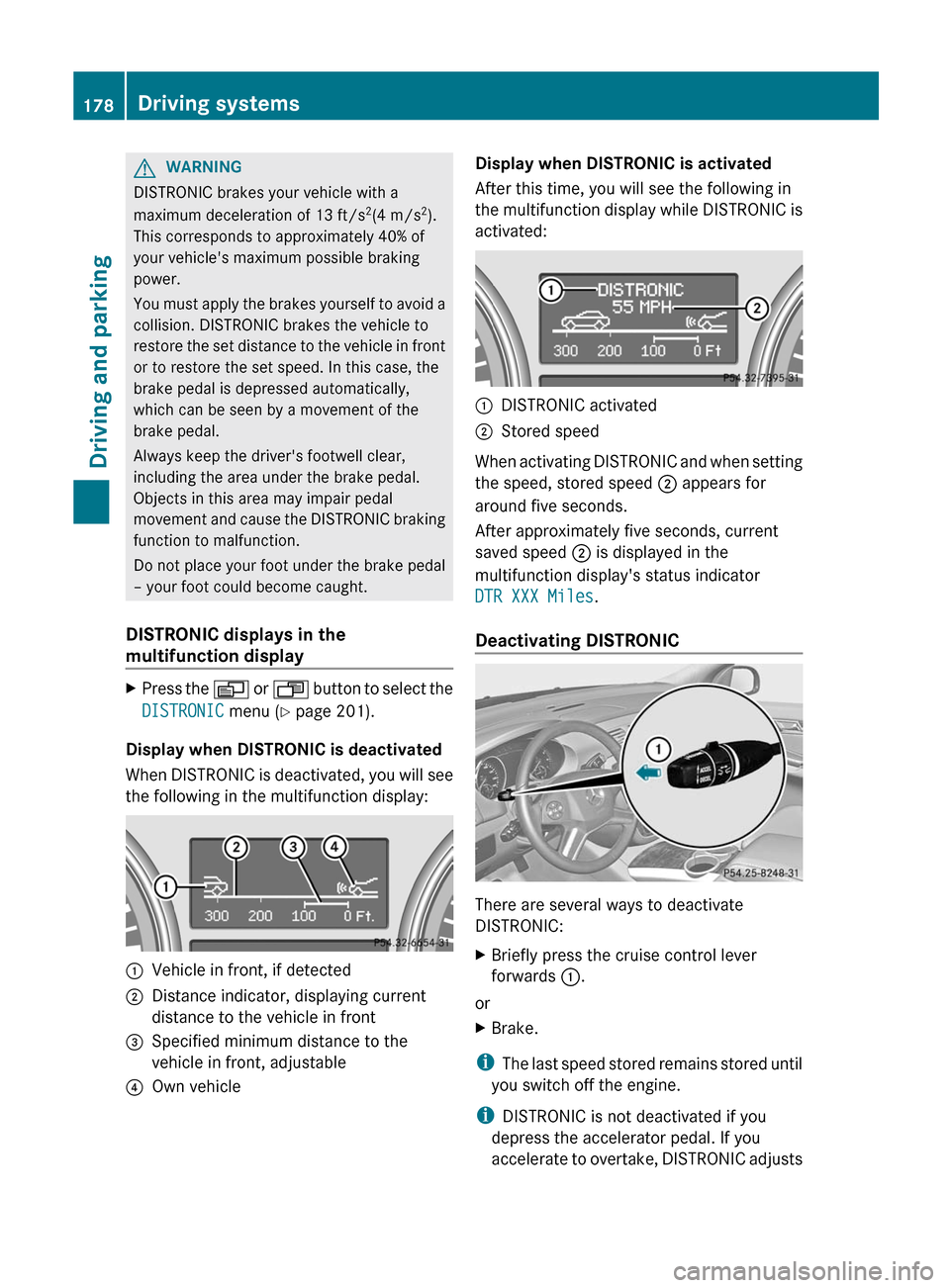
When DISTRONIC is deactivated, you will see
the following in the multifunction display:
:Vehicle in front, if detected;Distance indicator, displaying current
distance to the vehicle in front=Specified minimum distance to the
vehicle in front, adjustable?Own vehicleDisplay when DISTRONIC is activated
After this time, you will see the following in
the multifunction display while DISTRONIC is
activated::DISTRONIC activated;Stored speed
When activating DISTRONIC and when setting
the speed, stored speed ; appears for
around five seconds.
After approximately five seconds, current
saved speed ; is displayed in the
multifunction display's status indicator
DTR XXX Miles .
Deactivating DISTRONIC
There are several ways to deactivate
DISTRONIC:
XBriefly press the cruise control lever
forwards :.
or
XBrake.
i
The last speed stored remains stored until
you switch off the engine.
i DISTRONIC is not deactivated if you
depress the accelerator pedal. If you
accelerate to overtake, DISTRONIC adjusts
178Driving systemsDriving and parking
Page 232 of 368
Display messagesPossible causes/consequences and M SolutionsBlind Spot Assist
Currently
Unavailable, See
Operator's ManualBlind Spot Assist is temporarily inoperative if:
R the sensors are dirty.
R its function is impaired due to heavy rain or snow.
R the radar sensor system is outside the operating temperature
range.
R the radar sensor system is temporarily inoperative, e.g. due to
electromagnetic radiation emitted by nearby TV or radio
stations or other sources of electromagnetic radiation.
The yellow 9 indicator lamps also light up in the exterior
mirrors.
Blind Spot Assist is operational again and the display message
disappears if:
R the dirt (e.g. slush) drops away while the vehicle is in motion.
R the system detects that the sensors are fully available again.
R the radar sensor system is back within the operating
temperature range.
If the display message continues to be displayed:XClean the sensors ( Y page 291).XRestart the engine.Blind Spot Assist
InoperativeBlind Spot Assist is defective.
The yellow 9 indicator lamps also light up in the exterior
mirrors.XVisit a qualified specialist workshop.Cruise Control
InoperativeCruise control is defective.XVisit a qualified specialist workshop.Cruise Control
--- MPH A condition for activating cruise control has not been fulfilled.
You attempted to save a speed of less than 20 mph (30 km/h).XIf the situation allows, drive faster than 20 mph ( 30 km/h) and
save the speed.XCheck the activation conditions for cruise control
( Y page 170).DISTRONIC
--- MPH An activation condition for DISTRONIC is not fulfilled.XCheck the activation conditions for DISTRONIC ( Y page 173).DISTRONIC
OverrideDISTRONIC is no longer controlling the speed of the vehicle.XTake your foot off the accelerator pedal.230Display messagesOn-board computer and displays
Page 243 of 368
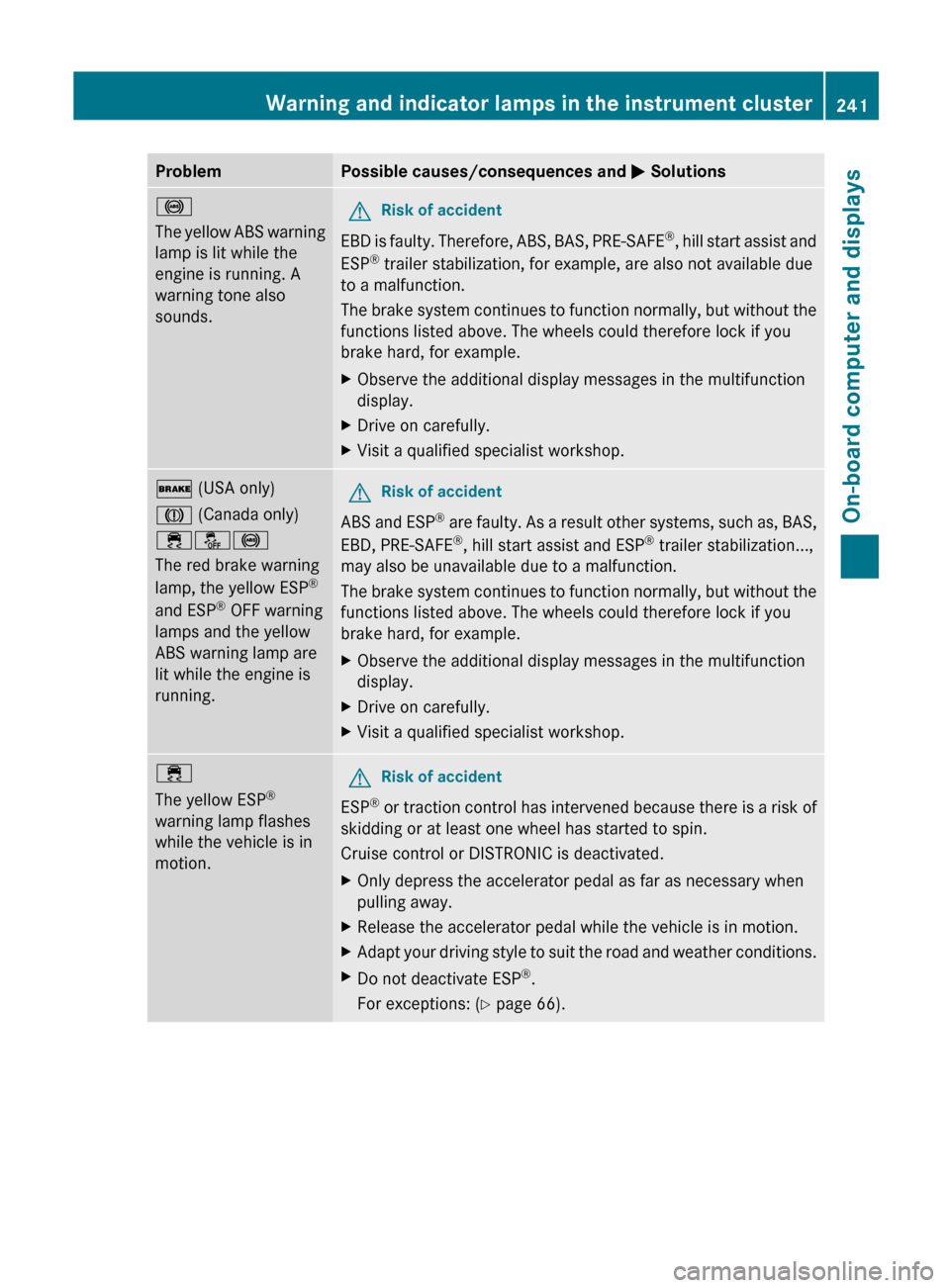
ProblemPossible causes/consequences and M Solutions!
The yellow ABS warning
lamp is lit while the
engine is running. A
warning tone also
sounds.GRisk of accident
EBD is faulty. Therefore, ABS, BAS, PRE-SAFE ®
, hill start assist and
ESP ®
trailer stabilization, for example, are also not available due
to a malfunction.
The brake system continues to function normally, but without the
functions listed above. The wheels could therefore lock if you
brake hard, for example.
XObserve the additional display messages in the multifunction
display.XDrive on carefully.XVisit a qualified specialist workshop.$ (USA only)
J (Canada only)
֌!
The red brake warning
lamp, the yellow ESP ®
and ESP ®
OFF warning
lamps and the yellow
ABS warning lamp are
lit while the engine is
running.GRisk of accident
ABS and ESP ®
are faulty. As a result other systems, such as, BAS,
EBD, PRE-SAFE ®
, hill start assist and ESP ®
trailer stabilization...,
may also be unavailable due to a malfunction.
The brake system continues to function normally, but without the
functions listed above. The wheels could therefore lock if you
brake hard, for example.
XObserve the additional display messages in the multifunction
display.XDrive on carefully.XVisit a qualified specialist workshop.÷
The yellow ESP ®
warning lamp flashes
while the vehicle is in
motion.GRisk of accident
ESP ®
or traction control has intervened because there is a risk of
skidding or at least one wheel has started to spin.
Cruise control or DISTRONIC is deactivated.
XOnly depress the accelerator pedal as far as necessary when
pulling away.XRelease the accelerator pedal while the vehicle is in motion.XAdapt your driving style to suit the road and weather conditions.XDo not deactivate ESP ®
.
For exceptions: ( Y page 66).Warning and indicator lamps in the instrument cluster241On-board computer and displaysZ