cruise control MERCEDES-BENZ R-Class 2012 W251 Owner's Manual
[x] Cancel search | Manufacturer: MERCEDES-BENZ, Model Year: 2012, Model line: R-Class, Model: MERCEDES-BENZ R-Class 2012 W251Pages: 368, PDF Size: 15.19 MB
Page 9 of 368
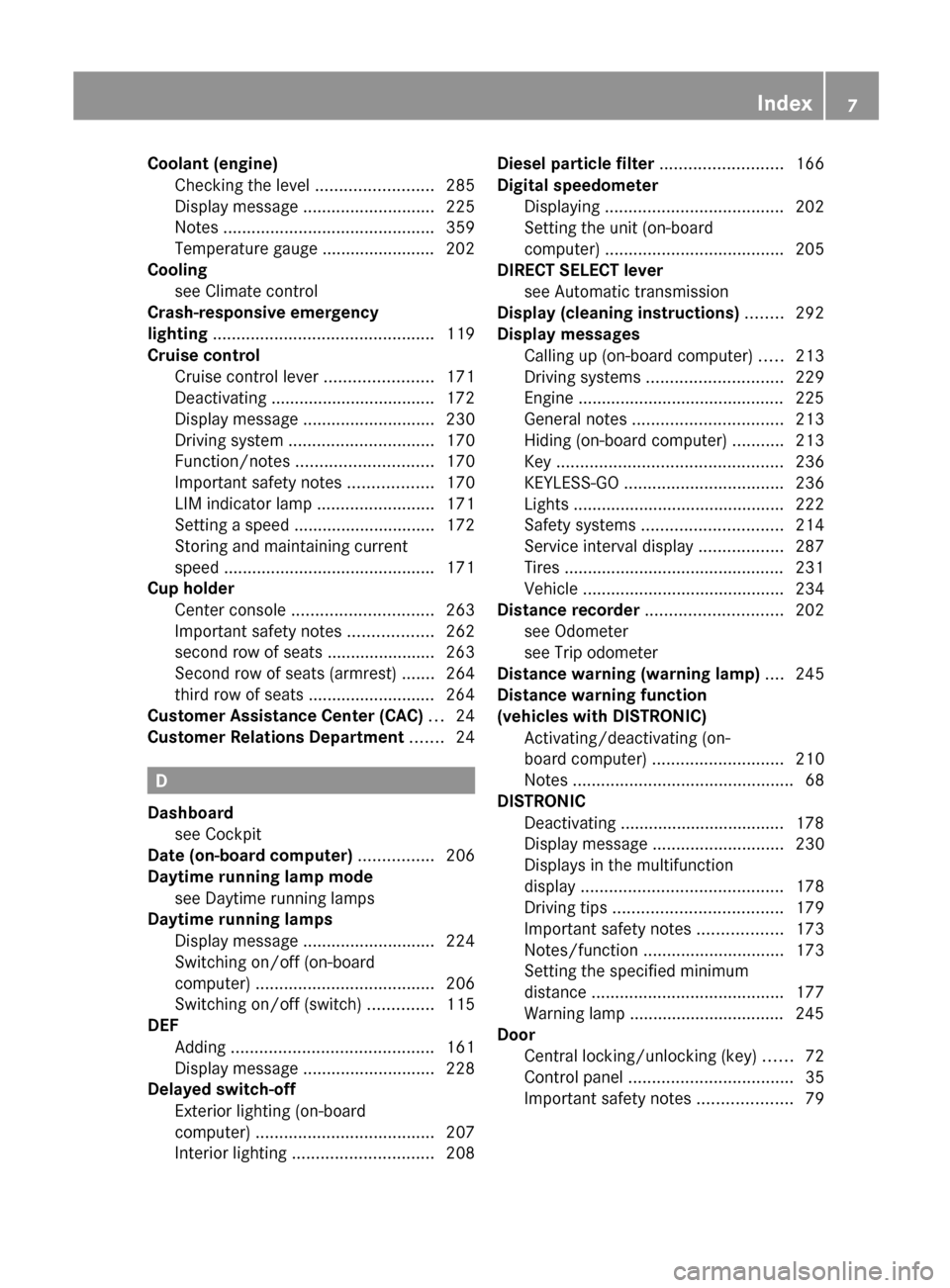
Coolant (engine)Checking the level .........................285
Display message ............................ 225
Notes ............................................. 359
Temperature gauge ........................ 202
Cooling
see Climate control
Crash-responsive emergency
lighting ............................................... 119
Cruise control Cruise control lever .......................171
Deactivating ................................... 172
Display message ............................ 230
Driving system ............................... 170
Function/notes ............................. 170
Important safety notes ..................170
LIM indicator lamp .........................171
Setting a speed .............................. 172
Storing and maintaining current
speed ............................................. 171
Cup holder
Center console .............................. 263
Important safety notes ..................262
second row of seats ....................... 263
Second row of seats (armrest) .......264
third row of seats ........................... 264
Customer Assistance Center (CAC) ... 24
Customer Relations Department ....... 24
D
Dashboard see Cockpit
Date (on-board computer) ................ 206
Daytime running lamp mode see Daytime running lamps
Daytime running lamps
Display message ............................ 224
Switching on/off (on-board
computer) ...................................... 206
Switching on/off (switch) ..............115
DEF
Adding ........................................... 161
Display message ............................ 228
Delayed switch-off
Exterior lighting (on-board
computer) ...................................... 207
Interior lighting .............................. 208
Diesel particle filter .......................... 166
Digital speedometer Displaying ...................................... 202
Setting the unit (on-board
computer) ...................................... 205
DIRECT SELECT lever
see Automatic transmission
Display (cleaning instructions) ........ 292
Display messages Calling up (on-board computer) .....213
Driving systems ............................. 229
Engine ............................................ 225
General notes ................................ 213
Hiding (on-board computer) ...........213
Key ................................................ 236
KEYLESS-GO .................................. 236
Lights ............................................. 222
Safety systems .............................. 214
Service interval display ..................287
Tires ............................................... 231
Vehicle ........................................... 234
Distance recorder ............................. 202
see Odometer
see Trip odometer
Distance warning (warning lamp) .... 245
Distance warning function
(vehicles with DISTRONIC) Activating/deactivating (on-
board computer) ............................ 210
Notes ............................................... 68
DISTRONIC
Deactivating ................................... 178
Display message ............................ 230
Displays in the multifunction
display ........................................... 178
Driving tips .................................... 179
Important safety notes ..................173
Notes/function .............................. 173
Setting the specified minimum
distance ......................................... 177
Warning lamp ................................. 245
Door
Central locking/unlocking (key) ......72
Control panel ................................... 35
Important safety notes ....................79Index7
Page 10 of 368
DoorsAutomatic locking (on-board
computer) ...................................... 208
Automatic locking (switch) ............... 80
Display message ............................ 235
Emergency locking ........................... 81
Emergency unlocking .......................81
Opening (from inside) ......................80
Drinking and driving ......................... 165
Drinks holder see Cup holders
Drive program (automatic) ............... 154
Driver's door see Doors
Driver's seat
see Seats
Driving abroad
Mercedes-Benz Service .................287
Symmetrical low beam ..................114
Driving on flooded roads .................. 168
Driving safety systems 4ETS (Electronic Traction System) ...66
ABS (Anti-lock Braking System) .......65
BAS (Brake Assist System) ..............65
Distance warning system
(vehicles with DISTRONIC) ...............68
Electronic brake force distribution ...68
ESP ®
(Electronic Stability
Program) .......................................... 66
Important safety information ...........64
Overview .......................................... 64
Driving systems
Blind Spot Assist ............................ 189
Cruise control ................................ 170
Display message ............................ 229
DISTRONIC .................................... 173
Level control .................................. 181
PARKTRONIC ................................. 184
Rear axle level control ...................180
Rear view camera .......................... 187
Driving tips
Automatic transmission .................153
Brakes ........................................... 166
Break-in period .............................. 144
DISTRONIC .................................... 179
Downhill gradient ........................... 166
Drinking and driving .......................165Driving abroad ............................... 114
Driving on flooded roads ................168
Driving on wet roads ......................168
Exhaust check ............................... 166
Fuel ................................................ 165
General .......................................... 165
Hydroplaning ................................. 168
Icy road surfaces ........................... 170
Limited braking efficiency on
salted roads ................................... 167
Pedals ............................................ 165
Snow chains .......................... 169, 325
Symmetrical low beam ..................114
Towing a trailer .............................. 191
Wet road surface ........................... 167
DVD audio (on-board computer) ...... 203
E
EASY-ENTRY feature 3rd row of seats ............................. 103
Activating/deactivating .................209
Function/notes ............................. 108
EASY-EXIT feature
3rd row of seats ............................. 103
Crash-responsive ........................... 109
Function/notes ............................. 108
Switching on/off ........................... 209
EBD (electronic brake force
distribution) Display message ............................ 216
Function/notes ................................ 68
Electrical fuses
see Fuses
Electronic Brake force Distribution
see EBD (Electronic Brake force
Distribution)
Electronic Stability Program
see ESP ®
(Electronic Stability Program)
Electronic Traction System
see ETS/4ETS (Electronic
Traction System)
Emergency release
Driver's door .................................... 81
Fuel filler flap ................................. 158
Vehicle ............................................. 81
8Index
Page 13 of 368
Delayed switch-off (on-board
computer) ...................................... 208
Emergency lighting ........................119
Manual control ............................... 119
Overview ........................................ 118
Reading lamp ................................. 118
see Interior lighting
J
Jack Storage location ............................ 296
Using ............................................. 305
Jump starting (engine) ...................... 313
K
Key see SmartKey
KEYLESS-GO
Convenience closing feature ............88
Display message ............................ 236
Locking ............................................ 73
Start/Stop button .......................... 145
Starting the engine ........................147
Unlocking ......................................... 73
Key positions
KEYLESS-GO .................................. 145
SmartKey ....................................... 145
Kickdown ........................................... 153
L
Lamps see Warning and indicator lamps
Lane-change assistant
see Blind Spot Assist
Language (on-board computer) ........ 206
LATCH-type (ISOFIX) child seat
anchors ................................................ 58
Level control (display message) ...... 229
License plate lamp Changing bulbs .............................. 124
Display message ............................ 223
Lighting
see Lights
Lights
Activating/deactivating the
exterior lighting delayed switch-
off .................................................. 207
Activating/deactivating the
interior lighting delayed switch-off . 208
Automatic headlamp mode ............115
Display message ............................ 222
Driving abroad ............................... 114
Fog lamps ...................................... 116
Hazard warning lamps ...................117
High beam flasher .......................... 117
High-beam headlamps ...................117
Light switch ................................... 114
Low-beam headlamps ....................115
Parking lamps ................................ 114
Rear fog lamp ................................ 116
Switching the daytime running
lamps on/off (on-board
computer) ...................................... 206
Switching the daytime running
lamps on/off (switch) ....................115
Switching the surround lighting
on/off (on-board computer) ..........207
Turn signals ................................... 117
see Changing bulbs
see Interior lighting
Light sensor (display message) ....... 225
LIM indicator lamp Cruise control ................................ 171
DISTRONIC .................................... 175
Loading guidelines ............................ 248
Locking see Central locking
Locking (doors)
Automatic ........................................ 80
Emergency locking ........................... 81
From inside (central locking
button) ............................................. 80
Locking centrally
see Central locking
Locking verification signal (on-
board computer) ............................... 208
Low-beam headlamps Changing bulbs .............................. 121
Display message ............................ 222Index11
Page 18 of 368
Door central locking/unlocking .......72
Important safety notes ....................72
Loss ................................................. 78
Mechanical key ................................ 75
Positions (ignition lock) .................145
Problem (malfunction) .....................78
Starting the engine ........................146
Snow chains .............................. 169, 325
Sockets 2nd row of seats ............................ 268
Center console .............................. 268
Front-passenger footwell ...............268
Luggage compartment ...................268
Points to observe before use .........267
Spare wheel
Notes/data .................................... 349
Storage location ............................ 297
Stowing .......................................... 298
see Emergency spare wheel
Specialist workshop ............................ 24
Speed, controlling see Cruise control
Speedometer
Additional speedometer (on-
board computer) ............................ 202
In the Instrument cluster .................29
Segments ...................................... 199
Selecting the unit of
measurement ................................ 205
see Instrument cluster
SRS (Supplemental Restraint
System) Display message ............................ 218
Introduction ..................................... 38
Warning lamp ................................. 243
Warning lamp (function) ................... 38
Standing lamps
Changing bulbs .............................. 122
Display message ............................ 224
Switching on/off ........................... 114
Starting (engine) ................................ 146
Station see Radio
Steering (display message) .............. 235
Steering wheel Adjusting (electrically) ...................108
Adjusting (manually) ......................107
Button overview ............................... 31Buttons (on-board
computer) ...................................... 199
Important safety notes ..................107
Paddle shifters ............................... 153
Steering wheel heating ..................108
Storing settings (memory
function) ........................................ 112
Steering wheel (cleaning
instructions) ...................................... 293
Steering wheel heating Indicator lamp (malfunction) ..........108
Switching on/off ........................... 108
Steering wheel paddle shifters ........ 153
Stowage compartments 3rd row of seats ............................. 250
Armrest (under) ............................. 250
Center air vents (2nd row of
seats) ............................................. 250
Center console (2nd row of seats) . 250
Glove box ....................................... 249
Parcel net ...................................... 251
Stowage space
Center console .............................. 249
Cup holders ................................... 262
Important safety information .........248
Summer opening
see Convenience opening feature
Summer tires ..................................... 324
Sun visor ............................................ 264
Supplement Restraint System see SRS (Supplemental Restraint
System)
Surround lighting (on-board
computer) .......................................... 207
Switching air-recirculation mode
on/off ................................................. 140
Switching off the alarm (ATA) ............ 69
T
Tachometer ........................................ 198
Tailgate Display message ............................ 235
Important safety notes ....................81
Limiting the opening angle ...............85
Opening/closing (automatically
from inside) ...................................... 84
16Index
Page 21 of 368
U
Unlocking Emergency unlocking .......................81
From inside the vehicle (central
unlocking button) ............................. 80
V
Vanity mirror (in sun visor) .............. 265
Vehicle Correct use ...................................... 24
Data acquisition ............................... 25
Display message ............................ 234
Equipment ....................................... 21
Individual settings ..........................205
Limited Warranty ............................. 25
Loading .......................................... 333
Locking (in an emergency) ...............81
Locking (SmartKey) .......................... 73
Lowering ........................................ 309
Maintenance .................................... 22
Parking for a long period ................ 164
Pulling away ................................... 147
Raising ........................................... 305
Reporting problems .........................24
Towing away .................................. 315
Transporting .................................. 316
Unlocking (in an emergency) ...........81
Unlocking (SmartKey) ......................73
Vehicle battery
see Battery (vehicle)
Vehicle dimensions
see Technical data
Vehicle emergency locking ................ 81
Vehicle identification number see VIN
Vehicle identification plate .............. 353
Vehicle level (display message) ....... 229
Vehicle tool kit .................................. 296
Vehicle weights see Technical data
Video (DVD) ........................................ 204
Video DVD (on-board computer) ...... 204
VIN ...................................................... 353
W
Warning and indicator lamps ABS ................................................ 240
Brakes ........................................... 239
Check Engine ................................. 244
Cruise control ................................ 171
Distance warning ........................... 245
ESP ®
.............................................. 241
ESP ®
OFF ....................................... 242
Fuel tank ........................................ 244
LIM (DISTRONIC) ........................... 175
Overview .......................................... 30
Reserve fuel ................................... 244
Seat belt ........................................ 238
SRS ................................................ 243
Tire pressure monitor ....................245
Warranty ............................................ 352
Washer fluid Display message ............................ 236
see Windshield washer system
Weight
see Technical data
Wheel bolt tightening torque ........... 309
Wheel chock ...................................... 304
Wheels Changing/replacing .......................346
Changing a wheel .......................... 303
Checking ........................................ 323
Cleaning ......................................... 289
Important safety notes ..................322
Mounting a wheel .......................... 307
Removing a wheel ..........................306
Storing ........................................... 347
Tightening torque ........................... 309
Wheel size/tire size .......................347
Window curtain air bag ....................... 43
Windows Cleaning ......................................... 291
see Side windows
Windshield
Defrosting ...................................... 138
Infrared reflective .......................... 279
Windshield washer system .............. 285
Notes ............................................. 360
Windshield wipers
Problem (malfunction) ...................126
Rear window wiper ........................125Index19
Page 30 of 368
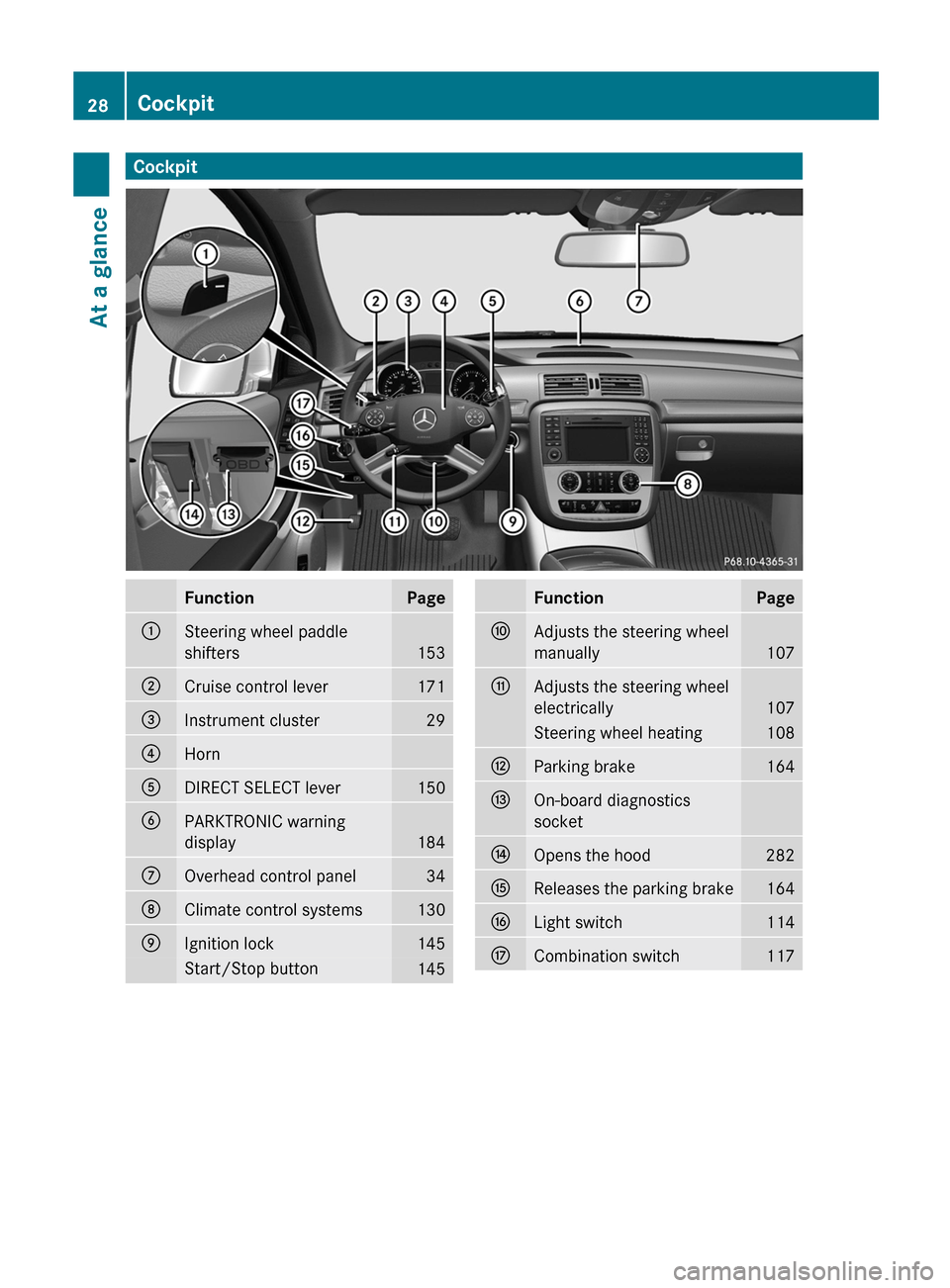
CockpitFunctionPage:Steering wheel paddle
shifters
153
;Cruise control lever171=Instrument cluster29?HornADIRECT SELECT lever150BPARKTRONIC warning
display
184
COverhead control panel34DClimate control systems130EIgnition lock145Start/Stop button145FunctionPageFAdjusts the steering wheel
manually
107
GAdjusts the steering wheel
electrically
107
Steering wheel heating108HParking brake164IOn-board diagnostics
socketJOpens the hood282KReleases the parking brake164LLight switch114MCombination switch11728CockpitAt a glance
Page 172 of 368
If you intend to mount snow chains, please
bear the following points in mind:
R you may not attach snow chains to all
wheel-tire combinations; see the
information under "Wheel and tire
combinations" in the "Wheels and tires"
section.
R mount snow chains only in pairs and only
to the rear wheels. Observe the
manufacturer's installation instructions.
! If snow chains are mounted on the front
wheels, the snow chains could grind
against the bodywork or components of the
chassis. This could result in damage to the
vehicle or the tires.
! Vehicles with steel wheels: if you wish
to install snow chains to steel wheels, make
sure that you remove the respective
wheels' hubcaps first. The hubcaps may
otherwise be damaged.
i You may wish to deactivate
ESP ®
(Y page 66) when pulling away with
snow chains mounted. This way you can
allow the wheels to spin in a controlled
manner, achieving an increased driving
force (cutting action).
Slippery road surfacesGWARNING
The outside temperature indicator is not
designed to serve as an ice-warning device
and is therefore unsuitable for that purpose.
Indicated temperatures just above the
freezing point do not guarantee that the road
surface is free of ice. The road may still be icy,
especially in wooded areas or on bridges.
GWARNING
On slippery road surfaces, never downshift in
order to obtain braking action. This could
result in drive wheel slip and reduced vehicle
control. Your vehicle's ABS will not prevent
this type of loss of control.
Drive particularly carefully on slippery road
surfaces. Avoid sudden acceleration, steering
and braking maneuvers. Do not use cruise
control.
If the vehicle threatens to skid or cannot be
stopped when moving at low speed:XShift the transmission to position N.
i
For more information on driving with
snow chains, see ( Y page 169).
GWARNING
Make sure that you do not endanger other
road users when you apply the brakes.
Driving systems
Cruise control
Important safety notes
Cruise control maintains a constant road
speed for you. It brakes automatically in order
to avoid exceeding the set speed. On long and
steep downhill gradients, especially if the
vehicle is laden or towing a trailer, you must
select shift range 1, 2 or 3 in good time. By
doing so, you will make use of the braking
effect of the engine, which relieves the load
on the brake system and prevents the brakes
from overheating and wearing too quickly.
Use cruise control only if road and traffic
conditions make it appropriate to maintain a
steady speed for a prolonged period. You can
set any road speed above 20 mph
(30 km/h).
GWARNING
The cruise control is a convenience system
designed to assist the driver during vehicle
operation. The driver is and must always
remain responsible for the vehicle's speed
and for safe brake operation.
Only use the cruise control if the road, traffic,
and weather conditions make it advisable to
travel at a constant speed.
170Driving systemsDriving and parking
Page 173 of 368
RThe use of the cruise control can be
dangerous on winding roads or in heavy
traffic because conditions do not allow safe
driving at a constant speed.
R The use of the cruise control can be
dangerous on slippery roads. Rapid
changes in tire traction can result in wheel
spin and loss of control.
R Deactivate the cruise control when driving
in fog.
The "Resume" function should only be
operated if the driver is fully aware of the
previously set speed and wishes to resume
this particular preset speed.GWARNING
When cruise control brakes, the brake pedal
is pulled back (i.e. operated automatically).
The area around the pedal must not be
blocked by obstacles:
R Do not place any objects in the footwell.
R Ensure that floormats and carpets are fixed
securely. In particular, do not place several
floormats on top of one another.
R Do not place your foot under the brake
pedal, as it could become trapped.
Non-compliance could lead you to cause an
accident in which you and/or others could be
seriously injured.
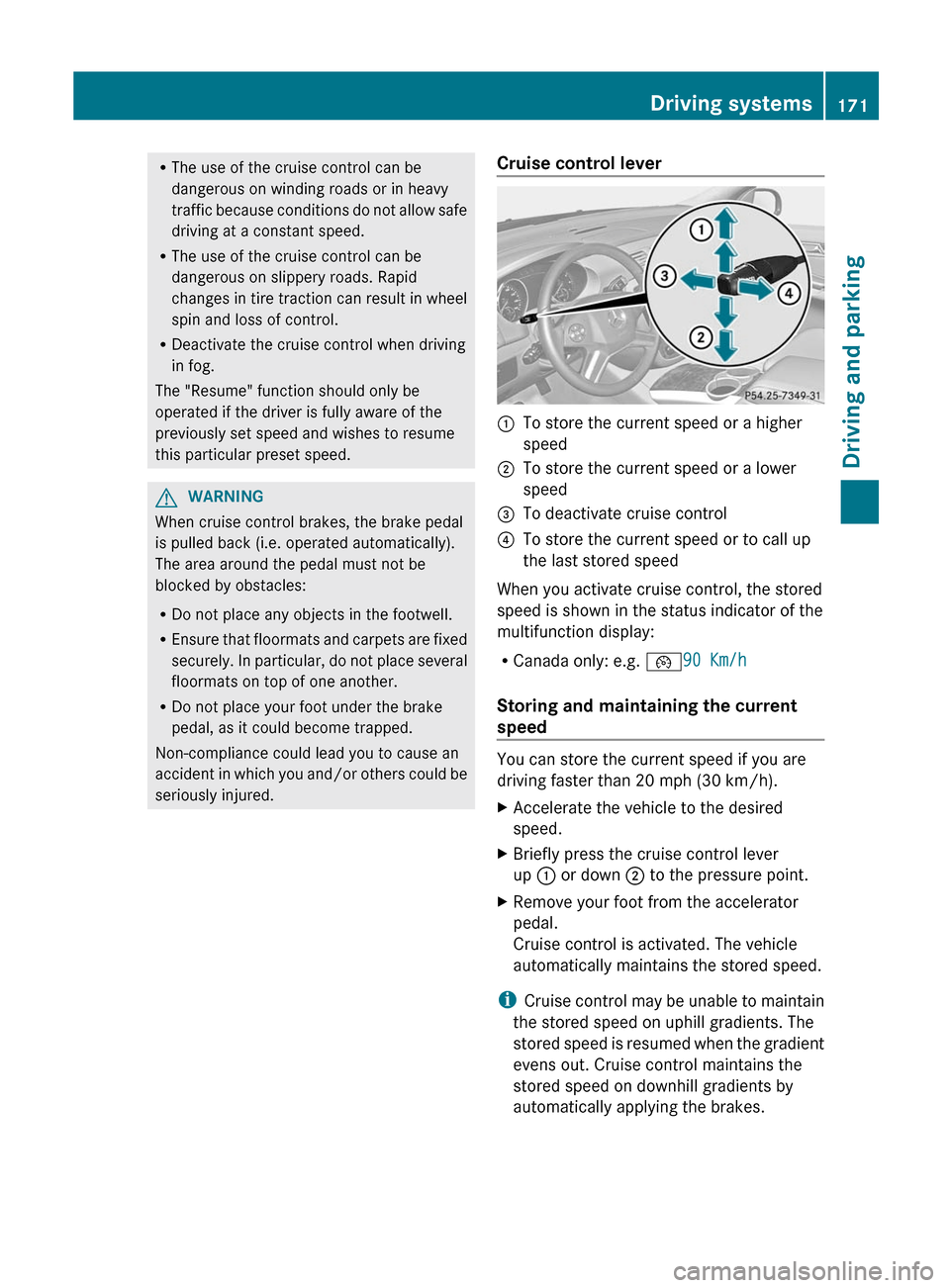
Cruise control lever:To store the current speed or a higher
speed;To store the current speed or a lower
speed=To deactivate cruise control?To store the current speed or to call up
the last stored speed
When you activate cruise control, the stored
speed is shown in the status indicator of the
multifunction display:
R Canada only: e.g. ¯90 Km/h
Storing and maintaining the current
speed
You can store the current speed if you are
driving faster than 20 mph (30 km/h).
XAccelerate the vehicle to the desired
speed.XBriefly press the cruise control lever
up : or down ; to the pressure point.XRemove your foot from the accelerator
pedal.
Cruise control is activated. The vehicle
automatically maintains the stored speed.
i Cruise control may be unable to maintain
the stored speed on uphill gradients. The
stored speed is resumed when the gradient
evens out. Cruise control maintains the
stored speed on downhill gradients by
automatically applying the brakes.
Driving systems171Driving and parkingZ
Page 174 of 368
Storing the current speed or calling up
the last stored speedGWARNING
The set speed stored in memory should only
be set again if prevailing road conditions and
legal speed limits permit. Possible
acceleration or deceleration differences
arising from returning to the preset speed
could cause an accident and/or serious injury
to you and others.
XBriefly pull the cruise control lever towards
you ?.XRemove your foot from the accelerator
pedal.
The first time cruise control is activated, it
stores the current speed or regulates the
speed of the vehicle to the previously
stored speed.
Setting a speed
GWARNING
Keep in mind that it may take a brief moment
until the vehicle has made the necessary
adjustments.
Increase or decrease the set vehicle speed to
a value that the prevailing road conditions and
legal speed limits permit. Otherwise, sudden
and unexpected acceleration or deceleration
of the vehicle could cause an accident and/
or serious injury to you and others.
XPress the cruise control lever to the
pressure point, up : for a higher speed or
down ; for a lower speed.XKeep the cruise control lever pressed until
the desired speed is reached.XRelease the cruise control lever.
The new speed is stored.
i Cruise control is not deactivated if you
depress the accelerator pedal. For
example, if you accelerate briefly to
overtake, cruise control adjusts the
vehicle's speed to the last speed stored
after you have finished overtaking.
Making adjustments in 1 mph (Canada:
1 km/h) incrementsXBriefly press the cruise control lever to the
pressure point, up : for a higher speed or
down ; for a lower speed.
The last speed stored is increased or
reduced.
Making adjustments in 5 mph (Canada:
10 km/h) increments
XBriefly press the cruise control lever
beyond the pressure point, up : for a
higher speed or down ; for a lower speed.
The last speed stored is increased or
reduced.
Deactivating cruise control
There are several ways to deactivate cruise
control:
XBriefly press the cruise control lever
forwards =.
or
XBrake.
Cruise control is automatically deactivated if:
R you depress the parking brake.
R you are driving below 20 mph (30 km/h).
R ESP ®
intervenes or you deactivate ESP ®
.
R you shift the transmission to position N
while driving.
If cruise control is deactivated, you will hear
a warning tone. You will see the Cruise
Control Off message in the multifunction
display for approximately five seconds.
i The last speed stored is cleared when you
switch off the engine.
172Driving systemsDriving and parking
Page 175 of 368
DISTRONIC
Important safety notes
DISTRONIC regulates the speed and
automatically helps you maintain the
distance to the vehicle detected in front. It
brakes automatically in order to avoid
exceeding the set speed.
On long and steep downhill gradients,
especially if the vehicle is laden or towing a
trailer, you must select shift range 1, 2 or 3
in good time. By doing so, you will make use
of the braking effect of the engine, which
relieves the load on the brake system and
prevents the brakes from overheating and
wearing too quickly.
If a slower-moving vehicle is detected in front,
DISTRONIC causes your vehicle to brake and
maintain the preset distance to the vehicle in
front.
GWARNING
The Distronic requires familiarity with its
operational characteristics. We strongly
recommend that you review the following
information carefully before operating the
system.
GWARNING
When DISTRONIC brakes, the brake pedal is
pulled back (i.e. operated automatically). The
area around the pedal must not be blocked by
obstacles:
R do not place any objects in the footwell.
R ensure that floormats and carpets are fixed
securely. In particular, do not place several
floormats on top of one another.
R do not place your foot under the brake
pedal, as it could become trapped.
Non-compliance could lead you to cause an
accident in which you and/or others could be
seriously injured.
GWARNING
The Distronic is a convenience system. Its
speed adjustment reduction capability is
intended to make cruise control more
effective and usable when traffic speeds vary.
It is not however, intended to, nor does it,
replace the need for extreme care.
The responsibility for the vehicle's speed,
distance to the preceding vehicle and, most
importantly, brake operation to ensure a safe
stopping distance, always remains with the
driver.
The Distronic cannot take street and traffic
conditions into account. Complex driving
situations are not always fully recognized by
the Distronic. This could result in wrong or
missing distance warnings.
If there is no vehicle driving in front of you,
DISTRONIC functions like cruise control at a
speed range between 20 mph (30 km/h) and
120 mph (200 km/h). If a vehicle is driving in
front of you, it functions at a speed range
between 0 mph (0 km/h) and 120 mph
(200 km/h).
Do not use DISTRONIC while driving on roads
with steep gradients.GWARNING
DISTRONIC distance control is not a
substitute for the driver's active involvement.
It does not react to pedestrians or stationary
objects and cannot detect or predict the
road's course and the movements of the
vehicles in front.
DISTRONIC can only brake using 40% of the
vehicle's maximum possible braking force.
The driver must always pay attention to road,
weather and traffic conditions. He must steer,
brake and drive the vehicle so that he
maintains control over it.
High-frequency sources such as toll stations,
velocity measurement systems, etc. may
cause DISTRONIC to malfunction.
GWARNING
The Distronic cannot take road and traffic
conditions into account. Only use the
Distronic if the road, weather and traffic
Driving systems173Driving and parkingZ