heating MERCEDES-BENZ R-CLASS MPV 2008 Owner's Manual
[x] Cancel search | Manufacturer: MERCEDES-BENZ, Model Year: 2008, Model line: R-CLASS MPV, Model: MERCEDES-BENZ R-CLASS MPV 2008Pages: 373, PDF Size: 6.75 MB
Page 162 of 373
Air conditioning
159Air conditioning
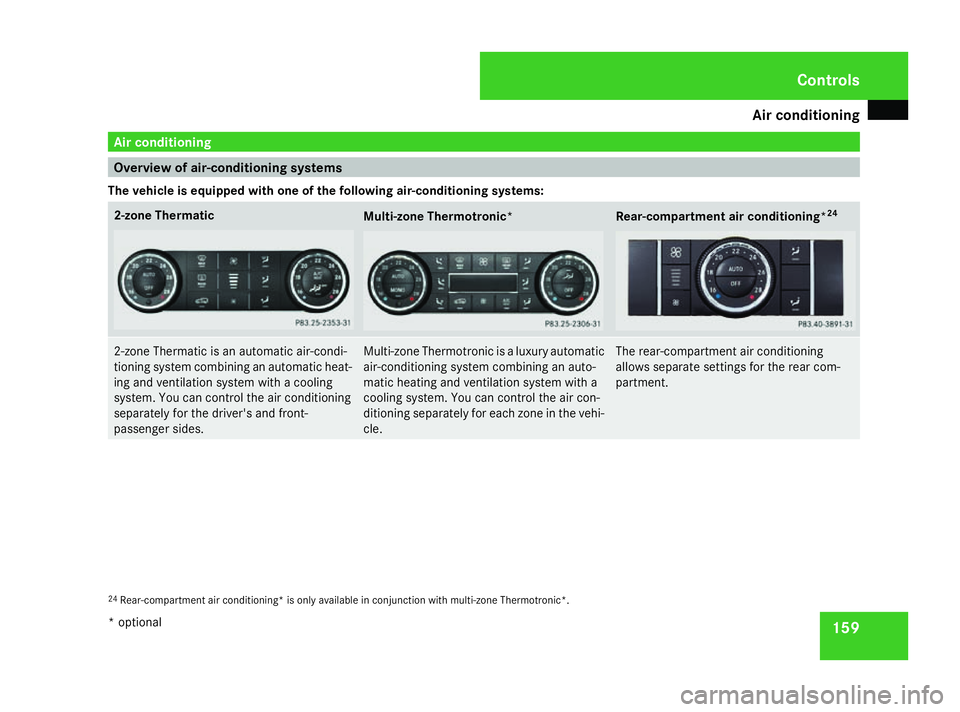
Overview of air-conditioning systems
The vehicle is equipped with one of the following air-conditioning systems: 2-zone Thermatic
Multi-zone Thermotronic* Rear-compartment air conditioning*
242-zone Thermatic is an automatic air-condi-
tioning system combining an automatic heat-
ing and ventilation system with a cooling
system. You can control the air conditioning
separately for the driver's and front-
passenger sides. Multi-zone Thermotronic is a luxury automatic
air-conditioning system combining an auto-
matic heating and ventilation system with a
cooling system. You can control the air con-
ditioning separately for each zone in the vehi-
cle. The rear-compartment air conditioning
allows separate settings for the rear com-
partment.
24
Rear-compartment air conditioning* is only available in conjunction with multi-zone Thermotronic*. Cont
rols
* optional
251_AKB; 5; 7, en-GB
wobuchh
,V ersion: 2.10.6
2008-05-11T14:51:51+02:00 - Seite 159 ZDateiname: 6515_1825_02_buchblock.pdf; preflight
Page 165 of 373

Air conditioning
162 Function Recommendation/Notes
5 {
Directs the airflow through the demister vents (Y
page 171) 6 9
Activates/deactivates cooling with air dehumidifi-
cation i
Switch on the air conditioning with air-dehumidifica-
tion function. The indicator lamp in the 9button
lights up. (Y
page 167) 9
Switches the residual heat function on/off i
You can use the residual heat to heat or ventilate the
vehicle interior after you have switched off the ignition. (Y
page 174) 7 Sets the temperature, right i
Set the temperature to 22 †. (Y
page 168) 8 <
Switches the rear-compartment air-conditioning
on/off (Y
page 166) 9 a
Directs the airflow through the centre and side air
vents (Y
page 171) a Y
Directs the airflow to the footwells and side air
vents (Y
page 171) b Displays the airflow level
c ·
Reduces the airflow (Y
page 172) d 1
Switches the rear window heating on/off i
At very low temperatures, the rear window heating is
only switched on once the vehicle interior has warmed
up. (Y
page 173) e :
Activates/deactivates air-recirculation mode i
Only use this operating mode for a short time, e.g. in
a tunnel. Otherwise, the windows could mist up due to
lack of fresh air. (Y
page 173) Cont
rols
251_AKB; 5; 7, en-GB
wobuchh
,V ersion: 2.10.6
2008-05-11T14:51:51+02:00 - Seite 162 Dateiname: 6515_1825_02_buchblock.pdf; preflight
Page 167 of 373
Air conditioning
164 Function Recommendation/Notes
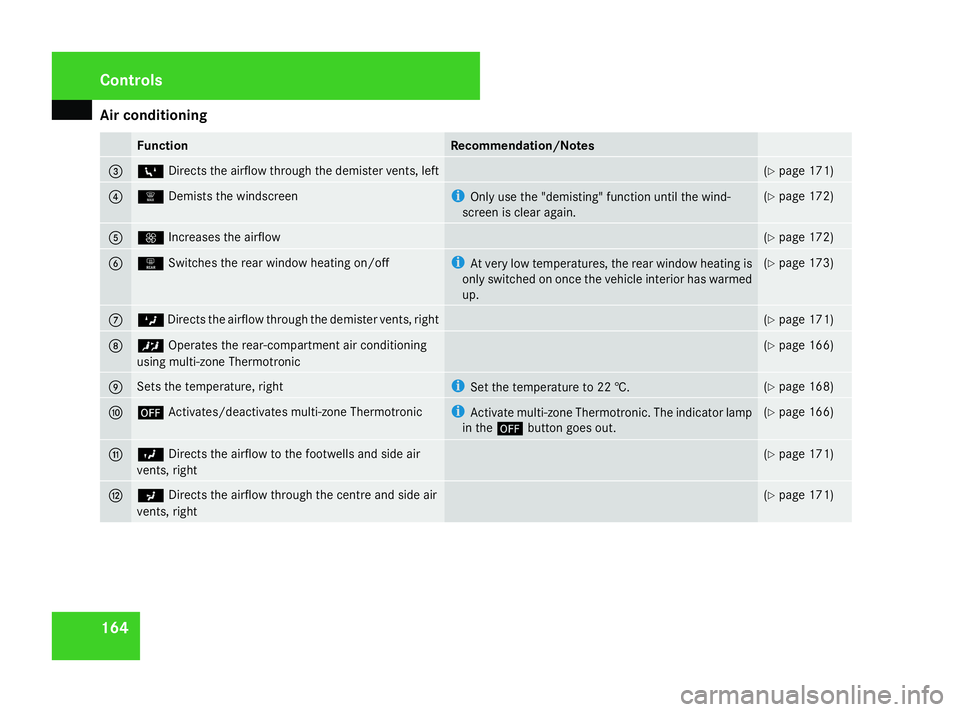
3 6
Directs the airflow through the demister vents, left (Y
page 171) 4 |
Demists the windscreen i
Only use the "demisting" function until the wind-
screen is clear again. (Y
page 172) 5 Q
Increases the airflow (Y
page 172) 6 1
Switches the rear window heating on/off i
At very low temperatures, the rear window heating is
only switched on once the vehicle interior has warmed
up. (Y
page 173) 7 Z
Directs the airflow through the demister vents, right (Y
page 171) 8 ™
Operates the rear-compartment air conditioning
using multi-zone Thermotronic (Y
page 166) 9 Sets the temperature, right i
Set the temperature to 22 †. (Y
page 168) a ´
Activates/deactivates multi-zone Thermotronic i
Activate multi-zone Thermotronic. The indicator lamp
in the ´button goes out. (Y
page 166) b Y
Directs the airflow to the footwells and side air
vents, right (Y
page 171) c a
Directs the airflow through the centre and side air
vents, right (Y
page 171) Cont
rols
251_AKB; 5; 7, en-GB
wobuchh
,V ersion: 2.10.6
2008-05-11T14:51:51+02:00 - Seite 164 Dateiname: 6515_1825_02_buchblock.pdf; preflight
Page 176 of 373
Air conditioning
173Switching the rear window heating
on/off
G
Risk of accident
Clear all windows of ice or snow before set-
ting off. Impaired visibility could otherwise
endanger you and others.
i At very low temperatures, the rear win-
dow heating is only switched on once the
vehicle interior has warmed up.
i The rear window heating has a high cur-
rent draw. You should therefore switch it
off as soon as the window is clear, as it only
switches off automatically after several
minutes.
i If the battery voltage is too low, the rear
window heating may switch off.
X Turn the key to position 2in the ignition
lock.
X Press the 1button.
The indicator lamp in the 1button lights
up or goes out. Activating/deactivating air-recircula-
tion mode
You can deactivate the flow of fresh air if
unpleasant odours are entering the vehicle
from outside. The air already inside the vehi-
cle will then be recirculated. G
Risk of accident
Only switch over to air-recirculation mode
briefly at low outside temperatures. Other-
wise, the windows could mist up, thus
impairing visibility and endangering your-
self and others. This may prevent you from
observing the traffic conditions, thereby
causing an accident.
X Turn the key to position 2in the ignition
lock.
X To activate: press the:button.
The indicator lamp in the :button
comes on.
i Air-recirculation mode is activated auto-
matically at high outside temperatures.
When air-recirculation mode is activated
automatically, the indicator lamp in
the : button is not lit.
Outside air is added after about 30
minutes. X
To deactivate: press the:button.
The indicator lamp in the :button goes
out.
i Air-recirculation mode switches off auto-
matically:
R after approximately five minutes at out-
side temperatures below approximately
5 †
R after approximately five minutes if cool-
ing with air dehumidification is deactiva-
ted
R after approximately 30 minutes at out-
side temperatures above approximately
5 †
Air-recirculation mode with the conve-
nience opening/closing feature G
Risk of injury
Make sure that nobody can become trap-
ped between the side window and the door
frame as the side windows are opened and
closed. Do not place objects or lean against
the side window when it is being opened or
closed. You or the objects could be drawn
in or become trapped between the side
window and the door frame as the window Cont
rols
251_AKB; 5; 7, en-GB
wobuchh
,V ersion: 2.10.6
2008-05-11T14:51:51+02:00 - Seite 173 ZDateiname: 6515_1825_02_buchblock.pdf; preflight
Page 177 of 373
Air conditioning
174 moves. If there is a risk of entrapment,
press the :button again. Press the but-
ton for stopping, opening or closing the side
window in the opposite direction as appro-
priate.
Make sure that nobody can become trap-
ped when you open or close the sliding/
tilting sunroof*/panorama sliding sun-
roof*. If there is a risk of entrapment, press
the : button again. Press the button for
stopping, opening or closing the sliding/
tilting sunroof*/panorama sliding sun-
roof *in the opposite direction as appropri-
ate.
X Convenience closing: press and hold
the : button until the side windows and
the sliding/tilting sunroof*/panorama
sliding sunroof* have closed.
The indicator lamp in the :button
comes on. Air-recirculation mode is activa-
ted.
X Convenience opening: press and hold
the : button until the side windows and
the sliding/tilting sunroof*/panorama sliding sunroof* have reached their original
position.
The indicator lamp in the
:button goes
out. Air-recirculation mode is deactivated.
i If you open the side windows or the slid-
ing/tilting sunroof* or panorama sliding
sunroof* manually after closing using the
convenience closing feature, it will remain
in this position when opened using the con-
venience opening feature. Switching the residual heat on/off
It is possible to make use of the residual heat
of the engine to continue heating the station-
ary vehicle for up to 30 minutes after the
engine has been switched off. The heating
time depends on the set interior temperature.
i The blower will run at a low speed regard-
less of the airflow setting.
i If you activate the "residual heat" function
at high temperatures, only the ventilation
will be activated. The blower runs at
medium speed. X
Turn the key to position 0in the ignition
lock or remove it.
X To switch on: press the9button.
The indicator lamp in the 9button lights
up.
X To deactivate: press the9button.
The indicator lamp in the 9button goes
out.
i The residual heat automatically switches
off after around 30 minutes or if:
R the ignition is switched on
R the battery voltage drops Auxiliary heating/ventilation*
G
Risk of poisoning
Exhaust fumes are produced when the aux-
iliary heating is in operation. Inhaling these
exhaust fumes can be poisonous. You
should therefore switch off the auxiliary
heating in confined spaces without an
extraction system, e.g. a garage. G
Risk of fire
When operating the auxiliary heating, parts
of the vehicle may become very hot, and Controls
* optional
251_AKB; 5; 7, en-GB
wobuchh
,V ersion: 2.10.6
2008-05-11T14:51:51+02:00 - Seite 174 Dateiname: 6515_1825_02_buchblock.pdf; preflight
Page 178 of 373

Air conditioning
175highly inflammable material such as fuels
could be ignited. Operating the auxiliary
heating is thus prohibited at filling stations
or when your vehicle is being refuelled. You
must therefore switch off the auxiliary heat-
ing at filling stations.
The auxiliary heating heats the air in the vehi-
cle interior to the set temperature without
using the heat of the running engine. The aux-
iliary heating is operated using fuel directly
from the vehicle's fuel tank. For this reason,
the tank content must be at least at reserve
fuel level to ensure that the auxiliary heating
functions.
The auxiliary heating/ventilation automati-
cally adjusts to changes in temperature and
weather conditions. For this reason, the aux-
iliary heating could switch from ventilation
mode to heating mode or from heating mode
to ventilation mode.
You cannot use the auxiliary ventilation to
cool the vehicle interior to a temperature
lower than the outside temperature.
Before activating X
Turn the key to position 2in the ignition
lock.
X Set the temperature. The auxiliary heating/ventilation can be acti-
vated even when the air conditioning is being
controlled manually. Optimum comfort can
be attained when the system is set to auto-
matic mode. Set the temperature to 22 †.
The auxiliary heating/ventilation can be acti-
vated or deactivated using the remote control
or the button on the centre console.
The on-board computer can be used to spec-
ify up to three departure times, one of which
may be preselected (Y page 135).
Switching the auxiliary heating/venti-
lation on/off using the centre console
button Centre console
1
X Auxiliary heating/ventilation The colours of the indicator lights on the but-
ton have the following meanings:
Blu
eA uxiliary ventilation activated
Red Auxiliary heating activated
Yello wDeparture time preselected
(Y page 134)
Activating the auxiliary heating/ventila-
tion
If the key is in position 1or 2:
X Press and hold the Xbutton for at least
two seconds.
The red or blue indicator lamp in the X
button lights up.
If the key is removed or in position 0:
X Briefly press the Xbutton.
The red or blue indicator lamp in the X
button lights up.
Deactivating the auxiliary heating/venti-
lation
X Briefly press the Xbutton.
The red or blue indicator lamp in the X
button goes out. Controls
251_AKB; 5; 7, en-GB
wobuchh,
Version: 2.10.6 2008-05-11T14:51:51+02:00 - Seite 175 ZDateiname: 6515_1825_02_buchblock.pdf; preflight
Page 179 of 373

Air conditioning
176
Switching the auxiliary heating/venti-
lation on/off using the remote control Your vehicle comes with one remote control.
You may use two additional remote controls
for your vehicle. For further information, con-
sult a qualified specialist workshop, e.g. a
Mercedes-Benz Service Centre.
The remote control has a maximum range of
approximately 300 metres. This range may be
reduced by:
R sources of radio interference
R solid objects between the remote control
and the vehicle
R the remote control being in an unfavoura-
ble position in relation to the vehicle
R transmitting from an enclosed space
i The optimum range can be achieved if you
hold the remote control vertically, pointing
upwards when you press one of the but-
tons.
i A battery symbol appears in the display
when the batteries in the remote control
are low. Replace the remote control bat-
teries (Y page 305). i
More information about the auxiliary
heating can be found in the "Practical
advice" section (Y page 300). Auxiliary heating remote control
1
Display
2 To check the status
3 OFF – to deactivate auxiliary heating/
ventilation
4 ON – to activate auxiliary heating/venti-
lation
5 To check the status
Using the remote control, you can:
R activate or deactivate the auxiliary heat-
ing/ventilation
R check the status of the auxiliary heating/
ventilation Activating the auxiliary heating/ventila-
tion
X
Press the ONbutton.
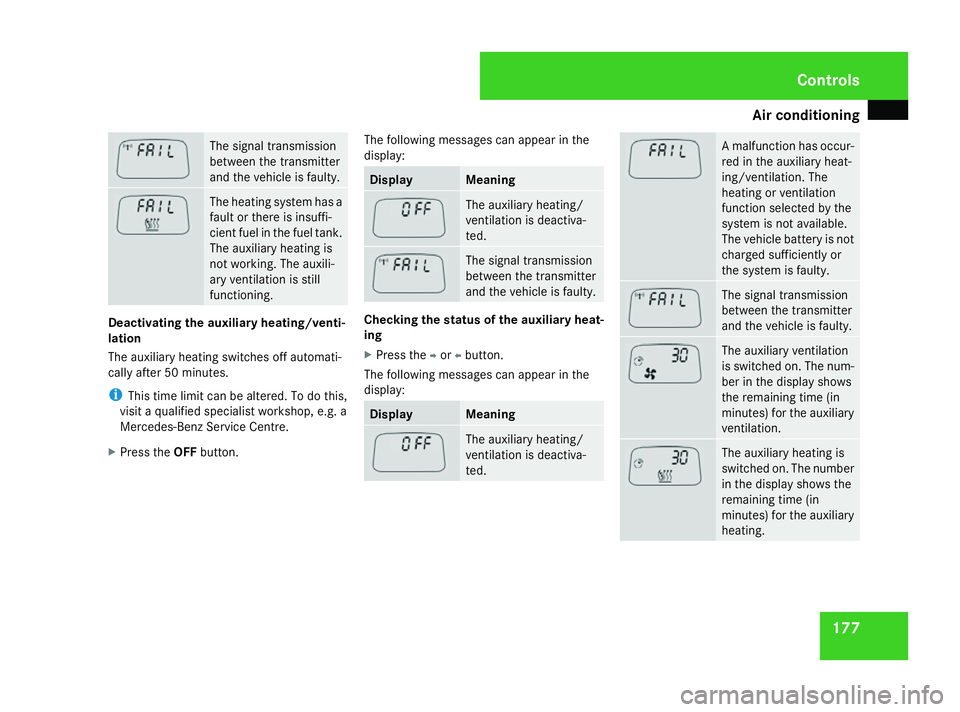
The following messages can appear in the
display: Display Meaning
The auxiliary heating/
ventilation is activated.
A malfunction has occur-
red in the auxiliary heat-
ing/ventilation. The
heating/ventilation
function selected by the
system is not available.
The vehicle battery is not
charged sufficiently or
the system is faulty.Cont
rols
251_AKB; 5; 7, en-GB
wobuchh
,V ersion: 2.10.6
2008-05-11T14:51:51+02:00 - Seite 176 Dateiname: 6515_1825_02_buchblock.pdf; preflight
Page 180 of 373
Air conditioning
177The signal transmission
between the transmitter
and the vehicle is faulty.
The heating system has a
fault or there is insuffi-
cient fuel in the fuel tank.
The auxiliary heating is
not working. The auxili-
ary ventilation is still
functioning. Deactivating the auxiliary heating/venti-
lation
The auxiliary heating switches off automati-
cally after 50 minutes.
i
This time limit can be altered. To do this,
visit a qualified specialist workshop, e.g. a
Mercedes-Benz Service Centre.
X Press the OFFbutton. The following messages can appear in the
display: Display Meaning
The auxiliary heating/
ventilation is deactiva-
ted.
The signal transmission
between the transmitter
and the vehicle is faulty.
Checking the status of the auxiliary heat-
ing
X
Press the por obutton.
The following messages can appear in the
display: Display Meaning
The auxiliary heating/
ventilation is deactiva-
ted. A malfunction has occur-
red in the auxiliary heat-
ing/ventilation. The
heating or ventilation
function selected by the
system is not available.
The vehicle battery is not
charged sufficiently or
the system is faulty.
The signal transmission
between the transmitter
and the vehicle is faulty. The auxiliary ventilation
is switched on. The num-
ber in the display shows
the remaining time (in
minutes) for the auxiliary
ventilation.
The auxiliary heating is
switched on. The number
in the display shows the
remaining time (in
minutes) for the auxiliary
heating. Cont
rols
251_AKB; 5; 7, en-GB
wobuchh
,V ersion: 2.10.6
2008-05-11T14:51:51+02:00 - Seite 177 ZDateiname: 6515_1825_02_buchblock.pdf; preflight
Page 209 of 373
Features
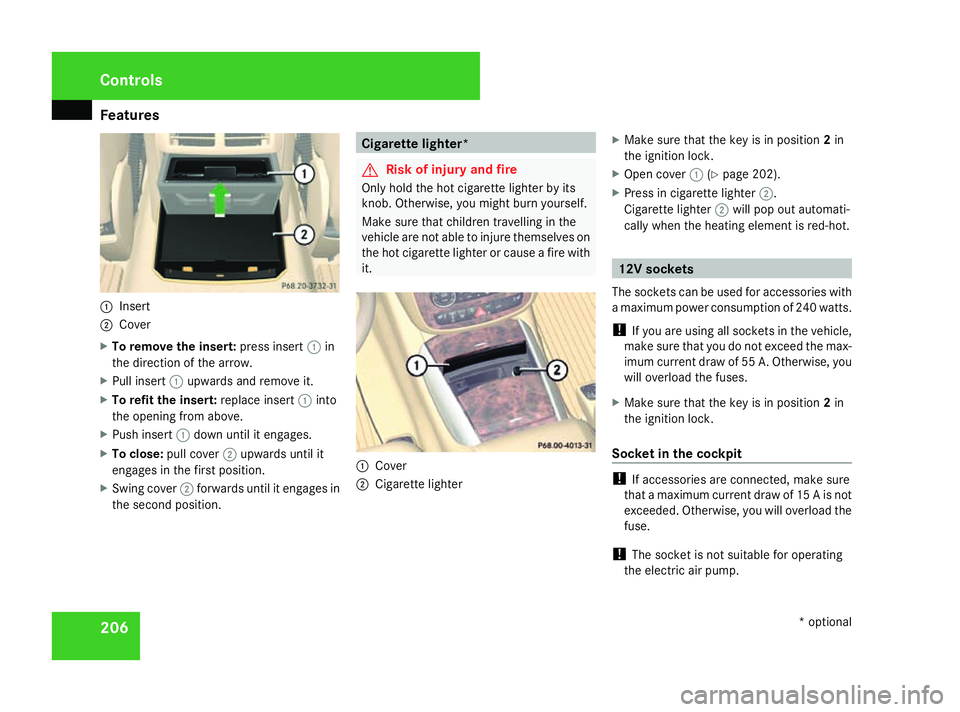
2061
Insert
2 Cover
X To remove the insert: press insert1in
the direction of the arrow.
X Pull insert 1upwards and remove it.
X To refit the insert: replace insert1into
the opening from above.
X Push insert 1down until it engages.
X To close: pull cover 2upwards until it
engages in the first position.
X Swing cover 2forwards until it engages in
the second position. Cigarette lighter*
G
Risk of injury and fire
Only hold the hot cigarette lighter by its
knob. Otherwise, you might burn yourself.
Make sure that children travelling in the
vehicle are not able to injure themselves on
the hot cigarette lighter or cause a fire with
it. 1
Cover
2 Cigarette lighter X
Make sure that the key is in position 2in
the ignition lock.
X Open cover 1(Ypage 202).
X Press in cigarette lighter 2.
Cigarette lighter 2will pop out automati-
cally when the heating element is red-hot. 12V sockets
The sockets can be used for accessories with
a maximum power consumption of 240 watts.
! If you are using all sockets in the vehicle,
make sure that you do not exceed the max-
imum current draw of 55 A. Otherwise, you
will overload the fuses.
X Make sure that the key is in position 2in
the ignition lock.
Socket in the cockpit !
If accessories are connected, make sure
that a maximum current draw of 15 A is not
exceeded. Otherwise, you will overload the
fuse.
! The socket is not suitable for operating
the electric air pump. Controls
* optional
251_AKB; 5; 7, en-GB
wobuchh,
Version: 2.10.6
2008-05-11T14:51:51+02:00 - Seite 206 Dateiname: 6515_1825_02_buchblock.pdf; preflight
Page 218 of 373
Features
215
X
Use æ orç on the multi-function
steering wheel to select the Vehiclesub-
menu.
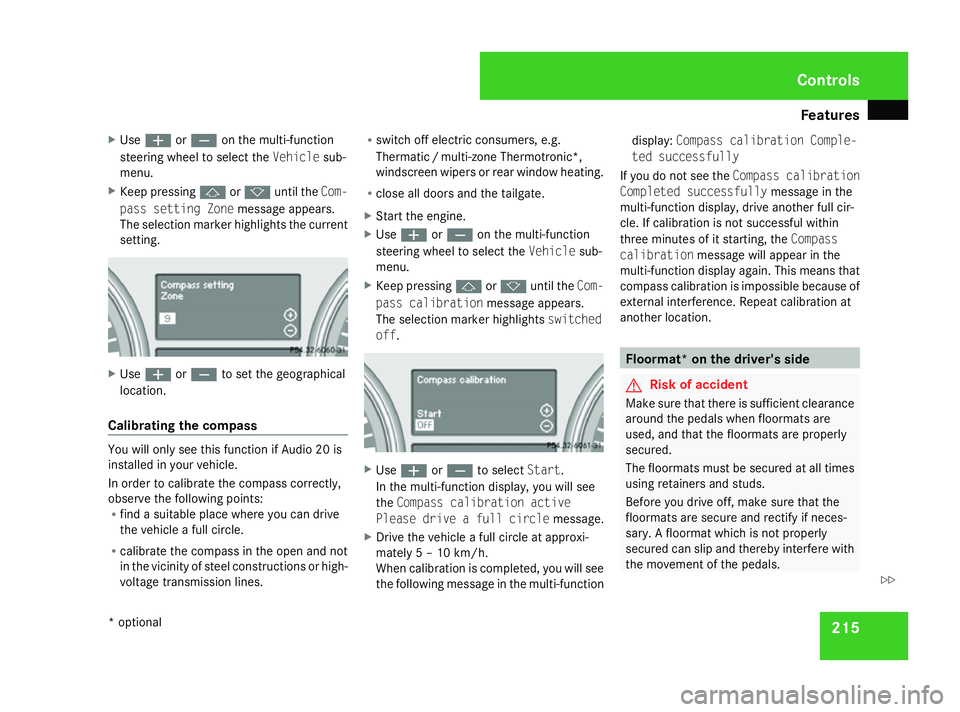
X Keep pressing jork until the Com-
pass setting Zone message appears.
The selection marker highlights the current
setting. X
Use æ orç to set the geographical
location.
Calibrating the compass You will only see this function if Audio 20 is
installed in your vehicle.
In order to calibrate the compass correctly,
observe the following points:
R find a suitable place where you can drive
the vehicle a full circle.
R calibrate the compass in the open and not
in the vicinity of steel constructions or high-
voltage transmission lines. R
switch off electric consumers, e.g.
Thermati c/multi-zone Thermotronic*,
windscreen wipers or rear window heating.
R close all doors and the tailgate.
X Start the engine.
X Use æ orç on the multi-function
steering wheel to select the Vehiclesub-
menu.
X Keep pressing jork until the Com-
pass calibration message appears.
The selection marker highlights switched
off . X
Use æ orç to select Start.
In the multi-function display, you will see
the Compass calibration active
Please drive a full circle message.
X Drive the vehicle a full circle at approxi-
mately 5 – 10 km/h.
When calibration is completed, you will see
the following message in the multi-function display:
Compass calibration Comple-
ted successfully
If you do not see the Compass calibration
Completed successfully message in the
multi-function display, drive another full cir-
cle. If calibration is not successful within
three minutes of it starting, the Compass
calibration message will appear in the
multi-function display again. This means that
compass calibration is impossible because of
external interference. Repeat calibration at
another location. Floormat* on the driver's side
G
Risk of accident
Make sure that there is sufficient clearance
around the pedals when floormats are
used, and that the floormats are properly
secured.
The floormats must be secured at all times
using retainers and studs.
Before you drive off, make sure that the
floormats are secure and rectify if neces-
sary. A floormat which is not properly
secured can slip and thereby interfere with
the movement of the pedals. Controls
* optional
251_AKB; 5; 7, en-GB
wobuchh,
Version: 2.10.6 2008-05-11T14:51:51+02:00 - Seite 215 ZDateiname: 6515_1825_02_buchblock.pdf; preflight