lights MERCEDES-BENZ R-CLASS MPV 2008 Owner's Manual
[x] Cancel search | Manufacturer: MERCEDES-BENZ, Model Year: 2008, Model line: R-CLASS MPV, Model: MERCEDES-BENZ R-CLASS MPV 2008Pages: 373, PDF Size: 6.75 MB
Page 105 of 373

Lights
102 Position Load
2 All seats occupied and lug-
gage compartment loaded up
to the maximum permissible
rear axle load
3 Driver’s seat occupied and
luggage compartment loaded
up to the maximum permissi-
ble rear axle load
X
Turn thumbwheel 1to the position which
corresponds to the load in your vehicle. Headlamp cleaning system*
The headlamps are cleaned automatically if
the "Wipe with windscreen washer fluid" func-
tion is operated five times while the lights are
on and the engine is running. When you
switch off the ignition, the automatic head-
lamp cleaning system is reset and counting is
resumed from 0. Cornering light function* (vehicles
with bi-xenon headlamps*)
Specially designed headlamps light up the
area into which you are driving when turning
corners.
If you are driving at speeds below 40 km/h,
the cornering light function is activated either
by the turn signals or when the steering wheel
is turned. If you are driving at speeds above
40 km/h the cornering light function is deac-
tivated.
Activating X
Start the engine.
X Switch on the dipped-beam headlamps.
X Switch off the foglamps.
X Switch on the turn signal.
The cornering lamp on the same side as the
turn signal comes on, even if you turn the
steering wheel in the opposite direction
after indicating.
or
X Turn the steering wheel in the desired
direction.
When in a forwards gear: the cornering
lamp on the inside of the bend comes on. When in reverse gear: the cornering lamp
on the outside of the bend comes on.
Deactivating X
Turn the steering wheel back to the straight
ahead position.
The turn signal goes off. The cornering lamp
may remain lit for a short time.
or
X Switch off the turn signal.
The cornering lamp may remain lit for a
short time.
The cornering light will go out after a maxi-
mum of three minutes. Controls
* optional
251_AKB; 5; 7, en-GB
wobuchh,
Version: 2.10.6 2008-05-11T14:51:51+02:00 - Seite 102Dateiname: 6515_1825_02_buchblock.pdf; preflight
Page 106 of 373
Lights
103Interior lighting
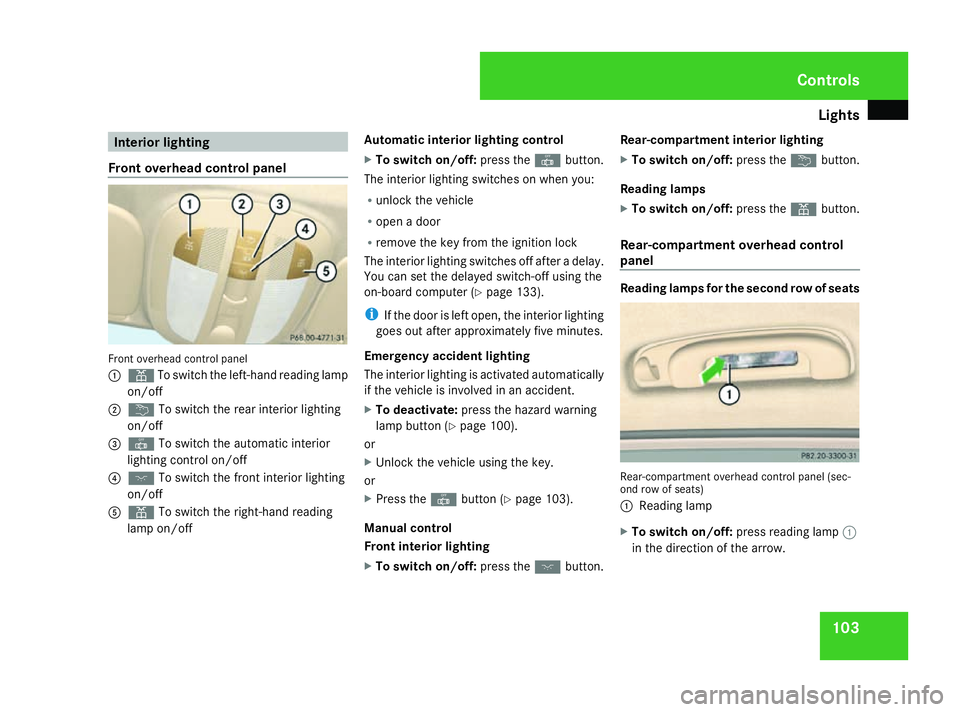
Front overhead control panel Front overhead control panel
1
X To switch the left-hand reading lamp
on/off
2 ¦ To switch the rear interior lighting
on/off
3 ¥ To switch the automatic interior
lighting control on/off
4 ð To switch the front interior lighting
on/off
5 X To switch the right-hand reading
lamp on/off Automatic interior lighting control
X
To switch on/off: press the¥button.
The interior lighting switches on when you:
R unlock the vehicle
R open a door
R remove the key from the ignition lock
The interior lighting switches off after a delay.
You can set the delayed switch-off using the
on-board computer (Y page 133).
i If the door is left open, the interior lighting
goes out after approximately five minutes.
Emergency accident lighting
The interior lighting is activated automatically
if the vehicle is involved in an accident.
X To deactivate: press the hazard warning
lamp button (Y page 100).
or
X Unlock the vehicle using the key.
or
X Press the ¥button (Y page 103).
Manual control
Front interior lighting
X To switch on/off: press theðbutton. Rear-compartment interior lighting
X
To switch on/off: press the¦button.
Reading lamps
X To switch on/off: press theXbutton.
Rear-compartment overhead control
panel Reading lamps for the second row of seats
Rear-compartment overhead control panel (sec-
ond row of seats)
1
Reading lamp
X To switch on/off: press reading lamp 1
in the direction of the arrow. Controls
251_AKB; 5; 7, en-GB
wobuchh,
Version: 2.10.6 2008-05-11T14:51:51+02:00 - Seite 103 ZDateiname: 6515_1825_02_buchblock.pdf; preflight
Page 114 of 373

Driving and pa
rking 111
Starting the engine with the key X
To start a petrol engine: turn the key to
position 3in the ignition lock (Y page 76)
and release it.
The engine starts automatically.
X To start a diesel engine: turn the key to
position 2in the ignition lock (Y page 76).
The q preglow indicator lamp in the
instrument cluster lights up.
X When the qpreglow indicator lamp
goes out, turn the key to position
3 (Y page 76) and release it.
The engine starts automatically.
i You can start the engine without preglow
if the engine is warm.
Starting the engine with KE YLESS GO*G
Risk of injury
Your vehicle can be started using a valid
KEYLESS GO key*. For this reason, children
should never be left unsupervised in the
vehicle. Always take the KEYLESS GO
key* with you when leaving the vehicle,
even if you are only leaving it for a short
time. The KEYLESS GO button can be used to start
the vehicle without inserting the key in the
ignition lock.
1
KEYLESS GO button
X Depress the brake pedal.
The selector lever lock is released.
X Petrol engine: press KEYLESS GO button
1 once.
The engine starts automatically.
X Diesel engine: press KEYLESS GO button
1 once.
Preglow is activated and the engine starts
automatically.
i You can start the engine without preglow
if the engine is warm: X
Press and hold KEYLESS GO button
1 until the engine is running. Pulling away
! Warm up the engine quickly. Do not use
the engine's full performance until it has
reached operating temperature.
Only shift into reverse gear when the vehi-
cle is stationary.
Where possible, avoid spinning the drive
wheels when pulling away on slippery
roads. You could otherwise damage the
drive train.
i The vehicle locks centrally once you have
pulled away. The locking knobs in the doors
drop down.
You can open the doors from the inside at
any time.
You can also deactivate the automatic lock-
ing feature (Y page 134).
i It is only possible to move the selector
lever to the desired position if you depress
the brake pedal. Only then is the selector
lever lock released. Cont
rols
* optional
251_AKB; 5; 7, en-GB
wobuchh
,V ersion: 2.10.6
2008-05-11T14:51:51+02:00 - Seite 111 ZDateiname: 6515_1825_02_buchblock.pdf; preflight
Page 115 of 373

Driving and pa
rking 112
X
Depress the brake pedal and hold it down.
X Pull the parking brake release handle to
release the parking brake.
X Move the selector lever to position Dor R.
i Wait until the shift process is completed
before pulling away.
X Release the brake pedal.
X Carefully depress the accelerator pedal.
i Upshifts take place at higher engine
speeds after a cold start. This helps the
catalytic converter to reach its operating
temperature more quickly. Hill start assist
Hill start assist helps you when pulling away
on uphill gradients of more than 5°. G
Risk of accident
Hill start assist is not a parking brake. It
does not prevent the vehicle from rolling
away.
When parking, always depress the parking
brake and set the automatic transmission
to P. X
To pull away on an uphill slope, release the
brake and depress the accelerator pedal.
The hill start assist continues to hold the
braking pressure for up to one second. This
allows you to pull away evenly without the
vehicle rolling back.
i The brake pedal remains in the depressed
position until the hill start assist releases
the braking pressure.
Hill start assist will not function if:
R you are pulling away on a downhill gradient
R the automatic transmission is in neutral N
R the parking brake is applied
R ESP ®
is deactivated due to a malfunction Parking
G
Risk of accident
Only remove the key from the ignition lock
when the vehicle is stationary as you can-
not steer the vehicle with the key removed.
Never leave children unsupervised in the
vehicle. They could release the parking
brake. This could lead to a serious or fatal
accident. G
Risk of fire
Make sure that the exhaust system does
not under any circumstances come into
contact with easily ignitable material such
as dry grass or petrol. The material could
otherwise ignite and set the vehicle on fire.
Parking brake 1
Release handle
2 Parking brake
X To apply: depress parking brake 2firmly.
The 3 warning lamp in the instrument
cluster lights up if the engine is running.
i On steep slopes, turn the front wheels
towards the kerb. Controls
251_AKB; 5; 7, en-GB
wobuchh
,V ersion: 2.10.6
2008-05-11T14:51:51+02:00 - Seite 112 Dateiname: 6515_1825_02_buchblock.pdf; preflight
Page 122 of 373

Instrument cluster
119Activating the multi-function display
X Switch on the ignition. 1
To dim the instrument cluster lighting
2 Reset button
3 To brighten the instrument cluster lighting
The multi-function display is also activated
when you:
R switch on the lights
R press reset button 2
R open a front door Adjusting the instrument cluster
lighting
X Brighter: press and hold down button 3.
X Dimmer: press and hold down button 1. Resetting the trip meter
X Select the standard display menu
(Y page 125).
X Press and hold reset button 2until the trip
meter is reset. Clock
On vehicles with Audio 20, you can set the
time using the on-board computer
(Y page 131). Speedometer with segments
The segments in the speedometer indicate
which speed range is available.
Distronic* mode:
One or two segments around the stored
speed light up. Rev counter
The red band in the rev counter indicates the
engine's overrevving range. The fuel supply is
interrupted to protect the engine when the
red band is reached.
! Do not drive in the overrevving range.
Doing so will damage the engine. H
Environmental note
Avoid driving at high engine speeds, as this
increases your vehicle's consumption
unnecessarily and pollutes the environ-
ment through increased emissions. Cont
rols
* optional
251_AKB; 5; 7, en-GB
wobuchh
,V ersion: 2.10.6
2008-05-11T14:51:51+02:00 - Seite 119 ZDateiname: 6515_1825_02_buchblock.pdf; preflight
Page 135 of 373
On-board computer
132
X
Press èor· to select the Set-
tings menu.
X Press the jbutton to call up the selec-
tion of submenus.
X Press the æorç button to select the
Time/Date submenu.
Setting the time
X Press the jbutton to select Clock Set
hour (orClock Set minute).
X Press the æorç button to set a
value.
Setting the date
X Press the jbutton to select Set date
Day (orSet date Month orSet date
Year).
X Press the æorç button to set the
values.
X Press the j,èorÿ button to
select a different display.
Setting constant headlamp mode If you have selected constant headlamp mode
and the light switch is set to the Mor
U position, the position lamps, dipped-
beam headlamps and licence plate lighting switch on automatically when the engine is
running. Turning the light switch to a different
position switches on the corresponding
lights. Make sure that the light switch is set
to
B orU if you switch off the constant
headlamp mode while driving at night.
In countries in which constant headlamp
mode is a legal requirement, Constantis the
factory setting.
X Press èor· to select the Set-
tings menu.
X Press the jbutton to call up the selec-
tion of submenus.
X Press the æorç button to select the
Lighting submenu.
X Press the jbutton to select Headlamp
mode.
X Press the æorç button to set the
switch-on mode for the headlamps to Man-
ual orConstant (constant headlamp
mode).
X Press the j,èorÿ button to
select a different display. Switching the surround lighting on or
off If the surround lighting is switched on, the
following lights will be switched on automat-
ically in the dark after you have unlocked the
vehicle using the key:
R
the position lamps
R the tail lamps
R the licence plate lighting
R the front foglamps
The surround lighting switches off automati-
cally if you open the driver's door or after 40
seconds.
X Press èor· to select the Set-
tings menu.
X Press the jbutton to call up the selec-
tion of submenus.
X Press the æorç button to select the
Lighting submenu.
X Press the jbutton to select the Sur-
round lighting function. Controls
251_AKB; 5; 7, en-GB
wobuchh,
Version: 2.10.6 2008-05-11T14:51:51+02:00 - Seite 132Dateiname: 6515_1825_02_buchblock.pdf; preflight
Page 138 of 373

On-board computer
135
X
Press the æorç button to select
one of the three switch-on times or Timer
off (auxiliary heating switched off).
When a switch-on time is selected, the yel-
low indicator lamp lights up in the auxiliary
heating button.
X Press the j,èorÿ button to
select a different display.
Changing the switch-on time for the
auxiliary heating* This function is only displayed if you have
selected a switch-on time. Here you can enter
the time at which the auxiliary heating is to
be switched on.
X
Press èor· to select the Set-
tings menu.
X Press the jbutton to call up the selec-
tion of submenus.
X Press the æorç button to select the
Heater submenu.
X Press the jbutton to select Switch-on
time X Set hours.
X Press the æorç button to set the
hour.
X Press the jbutton to select Switch-on
time X Set minutes . X
Press the æorç button to set the
minutes.
After changing from one menu to another,
the new time setting is stored. The yellow
indicator lamp lights up on the button for
the auxiliary heating on the centre console.
X Press the j,èorÿ button to
select a different display.
Activating or deactivating the easy-
entry/exit feature* i
For more information on the easy-entry/
exit feature, (Y page 89). G
Risk of injury
When the easy-entry/exit feature is active,
the steering wheel moves. There is a risk of
occupants becoming trapped. Before acti-
vating the easy-entry/exit feature, make
sure that nobody can become trapped.
Do not leave children unsupervised in the
vehicle, even if they are secured in a child
restraint system. The children could open
the driver's door and thereby unintention-
ally activate the easy-entry/exit feature
and become trapped. X
Press èor· to select the Set-
tings menu.
X Press the jbutton to call up the selec-
tion of submenus.
X Press æorç to select the Conve-
nience submenu.
X Press the jbutton to select the EASY-
ENTRY system.
X Press the æorç button to activate
or deactivate the EASY-ENTRY system.
X Press the j,èorÿ button to
select a different display.
Activating/deactivating the Fold in mir-
rors when locking* function The
Fold in mirrors when locking func-
tion allows you to determine whether the
exterior mirrors should fold in when you lock
the vehicle. When you switch on the ignition,
the exterior mirrors fold out again.
If you have switched the function on and you
fold in the exterior mirrors using the button
on the door (Y page 91), they will not fold out
automatically. The exterior mirrors can then
only be folded out using the button on the
door. Controls
* optional
251_AKB; 5; 7, en-GB
wobuchh,
Version: 2.10.6 2008-05-11T14:51:51+02:00 - Seite 135 ZDateiname: 6515_1825_02_buchblock.pdf; preflight
Page 145 of 373

Driving sys
tems 142
X
Briefly pull the cruise control lever towards
you 3.
X Remove your foot from the accelerator
pedal.
The first time cruise control is activated it
stores the current speed or regulates the
speed of the vehicle to the previously
stored speed.
Setting a speed X
Press the cruise control lever to the pres-
sure point, up 1for a higher speed or
down 4for a lower speed.
X Keep the cruise control lever pressed until
the desired speed is reached.
X Release the cruise control lever.
The new speed is stored.
i Cruise control is not deactivated if you
depress the accelerator pedal. For exam-
ple, if you accelerate briefly to overtake,
cruise control adjusts the vehicle's speed
to the last speed stored after you have fin-
ished overtaking. Making fine adjustments in 1 km/h
increments X
Briefly press the cruise control lever to the
pressure point, up 1for a higher speed or
down 4for a lower speed.
The last speed stored is increased or
reduced.
Making adjustments in 10 km/h incre-
ments X
Briefly press the cruise control lever
beyond the pressure point, up 1for a
higher speed or down 4for a lower speed.
The last speed stored is increased or
reduced.
Deactivating cruise control There are several ways to deactivate cruise
control:
X
Briefly press the cruise control lever for-
wards 6.
or
X Brake.
or X
Briefly press the cruise control lever in the
direction of arrow 5.
Variable Speedtronic is selected. LIM indi-
cator lamp 2in the cruise control lever
lights up.
Cruise control is automatically deactivated if,
for example:
R you depress the parking brake
R you are driving at less than 30 km/h
R ESP ®
is intervening or you deactivate
ESP ®
.
R you shift the automatic transmission to N
while driving
If cruise control is deactivated, you will hear
a warning tone. You will see the Cruise con-
trol Off message in the multi-function dis-
play for approximately five seconds.
i The last speed stored is cleared when you
switch off the engine. Controls
251_AKB; 5; 7, en-GB
wobuchh
,V ersion: 2.10.6
2008-05-11T14:51:51+02:00 - Seite 142 Dateiname: 6515_1825_02_buchblock.pdf; preflight
Page 147 of 373

Driving sys
tems 144 under braking or acceleration. The vehi-
cle could start to skid.
R if the sensors are dirty or there is poor
visibility, e.g. due to snow, rain or fog.
Distance control may be impaired.
Always pay attention to traffic conditions
even when Distronic is activated. Other-
wise, you may fail to recognise danger in
time, could cause an accident and injure
yourself and others.
If there is no vehicle in front, Distronic oper-
ates in the same way as cruise control. Dis-
tronic functions in the 30 km/h to
180 km/h range. G
Risk of accident
Distronic brakes your vehicle at a maximum
of 2 m/s 2
, depending on its speed. This
corresponds to approximately 20% of your
vehicle's maximum braking power. You
must also apply the brakes yourself if this
braking power is not sufficient.
If Distronic detects a risk of collision with a
vehicle in front, an intermittent warning
tone sounds. In addition, the ldistance
warning lamp in the instrument cluster
lights up. Brake to avoid a collision. Cruise control lever You can operate Distronic and variable
Speedtronic with the cruise control lever.
The LIM indicator lamp on the cruise control
lever indicates which system you have selec-
ted:
R
LIM indicator lamp off:
Distronic is selected.
R LIM indicator lamp lit:
Variable Speedtronic is selected. 1
To store the current speed or a higher
speed
2 To adjust the set distance
3 LIM indicator lamp
4 To store the current speed or call up the
last stored speed 5
To store the current speed or a lower
speed
6 To switch between Distronic and variable
Speedtronic
7 To deactivate Distronic
Selecting Distronic X
Check whether LIM indicator lamp 3is off.
If it is off, Distronic is already selected.
If it is not, press the cruise control lever in
the direction of arrow 6.
LIM indicator lamp 3in the cruise control
lever goes off. Distronic is selected.
Switching on Distronic, storing and
maintaining the current speed If Distronic is not activated after the cruise
control lever is pressed, you will see the mes-
sage
DISTRONIC - - - km/h in the multi-
function display.
You cannot activate Distronic in the following
circumstances:
R for two minutes after the engine is started
R if you are driving slower than 30 km/h or
faster than 180 km/h
R when braking Controls
251_AKB; 5; 7, en-GB
wobuchh
,V ersion: 2.10.6
2008-05-11T14:51:51+02:00 - Seite 144 Dateiname: 6515_1825_02_buchblock.pdf; preflight
Page 150 of 373

Driving sys
tems 147
Distronic displays in the multi-function
display X
Select the Distronic menu on the on-board
computer (Y page 128).
Display when Distronic is deactivated
When Distronic is deactivated, you will see
the following in the multi-function display: 1
Vehicle in front, if detected
2 Distance indicator, displaying current dis-
tance to the vehicle in front
3 Specified minimum distance to the vehi-
cle in front, adjustable
4 Own vehicle
Display when Distronic is activated
When Distronic is activated, you will see the
following in the multi-function display: 1
Distronic activated
2 Stored speed
When activating Distronic and when setting
the speed, stored speed 2appears for
around 5 seconds.
Deactivating Distronic 1
To deactivate Distronic
2 LIM indicator lamp
3 To switch between Distronic and variable
Speedtronic There are several ways to deactivate Dis-
tronic:
X
Briefly press the cruise control lever for-
wards 1.
or
X Brake.
or
X Briefly press the cruise control lever in the
direction of arrow 3.
Variable Speedtronic is selected. LIM indi-
cator lamp 2in the cruise control lever
lights up.
i The last speed stored remains stored until
you switch off the engine.
i Distronic is not deactivated if you depress
the accelerator pedal. If you accelerate
briefly to overtake, Distronic adjusts the
vehicle's speed to the last speed stored
after you have finished overtaking.
Distronic is automatically deactivated if:
R you depress the parking brake
R you are driving at less than 25 km/h Controls
251_AKB; 5; 7, en-GB
wobuchh
,V ersion: 2.10.6
2008-05-11T14:51:51+02:00 - Seite 147 ZDateiname: 6515_1825_02_buchblock.pdf; preflight