lights MERCEDES-BENZ R-CLASS MPV 2008 User Guide
[x] Cancel search | Manufacturer: MERCEDES-BENZ, Model Year: 2008, Model line: R-CLASS MPV, Model: MERCEDES-BENZ R-CLASS MPV 2008Pages: 373, PDF Size: 6.75 MB
Page 64 of 373
Driving safety sys
tems 61
ETS (Electronic Traction Support) Traction control is part of ESP
®
.
Traction control brakes the drive wheels indi-
vidually if they spin. This enables you to pull
away and accelerate on slippery surfaces, for
example if the road surface is slippery on one
side.
Traction control remains active when you
deactivate ESP ®
. G
Risk of accident
Traction control cannot reduce the risk of
an accident if you drive too fast. Traction
control cannot override the laws of physics.
i If heavy demands are made on the brakes,
traction control switches off automatically
for a brief period so that the brakes do not
heat up even further. The vwarning
lamp in the instrument cluster lights up if
traction control is not engaging for this rea-
son. The message ABS, ESP unavailable
see Owner's Manual also appears in the
multi-function display.
Activating/deactivating ESP ®ESP
®
is activated automatically when the
engine is running. It may be best to deactivate ESP
®
in the fol-
lowing situations:
R when using snow chains
R in deep snow
R on sand or gravel G
Risk of accident
Activate ESP ®
as soon as the situations
described above no longer apply. ESP ®
will
otherwise not be able to stabilise the vehi-
cle if the vehicle starts to skid or a wheel
starts to spin.
If you deactivate ESP ®
:
R ESP ®
no longer improves driving stability.
R the engine's torque is no longer limited and
the drive wheels can spin. Spinning of the
wheels results in a cutting action, which
provides better grip.
R traction control is still activated.
R ESP ®
still provides support when you
brake.
i If ESP ®
is deactivated and one or more
wheels start to spin, the vwarning lamp
in the instrument cluster flashes. In such
situations ESP ®
will not stabilise the vehi-
cle. 1
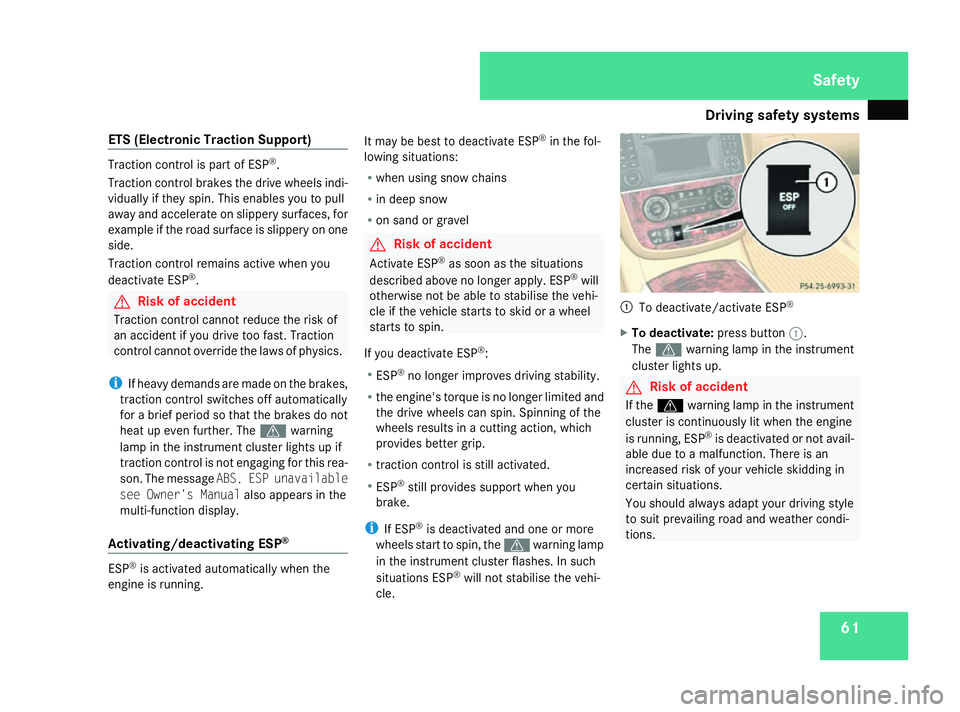
To deactivate/activate ESP ®
X To deactivate: press button1.
The v warning lamp in the instrument
cluster lights up. G
Risk of accident
If the v warning lamp in the instrument
cluster is continuously lit when the engine
is running, ESP ®
is deactivated or not avail-
able due to a malfunction. There is an
increased risk of your vehicle skidding in
certain situations.
You should always adapt your driving style
to suit prevailing road and weather condi-
tions. Safety
251_AKB; 5; 7, en-GB
wobuchh
,V ersion: 2.10.6
2008-05-11T14:51:51+02:00 - Seite 61 ZDateiname: 6515_1825_02_buchblock.pdf; preflight
Page 65 of 373

Driving safety sys
tems62
X
To activate: press button 1.
The v warning lamp in the instrument
cluster goes out. EBV (electronic brake-power distribu-
tion)
EBV monitors and controls the brake pres-
sure on the rear wheels to improve driving
stability under braking. G
Risk of accident
If EBV is malfunctioning, the brake system
is still available with full brake boosting
effect. However, the rear wheels can still
lock, e.g. under full braking. This could
cause you to lose control of your vehicle
and cause an accident. You should there-
fore adapt your driving style to the different
handling characteristics. Distance warning system (only for
vehicles with Distronic*)
This function will issue a warning at speeds of
around 30 km/h or more if:
R for a period of several seconds, the dis-
tance to the vehicle in front is too short for
the speed at which you are travelling. The
distance warning lamp lin the instru-
ment cluster will then light up.
R you are approaching the vehicle in front too
rapidly. An intermittent warning tone will
then sound and the distance warning lamp
l will light up in the instrument cluster.
In order to maintain the appropriate distance
to the vehicle in front and thus prevent a
crash, you must apply the brakes yourself. G
Risk of accident
Pay particular attention to the traffic con-
ditions if the distance warning lamp l
in the instrument cluster lights up or an
intermittent warning tone sounds.
If necessary, brake or swerve to avoid an
obstacle. X
To activate/deactivate: activate or deac-
tivate the distance warning system in the
on-board computer (Y page 136).
After activation, the :symbol is dis-
played in the lower multi-function display.
For more information on the distance warning
system, see the Distronic* section
(Y page 143). Safety
* optional
251_AKB; 5; 7, en-GB
wobuchh
,V ersion: 2.10.6
2008-05-11T14:51:51+02:00 - Seite 62 Dateiname: 6515_1825_02_buchblock.pdf; preflight
Page 70 of 373

67
Opening and closing
...........................68
Key positions ....................................... 76
Seats .................................................... 77
Steering wheel .................................... 88
Mirrors ................................................. 90
Memory functions* .............................92
Seat belts ............................................. 94
Lights ................................................... 97
Windscreen wipers ...........................104
Side windows .................................... 106Driving and parking
..........................110
Transmission ..................................... 113
Instrument cluster ............................118
On-board computer ..........................120
Driving systems ................................ 140
Air conditioning ................................. 159
Sliding sunroof .................................. 178
Loading and stowing ........................183
Features ............................................. 204 Controls
251_AKB; 5; 7, en-GB
wobuchh,
Version: 2.10.6 2008-05-11T14:51:51+02:00 - Seite 67Dateiname: 6515_1825_02_buchblock.pdf; preflight
Page 93 of 373

Mirrors
90 Mirrors
Rear-view mirror
X Adjust the rear-view mirror by hand so you
have a good overview of the traffic condi-
tions.
Rear-view mirror (manual anti-dazzle) 1
Anti-dazzle switch
X Anti-dazzle mode: flick anti-dazzle switch
1 forwards or back. Exterior mirrors
G
Risk of accident
The exterior mirrors reduce the size of the
image. Objects are actually closer than
they appear. You could misjudge the dis-
tance from vehicles driving behind and
cause an accident, e.g. when changing
lane. For this reason, make sure of the
actual distance from the vehicle driving
behind by glancing over your shoulder.
The convex exterior mirrors give a larger field
of vision.
At low outside temperatures, the exterior mir-
rors are heated automatically. Adjusting the exterior mirrors 1
Adjustment button
2 Right-hand exterior mirror
3 Left-hand exterior mirror
X Make sure that the key is in position 1or
2 in the ignition lock.
X Press button 2for the right-hand exterior
mirror or button 3for the left-hand exte-
rior mirror.
The indicator lamp in the corresponding
button lights up in red.
The indicator lamp goes out again after
some time. You can only adjust the selec-
ted mirror using adjustment button 1as
long as the indicator lamp is lit.
X Press adjustment button 1up, down, to
the right or to the left until the exterior mir- Controls
251_AKB; 5; 7, en-GB
wobuchh,
Version: 2.10.6 2008-05-11T14:51:51+02:00 - Seite 90Dateiname: 6515_1825_02_buchblock.pdf; preflight
Page 99 of 373

Seat belts
96 Belt warning for driver and front
passenger
The < seat belt warning lamp in the instru-
ment cluster reminds you that all occupants
should fasten their seat belts. The
or it may flash. Additionally, there may be a
warning tone.
The < seat belt warning lamp goes out and
the warning tone ceases when the driver and
the front passenger have fastened their seat
belt.
For certain countries only: regardless of
whether the driver or the front passenger is
already secured, the
has been started. The
front passenger have fastened their seat belt.
i Further information about the
You can adjust the seat belt height on the
driver's seat and front-passenger seat.
Adjust the belt to a height that allows it to be
routed across the middle of your shoulder. 1
Release catch
X To raise: slide the belt sash guide upwards.
The belt sash guide engages in various posi-
tions.
X To lower: press and hold release button
1.
X Slide the belt sash guide downwards.
X Let go of release button 1and make sure
that the belt sash guide has engaged. Correct driver's seat position
1
Steering wheel
2 Seat belt
3 Seat G
Risk of accident
Only adjust the driver's seat when the vehi-
cle is stationary. You will otherwise be dis- Controls
251_AKB; 5; 7, en-GB
wobuchh,
Version: 2.10.6 2008-05-11T14:51:51+02:00 - Seite 96Dateiname: 6515_1825_02_buchblock.pdf; preflight
Page 100 of 373
Lights
97tracted from the road and traffic conditions
and you could lose control of the vehicle as
a result of the seat moving. This could
cause an accident.
G
Risk of accident
Only adjust the steering wheel when the
vehicle is stationary and do not pull away
until the steering wheel adjustment mech-
anism is locked in position. You might oth-
erwise drive without the steering wheel
adjustment mechanism being locked in
position. As a result you could be distracted
from road and traffic conditions by an unex-
pected movement of the steering wheel
and thereby cause an accident.
The steerability of the vehicle is however
not affected.
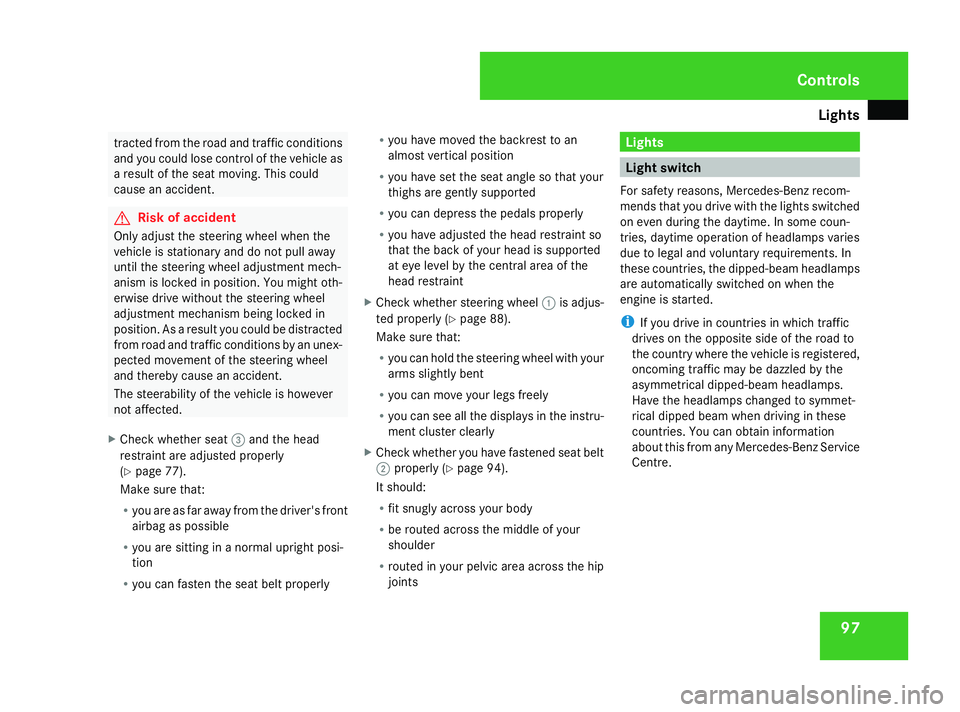
X Check whether seat 3and the head
restraint are adjusted properly
(Y page 77).
Make sure that:
R you are as far away from the driver's front
airbag as possible
R you are sitting in a normal upright posi-
tion
R you can fasten the seat belt properly R
you have moved the backrest to an
almost vertical position
R you have set the seat angle so that your
thighs are gently supported
R you can depress the pedals properly
R you have adjusted the head restraint so
that the back of your head is supported
at eye level by the central area of the
head restraint
X Check whether steering wheel 1is adjus-
ted properly (Y page 88).
Make sure that:
R you can hold the steering wheel with your
arms slightly bent
R you can move your legs freely
R you can see all the displays in the instru-
ment cluster clearly
X Check whether you have fastened seat belt
2 properly (Y page 94).
It should:
R fit snugly across your body
R be routed across the middle of your
shoulder
R routed in your pelvic area across the hip
joints Lights
Light switch
For safety reasons, Mercedes-Benz recom-
mends that you drive with the lights switched
on even during the daytime. In some coun-
tries, daytime operation of headlamps varies
due to legal and voluntary requirements. In
these countries, the dipped-beam headlamps
are automatically switched on when the
engine is started.
i If you drive in countries in which traffic
drives on the opposite side of the road to
the country where the vehicle is registered,
oncoming traffic may be dazzled by the
asymmetrical dipped-beam headlamps.
Have the headlamps changed to symmet-
rical dipped beam when driving in these
countries. You can obtain information
about this from any Mercedes-Benz Service
Centre. Controls
251_AKB; 5; 7, en-GB
wobuchh,
Version: 2.10.6 2008-05-11T14:51:51+02:00 - Seite 97 ZDateiname: 6515_1825_02_buchblock.pdf; preflight
Page 101 of 373

Lights
98$
a
Left-hand parking lamp
% g
Right-hand parking lamp
& M
Lights off/constant headlamp mode
( U
Automatic headlamp mode/con-
stant headlamp mode
) C
Side lamps, licence plate and instru-
ment lighting
* B
Dipped-beam headlamps or main-
beam headlamps
, ¥
Fog lamps
. †
Rear fog lamp
i The exterior lighting (except for side
lamps and parking lamps) automatically
switches off when you remove the key from
the ignition lock or open the driver's door
while the ignition is switched off (ignition
key in position 0). !
Switch off the side lamps and parking
lamp when you leave the vehicle. This pre-
vents the battery from discharging.
Dipped-beam headlamps X
Turn the ignition key to position 2in the
ignition lock or start the engine.
X To switch on: turn the light switch to
B.
The dipped-beam headlamps, parking
lamps and licence plate lamps are switched
on. The parking lamp indicator lamp next to
the light switch lights up.
Constant headlamp mode In countries in which constant headlamp
mode is not a legal requirement, you can
make this a setting using the on-board com-
puter.
You can activate or deactivate "constant
headlamp mode" using the on-board com-
puter (Y
page 132).
X To switch on: turn the light switch to
M orU.
The dipped-beam headlamps, side lamps
and licence plate lamp are switched on
when the engine is running. i
When you turn the light switch to any
position other than MorU, the cor-
responding light goes on.
Automatic headlamp mode The side lamps, dipped-beam headlamps and
licence plate lamp are switched on or off
automatically, depending on the brightness of
the ambient light.
G
Risk of accident
If the light switch is set to the Uposi-
tion, the light will not come on automati-
cally in foggy conditions. This could endan-
ger you and others. Therefore, turn the light
switch to Bin the dark or in fog.
The automatic headlamp feature is only an
aid. The driver is responsible for the vehi-
cle's lighting at all times. G
Risk of accident
When it is dark or foggy, turn the light
switch from UtoB in good time.
Otherwise, the headlamps could switch off
temporarily and you could cause an acci-
dent. Controls
251_AKB; 5; 7, en-GB
wobuchh,
Version: 2.10.6 2008-05-11T14:51:51+02:00 - Seite 98Dateiname: 6515_1825_02_buchblock.pdf; preflight
Page 102 of 373

Lights
99
X
To switch on: turn the light switch to
U.
The side lamps are switched on and off
automatically when the key is in position
1 in the ignition lock.
The dipped-beam headlamps, side lamps
and licence plate lamp are switched on
automatically when the engine is running.
When the parking lamp or dipped-beam
headlamps are switched on, the indicator
lamp next to the light switch lights up.
Front fog lamps/Rear fog lamp G
Risk of accident
If you suspect that driving conditions will be
foggy, turn the light switch to Bbefore
you start your journey. Otherwise, your
vehicle may not be visible and you could
endanger yourself and others. G
Risk of accident
When it is dark or foggy, turn the light
switch from UtoB in good time.
Otherwise, the headlamps could switch off
temporarily and you could cause an acci-
dent.
When the light switch is set to Uyou can-
not switch on the front or rear fog lamps. X
Turn the key to position 2in the ignition
lock.
X To switch on the front fog lamps: turn
the light switch to the BorC posi-
tion.
X Pull the light switch out to the first stop.
The ¥ green indicator lamp next to the
light switch lights up.
X To switch on the rear fog lamp: turn the
light switch to BorC.
X Pull the light switch out to the second
detent.
The † yellow indicator lamp next to the
light switch lights up.
X To switch off the front foglamps/rear
foglamp: push in the light switch to the
stop.
The corresponding indicator lamp goes out. Combination switch (turn signals,
main-beam headlamps and headlamp
flasher)
Turn signal Combination switch
1
Right-hand turn signal
2 Left-hand turn signal
X To switch on: press the combination
switch in the direction of arrow 1or2.
The corresponding turn signal indicator
lamp K orL in the instrument clus-
ter flashes.
i If you only wish to indicate a minor change
of direction, press the combination switch Controls
251_AKB; 5; 7, en-GB
wobuchh,
Version: 2.10.6 2008-05-11T14:51:51+02:00 - Seite 99 ZDateiname: 6515_1825_02_buchblock.pdf; preflight
Page 103 of 373

Lights
100briefly in the appropriate direction. The cor-
responding turn signal flashes three times.
Main-beam headlamps/headlamp flas-
her Combination switch
1
Main-beam headlamps
2 Headlamp flasher
Main-beam headlamps
X Turn the ignition key to position 2in the
ignition lock or start the engine.
X Turn the light switch to BorU 18
.
X To switch on: press the combination
switch in the direction of arrow 1.
The main-beam indicator lamp Ain the
instrument cluster lights up. X
To switch off: move the combination
switch back to its normal position.
The main-beam indicator lamp Ain the
instrument cluster goes out.
Headlamp flasher
X To switch on: briefly pull the combination
switch in the direction of arrow 2. Hazard warning lamps
Centre console
1
Hazard warning lamp button
The hazard warning lamps still operate if the
ignition is switched off. They switch on auto-
matically if an airbag is deployed or if you
brake sharply and bring the vehicle to a halt
from a speed of more than 70 km/h. X
To switch on: press button1.
All turn signals flash. If you now switch on
a turn signal using the combination switch
(Y page 99), only the turn signal lamp on
the corresponding side of the vehicle will
flash.
X To deactivate: press button1. Adjusting the headlamp range (vehi-
cles with halogen headlamps)
The headlamp range control allows you to
adjust the cone of light from the headlamps
according to how your vehicle is laden.
You can only adjust the headlamp range while
the engine is running.
18 In the Uposition, the main-beam headlamps are only switched on when it is dark. Controls
251_AKB; 5; 7, en-GB
wobuchh,
Version: 2.10.6 2008-05-11T14:51:51+02:00 - Seite 100Dateiname: 6515_1825_02_buchblock.pdf; preflight
Page 104 of 373

Lights
101Vehicles with air suspension*
1
Headlamp range control Vehicles with air suspension* Position Load
-2 Not required
-1 Driver's seat, front-
passenger seat and all the
rearmost seats occupied
or
All seats occupied
0 Driver's seat occupied
or
Driver's seat and front-
passenger seat occupied
or
All seats occupied and lug-
gage compartment loaded up
to the maximum permissible
rear axle load
or
Driver’s seat occupied and
luggage compartment loaded
up to the maximum permissi-
ble rear axle load Steel-spring vehicles
1
Headlamp range control
Steel-spring vehicles Position Load
0 Driver's seat occupied
or
Driver's seat and front-
passenger seat occupied
1 Driver's seat, front-
passenger seat and all the
rearmost seats occupied
or
All seats occupied Controls
* optional
251_AKB; 5; 7, en-GB
wobuchh,
Version: 2.10.6 2008-05-11T14:51:51+02:00 - Seite 101 ZDateiname: 6515_1825_02_buchblock.pdf; preflight