wheel MERCEDES-BENZ S CLASS 2000 Workshop Manual
[x] Cancel search | Manufacturer: MERCEDES-BENZ, Model Year: 2000, Model line: S CLASS, Model: MERCEDES-BENZ S CLASS 2000Pages: 421, PDF Size: 20.37 MB
Page 154 of 421
151 Tire inflation pressure monitor
Te ch n ica l
data Instruments
and controlsOperationDrivingInstrument
cluster displayPractical hints Car care Index Notes:
Following a tire inflation pressure reactivation process
the real tire inflation pressures are displayed only after
a few minutes travel time.
Possible differences between readings of a tire pressure
gauge of an air hose, e.g. gas station equipment, and the
vehicle’s multifunction display can occur. The vehicle’s
multifunction display of the tire inflation pressure
monitor is a more precise reading.Activation of tire inflation pressure monitor
Activation of tire inflation pressure monitor is
necessary if tire inf lation pressure is being changed,
wheels or tires are replaced, or new wheels are installed
on the vehicle.
Tire inf lation pressure should be checked and corrected
according to the label affixed inside the fuel filler flap.
For a detailed description, refer to page 348.
Turn electronic key in starter switch to position 2 (the
engine must not be running).
Notes:
When checking the tire inflation pressure of the road
wheels, also check the spare tire.
The tire inflation pressure of the spare wheel, mounted
or not mounted, is not monitored by the tire inflation
pressure monitor.
See page 338 for location of the spare wheel, and
page 348 for tire inflation pressure.
Page 155 of 421
152 Tire inflation pressure monitor
Te ch n ica l
data Instruments
and controlsOperationDrivingInstrument
cluster displayPractical hints Car care Index
Press è or ÿ button on the multifunction
steering wheel until the display for trip and main
odometer appears, see page 124.
Press the j or k button repeatedly until the tire
inflation pressure monitor appears.
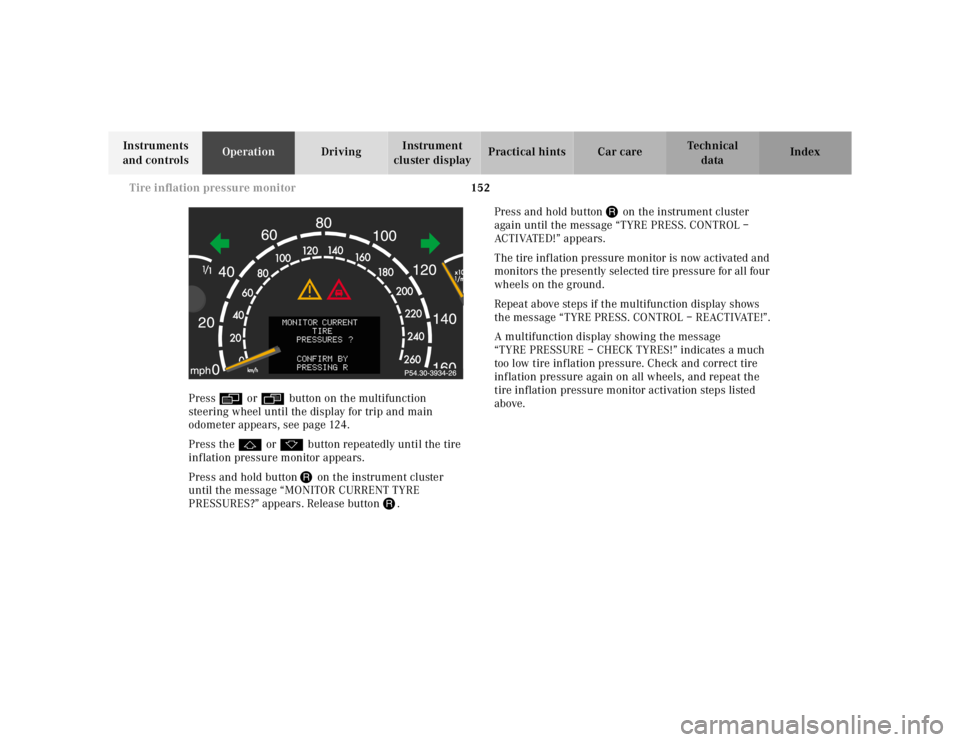
Press and hold button J on the instrument cluster
until the message “MONITOR CURRENT TYRE
PRESSURES?” appears. Release button J.Press and hold button J on the instrument cluster
again until the message “TYRE PRESS. CONTROL –
ACTIVATED!” appears.
The tire inflation pressure monitor is now activated and
monitors the presently selected tire pressure for all four
wheels on the ground.
Repeat above steps if the multifunction display shows
the message “TYRE PRESS. CONTROL – REACTIVATE!”.
A multifunction display showing the message
“TYREPRESSURE–CHECKTYRES!” indicates a much
too low tire inflation pressure. Check and correct tire
inflation pressure again on all wheels, and repeat the
tire inflation pressure monitor activation steps listed
above.
Page 156 of 421
153 Tire inflation pressure monitor
Te ch n ica l
data Instruments
and controlsOperationDrivingInstrument
cluster displayPractical hints Car care Index Notes:
To ensure proper functioning of the tire inflation
pressure monitor, the tire inflation pressure should be
checked and corrected according to the label affixed
inside the fuel filler flap. For a detailed description,
refer to page 348.
The message “TYRE PRESS. CONTROL – REACTIVATE”
appears if the tire inflation pressure shows an increase
of 4.4 psi (0.3 bar) or more. Reactivate the tire inflation
pressure monitor.
The tire inflation pressure monitor only functions on
wheels equipped with the proper electronic sensors.
Inquire at your authorized Mercedes-Benz Center about
retrofitting other than original Mercedes-Benz wheels
with electronic sensors.Transporting a deflated road wheel in the vehicle, e.g.
after having a flat, the tire inflation pressure monitor
should only be activated once the flat tire and rim are
removed from the vehicle. Otherwise the monitor
displays the message “TYRE PRESS. CONTROL –
CURRENTLY INACTIVE”.
To prevent possible damage to the electronic sensors,
have tire changes only performed at an authorized
Mercedes-Benz Center.
For malfunction and warning messages, see page 303.
Page 157 of 421
154 Engine oil level indicator
Te ch n ica l
data Instruments
and controlsOperationDrivingInstrument
cluster displayPractical hints Car care Index
Engine oil level indicator
To check the engine oil level, park vehicle on level
ground, with engine at normal operational temperature.
Check oil level approximately 5 minutes after stopping
the engine, allowing for the oil to return to the oil pan.
The message “PERF. SERV. ON TIME” (perform service
[engine oil level check] on time) will be displayed if the
required waiting period has not been observed after
stopping the engine:
•with engine at operational temperature
approximately 5 minutes.•with engine not at operational temperature up to
approximately 30 minutes.
The engine oil level check can be repeated after a short
time.
Turn the electronic key in starter switch to position 2.
To call up the trip odometer and main odometer, press
button è or ÿ on the multifunction steering
wheel until the display appears. See page 124.
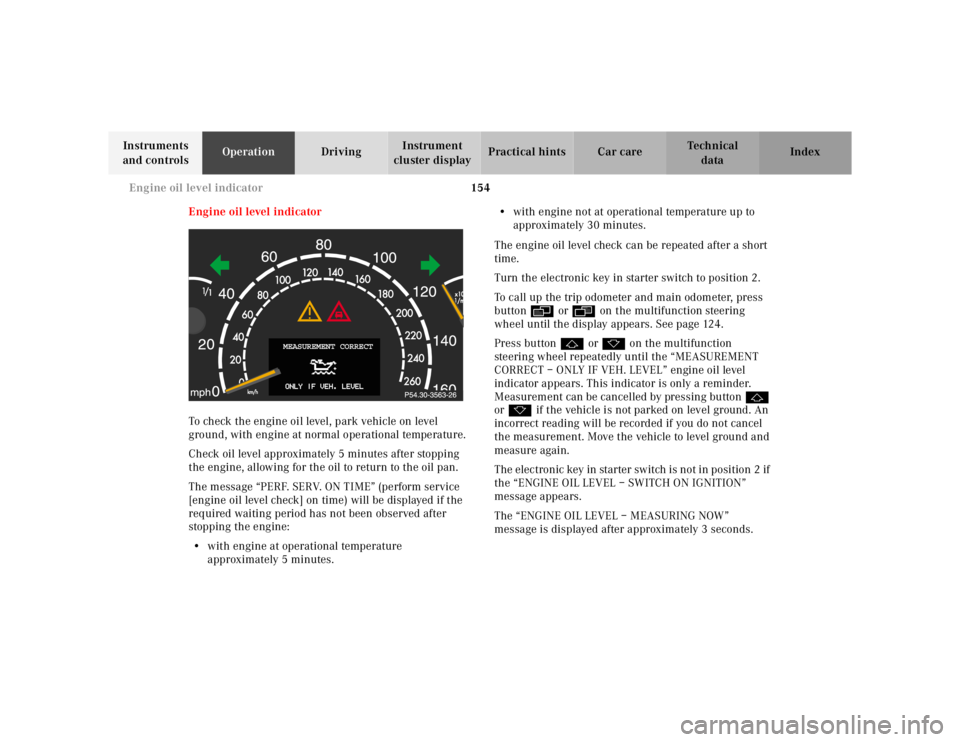
Press button j or k on the multifunction
steering wheel repeatedly until the “MEASUREMENT
CORRECT – ONLY IF VEH. LEVEL” engine oil level
indicator appears. This indicator is only a reminder.
Measurement can be cancelled by pressing button j
or k if the vehicle is not parked on level ground. An
incorrect reading will be recorded if you do not cancel
the measurement. Move the vehicle to level ground and
measure again.
The electronic key in starter switch is not in position 2 if
the “ENGINE OIL LEVEL – SWITCH ON IGNITION”
message appears.
The “ENGINE OIL LEVEL – MEASURING NOW”
message is displayed after approximately 3 seconds.
MEASUREMENT CORRECT
Page 163 of 421
160 Combination switch
Te ch n ica l
data Instruments
and controlsOperationDrivingInstrument
cluster displayPractical hints Car care Index
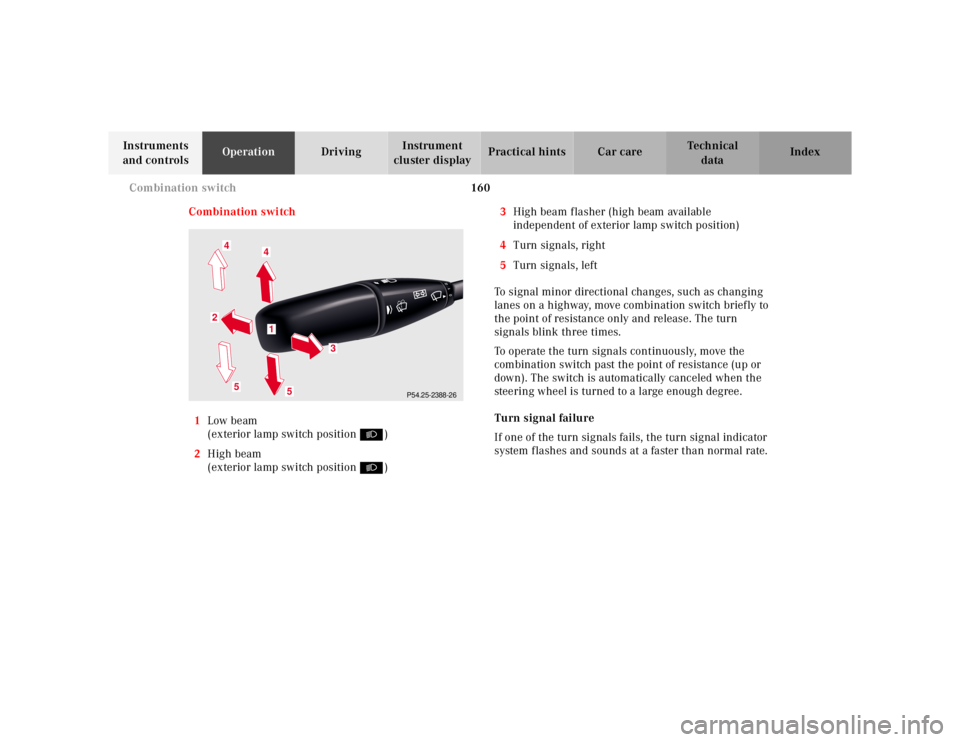
Combination switch
1Low beam
(exterior lamp switch position B)
2High beam
(exterior lamp switch position B)3High beam flasher (high beam available
independent of exterior lamp switch position)
4Turn signals, right
5Turn signals, left
To signal minor directional changes, such as changing
lanes on a highway, move combination switch brief ly to
the point of resistance only and release. The turn
signals blink three times.
To operate the turn signals continuously, move the
combination switch past the point of resistance (up or
down). The switch is automatically canceled when the
steering wheel is turned to a large enough degree.
Turn signal failure
If one of the turn signals fails, the turn signal indicator
system f lashes and sounds at a faster than normal rate.
P54.25-2388-26
5
2
1
4
3
4
5
Page 168 of 421
165 Automatic climate control
Te ch n ica l
data Instruments
and controlsOperationDrivingInstrument
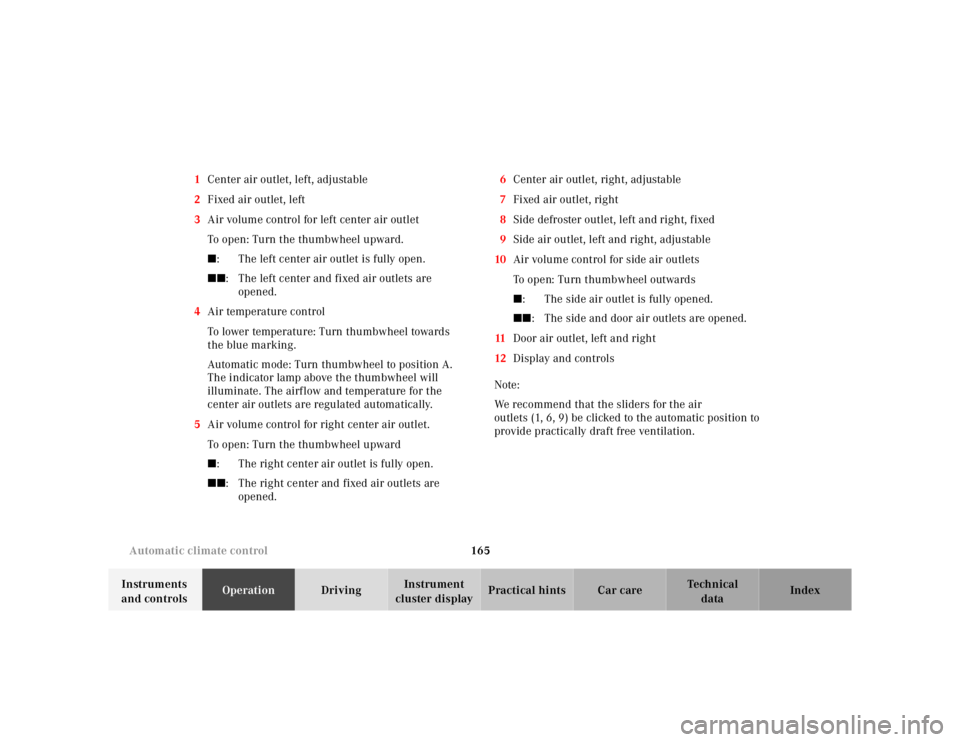
cluster displayPractical hints Car care Index 1Center air outlet, left, adjustable
2Fixed air outlet, left
3Air volume control for left center air outlet
To open: Turn the thumbwheel upward.
■: The left center air outlet is fully open.
■■: The left center and fixed air outlets are
opened.
4Air temperature control
To lower temperature: Turn thumbwheel towards
the blue marking.
Automatic mode: Turn thumbwheel to position A.
The indicator lamp above the thumbwheel will
illuminate. The airflow and temperature for the
center air outlets are regulated automatically.
5Air volume control for right center air outlet.
To open: Turn the thumbwheel upward
■: The right center air outlet is fully open.
■■: The right center and fixed air outlets are
opened.6Center air outlet, right, adjustable
7Fixed air outlet, right
8Side defroster outlet, left and right, fixed
9Side air outlet, left and right, adjustable
10Air volume control for side air outlets
To open: Turn thumbwheel outwards
■: The side air outlet is fully opened.
■■: The side and door air outlets are opened.
11Door air outlet, left and right
12Display and controls
Note:
We recommend that the sliders for the air
outlets (1, 6, 9) be clicked to the automatic position to
provide practically draft free ventilation.
Page 179 of 421
176 Automatic climate control
Te ch n ica l
data Instruments
and controlsOperationDrivingInstrument
cluster displayPractical hints Car care Index
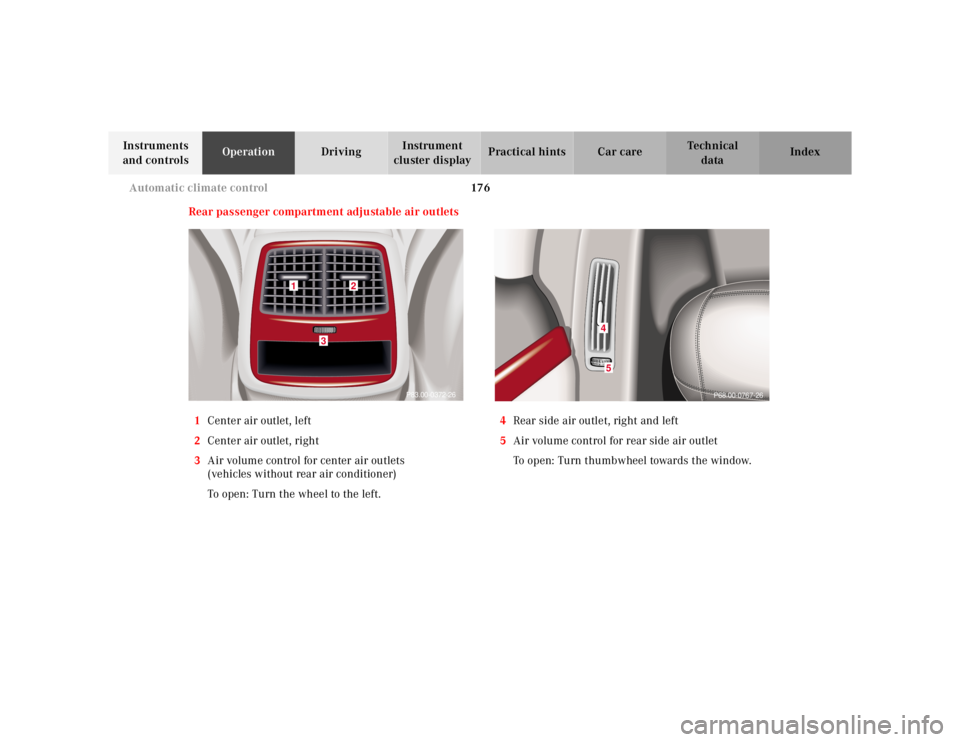
Rear passenger compartment adjustable air outlets
1Center air outlet, left
2Center air outlet, right
3Air volume control for center air outlets
(vehicles without rear air conditioner)
To open: Turn the wheel to the left.4Rear side air outlet, right and left
5Air volume control for rear side air outlet
To open: Turn thumbwheel towards the window.
P83.00-0372-26
1
2
3
45
P68.00-0767-26
Page 217 of 421
214 Tele Aid
Te ch n ica l
data Instruments
and controlsOperationDrivingInstrument
cluster displayPractical hints Car care Index
Te l e A i d
Important!
The initial activation of the Tele Aid system may only be
performed by completing the subscriber agreement and
placing an acquaintance call using the “SOS” button.
Failure to complete either of these steps will result in a
system that is not activated. If the system is not
activated the indicator lamp in the “SOS” button stays
on after turning electronic key in starter switch to
position 2 (vehicles with KEYLESS-GO:
operating position, see page 228) and the message
“TELE AID – NOT ACTIVATED” will be shown in the
multifunction display for approx. 10 seconds.
If you have any questions regarding activation, please
call the Response Center at 1-800-756-9018 (in the USA)
or 1-888-923-8367 (in Canada).
(Te l ematic Alarm Identification on Demand)
The Tele Aid system consists of three types of response;
automatic and manual emergency, roadside assistance
and information.
The Tele Aid system is operational providing that the
vehicle’s battery is charged, properly connected, not
damaged and cellular and GPS coverage is available.The speaker volume of a Tele Aid call can be adjusted
when using the volume control on the multifunction
steering wheel, for raising press buttonæand for
lowering press buttonç.
To activate, press the “SOS” button, the Roadside
Assistance button• or the Information button¡,
depending on the type of response required.
Shortly after the completion of your Acquaintance Call,
you will receive a user ID and password via first call
mail. By visiting www.mbusa.com and selecting
“Tele Aid” (USA only), you will have access to account
information, remote door unlock, Info Services
* profile
and more.
* Optional System self-check
Initially, after turning the electronic key in starter
switch to position 2, malfunctions are detected and
indicated (the indicator lamps in the “SOS” button, the
Roadside Assistance button• and the Information
button¡ stay on longer than 10 seconds or do not
come on). The message “TELE AID – VISIT
WORKSHOP” appears for approx. 10 seconds in the
multifunction display.
Page 222 of 421
219 Tele Aid
Te ch n ica l
data Instruments
and controlsOperationDrivingInstrument
cluster displayPractical hints Car care Index Notes:
The indicator lamp in the Roadside Assistance
button• remains illuminated in red for approx.
10 seconds during the system self-check after turning
electronic key in starter switch to position 2 (together
with the “SOS” button and the Information
button¡).
See system self-check on page 214 when the indicator
lamp does not light up in red or stays on longer than
approximately 10 seconds.
If the indicator lamp in the Roadside Assistance
button• is illuminated continuously and there was
no voice connection to the Response Center established,
then the Tele Aid system could not initiate an Roadside
Assistance call (e.g. the relevant cellular phone network
is not available). The message “ROADSIDE
ASSISTANCE – CALL FAILED” appears in the
multifunction display.
Roadside Assistance calls can be terminated using the
ìbutton on the multifunction steering wheel.Information button ¡
Located below the center armrest cover is the
Information button¡. Pressing and holding the
button (for longer than 2 seconds) will initiate a call to
the Client Assistance Center. The button will flash while
the call is in progress. The message “INFO –
CONNECTING CALL” will appear in the multifunction
display. When the connection is established, the
message “INFO – CALL CONNECTED” appears in the
multifunction display. The Tele Aid system will transmit
data generating the vehicle identification number,
model, color and location (subject to availability of
cellular and GPS signals).
A voice connection between the Client Assistance
Center representative and the occupants of the vehicle
will be established. When a voice connection is
established the audio system mutes and the message
“TELE AID – INFO CALL ACTIVE” appears in the
multifunction display. Information regarding the
operation of your vehicle, the nearest Mercedes-Benz
Center or Mercedes-Benz USA products and services is
ava il ab l e to you .
For more details concerning Tele Aid, please visit
www.mbusa.com and use your ID and password, sent to
you separately, to learn more (USA only).
Page 223 of 421
220 Tele Aid
Te ch n ica l
data Instruments
and controlsOperationDrivingInstrument
cluster displayPractical hints Car care Index
Notes:
The indicator lamp in the Information button¡
remains illuminated in red for approx. 10 seconds
during the system self-check after turning electronic
key in starter switch to position 2 (together with the
“SOS” button and the Roadside Assistance button•).
See system self-check on page 214 when the indicator
lamp does not light up in red or stays on longer than
approximately 10 seconds.
If the indicator lamp in the Information button¡ is
illuminated continuously and there was no voice
connection to the Response Center established, then the
Tele Aid system could not initiate an Information call
(e.g. the relevant cellular phone network is not
available). The message “INFO – CALL FAILED” appears
in the multifunction display.
Information calls can be terminated using the
ìbutton on the multifunction steering wheel.Important!
If the indicator lamps do not start flashing after
pressing one of the buttons or remain illuminated (in
red) at any time, the Tele Aid system has detected a fault
or the service is not currently active, and may not
initiate a call. Visit your Mercedes-Benz Center and
have the system checked or contact the Response Center
at 1-800-756-9018 (in the USA) or 1-888-923-8367 (in
Canada) as soon as possible.
Upgrade Signals
Tele Aid system processes calls using the following
priority.
•Automatic emergency – First priority
•Manual emergency – Second priority
•Roadside assistance – Third priority
•Information – Fourth priority
Should a higher priority call be initiated while you are
connected, an upgrade (alternating) tone will be heard,
and the appropriate indicator lamp will flash. If certain
information such as vehicle identification number or
client information is not available, the operator may
need to retransmit.