Selecting the language MERCEDES-BENZ S-Class 2001 W220 Comand Manual
[x] Cancel search | Manufacturer: MERCEDES-BENZ, Model Year: 2001, Model line: S-Class, Model: MERCEDES-BENZ S-Class 2001 W220Pages: 243, PDF Size: 2.33 MB
Page 3 of 243
Introduction1
How to use the COMAND operating manual
Before you take your first drive, please make yourself familiar with the COMAND operating unit and the functions it
supports. Read through these operating instructions carefully and, if necessary, refer to the operating instructions of
your vehicle.
The operating instructions are divided into 6 chapters:
• Introduction: An overview of the operating and display elements as well as explanation of the basic functions
• Audio: Information on the radio, tape and CD equipment (CD drive and CD changer) as well as sound settings
• Telephone: Explanation of the telephone functions
• Navigation: How to enter your destination, selecting your route, route guidance, how to use the route memory, and
selecting a detour.
•Info Services and system settings: Information on how to request and display service informations, setting
language, date/time, tones and day/night display
• Index: Search items to help you find exactly what you are looking for
Explanation of symbols used:
Warning notices for the protection of yourself and others
are preceded by a
symbol.
Page 7 of 243

Introduction5
Route guidance ............................... 174
The principle
of route guidance.......................... 174
Requesting destination and
route information ........................ 176
Beginning route guidance .......... 184
Turning onto a street .................. 186
Following the course
of the road ..................................... 187
Driving through
an intersection.............................. 188
Changing to map display
during route guidance ................ 189
Route guidance with a mixture
of map and symbol display ........ 190
Altering the map scale ............... 191
Selecting map orientation .......... 192
Marking a way point ................... 193
Selecting a detour during
route guidance ............................. 196
Resetting functions during
route guidance ............................. 200Deviating from the
calculated route ........................... 201
Reaching your destination ......... 201
Activating audio system ............. 202
Activating audio functions
during route guidance ................ 203
Canceling route guidance .......... 204
Destination memory ...................... 205
Activating the main destination
memory menu ............................. 205
Retrieving a destination from
the destination memory ............. 206
Saving the current destination
in the destination memory ........ 207
Saving the current vehicle
location in the destination
memory ......................................... 209
Sorting the destination
memory ......................................... 210
Deleting a destination
in the destination memory ........ 211
ContentsEntering the vehicle position ....... 212
Calibration ...................................... 213
Info Services and system
settingsContents – Info Services and
system settings .............................. 215
Info Services ................................... 216
Requesting and displaying
Info Services ................................ 216
System settings .............................. 219
Activating the main system
settings menu .............................. 219
Adjusting the brightness ........... 220
Activating Settings menu ........... 221
Selecting the language ............... 222
Set the date and time .................. 223
Switching beep tones
on and off ...................................... 230
Page 11 of 243
Introduction
Audio
Introduction
Telephone Navigation Index AudioInfo Services and
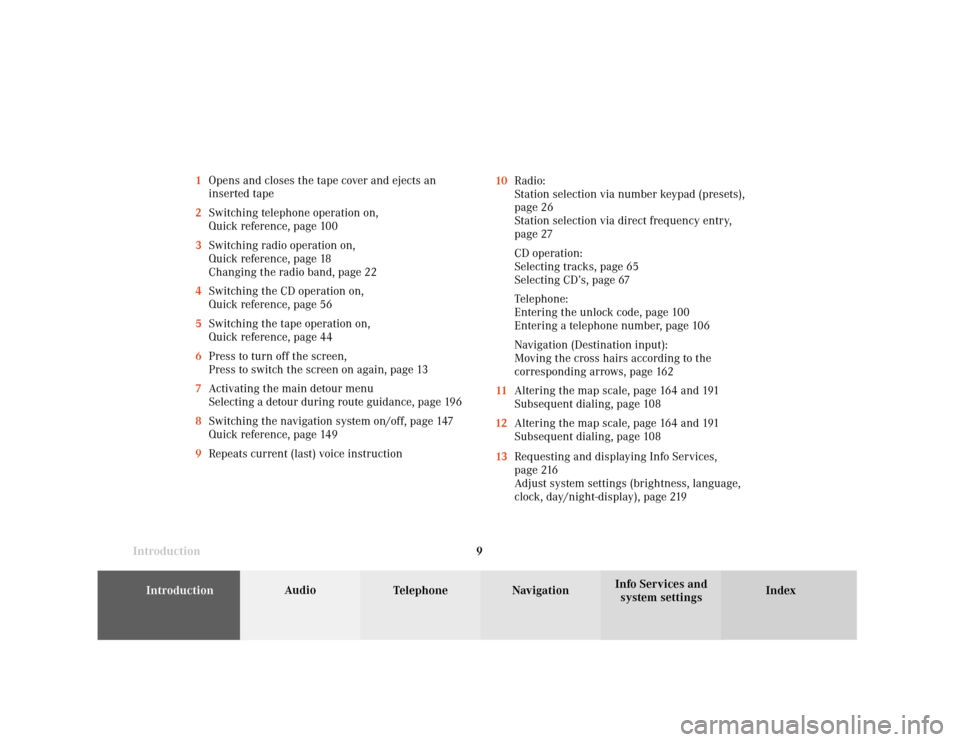
system settings 9 1Opens and closes the tape cover and ejects an
inserted tape
2Switching telephone operation on,
Quick reference, page 100
3Switching radio operation on,
Quick reference, page 18
Changing the radio band, page 22
4Switching the CD operation on,
Quick reference, page 56
5Switching the tape operation on,
Quick reference, page 44
6Press to turn off the screen,
Press to switch the screen on again, page 13
7Activating the main detour menu
Selecting a detour during route guidance, page 196
8Switching the navigation system on/off, page 147
Quick reference, page 149
9Repeats current (last) voice instruction10Radio:
Station selection via number keypad (presets),
page 26
Station selection via direct frequency entry,
page 27
CD operation:
Selecting tracks, page 65
Selecting CD’s, page 67
Telephone:
Entering the unlock code, page 100
Entering a telephone number, page 106
Navigation (Destination input):
Moving the cross hairs according to the
corresponding arrows, page 162
11Altering the map scale, page 164 and 191
Subsequent dialing, page 108
12Altering the map scale, page 164 and 191
Subsequent dialing, page 108
13Requesting and displaying Info Services,
page 216
Adjust system settings (brightness, language,
clock, day/night-display), page 219
Page 21 of 243
Introduction
AudioTelephone
Navigation
Index Info Services and
system settings Radio operation
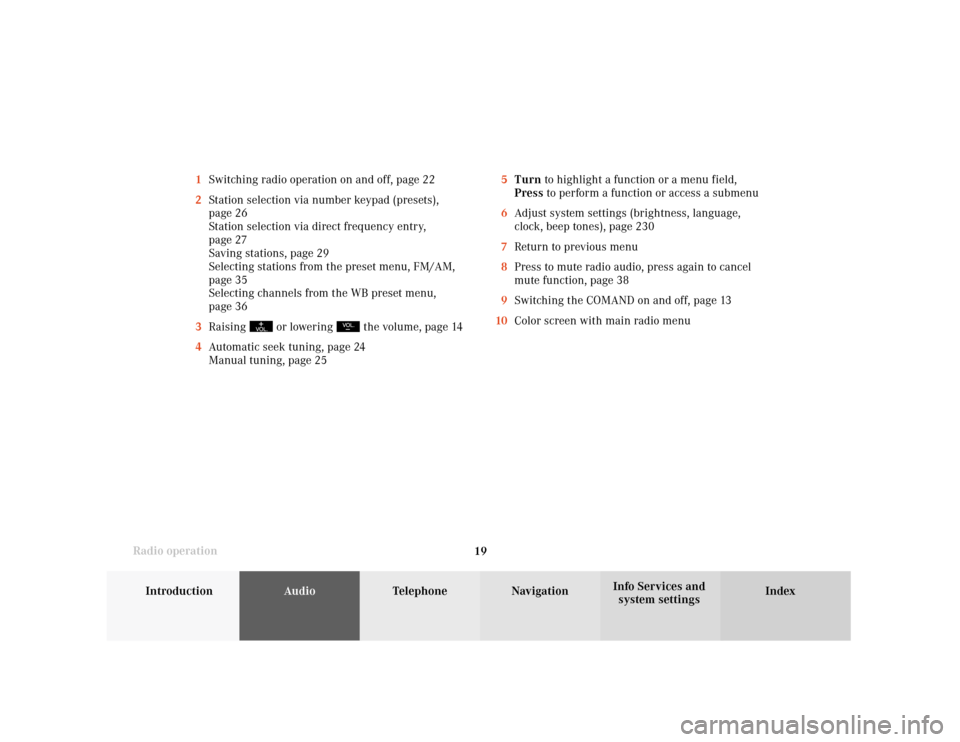
195Turn to highlight a function or a menu field,
Press to perform a function or access a submenu
6Adjust system settings (brightness, language,
clock, beep tones), page 230
7Return to previous menu
8Press to mute radio audio, press again to cancel
mute function, page 38
9Switching the COMAND on and off, page 13
10Color screen with main radio menu 1Switching radio operation on and off, page 22
2Station selection via number keypad (presets),
page 26
Station selection via direct frequency entry,
page 27
Saving stations, page 29
Selecting stations from the preset menu, FM/AM,
page 35
Selecting channels from the WB preset menu,
page 36
3Raising
or lowering
the volume, page 14
4Automatic seek tuning, page 24
Manual tuning, page 25
Page 59 of 243
57
Introduction
AudioTelephone
Navigation
Index Info Services and
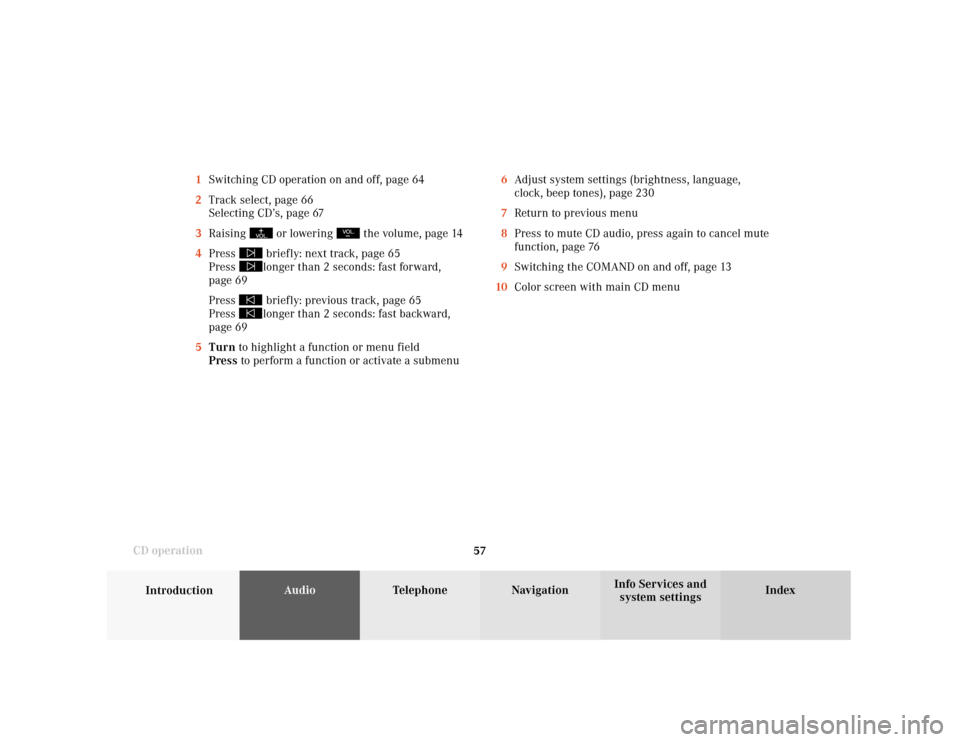
system settings CD operation6Adjust system settings (brightness, language,
clock, beep tones), page 230
7Return to previous menu
8Press to mute CD audio, press again to cancel mute
function, page 76
9Switching the COMAND on and off, page 13
10Color screen with main CD menu 1Switching CD operation on and off, page 64
2Track select, page 66
Selecting CD’s, page 67
3Raising
or lowering
the volume, page 14
4Press
briefly: next track, page 65
Press longer than 2 seconds: fast forward,
page 69
Press briefly: previous track, page 65
Press longer than 2 seconds: fast backward,
page 69
5Turn to highlight a function or menu field
Press to perform a function or activate a submenu
Page 217 of 243
System settings
Info Services and
system settings 215Contents – Info Services and system settings
Info Services and system
settingsInfo Services ................................... 216
Requesting and displaying
Info Services ................................ 216
System settings .............................. 219
Activating the main system
settings menu .............................. 219
Adjusting the brightness ........... 220
Activating Settings menu ........... 221
Selecting the language ............... 222
Set the date and time .................. 223
Switching beep tones
on and off ...................................... 230
Setting changeover between
day and night display ................. 231
Reset all settings to the factory
settings .......................................... 232
Auxiliary audio source ............... 233
Page 224 of 243
222 System settings
Audio Introduction
Telephone Navigation IndexInfo Services and
system settings
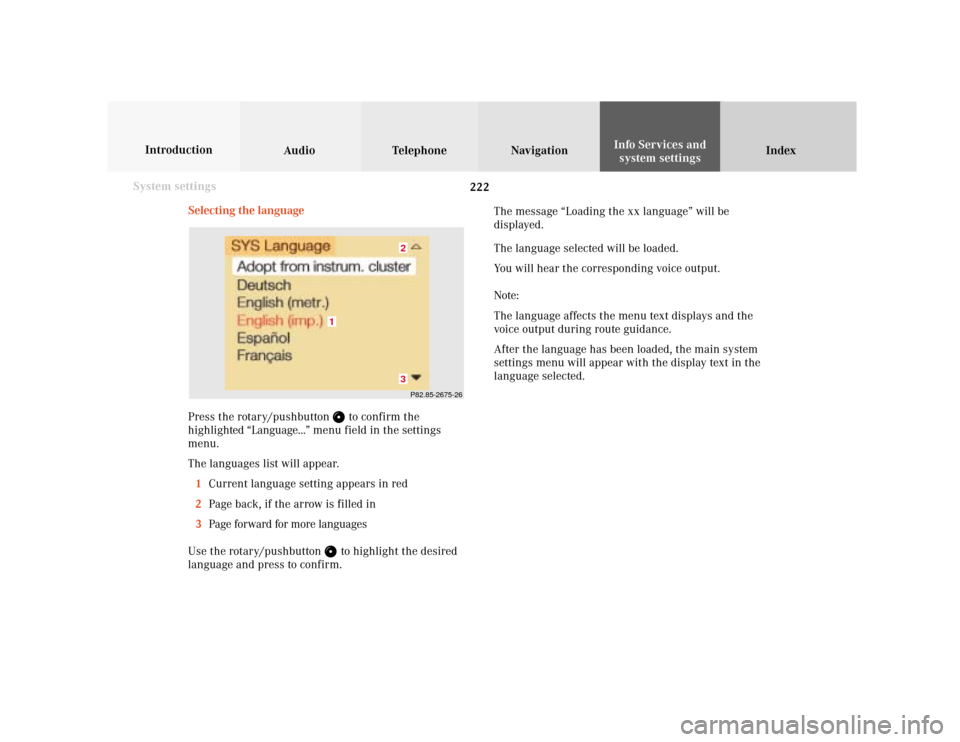
Selecting the language
Press the rotary/pushbutton
to confirm the
highlighted “Language...” menu field in the settings
menu.
The languages list will appear.
1Current language setting appears in red
2Page back, if the arrow is filled in
3Page forward for more languages
Use the rotary/pushbutton to highlight the desired
language and press to confirm.The message “Loading the xx language” will be
displayed.
The language selected will be loaded.
You will hear the corresponding voice output.
Note:
The language affects the menu text displays and the
voice output during route guidance.
After the language has been loaded, the main system
settings menu will appear with the display text in the
language selected.
P82.85-2675-2632
1
Page 225 of 243
System settings
Introduction Audio
Telephone NavigationIndex Info Services and
system settings 223Set the date and time
COMAND is equipped with an integrated clock. Press
to display the current time. The clock is used e.g.
for indicating the estimated time of arrival at the
destination, page 176.
There are several ways to set the time:
• With GPS reception, page 224
Set the time in 30 minute steps, page 225
Set the time by selecting a country and the time
zone, page 226
• Without GPS reception, page 224
Set the date and time manually, page 228
Note:
The clock must always be reset if the COMAND
system was disconnected or if the vehicle battery
was discharged. List of languages:
• “Adopt from Instrument Cluster” – the system will
use the same language as is set in instrument
cluster
• “Deutsch”
• “English (metric)” – distance measured in km,
speed in km/h
• “English (imperial)” – distance measured in yards,
miles, speed in mph
• “Español“
• “Français“
• “Italiano“
• “Nederlands“