ESP MERCEDES-BENZ S CLASS 2010 Owner's Guide
[x] Cancel search | Manufacturer: MERCEDES-BENZ, Model Year: 2010, Model line: S CLASS, Model: MERCEDES-BENZ S CLASS 2010Pages: 548, PDF Size: 11.45 MB
Page 156 of 548
External authorization
Certain security settings in your mobile
phone may prevent COMAND from finding
your mobile phone. In this case, you might
want to check if your mobile phone can
recognize the COMAND. The Bluetooth ®
device name of COMAND is MB Bluetooth.XSelect Data/Connections 0054
Bluetooth Telephones .XGo to Update and select Options 0054
External Authorization .XActivate the Bluetooth®
search on the
mobile phone. Refer to mobile phone
operating instructions for detail.XSelect MB Bluetooth on the mobile phone.XWhen prompted, enter the passkey into
COMAND and the mobile phone
( Y page 153).
Show details
Details can be displayed for each mobile
phone in the Bluetooth ®
phone list.
XSelect Data/Connections 0054
Bluetooth Telephones .XChoose the mobile phone from the list and
select Options 0054 Details .
The following mobile phone details appear:
R Bluetooth ®
name
R Bluetooth ®
address
R Availability status
R Authorization
R Bluetooth ®
Class (mobile phone,
notebook, etc.)XClosing detail display: Slide 009E005B 009F.Deauthorizing the mobile phone XSelect Data/Connections 0054
Bluetooth Telephones .XChoose the mobile phone from the list and
select Options 0054 De-authorize .
You will be asked whether you want to
deauthorize the device.XSelect Yes.
i
You should delete the device name MB
Bluetooth from the Bluetooth ®
list of the
mobile phone before authorizing that
mobile phone again.
Connecting another mobile phone
You can switch between several mobile
phones that you have authorized.
i Switching to another authorized mobile
phone is only possible while no phone calls
are being made.
XSelect Data/Connections 0054
Bluetooth Telephones .XSelect the mobile phone from the
Bluetooth ®
phone list.XConfirm the selection.
The selected mobile phone is connected
provided it is within Bluetooth ®
range and
Bluetooth ®
is activated on the respective
device.
You can only connect one mobile phone at
a time. The currently connected mobile
phone is indicated by a dot 003F in the
Bluetooth ®
phone list ( Y page 153).
Main telephone menu
When the connected mobile phone is ready,
the following display appears:
154COMAND telephoneControl systems
221_AKB; 6; 20, en-USd2ugruen,Version: 2.11.8.12009-09-24T13:28:17+02:00 - Seite 154
Page 160 of 548
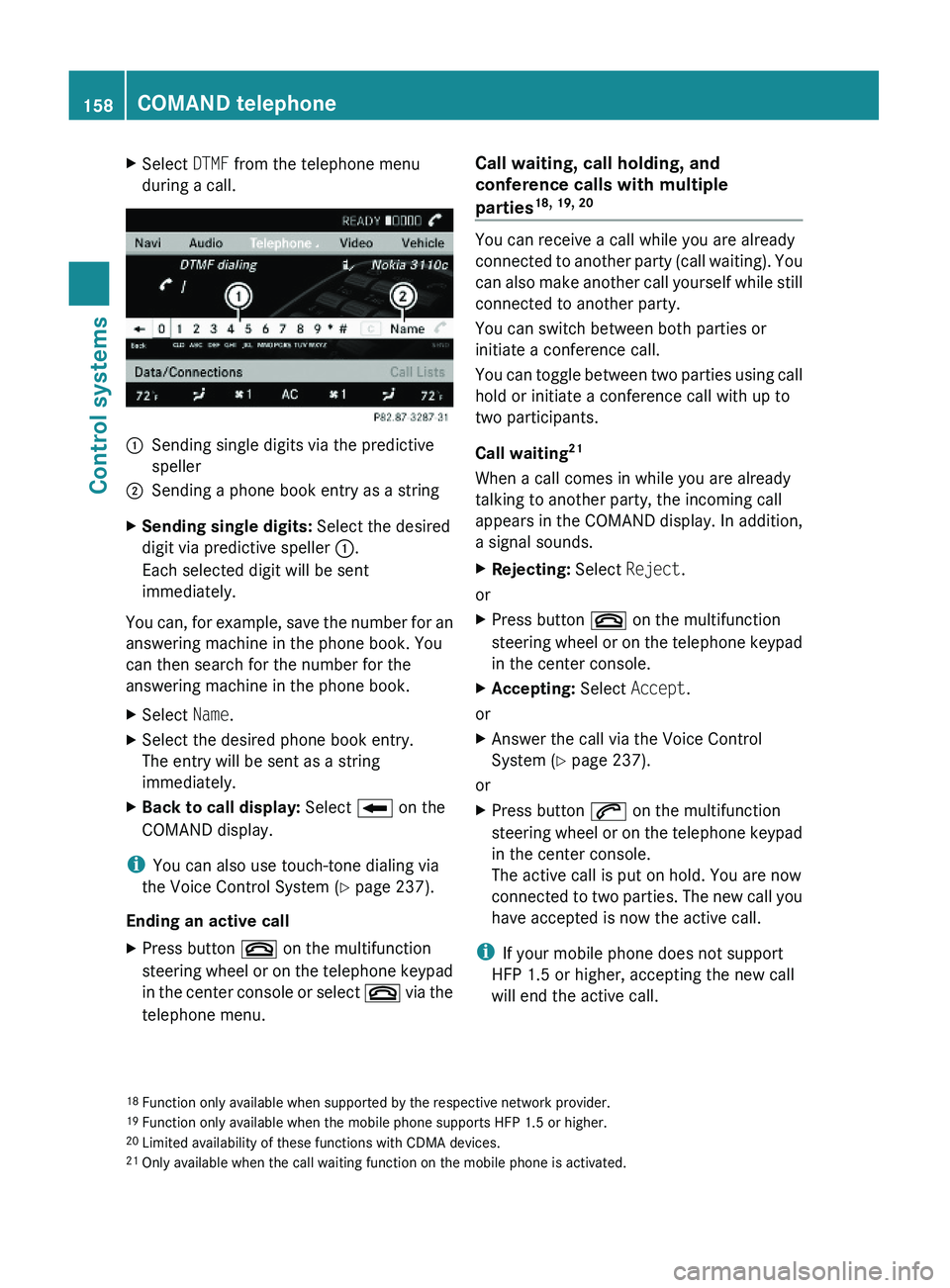
XSelect DTMF from the telephone menu
during a call.\000FSending single digits via the predictive
speller
\000GSending a phone book entry as a stringXSending single digits: Select the desired
digit via predictive speller \000F.
Each selected digit will be sent
immediately.
You can, for example, save the number for an
answering machine in the phone book. You
can then search for the number for the
answering machine in the phone book.
XSelect Name.XSelect the desired phone book entry.
The entry will be sent as a string
immediately.
XBack to call display: Select \000E on the
COMAND display.
iYou can also use touch-tone dialing via
the Voice Control System (Y page 237).
Ending an active call
XPress button \000 on the multifunction
steering wheel or on the telephone keypad
in the center console or select \000 via the
telephone menu.
Call waiting, call holding, and
conference calls with multiple
parties18, 19, 20
You can receive a call while you are already
connected to another party (call waiting). You
can also make another call yourself while still
connected to another party.
You can switch between both parties or
initiate a conference call.
You can toggle between two parties using call
hold or initiate a conference call with up to
two participants.
Call waiting21
When a call comes in while you are already
talking to another party, the incoming call
appears in the COMAND display. In addition,
a signal sounds.
XRejecting: Select Reject.
or
XPress button \000 on the multifunction
steering wheel or on the telephone keypad
in the center console.
XAccepting: Select Accept.
or
XAnswer the call via the Voice Control
System (Y page 237).
or
XPress button \000j on the multifunction
steering wheel or on the telephone keypad
in the center console.
The active call is put on hold. You are now
connected to two parties. The new call you
have accepted is now the active call.
iIf your mobile phone does not support
HFP 1.5 or higher, accepting the new call
will end the active call.
18Function only available when supported by the respective network provider.19Function only available when the mobile phone supports HFP 1.5 or higher.20Limited availability of these functions with CDMA devices.21Only available when the call waiting function on the mobile phone is activated.
158COMAND telephoneControl systems
221_AKB; 6; 20, en-USd2ugruen,Version: 2.11.8.12009-09-24T13:28:17+02:00 - Seite 158
Page 162 of 548
be accessed when the respective mobile
phone is connected to COMAND via the
Bluetooth® interface.
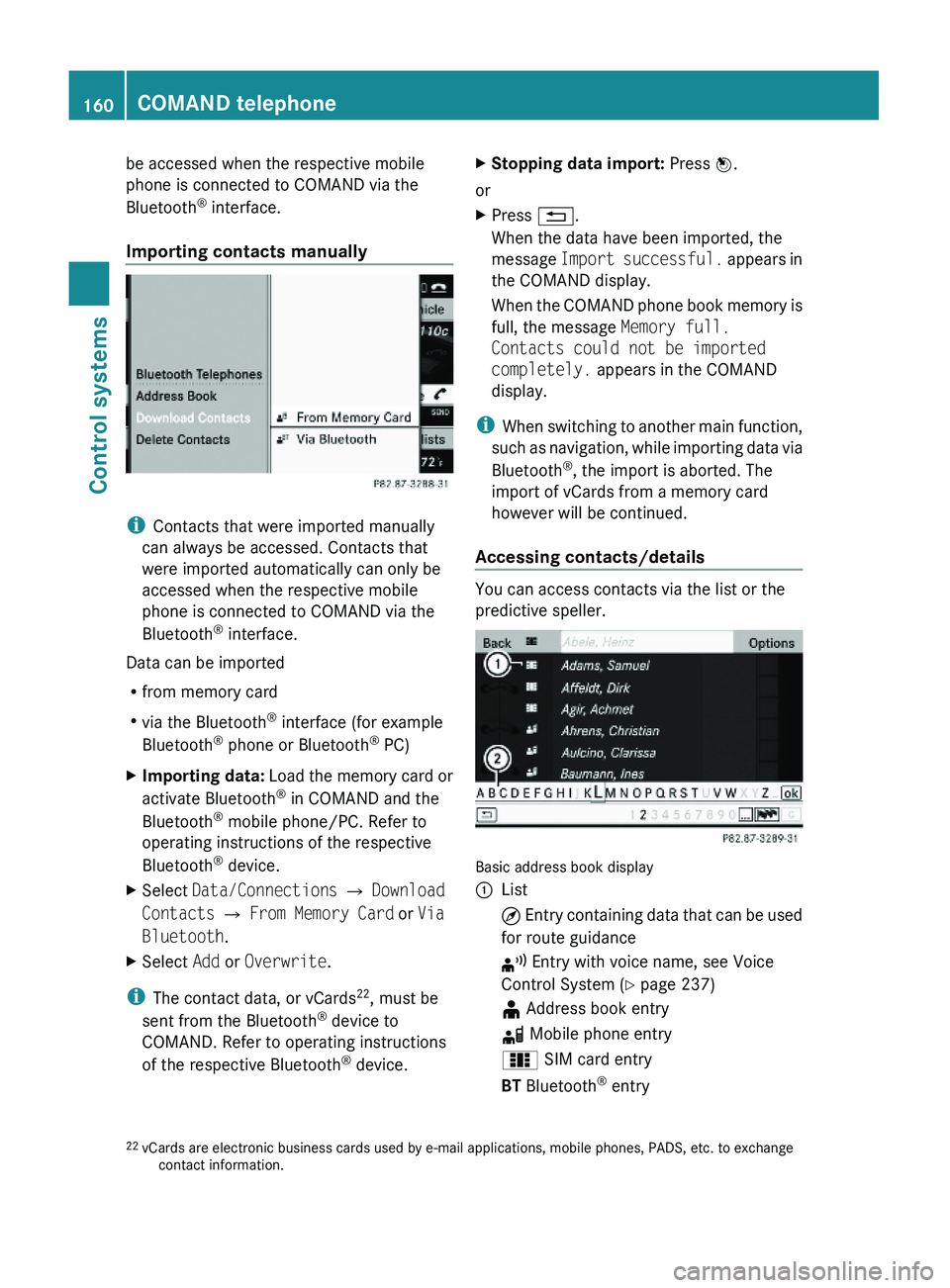
Importing contacts manually
iContacts that were imported manually
can always be accessed. Contacts that
were imported automatically can only be
accessed when the respective mobile
phone is connected to COMAND via the
Bluetooth® interface.
Data can be imported
Rfrom memory card
Rvia the Bluetooth® interface (for example
Bluetooth® phone or Bluetooth® PC)
XImporting data: Load the memory card or
activate Bluetooth® in COMAND and the
Bluetooth® mobile phone/PC. Refer to
operating instructions of the respective
Bluetooth® device.
XSelect Data/Connections \000T Download
Contacts \000T From Memory Card or Via
Bluetooth.
XSelect Add or Overwrite.
iThe contact data, or vCards22, must be
sent from the Bluetooth® device to
COMAND. Refer to operating instructions
of the respective Bluetooth® device.
XStopping data import: Press \000
Page 166 of 548
XSelect Calls Received or Calls
Dialed.
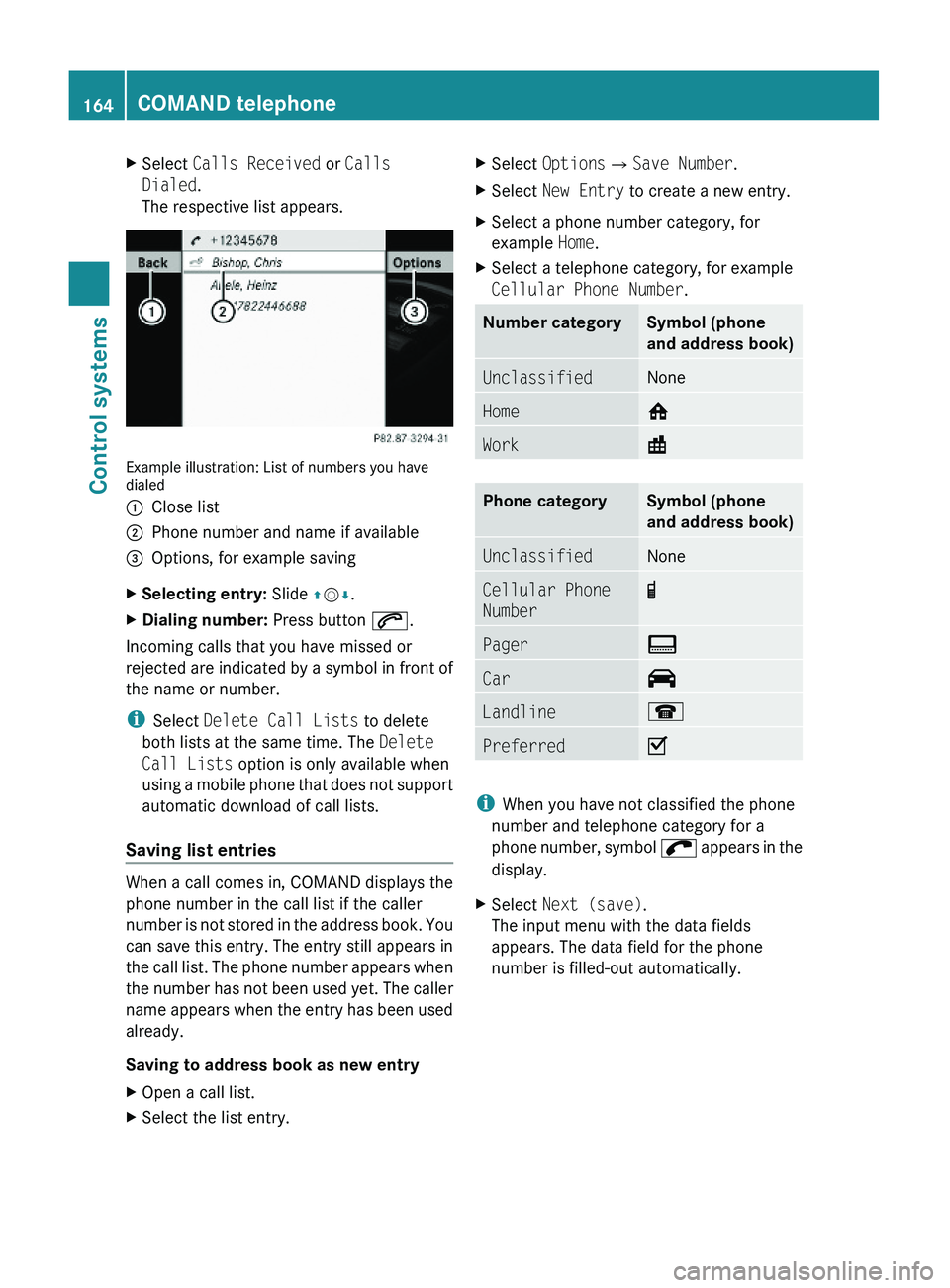
The respective list appears.
Example illustration: List of numbers you havedialed
\000FClose list\000GPhone number and name if available\000
Page 176 of 548
XSelect station preset and briefly press 00A1.
or
XEnter a position number with the telephone
keypad using buttons 0101 - 0109
( Y page 79).
COMAND tunes in the corresponding
channel as long as it is included in your
subscription and is still available.
i Vehicles with rear multicontour seats:
Rear occupants can also select a channel
using the buttons on the rear armrest
( Y page 80).
If the channel is not included in your
subscription, you will see the message
described in the section “Satellite radio
service is not activated” ( Y page 171).
If the channel is no longer available, you will
see the message Invalid Channel .
XClosing message: Press 00A1.
Tuning in channels using manual
channel number entry
i If you try to tune in a channel when the
satellite radio service is not activated, you
will see the screen described in the section
“Satellite radio service is not activated”
( Y page 171).
Entering the channel number using the
COMAND controller
XSelect Audio 0054 Audio 0054 Sat. Radio
0054 Sat. Radio 0054 Channel Entry .
The menu for manual channel number entry
appears.XExiting menu without making an entry:
Press back button 0041 in the center
console ( Y page 87).XIncrease or decreasing number: Slide
00A0 005B 0050 or rotate 0082005B 0083.XSelecting next number: Slide 009E005B 009F.XConfirming channel entry: Press 00A1.
Further operation depends on whether the
selected channel number is valid or if the
channel is included in your subscription.
Entering the channel number using the
telephone keypad
XPress button 004D on the telephone
keypad ( Y page 79).XEnter channel number using buttons 010B
- 0109 .
Further operation depends on whether the
selected channel number is valid or if the
channel is included in your subscription.
Channel number is valid and channel is
included in subscription
COMAND tunes in the channel entered.
Channel number is invalid
You will see the message Invalid Channel.
XClosing message: Press 00A1.
Channel number is valid but channel is
not included in subscription
You will see the screen described in the
section “Satellite radio service is not
activated” ( Y page 171).
XClosing display: Press 00A1.
Tuning in channels using the channel
list
XSelect Audio 0054 Audio 0054 Sat. Radio
0054 Sat. Radio 0054 Channel List .
The channel list appears. The dot 003F in
front of a list entry indicates the currently
selected channel.XSelect channel by rotating 0082005B 0083 or sliding
00A0 005B 0050 and press 00A1.
i
The contents of the channel list depends
on which channels are included in your
subscription and which program category
you have selected (Y page 173). If satellite
174COMAND satellite radioControl systems
221_AKB; 6; 20, en-USd2ugruen,Version: 2.11.8.12009-09-24T13:28:17+02:00 - Seite 174
Page 179 of 548
File structure on a disc
When you create an audio disc, the tracks can
be organized in folders. A disc may contain a
maximum of 4000 tracks.
The directory depth may not exceed a
maximum of 8 levels. The system will ignore
files in lower levels.
Notes on USB storage media
Do not store data other than audio data on a
USB storage medium. Doing so will increase
the time required to initialize the USB storage
medium.
A maximum of 8 directory levels with up to
4000 tracks each are supported.
For information on connecting USB storage
media to the built-in USB socket in the glove
box see ( Y page 80).
Track and folder names
When you create an audio medium, you can
assign names to the tracks and folders.
COMAND uses these names for the
corresponding display. Empty folders or
folders which contain data other than MP3/
WMA tracks are not displayed by COMAND.
If MP3/WMA files are saved in the root
directory itself (uppermost directory on
storage medium), the root directory will also
be treated as a folder. COMAND will then
show the name of the root directory as the
folder name.
You must observe the following when
assigning track names:
R Track names must have at least one
character.
R Track names must have the extension
“mp3” or “wma”.
R There must be a period between the track
name and the extension.
Example of a correct track name:
Track1.mp3
Compatible file systems and
compression methods
COMAND supports the following formats:
R MPEG1 Audio Layer 3 (MP3) 25
R Microsoft Windows Media Audio (WMA) V2,
V7, V8 or V9 that are not copy-proof
Bit and sampling rates
MP3
COMAND supports MP3 files of the following
types:
R Fixed and variable bit rates from
32 kbit/s up to 320 kbit/s
R Sampling rates of 24 kHz to 48 kHz
WMA (Windows Media ®
Audio)
Windows Media ®
Audio (WMA) is an audio
data compression technology developed by
Microsoft ®
.
COMAND supports WMA files of the following
types:
R Fixed and variable bit rates from 5 kbit/s
up to 384 kbit/s
R Sampling rates of 8 kHz to 48 kHz
COMAND does not support WMA files of the
following types:
R DRM (Digital Rights Management) coded
files
R variable bit rates
R Losless Settings
R WMA Pro
R 5.1-Surround
i Only use tracks with a bit rate of above
128 kbit/s and a sampling rate of above
44.1 kHz. Lower rates will cause an audible
25 MPEG Layer 3 audio-coding technology under license of Fraunhofer-Institut for Integrated Circuits (IIS) and
ThomsonCOMAND audio CD/audio DVD/MP3177Control systems221_AKB; 6; 20, en-USd2ugruen,Version: 2.11.8.12009-09-24T13:28:17+02:00 - Seite 177Z
Page 187 of 548
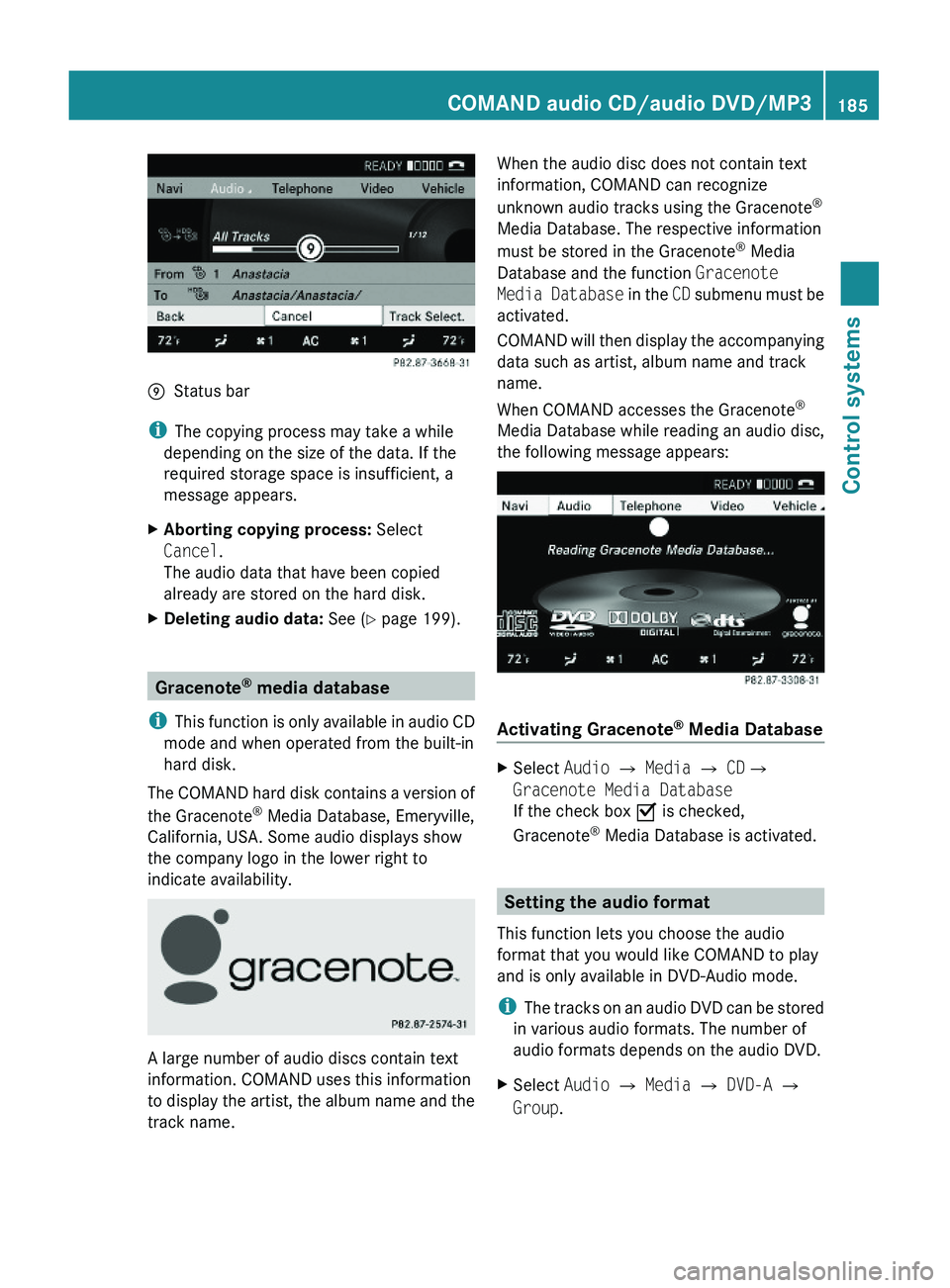
\000pStatus bar
iThe copying process may take a while
depending on the size of the data. If the
required storage space is insufficient, a
message appears.
XAborting copying process: Select
Cancel.
The audio data that have been copied
already are stored on the hard disk.
XDeleting audio data: See (Y page 199).
Gracenote® media database
iThis function is only available in audio CD
mode and when operated from the built-in
hard disk.
The COMAND hard disk contains a version of
the Gracenote® Media Database, Emeryville,
California, USA. Some audio displays show
the company logo in the lower right to
indicate availability.
A large number of audio discs contain text
information. COMAND uses this information
to display the artist, the album name and the
track name.
When the audio disc does not contain text
information, COMAND can recognize
unknown audio tracks using the Gracenote®
Media Database. The respective information
must be stored in the Gracenote® Media
Database and the function Gracenote
Media Database in the CD submenu must be
activated.
COMAND will then display the accompanying
data such as artist, album name and track
name.
When COMAND accesses the Gracenote®
Media Database while reading an audio disc,
the following message appears:
Activating Gracenote® Media Database
XSelect Audio £ Media £ CD£
Gracenote Media Database
If the check box Ç is checked,
Gracenote® Media Database is activated.
Setting the audio format
This function lets you choose the audio
format that you would like COMAND to play
and is only available in DVD-Audio mode.
iThe tracks on an audio DVD can be stored
in various audio formats. The number of
audio formats depends on the audio DVD.
XSelect Audio \000T Media \000T DVD-A \000T
Group.
COMAND audio CD/audio DVD/MP3185Control systems221_AKB; 6; 20, en-USd2ugruen,Version: 2.11.8.12009-09-24T13:28:17+02:00 - Seite 185Z
Page 188 of 548
iThe Group menu item cannot be selected
if only one audio format is saved on the
DVD.
The list of available audio formats appears. A
dot 003F indicates the format currently
selected.XChanging setting: Slide 00A0005B 0050 or rotate
0082 005B 0083.XExiting menu: Slide 009E005B 009F.
Playback options
The following options are available:
R Normal Track Sequence : Tracks are
played back in the order in which they are
stored on the disc, e.g. track 1, 2, 3, etc.
R Medium Mix : Tracks are played back in
random order, e.g. track 3, 8, 5, etc.
R Track List Mix (MP3 mode only): Tracks
of the current folder and its subfolders are
played back in random order.
XSelecting an option: Select Audio.XSelect CD, DVD-A or MP3 .
The option list appears. A dot 003F indicates
which option is switched on.XSelect an option and press 00A1.
The option is switched on. For all options
except Normal Track Sequence , you will
see a corresponding indicator in the main
area.
i The Normal Track Sequence option is
automatically activated when you select a
different medium. If an option is activated,
it remains activated after COMAND is
switched on/off.
Audio AUX and video AUX
You can play back external audio or video
sources via the systems installed in your
vehicle.
The sockets for external audio and video
sources (AUX) are located
R in the glove box (COMAND)
R on the CD/DVD drive in the rear passenger
compartment
R on the head restraints
i For operation of the external audio and
video sources, refer to the operating
instructions of the respective device. You
may have to adjust the proper video
standard on the external audio and video
source to ensure proper replay.
Do not leave external devices in the vehicle.
Proper function of the device could be
impaired due to excessive temperatures,
for example when exposing to direct
sunlight or when the outside temperature
is extremely low. Mercedes-Benz does not
assume liability for damage to external
devices.GWarning!
Operating an external audio source while the
vehicle is in motion will distract you. You may
not notice changing road and/or traffic
conditions which may cause an accident.
Bear in mind that at a speed of just 30 mph
(approximately 50 km/h), your vehicle is
covering a distance of 44 feet (approximately
14 m) every second.
For your safety and the safety of others, pull
over to a safe location and stop before
operating an external audio source.
GWarning!
Due to the different volumes of the external
audio sources, system messages of the
vehicle may be much louder. You may need to
disable these system messages or adjust the
volume of these messages manually.
i The volume of external audio sources is
extremely variable. It is possible that a
device connected as an external audio
source will sound quieter or louder in the
186Audio AUX and video AUXControl systems
221_AKB; 6; 20, en-USd2ugruen,Version: 2.11.8.12009-09-24T13:28:17+02:00 - Seite 186
Page 190 of 548
playback. Refer to operating instructions of
the external device.XSelecting main function: Select Aux.XPress button 003E on the remote control.XSelect Source .XSelect Display Aux for playback via the
connections in the head restraint.
or
XSelect Disk Drive Aux for playback via
the connections in the rear seat.
Switching to audio AUX operation
(COMAND)
XSelect Audio 0054 AUX .
The Audio AUX menu appears. You will hear
the medium in the external audio source
provided it is connected and set to
playback.
You can adjust the following during audio AUX
operation:
R Volume ( Y page 88)
R Balance and fader ( Y page 88)
R Treble and Bass (Y page 88)
R 3D Sound (Y page 89)
Switching to video AUX operation
(Rear Seat Entertainment System)
XConnect the video device to the sockets on
the head restraint or the rear seat and start
playback. Refer to operating instructions of
the external device.XSelecting main function: Select Aux.XPress button 003E on the remote control.XSelect Source .XSelect Display Aux for playback via the
connections in the head restraint.
or
XSelect Disk Drive Aux for playback via
the connections in the rear seat.XSwitching from full screen to menu
system: Press button 003E on the remote
control.XScreen settings: Select Display Aux .
A list appears.XProceed as described in the section
“Screen settings” ( Y page 194).
Switching to video AUX operation
(COMAND)
XSelect Video 0054 AUX .
The video AUX menu appears. You will hear
and see the medium in the external audio
source provided it is connected and set to
playback.
i For operation of the external video
source, refer to the operating instructions
of the respective device.
You can adjust the following during video AUX
operation:
R Brightness , Contrast and Color
( Y page 194)
R Picture format ( Y page 194)
R Volume ( Y page 88)
R Balance and fader ( Y page 88)
R Treble and Bass (Y page 88)
R 3D Sound (Y page 89)
188Audio AUX and video AUXControl systems
221_AKB; 6; 20, en-USd2ugruen,Version: 2.11.8.12009-09-24T13:28:17+02:00 - Seite 188
Page 198 of 548
Back to the movieXPress back button 0041 until you can see
the movie.
or
XSelect the corresponding menu item in the
DVD menu.
or
XSelect a menu item of your choice from the
DVD menu.XSelect the menu item Back (to the
movie) in the selection menu.
i
Depending on the DVD, the menu item
Back (to the movie) or the back button
0041 may be without function.
Setting the language
i This function is not available for all DVDs.
If it is available, you can set the language
for the DVD menu and the audio language.
The number of settings you can make is
determined by the content of the DVD. It
may also be possible to make the settings
in the DVD menu ( Y page 194).
XSelect Video 0054 Video DVD .XShow the menu system, if necessary
( Y page 193).XSelect DVD-V 0054 DVD Functions .XSelect Audio Language .
In both cases a selection list will appear.
The dot 003F in front of an entry indicates the
current language.XChanging the setting: Slide 00A0005B 0050 or turn
0082 005B 0083, until you reach the desired setting.XSaving a setting: Press 00A1.XExiting the menu: Slide 009E005B 009F.
Subtitles and camera angles
i This function is not available for all DVDs.
The number of settings you can make is
determined by the content of the DVD. It
may also be possible to make the settings
in the DVD menu ( Y page 194).XSelect Video 0054 Video DVD .XShow the menu system, if necessary
( Y page 193).XSelect DVD-V 0054 DVD Functions .XSelect Subtitles or Camera Angle .
In both cases a selection list will appear.
The dot 003F in front of an entry indicates the
current language.XChanging the setting: Slide 00A0005B 0050 or turn
0082 005B 0083, until you reach the desired setting.XSaving a setting: Press 00A1.XExiting the menu: Slide 009E005B 009F.
Interactive content
i DVDs may include interactive content
(e.g. a video game). In a video game you can
control the play by selecting and initiating
actions. The type and number of actions
depends on the DVD.
XSelecting an action: Slide 00A0005B 0050 or 009E005B 009F,
or turn 0082005B 0083, until you reach the desired
setting.XInitiating an action: Press 00A1.
A menu appears, the first entry Select is
highlighted.XPress 00A1.
Music Register
GObserve Safety notes, see page 76.
You can save MP3 or WMA audio files in the
Music Register. The storage capacity is
approximately 7 gigabyte.
! Keep your original music files in a safe
place. A fault with the COMAND may cause
the music files stored in the Music Register
196Music RegisterControl systems
221_AKB; 6; 20, en-USd2ugruen,Version: 2.11.8.12009-09-24T13:28:17+02:00 - Seite 196