Button MERCEDES-BENZ S-Class 2011 W221 Owners Manual
[x] Cancel search | Manufacturer: MERCEDES-BENZ, Model Year: 2011, Model line: S-Class, Model: MERCEDES-BENZ S-Class 2011 W221Pages: 524, PDF Size: 22.53 MB
Page 202 of 524
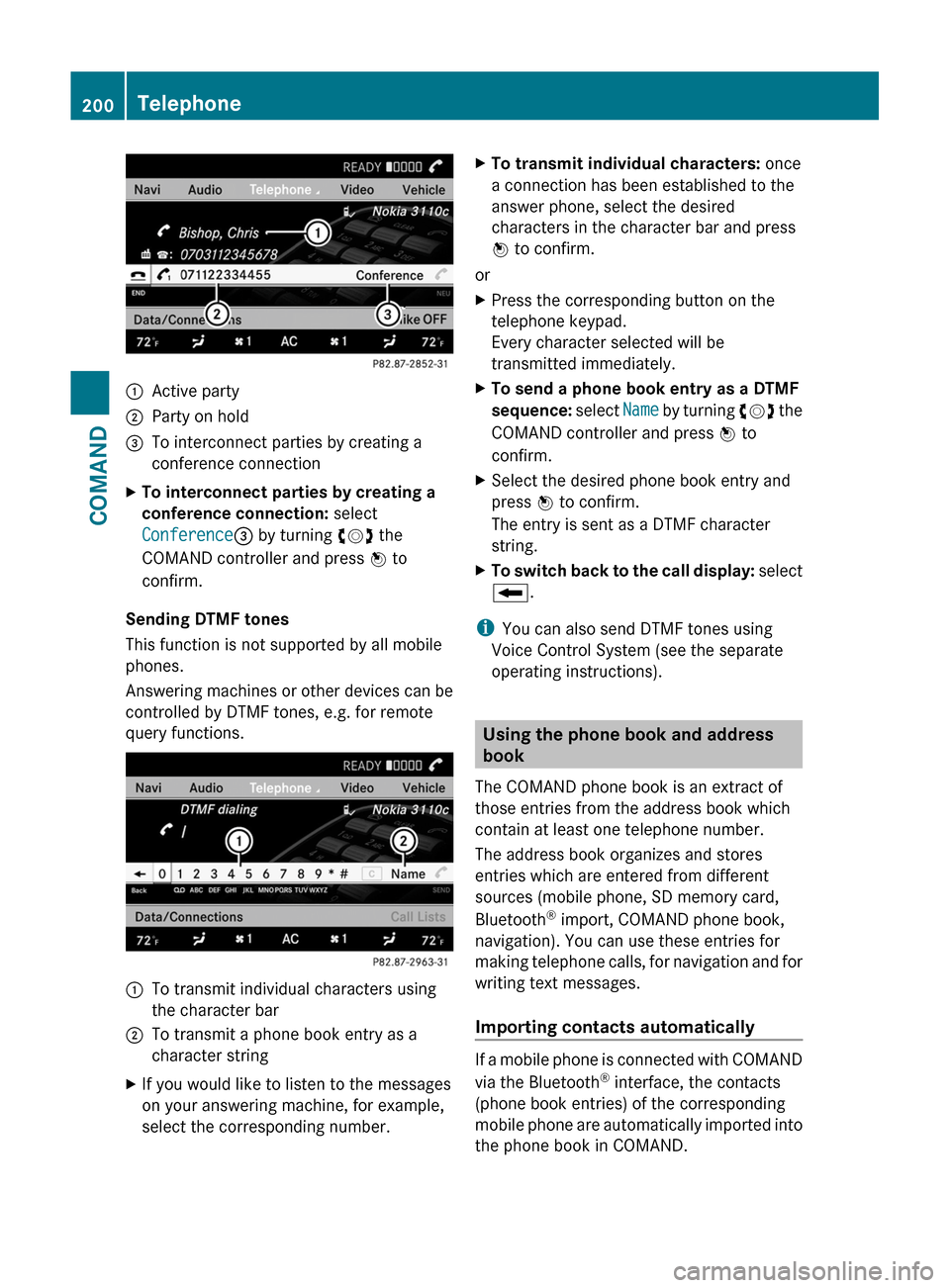
:Active party;Party on hold=To interconnect parties by creating a
conference connection
XTo interconnect parties by creating a
conference connection: select
Conference= by turning cVd the
COMAND controller and press W to
confirm.
Sending DTMF tones
This function is not supported by all mobile
phones.
Answering machines or other devices can be
controlled by DTMF tones, e.g. for remote
query functions.
:To transmit individual characters using
the character bar
;To transmit a phone book entry as a
character string
XIf you would like to listen to the messages
on your answering machine, for example,
select the corresponding number.
XTo transmit individual characters: once
a connection has been established to the
answer phone, select the desired
characters in the character bar and press
W to confirm.
or
XPress the corresponding button on the
telephone keypad.
Every character selected will be
transmitted immediately.
XTo send a phone book entry as a DTMF
sequence: select Name by turning cVd the
COMAND controller and press W to
confirm.
XSelect the desired phone book entry and
press W to confirm.
The entry is sent as a DTMF character
string.
XTo switch back to the call display: select
B.
iYou can also send DTMF tones using
Voice Control System (see the separate
operating instructions).
Using the phone book and address
book
The COMAND phone book is an extract of
those entries from the address book which
contain at least one telephone number.
The address book organizes and stores
entries which are entered from different
sources (mobile phone, SD memory card,
Bluetooth® import, COMAND phone book,
navigation). You can use these entries for
making telephone calls, for navigation and for
writing text messages.
Importing contacts automatically
If a mobile phone is connected with COMAND
via the Bluetooth® interface, the contacts
(phone book entries) of the corresponding
mobile phone are automatically imported into
the phone book in COMAND.
200TelephoneCOMAND
Page 203 of 524
Depending on the mobile phone, this process
may take some time. Depending on the
mobile phone used, only the phone book
entries in the mobile phone or these entries
and the phone book entries in the SIM card
are imported.
You can recognize the automatically imported
contacts (phone book entries) in COMAND by
the icon Ã/0. These are only available
in COMAND when a mobile phone is
connected to COMAND via the Bluetooth®
interface.
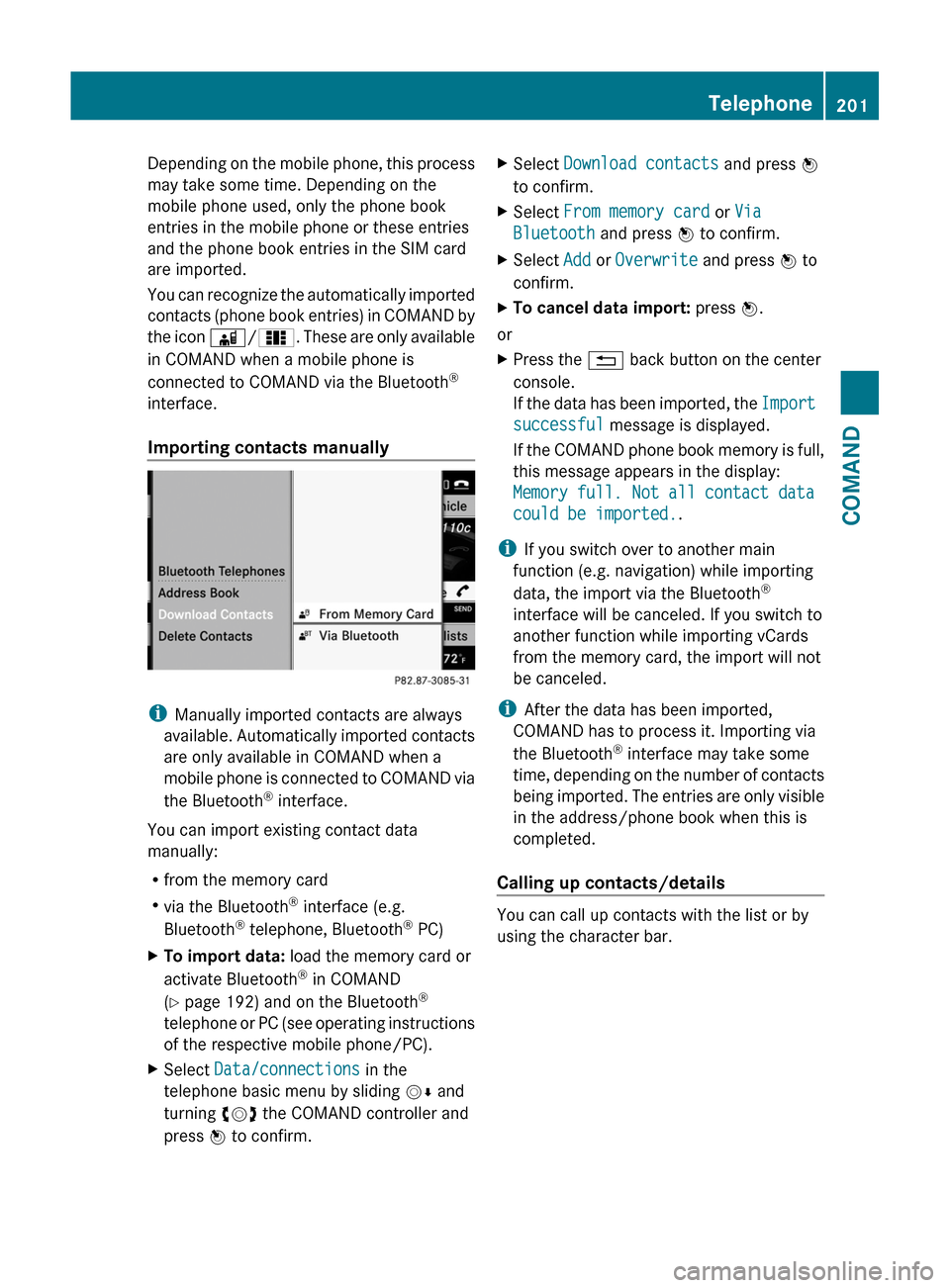
Importing contacts manually
iManually imported contacts are always
available. Automatically imported contacts
are only available in COMAND when a
mobile phone is connected to COMAND via
the Bluetooth® interface.
You can import existing contact data
manually:
Rfrom the memory card
Rvia the Bluetooth® interface (e.g.
Bluetooth® telephone, Bluetooth® PC)
XTo import data: load the memory card or
activate Bluetooth® in COMAND
(Y page 192) and on the Bluetooth®
telephone or PC (see operating instructions
of the respective mobile phone/PC).
XSelect Data/connections in the
telephone basic menu by sliding VÆ and
turning cVd the COMAND controller and
press W to confirm.
XSelect Download contacts and press W
to confirm.
XSelect From memory card or Via
Bluetooth and press W to confirm.
XSelect Add or Overwrite and press W to
confirm.
XTo cancel data import: press W.
or
XPress the % back button on the center
console.
If the data has been imported, the Import
successful message is displayed.
If the COMAND phone book memory is full,
this message appears in the display:
Memory full. Not all contact data
could be imported..
iIf you switch over to another main
function (e.g. navigation) while importing
data, the import via the Bluetooth®
interface will be canceled. If you switch to
another function while importing vCards
from the memory card, the import will not
be canceled.
iAfter the data has been imported,
COMAND has to process it. Importing via
the Bluetooth® interface may take some
time, depending on the number of contacts
being imported. The entries are only visible
in the address/phone book when this is
completed.
Calling up contacts/details
You can call up contacts with the list or by
using the character bar.
Telephone201COMANDZ
Page 204 of 524
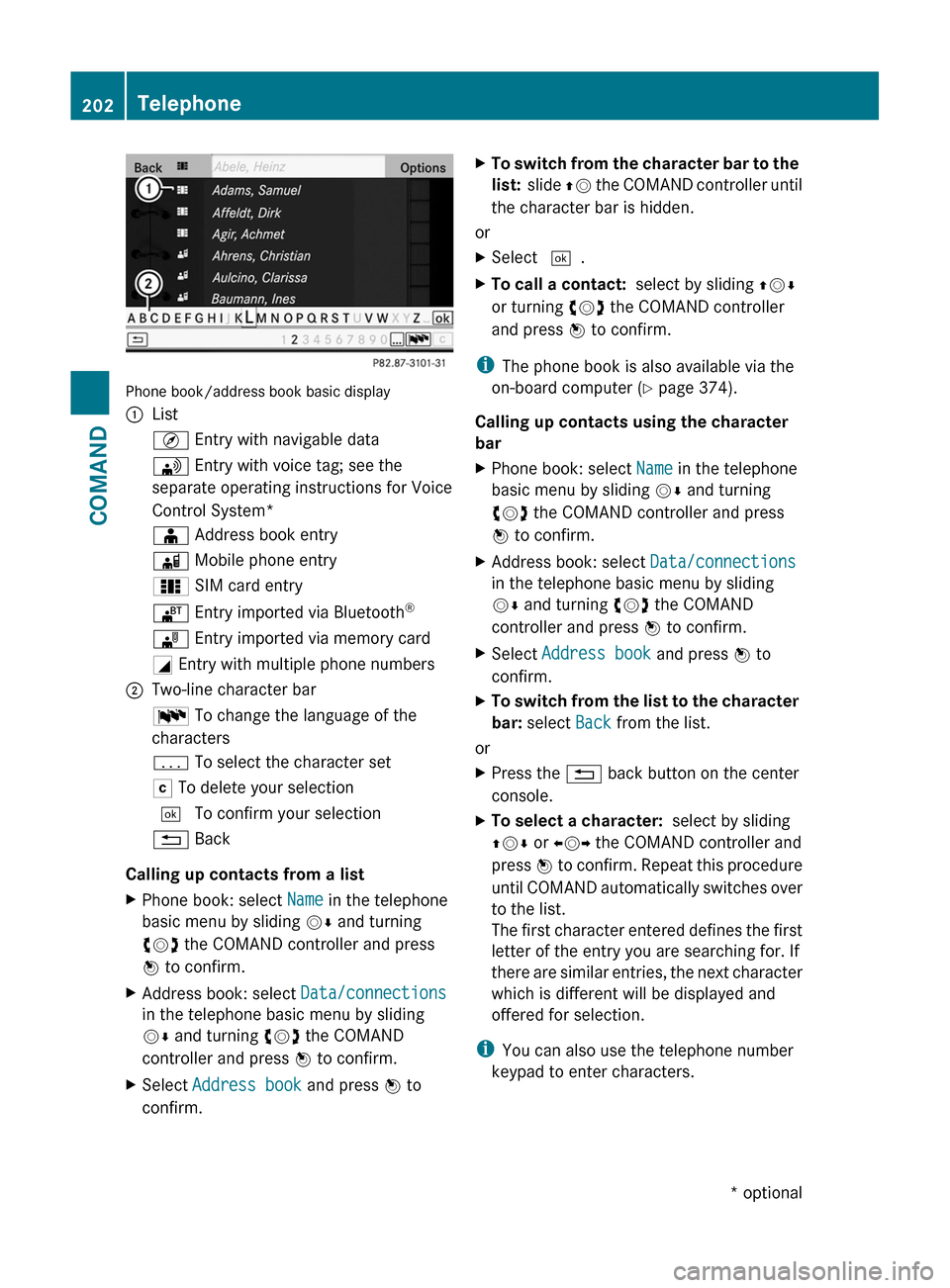
Phone book/address book basic display
:ListÇ Entry with navigable data\ Entry with voice tag; see the
separate operating instructions for Voice
Control System*
Æ Address book entryà Mobile phone entry0 SIM card entry® Entry imported via Bluetooth®¯ Entry imported via memory cardG Entry with multiple phone numbers;Two-line character barB To change the language of the
characters
p To select the character setF To delete your selection¬ To confirm your selection% Back
Calling up contacts from a list
XPhone book: select Name in the telephone
basic menu by sliding VÆ and turning
cVd the COMAND controller and press
W to confirm.
XAddress book: select Data/connections
in the telephone basic menu by sliding
VÆ and turning cVd the COMAND
controller and press W to confirm.
XSelect Address book and press W to
confirm.
XTo switch from the character bar to the
list: slide ZV the COMAND controller until
the character bar is hidden.
or
XSelect ¬.XTo call a contact: select by sliding ZVÆ
or turning cVd the COMAND controller
and press W to confirm.
iThe phone book is also available via the
on-board computer (Y page 374).
Calling up contacts using the character
bar
XPhone book: select Name in the telephone
basic menu by sliding VÆ and turning
cVd the COMAND controller and press
W to confirm.
XAddress book: select Data/connections
in the telephone basic menu by sliding
VÆ and turning cVd the COMAND
controller and press W to confirm.
XSelect Address book and press W to
confirm.
XTo switch from the list to the character
bar: select Back from the list.
or
XPress the % back button on the center
console.
XTo select a character: select by sliding
ZVÆ or XVY the COMAND controller and
press W to confirm. Repeat this procedure
until COMAND automatically switches over
to the list.
The first character entered defines the first
letter of the entry you are searching for. If
there are similar entries, the next character
which is different will be displayed and
offered for selection.
iYou can also use the telephone number
keypad to enter characters.
202TelephoneCOMAND* optional
Page 207 of 524
stores the destination in the address book
with the complete navigable address data.
In this case, navigation can be started
without any further data input.
If the contact entry contains a postal
address, e.g. as a result of importing a
vCard, the system can also navigate to this
address. If the data is incomplete or
unclear, COMAND asks the user to enter
the relevant address data. After the entry
has been completed and navigation has
been started, COMAND replaces the
existing address with the navigable
address if necessary.XSearch for an address book entry using the
¤ symbol.XDisplay the details about an entry and
highlight the address data field.XSelect Options by sliding VÆ and turning
cVd the COMAND controller and press
W to confirm.XSelect Navigate and press W to confirm.XSelect Start and press W to confirm.
i
You may only select Navigate if the
address data field contains complete,
navigable data. This is indicated by the ¤
symbol.
Voice tags*
i Voice tags are entered via Voice Control
System*; see the separate operating
instructions for Voice Control System*.
Adding or changing a voice tag
i You can add one voice tag per address
book entry.
XSearch for an address book entry with or
without a voice tag ( ¦ symbol).XSelect Options by sliding VÆ and turning
cVd the COMAND controller and press
W to confirm.XSelect Voice tag and press W to confirm.XSelect Add or Edit and press W to confirm.
Subsequent operation is controlled
by voice. Voice Control System* guides you
through the menus.
Deleting a voice tag
XSearch for an address book entry with a
voice tag.XSelect Options by sliding VÆ and turning
cVd the COMAND controller and press
W to confirm.XSelect Voice tag and press W to confirm.XSelect Delete and press W to confirm.
A deletion prompt appears.
Listening to a voice tag
XSearch for an address book entry with a
voice tag.XSelect Options by sliding VÆ and turning
cVd the COMAND controller and press
W to confirm.XSelect Voice tag and press W to confirm.XSelect Listen and press W to confirm.
You will hear the voice tag.
Using call lists
Introduction
COMAND displays calls received (including
missed calls) and made during phone
operation in lists.
i The respective menu item can only be
selected if calls have already been made or
received in COMAND or if the call lists have
been imported from the telephone.
Opening the call list and selecting an
entry
XTo call up the telephone menu: press the
S function button.XSelect Call lists in the telephone basic
menu by sliding VÆ and turning cVd theTelephone205COMAND* optionalZ
Page 208 of 524
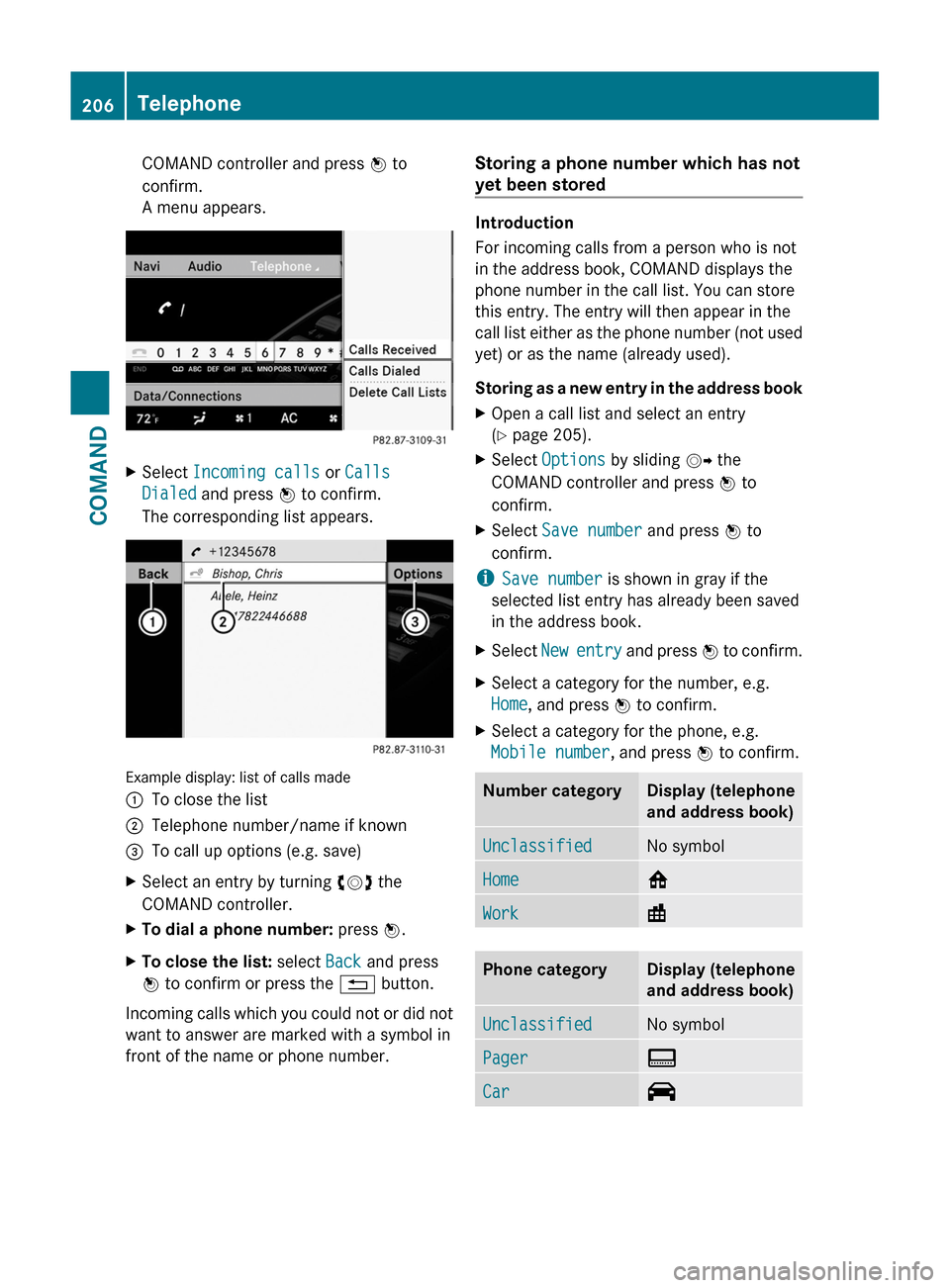
COMAND controller and press W to
confirm.
A menu appears.
XSelect Incoming calls or Calls
Dialed and press W to confirm.
The corresponding list appears.
Example display: list of calls made
:To close the list;Telephone number/name if known=To call up options (e.g. save)XSelect an entry by turning cVd the
COMAND controller.
XTo dial a phone number: press W.XTo close the list: select Back and press
W to confirm or press the % button.
Incoming calls which you could not or did not
want to answer are marked with a symbol in
front of the name or phone number.
Storing a phone number which has not
yet been stored
Introduction
For incoming calls from a person who is not
in the address book, COMAND displays the
phone number in the call list. You can store
this entry. The entry will then appear in the
call list either as the phone number (not used
yet) or as the name (already used).
Storing as a new entry in the address book
XOpen a call list and select an entry
(Y page 205).
XSelect Options by sliding VY the
COMAND controller and press W to
confirm.
XSelect Save number and press W to
confirm.
iSave number is shown in gray if the
selected list entry has already been saved
in the address book.
XSelect New entry and press W to confirm.XSelect a category for the number, e.g.
Home, and press W to confirm.
XSelect a category for the phone, e.g.
Mobile number, and press W to confirm.
Number categoryDisplay (telephone
and address book)
UnclassifiedNo symbolHome6Work\Phone categoryDisplay (telephone
and address book)
UnclassifiedNo symbolPager¨Car^206TelephoneCOMAND
Page 210 of 524
Audio
Vehicle equipment
iThis manual describes all the standard
and optional equipment of your vehicle
which was available at the time of
purchase. Country-specific differences are
possible. Bear in mind that your vehicle
may not feature all functions described
here. This also refers to safety-related
systems and functions.
Radio mode
General information
iPortable electronic devices in the vehicle
may seriously impair radio reception.
Switching to radio mode
Option 1
XPress the R function button.
The radio display appears. You will hear the
last station selected on the last waveband
set.
Option 2
XSelect Audio in the main function bar by
sliding ZV and turning cVd the COMAND
controller and press W to confirm.
If radio mode was the last mode selected,
it will now be active.
If another audio mode is switched on, you
can now switch to radio mode in the audio
menu.
XSelect Audio by sliding ZV the COMAND
controller and press W to confirm.
The audio menu appears.
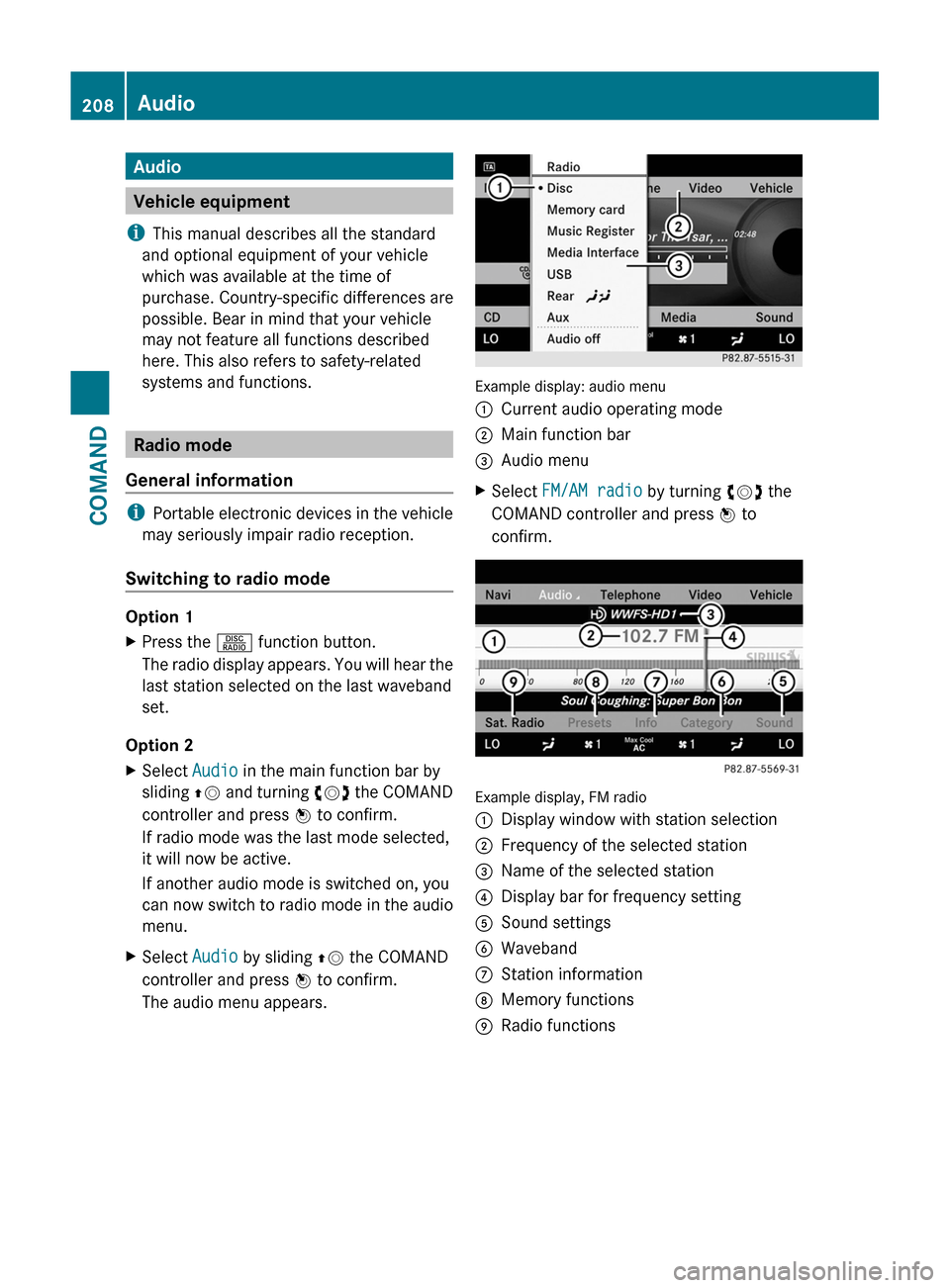
Example display: audio menu
:Current audio operating mode;Main function bar=Audio menuXSelect FM/AM radio by turning cVd the
COMAND controller and press W to
confirm.
Example display, FM radio
:Display window with station selection;Frequency of the selected station=Name of the selected station?Display bar for frequency settingASound settingsBWavebandCStation informationDMemory functionsERadio functions208AudioCOMAND
Page 211 of 524
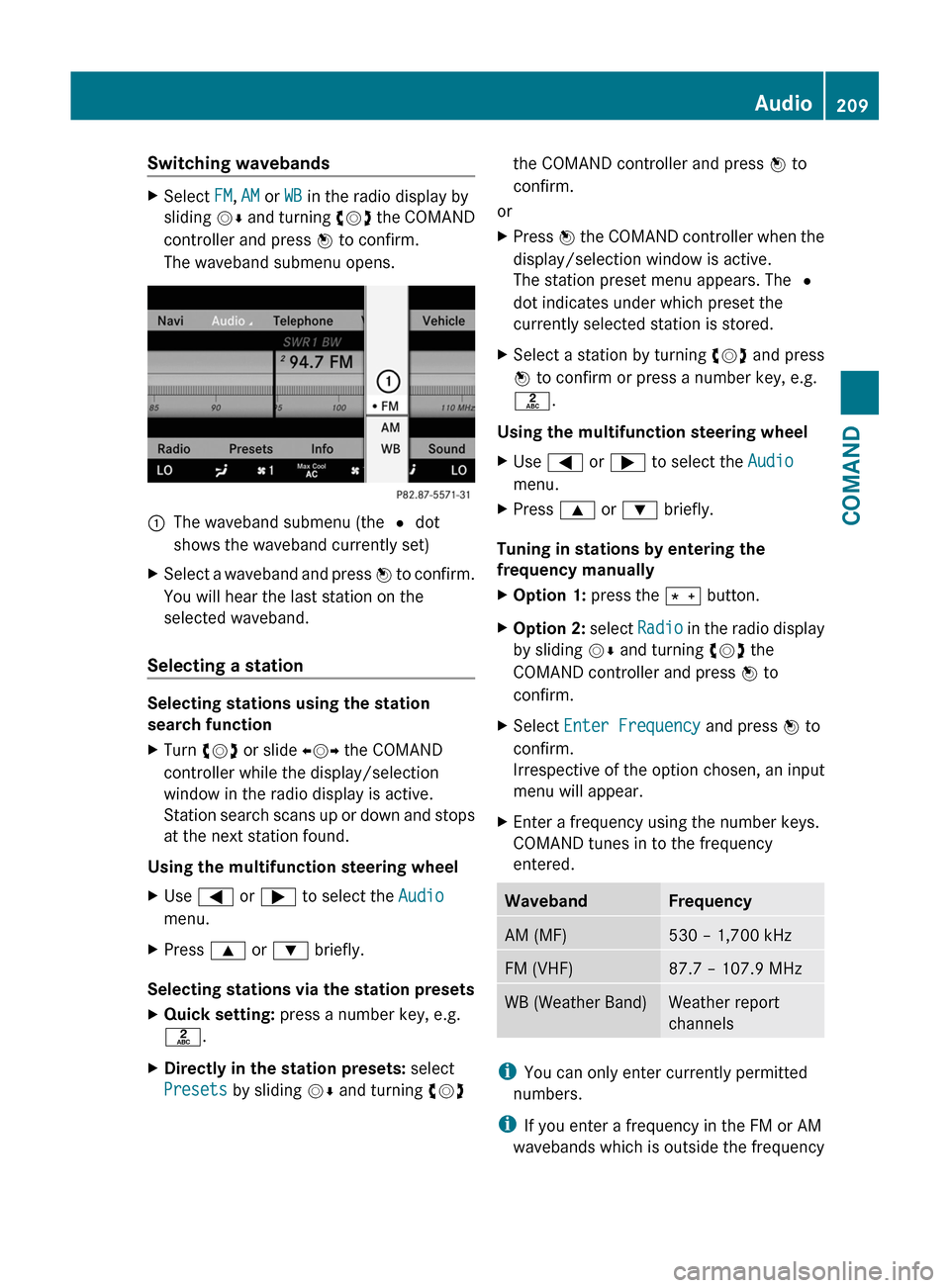
Switching wavebandsXSelect FM, AM or WB in the radio display by
sliding VÆ and turning cVd the COMAND
controller and press W to confirm.
The waveband submenu opens.
1The waveband submenu (the # dot
shows the waveband currently set)
XSelect a waveband and press W to confirm.
You will hear the last station on the
selected waveband.
Selecting a station
Selecting stations using the station
search function
XTurn cVd or slide XVY the COMAND
controller while the display/selection
window in the radio display is active.
Station search scans up or down and stops
at the next station found.
Using the multifunction steering wheel
XUse = or ; to select the Audio
menu.
XPress 9 or : briefly.
Selecting stations via the station presets
XQuick setting: press a number key, e.g.
l.
XDirectly in the station presets: select
Presets by sliding VÆ and turning cVd
the COMAND controller and press W to
confirm.
or
XPress W the COMAND controller when the
display/selection window is active.
The station preset menu appears. The #
dot indicates under which preset the
currently selected station is stored.
XSelect a station by turning cVd and press
W to confirm or press a number key, e.g.
l.
Using the multifunction steering wheel
XUse = or ; to select the Audio
menu.
XPress 9 or : briefly.
Tuning in stations by entering the
frequency manually
XOption 1: press the Ä button.XOption 2: select Radio in the radio display
by sliding VÆ and turning cVd the
COMAND controller and press W to
confirm.
XSelect Enter Frequency and press W to
confirm.
Irrespective of the option chosen, an input
menu will appear.
XEnter a frequency using the number keys.
COMAND tunes in to the frequency
entered.
WavebandFrequencyAM (MF)530 – 1,700 kHzFM (VHF)87.7 – 107.9 MHzWB (Weather Band)Weather report
channels
iYou can only enter currently permitted
numbers.
iIf you enter a frequency in the FM or AM
wavebands which is outside the frequency
Audio209COMANDZ
Page 218 of 524
Option 2XSelect Sat. Radio in the submenu bar by
turning cVd the COMAND controller and
press W to confirm.XSelect Enter Channel and press W to
confirm.
An input menu appears.XTo enter a channel: irrespective of the
option chosen, press the corresponding
number keys on the control panel one after
the other.
COMAND sets the selected channel.
i You can only select currently permitted
digits.
Selecting a channel from the SatRadio
channel list
XSelect Sat. Radio in the submenu bar by
turning cVd the COMAND controller and
press W to confirm.XSelect Channel List and press W to
confirm.
The channel list appears.XSelect a channel by turning cVd the
COMAND controller and press W to
confirm.
Memory functions
Storing channels
i There are ten presets available.
XPress W the COMAND controller when the
display/selection window is active.
or
XSelect Presets in the submenu bar by
turning cVd the COMAND controller and
press W to confirm.
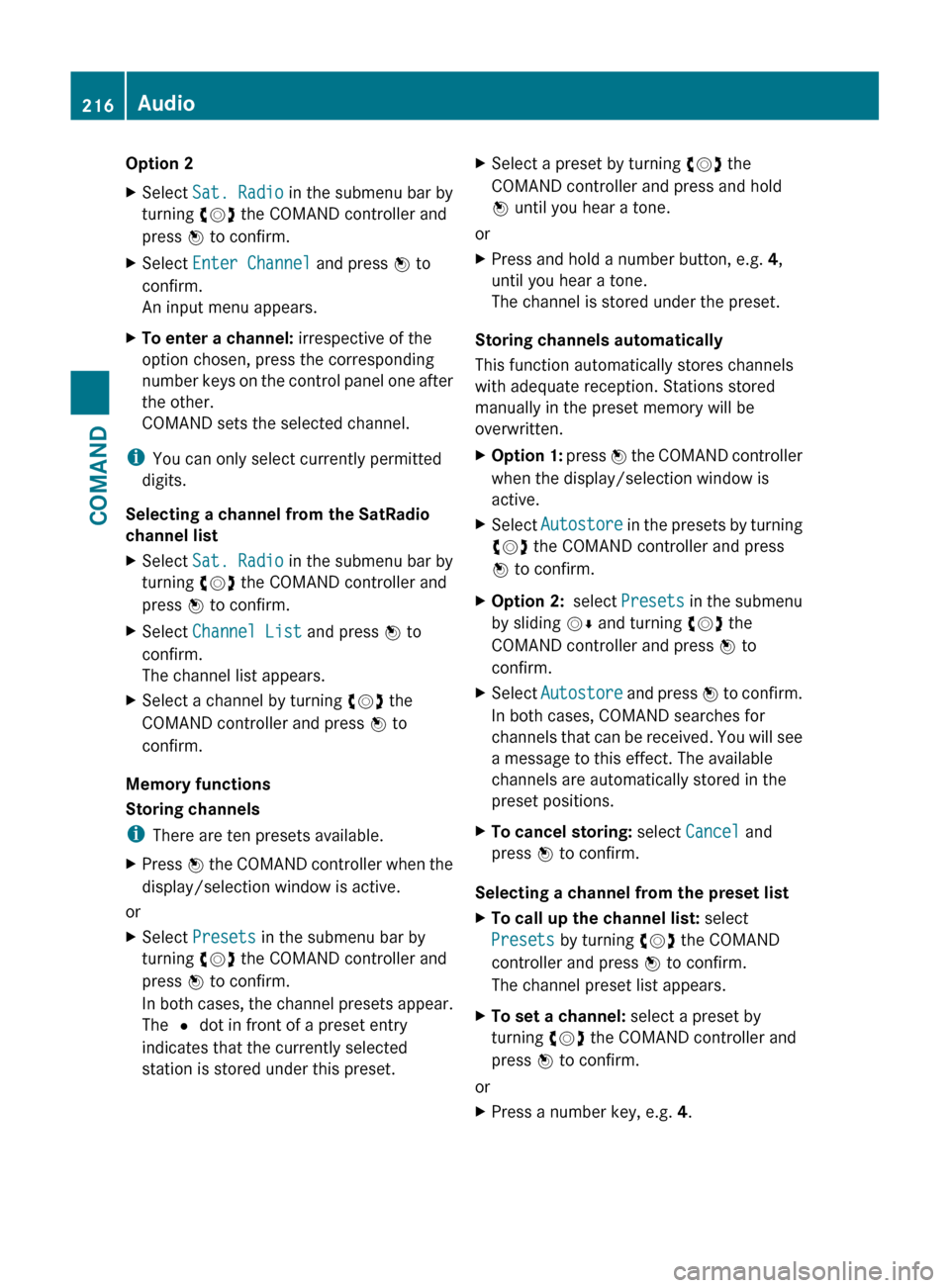
In both cases, the channel presets appear.
The R dot in front of a preset entry
indicates that the currently selected
station is stored under this preset.XSelect a preset by turning cVd the
COMAND controller and press and hold
W until you hear a tone.
or
XPress and hold a number button, e.g. 4,
until you hear a tone.
The channel is stored under the preset.
Storing channels automatically
This function automatically stores channels
with adequate reception. Stations stored
manually in the preset memory will be
overwritten.
XOption 1: press W the COMAND controller
when the display/selection window is
active.XSelect Autostore in the presets by turning
cVd the COMAND controller and press
W to confirm.XOption 2: select Presets in the submenu
by sliding VÆ and turning cVd the
COMAND controller and press W to
confirm.XSelect Autostore and press W to confirm.
In both cases, COMAND searches for
channels that can be received. You will see
a message to this effect. The available
channels are automatically stored in the
preset positions.XTo cancel storing: select Cancel and
press W to confirm.
Selecting a channel from the preset list
XTo call up the channel list: select
Presets by turning cVd the COMAND
controller and press W to confirm.
The channel preset list appears.XTo set a channel: select a preset by
turning cVd the COMAND controller and
press W to confirm.
or
XPress a number key, e.g. 4.216AudioCOMAND
Page 220 of 524
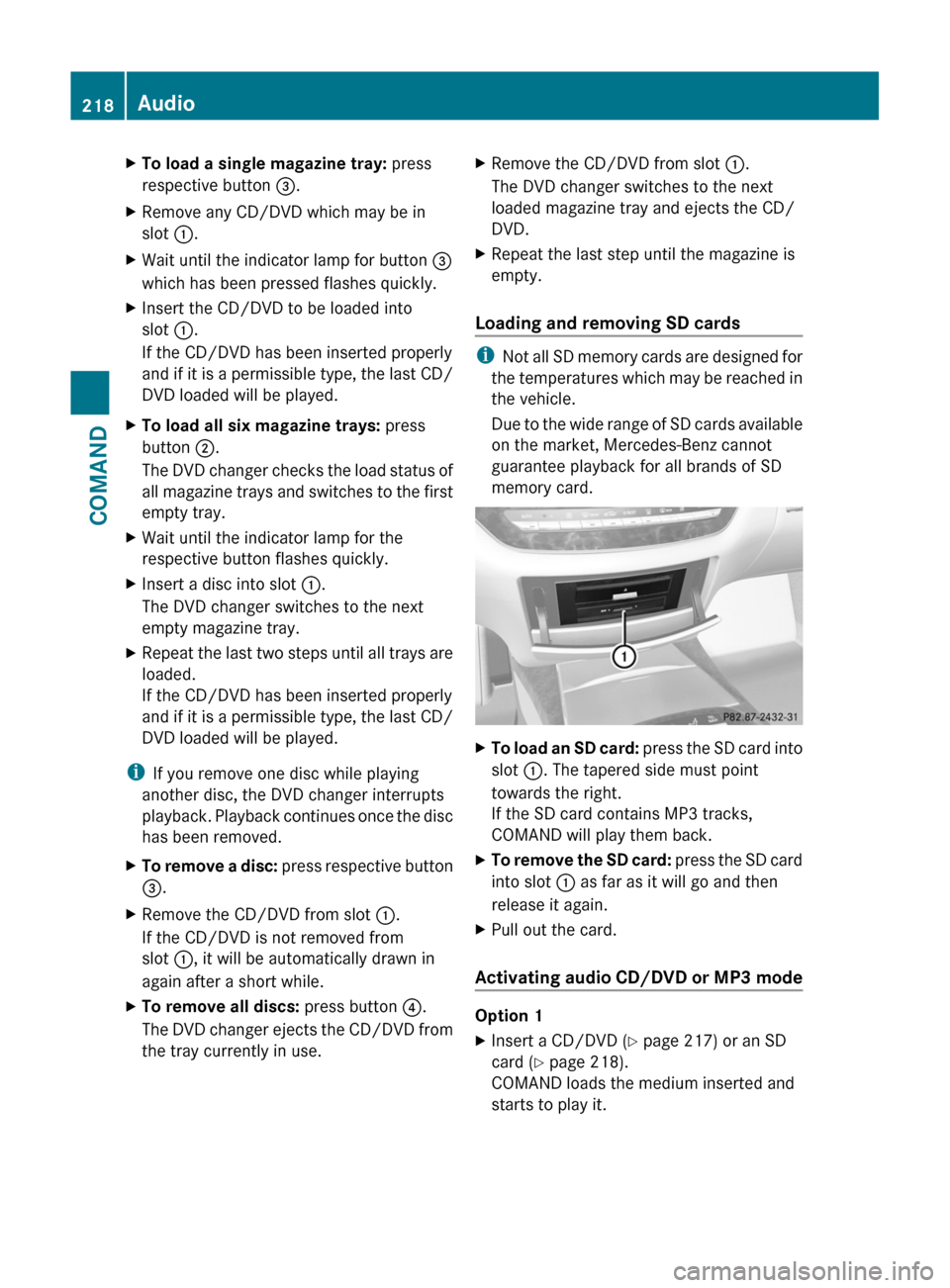
XTo load a single magazine tray: press
respective button =.
XRemove any CD/DVD which may be in
slot :.
XWait until the indicator lamp for button =
which has been pressed flashes quickly.
XInsert the CD/DVD to be loaded into
slot :.
If the CD/DVD has been inserted properly
and if it is a permissible type, the last CD/
DVD loaded will be played.
XTo load all six magazine trays: press
button ;.
The DVD changer checks the load status of
all magazine trays and switches to the first
empty tray.
XWait until the indicator lamp for the
respective button flashes quickly.
XInsert a disc into slot :.
The DVD changer switches to the next
empty magazine tray.
XRepeat the last two steps until all trays are
loaded.
If the CD/DVD has been inserted properly
and if it is a permissible type, the last CD/
DVD loaded will be played.
iIf you remove one disc while playing
another disc, the DVD changer interrupts
playback. Playback continues once the disc
has been removed.
XTo remove a disc: press respective button
=.
XRemove the CD/DVD from slot :.
If the CD/DVD is not removed from
slot :, it will be automatically drawn in
again after a short while.
XTo remove all discs: press button ?.
The DVD changer ejects the CD/DVD from
the tray currently in use.
XRemove the CD/DVD from slot :.
The DVD changer switches to the next
loaded magazine tray and ejects the CD/
DVD.
XRepeat the last step until the magazine is
empty.
Loading and removing SD cards
iNot all SD memory cards are designed for
the temperatures which may be reached in
the vehicle.
Due to the wide range of SD cards available
on the market, Mercedes-Benz cannot
guarantee playback for all brands of SD
memory card.
XTo load an SD card: press the SD card into
slot :. The tapered side must point
towards the right.
If the SD card contains MP3 tracks,
COMAND will play them back.
XTo remove the SD card: press the SD card
into slot : as far as it will go and then
release it again.
XPull out the card.
Activating audio CD/DVD or MP3 mode
Option 1
XInsert a CD/DVD (Y page 217) or an SD
card (Y page 218).
COMAND loads the medium inserted and
starts to play it.
218AudioCOMAND
Page 221 of 524
Option 2XPress the R function button once or
twice.XSelect an audio medium from the media list
( Y page 221).
Option 3
XSelect Audio in the main function bar by
sliding ZV and turning cVd the COMAND
controller and press W to confirm.
If disc mode was the last mode selected, it
will now be active.
If another audio source is switched on, you
can now switch to disc mode in the audio
menu.XSelect Audio by sliding ZV and turning
cVd the COMAND controller and press
W to confirm.
The audio menu appears.XSelect Disc or Memory card and press
W to confirm.
The desired disc mode is activated.XSelect an audio medium from the media list
( Y page 221).
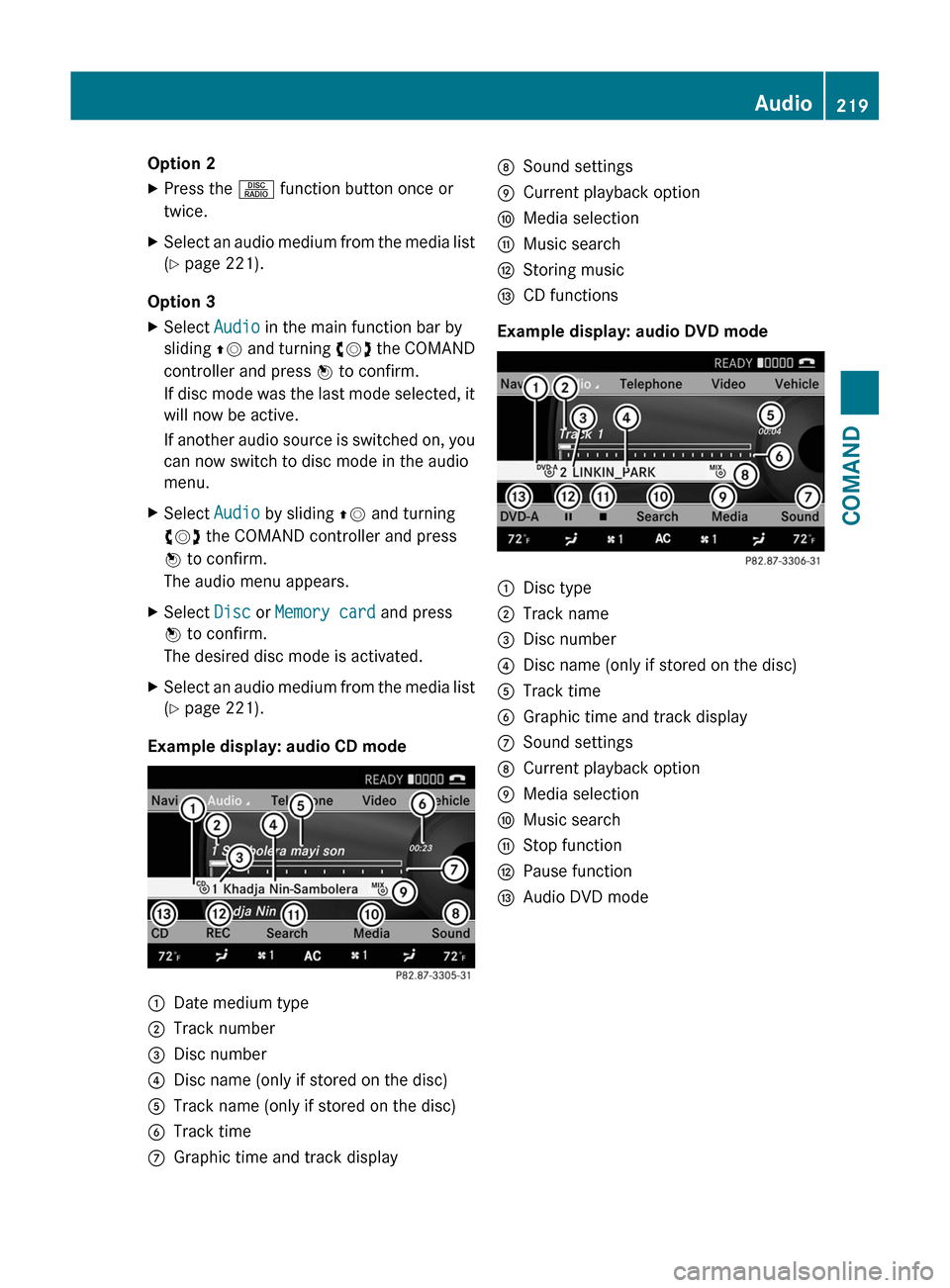
Example display: audio CD mode
:Date medium type;Track number=Disc number?Disc name (only if stored on the disc)ATrack name (only if stored on the disc)BTrack timeCGraphic time and track displayDSound settingsECurrent playback optionFMedia selectionGMusic searchHStoring musicICD functions
Example display: audio DVD mode
:Disc type;Track name=Disc number?Disc name (only if stored on the disc)ATrack timeBGraphic time and track displayCSound settingsDCurrent playback optionEMedia selectionFMusic searchGStop functionHPause functionIAudio DVD modeAudio219COMANDZ