Start MERCEDES-BENZ S-Class 2011 W221 Workshop Manual
[x] Cancel search | Manufacturer: MERCEDES-BENZ, Model Year: 2011, Model line: S-Class, Model: MERCEDES-BENZ S-Class 2011 W221Pages: 524, PDF Size: 22.53 MB
Page 161 of 524
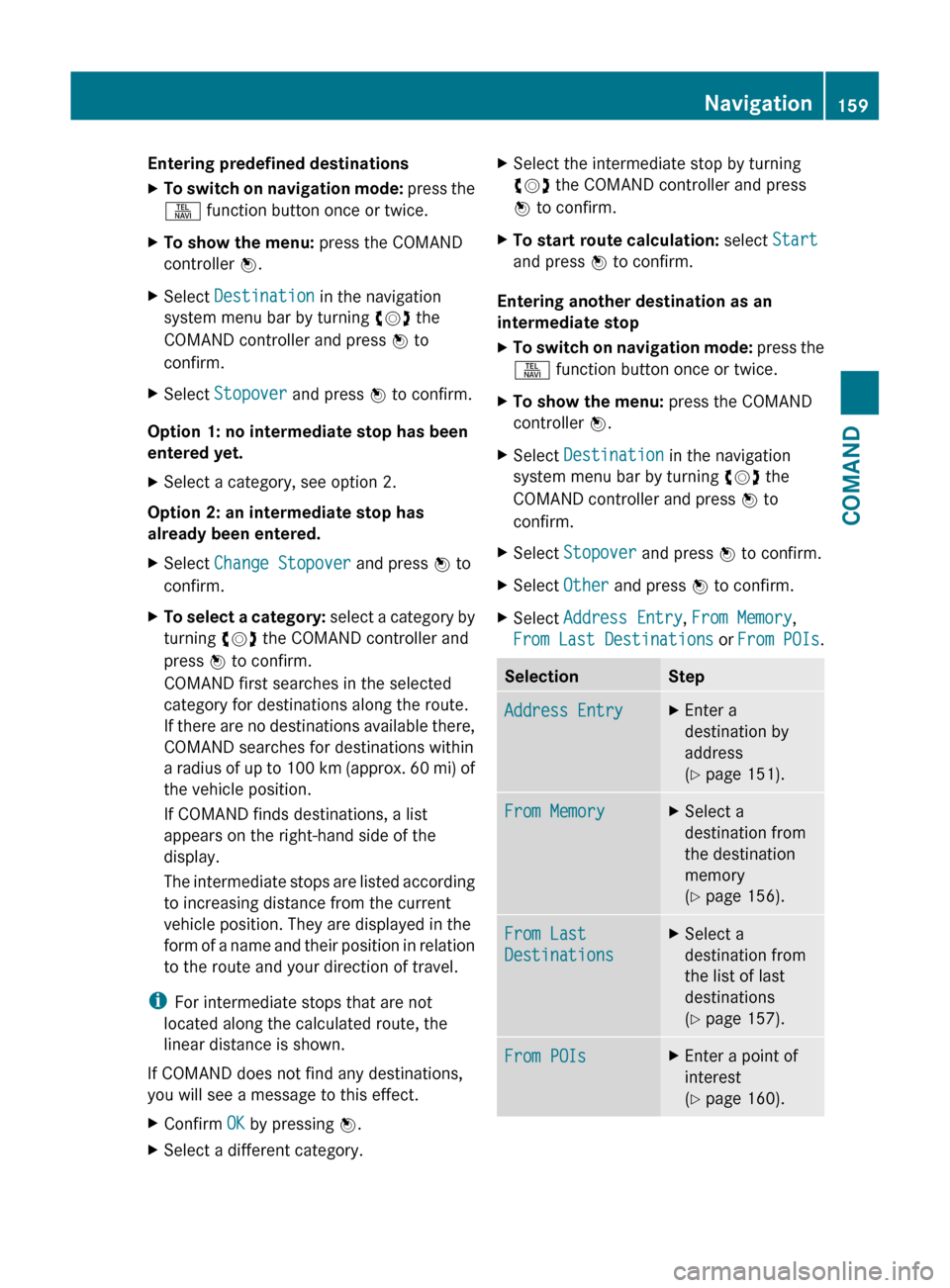
Entering predefined destinationsXTo switch on navigation mode: press the
S function button once or twice.XTo show the menu: press the COMAND
controller W.XSelect Destination in the navigation
system menu bar by turning cVd the
COMAND controller and press W to
confirm.XSelect Stopover and press W to confirm.
Option 1: no intermediate stop has been
entered yet.
XSelect a category, see option 2.
Option 2: an intermediate stop has
already been entered.
XSelect Change Stopover and press W to
confirm.XTo select a category: select a category by
turning cVd the COMAND controller and
press W to confirm.
COMAND first searches in the selected
category for destinations along the route.
If there are no destinations available there,
COMAND searches for destinations within
a radius of up to 100 km (approx. 60 mi) of
the vehicle position.
If COMAND finds destinations, a list
appears on the right-hand side of the
display.
The intermediate stops are listed according
to increasing distance from the current
vehicle position. They are displayed in the
form of a name and their position in relation
to the route and your direction of travel.
i For intermediate stops that are not
located along the calculated route, the
linear distance is shown.
If COMAND does not find any destinations,
you will see a message to this effect.
XConfirm OK by pressing W.XSelect a different category.XSelect the intermediate stop by turning
cVd the COMAND controller and press
W to confirm.XTo start route calculation: select Start
and press W to confirm.
Entering another destination as an
intermediate stop
XTo switch on navigation mode: press the
S function button once or twice.XTo show the menu: press the COMAND
controller W.XSelect Destination in the navigation
system menu bar by turning cVd the
COMAND controller and press W to
confirm.XSelect Stopover and press W to confirm.XSelect Other and press W to confirm.XSelect Address Entry , From Memory ,
From Last Destinations or From POIs .SelectionStepAddress EntryXEnter a
destination by
address
( Y page 151).From MemoryXSelect a
destination from
the destination
memory
( Y page 156).From Last
DestinationsXSelect a
destination from
the list of last
destinations
( Y page 157).From POIsXEnter a point of
interest
( Y page 160).Navigation159COMANDZ
Page 162 of 524
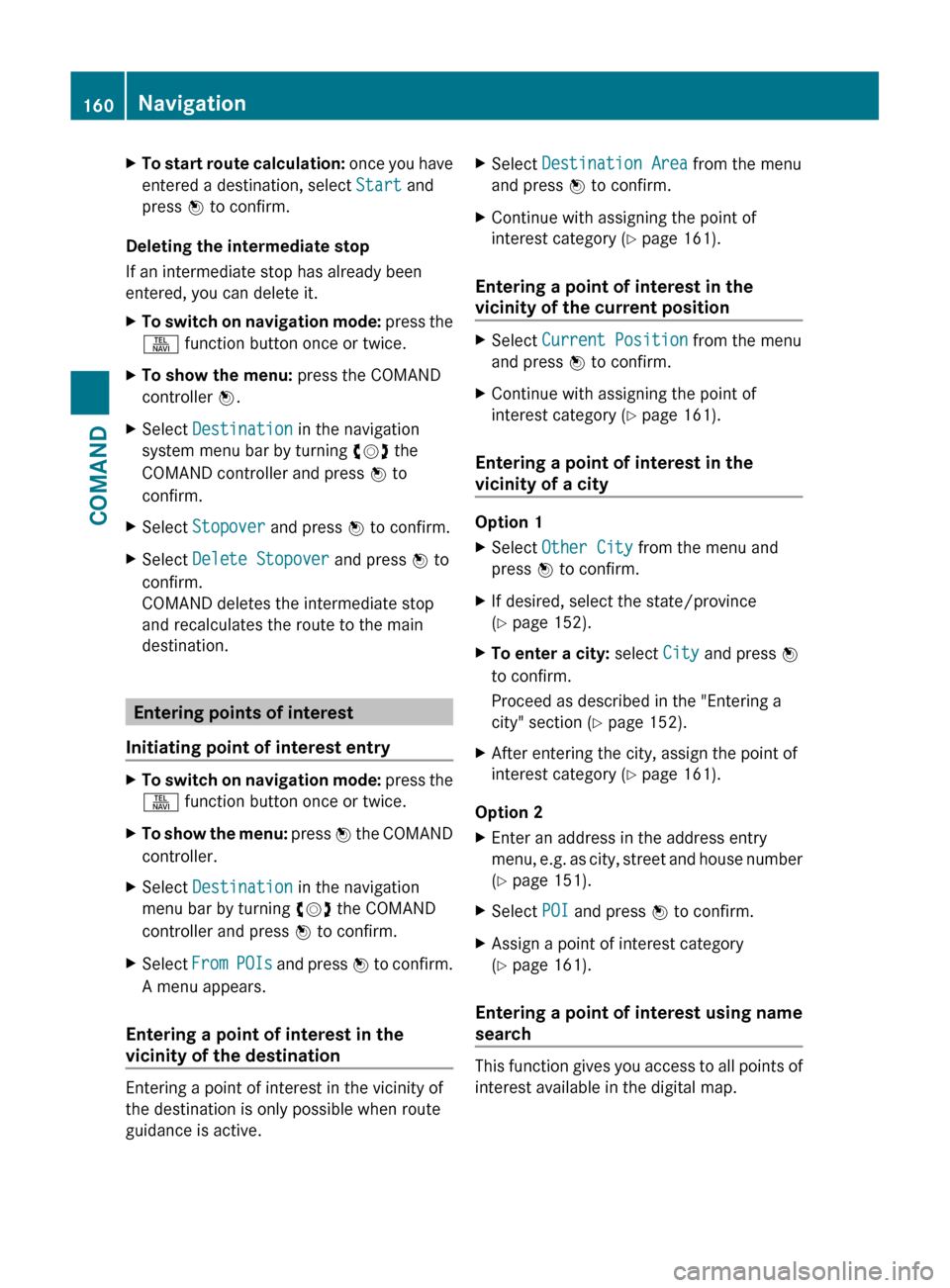
XTo start route calculation: once you have
entered a destination, select Start and
press W to confirm.
Deleting the intermediate stop
If an intermediate stop has already been
entered, you can delete it.
XTo switch on navigation mode: press the
S function button once or twice.XTo show the menu: press the COMAND
controller W.XSelect Destination in the navigation
system menu bar by turning cVd the
COMAND controller and press W to
confirm.XSelect Stopover and press W to confirm.XSelect Delete Stopover and press W to
confirm.
COMAND deletes the intermediate stop
and recalculates the route to the main
destination.
Entering points of interest
Initiating point of interest entry
XTo switch on navigation mode: press the
S function button once or twice.XTo show the menu: press W the COMAND
controller.XSelect Destination in the navigation
menu bar by turning cVd the COMAND
controller and press W to confirm.XSelect From POIs and press W to confirm.
A menu appears.
Entering a point of interest in the
vicinity of the destination
Entering a point of interest in the vicinity of
the destination is only possible when route
guidance is active.
XSelect Destination Area from the menu
and press W to confirm.XContinue with assigning the point of
interest category ( Y page 161).
Entering a point of interest in the
vicinity of the current position
XSelect Current Position from the menu
and press W to confirm.XContinue with assigning the point of
interest category ( Y page 161).
Entering a point of interest in the
vicinity of a city
Option 1
XSelect Other City from the menu and
press W to confirm.XIf desired, select the state/province
( Y page 152).XTo enter a city: select City and press W
to confirm.
Proceed as described in the "Entering a
city" section ( Y page 152).XAfter entering the city, assign the point of
interest category ( Y page 161).
Option 2
XEnter an address in the address entry
menu, e.g. as city, street and house number
( Y page 151).XSelect POI and press W to confirm.XAssign a point of interest category
( Y page 161).
Entering a point of interest using name
search
This function gives you access to all points of
interest available in the digital map.
160NavigationCOMAND
Page 164 of 524
list contains all the points of interest which
cannot be assigned to any sub-category of
the Restaurant main category and that lie
within the search radius.
Point of interest list
Introduction
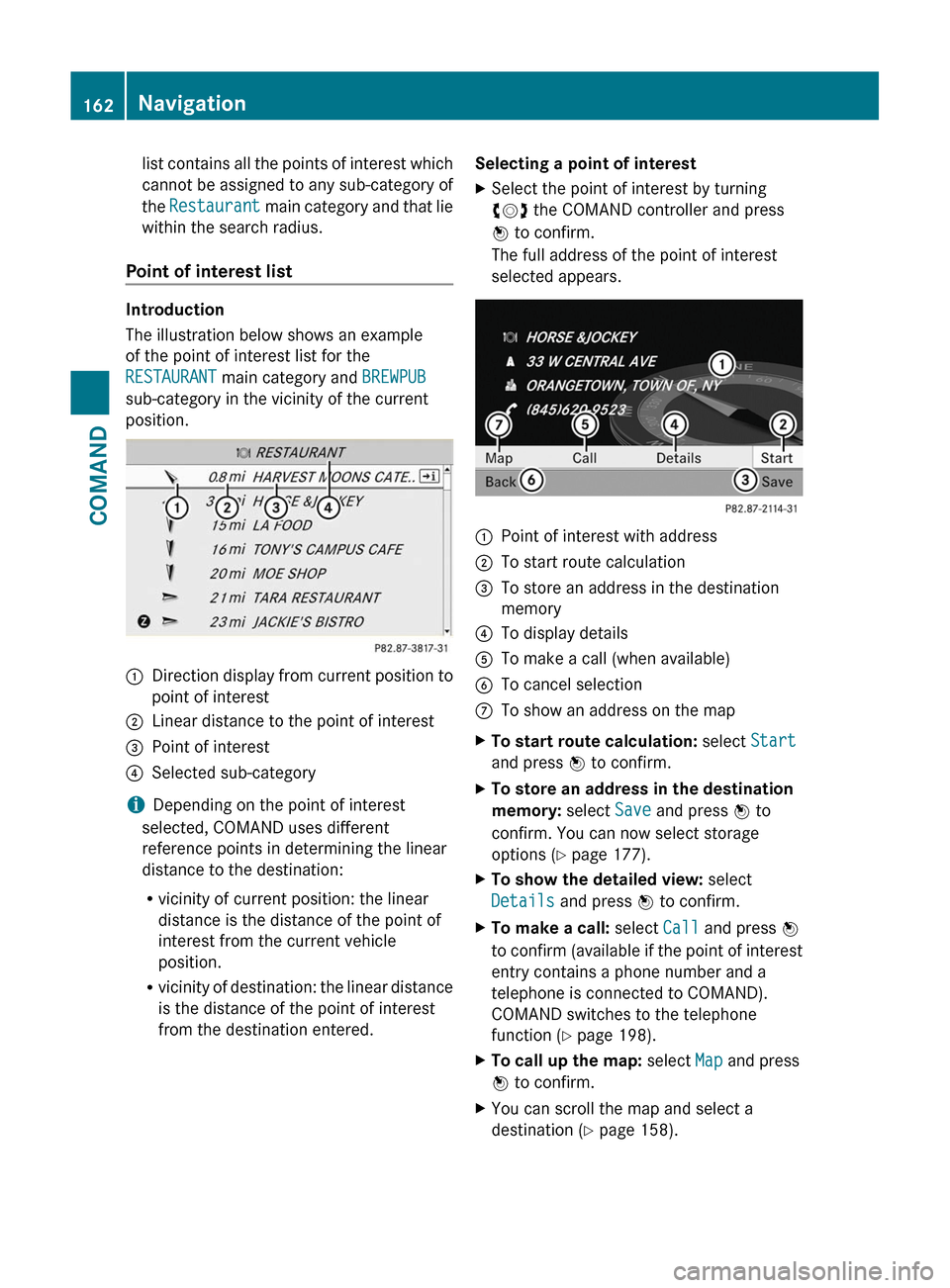
The illustration below shows an example
of the point of interest list for the
RESTAURANT main category and BREWPUB
sub-category in the vicinity of the current
position.
:Direction display from current position to
point of interest
;Linear distance to the point of interest=Point of interest?Selected sub-category
iDepending on the point of interest
selected, COMAND uses different
reference points in determining the linear
distance to the destination:
Rvicinity of current position: the linear
distance is the distance of the point of
interest from the current vehicle
position.
Rvicinity of destination: the linear distance
is the distance of the point of interest
from the destination entered.
Selecting a point of interestXSelect the point of interest by turning
cVd the COMAND controller and press
W to confirm.
The full address of the point of interest
selected appears.
:Point of interest with address;To start route calculation=To store an address in the destination
memory
?To display detailsATo make a call (when available)BTo cancel selectionCTo show an address on the mapXTo start route calculation: select Start
and press W to confirm.
XTo store an address in the destination
memory: select Save and press W to
confirm. You can now select storage
options (Y page 177).
XTo show the detailed view: select
Details and press W to confirm.
XTo make a call: select Call and press W
to confirm (available if the point of interest
entry contains a phone number and a
telephone is connected to COMAND).
COMAND switches to the telephone
function (Y page 198).
XTo call up the map: select Map and press
W to confirm.
XYou can scroll the map and select a
destination (Y page 158).
162NavigationCOMAND
Page 170 of 524
XSelect Continue Route Guidance and
press W to confirm.
COMAND calculates the route.
Destination or area of destination
reached
When you reach your destination, COMAND
displays a checkered flag and route guidance
is automatically ended.
For certain points of interest (e.g. airports),
you will see the Area of destination
reached message in addition to the
checkered flag.
Navigation announcements
Repeating navigation announcements
GWarning
Navigation announcements are intended to
direct you while driving without diverting your
attention from the road and driving.
Please always use this feature instead of
consulting the map display for directions.
Looking at the icons or map display can
distract you from traffic conditions and
driving, and increase the risk of an accident.
i Audible navigation announcements are
muted during a telephone call.
If you have missed an announcement, you can
call up the current announcement at any
time.
XTo show the menu: press W the COMAND
controller.XConfirm RPT in the navigation menu by
pressing W.
Switching navigation announcements
on/off
XTo switch off: press the 8 button
during an announcement.
You will briefly see the message: The
driving instructions have been
muted .XTo switch on: press W the COMAND
controller.XConfirm + in the navigation menu by
pressing W.
i COMAND automatically switches the
navigation announcements back on when:
R you have a new route calculated.
R you start the engine again after having
left the vehicle.
Reducing volume during a navigation
announcement
The volume of an active radio or video source
can be automatically reduced during a
navigation announcement.
XSelect Navi in the main function bar by
sliding ZV and turning cVd the COMAND
controller and press W to confirm.XSelect Audio Fadeout and press W to
confirm.
The function is switched on O or off ª,
depending on the previous status.
Setting the volume manually
XAdjust the volume during a navigation
announcement.
or
XSelect + in the map view with the menu
shown and adjust the volume.
Avoiding a section of the route blocked
by a traffic jam
This function blocks a section of the route
ahead of you. The length of the section of
route to be blocked can be adjusted. If
possible, COMAND calculates a detour
around the blocked section of the route.
XTo switch on navigation mode: press the
S function button once or twice.XTo show the menu: press the COMAND
controller W.168NavigationCOMAND
Page 171 of 524
XSelect Route in the navigation menu bar by
turning cVd the COMAND controller and
press W to confirm.
XSelect Detour and press W to confirm.XTo block a section of the route: select
More or Less repeatedly and confirm using
the W button until the desired section has
been selected.
iThe length of the blockable route section
is predetermined by the digital map. The
menu items are available accordingly.
XTo start route calculation: select Start
and press W to confirm.
XTo delete the blocked section: select
Delete while the message is shown and
press W to confirm.
COMAND calculates the route without the
block.
Selecting an alternative route
With the "Alternative route" function, routes
other than the original one can be calculated.
XTo switch on navigation mode: press the
S function button once or twice.
XTo show the menu: press W the COMAND
controller.
XSelect Route in the navigation menu bar by
turning cVd the COMAND controller and
press W to confirm.
XSelect Alternative Route and press W
to confirm.
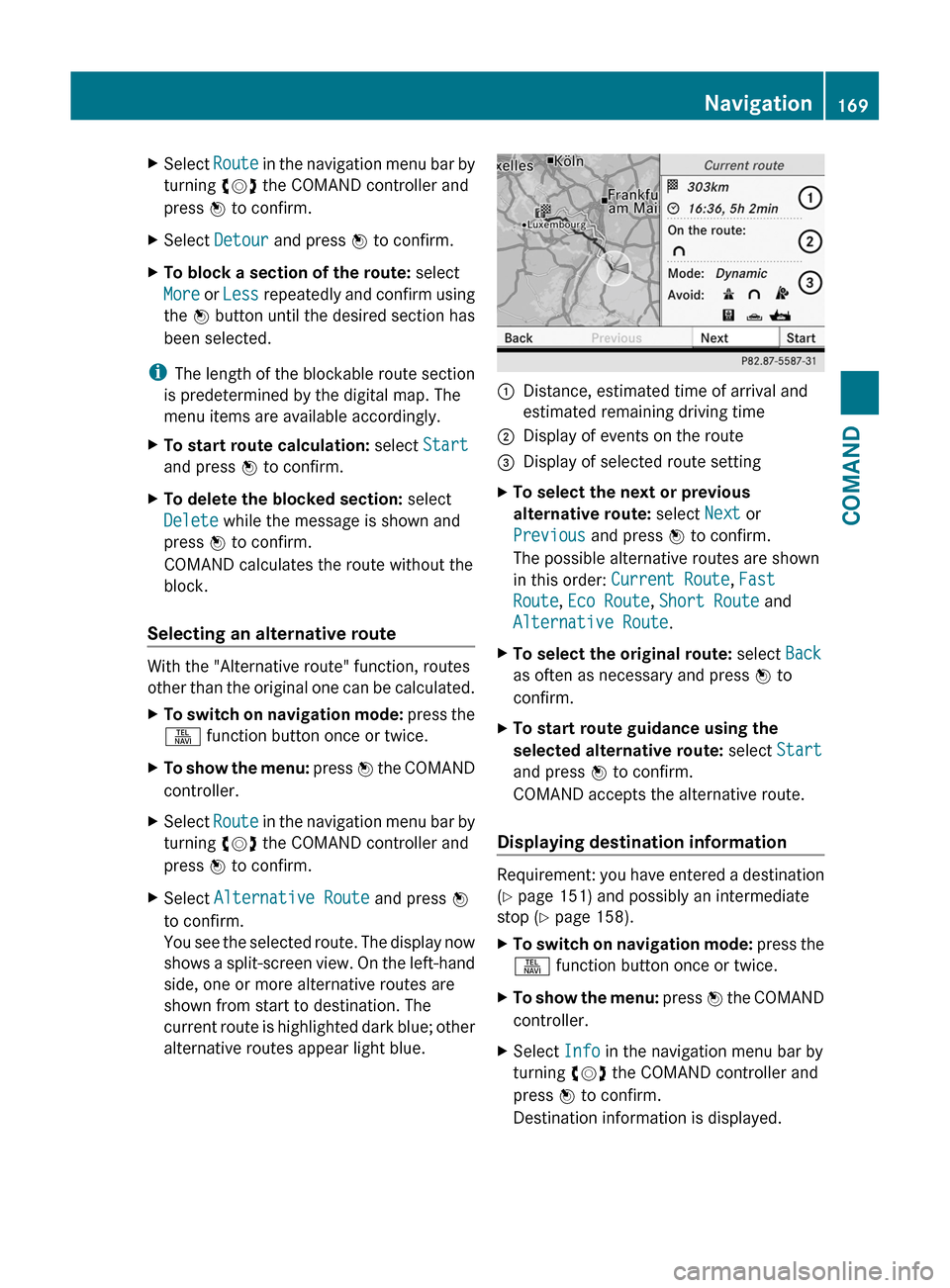
You see the selected route. The display now
shows a split-screen view. On the left-hand
side, one or more alternative routes are
shown from start to destination. The
current route is highlighted dark blue; other
alternative routes appear light blue.
:Distance, estimated time of arrival and
estimated remaining driving time
;Display of events on the route=Display of selected route settingXTo select the next or previous
alternative route: select Next or
Previous and press W to confirm.
The possible alternative routes are shown
in this order: Current Route, Fast
Route, Eco Route, Short Route and
Alternative Route.
XTo select the original route: select Back
as often as necessary and press W to
confirm.
XTo start route guidance using the
selected alternative route: select Start
and press W to confirm.
COMAND accepts the alternative route.
Displaying destination information
Requirement: you have entered a destination
(Y page 151) and possibly an intermediate
stop (Y page 158).
XTo switch on navigation mode: press the
S function button once or twice.
XTo show the menu: press W the COMAND
controller.
XSelect Info in the navigation menu bar by
turning cVd the COMAND controller and
press W to confirm.
Destination information is displayed.
Navigation169COMANDZ
Page 173 of 524
XTo show the menu: press the COMAND
controller W.
XSelect Position in the navigation menu
bar by turning cVd the COMAND
controller and press W to confirm.
XSelect Where am I? and press W to
confirm.
Off-road and off-map
Important safety notes
GWarning
The COMAND navigation system may direct
you to off-road routes that your vehicle may
not be capable of traversing through without
damaging your tires, wheels or vehicle. It is
the driver’s sole responsibility to determine
the suitability of the route. Off-road routes
may be of varying conditions and their
appropriateness for use may be affected by
various factors such as time of day, time of
year and immediate weather conditions that
cannot be judged or taken into consideration
by the COMAND system.
Route guidance to a destination that is on
a non-digitized road
COMAND can guide you to destinations
which are within the area covered by the
digital map, but which are not themselves
recorded on the map.
These destinations are known as off-road
destinations, which you can enter using the
map, for example. In these cases, COMAND
guides you for as long as possible with
navigation announcements and displays on
roads known to the system.
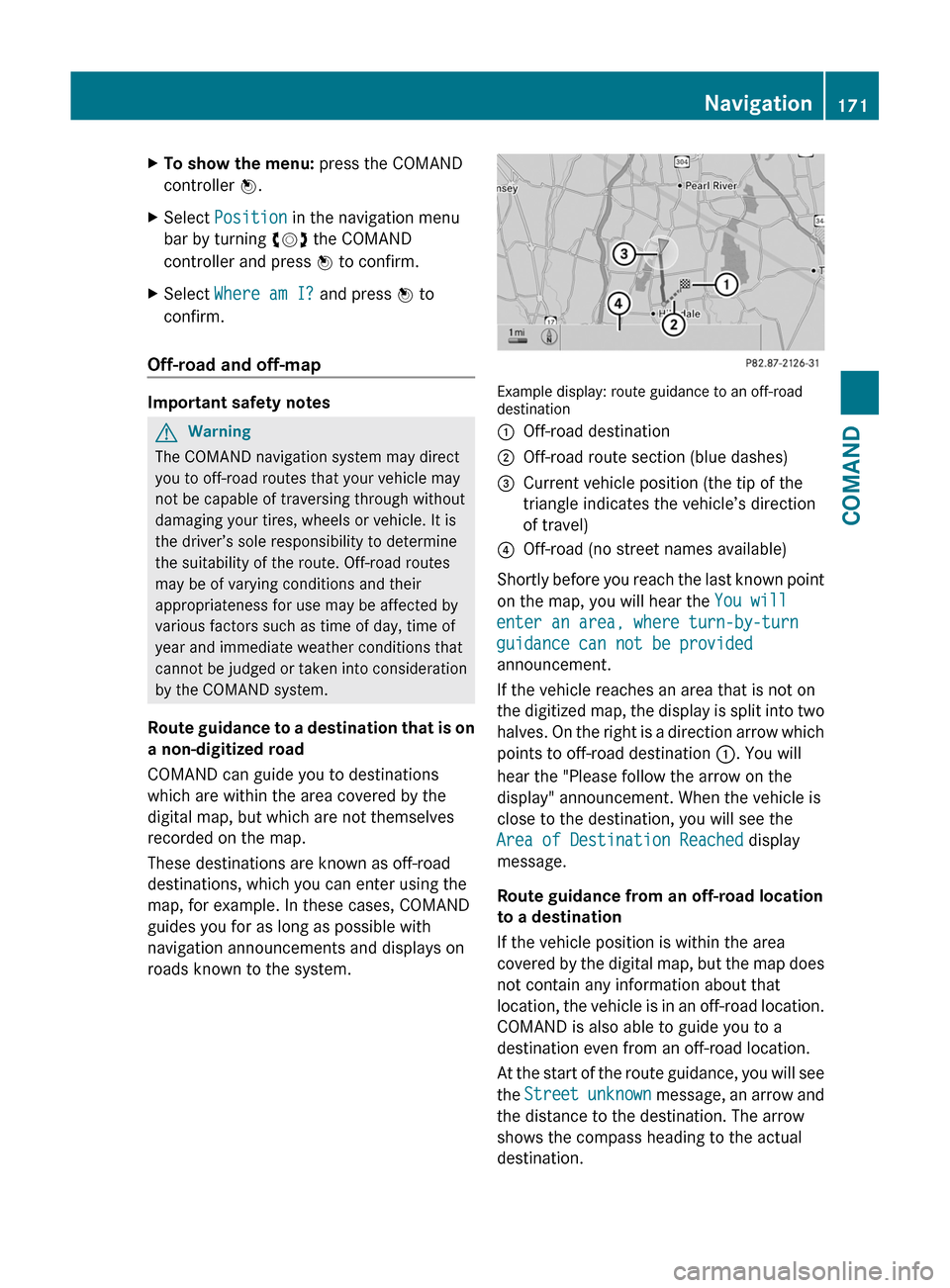
Example display: route guidance to an off-roaddestination
:Off-road destination;Off-road route section (blue dashes)=Current vehicle position (the tip of the
triangle indicates the vehicle’s direction
of travel)
?Off-road (no street names available)
Shortly before you reach the last known point
on the map, you will hear the You will
enter an area, where turn-by-turn
guidance can not be provided
announcement.
If the vehicle reaches an area that is not on
the digitized map, the display is split into two
halves. On the right is a direction arrow which
points to off-road destination :. You will
hear the "Please follow the arrow on the
display" announcement. When the vehicle is
close to the destination, you will see the
Area of Destination Reached display
message.
Route guidance from an off-road location
to a destination
If the vehicle position is within the area
covered by the digital map, but the map does
not contain any information about that
location, the vehicle is in an off-road location.
COMAND is also able to guide you to a
destination even from an off-road location.
At the start of the route guidance, you will see
the Street unknown message, an arrow and
the distance to the destination. The arrow
shows the compass heading to the actual
destination.
Navigation171COMANDZ
Page 174 of 524
The continuous blue route on the map starts
from the nearest road known to the system.
As soon as the vehicle is back on a road
known to the system, route guidance
continues in the usual way.
Route guidance from an off-map location
to a destination
If the vehicle position is outside the area
covered by the digital map, then the vehicle
is in an off-map location. COMAND is also
able to guide you to a destination even from
an off-map location.
At the start of the route guidance, you will see
the Street unknown message, an arrow and
the distance to the destination. The arrow
shows the compass heading to the road left
last.
The route is highlighted in blue from the
nearest road known to the system.
As soon as the vehicle is back on a road
known to the system, route guidance
continues in the usual way.
Off-road during route guidance
Due to road construction work, for example,
there may be differences between the data
on the digital map and the actual course of
the road.
In such cases, the system will temporarily be
unable to locate the vehicle position on the
digital map and thus considers the vehicle to
be in an off-road position.
In the display, you will see the Street
unknown message, an arrow and the distance
to the destination. The arrow shows the
compass heading to the actual destination.
As soon as the system can assign the vehicle
position to the map again, route guidance
continues in the usual way.Traffic reports
Conditions
i The SatRadio reception described below
requires optionally available SatRadio
equipment as well as a subscription to
SIRIUS XM SatRadio Traffic Message
Service. Further details on SatRadio are
available in the "SatRadio" chapter
( Y page 213).
COMAND can receive traffic reports via
SatRadio and incorporate them in the
navigation system. Traffic reports and map
icons can then be shown in the COMAND
display.
Real-time traffic reports on the map
COMAND can show certain traffic incidents
on the map. The incidents are shown on the
map at a scale from 1/16 mi to 20 mi.
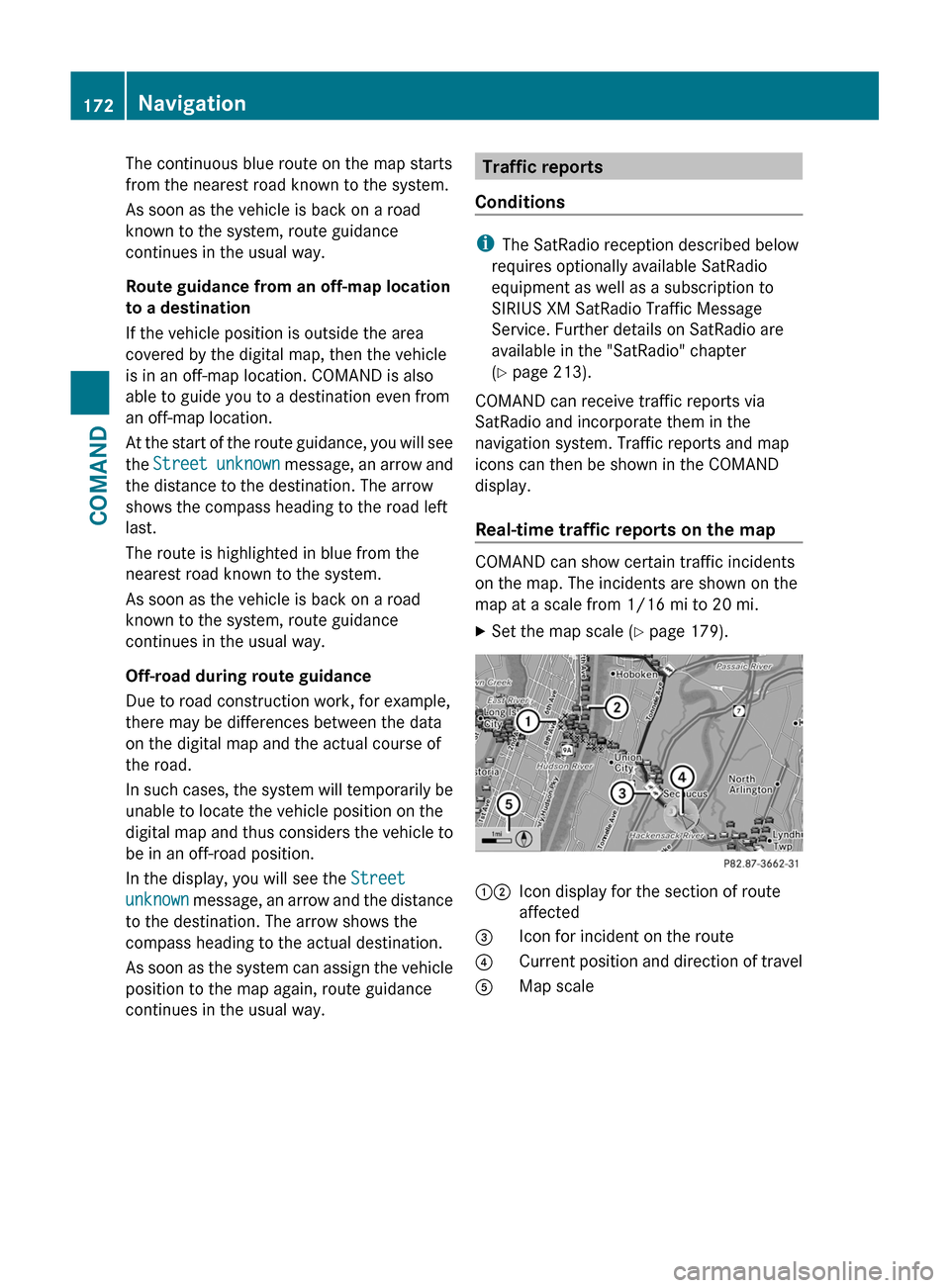
XSet the map scale ( Y page 179).12Icon display for the section of route
affected3Icon for incident on the route4Current position and direction of travel5Map scale172NavigationCOMAND
Page 177 of 524
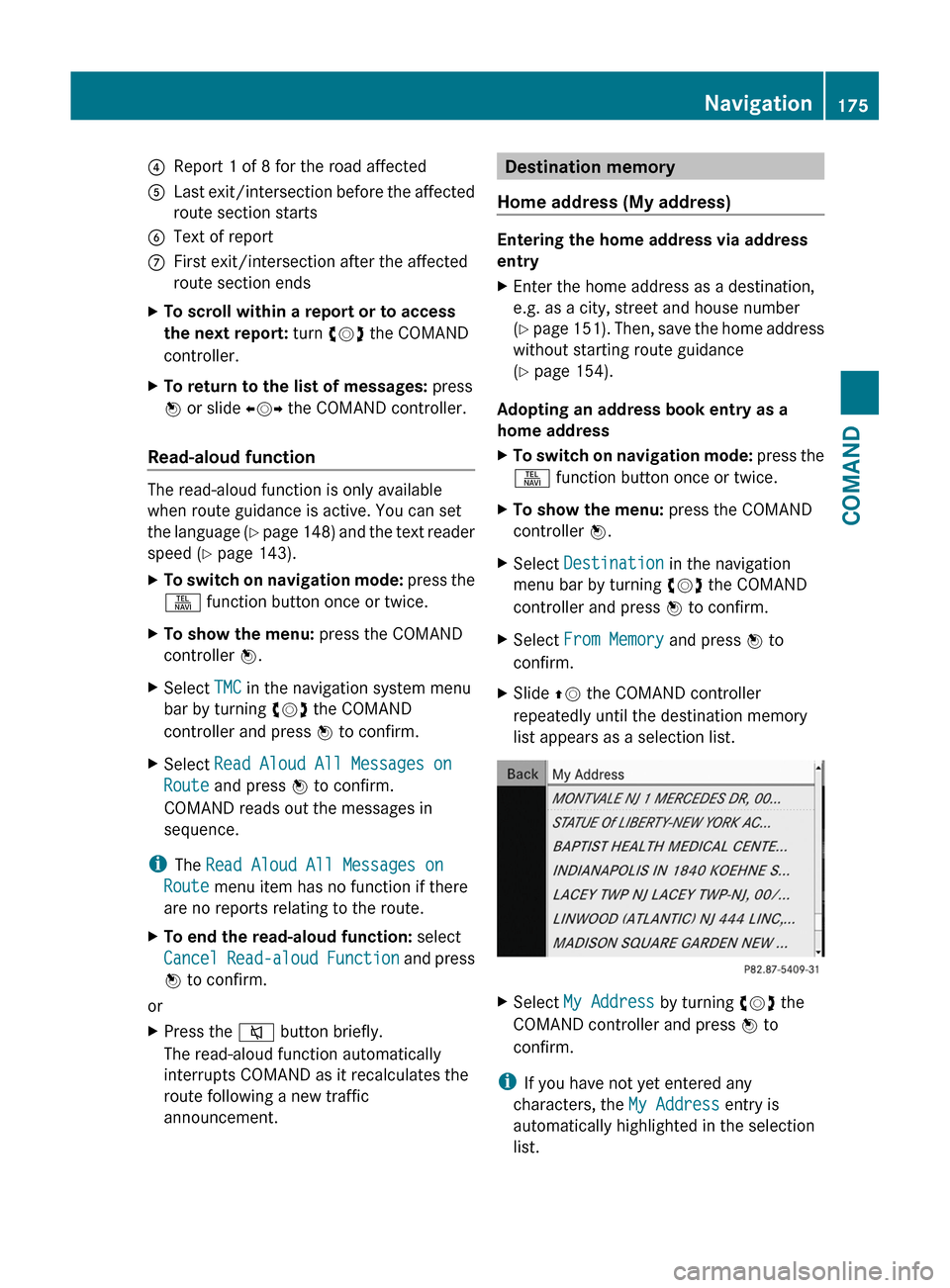
4Report 1 of 8 for the road affected5Last exit/intersection before the affected
route section starts
6Text of reportCFirst exit/intersection after the affected
route section ends
XTo scroll within a report or to access
the next report: turn cVd the COMAND
controller.
XTo return to the list of messages: press
W or slide XVY the COMAND controller.
Read-aloud function
The read-aloud function is only available
when route guidance is active. You can set
the language (Y page 148) and the text reader
speed (Y page 143).
XTo switch on navigation mode: press the
S function button once or twice.
XTo show the menu: press the COMAND
controller W.
XSelect TMC in the navigation system menu
bar by turning cVd the COMAND
controller and press W to confirm.
XSelect Read Aloud All Messages on
Route and press W to confirm.
COMAND reads out the messages in
sequence.
iThe Read Aloud All Messages on
Route menu item has no function if there
are no reports relating to the route.
XTo end the read-aloud function: select
Cancel Read-aloud Function and press
W to confirm.
or
XPress the 8 button briefly.
The read-aloud function automatically
interrupts COMAND as it recalculates the
route following a new traffic
announcement.
Destination memory
Home address (My address)
Entering the home address via address
entry
XEnter the home address as a destination,
e.g. as a city, street and house number
(Y page 151). Then, save the home address
without starting route guidance
(Y page 154).
Adopting an address book entry as a
home address
XTo switch on navigation mode: press the
S function button once or twice.
XTo show the menu: press the COMAND
controller W.
XSelect Destination in the navigation
menu bar by turning cVd the COMAND
controller and press W to confirm.
XSelect From Memory and press W to
confirm.
XSlide ZV the COMAND controller
repeatedly until the destination memory
list appears as a selection list.
XSelect My Address by turning cVd the
COMAND controller and press W to
confirm.
iIf you have not yet entered any
characters, the My Address entry is
automatically highlighted in the selection
list.
Navigation175COMANDZ
Page 178 of 524
If no home address has been stored yet, you
can now assign an address book entry. If a
home address already exists, it is displayed
and you can alter it.
i If you select New Entry, you are also
offered the option of entering the home
address for the first time. You can then
save the home address without starting
route guidance.XTo enter the home address for the first
time: select Assign Address Book
Entry and press W to confirm.XSelect Home or Work and press W to
confirm.XTo change the home address: select
Change and press W to confirm.XSelect Assign Address Book Entry and
press W to confirm.
i
If you select New Entry, you are also
offered the option of changing the home
address by entering an address. You can
then save the home address without having
to start route guidance.
XSelect Home or Work and press W to
confirm.
In both cases, you will see the address book
either with the character bar or as a
selection list.XTo select an address book entry:
proceed as described in the "Searching for
an address book entry" section
( Y page 201).XTo confirm the selection: press W the
COMAND controller.
If no home address has been stored,
COMAND saves the entry. You will see a
message and then the address menu with
the selected address. Start is highlighted
automatically.
If a home address has already been stored,
you will see a prompt asking you whether
the My Address entry should be
overwritten.XSelect Yes or No and press W to confirm.
If you select Yes, COMAND overwrites the
destination. You will see a message and
then the address menu with the selected
address. Start is highlighted
automatically.
If you select No, the list will reappear.
Selecting the home address for route
guidance
XProceed as described in the "Selecting a
destination from the destination memory"
section ( Y page 156).
Saving a destination in the destination
memory
Note
This function also stores the destination in
the address book.
After destination entry
XThe destination has been entered and is
shown in the address entry menu
( Y page 154).XSelect Save by sliding VÆ and turning
cVd the COMAND controller and press
W to confirm.
You can now select storage options
( Y page 177).
During route guidance
XTo show the menu: press W the COMAND
controller.XSelect Destination in the navigation
menu bar by turning cVd the COMAND
controller and press W to confirm.XSelect Save Destination and press W to
confirm.
You can now select storage options
( Y page 177).
From the list of previous destinations
XTo show the menu: press W the COMAND
controller.176NavigationCOMAND
Page 179 of 524
XSelect Destination in the navigation
menu bar by turning cVd the COMAND
controller and press W to confirm.
XSelect From Last Destinations and
press W to confirm.
The list of previous destinations appears.
XSelect the destination by turning cVd the
COMAND controller and press W to
confirm.
The destination address is shown.
XSelect Save and press W to confirm.
You can now select storage options.
Selecting storage options
XTo save the destination without a
name: select Save without Name and
press W to confirm.
COMAND stores the destination in the
destination memory and uses the address
as the destination name.
XTo save the destination as My
Address: select Save as "My Address"
and press W to confirm.
COMAND stores the destination as My
Address in the destination memory. If the
entry already contains data that can be
used for navigation (L icon), a prompt will
appear asking whether you wish to
overwrite the existing data.
XSelect Yes or No and press W to confirm.
If you select Yes, the entry is overwritten.
If you select No, the process will be
canceled.
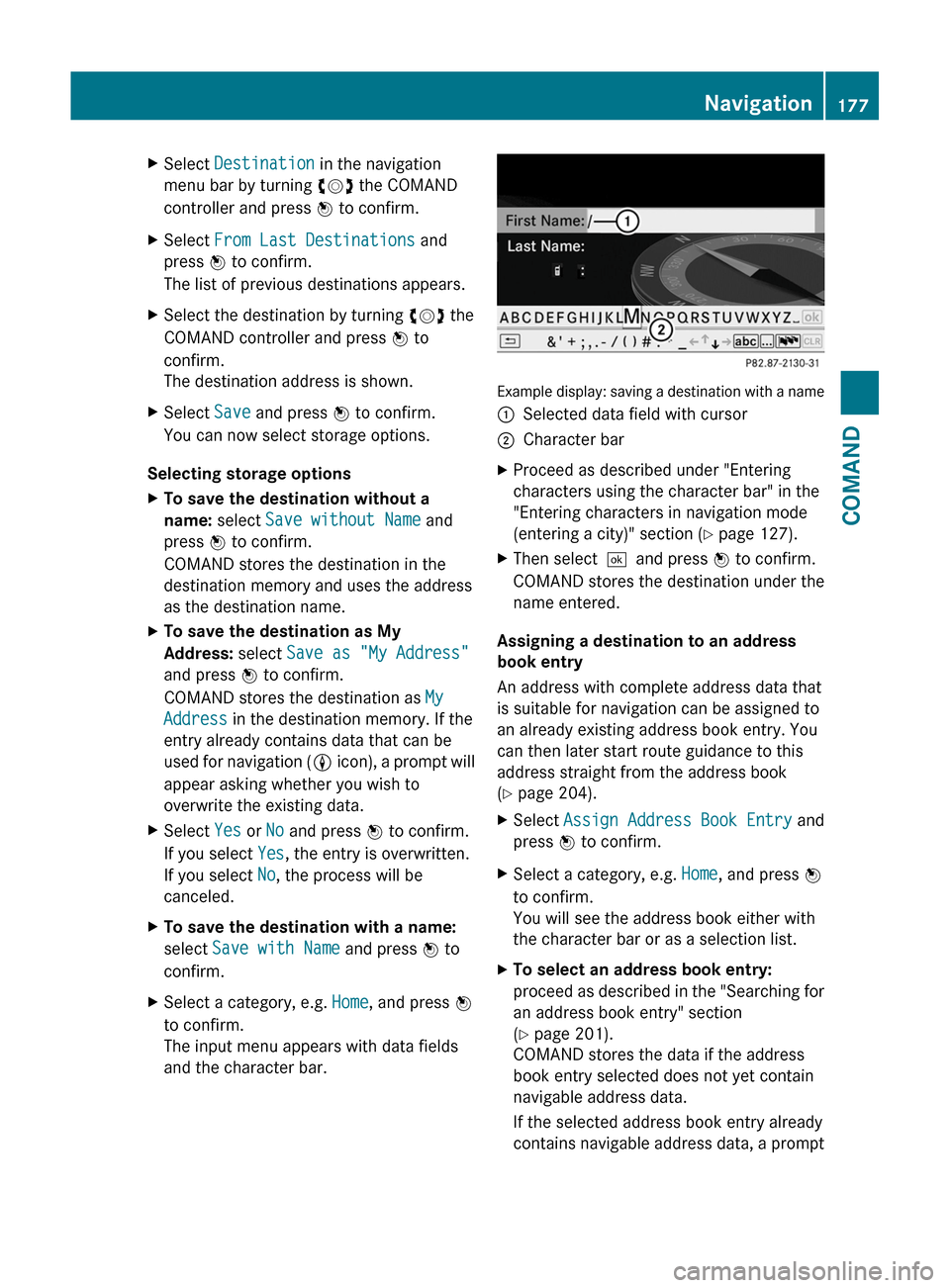
XTo save the destination with a name:
select Save with Name and press W to
confirm.
XSelect a category, e.g. Home, and press W
to confirm.
The input menu appears with data fields
and the character bar.
Example display: saving a destination with a name
:Selected data field with cursor;Character barXProceed as described under "Entering
characters using the character bar" in the
"Entering characters in navigation mode
(entering a city)" section (Y page 127).
XThen select¬and press W to confirm.
COMAND stores the destination under the
name entered.
Assigning a destination to an address
book entry
An address with complete address data that
is suitable for navigation can be assigned to
an already existing address book entry. You
can then later start route guidance to this
address straight from the address book
(Y page 204).
XSelect Assign Address Book Entry and
press W to confirm.
XSelect a category, e.g. Home, and press W
to confirm.
You will see the address book either with
the character bar or as a selection list.
XTo select an address book entry:
proceed as described in the "Searching for
an address book entry" section
(Y page 201).
COMAND stores the data if the address
book entry selected does not yet contain
navigable address data.
If the selected address book entry already
contains navigable address data, a prompt
Navigation177COMANDZ