parking sensors MERCEDES-BENZ S-Class 2011 W221 Owner's Manual
[x] Cancel search | Manufacturer: MERCEDES-BENZ, Model Year: 2011, Model line: S-Class, Model: MERCEDES-BENZ S-Class 2011 W221Pages: 524, PDF Size: 22.53 MB
Page 17 of 524
O
Occupant Classification System
(OCS) Faults ............................................... 52
Operation ......................................... 48
System self-test ............................... 51
Occupant safety
Children in the vehicle .....................60
System overview .............................. 42
Octane number (fuel) ........................ 512
Odometer ........................................... 368
Off-map .............................................. 171
Off-road .............................................. 171
4MATIC .......................................... 339
Oil
see Engine oil
On-board computer
AMG menu ..................................... 371
Assistance menu ........................... 375
Audio menu ................................... 370
Display messages ..........................380
Important safety notes ..................364
Instrument cluster submenu ..........377
Lighting submenu .......................... 377
Message memory .......................... 380
Navigation menu ............................ 369
Operating video DVD .....................371
Operation ....................................... 365
Overview of menus ........................367
Service menu ................................. 377
Settings menu ............................... 377
Standard display submenu ............368
Telephone menu ............................ 374
Trip menu ...................................... 368
Opening height restriction for
trunk lid .............................................. 261
Operating system see On-board computer
Orientation in direction of travel ..... 181
Outside lighting Delayed switch-off (COMAND) .......259
Outside temperature
Display ........................................... 365
Overhead control panel
Overview .......................................... 36
Override feature
Rear side windows ...........................65P
Paint code number ............................ 509
Paintwork (cleaning instructions) ... 454
Panic alarm .......................................... 66
Panorama roof with power tilt/
sliding panel Opening/closing .............................. 95
Resetting ......................................... 97
Parking ............................................... 316
Parking aid Parking Guidance ........................... 342
PARKTRONIC ................................. 339
Rear view camera .......................... 346
Parking brake
Display message ............................ 389
Electric parking brake ....................317
Parking Guidance .............................. 342
Display message ............................ 405
Parking lamp (display message) ...... 396
Parking position Exterior mirror on the front-
passenger side ............................... 111
Exterior mirrors (COMAND) ...........258
PARKTRONIC
Activating/deactivating .................341
Function/notes ............................. 339
Malfunction .................................... 342
Problem ......................................... 342
Range of the sensors .....................340
Warning display ............................. 341
Passcode
Entering ................................. 147, 194
Pause function ................................... 220
Pedals ................................................. 319
Permanent four-wheel drive see 4MATIC
Phone book
Calling up ....................................... 201
Creating an entry ........................... 203
Deleting an entry ........................... 204
Introduction ................................... 200
Plastic trim (cleaning instructions) . 458
Playback options .............. 224, 229, 234
Point of interest Category ........................................ 161
Entering ......................................... 160
Entering a name ............................. 160Index15
Page 71 of 524
Rdisturbance from other radar sources
R strong radar reflection such as in parking
garages
BAS PLUS uses radar signals that are not
reflected well by narrow objects and
absorptive materials. For this reason BAS
PLUS will not react to persons, animals, and
approaching traffic or cross-traffic.
BAS PLUS may not detect narrow vehicles
driving in front of you, such as motorcycles
and vehicles driving offset from your vehicle
center.
Following a collision or accident-related
damage to the front end of the vehicle, have
the configuration and operation of the radar
sensors checked at an authorized Mercedes-
Benz Center.
If BAS PLUS is not available due to a
malfunction in the radar sensor system, the
brake system remains available with full
brake boosting effect and BAS.
Adaptive brake lights
i Adaptive brake lamps are only available in
the USA and only on the S 600 and S65
AMG.
If you brake sharply from a speed of more
than 30 mph (50 km/h) or if braking is
assisted by BAS or BAS PLUS, the brake
lamps flash rapidly. In this way, traffic
traveling behind you is warned in an even
more noticeable manner.
If you brake from a speed of more than
40 mph (70 km/h) to a standstill, the hazard
warning lamps are switched on automatically
when the vehicle is stationary. If the brakes
are applied again, the brake lamps light up
continuously. The hazard warning lamps
switch off automatically if you drive faster
than 6 mph (10 km/h) again. You can also
switch off the hazard warning lamps using the
hazard warning lamp button ( Y page 276).
ESP ®
(Electronic Stability Program)
Important safety notesGWarning
Observe "Important safety notes"
( Y page 66).
If ESP ®
detects that the vehicle is deviating
from the direction desired by the driver, one
or more wheels are braked to stabilize the
vehicle. If necessary, the engine output is also
modified to keep the vehicle on the desired
course within physical limits. ESP ®
assists
the driver when pulling away on wet or
slippery roads. ESP ®
can also stabilize the
vehicle during braking.
If ESP ®
intervenes, the ÷ warning lamp
flashes in the instrument cluster.
GWarning
Under no circumstances should you
deactivate ESP ®
when the ÷ ESP®
warning lamp in the instrument cluster
flashes. Proceed as follows:
R when driving off, apply as little throttle as
possible.
R while driving, ease up on the accelerator
pedal.
R adapt your speed to suit the prevailing road
and weather conditions.
failure to observe these guidelines could
cause the vehicle to skid. ESP ®
cannot
prevent accidents resulting from excessive
speed.
! Vehicles without 4MATIC: switch the
ignition off when:
R the electric parking brake is being tested
using a brake dynamometer.
R the vehicle is being towed with the front/
rear axle raised.
Application of the brakes by ESP ®
may
otherwise destroy the brake system.
Driving safety systems69SafetyZ
Page 74 of 524
Immediately brake your vehicle to increase
the distance between your vehicle and the
vehicle driving in front of you. The warning
sound is intended as a final caution that you
have not interceded with your own braking
inputs to avoid a potentially dangerous
situation. Do not wait for the operation of the
warning signal to intercede with your own
braking, as that will result in potentially
dangerous emergency braking which will not
always result in an impact being avoided.
Tailgating increases the risk of an accident.GWarning!
The PRE-SAFE ®
Brake is a convenience
system designed to assist the driver during
vehicle operation. The responsibility for the
vehicle speed and the distance to the vehicle
ahead, including most importantly brake
operation to assure safe stopping distance,
always remains with the driver.
Always pay attention to traffic conditions
even while the PRE-SAFE ®
Brake is switched
on. Otherwise, you may not be able to
recognize dangerous situations until it is too
late and could cause an accident resulting in
personal or fatal injury to you or others.
i USA only: this device was approved as a
"Vehicular Radar System" by the FCC. The
radar sensor system is only intended for
use with radar systems in passenger
vehicles. Removing, tampering with, or
altering the device will void any warranties
and is not permitted by the FCC. Do not
tamper with the device in any way.
Any unauthorized modification to this
device could void the user's authority to
operate the equipment.
i Canada only: this device complies with
RSS-210 regulations of Industry Canada.
Operation is subject to the following two
conditions:
1. This device may not cause interference,
and
2. This device must withstand any
interference received, including
interference that may cause undesired
operation.
Removing, tampering with, or altering the
device will void any warranties and is not
permitted. Do not tamper with the device
in any way.
Any unauthorized modification to this
device could void the user's authority to
operate the equipment.
With the help of the radar sensor system,
PRE-SAFE ®
Brake can detect obstacles that
are in front of your vehicle for an extended
period of time. If you approach an obstacle
and PRE-SAFE ®
Brake detects a risk of a
collision, the system will initially alert you
both visually and acoustically. If you do not
brake or steer, the vehicle will at first
automatically brake slightly. In the event of
an increased risk of a collision, PRE-SAFE ®
is
activated ( Y page 53). If the risk of collision
remains and you do not brake, take evasive
action or accelerate significantly, the vehicle
may perform automatic emergency braking.GWarning!
The PRE-SAFE ®
Brake will only respond with
brake assistance if it has clearly detected an
object. Detection can be impeded by:
R dirty or covered sensors
R snowfall or heavy rain
R disturbance from other radar sources
R strong radar reflection such as in parking
garages
The PRE-SAFE ®
Brake uses radar signals that
are not reflected well by narrow objects and
absorptive materials. For this reason the PRE-
SAFE ®
Brake will not react to persons,
animals, and approaching traffic or cross-
traffic.
The PRE-SAFE ®
Brake may not detect narrow
vehicles driving in front of you, such as
motorcycles and vehicles driving offset from
your vehicle center.
72Driving safety systemsSafety
Page 342 of 524
GWarning!
Make sure no persons or animals are in or
near the area in which you are parking/
maneuvering. Otherwise, they could be
injured.
PARKTRONIC is an electronic parking aid with
ultrasonic sensors. It indicates visually and
audibly the distance between your vehicle
and an object.
PARKTRONIC is activated automatically when
you:
Rswitch on the ignition.
Rshift the transmission to position D, R or
N.
Rrelease the electric parking brake.
PARKTRONIC is deactivated at speeds above
11 mph (18 km/h). It is reactivated at lower
speeds.
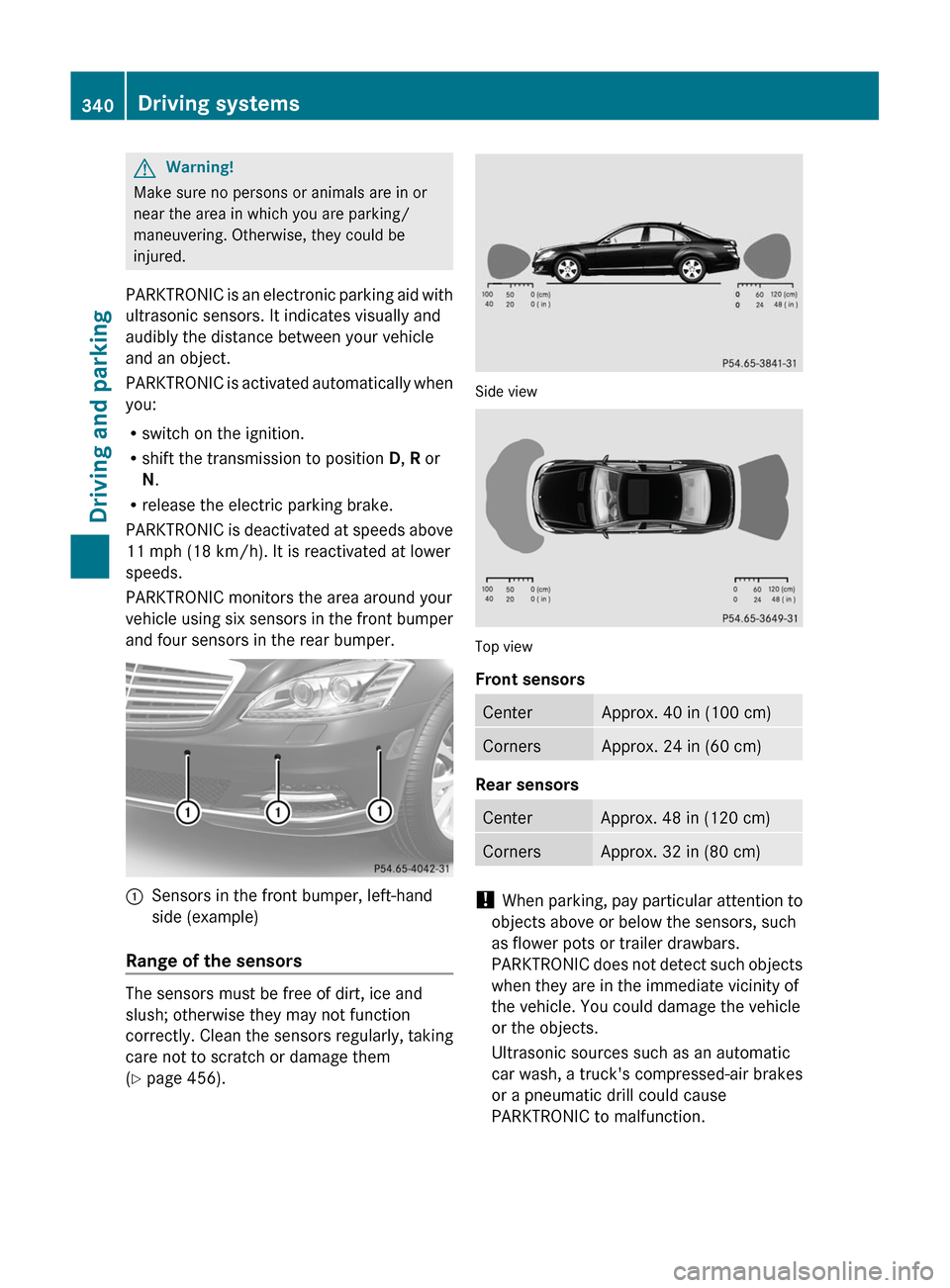
PARKTRONIC monitors the area around your
vehicle using six sensors in the front bumper
and four sensors in the rear bumper.
:Sensors in the front bumper, left-hand
side (example)
Range of the sensors
The sensors must be free of dirt, ice and
slush; otherwise they may not function
correctly. Clean the sensors regularly, taking
care not to scratch or damage them
(Y page 456).
Side view
Top view
Front sensors
CenterApprox. 40 in (100 cm)CornersApprox. 24 in (60 cm)
Rear sensors
CenterApprox. 48 in (120 cm)CornersApprox. 32 in (80 cm)
! When parking, pay particular attention to
objects above or below the sensors, such
as flower pots or trailer drawbars.
PARKTRONIC does not detect such objects
when they are in the immediate vicinity of
the vehicle. You could damage the vehicle
or the objects.
Ultrasonic sources such as an automatic
car wash, a truck's compressed-air brakes
or a pneumatic drill could cause
PARKTRONIC to malfunction.
340Driving systemsDriving and parking
Page 343 of 524
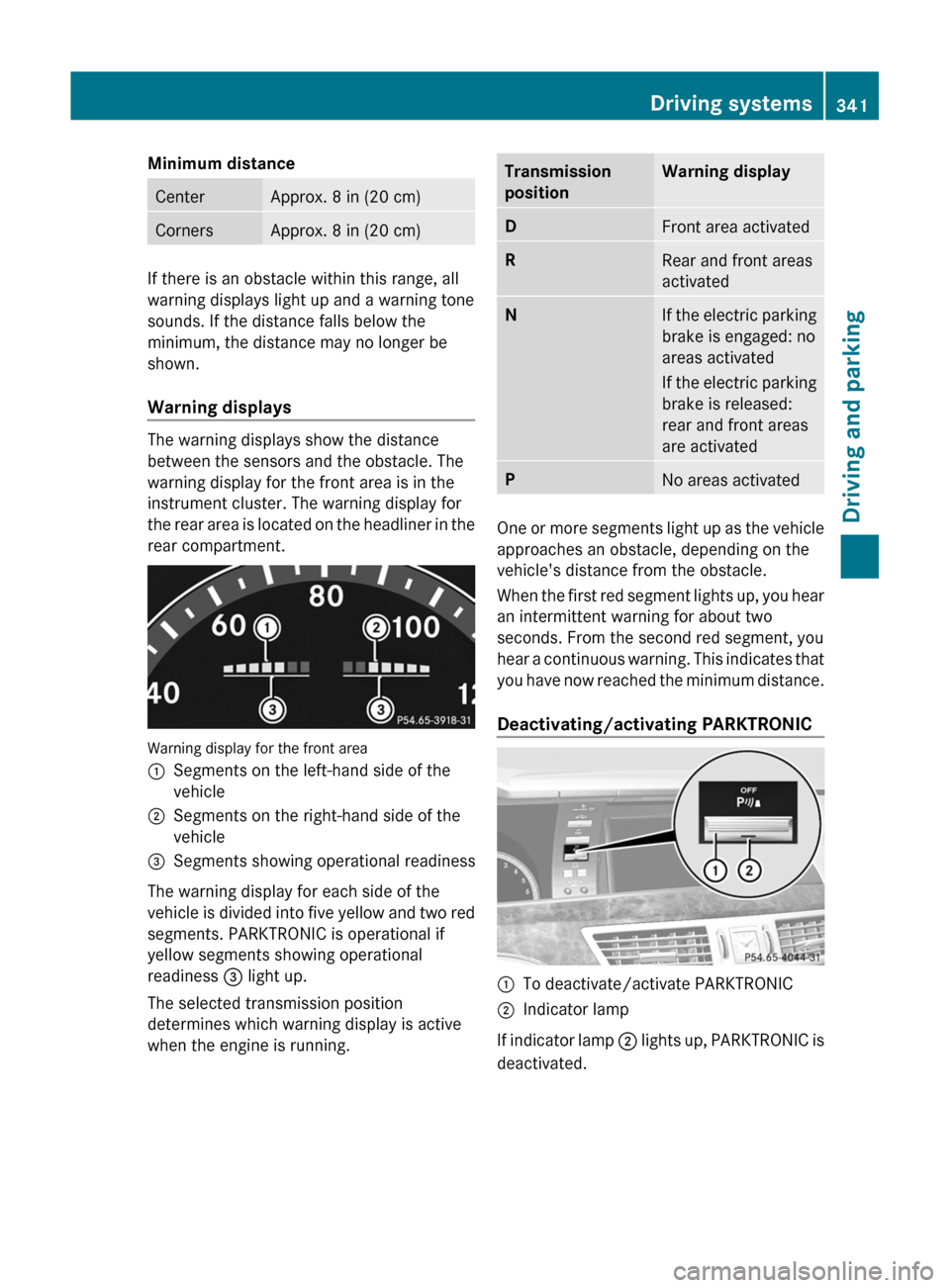
Minimum distanceCenterApprox. 8 in (20 cm)CornersApprox. 8 in (20 cm)
If there is an obstacle within this range, all
warning displays light up and a warning tone
sounds. If the distance falls below the
minimum, the distance may no longer be
shown.
Warning displays
The warning displays show the distance
between the sensors and the obstacle. The
warning display for the front area is in the
instrument cluster. The warning display for
the rear area is located on the headliner in the
rear compartment.
Warning display for the front area
:Segments on the left-hand side of the
vehicle;Segments on the right-hand side of the
vehicle=Segments showing operational readiness
The warning display for each side of the
vehicle is divided into five yellow and two red
segments. PARKTRONIC is operational if
yellow segments showing operational
readiness = light up.
The selected transmission position
determines which warning display is active
when the engine is running.
Transmission
positionWarning displayDFront area activatedRRear and front areas
activatedNIf the electric parking
brake is engaged: no
areas activated
If the electric parking
brake is released:
rear and front areas
are activatedPNo areas activated
One or more segments light up as the vehicle
approaches an obstacle, depending on the
vehicle's distance from the obstacle.
When the first red segment lights up, you hear
an intermittent warning for about two
seconds. From the second red segment, you
hear a continuous warning. This indicates that
you have now reached the minimum distance.
Deactivating/activating PARKTRONIC
:To deactivate/activate PARKTRONIC;Indicator lamp
If indicator lamp ; lights up, PARKTRONIC is
deactivated.
Driving systems341Driving and parkingZ
Page 344 of 524
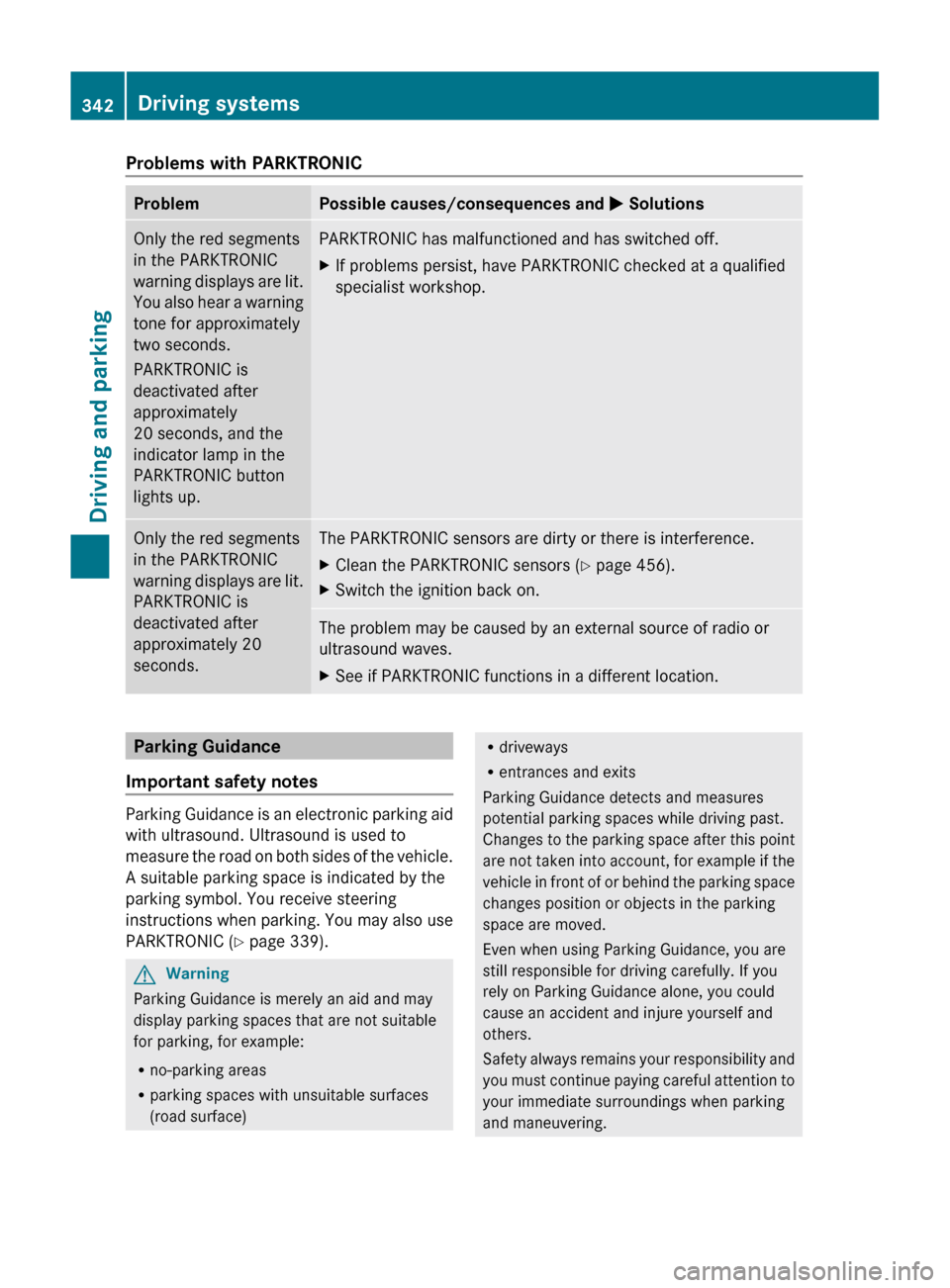
Problems with PARKTRONICProblemPossible causes/consequences and M SolutionsOnly the red segments
in the PARKTRONIC
warning displays are lit.
You also hear a warning
tone for approximately
two seconds.
PARKTRONIC is
deactivated after
approximately
20 seconds, and the
indicator lamp in the
PARKTRONIC button
lights up.PARKTRONIC has malfunctioned and has switched off.XIf problems persist, have PARKTRONIC checked at a qualified
specialist workshop.Only the red segments
in the PARKTRONIC
warning displays are lit.
PARKTRONIC is
deactivated after
approximately 20
seconds.The PARKTRONIC sensors are dirty or there is interference.XClean the PARKTRONIC sensors ( Y page 456).XSwitch the ignition back on.The problem may be caused by an external source of radio or
ultrasound waves.XSee if PARKTRONIC functions in a different location.Parking Guidance
Important safety notes
Parking Guidance is an electronic parking aid
with ultrasound. Ultrasound is used to
measure the road on both sides of the vehicle.
A suitable parking space is indicated by the
parking symbol. You receive steering
instructions when parking. You may also use
PARKTRONIC ( Y page 339).
GWarning
Parking Guidance is merely an aid and may
display parking spaces that are not suitable
for parking, for example:
R no-parking areas
R parking spaces with unsuitable surfaces
(road surface)
R driveways
R entrances and exits
Parking Guidance detects and measures
potential parking spaces while driving past.
Changes to the parking space after this point
are not taken into account, for example if the
vehicle in front of or behind the parking space
changes position or objects in the parking
space are moved.
Even when using Parking Guidance, you are
still responsible for driving carefully. If you
rely on Parking Guidance alone, you could
cause an accident and injure yourself and
others.
Safety always remains your responsibility and
you must continue paying careful attention to
your immediate surroundings when parking
and maneuvering.342Driving systemsDriving and parking
Page 345 of 524
GWarning!
The system cannot detect objects located
above the area that the sensors scan. These
objects, e.g. protruding load, overhang, or
truck tail lifts, will be ignored when computing
the parking procedure. The Parking Guidance
might therefore provide untimely steering
instructions. This could cause a collision.
Thus, do not use the Parking Guidance in such
situations.
GWarning!
Make sure no persons or animals are in the
area in which you are maneuvering. You could
otherwise injure them.
! Pay particular attention to low objects or
objects with flat surfaces, such as trailer
drawbars, posts, cross beams and curbs.
These types of objects cannot be detected
by Parking Guidance and may damage the
vehicle.
When PARKTRONIC is deactivated, Parking
Guidance is also unavailable.
Use Parking Guidance for parking spaces:
Rthat are parallel to the direction of travel
Rthat are on straight roads, not bends
Rthat are on the same level as the road, i.e.
not on the pavement, for example. Parking
Guidance may not detect flat curbs
Parking tips:
ROn narrow roads, drive as close to the
parking space as possible.
RParking spaces that are littered, overgrown
or partially occupied by trailer drawbars
might be identified incorrectly or not at all.
RSnowfall or heavy rain may lead to a parking
space being measured inaccurately.
RPay attention to the PARKTRONIC warning
messages during the parking procedure
(Y page 341).
RWhen transporting a load which protrudes
from your vehicle, you must not use Parking
Guidance.
RNever use Parking Guidance with snow
chains or an emergency spare wheel
installed.
RMake sure that the tire pressures are
always correct. This has a direct effect on
the steering instructions.
RThe way your vehicle is positioned in the
parking space after parking is dependent
on various factors. These include the
position and shape of the vehicles parked
in front and behind it and the conditions of
the location. In some cases, Parking
Guidance may guide you too far or not far
enough into a parking space. In some
cases, it may also lead you across or onto
the curb. If necessary, cancel the parking
procedure with Parking Guidance.
! If unavoidable, you should drive over
obstacles such as curbs slowly and not at
a sharp angle. Otherwise, you may damage
the wheels or tires.
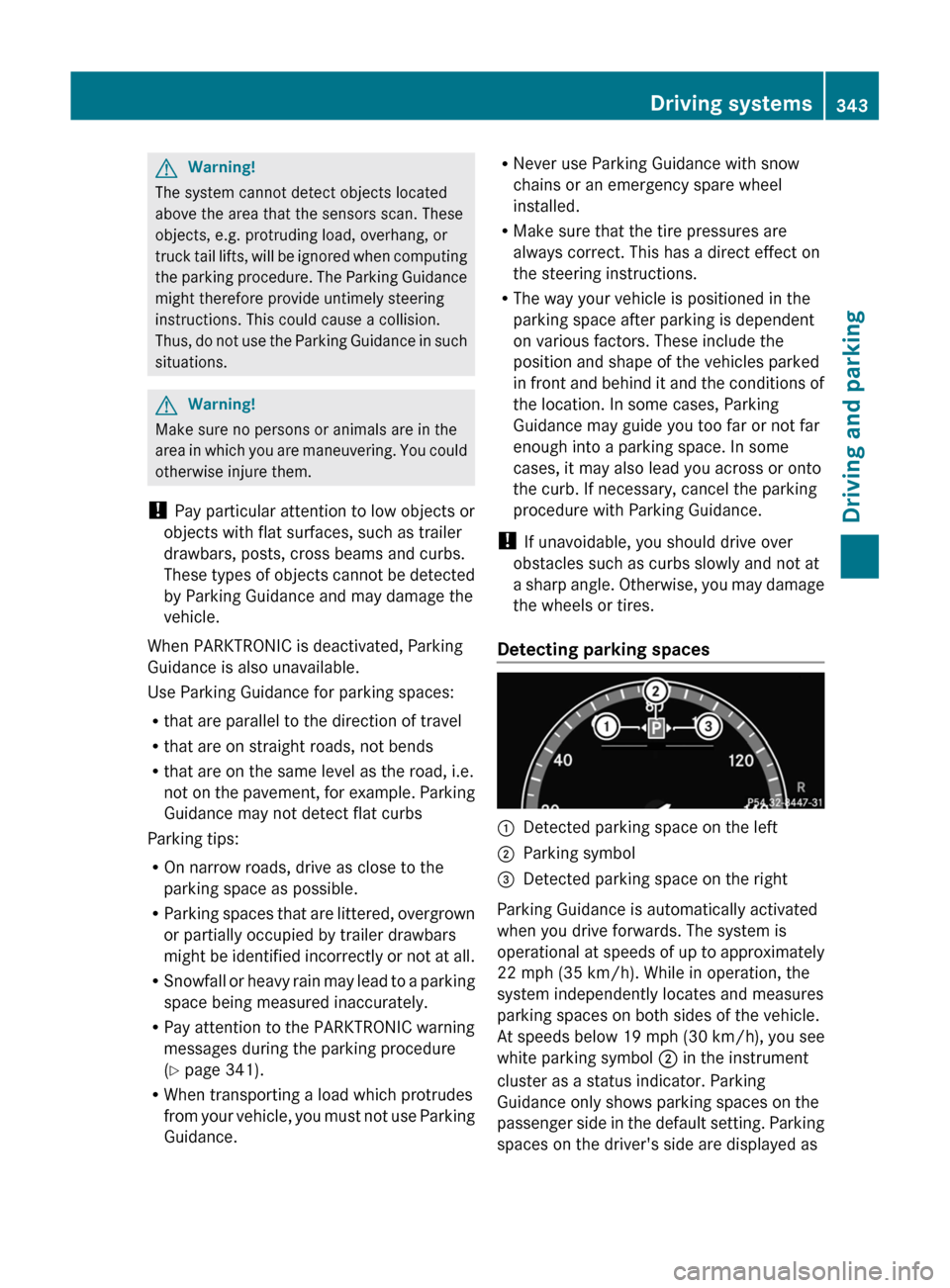
Detecting parking spaces
:Detected parking space on the left;Parking symbol=Detected parking space on the right
Parking Guidance is automatically activated
when you drive forwards. The system is
operational at speeds of up to approximately
22 mph (35 km/h). While in operation, the
system independently locates and measures
parking spaces on both sides of the vehicle.
At speeds below 19 mph (30 km/h), you see
white parking symbol ; in the instrument
cluster as a status indicator. Parking
Guidance only shows parking spaces on the
passenger side in the default setting. Parking
spaces on the driver's side are displayed as
Driving systems343Driving and parkingZ
Page 354 of 524
Problems with Night View Assist PlusProblemPossible causes/consequences and M SolutionsThe picture quality of
Night View Assist Plus
has deteriorated.The windshield wipers are smearing the windshield.XReplace the wiper blades ( Y page 281).The windshield is smeared after the vehicle has been cleaned in a
car wash.XClean the windshield ( Y page 455).There is windshield chip damage in the camera's field of vision.XReplace the windshield.The windshield is fogged up on the inside.XDefrost the windshield ( Y page 293).The windshield is iced up.XDe-ice the windshield ( Y page 292).There is dirt on the inside of the windshield.XClean the inside of the windshield ( Y page 455).Driving Assistance package
General information
i The Driving Assistance package is only
available on vehicles with HYBRID.
The Driving Assistance package consists of
DISTRONIC PLUS ( Y page 325), Blind Spot
Assist ( Y page 352) and Lane Keeping Assist
( Y page 354).
Blind Spot Assist
Important safety guidelines
Blind Spot Assist uses a radar sensor system
to monitor the areas on both sides of your
vehicle. Blind Spot Assist provides assistance
at speeds higher than 20 mph (30 km/h). A
warning display in the exterior mirrors draws
your attention to vehicles in the monitored
area. If you then indicate a turn towards that
side before changing lanes, you will also
receive visual and audible collision warnings.
For this purpose, Blind Spot Assist uses
sensors in the rear bumper.GWarning
Blind Spot Assist is only an aid designed to
assist driving. It may fail to detect some
vehicles and is no substitute for attentive
driving.
Blind Spot Assist cannot detect road and
traffic conditions. It may fail to detect narrow
vehicles, such as motorcycles or bicycles, or
may only detect them too late.
Monitoring may be affected by dirty sensors,
strong spray or poor visibility caused by snow,
rain or mist, for example. In this case, vehicles
are detected late or not at all.
Always pay attention to traffic conditions and
your surroundings. Otherwise, you may fail to
recognize dangers in time, cause an accident
and injure yourself and others.
i USA only:
352Driving systemsDriving and parking
Page 355 of 524
This device has been approved by the FCC
as a “Vehicular Radar System”. The radar
sensor is intended for use in an automotive
radar system only. Removing, tampering
with, or altering the device will void any
warranties, and is not permitted by the
FCC. Do not tamper with, alter, or use in
any non-approved way.
Any unauthorized modification to this
device could void the user’s authority to
operate the equipment.
For Blind Spot Assist to assist you when
driving, the radar sensor system must be
activated (Y page 378) and operational.
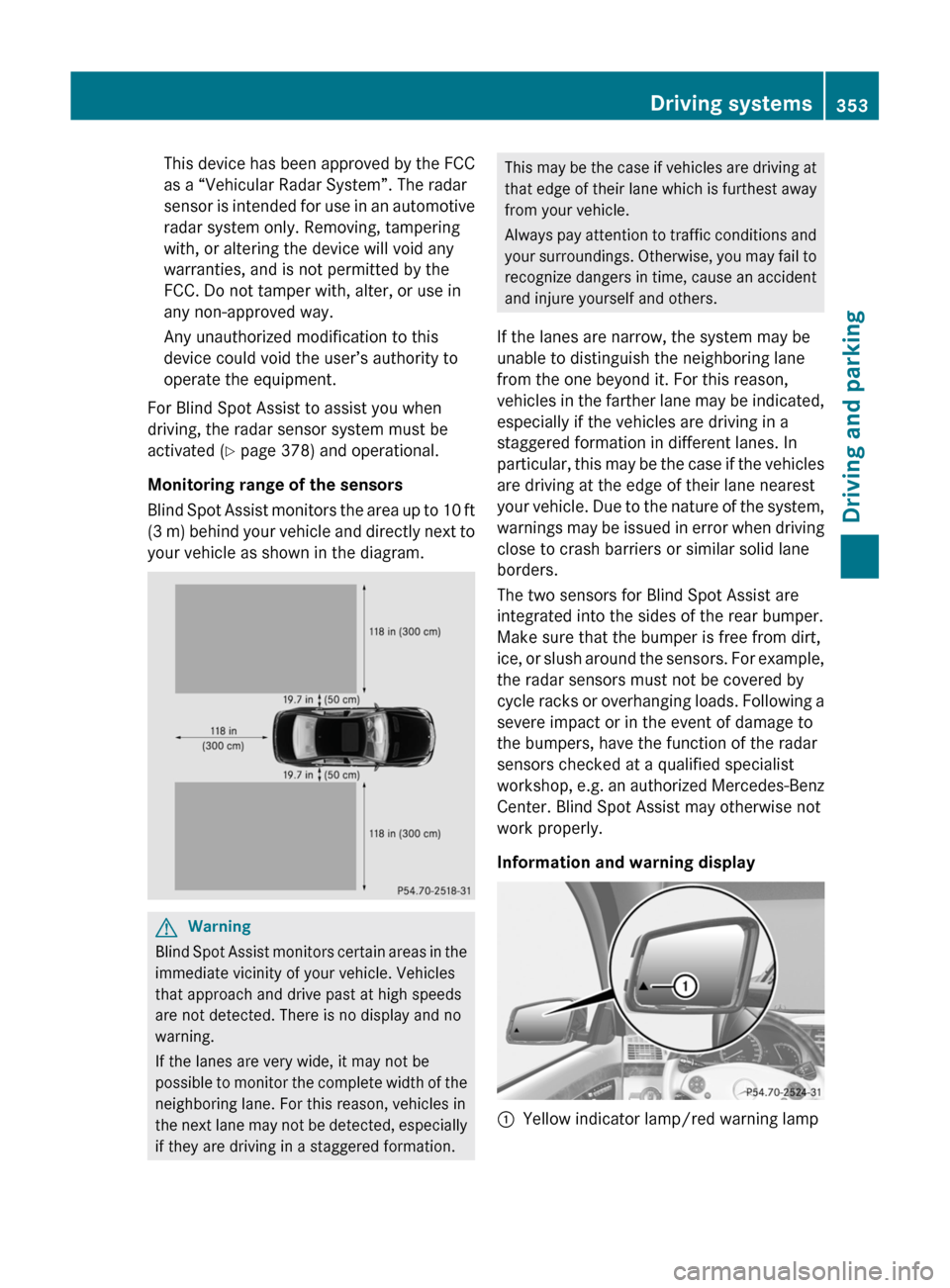
Monitoring range of the sensors
Blind Spot Assist monitors the area up to 10 ft
(3 m) behind your vehicle and directly next to
your vehicle as shown in the diagram.
GWarning
Blind Spot Assist monitors certain areas in the
immediate vicinity of your vehicle. Vehicles
that approach and drive past at high speeds
are not detected. There is no display and no
warning.
If the lanes are very wide, it may not be
possible to monitor the complete width of the
neighboring lane. For this reason, vehicles in
the next lane may not be detected, especially
if they are driving in a staggered formation.
This may be the case if vehicles are driving at
that edge of their lane which is furthest away
from your vehicle.
Always pay attention to traffic conditions and
your surroundings. Otherwise, you may fail to
recognize dangers in time, cause an accident
and injure yourself and others.
If the lanes are narrow, the system may be
unable to distinguish the neighboring lane
from the one beyond it. For this reason,
vehicles in the farther lane may be indicated,
especially if the vehicles are driving in a
staggered formation in different lanes. In
particular, this may be the case if the vehicles
are driving at the edge of their lane nearest
your vehicle. Due to the nature of the system,
warnings may be issued in error when driving
close to crash barriers or similar solid lane
borders.
The two sensors for Blind Spot Assist are
integrated into the sides of the rear bumper.
Make sure that the bumper is free from dirt,
ice, or slush around the sensors. For example,
the radar sensors must not be covered by
cycle racks or overhanging loads. Following a
severe impact or in the event of damage to
the bumpers, have the function of the radar
sensors checked at a qualified specialist
workshop, e.g. an authorized Mercedes-Benz
Center. Blind Spot Assist may otherwise not
work properly.
Information and warning display
:Yellow indicator lamp/red warning lampDriving systems353Driving and parkingZ
Page 358 of 524
Active Blind Spot Assist (Y page 356) and
Active Lane Keeping Assist ( Y page 359).
Active Blind Spot Assist
Important safety notes
Active Blind Spot Assist uses a radar sensor
system to monitor the side areas of your
vehicle. In addition, it uses the radar sensor
system to monitor the front area as well.
Active Blind Spot Assist is active at speeds
above approximately 20 mph (30 km/h). A
warning lamp in the exterior mirrors calls your
attention to a vehicle or certain obstacles in
the area monitored. If you switch on the
corresponding turn signal before changing
lane, you will also receive visual and audible
collision warnings. If a risk of lateral collision
is detected, corrective braking may help you
avoid a collision.
GWarning
Active Blind Spot Assist is only an aid, and
may detect vehicles/obstacles incorrectly or
not at all.
The system may be impaired or may not
function if:
R there is poor visibility, e.g. due to snow,
rain, fog or spray.
R the rear and/or front sensors are dirty.
Active Blind Spot Assist may not detect
narrow vehicles, such as motorcycles or
bicycles, or only detect them too late. It
cannot detect vehicles that are overtaken at
a small distance and then enter the blind spot
area.
Active Blind Spot Assist cannot detect road
and traffic conditions. It is not a substitute for
attentive driving. You are responsible for the
vehicle's speed, braking in good time, and
steering correctly. Always adapt your driving
style to suit the prevailing road and weather
conditions. Always pay attention to traffic
conditions and your surroundings. Otherwise,
you may fail to recognize dangers in time,
cause an accident and injure yourself and
others.
i USA only:
This device has been approved by the FCC
as a “Vehicular Radar System”. The radar
sensor is intended for use in an automotive
radar system only. Removal, tampering, or
altering of the device will void any
warranties, and is not permitted by the
FCC. Do not tamper with, alter, or use in
any non-approved way.
Any unauthorized modification to this
device could void the user’s authority to
operate the equipment.
For Active Blind Spot Assist to assist you
when driving, the radar sensor system must
be activated ( Y page 378) and operational.
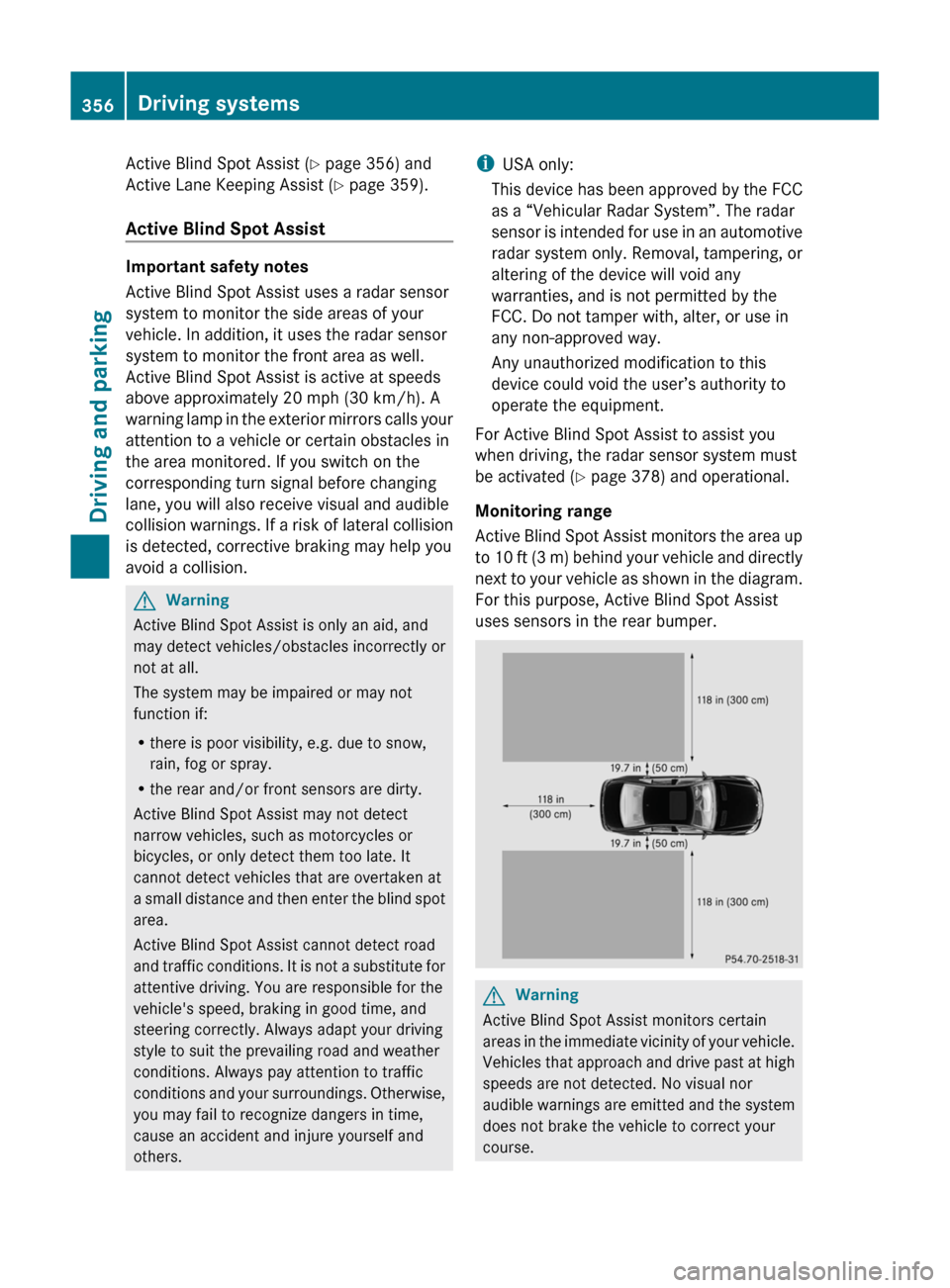
Monitoring range
Active Blind Spot Assist monitors the area up
to 10 ft (3 m) behind your vehicle and directly
next to your vehicle as shown in the diagram.
For this purpose, Active Blind Spot Assist
uses sensors in the rear bumper.GWarning
Active Blind Spot Assist monitors certain
areas in the immediate vicinity of your vehicle.
Vehicles that approach and drive past at high
speeds are not detected. No visual nor
audible warnings are emitted and the system
does not brake the vehicle to correct your
course.
356Driving systemsDriving and parking