two MERCEDES-BENZ S-Class 2015 W222 Comand Manual
[x] Cancel search | Manufacturer: MERCEDES-BENZ, Model Year: 2015, Model line: S-Class, Model: MERCEDES-BENZ S-Class 2015 W222Pages: 298, PDF Size: 6.39 MB
Page 142 of 298
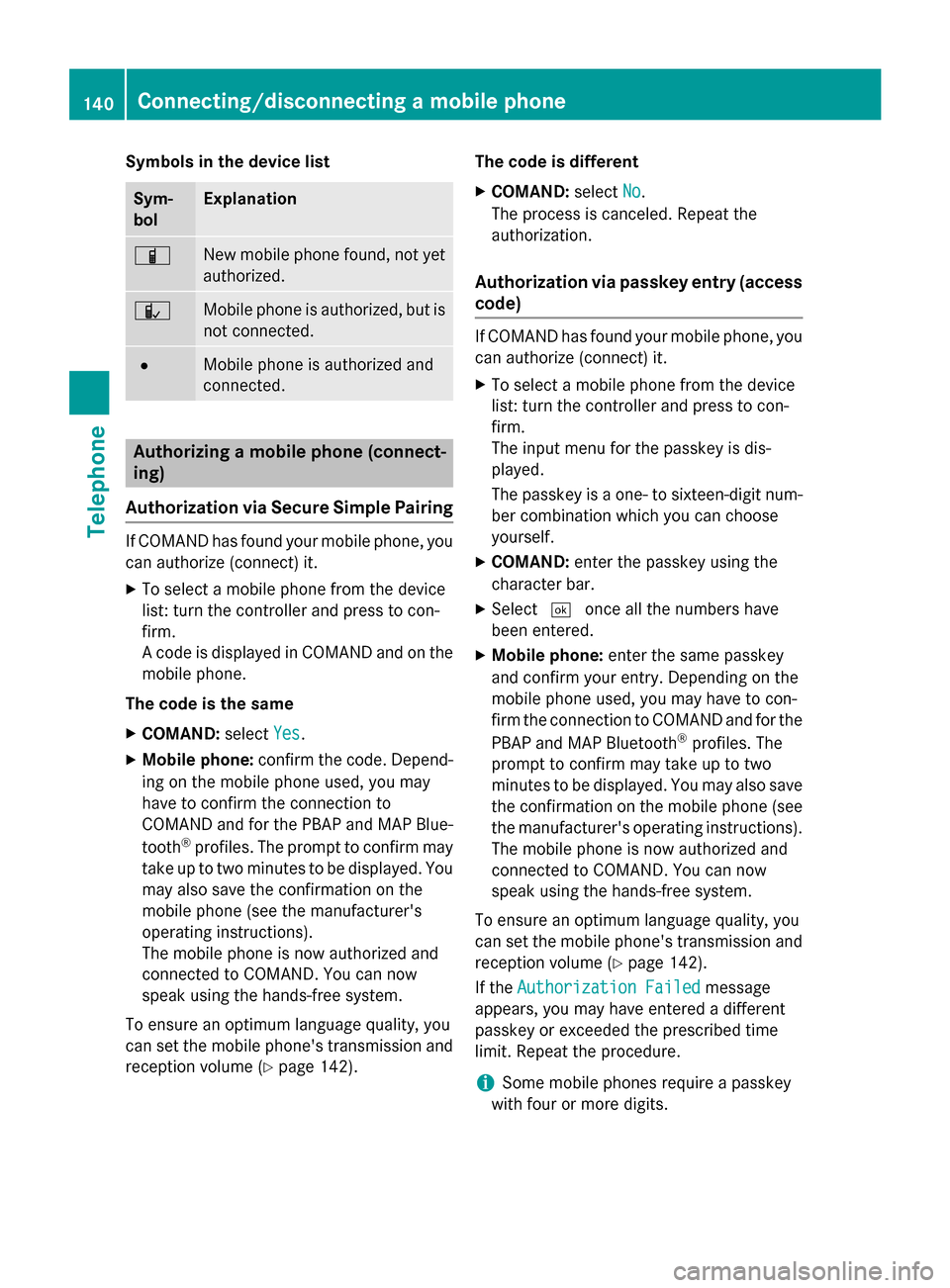
Symbols in the device list
Sym-
bol Explanation
00D3
New mobile phone found, not yet
authorized. 00DC
Mobile phone is authorized, but is
not connected. 0036
Mobile phone is authorized and
connected.
Authorizing a mobile phone (connect-
ing)
Authorization via Secure Simple Pairing If COMAND has found your mobile phone, you
can authorize (connect) it.
X To select a mobile phone from the device
list: turn the controller and press to con-
firm.
A code is displayed in COMAND and on the
mobile phone.
The code is the same X COMAND: selectYes
Yes.
X Mobile phone: confirm the code. Depend-
ing on the mobile phone used, you may
have to confirm the connection to
COMAND and for the PBAP and MAP Blue-
tooth ®
profiles. The prompt to confirm may
take up to two minutes to be displayed. You may also save the confirmation on the
mobile phone (see the manufacturer's
operating instructions).
The mobile phone is now authorized and
connected to COMAND. You can now
speak using the hands-free system.
To ensure an optimum language quality, you
can set the mobile phone's transmission and
reception volume (Y page 142). The code is different
X COMAND: selectNo
No.
The process is canceled. Repeat the
authorization.
Authorization via passkey entry (access
code) If COMAND has found your mobile phone, you
can authorize (connect) it.
X To select a mobile phone from the device
list: turn the controller and press to con-
firm.
The input menu for the passkey is dis-
played.
The passkey is a one- to sixteen-digit num-
ber combination which you can choose
yourself.
X COMAND: enter the passkey using the
character bar.
X Select 0054once all the numbers have
been entered.
X Mobile phone: enter the same passkey
and confirm your entry. Depending on the
mobile phone used, you may have to con-
firm the connection to COMAND and for the
PBAP and MAP Bluetooth ®
profiles. The
prompt to confirm may take up to two
minutes to be displayed. You may also save the confirmation on the mobile phone (see
the manufacturer's operating instructions).
The mobile phone is now authorized and
connected to COMAND. You can now
speak using the hands-free system.
To ensure an optimum language quality, you
can set the mobile phone's transmission and reception volume (Y page 142).
If the Authorization Failed Authorization Failed message
appears, you may have entered a different
passkey or exceeded the prescribed time
limit. Repeat the procedure.
i Some mobile phones require a passkey
with four or more digits. 140
Connecting/disconnecting a mobile phoneTelephone
Page 143 of 298
i
If you wish to re-authorize the mobile
phone after de-authorizing it, you can
choose another passkey for it.
i Mercedes-Benz recommends de-authori-
zation in COMAND and on the mobile
phone (Y page 142). Subsequent authori-
zation may otherwise fail. Establishing the connection from the
mobile phone
The Bluetooth ®
device name of COMAND is
"MB Bluetooth".
X COMAND: call up the telephone menu.
X To switch to the menu bar: slide 6the
controller.
X To select Connect Device Connect Device: turn the con-
troller and press to confirm.
The device list is displayed.
X To select Connect via Phone Connect via Phone: turn and
press the controller.
A message is displayed, stating that you
can start the search on your mobile phone.
X Mobile phone: start the search for a Blue-
tooth ®
device (see manufacturer's operat-
ing instructions).
COMAND is displayed with the name "MB
Bluetooth" in the mobile phone's device
list.
X Select "MB Bluetooth".
The following prompt appears in the
COMAND display Do you want
Do you want
Device_name to be authorized? Device_name to be authorized?
X COMAND: selectYes
Yes.
If No
No is selected, the procedure is canceled.
If your mobile phone supports Secure Sim- ple Pairing, a code is now displayed on both
devices.
The code is the same
X COMAND: selectYes
Yes.
X Mobile phone: confirm the code. Depend-
ing on the mobile phone used, you may
have to confirm the connection to
COMAND and for the PBAP and MAP Blue- tooth
®
profiles. The prompt to confirm may
take up to two minutes to be displayed. You
may also save the confirmation on the
mobile phone (see the manufacturer's
operating instructions).
The mobile phone is now authorized and
connected to COMAND. You can now
speak using the hands-free system.
To ensure an optimum language quality,
you can set the mobile phone's transmis-
sion and reception volume (Y page 142).
The code is different
X COMAND: selectNo
No.
The process is canceled. Repeat the pro-
cedure.
If your mobile phone does not support Secure
Simple Pairing, an input menu is displayed for the passkey. The passkey is a one- to sixteen-digit number combination which you can
choose yourself. Enter the same passkey on
both COMAND and the mobile phone and
confirm. Depending on the mobile phone
used, you may have to confirm the connection
to COMAND and for the PBAP and MAP Blue-
tooth ®
profiles. Reconnecting automatically
COMAND always searches for the last con-
nected mobile phone.
If no connection can be made to the most
recently connected mobile phone, the system searches for the mobile phone that was con-
nected before that one. Switching between mobile phones
If you have authorized more than one mobile
phone, you can switch between the individual
phones.
X To call up the telephone menu: press the
002B button.
X To switch to the menu bar: slide 6the
controller. Connecting/disconnecting a mobile phone
141Telephone Z
Page 146 of 298
As soon as one of the buttons on the tele-
phone keypad is touched, the correspond-
ing button is highlighted in the display.
X To select 0097in the telephone menu: turn
and press the controller.
The call is made.
Using the touchpad If your vehicle is equipped with a touchpad,
you can use this function.
X To call up the telephone menu: press the
002B button.
X To select n: turn and press the control-
ler.
X Draw all the numbers on the touch-sensi-
tive surface one after another.
X To select 0097in the telephone menu: turn
and press the controller.
The call is made.
Further information about the touchpad
(Y page 32).
Redial X
To call up the telephone menu: press the
002B button.
X To select 0097in the telephone menu: turn
and press the controller.
The list of outgoing calls is displayed. The
most recently dialed number is at the top.
X To select an entry and make a call: turn and
press the controller.
Further information about ending a call
(Y page 147).
Using call lists X
To call up the telephone menu: press the
002B button.
X To switch to the menu bar: slide 6the
controller.
X To select Call Lists Call Lists: turn and press the
controller. X
To select Calls Received Calls Received orCalls Calls
Dialed
Dialed : turn and press the controller.
The relevant list is displayed.
X To select an entry and make a call: turn and
press the controller.
Further information about ending a call
(Y page 147).
Using the phone book X
To call up the telephone menu: press the
002B button.
X To select Name Namein the telephone menu: turn
and press the controller.
X Search for a contact (Y page 148).
X To make a call: press the controller.
Further information about ending a call
(Y page 147).
Using speed dial Option 1
X To call up the telephone menu: press the
002B button.
X To highlight a number from the character
bar: turn the controller.
X Press the controller for longer than two
seconds.
The telephone menu displays the selected
entry. The number is dialed.
Option 2:
X To call up the telephone menu: press the
002B button.
X To switch to the menu bar: slide 6the
controller.
X To select Call Lists Call Lists: turn and press the
controller.
X To select Speed Dial Preset List
Speed Dial Preset List : turn
and press the controller.
The speed dial list is displayed.
X To select an entry and make a call: turn and
press the controller.
The telephone menu displays the selected
entry. The number is dialed. 144
Using the telephoneTelephone
Page 147 of 298
Option 3 (with telephone keypad)
X Press one of the number keys on the tele-
phone keypad for longer than two seconds.
The telephone menu displays the selected
entry. The number is dialed.
Further information on setting up speed dial
(Y page 154).
Further information about ending a call
(Y page 147). Functions available during a call
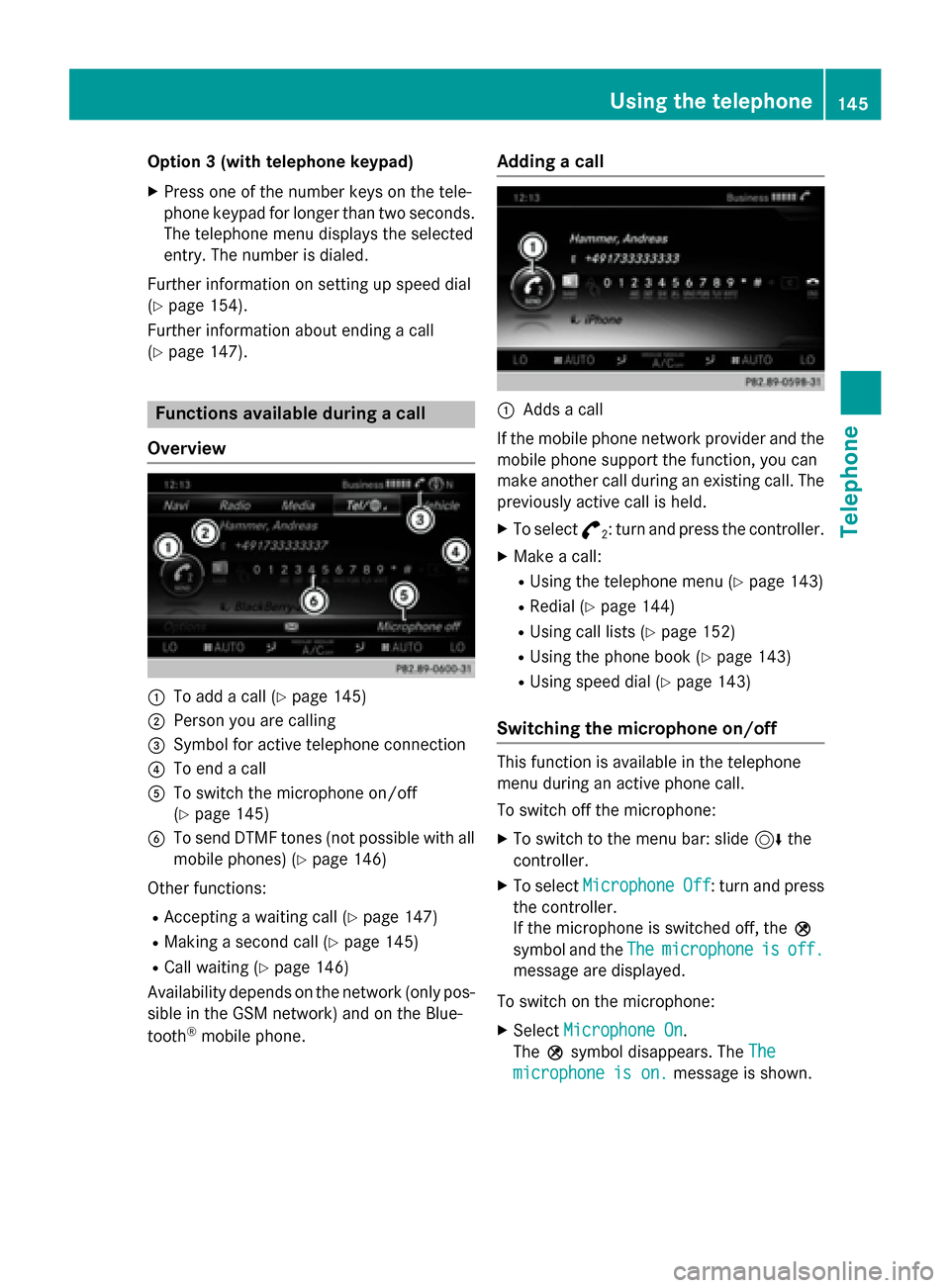
Overview 0043
To add a call (Y page 145)
0044 Person you are calling
0087 Symbol for active telephone connection
0085 To end a call
0083 To switch the microphone on/off
(Ypage 145)
0084 To send DTMF tones (not possible with all
mobile phones) (Y page 146)
Other functions: R Accepting a waiting call (Y page 147)
R Making a second call (Y page 145)
R Call waiting (Y page 146)
Availability depends on the network (only pos- sible in the GSM network) and on the Blue-
tooth ®
mobile phone. Adding a call
0043
Adds a call
If the mobile phone network provider and the
mobile phone support the function, you can
make another call during an existing call. The
previously active call is held.
X To select °
2: turn and press the controller.
X Make a call:
R
Using the telephone menu (Y page 143)
R Redial (Y page 144)
R Using call lists (Y page 152)
R Using the phone book (Y page 143)
R Using speed dial (Y page 143)
Switching the microphone on/off This function is available in the telephone
menu during an active phone call.
To switch off the microphone:
X To switch to the menu bar: slide 6the
controller.
X To select Microphone Off Microphone Off : turn and press
the controller.
If the microphone is switched off, the 004D
symbol and the The Themicrophone
microphone is
isoff.
off.
message are displayed.
To switch on the microphone:
X Select Microphone On
Microphone On.
The 004Dsymbol disappears. The The
The
microphone is on.
microphone is on. message is shown. Using the telephone
145Telephone Z
Page 148 of 298
Sending DTMF tones
This function is not supported by all mobile
phones.
Answering machines or other devices can be controlled by DTMF tones, e.g. for remote
query functions.
X If you would like to listen to the messages
on your answering machine, for example,
dial the corresponding number.
Transmitting individual characters:
X Once a connection has been established to
the answer phone, select the desired char-acters in the telephone menu: turn and
press the controller each time.
Every character selected will be transmit-
ted immediately.
or
X Press the corresponding number button on
the telephone keypad.
i You can also send DTMF tones using the
Voice Control system; see the separate
operating instructions. Calls with several participants
Switching between calls (call waiting) If you make another call, you can switch
between the two calls (call waiting). This func-
tion depends on your mobile phone network
provider and the mobile phone (see the man- ufacturer's operating instructions).
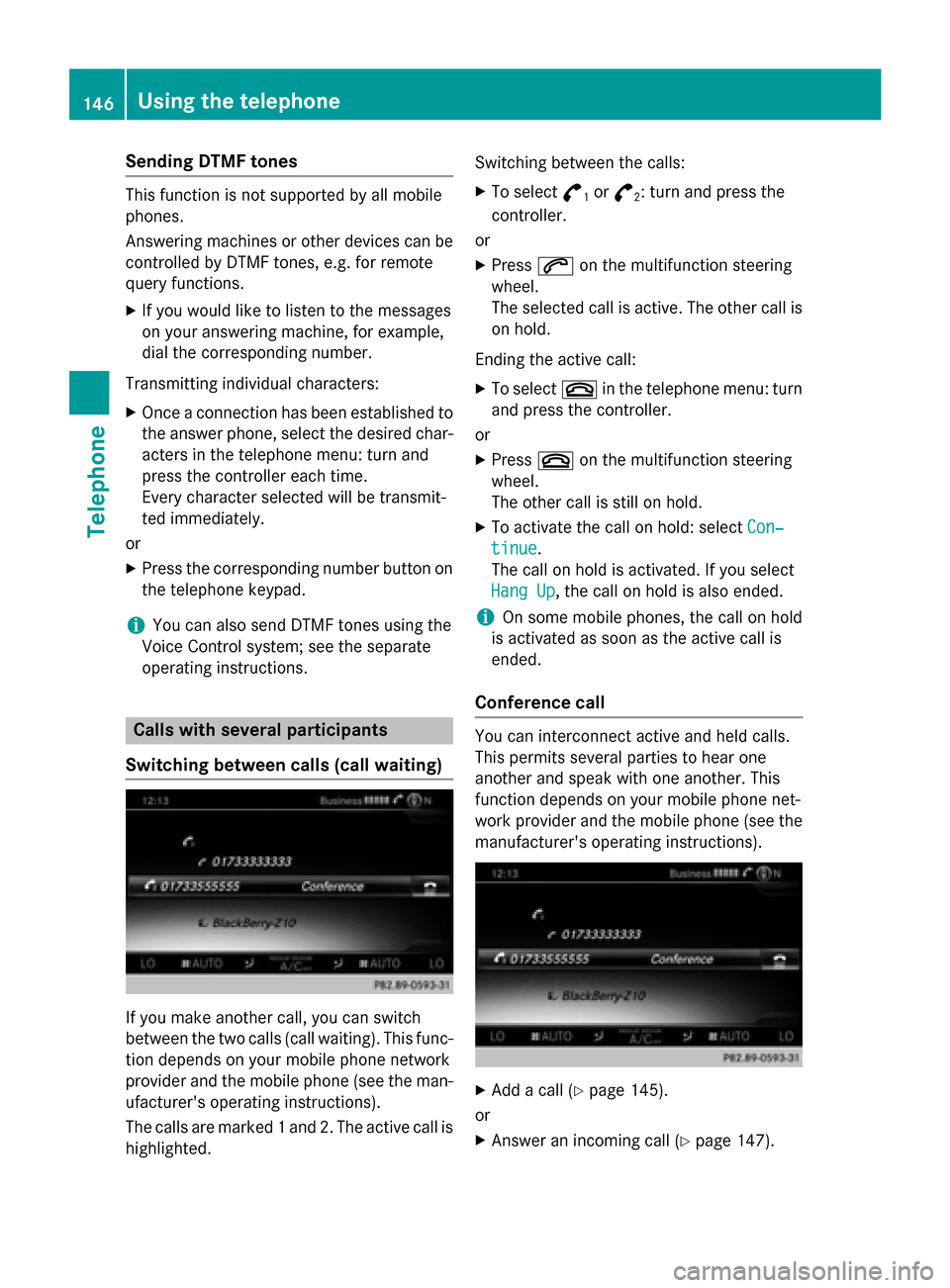
The calls are marked 1 and 2. The active call ishighlighted. Switching between the calls:
X To select °
1or
°
2: turn and press the
controller.
or X Press 0061on the multifunction steering
wheel.
The selected call is active. The other call is
on hold.
Ending the active call: X To select 0076in the telephone menu: turn
and press the controller.
or X Press 0076on the multifunction steering
wheel.
The other call is still on hold.
X To activate the call on hold: select Con‐
Con‐
tinue tinue.
The call on hold is activated. If you select
Hang Up Hang Up, the call on hold is also ended.
i On some mobile phones, the call on hold
is activated as soon as the active call is
ended.
Conference call You can interconnect active and held calls.
This permits several parties to hear one
another and speak with one another. This
function depends on your mobile phone net-
work provider and the mobile phone (see the manufacturer's operating instructions). X
Add a call (Y page 145).
or
X Answer an incoming call (Y page 147).146
Using the telephoneTelephone
Page 149 of 298
X
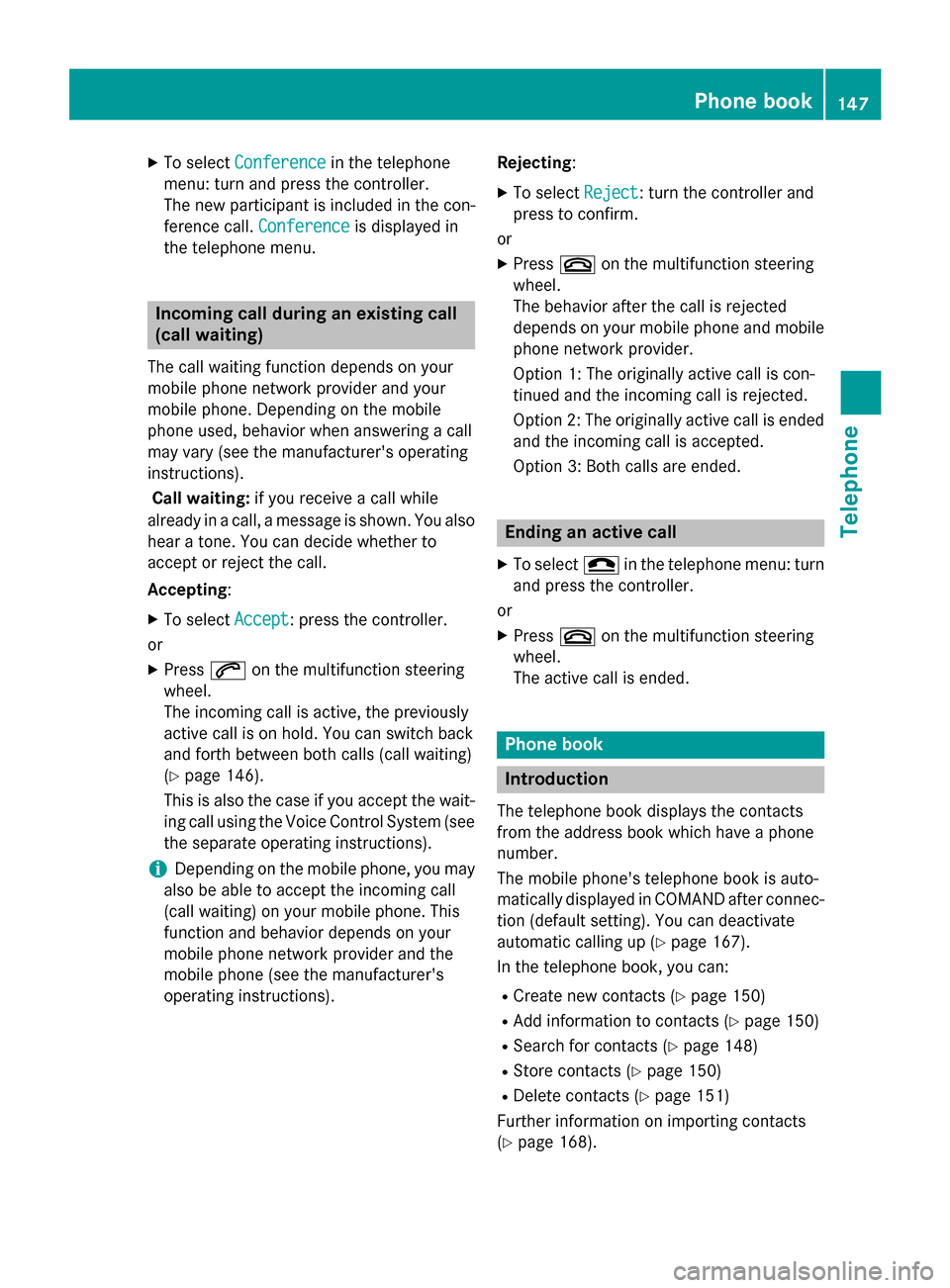
To select Conference
Conference in the telephone
menu: turn and press the controller.
The new participant is included in the con-
ference call. Conference
Conference is displayed in
the telephone menu. Incoming call during an existing call
(call waiting)
The call waiting function depends on your
mobile phone network provider and your
mobile phone. Depending on the mobile
phone used, behavior when answering a call
may vary (see the manufacturer's operating
instructions).
Call waiting: if you receive a call while
already in a call, a message is shown. You also
hear a tone. You can decide whether to
accept or reject the call.
Accepting :
X To select Accept
Accept: press the controller.
or
X Press 0061on the multifunction steering
wheel.
The incoming call is active, the previously
active call is on hold. You can switch back
and forth between both calls (call waiting)
(Y page 146).
This is also the case if you accept the wait- ing call using the Voice Control System (see
the separate operating instructions).
i Depending on the mobile phone, you may
also be able to accept the incoming call
(call waiting) on your mobile phone. This
function and behavior depends on your
mobile phone network provider and the
mobile phone (see the manufacturer's
operating instructions). Rejecting
:
X To select Reject Reject: turn the controller and
press to confirm.
or
X Press 0076on the multifunction steering
wheel.
The behavior after the call is rejected
depends on your mobile phone and mobile
phone network provider.
Option 1: The originally active call is con-
tinued and the incoming call is rejected.
Option 2: The originally active call is ended
and the incoming call is accepted.
Option 3: Both calls are ended. Ending an active call
X To select 005Ain the telephone menu: turn
and press the controller.
or
X Press 0076on the multifunction steering
wheel.
The active call is ended. Phone book
Introduction
The telephone book displays the contacts
from the address book which have a phone
number.
The mobile phone's telephone book is auto-
matically displayed in COMAND after connec- tion (default setting). You can deactivate
automatic calling up (Y page 167).
In the telephone book, you can:
R Create new contacts (Y page 150)
R Add information to contacts (Y page 150)
R Search for contacts (Y page 148)
R Store contacts (Y page 150)
R Delete contacts (Y page 151)
Further information on importing contacts
(Y page 168). Phone book
147Telephone Z
Page 164 of 298
Adding the sender to an address book
entry
Storing the sender of a text message X
To call up the menu when a text message is
displayed: press the controller.
X To select Save
Save Number
Number : turn and press the
controller.
X To select Add Phone No.
Add Phone No. : turn and press
the controller.
X To select a category for the number, e.g.
Home
Home: turn the controller and press to con-
firm.
X To select a telephone category, e.g.
Mobile Phone
Mobile Phone: turn the controller and
press to confirm.
X To select Continue
Continue: turn and press the
controller.
The address book is displayed.
X Search for the desired entry (Y page 163).
X Press the controller when you have finished
searching.
The telephone number has been added.
A maximum of five telephone numbers can
be saved for one contact.
Saving the sender of an e-mail Up to two e-mail addresses can be saved for
one contact.
X To call up the menu when an e-mail is dis-
played: press the controller.
X To select Save Sender's E-Mail
Save Sender's E-Mail
Address Address: turn and press the controller.
X To select Add
Add: turn and press the controller.
The address book is displayed.
X Search for the desired entry (Y page 163).
X Press the controller when you have finished
searching.
The e-mail address has been added. Deleting messages
X Call up the message folder (Y page 157).
X To select the message: turn and press the
controller.
X To select G: slide 9the controller.
X To select Delete Delete: turn and press the con-
troller.
X To select Yes
Yes: turn and press the controller.
The message is deleted.
or
X To select No
No: turn and press the controller.
The process is canceled.
i This delete function is not supported by all
mobile phones. The Delete
Deletefailed.
failed. mes-
sage then appears. Address book
Introduction
Always pay attention to traffic conditions.
Familiarize yourself with the address book
functions before beginning your journey.
You can use COMAND when the road and
traffic conditions permit. You could otherwise become involved in an accident in which you
or others could be injured.
The address book displays all the contacts
from the various sources (mobile phone,
memory card, USB device, COMAND phone
book, navigation).
You can use the contacts to make telephone
calls, navigate and to write messages.
If a mobile phone is connected to COMAND
and automatic calling up is activated
(Y page 167), the mobile phone's contacts
are displayed in the address book. If you dis-
connect the mobile phone from COMAND,
these contacts are no longer displayed in the address book.
When you import, save, edit or add contacts,they will be saved in COMAND. These con-
tacts will remain there even when you con-
nect COMAND to a different mobile phone. 162
Address bookTelephone
Page 166 of 298
Further information on handwriting recog-
nition on the touchpad (Y page 32).
X Draw additional letters on the touchpad
surface one after another.
X To complete the search and return to the
phone book: press the touchpad.
X To select and call the contact: glide up or
down and press. Adding a new contact
You can enter address data directly into the
address book. If you store telephone num-
bers in the COMAND phone book, these are
also saved in the address book. If you store a navigation destination, COMAND creates an
address book entry which includes the com-
plete navigable address data.
X Call up the address book (Y page 163).
X To switch to the menu bar: slide 6the
controller.
X To select New New: turn and press the controller.
The surname and first name input lines are
displayed.
X Enter characters using the controller
(Y page 36), the telephone keypad or the
touchpad (Y page 32), depending on the
vehicle's equipment.
X To save the surname and first name: select
0054.
The details for the contact are displayed.
X To add the desired entry (e.g. Add
Add E-Mail E-Mail
Address
Address): turn and press the controller.
Depending on the type of entry, the corre-
sponding input menu appears.
X Enter characters using the controller
(Y page 36), the telephone keypad or the
touchpad (Y page 32), depending on the
vehicle's equipment.
X To finish and save an entry: select 0054. Displaying contact details
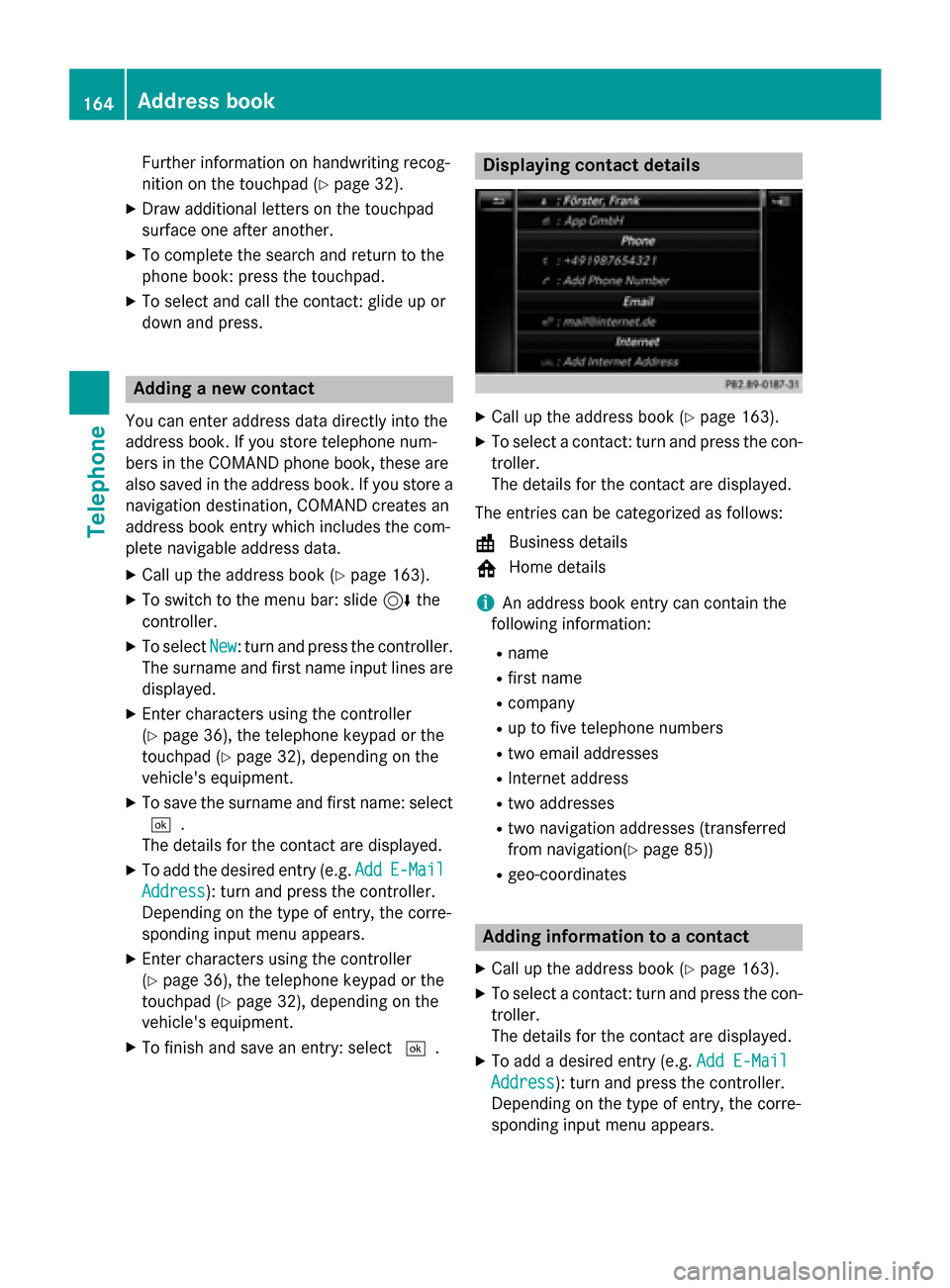
X
Call up the address book (Y page 163).
X To select a contact: turn and press the con-
troller.
The details for the contact are displayed.
The entries can be categorized as follows:
\ Business details
0088 Home details
i An address book entry can contain the
following information:
R name
R first name
R company
R up to five telephone numbers
R two email addresses
R Internet address
R two addresses
R two navigation addresses (transferred
from navigation(Y page 85))
R geo-coordinates Adding information to a contact
X Call up the address book (Y page 163).
X To select a contact: turn and press the con-
troller.
The details for the contact are displayed.
X To add a desired entry (e.g. Add E-Mail
Add E-Mail
Address Address): turn and press the controller.
Depending on the type of entry, the corre-
sponding input menu appears. 164
Address bookTelephone
Page 174 of 298
Your COMAND equipment
These operating instructions describe all
standard and optional equipment available
for your COMAND system at the time of pur-
chase. Country-specific differences are pos-
sible. Please note that your COMAND system may not be equipped with all the features
described. This also applies to safety-relevant
systems and functions. Therefore, the equip-
ment on your COMAND system may differ
from that in the descriptions and illustrations. Should you have any questions concerning
equipment and operation, please consult an
authorized Mercedes-Benz Center. Important safety notes
G
WARNING
If you operate mobile communication equip-
ment while driving, you will be distracted from traffic conditions. You could also lose controlof the vehicle. There is a risk of an accident.
Only operate this equipment when the vehicleis stationary.
If you make a call on your mobile phone while
driving, always use hands-free mode. Only
use the mobile phone when road, weather
and traffic conditions permit. Some jurisdic-
tions prohibit the driver from using a mobile
phone while driving a vehicle.
Bear in mind that at a speed of 30 mph
(approximately 50 km/h), the vehicle covers
a distance of 44 feet (approximately 14 m)
per second.
Excessive levels of electromagnetic radiation
may cause damage to your health and the
health of others.
There is scientific discussion surrounding the possible health risks posed by electromag-
netic fields. You can reduce this risk by using
an exterior antenna. Therefore, connect your mobile communica-
tions equipment to the vehicle's exterior
antenna wherever possible. General notes
Connection difficulties while the vehi-
cle is in motion
The connection may be lost if:
R the mobile phone network coverage is
insufficient
R the vehicle has moved into a mobile phone
cell with no free channels
R the SIM card used is not compatible with
the network available Function restrictions
You will not be able to use the Mercedes-Benz
Apps and Internet connection, or will no lon-
ger be able to use them, or may have to wait
before using them, in the following situations:
R when the mobile phone is switched off.
R if your mobile phone has not been enabled
for Internet access.
R if the Bluetooth ®
function is switched off on
COMAND and the desired phone is sup-
posed to be connected via Bluetooth ®
.
R if the Bluetooth ®
function is switched off on
the mobile phone and the phone is sup-
posed to be connected via Bluetooth ®
.
R if the mobile phone is not connected via
USB and the phone is supposed to be con-
nected via USB.
R if neither the mobile phone network nor the
mobile phone allow simultaneous use of a
phone and an Internet connection.
R if the mobile phone has not been enabled
for Internet access via Bluetooth ®
and/or
USB.
The driver is not permitted to call up websites while driving and use of the Mercedes-Benz
Apps is restricted. 172
General notesOnline and Internet functions
Page 175 of 298
i
It is possible that you may not be able to
receive calls when an Internet connection
is active. This depends on the mobile phone
and the mobile phone network used. Conditions for access
USA: to use Mercedes-Benz apps and Inter-
net access, mbrace must be activated and
operational. Furthermore, mbrace must be
activated for Mercedes-Benz apps and Inter-
net access. Take note of the connection pri-
orities. An emergency call has the highest pri-
ority. When a service call, e.g. a breakdown
service call or the MB Info Call, is active, an
emergency call can still be initiated. A service
call, on the other hand, has priority over a
current Internet connection. Therefore, you
cannot establish an Internet connection dur-
ing a service call.
Canada: a mobile phone must be connected
via Bluetooth ®
(Y page 138) or USB
(Y page 235) with COMAND. Furthermore,
you need a valid mobile service contract with
a data option, which is used to calculate the
associated connection costs.
Conditions for a Bluetooth ®
connection
R The mobile phone supports at least one of
the Bluetooth ®
profiles DUN (Dial-Up
Networking) or PAN (Personal Area
Network).
The Bluetooth ®
profiles DUN and PAN ena-
ble the Internet connection of the mobile
phone to be made available to the system.
Conditions for a USB connection
R The mobile phone supports at least one of
the USB classes:
- RNDIS (R emoteNetwork DriverInter-
face Specification)
- CDC/NCM (Network ControlModel)
- CDC/ECM (Ethernet ControlModel)
- CDC/ACM (Access ControlModel) The USB classes enable the mobile phone
Internet connection to be made available to
the system.
The terms of use are shown when the system is used for the first time and then once a year
thereafter. Only read and accept the terms of
use when the vehicle is stationary.
The driver is not permitted to call up websites while driving and use of the Mercedes-Benz
Apps is restricted.
i The availability of individual Mercedes-
Benz Apps may vary depending on the
country. Setting up an Internet connection
Procedure and general information
USA: to use Mercedes-Benz apps and Inter-
net access, mbrace must be activated and
operational. Furthermore, mbrace must be
activated for Mercedes-Benz apps and Inter-
net access. No further settings are required.
Canada: in order to set up a mobile phone for
Internet access, the mobile phone must be
connected via Bluetooth ®
(Y page 138) or
USB (Y page 215) with COMAND. If you are
using Internet access for the first time, you
must enable the connected mobile phone for
Internet access (Y page 174). If the con-
nected mobile phone supports the Blue-
tooth ®
PAN profile or the USB classes RNDIS,
CDC/NCM or CDC/ECM, you do not need to make additional settings. The Internet con-
nection is established. If the connected
mobile phone does not support the named
Bluetooth ®
profile or the named USB classes,
predefined (Y page 174) or manual access
data (Y page 175) must be set. Setting up an Internet connection
173Online and Internet functions Z