Service MERCEDES-BENZ S-Class 2015 W222 Owner's Guide
[x] Cancel search | Manufacturer: MERCEDES-BENZ, Model Year: 2015, Model line: S-Class, Model: MERCEDES-BENZ S-Class 2015 W222Pages: 502, PDF Size: 9.59 MB
Page 296 of 502
Useful information
i This Operator's Manual describes all
models and all standard and optional equip- ment of your vehicle available at the time of
publication of the Operator's Manual.
Country-specific differences are possible.
Please note that your vehicle may not be
equipped with all features described. This
also applies to safety-related systems and
functions.
i Read the information on qualified special-
ist workshops (Y page 29). Important safety notes
G
WARNING
If you operate information systems and com-
munication equipment integrated in the vehi- cle while driving, you will be distracted from
traffic conditions. You could also lose control of the vehicle. There is a risk of an accident.
Only operate the equipment when the traffic
situation permits. If you are not sure that this
is possible, park the vehicle paying attention
to traffic conditions and operate the equip-
ment when the vehicle is stationary.
You must observe the legal requirements for
the country in which you are currently driving when operating the on-board computer.
Only PLUG-IN HYBRID vehicles: G
WARNING
If the instrument cluster has failed or mal-
functioned, you may not recognize function
restrictions in systems relevant to safety. The operating safety of your vehicle may be
impaired. There is a risk of an accident.
Pull over as soon as it is safe to do so and
consult a qualified specialist workshop.
All vehicles except PLUG-IN HYBRID vehi-
cles: G
WARNING
If the instrument cluster has failed or mal-
functioned, you may not recognize function
restrictions in systems relevant to safety. The operating safety of your vehicle may be
impaired. There is a risk of an accident.
Drive on carefully. Have the vehicle checked
at a qualified specialist workshop immedi-
ately.
If the operating safety of your vehicle is
impaired, pull over as soon as it is safe to do
so. Contact a qualified specialist workshop.
The on-board computer only shows messages
or warnings from certain systems in the mul- tifunction display. You should therefore make
sure your vehicle is operating safely at all
times.
For an overview, see the instrument panel
illustration (Y page 35). Displays and operation
Tachometer
! Do not drive in the overrevving range, as
this could damage the engine.
The red band in the tachometer indicates the
engine's overrevving range.
The fuel supply is interrupted to protect the
engine when the red band is reached. Coolant temperature display
G
WARNING
Opening the hood when the engine is over-
heated or when there is a fire in the engine
compartment could expose you to hot gases
or other service products. There is a risk of
injury.
Let an overheated engine cool down before
opening the hood. If there is a fire in the
engine compartment, keep the hood closed
and contact the fire department. 294
Displays and operationOn-board computer and displays
Page 301 of 502
In the Settings menu, in the submenu head-up display, you have the following settings options:
R Switching other displays on/off (Y page 311)
R Setting the position (Y page 311)
R Setting the brightness (Y page 312)Menus and submenus
Menu overview
Press the òbutton on the steering wheel
to call up the list of menus and select a menu.
Operating the on-board computer
(Y page 295).
Depending on the equipment installed in the
vehicle, you can call up the following menus:
R Trip Trip menu (Y page 299)
R Navi Navi menu (navigation instructions)
(Y page 301)
R Radio
Radio menu (Y page 303)
R Media
Media menu (Y page 304)
R Telephone
Telephone menu (Ypage 305)
R Assistance Info Display
Assistance Info Display menu
(Y page 307)
R Service
Service menu (Ypage 307)
R Settings
Settings menu (Ypage 308)
R AMG
AMG menu in AMG vehicles (Y page 314)Trip menu
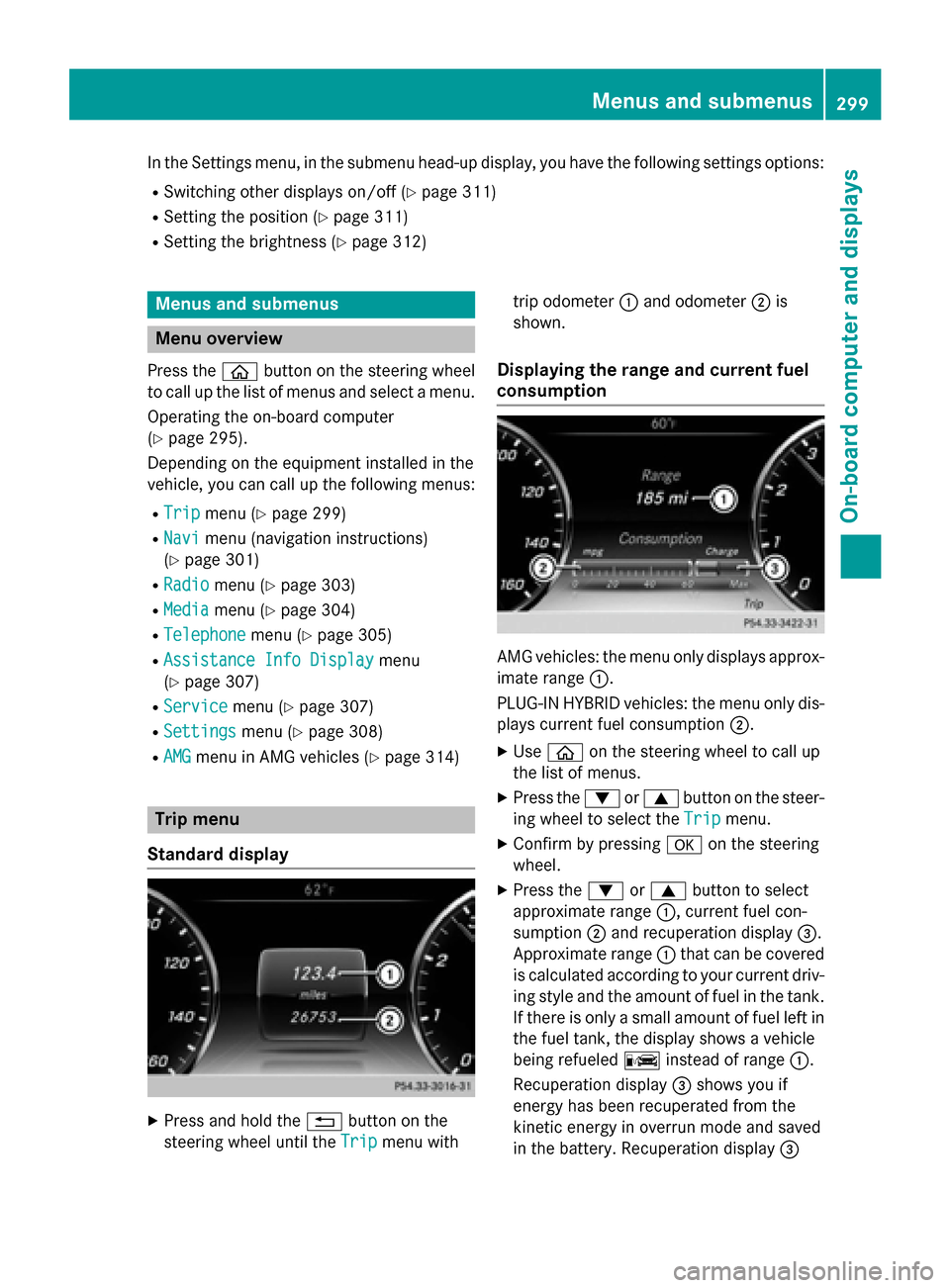
Standard display X
Press and hold the %button on the
steering wheel until the Trip
Trip menu with trip odometer
:and odometer ;is
shown.
Displaying the range and current fuel
consumption AMG vehicles: the menu only displays approx-
imate range :.
PLUG-IN HYBRID vehicles: the menu only dis-
plays current fuel consumption ;.
X Use ò on the steering wheel to call up
the list of menus.
X Press the :or9 button on the steer-
ing wheel to select the Trip
Trip menu.
X Confirm by pressing aon the steering
wheel.
X Press the :or9 button to select
approximate range :, current fuel con-
sumption ;and recuperation display =.
Approximate range :that can be covered
is calculated according to your current driv- ing style and the amount of fuel in the tank.If there is only a small amount of fuel left in
the fuel tank, the display shows a vehicle
being refueled Cinstead of range :.
Recuperation display =shows you if
energy has been recuperated from the
kinetic energy in overrun mode and saved
in the battery. Recuperation display = Menus and submenus
299On-board computer and displays Z
Page 308 of 502
X
Press :or9 on the steering wheel
to select the Telephone Telephonemenu.
X Confirm by pressing aon the steering
wheel.
You will see one of the following display mes- sages in the multifunction display:
R Phone READY
Phone READY or the name of the network
provider: the mobile phone has found a
network and is ready to receive.
R Phone No Service
Phone No Service: there is no network
available or the mobile phone is searching
for a network.
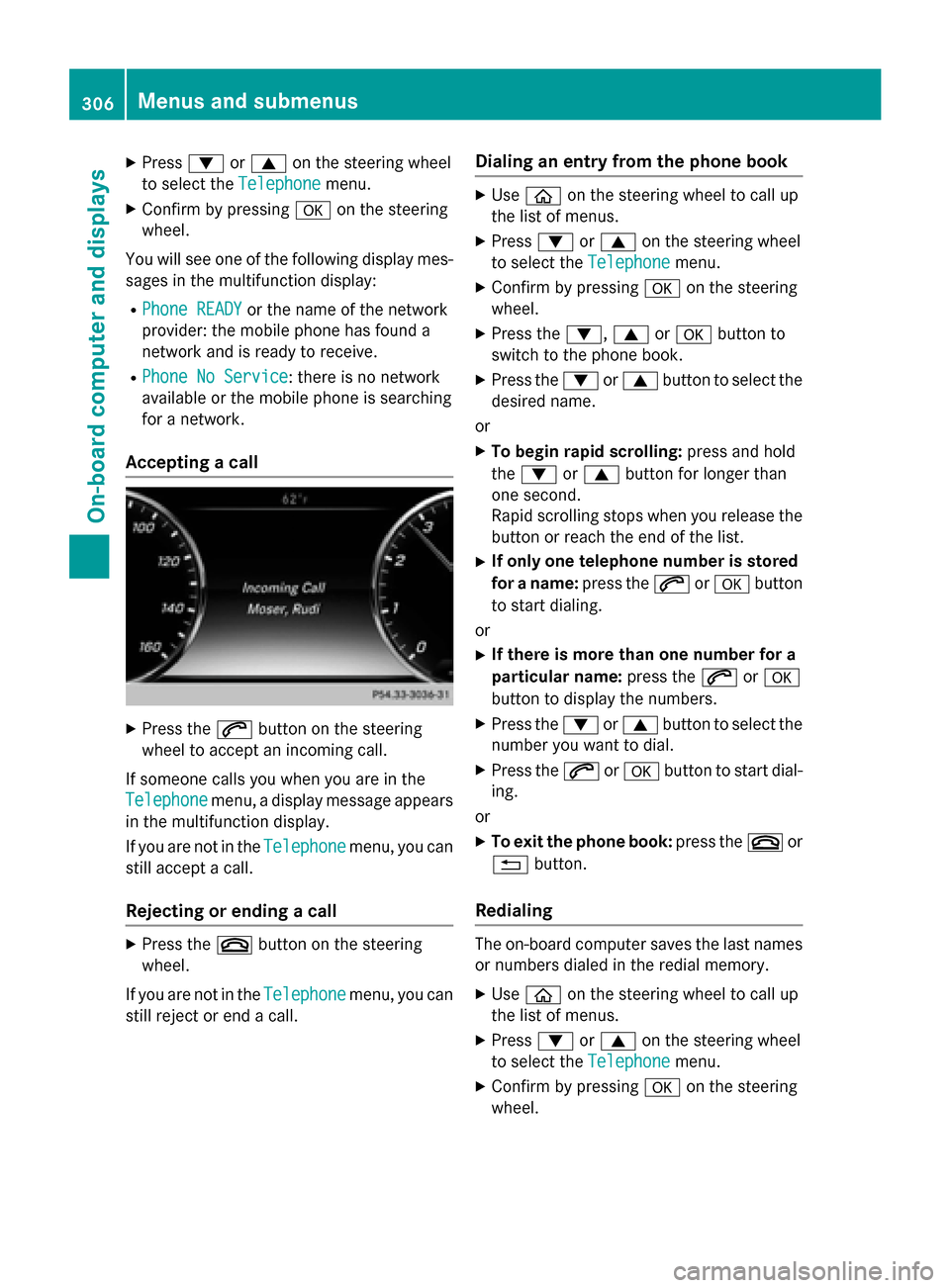
Accepting a call X
Press the 6button on the steering
wheel to accept an incoming call.
If someone calls you when you are in the
Telephone Telephone menu, a display message appears
in the multifunction display.
If you are not in the Telephone
Telephone menu, you can
still accept a call.
Rejecting or ending a call X
Press the ~button on the steering
wheel.
If you are not in the Telephone
Telephone menu, you can
still reject or end a call. Dialing an entry from the phone book X
Use ò on the steering wheel to call up
the list of menus.
X Press :or9 on the steering wheel
to select the Telephone
Telephonemenu.
X Confirm by pressing aon the steering
wheel.
X Press the :,9ora button to
switch to the phone book.
X Press the :or9 button to select the
desired name.
or X To begin rapid scrolling: press and hold
the : or9 button for longer than
one second.
Rapid scrolling stops when you release the button or reach the end of the list.
X If only one telephone number is stored
for a name: press the6ora button
to start dialing.
or X If there is more than one number for a
particular name: press the6ora
button to display the numbers.
X Press the :or9 button to select the
number you want to dial.
X Press the 6ora button to start dial-
ing.
or X To exit the phone book: press the~or
% button.
Redialing The on-board computer saves the last names
or numbers dialed in the redial memory.
X Use ò on the steering wheel to call up
the list of menus.
X Press :or9 on the steering wheel
to select the Telephone Telephonemenu.
X Confirm by pressing aon the steering
wheel. 306
Menus and submenusOn-board computer and displays
Page 309 of 502
X
Press the 6button to switch to the
redial memory.
X Press the :or9 button to select the
desired name or number.
X Press the 6ora button to start dial-
ing.
or X To exit the redial memory: press the
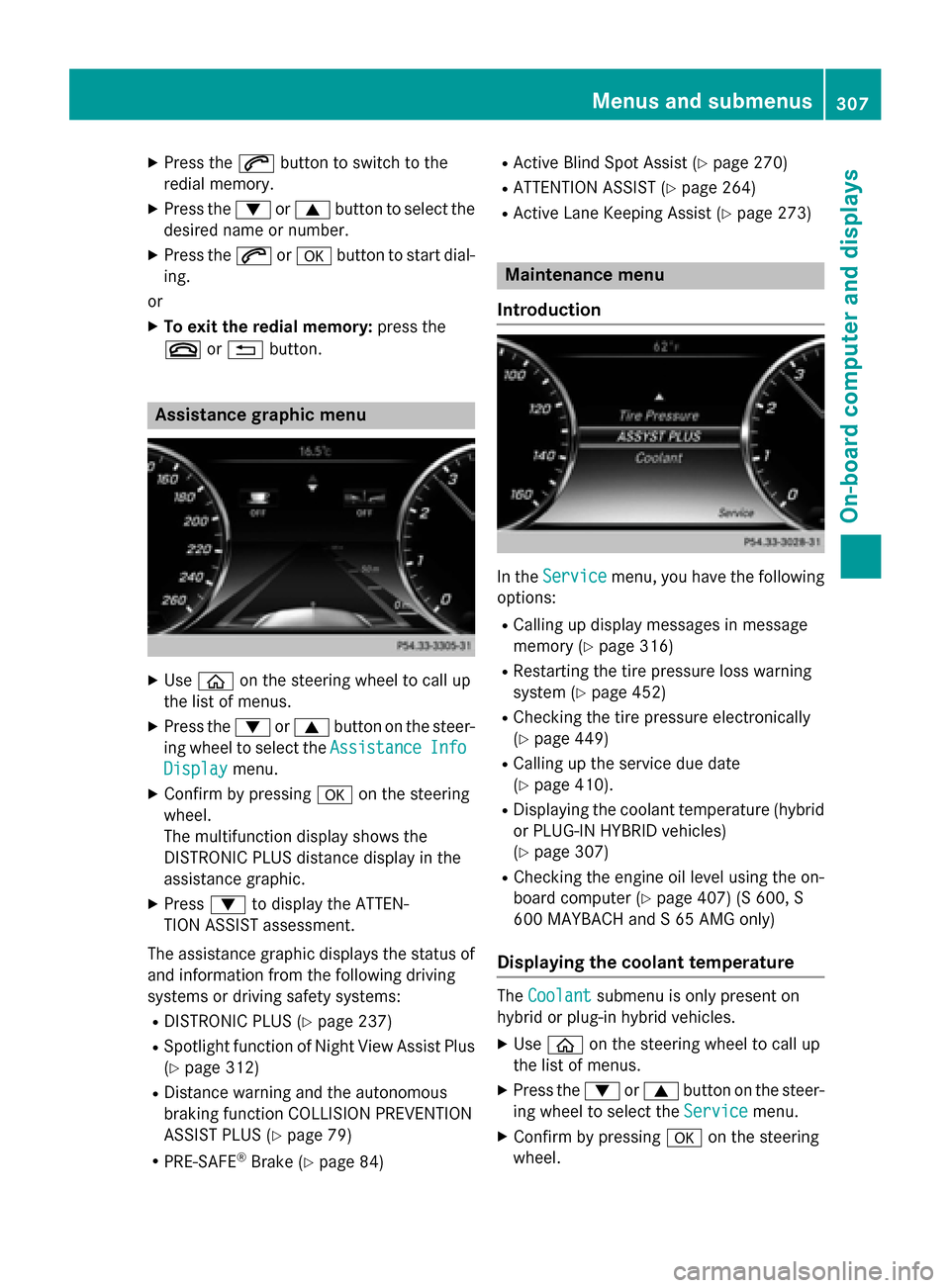
~ or% button. Assistance graphic menu
X
Use ò on the steering wheel to call up
the list of menus.
X Press the :or9 button on the steer-
ing wheel to select the Assistance
AssistanceInfo
Info
Display
Display menu.
X Confirm by pressing aon the steering
wheel.
The multifunction display shows the
DISTRONIC PLUS distance display in the
assistance graphic.
X Press :to display the ATTEN-
TION ASSIST assessment.
The assistance graphic displays the status of and information from the following driving
systems or driving safety systems:
R DISTRONIC PLUS (Y page 237)
R Spotlight function of Night View Assist Plus
(Y page 312)
R Distance warning and the autonomous
braking function COLLISION PREVENTION
ASSIST PLUS (Y page 79)
R PRE-SAFE ®
Brake (Y page 84) R
Active Blind Spot Assist (Y page 270)
R ATTENTION ASSIST (Y page 264)
R Active Lane Keeping Assist (Y page 273) Maintenance menu
Introduction In the
Service Service menu, you have the following
options:
R Calling up display messages in message
memory (Y page 316)
R Restarting the tire pressure loss warning
system (Y page 452)
R Checking the tire pressure electronically
(Y page 449)
R Calling up the service due date
(Y page 410).
R Displaying the coolant temperature (hybrid
or PLUG-IN HYBRID vehicles)
(Y page 307)
R Checking the engine oil level using the on-
board computer (Y page 407) (S 600, S
600 MAYBACH and S 65 AMG only)
Displaying the coolant temperature The
Coolant Coolant submenu is only present on
hybrid or plug-in hybrid vehicles.
X Use ò on the steering wheel to call up
the list of menus.
X Press the :or9 button on the steer-
ing wheel to select the Service Servicemenu.
X Confirm by pressing aon the steering
wheel. Menus and submenus
307On-board computer and displays Z
Page 315 of 502
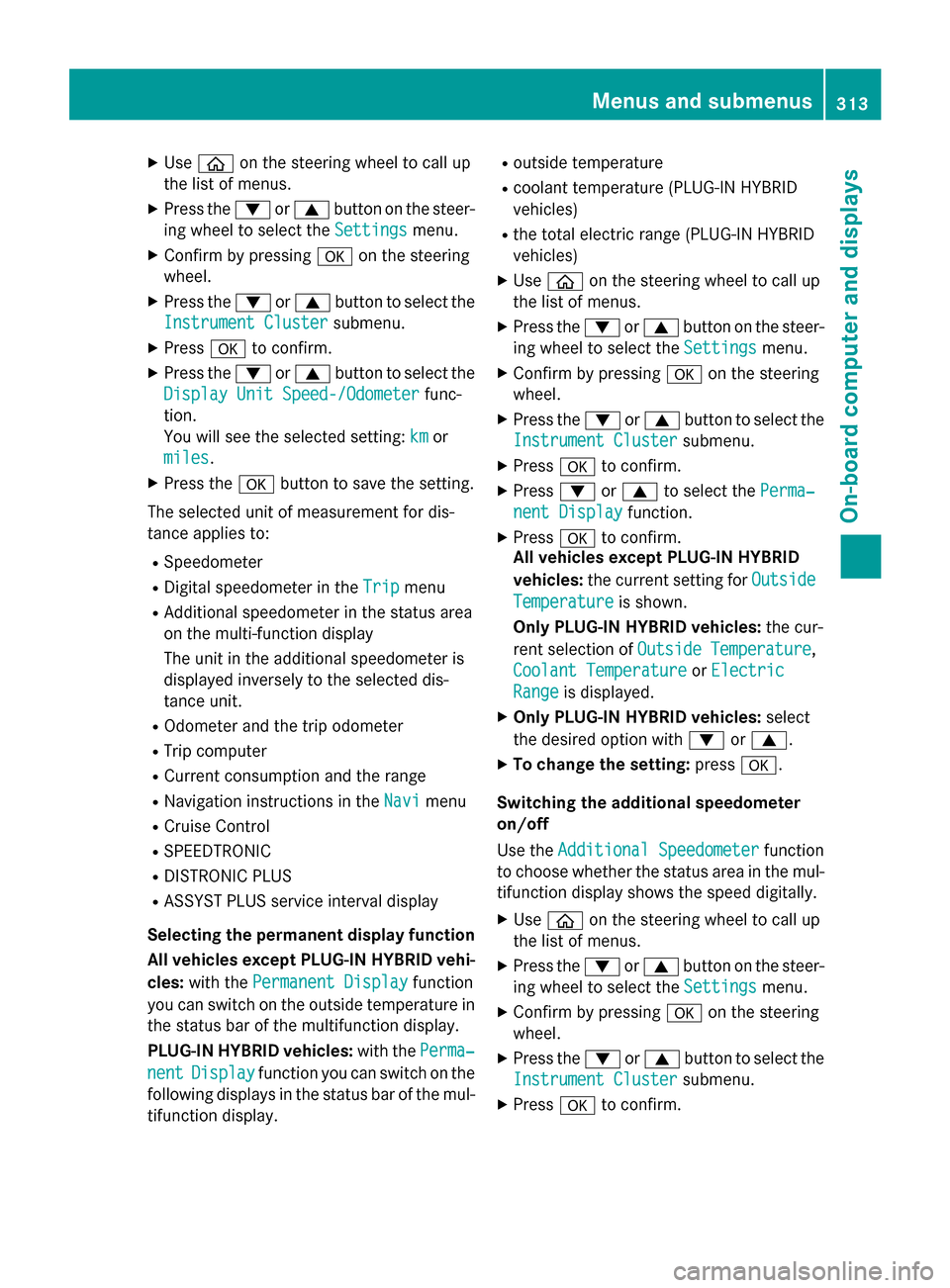
X
Use ò on the steering wheel to call up
the list of menus.
X Press the :or9 button on the steer-
ing wheel to select the Settings
Settingsmenu.
X Confirm by pressing aon the steering
wheel.
X Press the :or9 button to select the
Instrument Cluster
Instrument Cluster submenu.
X Press ato confirm.
X Press the :or9 button to select the
Display Unit Speed-/Odometer
Display Unit Speed-/Odometer func-
tion.
You will see the selected setting: km
km or
miles miles.
X Press the abutton to save the setting.
The selected unit of measurement for dis-
tance applies to:
R Speedometer
R Digital speedometer in the Trip
Trip menu
R Additional speedometer in the status area
on the multi-function display
The unit in the additional speedometer is
displayed inversely to the selected dis-
tance unit.
R Odometer and the trip odometer
R Trip computer
R Current consumption and the range
R Navigation instructions in the Navi
Navi menu
R Cruise Control
R SPEEDTRONIC
R DISTRONIC PLUS
R ASSYST PLUS service interval display
Selecting the permanent display function
All vehicles except PLUG-IN HYBRID vehi-
cles: with the Permanent Display
Permanent Display function
you can switch on the outside temperature in the status bar of the multifunction display.
PLUG-IN HYBRID vehicles: with thePerma‐ Perma‐
nent
nent Display
Display function you can switch on the
following displays in the status bar of the mul-
tifunction display. R
outside temperature
R coolant temperature (PLUG‑IN HYBRID
vehicles)
R the total electric range (PLUG-IN HYBRID
vehicles)
X Use ò on the steering wheel to call up
the list of menus.
X Press the :or9 button on the steer-
ing wheel to select the Settings
Settings menu.
X Confirm by pressing aon the steering
wheel.
X Press the :or9 button to select the
Instrument Cluster Instrument Cluster submenu.
X Press ato confirm.
X Press :or9 to select the Perma‐
Perma‐
nent Display
nent Display function.
X Press ato confirm.
All vehicles except PLUG-IN HYBRID
vehicles: the current setting for Outside Outside
Temperature
Temperature is shown.
Only PLUG-IN HYBRID vehicles: the cur-
rent selection of Outside Temperature
Outside Temperature,
Coolant Temperature
Coolant Temperature orElectric
Electric
Range
Range is displayed.
X Only PLUG-IN HYBRID vehicles: select
the desired option with :or9.
X To change the setting: pressa.
Switching the additional speedometer
on/off
Use the Additional Speedometer Additional Speedometer function
to choose whether the status area in the mul- tifunction display shows the speed digitally.
X Use ò on the steering wheel to call up
the list of menus.
X Press the :or9 button on the steer-
ing wheel to select the Settings Settingsmenu.
X Confirm by pressing aon the steering
wheel.
X Press the :or9 button to select the
Instrument Cluster
Instrument Cluster submenu.
X Press ato confirm. Menus and submenus
313On-board computer and displays Z
Page 318 of 502
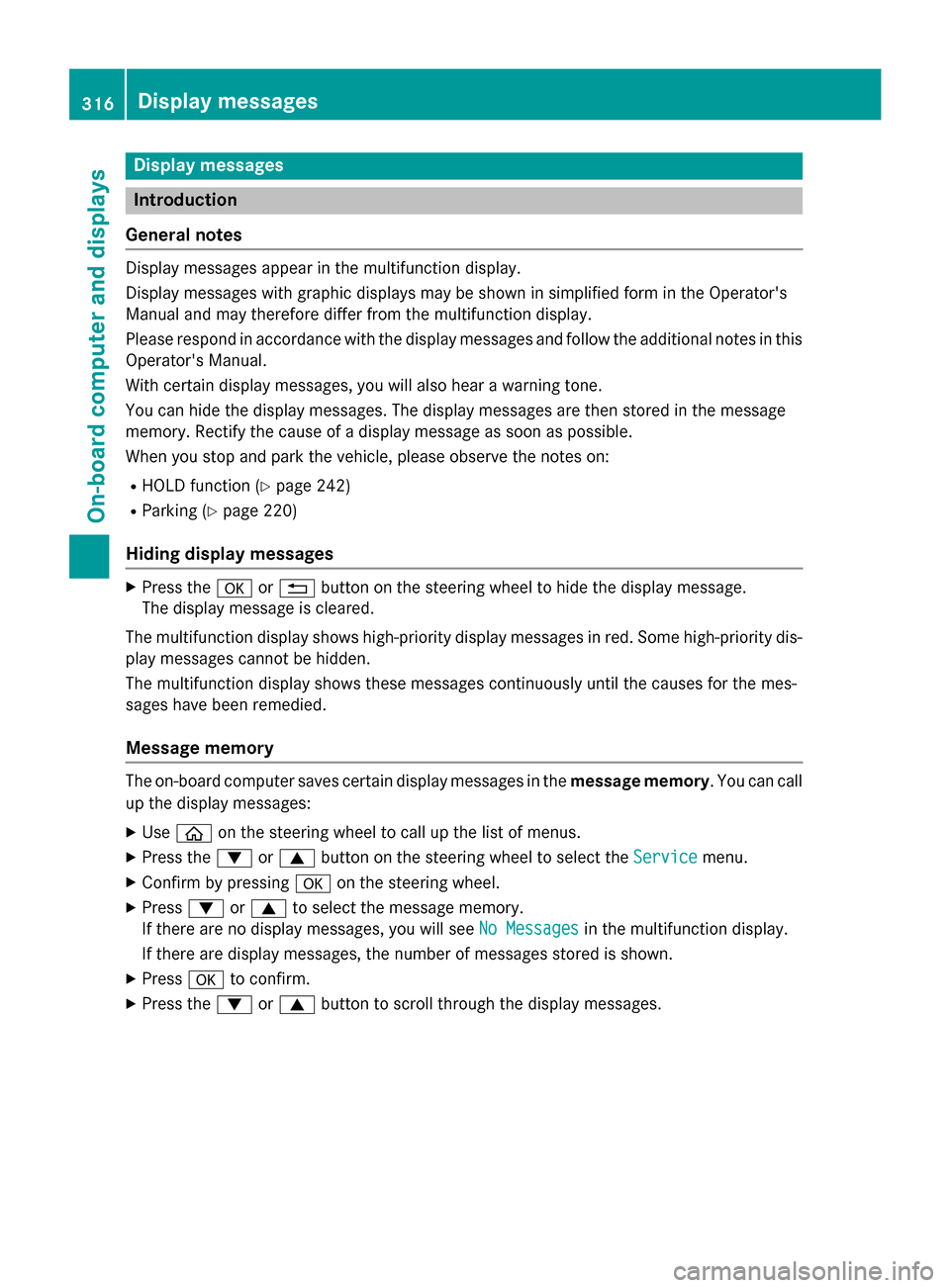
Display messages
Introduction
General notes Display messages appear in the multifunction display.
Display messages with graphic displays may be shown in simplified form in the Operator's
Manual and may therefore differ from the multifunction display.
Please respond in accordance with the display messages and follow the additional notes in this Operator's Manual.
With certain display messages, you will also hear a warning tone.
You can hide the display messages. The display messages are then stored in the message
memory. Rectify the cause of a display message as soon as possible.
When you stop and park the vehicle, please observe the notes on:
R HOLD function (Y page 242)
R Parking (Y page 220)
Hiding display messages X
Press the aor% button on the steering wheel to hide the display message.
The display message is cleared.
The multifunction display shows high-priority display messages in red. Some high-priority dis- play messages cannot be hidden.
The multifunction display shows these messages continuously until the causes for the mes-
sages have been remedied.
Message memory The on-board computer saves certain display messages in the
message memory. You can call
up the display messages:
X Use ò on the steering wheel to call up the list of menus.
X Press the :or9 button on the steering wheel to select the Service Servicemenu.
X Confirm by pressing aon the steering wheel.
X Press :or9 to select the message memory.
If there are no display messages, you will see No Messages
No Messages in the multifunction display.
If there are display messages, the number of messages stored is shown.
X Press ato confirm.
X Press the :or9 button to scroll through the display messages. 316
Display
messagesOn-board computer and displays
Page 330 of 502
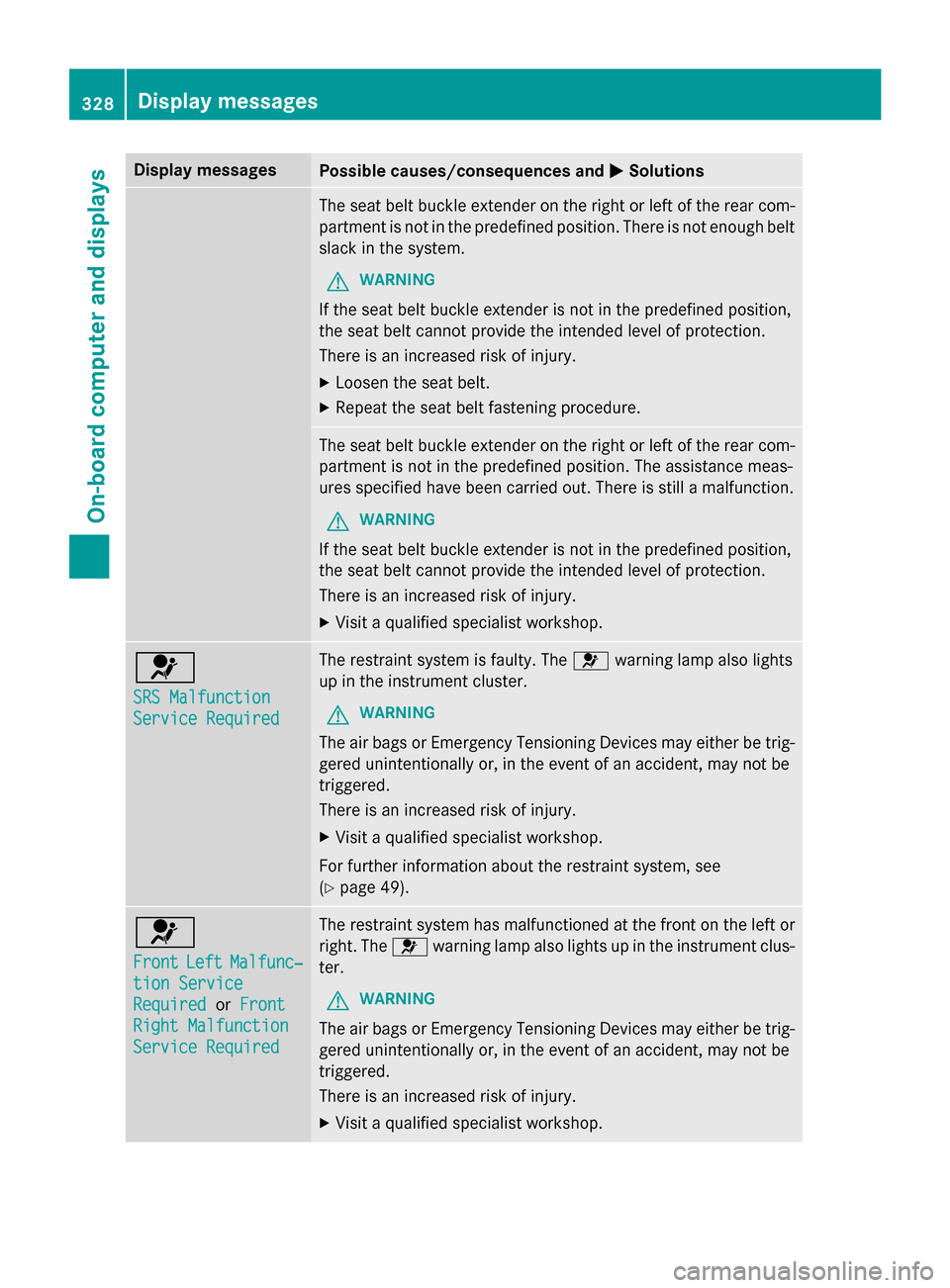
Display messages
Possible causes/consequences and
M
MSolutions The seat belt buckle extender on the right or left of the rear com-
partment is not in the predefined position. There is not enough belt slack in the system.
G WARNING
If the seat belt buckle extender is not in the predefined position,
the seat belt cannot provide the intended level of protection.
There is an increased risk of injury. X Loosen the seat belt.
X Repeat the seat belt fastening procedure. The seat belt buckle extender on the right or left of the rear com-
partment is not in the predefined position. The assistance meas-
ures specified have been carried out. There is still a malfunction.
G WARNING
If the seat belt buckle extender is not in the predefined position,
the seat belt cannot provide the intended level of protection.
There is an increased risk of injury. X Visit a qualified specialist workshop. 6
SRS Malfunction SRS Malfunction
Service Required Service Required The restraint system is faulty. The
6warning lamp also lights
up in the instrument cluster.
G WARNING
The air bags or Emergency Tensioning Devices may either be trig- gered unintentionally or, in the event of an accident, may not be
triggered.
There is an increased risk of injury.
X Visit a qualified specialist workshop.
For further information about the restraint system, see
(Y page 49). 6
Front Front
Left
LeftMalfunc‐
Malfunc‐
tion Service
tion Service
Required Required orFront
Front
Right Malfunction
Right Malfunction
Service Required Service Required The restraint system has malfunctioned at the front on the left or
right. The 6warning lamp also lights up in the instrument clus-
ter.
G WARNING
The air bags or Emergency Tensioning Devices may either be trig- gered unintentionally or, in the event of an accident, may not be
triggered.
There is an increased risk of injury.
X Visit a qualified specialist workshop. 328
Display
messagesOn-board computer and displays
Page 331 of 502
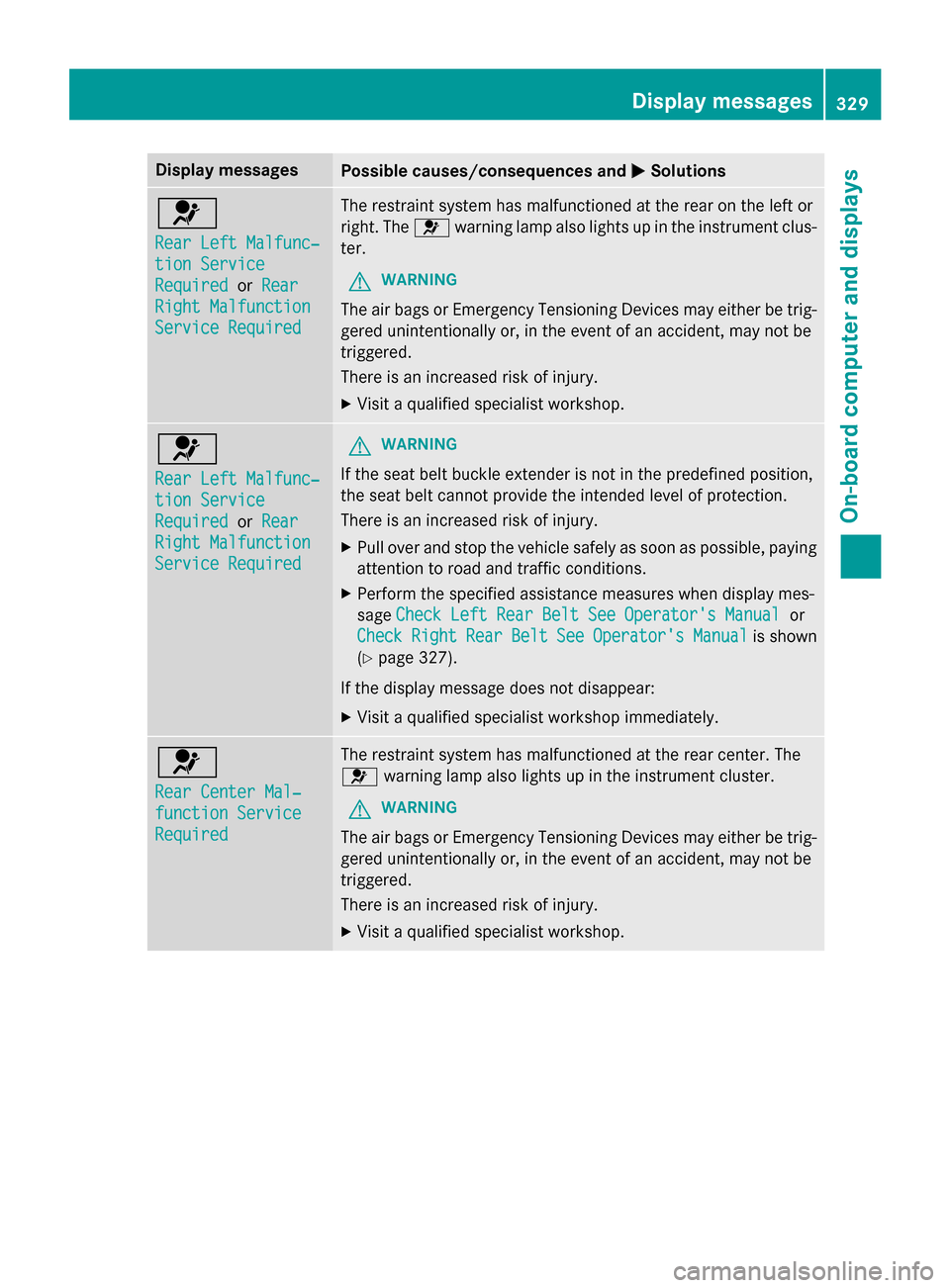
Display messages
Possible causes/consequences and
M
MSolutions 6
Rear Left Malfunc‐ Rear Left Malfunc‐
tion Service tion Service
Required Required
orRear
Rear
Right Malfunction
Right Malfunction
Service Required Service Required The restraint system has malfunctioned at the rear on the left or
right. The 6warning lamp also lights up in the instrument clus-
ter.
G WARNING
The air bags or Emergency Tensioning Devices may either be trig- gered unintentionally or, in the event of an accident, may not be
triggered.
There is an increased risk of injury.
X Visit a qualified specialist workshop. 6
Rear Left Malfunc‐ Rear Left Malfunc‐
tion Service tion Service
Required Required
orRear
Rear
Right Malfunction
Right Malfunction
Service Required Service Required G
WARNING
If the seat belt buckle extender is not in the predefined position,
the seat belt cannot provide the intended level of protection.
There is an increased risk of injury. X Pull over and stop the vehicle safely as soon as possible, paying
attention to road and traffic conditions.
X Perform the specified assistance measures when display mes-
sage Check Left Rear Belt See Operator's Manual Check Left Rear Belt See Operator's Manual or
Check
Check Right
RightRear
RearBelt
Belt See
SeeOperator's
Operator's Manual
Manualis shown
(Y page 327).
If the display message does not disappear:
X Visit a qualified specialist workshop immediately. 6
Rear Center Mal‐ Rear Center Mal‐
function Service function Service
Required Required The restraint system has malfunctioned at the rear center. The
6 warning lamp also lights up in the instrument cluster.
G WARNING
The air bags or Emergency Tensioning Devices may either be trig- gered unintentionally or, in the event of an accident, may not be
triggered.
There is an increased risk of injury.
X Visit a qualified specialist workshop. Display
messages
329On-board computer and displays Z
Page 332 of 502
Display messages
Possible causes/consequences and
M
MSolutions 6
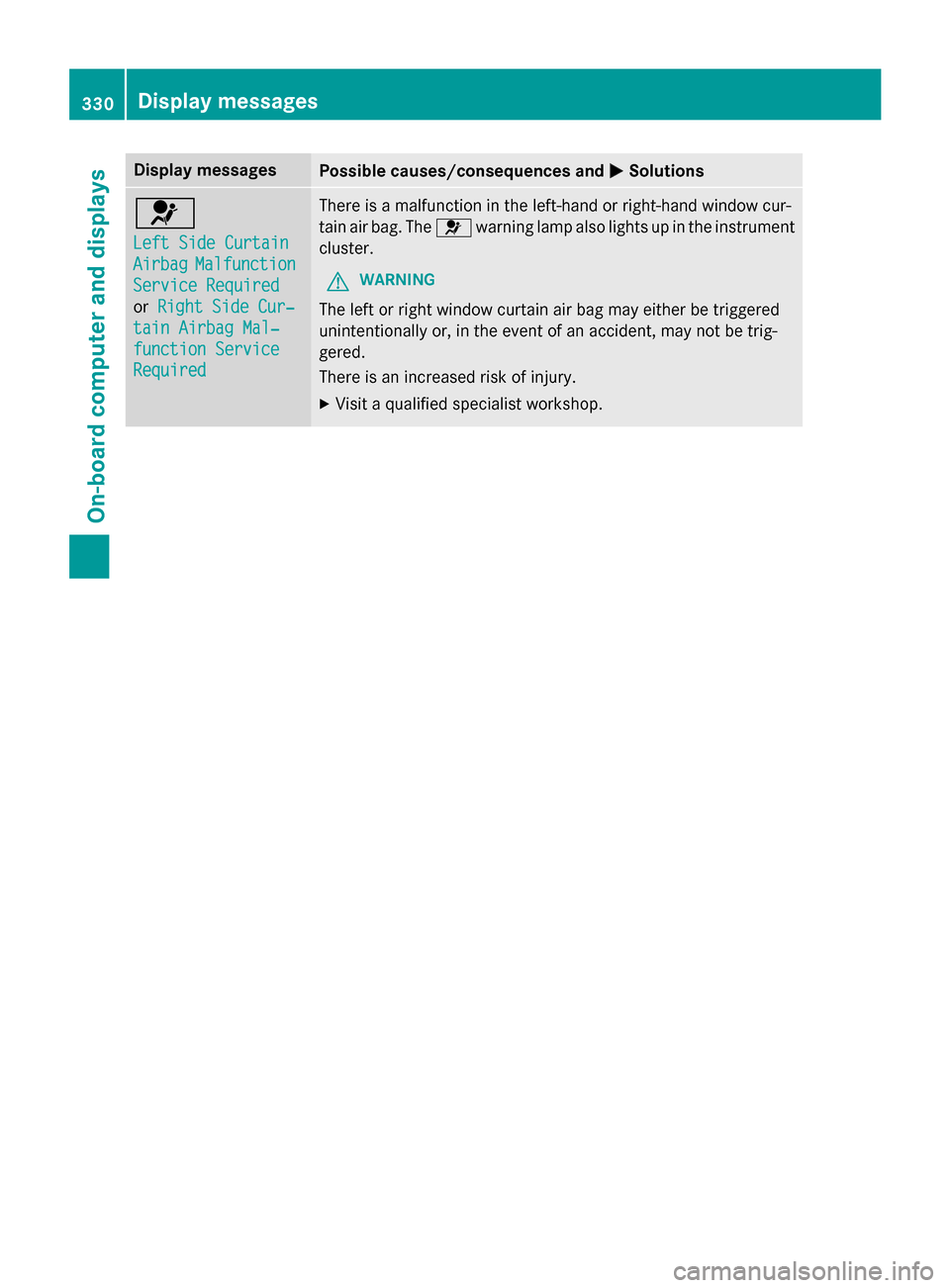
Left Side Curtain Left Side Curtain
Airbag Airbag
Malfunction
Malfunction
Service Required
Service Required
or Right Side Cur‐ Right Side Cur‐
tain Airbag Mal‐
tain Airbag Mal‐
function Service function Service
Required Required There is a malfunction in the left-hand or right-hand window cur-
tain air bag. The
6warning lamp also lights up in the instrument
cluster.
G WARNING
The left or right window curtain air bag may either be triggered
unintentionally or, in the event of an accident, may not be trig-
gered.
There is an increased risk of injury. X Visit a qualified specialist workshop. 330
Display
messagesOn-board computer and displays
Page 353 of 502
Vehicle
Display messages
Possible causes/consequences and
M
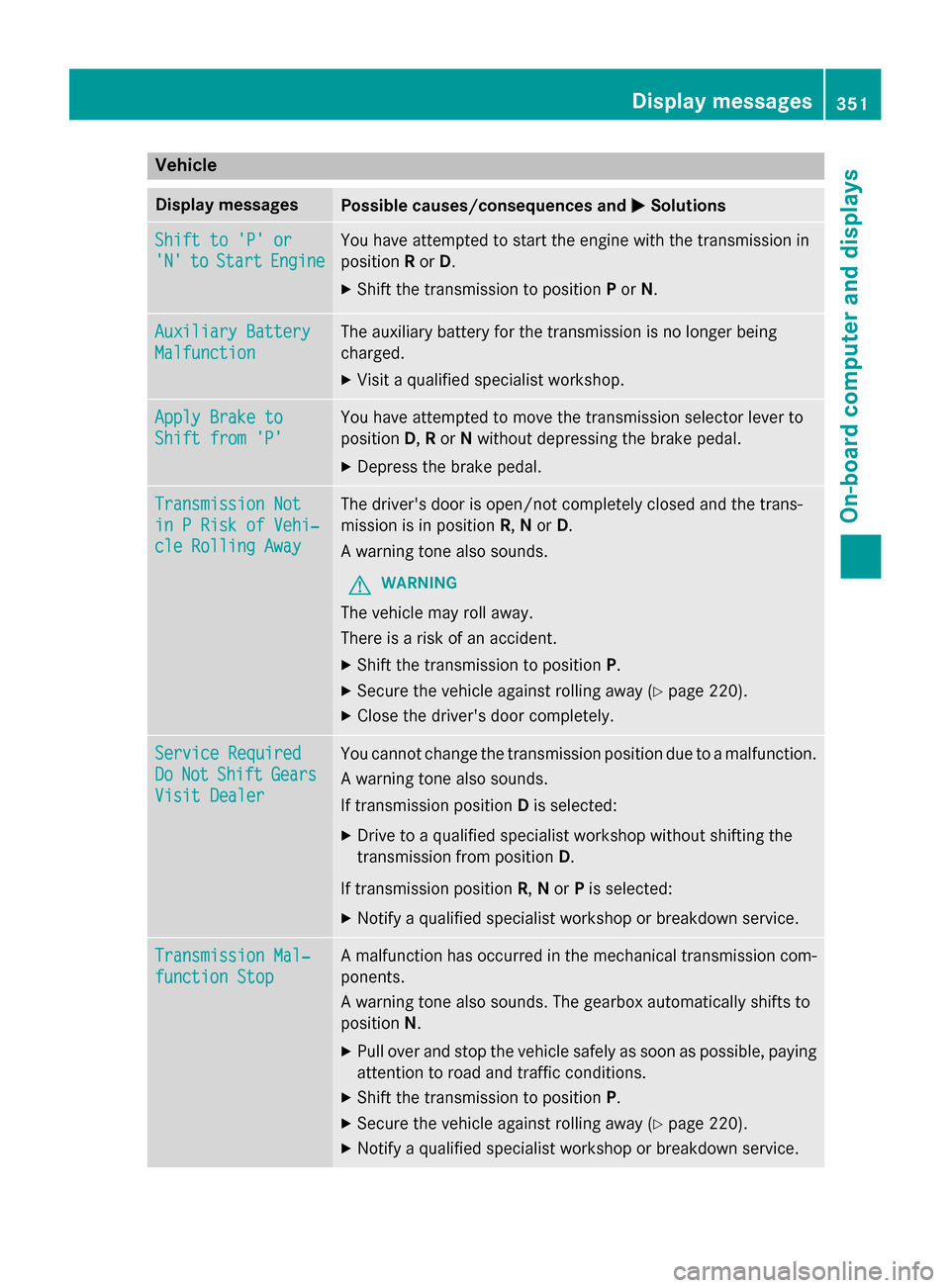
MSolutions Shift to 'P' or
Shift to 'P' or
'N' 'N'
to
toStart
Start Engine
Engine You have attempted to start the engine with the transmission in
position
Ror D.
X Shift the transmission to position Por N. Auxiliary Battery Auxiliary Battery
Malfunction Malfunction The auxiliary battery for the transmission is no longer being
charged.
X Visit a qualified specialist workshop. Apply Brake to Apply Brake to
Shift from 'P' Shift from 'P' You have attempted to move the transmission selector lever to
position
D,Ror Nwithout depressing the brake pedal.
X Depress the brake pedal. Transmission Not Transmission Not
in P Risk of Vehi‐ in P Risk of Vehi‐
cle Rolling Away cle Rolling Away The driver's door is open/not completely closed and the trans-
mission is in position
R,Nor D.
A warning tone also sounds.
G WARNING
The vehicle may roll away.
There is a risk of an accident. X Shift the transmission to position P.
X Secure the vehicle against rolling away (Y page 220).
X Close the driver's door completely. Service Required Service Required
Do Do
Not
Not Shift
Shift Gears
Gears
Visit Dealer
Visit Dealer You cannot change the transmission position due to a malfunction.
A warning tone also sounds.
If transmission position Dis selected:
X Drive to a qualified specialist workshop without shifting the
transmission from position D.
If transmission position R,Nor Pis selected:
X Notify a qualified specialist workshop or breakdown service. Transmission Mal‐ Transmission Mal‐
function Stop function Stop A malfunction has occurred in the mechanical transmission com-
ponents.
A warning tone also sounds. The gearbox automatically shifts to
position N.
X Pull over and stop the vehicle safely as soon as possible, paying
attention to road and traffic conditions.
X Shift the transmission to position P.
X Secure the vehicle against rolling away (Y page 220).
X Notify a qualified specialist workshop or breakdown service. Display messages
351On-board computer and displays Z