hold MERCEDES-BENZ S-Class 2015 W222 Owner's Guide
[x] Cancel search | Manufacturer: MERCEDES-BENZ, Model Year: 2015, Model line: S-Class, Model: MERCEDES-BENZ S-Class 2015 W222Pages: 502, PDF Size: 9.59 MB
Page 104 of 502
!
The trunk lid swings upwards when
opened. Therefore, make sure that there is sufficient clearance above the trunk lid.
i The opening dimensions of the trunk lid
can be found in the "Vehicle data" section
(Y page 495).
Opening You can open the trunk lid automatically
using the SmartKey or the handle in the trunk
lid.
X Press and hold the Fbutton on the
SmartKey until the trunk lid opens.
or
X If the trunk lid is unlocked, pull the trunk lid
handle and let it go again immediately.
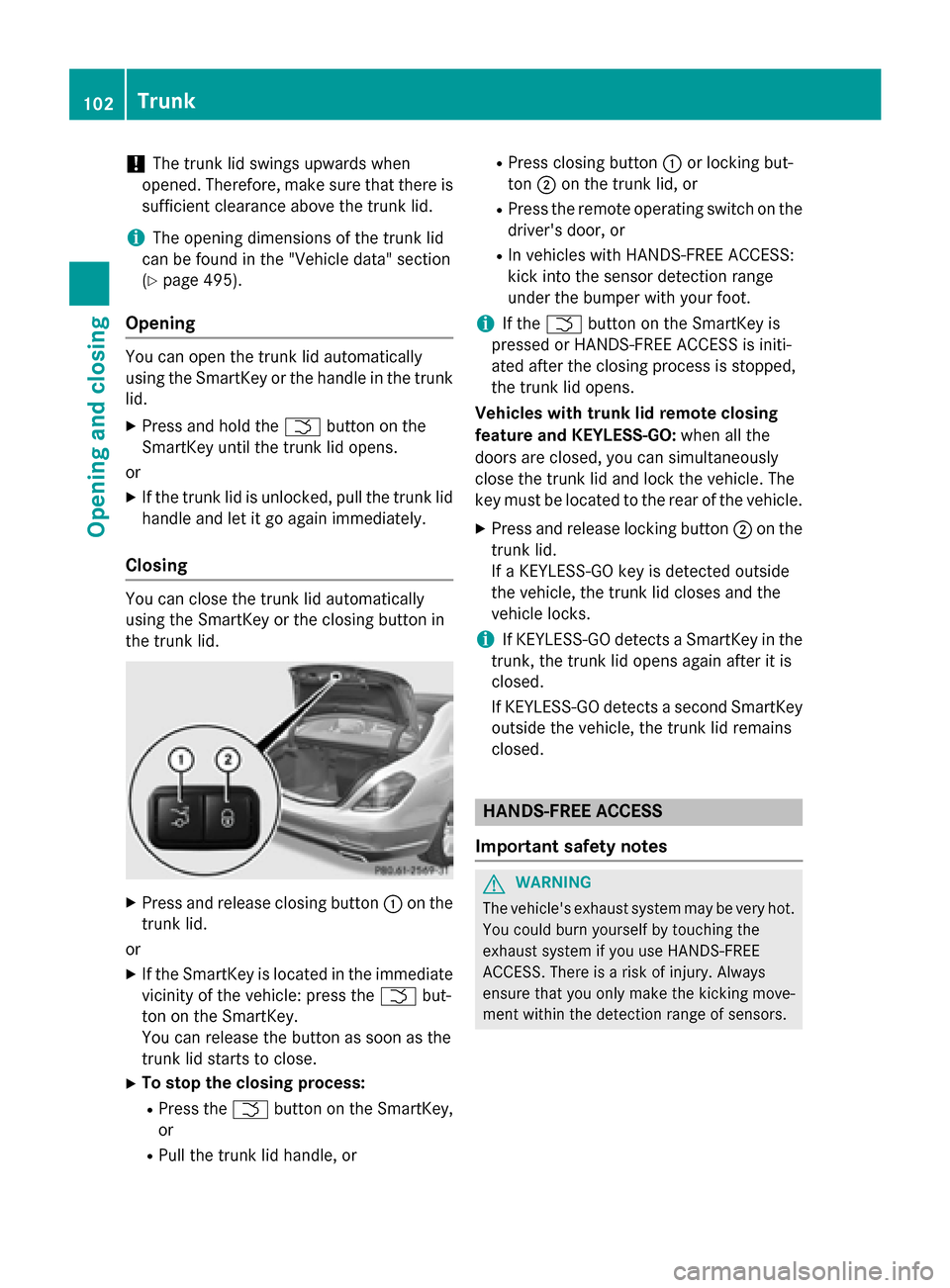
Closing You can close the trunk lid automatically
using the SmartKey or the closing button in
the trunk lid. X
Press and release closing button :on the
trunk lid.
or X If the SmartKey is located in the immediate
vicinity of the vehicle: press the Fbut-
ton on the SmartKey.
You can release the button as soon as the
trunk lid starts to close.
X To stop the closing process:
R Press the Fbutton on the SmartKey,
or
R Pull the trunk lid handle, or R
Press closing button :or locking but-
ton ;on the trunk lid, or
R Press the remote operating switch on the
driver's door, or
R In vehicles with HANDS-FREE ACCESS:
kick into the sensor detection range
under the bumper with your foot.
i If the
F button on the SmartKey is
pressed or HANDS-FREE ACCESS is initi-
ated after the closing process is stopped,
the trunk lid opens.
Vehicles with trunk lid remote closing
feature and KEYLESS-GO: when all the
doors are closed, you can simultaneously
close the trunk lid and lock the vehicle. The
key must be located to the rear of the vehicle.
X Press and release locking button ;on the
trunk lid.
If a KEYLESS-GO key is detected outside
the vehicle, the trunk lid closes and the
vehicle locks.
i If KEYLESS-GO detects a SmartKey in the
trunk, the trunk lid opens again after it is
closed.
If KEYLESS-GO detects a second SmartKey outside the vehicle, the trunk lid remains
closed. HANDS-FREE ACCESS
Important safety notes G
WARNING
The vehicle's exhaust system may be very hot. You could burn yourself by touching the
exhaust system if you use HANDS-FREE
ACCESS. There is a risk of injury. Always
ensure that you only make the kicking move-
ment within the detection range of sensors. 102
TrunkOpening and closing
Page 105 of 502
!
If the SmartKey is within the rear detec-
tion range of KEYLESS-GO, the following
situations, for example, could lead to the
unintentional opening of the trunk:
R using a car wash
R using a power washer
Make sure that the SmartKey is at least
10 ft (3 m) away from the vehicle.
General notes With KEYLESS-GO and HANDS-FREE
ACCESS, you can open or close the trunk lid
or stop the procedure without using your
hands. This is useful if you have your hands
full. To do this, make a kicking movement
under the bumper with your foot.
Observe the following points:
R Carry your KEYLESS-GO key about your
person. The KEYLESS-GO key must be in
the rear detection range of the vehicle.
R When making the kicking movement, make
sure that you are standing firmly on the
ground and that there is sufficient clear-
ance to the rear of the vehicle. You could
otherwise lose your balance e.g. on ice. R
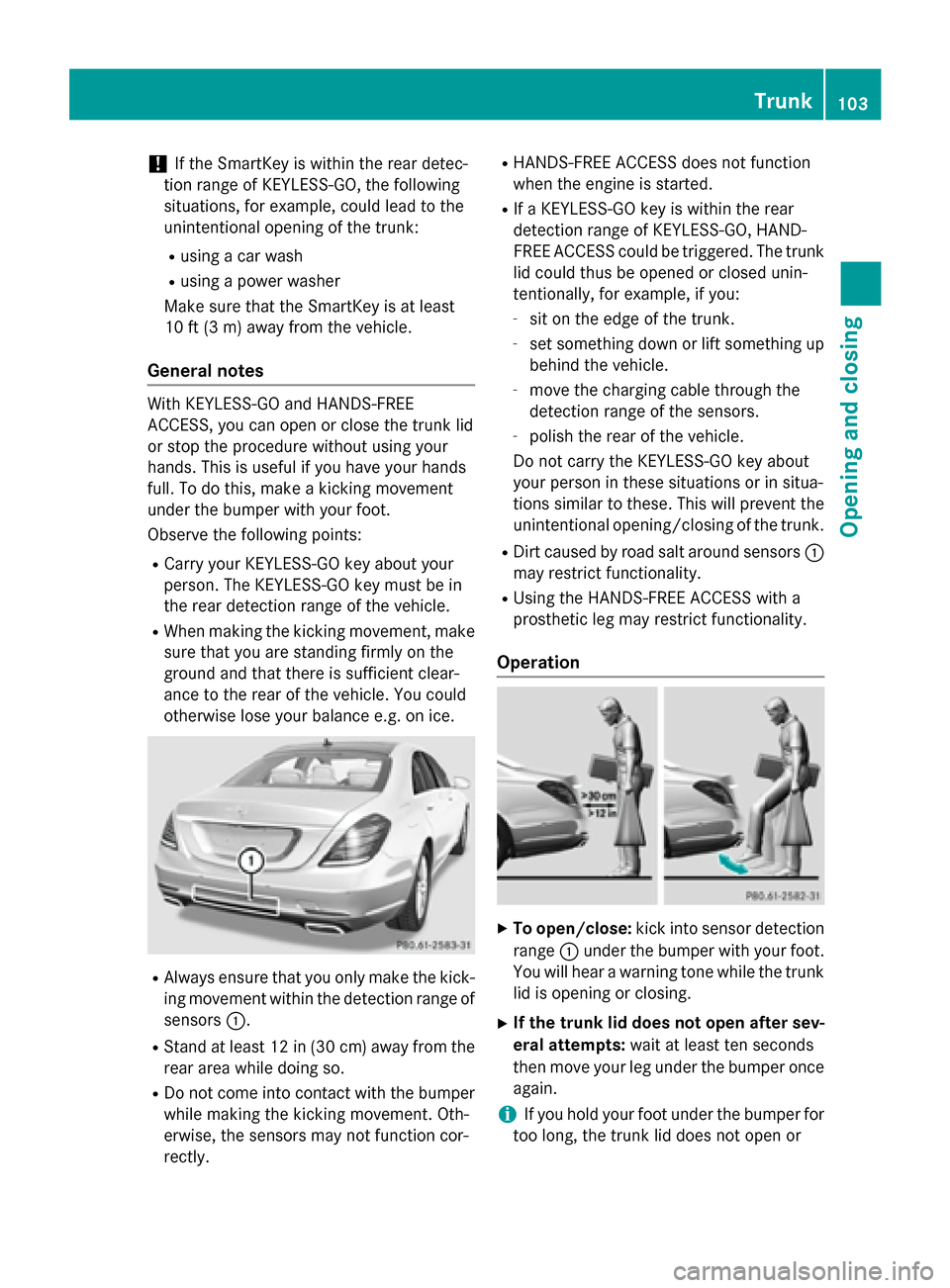
Always ensure that you only make the kick-
ing movement within the detection range of
sensors :.
R Stand at least 12 in (30 cm) away from the
rear area while doing so.
R Do not come into contact with the bumper
while making the kicking movement. Oth-
erwise, the sensors may not function cor-
rectly. R
HANDS-FREE ACCESS does not function
when the engine is started.
R If a KEYLESS-GO key is within the rear
detection range of KEYLESS-GO, HAND-
FREE ACCESS could be triggered. The trunk
lid could thus be opened or closed unin-
tentionally, for example, if you:
- sit on the edge of the trunk.
- set something down or lift something up
behind the vehicle.
- move the charging cable through the
detection range of the sensors.
- polish the rear of the vehicle.
Do not carry the KEYLESS-GO key about
your person in these situations or in situa-
tions similar to these. This will prevent the
unintentional opening/closing of the trunk.
R Dirt caused by road salt around sensors :
may restrict functionality.
R Using the HANDS-FREE ACCESS with a
prosthetic leg may restrict functionality.
Operation X
To open/close: kick into sensor detection
range :under the bumper with your foot.
You will hear a warning tone while the trunk lid is opening or closing.
X If the trunk lid does not open after sev-
eral attempts: wait at least ten seconds
then move your leg under the bumper once
again.
i If you hold your foot under the bumper for
too long, the trunk lid does not open or Trunk
103Opening and closing Z
Page 109 of 502
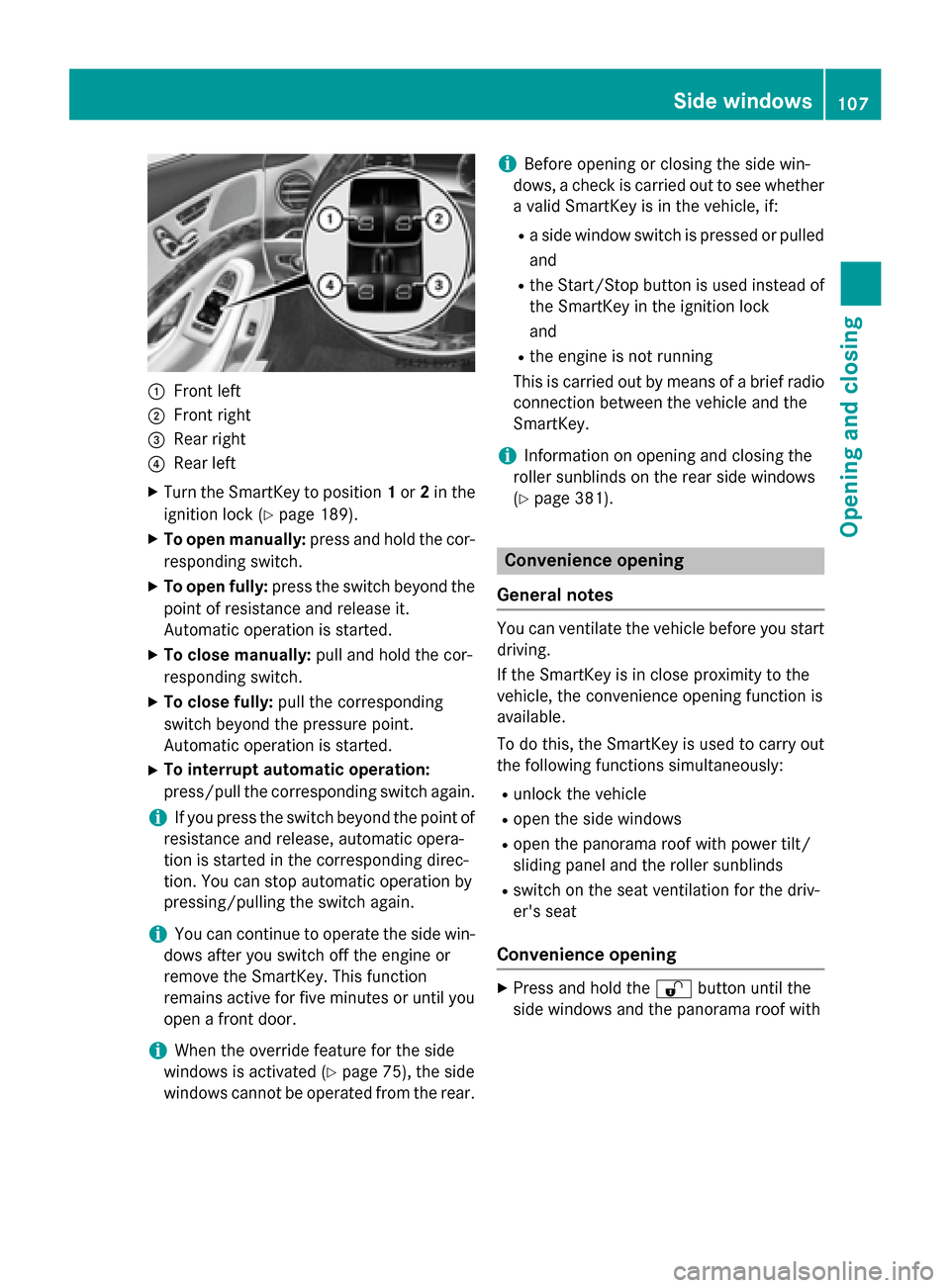
:
Front left
; Front right
= Rear right
? Rear left
X Turn the SmartKey to position 1or 2in the
ignition lock (Y page 189).
X To open manually: press and hold the cor-
responding switch.
X To open fully: press the switch beyond the
point of resistance and release it.
Automatic operation is started.
X To close manually: pull and hold the cor-
responding switch.
X To close fully: pull the corresponding
switch beyond the pressure point.
Automatic operation is started.
X To interrupt automatic operation:
press/pull the corresponding switch again.
i If you press the switch beyond the point of
resistance and release, automatic opera-
tion is started in the corresponding direc-
tion. You can stop automatic operation by
pressing/pulling the switch again.
i You can continue to operate the side win-
dows after you switch off the engine or
remove the SmartKey. This function
remains active for five minutes or until you
open a front door.
i When the override feature for the side
windows is activated (Y page 75), the side
windows cannot be operated from the rear. i
Before opening or closing the side win-
dows, a check is carried out to see whether a valid SmartKey is in the vehicle, if:
R a side window switch is pressed or pulled
and
R the Start/Stop button is used instead of
the SmartKey in the ignition lock
and
R the engine is not running
This is carried out by means of a brief radio connection between the vehicle and the
SmartKey.
i Information on opening and closing the
roller sunblinds on the rear side windows
(Y page 381). Convenience opening
General notes You can ventilate the vehicle before you start
driving.
If the SmartKey is in close proximity to the
vehicle, the convenience opening function is
available.
To do this, the SmartKey is used to carry out
the following functions simultaneously:
R unlock the vehicle
R open the side windows
R open the panorama roof with power tilt/
sliding panel and the roller sunblinds
R switch on the seat ventilation for the driv-
er's seat
Convenience opening X
Press and hold the %button until the
side windows and the panorama roof with Side windows
107Opening and closing Z
Page 110 of 502
power tilt/sliding panel are in the desired
position.
If the roller sunblinds of the panorama roof
with power tilt/sliding panel are closed, the roller sunblinds are opened first.
X Press and hold the %button again until
the panorama roof with power tilt/sliding
panel is in the desired position.
X To interrupt convenience opening:
release the %button. Convenience closing feature
Important safety notes G
WARNING
When the convenience closing feature is oper- ating, parts of the body could become trapped
in the closing area of the side window and the
sliding sunroof. There is a risk of injury.
Observe the complete closing procedure
when the convenience closing feature is oper-
ating. Make sure that no body parts are in
close proximity during the closing procedure.
When you lock the vehicle, you can simulta-
neously:
R close the side windows
R close the panorama roof with power tilt/
sliding panel
On vehicles with a panorama roof with power tilt/sliding panel, you can then close the
roller sunblinds.
i Notes on the automatic reversing feature
for:
R the side window (Y page 106)
R the panorama roof with power tilt/slid-
ing panel (Y page 111)
R the roller sunblinds (Y page 112)Using the SmartKey X
Press and hold the &button until the
side windows and the panorama roof with
power tilt/sliding panel are fully closed.
X Make sure that all the side windows and the
panorama roof with power tilt/sliding
panel are closed.
On vehicles with a panorama roof with power tilt/sliding panel:
X Press and hold the &button again until
the roller sunblinds of the panorama roof
with power tilt/sliding panel close.
X To interrupt convenience closing:
release the &button.
Using KEYLESS-GO The SmartKey must be outside the vehicle. All
the doors must be closed. X
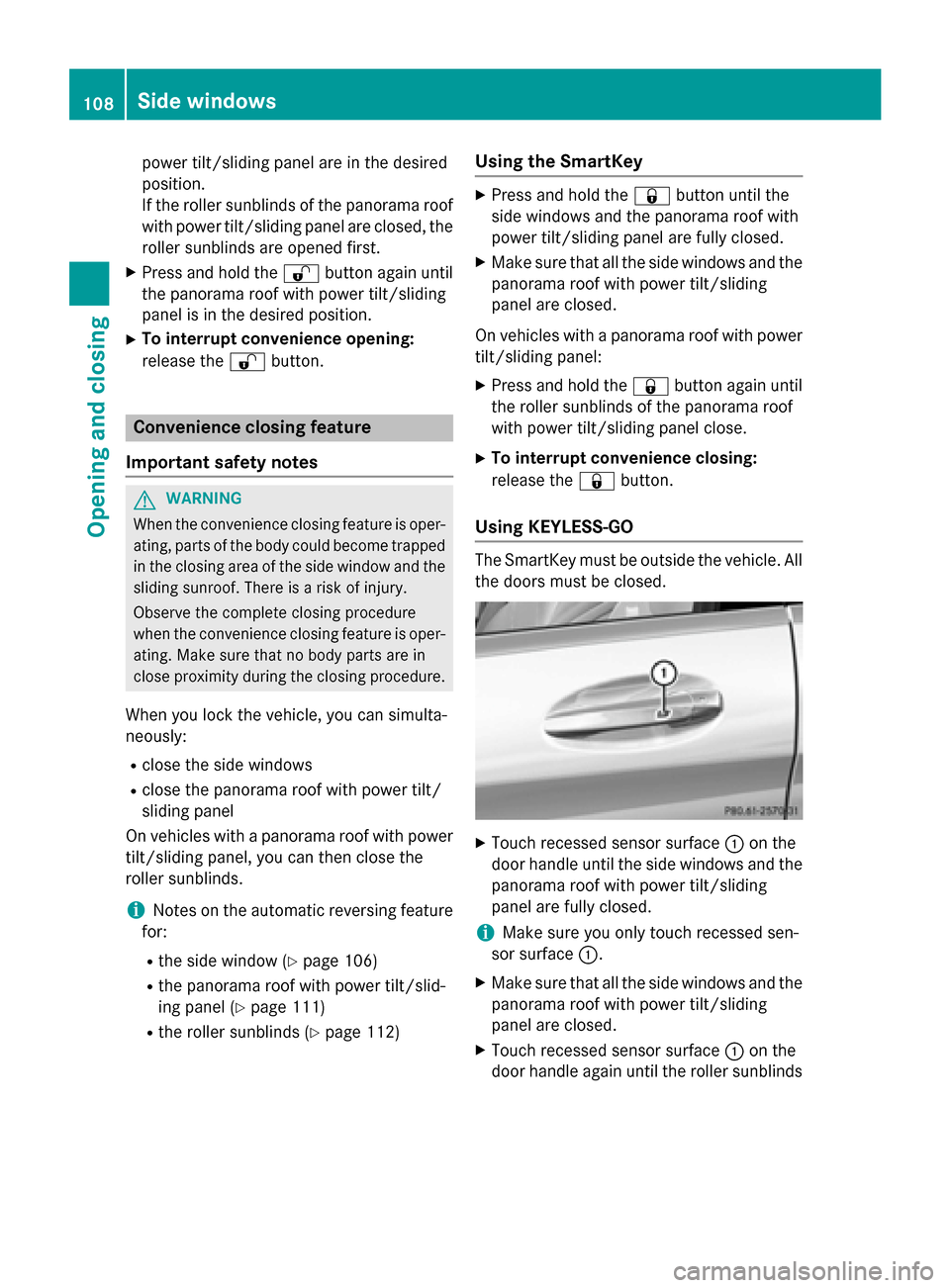
Touch recessed sensor surface :on the
door handle until the side windows and the panorama roof with power tilt/sliding
panel are fully closed.
i Make sure you only touch recessed sen-
sor surface :.
X Make sure that all the side windows and the
panorama roof with power tilt/sliding
panel are closed.
X Touch recessed sensor surface :on the
door handle again until the roller sunblinds 108
Side windowsOpening and closing
Page 111 of 502
of the panorama roof with power tilt/slid-
ing panel close.
X To interrupt convenience closing:
release recessed sensor surface :on the
door handle. Resetting the side windows
If a side window can no longer be closed fully, you must reset it.
X Close all the doors.
X Turn the SmartKey to position 1or 2in the
ignition lock (Y page 189).
X Pull the corresponding switch on the door
control panel until the side window is com-
pletely closed (Y page 106).
X Hold the switch for an additional second.
If the side window opens again slightly: X Immediately pull the corresponding switch
on the door control panel until the side win-
dow is completely closed (Y page 106).
X Hold the switch for an additional second.
X If the respective side window remains
closed after the button is released, then it
has been set correctly. If this is not the
case, repeat the steps above again. Side windows
109Opening and closing Z
Page 116 of 502
Operating from the rear compartment
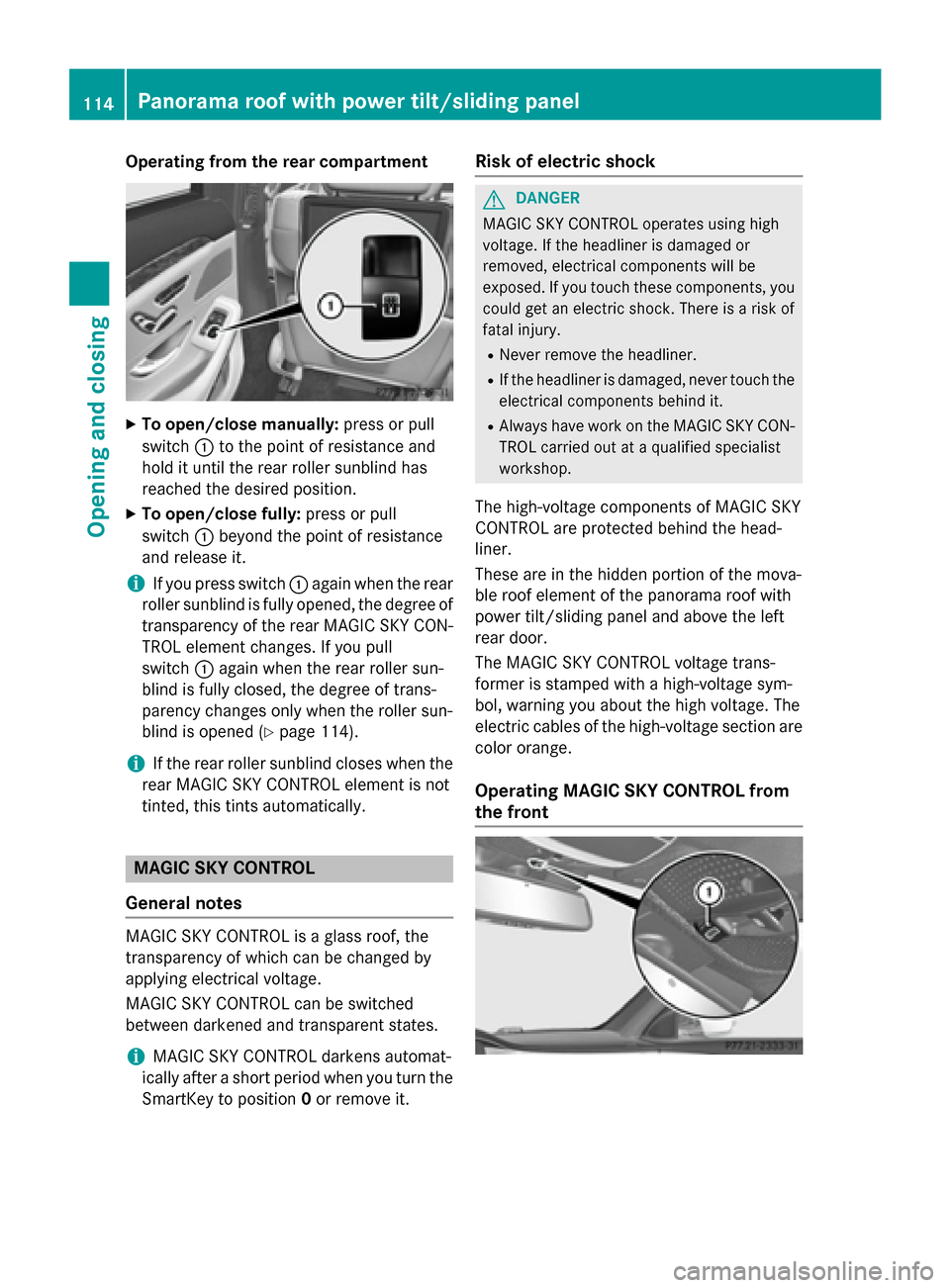
X
To open/close manually: press or pull
switch :to the point of resistance and
hold it until the rear roller sunblind has
reached the desired position.
X To open/close fully: press or pull
switch :beyond the point of resistance
and release it.
i If you press switch
:again when the rear
roller sunblind is fully opened, the degree of transparency of the rear MAGIC SKY CON-
TROL element changes. If you pull
switch :again when the rear roller sun-
blind is fully closed, the degree of trans-
parency changes only when the roller sun-
blind is opened (Y page 114).
i If the rear roller sunblind closes when the
rear MAGIC SKY CONTROL element is not
tinted, this tints automatically. MAGIC SKY CONTROL
General notes MAGIC SKY CONTROL is a glass roof, the
transparency of which can be changed by
applying electrical voltage.
MAGIC SKY CONTROL can be switched
between darkened and transparent states.
i MAGIC SKY CONTROL darkens automat-
ically after a short period when you turn the SmartKey to position 0or remove it. Risk of electric shock G
DANGER
MAGIC SKY CONTROL operates using high
voltage. If the headliner is damaged or
removed, electrical components will be
exposed. If you touch these components, you could get an electric shock. There is a risk of
fatal injury.
R Never remove the headliner.
R If the headliner is damaged, never touch the
electrical components behind it.
R Always have work on the MAGIC SKY CON-
TROL carried out at a qualified specialist
workshop.
The high-voltage components of MAGIC SKY
CONTROL are protected behind the head-
liner.
These are in the hidden portion of the mova-
ble roof element of the panorama roof with
power tilt/sliding panel and above the left
rear door.
The MAGIC SKY CONTROL voltage trans-
former is stamped with a high-voltage sym-
bol, warning you about the high voltage. The
electric cables of the high-voltage section are color orange.
Operating MAGIC SKY CONTROL from
the front 114
Panorama roof with power tilt/sliding panelOpening and closing
Page 122 of 502
Useful information
i This Operator's Manual describes all
models and all standard and optional equip- ment of your vehicle available at the time of
publication of the Operator's Manual.
Country-specific differences are possible.
Please note that your vehicle may not be
equipped with all features described. This
also applies to safety-related systems and
functions.
i Read the information on qualified special-
ist workshops (Y page 29). Correct driver's seat position
G
WARNING
You could lose control of your vehicle if you do the following while driving:
R adjust the driver's seat, head restraint,
steering wheel or mirrors
R fasten the seat belt
There is a risk of an accident.
Adjust the driver's seat, head restraint, steer-
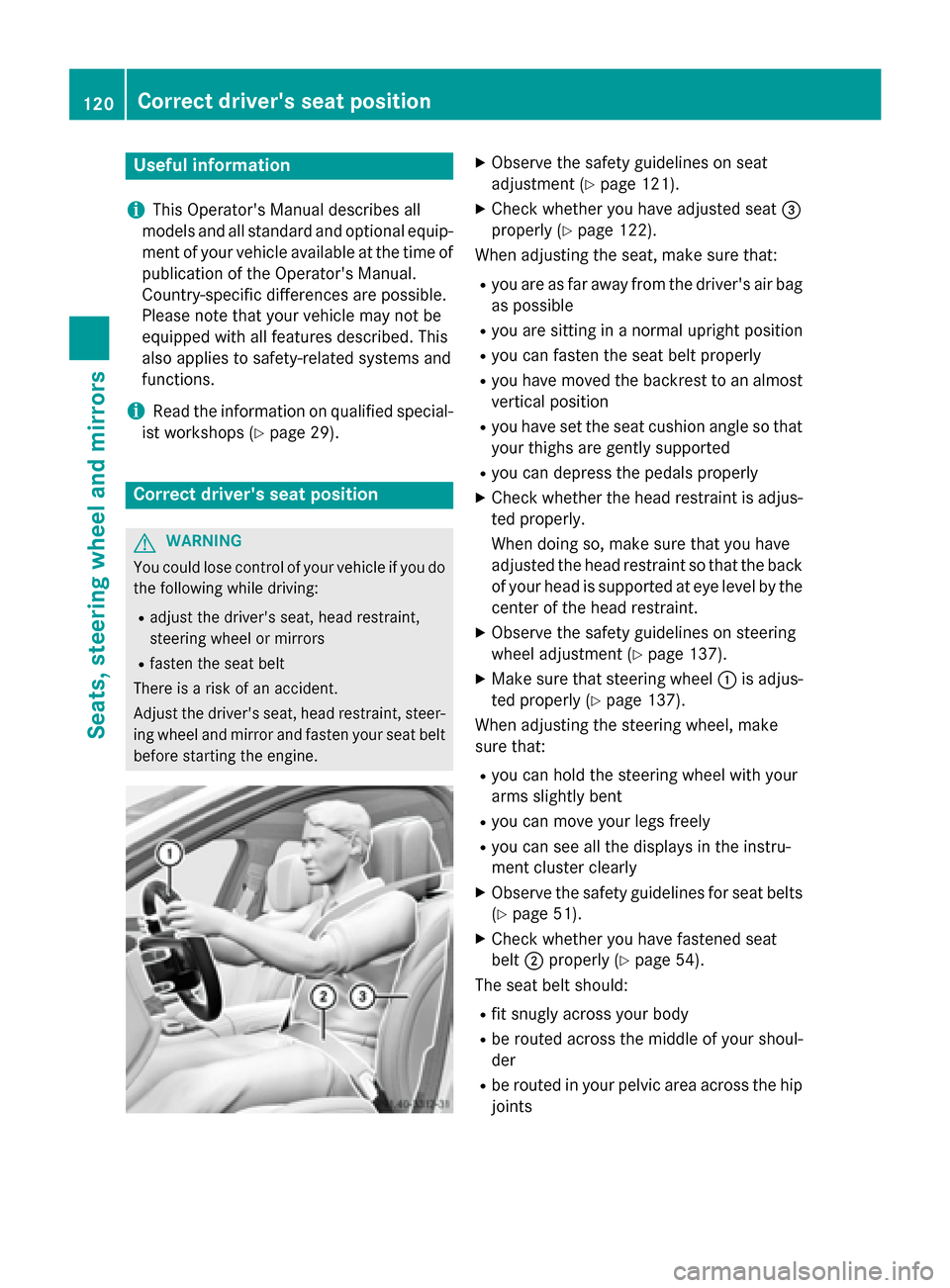
ing wheel and mirror and fasten your seat belt before starting the engine. X
Observe the safety guidelines on seat
adjustment (Y page 121).
X Check whether you have adjusted seat =
properly (Y page 122).
When adjusting the seat, make sure that:
R you are as far away from the driver's air bag
as possible
R you are sitting in a normal upright position
R you can fasten the seat belt properly
R you have moved the backrest to an almost
vertical position
R you have set the seat cushion angle so that
your thighs are gently supported
R you can depress the pedals properly
X Check whether the head restraint is adjus-
ted properly.
When doing so, make sure that you have
adjusted the head restraint so that the back of your head is supported at eye level by the center of the head restraint.
X Observe the safety guidelines on steering
wheel adjustment (Y page 137).
X Make sure that steering wheel :is adjus-
ted properly (Y page 137).
When adjusting the steering wheel, make
sure that:
R you can hold the steering wheel with your
arms slightly bent
R you can move your legs freely
R you can see all the displays in the instru-
ment cluster clearly
X Observe the safety guidelines for seat belts
(Y page 51).
X Check whether you have fastened seat
belt ;properly (Y page 54).
The seat belt should:
R fit snugly across your body
R be routed across the middle of your shoul-
der
R be routed in your pelvic area across the hip
joints 120
Correct driver's seat positionSeats, steering wheel and mirrors
Page 125 of 502
i
The fore-and-aft position of the head
restraint is adjusted automatically when
you adjust the backrest. Adjusting the rear seat
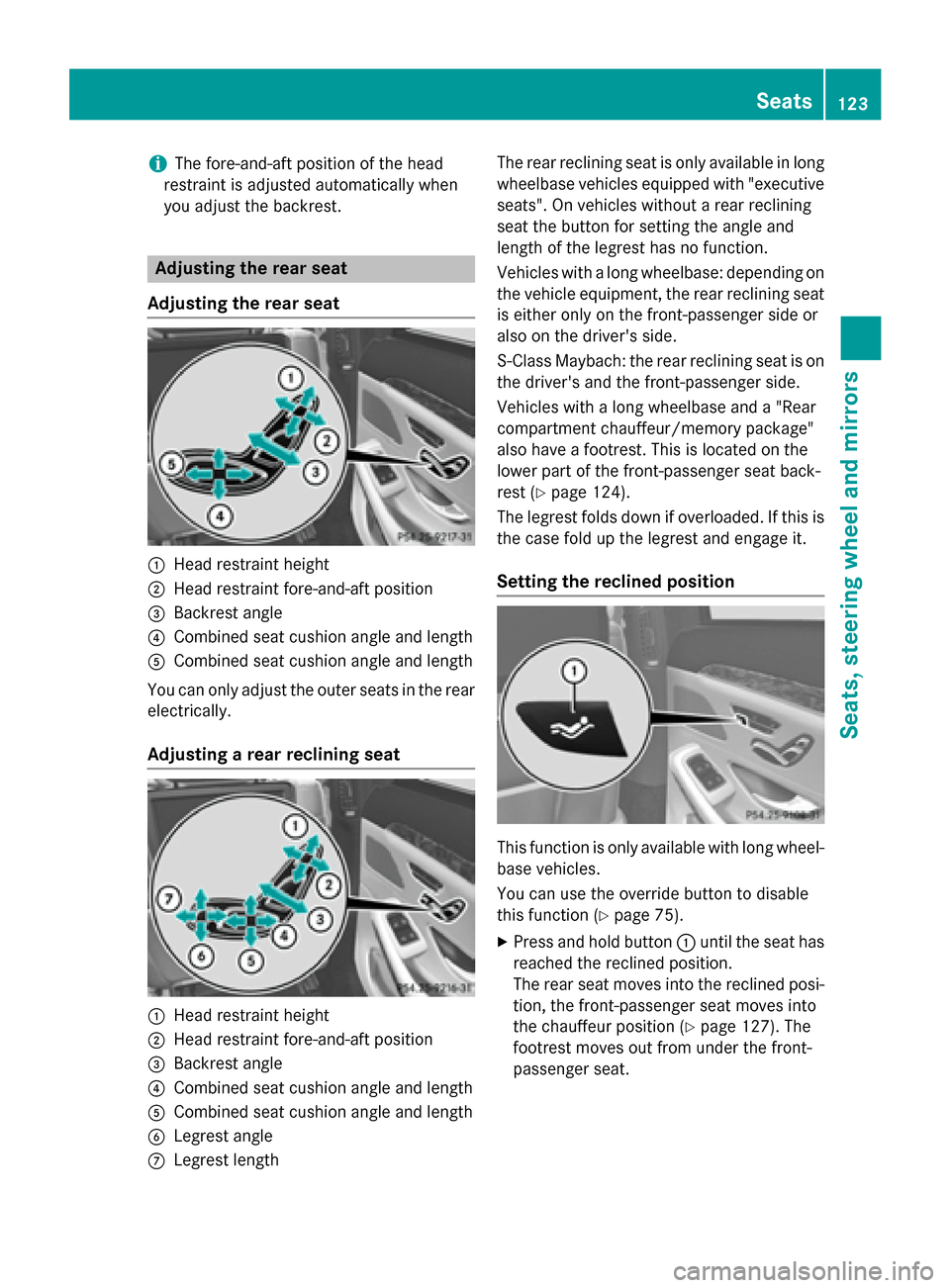
Adjusting the rear seat :
Head restraint height
; Head restraint fore-and-aft position
= Backrest angle
? Combined seat cushion angle and length
A Combined seat cushion angle and length
You can only adjust the outer seats in the rear
electrically.
Adjusting a rear reclining seat :
Head restraint height
; Head restraint fore-and-aft position
= Backrest angle
? Combined seat cushion angle and length
A Combined seat cushion angle and length
B Legrest angle
C Legrest length The rear reclining seat is only available in long
wheelbase vehicles equipped with "executive seats". On vehicles without a rear reclining
seat the button for setting the angle and
length of the legrest has no function.
Vehicles with a long wheelbase: depending on
the vehicle equipment, the rear reclining seat
is either only on the front-passenger side or
also on the driver's side.
S-Class Maybach: the rear reclining seat is on the driver's and the front-passenger side.
Vehicles with a long wheelbase and a "Rear
compartment chauffeur/memory package"
also have a footrest. This is located on the
lower part of the front-passenger seat back-
rest (Y page 124).
The legrest folds down if overloaded. If this is
the case fold up the legrest and engage it.
Setting the reclined position This function is only available with long wheel-
base vehicles.
You can use the override button to disable
this function (Y page 75).
X Press and hold button :until the seat has
reached the reclined position.
The rear seat moves into the reclined posi- tion, the front-passenger seat moves into
the chauffeur position (Y page 127). The
footrest moves out from under the front-
passenger seat. Seats
123Seats, steering wheel and mirrors Z
Page 130 of 502
R
the front-passenger seat head restraint is
inserted and the ignition is switched on
R the front-passenger seat backrest is moved
backwards or the seat is moved in a longi-
tudinal direction out of the chauffeur area
(Y page 130).
Positioning the front-passenger seat for
chauffeur mode General notes
Pay attention to the important safety notes
(Y
page 127). Adjust the seat for chauffeur
mode before the journey (Y page 128). Do not
remove the front-passenger seat head
restraint during the journey.
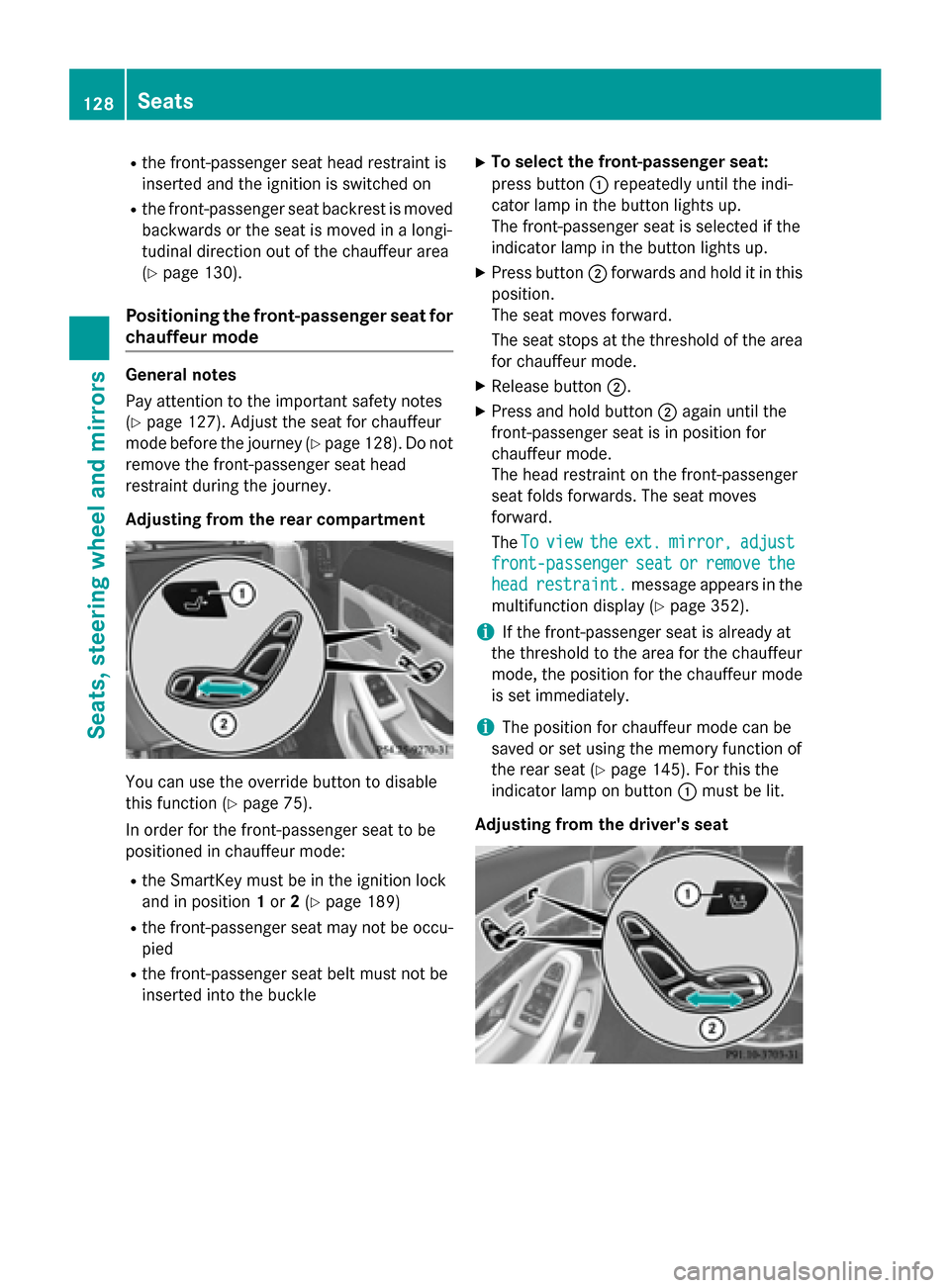
Adjusting from the rear compartment You can use the override button to disable
this function (Y page 75).
In order for the front-passenger seat to be
positioned in chauffeur mode:
R the SmartKey must be in the ignition lock
and in position 1or 2(Y page 189)
R the front-passenger seat may not be occu-
pied
R the front-passenger seat belt must not be
inserted into the buckle X
To select the front-passenger seat:
press button :repeatedly until the indi-
cator lamp in the button lights up.
The front-passenger seat is selected if the
indicator lamp in the button lights up.
X Press button ;forwards and hold it in this
position.
The seat moves forward.
The seat stops at the threshold of the area for chauffeur mode.
X Release button ;.
X Press and hold button ;again until the
front-passenger seat is in position for
chauffeur mode.
The head restraint on the front-passenger
seat folds forwards. The seat moves
forward.
The To
To view view the
theext.
ext. mirror,
mirror, adjust
adjust
front-passenger
front-passenger seat
seator
orremove
remove the
the
head
head restraint.
restraint. message appears in the
multifunction display (Y page 352).
i If the front-passenger seat is already at
the threshold to the area for the chauffeur
mode, the position for the chauffeur mode
is set immediately.
i The position for chauffeur mode can be
saved or set using the memory function of
the rear seat (Y page 145). For this the
indicator lamp on button :must be lit.
Adjusting from the driver's seat 128
SeatsSeats, steering
wheel and mirrors
Page 131 of 502
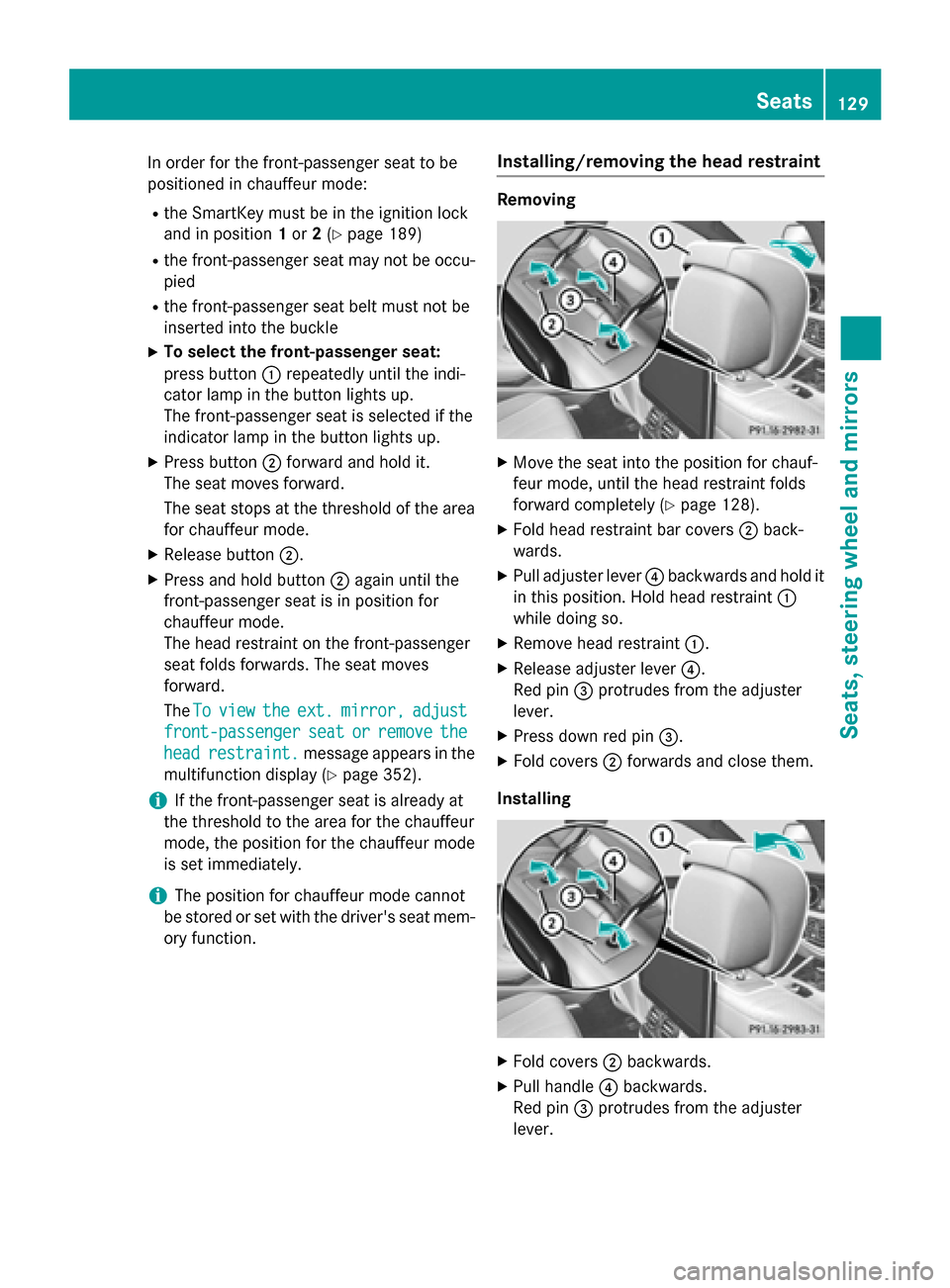
In order for the front-passenger seat to be
positioned in chauffeur mode:
R the SmartKey must be in the ignition lock
and in position 1or 2(Y page 189)
R the front-passenger seat may not be occu-
pied
R the front-passenger seat belt must not be
inserted into the buckle
X To select the front-passenger seat:
press button :repeatedly until the indi-
cator lamp in the button lights up.
The front-passenger seat is selected if the
indicator lamp in the button lights up.
X Press button ;forward and hold it.
The seat moves forward.
The seat stops at the threshold of the area for chauffeur mode.
X Release button ;.
X Press and hold button ;again until the
front-passenger seat is in position for
chauffeur mode.
The head restraint on the front-passenger
seat folds forwards. The seat moves
forward.
The To Toview
view the
theext.
ext. mirror,
mirror, adjust
adjust
front-passenger
front-passenger seat
seator
orremove
remove the
the
head
head restraint.
restraint. message appears in the
multifunction display (Y page 352).
i If the front-passenger seat is already at
the threshold to the area for the chauffeur
mode, the position for the chauffeur mode
is set immediately.
i The position for chauffeur mode cannot
be stored or set with the driver's seat mem-
ory function. Installing/removing the head restraint Removing
X
Move the seat into the position for chauf-
feur mode, until the head restraint folds
forward completely (Y page 128).
X Fold head restraint bar covers ;back-
wards.
X Pull adjuster lever ?backwards and hold it
in this position. Hold head restraint :
while doing so.
X Remove head restraint :.
X Release adjuster lever ?.
Red pin =protrudes from the adjuster
lever.
X Press down red pin =.
X Fold covers ;forwards and close them.
Installing X
Fold covers ;backwards.
X Pull handle ?backwards.
Red pin =protrudes from the adjuster
lever. Seats
129Seats, steering wheel and mirrors Z