phone MERCEDES-BENZ S CLASS 2019 User Guide
[x] Cancel search | Manufacturer: MERCEDES-BENZ, Model Year: 2019, Model line: S CLASS, Model: MERCEDES-BENZ S CLASS 2019Pages: 578, PDF Size: 23.31 MB
Page 145 of 578
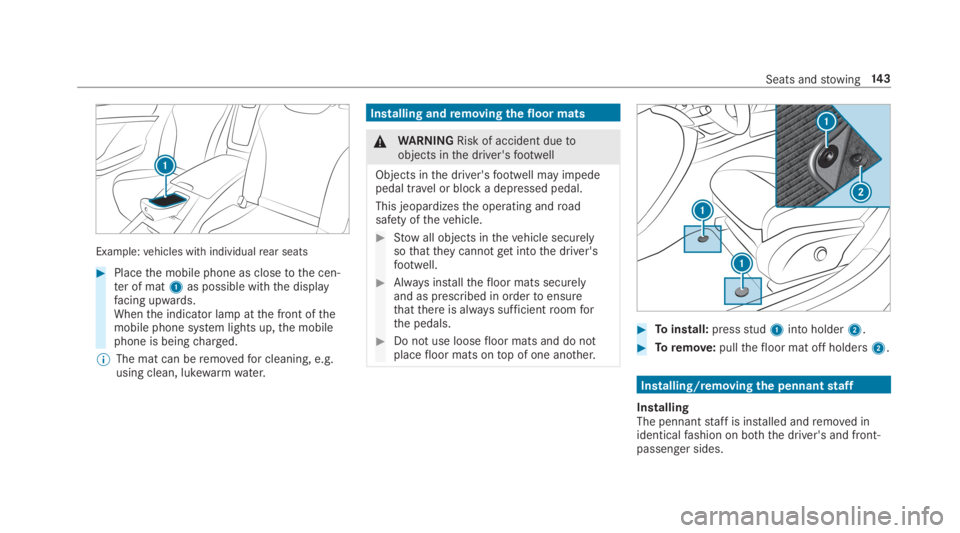
Example:vehicles with individualrear seats
#Placethe mobile phone as closetothe cen‐ter of mat1as possible withthe displayfacing upwards.Whenthe indicator lamp atthe front ofthemobile phone system lights up,the mobilephone is beingcharged.
%The mat can beremovedfor cleaning, e.g.using clean, lukewarmwater.
Installing andremoving thefloor mats
&WARNINGRisk of accident duetoobjects inthe driver'sfootwell
Objects inthe driver'sfootwell may impedepedal travel or block a depressed pedal.
This jeopardizesthe operating androadsafety ofthevehicle.
#Stowall objects inthevehicle securelysothattheycannotgetintothe driver'sfootwell.
#Always installthefloor mats securelyand as prescribed in ordertoensurethatthere is always sufficientroomforthe pedals.
#Do not use loosefloor mats and do notplacefloor mats ontop of one another.
#Toinstall:pressstud1into holder2.
#Toremove:pullthefloor mat off holders2.
Installing/removingthe pennantstaff
InstallingThe pennantstaff is installed andremoved inidenticalfashion on both the driver's and front-passenger sides.
Seats andstowing14 3
Page 171 of 578
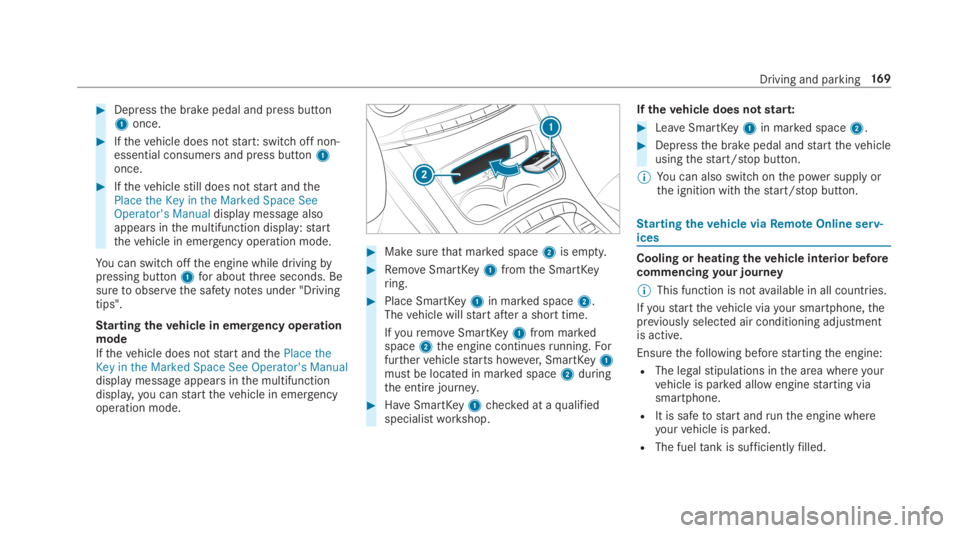
#Depressthe brake pedal and press button1once.
#Ifthevehicle does notstart:switch off non-essential consumers and press button1once.
#Ifthevehiclestill does notstart andthePlace the Key in the Marked Space SeeOperator's Manualdisplay message alsoappears inthe multifunction display:startthevehicle in emergency operation mode.
You can switchoffthe engine while drivingbypressing button1for aboutthree seconds. Besuretoobservethe safety notes under "Drivingtips".
Startingthevehicle in emergency operationmodeIfthevehicle does notstart andthePlace theKey in the Marked Space See Operator's Manualdisplay message appears inthe multifunctiondisplay,you canstartthevehicle in emergencyoperation mode.
#Makesurethat marked space2is empty.
#RemoveSmartKey1fromthe SmartKeyring.
#Place SmartKey1in marked space2.Thevehicle willstart after a short time.
IfyouremoveSmartKey1from markedspace2the engine continuesrunning.Forfurthervehiclestarts however,SmartKey1must be located in marked space2duringthe entire journey.
#HaveSmartKey1checked at aqualifiedspecialistworkshop.
Ifthevehicle does notstart:
#LeaveSmartKey1in marked space2.
#Depressthe brake pedal andstartthevehicleusingthestart/stop button.
%You can also switchonthe power supplyorthe ignition withthestart/stop button.
Startingthevehicle viaRemoteOnline serv‐ices
Cooling or heatingthevehicle interior beforecommencingyour journey
%This function is notavailable in all countries.
Ifyoustartthevehicle viayour smartphone,thepreviously selected air conditioning adjustmentis active.
Ensurethefollowing beforestartingthe engine:
RThe legalstipulations inthe area whereyourvehicle is parked allow enginestarting viasmartphone.
RIt is safetostart andrunthe engine whereyourvehicle is parked.
RThe fueltank is sufficientlyfilled.
Driving and parking16 9
Page 172 of 578
RThestarter battery is sufficientlycharged.
%You can also setthetemperature withyoursmartphone. Information on Mercedes meconnect andother services: http://www.mercedes.meThis function is notavailablefor all models.
Chargingthe batterybefore commencingyour journey
%This function is notavailable in all countries.
RIfthevehicle battery is discharged,youreceivea message onyour smartphone.
RYou canthenstartthevehicle withthesmartphonetochargethe battery.
RThevehicle is automatically switched offafterten minutes.
Ensurethefollowing beforestartingthe engine:
RThe legalstipulations inthe area whereyourvehicle is parked allow enginestarting viasmartphone.
RIt is safetostart andrunthe engine whereyourvehicle is parked.
RThe fueltank is sufficientlyfilled.
Startingthevehicle
&WARNINGRisk of crushing or entrap‐ment duetounintentionalstarting oftheengine
Limbs could be crushed or trapped iftheengine isstarted unintentionally duringservice or maintenancework.
#Always securethe engine against unin‐tentionalstarting before carrying outmaintenance orrepairwork.
Requirements:RParkposition]is selected.
RThe anti-theft alarm system is not activated.
RThe panic alarm is not activated.
RThe hazardwarning lights are switched off.
RThe hood is closed.
RThe doors are closed and locked.
RThe windowsand sliding sunroof are closed.
#Startthevehicle usingthe smartphone:
RAftereveryvehiclestart,the enginerunsforten minutes.
RYou can carryout a maximum of two consec‐utivestarting attempts. Thevehicle must bestarted once withthe SmartKeybefore tryingtostartthevehicle again withthe smart‐phone.
RYou canstopthevehicle again at any time.
RFurther information can befound inthesmartphone app.
Securingthe engine againststarting beforecarrying out maintenance orrepairwork:#Switch onthe hazardwarning lights.
or
#Unlockthe doors.
or
#Open a side window orthe sliding sunroof.
Breaking-in notes
Mercedes-AMGvehicles:observethe notes inthe Supplement. Otherwise,you mayfailtorec‐ognize dangers.
17 0Driving and parking
Page 255 of 578
Observethe legalrequirementsforthe countryin whichyou are currently driving whenyouoperatethe on-board computer.
%The on-board computer displaysappear onthe multifunction display (→page 255).
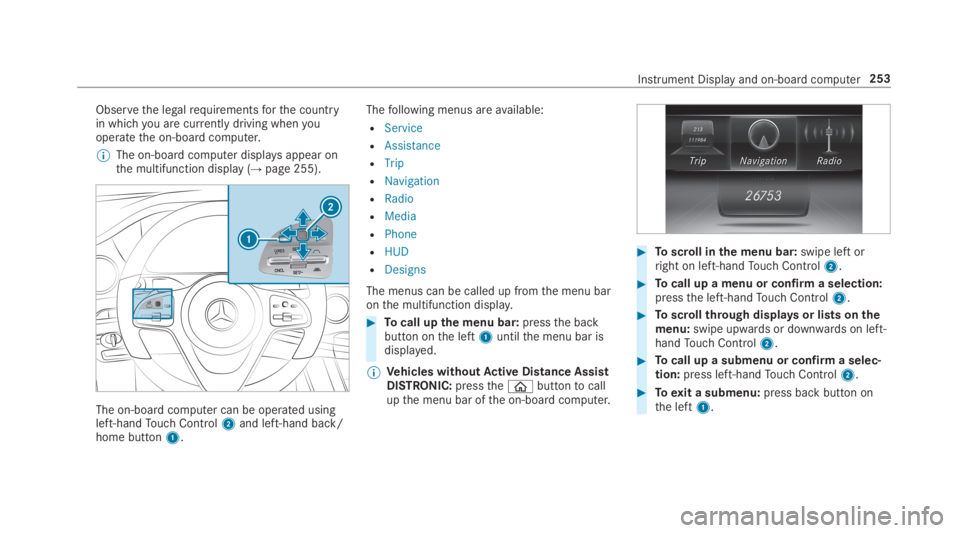
The on-board computer can be operated usingleft-handTouch Control2and left-hand back/home button1.
Thefollowing menus areavailable:
RService
RAssistance
RTrip
RNavigation
RRadio
RMedia
RPhone
RHUD
RDesigns
The menus can be called up fromthe menu baronthe multifunction display.
#Tocall upthe menu bar:pressthe backbutton onthe left1untilthe menu bar isdisplayed.
%Vehicles withoutActive Distance AssistDISTRONIC:pressthe
Page 262 of 578
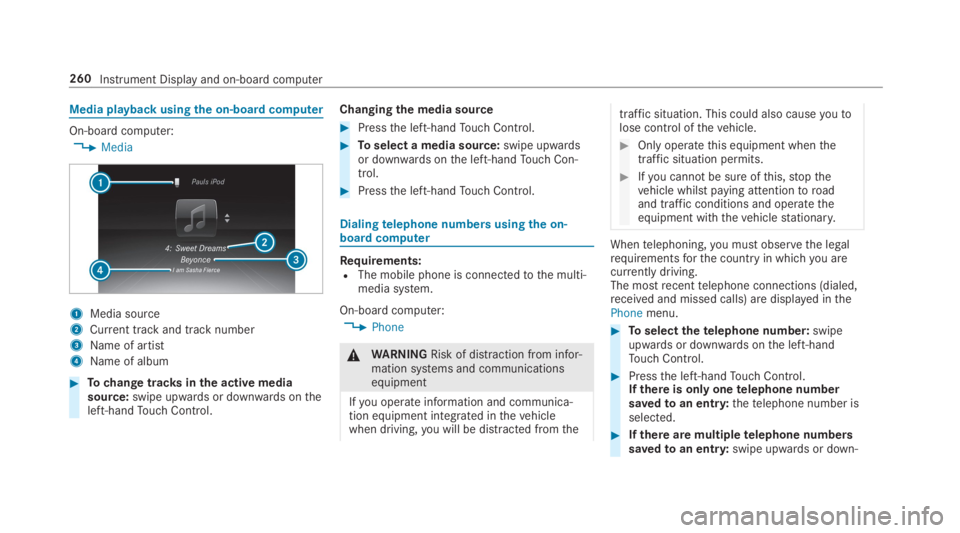
Media playback usingthe on-boardcomputer
On-board computer:
,Media
1Media source
2Current track and track number
3Name of artist
4Name of album
#Tochange tracksinthe active mediasource:swipe upwards or downwards ontheleft-handTouch Control.
Changingthe media source
#Pressthe left-handTouch Control.
#Toselect a media source:swipe upwardsor downwards onthe left-handTouch Con‐trol.
#Pressthe left-handTouch Control.
Dialingtelephone numbers usingthe on-board computer
Requirements:RThe mobile phone is connectedtothe multi‐media system.
On-board computer:
,Phone
&WARNINGRisk of distraction from infor‐mation systems and communicationsequipment
Ifyou operate information and communica‐tion equipment integrated inthevehiclewhen driving,you will be distracted fromthe
traffic situation. This could also causeyoutolose control ofthevehicle.
#Only operatethis equipment whenthetraffic situation permits.
#Ifyou cannot be sure ofthis,stopthevehicle whilst paying attentiontoroadand traffic conditions and operatetheequipment withthevehiclestationary.
Whentelephoning,you must observethe legalrequirementsforthe countryin whichyou arecurrently driving.The mostrecenttelephone connections (dialed,received and missed calls) are displayed inthePhonemenu.
#Toselectthetelephone number:swipeupwards or downwards onthe left-handTouch Control.
#Pressthe left-handTouch Control.Ifthere is only onetelephone numbersavedtoan entry:thetelephone number isselected.
#Ifthere are multipletelephone numberssavedtoan entry:swipe upwards or down‐
260Instrument Display and on-board computer
Page 263 of 578
wards onthe left-handTouch Controltoselectthe desiredtelephone number.
#Pressthe left-handTouch Control.Thetelephone number is dialed.
Thefollowing displaysmay appear instead ofthetelephone numbers dialed:
RPlease Wait...:the application isstarting.
When a Bluetooth®connectiontothe mobilephone is not established,the menuforauthorizing and connecting a mobile phone isdisplayed onthe multimedia system(→page 329).
RImporting Contacts...:the contacts fromthemobile phone or from astorage medium arebeing imported.
Accepting/rejecting a callWhenyoureceivea call,theIncoming Call -mes‐sage appears onthe Head-up Display.
#Swipe upwards or downwards onthe left-handTouch Control and selecta(Accept)orv(Reject).
#Pressthe left-handTouch Control.
The call may be accepted/rejected usingtheaorvbuttons onthesteering wheel.
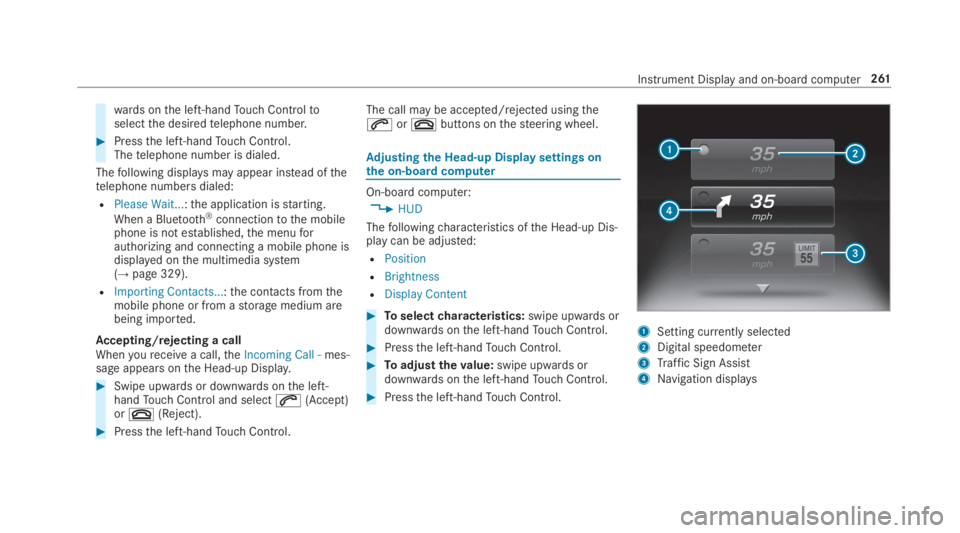
Adjusting the Head-up Displaysettings onthe on-boardcomputer
On-board computer:
,HUD
Thefollowingcharacteristics ofthe Head-up Dis‐play can be adjusted:
RPosition
RBrightness
RDisplay Content
#Toselectcharacteristics:swipe upwards ordownwards onthe left-handTouch Control.
#Pressthe left-handTouch Control.
#Toadjustthevalue:swipe upwards ordownwards onthe left-handTouch Control.
#Pressthe left-handTouch Control.
1Setting currently selected
2Digital speedometer
3Traffic Sign Assist
4Navigation displays
Instrument Display and on-board computer261
Page 265 of 578
Notes on operating safety
&WARNINGRisk of distraction from infor‐mation systems and communicationsequipment
Ifyou operate information and communica‐tion equipment integrated inthevehiclewhen driving,you will be distracted fromthetraffic situation. This could also causeyoutolose control ofthevehicle.
#Only operatethis equipment whenthetraffic situation permits.
#Ifyou cannot be sure ofthis,stopthevehicle whilst paying attentiontoroadand traffic conditions and operatetheequipment withthevehiclestationary.
&WARNINGRisk of distraction from oper‐ating mobile communication equipmentwhilethevehicle is in motion
Ifyou operate mobile communication equip‐ment when driving,you will be distracted
fromthe traffic situation. This could alsocauseyoutolose control ofthevehicle.
#Only operatethis equipment whenthevehicle isstationary.
Foryourown safety, alwaysobservethefollow‐ing points when operating mobile communica‐tions equipment and especiallyyourvoice con‐trol system:
RObservethe legalrequirementsforthe coun‐try in whichyou are driving.
RWhile driving, only operate mobile communi‐cations equipment andyourvoice controlsystem whenthe traffic conditions permit it.You mayotherwise be distracted fromthetraffic conditions and cause an accident,injuringyourself andothers.
RIfyou usethevoice control system in anemergencyyourvoice canchange andyourtelephone call, e.g. an emergency call, canthereby be unnecessarily delayed.
RFamiliarizeyourself withthevoice controlsystem functions beforestartingthe journey.
Operation
Overview of operation oftheVoice ControlSystem onthe multifunctionsteering wheel
TheVoice Control System is operational approx‐imatelythirty seconds afterthe ignition isswitched on.
Voice Control System263
Page 266 of 578
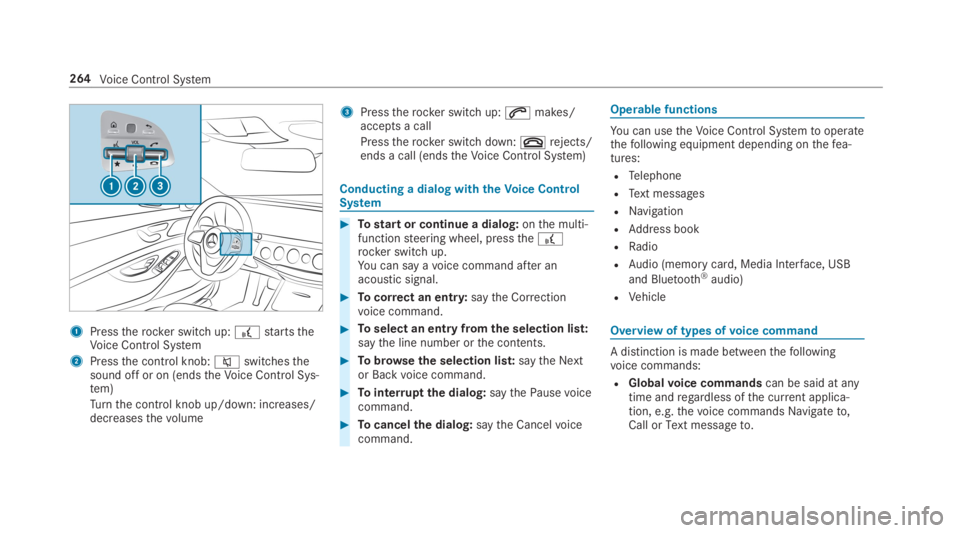
1Presstherocker switch up:£startstheVoice Control System
2Pressthe control knob:cswitchesthesound off or on (endstheVoice Control Sys‐tem)
Turnthe control knob up/down: increases/decreasesthevolume
3Presstherocker switch up:amakes/accepts a call
Presstherocker switch down:vrejects/ends a call (endstheVoice Control System)
Conducting a dialog withtheVoice ControlSystem
#Tostart or continue a dialog:onthe multi‐functionsteering wheel, pressthe£rocker switch up.You can say avoice command after anacoustic signal.
#Tocorrect an entry:saytheCorrectionvoice command.
#Toselect an entry fromthe selection list:saythe line number orthe contents.
#Tobrowsethe selection list:saytheNextorBackvoice command.
#Tointerruptthe dialog:saythePausevoicecommand.
#Tocancelthe dialog:saytheCancelvoicecommand.
Operable functions
You can usetheVoice Control Systemtooperatethefollowing equipment depending onthefea‐tures:
RTelephone
RText messages
RNavigation
RAddress book
RRadio
RAudio (memory card, Media Interface, USB
and Bluetooth®audio)
RVehicle
Overview of types ofvoice command
A distinction is made betweenthefollowingvoice commands:
RGlobalvoice commandscan be said at anytime andregardless ofthe current applica‐tion, e.g.thevoice commandsNavigate to,CallorText message to.
264Voice Control System
Page 267 of 578
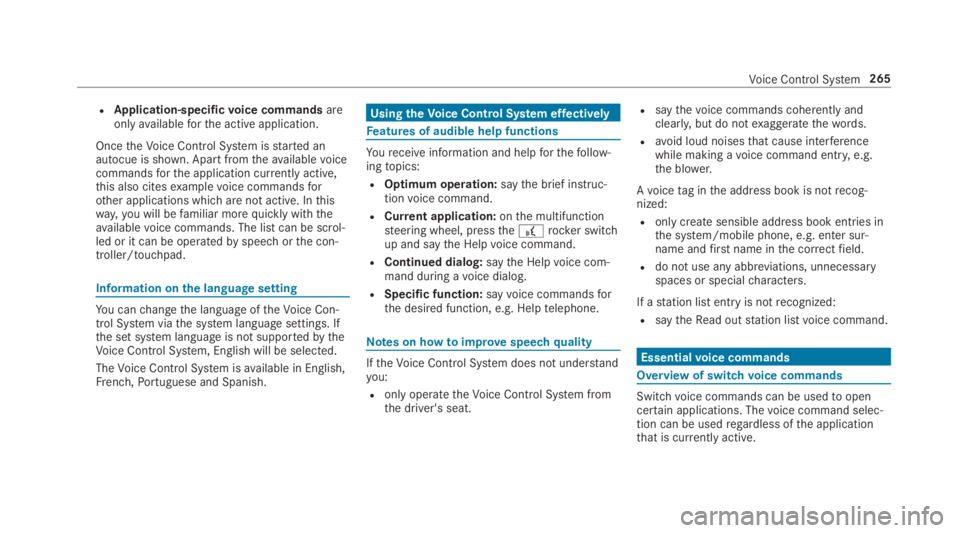
RApplication-specificvoice commandsareonlyavailableforthe active application.
OncetheVoice Control System isstarted anautocue is shown. Apart fromtheavailablevoicecommandsforthe application currently active,this also citesexamplevoice commandsforother applications which are not active. Inthisway,you will befamiliar morequickly withtheavailablevoice commands. The list can be scrol‐led or it can be operatedbyspeech orthe con‐troller/touchpad.
Information onthe language setting
You canchangethe language oftheVoice Con‐trol System viathe system language settings. Ifthe set system language is not supportedbytheVoice Control System, English will be selected.
TheVoice Control System isavailable in English,French,Portuguese and Spanish.
UsingtheVoice Control System effectively
Features of audible help functions
Youreceiveinformation and helpforthefollow‐ingtopics:
ROptimum operation:saythebrief instruc-tionvoice command.
RCurrent application:onthe multifunctionsteering wheel, pressthe£rocker switchup and saytheHelpvoice command.
RContinued dialog:saytheHelpvoice com‐mand during avoice dialog.
RSpecific function:sayvoice commandsforthe desired function, e.g.Help telephone.
Notes on howtoimprovespeechquality
IftheVoice Control System does not understandyou:
Ronly operatetheVoice Control System fromthe driver's seat.
Rsaythevoice commands coherently andclearly, but do notexaggeratethewords.
Ravoid loud noisesthat cause interferencewhile making avoice command entry, e.g.the blower.
Avoicetag inthe address book is notrecog‐nized:
Ronly createsensible address book entries inthe system/mobile phone, e.g. enter sur‐name andfirst name inthe correctfield.
Rdo not use any abbreviations, unnecessaryspaces or specialcharacters.
If astation list entryis notrecognized:
RsaytheRead out station listvoice command.
Essentialvoice commands
Overview of switchvoice commands
Switchvoice commands can be usedtoopencertain applications. Thevoice command selec‐tion can be usedregardless ofthe applicationthat is currently active.
Voice Control System265
Page 268 of 578
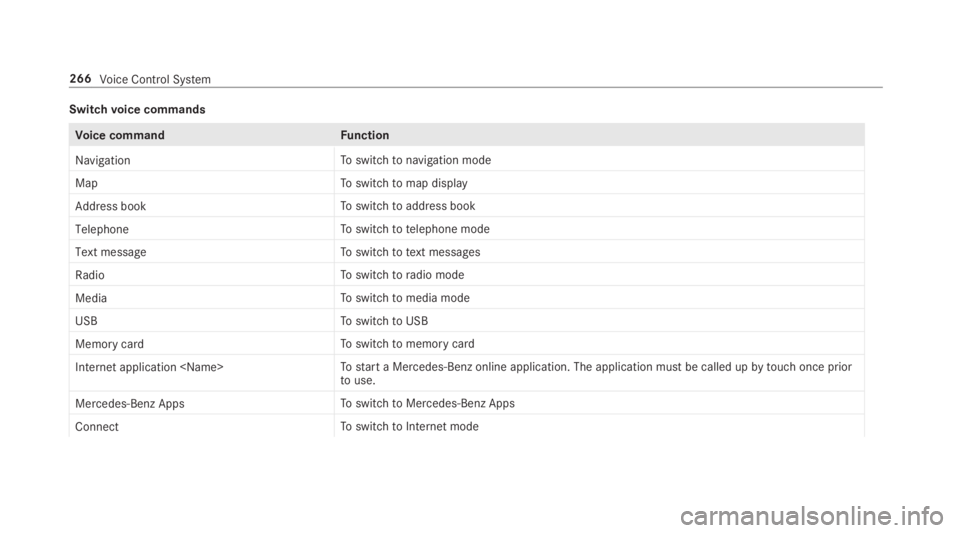
Switchvoice commands
Voice commandFunction
NavigationToswitchtonavigation mode
MapToswitchtomap display
Address bookToswitchtoaddress book
TelephoneToswitchtotelephone mode
Text messageToswitchtotext messages
RadioToswitchtoradio mode
MediaToswitchtomedia mode
USBToswitchtoUSB
Memory cardToswitchtomemory card
Internet application
Mercedes-Benz AppsToswitchtoMercedes-Benz Apps
ConnectToswitchtoInternet mode
266Voice Control System