display MERCEDES-BENZ S CLASS 2019 Manual PDF
[x] Cancel search | Manufacturer: MERCEDES-BENZ, Model Year: 2019, Model line: S CLASS, Model: MERCEDES-BENZ S CLASS 2019Pages: 578, PDF Size: 23.31 MB
Page 272 of 578
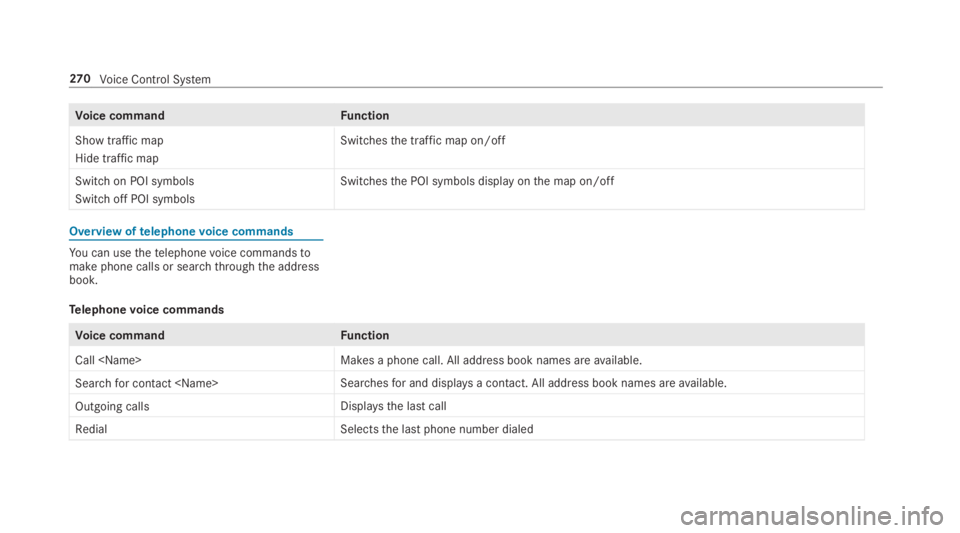
Voice commandFunction
Show traffic map
Hide traffic map
Switchesthe traffic map on/off
Switch on POI symbols
Switch off POI symbols
Switchesthe POI symbols display onthe map on/off
Overview oftelephonevoice commands
You can usethetelephonevoice commandstomake phone calls or searchthroughthe addressbook.
Telephonevoice commands
Voice commandFunction
Call
Search for contact
Outgoing callsDisplays the last call
RedialSelectsthe last phone number dialed
270Voice Control System
Page 273 of 578
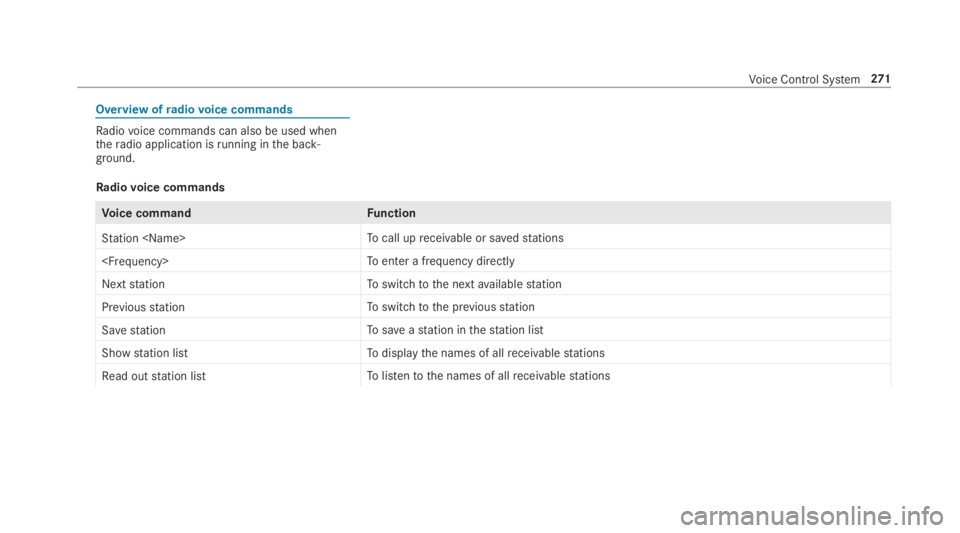
Overview ofradiovoice commands
Radiovoice commands can also be used whentheradio application isrunning inthe back‐ground.
Radiovoice commands
Voice commandFunction
Station
Next stationToswitchtothe nextavailablestation
Previous stationToswitchtothe previousstation
Save stationTosaveastation inthestation list
Show station listTodisplaythe names of allreceivablestations
Read out station listTolistentothe names of allreceivablestations
Voice Control System271
Page 277 of 578
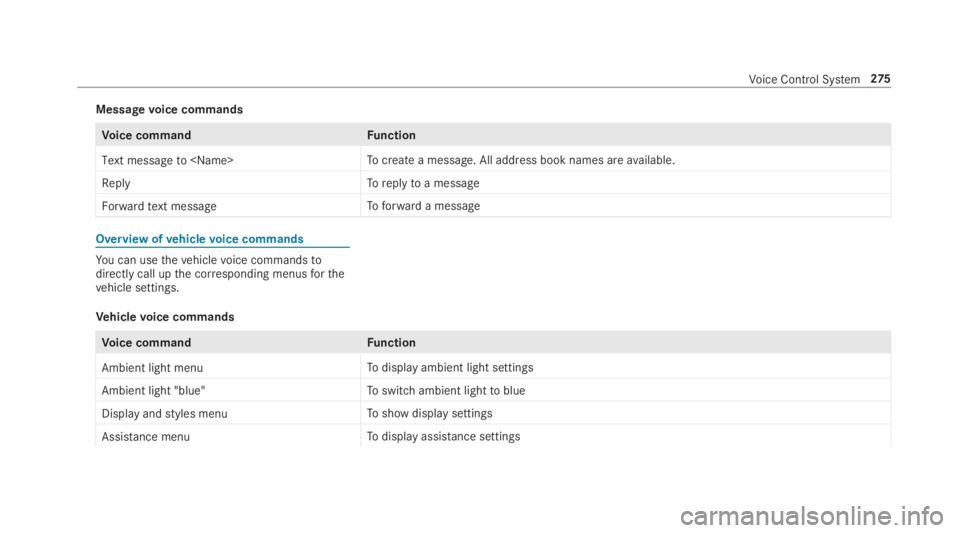
Messagevoice commands
Voice commandFunction
Text message to
ReplyToreplytoa message
Forward text messageToforward a message
Overview ofvehiclevoice commands
You can usethevehiclevoice commandstodirectly call upthe corresponding menusforthevehicle settings.
Vehiclevoice commands
Voice commandFunction
Ambient light menuTodisplay ambient light settings
Ambient light "blue"Toswitch ambient lighttoblue
Display and styles menuToshow display settings
Assistance menuTodisplay assistance settings
Voice Control System275
Page 278 of 578
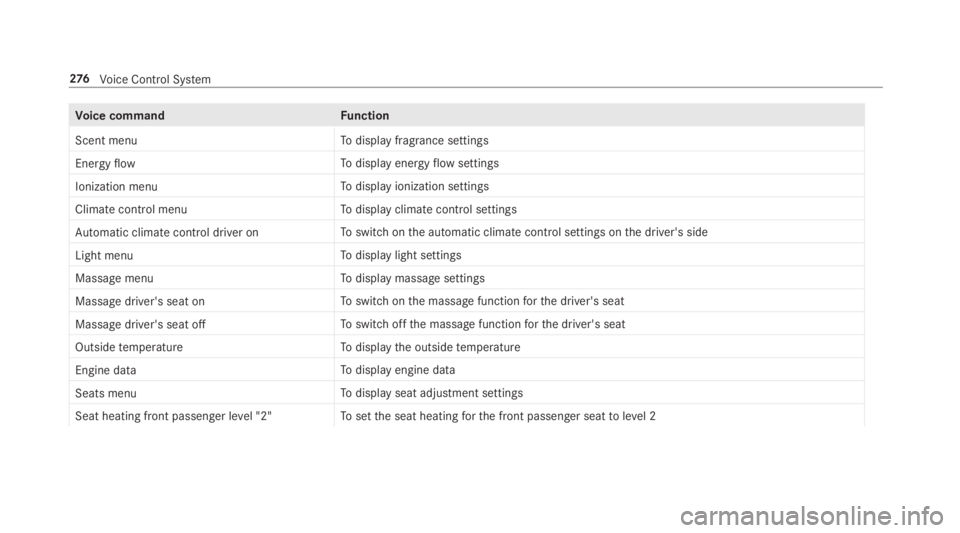
Voice commandFunction
Scent menuTodisplay fragrance settings
Energy flowTodisplay energyflowsettings
Ionization menuTodisplay ionization settings
Climate control menuTodisplay climate control settings
Automatic climate control driver onToswitch onthe automatic climate control settings onthe driver's side
Light menuTodisplay light settings
Massage menuTodisplay massage settings
Massage driver's seat onToswitch onthe massage functionforthe driver's seat
Massage driver's seat offToswitch offthe massage functionforthe driver's seat
Outside temperatureTodisplaythe outsidetemperature
Engine dataTodisplay engine data
Seats menuTodisplay seat adjustment settings
Seat heating front passenger level "2"Tosetthe seat heatingforthe front passenger seattolevel 2
276Voice Control System
Page 279 of 578
Voice commandFunction
Consumption menuTodisplay consumption
Vehicle dataTodisplayvehicle data
Voice Control System277
Page 280 of 578
Overview and operation
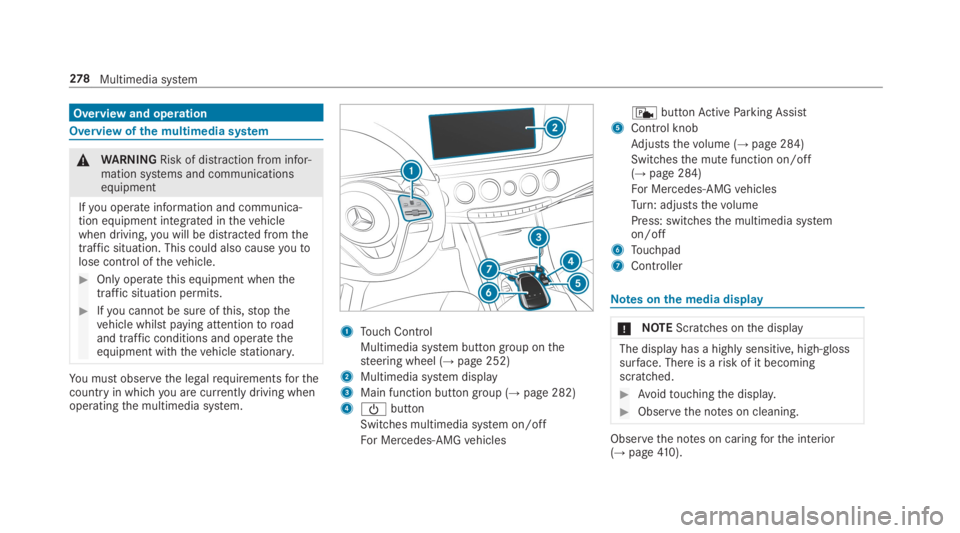
Overview ofthe multimedia system
&WARNINGRisk of distraction from infor‐mation systems and communicationsequipment
Ifyou operate information and communica‐tion equipment integrated inthevehiclewhen driving,you will be distracted fromthetraffic situation. This could also causeyoutolose control ofthevehicle.
#Only operatethis equipment whenthetraffic situation permits.
#Ifyou cannot be sure ofthis,stopthevehicle whilst paying attentiontoroadand traffic conditions and operatetheequipment withthevehiclestationary.
You must observethe legalrequirementsforthecountry in whichyou are currently driving whenoperatingthe multimedia system.
1Touch Control
Multimedia system button group onthesteering wheel (→page 252)
2Multimedia system display
3Main function button group (→page 282)
4
Page 281 of 578
Automatictemperature-controlled switch-offfeature:ifthetemperature istoo high,thebrightness is initiallyreduced automatically. Thedisplay maythen switch off completelyfor awhile.
%Ifyou arewearing polarized sunglasses, itmay be difficulttoreadthe display.
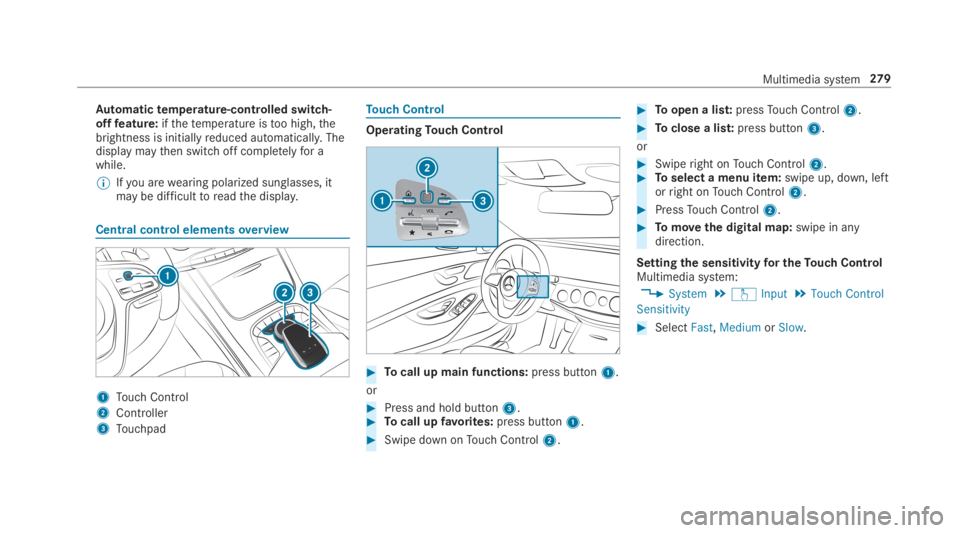
Central control elementsoverview
1Touch Control
2Controller
3Touchpad
Touch Control
OperatingTouch Control
#Tocall up main functions:press button1.
or
#Press and hold button3.#Tocall upfavorites:press button1.
#Swipe down onTouch Control2.
#Toopen a list:pressTouch Control2.
#Toclose a list:press button3.
or
#Swiperight onTouch Control2.#Toselect a menu item:swipe up, down, leftorright onTouch Control2.
#PressTouch Control2.
#Tomovethe digital map:swipe in anydirection.
Settingthe sensitivityfor theTouch ControlMultimedia system:
,System.wInput.Touch Control
Sensitivity
#SelectFast,MediumorSlow.
Multimedia system279
Page 282 of 578
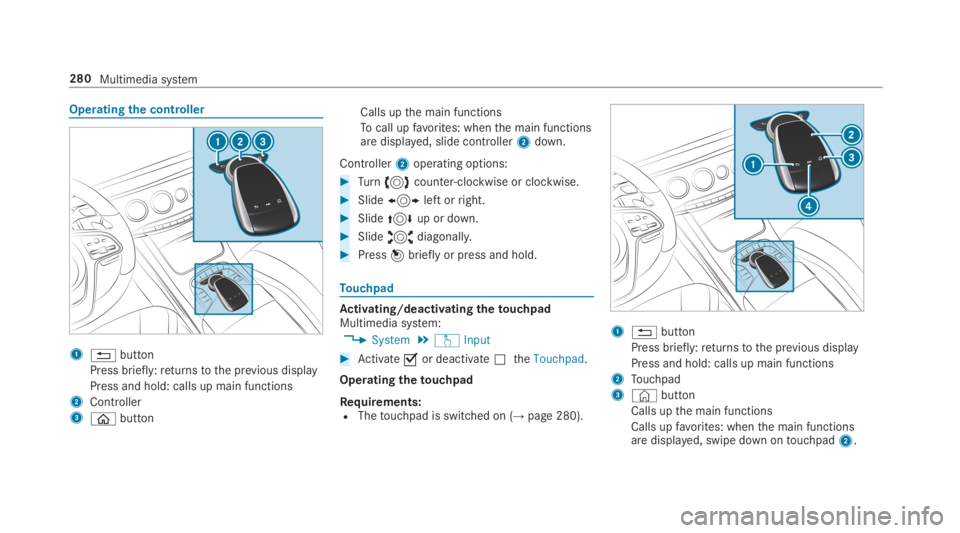
Operatingthe controller
18button
Press briefly:returnstothe previous display
Press and hold: calls up main functions
2Controller
3
Page 285 of 578
Addingfavorites
Adding predefinedfavorites
#Pressthe©button.The main functions are displayed.
#Navigate downwards twice.TheFavorites menu appears.
#SelectNew Favorite.The categories are displayed.
#Select a category.Thefavorites are displayed.
#Select afavorite.
#Storethefavoriteatthe desired position.If afavoritehas already been added atthisposition, it will beoverwritten.
Example: addingyourownfavorites
#SelectVehicle.
#SelectFull Screen: Consumption.
#Press and holdthe©button untilthefavorites are displayed.
#Storethefavoriteatthe desired position.
IfNo function available for saving.is shown,theselected function cannot be added.
Renamingfavorites#Pressthe©button.The main functions are displayed.
#Navigate downwards once.
#Select afavorite.
#Navigate downwards once.TheFavorites menu appears.
#SelectRename.
#Enterthecharacters.
#Toconfirmthe entry:select¡.
Movingfavorites#Pressthe©button.The main functions are displayed.
#Navigate downwards once.
#Select afavorite.
#Navigate downwards once.TheFavorites menu appears.
#SelectMove.
#Movethefavorite tothe desired position.If afavoritehas already been added atthisposition, it will beoverwritten.
Deletingfavorites#Pressthe©button.The main functions are displayed.
#Navigate downwards once.
#Select afavorite.
#Navigate downwards once.TheFavorites menu appears.
#Todelete:selectDelete.
#SelectYes.
#Torestoreallfavorites:selectReset All.A promptappears.
#SelectYes.Thefavorites areresettothefactory set‐tings.
Multimedia system283
Page 286 of 578
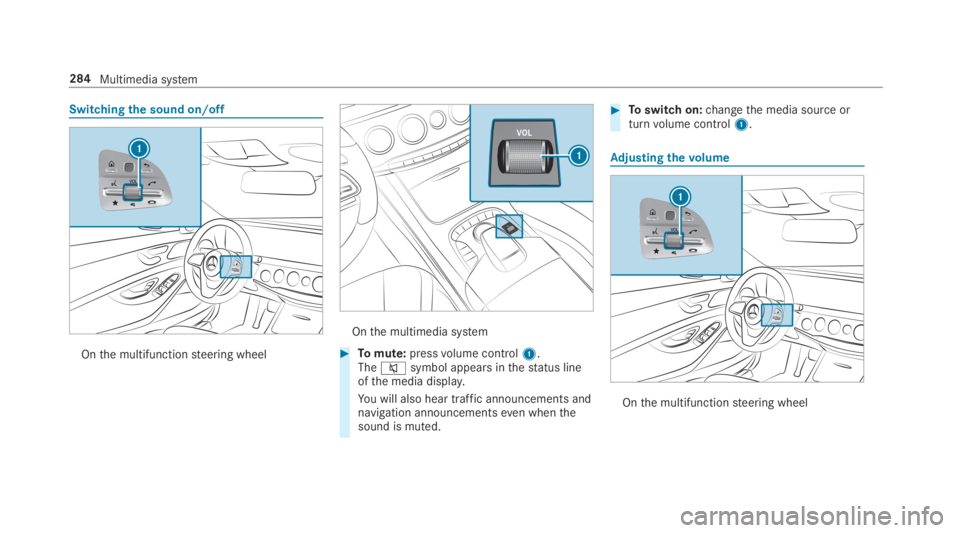
Switchingthe sound on/off
Onthe multifunctionsteering wheel
Onthe multimedia system
#Tomute:pressvolume control1.Thecsymbol appears inthestatus lineofthe media display.
You will also hear traffic announcements andnavigation announcementseven whenthesound is muted.
#Toswitch on:changethe media source orturnvolume control1.
Adjusting thevolume
Onthe multifunctionsteering wheel
284Multimedia system