ECU MERCEDES-BENZ S-CLASS CABRIOLET 2017 Owner's Guide
[x] Cancel search | Manufacturer: MERCEDES-BENZ, Model Year: 2017, Model line: S-CLASS CABRIOLET, Model: MERCEDES-BENZ S-CLASS CABRIOLET 2017Pages: 521, PDF Size: 10.48 MB
Page 158 of 521
*
NO
TEDama getothev ehicle or thed riv‐
et ra in caused bythev ehicle rolling away #
Alw aysp roper lysecur ethe vehicle
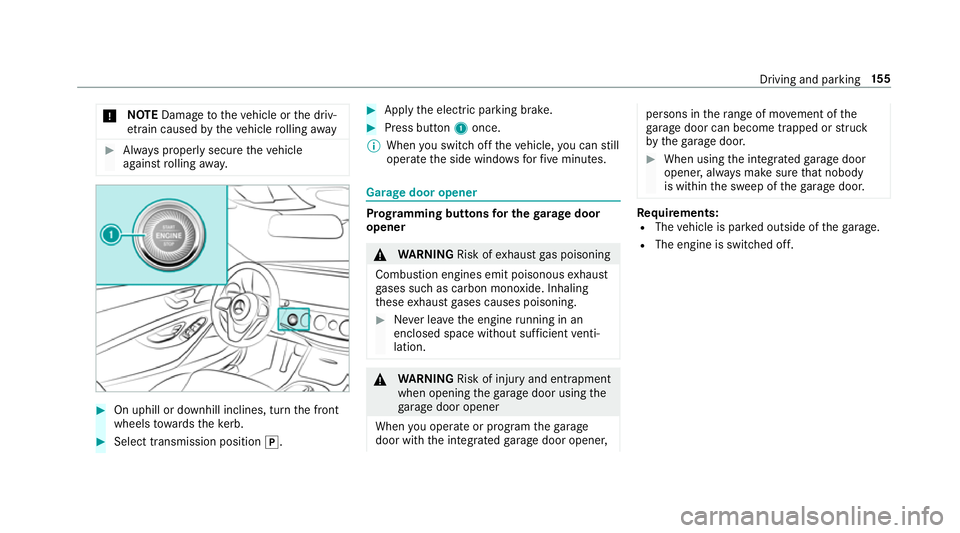
agains trolling away. #
On uphillord ownhill inclines, tur nthe front
wheels towa rdst he kerb. #
Select transmission position j. #
Appl ythe electric parking brake. #
Press button 1once.
% When yous wit ch offt he vehicle, youc an still
opera tethes ide windo wsforf ivem inutes. Garag
edoor opener Prog
rammin gbutton sfor th egarag edoor
opener &
WARNING Risk ofexhaus tgas poisoning
Combustio nengines emit poisonous exhaust
ga ses suc hascarbon monoxide. Inhaling
th ese exhaus tgases causes poisoning. #
Neverlea ve thee ngine running in an
enclose dspace wi thout suf ficient venti‐
lation. &
WARNING Risk of inju ryand ent rapment
when openin gthe garage door using the
ga rage door opener
When youo perat eorp rogram theg arage
door wit hthe integrated garage door opener, persons in
ther ang eofm ovement of the
ga rage door can become trapped or stru ck
by theg arag edoor. #
When using thei ntegrated garage door
opener ,alway sm akes uret hat nobody
is within thes weep of theg arag edoor. Re
quirements:
R The vehicle is par kedo utside of theg arage.
R The engine is swit ched off. Driving and parking
15 5
Page 162 of 521
Count
ryRadio equipment appr oval
number
South
Africa TA
-20 15/1386
Tu rkey notrequired
Uni ted
Arab Emi‐
ra tes ER4
1849/15
Dealer No: DA35176/14
United
St ates FCC ID
:NZLM UAHL5 Brazil
Es
te equipament ooper aemc aráter secundário,
is to é, não temd ireit oàp roteção contr ainter fer‐
ência prejudicial ,mesmo de es tações do mesmo
tipo ,en ão pod ecausar inter ferê ncia asiste mas
operando em caráter primário.
Pa ra maio resi nformações acessar
www.anatel.go v.br
Fu rther information on thed eclaration of con‐
fo rm ity forw ireles svehicle components
(→ pag e26). Electric parking brake
Fu
nction of thee lectric pa rking brak e(app ly‐
ing automatically) &
WARNING Risk of accident and inju ry
due tochildren lef tunat tende dint he
ve hicle
If yo ul eave children unat tende dint hevehi‐
cle, they ma ybea bletos etthev ehicle in
motion, fore xamp leby:
R Releasing thep arking brake.
R Shifting thet ransmission out of park
position j.
R Startin gthe engine.
In addition, they ma yoperat evehicle equip‐
ment. #
Neverlea ve children and animals unat‐
te nde dint hevehicle. #
When leaving thev ehicle, alw ayst ake
th ek eywit hyou and loc kthe vehicle.
This also applies tomobil ephones if the
"Digital Car Keyint he smartphone" Driving and parking
15 9
Page 164 of 521
App
lying or releasing thee lectric pa rking
brak emanually
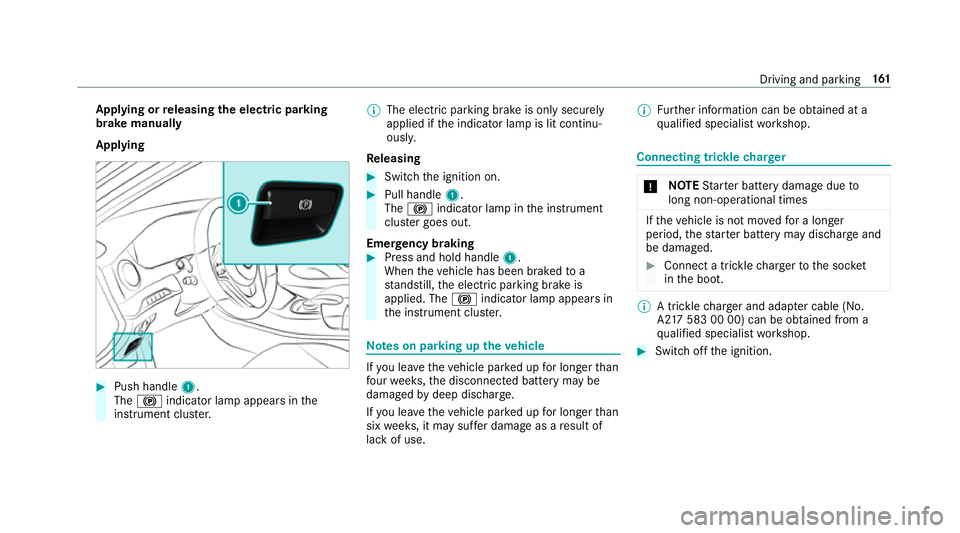
Applying #
Push handle 1.
The ! indicator lam pappear sinthe
instrument clus ter. %
The electric parking brak eisonlys ecurely
applied if thei ndicator lam pislit continu‐
ously.
Re leasing #
Swit chthei gnition on. #
Pull handle 1.
The ! indicator lam pinthe instrument
clus terg oes out.
Emer gency braking #
Press and hold handle 1.
When thev ehicle has been braked to a
st andstill, thee lectric parking brak eis
applied. The !indicator lam pappear sin
th ei nstrument clus ter. Note
sonp arking up thev ehicle If
yo ul eave thev ehicle par kedupf or longer than
fo ur we eks, thed isconnected batter ymaybe
damaged bydeep dischar ge.
If yo ul eave thev ehicle par kedupf or longer than
six weeks, it ma ysufferd ama geasaresult of
lac kofu se. %
Further information can be obtained at a
qu alified specialis tworks hop. Connecting trickle
charger *
NO
TEStarterb atter ydama gedue to
long non-ope rational times If
th ev ehicle is no tmove dfor alonger
period, thes tarter batter ymaydischarg eand
be dama ged. #
Connec tatrick le ch arge rtot he soc ket
in theb oot. %
Atrick le ch arge ra nd adapte rcable( No.
A2 17 583 00 00) can be obtained from a
qu alified specialis tworks hop. #
Switc hoffthei gnition. Driving and parking
161
Page 182 of 521
Pulling
away wit hA ctive Distance Assist
DISTRO NIC #
Remo veyour foot from theb rake pedal. #
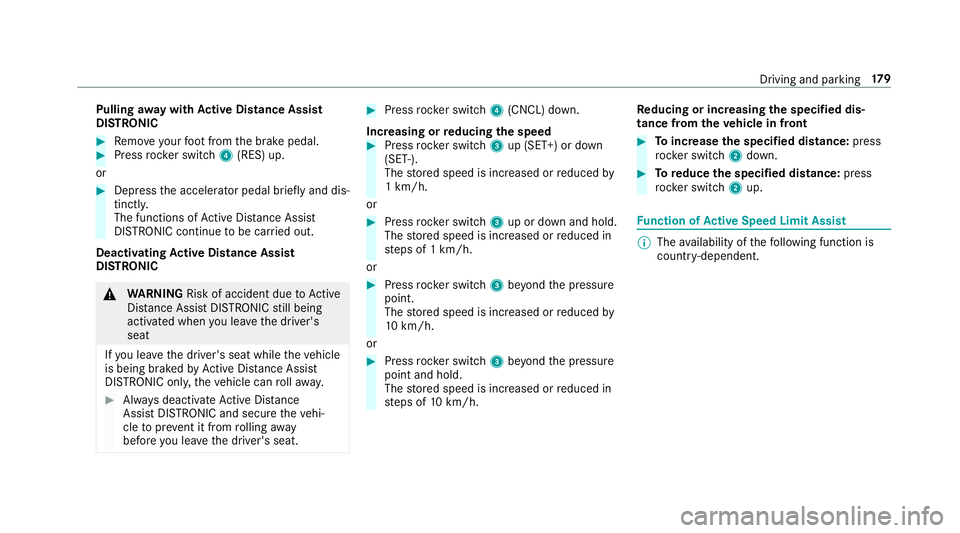
Press rocker switch 4(RES) up.
or #
Depress thea ccelerator pedal briefly and dis‐
tinctl y.
The functions of ActiveD istan ce Assi st
DISTRONI Ccontinue tobe car ried out.
Deactivating Activ eD ista nce Assist
DISTRO NIC &
WARNING Risk of accident du etoActive
Dis tance Assi stDISTRONI Cstillb eing
activated when youl eave thed rive r's
seat
If yo ul eave thed rive r's seat while thev ehicle
is being braked byActiveD istan ce Assi st
DISTRONI Conly,the vehicle can rollaw ay. #
Alw aysd eactivat eActiv eDista nce
Assi stDISTRONI Cand secur ethe vehi‐
cle topreve nt it from rolling away
befor eyou lea vethed rive r's seat. #
Press rocker switch 4(CNCL) down.
Increasing or reducing the speed #
Press rocker switch 3up (SET+) or down
(SET-).
The stored speed is increased or reduced by
1k m/h.
or #
Press rocker switch 3up or down and hold.
The stored speed is increased or reduced in
st eps of 1km/h.
or #
Press rocker switch 3beyond thep ressure
point.
The stored speed is increased or reduced by
10 km/h.
or #
Press rocker switch 3beyond thep ressure
point and hold.
The stored speed is increased or reduced in
st eps of 10km/h. Re
ducing or inc reasin gthe specified dis‐
tance from thev ehicle in front #
Toincrease thes pecified distance: press
rock er switch 2down. #
Toreduce the speci fied distance: press
rock er switch 2up. Fu
nction of Activ eS peed Limit Assi st %
The availabilit yofthefollowing function is
countr y-dependent. Driving and parking
17 9
Page 189 of 521
sag
eiss hown in them ultifunction displa y.The
ve hicle is decelerated in stages toas tandstill. At
speeds belo w60km/h theh azar dwarning
light sswitc hona utomaticall y.
When thev ehicle is stationar y,thef ollowing
actions ar ecarried out:
R The vehicle is secured wit hthe electric park‐
ing brake.
R ActiveD ista nce Assi stDISTRONI Cisended.
R The vehicle is unloc ked.
R If possible, an emer gency cal lisplace dto
th eM ercedes-Benz emer gency cal lcentre.
The driver can cance lthe deceleration at any
time byper form ing one of thef ollowing actions:
R Steering
R Depressing theb rake or accelera torp edal
R Pressing asteering wheel button or operat‐
ing Touc hC ontrol
R Activating or deacti vating ActiveD ista nce
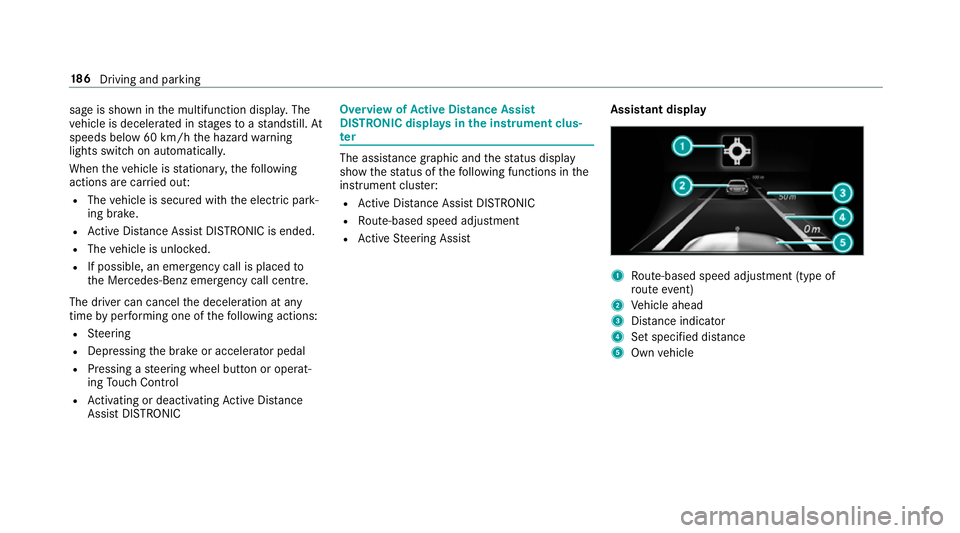
Assi stDISTRONIC Overvi
ewofActiv eD ista nce Assist
DISTRO NIC displa ysinthei nstrument clus‐
ter The assis
tance graphi cand thes tatus display
sho wthe status of thef ollowing function sinthe
instrument clus ter:
R ActiveD ista nce Assi stDISTRONIC
R Route-based spee dadjustment
R ActiveS teering Assist Assistant display 1
Route-based spee dadjustmen t(type of
ro utee vent)
2 Vehicle ahead
3 Distance indica tor
4 Setspecifie ddista nce
5 Own vehicle 18 6
Driving and pa rking
Page 191 of 521
Information on Hill
StartA ssist Hill
StartA ssisth olds thev ehicle foras hort
time when pulling away on ahill under thef ol‐
lowing conditions:
R The transmission is in position hork.
R The electric parking brak eisreleased.
This gives youe nough tim etomovey our foot
from theb rake pedal tothea ccelera torp edal
and depress it befor ethe vehicle begins toroll. &
WARNING Risk of accident and inju ry
caused bythev ehicle rolling away
Af teras horttime, Hill StartA ssistnol onger
holds thev ehicle and it can rollaw ay. #
Therefore, swiftl ymove your foot from
th eb rake pedal tothea ccelerator
pedal. Ne vera ttem pttolea vethev ehi‐
cle if it is being held byHillStart Assist. HOLD function
HOLD function
The HOL
Dfunction holds thev ehicle at astand‐
st ill without requ iring youtod epress theb rake
pedal, e.g. when pulling away on steep slopes.
Sy stem limitations
R The incline mus tnotbe grea tert han 30%.
Ac tivating/deactivatin gthe HOL Dfunction &
WARNING Risk of an accident du etothe
HOLD function being acti vatedw heny ou
lea vethev ehicle
If yo ul eave thev ehicle while onl ythe HOLD
function is braking thev ehicle, thev ehicle
can rollaw ay inthef ollowing situations:
R Ifth er eisam alfunction in thes ystemor
in thep owe rsupply.
R Ifth eH OLD function is deactivated by
depressing thea ccelera torp eda lort he
brak epedal, e.g. byavehicle occupant. R
Ifth ee lectrics in thee ngine compart‐
ment ,the batter yorthe fuses ar etam‐
pered wit horifthe batter yisdisconnec‐
te d. #
Alw aysd eactivat ethe HOLD function
and secur ethe vehicle agains trolling
aw ay befor eleaving thev ehicle. *
NO
TEDama gefrom auto matic braking When
ActiveB rake Assi st,A ctiv eDista nce
Assi stDISTRONI Corthe HOLD function are
activated, thev ehicle brakes autonomously
in cer tain situations.
To avo id damag etothevehicle, deactivate
th ese sy stems in thef ollowing or similars it‐
uations: #
During towing #
Inac arwa sh Re
quirements:
R The vehicle is stationar y.
R The driver's door is closed or thes eat belt on
th ed rive r's side is fastened. 18 8
Driving and pa rking
Page 192 of 521
R
The engine is running or ha sbeena utomati‐
cally switched of fbythe EC Ostart/s top
function.
R The electric parking brak eisreleased.
R ActiveD ista nce Assi stDISTRONI Cisdeacti‐
va ted.
R The transmission is in position h,kori.
Ac tivatin gthe HOL Dfunction #
Dep ress theb rake pedal and af teras hort
time quickl ydepress fur ther until theë
displa yappear sinthe multifunction displa y.#
Release theb rake pedal.
Deactivating the HOLD function #
Depress thea ccelerator pedal topull away.
or #
Depress theb rake pedal until theë dis‐
pla yd isappear sfromt he multifunction dis‐
pla y. The HOLD function is deactivated in
thef ollow‐
ing situations:
R ActiveD ista nce Assi stDISTRONI Cisactiva‐
te d.
R The transmission is switched toposition j.
R The vehicle is secured wit hthe electric park‐
ing brake.
In thef ollowing situations, thev ehicle is held by
th et ransmission position jorby thee lectric
parking brake:
R The seat belt is unfas tened and thed rive r's
door is opened.
R The engine is switched off.
R Ther eisam alfunction in thes ystemort he
po we rsupply is insuf ficient. AI
RB ODYC ONT ROL AIR
BODY CONT ROLfunction
AI RB ODYC ONTROL is an air suspension sy stem
wit hvariable dampin gfor impr oveddriving com‐ fo
rt.T he all-round le velc ontrol sy stem ensures
th eb estp ossible suspension and const ant
groun dclearance, evenw ithal aden vehicle.
When driving at speed, thev ehicle is lo wered
automaticall ytoimprove driving saf etya nd to
re duce fuel consum ption. The option of manually
adjustin gthe vehicle le velisa lsoavailable.
AI RB ODYC ONTROL comprises:
R Air suspension wit hautomatic all-round le vel
control
R Speed-dependent lo wering toreduce fuel
consum ption
R Manuall yselec table high-le vels etting for
greater ground clearance
R ADS PLUS (Adaptiv eDamping Sy stem with
const ant dampin gforce adjustment)
R DYNA MIC SELECT switc hand le velb utton Drivin
gand parking 18 9
Page 209 of 521
Deactivating/acti
vatin gm anoeuv ring assis‐
tance
Multimedia sy stem:
, Vehicle .
k Assistance .
Camera
&P ark. Assist .
Manoeuvrin gassist. #
Switc hthe function on Oor off ª. AT
TENTION ASSI STFu
nction of ATTENTION ASSI ST
AT TENTION ASSIS Tassists youo nlong, mon oto‐
nous journe ys,e .g. on mo torw aysa nd trunk
ro ads. If ATTENTION ASSIS Tdetects ind icators
of fatigue or increasing lapses in concentration
on thep artoft he driver ,itsuggests taking a
brea k.
AT TENTION ASSIS Tisonlyana id. It cannot
alw aysd etect fatigue or lapses in concentration
unti ltoo late. The sy stem is no tasubstitut efor a
we ll-res teda nd attentiv edrive r.On long jour‐
ne ys,tak er egular break singood time that allow
fo ra dequ ater ecuperation.
Yo uc an choose between tw osettings.
R Standard: normal sy stem sensitivity. R
Sensitive: higher system sensitivity .The
driver is warned earlier and thea ttention
le ve ld etected byATTENTION ASSIS Tisadap‐
te da ccording ly.
If dr owsiness or increasing lapses in concentra‐
tion ar edetected, theATTENTION ASSIST: Take
ab reak! warning appear sinthe Instrument Dis‐
pla y.Yo uc an ackn owledg ethe messag eand
tak eab reak wher enecessar y.Ifyo udon ottake
ab reak and ATTENTION ASSIS Tcontinues to
de tect increasing lapse sinconcentration, you
will be warned again af teram inimu mof
15 minutes. Yo
uc an ha vethef ollowing status information for
AT TENTION ASSIS Tdispla yedint he assis tance
menu of theo n-boar dcomputer:
R The lengt hofthe journe ysince thel ast
break.
R The attention le veld etermined byATTENTION
ASSIS T.
If AT TENTION ASSIS Tisunable tocalculat ethe
attention le vela nd canno tissue awarning ,the
System suspended messageappears.
If aw arning is given in theI nstrument Displa y,
th em ultimedia sy stem of fers to sear chforar est
area. Youc an select aresta reaa nd star tn aviga‐
tio ntot hisrest area. This function can be activa‐
te da nd deactivated in them ultimedia sy stem.
If AT TENTION ASSIS Tisdeactivated, theé
symbol appear sinthe assis tance graphi cinthe
Instrument Displa ywhen thee ngine is running.
AT TENTION ASSIS Tisactivated automatically
when thee ngine is re-sta rted. The las tselected
sensitivity le velremain sstore d. 206
Driving and parking
Page 224 of 521
Callin
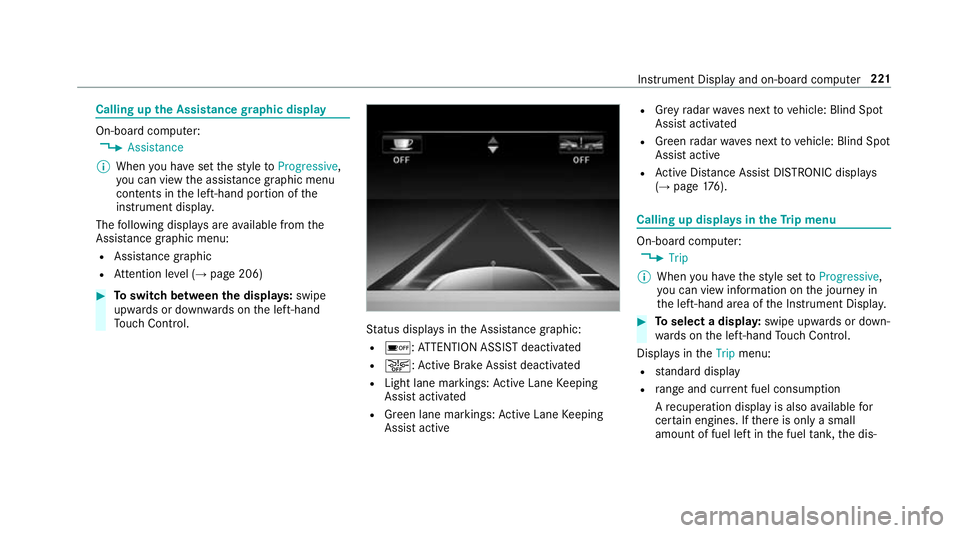
gupthe Assistance graphic display On-board computer:
, Assistance
% When youh ave setthe styletoProgressive,
yo uc an vie wthe assis tance graphi cmenu
contents in thel eft-hand portion of the
instrumen tdispla y.
The following displa ysarea vailable from the
Assi stanc egraphic menu:
R Assis tance graphic
R Attentio nleve l(→ pag e206) #
Toswitc hbetwe en thed ispla ys:swipe
up wa rdsord ownw ards on thel eft-hand
To uc hC ontrol. St
atus displa ysintheA ssis tance graphic:
R é:A TTENTION ASSIS Tdeactivated
R æ:A ctiveBrake Assi stdeactivated
R Light lane markings: ActiveL aneK eeping
Assis tactivated
R Green lane markings: ActiveL aneK eeping
Assis tactive R
Grey radar wavesn exttov ehicle: Blind Spot
Assis tactivated
R Green radar waves next tovehicle: Blind Spot
Assis tactive
R ActiveD ista nce Assi stDISTRONI Cdispl ays
( → pag e176). Calling up displa
ysintheT ripm enu On-boar
dcomputer:
, Trip
% When youh ave thes tyle se ttoProgressive,
yo uc an vie winformation on thej ourne yin
th el eft-hand area of theI nstrument Displa y. #
Toselect adispla y:swipe upwards or down‐
wa rdsont he left-hand Touc hC ontrol.
Displa ysinthe Trip menu:
R standar ddisplay
R rang ea nd cur rent fue lconsu mption
Ar ecuperation displa yisalsoavailable for
cer tain engines. If ther eiso nlyas mall
amount of fuel lef tinthe fuel tank ,the dis‐ Instrument Displa
yand on-boar dcomputer 221
Page 255 of 521
Ac
tivating/deactivatin gBluetooth ®
Requ irement:
R Apple CarPlay™ is no tactive.
Multimedia sy stem:
, System .
ö Connectivity #
Activate Oor deacti vate ª Bluetoo th®
.
If Android Autois active, apromp tappear sask‐
ing whe ther Blue tooth®
should be deactivated. #
Select Yes.
Android Autois closed and Blue tooth®
is
deactivated. Wi
-Fi Wi
-Fic on nectio noverview
Yo uc an use Wi-Fi toestablish aconnection with
aW i-Finetwo rkand toaccess theI nterne tor
ot her networ kdevices.
The following connection option sareavailable:
R Wi-Fi connection The
Wi-Fi connectio ntoaWi-Fi-capable
device ,e.g.t he cus tomer's mobil ephone or
at able tPCise stablished.
R multimedia sy stem as aWi-Fihotspot
Using this function ,atable tPCorn otebook
can be connected, fore xamp le.
To establish aconnection ,you can use thef ol‐
lowing me thods:
R WPS PIN
The connection toas ecur eWi-Finetwo rkis
mad eviaaP IN.
R WPS PBC
The connectio ntoasecureWi-Finetwo rkis
mad ebyp ressing abutton (push button).
R security key
The connection toas ecur eWi-Finetwo rkis
mad eviaas ecu rity key. Setting up
Wi-Fi
Requ irement:
R The device tobe connec teds upports one of
th et hree means of connection described
(→ pag e252).
Multimedia sy stem:
, System .
ö Connectivity
Ac tivating/deactivatin gWi-Fi #
Switch Wi-FionO or off ª.
If Wi-Fi is deacti vatedª,communicatio nvia
Wi -Fi toall devices is inter rupte d. This also
means that ac onnectio ntothe HERMES
communication module canno tbeestab‐
lished. Then function ssuchasd ynamic route
guidance wit hLiveT raffic In form ation ar enot
av ailable.
Connecting them ultimedia sy stem wit ha
device via Wi-Fi
Thi sfunction is available if aHERME Scommuni‐
cation modul eisnotins talled. 252
Multimedia sy stem