ECU MERCEDES-BENZ S-CLASS CABRIOLET 2017 Repair Manual
[x] Cancel search | Manufacturer: MERCEDES-BENZ, Model Year: 2017, Model line: S-CLASS CABRIOLET, Model: MERCEDES-BENZ S-CLASS CABRIOLET 2017Pages: 521, PDF Size: 10.48 MB
Page 394 of 521
Brazil
Es
te equipament ooper aemc aráter secundário,
is to é, não temd ireit oàp roteção contr ainter fer‐
ência prejudicial ,mesmo de es tações do mesmo
tipo ,en ão pod ecausar inter ferê ncia asiste mas
operando em caráter primário. Vi
etnam Ty
re pressur elossw arnin gsystem Fu
nction of thet yrep ress urel ossw arning
sy stem
The tyr epressur eloss warning sy stem warnst he
driver bymeans of displa ymessa gesw hen there
is as eve retyr ep ressur eloss.
Af terac hang eint yrep ressure, awheel rotation
or aw heel change, thet yrep ressur eloss warn‐
ing sy stem has tobe taught-in again bybeing
re star ted( → pag e394). The tyr
epressur eloss warning sy stem does not
re place then eed toregularly checkt he tyre
pressures.
Sy stem limitations
The sy stem ma ybeimpaired or ma ynotfunction
in thef ollowing situations:
R Ifth et yrep ressur eiss etincor rectly.
R Ifth er eisas udden pressur eloss caused, for
ex ample, byaforeign object penetratin gthe
tyre.
R Ifth ep ressur eloss in se veraltyres decrea‐
ses at thes ame rate.
The sy stem has alimited or dela yedf unction:
R When ther oad sur face is poo r,e.g. sno wor
gr ave l.
R When drivin gwiths nowc hains.
R When driving in averys porty driving style
wit hh igh cornering speeds or sudden accel‐
eration.
R When drivin gwithah igh load. Wheels and tyres
391
Page 406 of 521
Ve
hicles with atyrep ressur emonitoring
sy stem: foraf ewminutes af terac ollapsible
spar ewhee lisf itted, thes ystemm aystill
displa ythe tyr epressur eoft heremo ved
wheel.
Be sur etoalso obse rvet he following fur ther
re lated subjects:
R Notesont yrep ressur e(→pag e385)
R Tyre pressur etable (→ page386) Re
moving the collapsibl espar ew heel The collapsible spar
ewheel is secured in thec ol‐
lapsible spar ewheel bag in theb oot. #
Obser vethei nformation on mounting tyres
(→ pag e392). #
Open theb oot. #
Detach thef astening stra ps. #
Unhook ther etainin gspring hook softhefas‐
te ning stra ps from theb rack ets. #
Remo vethee mer gency spa rewheel bag
to ge ther wit hthe collapsibl espar ew heel. #
Open thee mer gency spa rewheel bag and
re mo vethec ollapsible spar ewheel. Inflating
thec ollapsible spa rewheel Re
quirements:
R Mount thec ollapsible spar ewheel as descri‐
bed. (→ page400)
R Remo vethet yrei nflation compressor from
th es towa ge well under theb ootfloor.
(→ pag e366)
* NO
TEDama getothec ollapsible spare
wheel when lo wering thev ehicle Lo
we ring thev ehicle without pr eviously
inflatin gthe collapsibl espar ew heel can
damag eits rim. #
Inflat ethe collapsibl espar ew heel using
th et yrei nflation compressor before
lo we ring thev ehicle. *
NO
TEOverheating du etothe tyr einfla‐
tion compressor running tool ong #
Do no trun thet yrei nflation compres‐
sor forl onger than tenm inutesw ithout
inter ruption. #
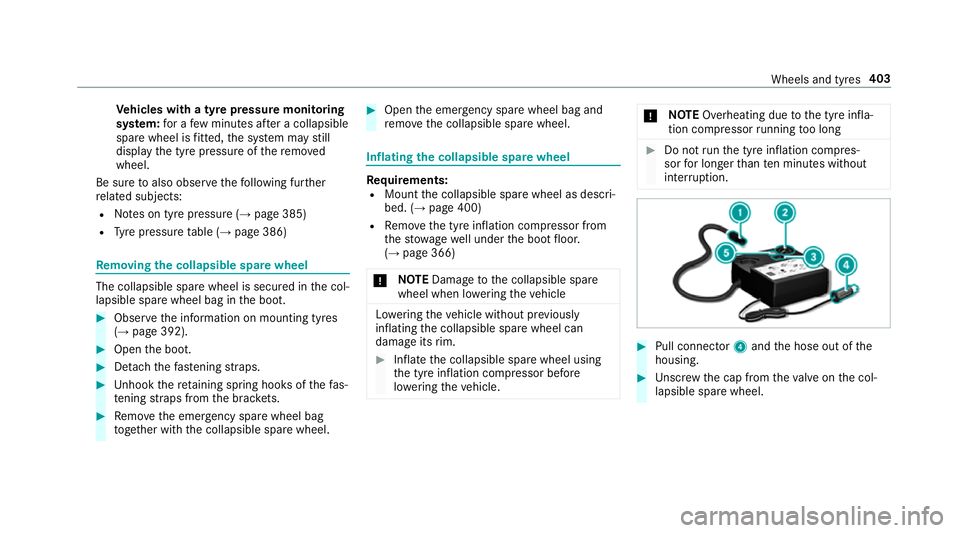
Pull connec tor4 and theh ose out of the
housing. #
Unscr ew thec ap from thev alveont he col‐
lapsible spar ewheel. Wheels and tyres
403
Page 434 of 521
Displa
ymessages
Possible causes/consequences and M
MSolutions
Front-passenger airbag
enabled See Owner's Man-
ual *T
he front passenger airbag is enabled while thev ehicle is in motion:
R evenw henac hild, asmall adult or an object weighin gless than thes ystemw eight thre shold is located on the
front passenger seat
R evenw hent he front passenger seat is no toccupied
The sy stem ma ydetect objects or forc es that ar eaddin gtot heweight applied tothes eat. &
WARNING Risk of inju ryor fata linjur ywhen using achild restra int sy stem while thef ront passenger airbag
is enabled
If yo us ecur eac hild in achild restra int sy stem on thef ront passenger seat and thef ront passenger airbag is
enabled, thef ront passenger airbag can deplo yintheevent of an accident.
The child could be stru ck bythea irbag. #
Ensure, bo thbefor eand during thej ourne y,that thes tatus of thef ront passenger airbag is cor rect.
NEVER us earearwardfacing child restra int on aseat pr otected byan ACTIVE FRONT AIRB AGin front of it;
DE ATHorS ERIOU SINJU RYtotheC HILD can occur. #
Pullovera nd stop thev ehicle safely as soon as possible, paying attention toroad and traf ficc onditions. #
Chec kthe status of thea utomatic front passenger airbag shutof f. #
If necessar y,consult aqualified specialis tworks hop immediatel y. Displ
aymessa gesa nd warning/indicator lamps 431
Page 486 of 521
Plastic trim .......................................... 360
Re
alwo od/trim elements ...................3 60
Re versing camera/360° Camer a....... .3 58
Ro of lining ...........................................3 60
Seat bel t.............................................. 360
Seat co ver. .......................................... 360
Sensor s............................................... 358
Sof ttop ............................................... 356
Wa shing byhand ................................. 353
Wheels/rims ....................................... 358
Wi nd de flector .....................................3 56
Wi ndo ws .............................................. 358
Wi per blades .......................................3 58
Carpe t(Ca re) .......................................... .360
Changing hub caps .................................. 397
Changing thel ights
Drivin gabroad (symm etrical dipped
beam) ................................................... 11 7
Channel tracking Setting ................................................ .333
Charging Batter y(vehicle) .................................. 373
Mobile phone (wireless) ....................... 11 4Chassis le
vel(AIR BODY CONT ROL)
Setting ................................................ .190
Chil dseat
At tach ing (no tes) ................................... 57
Fr ont passenger seat (no tes) ................. 55
Fr ont passenger seat (rear ward-
fa cing/for ward-facing) .......................... 56
Fr ont passenger seat (without airbag
shutoff) .................................................. 55
ISOFIX (fitting) ....................................... 54
ISOFIX (no tes) ....................................... 53
No tes. .................................................... 50
Re commended child restra int sy stems .. 61
Seats suitable forb elt-secu redc hild
re stra int sy stems ................................... 57
Seats suitable forI SOFIX child
re stra int sy stems ................................... 59
Children Restra int sy stems ..................................50
Chock ...................................................... .396
St orag elocation ..................................3 96
Cigar ette lighter
Fr ont centre console ............................ 11 3Cleaning
see Care
Climat econtrol
Ac tivating/deactivating theA /C
function (cont rolp anel) ........................ 131
Ac tivating/deactivating theA /C
function (multimedia sy stem) .............. 13 2
Ac tivating/deactivating thes ynchro‐
nisation function (multimedia sys‐
te m) ..................................................... 13 3
Air di stribution settings .......................1 32
Air-recirculation mode ......................... 13 3
Au tomatic control ................................ 13 2
Climat estyle function .......................... 13 2
Demi sting thew indo ws....................... 13 3
Fr ont air vents ..................................... 13 5
Glo veboxa irve nt ................................ 13 6
Inserting/removing thef lacon (fra‐
gr anc esystem) .................................... 13 4
Ionisation .............................................1 34
No te ..................................................... 131
Re ar air vents ...................................... 13 6
Re sidualh eat ....................................... 13 3
Setting thec limat estyle ...................... 13 2
Setting thef ragrance sy stem ............... 13 4 Index
483
Page 497 of 521
Fu
nctio n................................................ 91
Intermediat edestination
Calculating arout ew ithi ntermediate
destinations ........................................ 268
Editing ................................................ .268
Entering ............................................... 267
St artin gana utomatic filling station
sear ch................................................. 267
St artin gthe automatic service sta‐
tio ns ear ch .......................................... 272
Internet Deletin gabookmar k........................... .316
Del eting br owser dat a.......................... 316
Managing bookmar ks.......................... 316
Interne tconnection
Cancellin gpermission .......................... 314
Connection status ................................ 314
Displ aying thec onnection status ........ .315
Editing access da ta.............................. 314
Es tablishing .........................................3 14
Information .......................................... 310
Mobile phone de tails .......................... .314
Re strictions ......................................... 310
Setting access da ta............................. 312
Setting up (Blue tooth®
). ...................... .312 Setting up (business
telephony) .......... .311
Switching Blu etoo th®
profile (DUN/
PA N) .....................................................3 13
Vi aB luetooth ®
..................................... 312
Vi ac ommunication modul e................. .311
Vi aW i-Fi............................................... 311
Interne tradio
Calling up ............................................. 317
Del eting stations .................................. 318
Logging in ............................................ 318
Logging out .......................................... 318
Overvie w..............................................3 17
Saving stations .................................... 318
Selecting and connecting toas tation
............................................................ .318
Selecting stre am .................................. 318
Setting options .................................... 318
Te rm sofu se ........................................3 18
Ionisation ................................................ .134
iPhone ®
see Apple CarPlay™
ISOFIXc hild seatattachment
Fittin g................................................... .54
No tes. .................................................... 53 ISOFIXc
hild seatsecuring sy stem
Seat ssuitable fora ttaching ................... 59 J
Jack Declaration of Conformity .................... .26
St orag elocation ..................................3 96
Jump-star tconnection ............................ 373 K
Key .............................................................. 64
Batter y.................................................. 66
Emer gency keye lemen t....................... .66
Energy consum ption .............................. 65
Fe atures ................................................ 64
Ke yr ing at tach ment .............................. 66
Overvie w............................................... 64
Pa nic alar m........................................... 65
Proble m................................................. 67
Un lockin gsetting .................................. 65
KEYLESS-GO Lockin gthe vehicle ................................ 71
Problem .................................................71
Un lockin gsetting .................................. 65 494
Index
Page 499 of 521
Media pla
yerv oice commands ............ 237
Messag evoice commands .................. 238
Multifunction steering wheel (operat‐
ing) ...................................................... 228
Na vigation voice command s............... .232
Operable function s............................. .229
Operatin gsafet y. ................................ .228
Ra dio voice command s....................... 236
Swit chvoice command s..................... .231
Te lephon evoice controls .....................2 35
Te xt messa gevoice command s........... 238
TV voice command s........................... .236
Ty pes of voice command s................... 229
Ve hicle voice command s..................... 239
Vo ice prom pting .................................. 229
Liv eTraffic Information
Displaying subscription information .... 280
Displaying thet raffic map .................... 281
Displaying traf fici ncidents .................. 281
Extending asubscription ..................... 280
Issuing hazar dalerts. .......................... 282
Re gis tering on Mercedes me ............... 280
Loadin gguidelines .................................. 106
Loads Securing .............................................. 106Locator lighting
Swit ching on/of f................................. 12 3
Lock ing/unlocking
Ad ditional door loc k............................. .68
KEYLESS-GO .......................................... 71
Locking thed oor sfromt he inside ......... 69
Mobile phone ........................................70
Smartphone .......................................... 70
Un lockin gand opening thed oors
from thei nside ...................................... 68
Lu bricant additives
see Additives
Lu ggage
Ne thook s........................................... .109
Securing .............................................. 106
Lu ggag enethooks .................................. 109 M
MAGIC VISION CONTROL Windsc reen wiper s.............................. 12 6
Main beam Activating/deactivating ........................ 11 9
Ad aptiv eHighbeam Assis tPlus .......... .122 Maintenance
see ASS YSTP LUS
Malfunction Restra int sy stem ................................... 35
Map ...........................................2 81,2 82, 283
Av oiding an area ..................................2 85
Av oiding an area (o verview) ................ .285
Changing an area ................................ 286
Deleting an area .................................. 286
Displ aying Qibla .................................. .287
Displ aying thec ompass ....................... 287
Displaying them apversion ................ .285
Displ aying then extintersecting
st re et ................................................... 285
Displaying thes atellit emap ................2 88
Displ aying thet raffic map .................... 281
Displaying weather information .......... .288
Map dat a............................................. 287
Moving ................................................ 284
Overvie w............................................. 282
Selecting POI symbols ......................... 284
Selecting text information ................... 284
Selecting them ap orientation .............2 84
Setting them ap scale .......................... 283
Setting them ap scale automatically ....2 88496
Index
Page 510 of 521
Sy
stem settings
Languag e............................................. 255
No tesonl anguage selection ............... 255
Re setfunction (multimedia sy stem) ....2 60
Setting thed istan ce uni t..................... 255
Softwar eupdat e.................................. 259
Sy stem settings
see Multimedia sy stem T
Ta ke -bac kofe nd-of-lif evehicles .............. 23
Pr otection of thee nvironmen t............... 23
Ta nk capacity
Fu el ...................................................... 411
Re ser ve(fuel) .......................................4 11
Te ch nical data
Information .......................................... 405
Ty re pressur emonitoring sy stem ........ 389
Ve hicle identification plat e.................. 407
Te lephone ........................................ 225, 289
Ac tivating functions du ring acall. ....... 295
Business telephon ysettings ................ 293
Call and ringtone volume .................... .295
Calls wit hseve ralp articipant s............. 295 Connecting
amobile phone (busi‐
ness telephony) .................................. .292
Connecting amobile phone (Near
Fiel dCommunicatio n(NFC)) .............. .294
Connecting amobile phon e(Pass‐
ke y) .................................................... .290
Connecting amobile phone (Secu re
Simpl ePairing) .................................... 290
Disconnecting amobile phon e........... .293
Importin gcontacts .............................. 297
Incoming cal ldurin gane xisting call .... 296
In fo rm atio n......................................... .290
Lockin gthe vehicle (mobile phone) .......70
Menu (on-boar dcomputer) .................. 225
Mobile phone voice recognition .......... 295
No tes. ................................................. 290
Operating modes ................................. 289
Re ception and transmission volume .... 294
St artin gthe vehicle (mobile phone) ..... 14 0
Switching mobil ephones .................... 293
Switching mobil ephones (Near Field
Communication (NFC)) ........................ 294
Symbol sfor business telephon y......... .293
Te lephon emenuo verview. ..................2 89
Te lephon eoperation ............................ 295
Un lockin gthe vehicle (mobile phone) ....70 Using
aSIM car dfor business tel‐
ephon y................................................. 291
Usin gNear Field Communication
(NFC) ................................................... 294
Vo ice command s(LINGU ATRO NIC) .....2 35
Wi reless chargin g(mobile phone) ........ 11 6
Te lephone number
Dialling (on-boar dcomputer) .............. .225
Te lephone operation
see Calls
Te lephon yoperating modes
Blue tooth ®
Te lephon y......................... .289
Business telephon y............................. 289
Te lete xt
Displaying ............................................ 340
Overvie w............................................. 340
Te levision
see TV
Te xt messages ......................................... 299
calling amessag esender .................... 300
Changing folder s................................. 300
Co mp osing .......................................... 299
Configu ring thed ispla yedt extm es‐
sa ge s. .................................................. 299 Index
507