light MERCEDES-BENZ S-CLASS CABRIOLET 2017 Manual PDF
[x] Cancel search | Manufacturer: MERCEDES-BENZ, Model Year: 2017, Model line: S-CLASS CABRIOLET, Model: MERCEDES-BENZ S-CLASS CABRIOLET 2017Pages: 521, PDF Size: 10.48 MB
Page 213 of 521
Ad
justin gthe warning threshold
This value de term ines thes peed at whic ha
wa rning is issued when exceeded. #
Select Warning threshold. #
Setthe desired speed. Night
View Assist Fu
nction of Night View Assist Wi
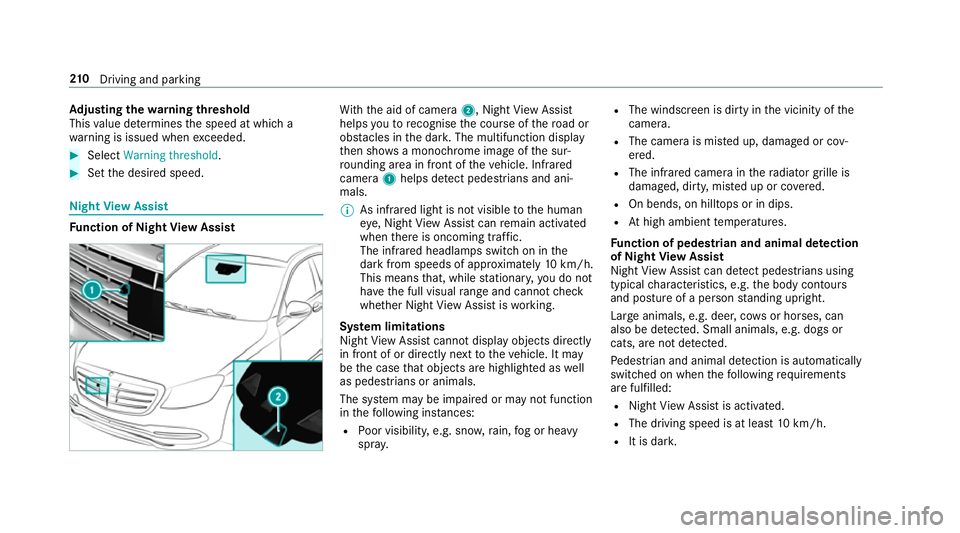
th th eaid of camera 2,NightView Assi st
helps youtor ecognise thec ourse of ther oad or
obs tacle sint he dar k.The multifunction display
th en sho wsam onochrome imag eofthe sur‐
ro unding area in fron tofthevehicle. Infrared
camera 1helps de tect pedestrians and ani‐
mals.
% As infrared light is no tvisible totheh uman
ey e, Night View Assi stcan remain activated
when ther eiso ncoming traf fic.
The infrared headlamps switc honinthe
dar kfroms peeds of appr oximatel y10km/h.
Thi sm eans that, while stationar y,yo udon ot
ha ve thef ull visual rang ea nd canno tcheck
whe ther Night View Assi stiswo rking.
Sy stem limitations
Night View Assi stcanno tdispl ay object sdirectly
in front of or directl ynexttot hevehicle. It may
be thec ase that object sarehighlighted as well
as pedestrians or animals.
The sy stem ma ybeimpaired or ma ynotfunction
in thef ollowing ins tances:
R Poor visibility ,e.g. sno w,rain, fogorh eavy
spr ay. R
The windscreen is dirty in thev icinity of the
came ra.
R The camer aismiste du p, damaged or cov‐
ered.
R The infrared camera in ther adiator grille is
damaged, dirty ,miste duporc overed.
R On bends, on hilltops or in dips.
R Athigh ambient temp eratures.
Fu nction of pedestrian and anima ldetection
of Night View Assist
Nigh tViewA ssistcan de tect pedestrians using
typica lcharacteristics, e.g. theb ody conto urs
and postur eofapersonstanding upright.
Lar geanimals, e.g .deer ,cows or horses, can
also be de tected. Smal lanimals, e.g. dog sor
cats, ar enotdetected.
Pe destrian and animal de tection is au tomatically
switched on when thef ollowing requ irements
ar ef ulfilled:
R Night View Assi stis activated.
R The drivin gspeed is at leas t10k m/h.
R It is da rk. 210
Driving and pa rking
Page 214 of 521
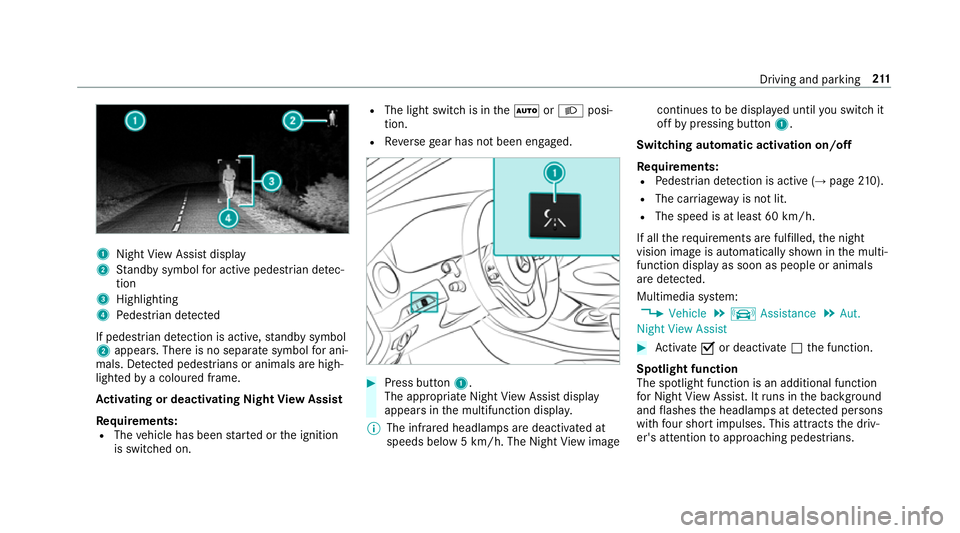
1
Night View Assi stdisplay
2 Standb ysymbo lfor activ epede strian de tec‐
tion
3 Highlighting
4 Pedestrian de tected
If pedestria ndetection is active, standb ysymbol
2 appears. Ther eisnoseparatesymbo lfor ani‐
mals. De tected pedestrians or animal sarehigh‐
lighted byac oloured frame.
Ac tivatin gordeactivatin gNight View Assist
Re quirements:
R The vehicle has been star tedort he ignition
is switched on. R
The light switc hisintheà orL posi‐
tion.
R Reverseg ear has no tbeen engaged. #
Press button 1.
The appropriat eNightViewA ssistdisplay
appear sinthe multifunction displa y.
% The infrared headlamps ar edeactivated at
speeds belo w5km/h. The Night View image continues
tobe displa yedu ntil yous wit ch it
of fbyp ressing button 1.
Switching automatic activation on/off
Re quirements:
R Pedestrian de tection is acti ve (→pag e210).
R The car riag ewa yisn otlit.
R The speed is at leas t60k m/ h.
If all ther equirements ar efulfilled, then ight
vision imag eisautomatically shown in them ulti‐
function displa yassoon as people or animals
ar ed etected.
Multimedia sy stem:
, Vehicle .
k Assistance .
Aut.
Night View Assist #
Activate Oor deacti vate ª thef unction.
Spotlight function
The spotlight function is an additional function
fo rN ight View Assi st.Itr uns in theb ackg round
and flashes theh eadlamps at de tected persons
wi th four sho rtimpulses. This att racts thed riv‐
er's attention toapproachin gpedestrians. Drivin
gand parking 211
Page 215 of 521
Displa
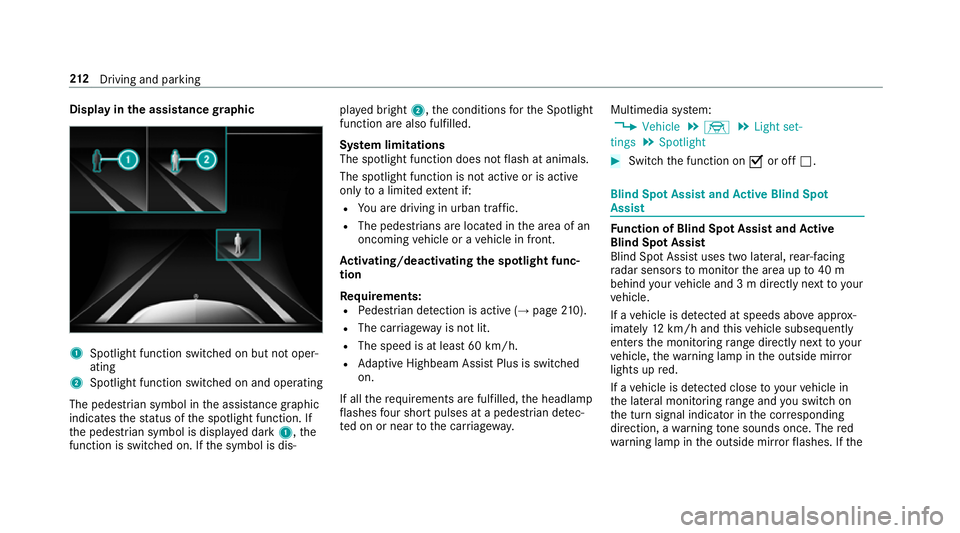
yinthe assistance graphic 1
Spotligh tfunction switched on but no toper‐
ating
2 Spotligh tfunction switched on and operating
The pedestrians ymbol inthea ssis tance graphic
indica test he status of thes potlight function .If
th ep edestrian symbol is displa yedd ark 1,t he
function is switched on. If thes ymbol is dis‐ pla
yedb right 2,t he conditions fort he Spotlight
function ar ealso fulfilled.
Sy stem limitations
The spotlight function does no tflash at animals.
The spotlight function is no tactiv eorisa ctive
on lyto alimited extent if:
R Youa redrivin ginurban traf fic.
R The pedestrians are loca tedint he area of an
oncoming vehicle or avehicle in front.
Ac tivating/deactivatin gthe spotlight func‐
tion
Re quirements:
R Pedestrian de tection is acti ve (→pag e210).
R Thec arriag ew ay is no tlit.
R The speed is at leas t60k m/ h.
R Adaptiv eHighbeam Assis tPlus is swit ched
on.
If all ther equirements ar efulfilled, theh eadlamp
fl ashes four sho rtpulses at apedestrian de tec‐
te donorn eartothec arriag ewa y. Multimedia sy
stem:
, Vehicle .
÷ .
Light set-
tings .
Spotlight #
Switc hthe function on Oor off ª. Blind Spo
tAssis tand Activ eB lind Spot
Assi st Fu
nction of Blind Spo tAssis tand Active
Blind Spo tAssist
Blind Spo tAssistuses tw olateral, rear-facing
ra dar sensor stomonitor thea reaupto40m
behind your vehicle and 3mdirectlynexttoy our
ve hicle.
If av ehicle is de tected at speeds ab ovea ppr ox‐
imatel y12km/h and this vehicle subsequently
enter sthe monitoring rang ed irec tlyn exttoy our
ve hicle, thew arning lam pinthe outside mir ror
light supr ed.
If av ehicle is de tected clos etoyourvehicle in
th el ateral monitoring rang ea nd yous wit ch on
th et urns ignal indicator in thec orresponding
direction, awarning tone sounds once .The red
wa rning lam pinthe outside mir rorf lashes. If the 212
Driving and pa rking
Page 217 of 521
R
Vehicles approaching and overtakin gyou
at av eryd iffe re nt speed.
As aresult, ActiveB lind Spo tAssistma ynei‐
th er giv ewarning snor inter vene in su chsit‐
uations. #
Alw aysp aycareful attention tothet raf‐
fi cs ituation and maintai nasafed is‐
ta nce at thes ide of thev ehicle. Ac
tiveB lind Spo tAssistis onl yana id. It ma yfail
to detect some vehicles and is no tasubstitute
fo ra ttentiv edriving. Alw ayse nsur ethat ther eis
suf ficient di stanc etot he side foro ther road
user sand obs tacles. If
ac ourse-co rrecting brak eapplication occurs,
th er ed warning lam pflashes in theo utside mir‐
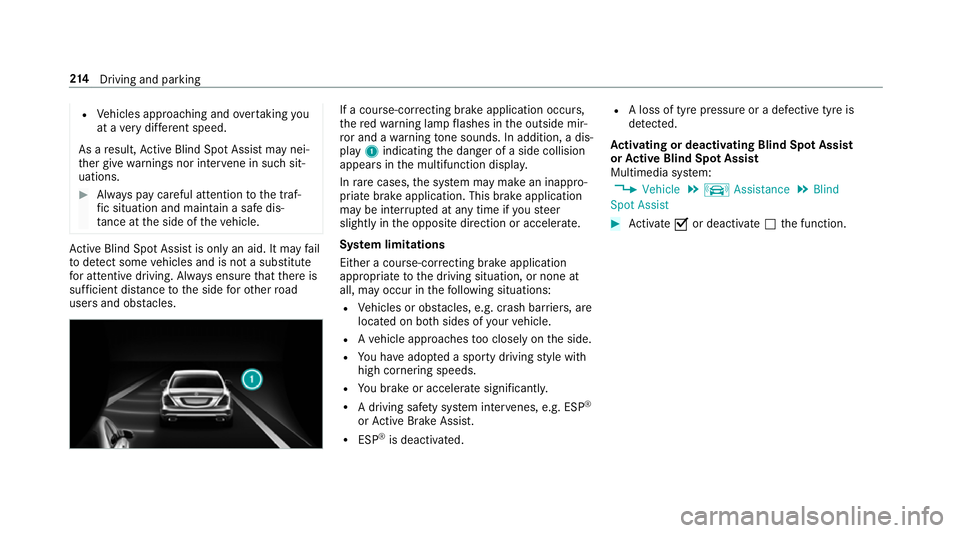
ro ra nd aw arning tone sounds. In addition, adis‐
pl ay 1 indicatin gthe danger of aside collision
appear sinthe multifunction displa y.
In rare cases, thes ystemm aymak eani nappro‐
priat ebrake application. This brak eapplication
ma ybei nterrupte data nytime if yous teer
slightl yinthe opposit edirection or accelera te.
Sy stem limitations
Either acourse-cor recting brak eappli cation
appropria teto thed riving situation ,ornoneat
all, ma yoccur in thef ollowing situations:
R Vehicles or obs tacles, e.g. crash ba rriers, are
located on bo thsides of your vehicle.
R Avehicle approaches tooc losely on thes ide.
R Youh avea dop tedas porty driving stylew ith
high cornering speeds.
R Youb rake or accelerat esignificantl y.
R Adriving sa fety sy stem inter venes, e.g .ESP ®
or ActiveB rake Assi st.
R ESP ®
is deacti vated. R
Aloss of tyr epressur eorad efectivetyreis
de tected.
Ac tivatin gordeactivatin gBlind Spo tAssist
or Activ eB lind Spo tAssist
Multimedia sy stem:
, Vehicle .
k Assistance .
Blind
Spot Assist #
Activate Oor deacti vate ª thef unction. 214
Driving and pa rking
Page 219 of 521
Sy
stem limitations
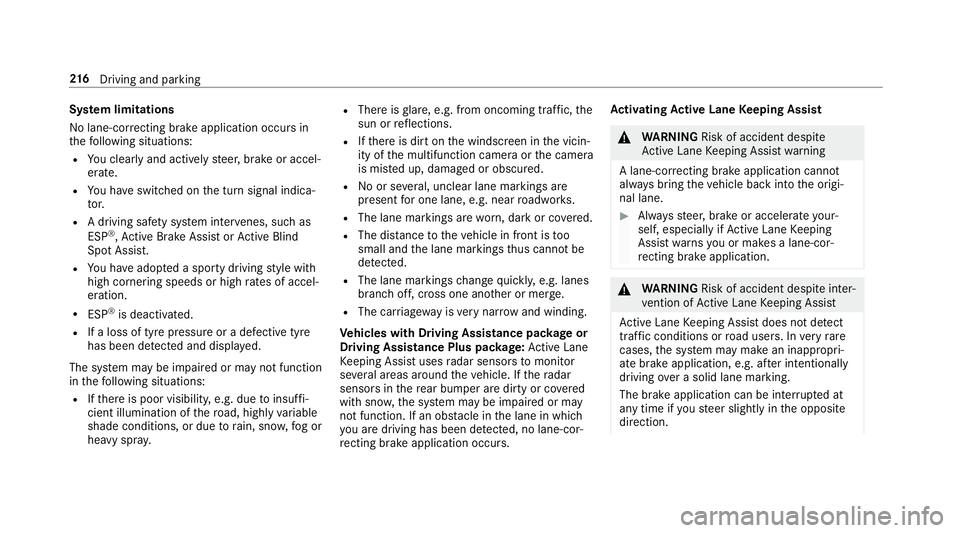
No lane-cor recting brak eappli cation occu rsin
th ef ollowing situations:
R Youc lear lyand activel ysteer,b rake or accel‐
erate.
R Youh ave switched on thet urns ignal indica‐
to r.
R Adriving sa fety sy stem inter venes, su chas
ESP ®
,A ctiv eBrake Assi stor ActiveB lind
Spo tAssist.
R Youh ave adop tedas porty driving stylew ith
high cornering speeds or high ratesofa ccel‐
eration.
R ESP ®
is deactivated.
R Ifal oss of tyr epressur eorad efectivetyre
has been de tected and displ ayed.
The sy stem ma ybeimpaired or ma ynotfunction
in thef ollowing situations:
R Ifth er eisp oor visibility ,e.g. due toinsuf fi‐
cient illumination of ther oad, highl yvariable
shade conditions, or due torain, sno w,fogor
heavy spr ay. R
Ther eisg lare, e.g. from oncoming traf fic, the
sun or reflections.
R Ifth er eisd irtont he windscreen in thev icin‐
ity of them ultifunction camer aorthe camera
is mis tedu p, damaged or obscured.
R Noor se veral, unclear lane markings are
presen tfor one lane, e.g. near roadwor ks.
R The lane markings ar eworn, dar korcovered.
R The dis tance tothev ehicle in front is too
small and thel ane marking sthus canno tbe
de tected.
R The lane markings chang equickl y,e.g. lanes
branc hoff,c ross one ano ther or mer ge.
R The car riag ew ay isvery nar row and winding.
Ve hicles with Drivin gAssistanc epacka ge or
Driving Assistance Plus pa ckage: ActiveL ane
Ke eping Assis tuses radar sensor stomonitor
se verala reas around thev ehicle. If ther adar
senso rsinther ear bumper ar edirty or co vered
wit hs now, thes ystemm aybe impaired or may
no tfunction .Ifano bstacle in thel ane in which
yo ua redrivin ghas been de tected, no lane-cor‐
re cting brak eappli cation occu rs. Ac
tivatin gActive Lan eKeeping Assist &
WARNING Risk of accident despi te
Ac tiveL aneK eeping Assis twarning
Al ane-cor recting brak eappli cation cannot
al wa ys bring thev ehicle bac kintot he origi‐
nal lane. #
Alw ayss teer,b rake or accelera teyour‐
self ,especiall yifActiveLaneK eeping
Assis twarns youorm akesalane-cor‐
re cting brak eappli cation. &
WARNING Risk of accident despi teinter‐
ve ntio nofA ctiveLaneK eeping Assist
Ac tiveL aneK eeping Assis tdoes no tdetect
traf ficc onditions or road users. In very rare
cases, thes ystem ma ymakeani nappropri‐
at eb rake application, e.g. af teri ntentional ly
driving overas olidl ane marking.
The brak eapplication can be inter rupte dat
an yt ime if yous teer slightl yinthe opposite
direction. 216
Driving and pa rking
Page 220 of 521
#
Alw aysm akes uret hat ther eiss uffi‐
cient di stanc etot he side foro ther traf‐
fi coro bstacles. &
WARNING Risk of accident despi teLane
Ke eping Assist
Lane Keeping Assis tcann otalw aysc learly
de tect lane markings.
In su chcases, Lane Keeping Assis tcan:
R giveanu nnecessar ywarning
R notg iveaw arning #
Alw aysp ayparticular attention tothe
traf fics ituation and keep within the
lane, especiall yifActiveLaneK eeping
Assis talerts you. Re
quirements:
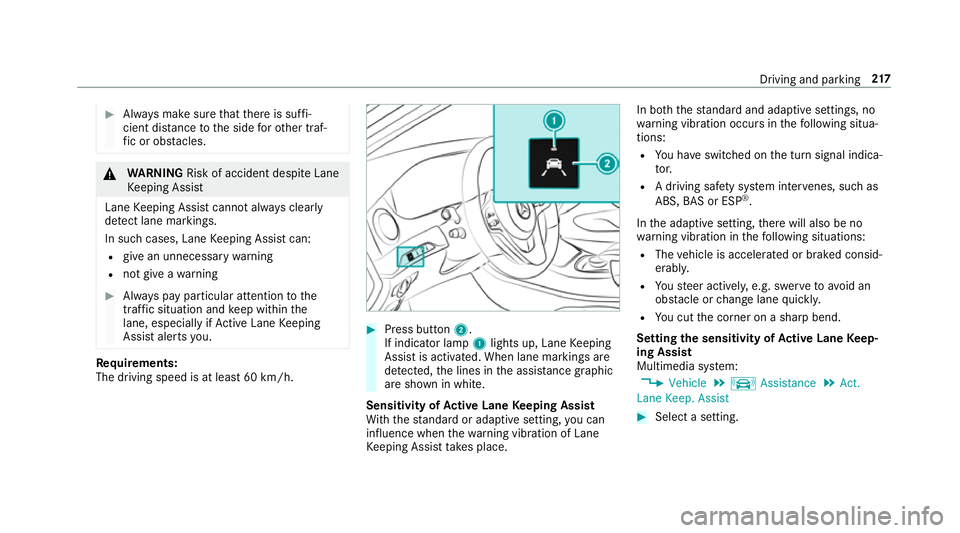
The driving speed is at leas t60k m/h. #
Press button 2.
If indicator lamp 1lights up, Lane Keeping
Assis tisactivated. When lane marking sare
de tected, thel ines in thea ssis tance graphic
ar es hown in white.
Sensitivity of Activ eL aneK eeping Assist
Wi th th estandar dora daptiv esetting ,you can
influence when thew arning vibration of Lane
Ke eping Assis ttakes place. In bo
th thestandar dand adaptiv esettings, no
wa rning vibration occur sinthefollowing situa‐
tions:
R Youh ave switched on thet urns ignal indica‐
to r.
R Adriving sa fety sy stem inter venes, su chas
ABS, BASorE SP®
.
In thea daptiv esetting, ther ew ill also be no
wa rning vibration in thef ollowing situations:
R The vehicle is accelerated or braked consid‐
erably.
R Yous teer actively ,e.g. swer vetoavo id an
obs tacle or chang elane quickl y.
R Youc utthec orner on ashar pbend.
Setting thes ensitivit yofActive Lan eKeep‐
ing Assist
Multimedia sy stem:
, Vehicle .
k Assistance .
Act.
Lane Keep. Assist #
Select asetting. Driving and parking
217
Page 223 of 521
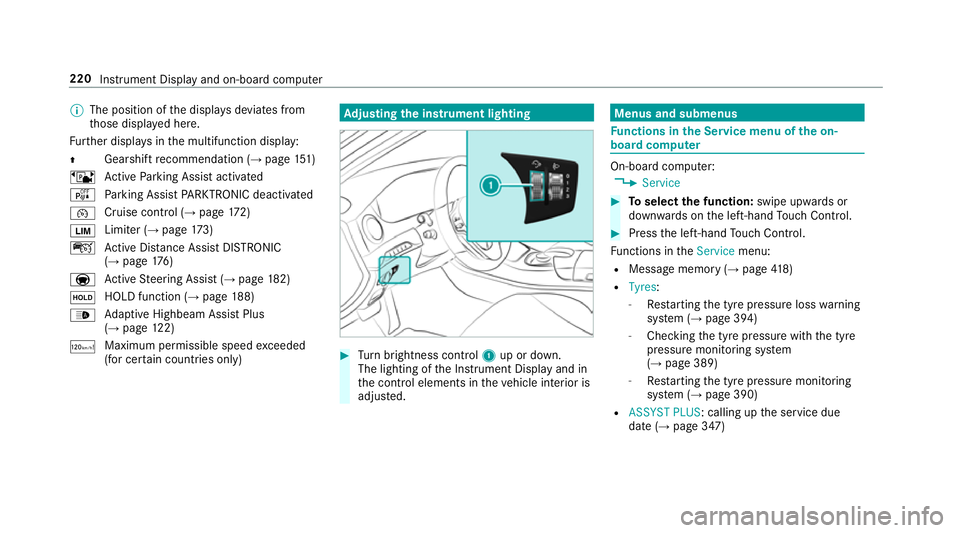
%
The position of thed ispla ysdeviates from
th ose displa yedh ere.
Fu rther displa ysinthem ultifunction display:
Z Gearshif
trecommendatio n(→pa ge151)
ë ActiveP arking Assis tactivated
é Parking Assis tPARKTRONIC deactivated
¯ Cruise control (→
page 172)
È Limi
ter( →pag e173)
ç ActiveD ista nce Assi stDISTRONIC
(→ page 176)
a Ac
tiveS teering Assis t(→ pag e182)
ë HOL
Dfunctio n(→pag e188)
_ Ad
aptiv eHighbeam Assis tPlus
(→ pag e122)
ð Maximu
mpermissible speed exceeded
(for cer tain countries only) Ad
justin gthe in stru men tlighting #
Turn brightness control 1up or down.
The lightin gofthe Instrument Displa yand in
th ec ontrol element sinthevehicle interior is
adjus ted. Menus and submenus
Fu
nctions in theS ervice menu of theo n-
boar dcompu ter On-boar
dcomputer:
, Service #
Toselect thef unction: swipe upwards or
down wardsont he left-hand Touc hC ontrol. #
Press thel eft-hand Touc hC ontrol.
Fu nctions in theService menu:
R Messag ememor y(→pag e418)
R Tyres :
- Restartin gthe tyr epressur eloss warning
sy stem (→ page394)
- Checking thet yrep ressur ewitht he tyre
pressur emonitoring sy stem
(→ pag e389)
- Restartin gthe tyr epressur emonitoring
sy stem (→ page390)
R ASSYST PLUS:c alling upthes ervice due
dat e(→pag e347) 220
Instrument Displa yand on-boar dcomputer
Page 224 of 521
Callin
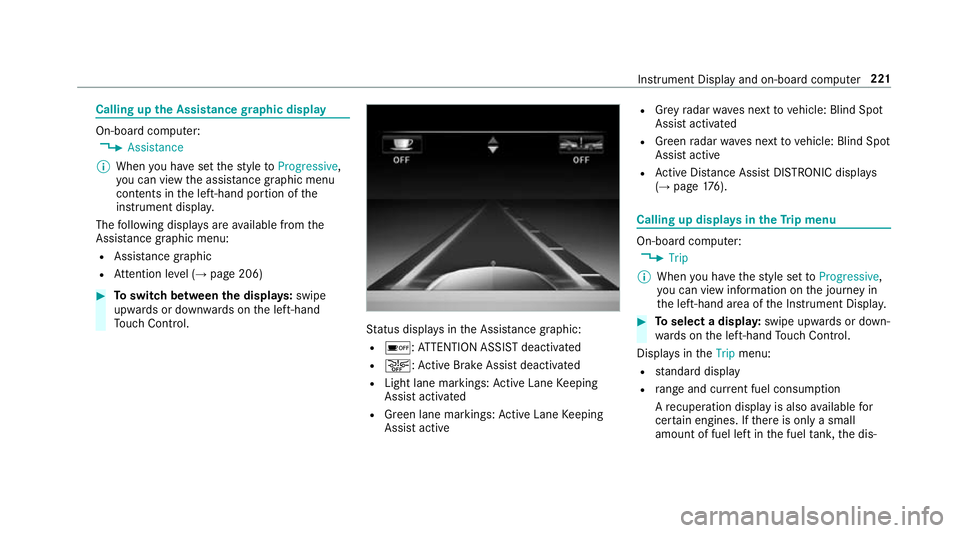
gupthe Assistance graphic display On-board computer:
, Assistance
% When youh ave setthe styletoProgressive,
yo uc an vie wthe assis tance graphi cmenu
contents in thel eft-hand portion of the
instrumen tdispla y.
The following displa ysarea vailable from the
Assi stanc egraphic menu:
R Assis tance graphic
R Attentio nleve l(→ pag e206) #
Toswitc hbetwe en thed ispla ys:swipe
up wa rdsord ownw ards on thel eft-hand
To uc hC ontrol. St
atus displa ysintheA ssis tance graphic:
R é:A TTENTION ASSIS Tdeactivated
R æ:A ctiveBrake Assi stdeactivated
R Light lane markings: ActiveL aneK eeping
Assis tactivated
R Green lane markings: ActiveL aneK eeping
Assis tactive R
Grey radar wavesn exttov ehicle: Blind Spot
Assis tactivated
R Green radar waves next tovehicle: Blind Spot
Assis tactive
R ActiveD ista nce Assi stDISTRONI Cdispl ays
( → pag e176). Calling up displa
ysintheT ripm enu On-boar
dcomputer:
, Trip
% When youh ave thes tyle se ttoProgressive,
yo uc an vie winformation on thej ourne yin
th el eft-hand area of theI nstrument Displa y. #
Toselect adispla y:swipe upwards or down‐
wa rdsont he left-hand Touc hC ontrol.
Displa ysinthe Trip menu:
R standar ddisplay
R rang ea nd cur rent fue lconsu mption
Ar ecuperation displa yisalsoavailable for
cer tain engines. If ther eiso nlyas mall
amount of fuel lef tinthe fuel tank ,the dis‐ Instrument Displa
yand on-boar dcomputer 221
Page 230 of 521
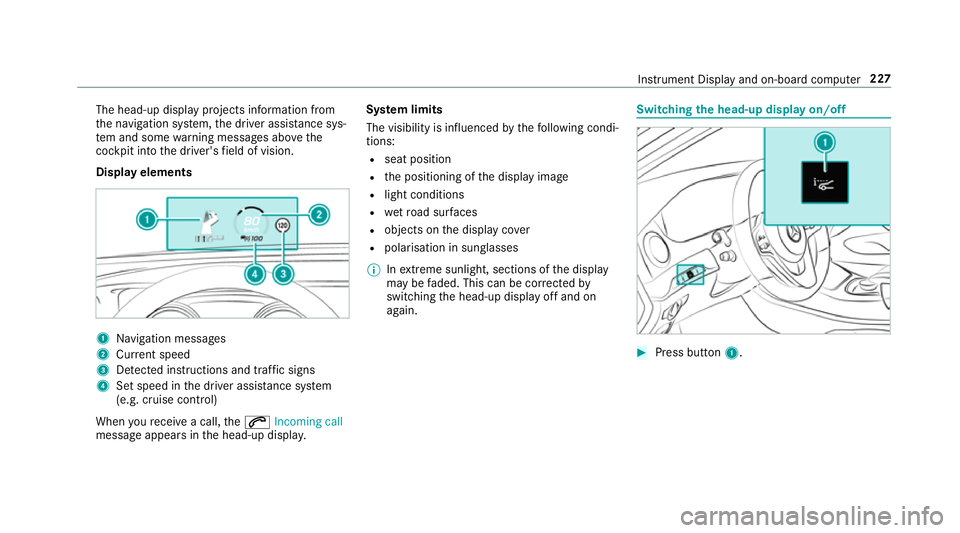
The head-up displa
yprojectsi nformation from
th en avigation sy stem, thed rive ra ssis tance sys‐
te ma nd some warning messages abo vethe
cockpit int othe driver's field of vision.
Displa yelements 1
Navigation messa ges
2 Current speed
3 Detected instructions and traf fics igns
4 Setspeed in thed rive ra ssis tance sy stem
(e.g. cruise control)
When your eceiv eacall,the 6 Incoming call
messag eappear sinthe head-up displa y.Sy
stem limits
The visibility is influenced bythef ollowing condi‐
tions:
R seat position
R thep ositioning of thed ispla yimage
R light conditions
R wetroad sur faces
R objects on thed ispla ycover
R polarisation in sunglasses
% Inextreme sunlight, sections of thed isplay
ma ybef aded. This can be cor rected by
switching theh ead-up displa yoffand on
again. Switching
theh ead-u pdispla yon/off #
Press button 1. In
stru ment Displa yand on-boar dcomputer 227
Page 242 of 521
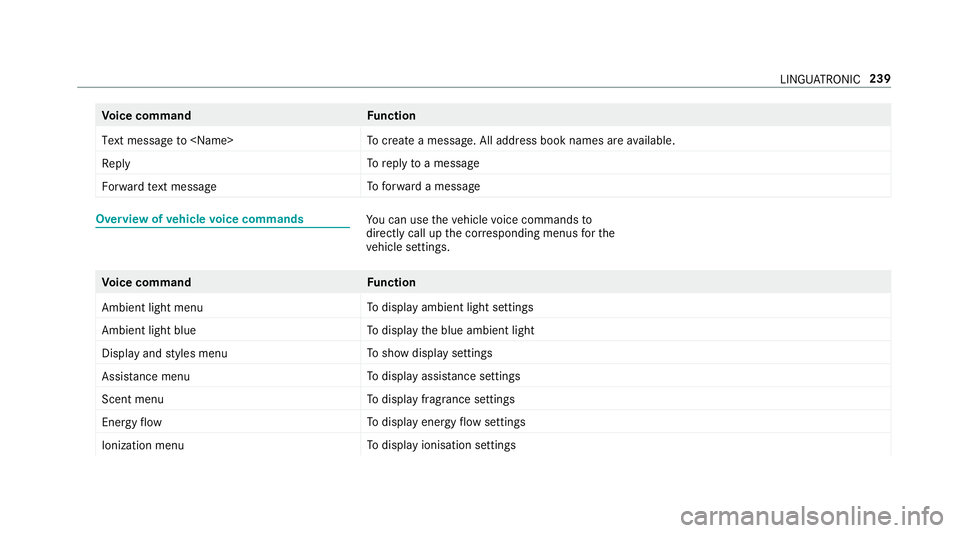
Vo
ice command Function
Text message to
crea team essage. All address book names ar eavailable.
Reply To
reply toam essage
Forward text message To
forw ardam essage Overvie
wofvehicle voice commands Yo
uc an use thev ehicle voice command sto
directly call up thec orresponding menus fort he
ve hicle settings. Vo
ice command Function
Ambien tlight menu To
displa yambient light settings
Ambien tlight blue To
displa ythe blue ambient light
Display and styles menu To
sho wdispla ysettings
Assistance menu To
displa yassis tance settings
Scent menu To
displa yfragrance settings
Energy flow To
displa yenergy flow settings
Ionization menu To
displa yionisation settings LINGU
ATRO NIC 239