clock MERCEDES-BENZ S-CLASS CABRIOLET 2019 Owner's Manual
[x] Cancel search | Manufacturer: MERCEDES-BENZ, Model Year: 2019, Model line: S-CLASS CABRIOLET, Model: MERCEDES-BENZ S-CLASS CABRIOLET 2019Pages: 518, PDF Size: 13.78 MB
Page 68 of 518
#
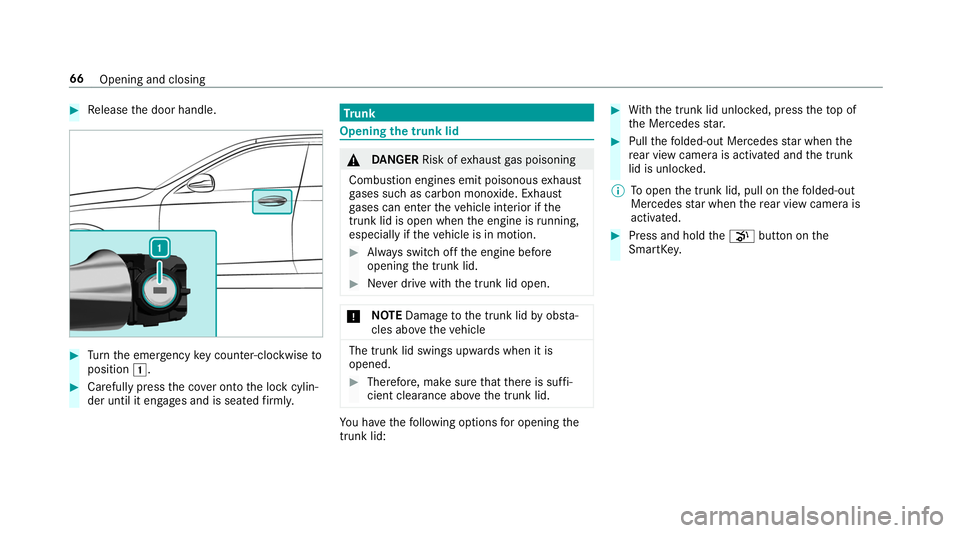
Release the door handle. #
Turn the emer gency key counter-clockwise to
position 0047. #
Carefully press the co ver onto the lock cylin‐
der until it engages and is seated firm ly. Tr
unk Opening
the trunk lid &
DANG ER Risk of exhaust gas poisoning
Combustion engines emit poisonous exhaust
ga ses such as carbon monoxide. Exhaust
ga ses can enter theve hicle interior if the
trunk lid is open when the engine is running,
especially if theve hicle is in motion. #
Alw ays switch off the engine before
opening the trunk lid. #
Never drive with the trunk lid open. *
NO
TEDama getothe trunk lid byobs ta‐
cles ab ovetheve hicle The trunk lid swings upwards when it is
opened. #
Therefore, make sure that there is suf fi‐
cient clearance ab ovethe trunk lid. Yo
u ha vethefo llowing options for opening the
trunk lid: #
With th e trunk lid unloc ked, press theto p of
th e Mercedes star. #
Pull thefo lded-out Mercedes star when the
re ar view camera is activated and the trunk
lid is unloc ked.
% Toopen the trunk lid, pull on thefo lded-out
Mercedes star when there ar view camera is
activated. #
Press and hold the008B button on the
SmartK ey. 66
Opening and closing
Page 103 of 518
St
ow age spaces in theve hicle interior Overview of
the front stowage compa rt‐
ments &
WARNING Risk of inju rydue toobjects
being stowed incor rectly
If yo u do not adequately stowobjects in the
ve hicle interior, they could slip or be tossed
around and thereby strike vehicle occupants.
In addition, cup holders, open stowage
spaces and mobile phone brac kets cann ot
alw aysre stra in the objects they contain in
th eev ent of an accident.
There is a risk of injur y,particularly in the
ev ent of sudden braking or a sudden change
in direction. #
Alw aysstow objects in such a wayth at
th ey cannot be tossed about in these or
similar situations. #
Alw ays make sure that objects do not
project from stowage spaces, parcel
nets or stowage nets. #
Close the loc kable stow age spaces
before starting a journe y. #
Alw aysstow and secure objects that
are heavy, hard, poin ted, sharp-edged,
fragile or too large in the trunk. Obser
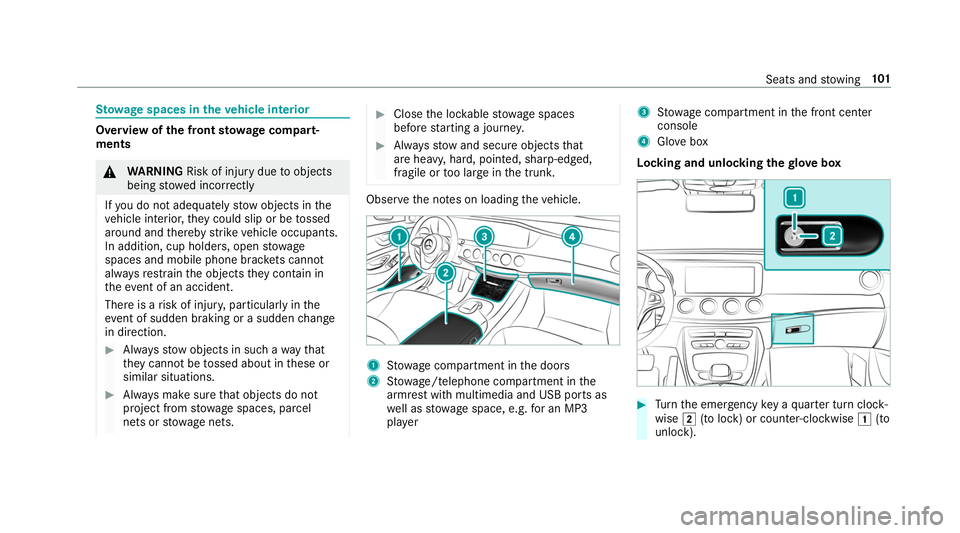
vethe no tes on loading theve hicle. 1
Stow age compartment in the doors
2 Stow age/telephone compartment in the
armrest with multimedia and USB ports as
we ll as stow age space, e.g. for an MP3
pla yer 3
Stow age compartment in the front center
console
4 Glovebox
Locking and unlocking thegl ove box #
Turn the emer gency key a quarter turn clock‐
wise 0048(to lock) or counter-clockwise 0047(to
unlock). Seats and
stowing 101
Page 147 of 518
*
NO
TEFuel may spr ayout when you
re mo vethe fuel pump nozzle. #
Only fill th e fuel tank until the pump
nozzle switches off. Re
quirements:
R The vehicle is unloc ked.
% Do not get into theve hicle again during the
re fueling process. Otherwise, electros tatic
ch arge could build up again.
Obser vethe no tes on operating fluids
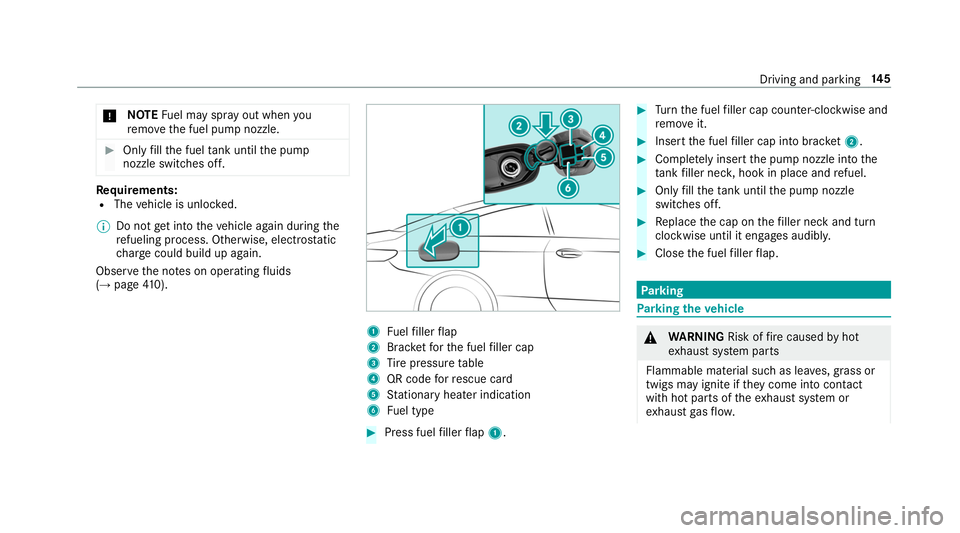
(→ page 410). 1
Fuelfiller flap
2 Brac ketfo rth e fuel filler cap
3 Tire pressure table
4 QR code forre scue card
5 Stationary heater indication
6 Fuel type #
Press fuel filler flap 1. #
Turn the fuel filler cap coun ter-clockwise and
re mo veit. #
Insert the fuel filler cap into brac ket2. #
Comp lete ly inse rtthe pump nozzle into the
ta nk filler nec k,hook in place and refuel. #
Only fill th eta nk until the pump nozzle
switches off. #
Replace the cap on thefiller neck and turn
clockwise until it engages audibl y. #
Close the fuel filler flap. Pa
rking Pa
rking theve hicle &
WARNING Risk offire caused byhot
ex haust sy stem parts
Flammable material such as lea ves, grass or
twigs may ignite if they come into contact
wi th hot parts of theex haust sy stem or
ex haust gasflow. Driving and pa
rking 14 5
Page 241 of 518
Operating
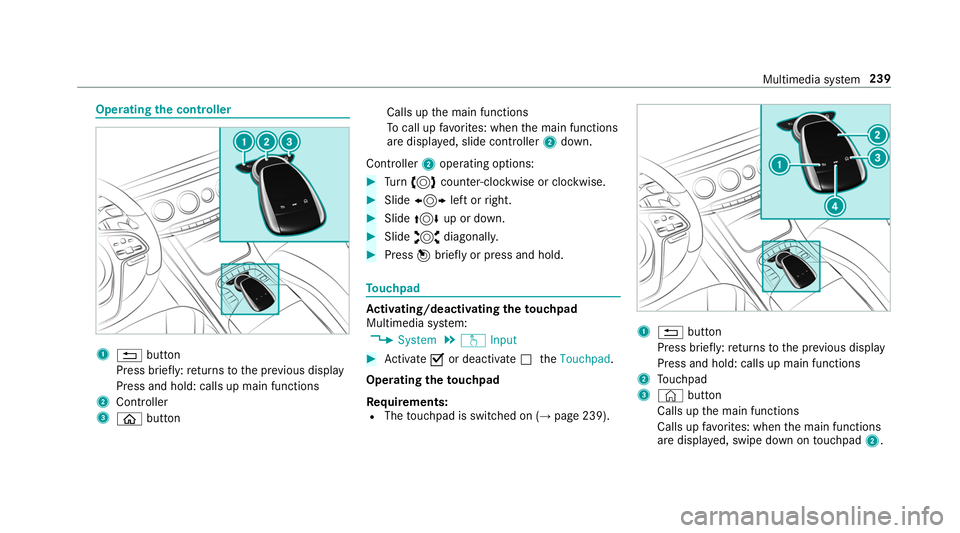
the controller 1
0038 button
Press brief ly:re turns tothe pr evious display
Press and hold: calls up main functions
2 Cont roller
3 00E2 button Calls up
the main functions
To call up favo rite s: when the main functions
are displa yed, slide controller 2down.
Controller 2operating options: #
Turn 0018 counter-clockwise or clockwise. #
Slide 0016 left or right. #
Slide 0019 up or down. #
Slide 0017 diagonally. #
Press 001Cbrief lyor press and hold. To
uchpad Ac
tivating/deactivating the touchpad
Multimedia sy stem:
, System .
w Input #
Activate 0073or deacti vate 0053 theTouchpad .
Operating theto uchpad
Re quirements:
R The touchpad is swit ched on (→ page 239). 1
0038 button
Press brief ly:re turns tothe pr evious display
Press and hold: calls up main functions
2 Touchpad
3 © button
Calls up the main functions
Calls up favo rite s: when the main functions
are displa yed, swipe down on touchpad 2. Multimedia sy
stem 239
Page 281 of 518
• Fil
ters the display of POIs in the vicinity
according toPOI category
5 Switches the display of personal POI sym‐
bols on the map on or off
6 Switches one of thefo llowing displa yson or
off depending on the equipment:
• We ather information
• Satellite map
• Traf fic incidents
7 Switches the tra ffic map display on or off
The map and satellite images are shown in globe
projection. This allo wsfor a realistic map display
in all map scales. The map uses ele vation model‐
ing.
Depending on the map data, impor tant buildings
in ma nycities are depicted realistically on the
map in small map scales (e.g. 1/32 mi (20 m),
1/16 mi (50 m)). Other buildings are shown as
models.
% You can set the unit of measurement of the
map scale (→ page 252). If online information is
available, fuel prices and
th eav ailability of parking spaces in parking
ga rage s are displa yed, forex ample.
% Requirements:
R Mercedes me connect is available.
R You ha vea user account forthe
Mercedes me por tal.
R The service has been activated at an
authorized Mercedes-Benz Center.
Fu rther information can be found at: http://
www.mercedes.me
% The online information is not available in all
countries.
If Display in COMAND is activated inTraf fic Sign
Assi st (→page 199), speed limits and overtaking
re strictions are displ ayed on the map.
% Company logos displa yed on the map are
trademar ksofthere spective companies and
used solely forth e purpose of indicating the
locations of these companies. The use of
such logos on the map does not indicate
appr oval of, suppo rtof or advertising byth
ese companies forth e navigation sy stem
itself.
Setting the map scale
Re quirements:
R The map is shown.
Multimedia sy stem:
, Navigation #
Tozoom in: swipe down on theTo uch Con‐
trol.
or #
Turn the controller counter-clockwise.
or #
Movetwo fingers apart on theto uchpad. #
Tozoom out: swipe up on theTo uch Control.
or #
Turn the controller clockwise.
or #
Movetwo fingers toge ther on theto uchpad.
% You can set the unit of measurement of the
map scale (→ page 252). Multimedia sy
stem 279
Page 330 of 518
#
Select Move Highlighted Station. #
Select a memo rypreset.
Deleting stations: #
Highlight a preset entry and navigate tothe
left. #
Select Delete Highlighted Station. #
Select Yes. Ta
gging music trac ksMultimedia sy
stem:
, Radio
If ra dio stations pr ovide there leva nt information,
th is function allo wsyouto trans fer information
on the music track cur rently pl aying toan
Apple ®
device. You can then pur chase the audio
fi le from theiTunes Store ®
. #
Select ♫→ Tag This Song.
The track information is sa ved. Ac
tivating/deactivating radio text Multimedia sy
stem:
, Radio .
Z Options .
Display Radio
Text Information #
Activate 0073or deacti vate 0053 the function. Satellite
radio In
fo rm ation on the satellite radio
SIRIUS XM ®
satelli teradio of fers more than 175
digital-quality radio channels pr oviding 100%
commercial-free music, sports, ne wsand enter‐
ta inment, forex ample. SIRIUS XM satellite radio
emplo ysafleet of high-per form ance satellites to
broadcast around the clock thro ughout the USA
and Canada. The satellite radio program is avail‐
able for a monthly fee. Information about this
can be obtained from a Sirius XM ®
Service Cen‐
te r and at http://www.siriusxm.com (USA) or
http://www.siriusxm.ca (Canada).
% Sirius, XM and all related mar ksand logos
are trademar ksof Sirius XM Radio Inc. and
its subsidiaries. All other mar ks,ch annel names and logos are
the property of their
re spective owners. All rights reser ved.
Satellite radio restrictions
Satellite radio mode may be temp orarily una vail‐
able or inter rupte dfo r a variet y of reasons.
These include environmen tal or topog raphical
conditions be yond the control of Mercedes-Benz
US A,LLC. Thus, operation at cer tain locations
may not be possible.
Re gis tering satellite radio
Re quirements:
R Satellite radio equipment
R Registration with a satellite radio pr ovider
R Ifre gistration is not included when pur chas‐
ing the sy stem, your credit card de tails will
be requ ired toactivate your account 328
Multimedia sy stem
Page 334 of 518
#
Select 0080Options .
The following options are available:
R Mark This Entry
R Unmark This Entry
R Mark All Entries
R Unmark All Entries
R Delete This Entry
R Delete All Entries #
Select an option. #
Activate Artist & Song Alerts 0073.
The alert is set forth e cur rent artist or trac k.
If a match is found, a prom ptappears asking
whe ther you wish tochange tothest ation.
Setting a sport alert #
Select Add New Alert.
or #
Select Manage Sports Alerts. #
Select Select New Alerts.
or #
Select Edit Alerts . #
Select a team from a league. #
Activate Sports Alerts 0073.
Information on Smart Favorite s and Tune
St art
St ations in thest ation presets can be added as
Smart Favorite s. Smart Favorite sst ations are
automatically sa vedto temp orary storage in the
bac kground. If youch ange toa Smart Favorites
st ation, you can repla y,pause or actively skip
fo rw ard or back tobroadcasts which you ha ve
missed. If Tune Start is activated and youch ange
to ano ther Smart Favorite sst ation, the music
tra ck cur rently pl aying on thest ation is automat‐
ically restar ted from the beginning of the tra ck.
Ad ding a channel toSmart Favorites
Multimedia sy stem:
, Radio .
Þ Radio Source .
Sir-
iusXM Radio #
Select the active frequency band. #
Highlight an entry. #
Select 0080. #
Select Add Highlighted Channel to Smart
Favorites. Ac
tivating/deactivating TuneStart
Multimedia sy stem:
, Radio .
Z Options .
TuneStart #
Activate 0073or deacti vate 0053 the function.
Controlling playback
Multimedia sy stem:
, Radio .
Y Playback Control
Yo u can pause the playback of the cur rent sta‐
tion or skip forw ard or backward in the timeline.
This lea ves live mode toaccess the internal tem‐
porary storage. #
Tofast forw ard/r ewind: turn the controller
counter-clockwise or clockwise/swipe left or
ri ght on theto uchpad. #
Tojump tothe pr evious/next song: press
th e controller left or right/swipe left or right
on theto uchpad. #
Topause playback: select00CF. #
Toreturn tolive mode: navigatetothe end
of the timeline. 332
Multimedia sy stem
Page 343 of 518
*
NO
TEEngine dama gecaused byan
incor rect oil filter, incor rect oil or addi‐
tives #
Do not use engine oils or oil filters
which do not cor respond tothe specifi‐
cations explicitly prescribed forthe
service inter vals. #
Do not alter the engine oil or oil filter in
order toachie velonger change inter vals
th an presc ribed. #
Do not use additives. #
Follow the instructions in the service
inter val display rega rding the oil
ch ange. *
NO
TEDama gecaused byadding too
much engine oil To
o much engine oil can damage the engine
or the catalytic con verter. #
Have excess engine oil remo ved at a
qu alified specialist workshop. #
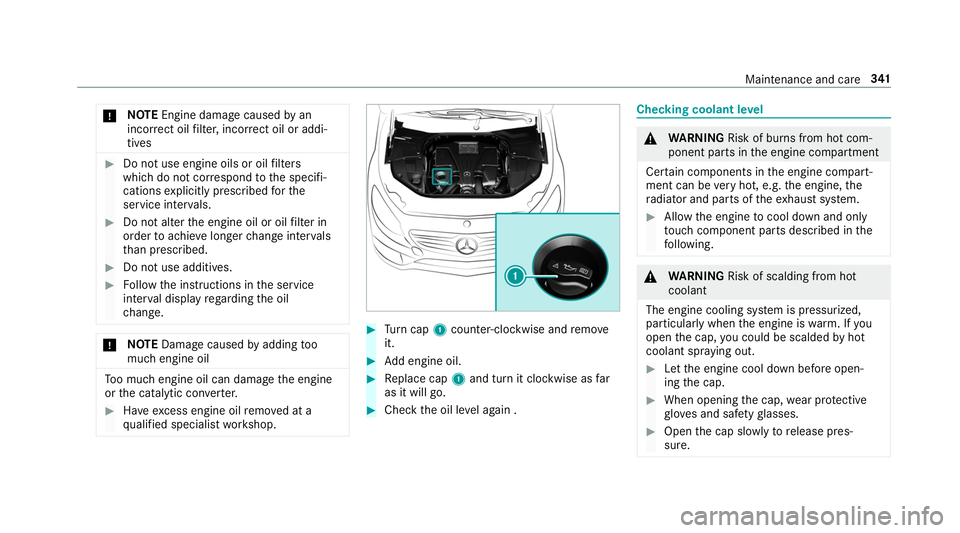
Turn cap 1counter-clockwise and remo ve
it. #
Add engine oil. #
Replace cap 1and turn it clockwise as far
as it will go. #
Check the oil le vel again . Checking coolant le
vel &
WARNING Risk of bu rns from hot com‐
ponent parts in the engine compartment
Cer tain components in the engine compart‐
ment can be very hot, e.g. the engine, the
ra diator and parts of theex haust sy stem. #
Allow the engine tocool down and only
to uch co mponent parts described in the
fo llowing. &
WARNING Risk of scalding from hot
coolant
The engine cooling sy stem is pressurized,
particularly when the engine is warm. If you
open the cap, you could be scalded byhot
coolant spr aying out. #
Let the engine cool down before open‐
ing the cap. #
When opening the cap, wear pr otective
gl ove s and saf etygl asses. #
Open the cap slowly torelease pres‐
sure. Maintenance and care
341
Page 344 of 518
#
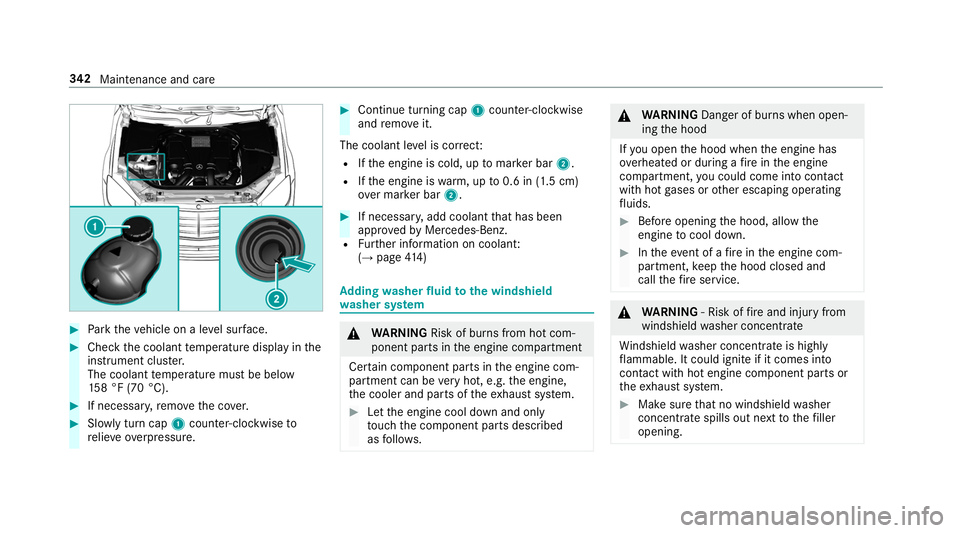
Park theve hicle on a le vel sur face. #
Check the coolant temp erature display in the
instrument clus ter.
The coolant temp erature must be below
15 8 °F (70 °C). #
If necessa ry,re mo vethe co ver. #
Slowly turn cap 1counter-clockwise to
re lie ve ove rpressure. #
Continue turning cap 1counter-clockwise
and remo veit.
The coolant le vel is cor rect:
R Ifth e engine is cold, up tomar ker bar 2.
R Ifth e engine is warm, up to0.6 in (1.5 cm)
ov er mar ker bar 2. #
If necessar y,add coolant that has been
appr ovedby Mercedes-Benz.
R Further information on coolant:
(→ page 414) Ad
ding washer fluid tothe windshield
wa sher sy stem &
WARNING Risk of bu rns from hot com‐
ponent parts in the engine compartment
Cer tain component parts in the engine com‐
partment can be very hot, e.g. the engine,
th e cooler and parts of theex haust sy stem. #
Let the engine cool down and only
to uch the component parts described
as follo ws. &
WARNING Danger of bu rns when open‐
ing the hood
If yo u open the hood when the engine has
ove rheated or during a fire inthe engine
compartment, you could come into contact
with hot gases or other escaping operating
fl uids. #
Before opening the hood, allow the
engine tocool down. #
Intheeve nt of a fire inthe engine com‐
partment, keep the hood closed and
call thefire service. &
WARNING ‑ Risk of fire and injury from
windshield washer concentrate
Wi ndshield washer concentrate is highly
fl ammable. It could ignite if it comes into
con tact wi thhot engine component parts or
th eex haust sy stem. #
Make sure that no windshield washer
concentrate spills out next tothefiller
opening. 342
Maintenance and care
Page 374 of 518
#
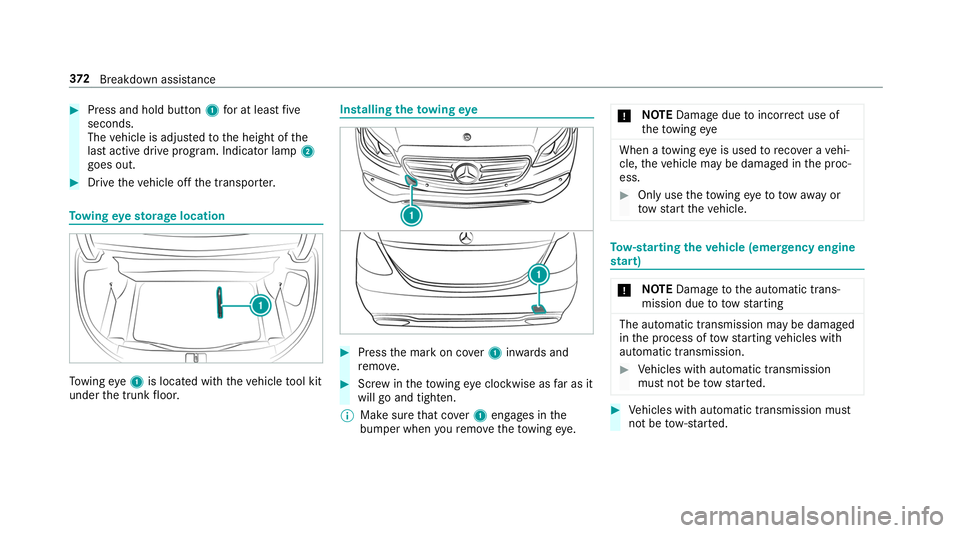
Press and hold button 1for at least five
seconds.
The vehicle is adjus tedto the height of the
last active drive prog ram. Indicator lamp 2
goes out. #
Drive theve hicle off the transpor ter. To
wing eyesto rage location To
wing eye1 is located with theve hicle tool kit
under the trunk floor. Installing
theto wing eye #
Press the mark on co ver1 inwa rds and
re mo ve. #
Screw intheto wing eyeclockwise as far as it
will go and tighten.
% Make sure that co ver1 engages in the
bumper when youre mo vetheto wing eye. *
NO
TEDama gedue toincor rect use of
th eto wing eye When a
towing eye is used toreco ver a vehi‐
cle, theve hicle may be damaged in the proc‐
ess. #
Only use theto wing eyeto to waw ay or
to w start theve hicle. To
w- starting theve hicle (eme rgency engine
st art) *
NO
TEDama getothe automatic trans‐
mission due to towstarting The automatic transmission may be damaged
in the process of tow starting vehicles with
automatic transmission. #
Vehicles with automatic transmission
must not be tow star ted. #
Vehicles with automatic transmission must
not be tow- star ted. 372
Breakdown assis tance