phone MERCEDES-BENZ S-CLASS COUPE 2015 User Guide
[x] Cancel search | Manufacturer: MERCEDES-BENZ, Model Year: 2015, Model line: S-CLASS COUPE, Model: MERCEDES-BENZ S-CLASS COUPE 2015Pages: 417, PDF Size: 13.42 MB
Page 249 of 417
9
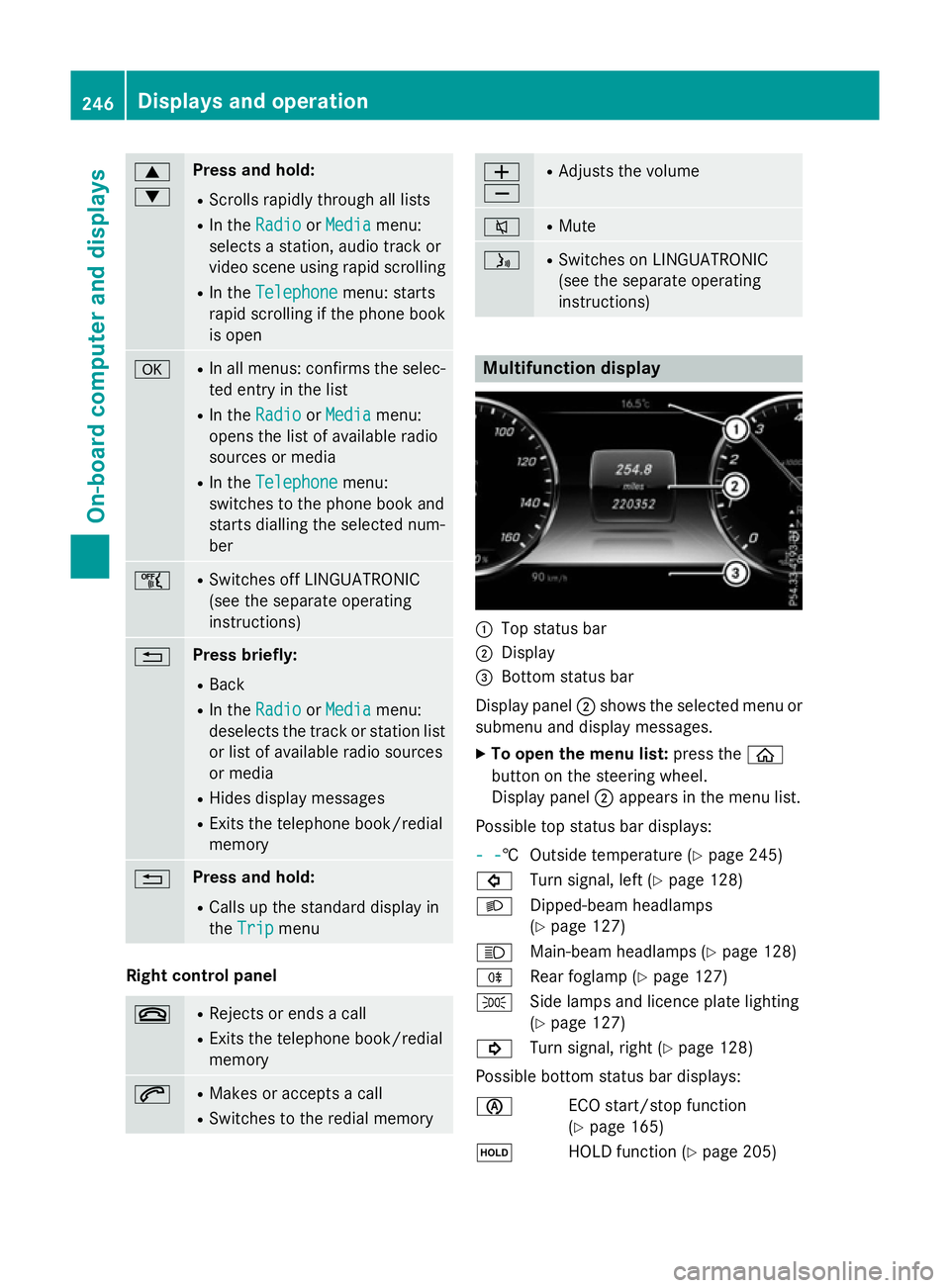
: Press and hold:
R Scrolls rapidly through all lists
R In the Radio
Radio orMedia Media menu:
selects a station, audio track or
video scene using rapid scrolling
R In the Telephone Telephone menu: starts
rapid scrolling if the phone book is open a R
In all menus: confirms the selec-
ted entry in the list
R In the Radio
Radio orMedia
Media menu:
opens the list of available radio
sources or media
R In the Telephone Telephone menu:
switches to the phone book and
starts dialling the selected num-
ber ñ R
Switches off LINGUATRONIC
(see the separate operating
instructions) % Press briefly:
R Back
R In the Radio Radio orMedia
Media menu:
deselects the track or station list or list of available radio sources
or media
R Hides display messages
R Exits the telephone book/redial
memory % Press and hold:
R Calls up the standard display in
the Trip Trip menu Right control panel
~ R
Rejects or ends a call
R Exits the telephone book/redial
memory 6 R
Makes or accepts a call
R Switches to the redial memory W
X R
Adjusts the volume 8 R
Mute ó R
Switches on LINGUATRONIC
(see the separate operating
instructions) Multifunction display
:
Top status bar
; Display
= Bottom status bar
Display panel ;shows the selected menu or
submenu and display messages.
X To open the menu list: press theò
button on the steering wheel.
Display panel ;appears in the menu list.
Possible top status bar displays:
- - - -† Outside temperature (Y
page 245)
# Turn signal, left (Y page 128)
L Dipped-beam headlamps
(Ypage 127)
K Main-beam headlamps (Y page 128)
R Rear foglamp (Y page 127)
T Side lamps and licence plate lighting
(Ypage 127)
! Turn signal, right (Y page 128)
Possible bottom status bar displays:
è ECO start/stop function
(Ypage 165)
ë HOLD function (Y page 205)246
Displays and operationOn-board computer and displays
Page 252 of 417
=
Upshift indicator
? Currently selected gear, gearshift options when shifting manually
Setting options
You can make the following settings in the
head-up display submenu:
R adjust the position of the head-up display
on the windscreen (Y page 262)
R adjust the brightness of the displays in the
head-up display (Y page 262)
R select desired displays in the head-up dis-
play (Y page 261)
Using the Display content
Display content function, you
can, depending on your vehicle's equip-
ment, choose between four standard dis-
plays. The selected contents then appear in
the head-up display.
In Mercedes-AMG vehicles, you can also
choose between two AMG displays. If you
select an AMG display, the head-up display shows AMG-specific contents.
If you select a display with traffic signs,
detected traffic signs from Traffic Sign
Assist appear in the head-up display. Menus and submenus
Menu overview
Press the òbutton on the steering wheel
to open the menu list.
Operating the on-board computer
(Y page 245).
Depending on the vehicle equipment, you can
select the following menus:
R Trip
Trip menu (Y page 249)
R Navi Navi menu (navigation instructions)
(Y page 251)
R Radio Radio menu (Y page 253)
R Media
Media menu (Y page 254)
R Telephone
Telephone menu (Ypage 256)
R Assistance graphic
Assistance graphic menu
(Y page 257)
R Service
Service menu (Ypage 258) R
Settings
Settings menu (Ypage 258)
R AMG
AMG menu (Mercedes-AMG vehicles)
(Y page 265) Trip menu
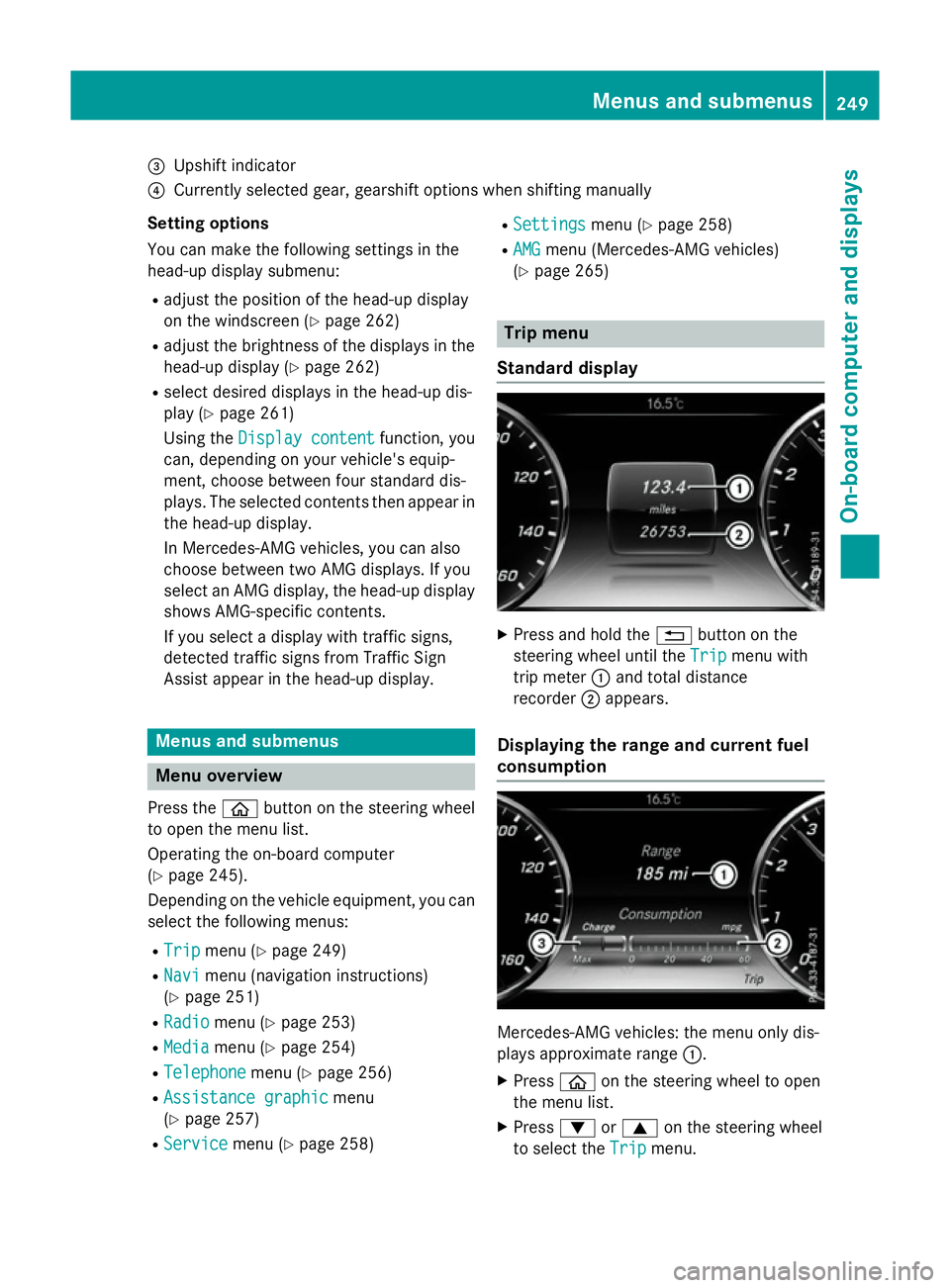
Standard display X
Press and hold the %button on the
steering wheel until the Trip
Tripmenu with
trip meter :and total distance
recorder ;appears.
Displaying the range and current fuel
consumption Mercedes-AMG vehicles: the menu only dis-
plays approximate range
:.
X Press òon the steering wheel to open
the menu list.
X Press :or9 on the steering wheel
to select the Trip Tripmenu. Menus and submenus
249On-board computer and displays Z
Page 259 of 417
X
To select TV: pressabriefly.
The list containing the media sources
appears.
X Press :or9 to select TV.
X Press ato confirm your selection.
X To open the channel list: press the:
or 9 button briefly.
X To select a channel in the channel list:
press the :or9 button briefly.
X To select a channel in the channel list
using rapid scroll: press and hold
the : or9 button.
X Press ato confirm the selection.
You can store TV channels in COMAND
Online; see the separate operating instruc-
tions. Telephone menu
Introduction G
WARNING
Operating the integrated information systems and communications equipment in the vehicle
while driving will distract you from traffic con-
ditions. You could then lose control of the
vehicle. There is a risk of an accident.
Only operate these devices if road traffic con-
ditions permit. If you are unsure about the
surrounding conditions, pull over to a safe
location and make entries only while the vehi-
cle is stationary.
When telephoning, you must observe the
legal requirements for the country in which
you are currently driving. X Switch on the mobile phone (see the man-
ufacturer's operating instructions).
X Switch on COMAND Online, see the sepa-
rate operating instructions. X
Insert the mobile phone into the bracket
(Y page 328).
or
X Establish a Bluetooth ®
connection to
COMAND Online, see the separate operat-
ing instructions.
X Press the òbutton on the steering
wheel to open the menu list.
X Press :or9 on the steering wheel
to select the Telephone Telephonemenu.
X Confirm by pressing aon the steering
wheel.
You will see one of the following display mes- sages in the multifunction display:
R Telephone ready
Telephone ready or the name of the net-
work provider: the mobile phone has found a network and is ready to receive.
R Telephone No service Telephone No service: there is no net-
work available or the mobile phone is
searching for a network.
i You can obtain further information about
suitable mobile phones and connecting
mobile phones via Bluetooth ®
:
R from any Mercedes-Benz Service Centre
R on the Internet at http://
www.mercedes-benz.com/connect
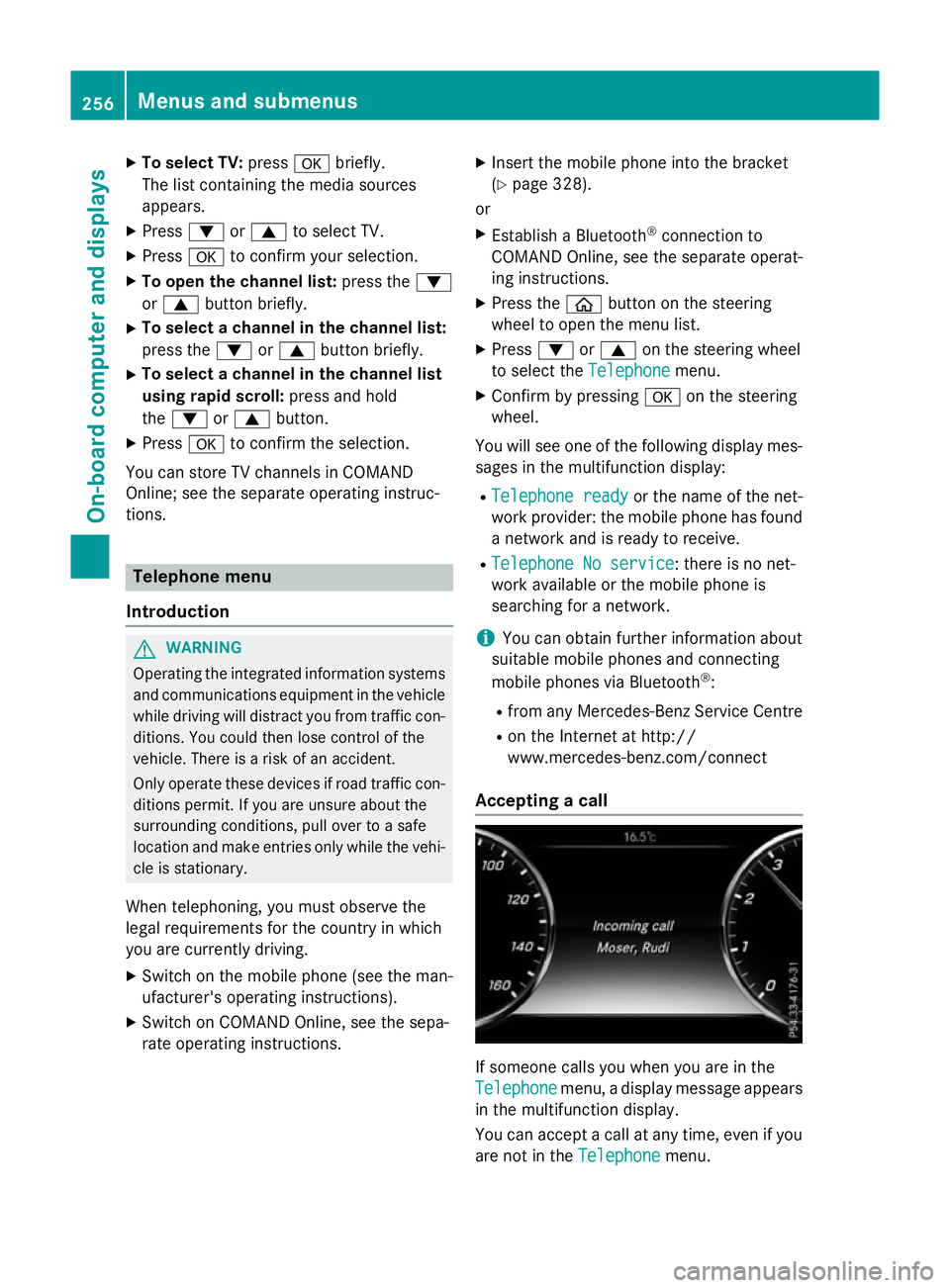
Accepting a call If someone calls you when you are in the
Telephone Telephone menu, a display message appears
in the multifunction display.
You can accept a call at any time, even if you
are not in the Telephone Telephonemenu.256
Menus and submenusOn-board computer and displays
Page 260 of 417
X
Press the 6button on the steering
wheel to accept an incoming call.
Rejecting or ending a call You can end or reject a call at any time even if
you are not in the Telephone
Telephonemenu.
X Press the ~button on the steering
wheel to reject or end a call.
Selecting an entry in the phone book X
Press òon the steering wheel to open
the menu list.
X Press :or9 on the steering wheel
to select the Telephone
Telephonemenu.
X Confirm by pressing aon the steering
wheel.
X Press :, 9ora to switch to the
phone book.
X Press :or9 to select the names
one after the other.
or
X To start rapid scrolling: press and hold
the : or9 button for longer than
one second.
The names in the phone book are displayed quickly one after the other.
If you press and hold the :or9
button for longer than five seconds, the
name appears with the next or previous ini-
tial letter in the alphabet.
Rapid scrolling stops when you release the button or reach the end of the list.
X If only one telephone number is stored
for a name: press the6ora button
to start dialling.
or X If there is more than one number for a
particular name: press the6ora
button to display the numbers.
X Press :or9 to select the number
you want to dial.
X Press the 6ora button to start dial-
ling. or
X To exit the telephone book: press the
~ or% button.
Redialling The on-board computer saves the last names
or numbers dialled in the redial memory.
X Press òon the steering wheel to open
the menu list.
X Press :or9 on the steering wheel
to select the Telephone Telephonemenu.
X Confirm by pressing aon the steering
wheel.
X Press the 6button to switch to the
redial memory.
X Press :or9 to select the desired
name or number.
X Press the 6ora button to start dial-
ling.
or
X To exit the redial memory: press the
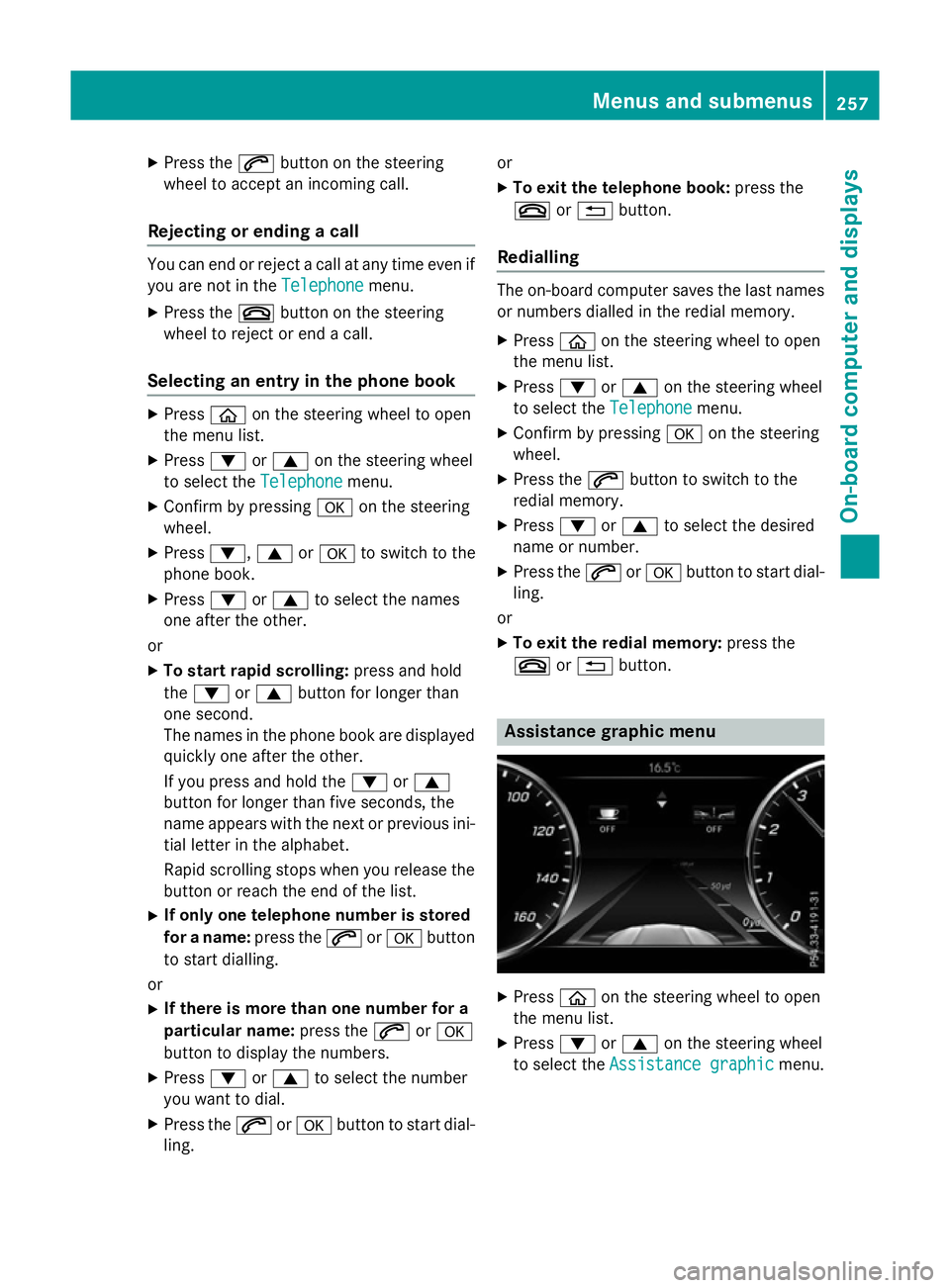
~ or% button. Assistance graphic menu
X
Press òon the steering wheel to open
the menu list.
X Press :or9 on the steering wheel
to select the Assistance graphic
Assistance graphic menu. Menus and submenus
257On-board computer and displays Z
Page 303 of 417
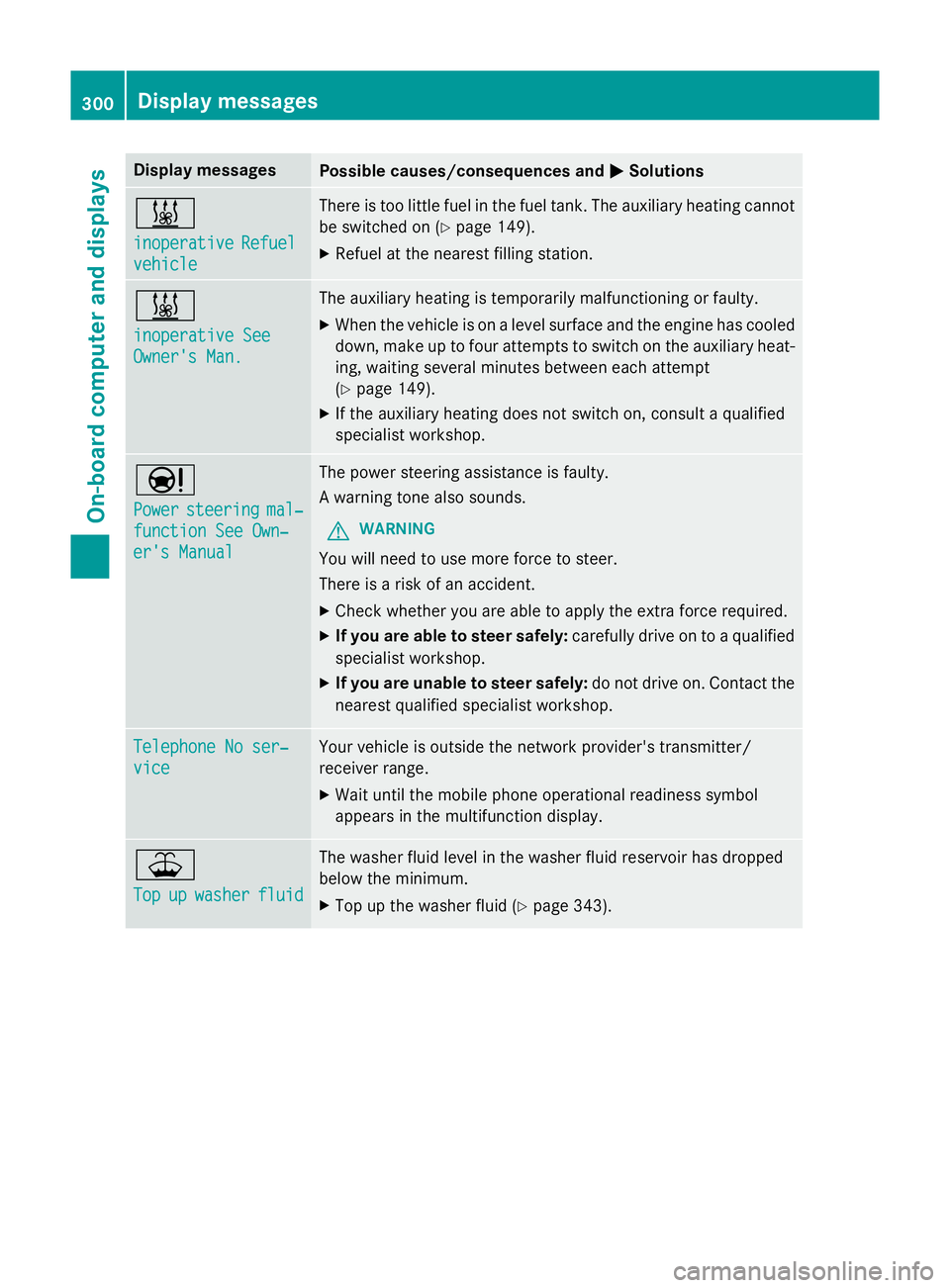
Display messages
Possible causes/consequences and
M
MSolutions &
inoperative inoperative
Refuel
Refuel
vehicle
vehicle There is too little fuel in the fuel tank. The auxiliary heating cannot
be switched on (Y page 149).
X Refuel at the nearest filling station. &
inoperative See inoperative See
Owner's Man. Owner's Man. The auxiliary heating is temporarily malfunctioning or faulty.
X When the vehicle is on a level surface and the engine has cooled
down, make up to four attempts to switch on the auxiliary heat- ing, waiting several minutes between each attempt
(Y page 149).
X If the auxiliary heating does not switch on, consult a qualified
specialist workshop. Ð
Power Power
steering
steering mal‐
mal‐
function See Own‐
function See Own‐
er's Manual er's Manual The power steering assistance is faulty.
A warning tone also sounds.
G WARNING
You will need to use more force to steer.
There is a risk of an accident. X Check whether you are able to apply the extra force required.
X If you are able to steer safely: carefully drive on to a qualified
specialist workshop.
X If you are unable to steer safely: do not drive on. Contact the
nearest qualified specialist workshop. Telephone No ser‐ Telephone No ser‐
vice vice Your vehicle is outside the network provider's transmitter/
receiver range.
X Wait until the mobile phone operational readiness symbol
appears in the multifunction display. ¥
Top Top
up
upwasher
washer fluid
fluid The washer fluid level in the washer fluid reservoir has dropped
below the minimum.
X Top up the washer fluid (Y page 343).300
Display
messagesOn-board computer and displays
Page 321 of 417
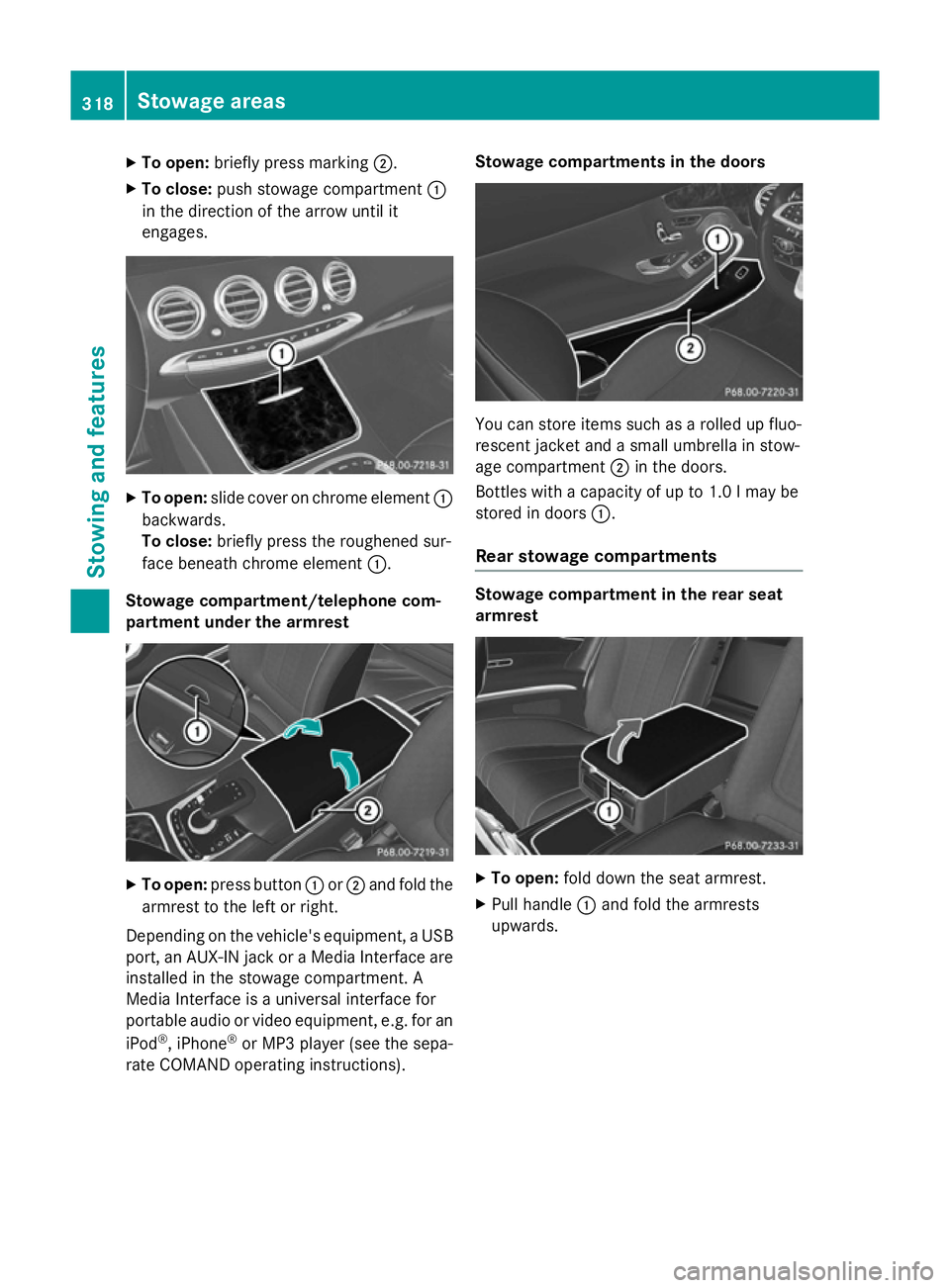
X
To open: briefly press marking ;.
X To close: push stowage compartment :
in the direction of the arrow until it
engages. X
To open: slide cover on chrome element :
backwards.
To close: briefly press the roughened sur-
face beneath chrome element :.
Stowage compartment/telephone com-
partment under the armrest X
To open: press button :or; and fold the
armrest to the left or right.
Depending on the vehicle's equipment, a USB port, an AUX-IN jack or a Media Interface areinstalled in the stowage compartment. A
Media Interface is a universal interface for
portable audio or video equipment, e.g. for an
iPod ®
, iPhone ®
or MP3 player (see the sepa-
rate COMAND operating instructions). Stowage compartments in the doors
You can store items such as a rolled up fluo-
rescent jacket and a small umbrella in stow-
age compartment ;in the doors.
Bottles with a capacity of up to 1.0 lmay be
stored in doors :.
Rear stowage compartments Stowage compartment in the rear seat
armrest
X
To open: fold down the seat armrest.
X Pull handle :and fold the armrests
upwards. 318
Stowage areasStowing and features
Page 328 of 417
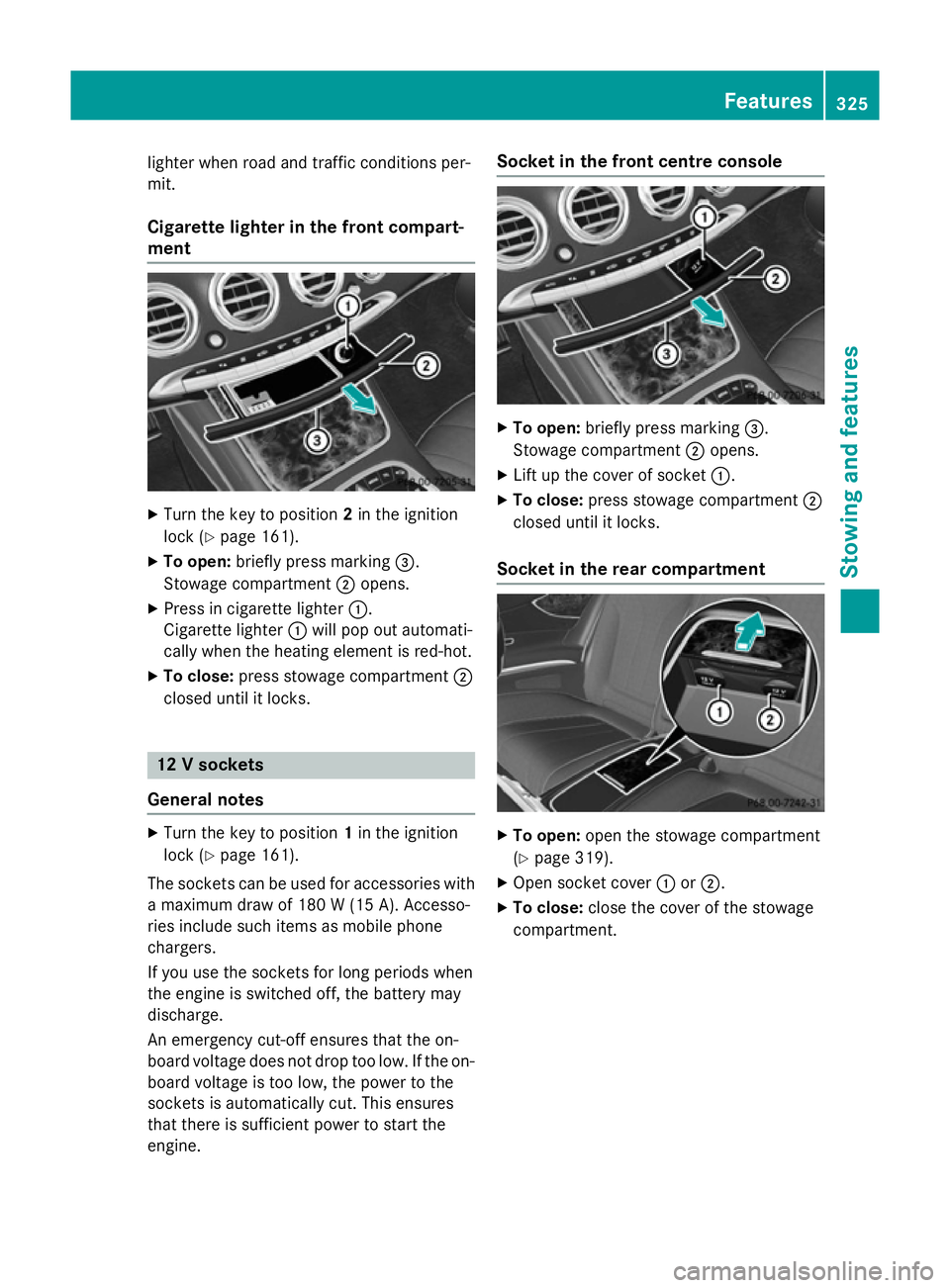
lighter when road and traffic conditions per-
mit.
Cigarette lighter in the front compart-
ment X
Turn the key to position 2in the ignition
lock (Y page 161).
X To open: briefly press marking =.
Stowage compartment ;opens.
X Press in cigarette lighter :.
Cigarette lighter :will pop out automati-
cally when the heating element is red-hot.
X To close: press stowage compartment ;
closed until it locks. 12 V sockets
General notes X
Turn the key to position 1in the ignition
lock (Y page 161).
The sockets can be used for accessories with a maximum draw of 180 W (15A). Accesso-
ries include such items as mobile phone
chargers.
If you use the sockets for long periods when
the engine is switched off, the battery may
discharge.
An emergency cut-off ensures that the on-
board voltage does not drop too low. If the on-
board voltage is too low, the power to the
sockets is automatically cut. This ensures
that there is sufficient power to start the
engine. Socket in the front cent
re console X
To open: briefly press marking =.
Stowage compartment ;opens.
X Lift up the cover of socket :.
X To close: press stowage compartment ;
closed until it locks.
Socket in the rear compartment X
To open: open the stowage compartment
(Y page 319).
X Open socket cover :or;.
X To close: close the cover of the stowage
compartment. Features
325Stowing an d features Z
Page 330 of 417
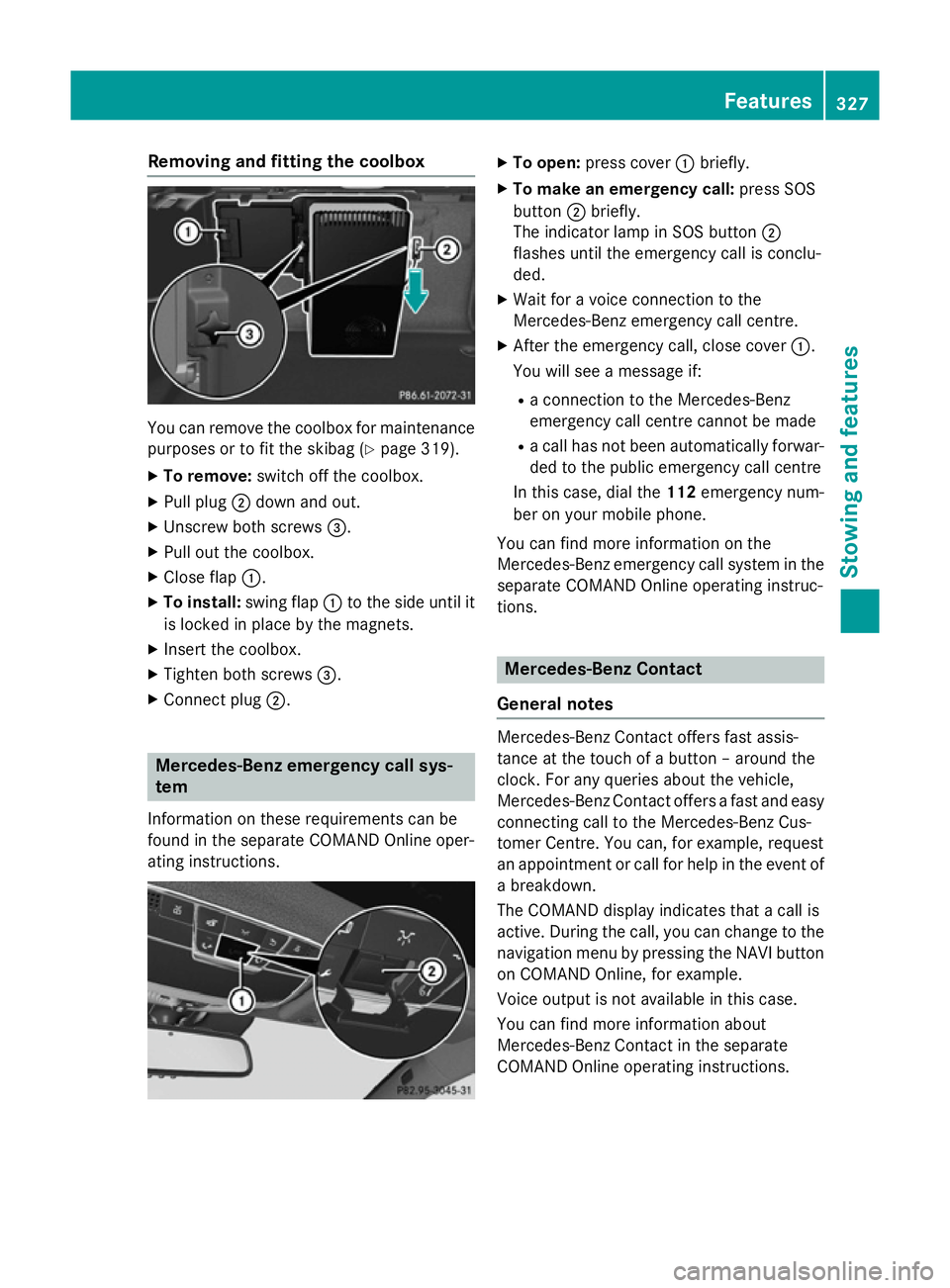
Removing and fitting the coolbox
You can remove the coolbox for maintenance
purposes or to fit the skibag (Y page 319).
X To remove: switch off the coolbox.
X Pull plug ;down and out.
X Unscrew both screws =.
X Pull out the coolbox.
X Close flap :.
X To install: swing flap:to the side until it
is locked in place by the magnets.
X Insert the coolbox.
X Tighten both screws =.
X Connect plug ;. Mercedes-Benz emergency call sys-
tem
Information on these requirements can be
found in the separate COMAND Online oper-
ating instructions. X
To open: press cover :briefly.
X To make an emergency call: press SOS
button ;briefly.
The indicator lamp in SOS button ;
flashes until the emergency call is conclu-
ded.
X Wait for a voice connection to the
Mercedes-Benz emergency call centre.
X After the emergency call, close cover :.
You will see a message if:
R a connection to the Mercedes-Benz
emergency call centre cannot be made
R a call has not been automatically forwar-
ded to the public emergency call centre
In this case, dial the 112emergency num-
ber on your mobile phone.
You can find more information on the
Mercedes-Benz emergency call system in the separate COMAND Online operating instruc-
tions. Mercedes-Benz Contact
General notes Mercedes-Benz Contact offers fast assis-
tance at the touch of a button – around the
clock. For any queries about the vehicle,
Mercedes-Benz Contact offers a fast and easy
connecting call to the Mercedes-Benz Cus-
tomer Centre. You can, for example, request
an appointment or call for help in the event of a breakdown.
The COMAND display indicates that a call is
active. During the call, you can change to the
navigation menu by pressing the NAVI button
on COMAND Online, for example.
Voice output is not available in this case.
You can find more information about
Mercedes-Benz Contact in the separate
COMAND Online operating instructions. Features
327Stowing and features Z
Page 331 of 417
Breakdown assistance call button
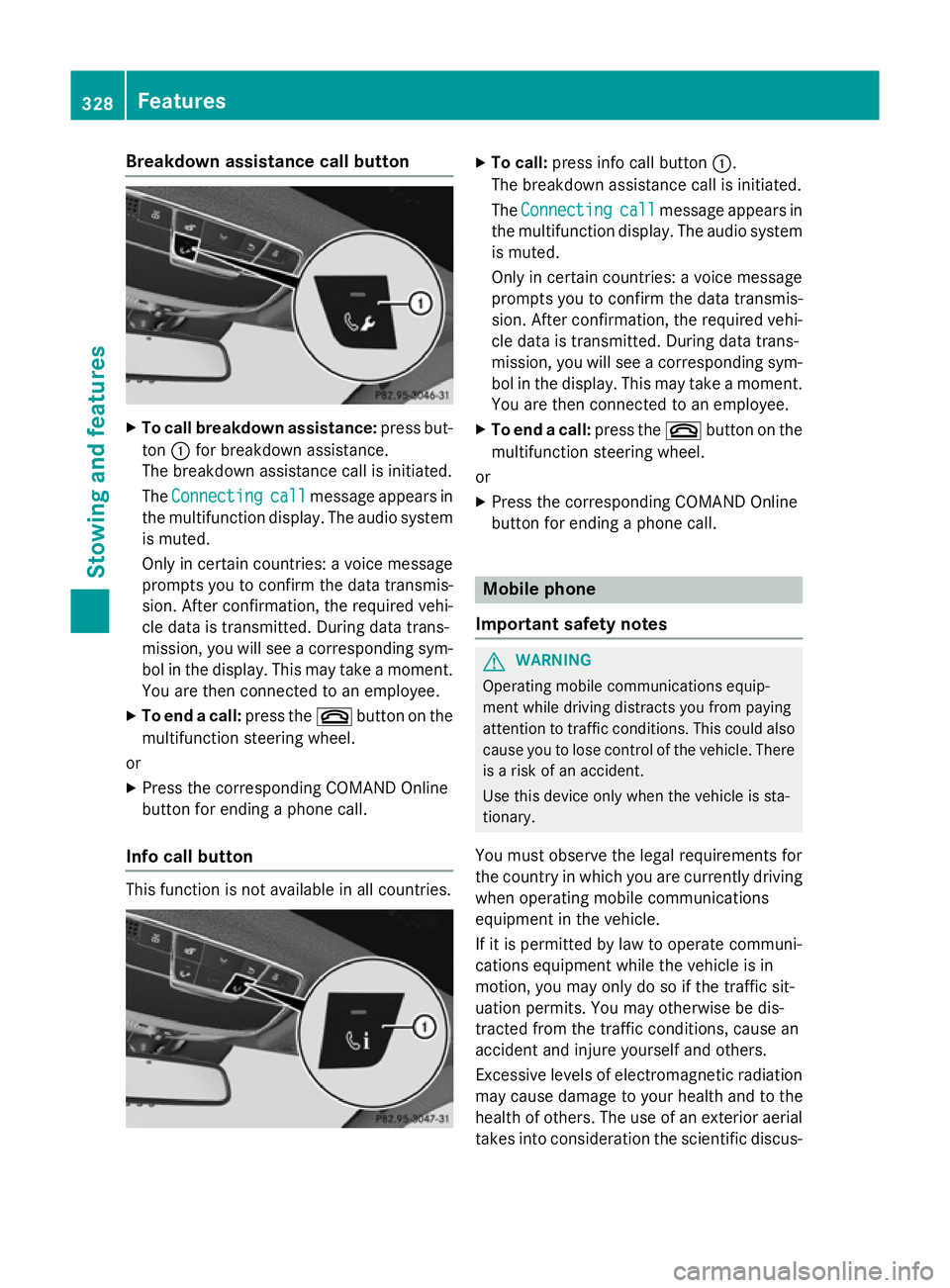
X
To call breakdown assistance: press but-
ton :for breakdown assistance.
The breakdown assistance call is initiated.
The Connecting Connecting call
callmessage appears in
the multifunction display. The audio system is muted.
Only in certain countries: a voice message
prompts you to confirm the data transmis-
sion. After confirmation, the required vehi-
cle data is transmitted. During data trans-
mission, you will see a corresponding sym-
bol in the display. This may take a moment. You are then connected to an employee.
X To end a call: press the~button on the
multifunction steering wheel.
or
X Press the corresponding COMAND Online
button for ending a phone call.
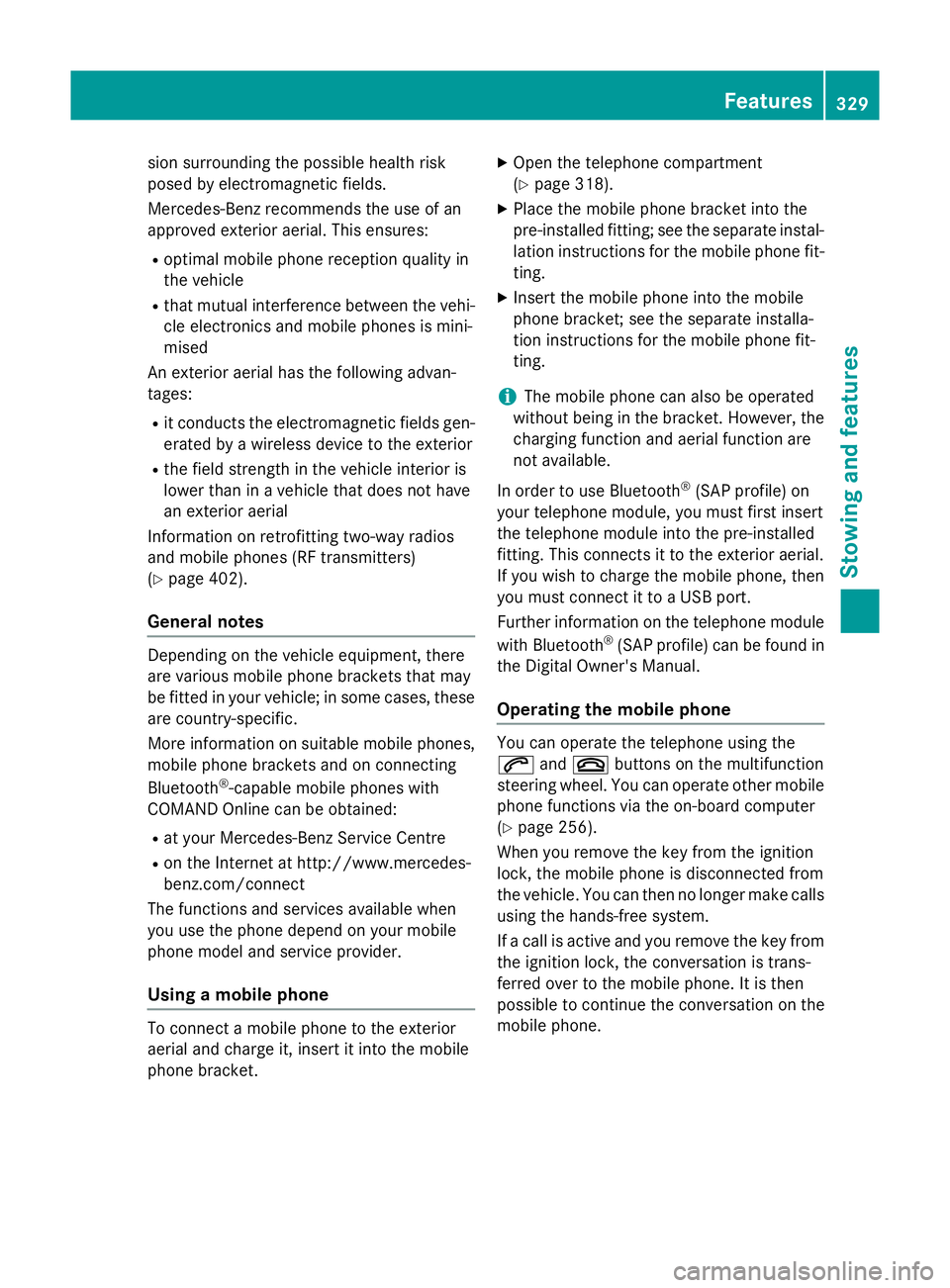
Info call button This function is not available in all countries. X
To call: press info call button :.
The breakdown assistance call is initiated.
The Connecting Connecting call
callmessage appears in
the multifunction display. The audio system is muted.
Only in certain countries: a voice message
prompts you to confirm the data transmis-
sion. After confirmation, the required vehi- cle data is transmitted. During data trans-
mission, you will see a corresponding sym-
bol in the display. This may take a moment.
You are then connected to an employee.
X To end a call: press the~button on the
multifunction steering wheel.
or
X Press the corresponding COMAND Online
button for ending a phone call. Mobile phone
Important safety notes G
WARNING
Operating mobile communications equip-
ment while driving distracts you from paying
attention to traffic conditions. This could also cause you to lose control of the vehicle. There
is a risk of an accident.
Use this device only when the vehicle is sta-
tionary.
You must observe the legal requirements for
the country in which you are currently driving when operating mobile communications
equipment in the vehicle.
If it is permitted by law to operate communi-
cations equipment while the vehicle is in
motion, you may only do so if the traffic sit-
uation permits. You may otherwise be dis-
tracted from the traffic conditions, cause an
accident and injure yourself and others.
Excessive levels of electromagnetic radiation
may cause damage to your health and to the
health of others. The use of an exterior aerial
takes into consideration the scientific discus- 328
FeaturesSto
wing an d features
Page 332 of 417
sion surrounding the possible health risk
posed by electromagnetic fields.
Mercedes-Benz recommends the use of an
approved exterior aerial. This ensures:
R optimal mobile phone reception quality in
the vehicle
R that mutual interference between the vehi-
cle electronics and mobile phones is mini-
mised
An exterior aerial has the following advan-
tages:
R it conducts the electromagnetic fields gen-
erated by a wireless device to the exterior
R the field strength in the vehicle interior is
lower than in a vehicle that does not have
an exterior aerial
Information on retrofitting two-way radios
and mobile phones (RF transmitters)
(Y page 402).
General notes Depending on the vehicle equipment, there
are various mobile phone brackets that may
be fitted in your vehicle; in some cases, these
are country-specific.
More information on suitable mobile phones,
mobile phone brackets and on connecting
Bluetooth ®
-capable mobile phones with
COMAND Online can be obtained:
R at your Mercedes-Benz Service Centre
R on the Internet at http://www.mercedes-
benz.com/connect
The functions and services available when
you use the phone depend on your mobile
phone model and service provider.
Using a mobile phone To connect a mobile phone to the exterior
aerial and charge it, insert it into the mobile
phone bracket. X
Open the telephone compartment
(Y page 318).
X Place the mobile phone bracket into the
pre-installed fitting; see the separate instal-
lation instructions for the mobile phone fit-
ting.
X Insert the mobile phone into the mobile
phone bracket; see the separate installa-
tion instructions for the mobile phone fit-
ting.
i The mobile phone can also be operated
without being in the bracket. However, the charging function and aerial function are
not available.
In order to use Bluetooth ®
(SAP profile) on
your telephone module, you must first insert
the telephone module into the pre-installed
fitting. This connects it to the exterior aerial.
If you wish to charge the mobile phone, then
you must connect it to a USB port.
Further information on the telephone module
with Bluetooth ®
(SAP profile) can be found in
the Digital Owner's Manual.
Operating the mobile phone You can operate the telephone using the
6 and~ buttons on the multifunction
steering wheel. You can operate other mobile
phone functions via the on-board computer
(Y page 256).
When you remove the key from the ignition
lock, the mobile phone is disconnected from
the vehicle. You can then no longer make calls using the hands-free system.
If a call is active and you remove the key from the ignition lock, the conversation is trans-
ferred over to the mobile phone. It is then
possible to continue the conversation on the
mobile phone. Features
329Stowing and features Z