reset MERCEDES-BENZ S-CLASS COUPE 2015 User Guide
[x] Cancel search | Manufacturer: MERCEDES-BENZ, Model Year: 2015, Model line: S-CLASS COUPE, Model: MERCEDES-BENZ S-CLASS COUPE 2015Pages: 417, PDF Size: 13.42 MB
Page 107 of 417
feature is only an aid, not a substitute for your
attention when closing the roller sunblind. G
WARNING
The reversing feature especially does not
react to soft, light and thin objects, such as
small fingers. This means that the reversing
feature cannot prevent someone being trap-
ped in these situations. There is a risk of
injury.
When closing make sure that no parts of the
body are in the sweep of the roller sunblind.
If someone is trapped:
R release the switch immediately or
R during automatic operation, press the
switch briefly in any direction
The closing process is stopped.
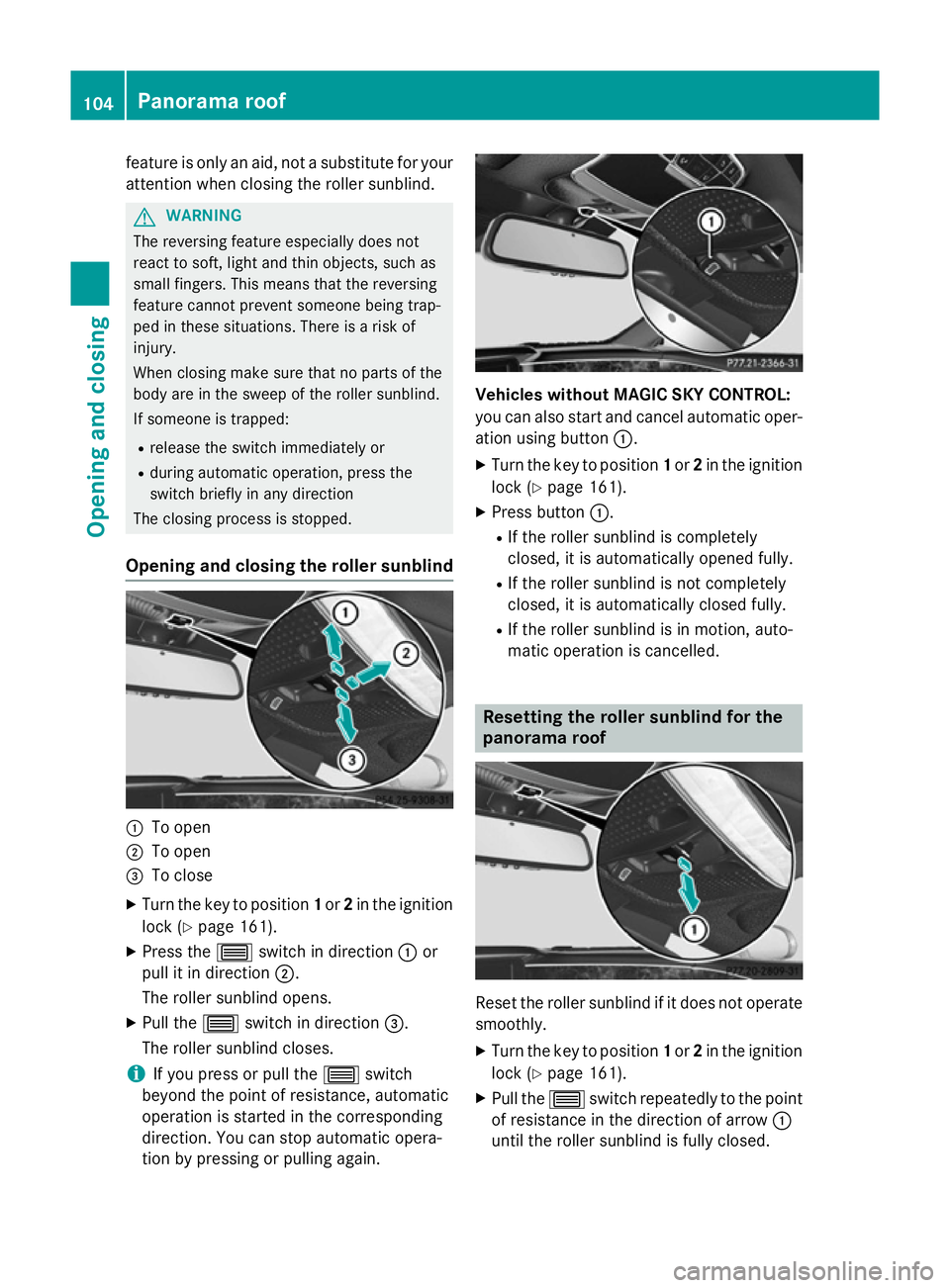
Opening and closing the roller sunblind :
To open
; To open
= To close
X Turn the key to position 1or 2in the ignition
lock (Y page 161).
X Press the 3switch in direction :or
pull it in direction ;.
The roller sunblind opens.
X Pull the 3switch in direction =.
The roller sunblind closes.
i If you press or pull the
3switch
beyond the point of resistance, automatic
operation is started in the corresponding
direction. You can stop automatic opera-
tion by pressing or pulling again. Vehicles without MAGIC SKY CONTROL:
you can also start and cancel automatic oper-
ation using button :.
X Turn the key to position 1or 2in the ignition
lock (Y page 161).
X Press button :.
R If the roller sunblind is completely
closed, it is automatically opened fully.
R If the roller sunblind is not completely
closed, it is automatically closed fully.
R If the roller sunblind is in motion, auto-
matic operation is cancelled. Resetting the roller sunblind for the
panorama roof
Reset the roller sunblind if it does not operate
smoothly.
X Turn the key to position 1or 2in the ignition
lock (Y page 161).
X Pull the 3switch repeatedly to the point
of resistance in the direction of arrow :
until the roller sunblind is fully closed. 104
Panorama roofOpening and closing
Page 123 of 417
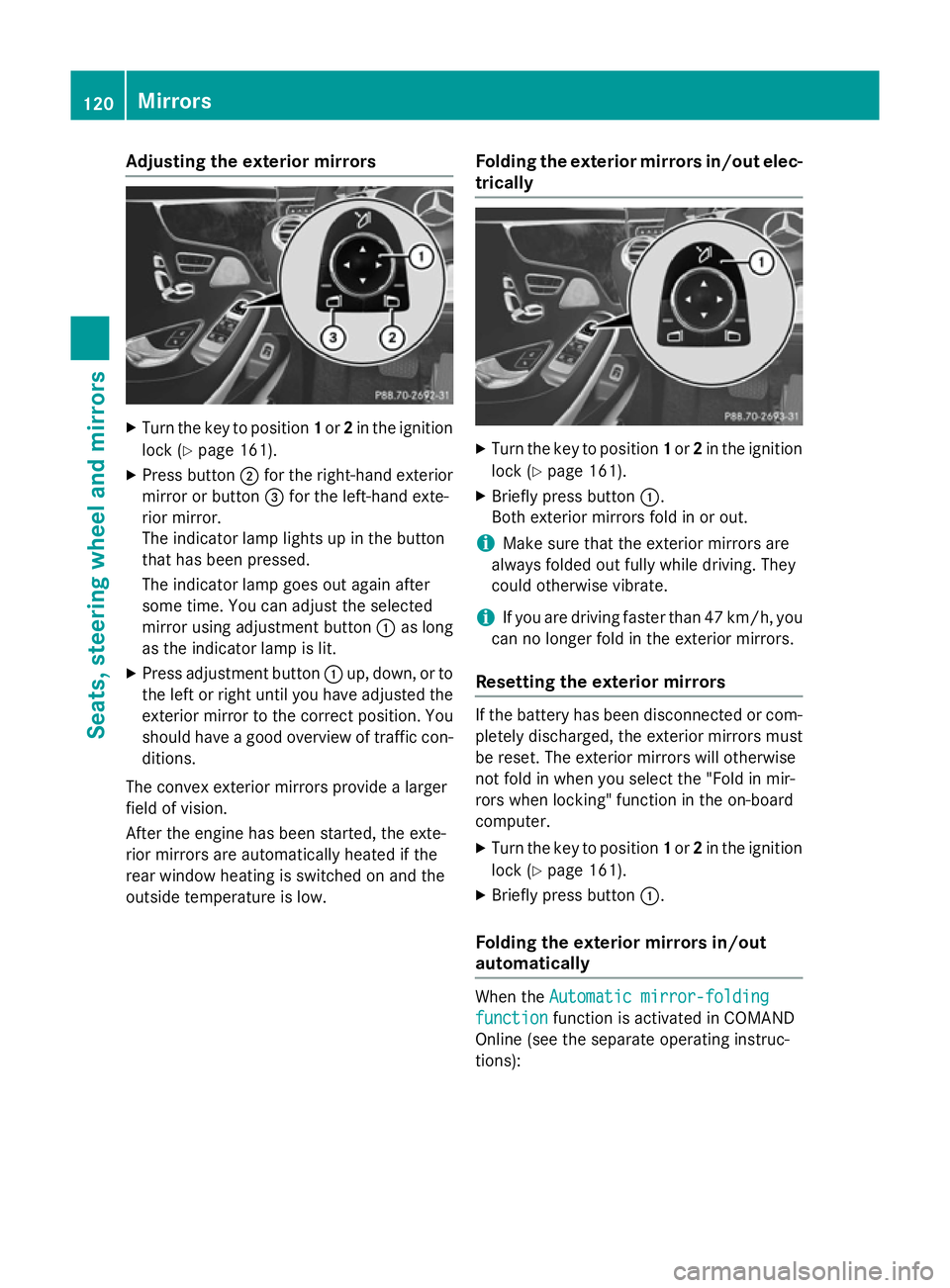
Adjusting the exterior mirrors
X
Turn the key to position 1or 2in the ignition
lock (Y page 161).
X Press button ;for the right-hand exterior
mirror or button =for the left-hand exte-
rior mirror.
The indicator lamp lights up in the button
that has been pressed.
The indicator lamp goes out again after
some time. You can adjust the selected
mirror using adjustment button :as long
as the indicator lamp is lit.
X Press adjustment button :up, down, or to
the left or right until you have adjusted the
exterior mirror to the correct position. You
should have a good overview of traffic con- ditions.
The convex exterior mirrors provide a larger
field of vision.
After the engine has been started, the exte-
rior mirrors are automatically heated if the
rear window heating is switched on and the
outside temperature is low. Folding the exterior mirrors in/out elec-
trically X
Turn the key to position 1or 2in the ignition
lock (Y page 161).
X Briefly press button :.
Both exterior mirrors fold in or out.
i Make sure that the exterior mirrors are
always folded out fully while driving. They
could otherwise vibrate.
i If you are driving faster than 47 km/h, you
can no longer fold in the exterior mirrors.
Resetting the exterior mirrors If the battery has been disconnected or com-
pletely discharged, the exterior mirrors must
be reset. The exterior mirrors will otherwise
not fold in when you select the "Fold in mir-
rors when locking" function in the on-board
computer.
X Turn the key to position 1or 2in the ignition
lock (Y page 161).
X Briefly press button :.
Folding the exterior mirrors in/out
automatically When the
Automatic mirror-folding Automatic mirror-folding
function
function function is activated in COMAND
Online (see the separate operating instruc-
tions): 120
MirrorsSeats
, steering wheel and mirrors
Page 125 of 417
X
Turn the key to position 2in the ignition
lock (Y page 161).
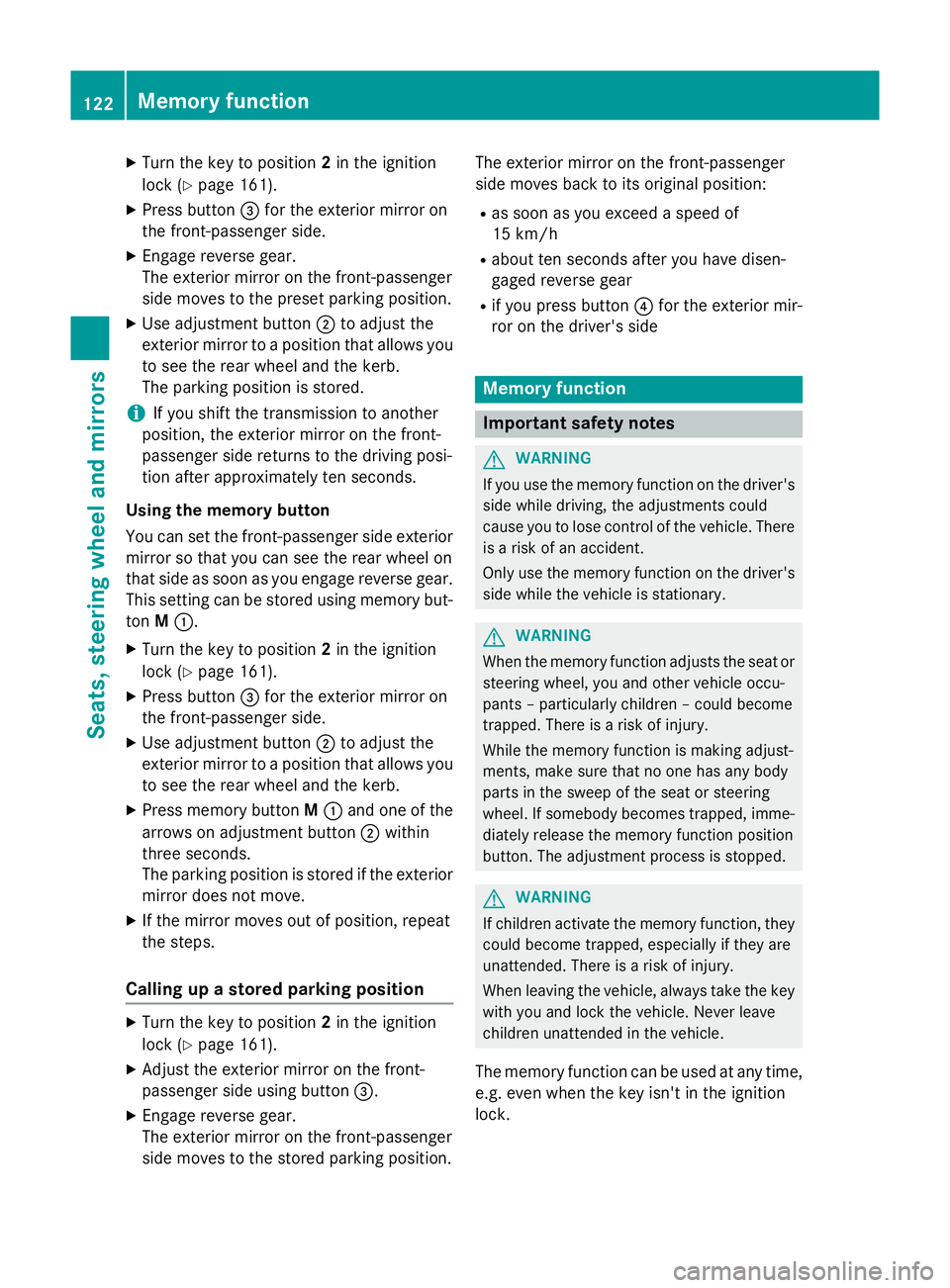
X Press button =for the exterior mirror on
the front-passenger side.
X Engage reverse gear.
The exterior mirror on the front-passenger
side moves to the preset parking position.
X Use adjustment button ;to adjust the
exterior mirror to a position that allows you to see the rear wheel and the kerb.
The parking position is stored.
i If you shift the transmission to another
position, the exterior mirror on the front-
passenger side returns to the driving posi-
tion after approximately ten seconds.
Using the memory button
You can set the front-passenger side exterior
mirror so that you can see the rear wheel on
that side as soon as you engage reverse gear. This setting can be stored using memory but-
ton M:.
X Turn the key to position 2in the ignition
lock (Y page 161).
X Press button =for the exterior mirror on
the front-passenger side.
X Use adjustment button ;to adjust the
exterior mirror to a position that allows you to see the rear wheel and the kerb.
X Press memory button M: and one of the
arrows on adjustment button ;within
three seconds.
The parking position is stored if the exterior
mirror does not move.
X If the mirror moves out of position, repeat
the steps.
Calling up a stored parking position X
Turn the key to position 2in the ignition
lock (Y page 161).
X Adjust the exterior mirror on the front-
passenger side using button =.
X Engage reverse gear.
The exterior mirror on the front-passenger
side moves to the stored parking position. The exterior mirror on the front-passenger
side moves back to its original position:
R as soon as you exceed a speed of
15 km/h
R about ten seconds after you have disen-
gaged reverse gear
R if you press button ?for the exterior mir-
ror on the driver's side Memory function
Important safety notes
G
WARNING
If you use the memory function on the driver's side while driving, the adjustments could
cause you to lose control of the vehicle. There
is a risk of an accident.
Only use the memory function on the driver's
side while the vehicle is stationary. G
WARNING
When the memory function adjusts the seat or steering wheel, you and other vehicle occu-
pants – particularly children – could become
trapped. There is a risk of injury.
While the memory function is making adjust-
ments, make sure that no one has any body
parts in the sweep of the seat or steering
wheel. If somebody becomes trapped, imme-
diately release the memory function position
button. The adjustment process is stopped. G
WARNING
If children activate the memory function, they
could become trapped, especially if they are
unattended. There is a risk of injury.
When leaving the vehicle, always take the key with you and lock the vehicle. Never leave
children unattended in the vehicle.
The memory function can be used at any time,
e.g. even when the key isn't in the ignition
lock. 122
Memory functionSeats, steering wheel and mirrors
Page 126 of 417
Storing settings
With the memory function, you can store up
to three different settings, e.g. for three dif-
ferent people.
The following settings are stored as a single
memory preset:
R seat, backrest, head restraint position and
contour of the backrest in the lumbar
region
R active multicontour seat: side bolsters of
the backrest, shoulder of the backrest, con-
tour of the backrest, dynamic function level
R seat heating: distribution of the heated sec-
tions of the seat cushion and backrest
R driver's side: position of the exterior mir-
rors on the driver's and front-passenger
sides
R position of the head-up display X
Adjust the seat accordingly (Y page 110).
X On the driver's side, adjust the steering
wheel (Y page 116) and the exterior mirrors
(Y page 120).
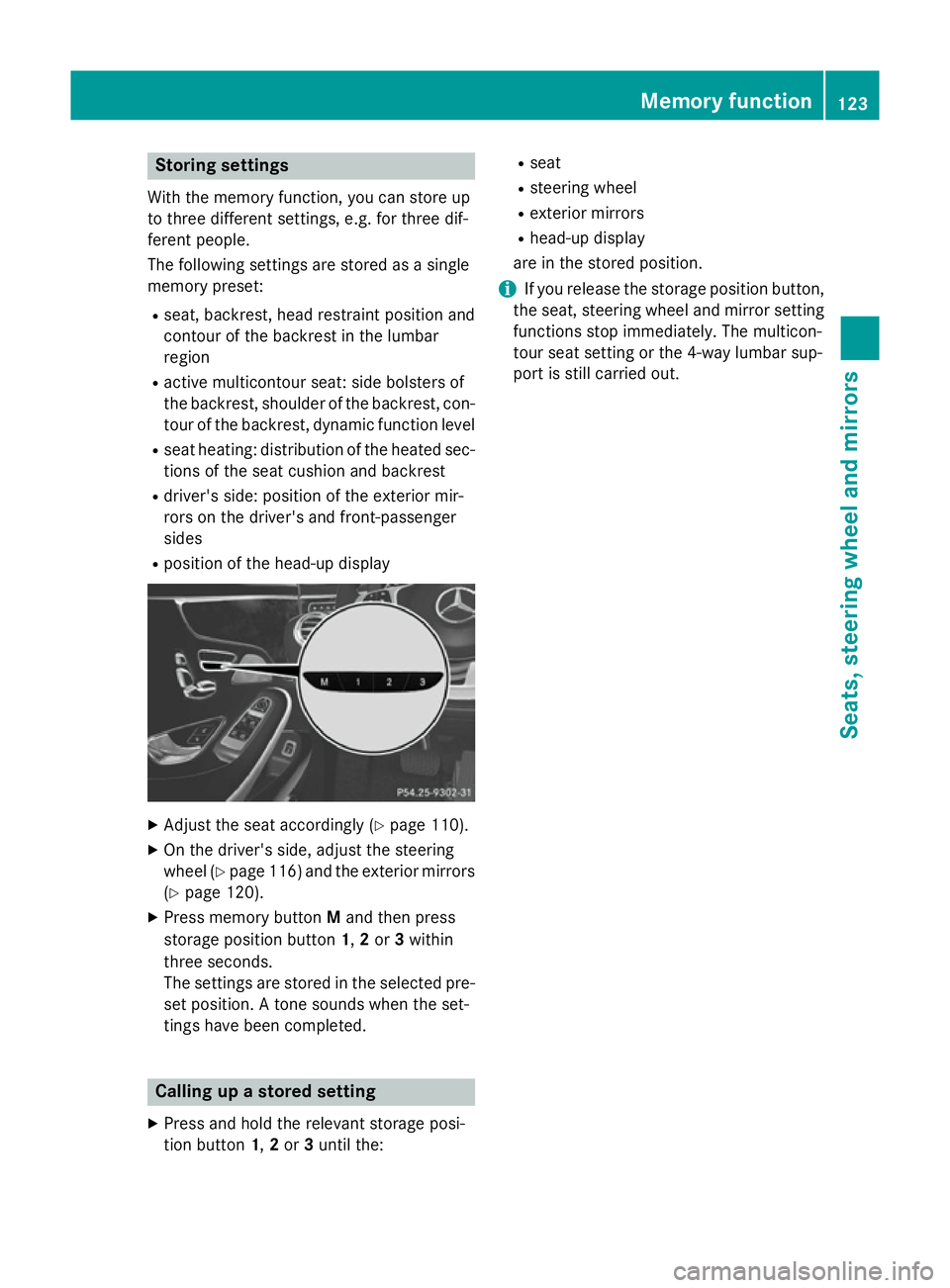
X Press memory button Mand then press
storage position button 1,2or 3within
three seconds.
The settings are stored in the selected pre- set position. A tone sounds when the set-
tings have been completed. Calling up a stored setting
X Press and hold the relevant storage posi-
tion button 1,2or 3until the: R
seat
R steering wheel
R exterior mirrors
R head-up display
are in the stored position.
i If you release the storage position button,
the seat, steering wheel and mirror setting
functions stop immediately. The multicon-
tour seat setting or the 4-way lumbar sup-
port is still carried out. Memory function
123Seats, steering wheel and mirrors Z
Page 188 of 417
more effort to steer and brake. There is a risk
of an accident.
Do not switch off the ignition while driving. ECO display
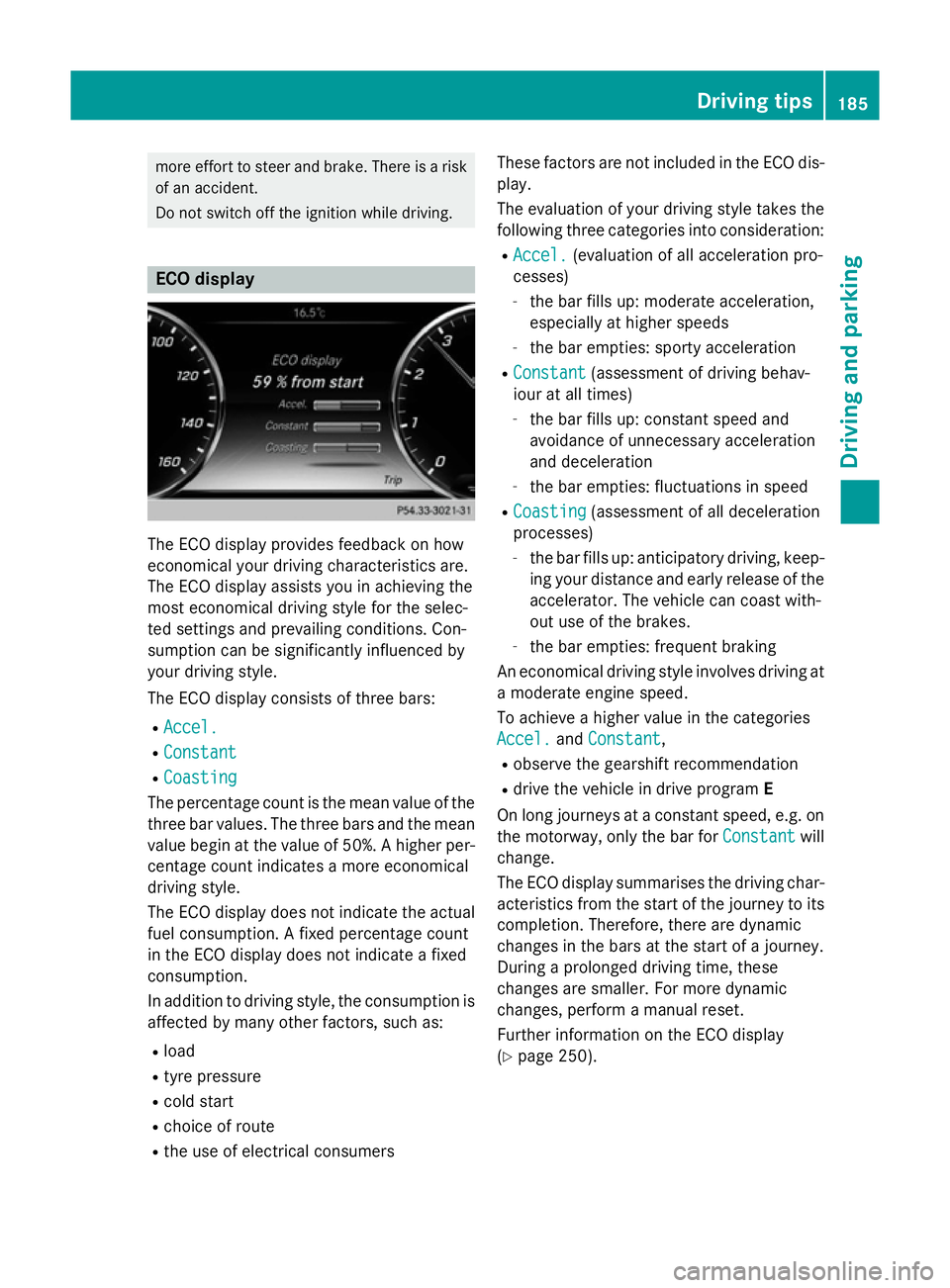
The ECO display provides feedback on how
economical your driving characteristics are.
The ECO display assists you in achieving the
most economical driving style for the selec-
ted settings and prevailing conditions. Con-
sumption can be significantly influenced by
your driving style.
The ECO display consists of three bars:
R Accel.
Accel.
R Constant Constant
R Coasting
Coasting
The percentage count is the mean value of the three bar values. The three bars and the mean
value begin at the value of 50%. A higher per-
centage count indicates a more economical
driving style.
The ECO display does not indicate the actual fuel consumption. A fixed percentage count
in the ECO display does not indicate a fixed
consumption.
In addition to driving style, the consumption is
affected by many other factors, such as:
R load
R tyre pressure
R cold start
R choice of route
R the use of electrical consumers These factors are not included in the ECO dis-
play.
The evaluation of your driving style takes the following three categories into consideration:
R Accel.
Accel. (evaluation of all acceleration pro-
cesses)
- the bar fills up: moderate acceleration,
especially at higher speeds
- the bar empties: sporty acceleration
R Constant Constant (assessment of driving behav-
iour at all times)
- the bar fills up: constant speed and
avoidance of unnecessary acceleration
and deceleration
- the bar empties: fluctuations in speed
R Coasting Coasting (assessment of all deceleration
processes)
- the bar fills up: anticipatory driving, keep-
ing your distance and early release of the
accelerator. The vehicle can coast with-
out use of the brakes.
- the bar empties: frequent braking
An economical driving style involves driving at a moderate engine speed.
To achieve a higher value in the categories
Accel. Accel. andConstant
Constant,
R observe the gearshift recommendation
R drive the vehicle in drive program E
On long journeys at a constant speed, e.g. on the motorway, only the bar for Constant
Constantwill
change.
The ECO display summarises the driving char-
acteristics from the start of the journey to its completion. Therefore, there are dynamic
changes in the bars at the start of a journey.
During a prolonged driving time, these
changes are smaller. For more dynamic
changes, perform a manual reset.
Further information on the ECO display
(Y page 250). Driving tips
185Driving and parking Z
Page 253 of 417
X
Confirm by pressing aon the steering
wheel.
X Press :or9 to select the display
with approximate range :and current fuel
consumption ;.
Approximate range :that can be covered is
calculated according to your current driving
style and the amount of fuel in the tank. If
there is only a small amount of fuel left in the
fuel tank, a vehicle being refuelled C
appears instead of approximate range :.
Recuperation display =shows you if energy
has been recuperated from the kinetic energy
in overrun mode and saved in the battery.
Recuperation display =depends on the
engine installed and is therefore not available in all vehicles.
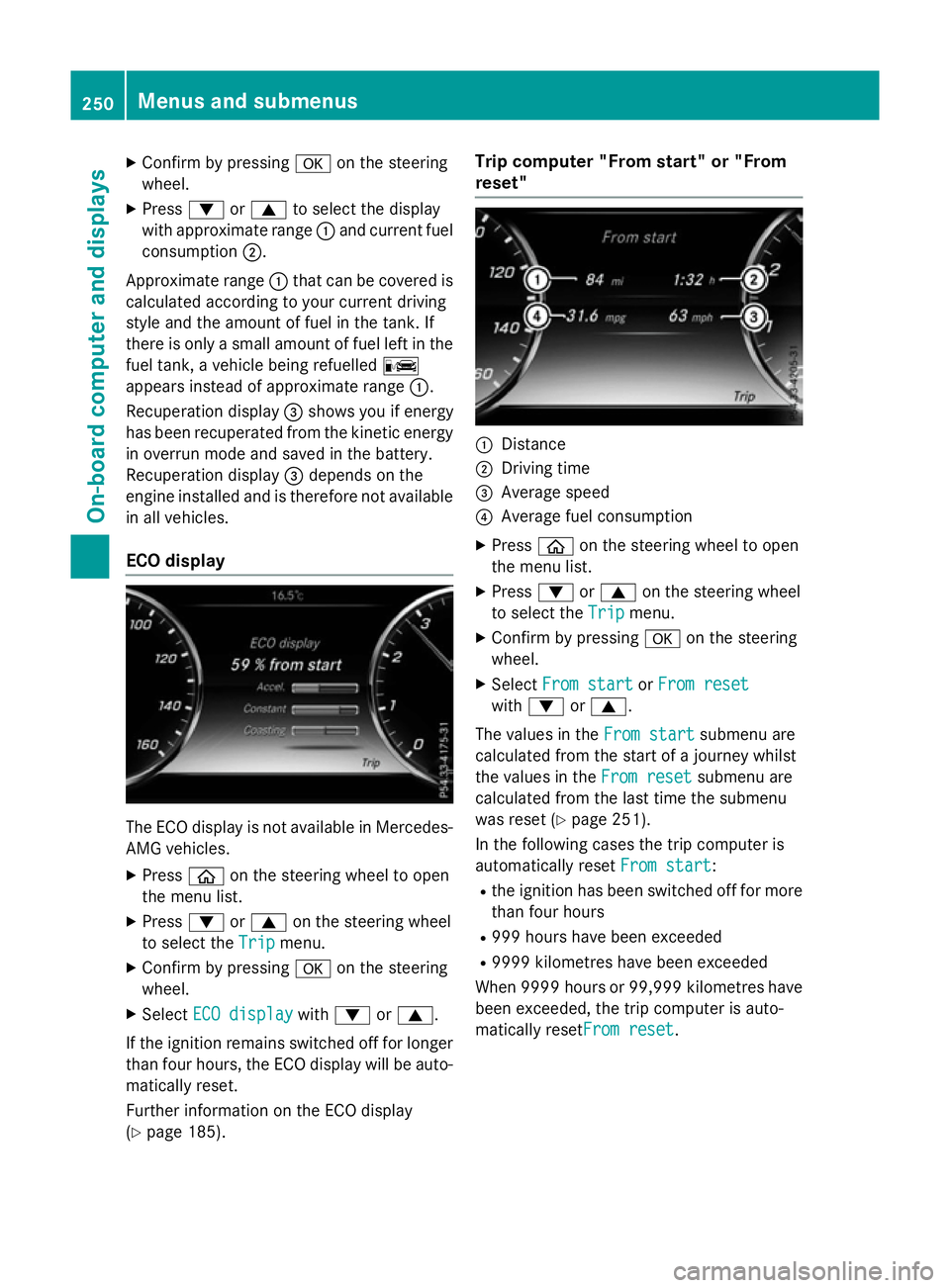
ECO display The ECO display is not available in Mercedes-
AMG vehicles.
X Press òon the steering wheel to open
the menu list.
X Press :or9 on the steering wheel
to select the Trip Tripmenu.
X Confirm by pressing aon the steering
wheel.
X Select ECO display
ECO display with: or9.
If the ignition remains switched off for longer than four hours, the ECO display will be auto-
matically reset.
Further information on the ECO display
(Y page 185). Trip computer "From start" or "From
reset"
:
Distance
; Driving time
= Average speed
? Average fuel consumption
X Press òon the steering wheel to open
the menu list.
X Press :or9 on the steering wheel
to select the Trip Tripmenu.
X Confirm by pressing aon the steering
wheel.
X Select From start
From start orFrom reset
From reset
with : or9.
The values in the From start
From startsubmenu are
calculated from the start of a journey whilst
the values in the From reset From resetsubmenu are
calculated from the last time the submenu
was reset (Y page 251).
In the following cases the trip computer is
automatically reset From start From start:
R the ignition has been switched off for more
than four hours
R 999 hours have been exceeded
R 9999 kilometres have been exceeded
When 9999 hour sor 99,999 kilometres have
been exceeded, the trip computer is auto-
matically resetFrom reset From reset.250
Menus and submenusOn-board computer and displays
Page 254 of 417
Digital speedometer
X
Press òon the steering wheel to open
the menu list.
X Press :or9 on the steering wheel
to select the Trip
Tripmenu.
X Confirm by pressing aon the steering
wheel.
X Press :or9 to select the digital
speedometer.
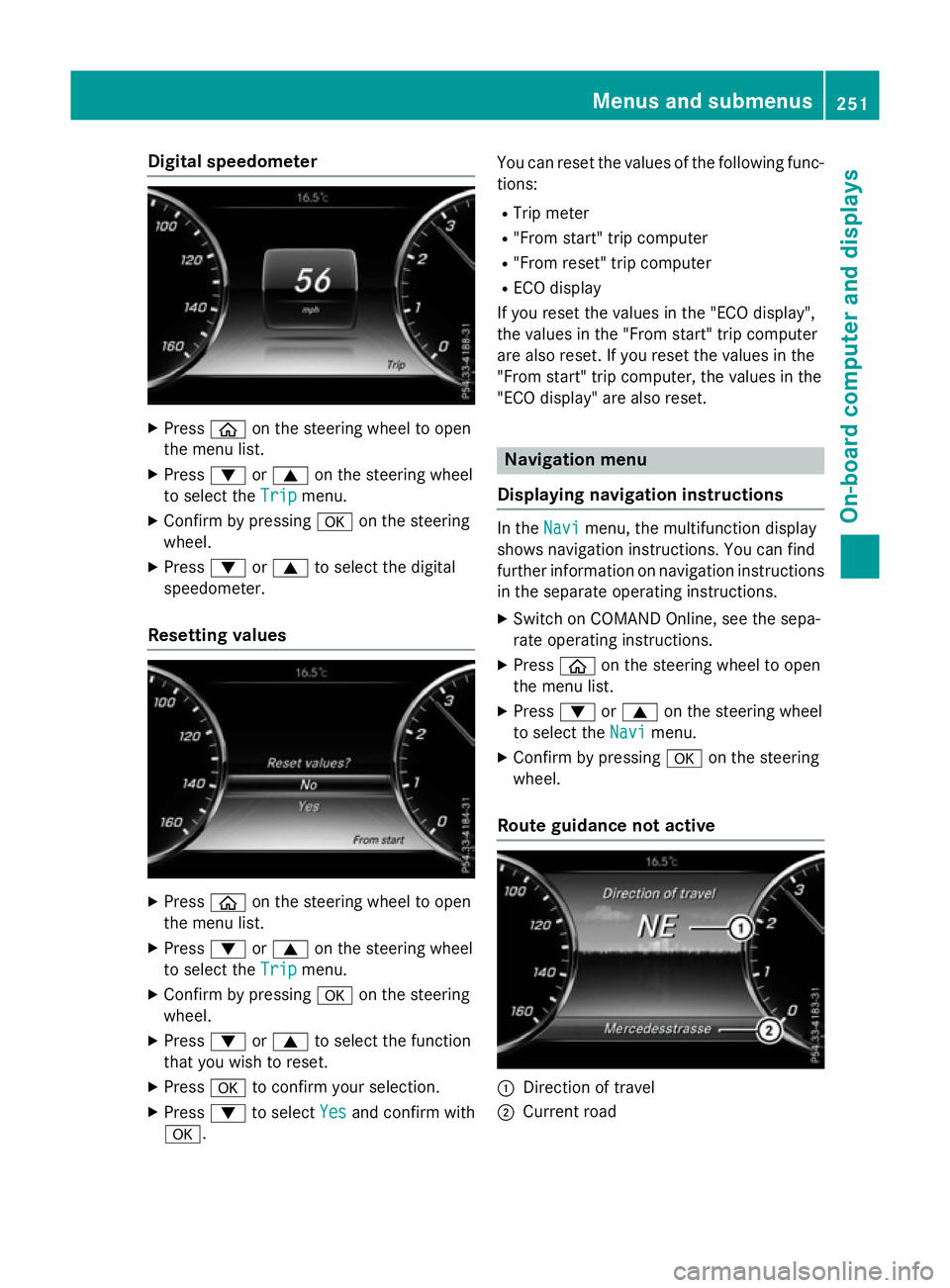
Resetting values X
Press òon the steering wheel to open
the menu list.
X Press :or9 on the steering wheel
to select the Trip
Tripmenu.
X Confirm by pressing aon the steering
wheel.
X Press :or9 to select the function
that you wish to reset.
X Press ato confirm your selection.
X Press :to select Yes
Yesand confirm with
a. You can reset the values of the following func-
tions:
R Trip meter
R "From start" trip computer
R "From reset" trip computer
R ECO display
If you reset the values in the "ECO display",
the values in the "From start" trip computer
are also reset. If you reset the values in the
"From start" trip computer, the values in the
"ECO display" are also reset. Navigation menu
Displaying navigation instructions In the
Navi Navimenu, the multifunction display
shows navigation instructions. You can find
further information on navigation instructions in the separate operating instructions.
X Switch on COMAND Online, see the sepa-
rate operating instructions.
X Press òon the steering wheel to open
the menu list.
X Press :or9 on the steering wheel
to select the Navi Navimenu.
X Confirm by pressing aon the steering
wheel.
Route guidance not active :
Direction of travel
; Current road Menus and submenus
251On-boardcompu ter and displays Z
Page 256 of 417
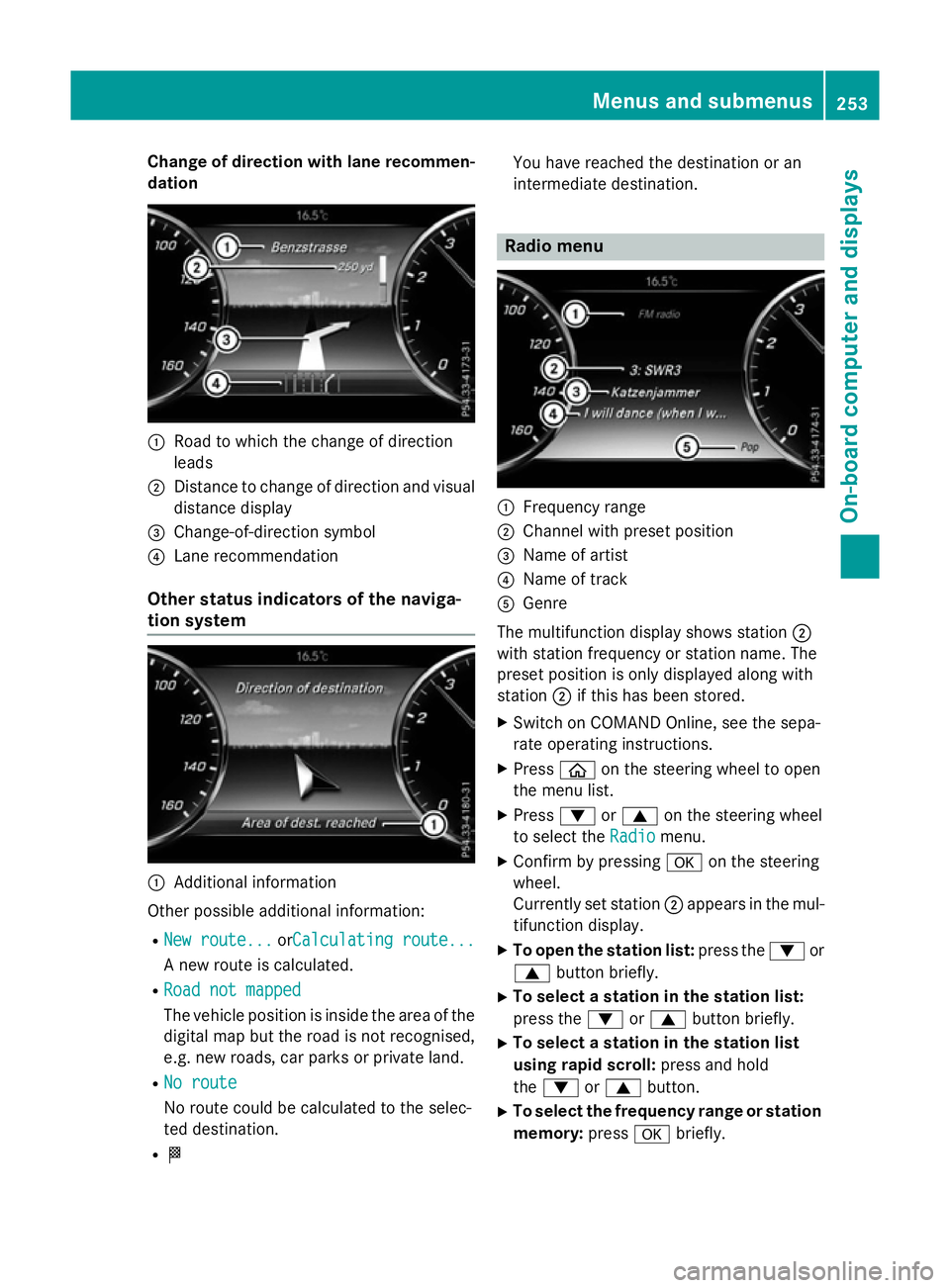
Change of direction with lane recommen-
dation :
Road to which the change of direction
leads
; Distance to change of direction and visual
distance display
= Change-of-direction symbol
? Lane recommendation
Other status indicators of the naviga-
tion system :
Additional information
Other possible additional information:
R New route...
New route... orCalculating route...Calculating route...
A new route is calculated.
R Road not mapped
Road not mapped
The vehicle position is inside the area of the
digital map but the road is not recognised,
e.g. new roads, car parks or private land.
R No route
No route
No route could be calculated to the selec-
ted destination.
R O You have reached the destination or an
intermediate destination. Radio menu
:
Frequency range
; Channel with preset position
= Name of artist
? Name of track
A Genre
The multifunction display shows station ;
with station frequency or station name. The
preset position is only displayed along with
station ;if this has been stored.
X Switch on COMAND Online, see the sepa-
rate operating instructions.
X Press òon the steering wheel to open
the menu list.
X Press :or9 on the steering wheel
to select the Radio
Radio menu.
X Confirm by pressing aon the steering
wheel.
Currently set station ;appears in the mul-
tifunction display.
X To open the station list: press the:or
9 button briefly.
X To select a station in the station list:
press the :or9 button briefly.
X To select a station in the station list
using rapid scroll: press and hold
the : or9 button.
X To select the frequency range or station
memory: pressabriefly. Menus and submenus
253On-board computer and displays Z
Page 258 of 417
X
To select the next or previous track in
the track list: press the:or9 but-
ton briefly.
X To select a track from the track list
using rapid scrolling: press and
hold : or9 until the desired track is
reached.
If you press and hold the button, the speed of rapid scroll increases after a short time.
Not all audio players or media support this function.
If the corresponding track information is
stored on the audio drive or audio media, the multifunction display may display the follow-
ing:
R track number
R track name
R artist
R album
The track information is not available in audio AUX mode (Aux iliary audio mode: external
audio source connected).
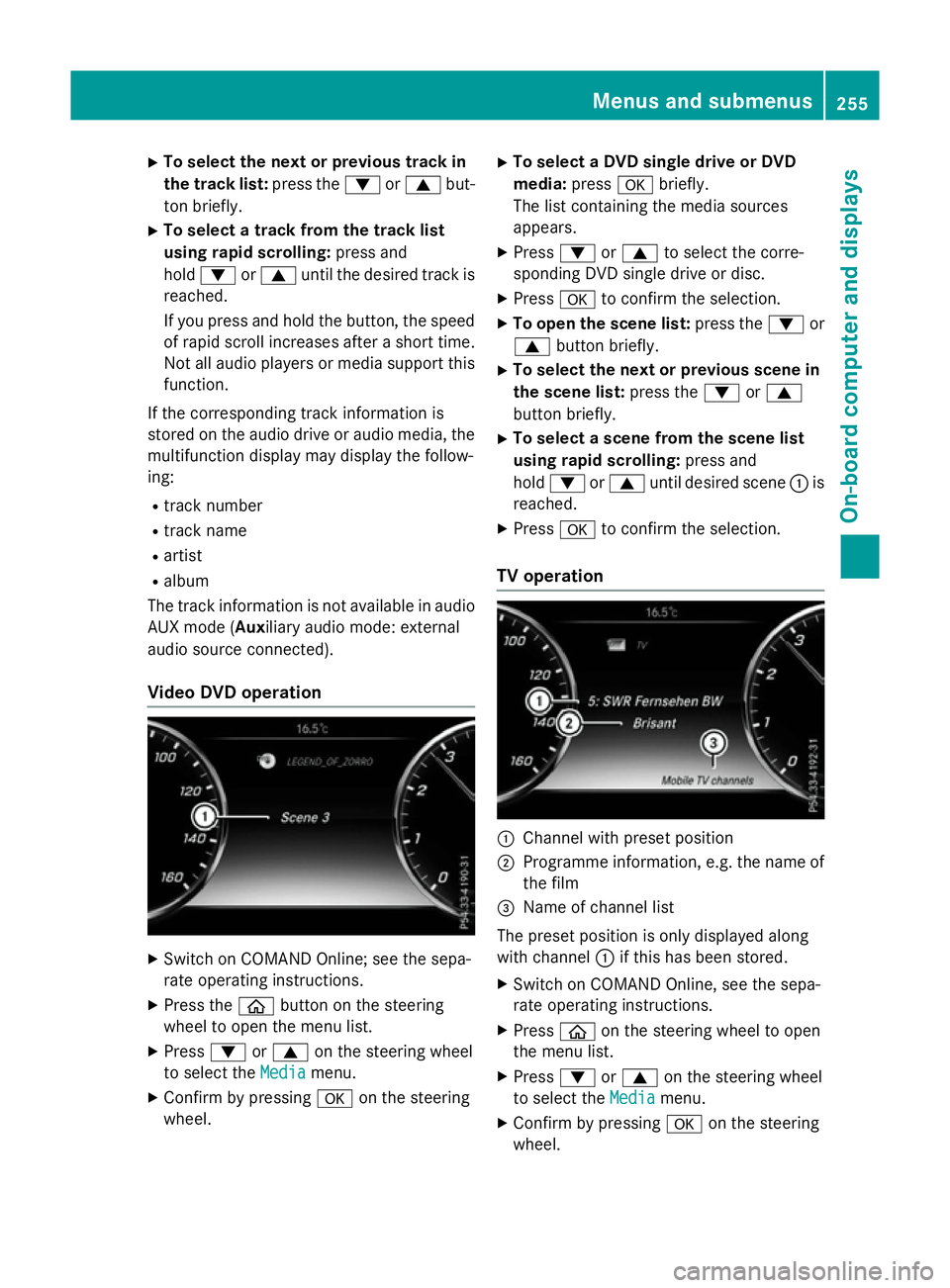
Video DVD operation X
Switch on COMAND Online; see the sepa-
rate operating instructions.
X Press the òbutton on the steering
wheel to open the menu list.
X Press :or9 on the steering wheel
to select the Media
Media menu.
X Confirm by pressing aon the steering
wheel. X
To select a DVD single drive or DVD
media: pressabriefly.
The list containing the media sources
appears.
X Press :or9 to select the corre-
sponding DVD single drive or disc.
X Press ato confirm the selection.
X To open the scene list: press the:or
9 button briefly.
X To select the next or previous scene in
the scene list: press the:or9
button briefly.
X To select a scene from the scene list
using rapid scrolling: press and
hold : or9 until desired scene :is
reached.
X Press ato confirm the selection.
TV operation :
Channel with preset position
; Programme information, e.g. the name of
the film
= Name of channel list
The preset position is only displayed along
with channel :if this has been stored.
X Switch on COMAND Online, see the sepa-
rate operating instructions.
X Press òon the steering wheel to open
the menu list.
X Press :or9 on the steering wheel
to select the Media
Media menu.
X Confirm by pressing aon the steering
wheel. Menus and submenus
255On-board computer and displays Z
Page 265 of 417
Further information on navigation can be
found on COMAND Online (see the separate
operating instructions).
Further information about Traffic Sign Assist
(Y page 230).
Setting the position
You can adjust the position of the head-up
display on the windscreen. You can compen-
sate for height differences if the seat posi-
tions are changed, for example.
X Switch on the head-up display
(Y page 247).
X Press òon the steering wheel to open
the menu list.
X Press the :or9 button on the steer-
ing wheel to select the Settings
Settings menu.
X Confirm by pressing aon the steering
wheel.
X Press :or9 to select the Head-up Head-up
display
display submenu.
X Press ato confirm.
X Press the :or9 button to select the
Position
Position function.
X Press ato save the setting.
X Press :or9 to adjust the position
to a level from Level +5
Level +5 toLevel -5
Level -5.
X Press aor% to save the setting.
Using the Memory function, you can save and
call up the set position of the head-up display as a single memory preset (Y page 122).
Adjusting the brightness
The brightness of the head-up display is auto-
matically adjusted to the surrounding light
conditions. You can also individually adjust
the brightness of the head-up display.
X Switch on the head-up display
(Y page 247).
X Press òon the steering wheel to open
the menu list.
X Press the :or9 button on the steer-
ing wheel to select the Settings
Settings menu.
X Confirm by pressing aon the steering
wheel. X
Use : or9 to select the Head-up
Head-up
display display submenu.
X Press ato confirm.
X Press the :or9 button to select the
Brightness
Brightness function.
X Press the abutton to save the setting.
X Press :or9 to adjust the bright-
ness to a level from Level +5
Level +5 (bright) to
Level -5
Level -5 (dark).
X Press the aor% button to save the
setting.
Light submenu Switching the Intelligent Light System
on/off
X Press òon the steering wheel to open
the menu list.
X Press :or9 on the steering wheel
to select the Settings Settingsmenu.
X Confirm by pressing aon the steering
wheel.
X Use : or9 to select the Lights
Lights
submenu.
X Press ato confirm.
X Press the :or9 button to select the
Intelligent Light System
Intelligent Light System function.
If the Intelligent Light System
Intelligent Light System func-
tion has been switched on, the cone of light and the Lsymbol in the multifunction
display are shown in white.
X Press the abutton to save the setting.
If you switch on the Intelligent Light
Intelligent Light
System
System function, the following functions are
activated:
R Motorway mode
R Active light function
R Cornering light function
R Extended range foglamps
If you set the dipped-beam headlamps for
driving on the right/left, the multifunction
display shows the Inactive for left-
Inactive for left-
side traffic side traffic orInactive for right-
Inactive for right-
side traffic
side traffic display message in the262
Menus and submenusOn-board computer and displays