warning light MERCEDES-BENZ S-CLASS COUPE 2017 Service Manual
[x] Cancel search | Manufacturer: MERCEDES-BENZ, Model Year: 2017, Model line: S-CLASS COUPE, Model: MERCEDES-BENZ S-CLASS COUPE 2017Pages: 533, PDF Size: 10.75 MB
Page 226 of 533
Ad
justin gthe warning threshold
This value de term ines thes peed at whic ha
wa rning is issued when exceeded. #
Select Warning threshold. #
Setthe desired speed. Night
View Assist Fu
nction of Night View Assist Wi
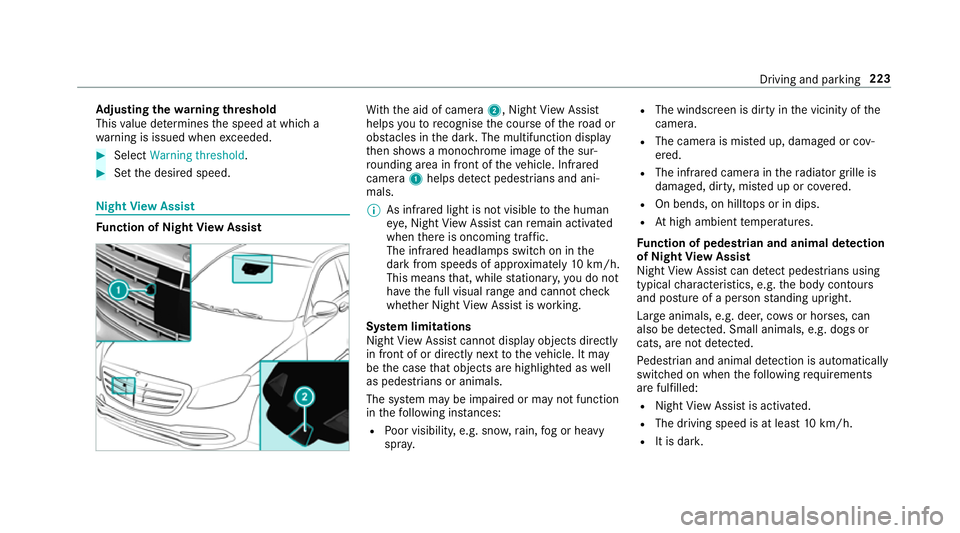
th th eaid of camera 2,NightView Assi st
helps youtor ecognise thec ourse of ther oad or
obs tacle sint he dar k.The multifunction display
th en sho wsam onochrome imag eofthe sur‐
ro unding area in fron tofthevehicle. Infrared
camera 1helps de tect pedestrians and ani‐
mals.
% As infrared light is no tvisible totheh uman
ey e, Night View Assi stcan remain activated
when ther eiso ncoming traf fic.
The infrared headlamps switc honinthe
dar kfroms peeds of appr oximatel y10km/h.
Thi sm eans that, while stationar y,yo udon ot
ha ve thef ull visual rang ea nd canno tcheck
whe ther Night View Assi stiswo rking.
Sy stem limitations
Night View Assi stcanno tdispl ay object sdirectly
in front of or directl ynexttot hevehicle. It may
be thec ase that object sarehighlighted as well
as pedestrians or animals.
The sy stem ma ybeimpaired or ma ynotfunction
in thef ollowing ins tances:
R Poor visibility ,e.g. sno w,rain, fogorh eavy
spr ay. R
The windscreen is dirty in thev icinity of the
came ra.
R The camer aismiste du p, damaged or cov‐
ered.
R The infrared camera in ther adiator grille is
damaged, dirty ,miste duporc overed.
R On bends, on hilltops or in dips.
R Athigh ambient temp eratures.
Fu nction of pedestrian and anima ldetection
of Night View Assist
Nigh tViewA ssistcan de tect pedestrians using
typica lcharacteristics, e.g. theb ody conto urs
and postur eofapersonstanding upright.
Lar geanimals, e.g .deer ,cows or horses, can
also be de tected. Smal lanimals, e.g. dog sor
cats, ar enotdetected.
Pe destrian and animal de tection is au tomatically
switched on when thef ollowing requ irements
ar ef ulfilled:
R Night View Assi stis activated.
R The drivin gspeed is at leas t10k m/h.
R It is da rk. Driving and pa
rking 223
Page 228 of 533
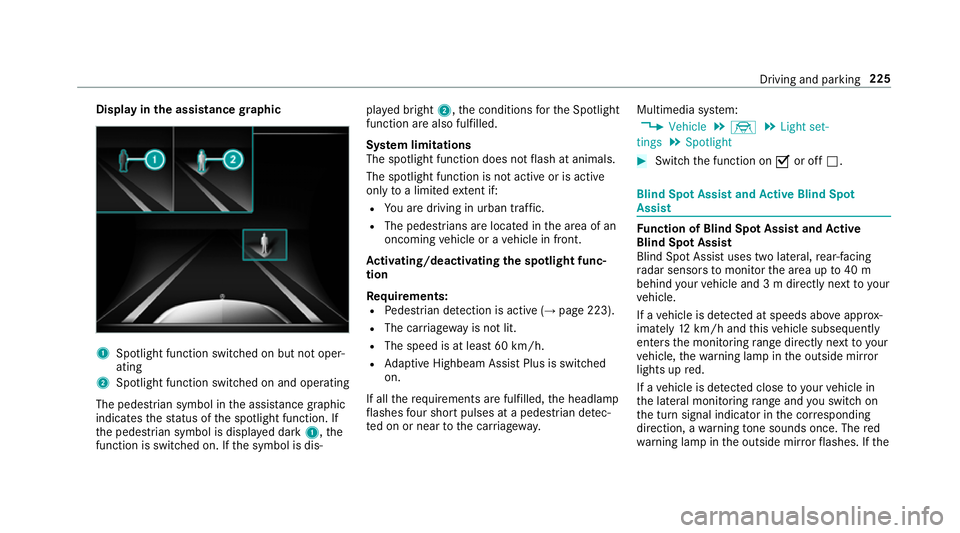
Displa
yinthe assistance graphic 1
Spotligh tfunction switched on but no toper‐
ating
2 Spotligh tfunction switched on and operating
The pedestrians ymbol inthea ssis tance graphic
indica test he status of thes potlight function .If
th ep edestrian symbol is displa yedd ark 1,t he
function is switched on. If thes ymbol is dis‐ pla
yedb right 2,t he conditions fort he Spotlight
function ar ealso fulfilled.
Sy stem limitations
The spotlight function does no tflash at animals.
The spotlight function is no tactiv eorisa ctive
on lyto alimited extent if:
R Youa redrivin ginurban traf fic.
R The pedestrians are loca tedint he area of an
oncoming vehicle or avehicle in front.
Ac tivating/deactivatin gthe spotlight func‐
tion
Re quirements:
R Pedestrian de tection is acti ve (→pag e223).
R The car riag ewa yisn otlit.
R The speed is at leas t60k m/ h.
R Adaptiv eHighbeam Assis tPlus is swit ched
on.
If all ther equirements ar efulfilled, theh eadlamp
fl ashes four sho rtpulses at apedestrian de tec‐
te donorn eartothec arriag ewa y. Multimedia sy
stem:
, Vehicle .
÷ .
Light set-
tings .
Spotlight #
Switc hthe function on Oor off ª. Blind Spo
tAssis tand Activ eB lind Spot
Assi st Fu
nction of Blind Spo tAssis tand Active
Blind Spo tAssist
Blind Spo tAssistuses tw olateral, rear-facing
ra dar sensor stomonitor thea reaupto40m
behind your vehicle and 3mdirectlynexttoy our
ve hicle.
If av ehicle is de tected at speeds ab ovea ppr ox‐
imatel y12km/h and this vehicle subsequently
enter sthe monitoring rang ed irec tlyn exttoy our
ve hicle, thew arning lam pinthe outside mir ror
light supr ed.
If av ehicle is de tected clos etoyourvehicle in
th el ateral monitoring rang ea nd yous wit ch on
th et urns ignal indicator in thec orresponding
direction, awarning tone sounds once .The red
wa rning lam pinthe outside mir rorf lashes. If the Driving and pa
rking 225
Page 230 of 533
R
Vehicles approaching and overtakin gyou
at av eryd iffe re nt speed.
As aresult, ActiveB lind Spo tAssistma ynei‐
th er giv ewarning snor inter vene in su chsit‐
uations. #
Alw aysp aycareful attention tothet raf‐
fi cs ituation and maintai nasafed is‐
ta nce at thes ide of thev ehicle. Ac
tiveB lind Spo tAssistis onl yana id. It ma yfail
to detect some vehicles and is no tasubstitute
fo ra ttentiv edriving. Alw ayse nsur ethat ther eis
suf ficient di stanc etot he side foro ther road
user sand obs tacles. If
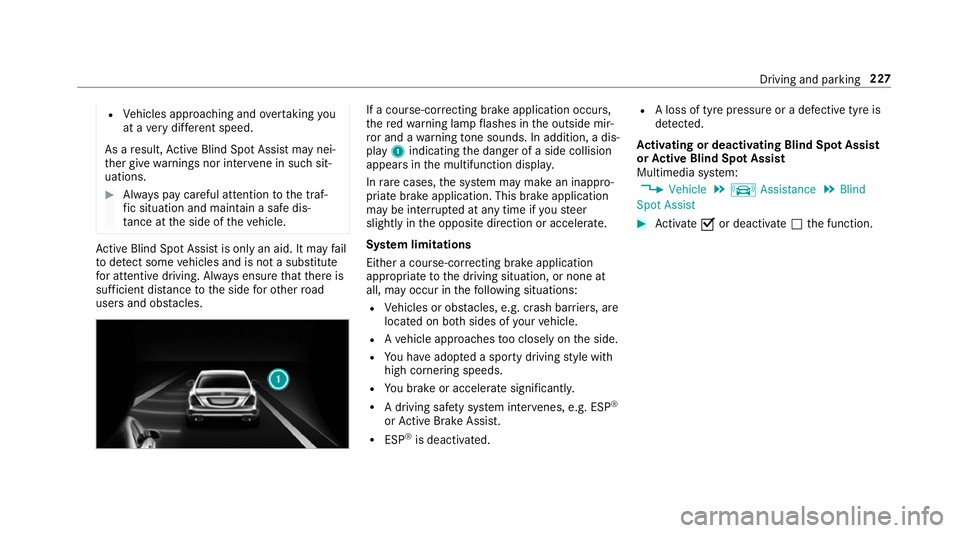
ac ourse-co rrecting brak eapplication occurs,
th er ed warning lam pflashes in theo utside mir‐
ro ra nd aw arning tone sounds. In addition, adis‐
pl ay 1 indicatin gthe danger of aside collision
appear sinthe multifunction displa y.
In rare cases, thes ystemm aymak eani nappro‐
priat ebrake application. This brak eapplication
ma ybei nterrupte data nytime if yous teer
slightl yinthe opposit edirection or accelera te.
Sy stem limitations
Either acourse-cor recting brak eappli cation
appropria teto thed riving situation ,ornoneat
all, ma yoccur in thef ollowing situations:
R Vehicles or obs tacles, e.g. crash ba rriers, are
located on bo thsides of your vehicle.
R Avehicle approaches tooc losely on thes ide.
R Youh avea dop tedas porty driving stylew ith
high cornering speeds.
R Youb rake or accelerat esignificantl y.
R Adriving sa fety sy stem inter venes, e.g .ESP ®
or ActiveB rake Assi st.
R ESP ®
is deacti vated. R
Aloss of tyr epressur eorad efectivetyreis
de tected.
Ac tivatin gordeactivatin gBlind Spo tAssist
or Activ eB lind Spo tAssist
Multimedia sy stem:
, Vehicle .
k Assistance .
Blind
Spot Assist #
Activate Oor deacti vate ª thef unction. Driving and parking
227
Page 232 of 533
Sy
stem limitations
No lane-cor recting brak eappli cation occu rsin
th ef ollowing situations:
R Youc lear lyand activel ysteer,b rake or accel‐
erate.
R Youh ave switched on thet urns ignal indica‐
to r.
R Adriving sa fety sy stem inter venes, su chas
ESP ®
,A ctiv eBrake Assi stor ActiveB lind
Spo tAssist.
R Youh ave adop tedas porty driving stylew ith
high cornering speeds or high ratesofa ccel‐
eration.
R ESP ®
is deactivated.
R Ifal oss of tyr epressur eorad efectivetyre
has been de tected and displ ayed.
The sy stem ma ybeimpaired or ma ynotfunction
in thef ollowing situations:
R Ifth er eisp oor visibility ,e.g. due toinsuf fi‐
cient illumination of ther oad, highl yvariable
shade conditions, or due torain, sno w,fogor
heavy spr ay. R
Ther eisg lare, e.g. from oncoming traf fic, the
sun or reflections.
R Ifth er eisd irtont he windscreen in thev icin‐
ity of them ultifunction camer aorthe camera
is mis tedu p, damaged or obscured.
R Noor se veral, unclear lane markings are
presen tfor one lane, e.g. near roadwor ks.
R The lane markings ar eworn, dar korcovered.
R The dis tance tothev ehicle in front is too
small and thel ane marking sthus canno tbe
de tected.
R The lane markings chang equickl y,e.g. lanes
branc hoff,c ross one ano ther or mer ge.
R The car riag ew ay isvery nar row and winding.
Ve hicles with Drivin gAssistanc epacka ge or
Driving Assistance Plus pa ckage: ActiveL ane
Ke eping Assis tuses radar sensor stomonitor
se verala reas around thev ehicle. If ther adar
senso rsinther ear bumper ar edirty or co vered
wit hs now, thes ystemm aybe impaired or may
no tfunction .Ifano bstacle in thel ane in which
yo ua redrivin ghas been de tected, no lane-cor‐
re cting brak eappli cation occu rs. Ac
tivatin gActive Lan eKeeping Assist &
WARNING Risk of accident despi te
Ac tiveL aneK eeping Assis twarning
Al ane-cor recting brak eappli cation cannot
al wa ys bring thev ehicle bac kintot he origi‐
nal lane. #
Alw ayss teer,b rake or accelera teyour‐
self ,especiall yifActiveLaneK eeping
Assis twarns youorm akesalane-cor‐
re cting brak eappli cation. &
WARNING Risk of accident despi teinter‐
ve ntio nofA ctiveLaneK eeping Assist
Ac tiveL aneK eeping Assis tdoes no tdetect
traf ficc onditions or road users. In very rare
cases, thes ystem ma ymakeani nappropri‐
at eb rake application, e.g. af teri ntentional ly
driving overas olidl ane marking.
The brak eapplication can be inter rupte dat
an yt ime if yous teer slightl yinthe opposite
direction. Driving and parking
229
Page 233 of 533
#
Alw aysm akes uret hat ther eiss uffi‐
cient di stanc etot he side foro ther traf‐
fi coro bstacles. &
WARNING Risk of accident despi teLane
Ke eping Assist
Lane Keeping Assis tcann otalw aysc learly
de tect lane markings.
In su chcases, Lane Keeping Assis tcan:
R giveanu nnecessar ywarning
R notg iveaw arning #
Alw aysp ayparticular attention tothe
traf fics ituation and keep within the
lane, especiall yifActiveLaneK eeping
Assis talerts you. Re
quirements:
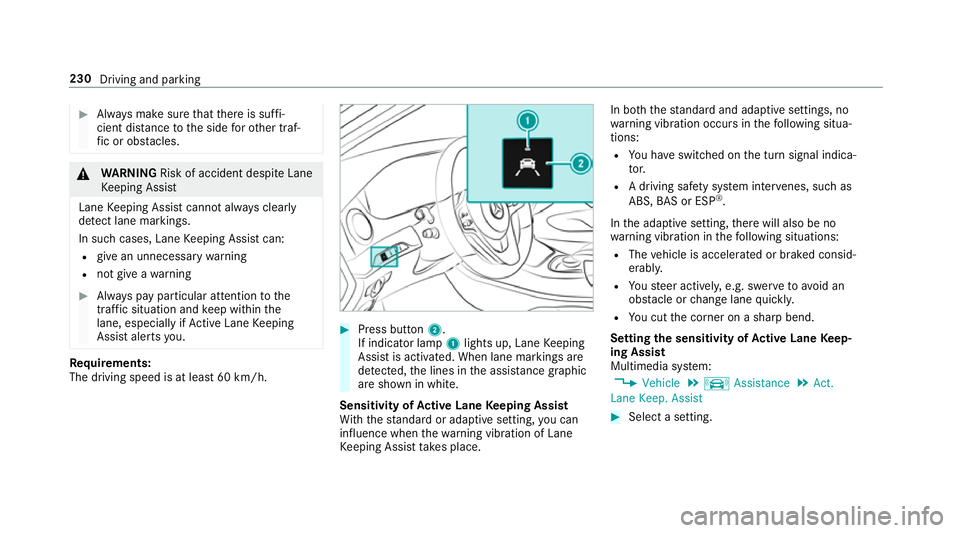
The driving speed is at leas t60k m/h. #
Press button 2.
If indicator lamp 1lights up, Lane Keeping
Assis tisactivated. When lane marking sare
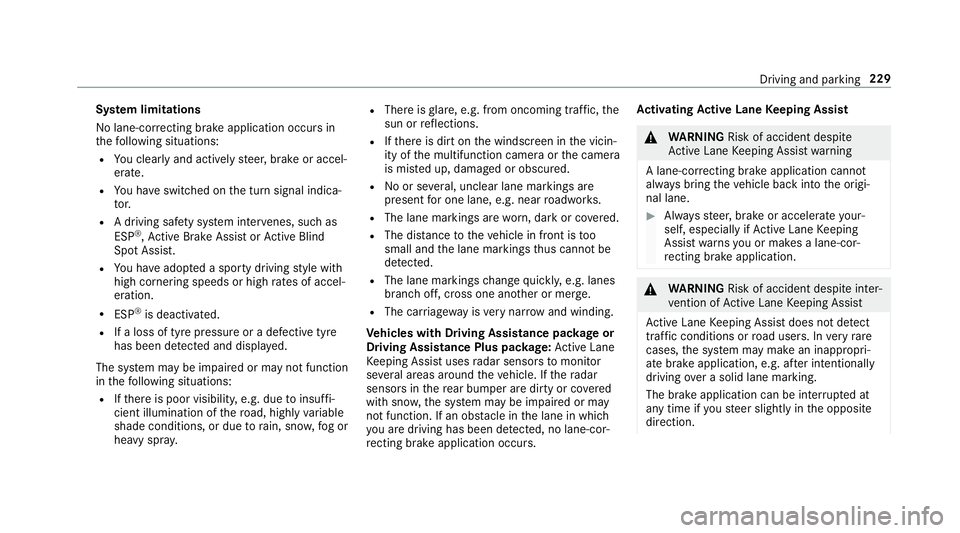
de tected, thel ines in thea ssis tance graphic
ar es hown in white.
Sensitivity of Activ eL aneK eeping Assist
Wi th th estandar dora daptiv esetting ,you can
influence when thew arning vibration of Lane
Ke eping Assis ttakes place. In bo
th thestandar dand adaptiv esettings, no
wa rning vibration occur sinthefollowing situa‐
tions:
R Youh ave switched on thet urns ignal indica‐
to r.
R Adriving sa fety sy stem inter venes, su chas
ABS, BASorE SP®
.
In thea daptiv esetting, ther ew ill also be no
wa rning vibration in thef ollowing situations:
R The vehicle is accelerated or braked consid‐
erably.
R Yous teer actively ,e.g. swer vetoavo id an
obs tacle or chang elane quickl y.
R Youc utthec orner on ashar pbend.
Setting thes ensitivit yofActive Lan eKeep‐
ing Assist
Multimedia sy stem:
, Vehicle .
k Assistance .
Act.
Lane Keep. Assist #
Select asetting. 230
Driving and parking
Page 236 of 533
%
The position of thed ispla ysdeviates from
th ose displa yedh ere.
Fu rther displa ysinthem ultifunction display:
Z Gearshif
trecommendatio n(→pa ge159)
ë ActiveP arking Assis tactivated
é Parking Assis tPARKTRONIC deactivated
¯ Cruise control (→
page 180)
È Limi
ter( →pag e181 )
ç ActiveD ista nce Assi stDISTRONIC
(→ page 184)
a Ac
tiveS teering Assis t(→ pag e190)
ë HOL
Dfunctio n(→pag e196)
_ Ad
aptiv eHighbeam Assis tPlus
(→ pag e124 )
ð Maximum permissible spee
dexceeded
(for cer tain countries only) Ad
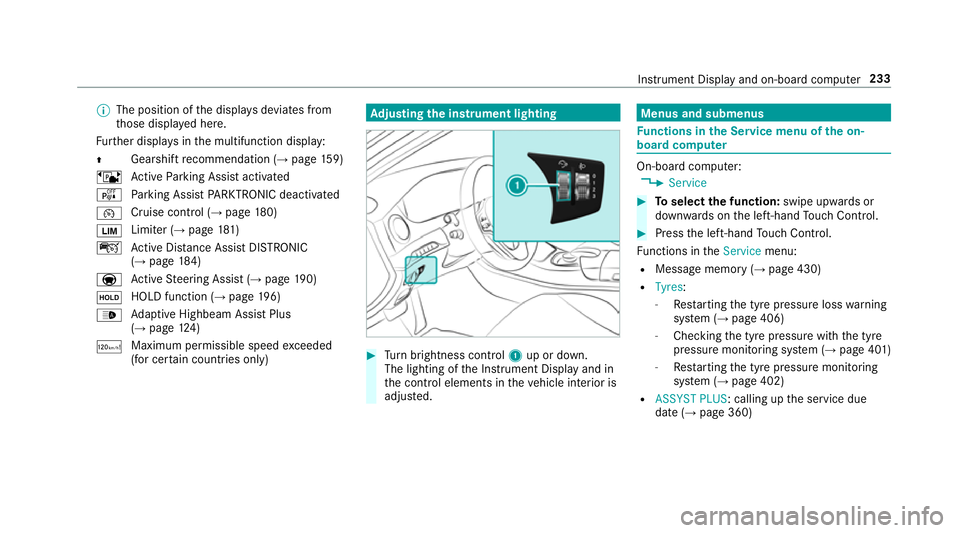
justin gthe in stru men tlighting #
Turn brightness control 1up or down.
The lightin gofthe Instrument Displa yand in
th ec ontrol element sinthevehicle interior is
adjus ted. Menus and submenus
Fu
nctions in theS ervice menu of theo n-
boar dcompu ter On-boar
dcomputer:
, Service #
Toselect thef unction: swipe upwards or
down wardsont he left-hand Touc hC ontrol. #
Press thel eft-hand Touc hC ontrol.
Fu nctions in theService menu:
R Messag ememor y(→pag e430)
R Tyres:
- Restartin gthe tyr epressur eloss warning
sy stem (→ page406)
- Checking thet yrep ressur ewitht he tyre
pressur emonitoring sy stem (→ page401 )
- Restartin gthe tyr epressur emonitoring
sy stem (→ page402)
R ASSYST PLUS:c alling upthes ervice due
dat e(→pag e360) Instrument Displa
yand on-boar dcomputer 233
Page 243 of 533
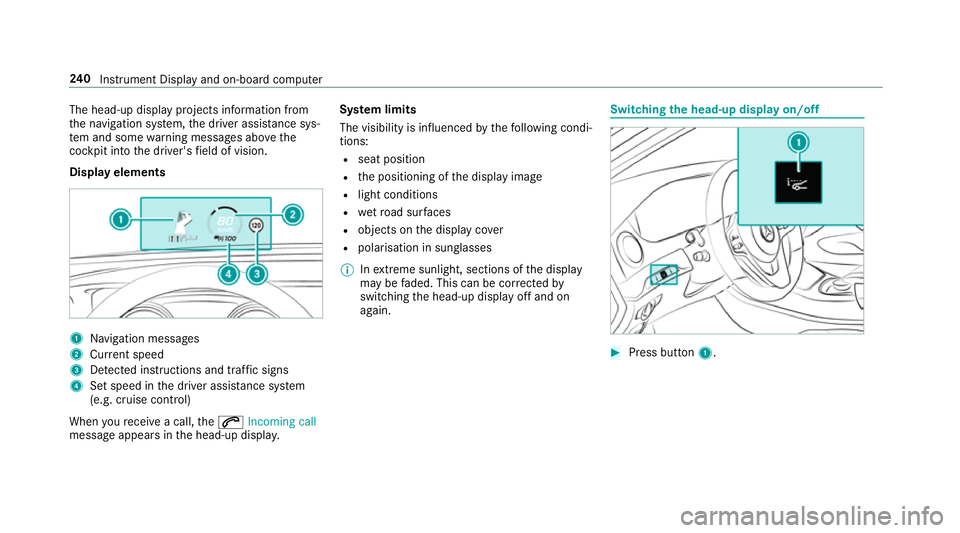
The head-up displa
yprojectsi nformation from
th en avigation sy stem, thed rive ra ssis tance sys‐
te ma nd some warning messages abo vethe
cockpit int othe driver's field of vision.
Displa yelements 1
Navigation messa ges
2 Current speed
3 Detected instructions and traf fics igns
4 Setspeed in thed rive ra ssis tance sy stem
(e.g. cruise control)
When your eceiv eacall,the 6 Incoming call
messag eappear sinthe head-up displa y.Sy
stem limits
The visibility is influenced bythef ollowing condi‐
tions:
R seat position
R thep ositioning of thed ispla yimage
R light conditions
R wetroad sur faces
R objects on thed ispla ycover
R polarisation in sunglasses
% Inextreme sunlight, sections of thed isplay
ma ybef aded. This can be cor rected by
switching theh ead-up displa yoffand on
again. Switching
theh ead-up displa yon/off #
Press button 1. 240
Instrument Displa yand on-boar dcomputer
Page 362 of 533
Batter
ydisconnection periods The AS
SYST PLUS service inter vald isplay
can onl ycalculat ethe servic edue date when
th eb attery is connected. #
Notedown thes ervice due dat edispla yedon
th ei nstrument displa ybefor edisconnecting
th eb atter y(→pag e358). Engine compartment
Ac
tiv eb onne t(pedestrian pr otection) Operation of
thea ctiv ebonne t(pedestrian
pr otection)
In cer tain accident situations ,the risk of injury
to pedestrians can be reduced bythea ctuation
of thea ctiv ebonnet .The rear area of thee ngine
bonn etisraised byappr oximatel y80m m.
Fo rthe driv etotheworkshop, rese tthe trig‐
ge reda ctiv ebonn etyourself .Ifthe activ ebonnet
has been triggered, pedestrian pr otection may
be limited.
Aq ualified specialis tworks hop mus tre-ins tate
th ef ull functionality of thea ctiv ebonnet. The activ
ebonne tisnotavailable in all coun‐
tries.
Re setting thea ctiv ebonnet &
WARNING Danger of bu rnsf romh ot
component parts in thee ngine compart‐
ment
Cer tain component parts in thee ngine com‐
partmen tmaybe very hot, e.g. thee ngine,
th er adiator and parts of thee xhau stsystem. #
Letthe engine cool down and only
to uc ht he component parts described
below: #
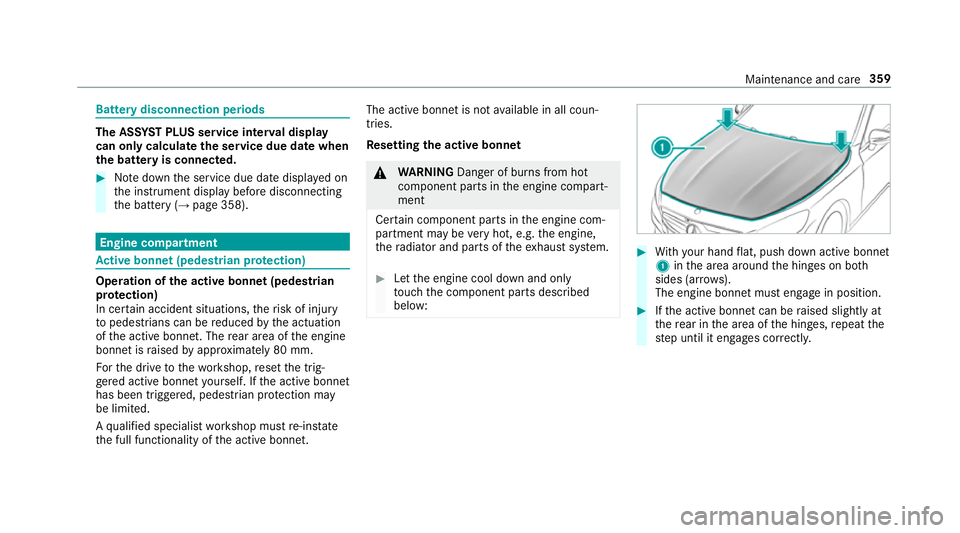
With your han dflat, push down activ ebonnet
1 inthea reaa round theh inges on bo th
sides (ar rows).
The engine bonne tmuste ngag einp osition. #
Ifth ea ctiv ebonnet can be raised slight lyat
th er ear in thea reaoft he hinges, repeat the
st ep until it engages cor rectl y. Maintenance and care
359
Page 364 of 533
th
er adiator and parts of thee xhau stsystem. #
Letthe engine cool down and only
to uc ht he component parts described
below: &
WARNING Risk of inju ryfrom using the
windscreen wiper swhile thee ngine bon‐
ne tiso pen
When thee ngine bonn etis open ,and the
windscreen wiper saresetinm otion, youc an
be trapped bythew iper linkage. #
Alw ayss witc hoffthew indscreen wip‐
er sa nd ignition befor eopening the
engine bonn et. #
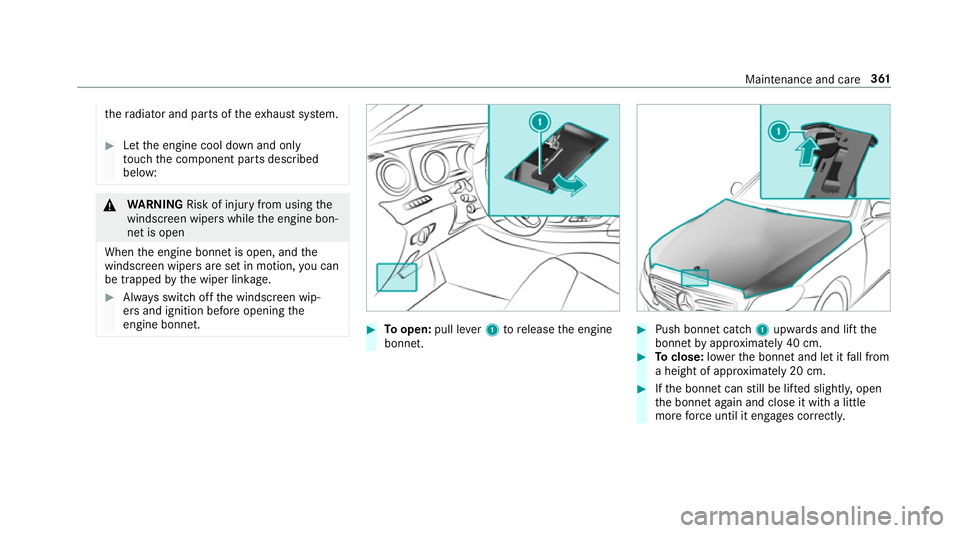
Toopen: pull lever1torelease thee ngine
bonn et. #
Push bonne tcatch 1upwards and lif tthe
bonne tbyapproximatel y40cm. #
Toclose: lowe rthe bonne tand le titfall from
ah eight of appr oximatel y20cm. #
Ifth eb onnet canstill be lif teds lightl y,open
th eb onnet again and close it wit halittle
mor eforce until it engages cor rectly. Maintenance and care
361
Page 374 of 533
Information on cleaning and car
eAvoiding vehicl edamage
Wi per blades
Fold out thew iper blades and clean them using adam pcloth .D onotclean thew iper blades tooo ften.
Exterior lighting Cleanthel enses wit hawetspong eand mild cleaning agent,
e.g .car sha mpoo. Onl
yuse cleaning agents or cleaning clo thst hat ar esuitable
fo rp last ic lenses.
Sensors Cleanthes ensor sinthe front and rear bumper and in the
ra diator trim wit hasoftc loth and car shampoo. When usin
gahigh-pressur ewater jet, main tain am inimum
dis tance of 30 cm.
Re versing camera
and 360° Camera R
Open thec amer acover wit hthe multimedia sy stem
(→ pag e213).
R Usec lear watera nd asoftc loth toclean thec amer alens. Do no
tuse ah igh-pressur ewater jet.
Exhaus tpipes
Clean withcleaning agents recommended byMercedes-Benz,
particular lyin thew inter and af terw ashing thev ehicle. Do no
tuse acidic cleaning agents. Note
sonc areoft he interior &
WARNING Risk of inju ryfrom pla stic
parts breakin goffafte rt he use of sol‐
ve nt-based car eprodu cts
Ca reand cleanin gproducts con tainin gsol‐
ve nts can cause su rfaces in thec ockpit to
become porous. When
thea irbags ar edeplo yed, plastic parts
ma ybreak away. #
Do no tuse anyc areorc leaning prod‐
ucts containing sol vents toclean the
cockpit. &
WARNING Risk of inju ryor deat hfrom
bleached seat belts
Bleaching or dyeing seat belts can se verely
we aken them.
This can, fore xamp le, caus eseat belt sto
te ar or fail in an accident. #
Neverb lea ch or dy eseat belts. Maintenance and care
371