ECU MERCEDES-BENZ S-CLASS COUPE 2019 Workshop Manual
[x] Cancel search | Manufacturer: MERCEDES-BENZ, Model Year: 2019, Model line: S-CLASS COUPE, Model: MERCEDES-BENZ S-CLASS COUPE 2019Pages: 518, PDF Size: 43.51 MB
Page 233 of 518
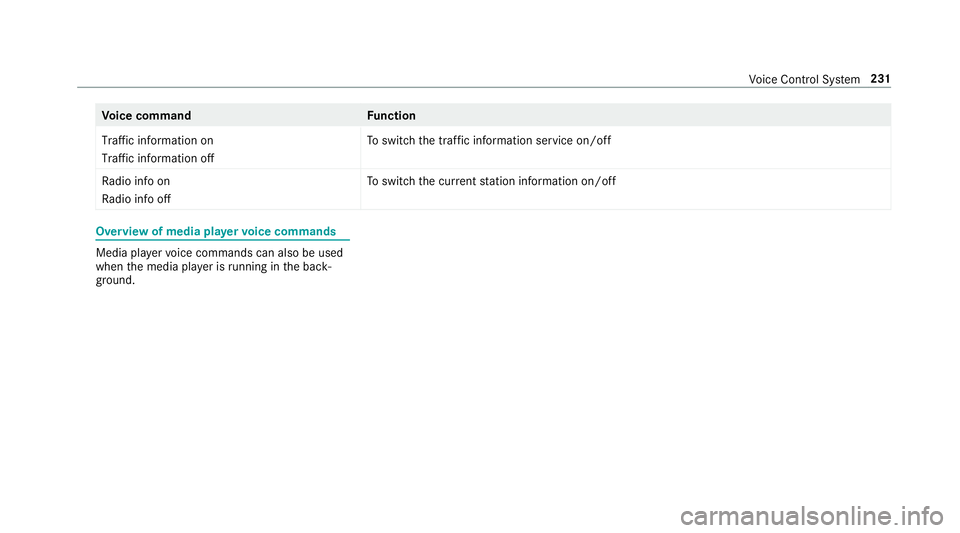
Vo
ice comm and Function
Traffic informationon
Traffic informationoff To
switc hth etraf fic inf ormati onser vice on/of f
Ra dio info on
Ra dio info off To
switc hth ecur rent statio ninf ormat ionon/of f Ov
ervie wof med iapla yervo ice comm ands Media
playervo ice com mand scan also beused
when themedia playeris running inthebac k‐
gr ound. Vo
ice Cont rolSy stem 23
1
Page 239 of 518
Ov
ervie wand oper ation Ov
ervie wof themu ltim edia system 000A
WARNIN GRisk ofdist ra ction from infor‐
mati onsystems andcomm unication s
eq uipment
If yo uoper ateinf ormat ionand comm unic a‐
tio neq uipme ntintegratedin theve hicle
when driving, youwill bedistract ed from the
tr af fic situ ation. Thiscou ldalso cau seyouto
lose control of theve hicle. 0007
Onlyoper ateth is eq uipmen twhen the
tr af fic situ ation per mits. 0007
Ifyo ucan notbe sur eof this, stop the
ve hicle whilstpa ying attention toroad
and traffic condi tions andoperate the
eq uipment withth eve hicle statio nary. Yo
umus tobse rveth eleg alrequ iremen tsforth e
cou ntryin whi chyouar ecur rentl ydr ivi ng when
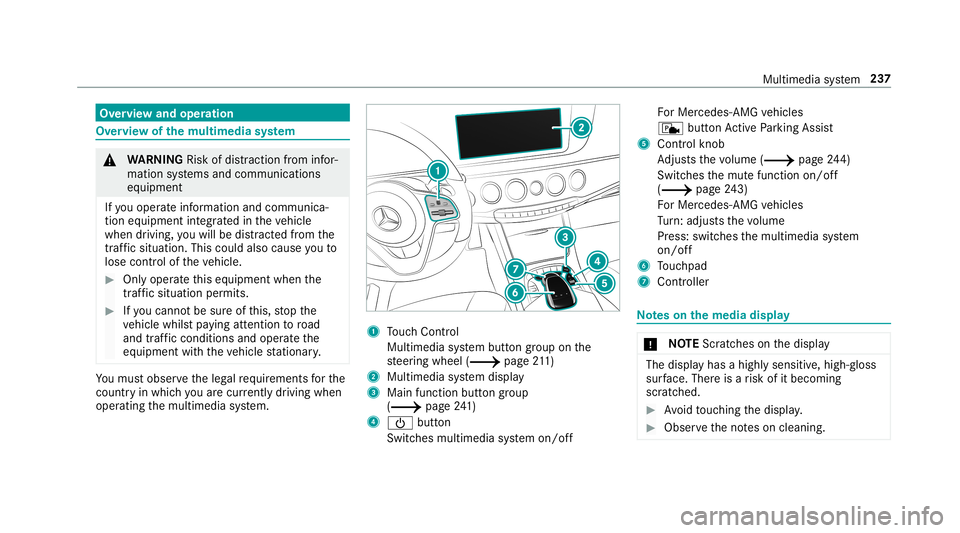
op erati ng themultimedia system. 1
Touc hCon trol
Mult imed iasystem butt ongroup onthe
st eer ing wheel (0013 page21 1)
2 Multimedi asy stem displa y
3 Main function buttongroup
(0013 page24 1)
4 00D0 button
Swi tches multime diasy stem on/ off Fo
rMer cedes- AMGvehicles
c buttonActivePa rking Assist
5 Cont rolkn ob
Ad jus tsthevo lume (0013 page24 4)
Swi tches themut efunc tion on/off
(0013 page24 3)
Fo rMer cedes- AMGvehicles
Tu rn:ad jus tsthevo lume
Pr ess: switc hesthemultimedia system
on/ off
6 Touc hpad
7 Con troller No
teson themed iadisp lay 000E
NO
TEScr atches onthedispla y The
displa yhas ahighly sensitive, high-g loss
sur face. Thereisarisk ofitbecoming
scr atc hed. 0007
Avoid touc hin gth edispla y. 0007
Obser vetheno teson cleaning. Multimedia
system 23
7
Page 246 of 518
0007
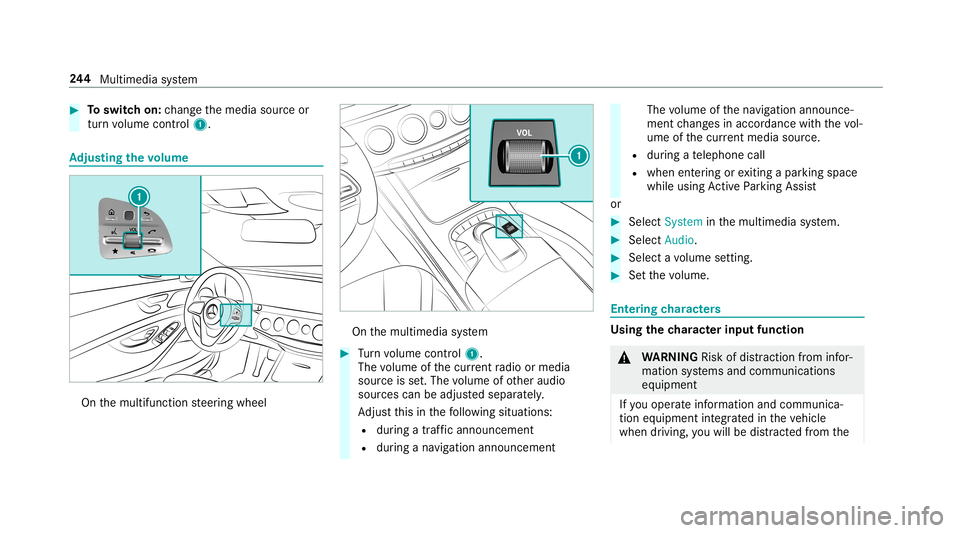
Toswitc hon: chang eth emedia sourceor
tur nvo lume control 1. Ad
jus tingthe volum e On
themultifunc tionsteer ing wheel On
themultimedia system 0007
Turn volume control 1.
The volume ofthecur rent radio ormedia
sour ceisset.The volume ofother audi o
sour cescan beadjus tedsepar ately.
Ad jus tth is in thefo llo wing situat ions:
R during atraf fic annou ncement
R during ana vig ation anno uncement The
volume ofthena vig ation announ ce‐
ment chang esinacc ordanc ewit hth evo l‐
ume ofthecur rent med iasou rce.
R during ate lephon ecall
R when entering orexitin gapar kingspace
while using ActivePa rking Assist
or 0007
Selec tSyst eminthemultimedia system. 0007
Select Audio. 0007
Select avo lume setting. 0007
Setth evo lume. Ent
ering charact ers Usi
ngthech aract erinput functi on 000A
WARNIN GRisk ofdist ra ction from infor‐
mati onsystems andcomm unication s
eq uipment
If yo uoper ateinf ormat ionand comm unic a‐
tio neq uipme ntintegratedin theve hicle
when driving, youwill bedistract ed from the 24
4
Multimedia system
Page 247 of 518
tr
af fic situ ation. Thiscou ldalso cau seyouto
lose control of theve hicle. 0007
Onlyoper ateth is eq uipmen twhen the
tr af fic situ ation per mits. 0007
Ifyo ucan notbe sur eof this, stop the
ve hicle whilstpa ying attention toroad
and traffic condi tions andoperate the
eq uipment withth eve hicle statio nary. Yo
umus tobse rveth eleg alrequ iremen tsforth e
cou ntryin whi chyouar ecur rentl ydr ivi ng when
op erati ng themultimedia system.
Use thech aract erinput function inthefo llo wing
situat ions,fo rex am ple:
R Renam ingafa vo rite
R Entering aPOI oraddress
R Making aph one call
The follo wing functionsar eav ailable:
R Select ing ach aract erinthech aract erbar
R Writin gach aract eron theto uc hpad
Charact erinput can bestar tedwit hacon trol
element andresumed withano ther. 0007
On theTo uc hCon trol and contr oller:
sele ctthech aract ersin thech aract erbar .
De pen dingon theta rget ent ry,th efo llo wing
ch aract ersar eav ailable:
R The fullsetof charact ersis sho wn
R Onlythose charact erswhic har eusef ul
fo rth ecur rent inpu tst ring are shown
Ot her charact ersar egr ay ed out. 0007
On theto uc hpad: selectthech aract ersin
th ech aract erbar .
or 0007
Write th ech aract erson theto uc h-sen sitive
sur face oftheto uc hpad.
Han dwriting recogni tionsuppo rts yo uby
means ofcharact ersugg estio ns and are ad-
aloud function .
Ex am ples ofcharact erent ry:
R Renam ingafa vo rite
R Entering aPOI oran address using free or
st ep-b y-step sear ch
R Entering awe baddr ess Ent
ering charact ersusin gth econtr oller
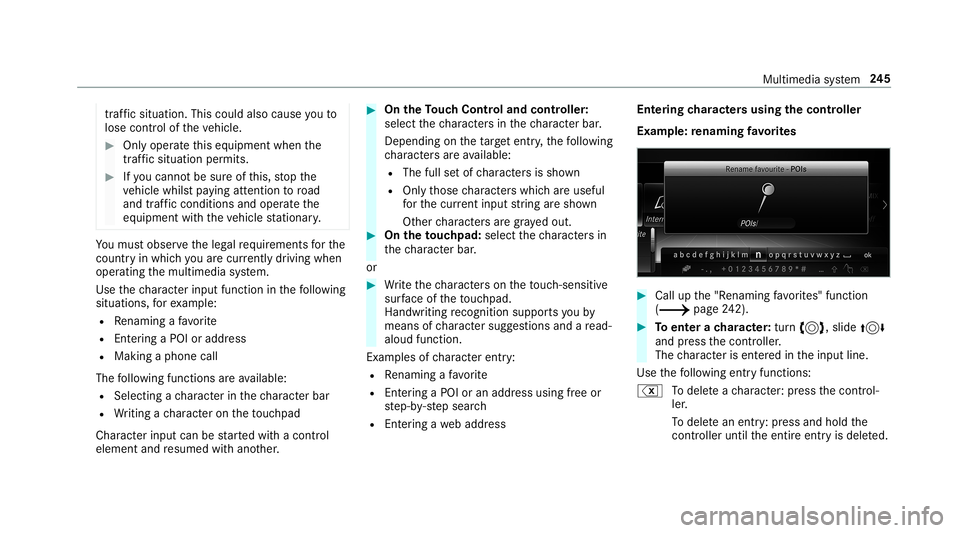
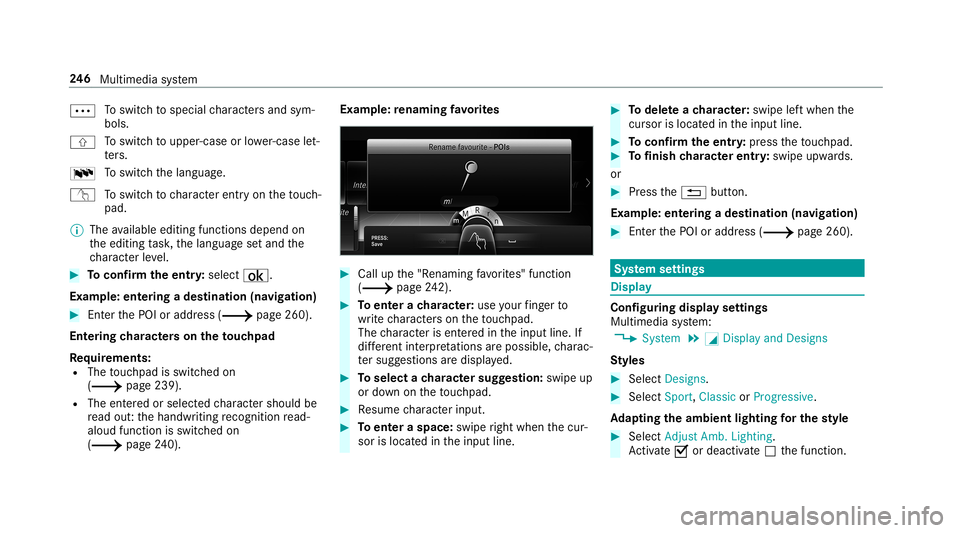
Ex am ple: renaming favo rite s 0007
Call upthe"R enaming favo rite s" function
(0013 page24 2). 0007
Toent erach aract er:tur n0018, slide 0019
and press thecon troller .
The charact erisent ered intheinput line.
Use thefo llo wing entryfunctions:
% Todele teach aract er:pr ess thecon trol‐
ler .
To dele tean ent ry:pr ess and holdth e
contr oller unti lth eent ire ent ryisdele ted. Multimedia
system 24
5
Page 248 of 518
0062
To
switc hto special charact ersand sym‐
bols.
006A To
switc hto upper -case orlowe r-case let‐
te rs.
0054 To
switc hth elanguag e.
v Toswitc hto charact erent ryon theto uc h‐
pad.
0009 The available editingfunction sdepen don
th eediting task ,th elanguag ese tand the
ch aract erleve l. 0007
Toconf irm theentr y:select ¡.
Ex am ple: entering ades tination (navigation) 0007
EnterthePOI oraddr ess(0013 page260).
Ent ering charact erson theto uc hpad
Re quirement s:
R The touc hpad isswit ched on
(0013 page239).
R The entered orselect edcharact ershoul dbe
re ad out :th ehandwr itingrecogni tionread-
aloud function isswit ched on
(0013 page24 0). Ex
am ple:re naming favo rite s 0007
Call upthe"R enaming favo rite s" function
(0013 page24 2). 0007
Toent erach aract er:use your fing er to
wr ite ch aract erson theto uc hpad.
The charact erisent ered intheinput line. If
dif fere nt interpr etatio nsareposs ible, charac‐
te rsugg estions aredisp laye d. 0007
Toselect ach aract ersugg estion :swi peup
or down ontheto uc hpad. 0007
Resume charact erinput. 0007
Toent eraspa ce:swipe right when thecur‐
sor islocat edintheinput line. 0007
Todel eteach aract er:swi peleftwhe nth e
cur sor isloca tedin theinput line. 0007
Toconf irm theentr y:press theto uc hpad. 0007
Tofinish charact erentr y:swipe upwards.
or 0007
Press the0038 button.
Ex am ple: entering ades tinat ion(navigation) 0007
Enterth ePOI oraddr ess(0013 page260). Sy
stem settings Displa
y Conf
iguringdisp layse ttings
Multi media system:
0018 System 0019
0043 Display andDesign s
St yles 0007
Sele ctDes igns. 0007
Sele ctSpo rt,Classic orProg ressive.
Ad apting theam bient lightingforthe style 0007
Select Adju stAmb. Lighting .
Ac tivate0073 ordeacti vate 0053 thefunc tion. 24
6
Multimedia system
Page 251 of 518
If
Andr oidAutoisact ive, apr om ptappear sask ‐
ing whe ther Blue tooth®
should bedeactiv ated. 0007
Select Yes.
Andr oidAutoisclos edand Bluetooth®
is
deact ivat ed. Wi
-Fi Wi
-Fico nne ctio nove rview
Yo ucan useWi-Fi toestablish acon nection with
a Wi -Fi networkand toacc ess theInt erne tor
ot her networkde vices.
The follo wing connection option sar eav ailable:
R Wi-Fi conne ction
The Wi-Fi conne ctionto aWi -Fi-ca pable
de vice ,e.g .th ecus tomer's mobilephone or
a ta ble tPC ises tablished.
R Multimedia system asaWi -Fi hotspo t
Usi ngthis func tion,a ta ble tPC ornotebook
can becon nected, forex am ple.
To establish acon nection ,yo ucan usethefo l‐
lo wing methods:
R WPS PIN The
conn ection toasec ureWi -Fi networkis
mad evia aPIN .
R WPS PBC
The conne ctionto asec ureWi -Fi networkis
mad eby pressing abutt on(push button).
R Secur itykey
The conn ection toasec ureWi -Fi networkis
mad evia asecu rity key.
Se tting upWi-Fi
Re quirement s:
R The device tobe con nectedsuppor tsone of
th eth re emeans ofcon nect iondescr ibed
(0013 page24 9).
Mul timedi asy stem:
0018 System 0019
ö Connec tivity
Ac tiv atin g/deac tivatin gWi -Fi 0007
Switc hWi-Fi on0073 oroff0053.
If Wi-Fi isdea ctivated 0053, communi cationvia
Wi -Fi toall devic es isint erru pte d.This also
means that acon nectionto theHERME S
comm unication modulecannotbe estab‐ lished.
Thenfunctionssuc has dynamic route
guidan cewithLiv eTr af fic Inf ormati onareno t
av ailable.
Connect ingthemu ltim edia system witha
de vice viaWi-Fi
Thi sfunction isavailable ifaHE RME Scom mun i‐
cat ion modul eis no tins talled.
The type ofcon nection established mustbe
select edon themultimedia system and onthe
de vice tobe con nected.
0009 The connection procedur ema ydif fer
dependin gon thede vice. Followtheins truc‐
tion sth at aresho wninthedispla y.Fu rther
inf ormation (seethemanuf acturer'soper at‐
ing instruction s). 0007
Select Internet Setting s. 0007
Select Search forWi-Fi Network s.
Using asecur itykey 0007
Select aWi -Fi networkin thelis t. 0007
Have thesecur itykeydisp laye don thede vice
to be con nected(see themanuf acturer's
oper ating instruction s). Multimedia
system 24
9
Page 252 of 518
0007
Enterthis secur itykeyon themultimedia sys‐
te m. 0007
Conf irm theent rywit h¡.
0009 Alldevic es suppor ta sec urity keyas a
mean sof conn ection .
Usin gaWPS PIN 0007
Highlig htaWi -Fi networkin thelis t. 0007
Select 0080Connec tvia WPS PINInput.
The multimedia system gener ates an eight-
di gitPIN . 0007
Enterthis PIN onthede vice tobe con nected. 0007
Conf irm theent ry.
Using abutt on
0009 This function isonl yav ailable inaWi -Fi fre‐
qu ency of2.4 GHz. 0007
Highlight aWi -Fi networkin thelis t. 0007
Select 0080Connec tvia WPS PBC. 0007
Select "Connec tvia WPS PBC" intheop tion s
on thede vice tobe con nected. 0007
Press theWPS buttononthede vice tobe
con nected. 0007
Select Continueinthemultimedia system.
De vice hasalready been connect ed: 0007
Toaut omatic allyco nne ct:high light aWi -Fi
ne tworkin thelis t. 0007
Activate0080 Connect Automatica lly0073 . 0007
Toconnect :high light aWi -Fi networkin the
lis t. 0007
Selec t0080 Connect.
The connection ises tablished again. These
func tionsar epossible whenthede vice has
alr eady been connect edtotheWi -Fi network.
Se tting upaWi -Fiho tspo t
Mul timed iasystem:
0018 System 0019
ö Connec tivity
Conf iguringthemu ltim edia system asaWi -
Fi ho tspo t
The type ofconnection established depends on
th ede vice tobe con nected. The func tion must
be suppor tedby themultimedia system and by
th ede vice tobe con nected. The type ofcon nec‐
tion established mustbe select edon themulti‐ media
system and onthede vice tobe con nec‐
te d. 0007
Select SetUpHot spot. 0007
Highlight ConnectDevic eto Vehicle Hotspot.
Gener atingaWPS PIN 0007
Select 0080Connec tvia WPS PINGenera-
tion . 0007
Enterth ePIN showninthemedia displayon
th ede vice tobe con nectedand confirm .
Connect ingusin gaWPS PIN 0007
Sele ct0080 ConnectviaWPS PINInput. 0007
Sele ctEnter WPS PIN. 0007
Enterth ePIN that issho wnontheex tern al
de vic e's displa yon themultimedia system. 0007
Select Continue.
Connecting usingabutt on
Re quiremen ts
R This function isonl yav ailable inaWi -Fi fre‐
qu ency of2.4 GHz. 0007
Select 0080Connec tvia WPS PBC. 250
Multimedia system
Page 253 of 518
0007
Press theWPS buttononthede vice tobe
con nectedor select Connec t. 0007
Select Continue inthemultimedia system.
Connecting usingasecur itykey 0007
Select Connect DevicetoVeh icleHotsp ot.
A secu rity keyis disp laye d. 0007
Select theve hicle from thede vice tobe con ‐
nec ted. The vehicle isdispla yedwit hth e
SSID MBHotsp otXXX XX. 0007
Enterthesecur itykeywhic his sho wninthe
media display on thede vice tobe con nected. 0007
Conf irm theent ry.
Connect ingusin gNFC 0007
Sele ctConn ection viaNFC. 0007
ActivateNFC onthemobile device (see the
manuf acturer'soper ating instructions). 0007
Bring themobile device intoth eNFC area of
th eve hicle (0013 page290). 0007
Select Done.
The mobile device isno wconn ectedtothe
multime diasystem hotspo tvia NFC. Gener
atingane wsecur itykey: 0007
Select Set UpHotsp ot. 0007
Select Genera teSecu rityKey.
A connecti onwillbe established withth e
ne wly crea tedsecur itykey. 0007
Tosave asec urity key:select Save.
When ane wsecur itykeyis save d, all existin g
Wi -Fi conne ctionsareth en discon nected.If
th eWi -Fi conne ctionsarebe ing re-es tab‐
lished, thene wsecur itykeymus tbe entere d. Mana
gingCOMAND Touc hde vic es Re
quirement s:
R The COMAND Touc happ isins talled onthe
ex tern al de vic e(e. g.table tor smar tphon e).
R Wi-Fi isacti vated(0013 page24 9) andth e
multime diasystem iscon figur edasaWi -Fi
ho tspo t(0013 page 250) . Mul
timedi asy stem:
0018 System 0019
COMAND Touch
Connecting andauthor izing ane wde vice 0007
Select AuthorizeaNew Devic e. 0007
Select Connec tNew Devic e. 0007
Enterth esecur itykeyin theex tern al de vic e.
The Please start COMA NDTouc hon your
devi ceand follow theins truct ions.mes sage
appear s. 0007
Select Con tinue. 0007
Accep tth econ nect ionrequ estfr om thene w
de vice. 0007
Enterth ePIN shownontheex tern al de vic e.
The devic eis aut hor ized.
Au thorizing aconnect eddevice 0007
Sele ctAut hori zeaNew Device.
The devic es already connectedar edispla yed. 0007
Select Continue Using Connec tedDevic es.
The Please startCOMAND Touchonyour
device andfollow theinstruct ions. messag e
appear s. Multimedia
system 25
1
Page 255 of 518
Im
por ting/e xportin gda ta
000E NO
TELos sof data due toprematur e
re mo val 0007
Donotre mo vethedat ast or ag e
medium whendatais being expor ted.
Mer cedes- Benzis no tliable foran yloss of
dat a. Re
quirement s:
R The vehicle isstatio nary.
R The ignition isswitc hedonortheve hicle has
been star ted.
R The SDcardis inser ted(0013 page31 4) or
th eUSB device iscon nect ed
(0013 page31 6).
Mul timediasystem:
0018 System 0019
System Backup 0007
Select Import DataorExport Data. Im
por ting 0007
Select adat ast or ag emedium.
A pr om ptappear sask ing whe ther youre all y
wish tooverwr ite th ecur rent data.If da ta
or iginat esfrom another vehicle, this isrecog‐
nized during data readin g.
The mult imed iasystem isrestar tedonc eth e
dat ahas been impor ted.
0009 Current vehicle settin gscan beedit edafte r
th eim por t.
Expor ting
If PIN protect ion isactiv ated, your PIN isrequ es‐
te d. 0007
Enterth efo ur -di git PIN. 0007
Select adat ast or ag emedium.
The datais ex por ted. The dataex por tma y
ta ke severalmin utes. Ac
tiv atin g/deac tivatin gPI N protection Multi
media system:
0018 System 0019
PIN Protec tion
Se tting thePIN 0007
Sele ctSet PIN. 0007
Entera fo ur -di git PIN. 0007
Enterth efo ur -di git PIN again.
If bo th PINs match,PIN protect ion isactiv e.
Changing thePIN
Re quiremen ts
R Acur rent PIN mustbe set. 0007
Select Change Settings. 0007
Enterth ecur rent PIN . 0007
Select Chang ePIN . 0007
Seta ne wPIN .
Ac tiv atin gPI N protection fordat aex por t 0007
Select Change Setting s.
Co nfirm with thePIN. Multimedia
system 253
Page 258 of 518
th
emobile phoneconnect ioninyour vehicle
and, asan option, installed automat ically.Yo u
can moni torth est atus ofyour updat eson the
Mer cedes meportaland find informa tionab ou t
po tentia linno vatio ns.
Yo ur adv antages ataglanc e:
R con venie ntly recei vesof twareupda tesvia
th emobile phonenetwork
R improve sth equ alit yand availabilit yof
Mer cedesme connectser vices
R keeps your mult imed iasystem and comm uni‐
cation module up-to-dat e
Fu rther information aboutsoftwareupdat escan
be found athttp :/ /m e.m erced es-ben z.co m
Pe rfor min gasof twareup date
Re quirement s:
R Ther eis an Interne tcon nection
(0013 page30 7).
R Foraut omat icupdat es:yo ur vehicle hasa
per manent lyins talled com munic ationmod‐
ule. Multim
ediasystem:
0018 System 0019
Soft ware Update
Au tomatic update 0007
Swi tchAuto matic Onl ine Update on 0073.
Up dat esareper form ed.
The current status oftheupdat esisdis‐
pla yed.
Manu alupd ate 0007
Deact ivat e0053 Auto matic OnlineUpdate. 0007
Select anupdat efrom thelis tand star tth e
updat e.
Ac tiv atin gthe softwa reupdat e 0007
Restar tth esy stem.
Fu nction ofimpor tant system updates
Im por tant system updat esma ybe neces saryfo r
th esecur ityofyour mult imed iasystem's data.
Please installth ese updat es,orelse thesecur ity
of your mult imed iasystem cann otbe ensur ed.
0009 Ifaut omatic softwareupdat esareactiv ated,
th esy stem updat eswill bedownloaded auto‐
maticall y(0013 page256). As
soon asan updat eis available fordo wnloa d,
a cor responding messageappea rson themedia
displa y.
Yo uha ve thefo llo wing selectionoption s:
R Down load
The updat ewill bedownloaded inthebac k‐
gr ound.
R Det ails
Inf ormation aboutthepending system
updat eis displa yed.
R Later
The updat ecan bedownloaded manuallyata
lat er time (0013 page256 ).
If th edo wnload iscom pletedand theupdat eis
re ady forins tallation ,yo uwill beinformed ofthis
af te rth ene xt ignition cycle, forex am ple.
0009 Park theve hicle safely inasuit able location
bef orest ar tin gth eins tallation .
Re quiremen tsforth eins tallation :
R The ignit ionisswitc hedon.
R The engin eis no tru nning . 25
6
Mu ltimed iasystem