ECU MERCEDES-BENZ S-CLASS COUPE 2019 Manual PDF
[x] Cancel search | Manufacturer: MERCEDES-BENZ, Model Year: 2019, Model line: S-CLASS COUPE, Model: MERCEDES-BENZ S-CLASS COUPE 2019Pages: 518, PDF Size: 43.51 MB
Page 283 of 518
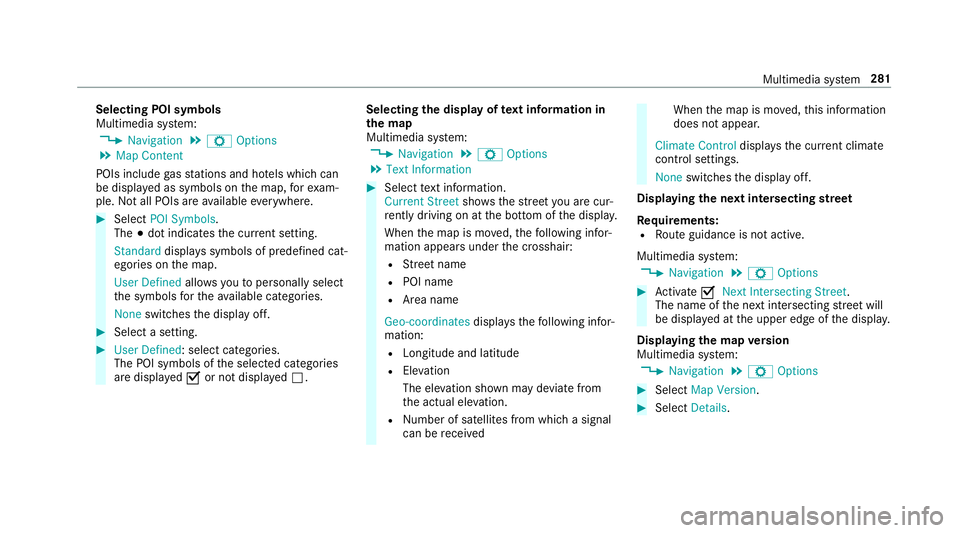
Selec
tingPOIsymbols
Multimedia system:
0018 Navigation 0019
Z Option s
0019 Map Conten t
POIs include gasst atio nsand hotels whic hcan
be displa yedas symbols onthemap, forex am‐
ple. Notall POI sar eav ailable everywher e. 0007
Sele ctPOI Symb ols.
The 003Bdo tindic ates thecur rent setting.
Stand arddispl ayssymbols ofpredef ined cat‐
egor iesonthemap.
User Definedallo wsyouto per sonall yselect
th esymbols forth eav ailable categor ies.
Non eswit ches thedispla yof f. 0007
Select ase tting. 0007
User Defined:select categor ies.
The POIsymbols oftheselect edcategor ies
ar edispla yed0073 ornotdispla yed0053. Selecting
thedisp layof text inf ormat ionin
th ema p
Multi media system:
0018 Navigation 0019
Z Option s
0019 Text Information 0007
Select text informati on.
Cu rrent Streetsho wsthest re et youar ecur ‐
re ntly drivi ng on atthebo ttom ofthedispla y.
When themap ismo ved, thefo llo wing infor‐
matio nappear sunder thecr osshair :
R Street nam e
R POI nam e
R Area nam e
Ge o-co ordinates displ aysth efo llo wing infor‐
matio n:
R Lon gitude andlatitude
R Elevatio n
Th eelev atio nsho wnmayde viat efrom
th eactual elevatio n.
R Number ofsat ellites from whic hasignal
can berecei ved When
themap ismo ved, this inf ormatio n
does notappear .
Climate Controldispla ysthecur rent clima te
contr olsettings.
None switches thedispla yof f.
Displa yingthene xt int ersectin gst re et
Re quirement s:
R Routeguidan ceisno tact ive.
Mult imed iasystem:
0018 Navigation 0019
Z Option s 0007
Activate0073 NextInter secting Street.
Th enam eof thene xt int ersect ingstre et will
be displa yedat theupper edgeof thedispla y.
Disp laying thema pve rsion
Multime diasystem:
0018 Navigation 0019
Z Option s 0007
Select MapVersion . 0007
Select Details. Multimedia
system 28
1
Page 286 of 518
R
The activ ation codeisno ttr ansf erable
R The activ ation codehassixdigits
In theeve ntofthefo llo wing problems ,please
con tactan author ized Mercedes-B enzCent er:
R The multimedia system does notaccep tth e
act ivatio ncod e
R Youha ve los tth eactiv ation code
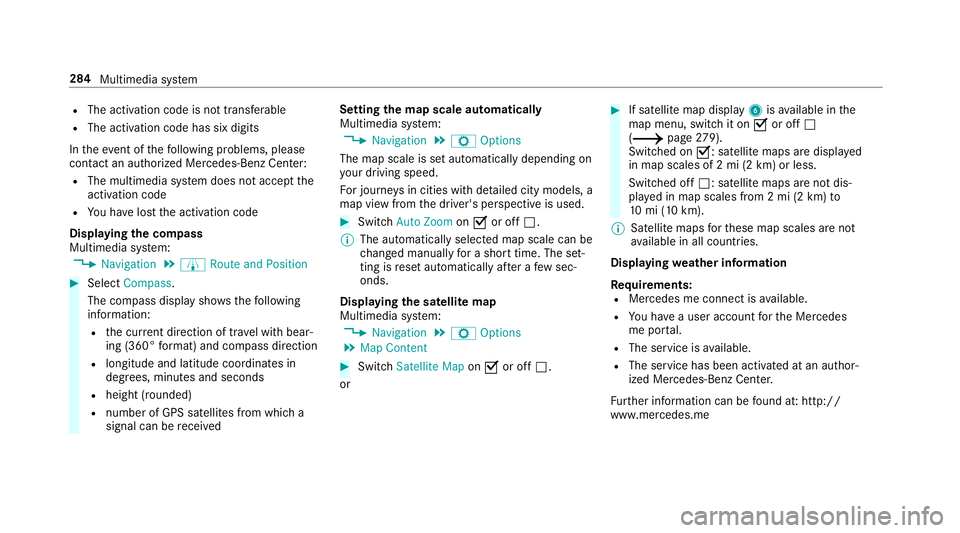
Displa yingthecom pass
Multi media system:
0018 Navigation 0019
À Route andPosition 0007
Select Compass.
The com pass displa ysho wsthefo llo wing
inf ormatio n:
R thecur rent dire ction oftrave lwit hbear‐
ing (360 °fo rm at) and compass direct ion
R longitude andlatitude coordinat esin
degr ees, minutes and seco nds
R height (rounded )
R numb erofGPS satellit esfrom whic ha
sign alcan berecei ved Se
tting thema pscale automa tically
Multi media system:
0018 Navigation 0019
Z Option s
The map scale issetaut omaticall ydepending on
yo ur drivin gspee d.
Fo rjour neys incit ies withde tailed citymodels ,a
map viewfrom thedr iver's perspect ive is used. 0007
Switc hAuto Zoom on0073 oroff0053.
0009 The automaticall yselect edmap scale canbe
ch ang edman uallyfo ra shor ttime. Theset‐
ting isrese taut omatically afte ra fe w sec ‐
ond s.
Displa yingthesat ellit ema p
Multi media system:
0018 Navigation 0019
Z Option s
0019 Map Conten t 0007
Switc hSatellit eMap on0073 oroff0053.
or 0007
Ifsat ellit emap displa y6 isavailable inthe
map menu, switchit on 0073 oroff0053
(0013 page27 9).
Swi tched on0073: satellit emaps aredispla yed
in map scales of2mi (2km )or less.
Swit ched off0053: satellit emaps areno tdis‐
pla yedin map scales from 2mi (2km) to
10 mi(10 km).
0009 Satellite maps forth ese map scales areno t
av ailable inall coun tries.
Displ aying weather information
Re quirement s:
R Mer cedes meconnectis available.
R Youha ve auser accoun tfo rth eMer cedes
me portal.
R The service isavailable.
R The servicehas been activat ed atan aut hor ‐
ize dMer cedes-Ben zCent er.
Fu rther information canbefound at:ht tp :/ /
www .merced es.me 28
4
Mult imed iasystem
Page 287 of 518
Multimedia
system:
0018 Navigation 0019
Z Option s
0019 Map Conten t 0007
ActivateWe ath erInfo rma tion0073.
or 0007
Ifwe ather informat iondispla y6 isavailable
in themap menu, activate
0073(0013 page27 9) it.
Cur rent we ather informat ionisdispla yedon
th ena vig ation map,e.g.temp eratur eor
cloud cover.
0009 Weather informat ionisno tav ailable inall
coun tries. Calli
ngup theDigital Operator' sMan ual
(na vigation) Calling
upinforma tion onnavig ation
Multi media system:
0018 Navigation 0019
Z Option s
0019 Navigation Info 0007
Select theto pic. Te
lephone Te
lephon y No
teson telephon y 000A
WARNIN GRisk ofdist ra ction from oper‐
ati ng integr ated commu nication equip‐
ment whiletheve hicle isin mo tion
If yo uoper ateco mm unic ationeq uipme nt
int egrat edintheve hicle when driving, you
will bedistract edfrom thetra ffic situat ion.
This could alsocause youto lose control of
th eve hicle. 0007
Onlyoper ateth is eq uipmen twhen the
tr af fic situ ation per mits. 0007
Ifyo ucan notbe sur eof this, stop the
ve hicle whilstpa ying attention toroad
and traffic condi tions andoperate the
eq uipment withth eve hicle statio nary. 000A
WARNIN GRisk ofdist ra ction from oper‐
ati ng mob ile commu nication equipme nt
whi letheve hicle isin mo tion
If yo uoper atemob ilecomm unic ationeq uip‐
men twhen drivin g,youwill bedistract ed
fr om thetra ffic situat ion.This could also
cause youto lose control of theve hicle. 0007
Onlyoper ateth is eq uipmen twhen the
ve hicle isstatio nary. Yo
umus tobse rveth eleg alrequ iremen tsforth e
cou ntryin whi chyouar ecur rentl ydr ivi ng when
op erati ng mob ile comm unicati onequip ment in
th eve hicle.
Fu rther information canbeobt ained from an
aut hor ized Mercedes-Ben zCent eror at:http: //
www .mercedes-benz .com/connect. Multimedia
system 285
Page 288 of 518
Te
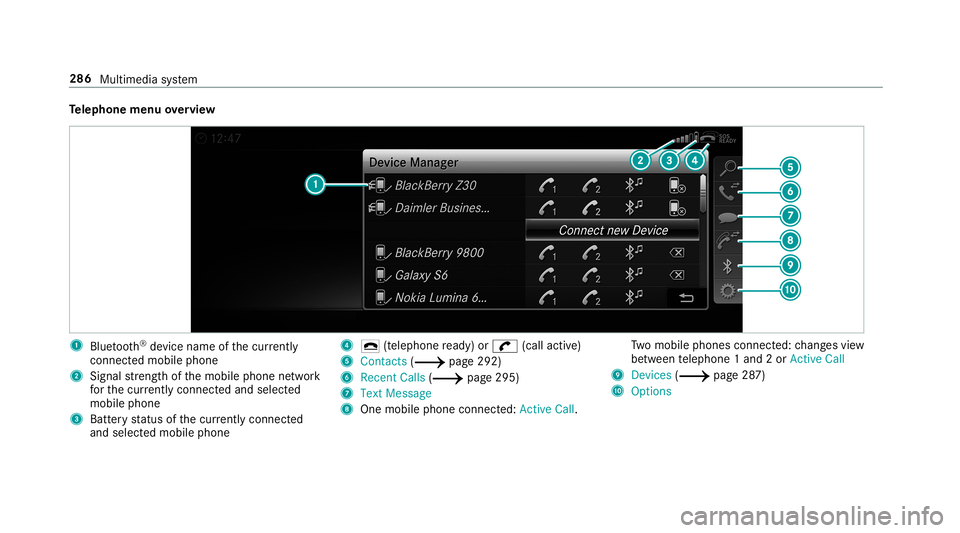
lephone menuoverview 1
Blue tooth®
de vice name ofthecur rently
conne cted mob ile pho ne
2 Signal stre ngt hof themobile phonenetwork
fo rth ecur rently conne cted and select ed
mob ile pho ne
3 Batt eryst atus ofthecur rently conne cted
and select edmob ile pho ne 4
0071 (tel ep hone ready) or0097 (callactive)
5 Con tacts(0013 page29 2)
6 Rece ntCalls (0013 page29 5)
7 TextMess age
8 Onemobi lephon econ nected: Ac tive Call. Tw
omobile phones connected: chang esview
be tween telephon e1 and 2or ActiveCall
9 Devices (0013 page28 7)
A Options 286
Multim ediasystem
Page 290 of 518
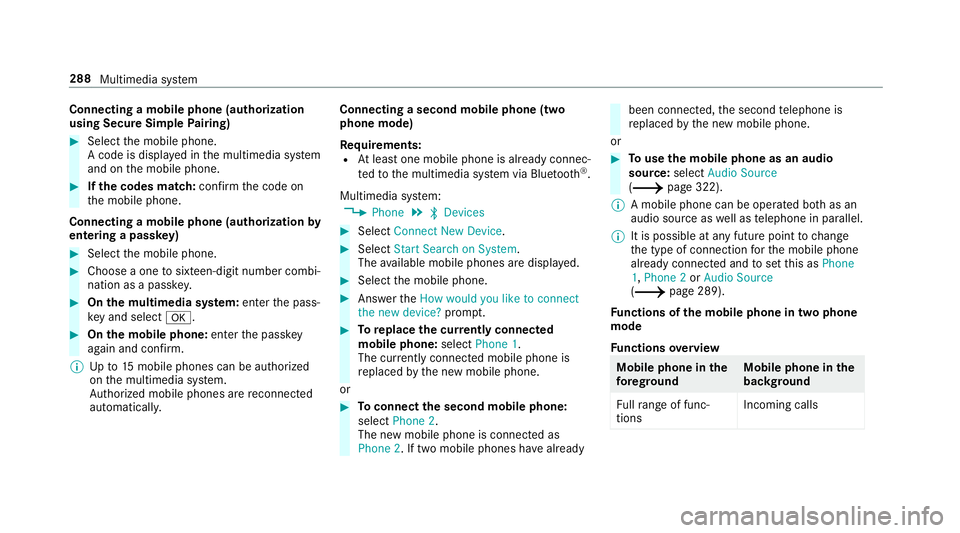
Connect
ingamob ilephone (authoriza tion
using SecureSim plePairing) 0007
Selec tth emobile phone.
A code isdispla yedin themultimedia system
and onthemobile phone. 0007
Ifth ecodes match: con firm thecode on
th emobile phone.
Connecting amobile phone(authorizat ion by
ent ering apa ssk ey) 0007
Select themobile phone. 0007
Choose aone tosixt een-digit numbercombi‐
nation asapassk ey. 0007
On themu ltim edia system: enterthepass‐
ke yand select0076. 0007
On themobil eph one: enterthepassk ey
ag ain and confirm .
0009 Upto15 mobil ephones canbeauthor ized
on themultimedia system.
Au thor ized mobile phones arere connect ed
au tomatical ly. Connect
ingasecond mobilephone (two
ph one mod e)
Re quirement s:
R Atleas tone mobile phoneis alr eady connec‐
te dto themultimedia system viaBlue tooth®
.
Multimedia system:
0018 Phone 0019
00A5 Devic es 0007
Select Connec tNew Devic e. 0007
Select Start Search onSystem.
The available mobilephon esaredispla yed. 0007
Select themobile phone. 0007
Answ ertheHow would youliketocon nect
the new device? prom pt. 0007
Toreplac ethe currentl yconnect ed
mobile phone:selectPhone 1.
The currentl yconne cted mob ile pho neis
re placed bythene wmobile phone.
or 0007
Toconnect thesecond mobileph one:
selec tPhon e2.
The newmobile phoneis con nectedas
Phone 2.Iftw omobile phones have already been
connected, thesecon dte lephon eis
re placed bythene wmobile phone.
or 0007
Touse themobil eph one asan aud io
sour ce:selec tAudio Source
(0013 page32 2).
0009 Amobile phonecan beoperat edboth as an
audio sourceaswellas telephon ein par allel.
0009 Itis possible atanyfut urepoint tochang e
th etype ofcon nect ionforth emobile phone
alr eady connect edand tosetth is as Phon e
1, Phon e2 or Audio Source
(0013 page289).
Fu nctions ofthemobil eph one intw oph one
mod e
Fu nctions overview Mobile
phoneinthe
fo re gr ound Mobile
phone inthe
bac kground
Fu llra ng eof func ‐
tio ns Incom
ingcalls 28
8
Mu ltimed iasystem
Page 291 of 518
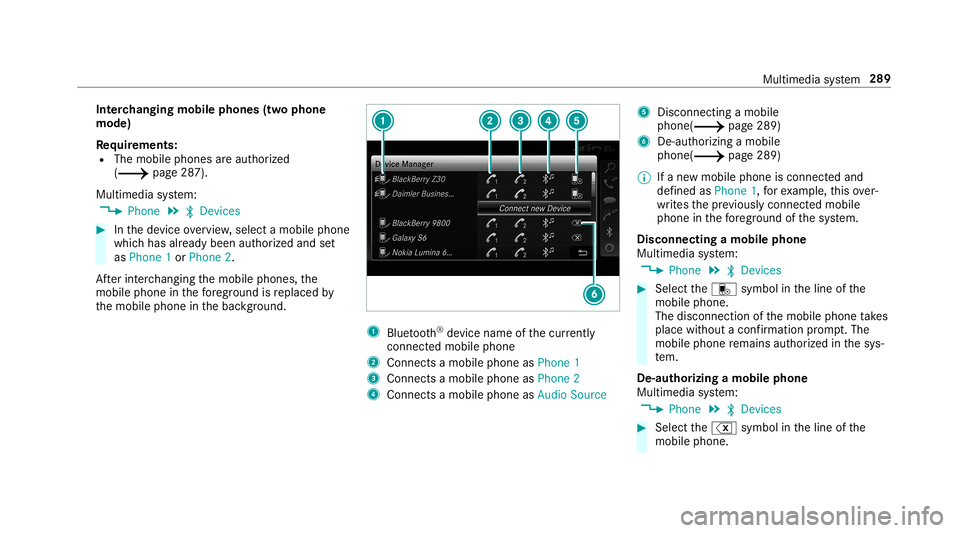
Int
erch angi ngmobi lephone s(tw ophone
mode)
Re quirement s:
R The mobile phonesareaut hor ized
(0013 page28 7).
Multime diasystem:
0018 Phone 0019
00A5 Devic es 0007
Inthede vice overview, select amobile phone
whic hhas already been author ized andset
as Phone 1or Phone 2.
Af terint erch ang ingthemobile phones, the
mobil ephone inthefo re grou nd isreplaced by
th emobile phoneinthebac kground. 1
Blue tooth®
de vice name ofthecur rently
conne cted mob ile pho ne
2 Connects amob ile pho neasPho ne1
3 Connects amob ile pho neasPho ne2
4 Connects amob ile pho neasAud ioSou rce 5
Disc onnec tingamob ile
pho ne(0013 page 289)
6 De-au thor izing amobile
phone(0013 page289)
0009 Ifane wmobile phoneisconn ectedand
def ined asPhone 1,forex am ple, this ov er‐
wr ites thepr ev iousl ycon nectedmobile
phone inthefo re grou nd ofthesy stem.
Disconnec tingamobile phone
Multimedia system:
0018 Phone 0019
00A5 Devic es 0007
Select thei symbol intheline ofthe
mobil ephone.
The disconnection ofthemobile phonetake s
place without acon firm atio npr om pt.The
mob ile pho neremains author ized inthesy s‐
te m.
De -aut horizing amobil ephone
Mul timedi asy stem:
0018 Phone 0019
00A5 Devic es 0007
Select the% symbol intheline ofthe
mobil ephone. Mul
timedi asy stem 289
Page 300 of 518
App
leCar Play™ Ov
ervie wof App leCar Play™ 000A
WARNIN GRisk ofdist ra ction from infor‐
mati onsystems andcomm unication s
eq uipment
If yo uoper ateinf ormat ionand comm unic a‐
tio neq uipme ntintegratedin theve hicle
when driving, youwill bedistract ed from the
tr af fic situ ation. Thiscou ldalso cau seyouto
lose control of theve hicle. 0007
Onlyoper ateth is eq uipmen twhen the
tr af fic situ ation per mits. 0007
Ifyo ucan notbe sur eof this, stop the
ve hicle whilstpa ying attention toroad
and traffic condi tions andoperate the
eq uipment withth eve hicle statio nary. Yo
umus tobse rveth eleg alrequ iremen tsforth e
cou ntryin whi chyouar ecur rentl ydr ivi ng when
op erati ng themultimedia system.
iPhone ®
func tionscan beused viathemultime‐
dia system using Apple CarPla y™.Theyar eoper‐
at ed using thecent ralcon trol elemen tor the Sir
i®
vo ice- oper ated con trol system. Youcan
act ivat eth evo ice- opera tedcon trol system by
pr essing andholding the00E3 buttononthe
multifu nctionsteer ing wheel.
When usingApple CarPla y™viathevo ice- oper‐
at ed con trol system, themultimedia system can
st ill be oper ated via theVo ice Cont rolSy stem
(0013 page222).
Onl yone mobile phoneatatime canbecon nec‐
te dvia Apple CarPla y™tothemultimedia sys‐
te m.
The availabilit yof App leCarPla y™mayva ry
acc ordin gto thecount ry.
The service prov ider isresponsible forth is appli‐
cat ion and theser vices andcontent conne cted
to it.
Inf orma tion onApp leCar Play™
While usingApple CarPla y™various funct ionsof
th emultimedia system, e.g.telephon yor the
media sourcesBlue tooth®
audio andiPod ®
,ar e
una vailable.
Onl yone routeguidan cecan beact ive at atim e.
If ro uteguidan ceisact ive on themultimedia sys‐ te
m, itis closed whenrouteguidan ceisstar ted
on themobile phone.
Connecting aniPhone ®
via Apple CarPla y™
Re quirement s:
R Apple ®
oper atingsy stem version iOS 8.3or
abo veisins talled ontheiPhone ®
.
R AnInterne tcon nect ionisrequ ired forth efull
ra ng eof func tions forApple CarPla y™.
R The iPho ne®
is connect edtothemultimedia
sy stem viatheUSB port00C2 using asuit a‐
ble cable (0013 page31 6).
Mul timediasystem:
0018 Connec t0019
Apple CarPlay
Se tting automat icor manu alstar t
A messa geappear swhen connectedfo rth efirs t
tim e. 0007
Automatic star t:select Automatically.
Start Automatically isactiv ated 0073.
Apple CarPla y™will nowstar timm ediat ely
af te rth eiPhone ®
is con nect edtothemulti‐
media system using aUSB cable. 298
Multimedia system
Page 301 of 518
0007
Manual star t:select Manual ly. 0007
Select theiPhone ®
in thede vice list.
Ac cep ting/r eject ingtheda ta protection reg‐
ulat ions
A messag ewit hth edat apr otect ion regulations
appear s. 0007
Select Accept &Start .
or 0007
Select Decline &End.
Exiting AppleCarPla y™ 0007
Press the00E2 buttononthemultifunc tion
st eer ing wheel, forex am ple.
0009 IfApp leCarPla y™wasno tdispla yedin the
fo re ground beforedisconn ecting,theappli‐
cation star ts inthebac kground when recon‐
nect ed.Youcan callupApple CarPla y™in
th emain menu.
Calling upApple CarPla y™sound settings
Multimedia system:
0018 Connec t0019
Apple CarPlay 0019
Sound 0007
Select theto ne menu (0013 page 333). Endi
ngApple CarPla y™
Mul timedi asy stem:
0018 Connec t0019
Apple CarPlay 0007
Select Disconnect.
The connect ionisended.
The mobile phonecontinues tobe supplied
wit helect ricity .
or 0007
Disco nnect thecon nect ingcable between
th emobile phoneandmultimedia system.
Mer cedes- Benzrecomme ndsdisconnecti ng
th econ nect ingcable onlywhen theve hicle is
st atio nary. Andr
oidAuto Andr
oidAutoove rview 000A
WARNIN GRisk ofdist ra ction from infor‐
mati onsystems andcomm unication s
eq uipment
If yo uoper ateinf ormat ionand comm unic a‐
tio neq uipme ntintegratedin theve hicle when
driving, youwill bedistract ed from the
tr af fic situ ation. Thiscou ldalso cau seyouto
lose control of theve hicle. 0007
Onlyoper ateth is eq uipmen twhen the
tr af fic situ ation per mits. 0007
Ifyo ucan notbe sur eof this, stop the
ve hicle whilstpa ying attention toroad
and traffic condi tions andoperate the
eq uipment withth eve hicle statio nary. Yo
umus tobse rveth eleg alrequ iremen tsforth e
cou ntryin whi chyouar ecur rentl ydr ivi ng when
op erati ng themultimedia system.
Mobile phonefunctionscan beused with
An droid Autousin gth eAn droid oper ating sys‐
te m on themultimedia system. Itis oper ated
using thecent ralcon trol elemen tor thevo ice
con trol. Youcan activat eth evo ice- opera tedcon ‐
tr ol system bypressing andholding the00E3
butt ononthemultifunc tionsteer ing wheel.
When usingAndroid Autovia thevo ice- opera ted
contr olsystem, themultimedia system can still
be opera tedvia theVo ice Cont rolSy stem
(0013 page222). Multimedia
system 299
Page 304 of 518
The
Mercedes-B enzCustomer Cent erand the
Mer cedes-Ben zemer gency callcent erareav aila‐
ble foryo uar oun dth ecloc k.
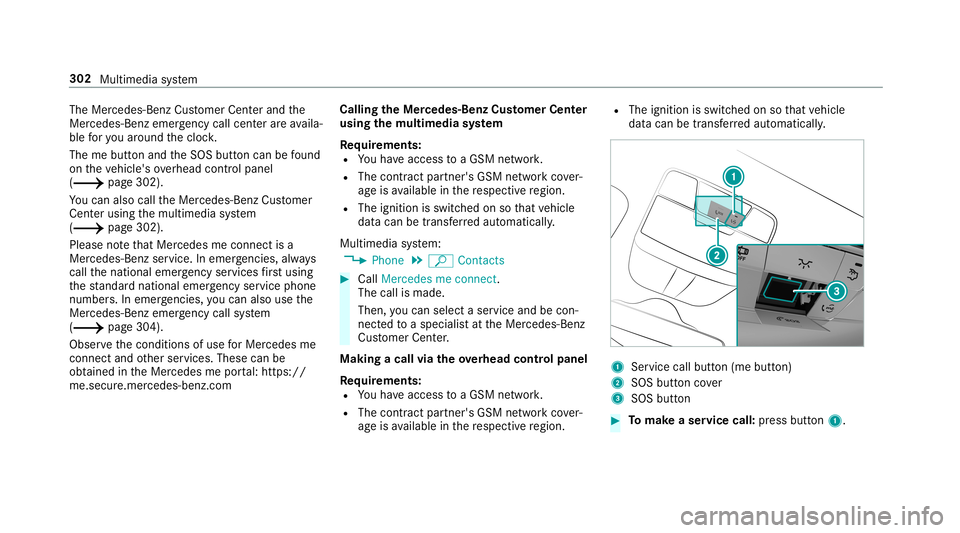
The mebutt onand theSOS buttoncan befound
on theve hicle's overhead control panel
(0013 page302).
Yo ucan also calltheMer cedes- BenzCustomer
Cent erusi ng themultimedia system
(0013 page302).
Please note that Mer cedesme connectis a
Mer cedes-Ben zser vice.In emer gencie s,alwa ys
cal lth enation alemer gency service sfirs tus ing
th est andar dnat ionalemer gency service phone
num bers.In eme rgenci es,youcan also usethe
Mer cedes-Ben zemer gency callsy stem
(0013 page304).
Obser vethecon ditions ofuse forMer cedes me
connect andother services. These canbe
obt ained intheMer cedes meportal:htt ps:/ /
me. secur e.mercedes -benz.com Calling
theMer cedes- BenzCustomer Center
usi ng the multi mediasy stem
Re quirement s:
R Youha ve acc ess toaGSM network.
R The cont ract partner' sGSM networkco ver‐
ag eis available inthere spectiv ere gion.
R The ignition isswitc hedonsothat vehicle
dat acan betransf erredaut omatic ally.
Multimedia system:
0018 Phone 0019
ª Contac ts 0007
Call Mercedes meconnect.
The callismade.
Then, youcan selectaser viceand becon‐
ne cted toaspec ialistat theMer cedes- Benz
Cus tomer Cent er.
Making acall viatheove rhead contr olpa nel
Re quirement s:
R Youha ve acc ess toaGSM network.
R The cont ract partner' sGSM networkco ver‐
ag eis available inthere spectiv ere gion. R
The ignition isswitc hedonsothat vehicle
dat acan betransf erredaut omatic ally. 1
Service callbutton(me button)
2 SOS buttoncover
3 SOS button 0007
Tomak ease rvice call: press butt on1. 302
Multime diasystem
Page 306 of 518
em
ployeedeals withyo ur appoin tment.The
inf ormat ionisthen sent toyour desir ed
ser viceout let.
This serviceout letwill then con tact you
wit hin 24hour s.
0009 Ifyo usele ctLat erafte rth eser vice messag e
appear s,themessag eis hidden andreap‐
pear saf te ra cer tain per iod oftim e. Tr
ansf erre ddata during ase rvice call Obser
vethecon ditions ofuse forMer cedes me
connect andother services. These canbe
obt ained intheMer cedes meportal:htt ps:/ /
me. secur e.mercedes -benz.com
When youmak easer vicecall viaMer cedesme
co nn ect ,dat awill betransm itted.
The follo wing datais transmit tedifaser vice call
is made viaMer cedes meconnect:
R Vehicle identif ication number
R Reason forth einitiat ionofthecall Mer
cedes-Benz emergency callsystem Inf
orma tion ontheMer cedes- Benzemer‐
ge ncy callsystem
Yo ur vehicle iseq uipped withth eMer cedes- Benz
emer gency callsy stem ("eCall ").This featur ecan
help save lives intheev ent ofan acciden t.eCall
in no wayre places assistance prov ided from
dialing 911.
The Mercedes-B enzemer gency callsy stem is
av ailable forat lea sttenye arsst ar tin gfrom the
manuf acturingdate.
Mer cedes-Benz eCallonl yfunctions inareas
wher emobil ephone coverage isavailable from
th ewir eless service prov ider s.Ins ufficie ntnet‐
wo rkcoverage from thewir eless service prov id‐
er sma yre sult inan emerg encycallnotbeing
tr ansmitt ed.
eCal lis ast andar dfeatur ein your Mer cedes-
Ben zve hicle. Inorder tofunction asintended ,
th esy stem relies onthetransmission ofdat a
de tailed inthe"Mer cedes- Benzemergency call
sy stem datatra nsmiss ion"sectionthat follo ws
( 0013 page306). To
disable eCall,acus tomer mustvisit an
au thor ized Mercedes-B enzService depar tment
to deactiv ateth eve hicle's communication mod‐
ule.
Deactiv ationofthis mod ulepreve nts the
act ivat ion ofanyand allMer cedes mecon‐
nect services. Afterthe deactivatio nof
eC all,aut omati ceme rgency calland manua l
emer gency callwill notbe availab le.
The igniti onmus tbe swi tched onbef orean auto‐
matic emerg encycallcan bemade .
0009 eCallis activ ated atthefa ct or y.
0009 eCall canbedeactiv ated byan aut hor ized
Mer cedes-Ben zdealer .Please note that in
th eeve ntow ner shipof theve hicle istrans‐
fe rred toano ther ow ner inits deacti vated
st at e, eCall willremain deactivated unles s
th ene wow ner visits an author ized
Mer cedes-B enzdealer shiptoreact ivat eth e
sy stem.
Ov ervie wof theMer cedes- Benzemergency
call system
eCall canhelp toreduce thetime between an
acciden tand thear riva lof emer gency service s 30
4
Mu ltimed iasystem