cruise control MERCEDES-BENZ S-CLASS SEDAN 2012 User Guide
[x] Cancel search | Manufacturer: MERCEDES-BENZ, Model Year: 2012, Model line: S-CLASS SEDAN, Model: MERCEDES-BENZ S-CLASS SEDAN 2012Pages: 536, PDF Size: 39.39 MB
Page 343 of 536
If these conditions are fulfilled, your vehicle
is accelerated. Acceleration will be
interrupted if changing lanes takes too long
or if the distance between your vehicle and
the vehicle in front becomes too small.
i When changing lanes, DISTRONIC PLUS
monitors the left lane on left-hand drive
vehicles and the right lane on right-hand
drive vehicles.GWARNING
DISTRONIC PLUS and Active Blind Spot Assist
are only aids designed to assist driving.
They do not relieve you of the responsibility
of paying attention. The driver remains fully
responsible for the vehicle's distance from
other vehicles, the vehicle's speed and for
braking in good time. Always pay attention to
traffic conditions and your surroundings.
Otherwise, you may fail to recognize dangers
in time, cause an accident and injure yourself
and others.
Stopping
GWARNING
Never get out of the vehicle when DISTRONIC
PLUS is activated.
DISTRONIC PLUS must also never be
operated, activated or deactivated by a
passenger or from outside the vehicle.
DISTRONIC PLUS does not replace the
electric parking brake and must not be used
for parking.
The DISTRONIC PLUS braking effect is
canceled and the vehicle can start moving if:
R DISTRONIC PLUS is deactivated using the
cruise control lever.
R you accelerate.
R there is a malfunction in the system or an
interruption in the power supply, e.g.
battery failure.
R the electrical system in the engine
compartment, the battery or the fuses are
tampered with.
R the battery is disconnected.
If you wish to leave the vehicle or park it,
deactivate DISTRONIC PLUS and secure the
vehicle against rolling away.
If DISTRONIC PLUS detects that the vehicle
in front is stopping, it brakes your vehicle until
it is stationary.
Once your vehicle is stationary, it remains
stationary and you do not need to depress the
brake.
i After a time, the electric parking brake
secures the vehicle and relieves the service
brake.
i Depending on the specified minimum
distance, your vehicle will come to a
standstill at a sufficient distance behind the
vehicle in front. The specified minimum
distance is set using the control on the
cruise control lever.
Setting a speedGWARNING
Keep in mind that it may take a brief moment
until the vehicle has made the necessary
adjustments.
Increase or decrease the set vehicle speed to
a value that the prevailing road conditions and
legal speed limits permit. Otherwise, sudden
and unexpected acceleration or deceleration
of the vehicle could cause an accident and/
or serious injury to you and others.
XPress the cruise control lever up : for a
higher speed or down ; for a lower speed.XTo adjust the speed in 1 mph
increments (1 km/h increments): briefly
press the cruise control lever up : or
down ; to the pressure point.
The last speed stored is increased or
decreased every time the cruise control
lever is pushed up : or down ;.XTo adjust the speed in 5 mph
increments (10 km/h increments):
briefly press the cruise control leverDriving systems341Driving and parkingZ
Page 344 of 536
up : or down ; beyond the pressure
point.
The last speed stored is increased or
decreased every time the cruise control
lever is pushed up : or down ;.
i
DISTRONIC PLUS is not deactivated if you
depress the accelerator pedal. If you
accelerate to overtake, DISTRONIC PLUS
adjusts the vehicle's speed to the last
speed stored after you have finished
overtaking.
Storing the current speed or calling up
a stored speed
GWARNING
The set speed stored in memory should only
be set again if prevailing road conditions and
legal speed limits permit. Possible
acceleration or deceleration differences
arising from returning to the preset speed
could cause an accident and/or serious injury
to you and others.
XBriefly pull the cruise control lever towards
you ?.XRemove your foot from the accelerator
pedal.
DISTRONIC PLUS is activated. The first
time it is activated, the current speed is
stored. Otherwise, it sets the vehicle cruise
speed to the previously stored value.
Setting the specified minimum distance
You can set the specified minimum distance
for DISTRONIC PLUS by varying the time span
between one and two seconds. With this
function, you can set the minimum distance
that DISTRONIC PLUS keeps to the vehicle in
front, dependent on vehicle speed. You can
see this distance in the multifunction display
( Y page 343).
GWARNING
It is up to the driver to exercise discretion to
select the appropriate setting given road
conditions, traffic, driver's preferred driving
style and applicable laws and driving
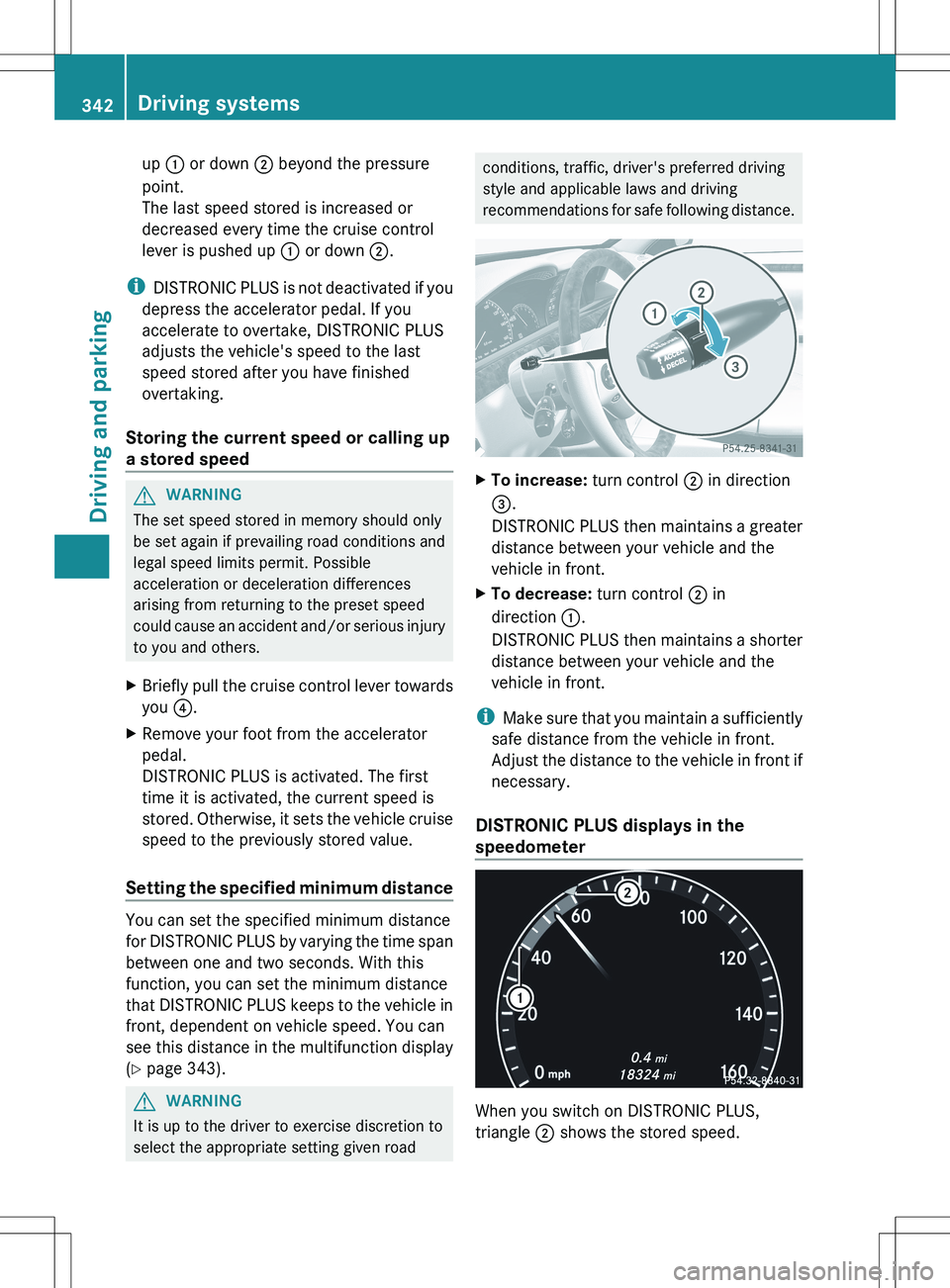
recommendations for safe following distance.XTo increase: turn control ; in direction
= .
DISTRONIC PLUS then maintains a greater
distance between your vehicle and the
vehicle in front.XTo decrease: turn control ; in
direction :.
DISTRONIC PLUS then maintains a shorter
distance between your vehicle and the
vehicle in front.
i Make sure that you maintain a sufficiently
safe distance from the vehicle in front.
Adjust the distance to the vehicle in front if
necessary.
DISTRONIC PLUS displays in the
speedometer
When you switch on DISTRONIC PLUS,
triangle ; shows the stored speed.
342Driving systemsDriving and parking
Page 345 of 536
iFor design reasons, the speed displayed
in the speedometer may differ slightly from
the speed set for DISTRONIC PLUS.
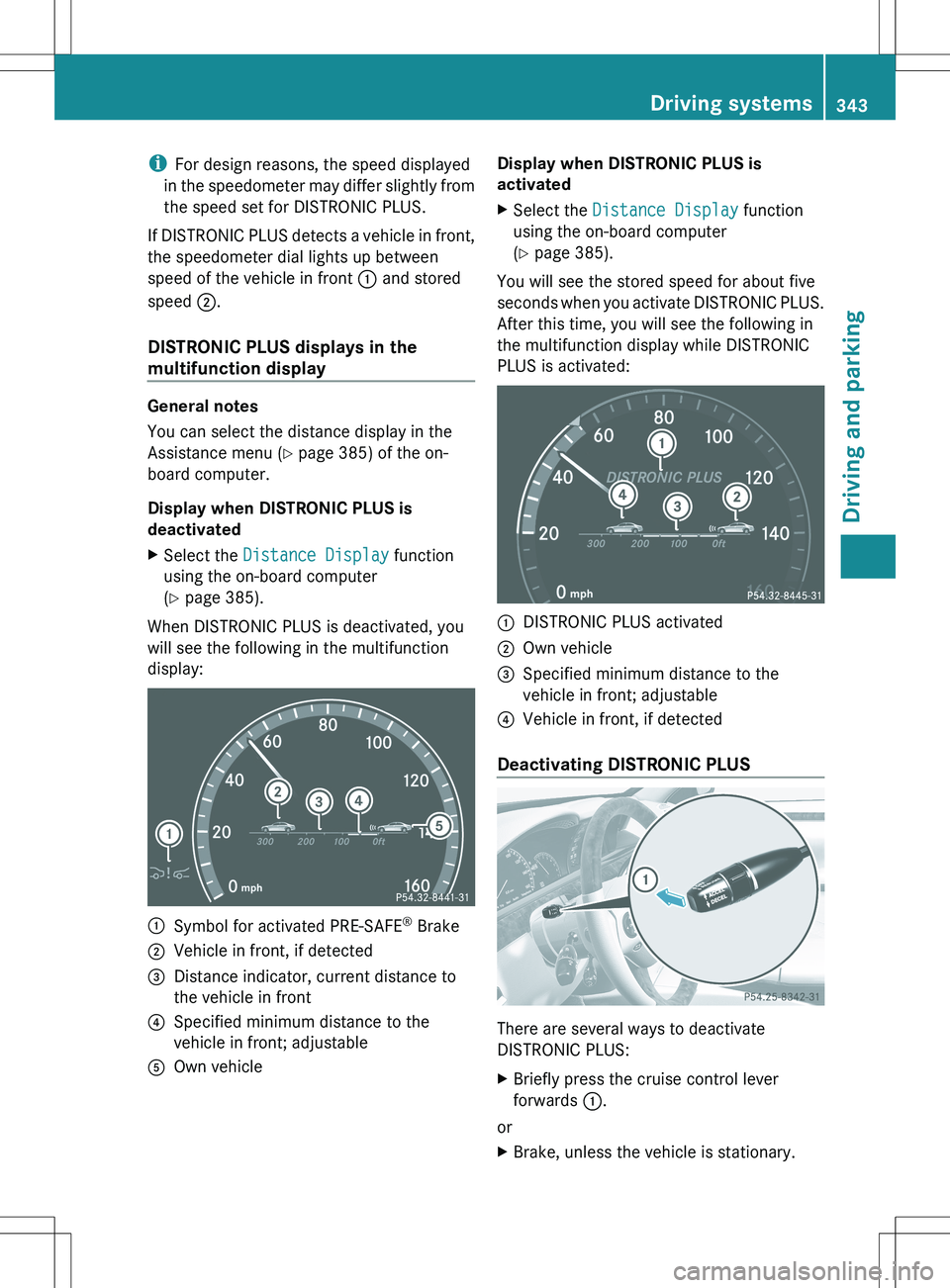
If DISTRONIC PLUS detects a vehicle in front,
the speedometer dial lights up between
speed of the vehicle in front : and stored
speed ;.
DISTRONIC PLUS displays in the
multifunction display
General notes
You can select the distance display in the
Assistance menu ( Y page 385) of the on-
board computer.
Display when DISTRONIC PLUS is
deactivated
XSelect the Distance Display function
using the on-board computer
( Y page 385).
When DISTRONIC PLUS is deactivated, you
will see the following in the multifunction
display:
:Symbol for activated PRE-SAFE ®
Brake;Vehicle in front, if detected=Distance indicator, current distance to
the vehicle in front?Specified minimum distance to the
vehicle in front; adjustableAOwn vehicleDisplay when DISTRONIC PLUS is
activatedXSelect the Distance Display function
using the on-board computer
( Y page 385).
You will see the stored speed for about five
seconds when you activate DISTRONIC PLUS.
After this time, you will see the following in
the multifunction display while DISTRONIC
PLUS is activated:
:DISTRONIC PLUS activated;Own vehicle=Specified minimum distance to the
vehicle in front; adjustable?Vehicle in front, if detected
Deactivating DISTRONIC PLUS
There are several ways to deactivate
DISTRONIC PLUS:
XBriefly press the cruise control lever
forwards :.
or
XBrake, unless the vehicle is stationary.Driving systems343Driving and parkingZ
Page 346 of 536
When you deactivate DISTRONIC PLUS, the
DISTRONIC PLUS Off message is shown in
the multifunction display for approximately
five seconds.
i The last speed stored remains stored until
you switch off the engine.
DISTRONIC PLUS is automatically
deactivated if:
R you engage the electric parking brake or if
the vehicle is automatically secured with
the electric parking brake
R you are driving slower than 15 mph
(25km/h) and there is no vehicle in front,
or if the vehicle in front is no longer
detected.
R ESP ®
intervenes or you deactivate ESP ®
.
R the transmission is in the P, R or N position.
R you switch off the radar sensor system
( Y page 389).
R you pull the cruise control lever towards
you in order to pull away and the front-
passenger door or one of the rear doors is
open.
R the vehicle has skidded.
If DISTRONIC PLUS is deactivated, you will
hear a warning tone. The DISTRONIC PLUS
Off message is shown in the multifunction
display for approximately five seconds.GWARNING
DISTRONIC PLUS is deactivated and releases
the brakes if the vehicle is slowed down to a
speed below 20 mph ( 30km/h) by the system,
provided that DISTRONIC PLUS does not
detect a vehicle directly in front. At this point,
the driver must apply the brakes in order to
slow down further and bring the vehicle to a
standstill.
Tips for driving with DISTRONIC PLUS
Important safety notes
The following contains descriptions of certain
road and traffic conditions in which you must
be particularly attentive. In such situations,
brake if necessary. DISTRONIC PLUS is then
deactivated.GWARNING
The DISTRONIC PLUS works to maintain the
speed selected by the driver unless a moving
obstacle proceeding directly ahead of it in the
same travel direction is detected (e.g.
following another vehicle ahead of you at your
set distance).
This means that:
R Your vehicle can pass another vehicle after
you have changed lanes.
R While in a sharp turn or if the preceding
vehicle is in a sharp turn, the DISTRONIC
PLUS could lose sight of the preceding
vehicle. Your vehicle could then accelerate
to the previously selected speed.
The DISTRONIC PLUS regulates only the
distance between your vehicle and those
directly ahead of it. It may not register
stationary objects in the road, e.g.:
R a stopped vehicle in a traffic jam
R a disabled vehicle
R an oncoming vehicle
The driver must always be alert, observe all
traffic and intercede as required by means of
steering or braking the vehicle.
GWARNING
The DISTRONIC PLUS should not be used in
snowy or icy road conditions.
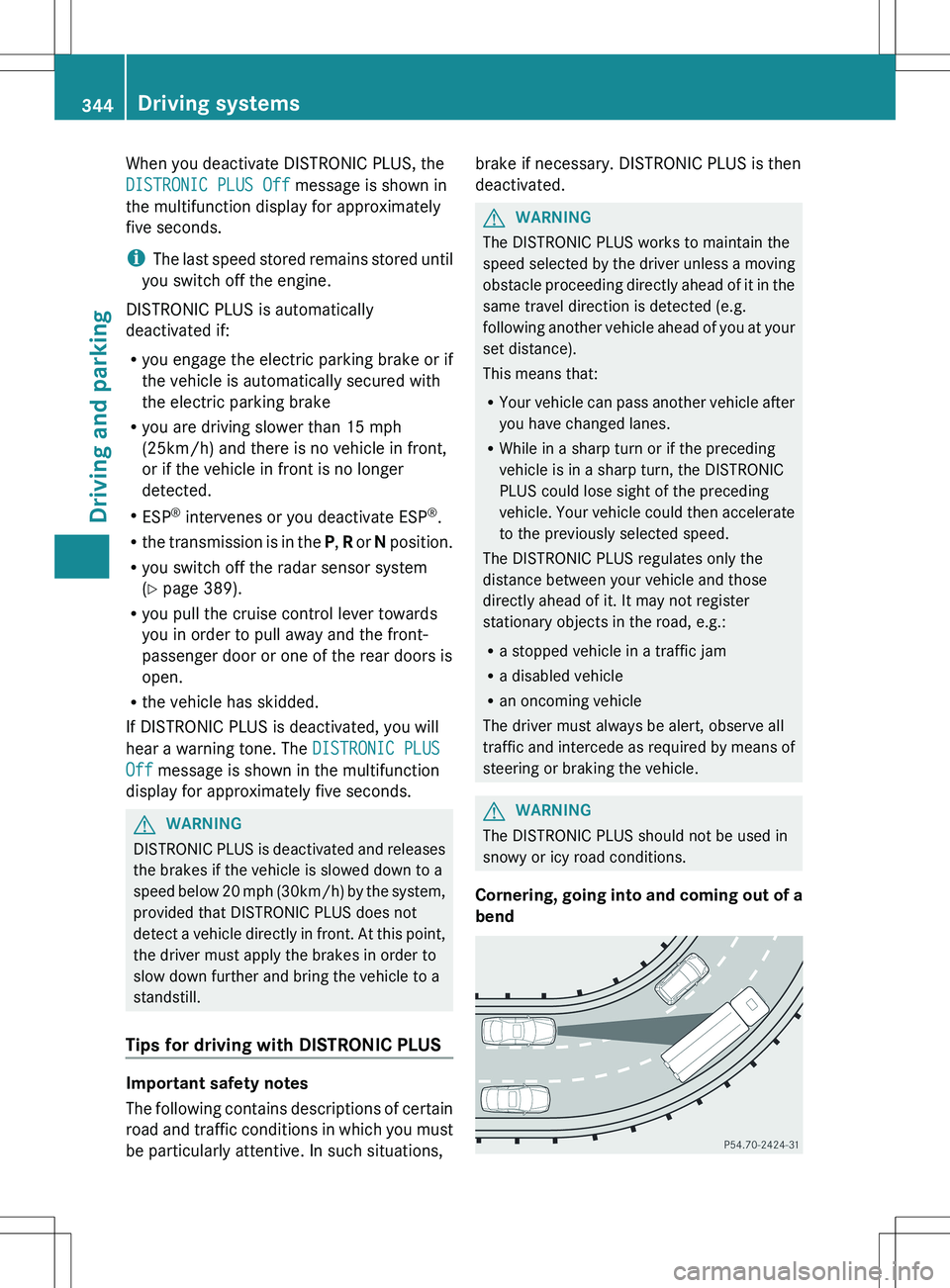
Cornering, going into and coming out of a
bend
344Driving systemsDriving and parking
Page 419 of 536
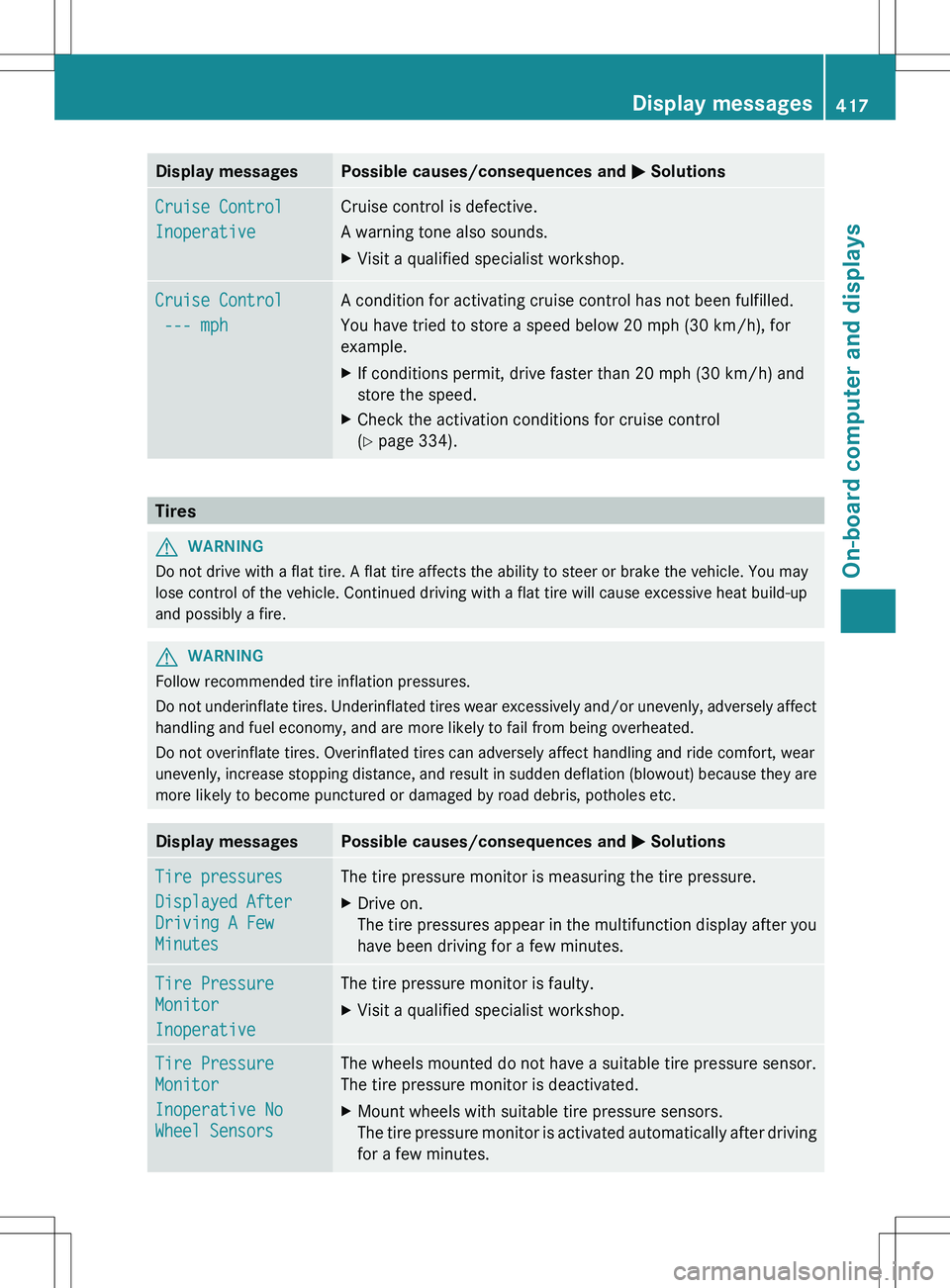
Display messagesPossible causes/consequences and M SolutionsCruise Control
InoperativeCruise control is defective.
A warning tone also sounds.XVisit a qualified specialist workshop.Cruise Control
--- mphA condition for activating cruise control has not been fulfilled.
You have tried to store a speed below 20 mph (30 km/h), for
example.XIf conditions permit, drive faster than 20 mph (30 km/h) and
store the speed.XCheck the activation conditions for cruise control
( Y page 334).
Tires
GWARNING
Do not drive with a flat tire. A flat tire affects the ability to steer or brake the vehicle. You may
lose control of the vehicle. Continued driving with a flat tire will cause excessive heat build-up
and possibly a fire.
GWARNING
Follow recommended tire inflation pressures.
Do not underinflate tires. Underinflated tires wear excessively and/or unevenly, adversely affect
handling and fuel economy, and are more likely to fail from being overheated.
Do not overinflate tires. Overinflated tires can adversely affect handling and ride comfort, wear
unevenly, increase stopping distance, and result in sudden deflation (blowout) because they are
more likely to become punctured or damaged by road debris, potholes etc.
Display messagesPossible causes/consequences and M SolutionsTire pressures
Displayed After
Driving A Few
MinutesThe tire pressure monitor is measuring the tire pressure.XDrive on.
The tire pressures appear in the multifunction display after you
have been driving for a few minutes.Tire Pressure
Monitor
InoperativeThe tire pressure monitor is faulty.XVisit a qualified specialist workshop.Tire Pressure
Monitor
Inoperative No
Wheel SensorsThe wheels mounted do not have a suitable tire pressure sensor.
The tire pressure monitor is deactivated.XMount wheels with suitable tire pressure sensors.
The tire pressure monitor is activated automatically after driving
for a few minutes.Display messages417On-board computer and displaysZ
Page 428 of 536
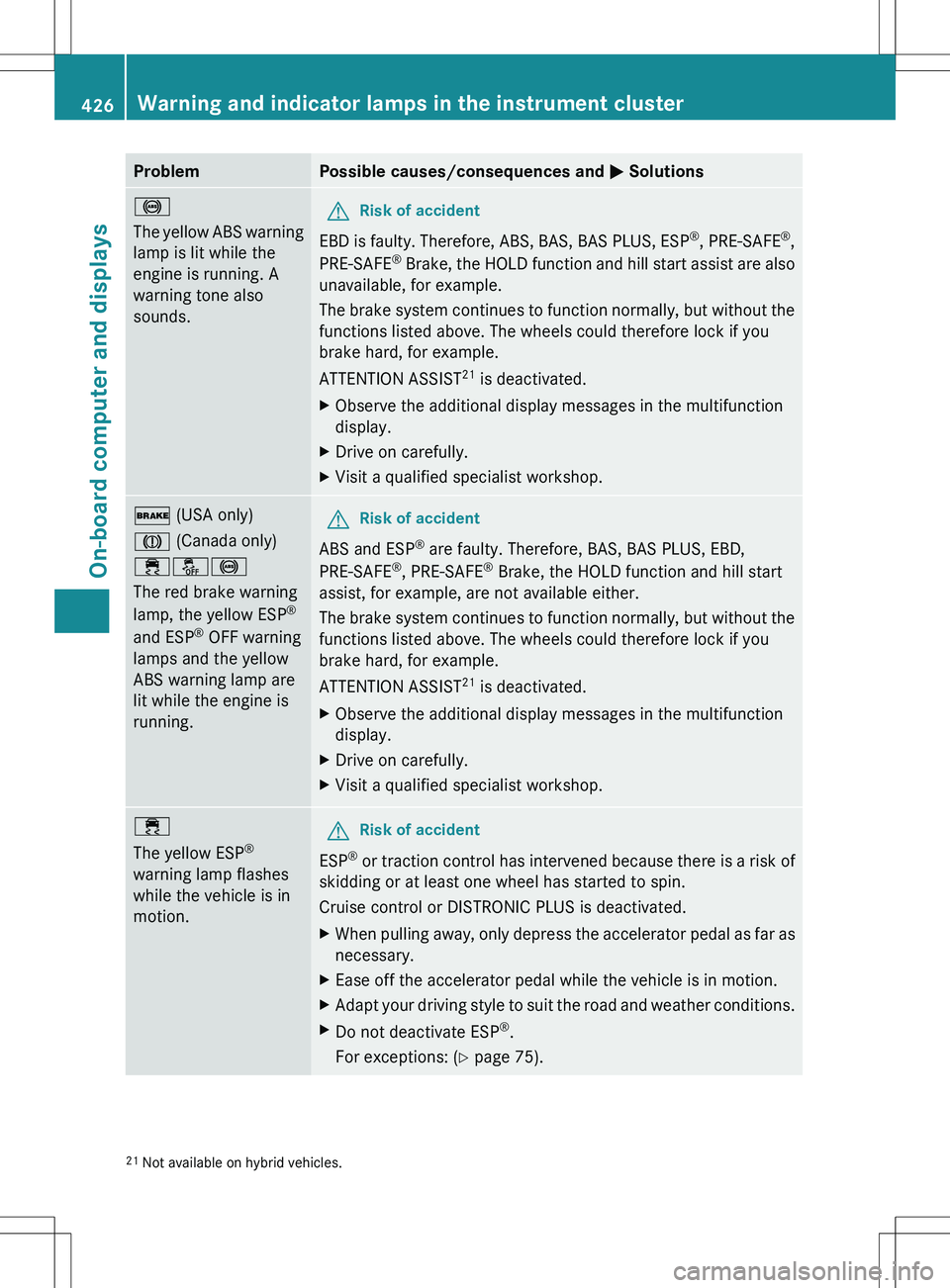
ProblemPossible causes/consequences and M Solutions!
The yellow ABS warning
lamp is lit while the
engine is running. A
warning tone also
sounds.GRisk of accident
EBD is faulty. Therefore, ABS, BAS, BAS PLUS, ESP ®
, PRE-SAFE ®
,
PRE-SAFE ®
Brake, the HOLD function and hill start assist are also
unavailable, for example.
The brake system continues to function normally, but without the
functions listed above. The wheels could therefore lock if you
brake hard, for example.
ATTENTION ASSIST 21
is deactivated.
XObserve the additional display messages in the multifunction
display.XDrive on carefully.XVisit a qualified specialist workshop.$ (USA only)
J (Canada only)
֌!
The red brake warning
lamp, the yellow ESP ®
and ESP ®
OFF warning
lamps and the yellow
ABS warning lamp are
lit while the engine is
running.GRisk of accident
ABS and ESP ®
are faulty. Therefore, BAS, BAS PLUS, EBD,
PRE-SAFE ®
, PRE-SAFE ®
Brake, the HOLD function and hill start
assist, for example, are not available either.
The brake system continues to function normally, but without the
functions listed above. The wheels could therefore lock if you
brake hard, for example.
ATTENTION ASSIST 21
is deactivated.
XObserve the additional display messages in the multifunction
display.XDrive on carefully.XVisit a qualified specialist workshop.÷
The yellow ESP ®
warning lamp flashes
while the vehicle is in
motion.GRisk of accident
ESP ®
or traction control has intervened because there is a risk of
skidding or at least one wheel has started to spin.
Cruise control or DISTRONIC PLUS is deactivated.
XWhen pulling away, only depress the accelerator pedal as far as
necessary.XEase off the accelerator pedal while the vehicle is in motion.XAdapt your driving style to suit the road and weather conditions.XDo not deactivate ESP ®
.
For exceptions: ( Y page 75).21
Not available on hybrid vehicles.426Warning and indicator lamps in the instrument clusterOn-board computer and displays