cruise control MERCEDES-BENZ S-CLASS SEDAN 2012 Owners Manual
[x] Cancel search | Manufacturer: MERCEDES-BENZ, Model Year: 2012, Model line: S-CLASS SEDAN, Model: MERCEDES-BENZ S-CLASS SEDAN 2012Pages: 536, PDF Size: 39.39 MB
Page 10 of 536
Climate controlAutomatic climate control .............295
COMAND ....................................... 269
Controlling automatically ...............297
Controlling centrally (COMAND) ....272
Cooling with air dehumidification ..297
Cooling with air dehumidification
(COMAND) ..................................... 271
Defrosting the windows .................300
Defrosting the windshield ..............300
Important safety notes ..................294
Indicator lamp ................................ 297
Main menu ..................................... 271
Maximum cooling .......................... 300
Notes on using automatic climate
control ........................................... 296
Overview of systems ......................294
Problems with cooling with air
dehumidification ............................ 297
Problem with the rear window
defroster ........................................ 301
Rear compartment (COMAND) ......273
Rear control panel .........................295
Setting the air distribution .............299
Setting the airflow .........................299
Setting the airflow (COMAND) .......273
Setting the air vents ......................302
Setting the footwell temperature
(COMAND) ..................................... 272
Setting the temperature ................298
Switching air-recirculation mode
on/off ............................................ 301
Switching on/off ........................... 296
Switching residual heat on/off ......302
Switching the rear window
defroster on/off ............................ 301
Coat hooks ......................................... 436
Cockpit Overview .......................................... 36
see Instrument cluster
Color, setting (TV, video) .................. 244
COMAND At a glance (overview) .................... 122
Back button ................................... 123
Basic functions .............................. 137
Components .................................. 122
Display ........................................... 125
Example of operation .....................132Function buttons ........................... 123
Menu overview .............................. 125
Remote control .............................. 129
Switching on/off ........................... 137
System settings ............................. 147
COMAND controller ........................... 122
COMAND display Cleaning instructions .....................129
Folding in and swiveling .................128
Setting ........................................... 147
COMAND operating system .............. 122
Combination switch .......................... 283
Compass function ............................. 192
Conference connection ..................... 205
Consumption statistics (on-board
computer) .......................................... 378
Contrast, setting (TV, video) ............ 244
Convenience closing feature .............. 97
Convenience opening feature ............ 96
Convenience telephone Importing contacts ........................208
Convenience telephony .................... 197
Introduction ................................... 197
Coolant (engine)
Checking the level .........................463
Display message ............................ 406
Filling capacity ............................... 530
Notes ............................................. 530
Temperature (on-board computer) . 381
Temperature gauge ........................ 374
Cooling
see Climate control
Copy protection (CD/DVD) ............... 234
Cornering light function Display message ............................ 403
Function/notes ............................. 284
Cruise control
Cruise control lever .......................335
Deactivating ................................... 336
Display message ............................ 417
Driving system ............................... 334
Function/notes ............................. 334
Important safety notes ..................334
Setting a speed .............................. 335
Storing and maintaining current
speed ............................................. 3358Index
Page 12 of 536
Setting the specified minimum
distance ......................................... 342
Warning lamp ................................. 430
Dolby ®
Digital .................................... 140
Doors Automatic locking (switch) ............... 89
Central locking/unlocking
(SmartKey) ....................................... 82
Control panel ................................... 43
Display message ............................ 420
Emergency locking ........................... 91
Emergency unlocking .......................90
Important safety notes ....................88
Opening (from inside) ......................89
Power closing feature ......................90
Drinking and driving ......................... 330
Drinks holder see Cup holder
Drive program
Automatic ...................................... 318
Manual ........................................... 319
Driver's door
see Doors
Driver's seat
see Seats
Driving abroad
Mercedes-Benz Service .................466
Symmetrical low beam ..................280
Driving Assistance package ............. 363
Driving lamps see Daytime running lamps
Driving safety systems
ABS (Anti-lock Braking System) .......73
ADAPTIVE BRAKE ............................. 77
BAS (Brake Assist System) ..............74
BAS PLUS (Brake Assist System
PLUS) ............................................... 74
Electronic brake force distribution ...77
ESP ®
(Electronic Stability
Program) .......................................... 75
ETS/4ETS (Electronic Traction
System) ........................................... 76
Important safety information ...........73
Overview .......................................... 72
PRE-SAFE ®
Brake ............................. 77Driving systems
Active Blind Spot Assist .................367
Active Body Control .......................348
Active Driving Assistance
package ......................................... 366
Active Lane Keeping Assist ............369
AIRMATIC ...................................... 347
ATTENTION ASSIST ........................359
Blind Spot Assist ............................ 363
Cruise control ................................ 334
Display message ............................ 410
DISTRONIC PLUS ........................... 336
Driving Assistance package ...........363
HOLD function ............................... 346
Lane Keeping Assist ......................365
Night View Assist Plus ...................360
Parking Guidance ........................... 353
PARKTRONIC ................................. 350
Rear view camera .......................... 357
Driving tips
Automatic transmission .................317
Brakes ........................................... 331
Break-in period .............................. 306
DISTRONIC PLUS ........................... 344
Downhill gradient ........................... 331
Drinking and driving .......................330
Driving abroad ............................... 280
Driving in winter ............................. 333
Driving on flooded roads ................333
Driving on wet roads ......................333
Exhaust check ............................... 331
Fuel ................................................ 330
General .......................................... 330
Hydroplaning ................................. 333
Icy road surfaces ........................... 334
Limited braking efficiency on
salted roads ................................... 332
Pedals ............................................ 330
Snow chains .................................. 495
Symmetrical low beam ..................280
Wet road surface ........................... 331
DVD
Changer ......................................... 225
Copy protection ............................. 234
Fast forward/fast rewind ...............230
Handling ........................................ 193
Inserting ........................................ 22510Index
Page 24 of 536
Sound settingsBalance and fader ..........................139
Calling up the sound menu ............139
Rear Seat Entertainment System ...253
Surround sound ............................. 140
Treble and bass ............................. 139
Spare wheel
Notes/data .................................... 518
Storage location ............................ 474
see Emergency spare wheel
Specialist workshop ............................ 31
Speech control see Voice Control System
Speed, controlling
see Cruise control
Speedometer
Activating/deactivating the
additional speedometer .................388
Digital ............................................ 378
In the Instrument cluster .................37
Selecting the unit of
measurement ................................ 388
see Instrument cluster
SPLITVIEW ......................................... 126
SRS (Supplemental Restraint
System) Display message ............................ 399
Introduction ..................................... 48
Warning lamp ................................. 428
Warning lamp (function) ................... 48
Standing lamps
Display message ............................ 404
Switching on/off ........................... 280
Starting (engine) ................................ 308
Station memory ................................. 217
Steering (display message) .............. 420
Steering wheel Adjusting (electrically) ...................114
Button overview ............................... 39
Buttons (on-board
computer) ...................................... 375
Cleaning ......................................... 472
Important safety notes ..................114
Paddle shifters ............................... 318
Steering wheel heating ..................114
Storing settings (memory
function) ........................................ 118Steering wheel heating
Switching on/off ........................... 114
Steering wheel paddle shifters ........ 318
Stop function Audio DVD ..................................... 228
Rear Seat Entertainment System ...260
Video DVD ..................................... 247
Stopwatch (RACETIMER) ................... 382
Storing stations Manually ........................................ 217
Storing stations (radio)
Automatically ................................. 217
Stowage areas ................................... 434
Stowage compartments Armrest (under) ............................. 435
Cup holders ................................... 439
Door ............................................... 435
Eyeglasses compartment ...............435
Glove box ....................................... 434
Important safety information .........434
Parcel net ...................................... 437
Rear ............................................... 436
Rear seat backrest ......................... 436
Rear seats (between) .....................436
Stowage well ..................................... 438
Stowage well beneath the trunk
floor .................................................... 438
Summer opening see Convenience opening feature
Summer tires ..................................... 494
Sun visor ............................................ 440
Supplemental Restraint System see SRS (Supplemental Restraint
System)
Surround sound
see 3D sound (Harman Kardon ®
surround sound system)
Surround sound (harman/
kardon ®
surround sound system)
Notes ............................................. 140
Switching on/off ........................... 140
Suspension tuning
Active Body Control .......................349
AIRMATIC ...................................... 348
Switching air-recirculation mode
on/off ................................................. 30122Index
Page 38 of 536
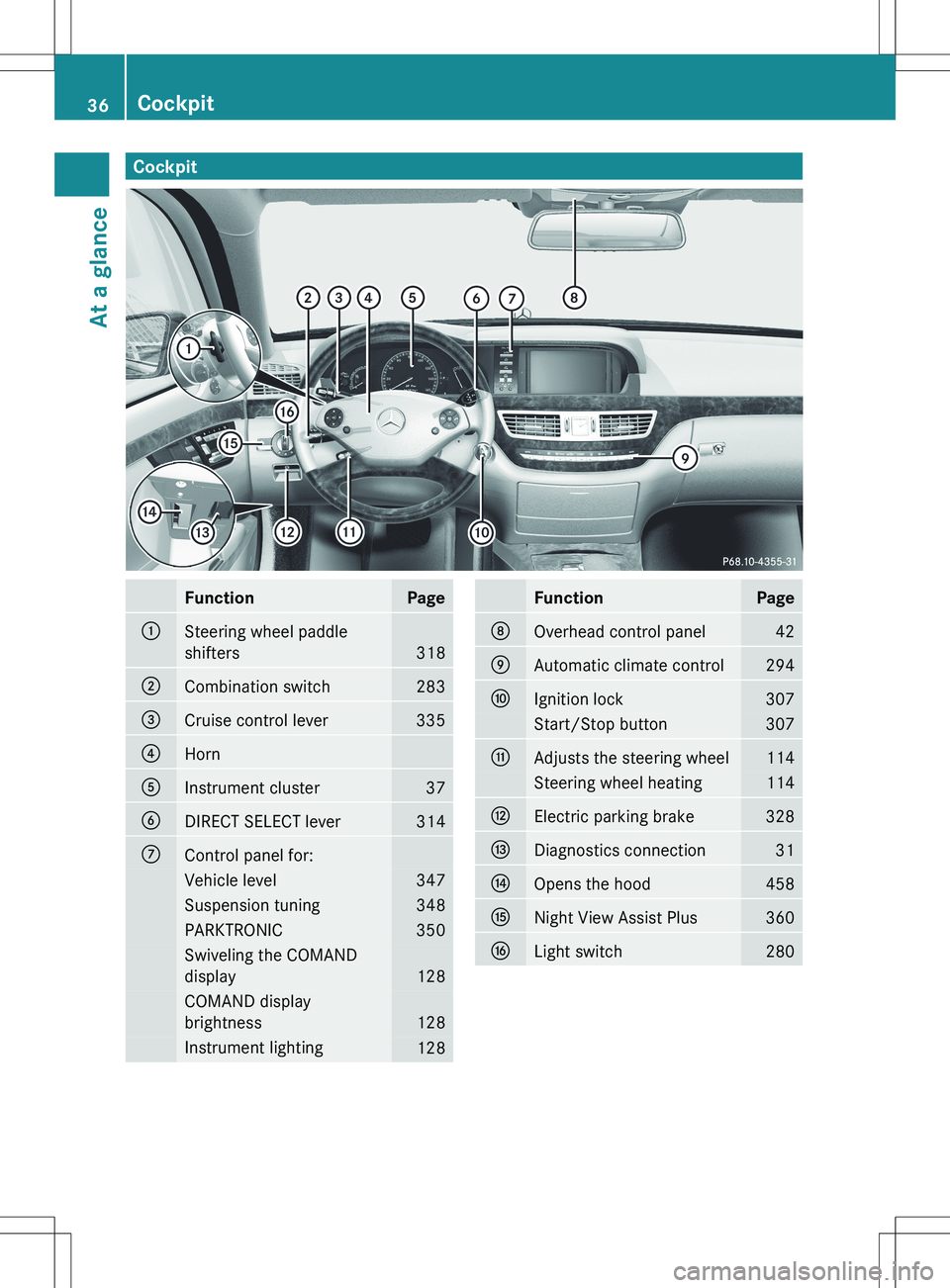
CockpitFunctionPage:Steering wheel paddle
shifters
318
;Combination switch283=Cruise control lever335?HornAInstrument cluster37BDIRECT SELECT lever314CControl panel for:Vehicle level347Suspension tuning348PARKTRONIC350Swiveling the COMAND
display
128
COMAND display
brightness
128
Instrument lighting128FunctionPageDOverhead control panel42EAutomatic climate control294FIgnition lock307Start/Stop button307GAdjusts the steering wheel114Steering wheel heating114HElectric parking brake328IDiagnostics connection31JOpens the hood458KNight View Assist Plus360LLight switch28036CockpitAt a glance
Page 336 of 536
Have your vehicle winterproofed at a qualified
specialist workshop at the onset of winter.
Observe the notes in the "Winter operation"
section ( Y page 494).
Driving with summer tires
Observe the notes in the "Winter operation"
section ( Y page 494).
Slippery road surfaces
GWARNING
The outside temperature indicator is not
designed to serve as an ice-warning device
and is therefore unsuitable for that purpose.
Indicated temperatures just above the
freezing point do not guarantee that the road
surface is free of ice. The road may still be icy,
especially in wooded areas or on bridges.
GWARNING
On slippery road surfaces, never downshift in
order to obtain braking action. This could
result in drive wheel slip and reduced vehicle
control. Your vehicle's ABS will not prevent
this type of loss of control.
Drive particularly carefully on slippery road
surfaces. Avoid sudden acceleration, steering
and braking maneuvers. Do not use the cruise
control or DISTRONIC PLUS.
If the vehicle threatens to skid or cannot be
stopped when moving at low speed:
XShift the transmission to position N.
i
For more information on driving with
snow chains, see ( Y page 495).
GWARNING
Make sure that you do not endanger other
road users when you apply the brakes.
Driving systems
Cruise control
Important safety notes
Cruise control maintains a constant road
speed for you. It brakes automatically in order
to avoid exceeding the set speed. On long and
steep downhill gradients, especially if the
vehicle is laden, you must select shift range
1 , 2 or 3 in good time. By doing so, you will
make use of the braking effect of the engine,
which relieves the load on the brake system
and prevents the brakes from overheating
and wearing too quickly.
Use cruise control only if road and traffic
conditions make it appropriate to maintain a
steady speed for a prolonged period. You can
store any road speed above 20 mph
(30 km/h).
GWARNING
The cruise control is a convenience system
designed to assist the driver during vehicle
operation. The driver is and must always
remain responsible for the vehicle's speed
and for safe brake operation.
Only use the cruise control if the road, traffic,
and weather conditions make it advisable to
travel at a constant speed.
R The use of the cruise control can be
dangerous on winding roads or in heavy
traffic because conditions do not allow safe
driving at a constant speed.
R The use of the cruise control can be
dangerous on slippery roads. Rapid
changes in tire traction can result in wheel
spin and loss of control.
R Deactivate the cruise control when driving
in fog.
The "Resume" function should only be
operated if the driver is fully aware of the
previously set speed and wishes to resume
this particular preset speed.
334Driving systemsDriving and parking
Page 337 of 536
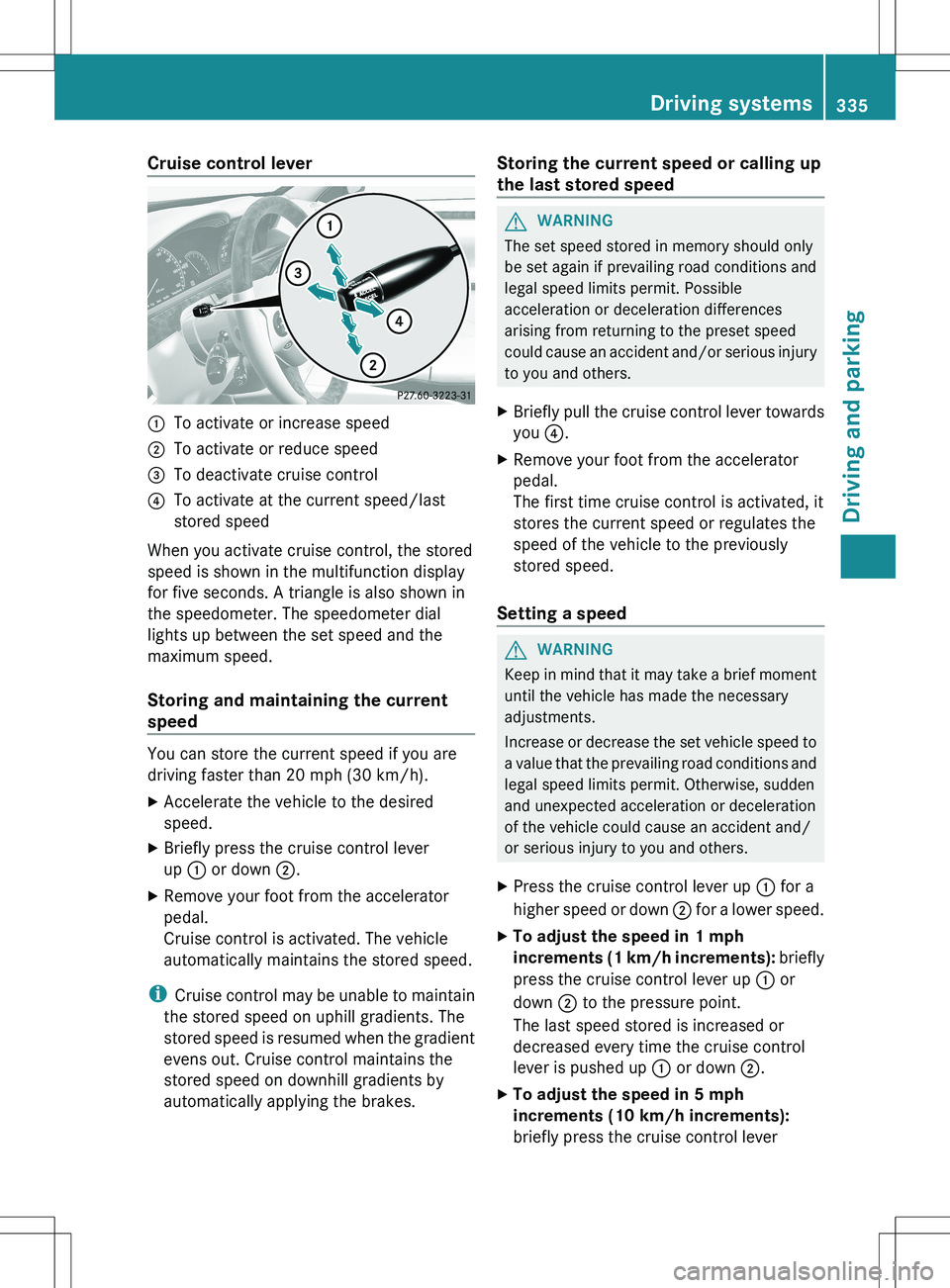
Cruise control lever:To activate or increase speed;To activate or reduce speed=To deactivate cruise control?To activate at the current speed/last
stored speed
When you activate cruise control, the stored
speed is shown in the multifunction display
for five seconds. A triangle is also shown in
the speedometer. The speedometer dial
lights up between the set speed and the
maximum speed.
Storing and maintaining the current
speed
You can store the current speed if you are
driving faster than 20 mph (30 km/h).
XAccelerate the vehicle to the desired
speed.XBriefly press the cruise control lever
up : or down ;.XRemove your foot from the accelerator
pedal.
Cruise control is activated. The vehicle
automatically maintains the stored speed.
i Cruise control may be unable to maintain
the stored speed on uphill gradients. The
stored speed is resumed when the gradient
evens out. Cruise control maintains the
stored speed on downhill gradients by
automatically applying the brakes.
Storing the current speed or calling up
the last stored speedGWARNING
The set speed stored in memory should only
be set again if prevailing road conditions and
legal speed limits permit. Possible
acceleration or deceleration differences
arising from returning to the preset speed
could cause an accident and/or serious injury
to you and others.
XBriefly pull the cruise control lever towards
you ?.XRemove your foot from the accelerator
pedal.
The first time cruise control is activated, it
stores the current speed or regulates the
speed of the vehicle to the previously
stored speed.
Setting a speed
GWARNING
Keep in mind that it may take a brief moment
until the vehicle has made the necessary
adjustments.
Increase or decrease the set vehicle speed to
a value that the prevailing road conditions and
legal speed limits permit. Otherwise, sudden
and unexpected acceleration or deceleration
of the vehicle could cause an accident and/
or serious injury to you and others.
XPress the cruise control lever up : for a
higher speed or down ; for a lower speed.XTo adjust the speed in 1 mph
increments (1 km/h increments): briefly
press the cruise control lever up : or
down ; to the pressure point.
The last speed stored is increased or
decreased every time the cruise control
lever is pushed up : or down ;.XTo adjust the speed in 5 mph
increments (10 km/h increments):
briefly press the cruise control leverDriving systems335Driving and parkingZ
Page 338 of 536
up : or down ; beyond the pressure
point.
The last speed stored is increased or
decreased every time the cruise control
lever is pushed up : or down ;.
i
Cruise control is not deactivated if you
depress the accelerator pedal. For
example, if you accelerate briefly to
overtake, cruise control adjusts the
vehicle's speed to the last speed stored
after you have finished overtaking.
Deactivating cruise control
There are several ways to deactivate cruise
control:
XBriefly press the cruise control lever
forwards =.
or
XBrake.
Cruise control is automatically deactivated if:
R you engage the electric parking brake.
R you are driving at less than 20 mph
(30 km/h)
R ESP ®
intervenes or you deactivate ESP ®
.
R you shift the transmission to position N
while driving.
If cruise control is deactivated, you will hear
a warning tone. You will see the Cruise
Control Off message in the multifunction
display for approximately five seconds.
i When you switch off the engine, the last
speed stored is cleared.
DISTRONIC PLUS
Important safety notes
DISTRONIC PLUS regulates the speed and
automatically helps you maintain the
distance to the vehicle detected in front.
DISTRONIC PLUS brakes automatically so
that the set speed is not exceeded.
On long and steep downhill gradients,
especially if the vehicle is laden, you must
select shift range 1, 2 or 3 in good time. By
doing so, you will make use of the braking
effect of the engine, which relieves the load
on the brake system and prevents the brakes
from overheating and wearing too quickly.
If DISTRONIC PLUS detects a slower-moving
vehicle in front, your vehicle is braked in order
to maintain the preset distance to the vehicle
in front.GWARNING
HYBRID vehicles: It is imperative that you read
the HYBRID Supplemental Operating
Instructions included in your vehicle literature
portfolio. You may otherwise not receive all
necessary safety information and warning for
the operation of your vehicle.
GWARNING
The DISTRONIC PLUS requires familiarity with
its operational characteristics. We strongly
recommend that you review the following
information carefully before operating the
system.
GWARNING
When DISTRONIC brakes, the brake pedal is
pulled back (i.e. operated automatically). The
area around the pedal must not be blocked by
obstacles:
R do not place any objects in the footwell.
R ensure that floormats and carpets are fixed
securely. In particular, do not place several
floormats on top of one another.
R do not place your foot under the brake
pedal, as it could become trapped.
Non-compliance could lead you to cause an
accident in which you and/or others could be
seriously injured.
GWARNING
The DISTRONIC PLUS is a convenience
system. Its speed adjustment reduction
capability is intended to make cruise control
336Driving systemsDriving and parking
Page 339 of 536
more effective and usable when traffic speeds
vary. It is not however, intended to, nor does
it, replace the need for extreme care.
The responsibility for the vehicle's speed,
distance to the preceding vehicle and, most
importantly, brake operation to ensure a safe
stopping distance, always remains with the
driver.
The DISTRONIC PLUS cannot take street and
traffic conditions into account.
Complex driving situations are not always
fully recognized by the DISTRONIC PLUS. This
could result in wrong or missing distance
warnings.
If you want DISTRONIC PLUS to assist you,
the radar sensor system must be activated
( Y page 389) and operational.
If there is no vehicle in front, DISTRONIC
PLUS operates in the same way as cruise
control in the speed range between 20 mph
(Canada: 30 km/h) and120 mph (Canada:
200 km/h). If a vehicle is driving in front of
you, it operates in the speed range between
0 mph and (0 km/h) 120 mph (Canada:
200 km/h).
Do not use DISTRONIC PLUS while driving on
roads with steep gradients.
As DISTRONIC PLUS transmits radar waves,
it can resemble the radar detectors of the
responsible authorities. You can refer to the
relevant chapter in the Operator's Manual if
questions are asked about this.
i USA only:
This device has been approved by the FCC
as a “Vehicular Radar System”. The radar
sensor is intended for use in an automotive
radar system only. Removal, tampering, or
altering of the device will void any
warranties, and is not permitted by the
FCC. Do not tamper with, alter, or use in
any non-approved way.
Any unauthorized modification to this
device could void the user’s authority to
operate the equipment.i Canada only: This device complies with
RSS-210 of Industry Canada. Operation is
subject to the following two conditions:
1. This device may not cause interference,
and
2. this device must accept any interference
received, including interference that may
cause undesired operation of the device.
Removal, tampering, or altering of the
device will void any warranties, and is not
permitted. Do not tamper with, alter, or use
in any non-approved way.
Any unauthorized modification to this
device could void the user’s authority to
operate the equipment.GWARNING
DISTRONIC PLUS distance is not a substitute
for the active intervention of the driver. It does
not detect pedestrians or stationary objects,
nor can it detect, recognize or predict the
road's course or the movements of vehicles
in front. DISTRONIC PLUS can only brake the
vehicle using 40% of the vehicle's maximum
available brake force.
DISTRONIC PLUS may not detect narrow
vehicles driving in front, e.g. motorcycles, or
vehicles driving in the lane beyond the lane
next to your vehicle, especially if the vehicles
are not driving on the middle of their lane.
The driver must always pay careful attention
to the road, weather and traffic conditions.
The driver must drive, steer and brake in a
manner which will allow him to always have
control of the vehicle.
Sources of high-frequency radio waves, such
as toll stations, speed-measuring radar, etc.,
can cause DISTRONIC PLUS to fail
temporarily.
GWARNING
The DISTRONIC PLUS cannot take road and
traffic conditions into account. Only use the
DISTRONIC PLUS if the road, weather and
traffic conditions make it advisable to travel
at a constant speed.
Driving systems337Driving and parkingZ
Page 341 of 536
GWARNING
DISTRONIC PLUS brakes your vehicle with a
maximum deceleration of 13 ft/s 2
(4 m/s 2
).
This corresponds to approximately 40% of
your vehicle's maximum braking force.
To avoid a collision, you must apply the brakes
yourself. DISTRONIC PLUS brakes the vehicle
just enough to restore the preset speed or the
preset distance to the vehicle in front.
GWARNING
If you do not receive visual or acoustic
warning signals during a critical traffic
situation, DISTRONIC PLUS has either not
recognized the collision risk, has been
deactivated or is malfunctioning.
Remember, whether or not DISTRONIC PLUS
is operating, it is ultimately always the drivers
responsibility to apply the brakes in order to
control the vehicle and avoid a collision.
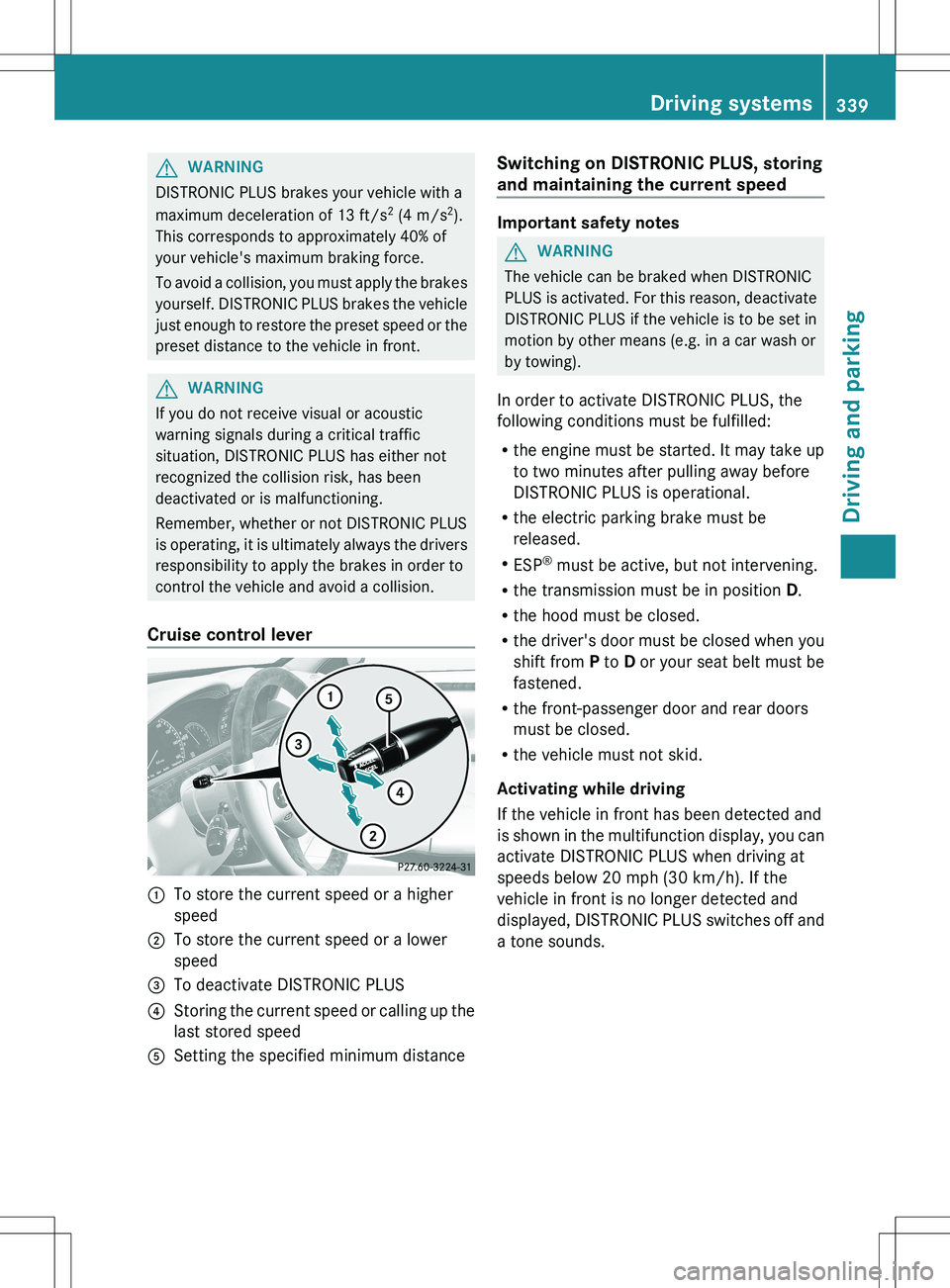
Cruise control lever
:To store the current speed or a higher
speed;To store the current speed or a lower
speed=To deactivate DISTRONIC PLUS?Storing the current speed or calling up the
last stored speedASetting the specified minimum distanceSwitching on DISTRONIC PLUS, storing
and maintaining the current speed
Important safety notes
GWARNING
The vehicle can be braked when DISTRONIC
PLUS is activated. For this reason, deactivate
DISTRONIC PLUS if the vehicle is to be set in
motion by other means (e.g. in a car wash or
by towing).
In order to activate DISTRONIC PLUS, the
following conditions must be fulfilled:
R the engine must be started. It may take up
to two minutes after pulling away before
DISTRONIC PLUS is operational.
R the electric parking brake must be
released.
R ESP ®
must be active, but not intervening.
R the transmission must be in position D.
R the hood must be closed.
R the driver's door must be closed when you
shift from P to D or your seat belt must be
fastened.
R the front-passenger door and rear doors
must be closed.
R the vehicle must not skid.
Activating while driving
If the vehicle in front has been detected and
is shown in the multifunction display, you can
activate DISTRONIC PLUS when driving at
speeds below 20 mph (30 km/h). If the
vehicle in front is no longer detected and
displayed, DISTRONIC PLUS switches off and
a tone sounds.
Driving systems339Driving and parkingZ
Page 342 of 536
XBriefly pull the cruise control lever towards
you ?, or briefly press up : or down ;.
DISTRONIC PLUS is selected.XPress the cruise control lever up : or
down ; repeatedly until the desired speed
is set.XRemove your foot from the accelerator
pedal.
Your vehicle adapts its speed to that of the
vehicle in front, but only up to the desired
stored speed.
i If you do not fully release the accelerator
pedal, the DISTRONIC PLUS Override
message appears in the multifunction
display. The set distance to a slower-
moving vehicle in front will then not be
maintained. You will be driving at the speed
you determine by the position of the
accelerator pedal.
Activating when driving towards a
stationary vehicle
If the vehicle in front of you is stationary, you
can only activate DISTRONIC PLUS once your
vehicle is stationary as well.
XBriefly pull the cruise control lever towards
you ?, or briefly press up : or down ;.
DISTRONIC PLUS is selected.
i DISTRONIC PLUS can only be activated at
under 20 mph ( 30km/h) if a vehicle in front
has been detected. Therefore, the
DISTRONIC PLUS distance display in the
instrument cluster should be activated
( Y page 385).
XPress the cruise control lever up : or
down ; repeatedly until the desired speed
is set.
i You can use the cruise control lever to set
the stored speed and the control on the
cruise control lever to set the specified
minimum distance ( Y page 342).
Pulling awayXIf the vehicle in front pulls away: remove
your foot from the brake pedal.XBriefly pull the cruise control lever towards
you ?.
or
XAccelerate briefly.
Your vehicle pulls away and adapts its
speed to that of the vehicle in front.
Driving
If there is no vehicle in front, DISTRONIC
PLUS operates in the same way as cruise
control.
If DISTRONIC PLUS detects that the vehicle
in front has slowed down, it brakes your
vehicle. In this way, the distance you have
selected is maintained.
If DISTRONIC PLUS detects that the vehicle
in front is driving faster, it accelerates your
vehicle, but only up to the speed you have
stored.
GWARNING
If you depress the brake, DISTRONIC PLUS is
deactivated unless your vehicle is stationary.
DISTRONIC PLUS then no longer brakes your
vehicle. In such cases, control the distance
from vehicles travelling in front with the brake
alone. You could otherwise cause an accident
and thereby injure yourself and others. The
driver remains fully responsible for the
vehicle's distance from other vehicles, the
speed being driven and for braking in good
time.
Changing lanes
If you change to the passing lane, DISTRONIC
PLUS supports you when:
R you are driving faster than 40mph
(60 km/h).
R DISTRONIC PLUS is maintaining the
distance to a vehicle in front.
R you switch on the appropriate turn signals.
R DISTRONIC PLUS does not detect a danger
of collision.
340Driving systemsDriving and parking