phone MERCEDES-BENZ S-CLASS SEDAN 2012 User Guide
[x] Cancel search | Manufacturer: MERCEDES-BENZ, Model Year: 2012, Model line: S-CLASS SEDAN, Model: MERCEDES-BENZ S-CLASS SEDAN 2012Pages: 536, PDF Size: 39.39 MB
Page 25 of 536
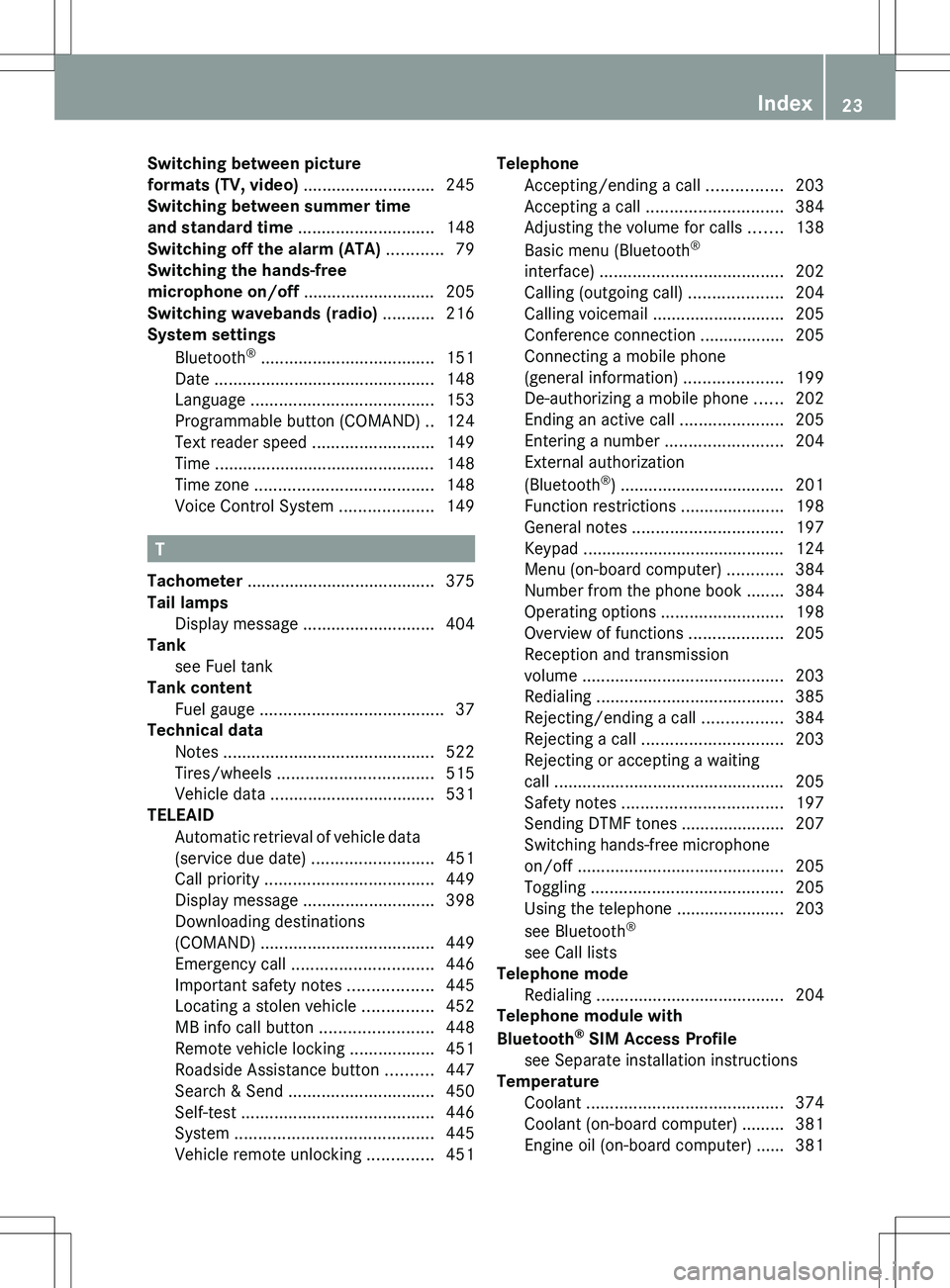
Switching between picture
formats (TV, video) ............................ 245
Switching between summer time
and standard time ............................. 148
Switching off the alarm (ATA) ............ 79
Switching the hands-free
microphone on/off ............................ 205
Switching wavebands (radio) ........... 216
System settings
Bluetooth ®
..................................... 151
Date ............................................... 148
Language ....................................... 153
Programmable button (COMAND) ..124
Text reader speed ..........................149
Time ............................................... 148
Time zone ...................................... 148
Voice Control System ....................149
T
Tachometer ........................................ 375
Tail lamps Display message ............................ 404
Tank
see Fuel tank
Tank content
Fuel gauge ....................................... 37
Technical data
Notes ............................................. 522
Tires/wheels ................................. 515
Vehicle data ................................... 531
TELEAID
Automatic retrieval of vehicle data
(service due date) ..........................451
Call priority .................................... 449
Display message ............................ 398
Downloading destinations
(COMAND) ..................................... 449
Emergency call .............................. 446
Important safety notes ..................445
Locating a stolen vehicle ...............452
MB info call button ........................448
Remote vehicle locking ..................451
Roadside Assistance button ..........447
Search & Send ............................... 450
Self-test ......................................... 446
System .......................................... 445
Vehicle remote unlocking ..............451
Telephone
Accepting/ending a call ................203
Accepting a call ............................. 384
Adjusting the volume for calls .......138
Basic menu (Bluetooth ®
interface) ....................................... 202
Calling (outgoing call) ....................204
Calling voicemail ............................ 205
Conference connection .................. 205
Connecting a mobile phone
(general information) .....................199
De-authorizing a mobile phone ......202
Ending an active call ......................205
Entering a number .........................204
External authorization
(Bluetooth ®
) ................................... 201
Function restrictions ......................198
General notes ................................ 197
Keypad ........................................... 124
Menu (on-board computer) ............384
Number from the phone book ........ 384
Operating options ..........................198
Overview of functions ....................205
Reception and transmission
volume ........................................... 203
Redialing ........................................ 385
Rejecting/ending a call .................384
Rejecting a call .............................. 203
Rejecting or accepting a waiting
call ................................................. 205
Safety notes .................................. 197
Sending DTMF tones ...................... 207
Switching hands-free microphone
on/off ............................................ 205
Toggling ......................................... 205
Using the telephone ....................... 203
see Bluetooth ®
see Call lists
Telephone mode
Redialing ........................................ 204
Telephone module with
Bluetooth ®
SIM Access Profile
see Separate installation instructions
Temperature
Coolant .......................................... 374
Coolant (on-board computer) ......... 381
Engine oil (on-board computer) ...... 381Index23
Page 28 of 536
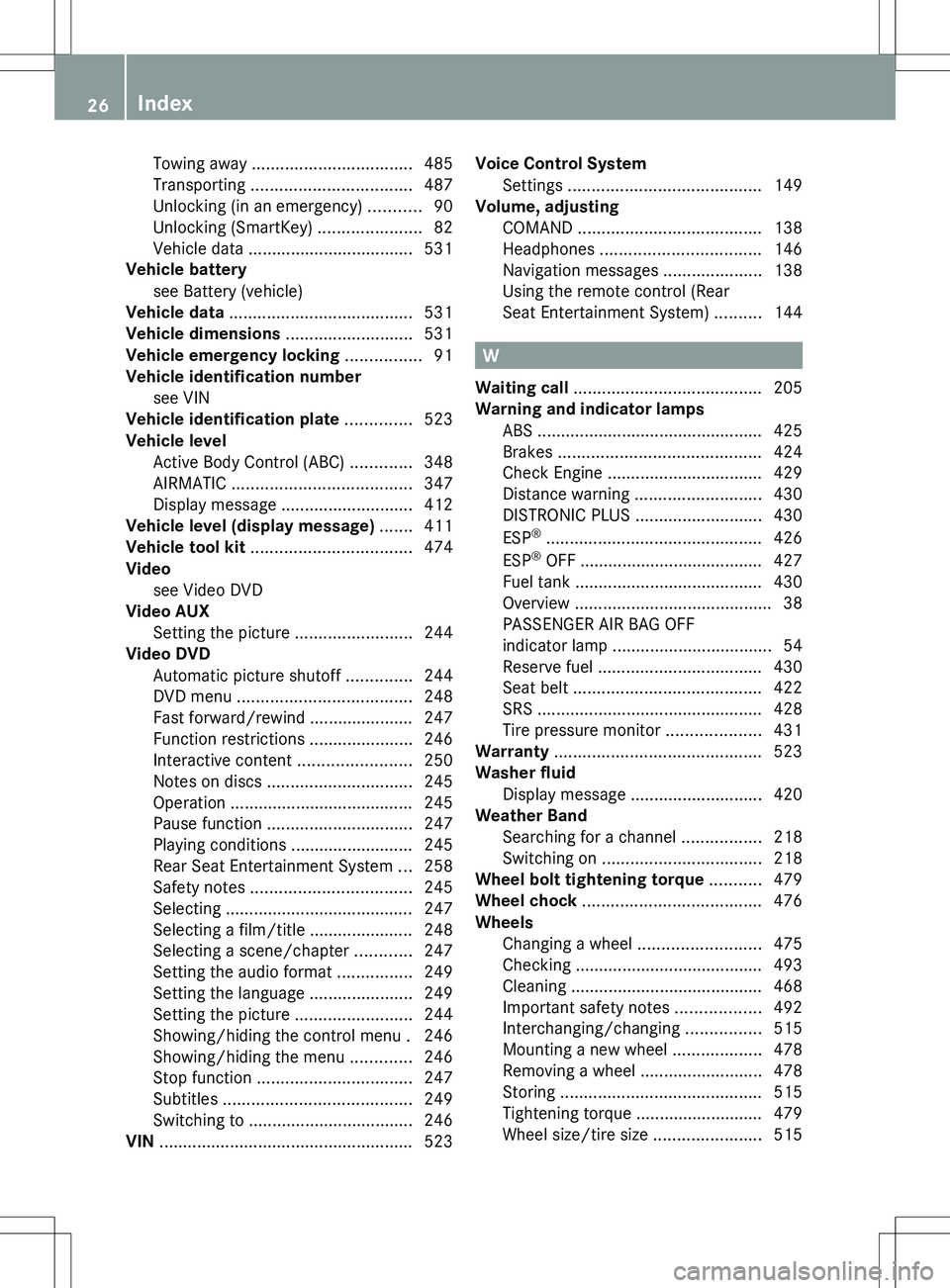
Towing away .................................. 485
Transporting .................................. 487
Unlocking (in an emergency) ...........90
Unlocking (SmartKey) ......................82
Vehicle data ................................... 531
Vehicle battery
see Battery (vehicle)
Vehicle data ....................................... 531
Vehicle dimensions ........................... 531
Vehicle emergency locking ................ 91
Vehicle identification number see VIN
Vehicle identification plate .............. 523
Vehicle level Active Body Control (ABC) .............348
AIRMATIC ...................................... 347
Display message ............................ 412
Vehicle level (display message) ....... 411
Vehicle tool kit .................................. 474
Video see Video DVD
Video AUX
Setting the picture .........................244
Video DVD
Automatic picture shutoff ..............244
DVD menu ..................................... 248
Fast forward/rewind ...................... 247
Function restrictions ......................246
Interactive content ........................250
Notes on discs ............................... 245
Operation ....................................... 245
Pause function ............................... 247
Playing conditions .......................... 245
Rear Seat Entertainment System ...258
Safety notes .................................. 245
Selecting ........................................ 247
Selecting a film/title ...................... 248
Selecting a scene/chapter ............247
Setting the audio format ................249
Setting the language ......................249
Setting the picture .........................244
Showing/hiding the control menu . 246
Showing/hiding the menu .............246
Stop function ................................. 247
Subtitles ........................................ 249
Switching to ................................... 246
VIN ...................................................... 523Voice Control System
Settings ......................................... 149
Volume, adjusting
COMAND ....................................... 138
Headphones .................................. 146
Navigation messages .....................138
Using the remote control (Rear
Seat Entertainment System) ..........144
W
Waiting call ........................................ 205
Warning and indicator lamps ABS ................................................ 425
Brakes ........................................... 424
Check Engine ................................. 429
Distance warning ........................... 430
DISTRONIC PLUS ........................... 430
ESP ®
.............................................. 426
ESP ®
OFF ....................................... 427
Fuel tank ........................................ 430
Overview .......................................... 38
PASSENGER AIR BAG OFF
indicator lamp .................................. 54
Reserve fuel ................................... 430
Seat belt ........................................ 422
SRS ................................................ 428
Tire pressure monitor ....................431
Warranty ............................................ 523
Washer fluid Display message ............................ 420
Weather Band
Searching for a channel .................218
Switching on .................................. 218
Wheel bolt tightening torque ........... 479
Wheel chock ...................................... 476
Wheels Changing a wheel .......................... 475
Checking ........................................ 493
Cleaning ......................................... 468
Important safety notes ..................492
Interchanging/changing ................515
Mounting a new wheel ...................478
Removing a wheel ..........................478
Storing ........................................... 515
Tightening torque ........................... 479
Wheel size/tire size .......................515
26Index
Page 41 of 536
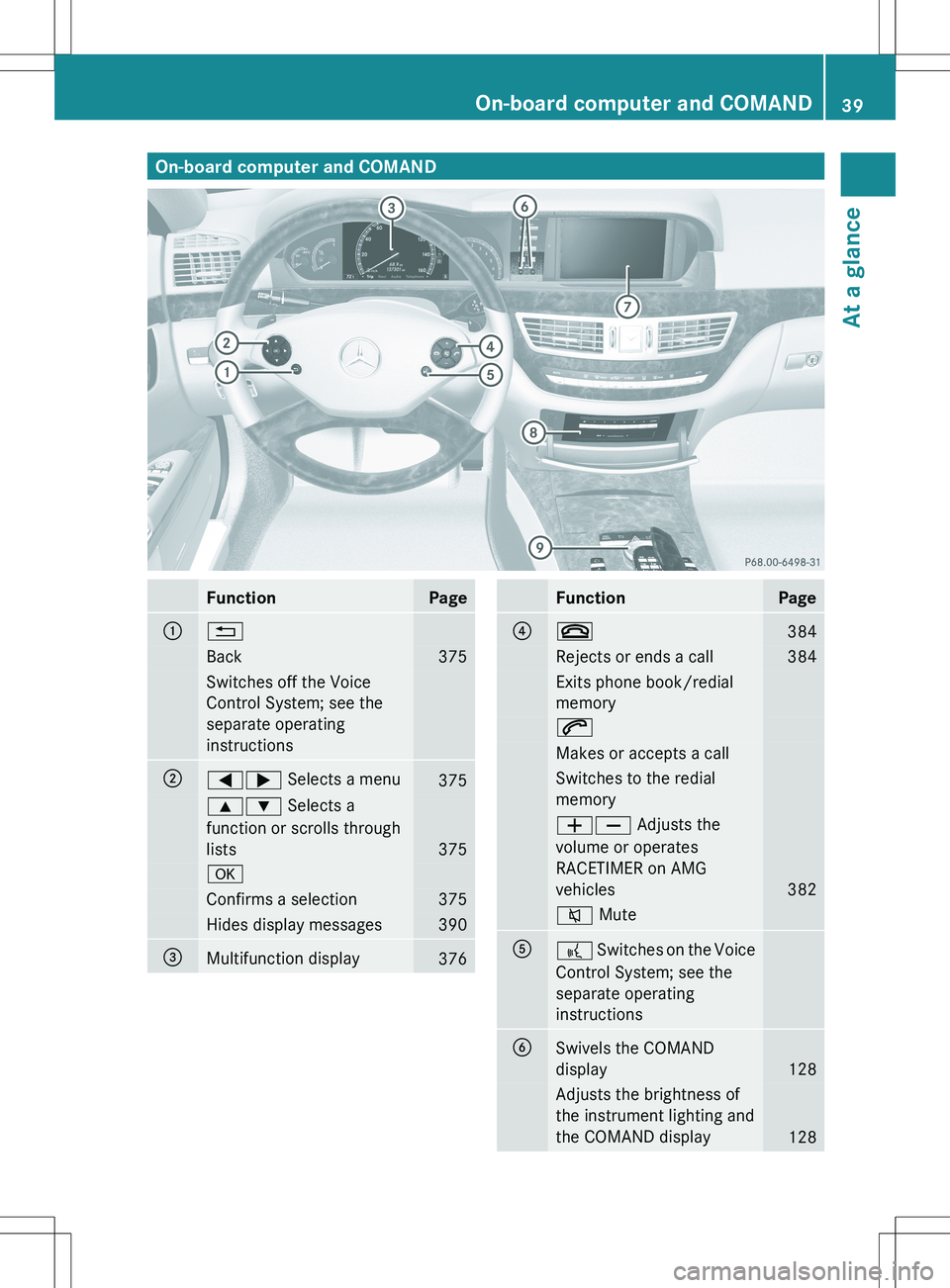
On-board computer and COMANDFunctionPage:%Back375Switches off the Voice
Control System; see the
separate operating
instructions;=; Selects a menu3759: Selects a
function or scrolls through
lists
375
aConfirms a selection375Hides display messages390=Multifunction display376FunctionPage?~384Rejects or ends a call384Exits phone book/redial
memory6Makes or accepts a callSwitches to the redial
memoryWX Adjusts the
volume or operates
RACETIMER on AMG
vehicles
382
8 MuteA? Switches on the Voice
Control System; see the
separate operating
instructionsBSwivels the COMAND
display
128
Adjusts the brightness of
the instrument lighting and
the COMAND display
128
On-board computer and COMAND39At a glance
Page 43 of 536

Center consoleFunctionPage:Function button for the
radio and CD/DVD/SD
card
123
;Back button123=Hazard warning lamps283?Lumbar support274Multicontour seat274AFunction button for the
telephone and navigation
system
155
BSwitches COMAND on/off137FunctionPageCAdjusts the volume138DProgrammable button124ETelephone keypad124FRear window roller sunblind441GRetracts the rear seat head
restraints
111
HSelects the drive program317ICOMAND controller122Center console41At a glance
Page 44 of 536
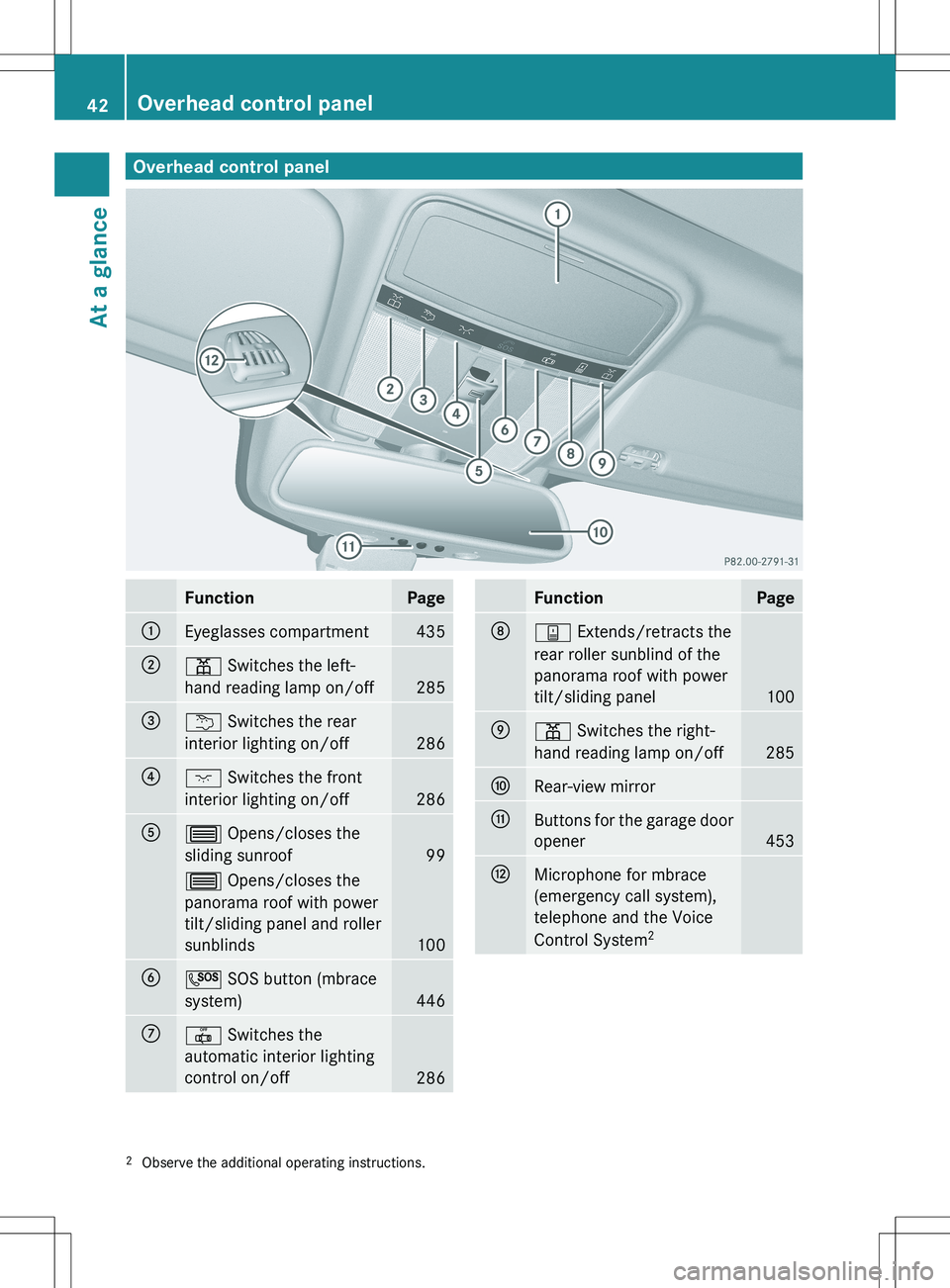
Overhead control panelFunctionPage:Eyeglasses compartment435;p Switches the left-
hand reading lamp on/off
285
=u Switches the rear
interior lighting on/off
286
?c Switches the front
interior lighting on/off
286
A3 Opens/closes the
sliding sunroof
99
3 Opens/closes the
panorama roof with power
tilt/sliding panel and roller
sunblinds
100
BG SOS button (mbrace
system)
446
C| Switches the
automatic interior lighting
control on/off
286
FunctionPageDy Extends/retracts the
rear roller sunblind of the
panorama roof with power
tilt/sliding panel
100
Ep Switches the right-
hand reading lamp on/off
285
FRear-view mirrorGButtons for the garage door
opener
453
HMicrophone for mbrace
(emergency call system),
telephone and the Voice
Control System 22
Observe the additional operating instructions.42Overhead control panelAt a glance
Page 82 of 536
iIf the alarm stays on for more than
30 seconds, the mbrace (USA only) or TELE
AID (Canada only) emergency call system
initiates a call to the Customer Assistance
Center automatically. The emergency call
system initiates the call provided that:
R you have subscribed to the mbrace/
TELE AID service.
R the mbrace/TELE AID service has been
activated properly.
R the required mobile phone, power supply
and GPS are available.XTo arm: lock the vehicle with the SmartKey
or KEYLESS-GO.
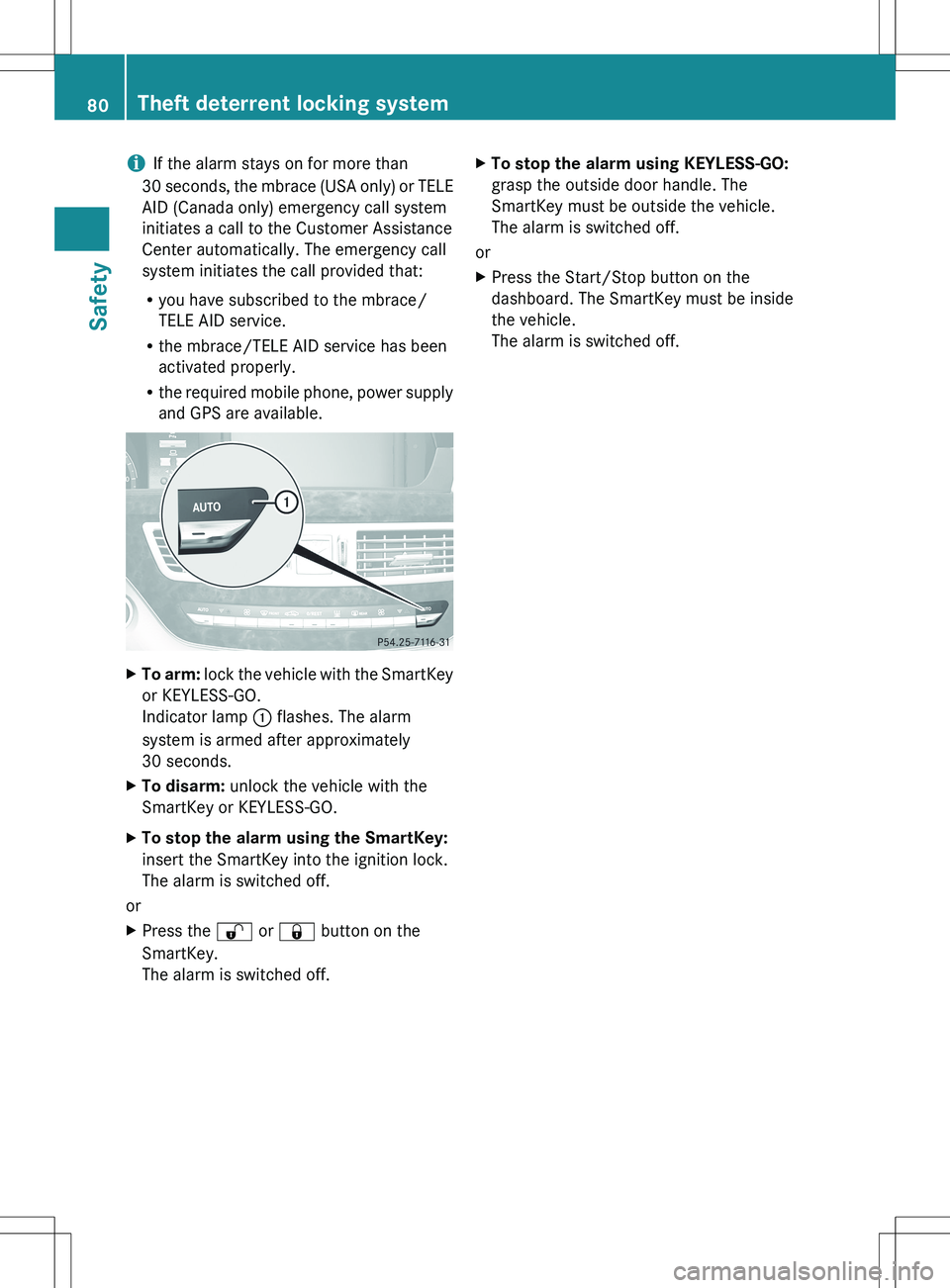
Indicator lamp : flashes. The alarm
system is armed after approximately
30 seconds.XTo disarm: unlock the vehicle with the
SmartKey or KEYLESS-GO.XTo stop the alarm using the SmartKey:
insert the SmartKey into the ignition lock.
The alarm is switched off.
or
XPress the % or & button on the
SmartKey.
The alarm is switched off.XTo stop the alarm using KEYLESS-GO:
grasp the outside door handle. The
SmartKey must be outside the vehicle.
The alarm is switched off.
or
XPress the Start/Stop button on the
dashboard. The SmartKey must be inside
the vehicle.
The alarm is switched off.80Theft deterrent locking systemSafety
Page 85 of 536
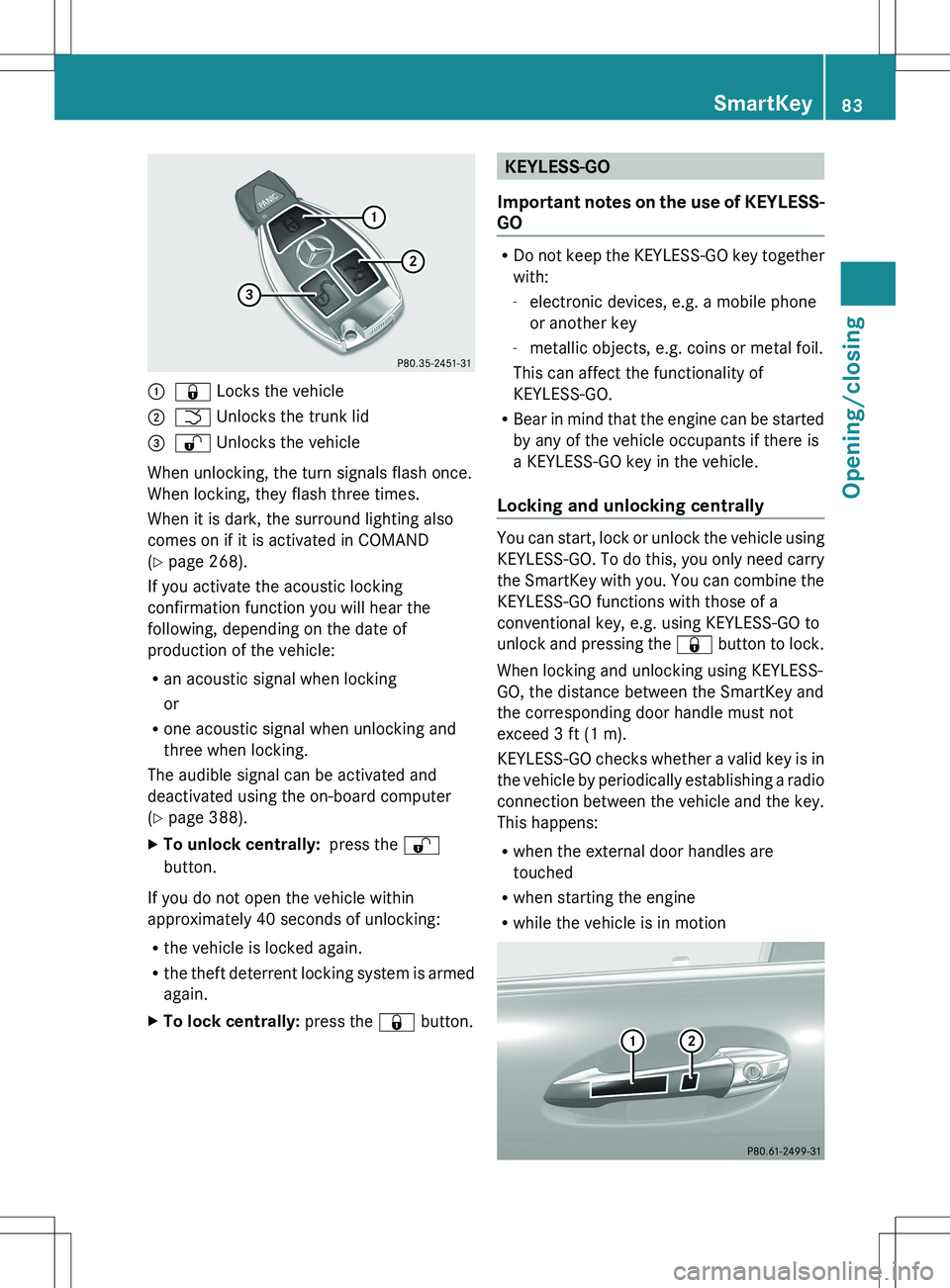
:& Locks the vehicle;F Unlocks the trunk lid=% Unlocks the vehicle
When unlocking, the turn signals flash once.
When locking, they flash three times.
When it is dark, the surround lighting also
comes on if it is activated in COMAND
( Y page 268).
If you activate the acoustic locking
confirmation function you will hear the
following, depending on the date of
production of the vehicle:
R an acoustic signal when locking
or
R one acoustic signal when unlocking and
three when locking.
The audible signal can be activated and
deactivated using the on-board computer
( Y page 388).
XTo unlock centrally: press the %
button.
If you do not open the vehicle within
approximately 40 seconds of unlocking:
R the vehicle is locked again.
R the theft deterrent locking system is armed
again.
XTo lock centrally: press the & button.KEYLESS-GO
Important notes on the use of KEYLESS-
GO
R Do not keep the KEYLESS-GO key together
with:
- electronic devices, e.g. a mobile phone
or another key
- metallic objects, e.g. coins or metal foil.
This can affect the functionality of
KEYLESS-GO.
R Bear in mind that the engine can be started
by any of the vehicle occupants if there is
a KEYLESS-GO key in the vehicle.
Locking and unlocking centrally
You can start, lock or unlock the vehicle using
KEYLESS-GO. To do this, you only need carry
the SmartKey with you. You can combine the
KEYLESS-GO functions with those of a
conventional key, e.g. using KEYLESS-GO to
unlock and pressing the & button to lock.
When locking and unlocking using KEYLESS-
GO, the distance between the SmartKey and
the corresponding door handle must not
exceed 3 ft (1 m).
KEYLESS-GO checks whether a valid key is in
the vehicle by periodically establishing a radio
connection between the vehicle and the key.
This happens:
R when the external door handles are
touched
R when starting the engine
R while the vehicle is in motion
SmartKey83Opening/closingZ
Page 121 of 536
Useful information ............................120
Introduction ...................................... 120
At a glance ......................................... 122
System settings ................................ 147
Navigation ......................................... 154
Telephone .......................................... 197
Audio .................................................. 215
Video .................................................. 244
Rear Seat Entertainment System ....251
Vehicle ............................................... 265119COMAND
Page 122 of 536
Useful information
i This Operator's Manual describes all
models and all standard and optional
equipment of your vehicle available at the
time of publication of the Operator's
Manual. Country-specific differences are
possible. Please note that your vehicle may
not be equipped with all features
described. This also applies to safety-
related systems and functions.
i Please read the information on qualified
specialist workshops ( Y page 31).
Introduction
Operating safety
Important safety notes
GWARNING
Vehicles with HYBRID: ensure that you read
the "HYBRID" supplement. You may otherwise
fail to recognize dangers.
GWARNING
Making alterations to electronic components
can cause malfunctions.
Radio, satellite radio, amplifier, DVD changer,
navigation module, phone and voice control
are networked. If one component is not
functional or if it has been incorrectly
removed/replaced, this could impair the
operation of other components.
This could seriously jeopardize the
operational safety of your vehicle.
We recommend that you always have
maintenance work on electronic components
carried out at an authorized Mercedes-Benz
Center.
GWARNING
In order to avoid distraction which could lead
to an accident, the driver should enter system
settings while the vehicle is at a standstill, and
operate the system only when permitted by
road, weather and traffic conditions.
Bear in mind that at a speed of just 30 mph
(approximately 50 km/h), your car covers a
distance of 44 feet (approximately 14 m) every
second.
COMAND supplies you with information to
help you select your route more easily and
guide you conveniently and safely to your
destination. For safety reasons, we
encourage the driver to stop the vehicle in a
safe place before answering or placing a call,
or consulting the COMAND screen to read
navigational maps, instructions, or
downloaded information.GWARNING
While the navigation system provides
directional assistance, the driver must remain
focused on safe driving behavior, especially
attention to traffic and street signs, and
should utilize the system's audio cues while
driving.
The navigation system does not supply any
information on stop signs, yield signs, traffic
regulations or traffic safety rules. Their
observance always remains in the driver's
personal responsibility. DVD maps do not
cover all areas nor all routes within an area.
GWARNING
This equipment complies with FCC radiation
exposure limits set forth for uncontrolled
equipment and meets the FCC radio
frequency (RF) Exposure Guidelines in
Supplement C to OET65.
This equipment has very low levels of RF
energy that is deemed to comply without
maximum permissive exposure evaluation
(MPE). But it is desirable that it should be
installed and operated with at least 8 inches
(20 cm) and more between the radiator and a
person's body (excluding extremities: hands,
wrists, feet and legs.)
120IntroductionCOMAND
Page 124 of 536
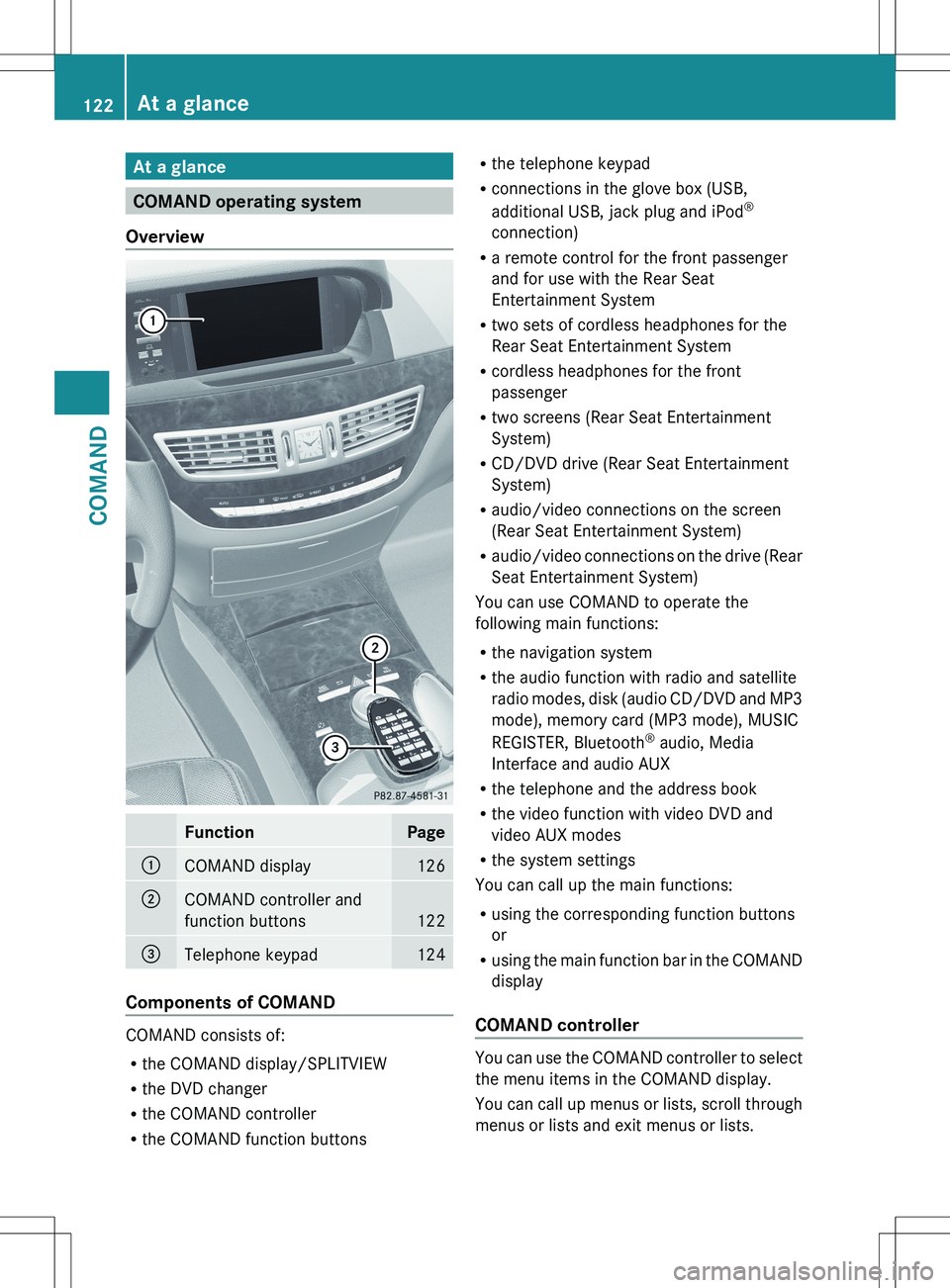
At a glance
COMAND operating system
Overview
FunctionPage:COMAND display126;COMAND controller and
function buttons
122
=Telephone keypad124
Components of COMAND
COMAND consists of:
R the COMAND display/SPLITVIEW
R the DVD changer
R the COMAND controller
R the COMAND function buttons
R
the telephone keypad
R connections in the glove box (USB,
additional USB, jack plug and iPod ®
connection)
R a remote control for the front passenger
and for use with the Rear Seat
Entertainment System
R two sets of cordless headphones for the
Rear Seat Entertainment System
R cordless headphones for the front
passenger
R two screens (Rear Seat Entertainment
System)
R CD/DVD drive (Rear Seat Entertainment
System)
R audio/video connections on the screen
(Rear Seat Entertainment System)
R audio/video connections on the drive (Rear
Seat Entertainment System)
You can use COMAND to operate the
following main functions:
R the navigation system
R the audio function with radio and satellite
radio modes, disk (audio CD/DVD and MP3
mode), memory card (MP3 mode), MUSIC
REGISTER, Bluetooth ®
audio, Media
Interface and audio AUX
R the telephone and the address book
R the video function with video DVD and
video AUX modes
R the system settings
You can call up the main functions:
R using the corresponding function buttons
or
R using the main function bar in the COMAND
display
COMAND controller
You can use the COMAND controller to select
the menu items in the COMAND display.
You can call up menus or lists, scroll through
menus or lists and exit menus or lists.
122At a glanceCOMAND