garage door opener MERCEDES-BENZ S-CLASS SEDAN 2012 Owners Manual
[x] Cancel search | Manufacturer: MERCEDES-BENZ, Model Year: 2012, Model line: S-CLASS SEDAN, Model: MERCEDES-BENZ S-CLASS SEDAN 2012Pages: 536, PDF Size: 39.39 MB
Page 14 of 536
ETS/4ETS (Electronic Traction
System) ................................................ 76
Exhaust check ................................... 331
Exhaust tail pipe (cleaning
instructions) ...................................... 470
Exterior lighting see Exterior lighting
Exterior mirror parking position
Adjusting (COMAND) .....................266
Exterior mirrors
Adjusting ....................................... 116
Dipping (automatic) .......................117
Folding in/out (automatically) .......116
Folding in/out (electrically) ...........116
Out of position (troubleshooting) ...116
Storing settings (memory
function) ........................................ 118
Storing the parking position ..........117
Eyeglasses compartment ................. 435
F
Factory setting (reset function) ....... 154
Fader, setting .................................... 139
Fast forward Audio mode (CD, DVD, MP3) .........230
Rear Seat Entertainment System ...260
Video DVD ..................................... 247
Fast rewind
Audio mode (CD, DVD, MP3) .........230
Rear Seat Entertainment System ...260
Video DVD ..................................... 247
Favorites (COMAND) ......................... 124
Filler cap see Fuel filler flap
First-aid kit ......................................... 474
Flat tire Changing a wheel/mounting the
spare wheel ................................... 475
MOExtended run-flat system .........480
Preparing the vehicle .....................475
Raising the vehicle .........................476
Floormat ............................................. 455
Freeway information ......................... 191
Front fog lamps ................................. 282
Display message ............................ 404
Switching on/off ........................... 282
Front-passenger seat
Adjusting from the driver's seat ..... 109
Adjusting from the rear
compartment ................................. 109
Front windshield
see Windshield
Fuel
Additives ........................................ 526
Displaying the current
consumption .................................. 378
Displaying the range ......................378
Driving tips .................................... 330
Fuel gauge ....................................... 37
Grade (gasoline) ............................ 525
Important safety notes ..................525
Premium-grade unleaded gasoline . 525
Problem (malfunction) ...................324
Quality (diesel) ............................... 526
Refueling ........................................ 321
Tank content/reserve fuel .............525
Fuel filler flap, opening/closing ....... 322
Fuel filter (display message) ............ 409
Fuel level Calling up the range (on-board
computer) ...................................... 378
Fuel tank
Capacity ........................................ 525
Problem (malfunction) ...................324
Function buttons (COMAND) ............ 123
Fuses Allocation chart ............................. 488
Before changing ............................. 488
Dashboard fuse box .......................488
Engine emergency stop .................490
Fuse box in the engine
compartment ................................. 489
Fuse box in the rear compartment . 488
Important safety notes ..................487
G
Garage door opener Clearing the memory .....................455
Notes ............................................. 452
12Index
Page 21 of 536
R
RACETIMER (on-board computer) .... 382
Radar sensor system Activating/deactivating .................389
Display message ............................ 413
Radiator cover ................................... 459
Radio HD Radio™ .................................... 219
Selecting a station .........................380
Setting a station ............................ 216
Sound settings (balance, bass,
fader, treble) .................................. 139
Storing stations ............................. 217
Switching on .................................. 215
Switching wavebands ....................216
Radio-controlled devices
(installing) .......................................... 456
Read-aloud function .......................... 178
Reading lamp ..................................... 285
Real-time traffic reports ................... 178
Rear compartment Activating/deactivating climate
control ........................................... 296
Setting the air distribution .............299
Setting the airflow .........................299
Setting the air vents ......................303
Setting the temperature ................298
Rear fog lamp
Display message ............................ 404
Switching on/off ........................... 282
Rear seat
Adjusting ....................................... 108
Rear Seat Entertainment System
Adjusting the sound settings .........253
Audio mode (CD, DVD, MP3) .........255
AUX mode ...................................... 263
Changing batteries (remote
control, headphones) .....................251
Changing the picture format ..........254
Components/overview ..................143
Headphones (cordless) ..................146
Multiple users ................................ 253
Overview of picture settings ..........253
Remote control .............................. 144
Screen ........................................... 144
Setting the audio format ................262
System settings ............................. 254Using headphones .........................252
Using the main loudspeaker ..........252
Video DVD mode ........................... 258
Rear seats
Overview .......................................... 45
Rear view camera
Cleaning instructions .....................470
Function/notes ............................. 357
Rear-view mirror ............................... 117
Rear window blind ............................ 441
see Rear window roller sunblind
see Roller sunblind
Rear window defroster
Problem (malfunction) ...................301
Switching on/off ........................... 301
Redialing (telephone) ........................ 204
Refueling Fuel gauge ....................................... 37
Important safety notes ..................321
Refueling process ..........................322
see Fuel
Remote control
Garage door opener .......................452
Programming (garage door
opener) .......................................... 453
Remote operation
Selecting a screen (Rear Seat
Entertainment System) ..................144
Switching a screen on/off (Rear
Seat Entertainment System) ..........145
Reporting safety defects .................... 32
Reserve (fuel tank) see Fuel
Reserve fuel
Display message ............................ 409
Warning lamp ................................. 430
see Fuel
Reset function ................................... 154
Resetting (factory settings) ............. 154
Residual heat (climate control) ........ 302
Restraint system see SRS (Supplemental Restraint
System)
Reversing lamps (display
message) ............................................ 405
Road map see Map Index19
Page 44 of 536
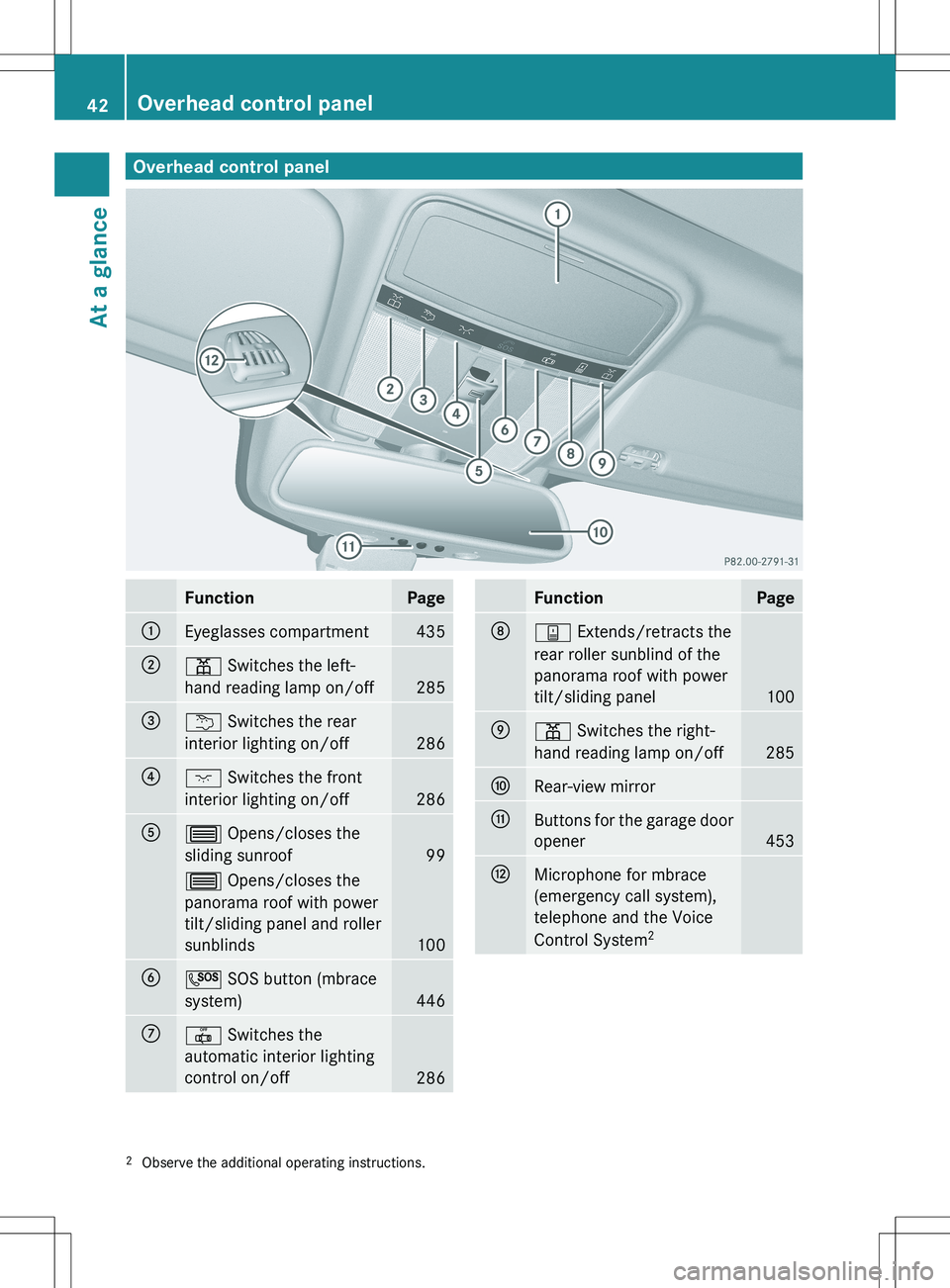
Overhead control panelFunctionPage:Eyeglasses compartment435;p Switches the left-
hand reading lamp on/off
285
=u Switches the rear
interior lighting on/off
286
?c Switches the front
interior lighting on/off
286
A3 Opens/closes the
sliding sunroof
99
3 Opens/closes the
panorama roof with power
tilt/sliding panel and roller
sunblinds
100
BG SOS button (mbrace
system)
446
C| Switches the
automatic interior lighting
control on/off
286
FunctionPageDy Extends/retracts the
rear roller sunblind of the
panorama roof with power
tilt/sliding panel
100
Ep Switches the right-
hand reading lamp on/off
285
FRear-view mirrorGButtons for the garage door
opener
453
HMicrophone for mbrace
(emergency call system),
telephone and the Voice
Control System 22
Observe the additional operating instructions.42Overhead control panelAt a glance
Page 454 of 536
happens automatically and does not require
any action from the driver. This function
allows the Mercedes-Benz Center to improve
appointment planning significantly and
ensures that your vehicle receives the best
service possible.
i The "Automatic retrieval of vehicle data
for the service due date" function is only
available if the relevant mobile phone
network is available and a data connection
is possible.
Stolen vehicle recovery service
If your vehicle has been stolen:
XNotify the police.
The police will issue a numbered incident
report.XThis number will be forwarded to the
Mercedes-Benz Customer Assistance
Center together with your PIN.
The Mercedes-Benz Customer Assistance
Center then attempts to locate the mbrace
system. The Mercedes-Benz Customer
Assistance Center contacts you and the
local law enforcement agency if the vehicle
is located. However, only the law
enforcement agency is informed of the
location of the vehicle.
i If the anti-theft alarm system is active for
longer than 30 seconds, mbrace
automatically informs the Mercedes-Benz
Customer Assistance Center.
Garage door opener
Important safety notes
The HomeLink ®
garage door opener
integrated in the rear-view mirror allows you
to operate up to three different door and gate
systems.
i Certain garage door drives are
incompatible with the integrated garage
door opener. If you have difficulty
programming the integrated garage door
opener, contact an authorized Mercedes-
Benz Center or call one of the following
telephone hotlines:
R USA: Mercedes-Benz Customer
Assistance Center at
1-800-FOR-MERCedes
R Canada: Customer Service at
1-800-387-0100GWARNING
Before programming the integrated remote
control to a garage door opener or gate
operator, make sure people and objects are
out of the way of the device to prevent
potential harm or damage. When
programming a garage door opener, the door
moves up or down. When programming a gate
operator, the gate opens or closes.
Do not use the integrated remote control with
any garage door opener that lacks safety stop
and reverse features as required by U.S.
federal safety standards (this includes any
garage door opener model manufactured
before April 1, 1982). A garage door that
cannot detect an object - signaling the door
to stop and reverse - does not meet current
U.S. federal safety standards.
When programming a garage door opener,
park vehicle outside the garage.
Do not run the engine while programming the
integrated remote control. Inhalation of
exhaust gas is hazardous to your health. All
exhaust gas contains carbon monoxide (CO),
and inhaling it can cause unconsciousness
and possible death. All exhaust gas contains
carbon monoxide (CO), and inhaling it can
cause unconsciousness and possible death.
i USA only:
This device complies with Part 15 of the
FCC Rules. Operation is subject to the
following two conditions:
452FeaturesStowage and features
Page 455 of 536
1. This device may not cause harmful
interference, and
2. this device must accept any interference
received, including interference that may
cause undesired operation.
Any unauthorized modification to this
device could void the user's authority to
operate the equipment.
FCC ID: CB2HMIHL4
i Canada only:
This device complies with RSS-210 of
Industry Canada. Operation is subject to
the following two conditions:
1. This device may not cause interference,
and
2. this device must accept any interference
received, including interference that may
cause undesired operation of the device.
Any unauthorized modification to this
device could void the user's authority to
operate the equipment.
IC: 279B-HMIHL4
Programming the integrated garage
door opener on the rear-view mirror
Programming
GWARNING
Only press the button on the integrated
garage door opener if there are no persons or
objects present within the sweep of the
garage door. Persons could otherwise be
injured as the door moves.
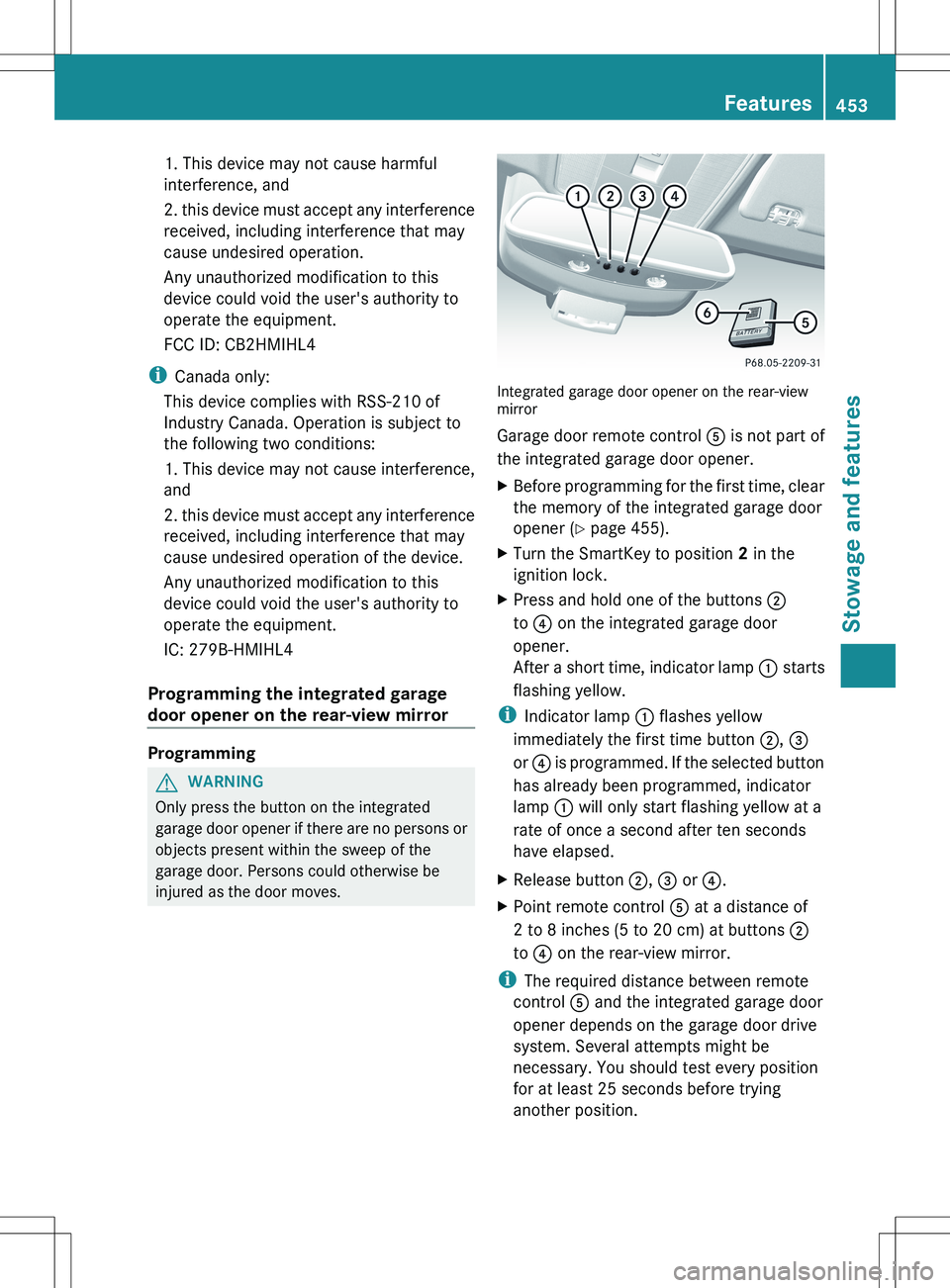
Integrated garage door opener on the rear-view
mirror
Garage door remote control A is not part of
the integrated garage door opener.
XBefore programming for the first time, clear
the memory of the integrated garage door
opener ( Y page 455).XTurn the SmartKey to position 2 in the
ignition lock.XPress and hold one of the buttons ;
to ? on the integrated garage door
opener.
After a short time, indicator lamp : starts
flashing yellow.
i Indicator lamp : flashes yellow
immediately the first time button ;, =
or ? is programmed. If the selected button
has already been programmed, indicator
lamp : will only start flashing yellow at a
rate of once a second after ten seconds
have elapsed.
XRelease button ;, = or ?.XPoint remote control A at a distance of
2 to 8 inches (5 to 20 cm) at buttons ;
to ? on the rear-view mirror.
i
The required distance between remote
control A and the integrated garage door
opener depends on the garage door drive
system. Several attempts might be
necessary. You should test every position
for at least 25 seconds before trying
another position.
Features453Stowage and featuresZ
Page 456 of 536
XPress and hold button B on remote control
A until indicator lamp : lights up green.
If indicator lamp : lights up green or
flashes, then programming has been
successful.XRelease button B on remote control A for
the garage door drive system.
If indicator lamp : lights up red:
XRepeat the programming procedure for the
corresponding button on the rear-view
mirror. When doing so, vary the distance
between remote control A and the rear-
view mirror.
i If the indicator lamp flashes green after
successful programming, the garage door
system is operating on a rolling code. After
programming, you must synchronize the
garage door opener integrated in the rear-
view mirror with the receiver of the garage
door system.
Synchronizing the rolling code
Your vehicle must be within reach of the
garage door or exterior gate drive. Make sure
that neither your vehicle nor any persons/
objects are present within the sweep of the
door or gate.
Observe the safety notes when performing
the rolling code synchronization
( Y page 452).
XTurn the SmartKey to position 2 in the
ignition lock.XPress the programming button of the door
or gate drive (see the door or gate drive
operating instructions, e.g. under
"Programming of additional remote
controls").
i Usually, you now have 30seconds to
initiate the next step.
XPress previously programmed button ;,
= or ? of the integrated garage door
opener until the door starts to move.
The rolling code synchronization is then
complete.Notes on programming the remote
control
Canadian radio frequency laws require a
"break" (or interruption) of the transmission
signals after broadcasting for a few seconds.
Therefore, these signals may not last long
enough for the integrated garage door
opener. The signal is not recognized during
programming. Comparable with Canadian
law, some U.S. garage door openers are
designed to "time-out" in the same manner.
Proceed as follows:
R if you live in Canada
R if you have difficulties programming the
garage door opener (regardless of where
you live) when using the programming
stepsXPress and hold one of buttons ; to ? on
the integrated garage door opener.
After a short time, indicator lamp : starts
flashing yellow.XRelease the button.XPress button B of garage door remote
control A for two seconds, then release it
for two seconds.XPress button B again for two seconds.XRepeat this sequence on button B of
remote control A until indicator lamp :
lights up green.
If indicator lamp : turns red, repeat the
process.XContinue with the other programming
steps (see above).
Problems when programming
If you are experiencing problems
programming the integrated garage door
opener on the rear-view mirror, take note of
the following instructions:
R Check the transmitter frequency of garage
door drive remote control A. This can
usually be found on the back of the remote
control.
454FeaturesStowage and features
Page 457 of 536
The integrated garage door opener is
compatible with devices that have units
which operate in the frequency range of
280 to 390MHz.
R Replace the batteries in garage door
remote control A. This increases the
likelihood that garage door remote control
A will transmit a strong and precise signal
to the integrated garage door opener in the
rear-view mirror.
R When programming, hold remote control
A at varying distances and angles from the
button that you are programming. Try
various angles at a distance between
2 and 12 inches (5 to 30 cm) or at the same
angle but at varying distances.
R If another remote control for the same
garage door drive is available, repeat the
same programming steps with this remote
control. Before performing these steps,
make sure that new batteries have been
installed in garage door drive remote
control A.
R Note that some remote controls only
transmit for a limited amount of time (the
indicator lamp on the remote control goes
out). Press button B on remote control
A again before transmission ends.
R Align the antenna cable of the garage door
opener unit. This can improve signal
reception/transmission.
Opening/closing the garage door
After it has been programmed, the integrated
garage door opener performs the function of
the garage door system remote control.
Please also read the operating instructions
for the garage door system.
XTurn the SmartKey to position 2 in the
ignition lock.XPress button ;, = or ? that you have
programmed to operate the garage door.
Garage door system with a fixed code:
indicator lamp : lights up green.Garage door system with a rolling code:
indicator lamp : flashes green.
i
The transmitter will transmit a signal for
as long as the button is pressed. The
transmission is halted after a maximum of
ten seconds and indicator lamp : flashes
yellow. Press button ;, = or ? again if
necessary.
Clearing the memory of the integrated
garage door opener on the rear-view
mirror
XTurn the SmartKey to position 2 in the
ignition lock.XPress buttons ; and ?.
The indicator lamp lights up yellow.XPress and hold buttons ; and ? until the
indicator lamp turns green.
i Make sure that you clear the memory of
the integrated garage door opener before
selling the vehicle.
Floormat on the driver's side
GWARNING
Whenever you are using a floormat, make sure
there is enough clearance and that the
floormat is securely fastened.
The floormat should always be securely
fastened using the fastening equipment.
Before driving off, check that the floormat is
securely in place and adjust it if necessary. A
loose floormat could slip and hinder proper
functioning of the pedals.
Do not place several floormats on top of each
other as this may impair pedal movement.
Features455Stowage and featuresZ