lock MERCEDES-BENZ S-COUPE 2016 Owners Manual
[x] Cancel search | Manufacturer: MERCEDES-BENZ, Model Year: 2016, Model line: S-COUPE, Model: MERCEDES-BENZ S-COUPE 2016Pages: 410, PDF Size: 8.62 MB
Page 232 of 410
Useful information
i
This Operator's Manual describes all
models and all standard and optional equip-
ment of your vehicle available at the time of
publication of the Operator's Manual.
Country-specific differences are possible.
Please note that your vehicle may not be
equipped with all features described. This
also applies to safety-related systems and
functions.
iRead the information on qualified special-
ist workshops (
Ypage 26).
Important safety notes
GWARNING
If you operate information systems and com-
munication equipment integrated in the vehi-
cle while driving, you will be distracted from
traffic conditions. You could also lose control
of the vehicle. There is a risk of an accident.
Only operate the equipment when the traffic
situation permits. If you are not sure that this
is possible, park the vehicle paying attention
to traffic conditions and operate the equip-
ment when the vehicle is stationary.
You must observe the legal requirements for
the country in which you are currently driving
when operating the on-board computer.
GWARNING
If the instrument cluster has failed or mal-
functioned, you may not recognize function
restrictions in systems relevant to safety. The
operating safety of your vehicle may be
impaired. There is a risk of an accident.
Pull over as soon as it is safe to do so and
consult a qualified specialist workshop.
GWARNING
If the instrument cluster has failed or mal-
functioned, you may not recognize function
restrictions in systems relevant to safety. The
operating safety of your vehicle may be
impaired. There is a risk of an accident.
Drive on carefully. Have the vehicle checked
at a qualified specialist workshop immedi-
ately.
If the operating safety of your vehicle is
impaired, pull over as soon as it is safe to do
so. Contact a qualified specialist workshop.
The on-board computer only shows messages
or warnings from certain systems in the mul-
tifunction display. You should therefore make
sure your vehicle is operating safely at all
times.
For an overview, see the instrument panel
illustration (
Ypage 33).
Displays and operation
Instrument cluster lighting
The light sensor in the instrument cluster
automatically controls the brightness of the
multifunction display. In daylight, the displays in the instrument cluster are illuminated. A
dimming function is not possible in daylight.
The lighting in the instrument cluster, in the
displays and the controls in the vehicle inte-
rior can be adjusted using the brightness con-
trol knob.
The brightness control is located between the
instrument cluster and the COMAND Display
(
Ypage 35).
XTurn the brightness control knob clockwise
or counter-clockwise.
If the light switch (
Ypage 126) is set to
Ã, TorL, the brightness is
dependent upon the brightness of the
ambient light.
Tachometer
!
Do not drive in the overrevving range, as
this could damage the engine.
230Displays and operation
On-board computer and displays
Page 233 of 410
The red band in the tachometer indicates the
engine's overrevving range.
The fuel supply is interrupted to protect the
engine when the red band is reached.
Outside temperature display
You should pay special attention to road con-
ditions when temperatures are around freez-
ing point.
Bear in mind that the outside temperature
display indicates the temperature measured
and does not record the road temperature.
The outside temperature display is in the mul-
tifunction display (
Ypage 232).
There is a short delay before a change in out-
side temperature is shown in the multifunc-
tion display.
Coolant temperature display
GWARNING
Opening the hood when the engine is over-
heated or when there is a fire in the engine
compartment could expose you to hot gases
or other service products. There is a risk of
injury.
Let an overheated engine cool down before
opening the hood. If there is a fire in the
engine compartment, keep the hood closed
and contact the fire department.
!A display message is shown if the coolant
temperature is too high.
If the coolant temperature is above 257 ‡
(125 †) do not drive any further. The
engine will otherwise be damaged.
The coolant temperature gauge is in the lower
section of the tachometer (
Ypage 33).
Under normal operating conditions and with
the specified coolant level, the coolant tem-
perature may rise to 255 ‡ (124 †).
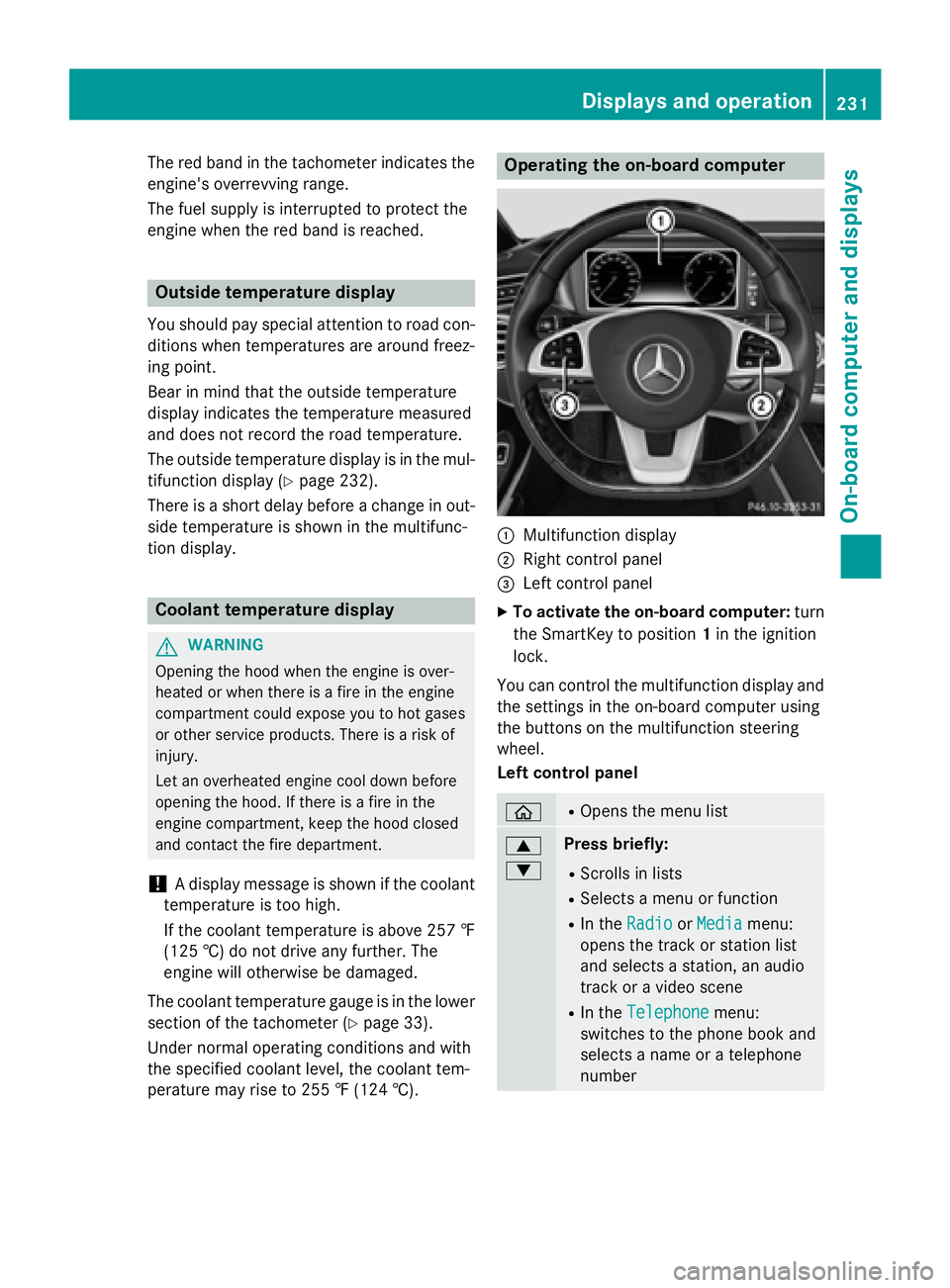
Operating the on-board computer
:Multifunction display
;Right control panel
=Left control panel
XTo activate the on-board computer: turn
the SmartKey to position 1in the ignition
lock.
You can control the multifunction display and
the settings in the on-board computer using
the buttons on the multifunction steering
wheel.
Left control panel
òROpens the menu list
9
:Press briefly:
RScrolls in lists
RSelects a menu or function
RIn the RadioorMediamenu:
opens the track or station list
and selects a station, an audio
track or a video scene
RIn the Telephonemenu:
switches to the phone book and
selects a name or a telephone
number
Displays and operation231
On-board computer and displays
Z
Page 235 of 410
_Adaptive Highbeam Assist Plus
(
Ypage 127)
a DISTRONIC PLUS Steering Assist
and Stop&Go Pilot (
Ypage 190)
---
km/h
Additional speedometer
(
Ypage 248)
Head-up display
General notes
The head-up display projects information
from the navigation system and the driver
assistance system above the dashboard into
the driver's field of vision.
A requirement for the display of the contents
is that the following functions are available in
the vehicle and are switched on:
RCruise control
RDISTRONIC PLUS
RTraffic Sign Assist
RNavigation
The head-up display allows the driver to see
all of the information without having to take
his eyes off the road.
Important safety notes
The head-up display is only an aid and is not a
substitute for attentive driving.
Speed limits and overtaking restrictions are
not always correctly displayed. Traffic signs
always have priority over the Traffic Sign
Assist display.
The visibility of the head-up display is influ-
enced by the following conditions:
Rthe driver's seat position
Rthe positioning of the display image
Rthe general ambient light
Rsunglasses with polarization filters
Rwet roads
Rblocking of sunlight by objects on the dis-
play cover In the event of extreme sunlight, sections of
the display may fade. This can be reversed by
switching the head-up display off and on
again.
iVehicles with the head-up display are
equipped with a special windshield. Should
repairs be necessary, have the windshield
replaced at a qualified specialist workshop.
Displays and operation
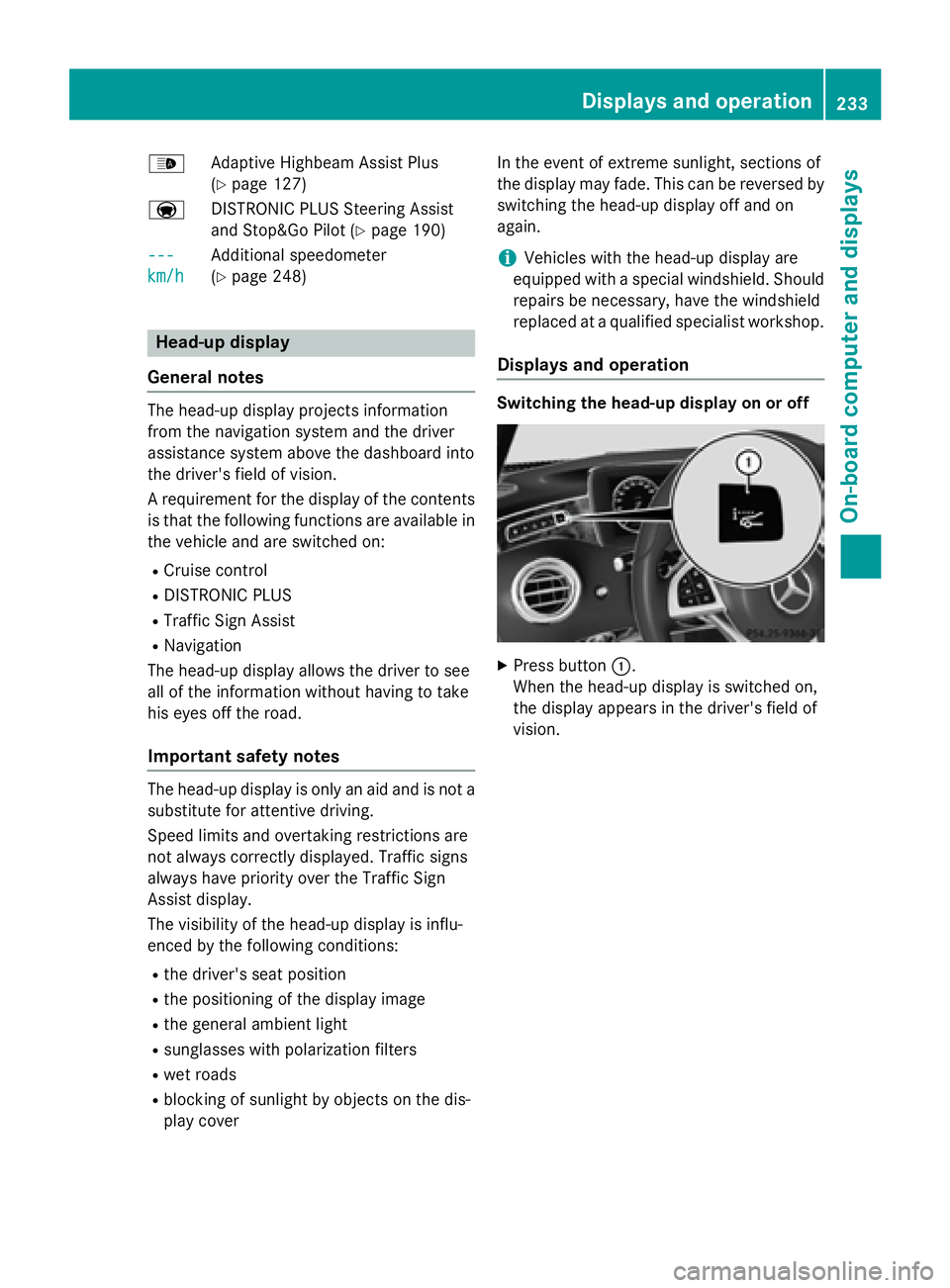
Switching the head-up display on or off
XPress button :.
When the head-up display is switched on,
the display appears in the driver's field of
vision.
Displays and operation233
On-board computer and displays
Z
Page 254 of 410
Safety systems
Display messagesPossible causes/consequences andMSolutions
!÷
Currently Unavail‐
able See Opera‐
tor's Manual
ABS (Anti-lock Brake System), ESP®(Electronic Stability Program),
BAS (Brake Assist), PRE‑ SAFE®, the HOLD function, Hill Start
Assist, Crosswind Assist, STEER CONTROL, Active Lane Keeping
Assist and Active Blind Spot Assist are temporarily unavailable.
BAS PLUS with Cross-Traffic Assist, PRE‑ SAFE
®Brake, PRE‑SAFE®
PLUS and COLLISION PREVENTION ASSIST PLUS may also have
failed.
In addition, the ÷and! warning lamps light up in the
instrument cluster.
ATTENTION ASSIST is deactivated.
For example, the on-board voltage may be insufficient.
GWARNING
The brake system continues to function normally, but without the
functions listed above. The wheels could therefore lock if you
brake hard, for example.
The steerability and braking characteristics may be severely affec-
ted. The braking distance in an emergency braking situation can
increase.
If ESP
®is not operational, ESP®is unable to stabilize the vehicle.
There is an increased risk of skidding and an accident.
XDrive on carefully.
Carefully drive a suitable distance, making slight steering move-
ments at a speed above 12 mph (20 km/h).
If the display message disappears, the functions mentioned
above are available again.
If the multifunction display still shows the display message:
XDrive on carefully.
XVisit a qualified specialist workshop.
!÷
Inoperative See
Operator's Manual
ABS, ESP®, BAS, PRE‑SAFE®, the HOLD function, Hill Start Assist,
Crosswind Assist, STEER CONTROL, Active Lane Keeping Assist
and Active Blind Spot are unavailable due to a malfunction.
BAS PLUS with Cross-Traffic Assist, PRE‑SAFE
®Brake, PRE‑SAFE®
PLUS and COLLISION PREVENTION ASSIST PLUS may also have
failed.
The $ (USA only) or J(Canada only), ÷and! warn-
ing lamps in the instrument cluster may also light up.
ATTENTION ASSIST is deactivated.
GWARNING
252Display messages
On-board computer and displays
Page 271 of 410
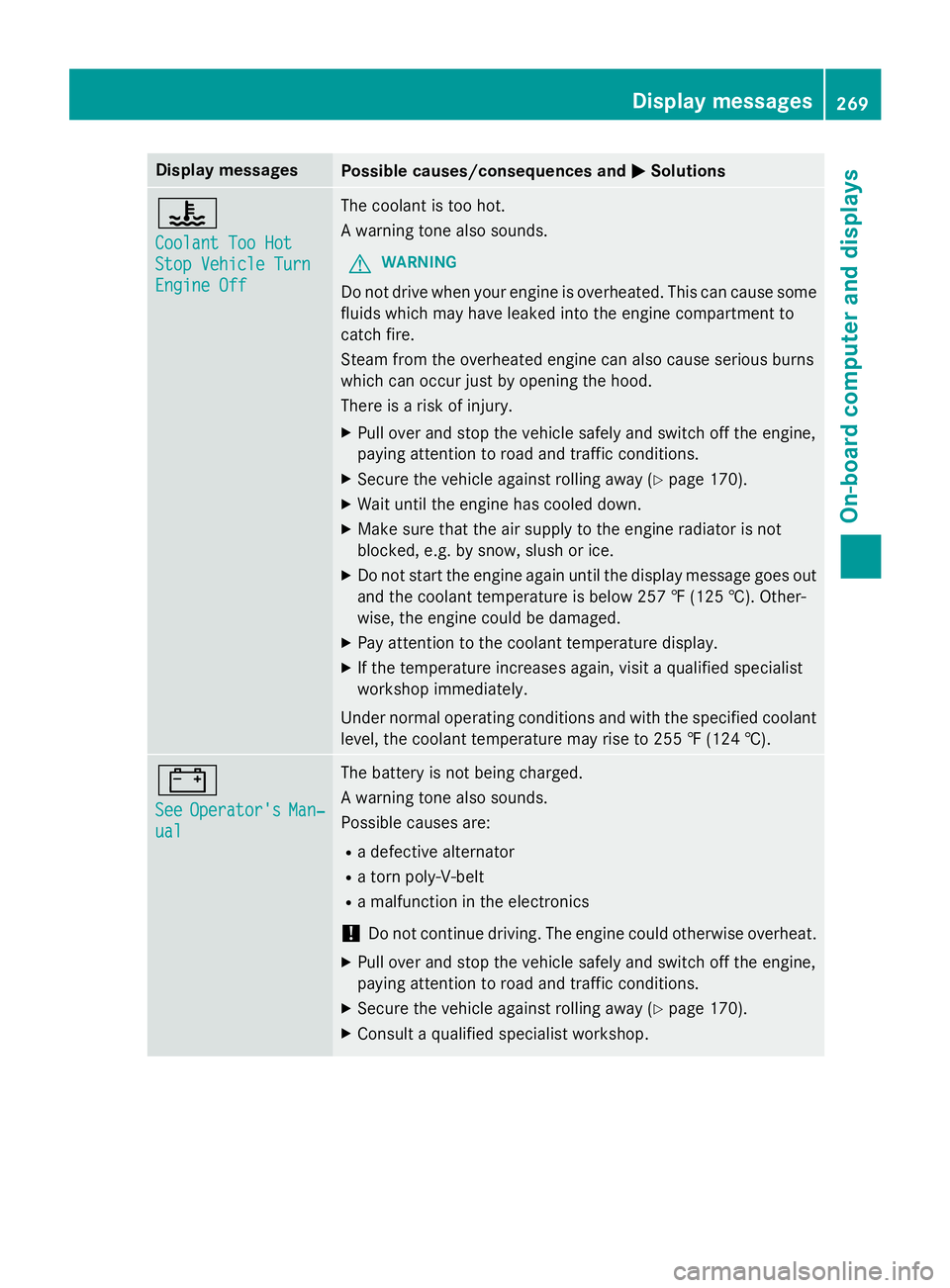
Display messagesPossible causes/consequences andMSolutions
?
CoolantToo Hot
Sto pVehicl eTur n
Engine Off
The coolan tis to ohot .
A warnin gtone also sounds.
GWARNIN G
Do notdrive when your engin eis overheated. This can caus esom e
fluids whic hmay hav eleaked into th eengin ecompartmen tto
catch fire.
Steam from th eoverheated engin ecan also caus eserious burn s
whic hcan occur jus tby openin gth ehood.
There is aris kof injury.
XPull ove rand stop th evehicl esafely and switch of fth eengine,
payin gattention to roa dand traffic conditions.
XSecur eth evehicl eagainst rollin gaway (Ypage 170).
XWait until th eengin ehas cooled down .
XMakesur ethat th eair supply to th eengin eradiato ris no t
blocked, e.g. by snow, slus hor ice .
XDo no tstart th eengin eagain until th edisplay message goe sout
and th ecoolan ttemperature is belo w25 7 ‡ (125†). Other -
wise ,th eengin ecould be damaged.
XPay attention to th ecoolan ttemperature display.
XIf th etemperature increase sagain ,visit aqualified specialist
workshop immediately.
Under normal operating condition sand wit hth especified coolan t
level, th ecoolan ttemperature may ris eto 25 5 ‡(124†).
#
SeeOperator' sMan‐
ual
The battery is no tbein gcharged.
A warnin gtone also sounds.
Possibl ecauses are:
Radefective alternato r
Ratorn poly-V-belt
Ramalfunction in th eelectronics
!Do no tcontinue driving. The engin ecould otherwise overheat .
XPull overand stop th evehicl esafely and switch of fth eengine,
payin gattention to roa dand traffic conditions.
XSecur eth evehicl eagainst rollin gaway (Ypage 170).
XConsult aqualified specialist workshop .
Display messages269
On-board computer and displays
Z
Page 285 of 410
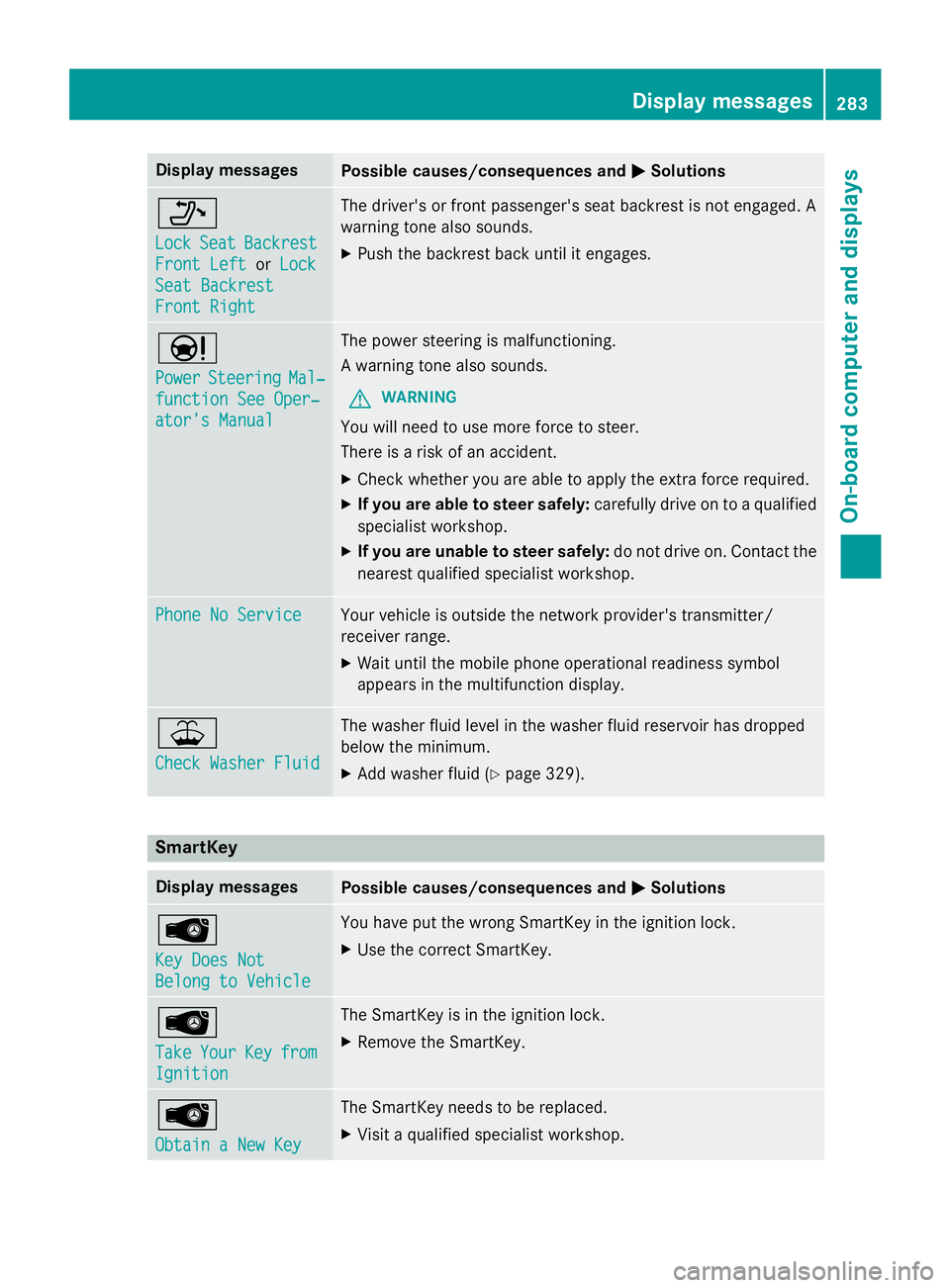
Display messagesPossible causes/consequences andMSolutions
_
LockSeatBackrest
Front Lef torLoc k
SeatBackrest
Front Right
The driver's or fron tpassenger's seat backrest is no tengaged. A
warnin gtone also sounds.
XPush th ebackrest bac kuntil it engages.
Ð
PowerSteeringMal ‐
function See Oper‐
ator's Manual
The powe rsteerin gis malfunctioning.
A warnin gtone also sounds.
GWARNIN G
You will need to use mor eforc eto steer .
There is aris kof an accident.
XChec kwhether you are able to apply th eextr aforc erequired.
XIf you ar eabl eto steer safely: carefully drive on to aqualified
specialist workshop .
XIf you areunable to steer safely :do no tdrive on .Contac tth e
neares tqualified specialist workshop .
Phone No ServiceYour vehicleis outside th enetwork provider' stransmitter/
receiver range.
XWait until th emobile phone operational readiness symbol
appears in th emultifunction display.
¥
Check Washer Fluid
The washer flui dlevel in th ewasher flui dreservoir has dropped
belo wtheminimum .
XAddwasher flui d (Ypage 329).
SmartKey
Display messagesPossible causes/consequences and MSolutions
Â
Key DoesNot
Belong to Vehicl e
You haveput th ewrong SmartKey in th eignition lock.
XUse th ecorrec tSmartKey.
Â
Tak eYourKeyfrom
Ignition
The SmartKey is in th eignition lock.
XRemove th eSmartKey.
Â
Obtain aNew Key
The SmartKey needs to be replaced.
XVisit aqualified specialist workshop .
Display messages283
On-board computer and displays
Z
Page 286 of 410
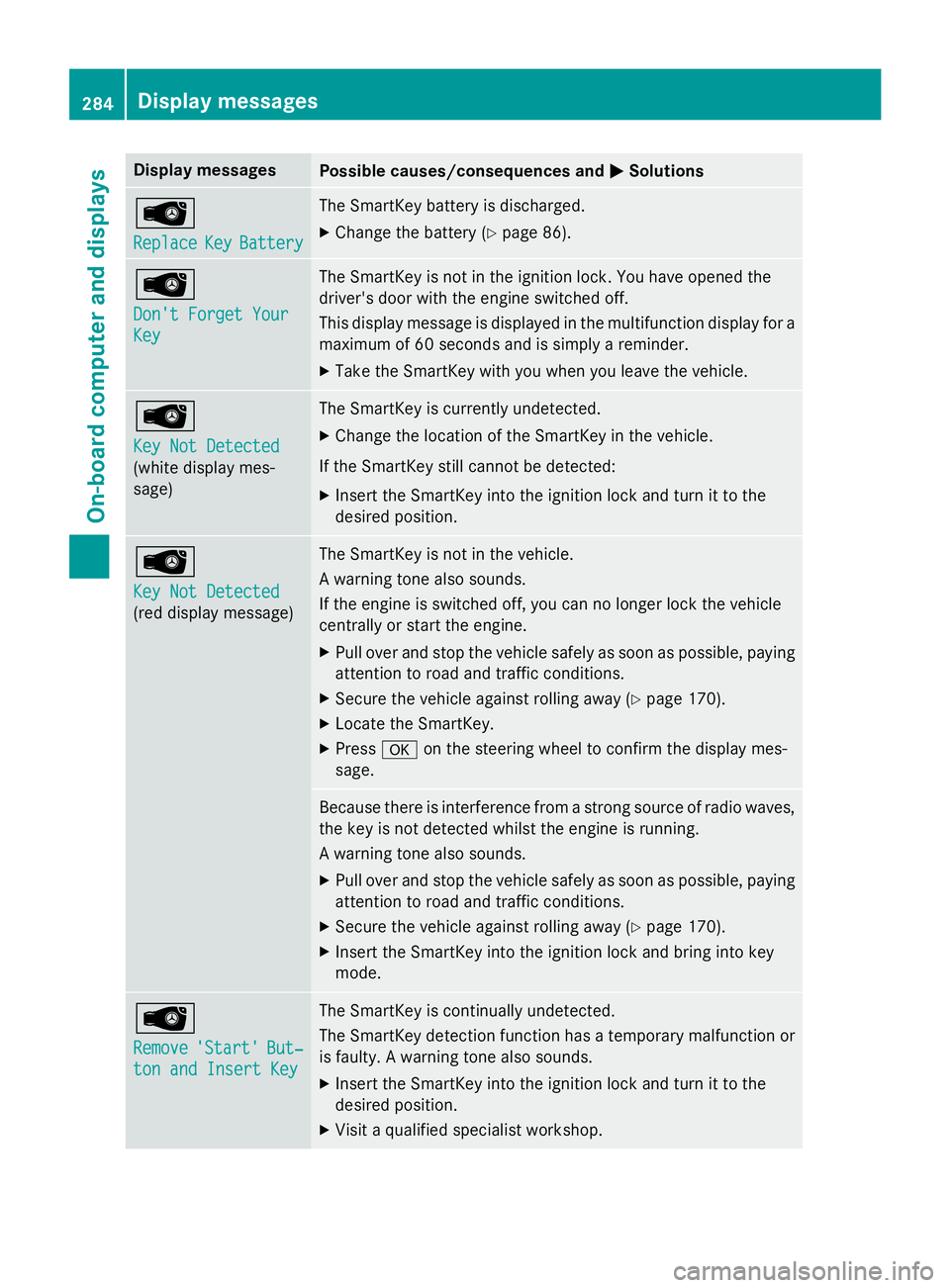
Display messagesPossible causes/consequences andMSolutions
Â
ReplaceKeyBattery
The SmartKey battery is discharged.
XChange th ebattery (Ypage 86) .
Â
Don't Forget You r
Key
The SmartKey is notin th eignition lock. You hav eopened th e
driver's doo rwit hth eengin eswitched off.
This display message is displayed in th emultifunction display fo r a
maximum of 60 seconds and is simply areminder .
XTaketh eSmartKey wit hyou when you leav eth evehicle.
Â
Key Not Detected
(whit edisplay mes -
sage )
The SmartKey is currentl yundetected.
XChange th elocation of th eSmartKey in th evehicle.
If th eSmartKey still canno tbe detected:
XInser tth eSmartKey into th eignition loc kand tur nit to th e
desire dposition .
Â
Key Not Detected
(reddisplay message )
The SmartKey is no tin th evehicle.
A warnin gtone also sounds.
If th eengin eis switched off, you can no longer loc kth evehicl e
centrall yor start th eengine.
XPull ove rand stop th evehicl esafely as soo nas possible, payin g
attention to roa dand traffic conditions.
XSecur eth evehicl eagainst rollin gaway (Ypage 170).
XLocate th eSmartKey.
XPress aon thesteerin gwhee lto confirm th edisplay mes -
sage .
Becaus ethere is interferenc efrom astron gsource of radi owaves,
th eke yis no tdetecte dwhils tth eengin eis running .
A warnin gtone also sounds.
XPull ove rand stop th evehicl esafely as soo nas possible, payin g
attention to roa dand traffic conditions.
XSecur eth evehicl eagainst rollin gaway (Ypage 170).
XInsertth eSmartKey into th eignition loc kand bring into ke y
mode.
Â
Remove'Start 'But‐
ton and Insert Key
The SmartKey is continually undetected.
The SmartKey detection function has atemporar ymalfunction or
is faulty. Awarnin gtone also sounds.
XInser tth eSmartKey into th eignition loc kand tur nit to th e
desire dposition .
XVisitaqualified specialist workshop .
284Display messages
On-board computer and displays
Page 290 of 410
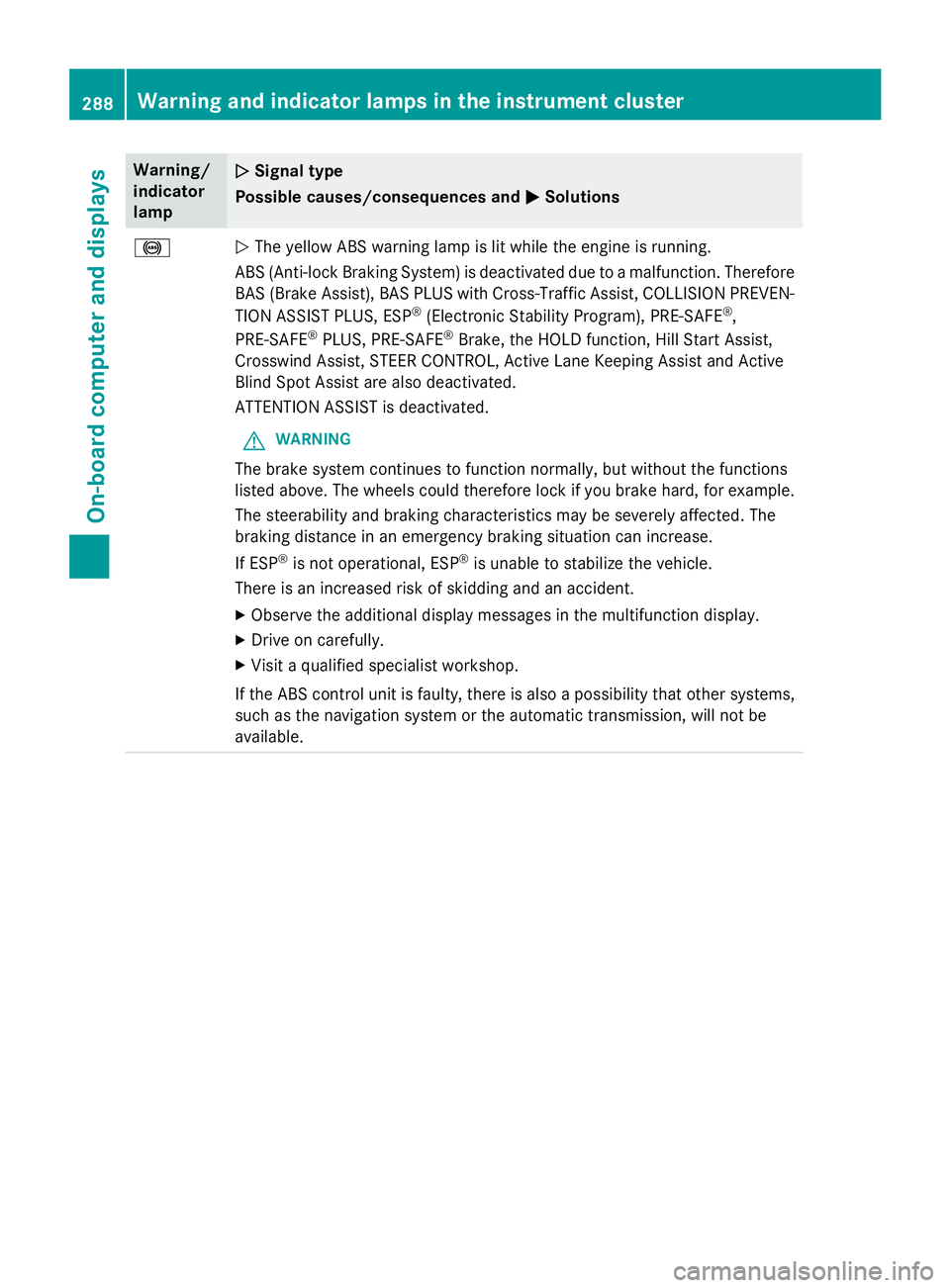
Warning/
indicator
lampNSignal type
Possible causes/consequences and M
Solutions
!NThe yellow ABS warning lamp is lit while the engine is running.
ABS (Anti-lock Braking System) is deactivated due to a malfunction. Therefore
BAS (Brake Assist), BAS PLUS with Cross-Traffic Assist, COLLISION PREVEN-
TION ASSIST PLUS, ESP
®(Electronic Stability Program), PRE‑SAFE®,
PRE‑SAFE®PLUS, PRE‑SAFE®Brake, the HOLD function, Hill Start Assist,
Crosswind Assist, STEER CONTROL, Active Lane Keeping Assist and Active
Blind Spot Assist are also deactivated.
ATTENTION ASSIST is deactivated.
GWARNING
The brake system continues to function normally, but without the functions
listed above. The wheels could therefore lock if you brake hard, for example.
The steerability and braking characteristics may be severely affected. The
braking distance in an emergency braking situation can increase.
If ESP
®is not operational, ESP®is unable to stabilize the vehicle.
There is an increased risk of skidding and an accident.
XObserve the additional display messages in the multifunction display.
XDrive on carefully.
XVisit a qualified specialist workshop.
If the ABS control unit is faulty, there is also a possibility that other systems,
such as the navigation system or the automatic transmission, will not be
available.
288Warning and indicator lamps in the instrument cluster
On-board computer and displays
Page 291 of 410
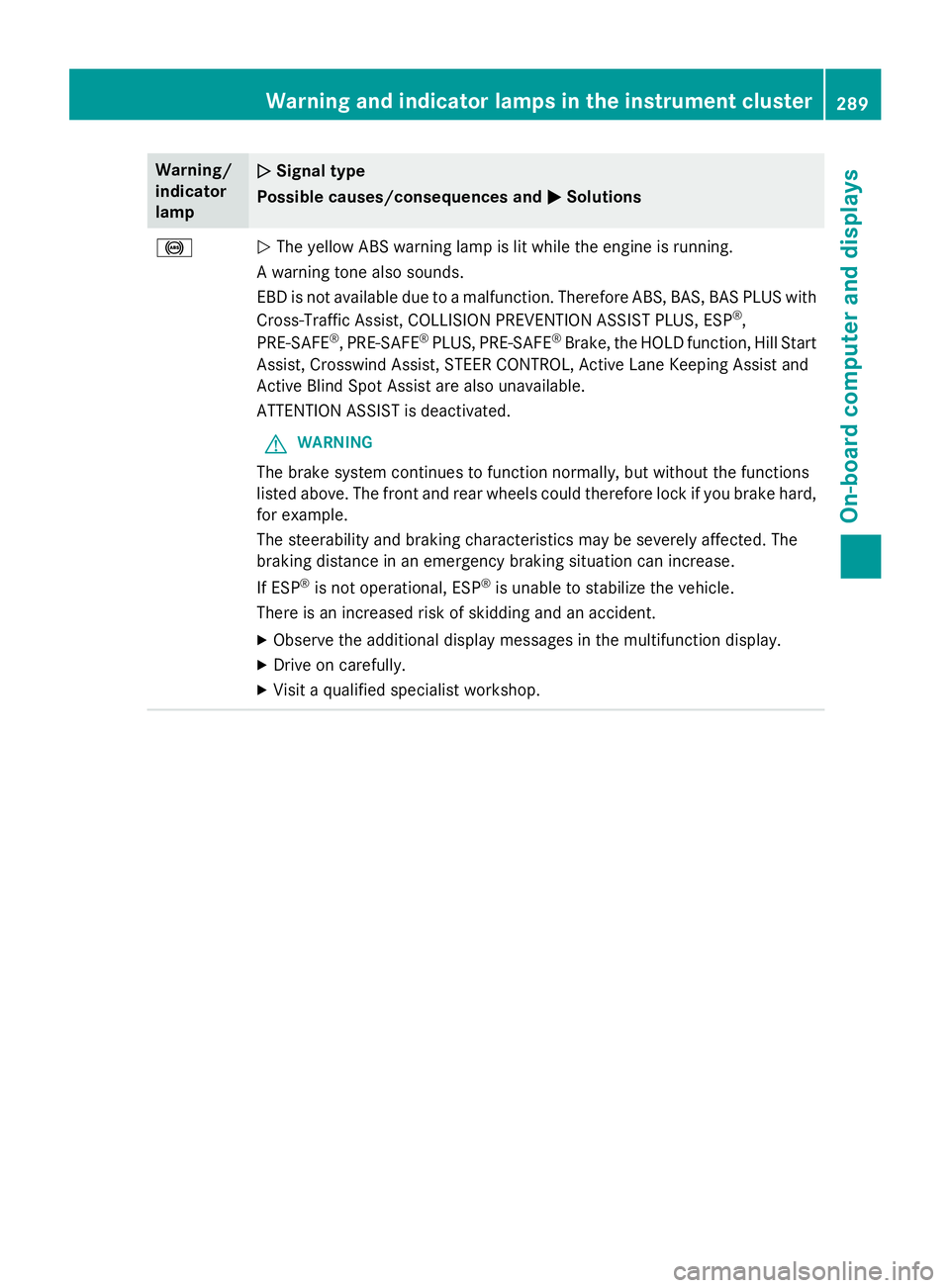
Warning/
indicator
lampNSignal type
Possible causes/consequences and M
Solutions
!NThe yellow ABS warning lamp is lit while the engine is running.
A warning tone also sounds.
EBD is not available due to a malfunction. Therefore ABS, BAS, BAS PLUS with
Cross-Traffic Assist, COLLISION PREVENTION ASSIST PLUS, ESP
®,
PRE‑SAFE®, PRE‑SAFE®PLUS, PRE‑SAFE®Brake, the HOLD function, Hill Start
Assist, Crosswind Assist, STEER CONTROL, Active Lane Keeping Assist and
Active Blind Spot Assist are also unavailable.
ATTENTION ASSIST is deactivated.
GWARNING
The brake system continues to function normally, but without the functions
listed above. The front and rear wheels could therefore lock if you brake hard,
for example.
The steerability and braking characteristics may be severely affected. The
braking distance in an emergency braking situation can increase.
If ESP
®is not operational, ESP®is unable to stabilize the vehicle.
There is an increased risk of skidding and an accident.
XObserve the additional display messages in the multifunction display.
XDrive on carefully.
XVisit a qualified specialist workshop.
Warning and indicator lamps in the instrument cluster289
On-board computer and displays
Z
Page 292 of 410
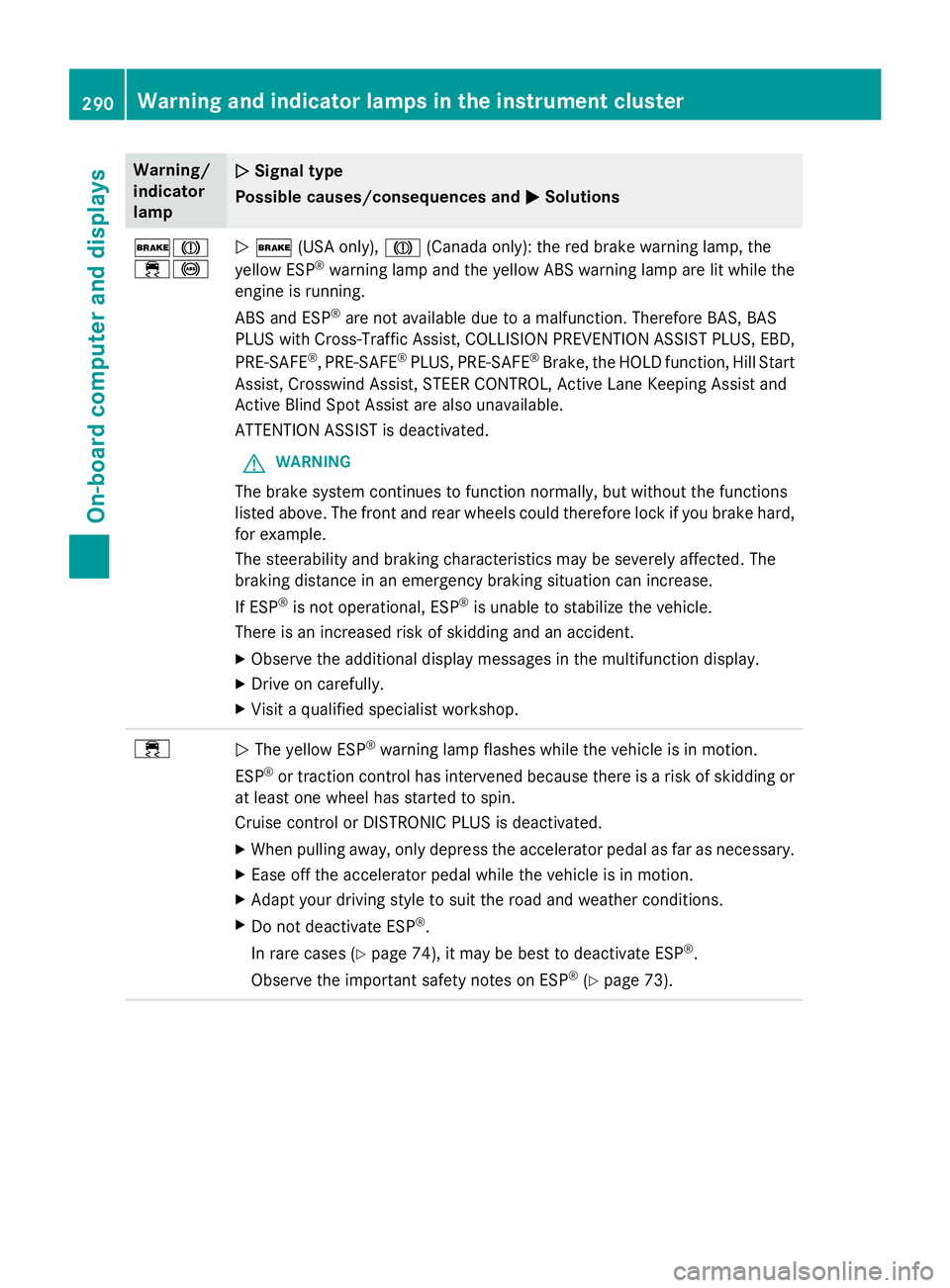
Warning/
indicator
lampNSignal type
Possible causes/consequences and M
Solutions
$J
÷!N$ (USA only), J(Canada only): the red brake warning lamp, the
yellow ESP®warning lamp and the yellow ABS warning lamp are lit while the
engine is running.
ABS and ESP
®are not available due to a malfunction. Therefore BAS, BAS
PLUS with Cross-Traffic Assist, COLLISION PREVENTION ASSIST PLUS, EBD,
PRE‑SAFE
®, PRE‑SAFE®PLUS, PRE‑SAFE®Brake, the HOLD function, Hill Start
Assist, Crosswind Assist, STEER CONTROL, Active Lane Keeping Assist and
Active Blind Spot Assist are also unavailable.
ATTENTION ASSIST is deactivated.
GWARNING
The brake system continues to function normally, but without the functions
listed above. The front and rear wheels could therefore lock if you brake hard,
for example.
The steerability and braking characteristics may be severely affected. The
braking distance in an emergency braking situation can increase.
If ESP
®is not operational, ESP®is unable to stabilize the vehicle.
There is an increased risk of skidding and an accident.
XObserve the additional display messages in the multifunction display.
XDrive on carefully.
XVisit a qualified specialist workshop.
÷N The yellow ESP®warning lamp flashes while the vehicle is in motion.
ESP
®or traction control has intervened because there is a risk of skidding or
at least one wheel has started to spin.
Cruise control or DISTRONIC PLUS is deactivated.
XWhen pulling away, only depress the accelerator pedal as far as necessary.
XEase off the accelerator pedal while the vehicle is in motion.
XAdapt your driving style to suit the road and weather conditions.
XDo not deactivate ESP®.
In rare cases (
Ypage 74), it may be best to deactivate ESP®.
Observe the important safety notes on ESP
®(Ypage 73).
290Warning and indicator lamps in the instrument cluster
On-board computer and displays