lock MERCEDES-BENZ S-COUPE 2016 Repair Manual
[x] Cancel search | Manufacturer: MERCEDES-BENZ, Model Year: 2016, Model line: S-COUPE, Model: MERCEDES-BENZ S-COUPE 2016Pages: 410, PDF Size: 8.62 MB
Page 126 of 410
Useful information
i
This Operator's Manual describes all
models and all standard and optional equip-
ment of your vehicle available at the time of
publication of the Operator's Manual.
Country-specific differences are possible.
Please note that your vehicle may not be
equipped with all features described. This
also applies to safety-related systems and
functions.
iRead the information on qualified special-
ist workshops (
Ypage 26).
Exterior lighting
General notes
For reasons of safety, Mercedes-Benz recom-
mends that you drive with the lights switched
on even during the daytime. In some coun-
tries, operation of the headlamps varies due
to legal requirements and self-imposed obli-
gations.
Setting the exterior lighting
Setting options
Exterior lighting can be set using:
Rthe light switch
Rthe combination switch (Ypage 126)
Rthe on-board computer (Ypage 247)
Light switch
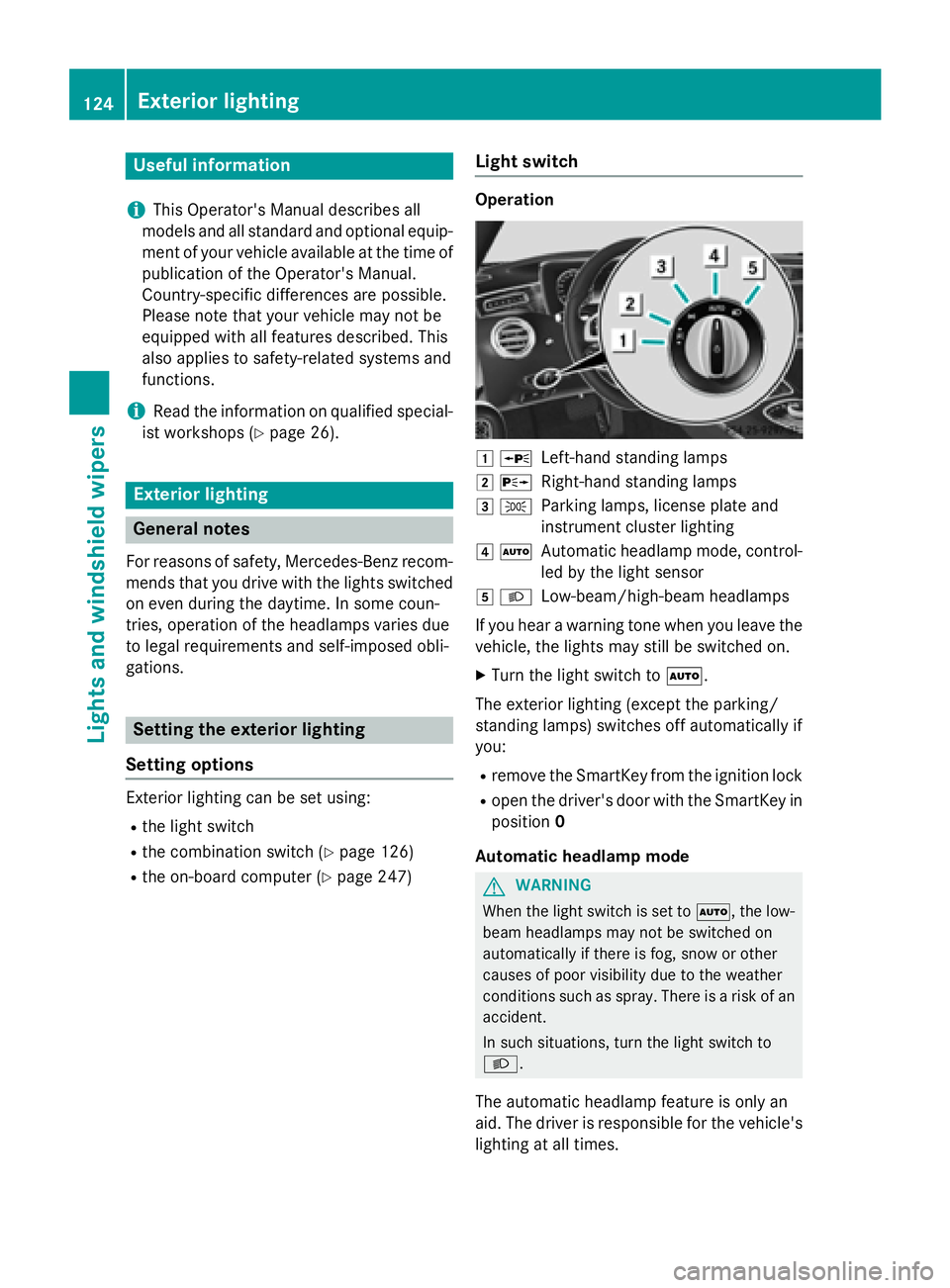
Operation
1 WLeft-hand standing lamps
2XRight-hand standing lamps
3TParking lamps, license plate and
instrument cluster lighting
4ÃAutomatic headlamp mode, control-
led by the light sensor
5LLow-beam/high-beam headlamps
If you hear a warning tone when you leave the
vehicle, the lights may still be switched on.
XTurn the light switch to Ã.
The exterior lighting (except the parking/
standing lamps) switches off automatically if
you:
Rremove the SmartKey from the ignition lock
Ropen the driver's door with the SmartKey in position 0
Automatic headlamp mode
GWARNING
When the light switch is set to Ã, the low-
beam headlamps may not be switched on
automatically if there is fog, snow or other
causes of poor visibility due to the weather
conditions such as spray. There is a risk of an
accident.
In such situations, turn the light switch to
L.
The automatic headlamp feature is only an
aid. The driver is responsible for the vehicle's
lighting at all times.
124Exterior lighting
Lights and windshield wipers
Page 127 of 410
Canada only:
The daytime running lamps improve the visi-
bility of your vehicle during the day. The day-
time running lamps function is required by law
in Canada. It cannot therefore be deactivated.
When the engine is running and the vehicle is
stationary: if you move the selector lever from
a drive position to P, the daytime running
lamps/low-beam headlamps go out after
three minutes.
When the engine is running, the vehicle is
stationary and in bright ambient light: if you
turn the light switch to T, the daytime
running lamps and parking lamps switch on.
If the engine is running and you turn the light
switch to L, the manual settings take
precedence over the daytime running lamps.
USA only:
The daytime running lamps improve the visi-
bility of your vehicle during the day. To do this,
the daytime running lamps function must be
switched on using the on-board computer
(
Ypage 248).
If the engine is running and you turn the light
switch to TorL, the manual settings
take precedence over the daytime running
lamps.
à is the favored light switch setting. The
light setting is automatically selected accord-
ing to the brightness of the ambient light
(exception: poor visibility due to weather con-
ditions such as fog, snow or spray):
RSmartKey in position 1in the ignition lock:
the parking lamps are switched on or off
automatically depending on the brightness
of the ambient light.
RWith the engine running: if you have acti-
vated the "daytime running lamps" function
via the on-board computer, the daytime
running lamps or the parking lamps and the
low-beam headlamps are switched on or off
automatically depending on the brightness
of the ambient light.
XTo switch on automatic headlamp
mode: turn the light switch to Ã.Low-beam headlamps
Even if the light sensor does not detect that it
is dark, the parking lamps and low-beam
headlamps switch on when the ignition is
switched on and the light switch is set to the
L
position. This is a particularly useful
function in the event of rain and fog.
XTo switch on the low-beam headlamps:
turn the SmartKey in the ignition lock to
position 2or start the engine.
XTurn the light switch to L.
The green Lindicator lamp in the instru-
ment cluster lights up.
Parking lamps
!If the battery has been excessively dis-
charged, the parking lamps or standing
lamps are automatically switched off to
enable the next engine start. Always park
your vehicle safely and sufficiently lit
according to legal standards. Avoid the
continuous use of the Tparking lamps
for several hours. If possible, switc
h on the
X right or the Wleft standing lamp.
XTo switch on: turn the light switch to T.
The green Tindicator lamp in the instru-
ment cluster lights up.
Standing lamps
Switching on the standing lamps ensures the
corresponding side of the vehicle is illumina-
ted.
XTo switch on the standing lamps: the
SmartKey is not in the ignition lock or it is in
position 0.
XTurn the light switch to W(left-hand side
of the vehicle) or X(right-hand side of
the vehicle).
Exterior lighting125
Lights and windshield wipers
Z
Page 128 of 410
Combination switch
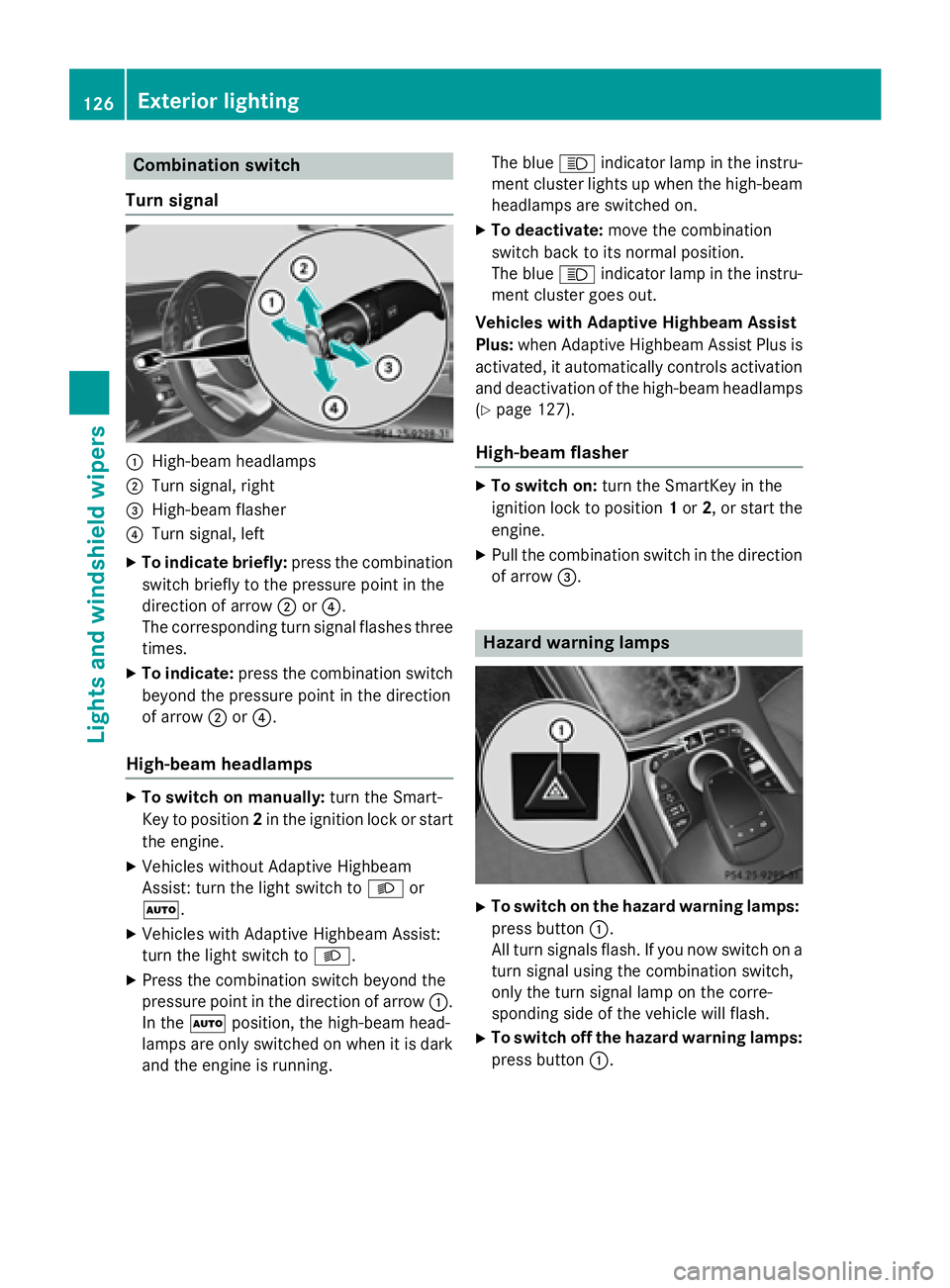
Turn signal
:High-beam headlamps
;Turn signal, right
=High-beam flasher
?Turn signal, left
XTo indicate briefly: press the combination
switch briefly to the pressure point in the
direction of arrow ;or?.
The corresponding turn signal flashes three
times.
XTo indicate: press the combination switch
beyond the pressure point in the direction
of arrow ;or?.
High-beam headlamps
XTo switch on manually: turn the Smart-
Key to position 2in the ignition lock or start
the engine.
XVehicles without Adaptive Highbeam
Assist: turn the light switch to Lor
Ã.
XVehicles with Adaptive Highbeam Assist:
turn the light switch to L.
XPress the combination switch beyond the
pressure point in the direction of arrow :.
In the Ãposition, the high-beam head-
lamps are only switched on when it is dark
and the engine is running. The blue
Kindicator lamp in the instru-
ment cluster lights up when the high-beam
headlamps are switched on.
XTo deactivate: move the combination
switch back to its normal position.
The blue Kindicator lamp in the instru-
ment cluster goes out.
Vehicles with Adaptive Highbeam Assist
Plus: when Adaptive Highbeam Assist Plus is
activated, it automatically controls activation and deactivation of the high-beam headlamps
(
Ypage 127).
High-beam flasher
XTo switch on: turn the SmartKey in the
ignition lock to position 1or 2, or start the
engine.
XPull the combination switch in the direction
of arrow =.
Hazard warning lamps
XTo switch on the hazard warning lamps:
press button :.
All turn signals flash. If you now switch on a
turn signal using the combination switch,
only the turn signal lamp on the corre-
sponding side of the vehicle will flash.
XTo switch off the hazard warning lamps:
press button :.
126Exterior lighting
Lights and windshield wipers
Page 130 of 410
Important safety notes
GWARNING
Adaptive Highbeam Assist Plus does no trec -
ognize road users:
Rwho hav eno lights ,e.g. pedestrian s
Rwho havepoor lighting ,e.g. cyclist s
Rwhoselighting is blocked, e.g. by abarrier
In ver yrar ecases, Adaptive Highbeam Assist
Plus may no trecognize road user swho do
hav elights ,or may recognize them to olate. In
this or similar situations, th eautomatic high -
beam headlamps will no tbe deactivated or
will be activated regardless .Ther eis aris kof
an accident.
Always carefully observ eth etraffic condition s
and switch off th ehigh-beam headlamps in
goo dtime.
Adaptive Highbeam Assist Plus cannot take
into account road, weather or traff iccond i-
tions. Adaptive Highbeam Assist Plus isonly
an aid. You are responsible for adjusting the
vehicle's lighting to the prevailing light, visi-
bilit y and traff icconditions.
In particular, the detection of obstacles can
be restricted ifthere is:
Rpoor vis ibility, e.g. due to fog, heavy rain or
snow
Rdirt on the sensors or the sensors are
obscured
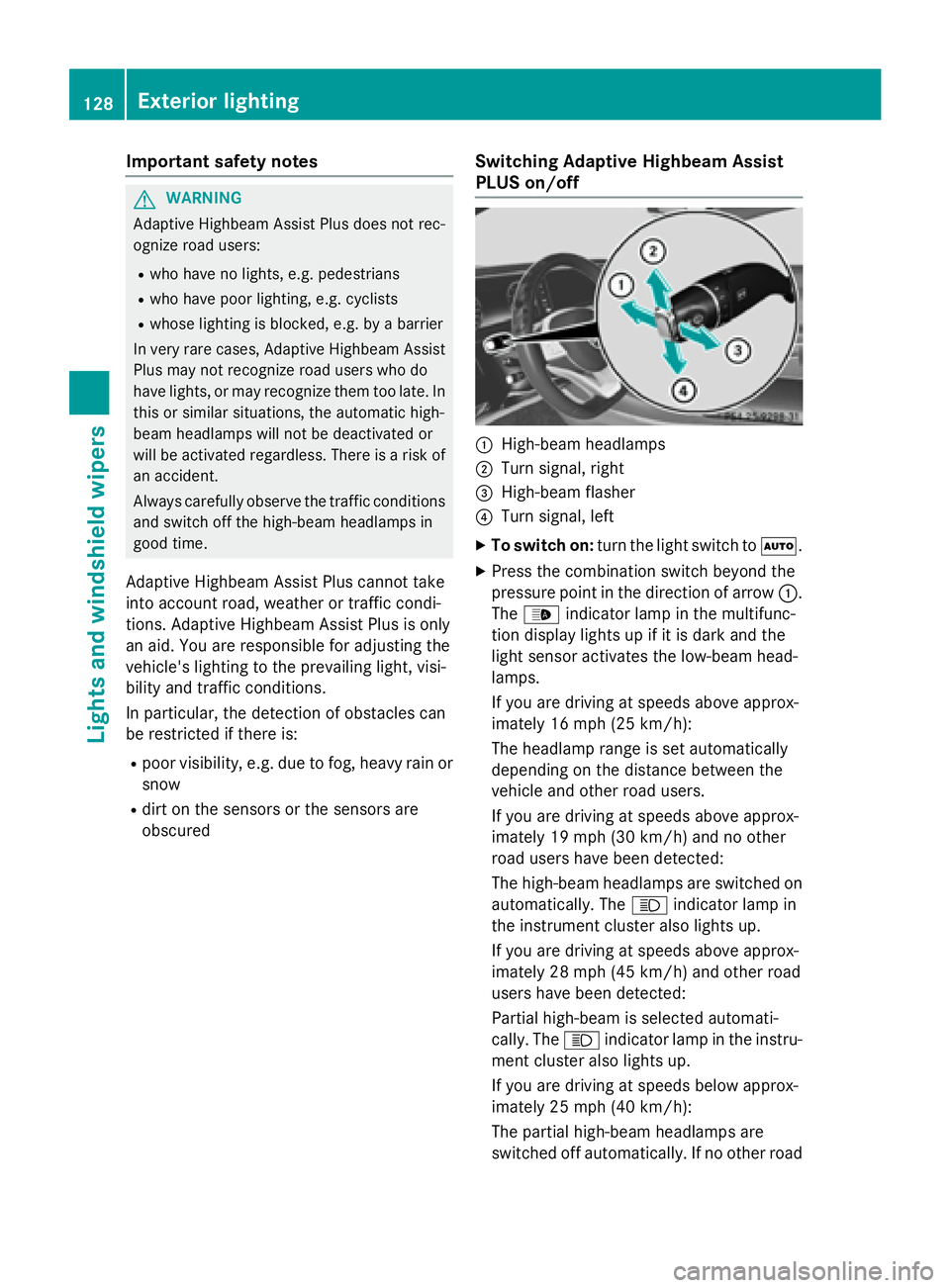
Switching Adaptive Highbeam Assist
PLUS on/off
:High-beam headlamps
;Turn signal, right
=High-beam flasher
?Turn signal, left
XTo switch on: turn thelight switch to Ã.
XPress the combination switch beyond the
pressure point inthe direction of arrow :.
The _ indicator lamp inthe multifunc-
tion display lights up if it is dark and the
ligh t sensor act ivates the low-beam head-
lamps.
If you are driving at speeds above approx-
imately 16 mph (25 km/h):
The headlamp range isset automatical ly
depe nding on the distance between the
vehicle and other road users.
If you are driving at speeds above approx-
imately 19 mph (30 km/h) and no other
road users have been detecte d:
The high-beam headlamps are switched on
automatically. The Kindicator lamp in
the instrument cluster also lights up.
If you are driving at speeds above approx-
imately 28 mph (45 km/h)and other road
users have been detected:
Partial high-beam is selected automati-
cally. The Kindicator lamp in the instru-
ment cluster also lights up.
If you are driving at speeds below approx-
imately 25 mph (40 km/h):
The partial high-beam headlamps are
switched off automatically. If no other road
128Exterior lighting
Lights and windshield wipers
Page 131 of 410
users are recognize, the high-beam head-
lamps are switched on.
Ifyou are driving at speeds belowapprox-
imately 16 mph (25 km/h) or the roads are
adequately illuminated:
The high-beam headlamps are switched off automatically. The Kindicator lamp in
the instrument cluster goes out. The _
indicator lamp inthe multifunction display
remains lit.
XTo switch off: move the combination
swit ch back to its normal position or move
the light switch to another position.
The _ indicator lamp inthe multifunc-
tion display goes out.
Headlamps fogged up on the inside
Certain climatic and physical cond itions may
cause moisture to form inthe headlamp. This
moisture does not affect the functionalit y of
the headlamp.
Interior lighting
Overview of interior lighting
Front overhead control panel
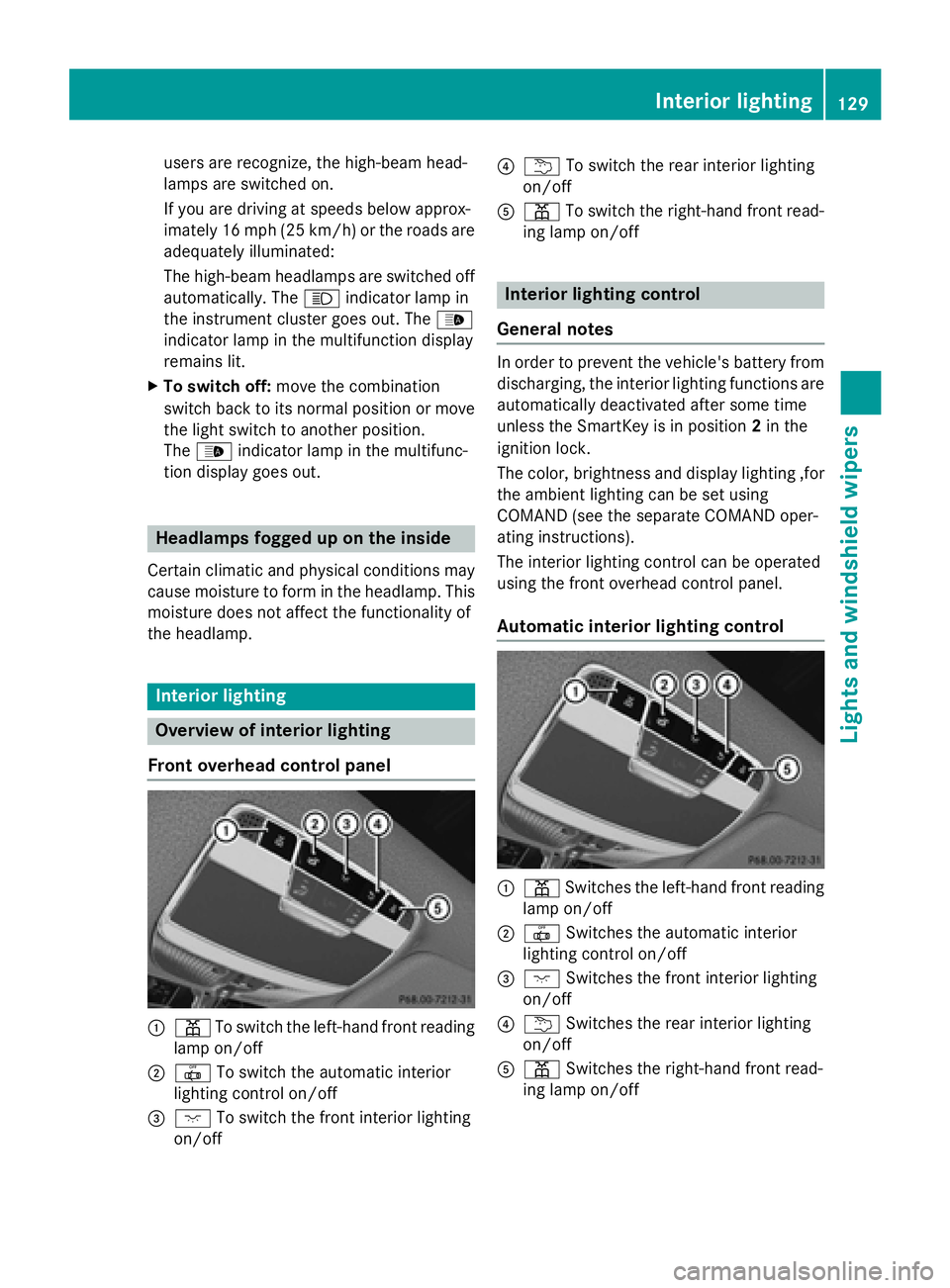
:p Toswit ch the left-hand front reading
lamp on/o ff
;|Toswit ch the automat icinterior
lighting control on/off
=c Toswit ch the front interior lighting
on/o ff
?u To switch the rear interior lighting
on/o ff
Ap To switch the right-hand front read-
ing lamp on/o ff
Interior lighting control
General notes
In order to prevent the vehicle's battery from
discharging, the interior lighting functions are
automatical lydeactivated after some time
unless the SmartKey is inposition 2in the
ignit ion lock.
The color, brightness and display lighting ,for
the ambient lighting can beset using
COMAND (see the separate COMAND oper-
ating instructions).
The interior lighting control can beoperated
using the front overhead control panel.
Automatic interior lighting control
:p Switches the left-hand front reading
lamp on/o ff
;|Switches the automat icinterior
lighting control on/o ff
=cSwitches the front interior lighting
on/o ff
?u Switches the rear interior lighting
on/o ff
Ap Switches the right-hand front read-
ing lamp on/o ff
Interior lighting129
Lights and windshield wipers
Z
Page 132 of 410

XTo activate/deactivate:press the|
button.
When the automatic interior lighting con-
trol is activated, the button is flush with the
overhead control panel.
The interior lighting automatically switches
on if you:
Runlock the vehicle
Ropen a door
Rremove the SmartKey from the ignition lock
The interior light is activated for a short while
when the SmartKey is removed from the igni-
tion lock. This delayed switch-off can be
adjusted using COMAND (see the separate
COMAND operating instructions).
Manual interior lighting control
:p To switch the left-hand front reading
lamp on/off
;| To switch the automatic interior
lighting control on/off
=c To switch the front interior lighting
on/off
?u To switch the rear interior lighting
on/off
Ap To switch the right-hand front read-
ing lamp on/off
XTo switch the front interior lighting on/
off: press the cbutton.
XTo switch the interior lighting on/off:
press the ubutton.
XTo switch the reading lamps on/off:
press the pbutton.
Crash-responsive emergency lighting
The interior lighting is activated automatically
if the vehicle is involved in an accident.
XTo switch off the crash-responsive
emergency lighting: press the hazard
warning lamp button.
or
XLock and then unlock the vehicle using the SmartKey.
Replacing bulbs
The front and rear light clusters of your vehi-
cle are equipped with LED light bulbs. Do not
replace the bulbs yourself. Contact a qualified
specialist workshop which has the necessary
specialist knowledge and tools to carry out
the work required.
Lamps are an important aspect of vehicle
safety. You must therefore make sure that
these function correctly at all times. Have the
headlamp setting checked regularly.
Windshield wipers
Switching the windshield wipers
on/off
!
Do not operate the windshield wipers
when the windshield is dry, as this could
damage the wiper blades. Moreover, dust
that has collected on the windshield can
scratch the glass if wiping takes place when
the windshield is dry.
If it is necessary to switch on the windshield
wipers in dry weather conditions, always
use washer fluid when operating the wind-
shield wipers.
!If the windshield wipers leave smears on
the windshield after the vehicle has been
washed in an automatic car wash, wax or
other residues may be the reason for this.
Clean the windshield using washer fluid
130Windshield wipers
Lights and windshield wiper s
Page 134 of 410

Replacing the wiper blades
Moving the wiper arms to a vertical posi-
tion
On vehicles without KEYLESS-GO:
XTurn the SmartKey to position0in the igni-
tion lock (
Ypage 151).
XSet the windshield wiper to the °posi-
tion.
XTurn the SmartKey to position 1in the igni-
tion lock (
Ypage 151).
XAs soon as the wiper arms are vertical to
the hood, turn the SmartKey to position 0in
the ignition lock (
Ypage 151).
XRemove the SmartKey.
XFold the wiper arms away from the wind-
shield until you feel them snap into place.
On vehicles with KEYLESS-GO:
XSwitch off the engine.
XRemove your foot from the brake pedal.
XSet the windshield wipers to position °.
XPress the Start/Stop button repeatedly
until the windshield wiper starts.
XWhen the wiper arms have reached the ver-
tical position, press the Start/Stop button
repeatedly until the windshield wipers stop.
XFold the wiper arms away from the wind-
shield until you feel them snap into place.
Removing a wiper blade
XTo bring the wiper blade into position to
be removed: hold the wiper arm firmly with
one hand. With the other hand, turn the wiper blade in the direction of arrow
:
beyond the point of resistance.
The wiper blade engages in the removal
position with an audible click.
XTo remove a wiper blade: firmly press
release knob ;and pull the wiper blade
upwards =.
Installing the wiper blades
XPush the new wiper blade in the direction of arrow :onto the wiper arm until tab ;
engages.
XPush the wiper blade out of the removal
position in the direction of arrow =beyond
the point of resistance.
The wiper blade disengages with an audible
click and is freely movable again.
XMake sure that the wiper blade is seated
correctly.
XFold the wiper arm back onto the wind-
shield.
132Windshield wipers
Lights and windshield wipers
Page 140 of 410
ECO start/stop function
During automatic engine switch-off, the cli-
mate control system only operates at a
reduced capacity. If you require the full cli-
mate control output, you can switch off the
ECO start/stop function by pressing the ECO
button (
Ypage 157).
Operating the climate control sys-
tems
Activating/deactivating climate con-
trol
General notes
When the climate control is switched off, the
air supply and air circulation are also
switched off. The windows could fog up.
Therefore, switch off climate control only
briefly
Switch on climate control primarily using the
à rocker switch (
Ypage 139).
Activating or deactivating
XTurn the SmartKey to position 2in the igni-
tion lock (
Ypage 151).
XTo activate: press thetrocker switch
up or down.
The COMAND climate control menu opens.
XActivate climate control via the air-condi-
tioning setting bar in COMAND (see the
separate operating instructions).
XTo deactivate: press thetrocker
switch up or down.
The COMAND climate control menu opens.
XDeactivate climate control via the air-con-
ditioning setting bar in COMAND (see the
separate operating instructions).
Switching cooling with air dehumidi-
fication on/off
General notes
If you deactivate the "Cooling with air-dehu-
midification" function, the air inside the vehi- cle will not be cooled. The air inside the vehi-
cle will also not be dehumidified. The win-
dows can fog up more quickly. Therefore,
deactivate the cooling with air-dehumidifica-
tion function only briefly.
The "Cooling with air dehumidification" func-
tion is only available when the engine is run-
ning. The air inside the vehicle is cooled and
dehumidified according to the temperature
selected.
Condensation may drip from the underside of
the vehicle when it is in cooling mode. This is
normal and not a sign that there is a malfunc-
tion.
Activating or deactivating
XTo activate: press theÁrocker switch
up or down.
The indicator lamp above the rocker switch
lights up.
or
XActivate the "Cooling with air dehumidifi-
cation" function via COMAND (see the sep-
arate operating instructions).
XTo deactivate: press theÁrocker
switch up or down.
The indicator lamp above the rocker switch
goes out.
or
XDeactivate the "Cooling with air dehumidi-
fication" function via COMAND (see the
separate operating instructions).
138Operating the climate control systems
Climate control
Page 141 of 410
Problems with the "Cooling with air dehumidification" function
ProblemPossible causes/consequences andMSolutions
The indicator lamp in
theÁ button
flashes three times or
remains off. Cooling
with air dehumidifica-
tion can also no longer
be switched on using
COMAND (see the sep-
arate operating instruc-
tions).Cooling with air dehumidification has been deactivated due to a
malfunction.
XVisit a qualified specialist workshop.
Setting climate control to automatic
General notes
In automatic mode, the set temperature is
maintained automatically at a constant level.
The system automatically regulates the tem-
perature of the dispensed air, the airflow and
the air distribution.
The automatic mode functions optimally
when the "Cooling with air dehumidification"
function is activated. If necessary, cooling
with air dehumidification can be deactivated.
If you deactivate the "Cooling with air-dehu-
midification" function, the air inside the vehi-
cle will not be cooled. The air inside the vehi-
cle will also not be dehumidified. The win-
dows can fog up more quickly. Therefore,
deactivate the cooling with air-dehumidifica-
tion function only briefly.
Setting climate control to automatic
XTurn the SmartKey to position 2in the igni-
tion lock (
Ypage 151).
XSet the desired temperature using the
w rocker switch.
or
XSet the desired temperature using
COMAND (see the separate operating
instructions).
XTo activate: press rocker switch Ãup
or down.
The indicator lamp in the Ãrocker
switch lights up.
XTo switch to manual operation: press the
K rocker switch up or down.
or
XSet the airflow using COMAND (see the
separate operating instructions).
or
XSet the air distribution using COMAND (see
the separate operating instructions).
The indicator lamp in rocker switch Ã
goes out.
In automatic mode, if you adjust the airflow or
air distribution manually, the indicator lamp
on the Ãrocker switch goes out. The func-
tion which has not been changed manually,
however, continues to be controlled automat-
ically. When the manually set function
Operating the climate control systems139
Climate control
Page 142 of 410

switches back to automatic mode, the indi-
cator lamp on theÃrocker switch lights
up again.
Adjusting the climate mode settings
In automatic mode you can select the follow-
ing airflow settings for the driver's and front- passenger areas:
FOCUS high airflow, slightly cooler setting
MEDIUM medium airflow, standard setting
DIFFUSE low airflow, slightly warmer and draught-free setting
XTo set:set the climate mode using
COMAND (see the separate operating
instructions).
Setting the temperature
General notes
You can set the temperature separately for
the following areas:
Rfront footwells, left and right
Rdriver and front passenger area
Setting the temperature
XTurn the SmartKey to position 2in the igni-
tion lock (
Ypage 151).
XTo increase or reduce: press thew
rocker switch up or down.
or
XSet the temperature using COMAND (see
the separate operating instructions).
Only change the temperature setting in
small increments. Start at 72 ‡ (22 †).
Setting the footwell temperature
The footwell temperature for the driver and
front passenger can be set separately using
COMAND (see the separate operating
instructions).
Setting the air distribution
Air distribution settings
¯ Directs air through the defroster vents
P Directs air through the center and side
air vents
O Directs air through the footwell air
vents
S Directs air through the center, side and
footwell vents
a Directs air through the defroster and
footwell vents
W Sets the air distribution to automatic
Setting the air distribution using
COMAND
The air distribution for the left and right sides
of the driver and front passenger area can be
adjusted using COMAND (see the separate
operating instructions).
140Operating the climate control systems
Climate control