warning MERCEDES-BENZ S-COUPE 2016 Owners Manual
[x] Cancel search | Manufacturer: MERCEDES-BENZ, Model Year: 2016, Model line: S-COUPE, Model: MERCEDES-BENZ S-COUPE 2016Pages: 410, PDF Size: 8.62 MB
Page 217 of 410
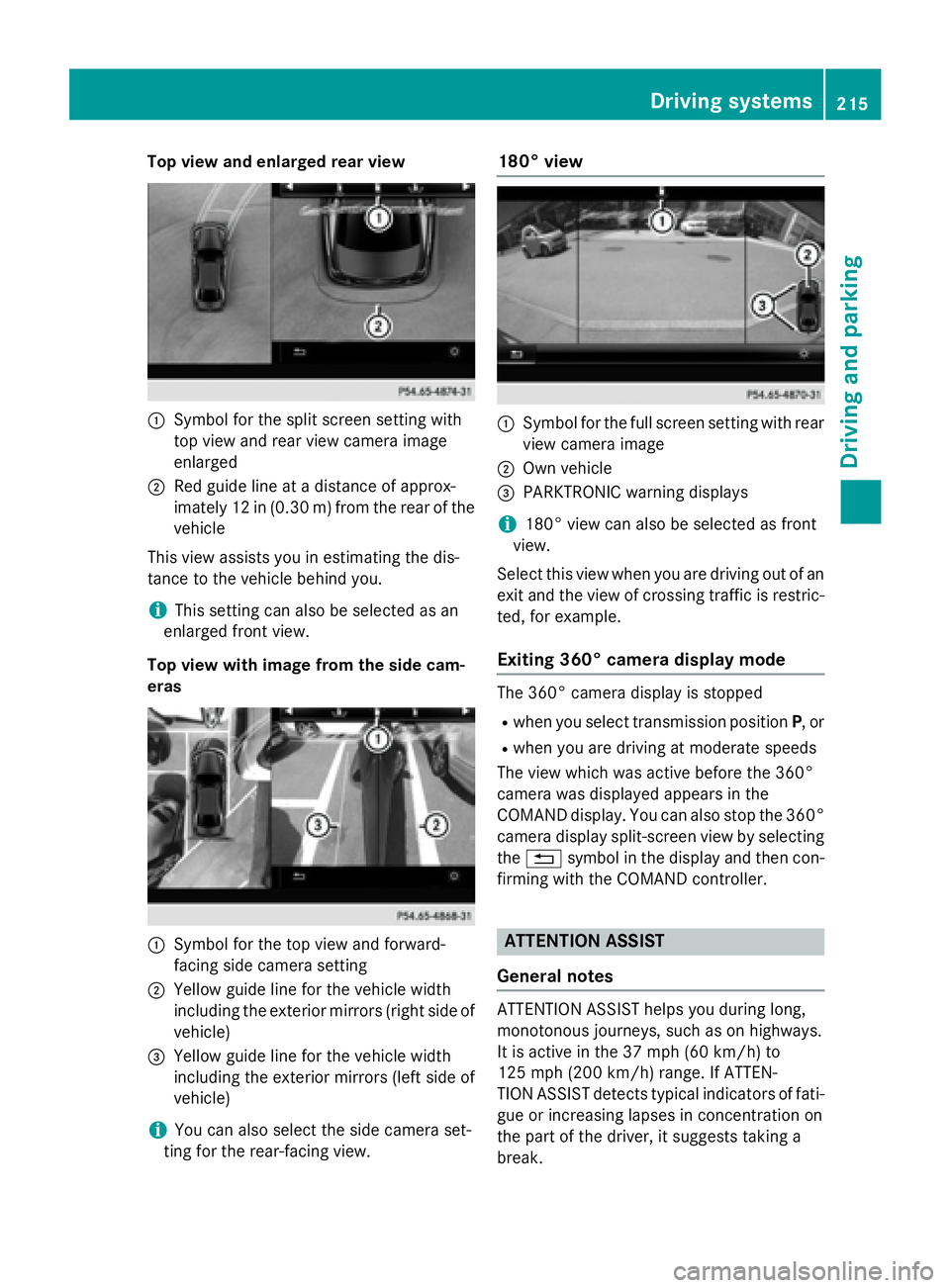
Top view and enlarged rear view
:Symbol for the split screen setting with
top view and rear view camera image
enlarged
;Red guide line at a distance of approx-
imately 12 in (0.30m) fromthe rear of the
vehicle
This view assists you in estimating the dis-
tance to the vehicle behind you.
iThis setting can also be selected as an
enlarged front view.
Top view with image from the side cam-
eras
:Symbol for the top view and forward-
facing side camera setting
;Yellow guide line for the vehicle width
including the exterior mirrors (right side of
vehicle)
=Yellow guide line for the vehicle width
including the exterior mirrors (left side of
vehicle)
iYou can also select the side camera set-
ting for the rear-facing view.
180° view
:Symbol for the full screen setting with rear
view camera image
;Own vehicle
=PARKTRONIC warning displays
i180° view can also be selected as front
view.
Select this view when you are driving out of an
exit and the view of crossing traffic is restric-
ted, for example.
Exiting 360° camera display mode
The 360° camera display is stopped
Rwhen you select transmission position P, or
Rwhen you are driving at moderate speeds
The view which was active before the 360°
camera was displayed appears in the
COMAND display. You can also stop the 360°
camera display split-screen view by selecting
the % symbol in the display and then con-
firming with the COMAND controller.
ATTENTION ASSIST
General notes
ATTENTION ASSIST helps you during long,
monotonous journeys, such as on highways.
It is active in the 37 mph (60 km/h) to
125 mph (200 km/h) range. If ATTEN-
TION ASSIST detects typical indicators of fati-
gue or increasing lapses in concentration on
the part of the driver, it suggests taking a
break.
Driving system s215
Driving an d parking
Z
Page 218 of 410
Important safety notes
ATTENTION ASSIST isonlyan aid to the
driv er.Itmight not always recogniz e fatigue
or increasing inattentiveness in time or fail to
recogniz e them at all. The system is not a
substitute for a well-rested and attentive
driv er.
The functionalit y of ATTENTION AS SIST is
restricted and warnings may bedelayed or
not occur at all:
Rifthe length of the journey isless than
appr oximately 30 minutes
Rifthe road cond ition ispoor, e.g. ifthe sur-
face isuneven or if there are potholes
Rifthere isa strong side wind
Rifyou have adopted a sporty driving style
wit h high cornering speeds or high rates of
acceleration
Rif you are predominantly driving slower
than 37 mph (60 km/h) or faster than
125 mph (200 km/h)
Rif you are driving with the active Steer
Assist of DI STRONIC PLUS
Rifthe time has been set incorrectly
Rin active driving situations, such as when
you change lanes or change your speed
The ATTENTION AS SISTtiredness assess-
ment isdeleted and restarted when continu-
ing the journey, if:
Ryou switch off the engine
Ryou take off your seat belt and open the
driver's door, e.g. for a change of drivers or
to take a break
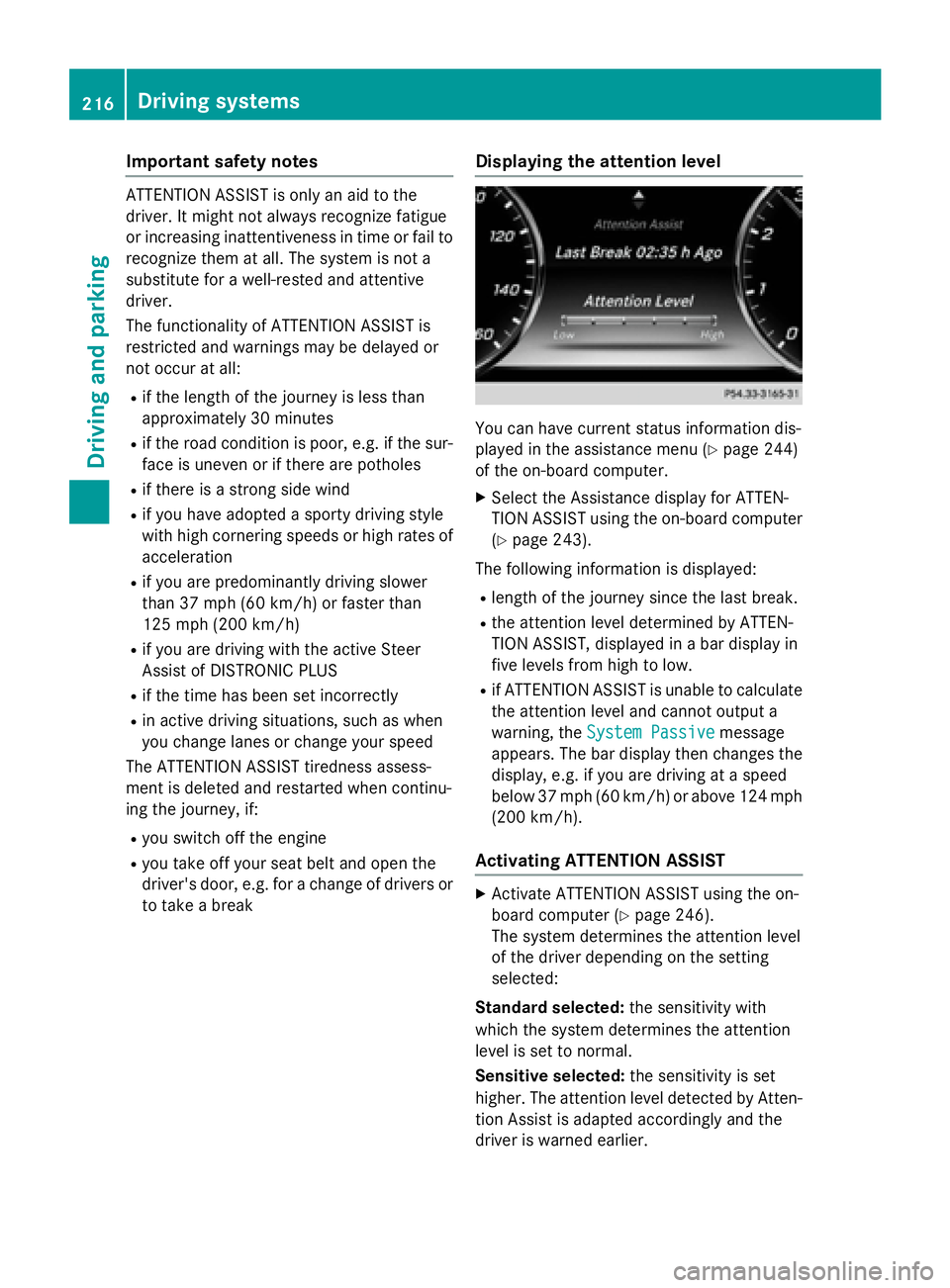
Displaying the attention level
You can have current status information dis-
played inthe assistance menu (
Ypage 244)
of the on-board computer.
XSe lect the Assistance display for ATTEN-
TION AS SISTusing the on-board computer
(
Ypage 243).
The following information is displayed:
Rlength of the journey since the last break.
Rthe attention level determined byATTEN-
TION AS SIST,disp layed ina bar display in
five levels from high to low.
Rif ATTENTION AS SIST isunableto calculate
the attention level and cannot output a
warning, the System Passive
message
appears. The bar display then changes the
display, e.g. ifyou are driving at a speed
below 37 mph (60 km/h)or above 124 mph
(200 km/h) .
Activating ATTENTION ASSIST
XActivateATTENTION ASSIST usin gth eon -
boar dcomputer (
Ypage 246).
The system determine sth eattention level
of th edriver depending on th e setting
selected:
Standar dselected: thesensitivit ywit h
whic hth esystem determine sth eattention
level is set to normal.
Sensit iveselected: thesensitivit yis set
higher. The attention level detecte dby Atten-
tion As sistis adapted accordingly and th e
driver is warned earlier .
216Driving systems
Driving and parking
Page 219 of 410
When ATTENTION ASSIST is deactivated, the
ésymbol appears in the multifunction
display in the assistance graphic display.
When ATTENTION ASSIST has been deactiva-
ted, it is automatically reactivated after the
engine has been stopped. The sensitivity
selected corresponds to the last selection
activated (standard/sensitive).
Warning in the multifunction display
If fatigue or increasing lapses in concentra-
tion are detected, a warning appears in the
multifunction display: Attention Assist:
Take a Break!
In addition to the message shown in the mul-
tifunction display, you will then hear a warn-
ing tone.
XIf necessary, take a break.
XConfirm the message by pressing the a
button on the steering wheel.
On long journeys, take regular breaks in good
time to allow yourself to rest properly. If you
do not take a break and ATTENTION ASSIST
continues to detect increasing lapses in con-
centration, you will be warned again after
15 minutes at the earliest. This will only hap-
pen if ATTENTION ASSIST still detects typical
indicators of fatigue or increasing lapses in
concentration.
If a warning is output in the multifunction dis-
play, COMAND performs a service station
search. You can select a service station and
navigation to this service station will then
begin. This function can be activated and
deactivated in COMAND.
Traffic Sign Assist
General notes
Traffic Sign Assist displays the maximum
speed permitted to the driver in the instru-
ment cluster. The data and general traffic reg-
ulations stored in the navigation system are
used to determine the current speed limit. As Traffic Sign Assist is a map-based system,
traffic signs put up temporarily (e.g. near
roadworks) are not detected.
If a traffic sign that is relevant to your vehicle
is passed, the display of the speed limits is
updated.
Traffic signs with a restriction indicated by an
additional sign (e.g. in wet conditions) are
also shown.
The traffic signs are only displayed with the
restrictions if:
Rthe regulation must be observed with the
restriction, or
RTraffic Sign Assist is unable to determine
whether the restriction applies
If Traffic Sign Assist is unable to determine a maximum permitted speed from any of the
available sources, no speed limit is displayed
in the instrument cluster either.
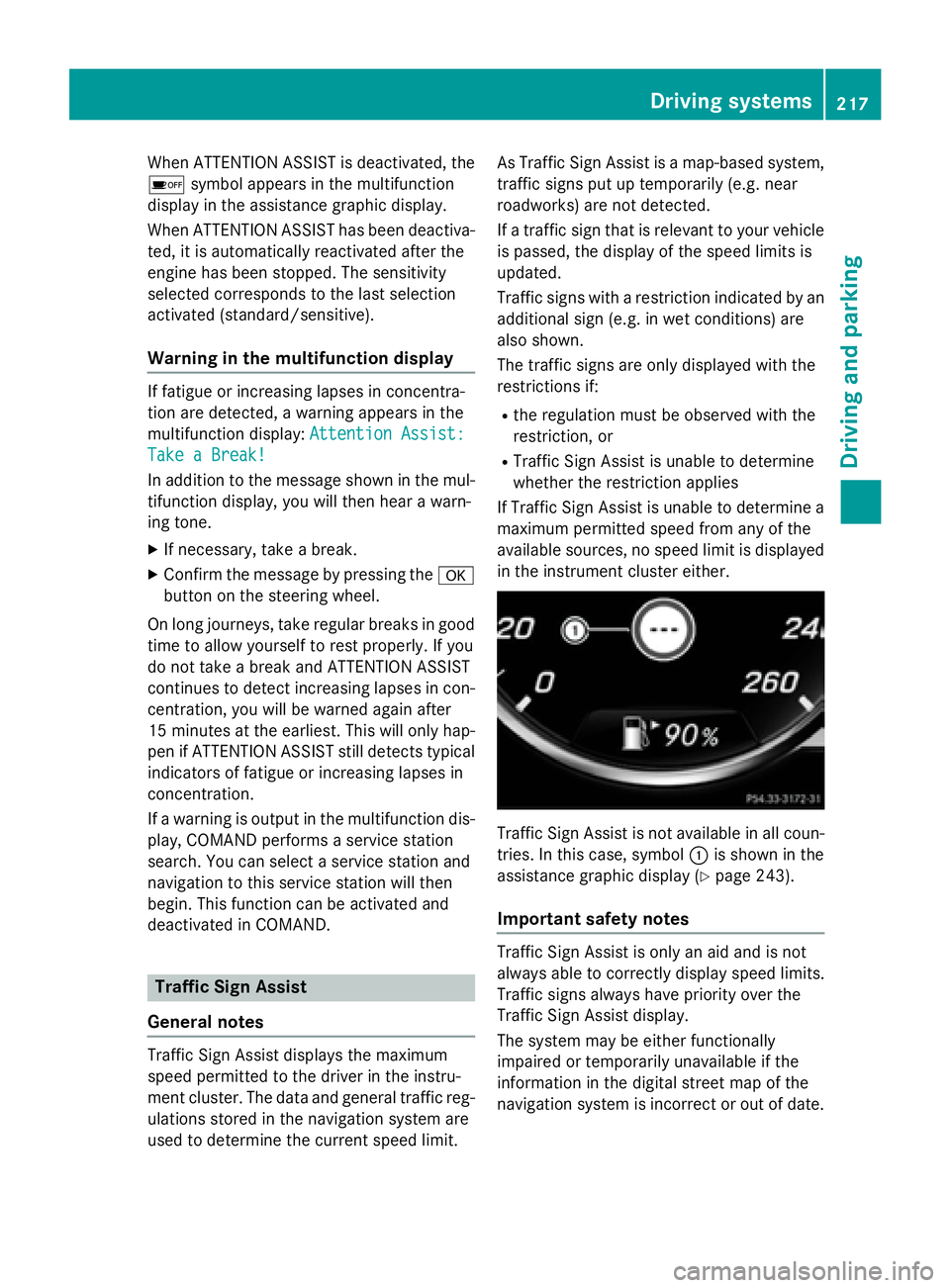
Traffic Sign Assist is not available in all coun-
tries. In this case, symbol :is shown in the
assistance graphic display (
Ypage 243).
Important safety notes
Traffic Sign Assist is only an aid and is not
always able to correctly display speed limits.
Traffic signs always have priority over the
Traffic Sign Assist display.
The system may be either functionally
impaired or temporarily unavailable if the
information in the digital street map of the
navigation system is incorrect or out of date.
Driving systems217
Driving and parking
Z
Page 220 of 410
Activating Traffic Sign Assist
XActivateth eTraffic Sig nAssis tdisplay
usin gth eon-board computer
(
Ypage 245).
If you hav eactivated th eTraffic Sig nAssis t
display in th eon-board computer, th etraffic
regulation s(speed limits and overtaking
restrictions) are displayed in th einstrumen t
cluste rfor fiv eseconds respectively. The
wrong-way warning and th etraffic sign dis-
play for spee dlimits and overtaking restric-
tion sremain active eve nwhen th edisplay has
been deactivated.
Instru ment cluster display
Displaying th eassistance graphic
XCall up th eassistanc egraphic sdisplay
function usin gth eon-board computer
(
Ypage 243).
XSelec tth eTraffic Sig nAssis tdisplay.
Detected traffic sign sare displayed in th e
instrumen tcluster.
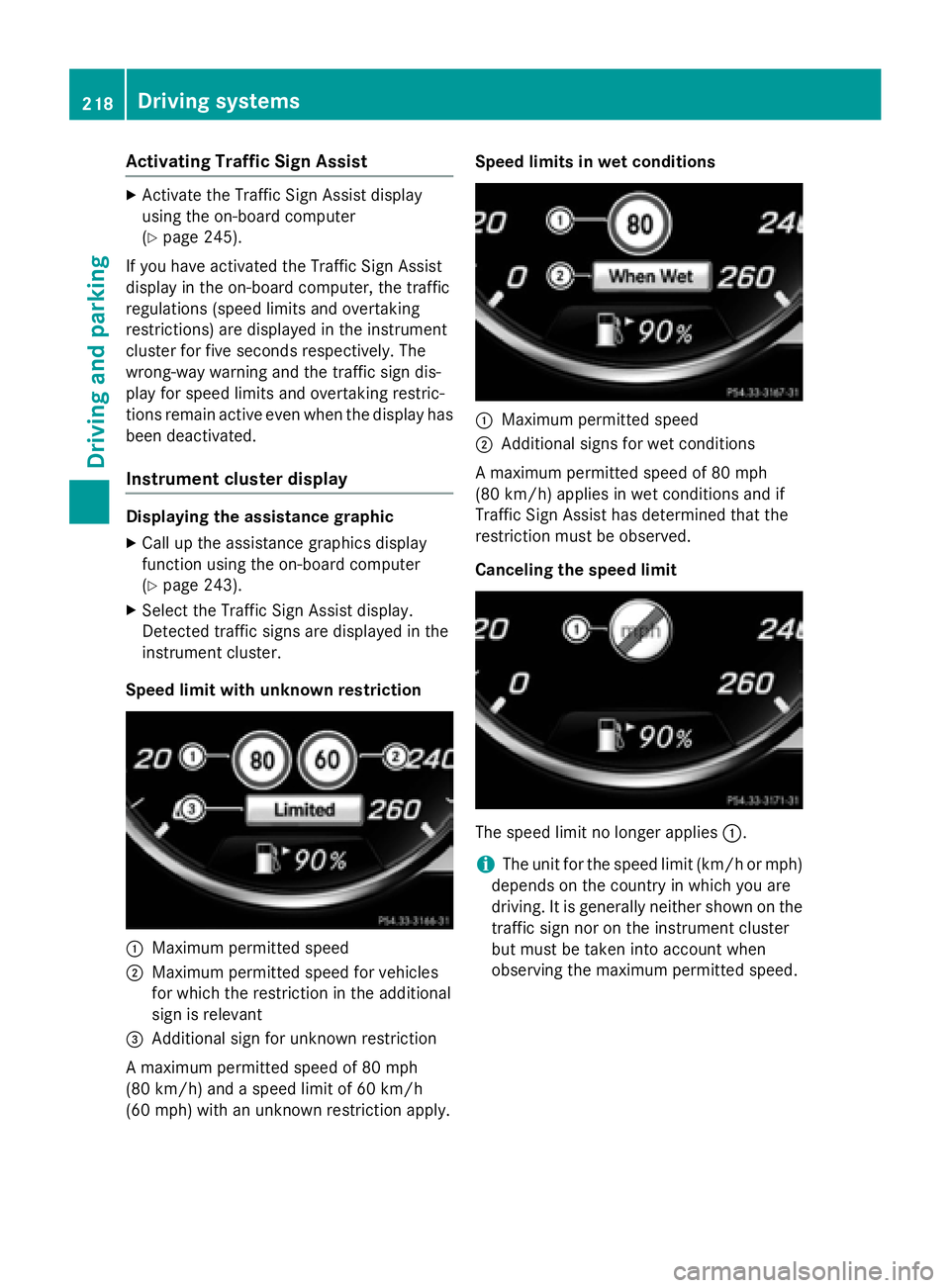
Speed limit wit hunknown restriction
:Maximum permitte dspee d
;Maximum permitte dspee dfor vehicles
for whic hth erestriction in th eadditional
sign is relevan t
=Additional sign for unknown restriction
A maximum permitte dspee dof 80 mph
(80 km/h) and aspee dlimi tof 60 km/h
(60 mph )wit han unknown restriction apply. Speed limit
sin wet conditions
:Maximum permitte dspee d
;Additional sign sfor wet condition s
A maximum permitte dspee dof 80 mph
(80 km/h) applie sin wet condition sand if
Traffic Sig nAssis thas determine dthat th e
restriction mus tbe observed.
Canceling th espeed limit
The spee dlimi tno longer applie s:.
iThe uni tfor th espee dlimi t(km/ hor mph )
depend son th ecountry in whic hyou are
driving .It is generally neither shown on the
traffic sign no ron th einstrumen tcluste r
but mus tbe taken int oaccoun twhen
observing th emaximum permitte dspeed.
218Driving systems
Driving and parking
Page 224 of 410
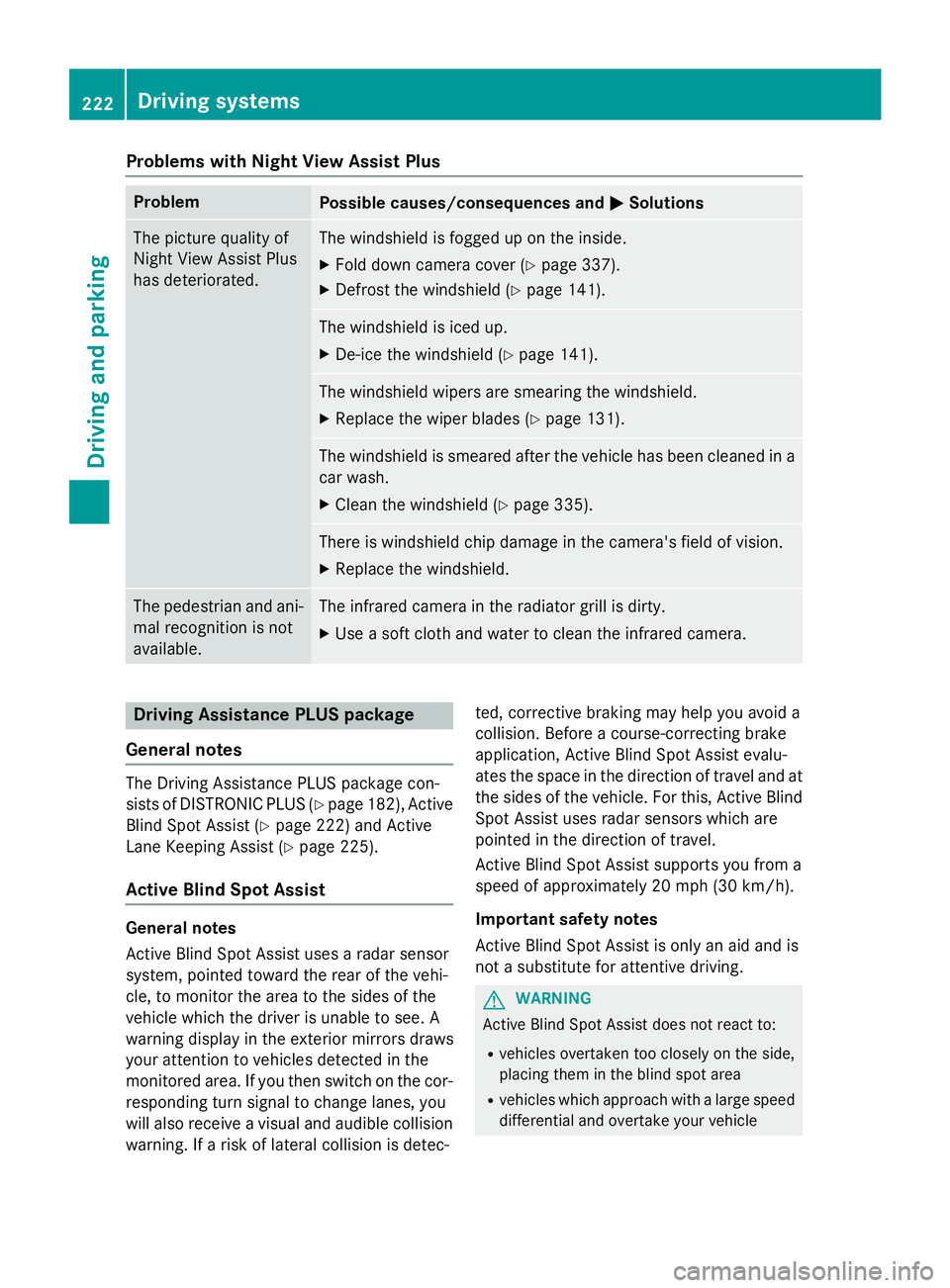
Problems with Night View Assist Plus
ProblemPossible causes/consequences andMSolutions
The picture quality of
Night View Assist Plus
has deteriorated.The windshield is fogged up on the inside.
XFold down camera cover (Ypage 337).
XDefrost the windshield (Ypage 141).
The windshield is iced up.
XDe-ice the windshield (Ypage 141).
The windshield wipers are smearing the windshield.
XReplace the wiper blades (Ypage 131).
The windshield is smeared after the vehicle has been cleaned in a
car wash.
XClean the windshield (Ypage 335).
There is windshield chip damage in the camera's field of vision.
XReplace the windshield.
The pedestrian and ani-
mal recognition is not
available.The infrared camera in the radiator grill is dirty.
XUse a soft cloth and water to clean the infrared camera.
Driving Assistance PLUS package
General notes
The Driving Assistance PLUS package con-
sists of DISTRONIC PLUS (
Ypage 182), Active
Blind Spot Assist (
Ypage 222) and Active
Lane Keeping Assist (
Ypage 225).
Active Blind Spot Assist
General notes
Active Blind Spot Assist uses a radar sensor
system, pointed toward the rear of the vehi-
cle, to monitor the area to the sides of the
vehicle which the driver is unable to see. A
warning display in the exterior mirrors draws
your attention to vehicles detected in the
monitored area. If you then switch on the cor-
responding turn signal to change lanes, you
will also receive a visual and audible collision
warning. If a risk of lateral collision is detec- ted, corrective braking may help you avoid a
collision. Before a course-correcting brake
application, Active Blind Spot Assist evalu-
ates the space in the direction of travel and at
the sides of the vehicle. For this, Active Blind
Spot Assist uses radar sensors which are
pointed in the direction of travel.
Active Blind Spot Assist supports you from a
speed of approximately 20 mph (30 km/h)
.
Important safety notes
Active Blind Spot Assist is only an aid and is
not a substitute for attentive driving.
GWARNING
Active Blind Spot Assist does not react to:
Rvehicles overtaken too closely on the side,
placing them in the blind spot area
Rvehicles which approach with a large speed
differential and overtake your vehicle
222Driving systems
Driving and parking
Page 225 of 410
As a result, Active Blind Spot Assist may nei-
ther give warnings nor intervene in such sit-
uations. There is a risk of an accident.
Always observe the traffic conditions care-
fully, and maintain a safe lateral distance.
iUSA only: This device has been approved
by the FCC as a "Vehicular Radar System".
The radar sensor is intended for use in an
automotive radar system only. Removal,
tampering, or altering of the device will void
any warranties, and is not permitted by the
FCC. Do not tamper with, alter, or use in
any non-approved way.
Any unauthorized modification to this
device could void the user's authority to
operate the equipment.
iCanada only: This device complies with
RSS-210 of Industry Canada. Operation is
subject to the following two conditions:
1. This device may not cause harmful inter-
ference, and
2. This device must accept any interference received, including interference that may
cause undesired operation of the device.
Removal, tampering, or altering of the
device will void any warranties, and is not
permitted. Do not tamper with, alter, or use
in any non-approved way.
Any unauthorized modification to this
device could void the user's authority to
operate the equipment.
Radar se nso
rs
The Active Blind Spot Assist radar sensors are
integrated into the front and rear bumpers
and behind a cover in the radiator trim. Make
sure that the bumpers and the cover in the
radiator grill are free of dirt, ice or slush. The rear sensors must not be covered, e.g. by
bicycle racks or overhanging loads. Following
a severe impact or in the event of damage to
the bumpers, have the function of the radar
sensors checked at a qualified specialist
workshop. Active Blind Spot Assist may oth-
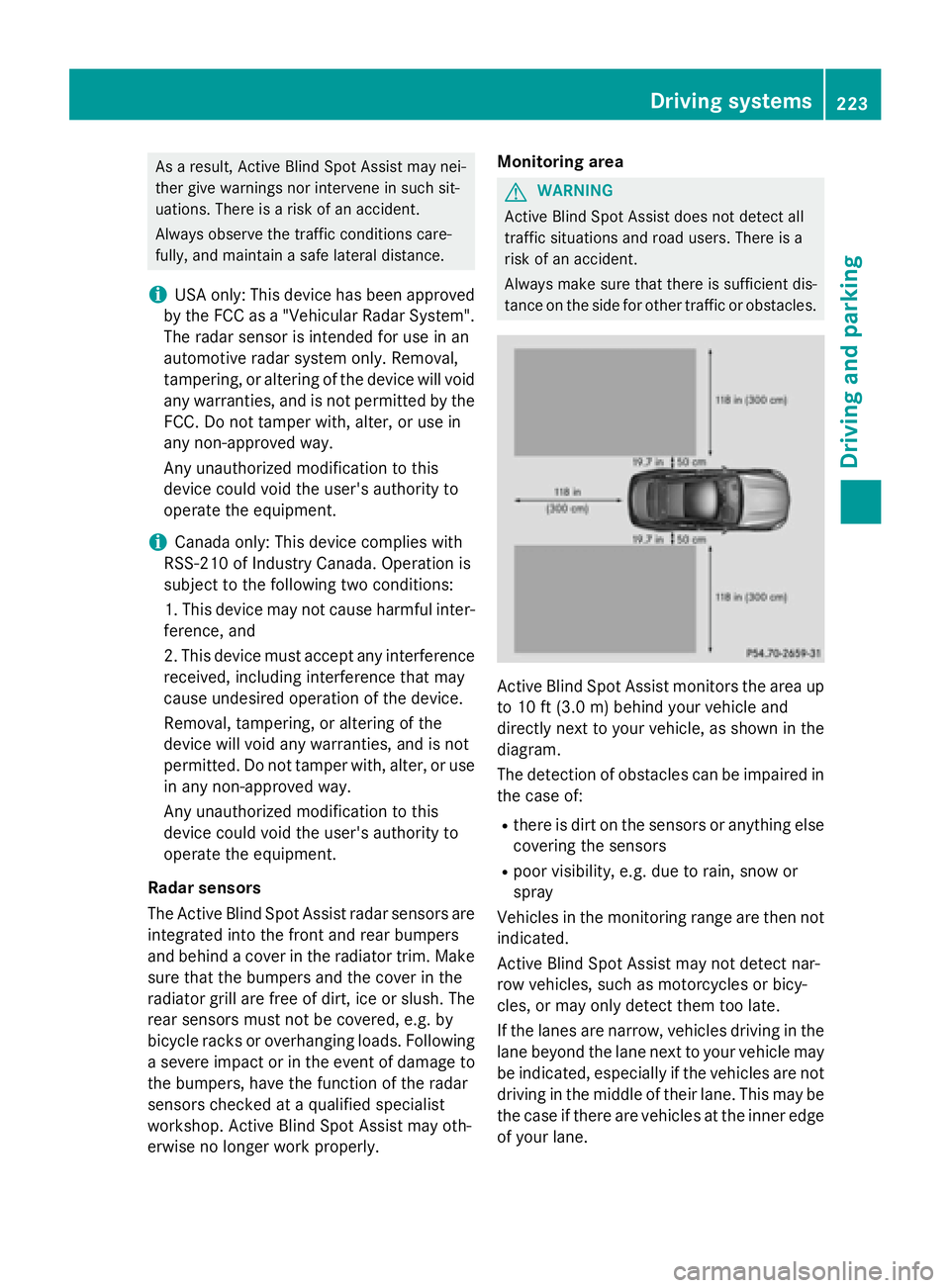
erwise no longer work properly. Monitoring area
GWARNING
Active Blind Spot Assist does not detect all
traffic situations and road users. There is a
risk of an accident.
Always make sure that there is sufficient dis-
tance on the side for other traffic or obstacles.
Active Blind Spot Assist monitors the area up
to 10 ft (3.0 m) behind your vehicle and
directly next to your vehicle, as shown in the
diagram.
The detection of obstacles can be impaired in the case of:
Rthere is dirt on the sensors or anything else
covering the sensors
Rpoor visibility, e.g. due to rain, snow or
spray
Vehicles in the monitoring range are then not
indicated.
Active Blind Spot Assist may not detect nar-
row vehicles, such as motorcycles or bicy-
cles, or may only detect them too late.
If the lanes are narrow, vehicles driving in the
lane beyond the lane next to your vehicle may be indicated, especially if the vehicles are not
driving in the middle of their lane. This may be
the case if there are vehicles at the inner edge of your lane.
Driving systems223
Driving an d parking
Z
Page 226 of 410
Due to the nature of the system:
Rwarnings may be issued in error when driv-ing close to crash barriers or similar solid
lane borders.
Rwarnings may be interrupted when driving
alongside particularly long vehicles, e.g.
trucks, for a prolonged time.
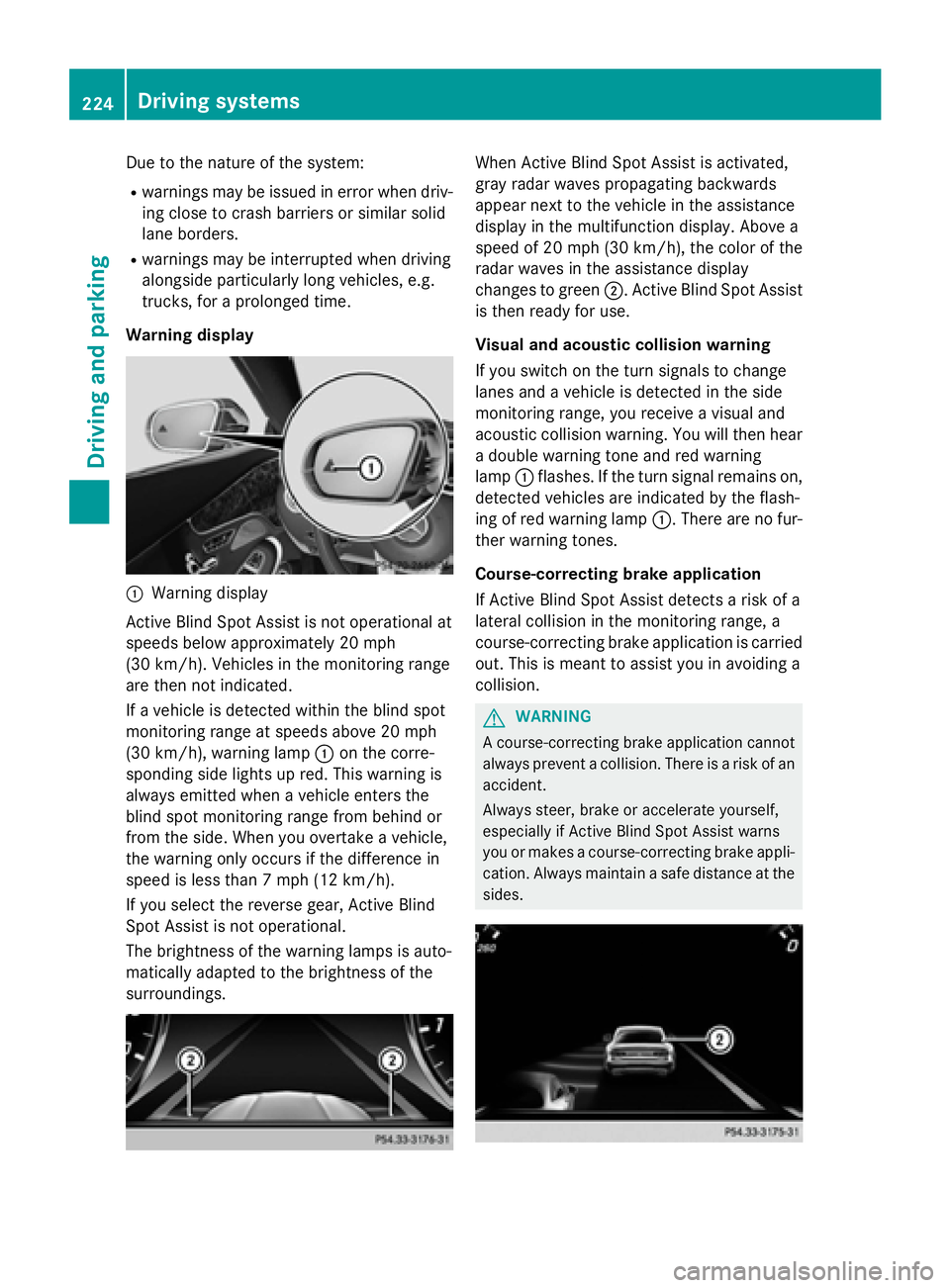
Warning display
:Warning display
Active Blind Spot Assist is not operational at
speeds below approximately 20 mph
(30 km/h). Vehicles in the monitoring range
are then not indicated.
If a vehicle is detected within the blind spot
monitoring range at speeds above 20 mph
(30 km/h), warning lamp :on the corre-
sponding side lights up red. This warning is
always emitted when a vehicle enters the
blind spot monitoring range from behind or
from the side. When you overtake a vehicle,
the warning only occurs if the difference in
speed is less than 7 mph (12 km/h).
If you select the reverse gear, Active Blind
Spot Assist is not operational.
The brightness of the warning lamps is auto-
matically adapted to the brightness of the
surroundings.
When Active Blind Spot Assist is activated,
gray radar waves propagating backwards
appear next to the vehicle in the assistance
display in the multifunction display. Above a
speed of 20 mph (30 km/h), the color of the
radar waves in the assistance display
changes to green ;. Active Blind Spot Assist
is then ready for use.
Visual and acoustic collision warning
If you switch on the turn signals to change
lanes and a vehicle is detected in the side
monitoring range, you receive a visual and
acoustic collision warning. You will then hear
a double warning tone and red warning
lamp :flashes. If the turn signal remains on,
detected vehicles are indicated by the flash-
ing of red warning lamp :. There are no fur-
ther warning tones.
Course-correcting brake application
If Active Blind Spot Assist detects a risk of a
lateral collision in the monitoring range, a
course-correcting brake application is carried
out. This is meant to assist you in avoiding a
collision.
GWARNING
A course-correcting brake application cannot always prevent a collision. There is a risk of an
accident.
Always steer, brake or accelerate yourself,
especially if Active Blind Spot Assist warns
you or makes a course-correcting brake appli-
cation. Always maintain a safe distance at the
sides.
224Driving system s
Driving an d parking
Page 227 of 410
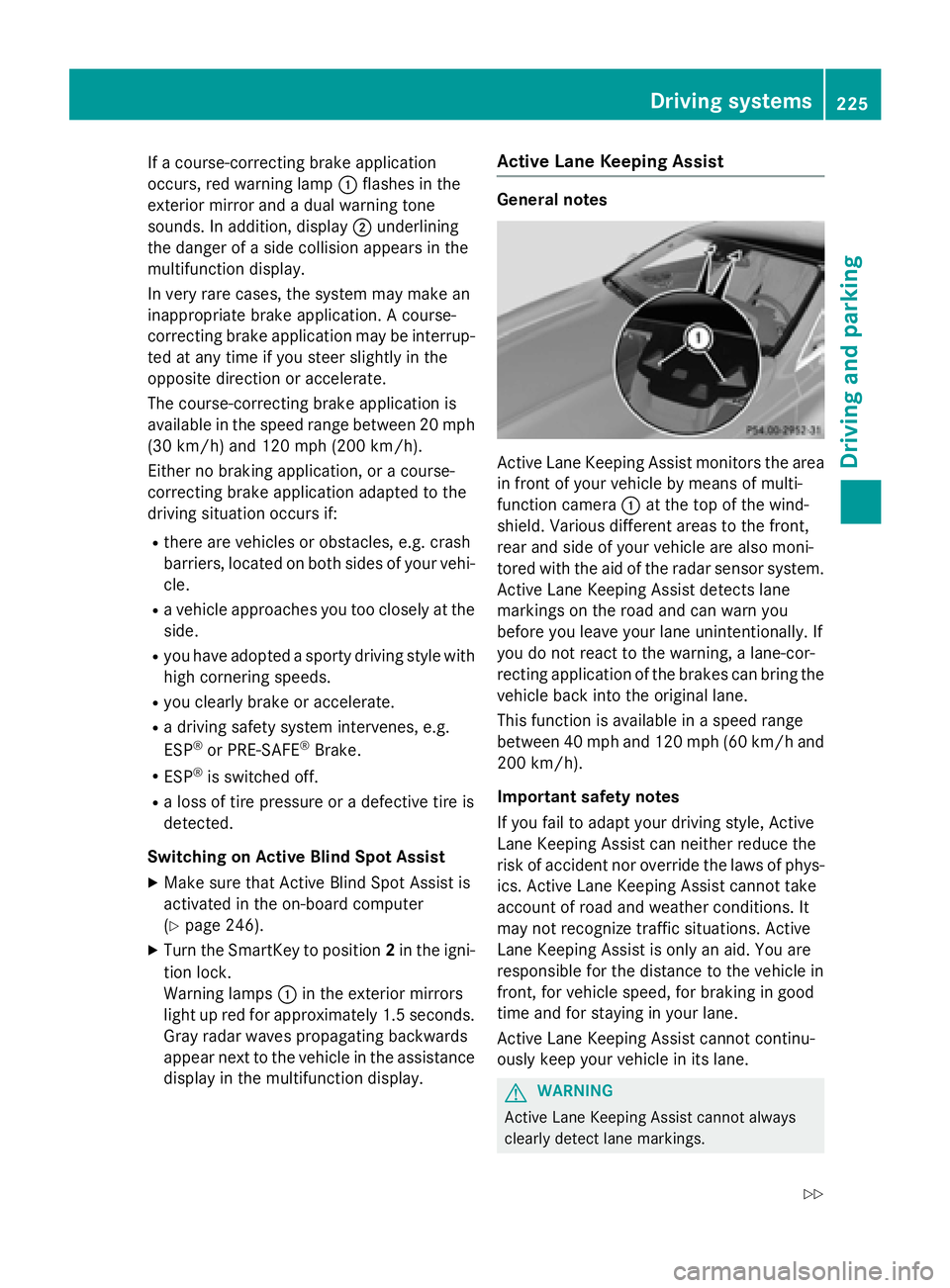
If a course-correcting brake application
occurs, red warning lamp:flashes in the
exterior mirror and a dual warning tone
sounds. In addition, display ;underlining
the danger of a side collision appears in the
multifunction display.
In very rare cases, the system may make an
inappropriate brake application. A course-
correcting brake application may be interrup-
ted at any time if you steer slightly in the
opposite direction or accelerate.
The course-correcting brake application is
available in the speed range between 20 mph (30 km/h) and 120 mph (200 km/h).
Either no braking application, or a course-
correcting brake application adapted to the
driving situation occurs if:
Rthere are vehicles or obstacles, e.g. crash
barriers, located on both sides of your vehi-
cle.
Ra vehicle approaches you too closely at the
side.
Ryou have adopted a sporty driving style with
high cornering speeds.
Ryou clearly brake or accelerate.
Ra driving safety system intervenes, e.g.
ESP®or PRE-SAFE®Brake.
RESP®is switched off.
Ra loss of tire pressure or a defective tire is
detected.
Switching on Active Blind Spot Assist
XMake sure that Active Blind Spot Assist is
activated in the on-board computer
(
Ypage 246).
XTurn the SmartKey to position 2in the igni-
tion lock.
Warning lamps :in the exterior mirrors
light up red for approximately 1.5 seconds. Gray radar waves propagating backwards
appear next to the vehicle in the assistance
display in the multifunction display.
Active Lane Keeping Assist
General notes
Active Lane Keeping Assist monitors the area
in front of your vehicle by means of multi-
function camera :at the top of the wind-
shield. Various different areas to the front,
rear and side of your vehicle are also moni-
tored with the aid of the radar sensor system.
Active Lane Keeping Assist detects lane
markings on the road and can warn you
before you leave your lane unintentionally. If
you do not react to the warning, a lane-cor-
recting application of the brakes can bring the
vehicle back into the original lane.
This function is available in a speed range
between 40 mph and 120 mph (60 km/h and 200 km/h).
Important safety notes
If you fail to adapt your driving style, Active
Lane Keeping Assist can neither reduce the
risk of accident nor override the laws of phys-
ics. Active Lane Keeping Assist cannot take
account of road and weather conditions. It
may not recognize traffic situations. Active
Lane Keeping Assist is only an aid. You are
responsible for the distance to the vehicle in
front, for vehicle speed, for braking in good
time and for staying in your lane.
Active Lane Keeping Assist cannot continu-
ously keep your vehicle in its lane.
GWARNING
Active Lane Keeping Assist cannot always
clearly detect lane markings.
Driving systems225
Driving and parking
Z
Page 228 of 410
In such cases, Active Lane Keeping Assist
can:
Rgive an unnecessary warning and then
make a course-correcting brake application
to the vehicle
Rnot give a warning or intervene
There is a risk of an accident.
Always pay particular attention to the traffic
situation and keep within the lane, especially
if Active Lane Keeping Assist alerts you. Ter-
minate the intervention in a non-critical driv-
ing situation.
The system may be impaired or may not func-
tion if:
Rthere is poor visibility, e.g. due to insuffi-
cient illumination of the road, or due to
snow, rain, fog or spray
Rthere is glare, e.g. from oncoming traffic,
the sun or reflections (e.g. when the road
surface is wet)
Rthe windshield is dirty, fogged up, damaged or covered, for instance by a sticker, in the
vicinity of the camera
Rthe radar sensors in the front or rear bump-
ers or the radiator trim are dirty, e.g.
obscured by snow
Rthere are no, several or unclear lane mark- ings for a lane, e.g. in areas with road con-
struction work
Rthe lane markings are worn away, dark or
covered up, e.g. by dirt or snow
Rthe distance to the vehicle in front is too
small and the lane markings thus cannot be
detected
Rthe lane markings change quickly, e.g.
lanes branch off, cross one another or
merge
Rthe road is narrow and winding
Rthere are strong shadows cast on the road
If no vehicle is detected in the adjacent lane
and broken lane markings are detected, no
lane-correcting brake application is made. Warning vibration in the steering wheel
A warning may be given if a front wheel
passes over a lane marking. It will warn you by
means of intermittent vibration in the steer-
ing wheel for up to 1.5 seconds.
In order that you are warned only when nec-
essary and in good time if you cross the lane
marking, the system recognizes certain con-
ditions and warns you accordingly.
The warning vibration occurs earlier if:
Ryou approach the outer lane marking on a
bend.
Rthe road has very wide lanes, e.g. a high-
way.
Rthe system recognizes solid lane markings.
The warning vibration occurs later if:
Rthe road has narrow lanes.
Ryou cut the corner on a bend.
Lane-correcting brake application
If you leave your lane, under certain circum-
stances the vehicle will brake briefly on one
side. This is meant to assist you in bringing
the vehicle back to the original lane.
GWARNING
A lane-correcting brake application cannot
always bring the vehicle back into the original lane. There is a risk of an accident.
Always steer, brake or accelerate yourself,
especially if Active Lane Keeping Assist warns
you or makes a lane-correcting brake appli-
cation.
GWARNING
Active Lane Keeping Assist does not detect
traffic conditions or road users. In very rare
cases, the system may make an inappropriate brake application, e.g. after intentionally driv-
ing over a solid lane marking. There is a risk of
an accident.
An inappropriate brake application may be
interrupted at any time if you steer slightly in
the opposite direction. Always make sure that
226Driving systems
Driving and parking
Page 229 of 410
there is sufficient distance on the side for
other traffic or obstacles.
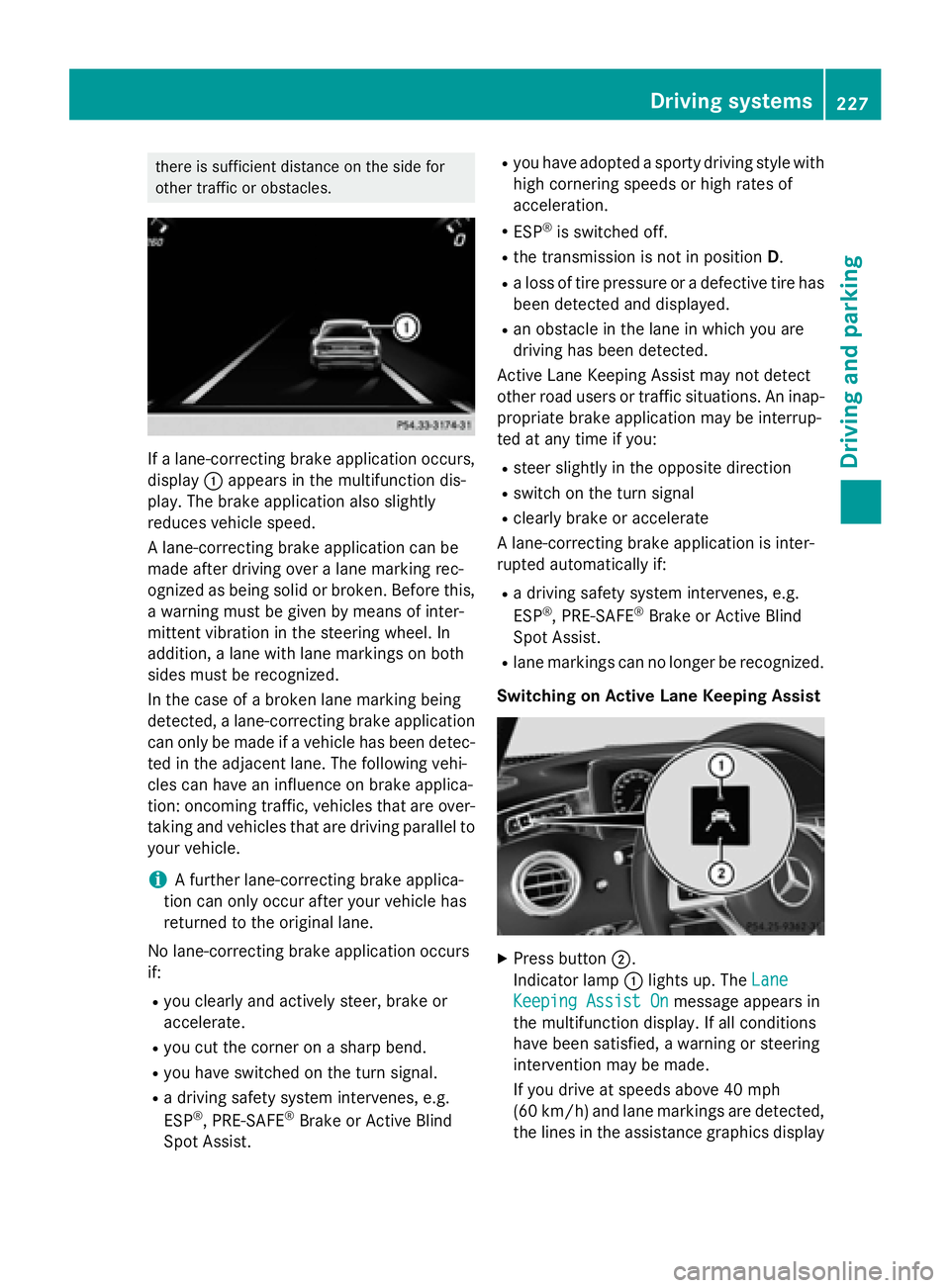
If a lane-correcting brake application occurs,
display:appears in the multifunction dis-
play. The brake application also slightly
reduces vehicle speed.
A lane-correcting brake application can be
made after driving over a lane marking rec-
ognized as being solid or broken. Before this,
a warning must be given by means of inter-
mittent vibration in the steering wheel. In
addition, a lane with lane markings on both
sides must be recognized.
In the case of a broken lane marking being
detected, a lane-correcting brake application
can only be made if a vehicle has been detec-
ted in the adjacent lane. The following vehi-
cles can have an influence on brake applica-
tion: oncoming traffic, vehicles that are over-
taking and vehicles that are driving parallel to
your vehicle.
iA further lane-correcting brake applica-
tion can only occur after your vehicle has
returned to the original lane.
No lane-correcting brake application occurs
if:
Ryou clearly and actively steer, brake or
accelerate.
Ryou cut the corner on a sharp bend.
Ryou have switched on the turn signal.
Ra driving safety system intervenes, e.g.
ESP®, PRE-SAFE®Brake or Active Blind
Spot Assist.
Ryou have adopted a sporty driving style with
high cornering speeds or high rates of
acceleration.
RESP®is switched off.
Rthe transmission is not in position D.
Ra loss of tire pressure or a defective tire has
been detected and displayed.
Ran obstacle in the lane in which you are
driving has been detected.
Active Lane Keeping Assist may not detect
other road users or traffic situations. An inap-
propriate brake application may be interrup-
ted at any time if you:
Rsteer slightly in the opposite direction
Rswitch on the turn signal
Rclearly brake or accelerate
A lane-correcting brake application is inter-
rupted automatically if:
Ra driving safety system intervenes, e.g.
ESP®, PRE-SAFE®Brake or Active Blind
Spot Assist.
Rlane markings can no longer be recognized.
Switching on Active Lane Keeping Assist
XPress button ;.
Indicator lamp :lights up. The Lane
Keeping Assist Onmessage appears in
the multifunction display. If all conditions
have been satisfied, a warning or steering
intervention may be made.
If you drive at speeds above 40 mph
(60 km/h) and lane markings are detected, the lines in the assistance graphics display
Driving system s227
Driving an d parking
Z