display MERCEDES-BENZ S-COUPE 2016 Owner's Manual
[x] Cancel search | Manufacturer: MERCEDES-BENZ, Model Year: 2016, Model line: S-COUPE, Model: MERCEDES-BENZ S-COUPE 2016Pages: 410, PDF Size: 8.62 MB
Page 35 of 410
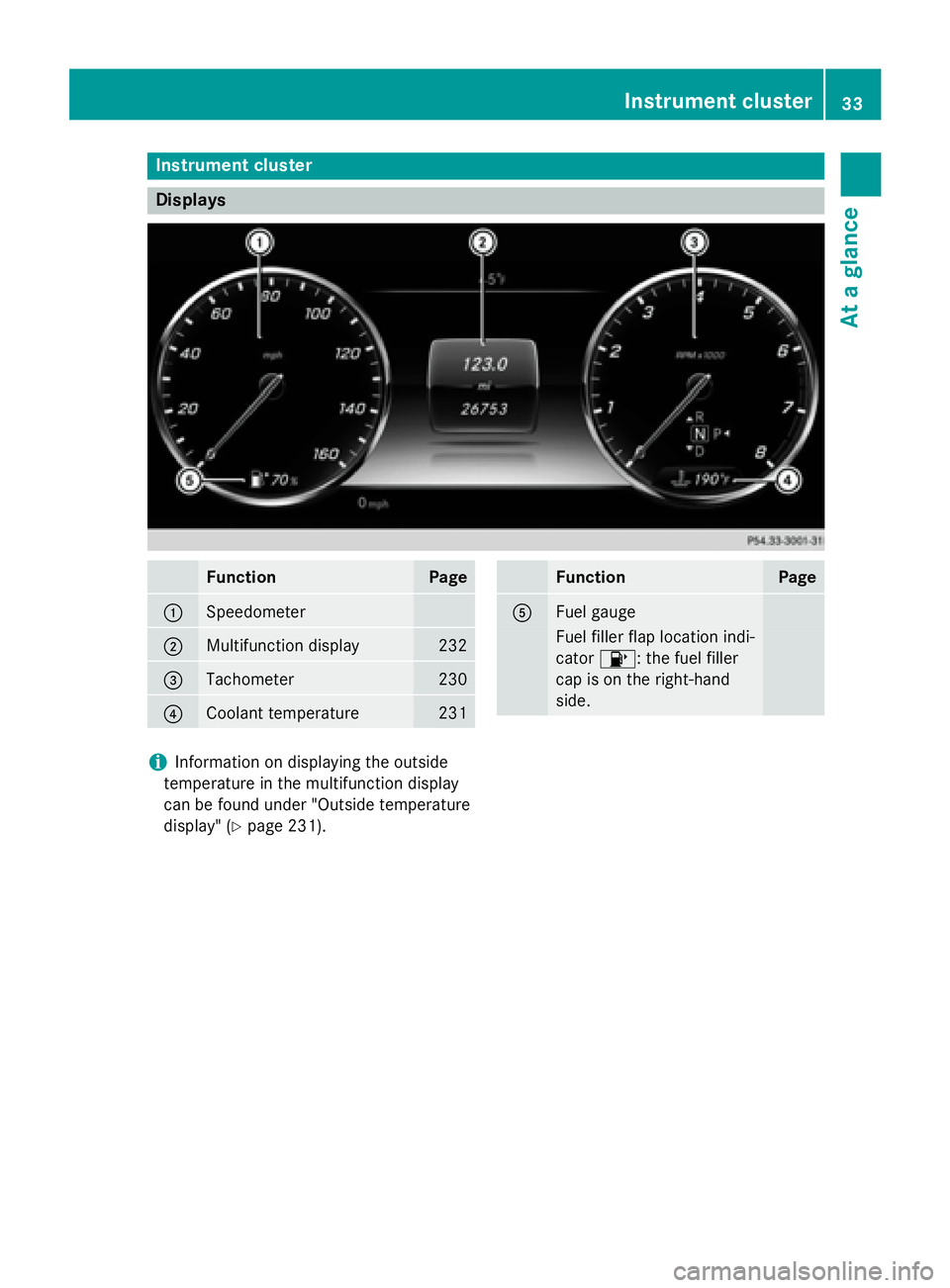
Instrument cluster
Displays
FunctionPage
:Speedometer
;Multifunction display232
=Tachometer230
?Coolant temperature231
FunctionPage
AFuel gauge
Fuel filler flap location ind i-
cator 8: the fuel filler
cap ison the right-hand
side.
iIn formation on displaying the outside
temperature inthe multifunction display
can befound under "Outside temperature
disp lay" (
Ypage 231).
Instrument cluster33
At a glance
Page 37 of 410
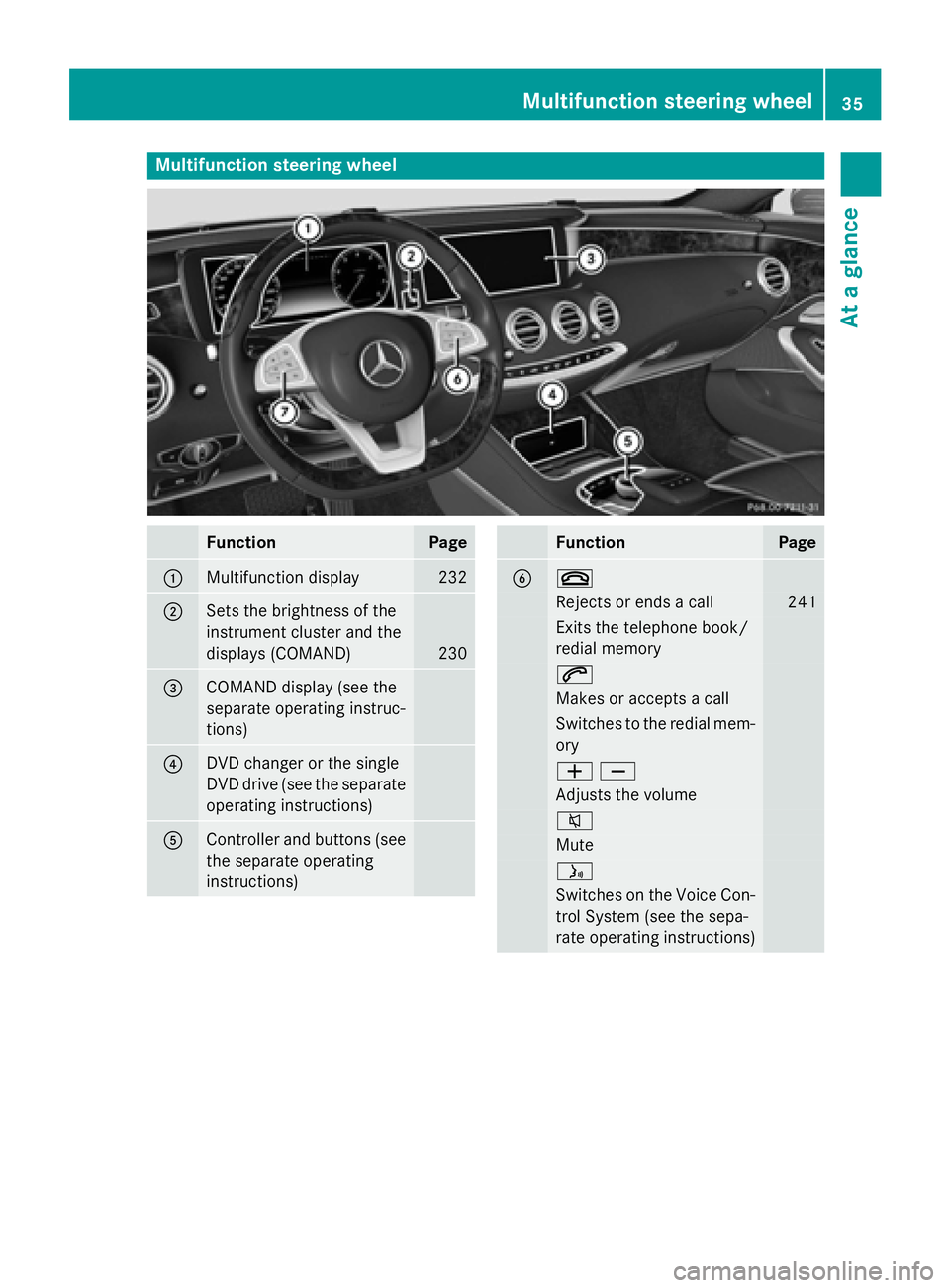
Multifunction steering wheel
FunctionPage
:Multifunction display232
;Sets the brightness of the
instrument cluster and the
displays (COMAND)
230
=COMAND display (see the
separate operating instruc-
tions)
?DVD changer or the single
DVD drive (see the separate
operating instructions)
AController and buttons (see
the separate operating
instructions)
FunctionPage
B~
Rejects or ends a call241
Exits the telephone book/
redial memory
6
Makes or accepts a call
Switches to the redial mem-
ory
WX
Adjusts the volume
8
Mute
ó
Switches on the Voice Con-
trol System (see the sepa-
rate operating instructions)
Multifunction steering wheel35
At a glance
Page 38 of 410
FunctionPage
Cò
Opens the menu list
9:
Selects a menu or submenu
or scrolls through lists
231
a
Confirms a selection231
Hides display messages251
%
Back231
ñ
Switches off the Voice Con-
trol System (see the sepa-
rate operating instructions)
36Multifunction steering wheel
At a glance
Page 47 of 410
Important safety notes
GWARNING
Modification sto th erestrain tsystem may
caus eit to no longer wor kas intended. The
restrain tsystem may then no tperfor mits
intended protective function and may fail in an
acciden tor trigge runexpectedly, for example.
This poses an increased ris kof injury or eve n
fatal injury.
Never modify part sof th erestrain tsystem.
Never tamper wit hth ewiring, th eelectronic
component sor their software.
If it is necessar yto modify an air bag system to
accommodat e aperson wit hdisabilities, con-
tac tan authorize dMercedes-Ben zCente rfor
details. US Aonly: for further information con-
tac tour Custome rAssistanc eCente rat
1-800-FOR-MERCedes (1 ‑80 0‑3 67‑6372).
Restraint system warning lamp
The functions of the restraint system are
checked after the ignition isswitched on and
at regular intervals while the engine is run-
ning. Therefore, malfunctions can bedetec-
ted ingood time.
The 6 restraint system warning lamp in
the instrument cluster lights up when the igni-
tion is swit ched on. Itgoes out no later than a
few seconds after the vehicle is started. The
components of the restraint system are in
operational readiness.
A malfunction has occurred if the 6
restraint system warning lamp:
Rdoes not light up after the ignition is
swit ched on
Rdoes not go out after a few seconds with
the engine running
Rligh ts up again while the engine is running
GWARNIN G
If restrain tsystem is malfunctioning ,restrain t
system component smay be triggered unin -
tentionally or might no tbe triggered at all in
th eevent of an acciden twit h a high rat eof
vehicl edeceleration .This can affec tth eEmer-
gency Tensioning Devic eor air bag, for exam-
ple. This poses an increased ris kof injury or
eve nfatal injury.
Hav eth erestrain tsystem checke dand
repaire din aqualified specialist workshop as
soo nas possible .
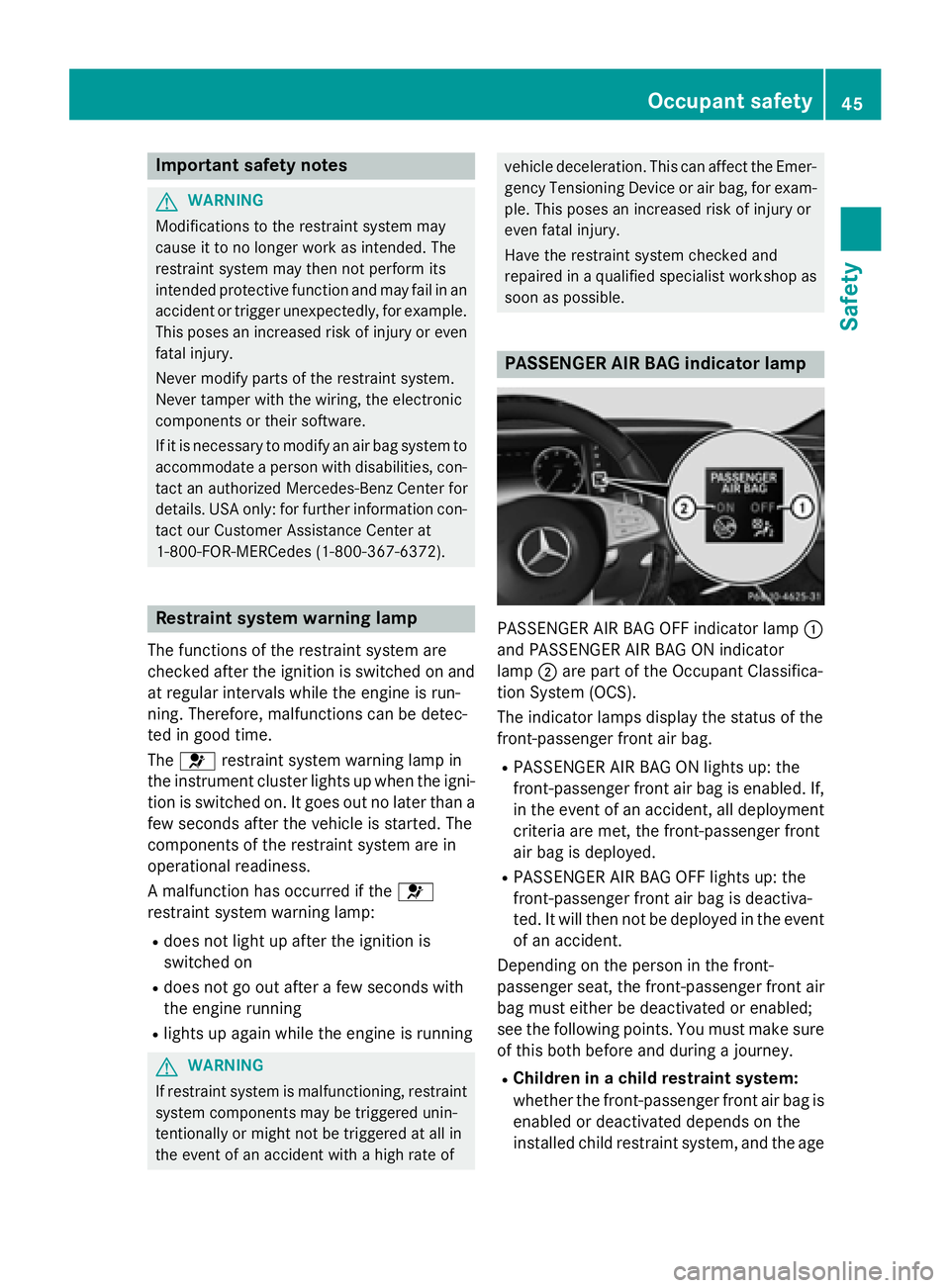
PASSENGER AIR BAG indicator lamp
PASSENGER AIR BAG OFF indicator lamp :
and PASS ENGER AIR BAG ON indicator
lamp ;are part of the Occupant Classific a-
tion System (OCS).
The indicator lamps display the status of the
front-passenger front air bag.
RPASS ENGER AIR BAG ON lights up: the
front-passenger front air bag isenabled. If,
in the event of an acc ident, all deplo yment
cr iteria are met, the front-passenger front
air bag is deplo yed.
RPASSENGER AIR BAG OFF lights up: the
front-passenger front air bag isdeactiva-
te d. It will then not be deployedinthe event
of an accident.
Depending on the person inthe front-
passenger seat, the front-passenger front air
bag must either bedeactivated or enabled;
see the following points. You must make sure
of th isboth before and during a journey.
RChildren in a child res traint system:
whether the front-passenger front air bag is
enabled or deactivated depends on the
installed ch ildrestraint system, and the age
Occupant safety45
Safety
Z
Page 56 of 410
Prerequisite
To be classified correctly, the front passenger
must sit:
Rwith the seat belt fastened correctly
Rin an almost upright position with their
back against the seat backrest
Rwith their feet resting on the floor, if possi-
ble
If the front passenger does not observe these
conditions, OCS may produce a false classi-
fication, e.g. because the front passenger:
Rtransfers their weight by supporting them-
selves on a vehicle armrest
Rsits in such a way that their weight is raised from the seat cushion
If it is absolutely necessary to install a child
restraint system on the front-passenger seat,
be sure to observe the correct positioning of
the child restraint system. Never place
objects under or behind the child restraint
system, e.g. cushions. Fully retract the seat
cushion length. The entire base of the child
restraint system must always rest on the seat
cushion of the front-passenger seat. The
backrest of the forward-facing child restraint
system must lie as flat as possible against the
backrest of the front-passenger seat.
The child restraint system must not touch the
roof or be subjected to a load by the head
restraint. Adjust the angle of the seat back-
rest and the head restraint position accord-
ingly.
Only then can OCS be guaranteed to function
correctly. Always observe the child restraint
system manufacturer's installation instruc-
tions.
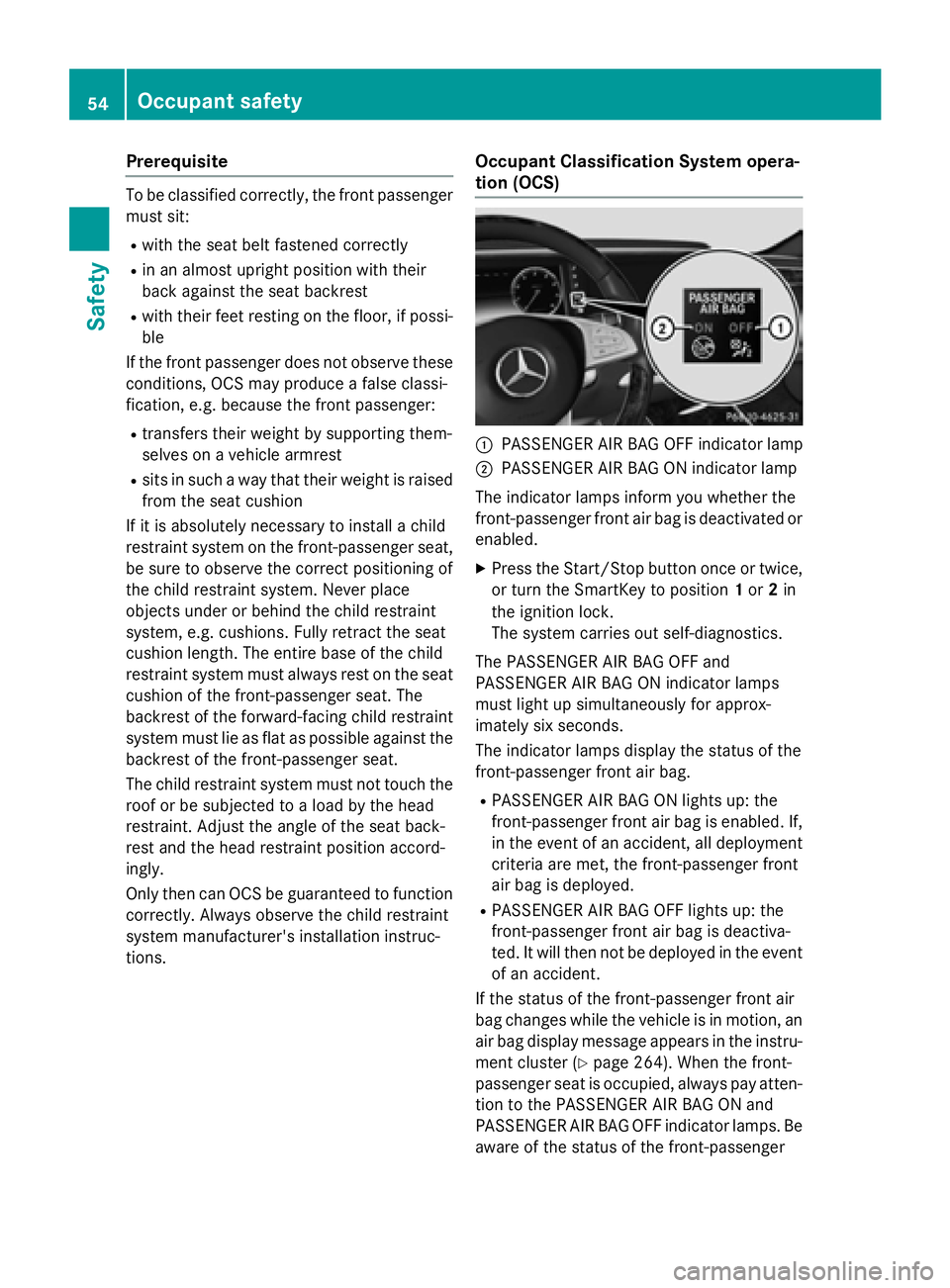
Occupant Classification System opera-
tion (OCS)
:PASSENGER AIR BAG OFF indicator lamp
;PASSENGER AIR BAG ON indicator lamp
The indicator lamps inform you whether the
front-passenger front air bag is deactivated or
enabled.
XPress the Start/Stop button once or twice,
or turn the SmartKey to position 1or 2in
the ignition lock.
The system carries out self-diagnostics.
The PASSENGER AIR BAG OFF and
PASSENGER AIR BAG ON indicator lamps
must light up simultaneously for approx-
imately six seconds.
The indicator lamps display the status of the
front-passenger front air bag.
RPASSENGER AIR BAG ON lights up: the
front-passenger front air bag is enabled. If,
in the event of an accident, all deployment
criteria are met, the front-passenger front
air bag is deployed.
RPASSENGER AIR BAG OFF lights up: the
front-passenger front air bag is deactiva-
ted. It will then not be deployed in the event
of an accident.
If the status of the front-passenger front air
bag changes while the vehicle is in motion, an
air bag display message appears in the instru-
ment cluster (
Ypage 264). When the front-
passenger seat is occupied, always pay atten-
tion to the PASSENGER AIR BAG ON and
PASSENGER AIR BAG OFF indicator lamps. Be
aware of the status of the front-passenger
54Occupant safety
Safety
Page 59 of 410
When the front-passenger seat is occupied,
always ensure that:
Rthe classification of the person in the front-passenger seat is correct and the front-
passenger front air bag is enabled or disa-
bled in accordance with the person in the
front-passenger seat
Rthe person is seated properly with a cor-
rectly fastened seatbelt
Rthe front-passenger seat has been moved
back as far back as possible
If the PASSENGER AIR BAG OFF indicator
lamp remains lit when it should not, the front-
passenger seat may not be used. Do not
install a child restraint system on the front-
passenger seat. Have the Occupant Classifi-
cation System (OCS) checked and repaired
immediately at a qualified specialist work-
shop.
GWARNING
Objects between the seat surface and the
child restraint system could affect OCS oper- ation. This could result in the front-passenger
air bag not functioning as intended during an
accident. This poses an increased risk of
injury or even fatal injury.
Do not place any objects between the seat
surface and the child restraint system. The
entire base of the child restraint system must
always rest on the seat cushion of the front-
passenger seat. The backrest of the forward-
facing child restraint system must, as far as
possible, be resting on the backrest of the
front-passenger seat. Always comply with the
child restraint system manufacturer's instal-
lation instructions.
After the system self-test, the PASSENGER
AIR BAG OFF or PASSENGER AIR BAG ON
indicator lamp display the status of the front-
passenger front air bag (
Ypage 54).
For more information about the OCS, see
"Problems with the Occupant Classification
System" (
Ypage 58).
Occupant safety57
Safety
Z
Page 70 of 410
The driving safety systems described only
work as effectively as possible when there is
adequate contact between the tires and the
road surface. Please pay special attention to
the notes on tires, recommended minimum
tire tread depths, etc. (
Ypage 362).
In wintry driving conditions, always use winter
tires (M+S tires) and if necessary, snow
chains. Only in this way will the driving safety systems described in this section work as
effectively as possible.
ABS (Anti-lock Braking System)
General information
ABS regulates brake pressure in such a way
that the wheels do not lock when you brake.
This allows you to continue steering the vehi-
cle when braking.
The ! ABS warning lamp in the instrument
cluster lights up when the ignition is switched
on. It goes out when the engine is running.
ABS works from a speed of about 5 mph
(8 km/h), regardless of road-surface condi-
tions. ABS works on slippery surfaces, even
when you only brake gently.
Important safety notes
iObserve the "Important safety notes" sec-
tion (
Ypage 67).
GWARNING
If ABS is faulty, the wheels could lock when
braking. The steerability and braking charac-
teristics may be severely impaired. Addition-
ally, further driving safety systems are deac-
tivated. There is an increased danger of skid-
ding and accidents.
Drive on carefully. Have ABS checked imme-
diately at a qualified specialist workshop.
When ABS is malfunctioning, other systems,
including driving safety systems, will also
become inoperative. Observe the information on the ABS warning lamp (
Ypage 288) and display messages which may be shown in the
instrument cluster (
Ypage 252).
Braking
XIf ABS intervenes:
continue to depress the
brake pedal vigorously until the braking sit-
uation is over.
XTo make a full brake application:
depress the brake pedal with full force.
If ABS intervenes when braking, you will feel a
pulsing in the brake pedal.
The pulsating brake pedal can be an indica-
tion of hazardous road conditions, and func-
tions as a reminder to take extra care while
driving.
BAS (Brake Assist System)
General information
BAS operates in emergency braking situa-
tions. If you depress the brake pedal quickly,
BAS automatically boosts the braking force,
thus shortening the stopping distance.
Important safety notes
iObserve the "Important safety notes" sec-
tion (
Ypage 67).
GWARNING
If BAS is malfunctioning, the braking distance
in an emergency braking situation is
increased. There is a risk of an accident.
In an emergency braking situation, depress
the brake pedal with full force. ABS prevents
the wheels from locking.
Braking
XKeep the brake pedal firmly depressed until
the emergency braking situation is over.
ABS prevents the wheels from locking.
The brakes will function as usual once you
release the brake pedal. BAS is deactivated.
68Driving safety systems
Safety
Page 73 of 410
do not react to the visual and audible collision
warning, autonomous braking can be initiated
in critical situations. If you apply the brake
yourself in a critical situation, the COLLISION
PREVENTION ASSIST PLUS adaptive Brake
Assist assists you.
Important safety notes
In particular, the detection of obstacles can
be impaired if:
Rthere is dirt on the sensors or anything elsecovering the sensors
Rthere is snow or heavy rain
Rthere is interference by other radar sources
Rthere are strong radar reflections, for
example in parking garages
Ra narrow vehicle traveling in front, e.g. a
motorbike
Ra vehicle traveling in front on a different line
Rnew vehicles or after a service on the COL-LISION PREVENTION ASSIST PLUS system
Observe the notes in the section on break-
ing-in (
Ypage 150).
Following damage to the front end of the vehi-
cle, have the configuration and operation of
the radar sensor checked at a qualified spe-
cialist workshop. This also applies to colli-
sions at low speeds where there is no visible
damage to the front of the vehicle.
Distance warning function
General information
The distance warning function can help you to
minimize the risk of a front-end collision with
a vehicle ahead or reduce the effects of such a collision. If the distance warning function
detects that there is a risk of a collision, you
will be warned visually and acoustically.
Important safety notes
iObserve the "Important safety notes" sec-
tion for driving safety systems (
Ypage 67).
GWARNING
The distance warning function does not react:
Rto people or animals
Rto oncoming vehicles
Rto crossing traffic
Rwhen cornering
Thus, the distance warning function cannot
provide a warning in all critical situations.
There is a risk of an accident.
Always pay careful attention to the traffic sit-
uation and be ready to brake.
GWARNING
The distance warning function cannot always
clearly identify objects and complex traffic
situations.
In such cases, the distance warning function
may:
Rgive an unnecessary warning
Rnot give a warning
There is a risk of an accident.
Always pay careful attention to the traffic sit-
uation and do not rely solely on the distance
warning function.
Function
XTo activate/deactivate: activate or deac-
tivate the distance warning function in the
on-board computer (
Ypage 245).
If the distance warning function is not activa-
ted, the æsymbol appears in the assis-
tance graphics display.
Starting at a speed of around 4 mph (7 km/h),
the distance warning function warns you if
you rapidly approach a vehicle in front. An
intermittent warning tone will then sound,
and the ·distance warning lamp will light
up in the instrument cluster.
XBrake immediately in order to increase the distance from the vehicle in front.
or
XTake evasive action, provided it is safe to do
so.
Driving safety systems71
Safety
Z
Page 74 of 410
Due to the nature of the system, particularly
complicated but non-critical driving condi-
tions may also cause the system to display a
warning.
With the help of the radar sensor system, thedistance warning function can detect obsta-
cles that are in the path of your vehicle for an
extended period of time.
Up to a speed of around 44 mph (70 km/h),
the distance warning function can also react
to stationary obstacles, such as stopped or
parked vehicles.
Autonomous braking function
If the driver does not react to the distance
warning signal in a critical situation, COLLI-
SION PREVENTION ASSIST PLUS can assist
with the autonomous braking function.
The autonomous braking function:
Rgives the driver more time to react to criti-
cal driving situations
Rcan help the driver to avoid an accident or
Rreduces the effects of an accident
The autonomous braking function is available in the following speed ranges:
Rfrom 4 mph (7 km/h) to approx. 65 mph
(105 km/h) for moving objects
Rfrom 4 mph (7 km/h) to approx. 31 mph
(50 km/h) for stationary objects
If the autonomous braking function requires a
particularly high braking force, preventative
passenger protection measures (PRE-SAFE
®)
are activated simultaneously.
Adaptive Brake Assist
iObserve the "Important safety notes" sec-
tion (
Ypage 67).
Adaptive Brake Assist provides braking assis-
tance in hazardous situations at speeds
above 4 mph (7 km/h). It uses radar sensor
technology to assess the traffic situation.
GWARNING
Adaptive Brake Assist cannot always clearly
identify objects and complex traffic situa-
tions.
In such cases, Adaptive Brake Assist can:
Rintervene unnecessarily
Rnot intervene
There is a risk of an accident.
Always pay careful attention to the traffic sit- uation and be ready to brake. Terminate the
intervention in a non-critical driving situation.
GWARNING
Adaptive Brake Assist does not react:
Rto people or animals
Rto oncoming vehicles
Rto crossing traffic
Rwhen cornering
As a result, the Adaptive Brake Assist may not
intervene in all critical conditions. There is a
risk of an accident.
Always pay careful attention to the traffic sit- uation and be ready to brake.
Due to the nature of the system, particularly
complicated but non-critical driving condi-
tions may also cause Brake Assist to inter-
vene.
If adaptive Brake Assist is not available due to
a malfunction in the radar sensor system, the
brake system remains available with full
brake boosting effect and BAS.
With the help of adaptive Brake Assist, the
distance warning signal can detect obstacles
that are in the path of your vehicle for an
extended period of time.
If adaptive Brake Assist detects a risk of col-
lision with the vehicle in front, it calculates
the braking force necessary to avoid a colli-
sion. If you apply the brakes forcefully, adap-
tive Brake Assist will automatically increase
the braking force to a level suitable for the
traffic conditions.
72Driving safet ysystem s
Safety
Page 75 of 410
XKeep the brake pedal depressed until the
emergency braking situation is over.
ABS prevents the wheels from locking.
The brakes will work normally again if:
Ryou release the brake pedal.
Rthere is no longer any danger of a collision.
Rno obstacle is detected in front of your
vehicle.
Adaptive Brake Assist is then deactivated.
If adaptive Brake Assist demands particularly
high braking force, preventative passenger
protection measures (PRE-SAFE
®) are activa-
ted simultaneously.
Up to a speed of approximately 155 mph
(250 km/h), adaptive Brake Assist is capable
of reacting to moving objects that have
already been detected as such at least once
over the period of observation.
Up to a speed of approximately 44 mph
(70 km/h), adaptive Brake Assist reacts to
stationary obstacles.
ESP®(Electronic Stability Program)
General notes
iObserve the "Important safety notes" sec-
tion (
Ypage 67).
ESP
®monitors driving stability and traction,
i.e. power transmission between the tires and
the road surface.
If ESP
®detects that the vehicle is deviating
from the direction desired by the driver, one
or more wheels are braked to stabilize the
vehicle. The engine output is also modified to
keep the vehicle on the desired course within
physical limits. ESP
®assists the driver when
pulling away on wet or slippery roads. ESP®
can also stabilize the vehicle during braking.
ETS/4ETS (Electronic Traction System)
iObserve the "Important safety notes" sec-
tion (
Ypage 67). ETS traction control is part of ESP
®. On vehi-
cles with 4MATIC, 4ETS is part of ESP®.
Traction control brakes the drive wheels indi-
vidually if they spin. This enables you to pull
away and accelerate on slippery surfaces, for
example if the road surface is slippery on one
side. In addition, more drive torque is trans-
ferred to the wheel or wheels with traction.
Traction control remains active, even if you
deactivate ESP
®.
Important safety notes
GWARNING
If ESP
®is malfunctioning, ESP®is unable to
stabilize the vehicle. Additionally, further driv-
ing safety systems are deactivated. This
increases the risk of skidding and an accident.
Drive on carefully. Have ESP
®checked at a
qualified specialist workshop.
Vehicles without 4MATIC: observe the notes
on ESP®(Ypage 356) when towing the vehi-
cle with a raised rear axle.
ESP
®is only deactivated if the åwarning
lamp is lit continuously.
If the ÷ warning lamp lights up continu-
ously, ESP
®is not available due to a malfunc-
tion.
Observe the information on warning lamps
(
Ypage 290) and display messages which
may be shown in the instrument cluster
(
Ypage 252).
Only use wheels with the recommended tire
sizes. Only then will ESP
®function properly.
Characteristics of ESP®
General information
If the ÷ ESP warning lamp goes out before
beginning the journey, ESP
®is automatically
active.
If ESP
®intervenes, the ÷ESP®warning
lamp flashes in the instrument cluster.
Driving safety systems73
Safety
Z