display MERCEDES-BENZ S-COUPE 2016 Service Manual
[x] Cancel search | Manufacturer: MERCEDES-BENZ, Model Year: 2016, Model line: S-COUPE, Model: MERCEDES-BENZ S-COUPE 2016Pages: 410, PDF Size: 8.62 MB
Page 163 of 410
XReleaseth eelectric parkin gbrake.
XSwitc hoff th eignition and leav eth eSmart -
Key in th eignition lock.
Engaging dr iveposition D
XIf thetransmission is in position Ror N:
push th eDIRECT SELECT lever down past
th efirst poin tof resistance.
XIf th etransmission is in position P:depress
th ebrak epedal and push th eDIRECT
SELECT lever down past th efirst poin tof
resistance.
Transmission position displa y
All vehicles (excep tMercedes-AMG
vehicles)
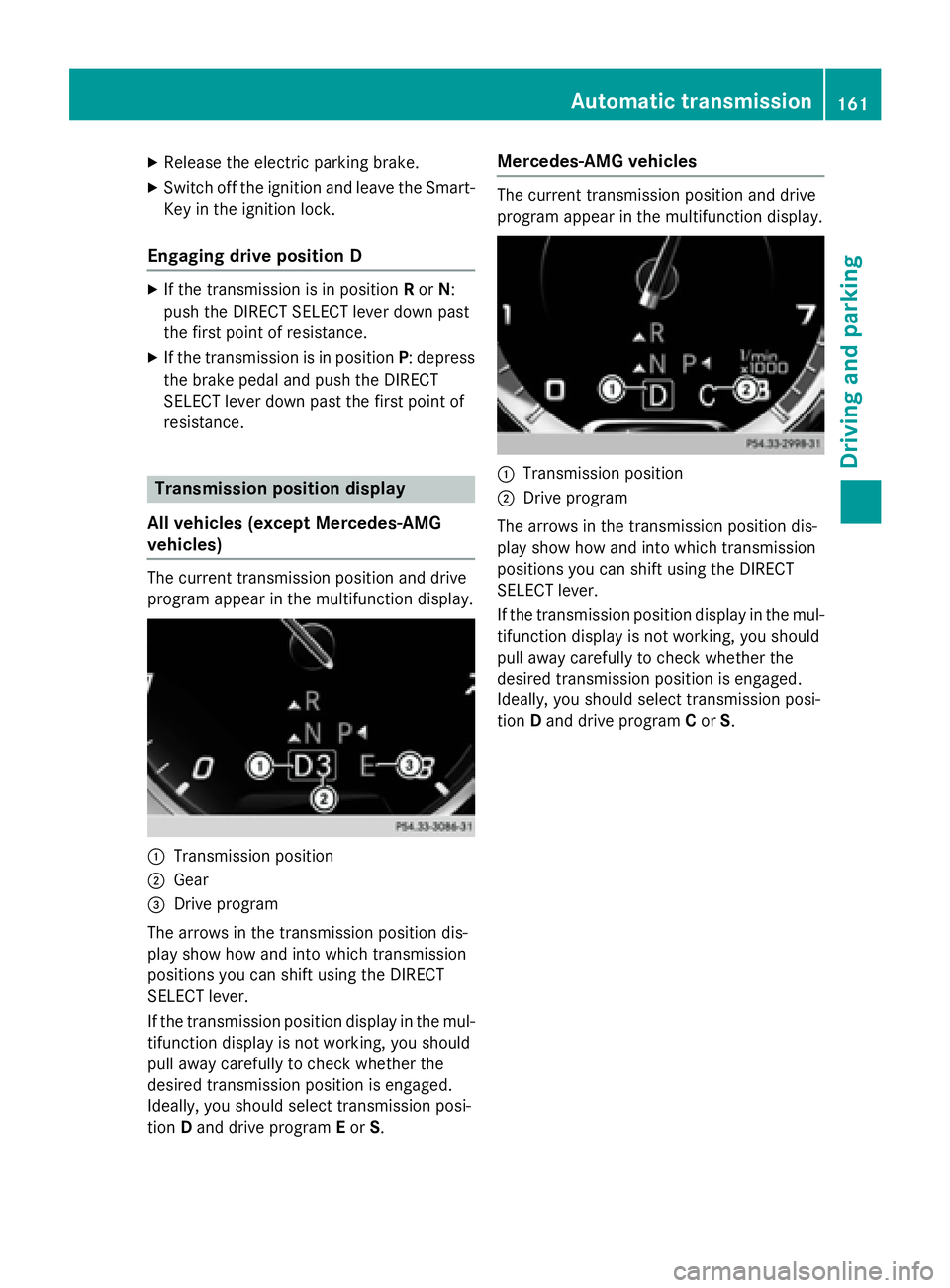
The curren ttransmission position and drive
progra mappear in th emultifunction display.
:Transmission position
;Gear
=Drive progra m
The arrows in th etransmission position dis-
play sho whow and into whic htransmission
position syou can shift usin gth eDIRECT
SELECT lever.
If th etransmission position display in th emul-
tifunction display is no tworking ,you should
pull away carefully to chec kwhether th e
desire dtransmission position is engaged.
Ideally, you should select transmission posi-
tion Dand drive progra mEor S.
Mercedes-AMG vehicles
The currenttransmission position and drive
progra mappear in th emultifunction display.
:Transmission position
;Drive progra m
The arrows in th etransmission position dis-
play sho whow and into whic htransmission
position syou can shift usin gth eDIRECT
SELECT lever.
If th etransmission position display in th emul-
tifunction display is no tworking ,you should
pull away carefully to chec kwhether th e
desire dtransmission position is engaged.
Ideally, you should select transmission posi-
tion Dand drive progra mCor S.
Automatic transmission16 1
Driving an d parking
Z
Page 165 of 410
Program selector button
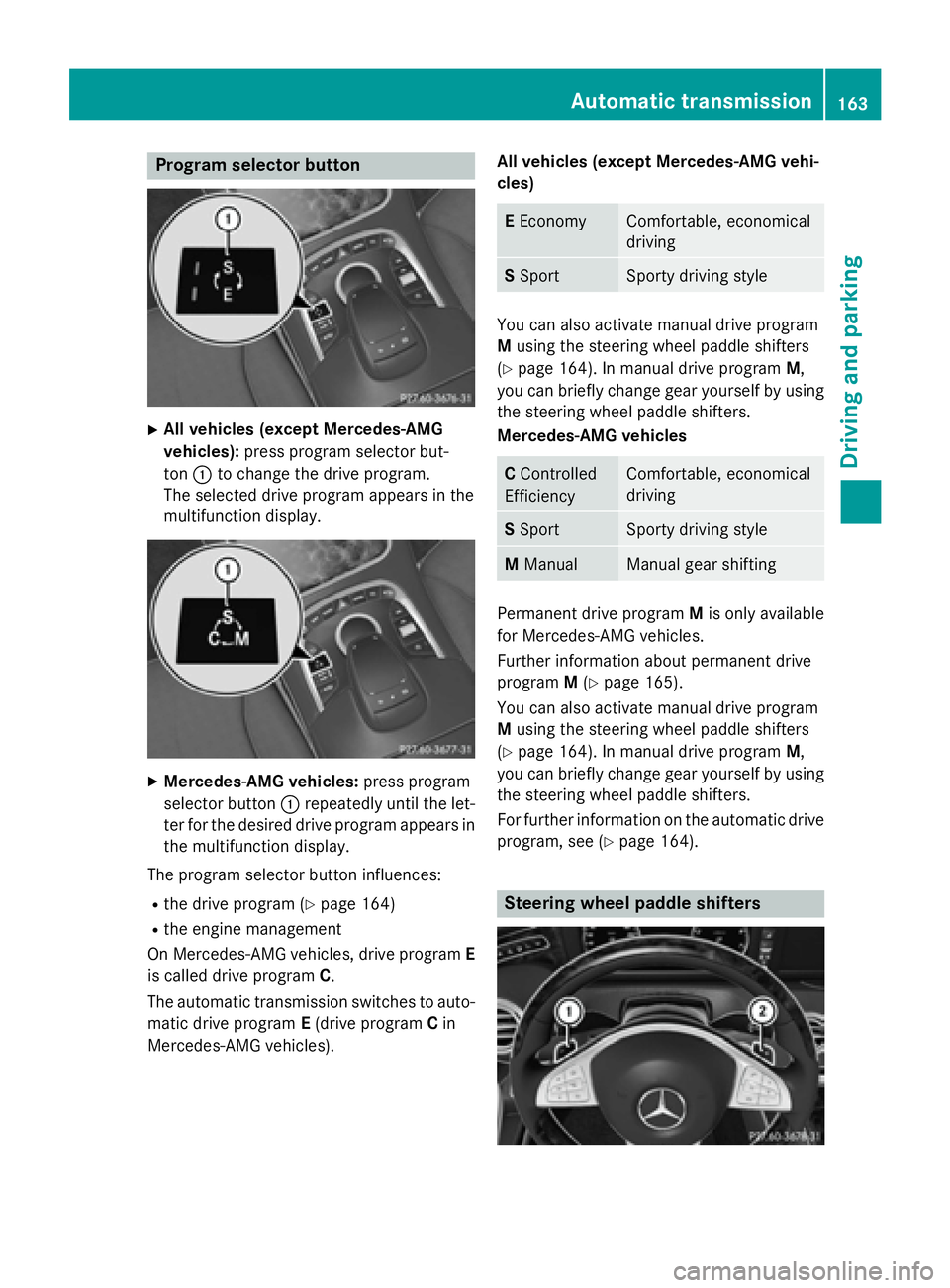
XAll vehicles (except Mercedes-AMG
vehicles):press program selector but-
ton :to change the drive program.
The selected drive program appears in the
multifunction display.
XMercedes-AMG vehicles: press program
selector button :repeatedly until the let-
ter for the desired drive program appears in
the multifunction display.
The program selector button influences:
Rthe drive program (Ypage 164)
Rthe engine management
On Mercedes-AMG vehicles, drive program E
is called drive program C.
The automatic transmission switches to auto-
matic drive program E(drive program Cin
Mercedes-AMG vehicles). All vehicles (except Mercedes-AMG vehi-
cles)
E
EconomyComfortable, economical
driving
S SportSporty driving style
You can also activate manual drive program
M using the steering wheel paddle shifters
(
Ypage 164). In manual drive program M,
you can briefly change gear yourself by using the steering wheel paddle shifters.
Mercedes-AMG vehicles
C Controlled
EfficiencyComfortable, economical
driving
S SportSporty driving style
M ManualManual gear shifting
Permanent drive program Mis only available
for Mercedes-AMG vehicles.
Further information about permanent drive
program M(
Ypage 165).
You can also activate manual drive program
M using the steering wheel paddle shifters
(
Ypage 164). In manual drive program M,
you can briefly change gear yourself by using
the steering wheel paddle shifters.
For further information on the automatic drive
program, see (
Ypage 164).
Steering wheel paddle shifters
Automatic transmission163
Driving and parking
Z
Page 166 of 410
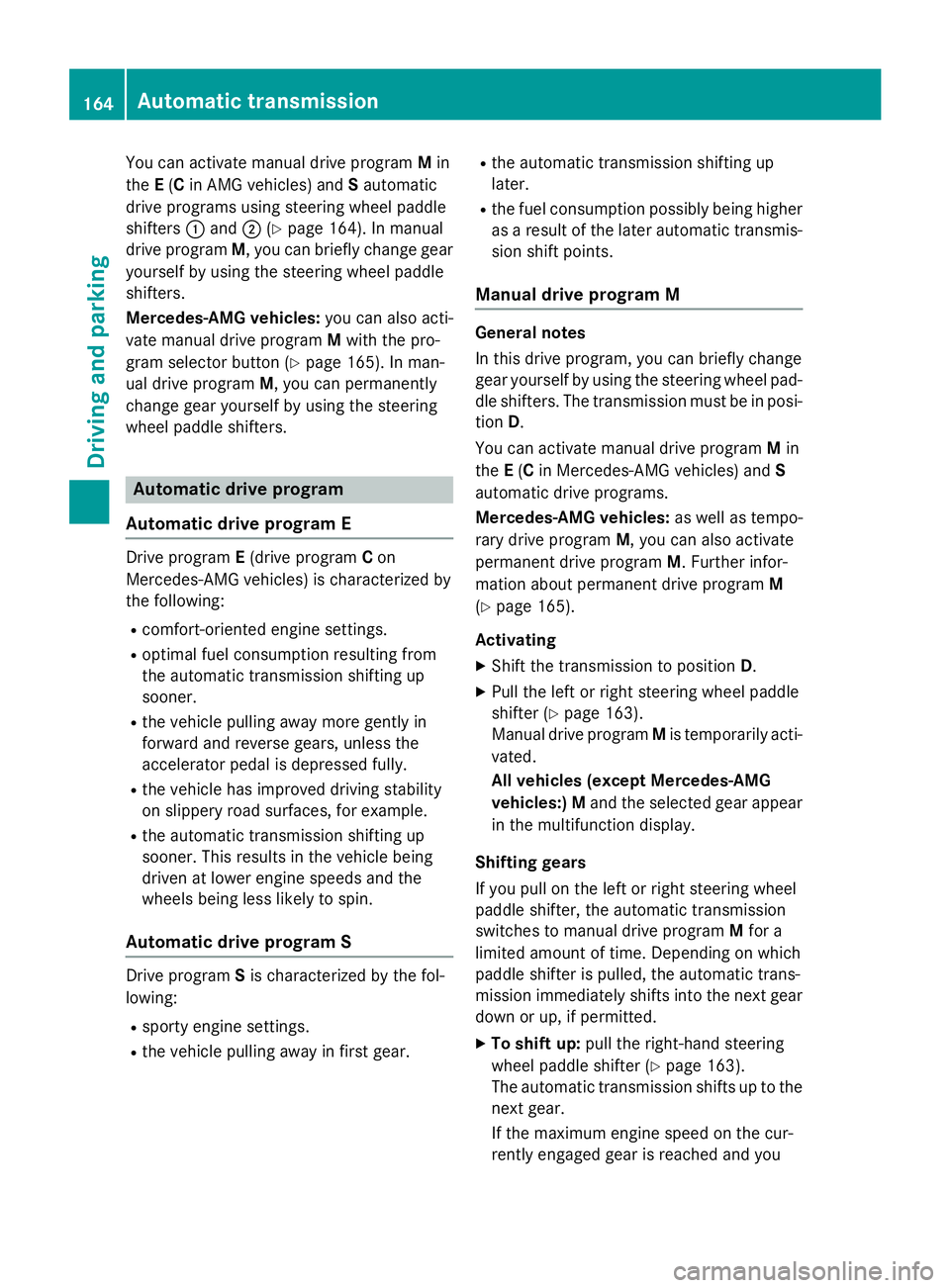
You can activate manual drive programMin
the E(C in AMG vehicles) and Sautomatic
drive programs using steering wheel paddle
shifters :and ;(
Ypage 164). In manual
drive program M, you can briefly change gear
yourself by using the steering wheel paddle
shifters.
Mercedes-AMG vehicles: you can also acti-
vate manual drive program Mwith the pro-
gram selector button (
Ypage 165). In man-
ual drive program M, you can permanently
change gear yourself by using the steering
wheel paddle shifters.
Automatic drive program
Automatic drive program E
Drive program E(drive program Con
Mercedes-AMG vehicles) is characterized by
the following:
Rcomfort-oriented engine settings.
Roptimal fuel consumption resulting from
the automatic transmission shifting up
sooner.
Rthe vehicle pulling away more gently in
forward and reverse gears, unless the
accelerator pedal is depressed fully.
Rthe vehicle has improved driving stability
on slippery road surfaces, for example.
Rthe automatic transmission shifting up
sooner. This results in the vehicle being
driven at lower engine speeds and the
wheels being less likely to spin.
Automatic drive program S
Drive program Sis characterized by the fol-
lowing:
Rsporty engine settings.
Rthe vehicle pulling away in first gear.
Rthe automatic transmission shifting up
later.
Rthe fuel consumption possibly being higher
as a result of the later automatic transmis-
sion shift points.
Manual drive program M
General notes
In this drive program, you can briefly change
gear yourself by using the steering wheel pad-
dle shifters. The transmission must be in posi-
tion D.
You can activate manual drive program Min
the E(C in Mercedes-AMG vehicles) and S
automatic drive programs.
Mercedes-AMG vehicles: as well as tempo-
rary drive program M, you can also activate
permanent drive program M. Further infor-
mation about permanent drive program M
(
Ypage 165).
Activating
XShift the transmission to position D.
XPull the left or right steering wheel paddle
shifter (
Ypage 163).
Manual drive program Mis temporarily acti-
vated.
All vehicles (except Mercedes-AMG
vehicles:)Mand the selected gear appear
in the multifunction display.
Shifting gears
If you pull on the left or right steering wheel
paddle shifter, the automatic transmission
switches to manual drive program Mfor a
limited amount of time. Depending on which
paddle shifter is pulled, the automatic trans-
mission immediately shifts into the next gear
down or up, if permitted.
XTo shift up: pull the right-hand steering
wheel paddle shifter (
Ypage 163).
The automatic transmission shifts up to the
next gear.
If the maximum engine speed on the cur-
rently engaged gear is reached and you
164Automatic transmission
Driving and parking
Page 167 of 410
continue to accelerate, the automatic
transmission automatically shifts up in
order to prevent engine damage.
Mercedes-AMG vehicles:the automatic
transmission will not shift up to the next
gear when the engine speed is very low.
XTo shift down: pull on the left-hand steer-
ing wheel paddle shifter (
Ypage 163).
The automatic transmission shifts down to the next gear.
If the engine exceeds the maximum engine
speed when shifting down, the automatic
transmission protects against engine dam- age by not shifting down.
Automatic down shifting occurs when
coasting.
Shift recommendation
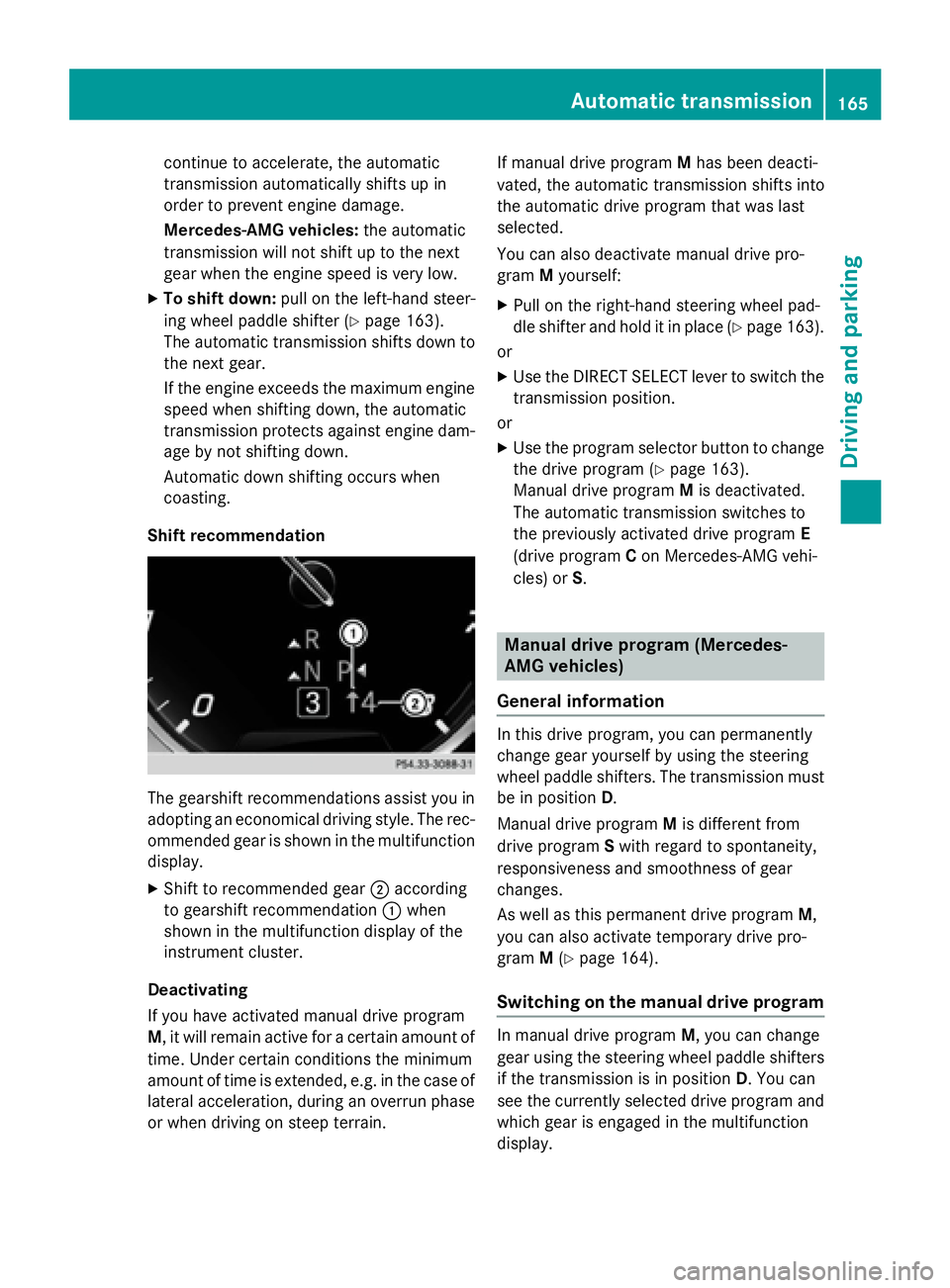
The gearshift recommendations assist you in
adopting an economical driving style. The rec-
ommended gear is shown in the multifunction
display.
XShift to recommended gear ;according
to gearshift recommendation :when
shown in the multifunction display of the
instrument cluster.
Deactivating
If you have activated manual drive program
M , it will remain active for a certain amount of
time. Under certain conditions the minimum
amount of time is extended, e.g. in the case of
lateral acceleration, during an overrun phase
or when driving on steep terrain. If manual drive program
Mhas been deacti-
vated, the automatic transmission shifts into
the automatic drive program that was last
selected.
You can also deactivate manual drive pro-
gram Myourself:
XPull on the right-hand steering wheel pad-
dle shifter and hold it in place (
Ypage 163).
or
XUse the DIRECT SELECT lever to switch the
transmission position.
or
XUse the program selector button to change
the drive program (
Ypage 163).
Manual drive program Mis deactivated.
The automatic transmission switches to
the previously activated drive program E
(drive program Con Mercedes-AMG vehi-
cles) or S.
Manual drive program (Mercedes-
AMG vehicles)
General information
In this drive program, you can permanently
change gear yourself by using the steering
wheel paddle shifters. The transmission must be in position D.
Manual drive program Mis different from
drive program Swith regard to spontaneity,
responsiveness and smoothness of gear
changes.
As well as this permanent drive program M,
you can also activate temporary drive pro-
gram M(
Ypage 164).
Switching on the manual drive program
In manual drive program M, you can change
gear using the steering wheel paddle shifters
if the transmission is in position D. You can
see the currently selected drive program and
which gear is engaged in the multifunction
display.
Automatic transmission165
Driving and parking
Z
Page 168 of 410
XPress the program selector button
(
Ypage 163) repeatedly untilMappears in
the multifunction display.
Upshifting
!In manual drive program M, the automatic
transmission does not shift up automati-
cally even when the engine limiting speed
for the current gear is reached. When the
engine limiting speed is reached, the fuel
supply is cut to prevent the engine from
overrevving. Always make sure that the
engine speed does not reach the red area of
the tachometer. There is otherwise a risk of
engine damage.
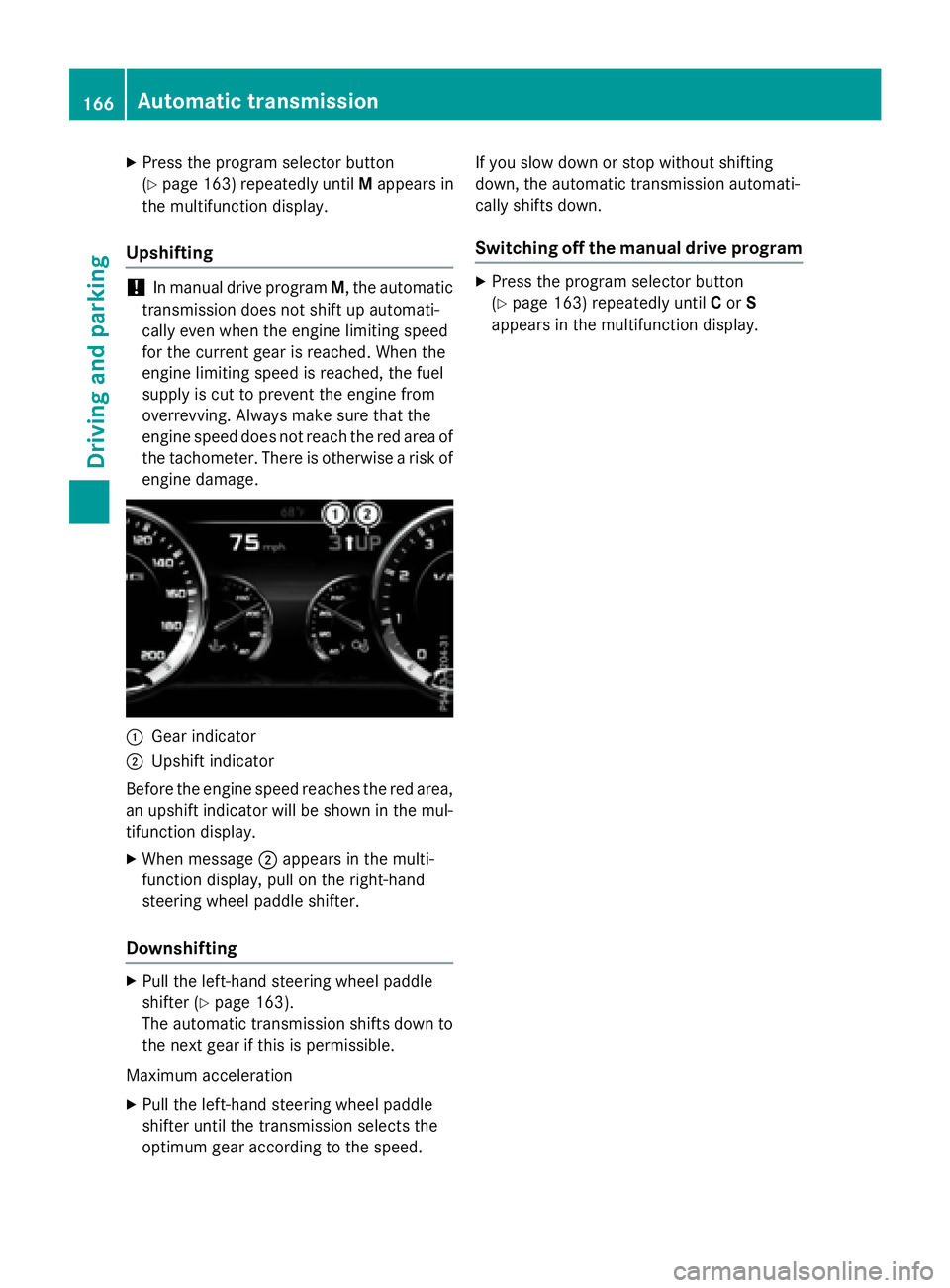
:Gear indicator
;Upshift indicator
Before the engine speed reaches the red area,
an upshift indicator will be shown in the mul-
tifunction display.
XWhen message ;appears in the multi-
function display, pull on the right-hand
steering wheel paddle shifter.
Downshifting
XPull the left-hand steering wheel paddle
shifter (
Ypage 163).
The automatic transmission shifts down to
the next gear if this is permissible.
Maximum acceleration
XPull the left-hand steering wheel paddle
shifter until the transmission selects the
optimum gear according to the speed. If you slow down or stop without shifting
down, the automatic transmission automati-
cally shifts down.
Switching off the manual drive program
XPress the program selector button
(
Ypage 163) repeatedly until
Cor S
appears in the multifunction display.
166Automatic transmission
Driving and parking
Page 170 of 410
If you or others come into contact with fuel,
observe the following:
RWash away fuel from skin immediately
using soap and water.
RIf fuel comes into contact with your eyes,
immediately rinse them thoroughly with
clean water. Seek medical assistance with-
out delay.
RIf fuel is swallowed, seek medical assis-
tance without delay. Do not induce vomit-
ing.
RImmediately change out of clothing which
has come into contact with fuel.
GWARNING
Electrostatic buildup can create sparks and
ignite fuel vapors. There is a risk of fire and
explosion.
Always touch the vehicle body before opening
the fuel filler flap or touching the fuel pump
nozzle. Any existing electrostatic buildup is
thereby discharged.
Do not get into the vehicle again during the
refueling process. Otherwise, electrostatic
charge could build up again.
!Do not use diesel to refuel vehicles with a
gasoline engine. Do not switch on the igni-
tion if you accidentally refuel with the
wrong fuel. Otherwise, the fuel will enter
the fuel system. Even small amounts of the wrong fuel could result in damage to the
fuel system and the engine. Notify a quali-
fied specialist workshop and have the fuel
tank and fuel lines drained completely.
!Overfilling the fuel tank could damage the
fuel system.
!Take care not to spill any fuel on painted
surfaces. You could otherwise damage the
paintwork.
!Use a filter when refueling from a fuel can.
Otherwise, the fuel lines and/or injection
system could be blocked by particles from
the fuel can. If you overfill the fuel tank, fuel could spray
out when the fuel pump nozzle is removed.
For further information on fuel and fuel quality
(
Ypage 401).
Refueling
General information
Pay attention to the important safety notes
(
Ypage 167).
If you unlock/lock the vehicle from the out-
side, the fuel filler flap also unlocks/locks.
The position of the fuel filler cap is displayed
8 in the instrument cluster. The arrow
next to the filling pump indicates the side of
the vehicle.
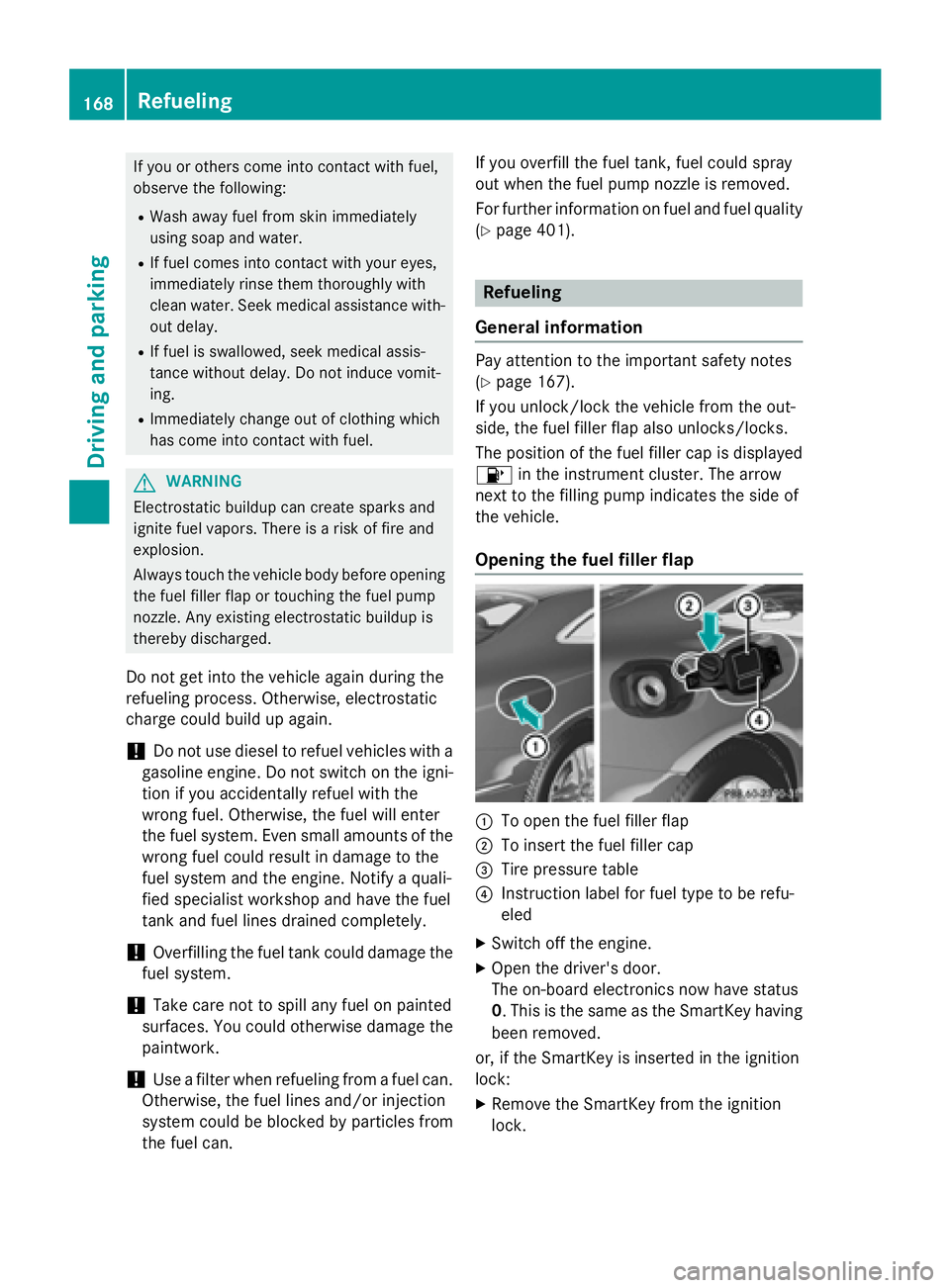
Opening the fuel filler flap
:To open the fuel filler flap
;To insert the fuel filler cap
=Tire pressure table
?Instruction label for fuel type to be refu-
eled
XSwitch off the engine.
XOpen the driver's door.
The on-board electronics now have status
0. This is the same as the SmartKey having
been removed.
or, if the SmartKey is inserted in the ignition
lock:
XRemove the SmartKey from the ignition
lock.
168Refueling
Driving and parking
Page 171 of 410
XPress the fuel filler flap in the direction of
arrow:.
The fuel filler flap swings up.
XTurn the fuel filler cap counterclockwise
and remove it.
XInsert the fuel filler cap into the holder on
the inside of fuel filler flap ;.
XCompletely insert the filler neck of the fuel
pump nozzle into the tank, hook in place
and refuel.
XOnly fill the tank until the pump nozzle
switches off.
iDo not add any more fuel after the pump
stops filling for the first time. Otherwise,
fuel may leak out.
Closing the fuel filler flap
XReplace the cap on the filler neck and turn
clockwise until it engages audibly.
XClose the fuel filler flap.
If you drive at speeds above 2 km/ hwith the
fuel filler flap open, the Fuel
fillerflap
openmessage is shown in the multifunction
display.
iClose the fuel filler flap before locking the
vehicle.
iIf you are driving with the fuel filler cap
open, the 8reserve fuel warning lamp
flashes. A message appears in the multi-
function display (
Ypage 271).
In addition, the ;Check Engine warning
lamp may light up (
Ypage 293).
For further information on warning and indi-
cator lamps in the instrument cluster, see
(
Ypage 293).
Refueling169
Driving and parking
Z
Page 176 of 410

If you leave the vehicle parked for longer than
six weeks, the vehicle may suffer damage as a
result of lack of use.
XVisit a qualified specialist workshop and
seek advice.
iYou can obtain information about trickle
chargers from a qualified specialist work-
shop.
Driving tips
General driving tips
Important safety notes
GWARNING
If you switch off the ignition while driving,
safety-relevant functions are only available
with limitations, or not at all. This could affect, for example, the power steering and the brake
boosting effect. You will require considerably
more effort to steer and brake. There is a risk
of an accident.
Do not switch off the ignition while driving.
GWARNING
If you operate mobile communication equip-
ment while driving, you will be distracted from traffic conditions. You could also lose control
of the vehicle. There is a risk of an accident.
Only operate this equipment when the vehicle
is stationary.
Observe the legal requirements for the coun-
try in which you are driving. Some jurisdic-
tions prohibit the driver from using a mobile
phone while driving a vehicle.
If you make a call while driving, always use
hands-free mode. Only operate the telephone
when the traffic situation permits. If you are
unsure, pull over to a safe location and stop
before operating the telephone.
Bear in mind that at a speed of only 30 mph
(approximately 50 km/h), the vehicle covers
a distance of 44 ft (approximately 14 m) per
second.
Drive sensibly – save fuel
Observe the following tips to save fuel:
XThe tires should always be inflated to the
recommended tire pressure.
XRemove unnecessary loads.
XRemove roof racks when they are not nee-
ded.
XWarm up the engine at low engine speeds.
XAvoid frequent acceleration or braking.
XHave all maintenance work carried out as
indicated by the service intervals in the
Maintenance Booklet or by the service
interval display.
Fuel consumption also increases when driv-
ing in cold weather, in stop-start traffic and in
hilly terrain.
Drinking and driving
GWARNING
Drinking and driving and/or taking drugs and driving are very dangerous combinations.
Even a small amount of alcohol or drugs can
affect your reflexes, perceptions and judg-
ment.
The possibility of a serious or even fatal acci-
dent is greatly increased when you drink or
take drugs and drive.
Do not drink or take drugs and drive or allow
anyone to drive who has been drinking or tak-
ing drugs.
Emission control
GWARNING
Combustion engines emit poisonous exhaust
gases such as carbon monoxide. Inhaling
these exhaust gases leads to poisoning. There
is a risk of fatal injury. Therefore never leave
the engine running in enclosed spaces with-
out sufficient ventilation.
Certain engine systems are designed to keep
the level of poisonous components in exhaust
fumes within legal limits.
174Driving tips
Driving and parking
Page 177 of 410
These systems only work at peak efficiency if
they are serviced exactly in accordance with
the manufacturer's specifications. For this
reason, all work on the engine must be carried
out by qualified and authorized Mercedes-
Benz technicians.
The engine settings must not be changed
under any circumstances. Furthermore, all
specific service work must be carried out at
regular intervals and in accordance with the
Mercedes-Benz service requirements. Details
can be found in the Maintenance Booklet.
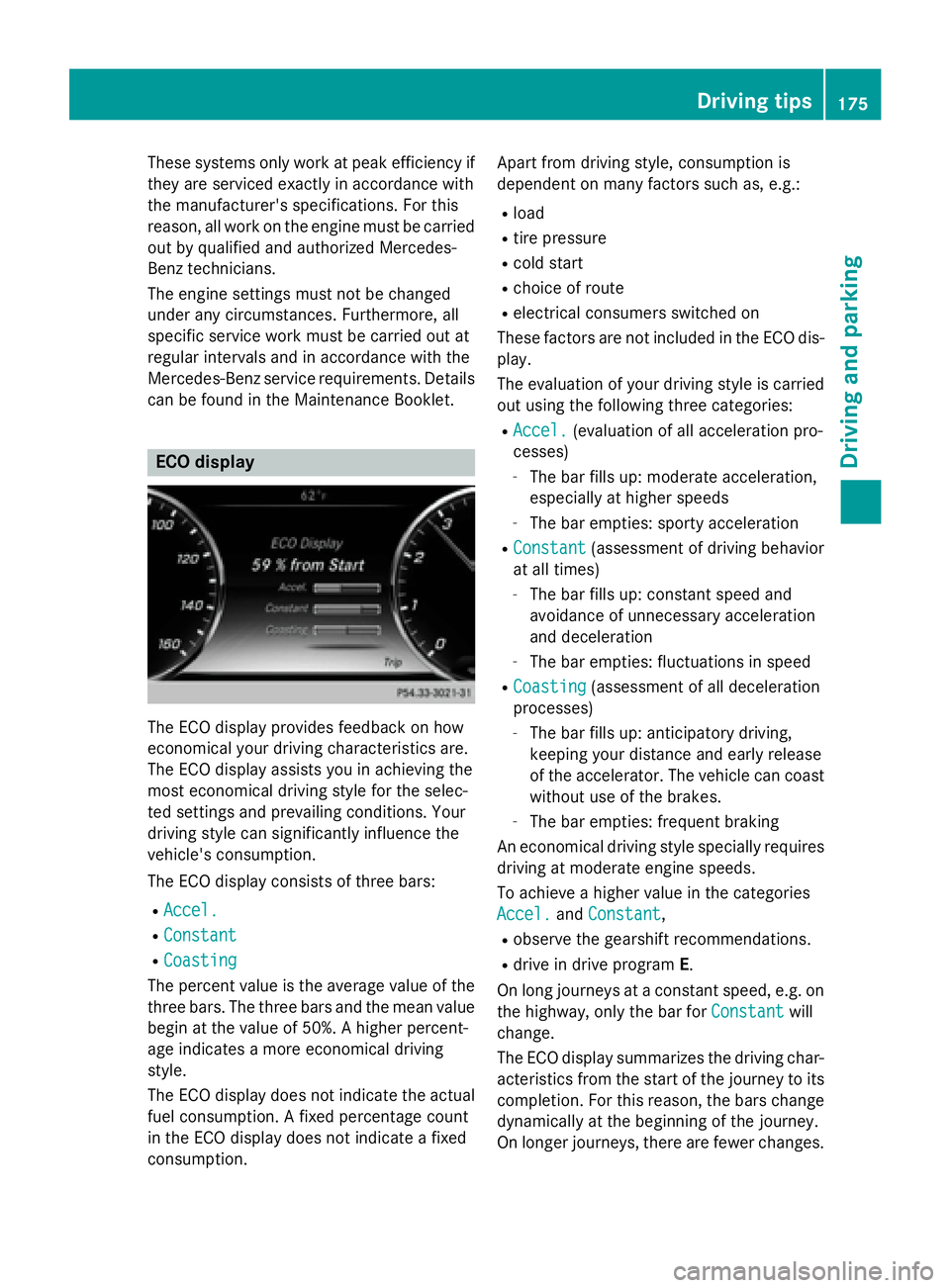
ECO display
The ECO display provides feedback on how
economical your driving characteristics are.
The ECO display assists you in achieving the
most economical driving style for the selec-
ted settings and prevailing conditions. Your
driving style can significantly influence the
vehicle's consumption.
The ECO display consists of three bars:
RAccel.
RConstant
RCoasting
The percent value is the average value of the
three bars. The three bars and the mean value
begin at the value of 50%. A higher percent-
age indicates a more economical driving
style.
The ECO display does not indicate the actual
fuel consumption. A fixed percentage count
in the ECO display does not indicate a fixed
consumption. Apart from driving style, consumption is
dependent on many factors such as, e.g.:
Rload
Rtire pressure
Rcold start
Rchoice of route
Relectrical consumers switched on
These factors are not included in the ECO dis-
play.
The evaluation of your driving style is carried
out using the following three categories:
RAccel.(evaluation of all acceleration pro-
cesses)
-The bar fills up: moderate acceleration,
especially at higher speeds
-The bar empties: sporty acceleration
RConstant(assessment of driving behavior
at all times)
-The bar fills up: constant speed and
avoidance of unnecessary acceleration
and deceleration
-The bar empties: fluctuations in speed
RCoasting(assessment of all deceleration
processes)
-The bar fills up: anticipatory driving,
keeping your distance and early release
of the accelerator. The vehicle can coast
without use of the brakes.
-The bar empties: frequent braking
An economical driving style specially requires driving at moderate engine speeds.
To achieve a higher value in the categories
Accel.
and Constant,
Robserve the gearshift recommendations.
Rdrive in drive program E.
On long journeys at a constant speed, e.g. on
the highway, only the bar for Constant
will
change.
The ECO display summarizes the driving char-
acteristics from the start of the journey to its
completion. For this reason, the bars change
dynamically at the beginning of the journey.
On longer journeys, there are fewer changes.
Driving tips175
Driving and parking
Z
Page 178 of 410
For more dynamic changes, carry out a man-
ual reset.
For further information on the ECO display,
see (
Ypage 236).
Braking
Important safety notes
GWARNING
If you shift down on a slippery road surface in an attempt to increase the engine's braking
effect, the drive wheels could lose their grip.
There is an increased danger of skidding and
accidents.
Do not shift down for additional engine brak-
ing on a slippery road surface.
Downhill gradients
!On long and steep gradients, you must
reduce the load on the brakes by shifting
early to a lower gear. This allows you to take
advantage of the engine braking effect and
helps avoid overheating and excessive
wear of the brakes.
When you take advantage of the engine
braking effect, a drive wheel may not turn
for some time, e.g. on a slippery road sur-
face. This could cause damage to the drive
train. This type of damage is not covered by
the Mercedes-Benz warranty.
Heavy and light loads
GWARNING
If you rest your foot on the brake pedal while
driving, the braking system can overheat. This increases the stopping distance and can even
cause the braking system to fail. There is a
risk of an accident.
Never use the brake pedal as a footrest. Never
depress the brake pedal and the accelerator
pedal at the same time.
!Depressing the brake pedal constantly
results in excessive and premature wear to
the brake pads.
If the brakes have been subjected to a heavy
load, do not stop the vehicle immediately.
Drive on for a short while. This allows the air-
flow to cool the brakes more quickly.
Wet roads
If you have driven for a long time in heavy rain
without braking, there may be a delayed reac-
tion from the brakes when braking for the first
time. This may also occur after the vehicle has
been washed or driven through deep water.
You have to depress the brake pedal more
firmly. Maintain a greater distance from the
vehicle in front.
After driving on a wet road or having the vehi-
cle washed, brake firmly while paying atten-
tion to the traffic conditions. This will warm up
the brake discs, thereby drying them more
quickly and protecting them against corro-
sion.
Limited braking performance on salt-
treated roads
If you drive on salted roads, a layer of salt
residue may form on the brake discs and
brake pads. This can result in a significantly
longer braking distance.
RIn order to prevent any salt build-up, apply
the brakes occasionally while paying atten-
tion to the traffic conditions.
RCarefully depress the brake pedal and the
beginning and end of a journey.
RMaintain a greater distance to the vehicle
ahead.
Servicing the brakes
!If the red brake warning lamp lights up in
the instrument cluster and you hear a warn-
ing tone while the engine is running, the
brake fluid level may be too low. Observe
176Driving tips
Driving and parking